DataWeave 2.0
Advanced Concepts - Recursion & Pattern Matching
Joshua Erney
● www.jerney.io (Blog)
● @jerney_io (Twitter)
● www.linkedin.com/in/jerney
Agenda
1. Introduction
2. Quick review of basics
3. Looping / Recursion
a. Tail Call Optimization
4. Pattern Matching
a. By predicate expressions
b. By data type
5. Combined Examples / Demos
a. Use Case 1 - applyToValues
b. Use Case 2 - applyToKeys
6. Questions
Who Am I? Why Should You Listen To Me?!
● Programming since ‘11 (not bragging)
○ Java, Python, JavaScript
● Working w/ MuleSoft products for about 3 years
● Saw no DataWeave experts at my company or in the community at the time, I LOVE learning
programming languages, so decided to focus efforts there
● Started learning DataWeave about the same time Functional Programming started making sense
to me
Disclaimer
I don’t work for MuleSoft, and I’ve never seen the source code for DataWeave. Because of this, I have no
way of knowing with 100% certainty how the language works; DataWeave is a black box to me.
Opinions are my own and do not necessarily reflect those of my employer.
A Quick Review of the Basics
● DataWeave is a domain-specific language created specifically to optimize data transformations
regardless of source and target formats
● Fully-fledged programming language
● Adheres to the core tenets of functional programming, i.e., it is a functional programming language
A Quick Review of the Basics (Cont.)
● Most transformations are done using `map`, `filter`, or `reduce`
○ `map` - transforms elements in an array
○ `filter` - removes elements in an array
○ `reduce` - general purpose tool for doing pretty much anything else with an array. Great for transforming
arrays into objects or scalar values like strings and numbers.
● Data structures in DataWeave are immutable (this restriction is essentially the crux of this talk)
● If you want a deep dive into the basics (highly recommended), you should check out the webinar I
did w/ Manik Magar: https://www.youtube.com/watch?v=r-jjcHPEP34
Iteration, Recursion
Why is iteration part of “Advanced Dataweave”?
● Conceptually, it isn’t, we just don’t need to think about it that much
● DataWeave’s immutable data structures present a barrier to using the iteration techniques
typically used in Java
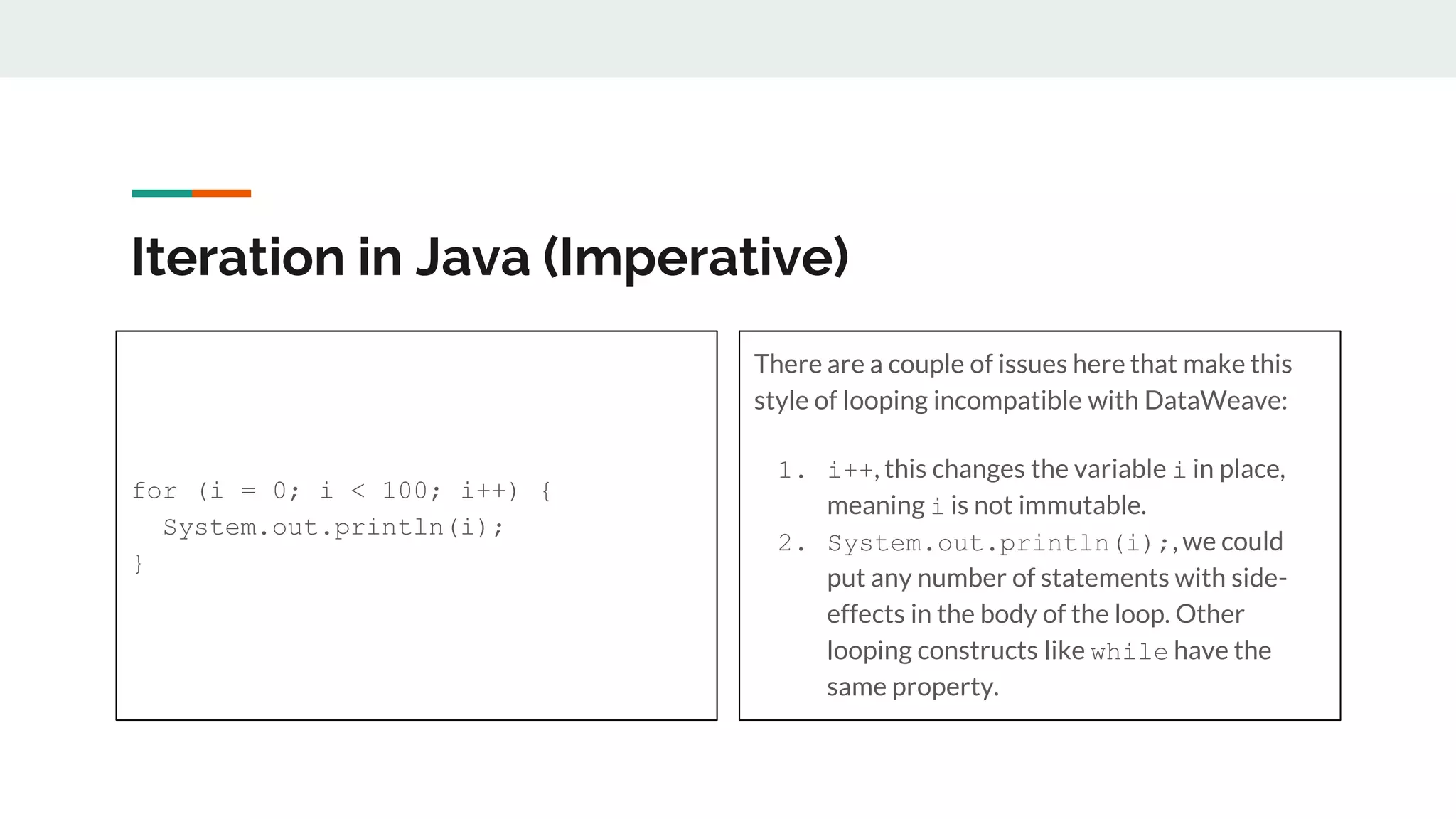
Iteration in Java (Imperative)
for (i = 0; i < 100; i++) {
System.out.println(i);
}
There are a couple of issues here that make this
style of looping incompatible with DataWeave:
1. i++, this changes the variable i in place,
meaning i is not immutable.
2. System.out.println(i);, we could
put any number of statements with side-
effects in the body of the loop. Other
looping constructs like while have the
same property.
Iteration in DataWeave (Functional)
● We can iterate using one of two strategies:
a. Reduce
b. Recursion
What is recursion?
According to Wikipedia:
Recursion in computer science is a method of solving a problem where the solution depends on
solutions to smaller instances of the same problem (as opposed to iteration).
According to me, for this talk:
Recursion is when a function calls itself for the purposes of looping in DataWeave.
Recursion Example
%dw 2.0
output application/json
var range = 1 to 10
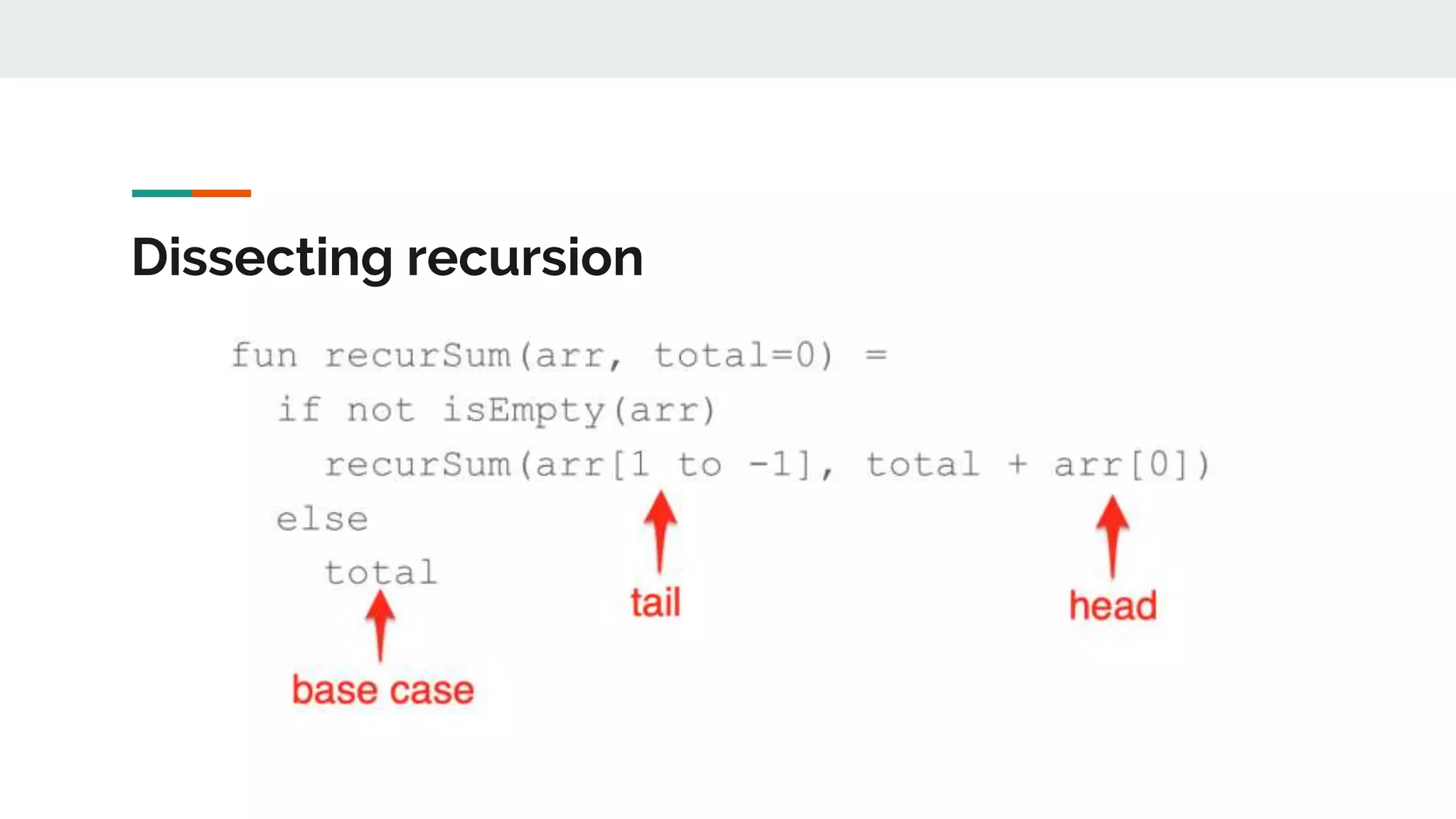
fun recurSum(arr, total=0) =
if not isEmpty(arr)
recurSum(arr[1 to -1], total + arr[0])
else
total
---
recurSum(range) // 1 + 2 + 3 + …, 10 = 45
Dissecting recursion
An Aside: Looping with Reduce
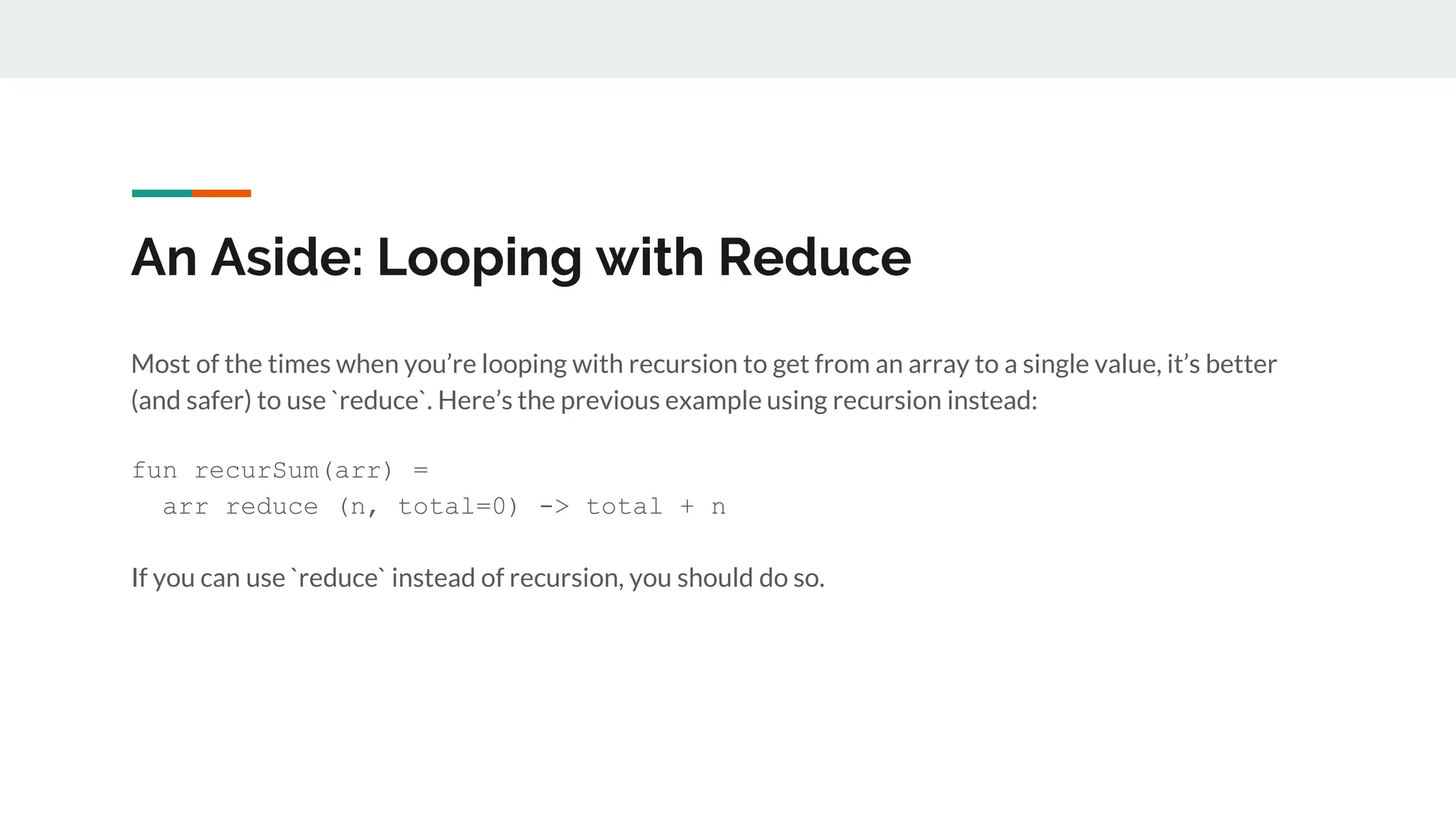
Most of the times when you’re looping with recursion to get from an array to a single value, it’s better
(and safer) to use `reduce`. Here’s the previous example using recursion instead:
fun recurSum(arr) =
arr reduce (n, total=0) -> total + n
If you can use `reduce` instead of recursion, you should do so.
A Problem with Recursion
● If you’re not careful, and/or your language does not support tail call optimization, you can run out
of memory. This results in a stack overflow
● Tail call optimization is an optimization that the language implementation makes so that recursion
is implemented as iteration, so that it doesn’t blow the stack
● Tail call optimization is supported in DataWeave since 2.0
What is a tail call?
● A tail call is a call to a function that is performed as the final action needed in the function body.
Tail call examples
Tail Call (recurSum is the last call in the function
body)
fun recurSum(arr, total=0) =
if not isEmpty(arr)
recurSum(arr[1 to -1], total +
arr[0])
else
total
Not a Tail Call (function still must add the result of
recurSum to arr[0])
fun recurSum(arr) =
if not isEmpty(arr)
arr[0] + recurSum(arr[1 to -1])
else
0
Pattern Matching
What is Pattern Matching?
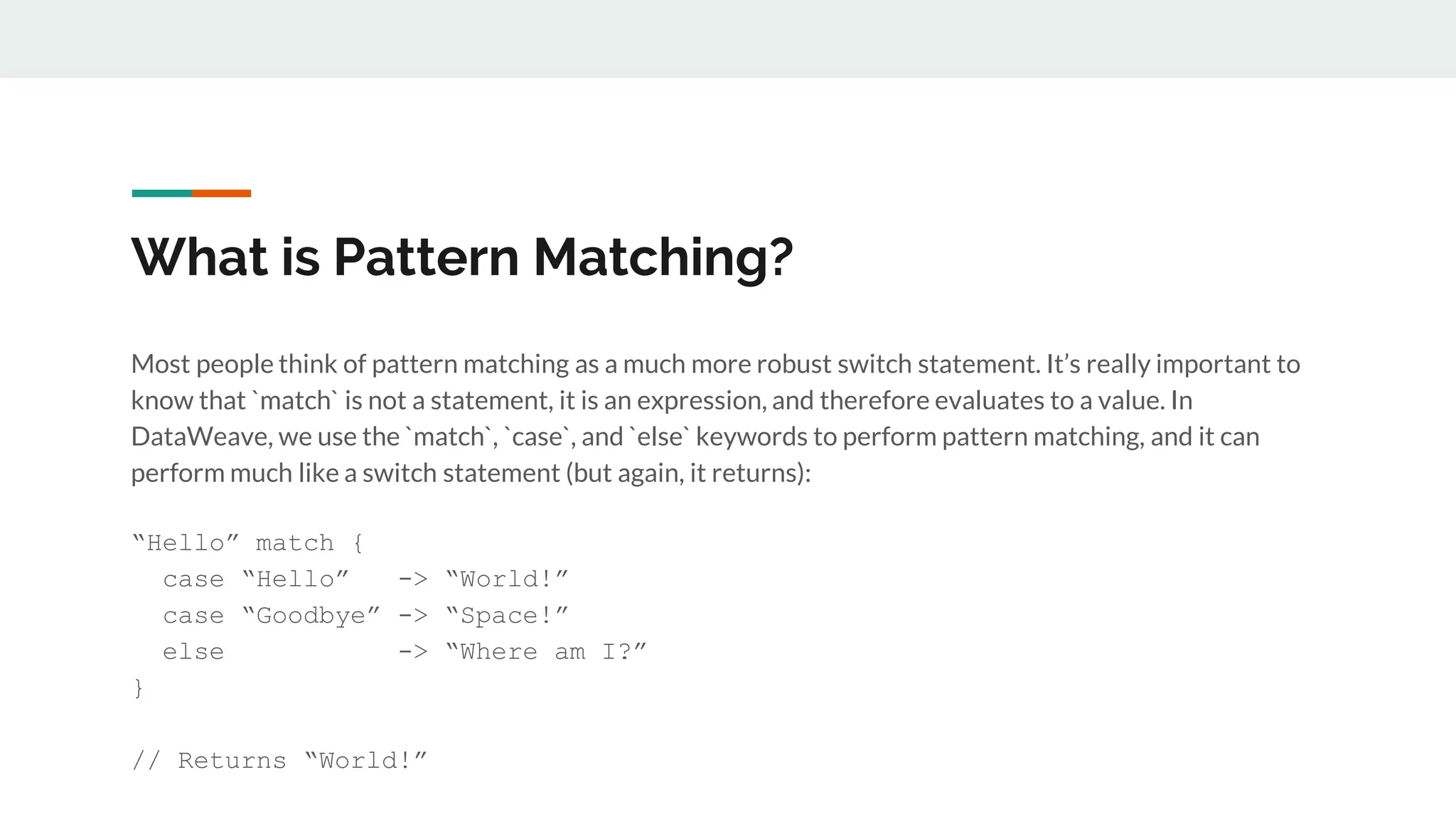
Most people think of pattern matching as a much more robust switch statement. It’s really important to
know that `match` is not a statement, it is an expression, and therefore evaluates to a value. In
DataWeave, we use the `match`, `case`, and `else` keywords to perform pattern matching, and it can
perform much like a switch statement (but again, it returns):
“Hello” match {
case “Hello” -> “World!”
case “Goodbye” -> “Space!”
else -> “Where am I?”
}
// Returns “World!”
What else can we match on?
We’re not just limited to strings, we can match on
1. any literals (booleans, numbers, etc),
2. predicate expressions
3. type
4. regex (we won’t go over this, its use will be intuitive after going over the other matchables)
Matching on Predicate Expressions
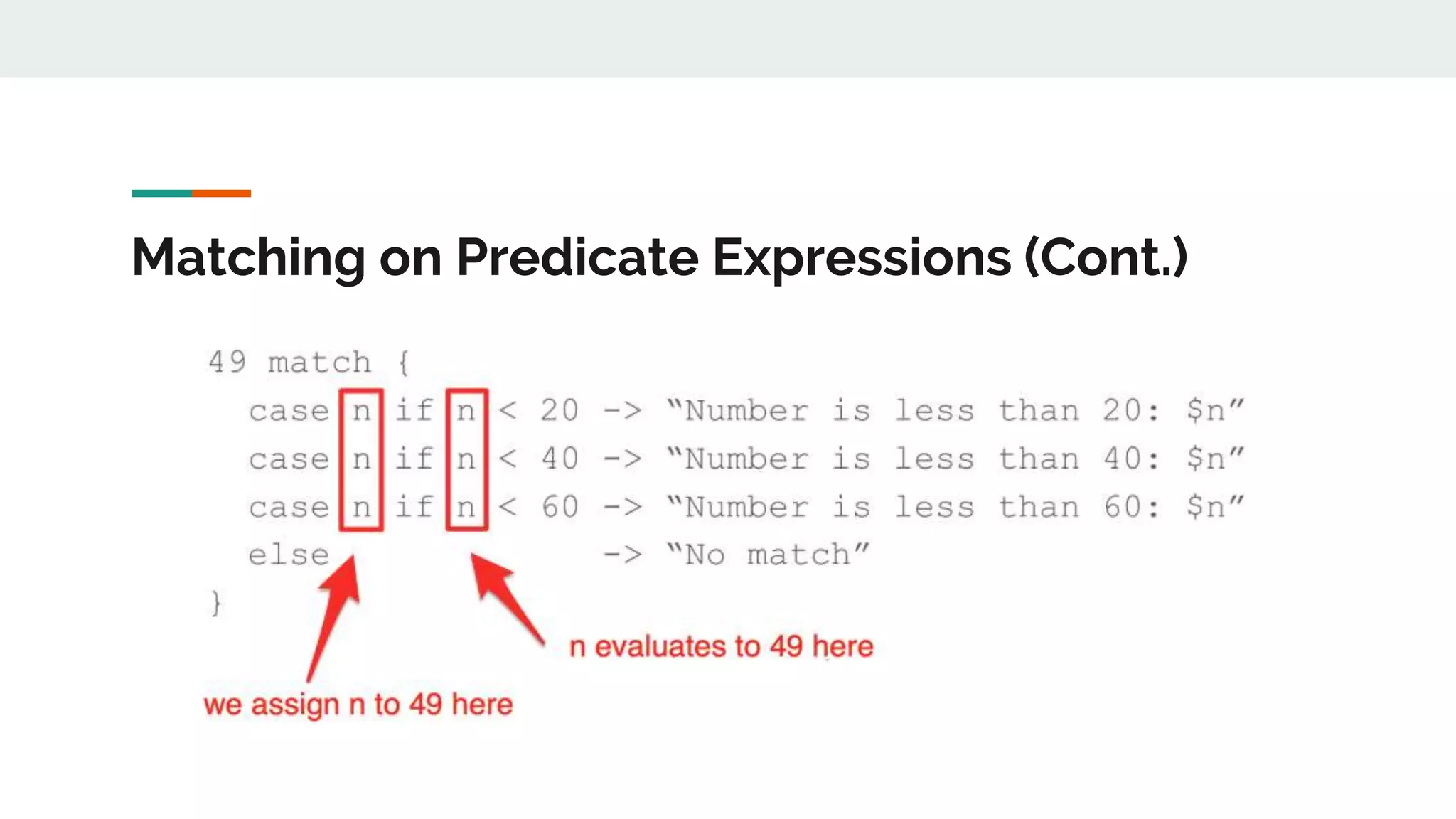
● A predicate expression is an expression that evaluates to true or false
● With `match`, this predicate expression usually takes the form `if <boolean test>`
● When using predicate expressions with `match`, `match` will match with the first predicate
expression that evaluates to true, and ignore the rest
● With predicate expressions, you need to specify the name that the value to match will be referred
to in the predicate expression (this is always an option, even though it was not shown in the
previous example)
Matching on Predicate Expressions (Cont.)
Matching on Type
We can also match on type:
[1,2,3] match {
case is Array -> “We have an array”
case is Object -> “We have an object”
else -> “We have neither an array or object”
}
// Returns “We have an array”
Combining Pattern Matching and
Recursion to Navigate Nested
Data
Use Case 1:
We need a utility function that will modify all of the values in an element, regardless of how deeply
they’re nested.
An element in this case is either an Object, Array, or any combination of the two.
How do we approach this?
Use Case 1: Approach
● We want to write a function that can be reused among ANY use case that needs the same behavior
● The use case doesn’t specify what modification should take place, so our function should probably
take another function as a parameter that describes this behavior, instead of hard-coding it
● We need to determine a way to navigate through a series of ambiguously nested elements, or
potentially no nesting at all (e.g. 1-dimensional array)
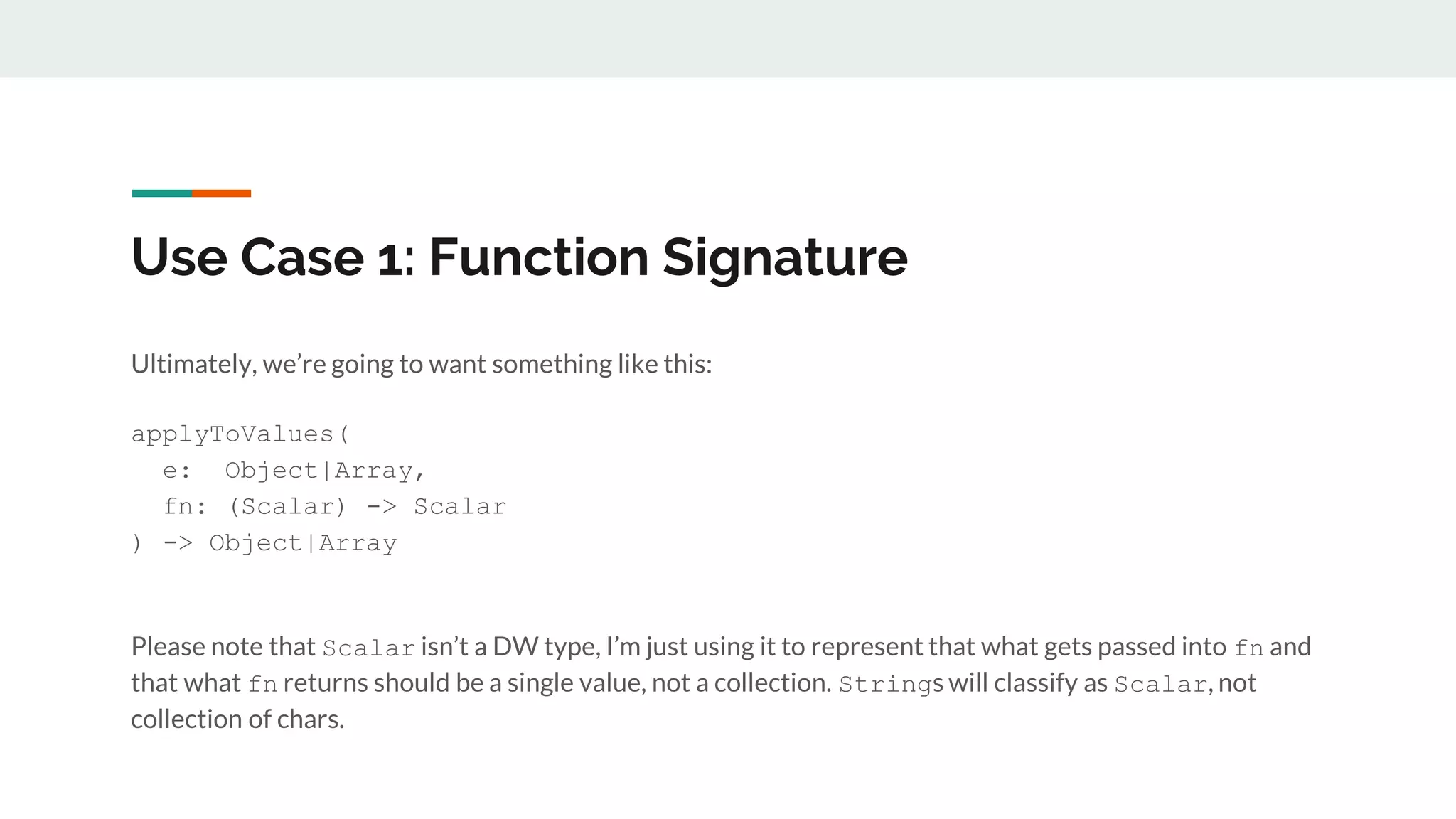
Use Case 1: Function Signature
Ultimately, we’re going to want something like this:
applyToValues(
e: Object|Array,
fn: (Scalar) -> Scalar
) -> Object|Array
Please note that Scalar isn’t a DW type, I’m just using it to represent that what gets passed into fn and
that what fn returns should be a single value, not a collection. Strings will classify as Scalar, not
collection of chars.
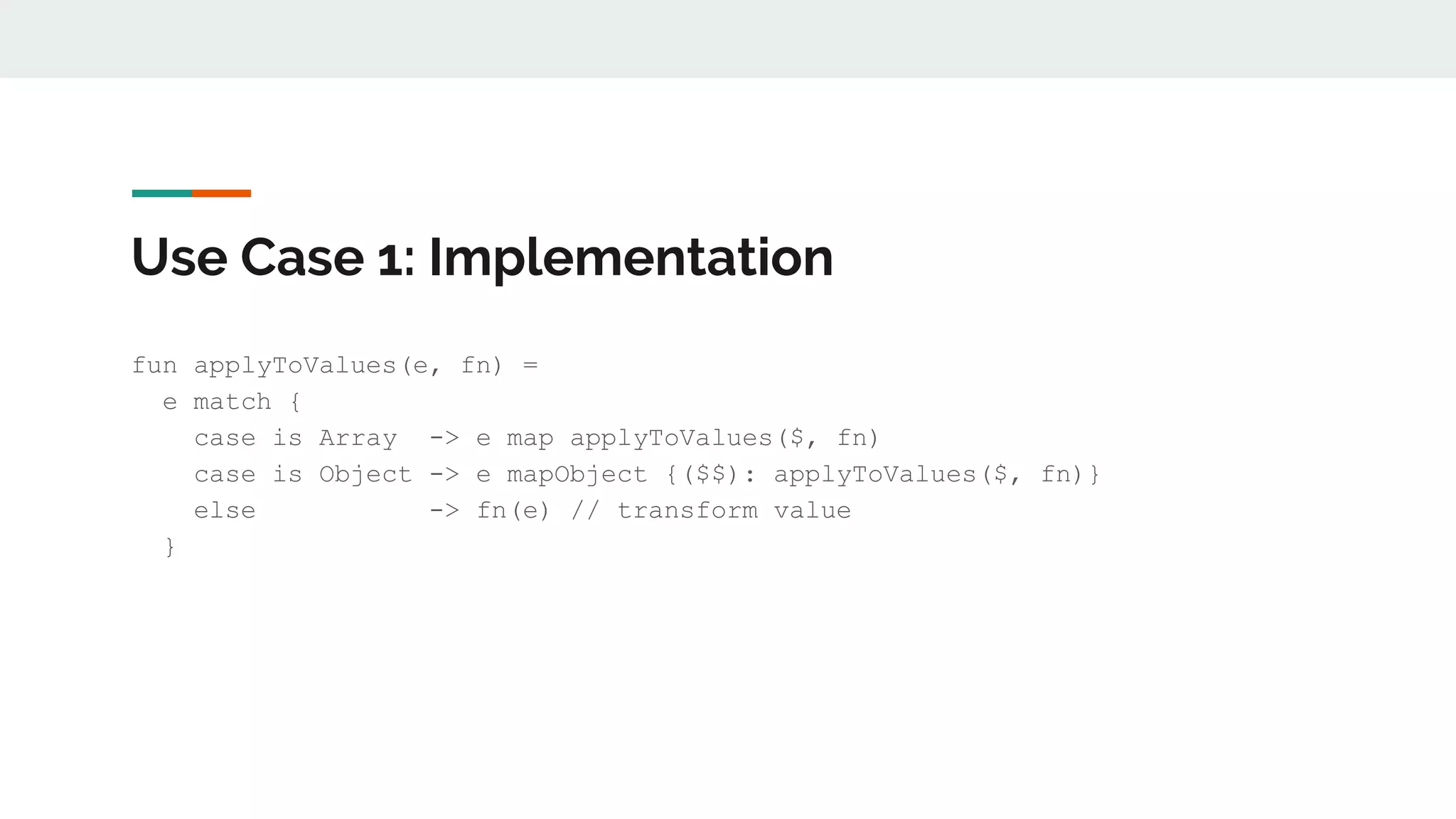
Use Case 1: Implementation
fun applyToValues(e, fn) =
e match {
case is Array -> e map applyToValues($, fn)
case is Object -> e mapObject {($$): applyToValues($, fn)}
else -> fn(e) // transform value
}
Use Case 1: Notes
While the Array branch of the `match` has the recursive call in tail position, the Object branch of the
`match` does not. Be careful using this on very large elements.
Use Case 2:
We need a utility function that will modify all of the keys in an element, regardless of how deeply they’re
nested.
An element in this case is either an Object, Array, or any combination of the two.
How do we approach this?
Use Case 2: Approach
● We want to write a function that can be reused among ANY use case that needs the same behavior
● The use case doesn’t specify what modification should take place, so our function should probably
take another function as a parameter that describes this behavior, instead of hard-coding it
● We need to determine a way to navigate through a series of ambiguously nested elements, or
potentially no nesting at all (e.g. 1-dimensional array)
Use Case 2: Function Signature
Same as our previous function, but we’ll call it applyToKeys
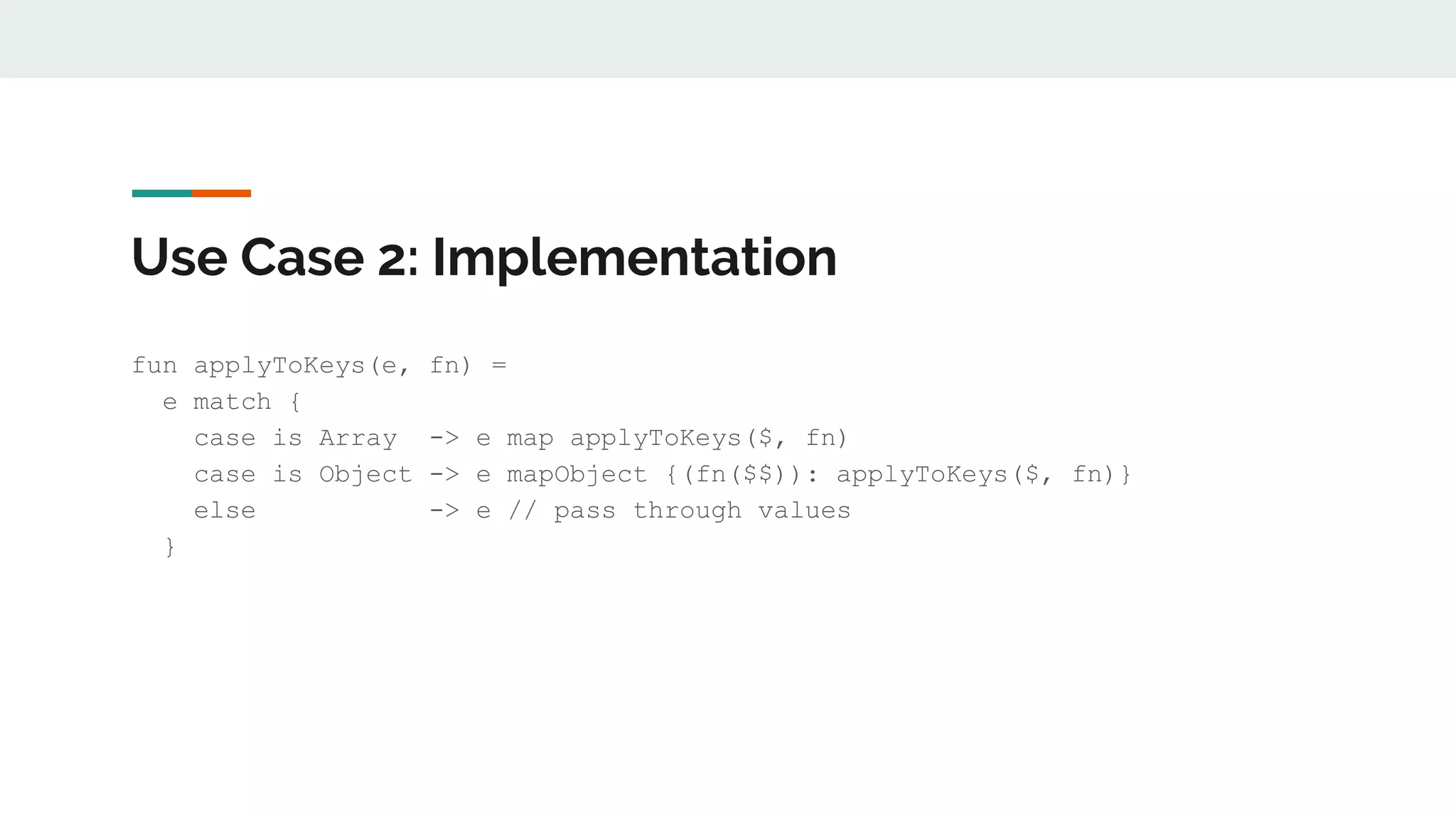
Use Case 2: Implementation
fun applyToKeys(e, fn) =
e match {
case is Array -> e map applyToKeys($, fn)
case is Object -> e mapObject {(fn($$)): applyToKeys($, fn)}
else -> e // pass through values
}
A Pattern Emerges
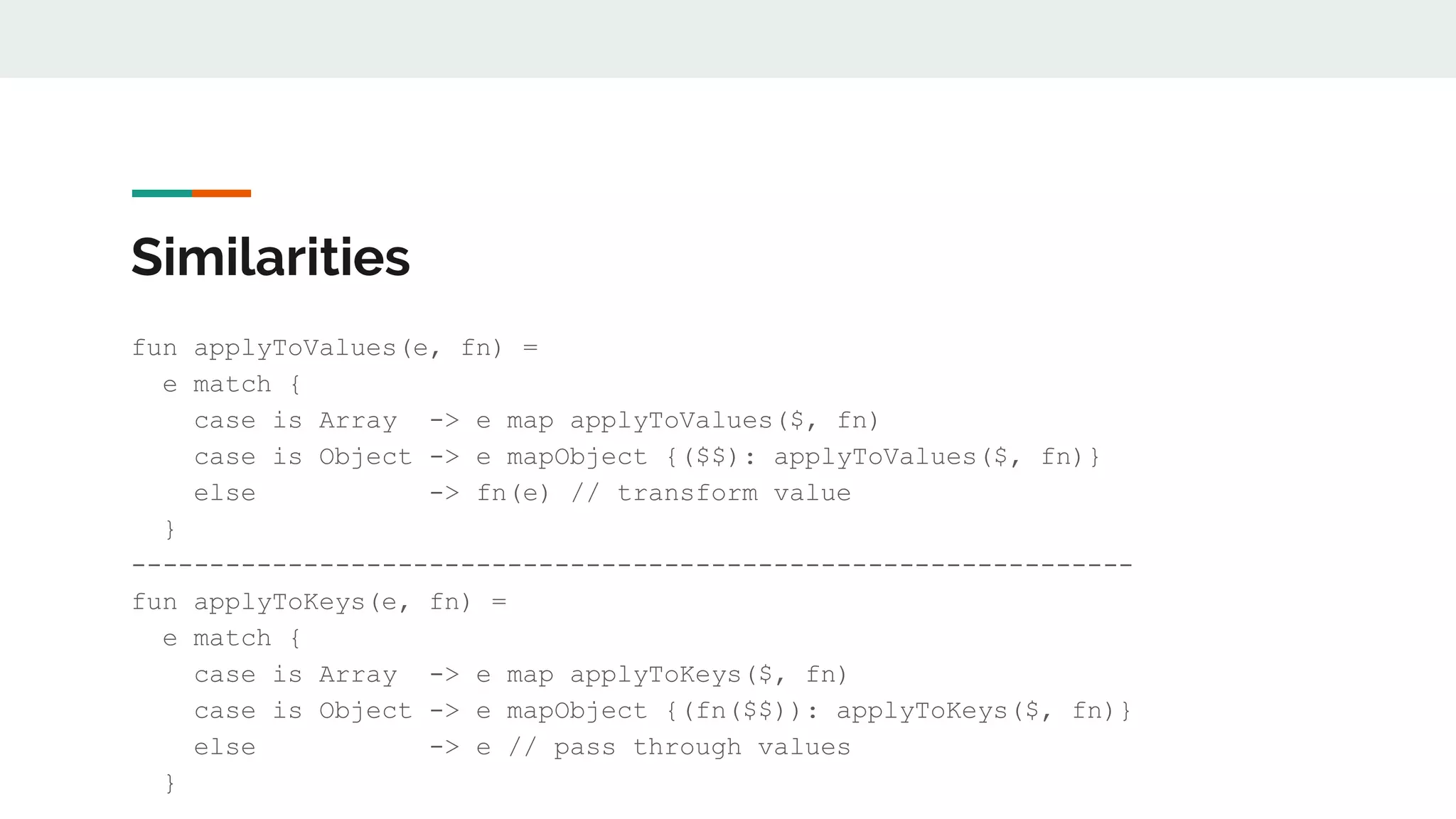
Similarities
fun applyToValues(e, fn) =
e match {
case is Array -> e map applyToValues($, fn)
case is Object -> e mapObject {($$): applyToValues($, fn)}
else -> fn(e) // transform value
}
----------------------------------------------------------------
fun applyToKeys(e, fn) =
e match {
case is Array -> e map applyToKeys($, fn)
case is Object -> e mapObject {(fn($$)): applyToKeys($, fn)}
else -> e // pass through values
}
Conclusion
Map and mapObject, combined with recursion and pattern matching on types, allows us to modify
ambiguously nested keys and values in an element
TODO
1. Can applyToValues and applyToKeys be modified so that the recursive call in the Object branch of
the match expression is in tail position?
2. Can we write a utility function that applies a function to values only when the key matches a
certain constraint?
Additional Info:
1. Full blog post on applyToValues - https://www.jerney.io/how-to-modify-all-values-of-an-element/
2. Full blog post on applyToValueWhenKey - https://www.jerney.io/dataweave-applywhenkey-
function/
3. Pattern Matching in DataWeave - https://docs.mulesoft.com/mule-runtime/4.1/dataweave-
pattern-matching
4. Pattern Matching regex - https://docs.mulesoft.com/mule-runtime/4.1/dataweave-pattern-
matching#pattern_match_regex
Questions?

Data weave 2.0 advanced (recursion, pattern matching)

  • 1.
    DataWeave 2.0 Advanced Concepts- Recursion & Pattern Matching Joshua Erney ● www.jerney.io (Blog) ● @jerney_io (Twitter) ● www.linkedin.com/in/jerney
  • 2.
    Agenda 1. Introduction 2. Quickreview of basics 3. Looping / Recursion a. Tail Call Optimization 4. Pattern Matching a. By predicate expressions b. By data type 5. Combined Examples / Demos a. Use Case 1 - applyToValues b. Use Case 2 - applyToKeys 6. Questions
  • 3.
    Who Am I?Why Should You Listen To Me?! ● Programming since ‘11 (not bragging) ○ Java, Python, JavaScript ● Working w/ MuleSoft products for about 3 years ● Saw no DataWeave experts at my company or in the community at the time, I LOVE learning programming languages, so decided to focus efforts there ● Started learning DataWeave about the same time Functional Programming started making sense to me
  • 4.
    Disclaimer I don’t workfor MuleSoft, and I’ve never seen the source code for DataWeave. Because of this, I have no way of knowing with 100% certainty how the language works; DataWeave is a black box to me. Opinions are my own and do not necessarily reflect those of my employer.
  • 5.
    A Quick Reviewof the Basics ● DataWeave is a domain-specific language created specifically to optimize data transformations regardless of source and target formats ● Fully-fledged programming language ● Adheres to the core tenets of functional programming, i.e., it is a functional programming language
  • 6.
    A Quick Reviewof the Basics (Cont.) ● Most transformations are done using `map`, `filter`, or `reduce` ○ `map` - transforms elements in an array ○ `filter` - removes elements in an array ○ `reduce` - general purpose tool for doing pretty much anything else with an array. Great for transforming arrays into objects or scalar values like strings and numbers. ● Data structures in DataWeave are immutable (this restriction is essentially the crux of this talk) ● If you want a deep dive into the basics (highly recommended), you should check out the webinar I did w/ Manik Magar: https://www.youtube.com/watch?v=r-jjcHPEP34
  • 7.
  • 8.
    Why is iterationpart of “Advanced Dataweave”? ● Conceptually, it isn’t, we just don’t need to think about it that much ● DataWeave’s immutable data structures present a barrier to using the iteration techniques typically used in Java
  • 9.
    Iteration in Java(Imperative) for (i = 0; i < 100; i++) { System.out.println(i); } There are a couple of issues here that make this style of looping incompatible with DataWeave: 1. i++, this changes the variable i in place, meaning i is not immutable. 2. System.out.println(i);, we could put any number of statements with side- effects in the body of the loop. Other looping constructs like while have the same property.
  • 10.
    Iteration in DataWeave(Functional) ● We can iterate using one of two strategies: a. Reduce b. Recursion
  • 11.
    What is recursion? Accordingto Wikipedia: Recursion in computer science is a method of solving a problem where the solution depends on solutions to smaller instances of the same problem (as opposed to iteration). According to me, for this talk: Recursion is when a function calls itself for the purposes of looping in DataWeave.
  • 12.
    Recursion Example %dw 2.0 outputapplication/json var range = 1 to 10 fun recurSum(arr, total=0) = if not isEmpty(arr) recurSum(arr[1 to -1], total + arr[0]) else total --- recurSum(range) // 1 + 2 + 3 + …, 10 = 45
  • 13.
  • 14.
    An Aside: Loopingwith Reduce Most of the times when you’re looping with recursion to get from an array to a single value, it’s better (and safer) to use `reduce`. Here’s the previous example using recursion instead: fun recurSum(arr) = arr reduce (n, total=0) -> total + n If you can use `reduce` instead of recursion, you should do so.
  • 15.
    A Problem withRecursion ● If you’re not careful, and/or your language does not support tail call optimization, you can run out of memory. This results in a stack overflow ● Tail call optimization is an optimization that the language implementation makes so that recursion is implemented as iteration, so that it doesn’t blow the stack ● Tail call optimization is supported in DataWeave since 2.0
  • 16.
    What is atail call? ● A tail call is a call to a function that is performed as the final action needed in the function body.
  • 17.
    Tail call examples TailCall (recurSum is the last call in the function body) fun recurSum(arr, total=0) = if not isEmpty(arr) recurSum(arr[1 to -1], total + arr[0]) else total Not a Tail Call (function still must add the result of recurSum to arr[0]) fun recurSum(arr) = if not isEmpty(arr) arr[0] + recurSum(arr[1 to -1]) else 0
  • 18.
  • 19.
    What is PatternMatching? Most people think of pattern matching as a much more robust switch statement. It’s really important to know that `match` is not a statement, it is an expression, and therefore evaluates to a value. In DataWeave, we use the `match`, `case`, and `else` keywords to perform pattern matching, and it can perform much like a switch statement (but again, it returns): “Hello” match { case “Hello” -> “World!” case “Goodbye” -> “Space!” else -> “Where am I?” } // Returns “World!”
  • 20.
    What else canwe match on? We’re not just limited to strings, we can match on 1. any literals (booleans, numbers, etc), 2. predicate expressions 3. type 4. regex (we won’t go over this, its use will be intuitive after going over the other matchables)
  • 21.
    Matching on PredicateExpressions ● A predicate expression is an expression that evaluates to true or false ● With `match`, this predicate expression usually takes the form `if <boolean test>` ● When using predicate expressions with `match`, `match` will match with the first predicate expression that evaluates to true, and ignore the rest ● With predicate expressions, you need to specify the name that the value to match will be referred to in the predicate expression (this is always an option, even though it was not shown in the previous example)
  • 22.
    Matching on PredicateExpressions (Cont.)
  • 23.
    Matching on Type Wecan also match on type: [1,2,3] match { case is Array -> “We have an array” case is Object -> “We have an object” else -> “We have neither an array or object” } // Returns “We have an array”
  • 24.
    Combining Pattern Matchingand Recursion to Navigate Nested Data
  • 25.
    Use Case 1: Weneed a utility function that will modify all of the values in an element, regardless of how deeply they’re nested. An element in this case is either an Object, Array, or any combination of the two. How do we approach this?
  • 26.
    Use Case 1:Approach ● We want to write a function that can be reused among ANY use case that needs the same behavior ● The use case doesn’t specify what modification should take place, so our function should probably take another function as a parameter that describes this behavior, instead of hard-coding it ● We need to determine a way to navigate through a series of ambiguously nested elements, or potentially no nesting at all (e.g. 1-dimensional array)
  • 27.
    Use Case 1:Function Signature Ultimately, we’re going to want something like this: applyToValues( e: Object|Array, fn: (Scalar) -> Scalar ) -> Object|Array Please note that Scalar isn’t a DW type, I’m just using it to represent that what gets passed into fn and that what fn returns should be a single value, not a collection. Strings will classify as Scalar, not collection of chars.
  • 28.
    Use Case 1:Implementation fun applyToValues(e, fn) = e match { case is Array -> e map applyToValues($, fn) case is Object -> e mapObject {($$): applyToValues($, fn)} else -> fn(e) // transform value }
  • 29.
    Use Case 1:Notes While the Array branch of the `match` has the recursive call in tail position, the Object branch of the `match` does not. Be careful using this on very large elements.
  • 30.
    Use Case 2: Weneed a utility function that will modify all of the keys in an element, regardless of how deeply they’re nested. An element in this case is either an Object, Array, or any combination of the two. How do we approach this?
  • 31.
    Use Case 2:Approach ● We want to write a function that can be reused among ANY use case that needs the same behavior ● The use case doesn’t specify what modification should take place, so our function should probably take another function as a parameter that describes this behavior, instead of hard-coding it ● We need to determine a way to navigate through a series of ambiguously nested elements, or potentially no nesting at all (e.g. 1-dimensional array)
  • 32.
    Use Case 2:Function Signature Same as our previous function, but we’ll call it applyToKeys
  • 33.
    Use Case 2:Implementation fun applyToKeys(e, fn) = e match { case is Array -> e map applyToKeys($, fn) case is Object -> e mapObject {(fn($$)): applyToKeys($, fn)} else -> e // pass through values }
  • 34.
  • 35.
    Similarities fun applyToValues(e, fn)= e match { case is Array -> e map applyToValues($, fn) case is Object -> e mapObject {($$): applyToValues($, fn)} else -> fn(e) // transform value } ---------------------------------------------------------------- fun applyToKeys(e, fn) = e match { case is Array -> e map applyToKeys($, fn) case is Object -> e mapObject {(fn($$)): applyToKeys($, fn)} else -> e // pass through values }
  • 36.
    Conclusion Map and mapObject,combined with recursion and pattern matching on types, allows us to modify ambiguously nested keys and values in an element
  • 37.
    TODO 1. Can applyToValuesand applyToKeys be modified so that the recursive call in the Object branch of the match expression is in tail position? 2. Can we write a utility function that applies a function to values only when the key matches a certain constraint?
  • 38.
    Additional Info: 1. Fullblog post on applyToValues - https://www.jerney.io/how-to-modify-all-values-of-an-element/ 2. Full blog post on applyToValueWhenKey - https://www.jerney.io/dataweave-applywhenkey- function/ 3. Pattern Matching in DataWeave - https://docs.mulesoft.com/mule-runtime/4.1/dataweave- pattern-matching 4. Pattern Matching regex - https://docs.mulesoft.com/mule-runtime/4.1/dataweave-pattern- matching#pattern_match_regex
  • 39.

Editor's Notes

  • #4 More esoteric languages like Clojure, Racket, Scala, Ruby Saw no DataWeave experts: when I started using Mule dataweave was just coming out, people were skeptical to learn it because they were afraid it would get replaced again like Data Mapper did. After using it for a few months, I thought MuleSoft nailed it, didn’t see why it would ever be replaced. Dove in.
  • #15 Safer because we don’t have to worry about testing the input array for length, avoid stack overflows during development
  • #21 any literals (booleans, numbers), data types (we’ll use this heavily later), predicate expressions regex (we won’t go over this, its use will be intuitive after going over the other matchables)