Introduction to GPU Computing

               Jeff Larkin
    Cray Supercomputing Center of
              Excellence
           larkin@cray.com
Goals for this tutorial
• Understand the architectural differences
  between GPUs and CPUs and the associated
  trade-offs
• Recognize several GPU programming models
  and how/when to use each
• Understand how to analyze GPU performance
• Recognize very basic GPU optimizations
This tutorial is not…
• A deep-dive on GPU programming
• The be all and end all on GPU optimization
• A recipe for getting 10, 100, 1000X speed-ups
  for your application
GPU ARCHITECTURE BASICS
Section Goals
• Recognize the differences between CPU/GPU
  architectures
• Identify when one architecture may be better
  suited than the other.
CPU/GPU Architectures
CPU                                       GPU
              ALU                   ALU
Control       ALU      Control      ALU
              ALU                   ALU
      Cache                 Cache

                    Cache


                                                Cache
                    RAM
                                                RAM
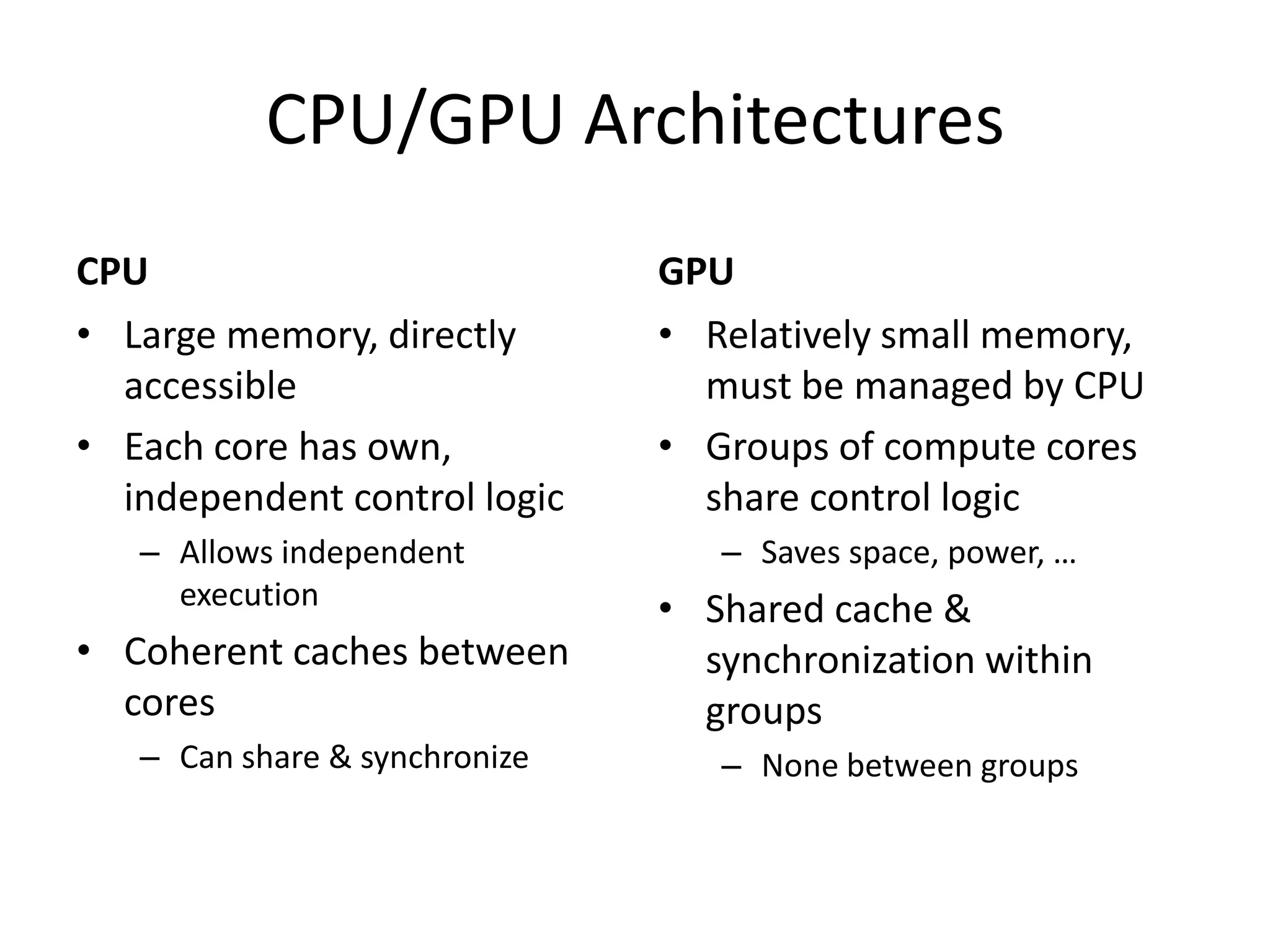
CPU/GPU Architectures
CPU                            GPU
• Large memory, directly       • Relatively small memory,
  accessible                     must be managed by CPU
• Each core has own,           • Groups of compute cores
  independent control logic      share control logic
   – Allows independent           – Saves space, power, …
     execution                 • Shared cache &
• Coherent caches between        synchronization within
  cores                          groups
   – Can share & synchronize      – None between groups
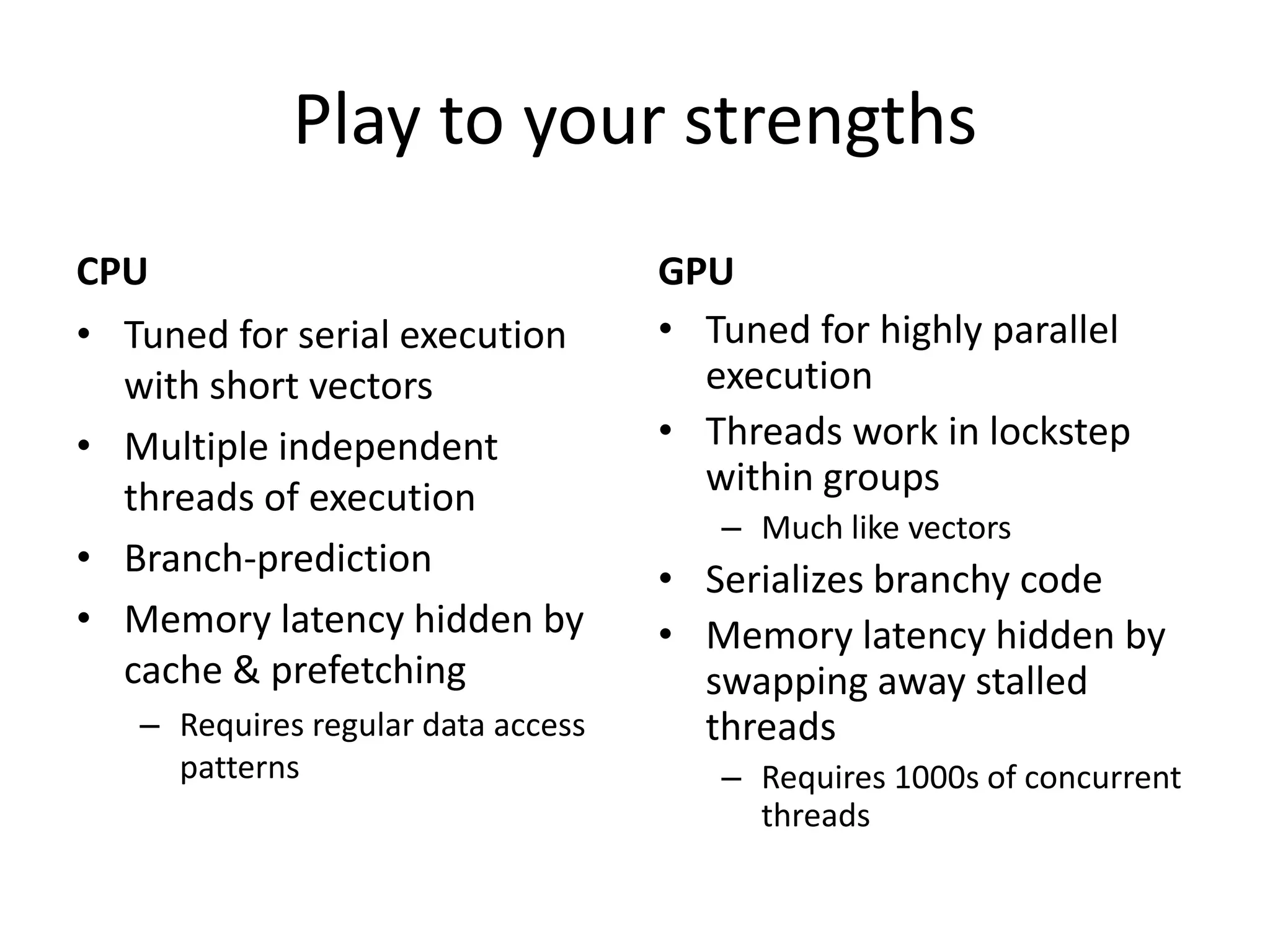
Play to your strengths
CPU                                 GPU
• Tuned for serial execution        • Tuned for highly parallel
  with short vectors                  execution
• Multiple independent              • Threads work in lockstep
  threads of execution                within groups
                                       – Much like vectors
• Branch-prediction                 • Serializes branchy code
• Memory latency hidden by          • Memory latency hidden by
  cache & prefetching                 swapping away stalled
   – Requires regular data access     threads
     patterns                          – Requires 1000s of concurrent
                                         threads
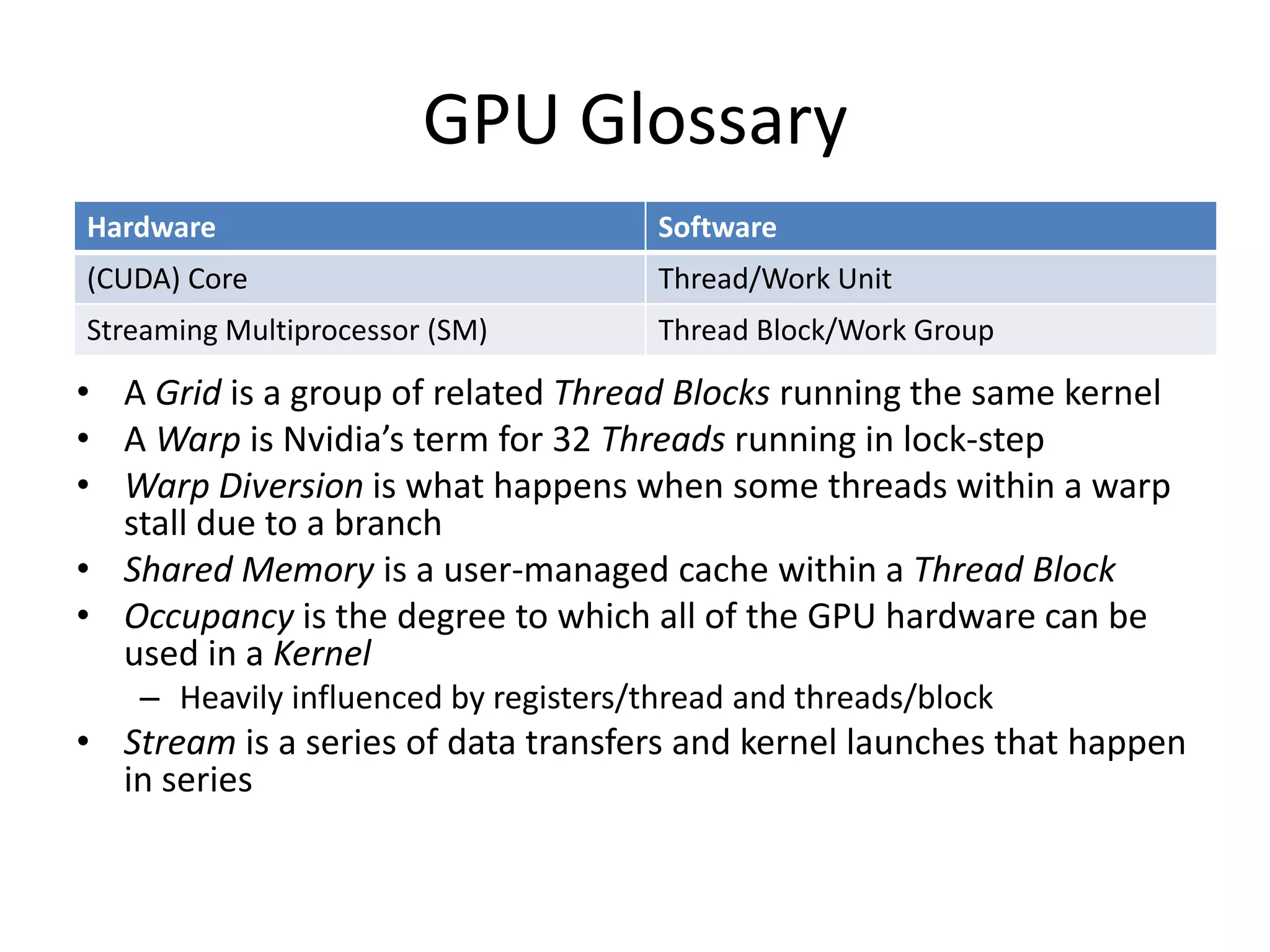
GPU Glossary
Hardware                               Software
(CUDA) Core                            Thread/Work Unit
Streaming Multiprocessor (SM)          Thread Block/Work Group

• A Grid is a group of related Thread Blocks running the same kernel
• A Warp is Nvidia’s term for 32 Threads running in lock-step
• Warp Diversion is what happens when some threads within a warp
  stall due to a branch
• Shared Memory is a user-managed cache within a Thread Block
• Occupancy is the degree to which all of the GPU hardware can be
  used in a Kernel
    – Heavily influenced by registers/thread and threads/block
• Stream is a series of data transfers and kernel launches that happen
  in series
GPU PROGRAMMING MODELS
Section Goals
• Introduce several GPU programming models
• Discuss why someone may choose one
  programming paradigm over the others.
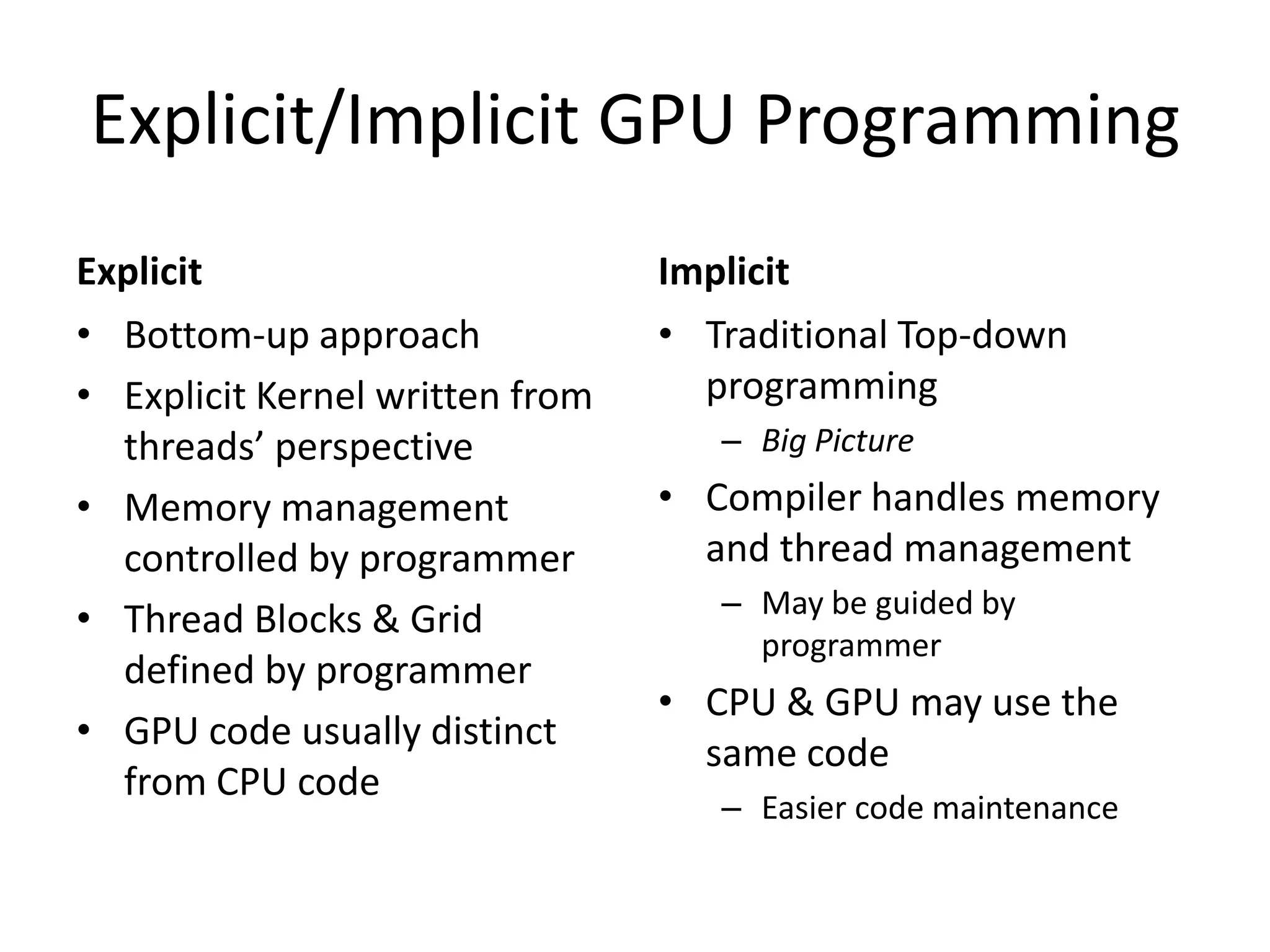
Explicit/Implicit GPU Programming
Explicit                         Implicit
• Bottom-up approach             • Traditional Top-down
• Explicit Kernel written from     programming
  threads’ perspective              – Big Picture
• Memory management              • Compiler handles memory
  controlled by programmer         and thread management
                                    – May be guided by
• Thread Blocks & Grid
                                      programmer
  defined by programmer
                                 • CPU & GPU may use the
• GPU code usually distinct
                                   same code
  from CPU code
                                    – Easier code maintenance
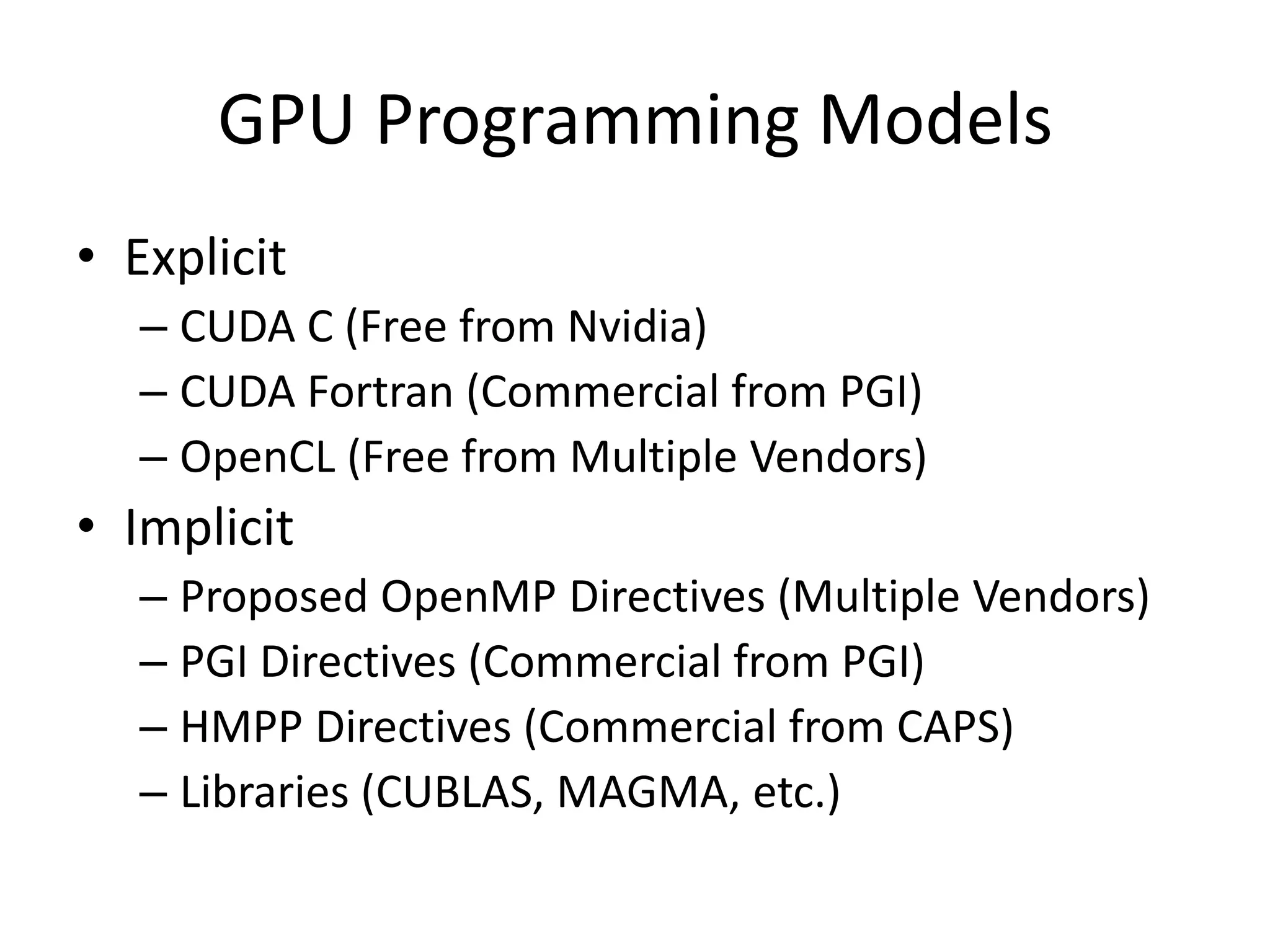
GPU Programming Models
• Explicit
   – CUDA C (Free from Nvidia)
   – CUDA Fortran (Commercial from PGI)
   – OpenCL (Free from Multiple Vendors)
• Implicit
   – Proposed OpenMP Directives (Multiple Vendors)
   – PGI Directives (Commercial from PGI)
   – HMPP Directives (Commercial from CAPS)
   – Libraries (CUBLAS, MAGMA, etc.)
Multi-node Programming
• GPU papers & tutorials usually focus on 1 node, what about the rest
  of the machine?

• High-level MPI parallelism between nodes
   – You’re probably already doing this
• Loose, on-node parallelism via threads
   – Most codes today are using MPI, but threading is becoming more
     important
• Tight, on-node, vector parallelism
   – SSE/AVX on CPUs
   – GPU threaded parallelism

Programmers need to expose the same parallelism with/without GPUs
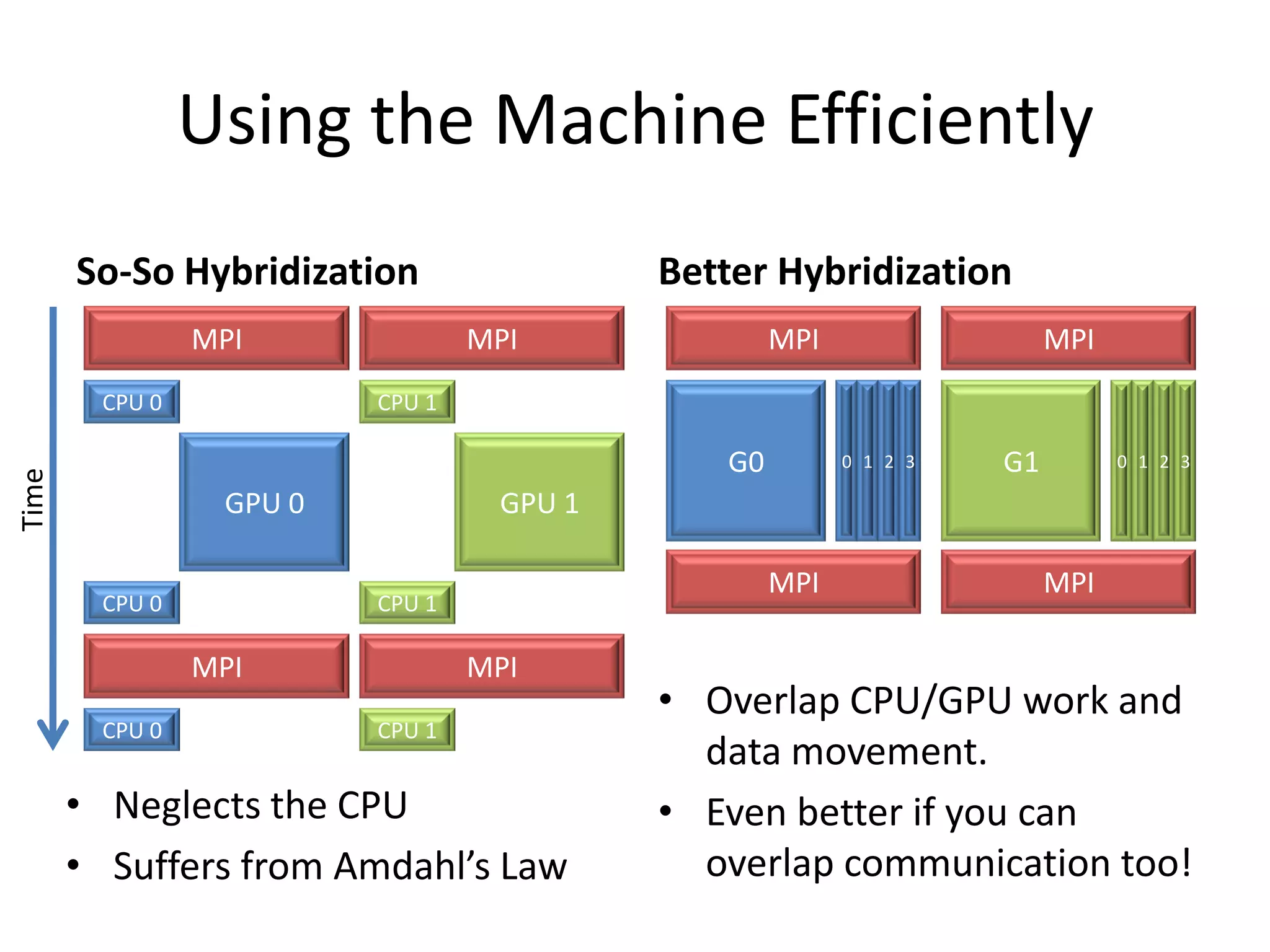
Using the Machine Efficiently
       So-So Hybridization                Better Hybridization
                MPI              MPI              MPI                  MPI
        CPU 0            CPU 1

                                             G0         0 1 2 3   G1         0 1 2 3
Time


                 GPU 0            GPU 1

                                                  MPI                  MPI
        CPU 0            CPU 1

                MPI              MPI
                                          • Overlap CPU/GPU work and
        CPU 0            CPU 1
                                            data movement.
       • Neglects the CPU                 • Even better if you can
       • Suffers from Amdahl’s Law          overlap communication too!
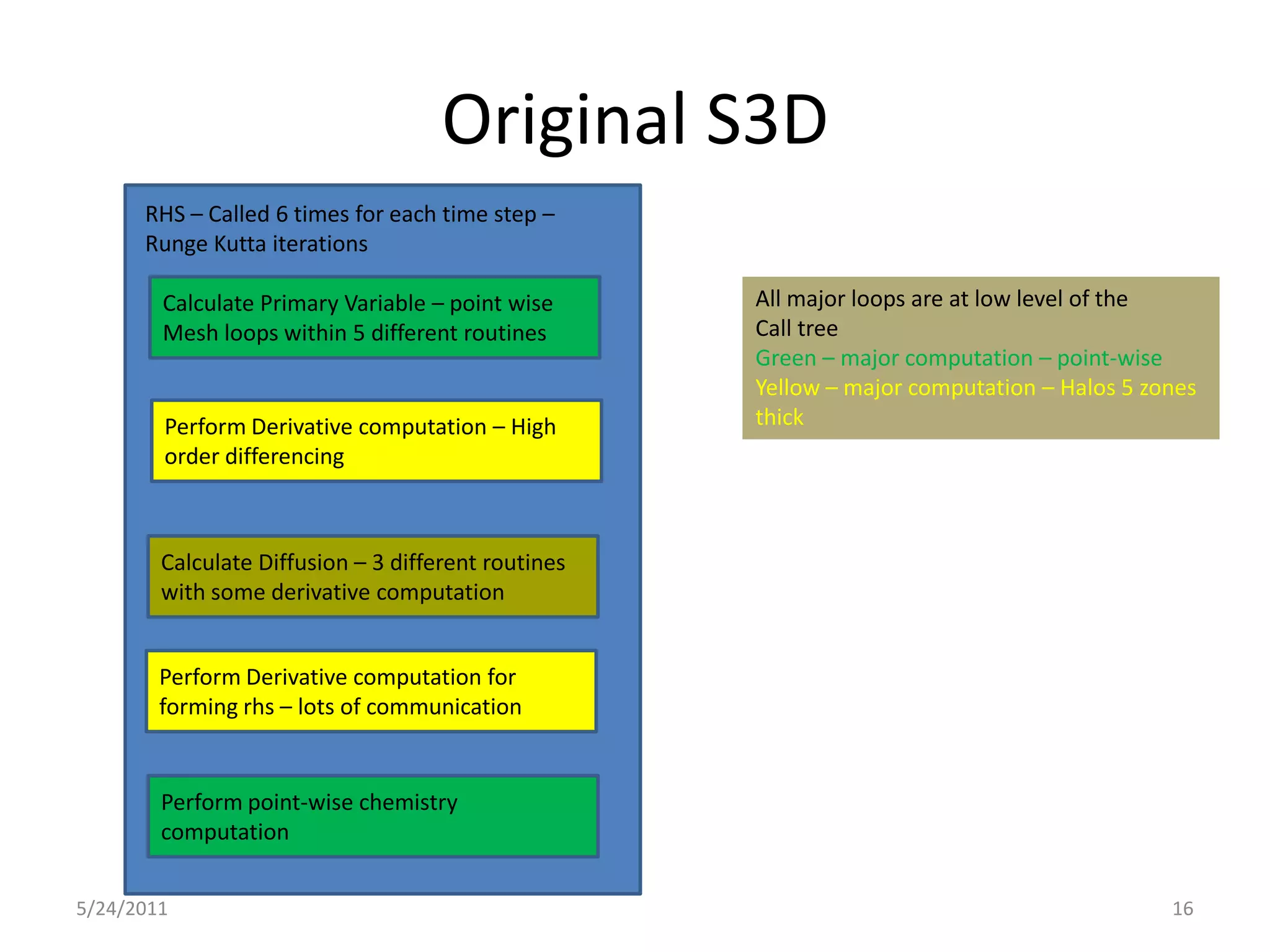
Original S3D
      RHS – Called 6 times for each time step –
      Runge Kutta iterations

        Calculate Primary Variable – point wise      All major loops are at low level of the
        Mesh loops within 5 different routines       Call tree
                                                     Green – major computation – point-wise
                                                     Yellow – major computation – Halos 5 zones
        Perform Derivative computation – High        thick
        order differencing


        Calculate Diffusion – 3 different routines
        with some derivative computation


        Perform Derivative computation for
        forming rhs – lots of communication


        Perform point-wise chemistry
        computation


5/24/2011                                                                                   16
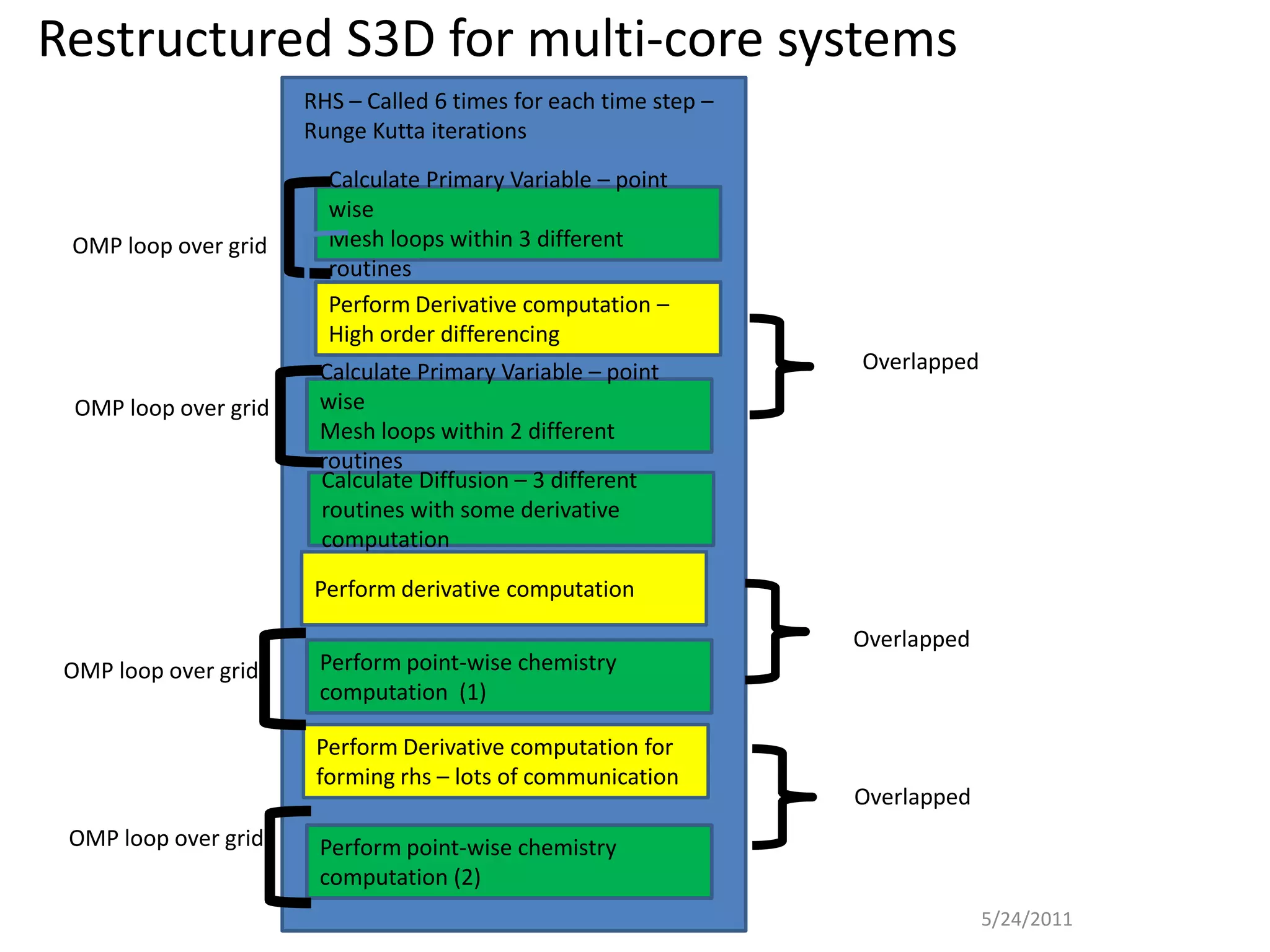
Restructured S3D for multi-core systems
                       RHS – Called 6 times for each time step –
                       Runge Kutta iterations
                         Calculate Primary Variable – point
                         wise
 OMP loop over grid      Mesh loops within 3 different
                         routines
                         Perform Derivative computation –
                         High order differencing
                        Calculate Primary Variable – point         Overlapped
  OMP loop over grid    wise
                        Mesh loops within 2 different
                        routines
                        Calculate Diffusion – 3 different
                        routines with some derivative
                        computation

                        Perform derivative computation

                                                                   Overlapped
 OMP loop over grid     Perform point-wise chemistry
                        computation (1)

                        Perform Derivative computation for
                        forming rhs – lots of communication
                                                                   Overlapped
 OMP loop over grid     Perform point-wise chemistry
                        computation (2)
                                                                                5/24/2011
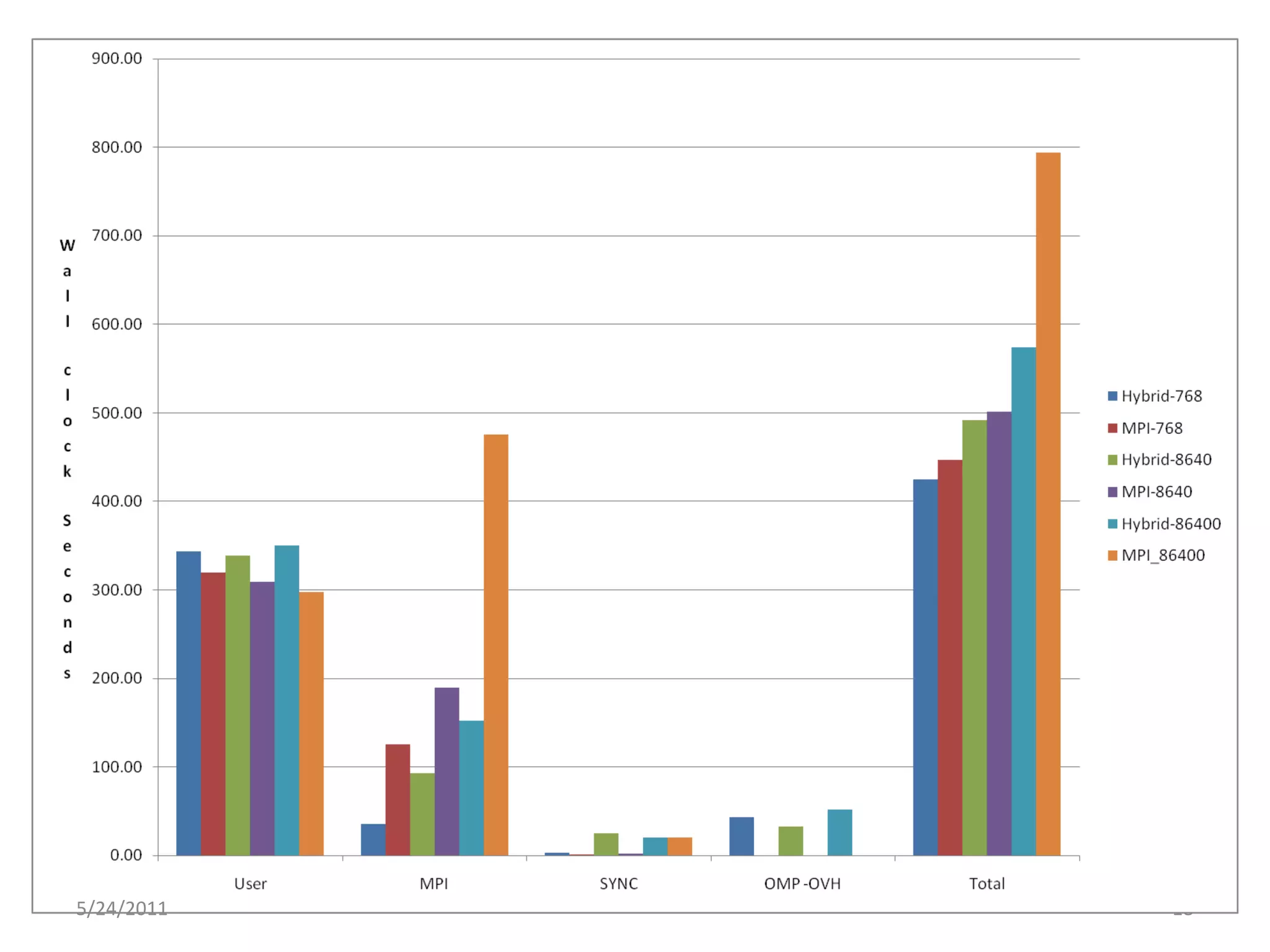
The Hybridization of S3D


5/24/2011                              18
Explicit: CUDA C/Fortran & OpenCL
• Programmer writes a kernel in C/Fortran that will be run on
  the GPU
   – This is essentially the loop body from original CPU code
• GPU memory must be explicitly allocated, freed, and filled
  from CPU memory over PCIe
   – Generally results in 2 variables referring to every pertinent array,
     one in each memory domain (hostA, devA)
• Programmer declares how to decompose into thread blocks
  and grid
   – Must understand limits of thread block size and how to
     maximize occupancy
• CPU code launches kernel on device.
   – May continue to work while GPU executes kernel(s)
CUDA C Example
Host Code                                          GPU Code
                               Allocate &
 double a[1000], *d_a;
 dim3 block( 1000, 1, 1 );    Copy to GPU           __global__
 dim3 grid( 1, 1, 1 );
                                                    void scaleit_kernel(double *a,int n)
 cudaMalloc((void**)&d_a, 1000*sizeof(double));
 cudaMemcpy(d_a, a,
                                                    {
    1000*sizeof(double),cudaMemcpyHostToDev
    ice);
                                                      int i = threadIdx.x;   My Index
 scaleit_kernel<<<grid,block>>>(d_a,n);   Launch
 cudaMemcpy(a, d_a,
                                                        if (i < n)
                                                                                 Calculate
    1000*sizeof(double),cudaMemcpyDeviceToH
    ost);
                                                           a[i] = a[i] * 2.0l;    Myself
 cudaFree(d_a);
                                                    }
                      Copy Back & Free
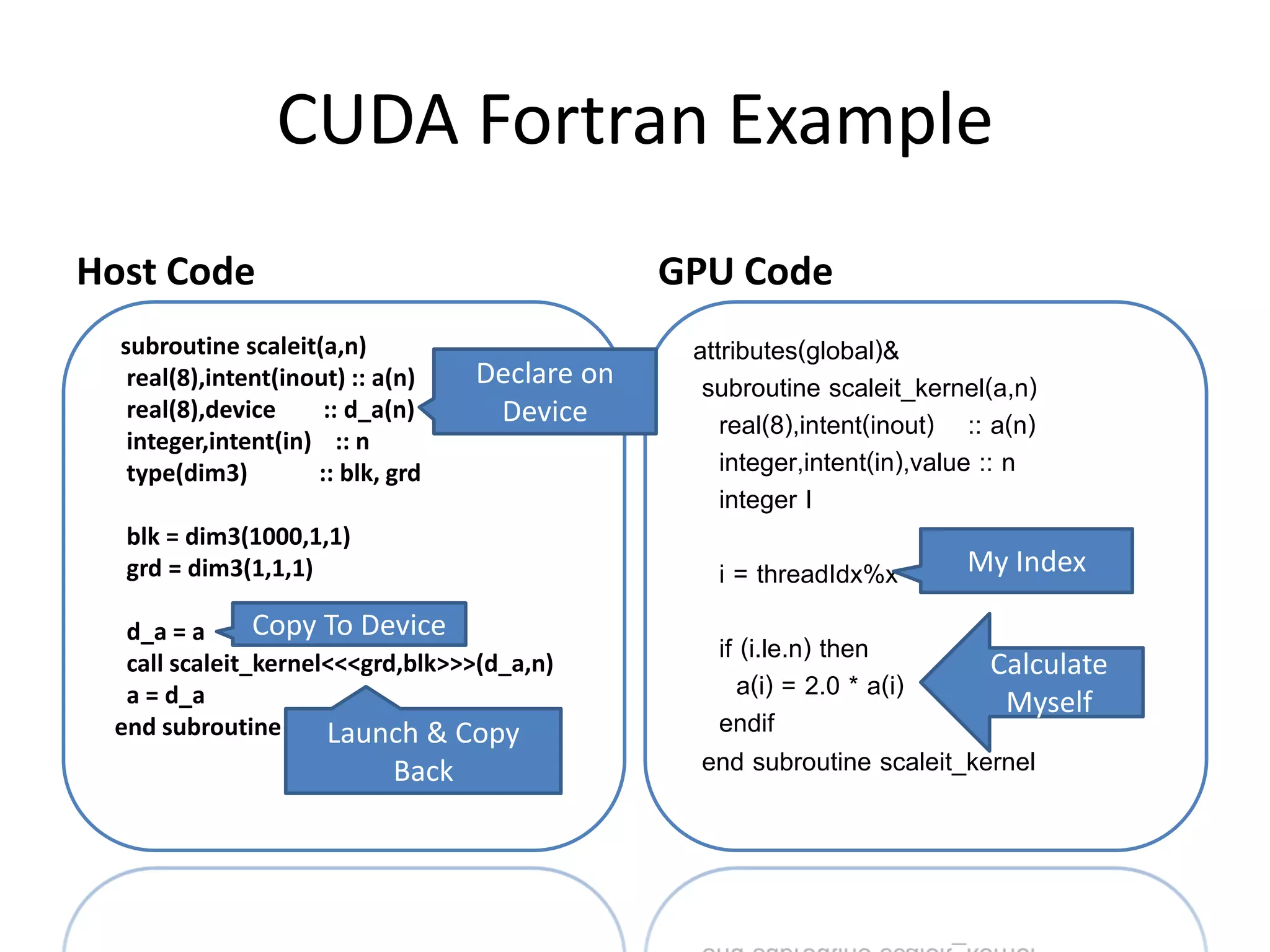
CUDA Fortran Example
Host Code                                        GPU Code
  subroutine scaleit(a,n)                         attributes(global)&
   real(8),intent(inout) :: a(n)    Declare on     subroutine scaleit_kernel(a,n)
   real(8),device     :: d_a(n)      Device          real(8),intent(inout) :: a(n)
   integer,intent(in) :: n
   type(dim3)        :: blk, grd                     integer,intent(in),value :: n
                                                     integer I
  blk = dim3(1000,1,1)
  grd = dim3(1,1,1)                                 i = threadIdx%x        My Index

  d_a = a      Copy To Device
  call scaleit_kernel<<<grd,blk>>>(d_a,n)
                                                    if (i.le.n) then        Calculate
  a = d_a                                              a(i) = 2.0 * a(i)     Myself
 end subroutine scaleit
                     Launch & Copy                  endif
                             Back                  end subroutine scaleit_kernel
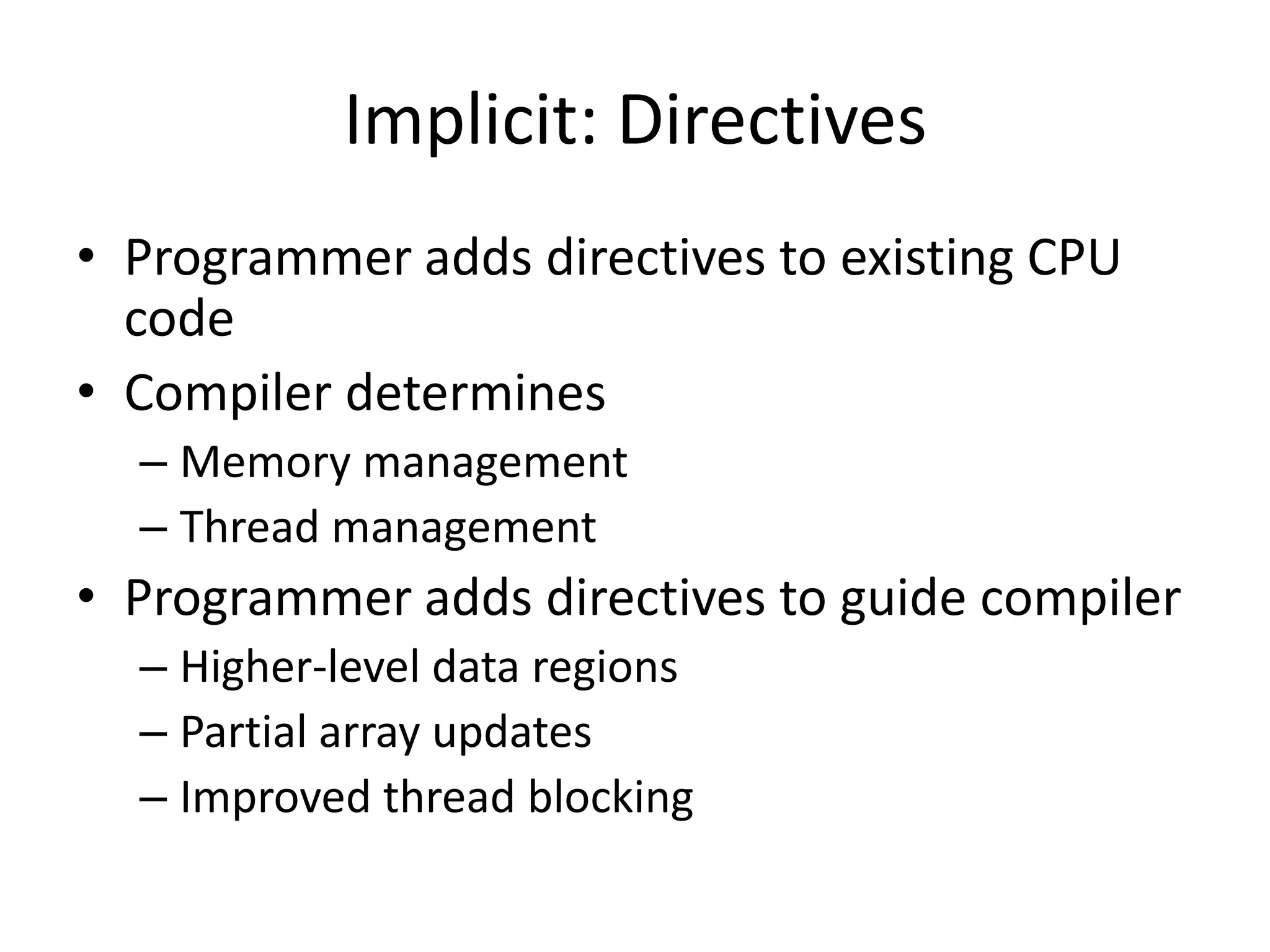
Implicit: Directives
• Programmer adds directives to existing CPU
  code
• Compiler determines
  – Memory management
  – Thread management
• Programmer adds directives to guide compiler
  – Higher-level data regions
  – Partial array updates
  – Improved thread blocking
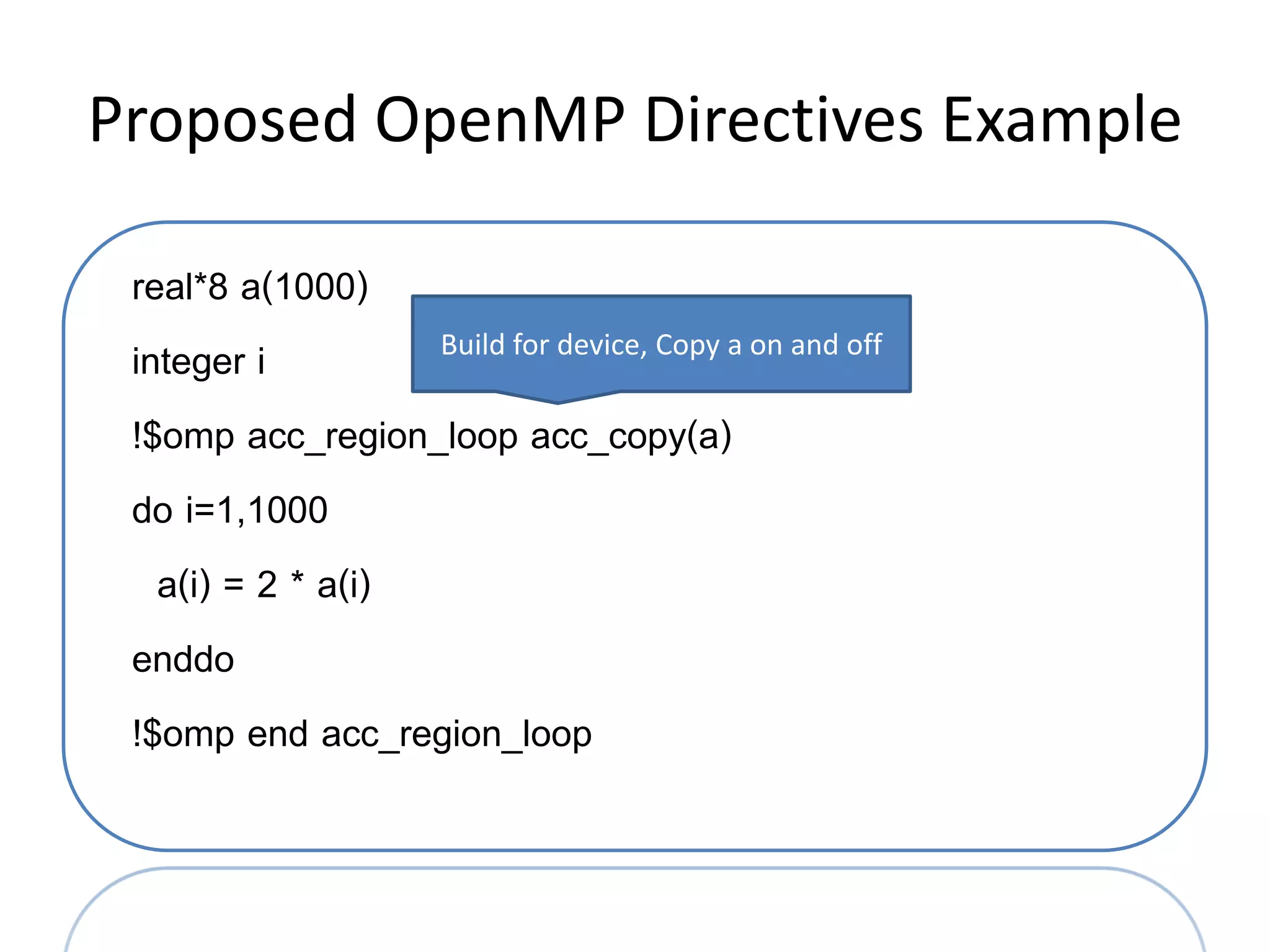
Proposed OpenMP Directives Example

 real*8 a(1000)
 integer i         Build for device, Copy a on and off

 !$omp acc_region_loop acc_copy(a)
 do i=1,1000
   a(i) = 2 * a(i)
 enddo
 !$omp end acc_region_loop
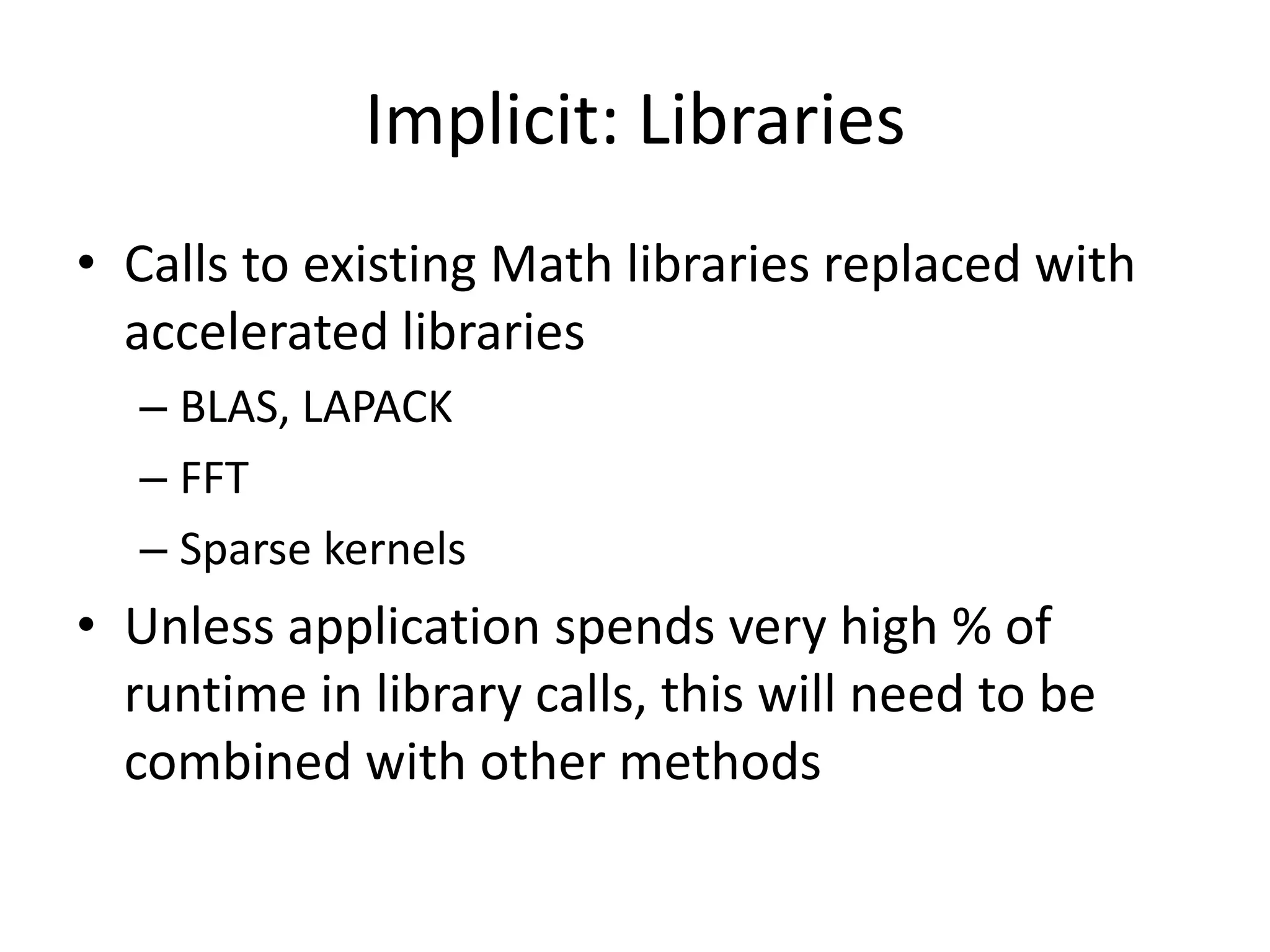
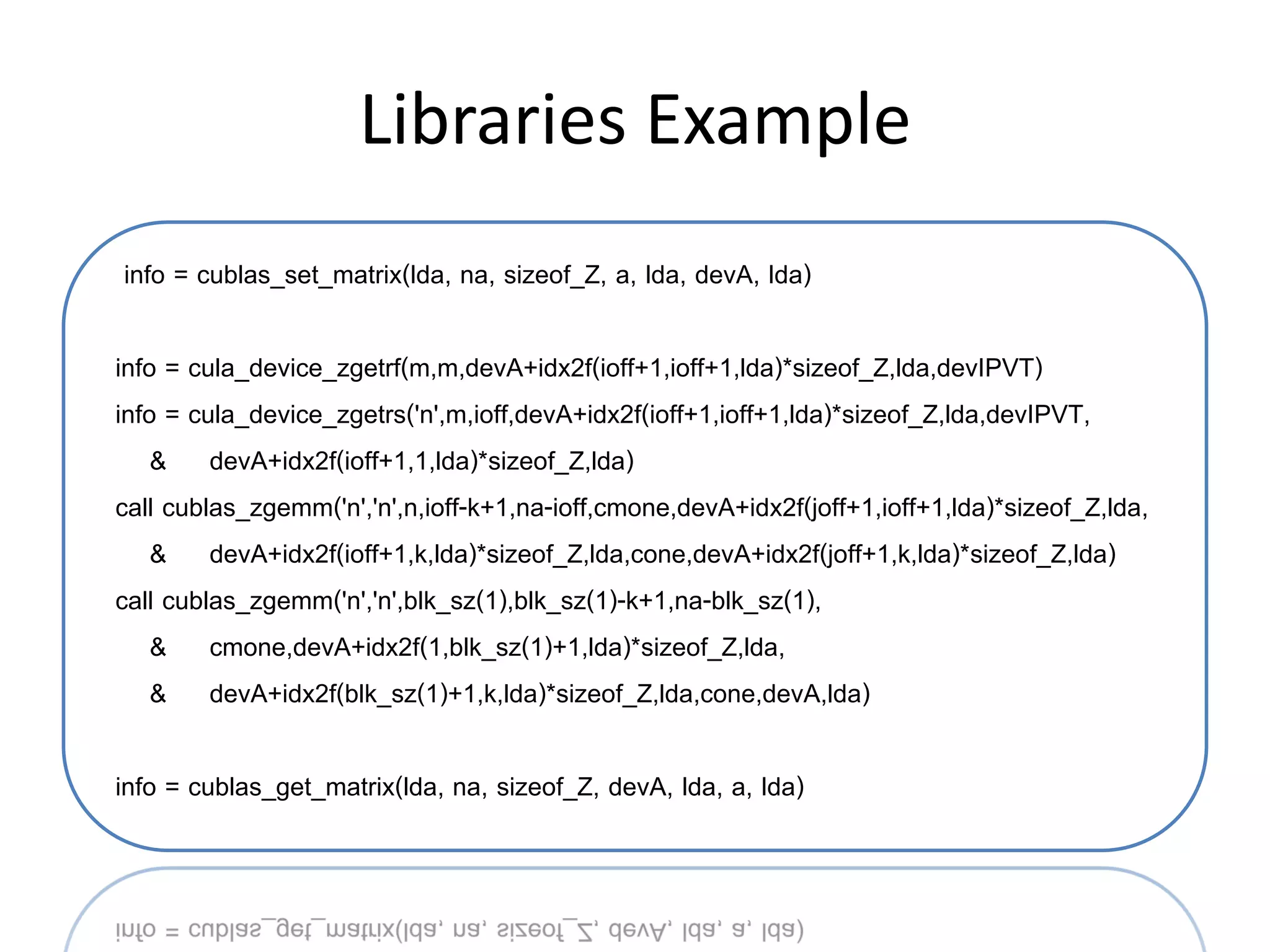
Implicit: Libraries
• Calls to existing Math libraries replaced with
  accelerated libraries
  – BLAS, LAPACK
  – FFT
  – Sparse kernels
• Unless application spends very high % of
  runtime in library calls, this will need to be
  combined with other methods
Libraries Example
info = cublas_set_matrix(lda, na, sizeof_Z, a, lda, devA, lda)

info = cula_device_zgetrf(m,m,devA+idx2f(ioff+1,ioff+1,lda)*sizeof_Z,lda,devIPVT)
info = cula_device_zgetrs('n',m,ioff,devA+idx2f(ioff+1,ioff+1,lda)*sizeof_Z,lda,devIPVT,
    & devA+idx2f(ioff+1,1,lda)*sizeof_Z,lda)
call cublas_zgemm('n','n',n,ioff-k+1,na-ioff,cmone,devA+idx2f(joff+1,ioff+1,lda)*sizeof_Z,lda,
    & devA+idx2f(ioff+1,k,lda)*sizeof_Z,lda,cone,devA+idx2f(joff+1,k,lda)*sizeof_Z,lda)
call cublas_zgemm('n','n',blk_sz(1),blk_sz(1)-k+1,na-blk_sz(1),
    & cmone,devA+idx2f(1,blk_sz(1)+1,lda)*sizeof_Z,lda,
    & devA+idx2f(blk_sz(1)+1,k,lda)*sizeof_Z,lda,cone,devA,lda)

info = cublas_get_matrix(lda, na, sizeof_Z, devA, lda, a, lda)
PERFORMANCE ANALYSIS
Section Goals
• Understand multiple options for gathering
  GPU performance metrics

• Increasing number of tools available, I’ll cover
  3 methods
  – Explicit event instrumentation
  – CUDA Profiler
  – CrayPAT Preview
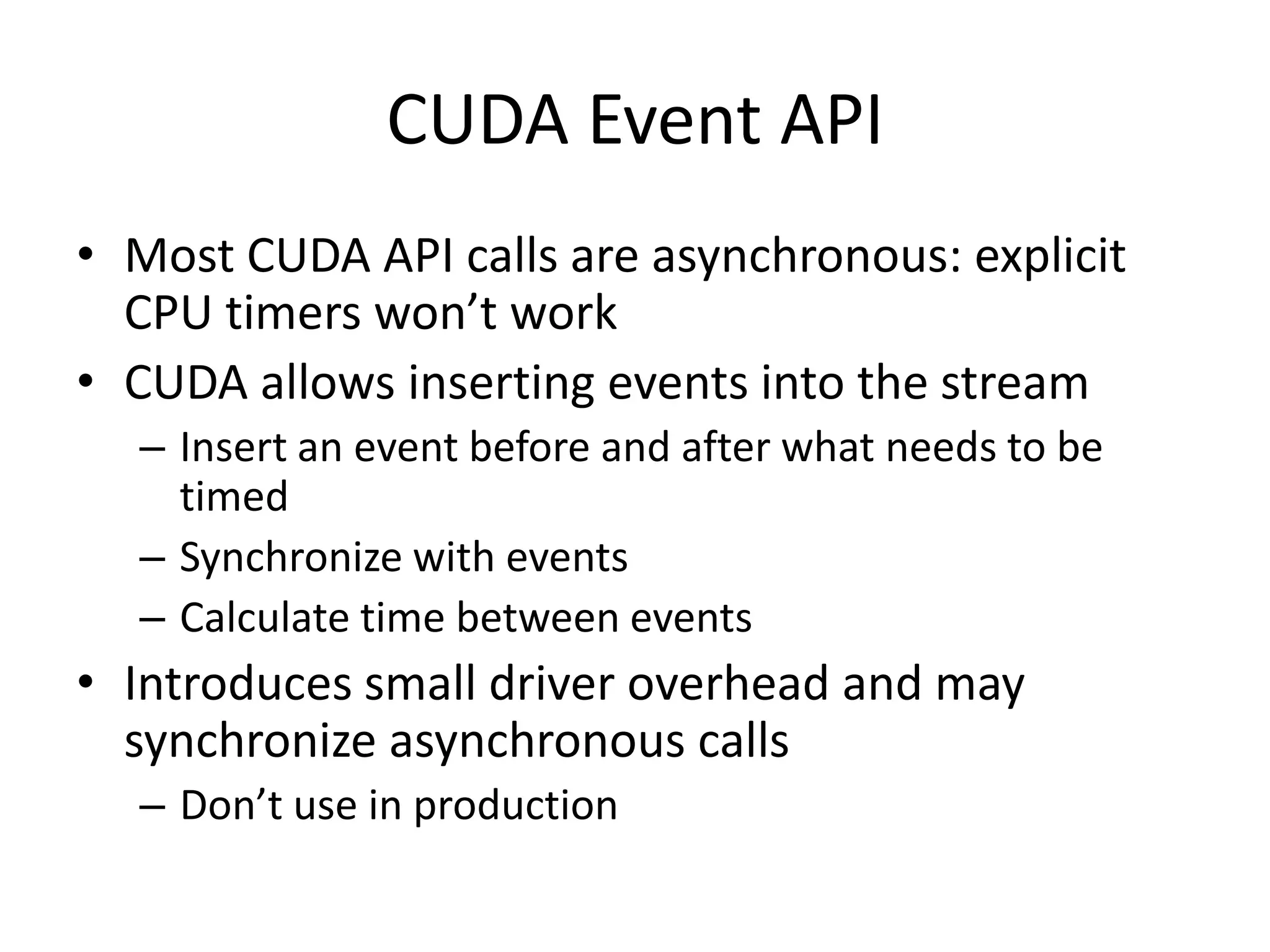
CUDA Event API
• Most CUDA API calls are asynchronous: explicit
  CPU timers won’t work
• CUDA allows inserting events into the stream
  – Insert an event before and after what needs to be
    timed
  – Synchronize with events
  – Calculate time between events
• Introduces small driver overhead and may
  synchronize asynchronous calls
  – Don’t use in production
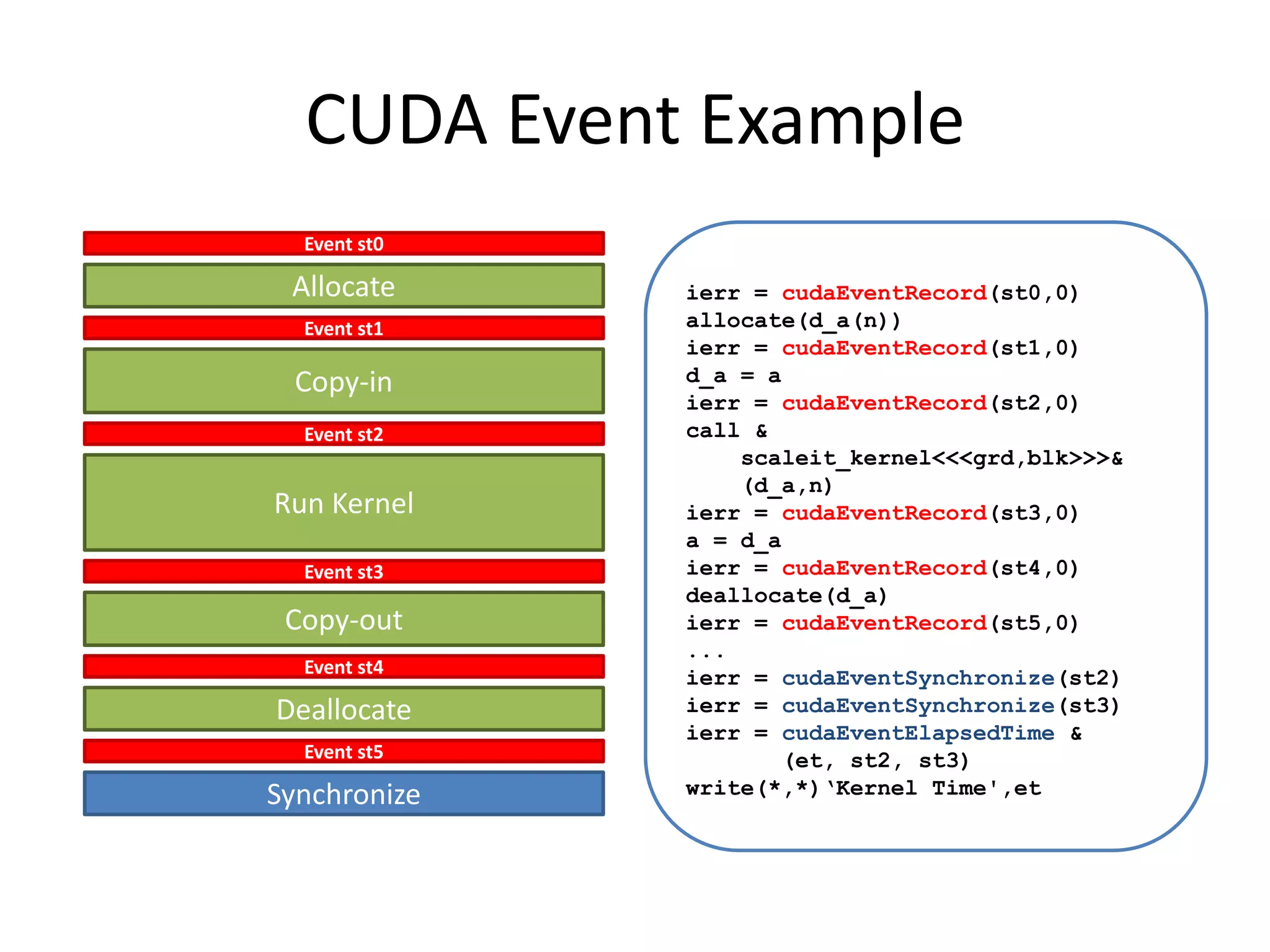
CUDA Event Example
  Event st0

 Allocate     ierr = cudaEventRecord(st0,0)
  Event st1   allocate(d_a(n))
              ierr = cudaEventRecord(st1,0)
 Copy-in      d_a = a
              ierr = cudaEventRecord(st2,0)
  Event st2   call &
                  scaleit_kernel<<<grd,blk>>>&
                  (d_a,n)
Run Kernel    ierr = cudaEventRecord(st3,0)
              a = d_a
  Event st3   ierr = cudaEventRecord(st4,0)
              deallocate(d_a)
 Copy-out     ierr = cudaEventRecord(st5,0)
              ...
  Event st4
              ierr = cudaEventSynchronize(st2)
Deallocate    ierr = cudaEventSynchronize(st3)
              ierr = cudaEventElapsedTime &
  Event st5           (et, st2, st3)
Synchronize   write(*,*)‘Kernel Time',et
CUDA Profiler
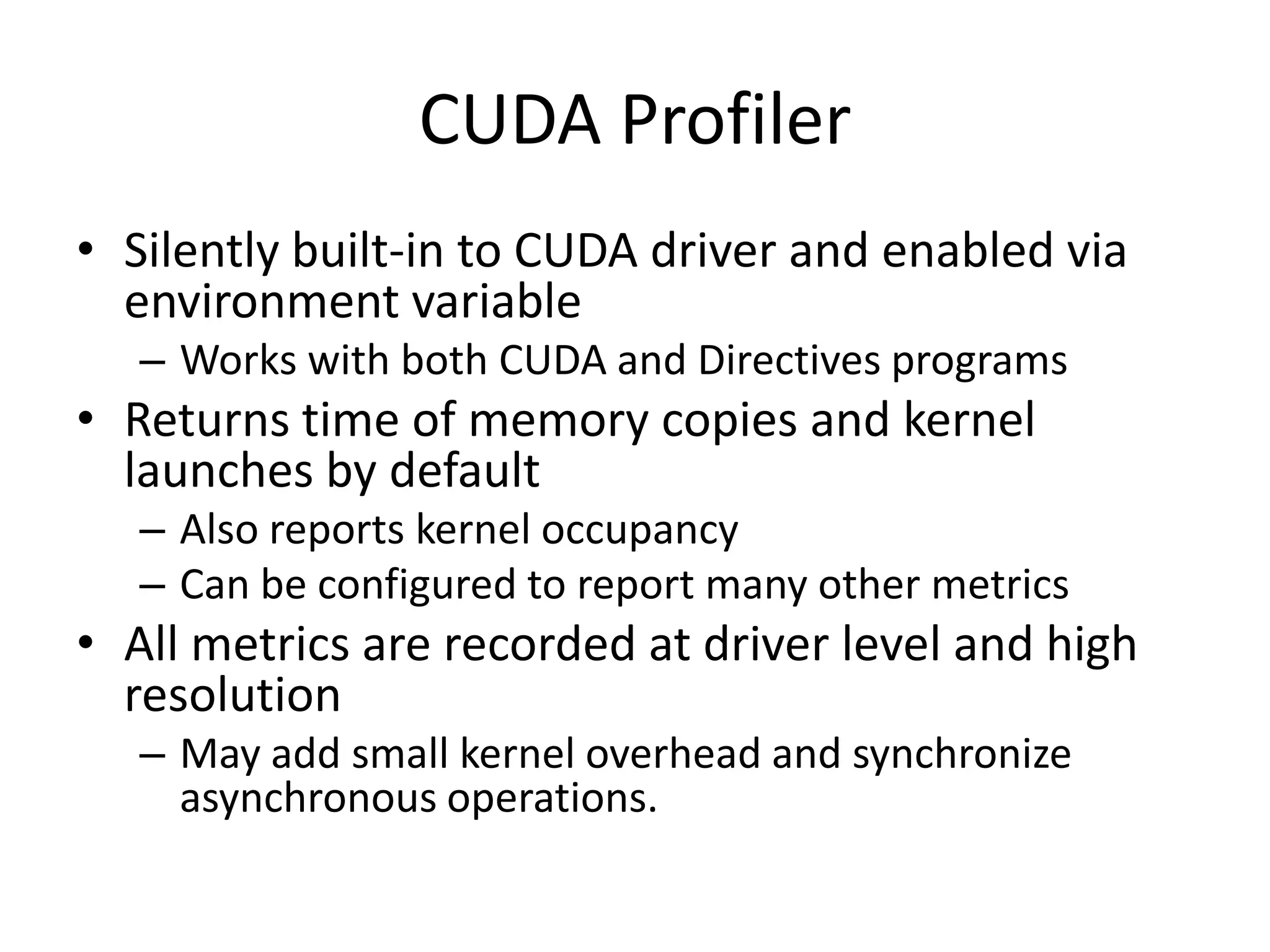
• Silently built-in to CUDA driver and enabled via
  environment variable
   – Works with both CUDA and Directives programs
• Returns time of memory copies and kernel
  launches by default
   – Also reports kernel occupancy
   – Can be configured to report many other metrics
• All metrics are recorded at driver level and high
  resolution
   – May add small kernel overhead and synchronize
     asynchronous operations.
CUDA Profiler Example
#   Enable Profiler
$   export CUDA_PROFILE=1
$   aprun ./a.out
$   cat cuda_profile_0.log

# CUDA_PROFILE_LOG_VERSION 2.0
# CUDA_DEVICE 0 Tesla M2090
# TIMESTAMPFACTOR fffff6f3e9b1f6c0
method,gputime,cputime,occupancy
method=[ memcpyHtoD ] gputime=[ 2.304 ] cputime=[ 23.000 ]
method=[ _Z14scaleit_kernelPdi ] gputime=[ 4.096 ] cputime=[
   15.000 ] occupancy=[ 0.667 ]
method=[ memcpyDtoH ] gputime=[ 3.072 ] cputime=[ 34.000 ]
CUDA Profiler Example
# Customize Experiment
$ cat exp.txt
l1_global_load_miss
l1_global_load_hit
$ export CUDA_PROFILE_CONFIG=exp.txt
$ aprun ./a.out
$ cat cuda_profile_0.log

# CUDA_PROFILE_LOG_VERSION 2.0
# CUDA_DEVICE 0 Tesla M2090
# TIMESTAMPFACTOR fffff6f4318519c8
method,gputime,cputime,occupancy,l1_global_load_miss,l1_global_load_hit
method=[ memcpyHtoD ] gputime=[ 2.240 ] cputime=[ 23.000 ]
method=[ _Z14scaleit_kernelPdi ] gputime=[ 4.000 ] cputime=[ 36.000 ]
   occupancy=[ 0.667 ] l1_global_load_miss=[ 63 ] l1_global_load_hit=[
   0 ]
method=[ memcpyDtoH ] gputime=[ 3.008 ] cputime=[ 33.000 ]
CrayPAT Prototype
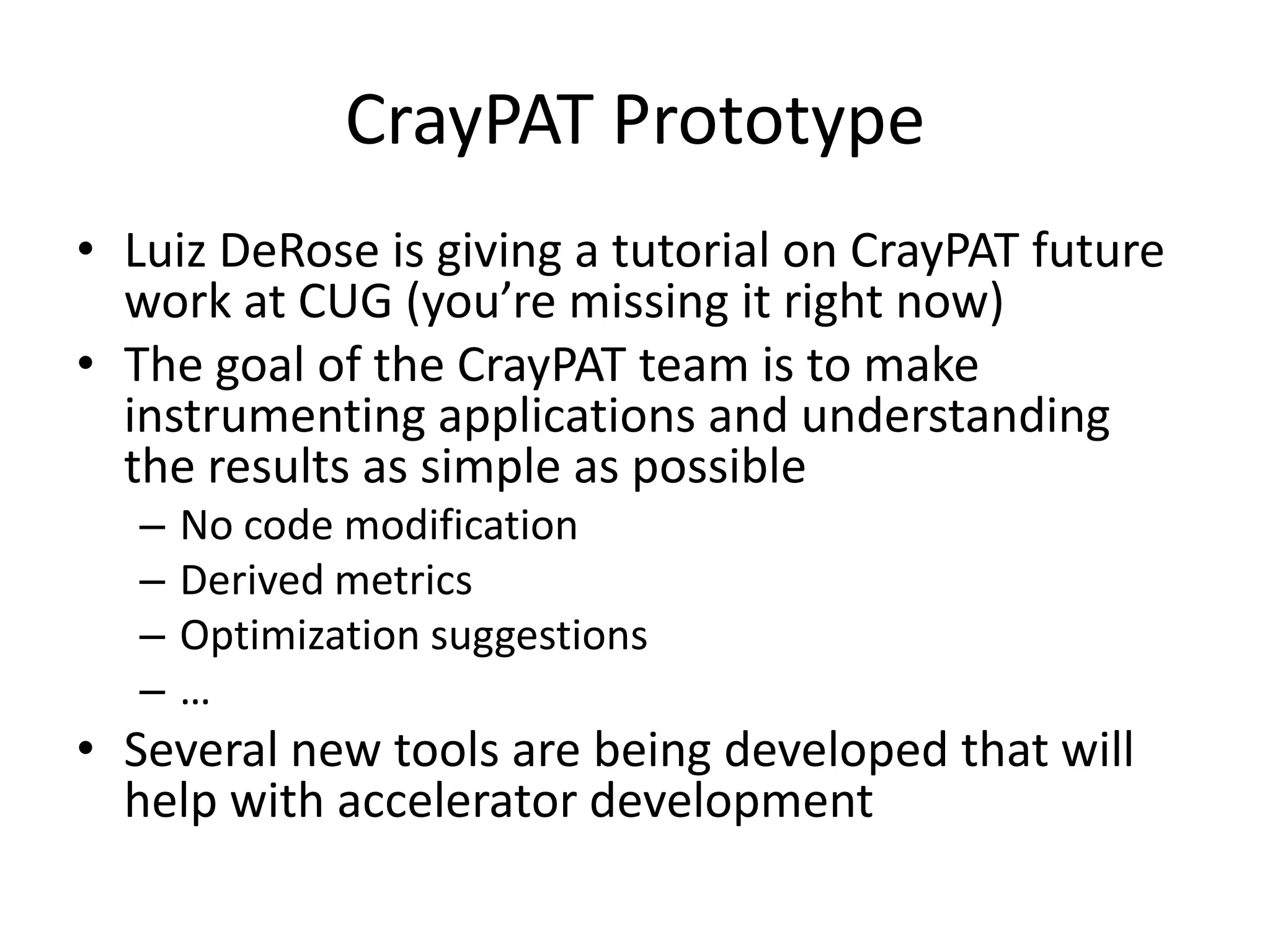
• Luiz DeRose is giving a tutorial on CrayPAT future
  work at CUG (you’re missing it right now)
• The goal of the CrayPAT team is to make
  instrumenting applications and understanding
  the results as simple as possible
   –   No code modification
   –   Derived metrics
   –   Optimization suggestions
   –   …
• Several new tools are being developed that will
  help with accelerator development
CrayPAT Preview: Performance Stats
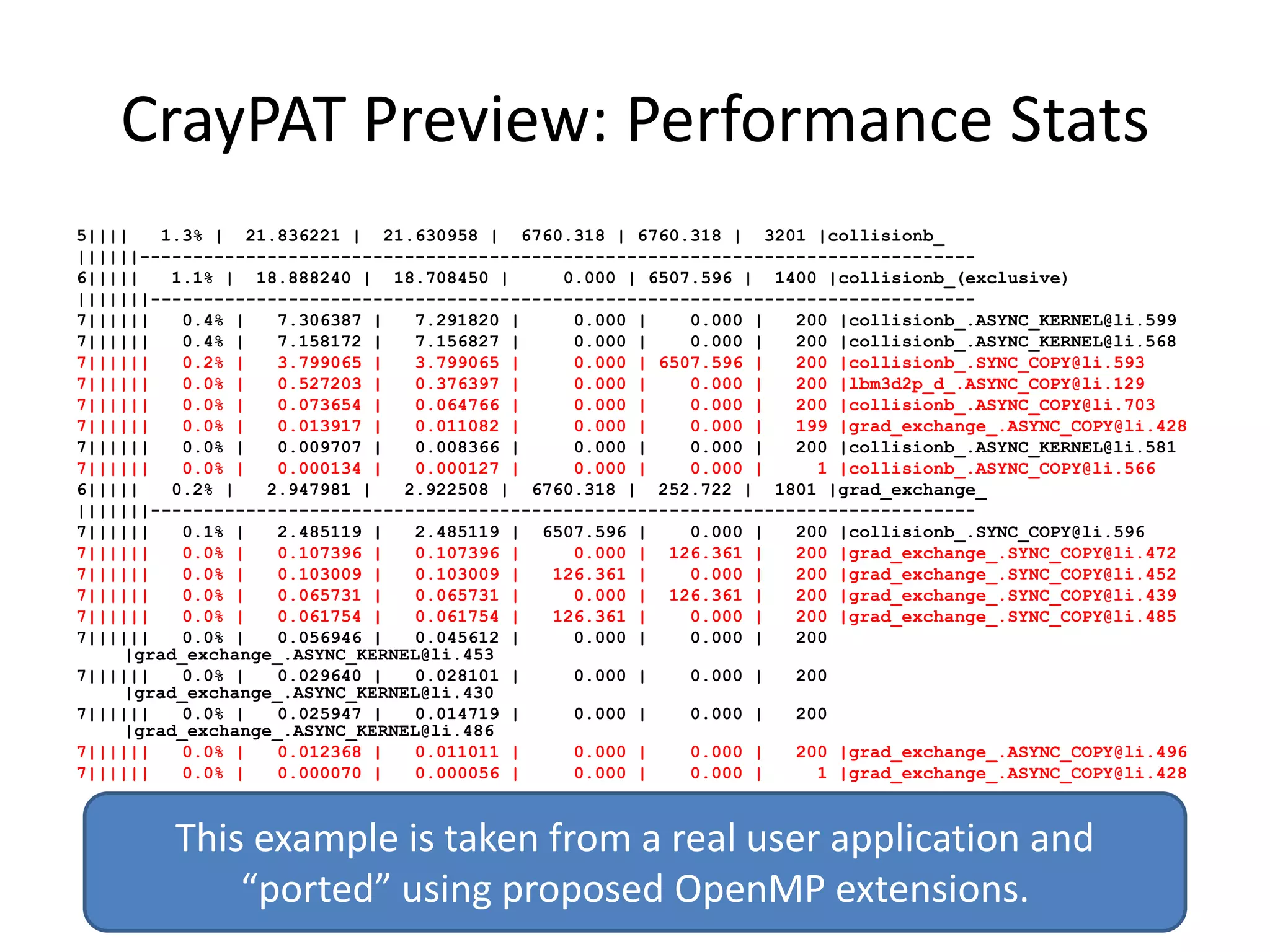
5||||    1.3% | 21.836221 | 21.630958 | 6760.318 | 6760.318 | 3201 |collisionb_
||||||-------------------------------------------------------------------------------
6|||||    1.1% | 18.888240 | 18.708450 |      0.000 | 6507.596 | 1400 |collisionb_(exclusive)
|||||||------------------------------------------------------------------------------
7||||||    0.4% |   7.306387 |   7.291820 |    0.000 |    0.000 |   200 |collisionb_.ASYNC_KERNEL@li.599
7||||||    0.4% |   7.158172 |   7.156827 |    0.000 |    0.000 |   200 |collisionb_.ASYNC_KERNEL@li.568
7||||||    0.2% |   3.799065 |   3.799065 |    0.000 | 6507.596 |   200 |collisionb_.SYNC_COPY@li.593
7||||||    0.0% |   0.527203 |   0.376397 |    0.000 |    0.000 |   200 |lbm3d2p_d_.ASYNC_COPY@li.129
7||||||    0.0% |   0.073654 |   0.064766 |    0.000 |    0.000 |   200 |collisionb_.ASYNC_COPY@li.703
7||||||    0.0% |   0.013917 |   0.011082 |    0.000 |    0.000 |   199 |grad_exchange_.ASYNC_COPY@li.428
7||||||    0.0% |   0.009707 |   0.008366 |    0.000 |    0.000 |   200 |collisionb_.ASYNC_KERNEL@li.581
7||||||    0.0% |   0.000134 |   0.000127 |    0.000 |    0.000 |     1 |collisionb_.ASYNC_COPY@li.566
6|||||    0.2% |   2.947981 |   2.922508 | 6760.318 | 252.722 | 1801 |grad_exchange_
|||||||------------------------------------------------------------------------------
7||||||    0.1% |   2.485119 |   2.485119 | 6507.596 |    0.000 |   200 |collisionb_.SYNC_COPY@li.596
7||||||    0.0% |   0.107396 |   0.107396 |    0.000 | 126.361 |    200 |grad_exchange_.SYNC_COPY@li.472
7||||||    0.0% |   0.103009 |   0.103009 |  126.361 |    0.000 |   200 |grad_exchange_.SYNC_COPY@li.452
7||||||    0.0% |   0.065731 |   0.065731 |    0.000 | 126.361 |    200 |grad_exchange_.SYNC_COPY@li.439
7||||||    0.0% |   0.061754 |   0.061754 |  126.361 |    0.000 |   200 |grad_exchange_.SYNC_COPY@li.485
7||||||    0.0% |   0.056946 |   0.045612 |    0.000 |    0.000 |   200
     |grad_exchange_.ASYNC_KERNEL@li.453
7||||||    0.0% |   0.029640 |   0.028101 |    0.000 |    0.000 |   200
     |grad_exchange_.ASYNC_KERNEL@li.430
7||||||    0.0% |   0.025947 |   0.014719 |    0.000 |    0.000 |   200
     |grad_exchange_.ASYNC_KERNEL@li.486
7||||||    0.0% |   0.012368 |   0.011011 |    0.000 |    0.000 |   200 |grad_exchange_.ASYNC_COPY@li.496
7||||||    0.0% |   0.000070 |   0.000056 |    0.000 |    0.000 |     1 |grad_exchange_.ASYNC_COPY@li.428


         This example is taken from a real user application and
             “ported” using proposed OpenMP extensions.
CrayPAT Preview: Data Transfer Stats
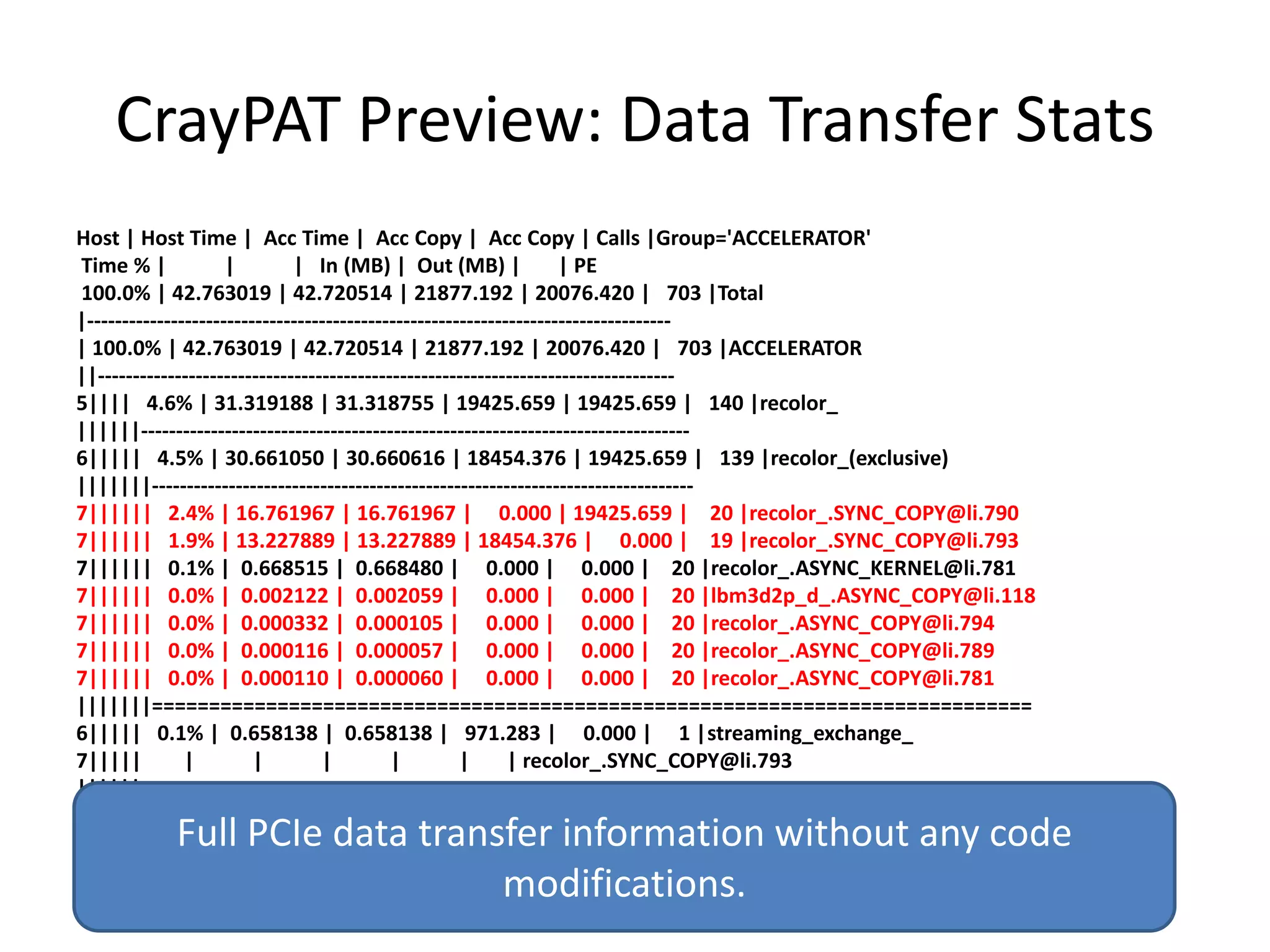
Host | Host Time | Acc Time | Acc Copy | Acc Copy | Calls |Group='ACCELERATOR'
Time % |             |        | In (MB) | Out (MB) |                | PE
100.0% | 42.763019 | 42.720514 | 21877.192 | 20076.420 | 703 |Total
|-----------------------------------------------------------------------------------
| 100.0% | 42.763019 | 42.720514 | 21877.192 | 20076.420 | 703 |ACCELERATOR
||----------------------------------------------------------------------------------
5|||| 4.6% | 31.319188 | 31.318755 | 19425.659 | 19425.659 | 140 |recolor_
||||||------------------------------------------------------------------------------
6||||| 4.5% | 30.661050 | 30.660616 | 18454.376 | 19425.659 | 139 |recolor_(exclusive)
|||||||-----------------------------------------------------------------------------
7|||||| 2.4% | 16.761967 | 16.761967 | 0.000 | 19425.659 | 20 |recolor_.SYNC_COPY@li.790
7|||||| 1.9% | 13.227889 | 13.227889 | 18454.376 | 0.000 | 19 |recolor_.SYNC_COPY@li.793
7|||||| 0.1% | 0.668515 | 0.668480 | 0.000 | 0.000 | 20 |recolor_.ASYNC_KERNEL@li.781
7|||||| 0.0% | 0.002122 | 0.002059 | 0.000 | 0.000 | 20 |lbm3d2p_d_.ASYNC_COPY@li.118
7|||||| 0.0% | 0.000332 | 0.000105 | 0.000 | 0.000 | 20 |recolor_.ASYNC_COPY@li.794
7|||||| 0.0% | 0.000116 | 0.000057 | 0.000 | 0.000 | 20 |recolor_.ASYNC_COPY@li.789
7|||||| 0.0% | 0.000110 | 0.000060 | 0.000 | 0.000 | 20 |recolor_.ASYNC_COPY@li.781
|||||||=============================================================================
6||||| 0.1% | 0.658138 | 0.658138 | 971.283 | 0.000 | 1 |streaming_exchange_
7|||||         |         |        |         |         |      | recolor_.SYNC_COPY@li.793
||||||==============================================================================

         Full PCIe data transfer information without any code
                             modifications.
Cray Tools: More Information
• Cray is developing a lot of tools that deserve
  more time than this tutorial allows, so…

• Go to “Cray GPU Programming Tools” BOF at
  4:15 on Wednesday (Track 15B)
• Talk to Luiz DeRose and/or Heidi Poxon while
  you’re here.
BASIC OPTIMIZATIONS
Basic Optimizations

OCCUPANCY
Calculating Occupancy
• Occupancy is the degree to which the hardware is
  saturated by your kernel
  – Generally higher occupancy results in higher
    performance
• Heavily affected by
  – Thread decomposition
  – Register usage
  – Shared memory use
• Nvidia provides an “occupancy calculator”
  spreadsheet as part of the SDK
  – Live example to follow
Calculating Occupancy
1. Get the register count
ptxas info    : Compiling entry function
   'laplace_sphere_wk_kernel3' for 'sm_20'
ptxas info    : Used 36 registers, 7808+0 bytes
   smem, 88 bytes cmem[0], 768 bytes cmem[2]
2. Get the thread decomposition
blockdim = dim3( 4, 4, 26)
griddim = dim3(101, 16, 1)
3. Enter into occupancy calculator

Result: 54%
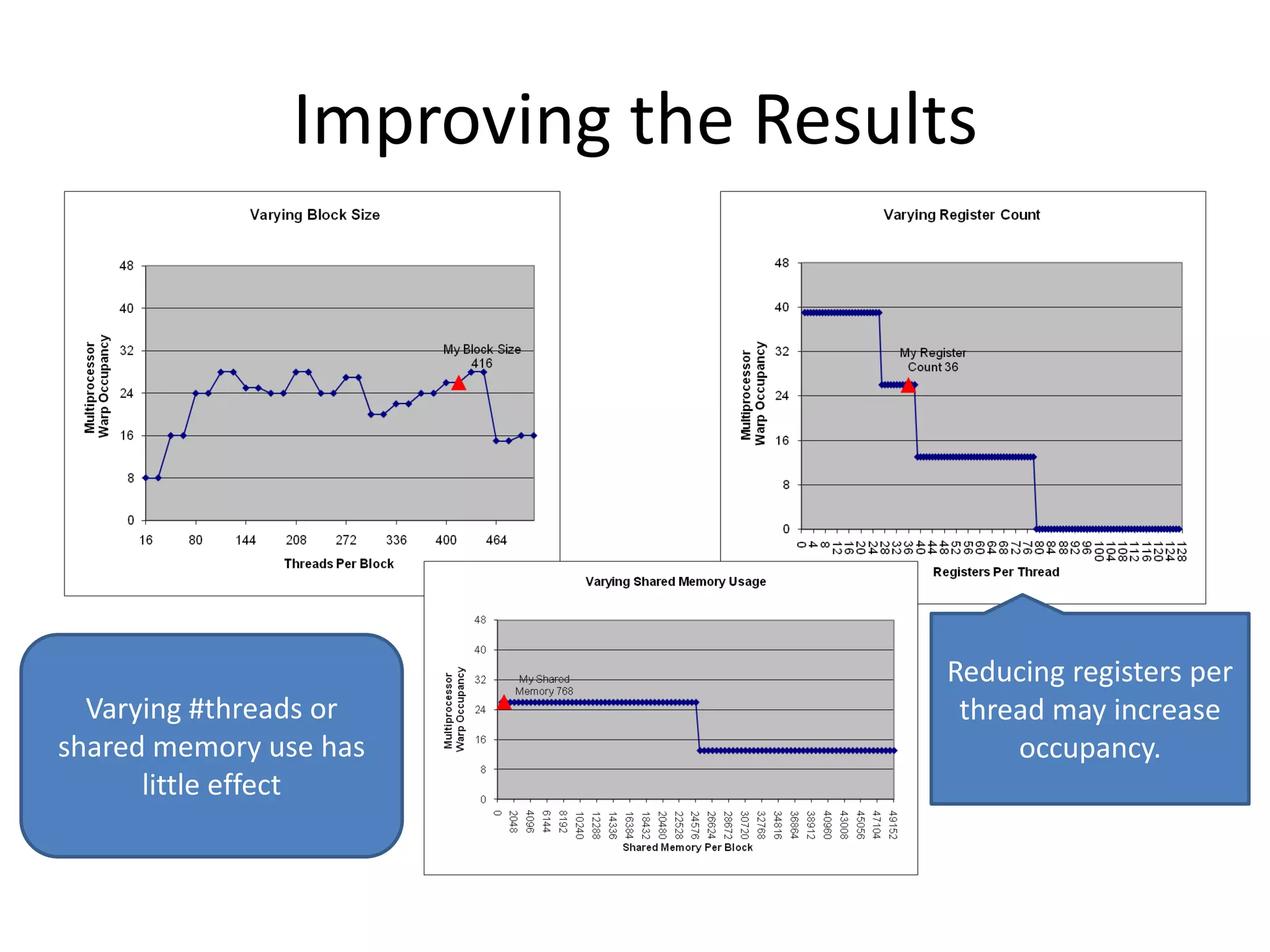
Improving the Results


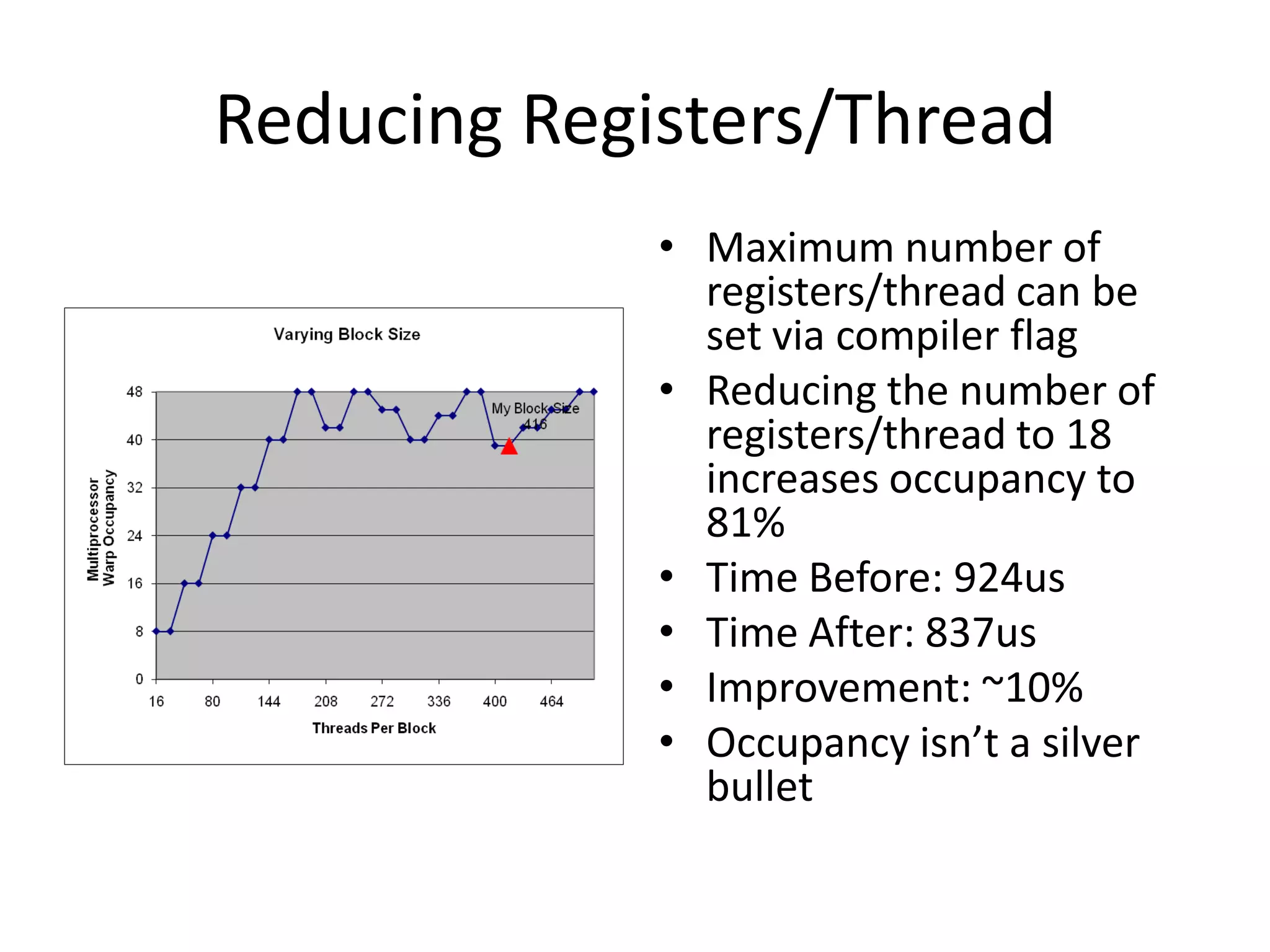
                                    Reducing registers per
  Varying #threads or                thread may increase
shared memory use has                    occupancy.
      little effect
Reducing Registers/Thread
             • Maximum number of
               registers/thread can be
               set via compiler flag
             • Reducing the number of
               registers/thread to 18
               increases occupancy to
               81%
             • Time Before: 924us
             • Time After: 837us
             • Improvement: ~10%
             • Occupancy isn’t a silver
               bullet
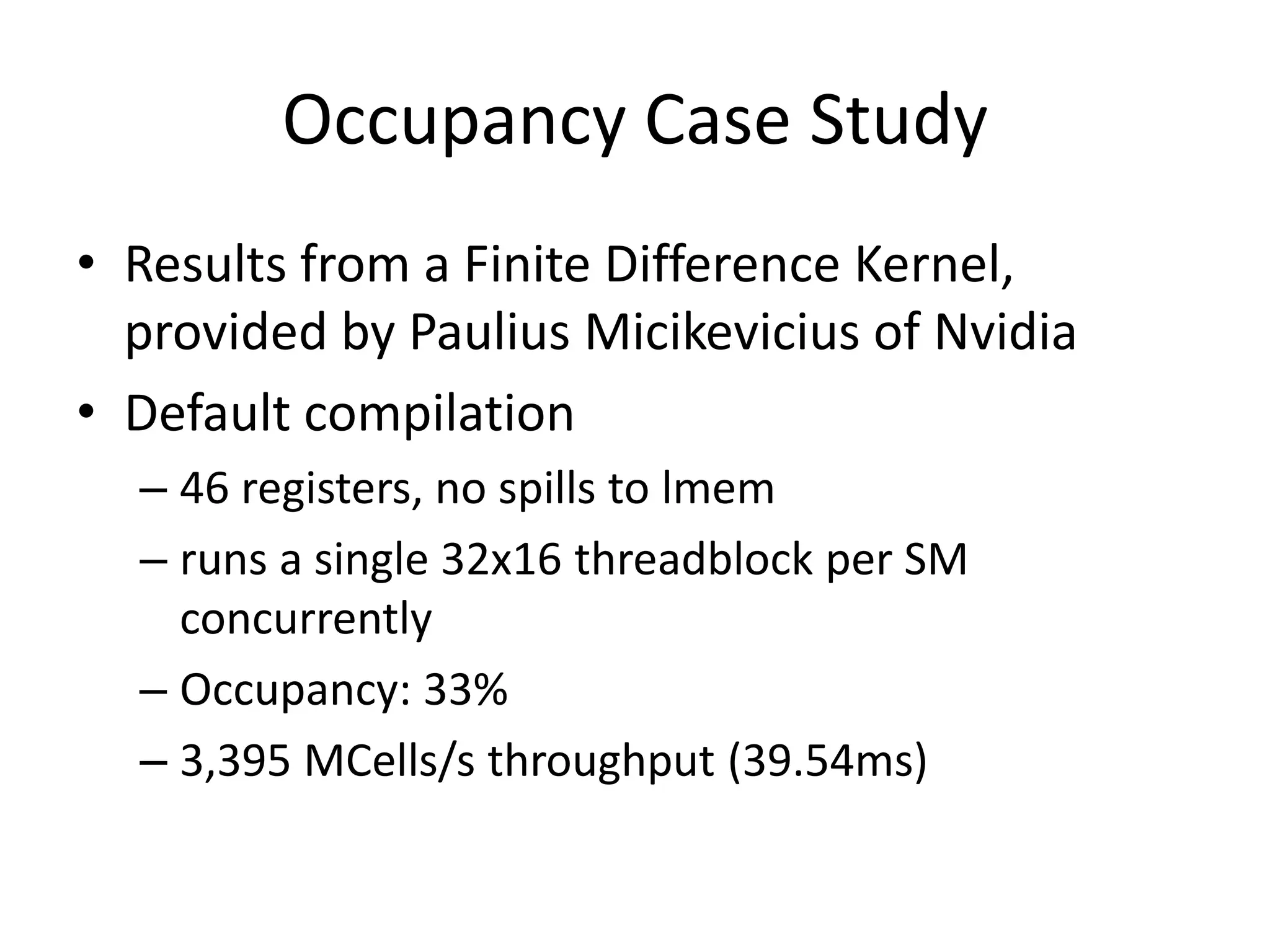
Occupancy Case Study
• Results from a Finite Difference Kernel,
  provided by Paulius Micikevicius of Nvidia
• Default compilation
  – 46 registers, no spills to lmem
  – runs a single 32x16 threadblock per SM
    concurrently
  – Occupancy: 33%
  – 3,395 MCells/s throughput (39.54ms)
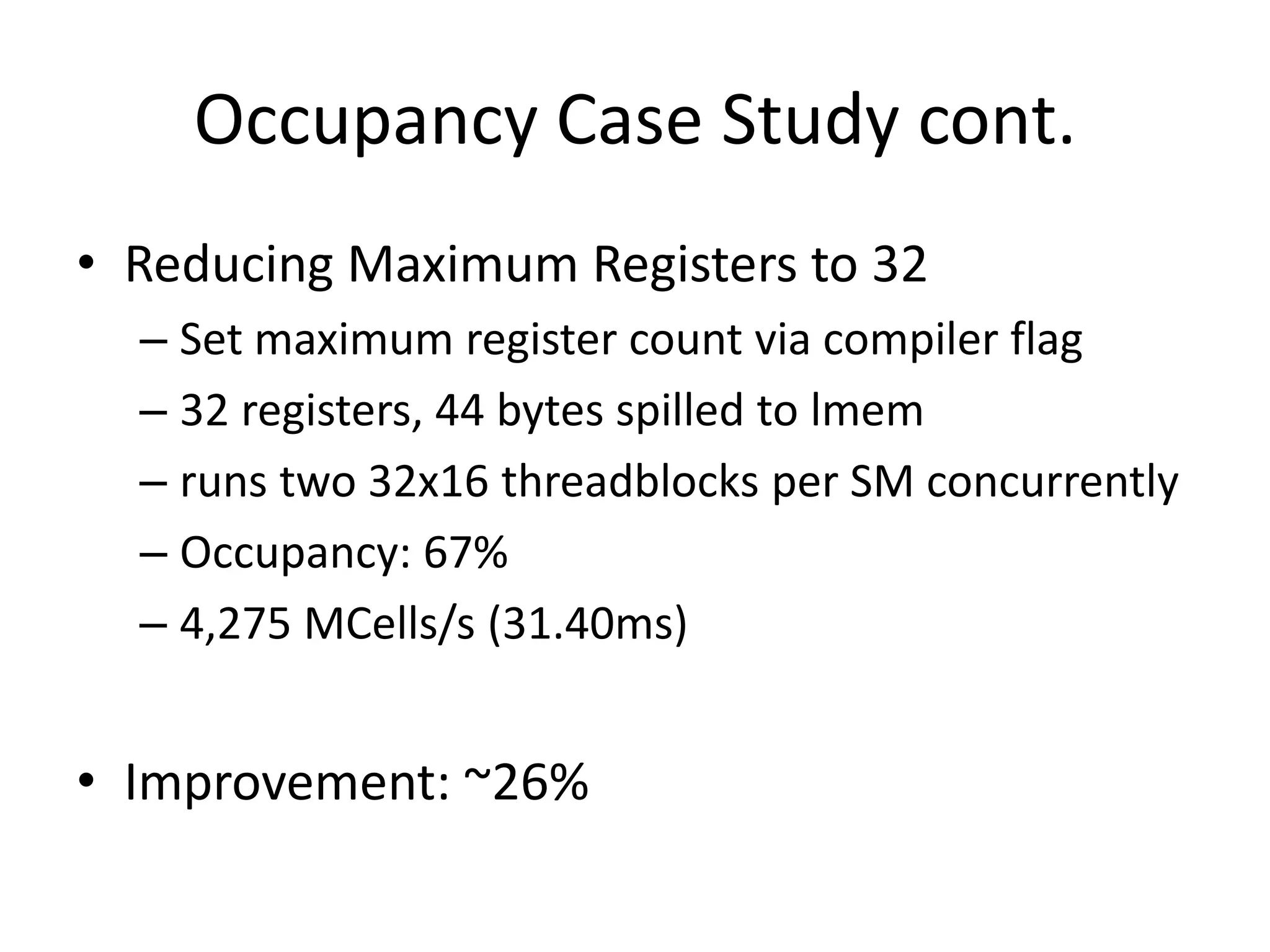
Occupancy Case Study cont.
• Reducing Maximum Registers to 32
  – Set maximum register count via compiler flag
  – 32 registers, 44 bytes spilled to lmem
  – runs two 32x16 threadblocks per SM concurrently
  – Occupancy: 67%
  – 4,275 MCells/s (31.40ms)


• Improvement: ~26%
Basic Optimizations

ASYNCHRONICITY
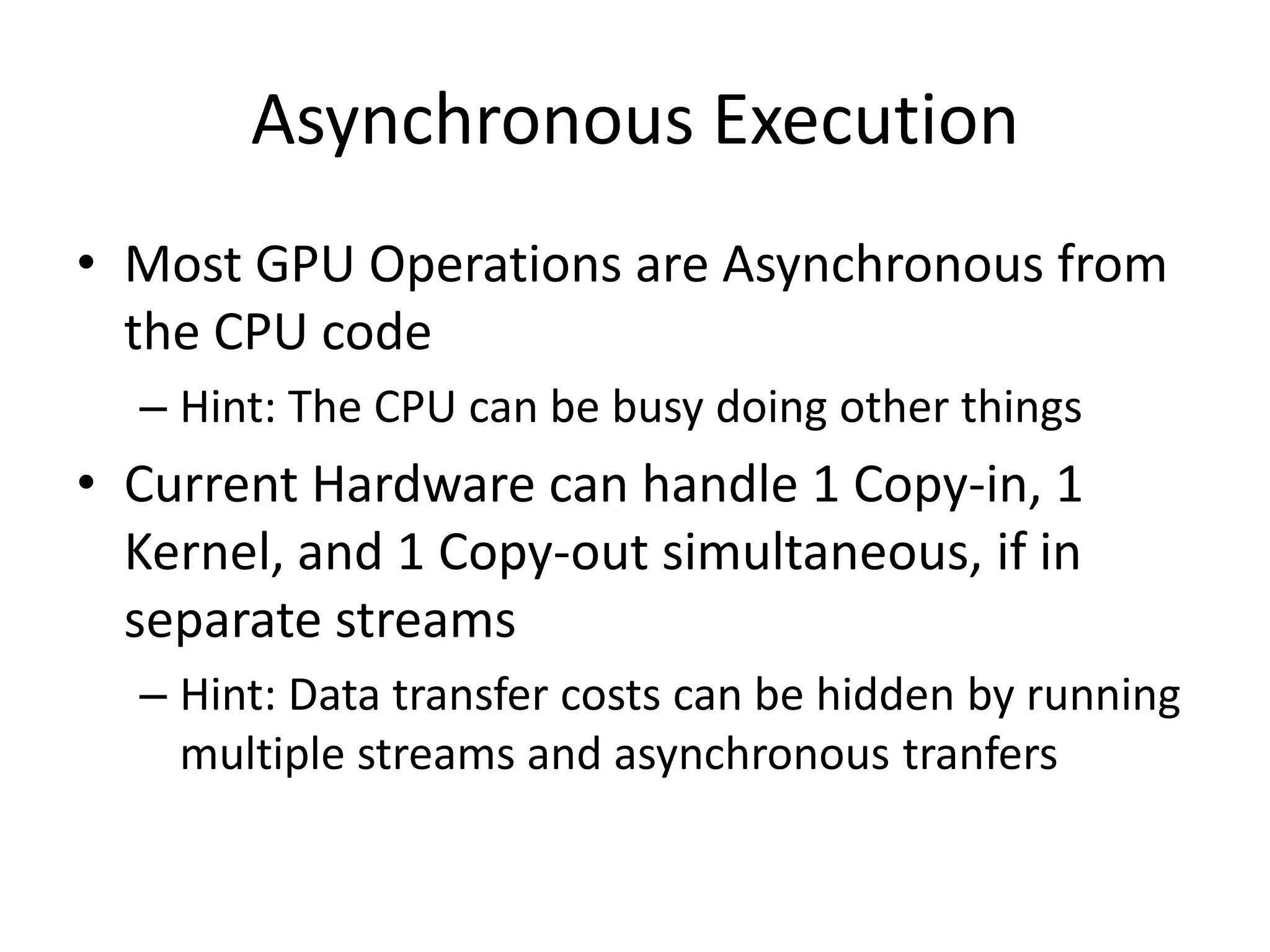
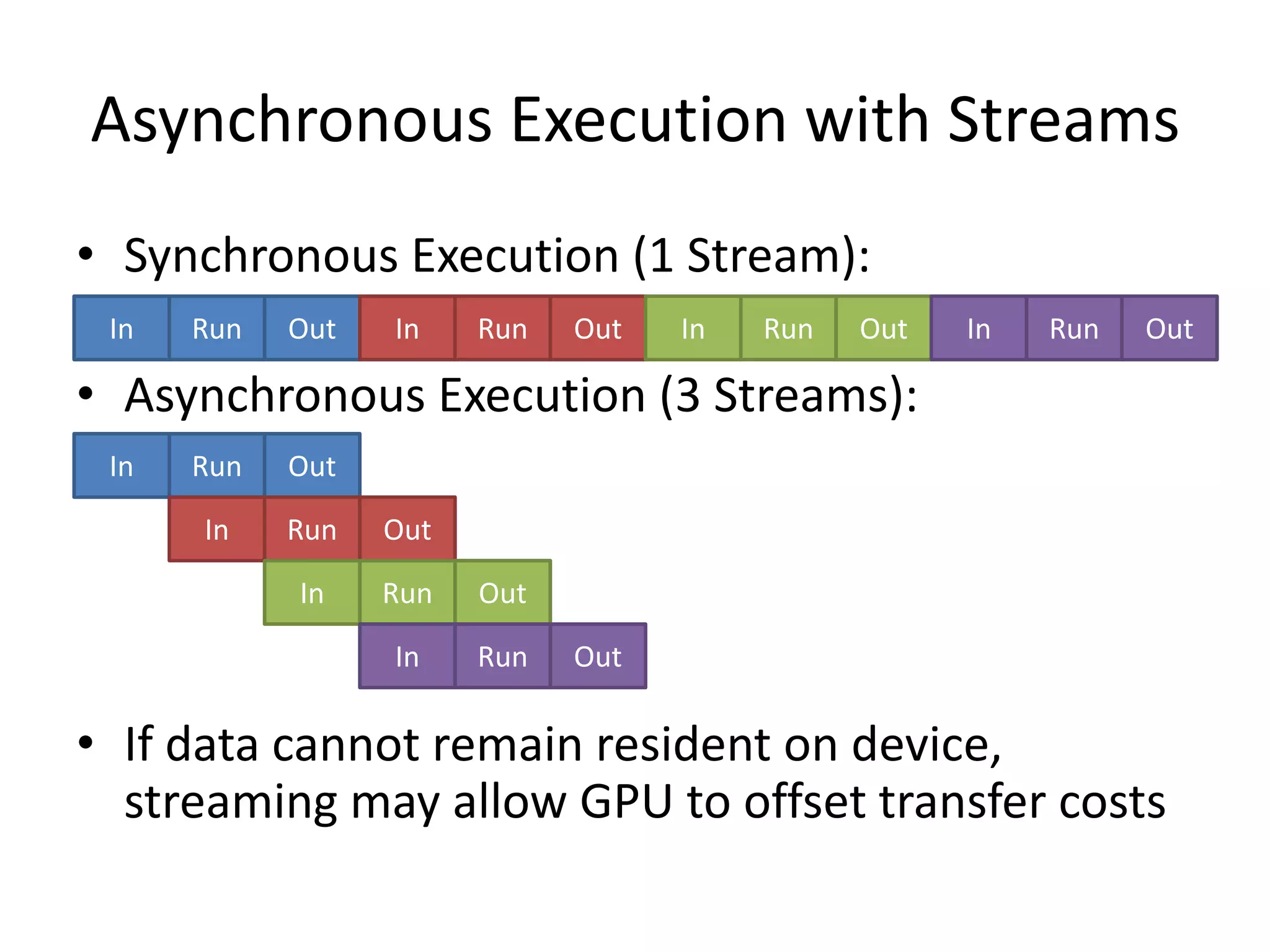
Asynchronous Execution
• Most GPU Operations are Asynchronous from
  the CPU code
  – Hint: The CPU can be busy doing other things
• Current Hardware can handle 1 Copy-in, 1
  Kernel, and 1 Copy-out simultaneous, if in
  separate streams
  – Hint: Data transfer costs can be hidden by running
    multiple streams and asynchronous tranfers
Asynchronous Execution with Streams
• Synchronous Execution (1 Stream):
 In   Run   Out   In    Run   Out   In   Run   Out   In   Run   Out

• Asynchronous Execution (3 Streams):
 In   Run   Out

      In    Run   Out
            In    Run   Out

                  In    Run   Out

• If data cannot remain resident on device,
  streaming may allow GPU to offset transfer costs
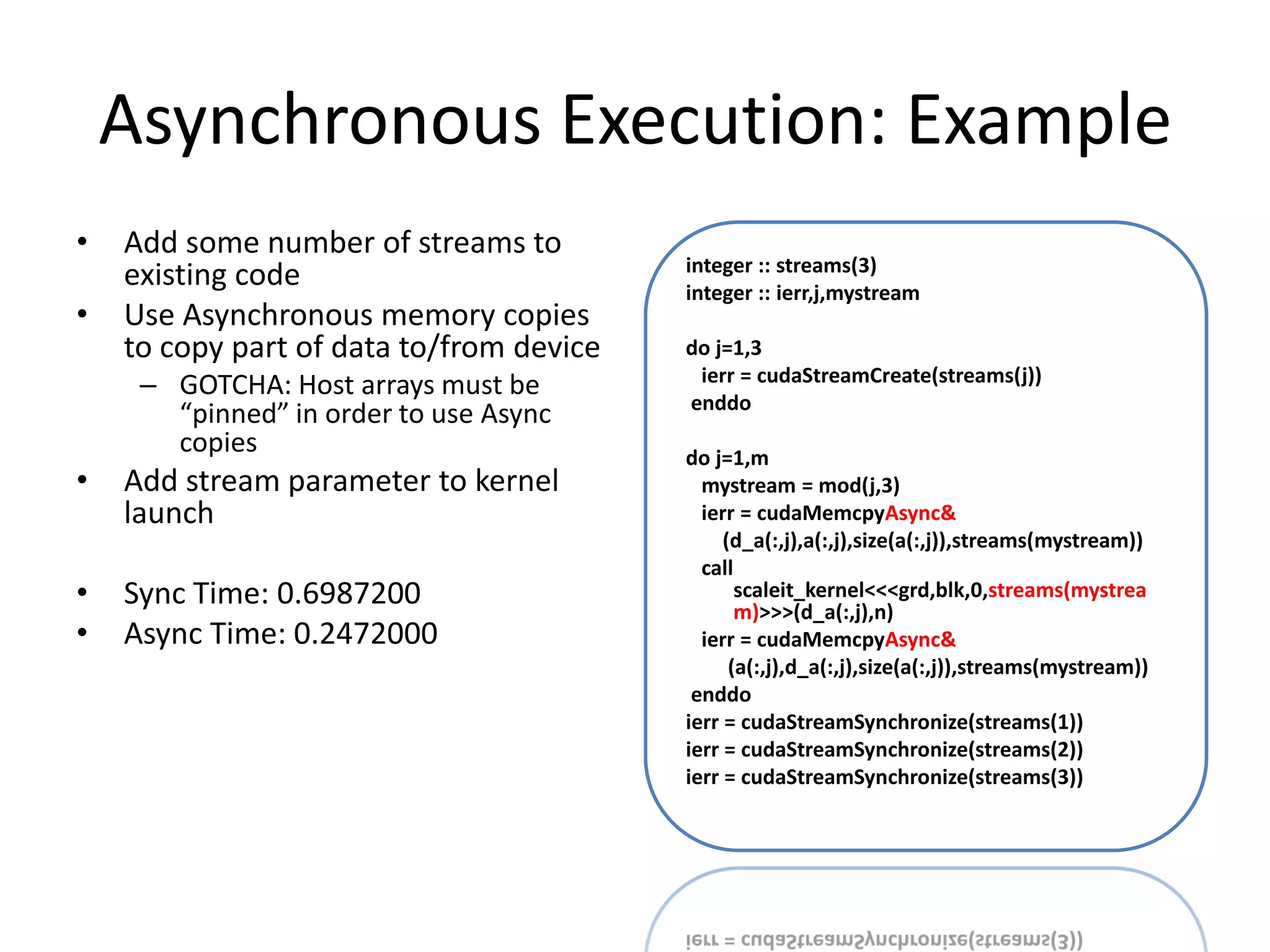
Asynchronous Execution: Example
•   Add some number of streams to
                                          integer :: streams(3)
    existing code                         integer :: ierr,j,mystream
•   Use Asynchronous memory copies
    to copy part of data to/from device   do j=1,3
                                           ierr = cudaStreamCreate(streams(j))
     – GOTCHA: Host arrays must be
                                          enddo
       “pinned” in order to use Async
       copies                             do j=1,m
•   Add stream parameter to kernel          mystream = mod(j,3)
    launch                                  ierr = cudaMemcpyAsync&
                                               (d_a(:,j),a(:,j),size(a(:,j)),streams(mystream))
                                            call
•   Sync Time: 0.6987200                         scaleit_kernel<<<grd,blk,0,streams(mystrea
                                                 m)>>>(d_a(:,j),n)
•   Async Time: 0.2472000                   ierr = cudaMemcpyAsync&
                                                (a(:,j),d_a(:,j),size(a(:,j)),streams(mystream))
                                           enddo
                                          ierr = cudaStreamSynchronize(streams(1))
                                          ierr = cudaStreamSynchronize(streams(2))
                                          ierr = cudaStreamSynchronize(streams(3))
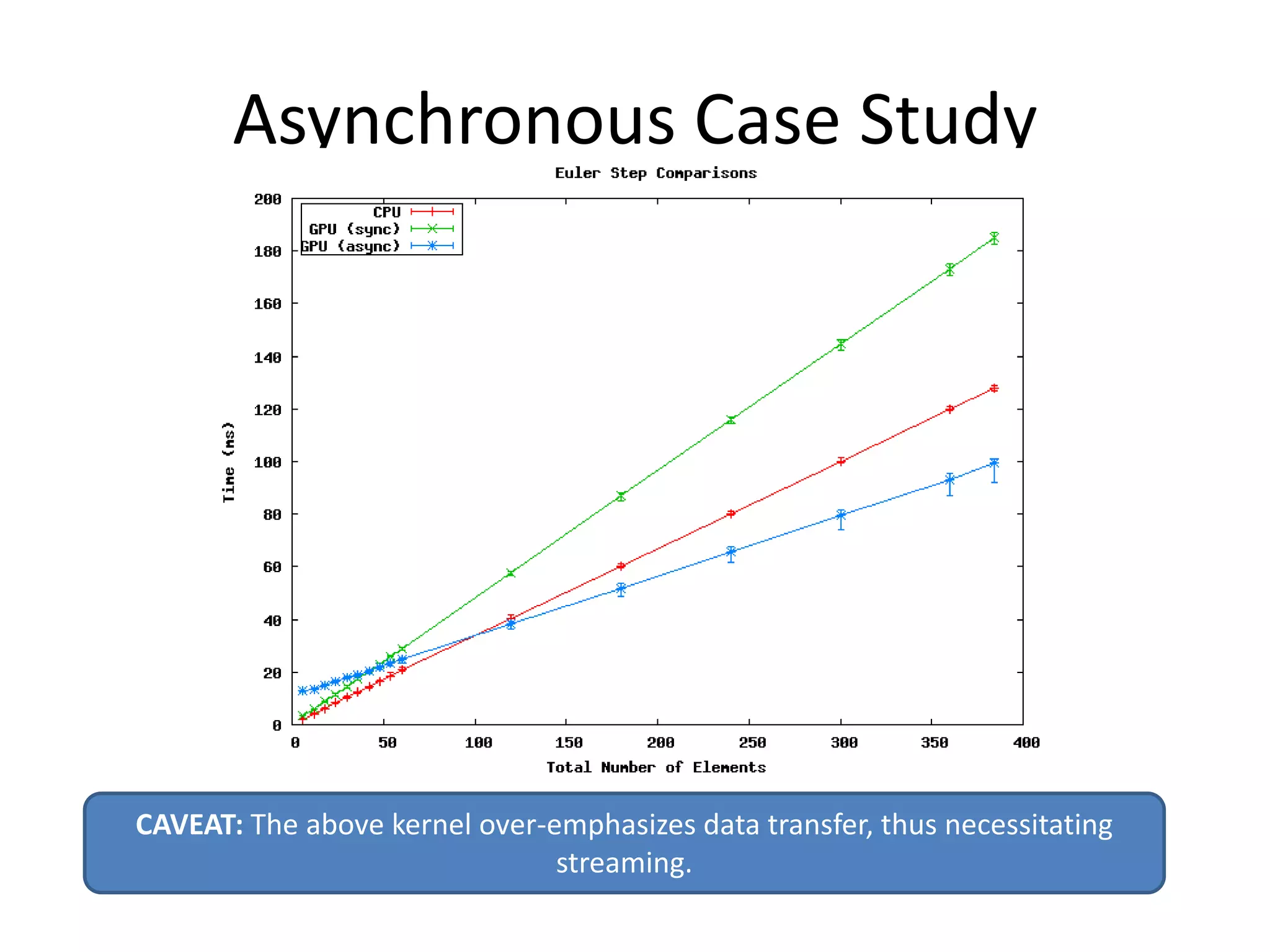
Asynchronous Case Study


CAVEAT: The above kernel over-emphasizes data transfer, thus necessitating
                               streaming.
Basic Optimizations

SHARED MEMORY
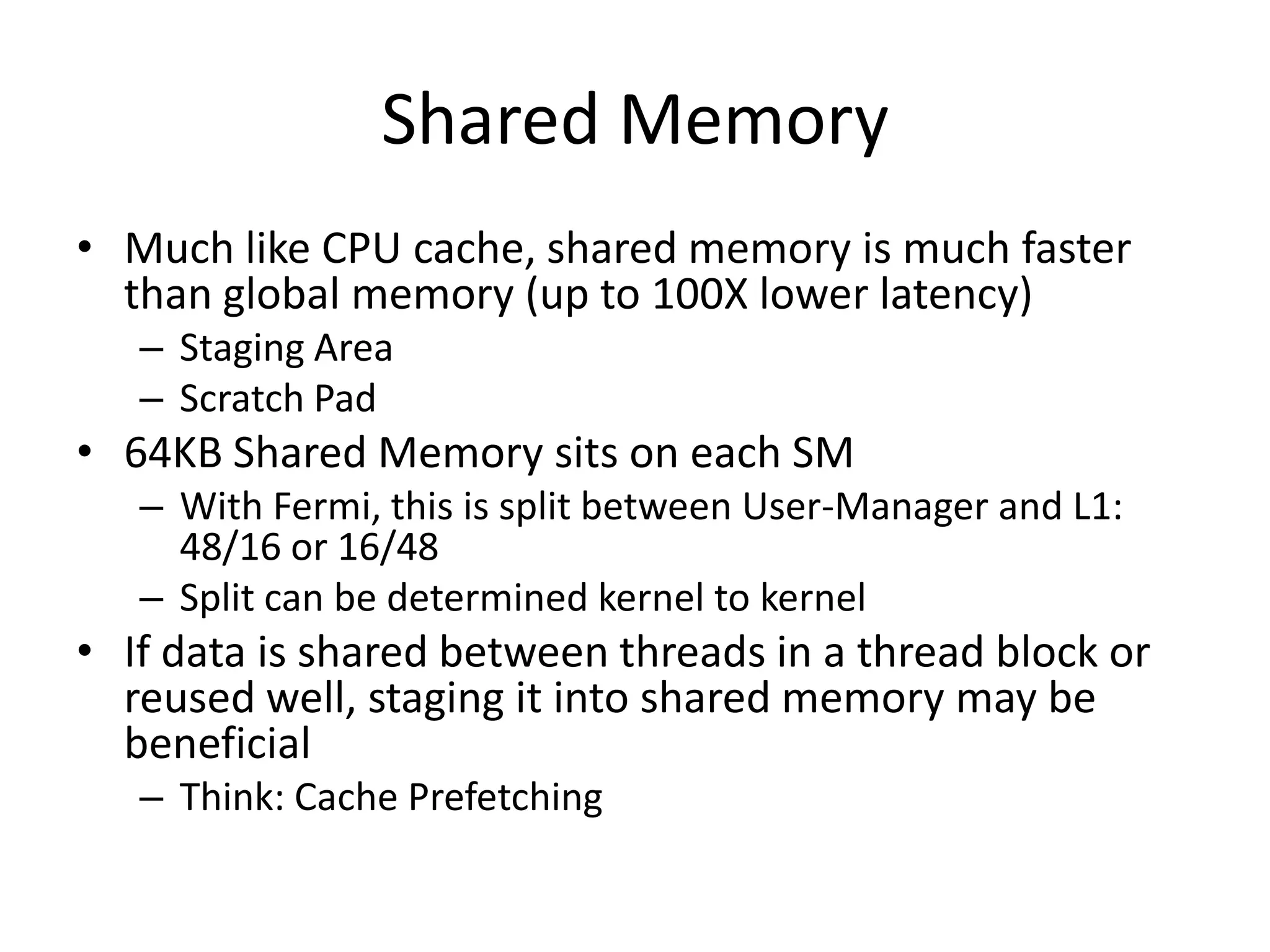
Shared Memory
• Much like CPU cache, shared memory is much faster
  than global memory (up to 100X lower latency)
   – Staging Area
   – Scratch Pad
• 64KB Shared Memory sits on each SM
   – With Fermi, this is split between User-Manager and L1:
     48/16 or 16/48
   – Split can be determined kernel to kernel
• If data is shared between threads in a thread block or
  reused well, staging it into shared memory may be
  beneficial
   – Think: Cache Prefetching
Simple Matrix Multiply
                                        ptxas info    : Compiling entry
 attributes(global)&
  subroutine mm1_kernel(C,A,B,N)
                                           function 'mm1_kernel' for
    integer, value, intent(in) :: N        'sm_20'
    real(8), intent(in) ::
                                        ptxas info    : Used 22
A(N,N),B(N,N)
    real(8), intent(inout) :: C(N,N)       registers, 60 bytes cmem[0]

      integer i,j,k
      real(8) :: val
                                        • No shared memory use,
    i = (blockIdx%x - 1) * blockDim%x     totally relies on
+ threadIdx%x
    j = (blockIdx%y - 1) * blockDim%y
+ threadIdx%y
                                          hardware L1
      val = C(i,j)                       Kernel     Time (ms)   Occupancy
      do k=1,N
        val = val + A(i,k) * B(k,j)      Simple     269.0917    67%
      enddo
      C(i,j) = val
end
Tiled Matrix Multiply
                                           ptxas info    : Compiling entry
integer,parameter :: M = 32
real(8),shared :: AS(M,M),BS(M,M)             function 'mm2_kernel' for
real(8) :: val                                'sm_20'
val = C(i,j)                               ptxas info    : Used 18
                                              registers, 16384+0 bytes
do blk=1,N,M
  AS(threadIdx%x,threadIdx%y) = &             smem, 60 bytes cmem[0], 4
  A(blk+threadIdx%x-1,blk+threadIdx%y-1)      bytes cmem[16]
  BS(threadIdx%x,threadIdx%y) = &
  B(blk+threadIdx%x-1,blk+threadIdx%y-1)
  call syncthreads()                       • Now uses 16K of shared
  do k=1,M
    val = val + AS(threadIdx%x,k) &
                                             memory
              * BS(k,threadIdx%y)
  enddo                                    Kernel     Time (ms)   Occupancy
  call syncthreads()
enddo                                      Simple     269.0917    67%
C(i,j) = val
endif
                                           Tiled      213.7160    67%
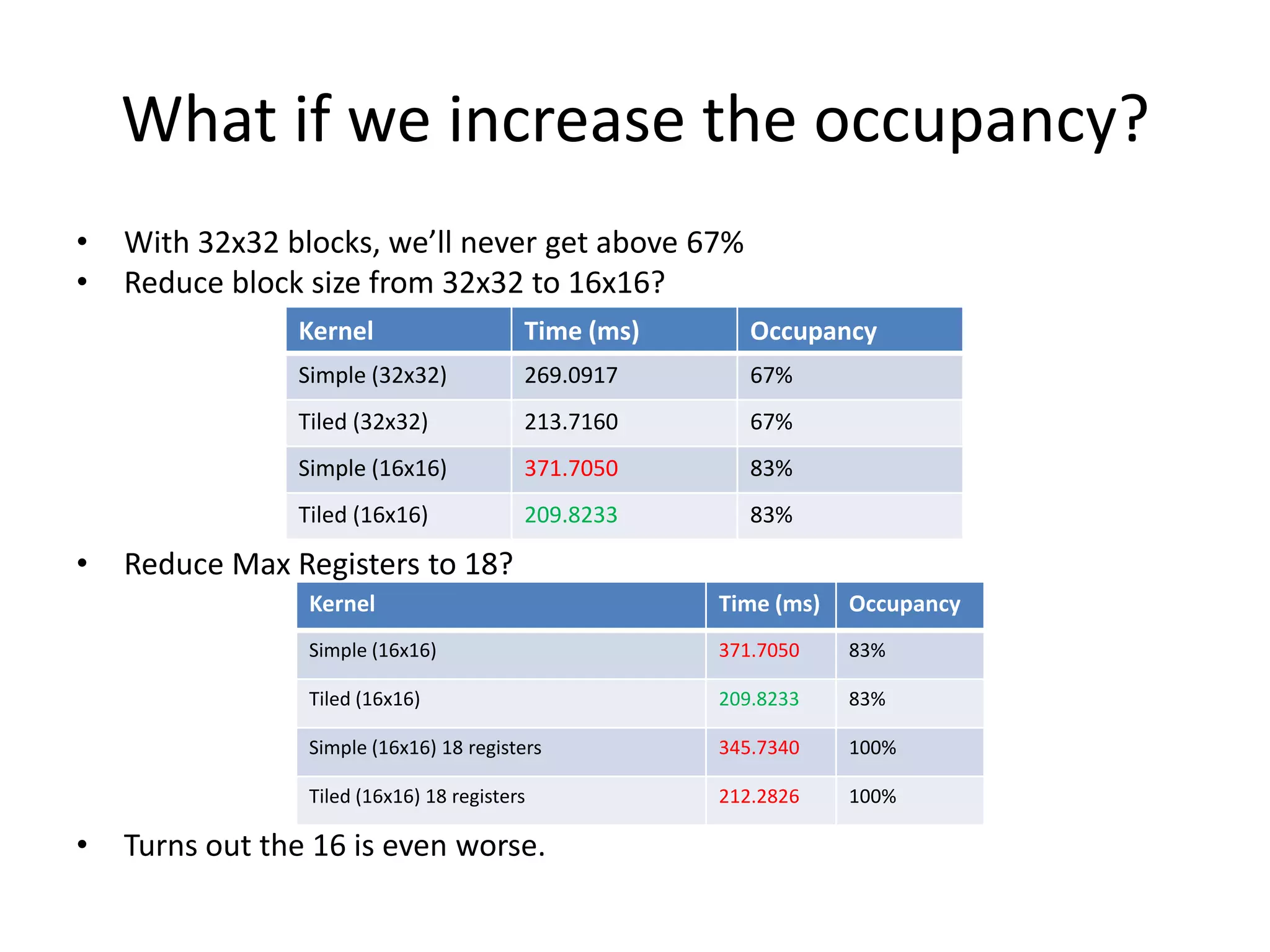
What if we increase the occupancy?
•   With 32x32 blocks, we’ll never get above 67%
•   Reduce block size from 32x32 to 16x16?
                Kernel                    Time (ms)      Occupancy
                Simple (32x32)            269.0917       67%
                Tiled (32x32)             213.7160       67%
                Simple (16x16)            371.7050       83%
                Tiled (16x16)             209.8233       83%

•   Reduce Max Registers to 18?
                 Kernel                               Time (ms)   Occupancy
                 Simple (16x16)                       371.7050    83%

                 Tiled (16x16)                        209.8233    83%

                 Simple (16x16) 18 registers          345.7340    100%

                 Tiled (16x16) 18 registers           212.2826    100%

•   Turns out the 16 is even worse.
Basic Optimizations

MEMORY COALESCING
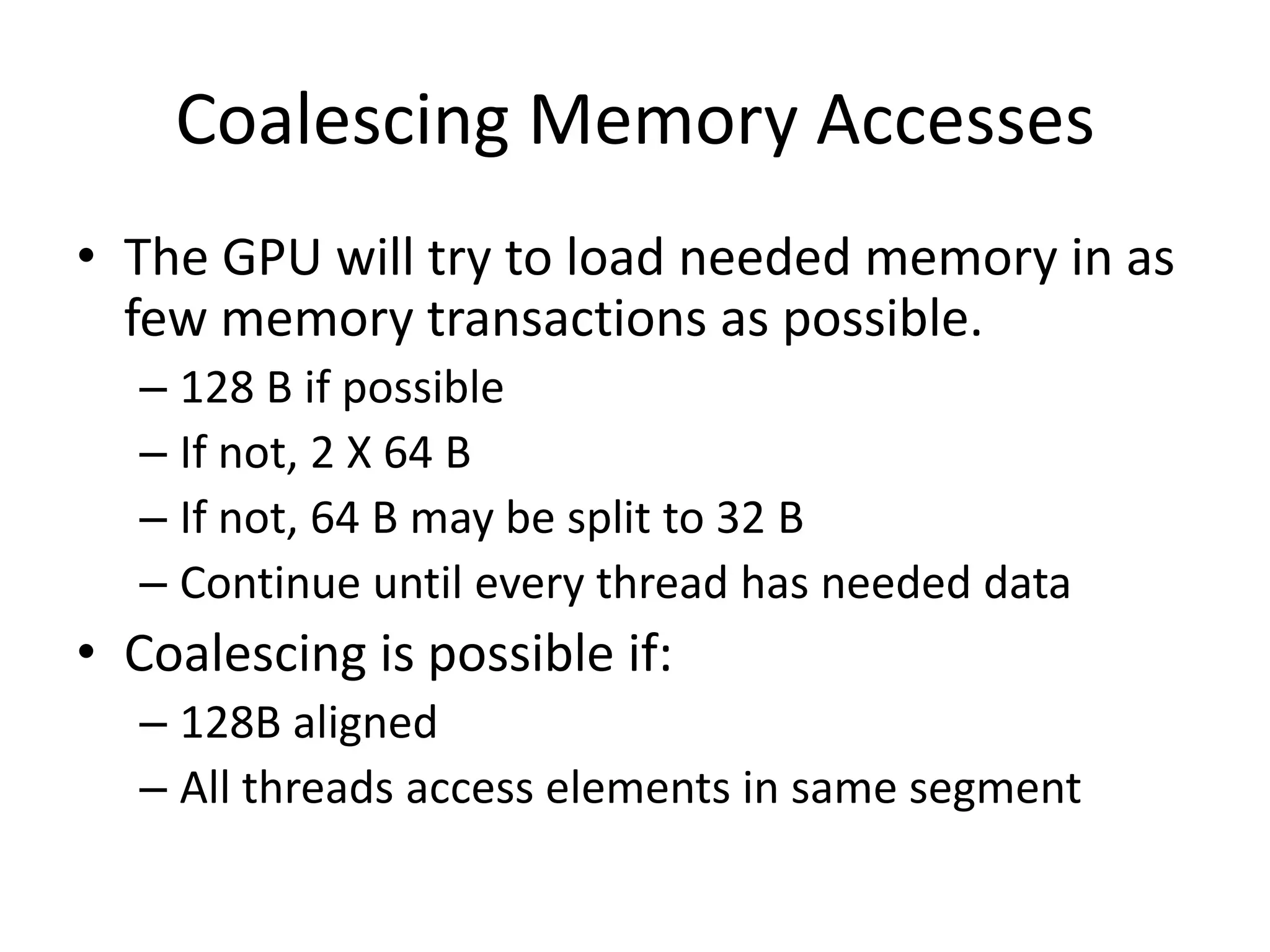
Coalescing Memory Accesses
• The GPU will try to load needed memory in as
  few memory transactions as possible.
  – 128 B if possible
  – If not, 2 X 64 B
  – If not, 64 B may be split to 32 B
  – Continue until every thread has needed data
• Coalescing is possible if:
  – 128B aligned
  – All threads access elements in same segment
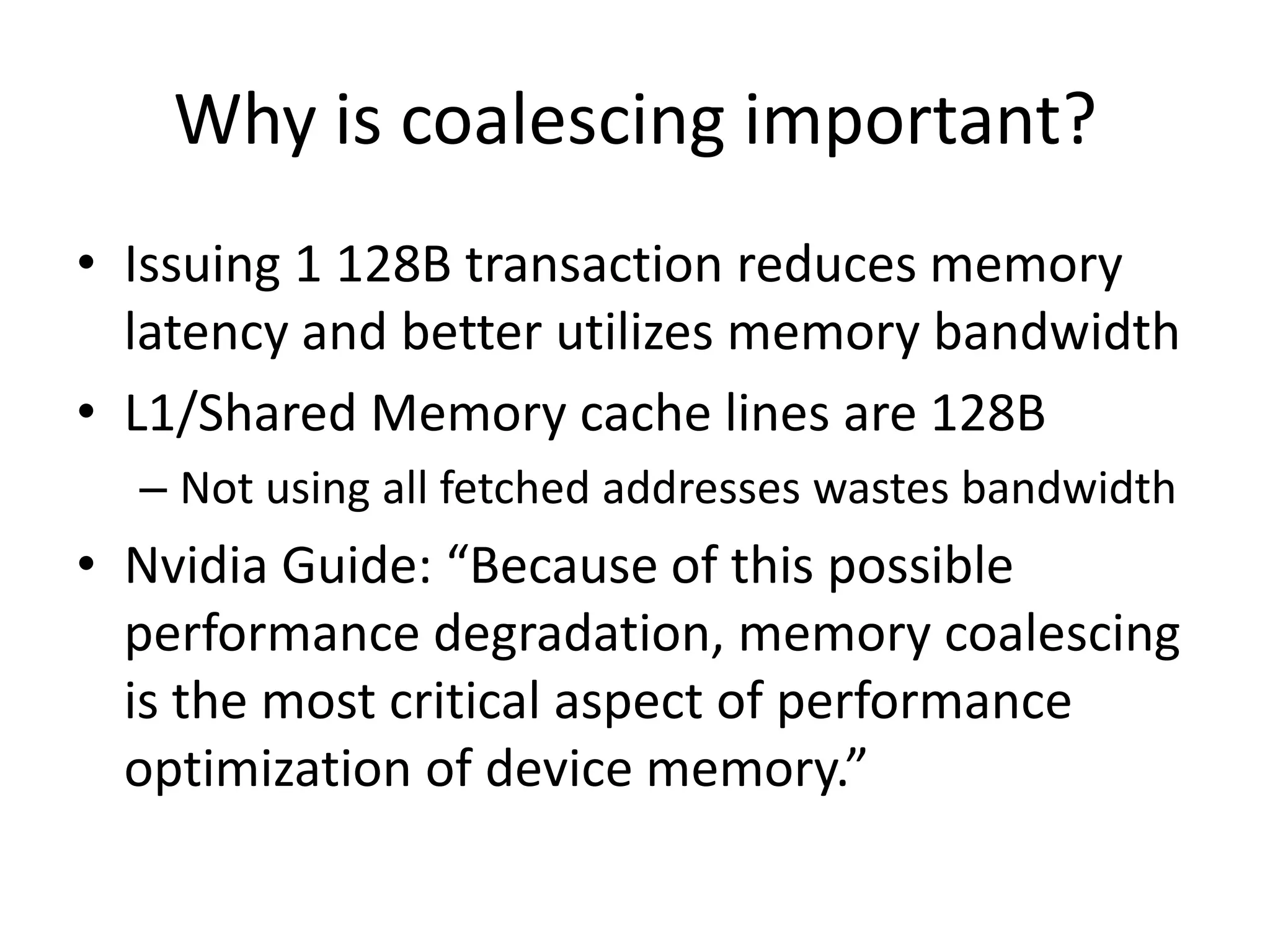
Why is coalescing important?
• Issuing 1 128B transaction reduces memory
  latency and better utilizes memory bandwidth
• L1/Shared Memory cache lines are 128B
  – Not using all fetched addresses wastes bandwidth
• Nvidia Guide: “Because of this possible
  performance degradation, memory coalescing
  is the most critical aspect of performance
  optimization of device memory.”
Coalescing Examples
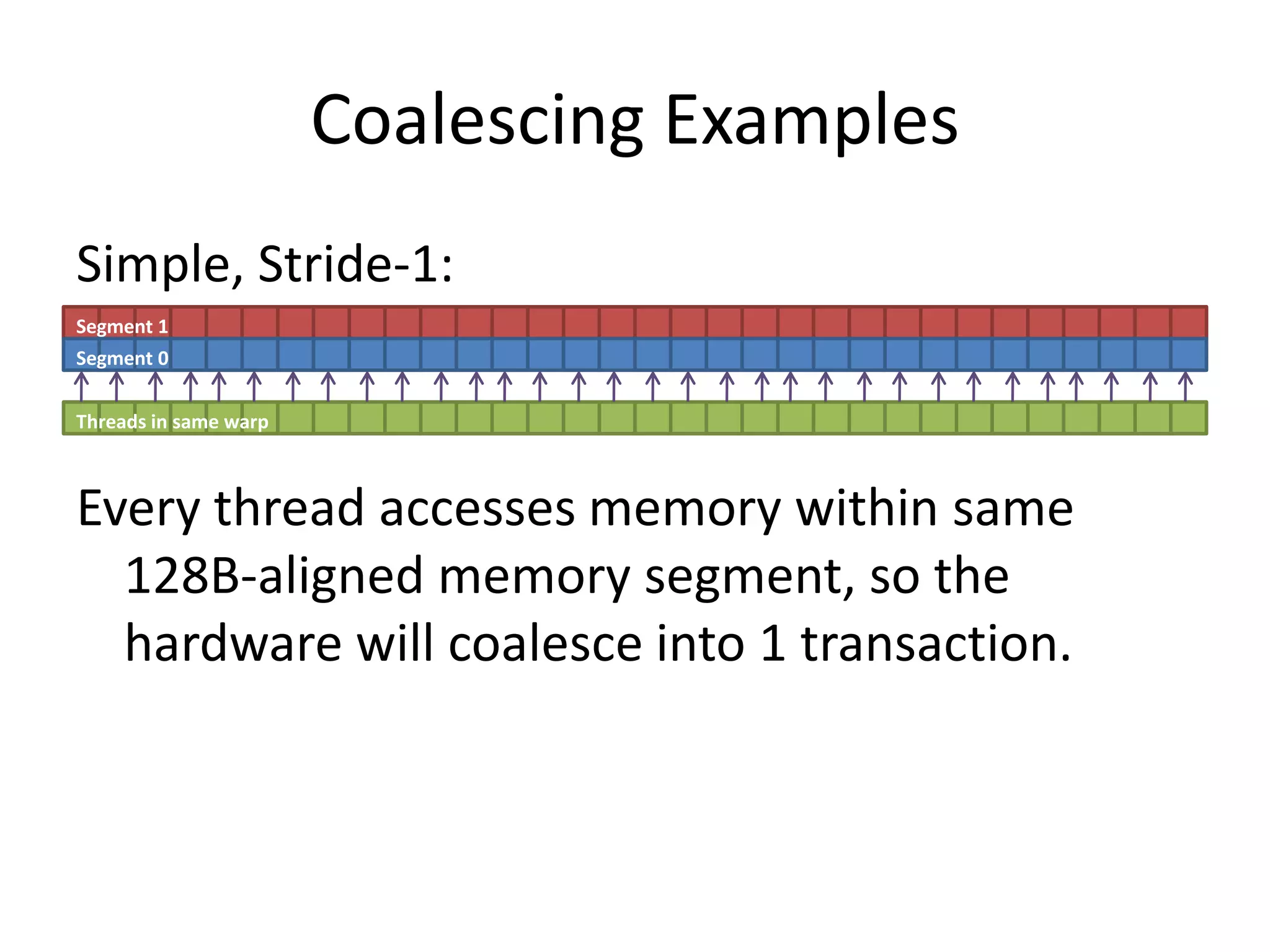
Simple, Stride-1:
Segment 1
Segment 0


Threads in same warp


Every thread accesses memory within same
  128B-aligned memory segment, so the
  hardware will coalesce into 1 transaction.
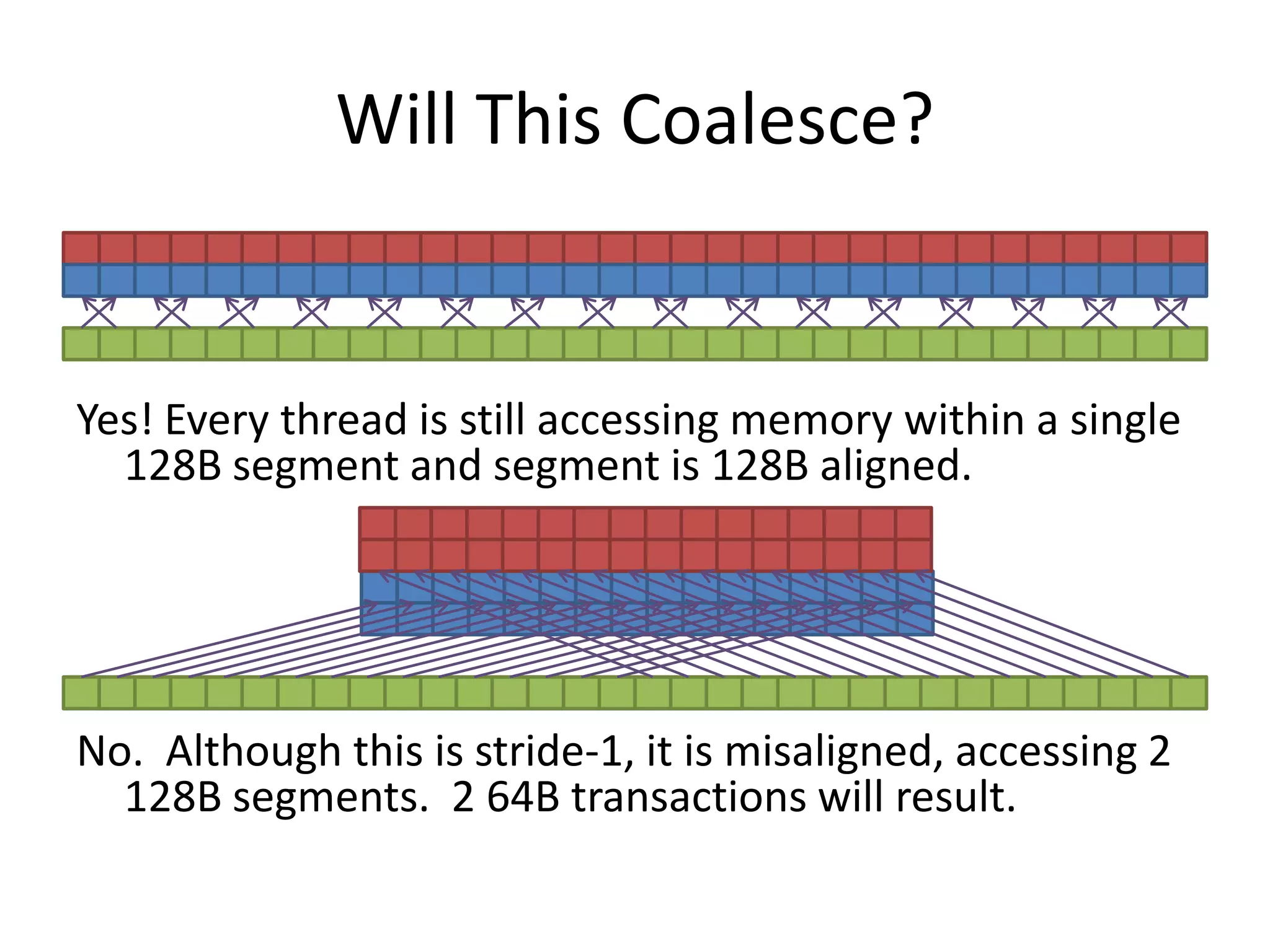
Will This Coalesce?


Yes! Every thread is still accessing memory within a single
  128B segment and segment is 128B aligned.


No. Although this is stride-1, it is misaligned, accessing 2
  128B segments. 2 64B transactions will result.
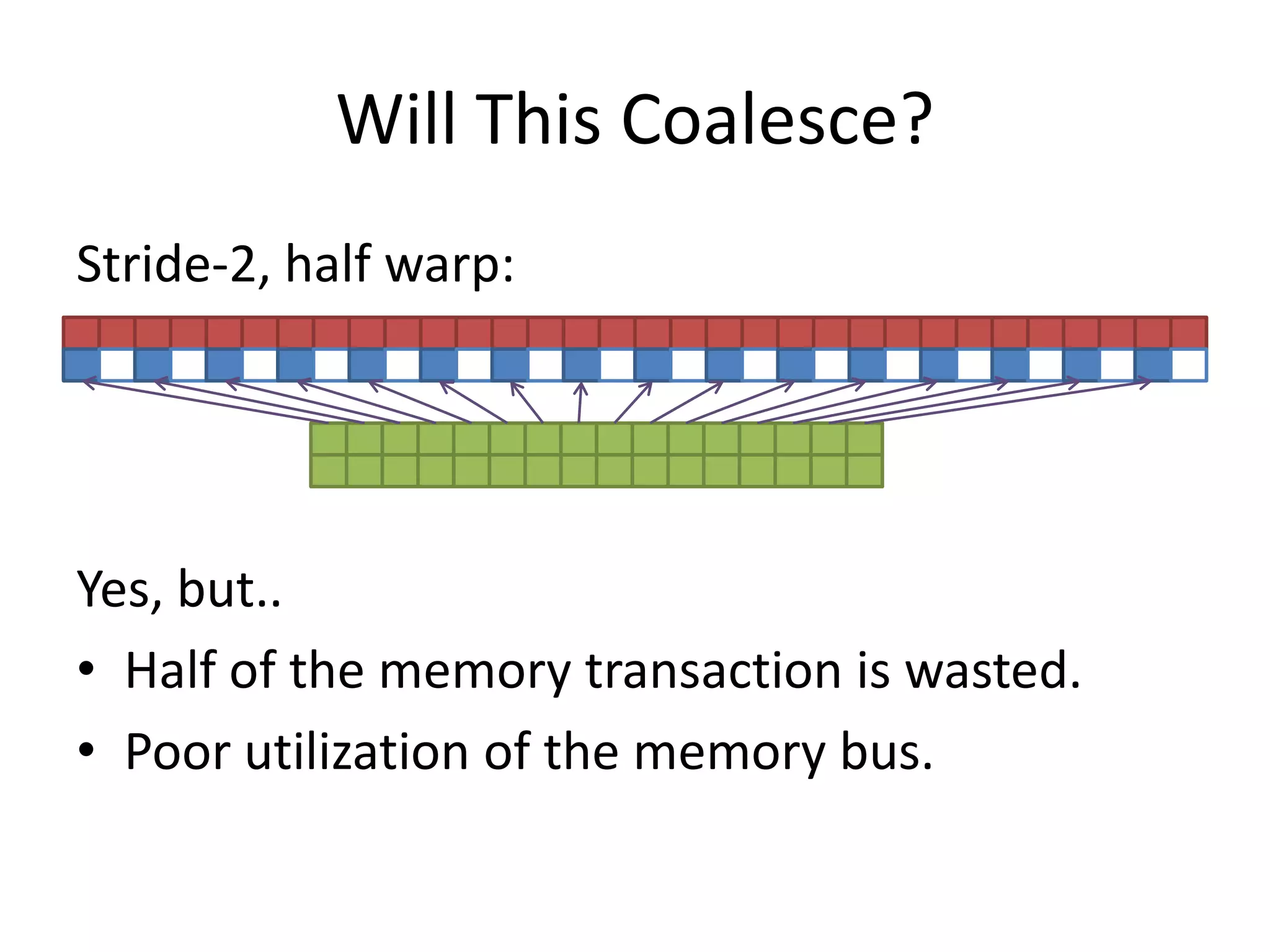
Will This Coalesce?
Stride-2, half warp:


Yes, but..
• Half of the memory transaction is wasted.
• Poor utilization of the memory bus.
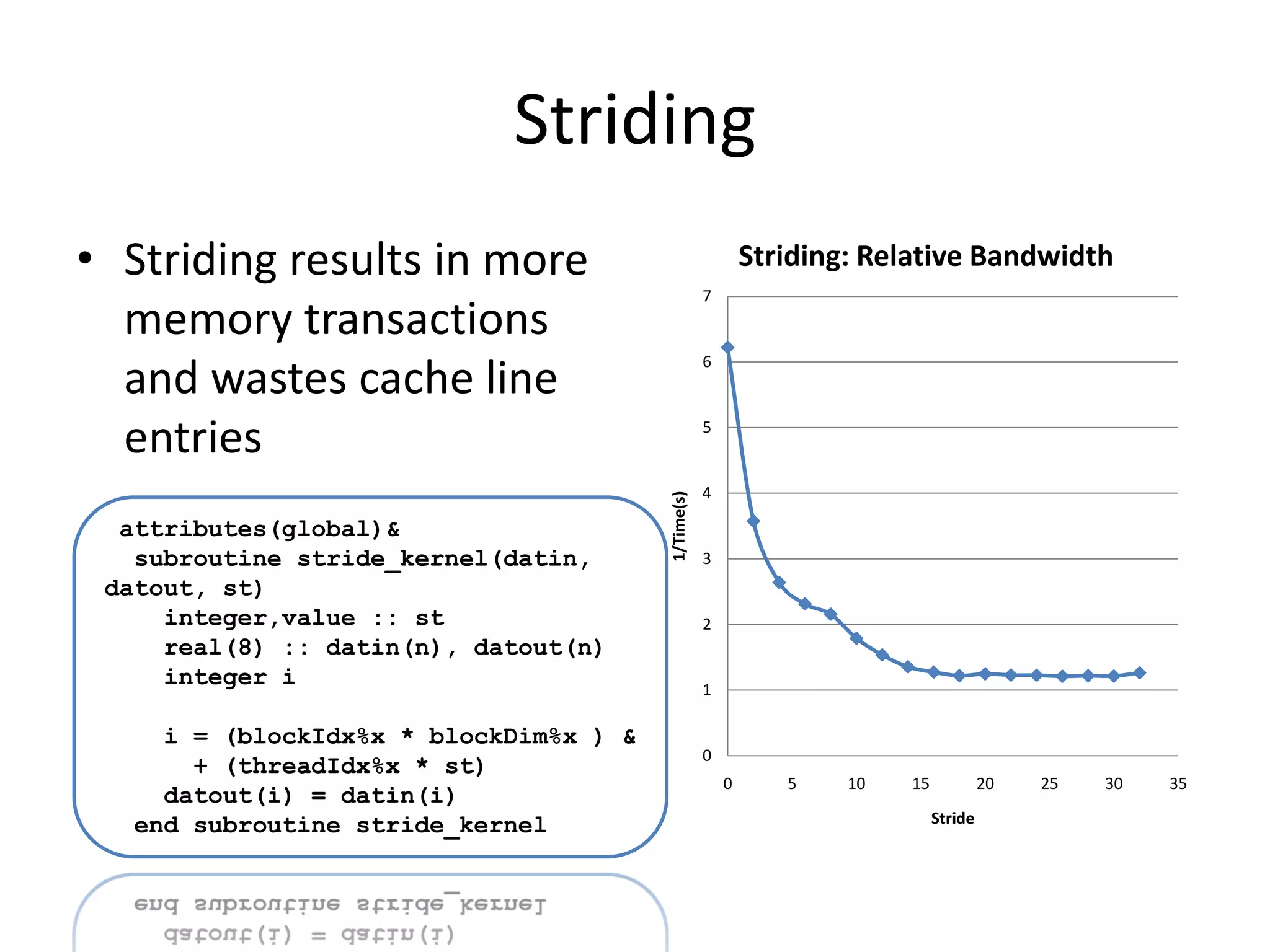
Striding
• Striding results in more                                  Striding: Relative Bandwidth
                                                    7
  memory transactions
                                                    6
  and wastes cache line
  entries                                           5


                                                    4


                                        1/Time(s)
  attributes(global)&
   subroutine stride_kernel(datin,                  3
 datout, st)
     integer,value :: st                            2
     real(8) :: datin(n), datout(n)
     integer i                                      1

     i = (blockIdx%x * blockDim%x ) &
                                                    0
       + (threadIdx%x * st)
                                                        0      5    10   15            20   25   30   35
     datout(i) = datin(i)
   end subroutine stride_kernel                                               Stride
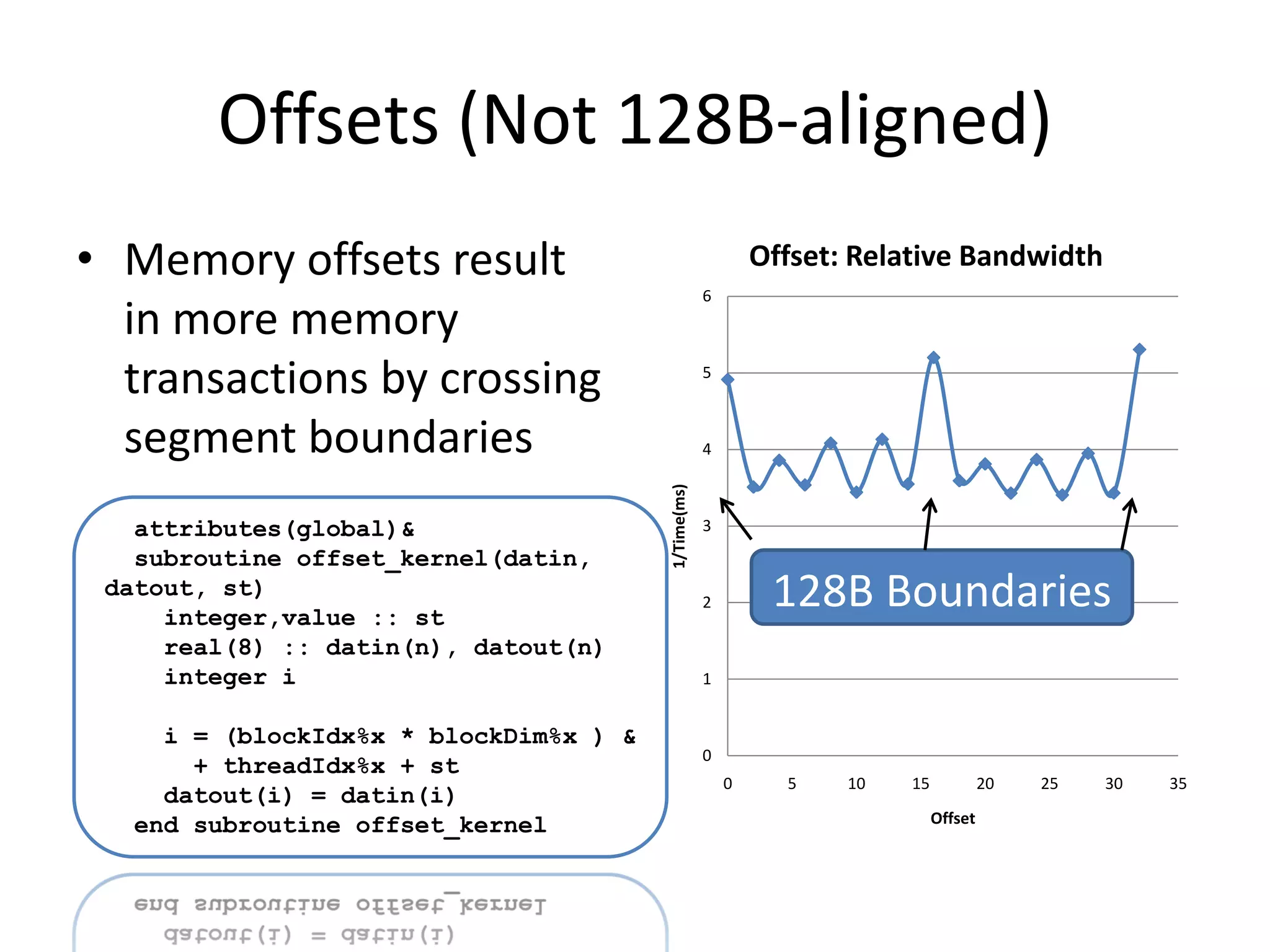
Offsets (Not 128B-aligned)
• Memory offsets result                                      Offset: Relative Bandwidth
                                                     6
  in more memory
  transactions by crossing                           5


  segment boundaries                                 4


                                        1/Time(ms)
   attributes(global)&                               3
   subroutine offset_kernel(datin,
 datout, st)
     integer,value :: st
                                                     2        128B Boundaries
     real(8) :: datin(n), datout(n)
     integer i                                       1


     i = (blockIdx%x * blockDim%x ) &
                                                     0
       + threadIdx%x + st
                                                         0     5    10   15            20   25   30   35
     datout(i) = datin(i)
   end subroutine offset_kernel                                               Offset
ADDITIONAL RESOURCES
On The Web
• GTC 2010 Tutorials:
  http://www.nvidia.com/object/gtc2010-
  presentation-archive.html
• Nvidia CUDA online resources:
  http://developer.nvidia.com/cuda-education-
  training
• PGI CUDA Fortran:
  http://www.pgroup.com/resources/cudafortra
  n.htm

CUG2011 Introduction to GPU Computing

  • 1.
    Introduction to GPUComputing Jeff Larkin Cray Supercomputing Center of Excellence larkin@cray.com
  • 2.
    Goals for thistutorial • Understand the architectural differences between GPUs and CPUs and the associated trade-offs • Recognize several GPU programming models and how/when to use each • Understand how to analyze GPU performance • Recognize very basic GPU optimizations
  • 3.
    This tutorial isnot… • A deep-dive on GPU programming • The be all and end all on GPU optimization • A recipe for getting 10, 100, 1000X speed-ups for your application
  • 4.
  • 5.
    Section Goals • Recognizethe differences between CPU/GPU architectures • Identify when one architecture may be better suited than the other.
  • 6.
    CPU/GPU Architectures CPU GPU ALU ALU Control ALU Control ALU ALU ALU Cache Cache Cache Cache RAM RAM
  • 7.
    CPU/GPU Architectures CPU GPU • Large memory, directly • Relatively small memory, accessible must be managed by CPU • Each core has own, • Groups of compute cores independent control logic share control logic – Allows independent – Saves space, power, … execution • Shared cache & • Coherent caches between synchronization within cores groups – Can share & synchronize – None between groups
  • 8.
    Play to yourstrengths CPU GPU • Tuned for serial execution • Tuned for highly parallel with short vectors execution • Multiple independent • Threads work in lockstep threads of execution within groups – Much like vectors • Branch-prediction • Serializes branchy code • Memory latency hidden by • Memory latency hidden by cache & prefetching swapping away stalled – Requires regular data access threads patterns – Requires 1000s of concurrent threads
  • 9.
    GPU Glossary Hardware Software (CUDA) Core Thread/Work Unit Streaming Multiprocessor (SM) Thread Block/Work Group • A Grid is a group of related Thread Blocks running the same kernel • A Warp is Nvidia’s term for 32 Threads running in lock-step • Warp Diversion is what happens when some threads within a warp stall due to a branch • Shared Memory is a user-managed cache within a Thread Block • Occupancy is the degree to which all of the GPU hardware can be used in a Kernel – Heavily influenced by registers/thread and threads/block • Stream is a series of data transfers and kernel launches that happen in series
  • 10.
  • 11.
    Section Goals • Introduceseveral GPU programming models • Discuss why someone may choose one programming paradigm over the others.
  • 12.
    Explicit/Implicit GPU Programming Explicit Implicit • Bottom-up approach • Traditional Top-down • Explicit Kernel written from programming threads’ perspective – Big Picture • Memory management • Compiler handles memory controlled by programmer and thread management – May be guided by • Thread Blocks & Grid programmer defined by programmer • CPU & GPU may use the • GPU code usually distinct same code from CPU code – Easier code maintenance
  • 13.
    GPU Programming Models •Explicit – CUDA C (Free from Nvidia) – CUDA Fortran (Commercial from PGI) – OpenCL (Free from Multiple Vendors) • Implicit – Proposed OpenMP Directives (Multiple Vendors) – PGI Directives (Commercial from PGI) – HMPP Directives (Commercial from CAPS) – Libraries (CUBLAS, MAGMA, etc.)
  • 14.
    Multi-node Programming • GPUpapers & tutorials usually focus on 1 node, what about the rest of the machine? • High-level MPI parallelism between nodes – You’re probably already doing this • Loose, on-node parallelism via threads – Most codes today are using MPI, but threading is becoming more important • Tight, on-node, vector parallelism – SSE/AVX on CPUs – GPU threaded parallelism Programmers need to expose the same parallelism with/without GPUs
  • 15.
    Using the MachineEfficiently So-So Hybridization Better Hybridization MPI MPI MPI MPI CPU 0 CPU 1 G0 0 1 2 3 G1 0 1 2 3 Time GPU 0 GPU 1 MPI MPI CPU 0 CPU 1 MPI MPI • Overlap CPU/GPU work and CPU 0 CPU 1 data movement. • Neglects the CPU • Even better if you can • Suffers from Amdahl’s Law overlap communication too!
  • 16.
    Original S3D RHS – Called 6 times for each time step – Runge Kutta iterations Calculate Primary Variable – point wise All major loops are at low level of the Mesh loops within 5 different routines Call tree Green – major computation – point-wise Yellow – major computation – Halos 5 zones Perform Derivative computation – High thick order differencing Calculate Diffusion – 3 different routines with some derivative computation Perform Derivative computation for forming rhs – lots of communication Perform point-wise chemistry computation 5/24/2011 16
  • 17.
    Restructured S3D formulti-core systems RHS – Called 6 times for each time step – Runge Kutta iterations Calculate Primary Variable – point wise OMP loop over grid Mesh loops within 3 different routines Perform Derivative computation – High order differencing Calculate Primary Variable – point Overlapped OMP loop over grid wise Mesh loops within 2 different routines Calculate Diffusion – 3 different routines with some derivative computation Perform derivative computation Overlapped OMP loop over grid Perform point-wise chemistry computation (1) Perform Derivative computation for forming rhs – lots of communication Overlapped OMP loop over grid Perform point-wise chemistry computation (2) 5/24/2011
  • 18.
    The Hybridization ofS3D 5/24/2011 18
  • 19.
    Explicit: CUDA C/Fortran& OpenCL • Programmer writes a kernel in C/Fortran that will be run on the GPU – This is essentially the loop body from original CPU code • GPU memory must be explicitly allocated, freed, and filled from CPU memory over PCIe – Generally results in 2 variables referring to every pertinent array, one in each memory domain (hostA, devA) • Programmer declares how to decompose into thread blocks and grid – Must understand limits of thread block size and how to maximize occupancy • CPU code launches kernel on device. – May continue to work while GPU executes kernel(s)
  • 20.
    CUDA C Example HostCode GPU Code Allocate & double a[1000], *d_a; dim3 block( 1000, 1, 1 ); Copy to GPU __global__ dim3 grid( 1, 1, 1 ); void scaleit_kernel(double *a,int n) cudaMalloc((void**)&d_a, 1000*sizeof(double)); cudaMemcpy(d_a, a, { 1000*sizeof(double),cudaMemcpyHostToDev ice); int i = threadIdx.x; My Index scaleit_kernel<<<grid,block>>>(d_a,n); Launch cudaMemcpy(a, d_a, if (i < n) Calculate 1000*sizeof(double),cudaMemcpyDeviceToH ost); a[i] = a[i] * 2.0l; Myself cudaFree(d_a); } Copy Back & Free
  • 21.
    CUDA Fortran Example HostCode GPU Code subroutine scaleit(a,n) attributes(global)& real(8),intent(inout) :: a(n) Declare on subroutine scaleit_kernel(a,n) real(8),device :: d_a(n) Device real(8),intent(inout) :: a(n) integer,intent(in) :: n type(dim3) :: blk, grd integer,intent(in),value :: n integer I blk = dim3(1000,1,1) grd = dim3(1,1,1) i = threadIdx%x My Index d_a = a Copy To Device call scaleit_kernel<<<grd,blk>>>(d_a,n) if (i.le.n) then Calculate a = d_a a(i) = 2.0 * a(i) Myself end subroutine scaleit Launch & Copy endif Back end subroutine scaleit_kernel
  • 22.
    Implicit: Directives • Programmeradds directives to existing CPU code • Compiler determines – Memory management – Thread management • Programmer adds directives to guide compiler – Higher-level data regions – Partial array updates – Improved thread blocking
  • 23.
    Proposed OpenMP DirectivesExample real*8 a(1000) integer i Build for device, Copy a on and off !$omp acc_region_loop acc_copy(a) do i=1,1000 a(i) = 2 * a(i) enddo !$omp end acc_region_loop
  • 24.
    Implicit: Libraries • Callsto existing Math libraries replaced with accelerated libraries – BLAS, LAPACK – FFT – Sparse kernels • Unless application spends very high % of runtime in library calls, this will need to be combined with other methods
  • 25.
    Libraries Example info =cublas_set_matrix(lda, na, sizeof_Z, a, lda, devA, lda) info = cula_device_zgetrf(m,m,devA+idx2f(ioff+1,ioff+1,lda)*sizeof_Z,lda,devIPVT) info = cula_device_zgetrs('n',m,ioff,devA+idx2f(ioff+1,ioff+1,lda)*sizeof_Z,lda,devIPVT, & devA+idx2f(ioff+1,1,lda)*sizeof_Z,lda) call cublas_zgemm('n','n',n,ioff-k+1,na-ioff,cmone,devA+idx2f(joff+1,ioff+1,lda)*sizeof_Z,lda, & devA+idx2f(ioff+1,k,lda)*sizeof_Z,lda,cone,devA+idx2f(joff+1,k,lda)*sizeof_Z,lda) call cublas_zgemm('n','n',blk_sz(1),blk_sz(1)-k+1,na-blk_sz(1), & cmone,devA+idx2f(1,blk_sz(1)+1,lda)*sizeof_Z,lda, & devA+idx2f(blk_sz(1)+1,k,lda)*sizeof_Z,lda,cone,devA,lda) info = cublas_get_matrix(lda, na, sizeof_Z, devA, lda, a, lda)
  • 26.
  • 27.
    Section Goals • Understandmultiple options for gathering GPU performance metrics • Increasing number of tools available, I’ll cover 3 methods – Explicit event instrumentation – CUDA Profiler – CrayPAT Preview
  • 28.
    CUDA Event API •Most CUDA API calls are asynchronous: explicit CPU timers won’t work • CUDA allows inserting events into the stream – Insert an event before and after what needs to be timed – Synchronize with events – Calculate time between events • Introduces small driver overhead and may synchronize asynchronous calls – Don’t use in production
  • 29.
    CUDA Event Example Event st0 Allocate ierr = cudaEventRecord(st0,0) Event st1 allocate(d_a(n)) ierr = cudaEventRecord(st1,0) Copy-in d_a = a ierr = cudaEventRecord(st2,0) Event st2 call & scaleit_kernel<<<grd,blk>>>& (d_a,n) Run Kernel ierr = cudaEventRecord(st3,0) a = d_a Event st3 ierr = cudaEventRecord(st4,0) deallocate(d_a) Copy-out ierr = cudaEventRecord(st5,0) ... Event st4 ierr = cudaEventSynchronize(st2) Deallocate ierr = cudaEventSynchronize(st3) ierr = cudaEventElapsedTime & Event st5 (et, st2, st3) Synchronize write(*,*)‘Kernel Time',et
  • 30.
    CUDA Profiler • Silentlybuilt-in to CUDA driver and enabled via environment variable – Works with both CUDA and Directives programs • Returns time of memory copies and kernel launches by default – Also reports kernel occupancy – Can be configured to report many other metrics • All metrics are recorded at driver level and high resolution – May add small kernel overhead and synchronize asynchronous operations.
  • 31.
    CUDA Profiler Example # Enable Profiler $ export CUDA_PROFILE=1 $ aprun ./a.out $ cat cuda_profile_0.log # CUDA_PROFILE_LOG_VERSION 2.0 # CUDA_DEVICE 0 Tesla M2090 # TIMESTAMPFACTOR fffff6f3e9b1f6c0 method,gputime,cputime,occupancy method=[ memcpyHtoD ] gputime=[ 2.304 ] cputime=[ 23.000 ] method=[ _Z14scaleit_kernelPdi ] gputime=[ 4.096 ] cputime=[ 15.000 ] occupancy=[ 0.667 ] method=[ memcpyDtoH ] gputime=[ 3.072 ] cputime=[ 34.000 ]
  • 32.
    CUDA Profiler Example #Customize Experiment $ cat exp.txt l1_global_load_miss l1_global_load_hit $ export CUDA_PROFILE_CONFIG=exp.txt $ aprun ./a.out $ cat cuda_profile_0.log # CUDA_PROFILE_LOG_VERSION 2.0 # CUDA_DEVICE 0 Tesla M2090 # TIMESTAMPFACTOR fffff6f4318519c8 method,gputime,cputime,occupancy,l1_global_load_miss,l1_global_load_hit method=[ memcpyHtoD ] gputime=[ 2.240 ] cputime=[ 23.000 ] method=[ _Z14scaleit_kernelPdi ] gputime=[ 4.000 ] cputime=[ 36.000 ] occupancy=[ 0.667 ] l1_global_load_miss=[ 63 ] l1_global_load_hit=[ 0 ] method=[ memcpyDtoH ] gputime=[ 3.008 ] cputime=[ 33.000 ]
  • 33.
    CrayPAT Prototype • LuizDeRose is giving a tutorial on CrayPAT future work at CUG (you’re missing it right now) • The goal of the CrayPAT team is to make instrumenting applications and understanding the results as simple as possible – No code modification – Derived metrics – Optimization suggestions – … • Several new tools are being developed that will help with accelerator development
  • 34.
    CrayPAT Preview: PerformanceStats 5|||| 1.3% | 21.836221 | 21.630958 | 6760.318 | 6760.318 | 3201 |collisionb_ ||||||------------------------------------------------------------------------------- 6||||| 1.1% | 18.888240 | 18.708450 | 0.000 | 6507.596 | 1400 |collisionb_(exclusive) |||||||------------------------------------------------------------------------------ 7|||||| 0.4% | 7.306387 | 7.291820 | 0.000 | 0.000 | 200 |collisionb_.ASYNC_KERNEL@li.599 7|||||| 0.4% | 7.158172 | 7.156827 | 0.000 | 0.000 | 200 |collisionb_.ASYNC_KERNEL@li.568 7|||||| 0.2% | 3.799065 | 3.799065 | 0.000 | 6507.596 | 200 |collisionb_.SYNC_COPY@li.593 7|||||| 0.0% | 0.527203 | 0.376397 | 0.000 | 0.000 | 200 |lbm3d2p_d_.ASYNC_COPY@li.129 7|||||| 0.0% | 0.073654 | 0.064766 | 0.000 | 0.000 | 200 |collisionb_.ASYNC_COPY@li.703 7|||||| 0.0% | 0.013917 | 0.011082 | 0.000 | 0.000 | 199 |grad_exchange_.ASYNC_COPY@li.428 7|||||| 0.0% | 0.009707 | 0.008366 | 0.000 | 0.000 | 200 |collisionb_.ASYNC_KERNEL@li.581 7|||||| 0.0% | 0.000134 | 0.000127 | 0.000 | 0.000 | 1 |collisionb_.ASYNC_COPY@li.566 6||||| 0.2% | 2.947981 | 2.922508 | 6760.318 | 252.722 | 1801 |grad_exchange_ |||||||------------------------------------------------------------------------------ 7|||||| 0.1% | 2.485119 | 2.485119 | 6507.596 | 0.000 | 200 |collisionb_.SYNC_COPY@li.596 7|||||| 0.0% | 0.107396 | 0.107396 | 0.000 | 126.361 | 200 |grad_exchange_.SYNC_COPY@li.472 7|||||| 0.0% | 0.103009 | 0.103009 | 126.361 | 0.000 | 200 |grad_exchange_.SYNC_COPY@li.452 7|||||| 0.0% | 0.065731 | 0.065731 | 0.000 | 126.361 | 200 |grad_exchange_.SYNC_COPY@li.439 7|||||| 0.0% | 0.061754 | 0.061754 | 126.361 | 0.000 | 200 |grad_exchange_.SYNC_COPY@li.485 7|||||| 0.0% | 0.056946 | 0.045612 | 0.000 | 0.000 | 200 |grad_exchange_.ASYNC_KERNEL@li.453 7|||||| 0.0% | 0.029640 | 0.028101 | 0.000 | 0.000 | 200 |grad_exchange_.ASYNC_KERNEL@li.430 7|||||| 0.0% | 0.025947 | 0.014719 | 0.000 | 0.000 | 200 |grad_exchange_.ASYNC_KERNEL@li.486 7|||||| 0.0% | 0.012368 | 0.011011 | 0.000 | 0.000 | 200 |grad_exchange_.ASYNC_COPY@li.496 7|||||| 0.0% | 0.000070 | 0.000056 | 0.000 | 0.000 | 1 |grad_exchange_.ASYNC_COPY@li.428 This example is taken from a real user application and “ported” using proposed OpenMP extensions.
  • 35.
    CrayPAT Preview: DataTransfer Stats Host | Host Time | Acc Time | Acc Copy | Acc Copy | Calls |Group='ACCELERATOR' Time % | | | In (MB) | Out (MB) | | PE 100.0% | 42.763019 | 42.720514 | 21877.192 | 20076.420 | 703 |Total |----------------------------------------------------------------------------------- | 100.0% | 42.763019 | 42.720514 | 21877.192 | 20076.420 | 703 |ACCELERATOR ||---------------------------------------------------------------------------------- 5|||| 4.6% | 31.319188 | 31.318755 | 19425.659 | 19425.659 | 140 |recolor_ ||||||------------------------------------------------------------------------------ 6||||| 4.5% | 30.661050 | 30.660616 | 18454.376 | 19425.659 | 139 |recolor_(exclusive) |||||||----------------------------------------------------------------------------- 7|||||| 2.4% | 16.761967 | 16.761967 | 0.000 | 19425.659 | 20 |recolor_.SYNC_COPY@li.790 7|||||| 1.9% | 13.227889 | 13.227889 | 18454.376 | 0.000 | 19 |recolor_.SYNC_COPY@li.793 7|||||| 0.1% | 0.668515 | 0.668480 | 0.000 | 0.000 | 20 |recolor_.ASYNC_KERNEL@li.781 7|||||| 0.0% | 0.002122 | 0.002059 | 0.000 | 0.000 | 20 |lbm3d2p_d_.ASYNC_COPY@li.118 7|||||| 0.0% | 0.000332 | 0.000105 | 0.000 | 0.000 | 20 |recolor_.ASYNC_COPY@li.794 7|||||| 0.0% | 0.000116 | 0.000057 | 0.000 | 0.000 | 20 |recolor_.ASYNC_COPY@li.789 7|||||| 0.0% | 0.000110 | 0.000060 | 0.000 | 0.000 | 20 |recolor_.ASYNC_COPY@li.781 |||||||============================================================================= 6||||| 0.1% | 0.658138 | 0.658138 | 971.283 | 0.000 | 1 |streaming_exchange_ 7||||| | | | | | | recolor_.SYNC_COPY@li.793 ||||||============================================================================== Full PCIe data transfer information without any code modifications.
  • 36.
    Cray Tools: MoreInformation • Cray is developing a lot of tools that deserve more time than this tutorial allows, so… • Go to “Cray GPU Programming Tools” BOF at 4:15 on Wednesday (Track 15B) • Talk to Luiz DeRose and/or Heidi Poxon while you’re here.
  • 37.
  • 38.
  • 39.
    Calculating Occupancy • Occupancyis the degree to which the hardware is saturated by your kernel – Generally higher occupancy results in higher performance • Heavily affected by – Thread decomposition – Register usage – Shared memory use • Nvidia provides an “occupancy calculator” spreadsheet as part of the SDK – Live example to follow
  • 40.
    Calculating Occupancy 1. Getthe register count ptxas info : Compiling entry function 'laplace_sphere_wk_kernel3' for 'sm_20' ptxas info : Used 36 registers, 7808+0 bytes smem, 88 bytes cmem[0], 768 bytes cmem[2] 2. Get the thread decomposition blockdim = dim3( 4, 4, 26) griddim = dim3(101, 16, 1) 3. Enter into occupancy calculator Result: 54%
  • 41.
    Improving the Results Reducing registers per Varying #threads or thread may increase shared memory use has occupancy. little effect
  • 42.
    Reducing Registers/Thread • Maximum number of registers/thread can be set via compiler flag • Reducing the number of registers/thread to 18 increases occupancy to 81% • Time Before: 924us • Time After: 837us • Improvement: ~10% • Occupancy isn’t a silver bullet
  • 43.
    Occupancy Case Study •Results from a Finite Difference Kernel, provided by Paulius Micikevicius of Nvidia • Default compilation – 46 registers, no spills to lmem – runs a single 32x16 threadblock per SM concurrently – Occupancy: 33% – 3,395 MCells/s throughput (39.54ms)
  • 44.
    Occupancy Case Studycont. • Reducing Maximum Registers to 32 – Set maximum register count via compiler flag – 32 registers, 44 bytes spilled to lmem – runs two 32x16 threadblocks per SM concurrently – Occupancy: 67% – 4,275 MCells/s (31.40ms) • Improvement: ~26%
  • 45.
  • 46.
    Asynchronous Execution • MostGPU Operations are Asynchronous from the CPU code – Hint: The CPU can be busy doing other things • Current Hardware can handle 1 Copy-in, 1 Kernel, and 1 Copy-out simultaneous, if in separate streams – Hint: Data transfer costs can be hidden by running multiple streams and asynchronous tranfers
  • 47.
    Asynchronous Execution withStreams • Synchronous Execution (1 Stream): In Run Out In Run Out In Run Out In Run Out • Asynchronous Execution (3 Streams): In Run Out In Run Out In Run Out In Run Out • If data cannot remain resident on device, streaming may allow GPU to offset transfer costs
  • 48.
    Asynchronous Execution: Example • Add some number of streams to integer :: streams(3) existing code integer :: ierr,j,mystream • Use Asynchronous memory copies to copy part of data to/from device do j=1,3 ierr = cudaStreamCreate(streams(j)) – GOTCHA: Host arrays must be enddo “pinned” in order to use Async copies do j=1,m • Add stream parameter to kernel mystream = mod(j,3) launch ierr = cudaMemcpyAsync& (d_a(:,j),a(:,j),size(a(:,j)),streams(mystream)) call • Sync Time: 0.6987200 scaleit_kernel<<<grd,blk,0,streams(mystrea m)>>>(d_a(:,j),n) • Async Time: 0.2472000 ierr = cudaMemcpyAsync& (a(:,j),d_a(:,j),size(a(:,j)),streams(mystream)) enddo ierr = cudaStreamSynchronize(streams(1)) ierr = cudaStreamSynchronize(streams(2)) ierr = cudaStreamSynchronize(streams(3))
  • 49.
    Asynchronous Case Study CAVEAT:The above kernel over-emphasizes data transfer, thus necessitating streaming.
  • 50.
  • 51.
    Shared Memory • Muchlike CPU cache, shared memory is much faster than global memory (up to 100X lower latency) – Staging Area – Scratch Pad • 64KB Shared Memory sits on each SM – With Fermi, this is split between User-Manager and L1: 48/16 or 16/48 – Split can be determined kernel to kernel • If data is shared between threads in a thread block or reused well, staging it into shared memory may be beneficial – Think: Cache Prefetching
  • 52.
    Simple Matrix Multiply ptxas info : Compiling entry attributes(global)& subroutine mm1_kernel(C,A,B,N) function 'mm1_kernel' for integer, value, intent(in) :: N 'sm_20' real(8), intent(in) :: ptxas info : Used 22 A(N,N),B(N,N) real(8), intent(inout) :: C(N,N) registers, 60 bytes cmem[0] integer i,j,k real(8) :: val • No shared memory use, i = (blockIdx%x - 1) * blockDim%x totally relies on + threadIdx%x j = (blockIdx%y - 1) * blockDim%y + threadIdx%y hardware L1 val = C(i,j) Kernel Time (ms) Occupancy do k=1,N val = val + A(i,k) * B(k,j) Simple 269.0917 67% enddo C(i,j) = val end
  • 53.
    Tiled Matrix Multiply ptxas info : Compiling entry integer,parameter :: M = 32 real(8),shared :: AS(M,M),BS(M,M) function 'mm2_kernel' for real(8) :: val 'sm_20' val = C(i,j) ptxas info : Used 18 registers, 16384+0 bytes do blk=1,N,M AS(threadIdx%x,threadIdx%y) = & smem, 60 bytes cmem[0], 4 A(blk+threadIdx%x-1,blk+threadIdx%y-1) bytes cmem[16] BS(threadIdx%x,threadIdx%y) = & B(blk+threadIdx%x-1,blk+threadIdx%y-1) call syncthreads() • Now uses 16K of shared do k=1,M val = val + AS(threadIdx%x,k) & memory * BS(k,threadIdx%y) enddo Kernel Time (ms) Occupancy call syncthreads() enddo Simple 269.0917 67% C(i,j) = val endif Tiled 213.7160 67%
  • 54.
    What if weincrease the occupancy? • With 32x32 blocks, we’ll never get above 67% • Reduce block size from 32x32 to 16x16? Kernel Time (ms) Occupancy Simple (32x32) 269.0917 67% Tiled (32x32) 213.7160 67% Simple (16x16) 371.7050 83% Tiled (16x16) 209.8233 83% • Reduce Max Registers to 18? Kernel Time (ms) Occupancy Simple (16x16) 371.7050 83% Tiled (16x16) 209.8233 83% Simple (16x16) 18 registers 345.7340 100% Tiled (16x16) 18 registers 212.2826 100% • Turns out the 16 is even worse.
  • 55.
  • 56.
    Coalescing Memory Accesses •The GPU will try to load needed memory in as few memory transactions as possible. – 128 B if possible – If not, 2 X 64 B – If not, 64 B may be split to 32 B – Continue until every thread has needed data • Coalescing is possible if: – 128B aligned – All threads access elements in same segment
  • 57.
    Why is coalescingimportant? • Issuing 1 128B transaction reduces memory latency and better utilizes memory bandwidth • L1/Shared Memory cache lines are 128B – Not using all fetched addresses wastes bandwidth • Nvidia Guide: “Because of this possible performance degradation, memory coalescing is the most critical aspect of performance optimization of device memory.”
  • 58.
    Coalescing Examples Simple, Stride-1: Segment1 Segment 0 Threads in same warp Every thread accesses memory within same 128B-aligned memory segment, so the hardware will coalesce into 1 transaction.
  • 59.
    Will This Coalesce? Yes!Every thread is still accessing memory within a single 128B segment and segment is 128B aligned. No. Although this is stride-1, it is misaligned, accessing 2 128B segments. 2 64B transactions will result.
  • 60.
    Will This Coalesce? Stride-2,half warp: Yes, but.. • Half of the memory transaction is wasted. • Poor utilization of the memory bus.
  • 61.
    Striding • Striding resultsin more Striding: Relative Bandwidth 7 memory transactions 6 and wastes cache line entries 5 4 1/Time(s) attributes(global)& subroutine stride_kernel(datin, 3 datout, st) integer,value :: st 2 real(8) :: datin(n), datout(n) integer i 1 i = (blockIdx%x * blockDim%x ) & 0 + (threadIdx%x * st) 0 5 10 15 20 25 30 35 datout(i) = datin(i) end subroutine stride_kernel Stride
  • 62.
    Offsets (Not 128B-aligned) •Memory offsets result Offset: Relative Bandwidth 6 in more memory transactions by crossing 5 segment boundaries 4 1/Time(ms) attributes(global)& 3 subroutine offset_kernel(datin, datout, st) integer,value :: st 2 128B Boundaries real(8) :: datin(n), datout(n) integer i 1 i = (blockIdx%x * blockDim%x ) & 0 + threadIdx%x + st 0 5 10 15 20 25 30 35 datout(i) = datin(i) end subroutine offset_kernel Offset
  • 63.
  • 64.
    On The Web •GTC 2010 Tutorials: http://www.nvidia.com/object/gtc2010- presentation-archive.html • Nvidia CUDA online resources: http://developer.nvidia.com/cuda-education- training • PGI CUDA Fortran: http://www.pgroup.com/resources/cudafortra n.htm