CSS Layout Techniques
Current practices of web page
layout development
http://definitelysimple.com 1
Goals
• Understand different layout terminology
• Differentiate various overlapping terms
– Layout vs. design
– Implementation vs. approach
• Glance at CSS3 specification
• Choosing appropriate layout strategy
http://definitelysimple.com 2
About
• DS – Definitely Simple
– Articles and case studies
– Everyday subjects
• Computers, economics, politics, sociology
– Goal of simplicity and elegance
• Visit at
– http://definitelysimple.com
http://definitelysimple.com 3
Web page layouts
• Need
– Web evolved from simple text-based
document serving to complex image and
other multimedia serving sites
– Web transitioned from web sites to web apps
http://definitelysimple.com 4
Text only websites
5
Websites with images
6
Multimedia & web apps
7
http://definitelysimple.com 8
Complexity
Time1990 2013
HTML serving
pages with
only text
Images are
served along
with text
Multimedia
support &
plugins
Websites
turning web
apps
For each feature added to
HTML, the layout complexity
goes up exponentially
Early efforts
• No CSS to manage complexity
• Multicolumn layouts with Tables
– HTML <table> tag with border=“0”
http://definitelysimple.com 9
<tr><td>col 1 row 1</td> <td>col 2 row 1</td></tr>
<tr><td>col 1 row 2</td></tr>
Problems with <table>
• Semantic violations
– Mixing markup with presentation
• Hard to maintain
• Screen reader issues
• Performance problem
– <table> needs more browser reflows
http://definitelysimple.com 10
Rise of CSS
• Separate markup (HTML) from
presentation (styling)
– CSS float and clear
– CSS display: block, inline, inline-block
• Solved problems of <table> tag
http://definitelysimple.com 11
CSS Evolution
• Evolved from simple styling to medium for
laying out complex web page layouts
• Different approaches and philosophies
emerged for CSS layouts
http://definitelysimple.com 12
http://definitelysimple.com 13
CSS
Layouts
http://definitelysimple.com 14
Classic Modern
CSS
Layouts
http://definitelysimple.com 15
Classic Modern
Absolute
Fixed
width
CSS
Layouts
http://definitelysimple.com 16
Classic Modern
Absolute
Fixed
width
CSS
Layouts
Absolute layout
• Very first layouts
– Developer moved from print media to web
– Units of measurement (inch and cm)
– Very rigid and inflexible
– Rarely used for web design
– Useful for creating printer-friendly style sheets
http://definitelysimple.com 17
http://definitelysimple.com 18
Classic Modern
Absolute
Fixed
width
CSS
Layouts
Fixed width layout
• Popular and very widely used
– Width of overall layout is set to standard
number like 980px, 960px or 760px;
– Fit in the middle when viewed on larger screen
– Horizontal scroll bar when viewed on smaller
screen
– Uses CSS unit of pixels (px)
http://definitelysimple.com 19
Fixed width layout
http://definitelysimple.com 20
Equal margin
on both sides
when viewed
on larger
screen
Fixed width layout
http://definitelysimple.com 21
No margin;
Content fits
perfectly on the
screen when
resolution of page
matches with that
of screen
Fixed width layout
http://definitelysimple.com 22
Horizontal scroll bar
when page is viewed
on smaller
resolution screen
than that of web
page
Fixed width layout
http://definitelysimple.com 23
Possible to create
extremely complex
design layouts
Fixed width layout
• Advantages
– Pixel perfection (create very complex layouts)
– Easier to develop and test
• Disadvantages
– Very annoying/little usability on small devices
– Zoom & text resize not handled property
– World is migrating towards mobile
http://definitelysimple.com 24
http://definitelysimple.com 25
Classic Modern
Absolute ElasticFluid
Fixed
width
Adaptive
Responsi
ve
CSS
Layouts
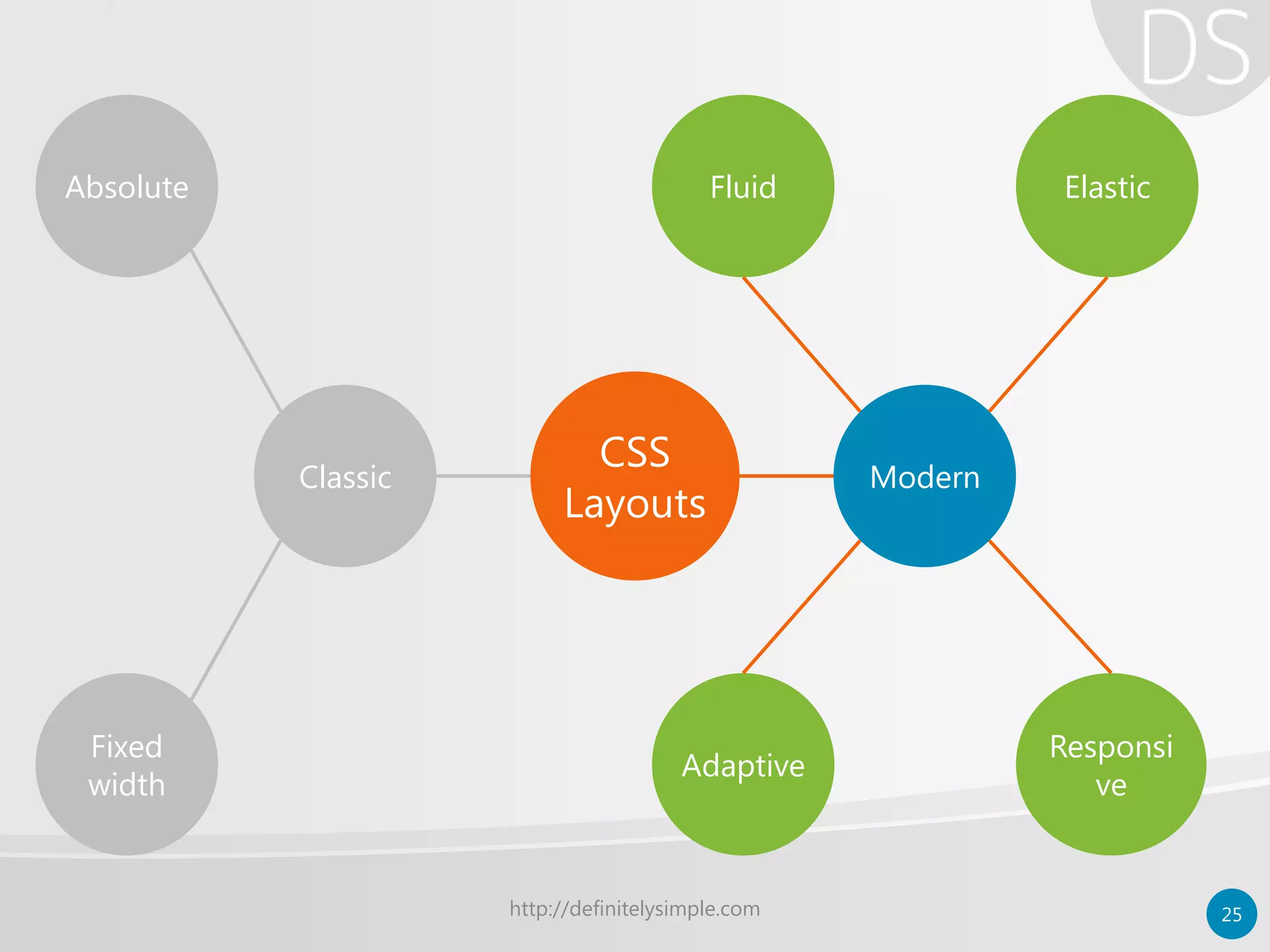
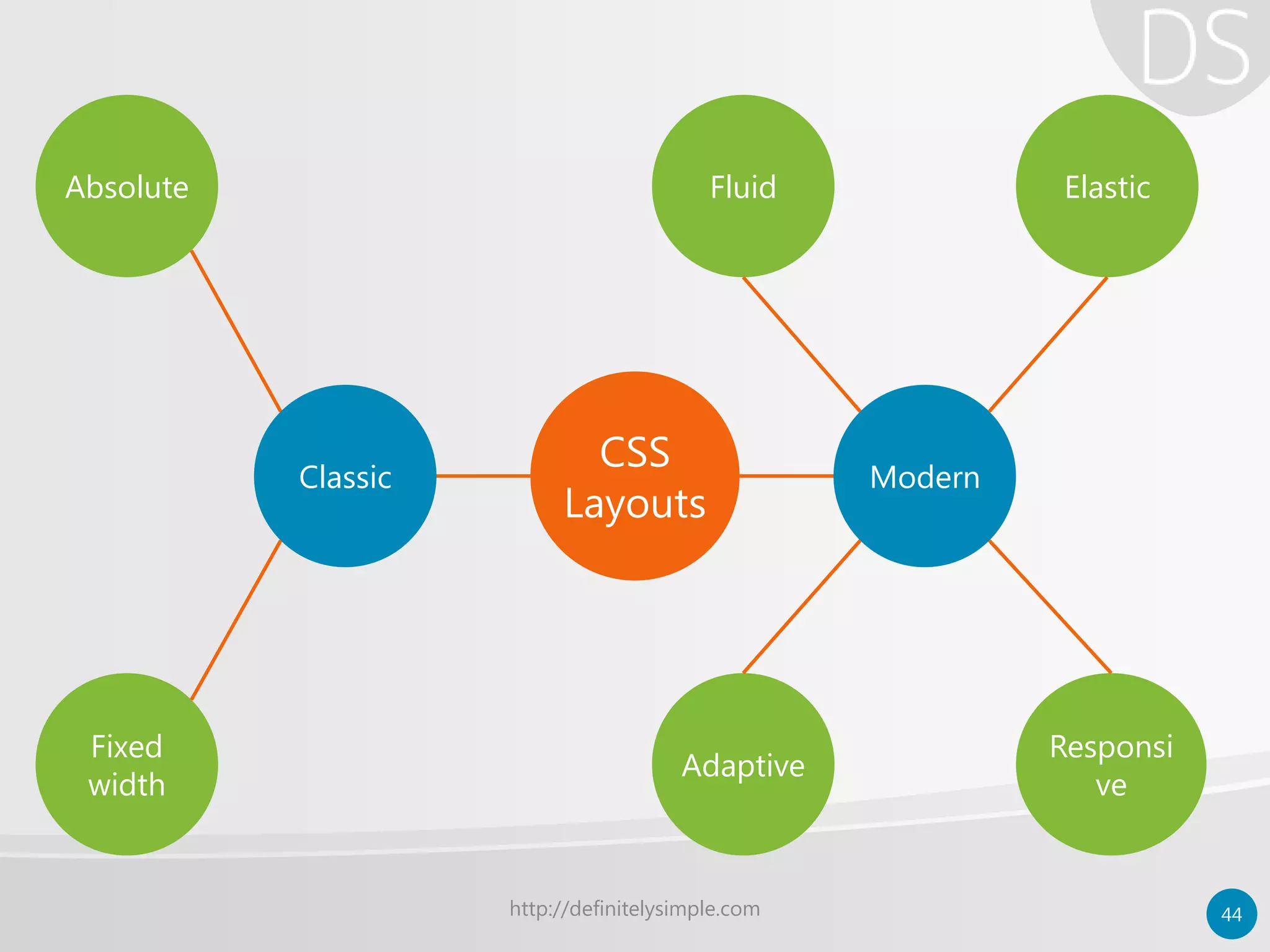
Modern layouts
• Also known as “Relative layouts”
– No fixed width for elements
– Works on both large and small screen devices
– Use relative CSS units
• Rem, ems, percentages, max/min values
– Recent layouts use CSS3 media queries
http://definitelysimple.com 26
http://definitelysimple.com 27
Classic Modern
Absolute ElasticFluid
Fixed
width
Adaptive
Responsi
ve
CSS
Layouts
Fluid layout
• Same as “liquid layout”
– Percentage based layouts – Size of element is
based on % of its container’s size
– Elements always occupy same space
regardless of screen size
– Better use of screen estate
• Foundation for other modern layouts
http://definitelysimple.com 28
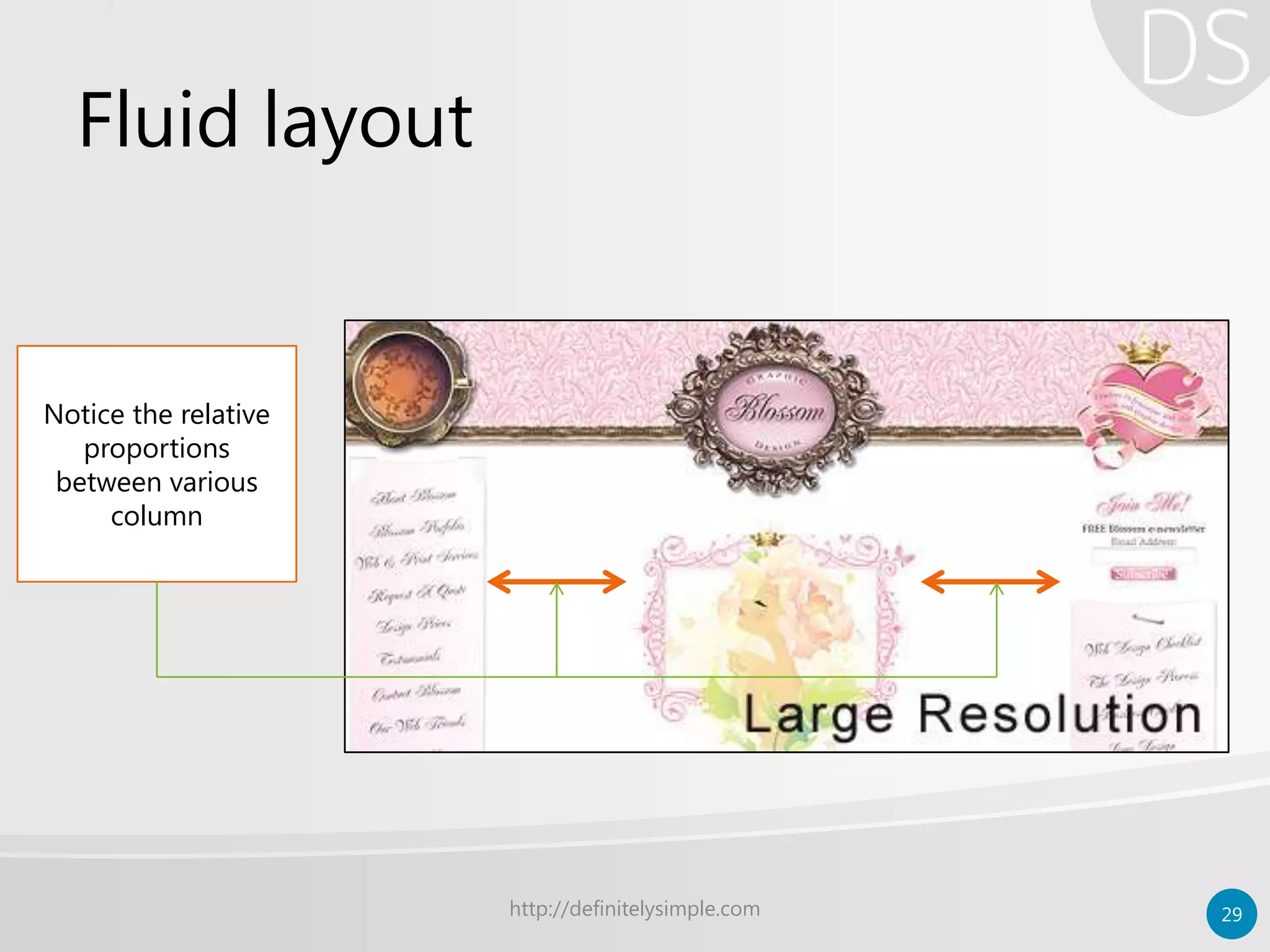
Fluid layout
http://definitelysimple.com 29
Notice the relative
proportions
between various
column
Fluid layout
http://definitelysimple.com 30
On smaller
resolutions
proportions have
reduced
Fluid layout
• Advantages
– Better at handling white spaces
– Easier than other modern layouts
• Disadvantage
– Hampered usability at very low & high
resolutions; needs to set limit with max/min
– Provides only size experience to users; no real
shift in user experience
http://definitelysimple.com 31
http://definitelysimple.com 32
Classic Modern
Absolute ElasticFluid
Fixed
width
Adaptive
Responsi
ve
CSS
Layouts
Elastic layout
• Uses CSS “em” unit for measurement
– Layout adjusts itself depending upon the
content’s need
– Width is determined by size of the text set in
user’s browser
– Not widely used as compared to others
– Ideal for text-heavy (content) web pages
http://definitelysimple.com 33
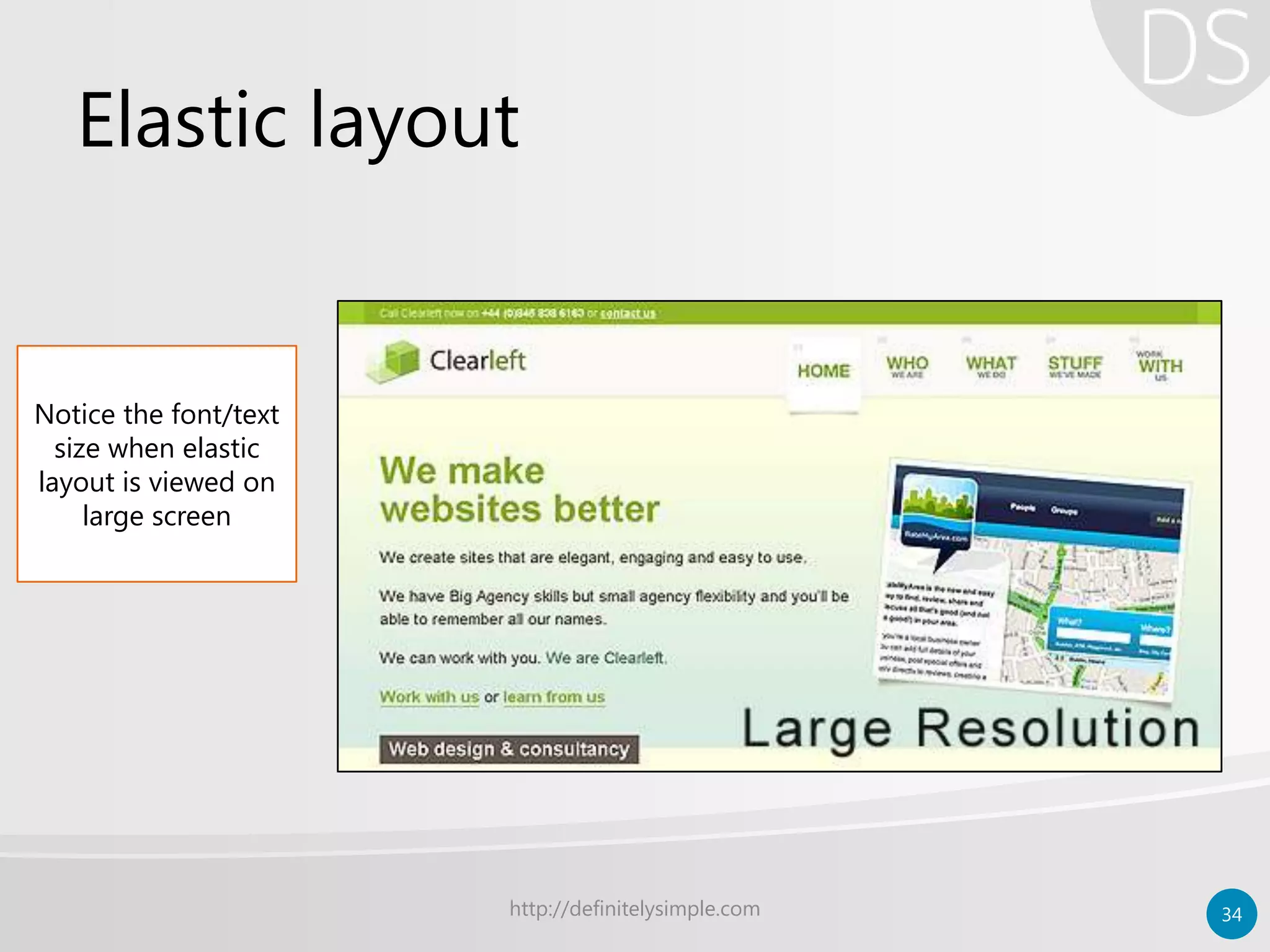
Elastic layout
http://definitelysimple.com 34
Notice the font/text
size when elastic
layout is viewed on
large screen
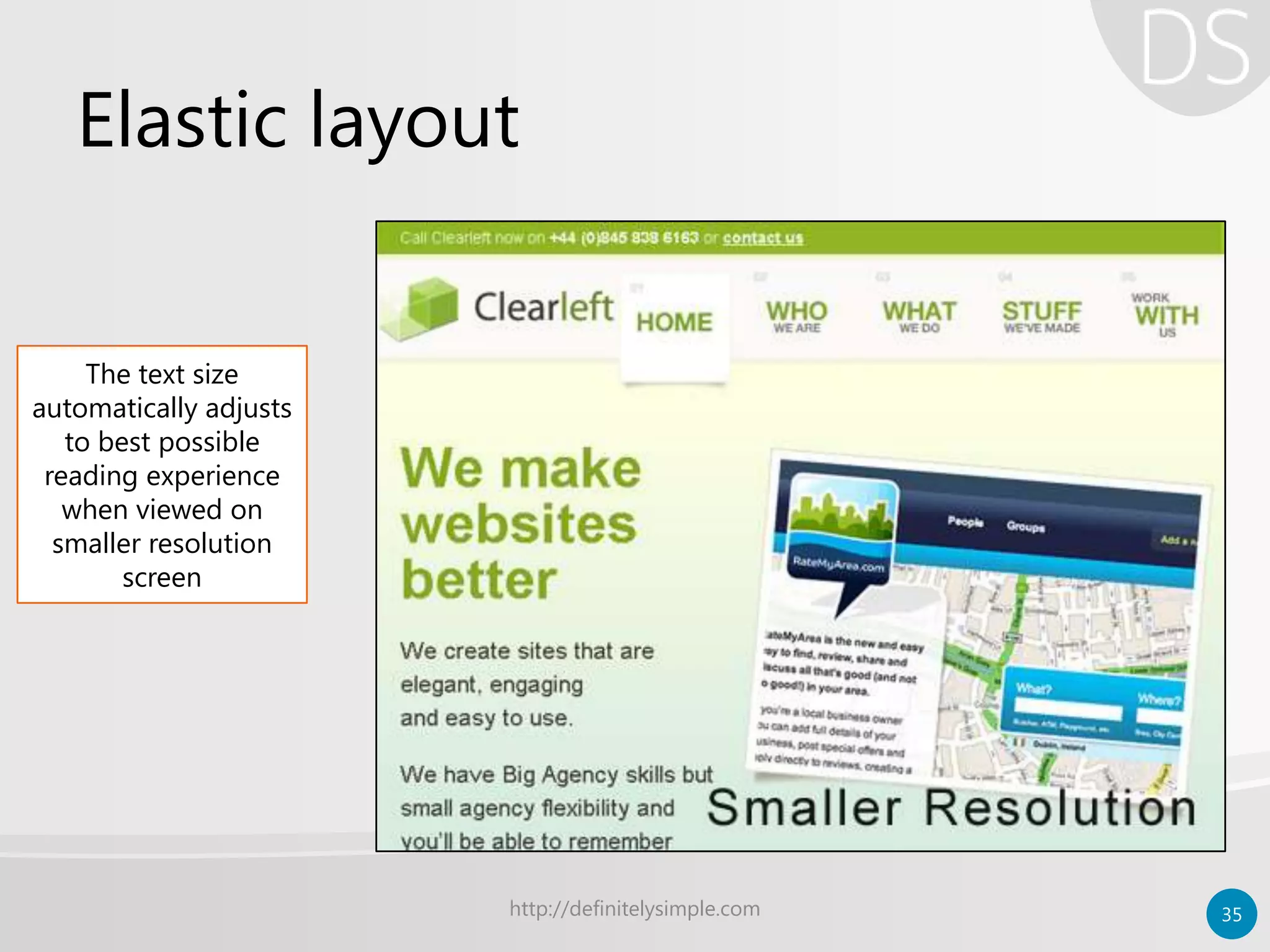
Elastic layout
http://definitelysimple.com 35
The text size
automatically adjusts
to best possible
reading experience
when viewed on
smaller resolution
screen
Elastic layout
• Advantages
– Highest content accessibility
– Better typographic control
– Renders good on small and big screen
• Disadvantages
– Little use beyond text-heavy web
– More difficult to develop & maintain
http://definitelysimple.com 36
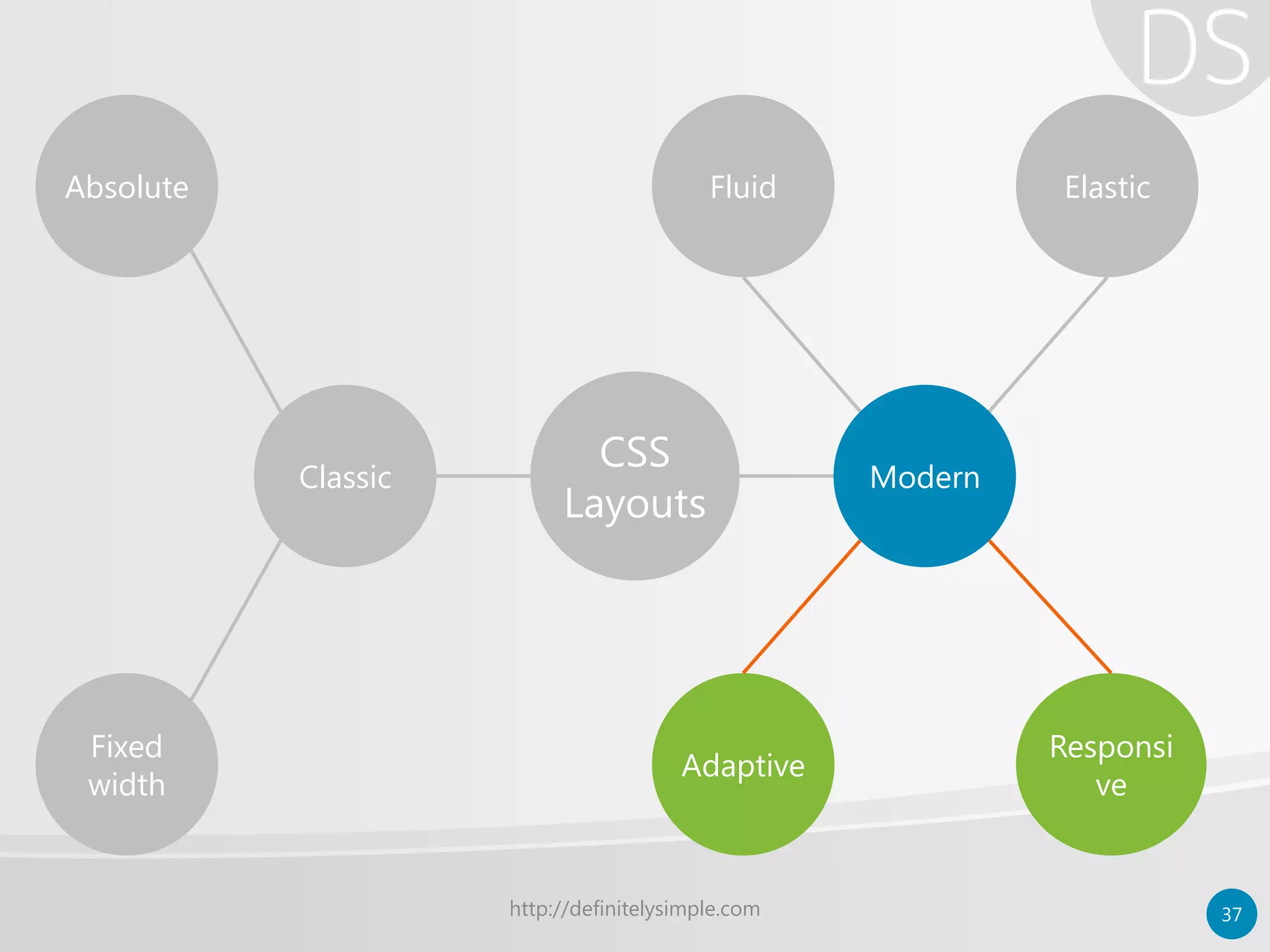
http://definitelysimple.com 37
Classic Modern
Absolute ElasticFluid
Fixed
width
Adaptive
Responsi
ve
CSS
Layouts
Adaptive layout
• Targets specific screen resolutions
– Selecting most common resolutions
• Uses either fluid or fixed layout
– Also uses CSS3 media queries if required
• Device is served the layout with the closest
possible match
http://definitelysimple.com 38
Responsive layout
• One step beyond adaptive layout
– No specific screen resolution
– Entire page is free to flow and consume space
– Mostly uses fluid layouts ideology
• Wherever page layout break
– Uses CSS3 media queries to solve the problem
– Uses flexible images
http://definitelysimple.com 39
Adaptive vs. responsive layout
Adaptive
• Predefined screen
resolution sets
• Can use both fixed/fluid
layouts internally
• Almost same end result
as responsive layout
• Less development efforts
Responsive
• No predefined screen
resolution sets
• Internally, uses fluid
layouts only
• Theoretically, better end
result than adaptive
• More development efforts
http://definitelysimple.com 40
Adaptive/responsive example
http://definitelysimple.com 41
Breakpoint 1:
Responsive
layout when
viewed on large
screen (1200px)
Adaptive/responsive example
http://definitelysimple.com 42
Breakpoint 2:
Responsive layout
when viewed on
normal screen
(960px)
Adaptive/responsive example
http://definitelysimple.com 43
Breakpoint 3:
Responsive
layout when
viewed on tablet
screen (870px)
Breakpoint 4:
Responsive
layout when
viewed on
mobile screen
(360px)
http://definitelysimple.com 44
Classic Modern
Absolute ElasticFluid
Fixed
width
Adaptive
Responsi
ve
CSS
Layouts
Modern layout – retrospective
• Modern layout is not a formally recognized
word or layout strategy
• It is to distinguish between traditional and
newer layout techniques
• By just looking at a page, it is difficult to tell
which approach has been followed since all
the techniques try for same end result
http://definitelysimple.com 45
Modern layout – retrospective
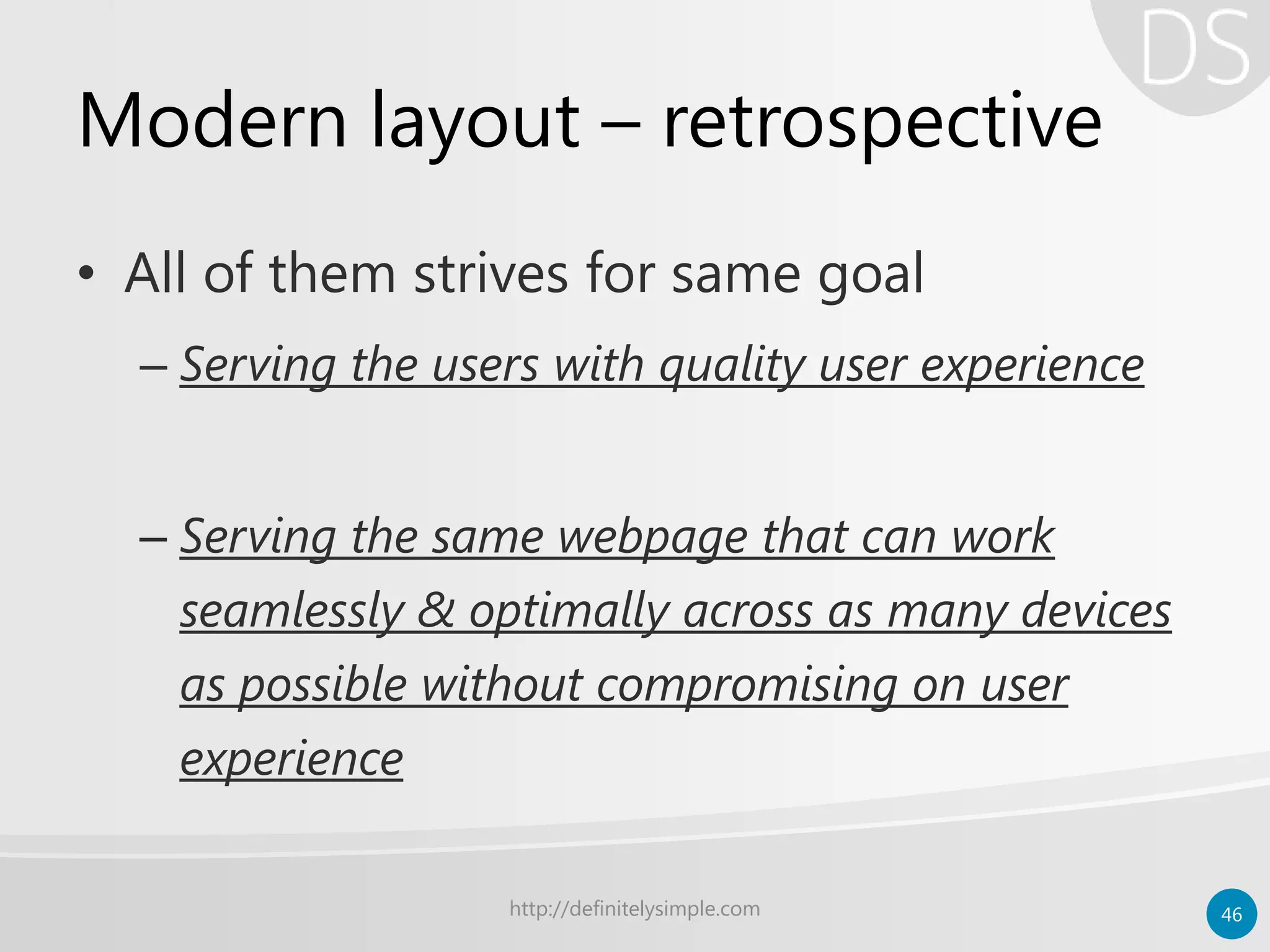
• All of them strives for same goal
– Serving the users with quality user experience
– Serving the same webpage that can work
seamlessly & optimally across as many devices
as possible without compromising on user
experience
http://definitelysimple.com 46
Modern layout – retrospective
• Some assume fluid and elastic are base
layouts helping as a foundation for
adaptive and responsive layouts
• While others tend to keep all the terms
separate and avoid possible overlap
http://definitelysimple.com 47
Modern layout – retrospective
• However one thing governs everything
– How people are consuming content
– How rapidly technology is moving from
traditional systems to modern devices likes
mobiles, tables, glass, etc.
http://definitelysimple.com 48
MOVING TO A BIGGER WORLD
Layouts are just one part of yet another bigger universe called as
“design philosophy”
http://definitelysimple.com 49
Layout is not design
• Adaptive layout is not Adaptive Web
Design (AWD)
• Responsive layout is not Responsive Web
Design (RWD)
• Layout is not design
http://definitelysimple.com 50
RWD – Responsive web design
• RWD is web design approach
• RWD goes beyond responsive layout
• Describes few design guidelines
• Term coined by Ethan Marcotte
• Often accompanied by Mobile-first
approach
http://definitelysimple.com 51
RWD – Responsive web design
• Few possible disadvantages
– Performance issues as all devices receive all
markup which maybe unnecessary
– More development & testing effort
– No pixel perfect control over layout
– Loads all the resources by default on client
computer
http://definitelysimple.com 52
AWD – Adaptive web design
• Builds on top of RWD
• Incorporate Progressive Enhancement
• Uses JavaScript to achieve the goal
• Extended into two verticals
– Client side adaptive
– Server side adaptive (often, needs to manage multiple
templates for same resource)
http://definitelysimple.com 53
AWD – Adaptive web design
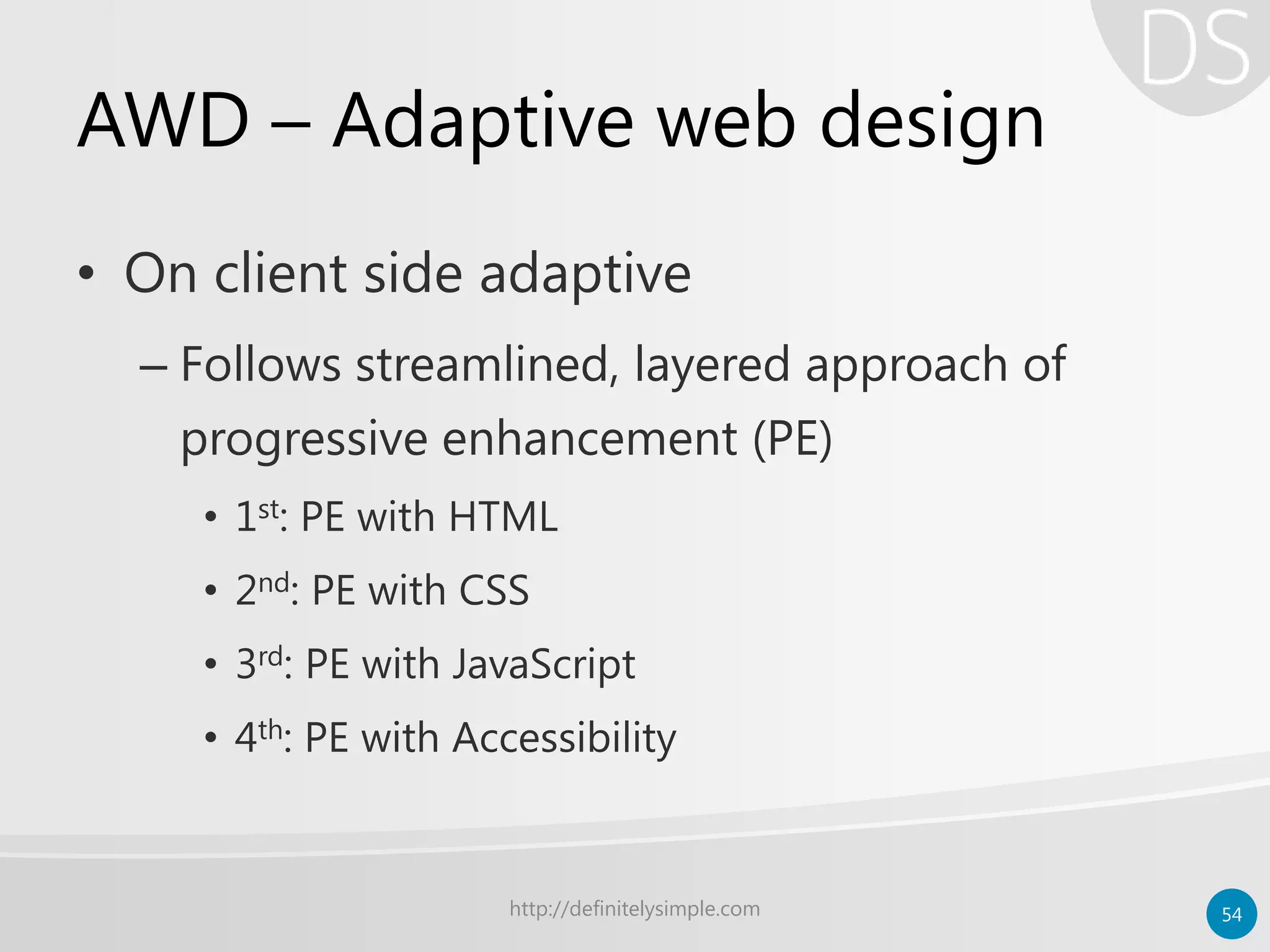
• On client side adaptive
– Follows streamlined, layered approach of
progressive enhancement (PE)
• 1st: PE with HTML
• 2nd: PE with CSS
• 3rd: PE with JavaScript
• 4th: PE with Accessibility
http://definitelysimple.com 54
AWD – Adaptive web design
• Few possible disadvantages
– Learning curve for developers as they need to
learn JavaScript
– Maintaining each layer of functionality can be a
problem in a long run
– May or may not have pixel perfect control
depending on layout used
– Server side adaptive introduces other new issues
http://definitelysimple.com 55
Points to notes
• Four terms
– Adaptive layout
– Responsive layout
– Responsive web design
– Adaptive web design
• All four are different terms & should not
be confused.
http://definitelysimple.com 56
Responsive & Adaptive
Layouts
• Responsive layout is more
complex & robust than
adaptive layout
• Responsive layout targets
more wider range than
adaptive layout
• Responsive layout needs
more development effort
Web design approach
• AWD builds on top of
RWD and addresses even
more concerns
• RWD is concerned about
page design while AWD
goes beyond page design
to include best possible
UX and IXD
http://definitelysimple.com 57
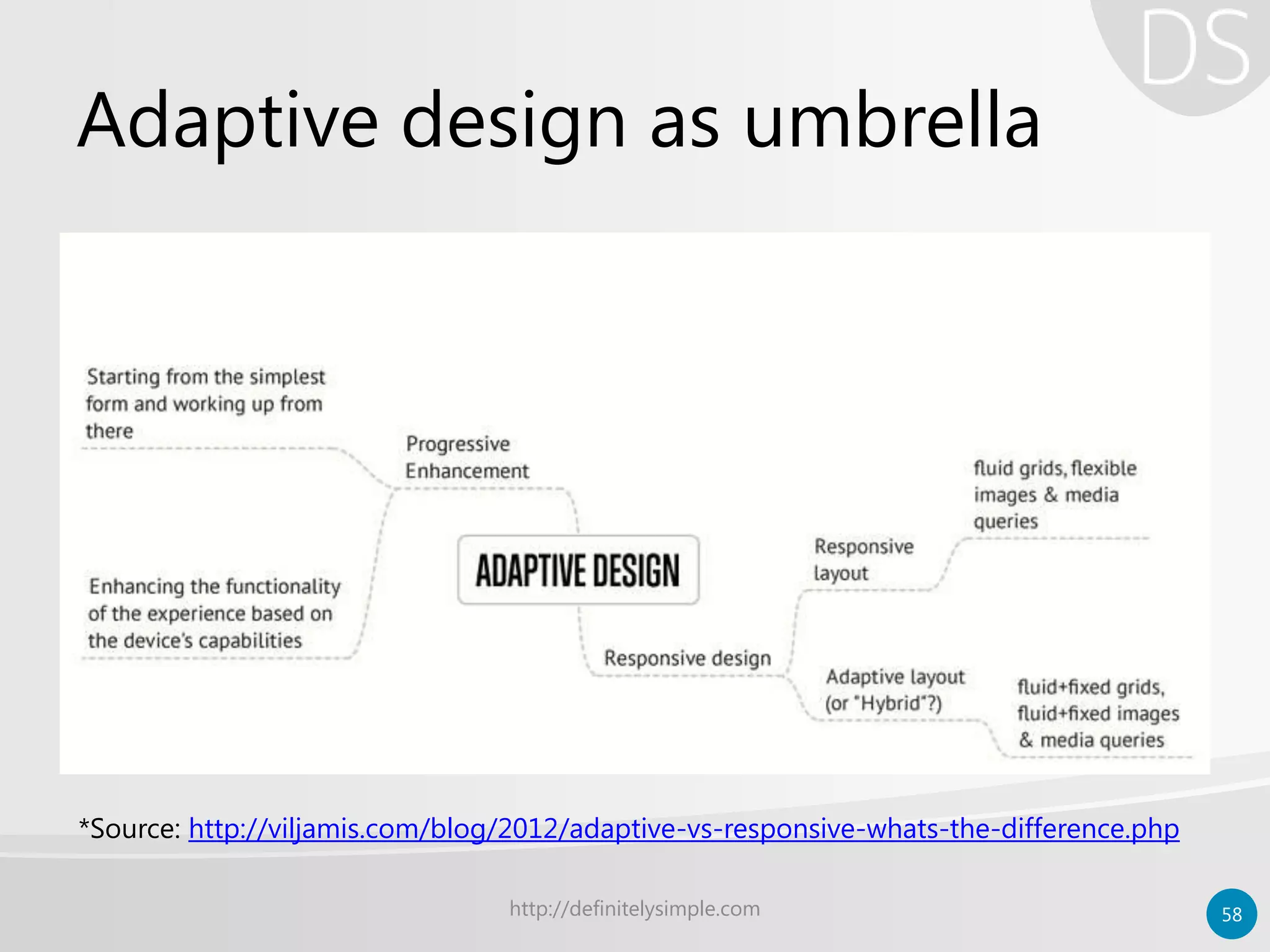
Adaptive design as umbrella
http://definitelysimple.com 58
*Source: http://viljamis.com/blog/2012/adaptive-vs-responsive-whats-the-difference.php
Possible conflicts
• There are few variations
– As opposite, some consider AWD to be a part
of RWD umbrella
– Some consider Adaptive layout and AWD as
one and the same thing
– Some consider any approach that leads to
responsive pages as RWD
http://definitelysimple.com 59
But what matters is the end result;
And…
http://definitelysimple.com 60
End justifies means
• Both AWD and RWD strive for one
ultimate goal:
One Web
http://definitelysimple.com 61
Future of layouts
• So far
– All layouts used various means to flexibility
– Relative measurements
– Display block, inline-blocks, etc.
– CSS float property
– CSS3 media quires
• However, there is more to CSS3…
http://definitelysimple.com 62
Future of layouts
• New CSS3 features to create better layouts
– Multi-column layout module
– CSS3 regions module
– Flexible box layout module
– Grid template layout module
– Box alignment module
– Exclusions and shape module
http://definitelysimple.com 63
Future of layouts
• However
– All new CSS3 modules are coding techniques
to create page layouts
– Web design approach and coding techniques
are two different things
– One is theory while other is practical
– These new modules may give rise new
approaches and theories
http://definitelysimple.com 64
http://definitelysimple.com 65
Harshal Patil
@softHarsh
http://definitelysimple.com
http://www.linkedin.com/in/hapatil
Author:
Further reading & references
• Books
– Flexible web design
• By Zoe Gillenwater
– Adaptive web design
• Aaron Gustafson
– Responsive web design
• Ethan Marcotte
http://definitelysimple.com 66
Further reading & references
• http://coding.smashingmagazine.com/2009/06/02/fixed-vs-fluid-vs-
elastic-layout-whats-the-right-one-for-you/
• http://www.w3.org/TR/mobile-bp/
• http://www.netmagazine.com/features/pros-guide-css-layouts
• http://sixrevisions.com/web_design/a-guide-on-layout-types-in-web-
design/
• http://viljamis.com/blog/2012/adaptive-vs-responsive-whats-the-
difference.php
• http://www.zeldman.com/2011/07/06/responsive-design-i-dont-think-
that-word-means-what-you-think-it-means/
• www.webmonkey.com/2013/05/the-two-flavors-of-a-one-web-
approach-responsive-vs-adaptive/
http://definitelysimple.com 67

CSS Layout Techniques

  • 1.
    CSS Layout Techniques Currentpractices of web page layout development http://definitelysimple.com 1
  • 2.
    Goals • Understand differentlayout terminology • Differentiate various overlapping terms – Layout vs. design – Implementation vs. approach • Glance at CSS3 specification • Choosing appropriate layout strategy http://definitelysimple.com 2
  • 3.
    About • DS –Definitely Simple – Articles and case studies – Everyday subjects • Computers, economics, politics, sociology – Goal of simplicity and elegance • Visit at – http://definitelysimple.com http://definitelysimple.com 3
  • 4.
    Web page layouts •Need – Web evolved from simple text-based document serving to complex image and other multimedia serving sites – Web transitioned from web sites to web apps http://definitelysimple.com 4
  • 5.
  • 6.
  • 7.
  • 8.
    http://definitelysimple.com 8 Complexity Time1990 2013 HTMLserving pages with only text Images are served along with text Multimedia support & plugins Websites turning web apps For each feature added to HTML, the layout complexity goes up exponentially
  • 9.
    Early efforts • NoCSS to manage complexity • Multicolumn layouts with Tables – HTML <table> tag with border=“0” http://definitelysimple.com 9 <tr><td>col 1 row 1</td> <td>col 2 row 1</td></tr> <tr><td>col 1 row 2</td></tr>
  • 10.
    Problems with <table> •Semantic violations – Mixing markup with presentation • Hard to maintain • Screen reader issues • Performance problem – <table> needs more browser reflows http://definitelysimple.com 10
  • 11.
    Rise of CSS •Separate markup (HTML) from presentation (styling) – CSS float and clear – CSS display: block, inline, inline-block • Solved problems of <table> tag http://definitelysimple.com 11
  • 12.
    CSS Evolution • Evolvedfrom simple styling to medium for laying out complex web page layouts • Different approaches and philosophies emerged for CSS layouts http://definitelysimple.com 12
  • 13.
  • 14.
  • 15.
  • 16.
  • 17.
    Absolute layout • Veryfirst layouts – Developer moved from print media to web – Units of measurement (inch and cm) – Very rigid and inflexible – Rarely used for web design – Useful for creating printer-friendly style sheets http://definitelysimple.com 17
  • 18.
  • 19.
    Fixed width layout •Popular and very widely used – Width of overall layout is set to standard number like 980px, 960px or 760px; – Fit in the middle when viewed on larger screen – Horizontal scroll bar when viewed on smaller screen – Uses CSS unit of pixels (px) http://definitelysimple.com 19
  • 20.
    Fixed width layout http://definitelysimple.com20 Equal margin on both sides when viewed on larger screen
  • 21.
    Fixed width layout http://definitelysimple.com21 No margin; Content fits perfectly on the screen when resolution of page matches with that of screen
  • 22.
    Fixed width layout http://definitelysimple.com22 Horizontal scroll bar when page is viewed on smaller resolution screen than that of web page
  • 23.
    Fixed width layout http://definitelysimple.com23 Possible to create extremely complex design layouts
  • 24.
    Fixed width layout •Advantages – Pixel perfection (create very complex layouts) – Easier to develop and test • Disadvantages – Very annoying/little usability on small devices – Zoom & text resize not handled property – World is migrating towards mobile http://definitelysimple.com 24
  • 25.
    http://definitelysimple.com 25 Classic Modern AbsoluteElasticFluid Fixed width Adaptive Responsi ve CSS Layouts
  • 26.
    Modern layouts • Alsoknown as “Relative layouts” – No fixed width for elements – Works on both large and small screen devices – Use relative CSS units • Rem, ems, percentages, max/min values – Recent layouts use CSS3 media queries http://definitelysimple.com 26
  • 27.
    http://definitelysimple.com 27 Classic Modern AbsoluteElasticFluid Fixed width Adaptive Responsi ve CSS Layouts
  • 28.
    Fluid layout • Sameas “liquid layout” – Percentage based layouts – Size of element is based on % of its container’s size – Elements always occupy same space regardless of screen size – Better use of screen estate • Foundation for other modern layouts http://definitelysimple.com 28
  • 29.
    Fluid layout http://definitelysimple.com 29 Noticethe relative proportions between various column
  • 30.
    Fluid layout http://definitelysimple.com 30 Onsmaller resolutions proportions have reduced
  • 31.
    Fluid layout • Advantages –Better at handling white spaces – Easier than other modern layouts • Disadvantage – Hampered usability at very low & high resolutions; needs to set limit with max/min – Provides only size experience to users; no real shift in user experience http://definitelysimple.com 31
  • 32.
    http://definitelysimple.com 32 Classic Modern AbsoluteElasticFluid Fixed width Adaptive Responsi ve CSS Layouts
  • 33.
    Elastic layout • UsesCSS “em” unit for measurement – Layout adjusts itself depending upon the content’s need – Width is determined by size of the text set in user’s browser – Not widely used as compared to others – Ideal for text-heavy (content) web pages http://definitelysimple.com 33
  • 34.
    Elastic layout http://definitelysimple.com 34 Noticethe font/text size when elastic layout is viewed on large screen
  • 35.
    Elastic layout http://definitelysimple.com 35 Thetext size automatically adjusts to best possible reading experience when viewed on smaller resolution screen
  • 36.
    Elastic layout • Advantages –Highest content accessibility – Better typographic control – Renders good on small and big screen • Disadvantages – Little use beyond text-heavy web – More difficult to develop & maintain http://definitelysimple.com 36
  • 37.
    http://definitelysimple.com 37 Classic Modern AbsoluteElasticFluid Fixed width Adaptive Responsi ve CSS Layouts
  • 38.
    Adaptive layout • Targetsspecific screen resolutions – Selecting most common resolutions • Uses either fluid or fixed layout – Also uses CSS3 media queries if required • Device is served the layout with the closest possible match http://definitelysimple.com 38
  • 39.
    Responsive layout • Onestep beyond adaptive layout – No specific screen resolution – Entire page is free to flow and consume space – Mostly uses fluid layouts ideology • Wherever page layout break – Uses CSS3 media queries to solve the problem – Uses flexible images http://definitelysimple.com 39
  • 40.
    Adaptive vs. responsivelayout Adaptive • Predefined screen resolution sets • Can use both fixed/fluid layouts internally • Almost same end result as responsive layout • Less development efforts Responsive • No predefined screen resolution sets • Internally, uses fluid layouts only • Theoretically, better end result than adaptive • More development efforts http://definitelysimple.com 40
  • 41.
    Adaptive/responsive example http://definitelysimple.com 41 Breakpoint1: Responsive layout when viewed on large screen (1200px)
  • 42.
    Adaptive/responsive example http://definitelysimple.com 42 Breakpoint2: Responsive layout when viewed on normal screen (960px)
  • 43.
    Adaptive/responsive example http://definitelysimple.com 43 Breakpoint3: Responsive layout when viewed on tablet screen (870px) Breakpoint 4: Responsive layout when viewed on mobile screen (360px)
  • 44.
    http://definitelysimple.com 44 Classic Modern AbsoluteElasticFluid Fixed width Adaptive Responsi ve CSS Layouts
  • 45.
    Modern layout –retrospective • Modern layout is not a formally recognized word or layout strategy • It is to distinguish between traditional and newer layout techniques • By just looking at a page, it is difficult to tell which approach has been followed since all the techniques try for same end result http://definitelysimple.com 45
  • 46.
    Modern layout –retrospective • All of them strives for same goal – Serving the users with quality user experience – Serving the same webpage that can work seamlessly & optimally across as many devices as possible without compromising on user experience http://definitelysimple.com 46
  • 47.
    Modern layout –retrospective • Some assume fluid and elastic are base layouts helping as a foundation for adaptive and responsive layouts • While others tend to keep all the terms separate and avoid possible overlap http://definitelysimple.com 47
  • 48.
    Modern layout –retrospective • However one thing governs everything – How people are consuming content – How rapidly technology is moving from traditional systems to modern devices likes mobiles, tables, glass, etc. http://definitelysimple.com 48
  • 49.
    MOVING TO ABIGGER WORLD Layouts are just one part of yet another bigger universe called as “design philosophy” http://definitelysimple.com 49
  • 50.
    Layout is notdesign • Adaptive layout is not Adaptive Web Design (AWD) • Responsive layout is not Responsive Web Design (RWD) • Layout is not design http://definitelysimple.com 50
  • 51.
    RWD – Responsiveweb design • RWD is web design approach • RWD goes beyond responsive layout • Describes few design guidelines • Term coined by Ethan Marcotte • Often accompanied by Mobile-first approach http://definitelysimple.com 51
  • 52.
    RWD – Responsiveweb design • Few possible disadvantages – Performance issues as all devices receive all markup which maybe unnecessary – More development & testing effort – No pixel perfect control over layout – Loads all the resources by default on client computer http://definitelysimple.com 52
  • 53.
    AWD – Adaptiveweb design • Builds on top of RWD • Incorporate Progressive Enhancement • Uses JavaScript to achieve the goal • Extended into two verticals – Client side adaptive – Server side adaptive (often, needs to manage multiple templates for same resource) http://definitelysimple.com 53
  • 54.
    AWD – Adaptiveweb design • On client side adaptive – Follows streamlined, layered approach of progressive enhancement (PE) • 1st: PE with HTML • 2nd: PE with CSS • 3rd: PE with JavaScript • 4th: PE with Accessibility http://definitelysimple.com 54
  • 55.
    AWD – Adaptiveweb design • Few possible disadvantages – Learning curve for developers as they need to learn JavaScript – Maintaining each layer of functionality can be a problem in a long run – May or may not have pixel perfect control depending on layout used – Server side adaptive introduces other new issues http://definitelysimple.com 55
  • 56.
    Points to notes •Four terms – Adaptive layout – Responsive layout – Responsive web design – Adaptive web design • All four are different terms & should not be confused. http://definitelysimple.com 56
  • 57.
    Responsive & Adaptive Layouts •Responsive layout is more complex & robust than adaptive layout • Responsive layout targets more wider range than adaptive layout • Responsive layout needs more development effort Web design approach • AWD builds on top of RWD and addresses even more concerns • RWD is concerned about page design while AWD goes beyond page design to include best possible UX and IXD http://definitelysimple.com 57
  • 58.
    Adaptive design asumbrella http://definitelysimple.com 58 *Source: http://viljamis.com/blog/2012/adaptive-vs-responsive-whats-the-difference.php
  • 59.
    Possible conflicts • Thereare few variations – As opposite, some consider AWD to be a part of RWD umbrella – Some consider Adaptive layout and AWD as one and the same thing – Some consider any approach that leads to responsive pages as RWD http://definitelysimple.com 59
  • 60.
    But what mattersis the end result; And… http://definitelysimple.com 60
  • 61.
    End justifies means •Both AWD and RWD strive for one ultimate goal: One Web http://definitelysimple.com 61
  • 62.
    Future of layouts •So far – All layouts used various means to flexibility – Relative measurements – Display block, inline-blocks, etc. – CSS float property – CSS3 media quires • However, there is more to CSS3… http://definitelysimple.com 62
  • 63.
    Future of layouts •New CSS3 features to create better layouts – Multi-column layout module – CSS3 regions module – Flexible box layout module – Grid template layout module – Box alignment module – Exclusions and shape module http://definitelysimple.com 63
  • 64.
    Future of layouts •However – All new CSS3 modules are coding techniques to create page layouts – Web design approach and coding techniques are two different things – One is theory while other is practical – These new modules may give rise new approaches and theories http://definitelysimple.com 64
  • 65.
  • 66.
    Further reading &references • Books – Flexible web design • By Zoe Gillenwater – Adaptive web design • Aaron Gustafson – Responsive web design • Ethan Marcotte http://definitelysimple.com 66
  • 67.
    Further reading &references • http://coding.smashingmagazine.com/2009/06/02/fixed-vs-fluid-vs- elastic-layout-whats-the-right-one-for-you/ • http://www.w3.org/TR/mobile-bp/ • http://www.netmagazine.com/features/pros-guide-css-layouts • http://sixrevisions.com/web_design/a-guide-on-layout-types-in-web- design/ • http://viljamis.com/blog/2012/adaptive-vs-responsive-whats-the- difference.php • http://www.zeldman.com/2011/07/06/responsive-design-i-dont-think- that-word-means-what-you-think-it-means/ • www.webmonkey.com/2013/05/the-two-flavors-of-a-one-web- approach-responsive-vs-adaptive/ http://definitelysimple.com 67