1.1
Chapter 1
Introduction
Copyright © The McGraw-Hill Companies, Inc. Permission required for reproduction or display.
Engr. Burhan Ud Din
Email: engr.burhan341@gmail.com
Department of Electrical Engineering
City University Peshawar.
1.2
1-1 DATA COMMUNICATIONS
The term
The term telecommunication
telecommunication means communication at a
means communication at a
distance. The word
distance. The word data
data refers to information presented
refers to information presented
in whatever form is agreed upon by the parties creating
and using the data.
and using the data. Data communications
Data communications are the
are the
exchange of data between two devices via some form of
transmission medium such as a wire cable.
 Components of a data communications system
 Data Flow
Topics discussed in this section:
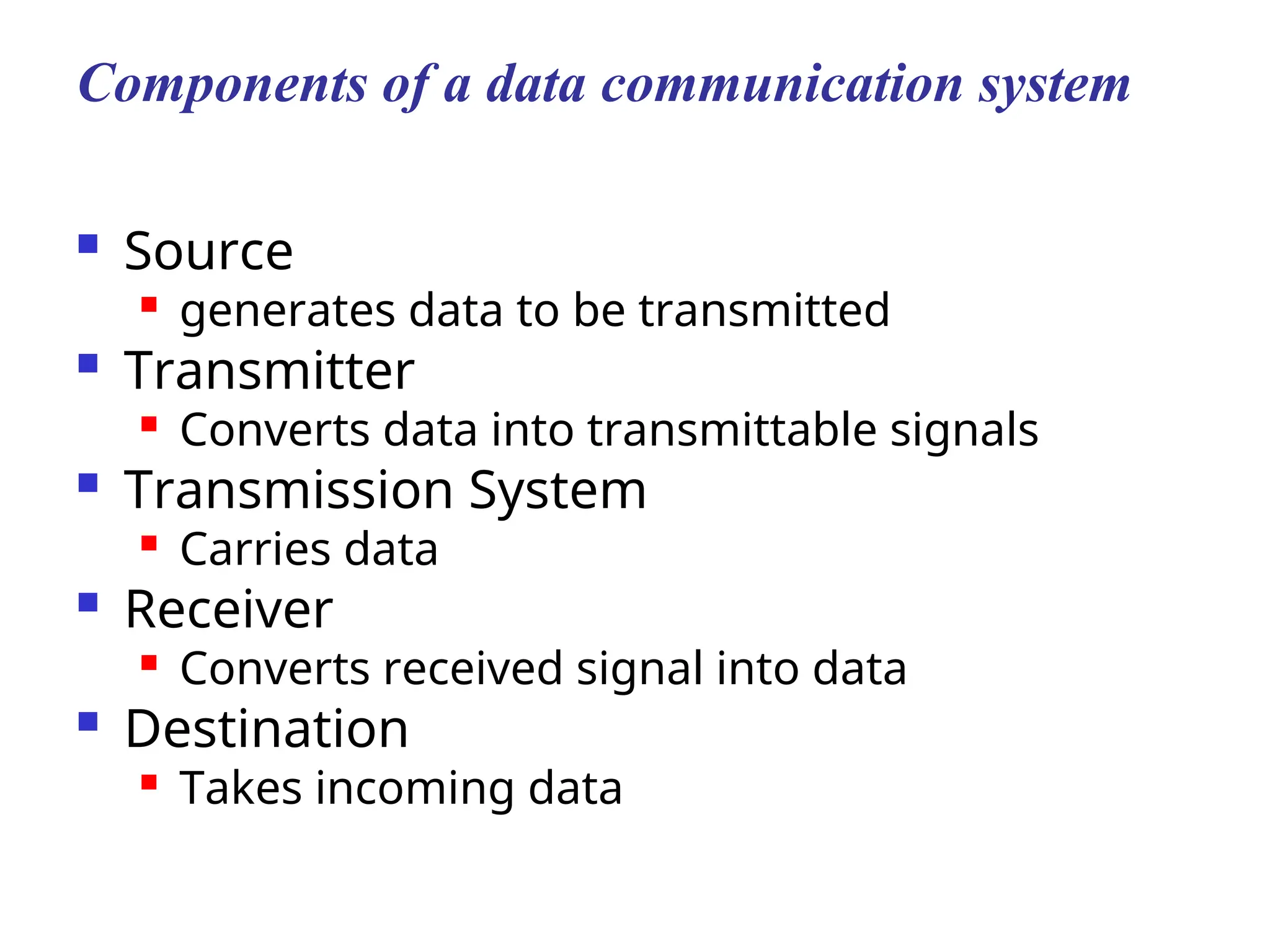
Components of a data communication system
 Source

generates data to be transmitted
 Transmitter

Converts data into transmittable signals
 Transmission System

Carries data
 Receiver
 Converts received signal into data
 Destination

Takes incoming data
1.4
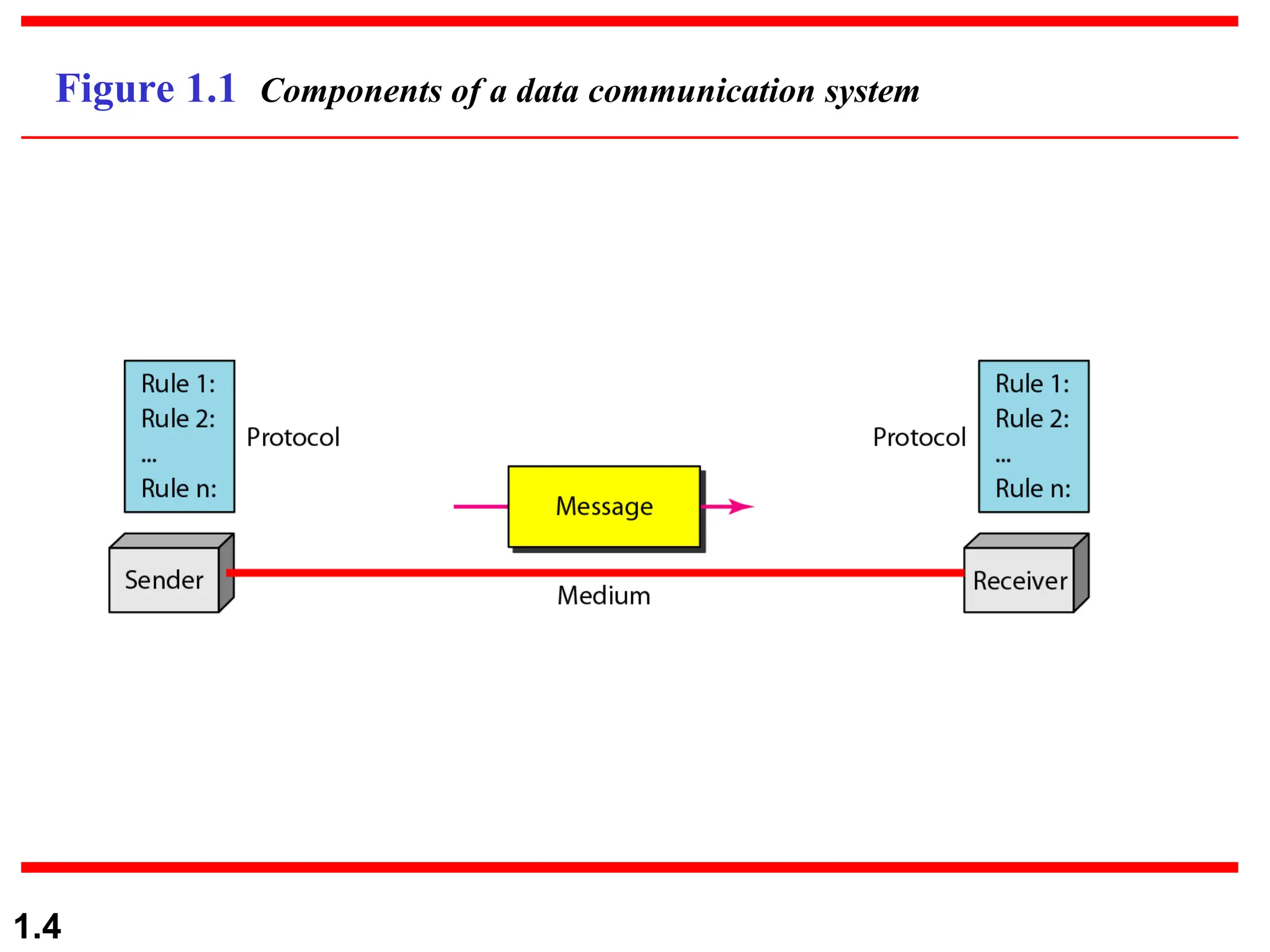
Figure 1.1 Components of a data communication system
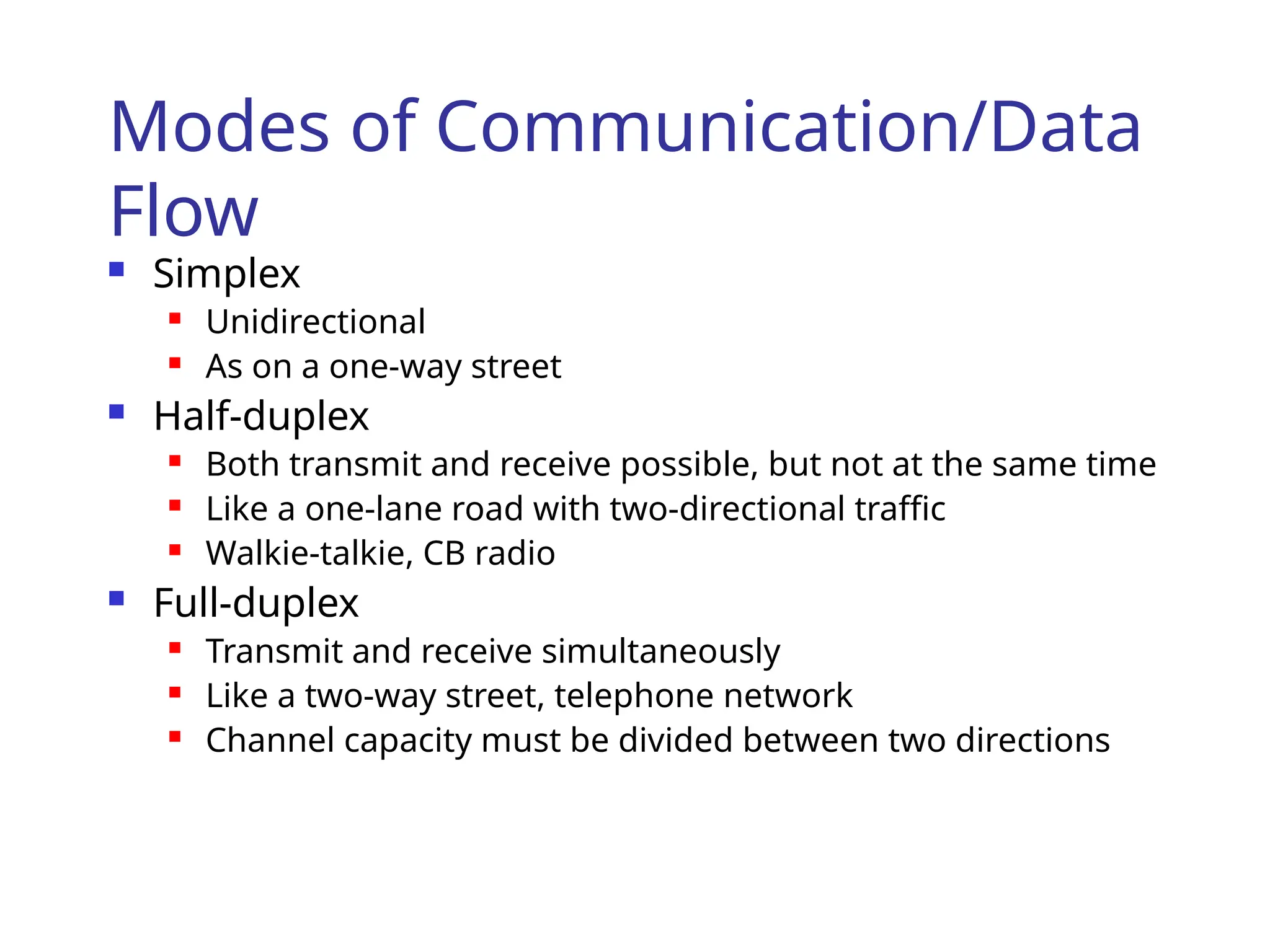
Modes of Communication/Data
Flow
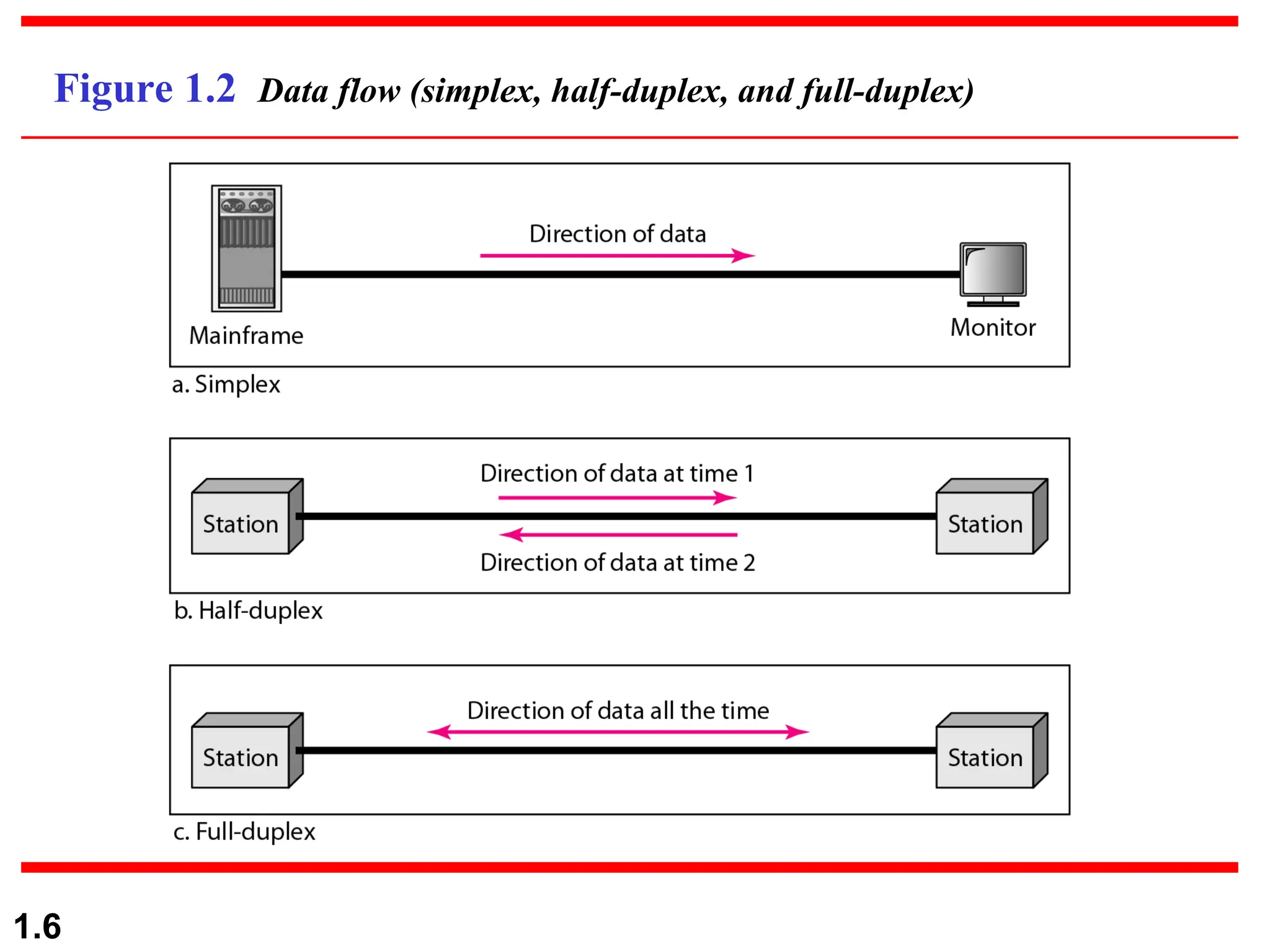
 Simplex
 Unidirectional
 As on a one-way street
 Half-duplex
 Both transmit and receive possible, but not at the same time
 Like a one-lane road with two-directional traffic
 Walkie-talkie, CB radio
 Full-duplex
 Transmit and receive simultaneously
 Like a two-way street, telephone network
 Channel capacity must be divided between two directions
1.6
Figure 1.2 Data flow (simplex, half-duplex, and full-duplex)
1.7
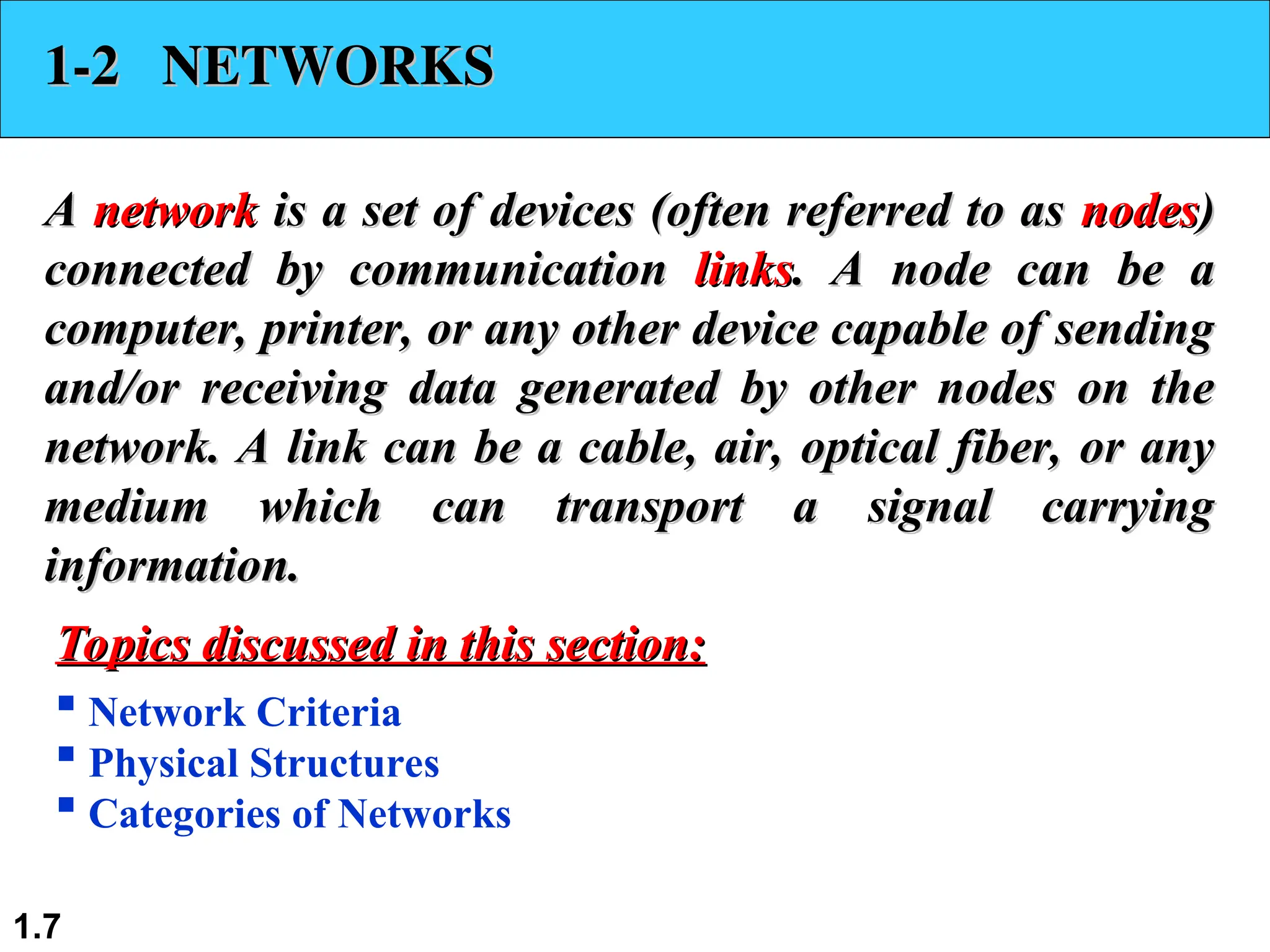
1-2 NETWORKS
1-2 NETWORKS
A
A network
network is a set of devices (often referred to as
is a set of devices (often referred to as nodes
nodes)
)
connected by communication
connected by communication links
links. A node can be a
. A node can be a
computer, printer, or any other device capable of sending
and/or receiving data generated by other nodes on the
network. A link can be a cable, air, optical fiber, or any
medium which can transport a signal carrying
information.
information.
 Network Criteria
 Physical Structures
 Categories of Networks
Topics discussed in this section:
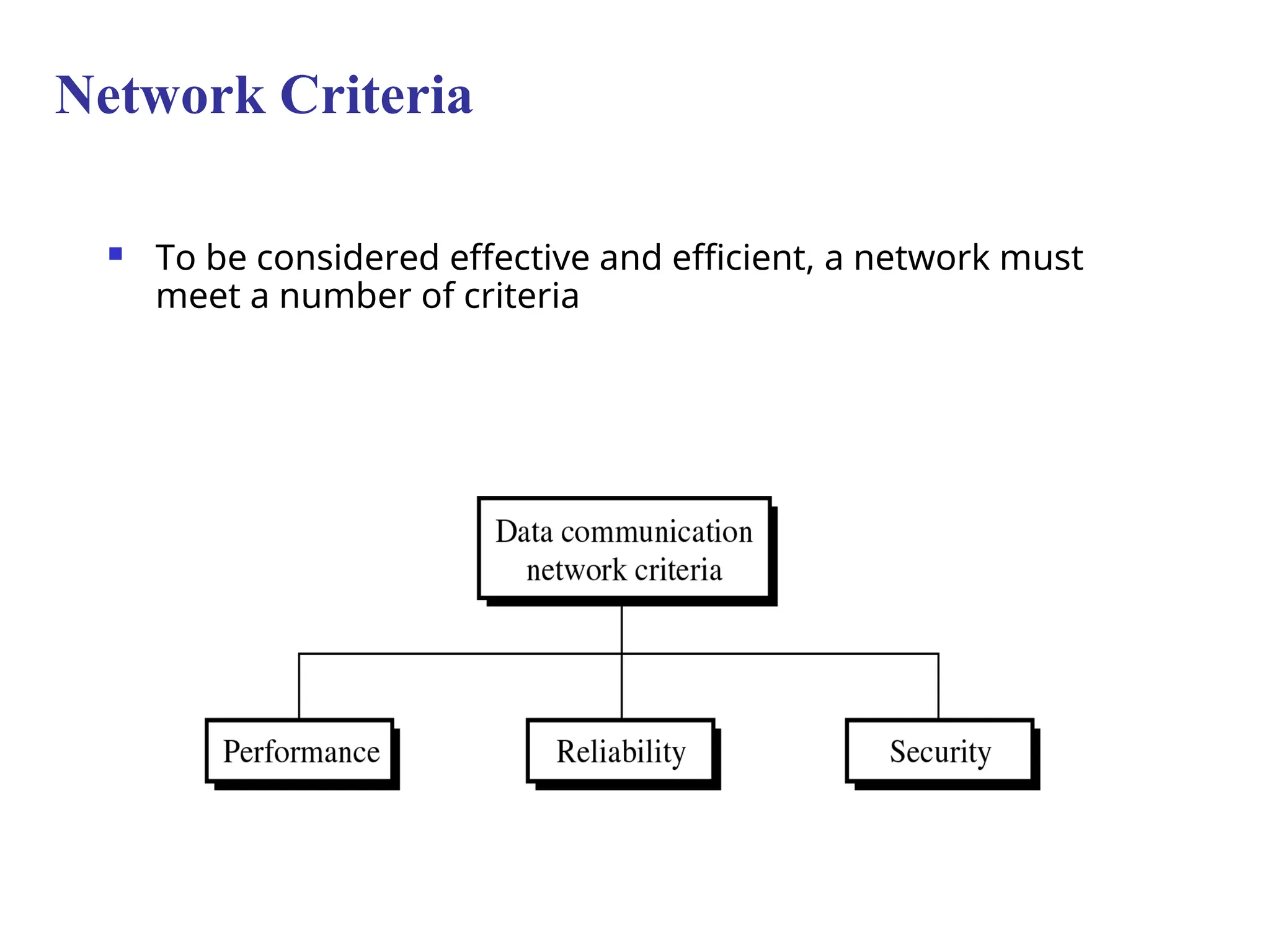
 To be considered effective and efficient, a network must
meet a number of criteria
Network Criteria
1.9
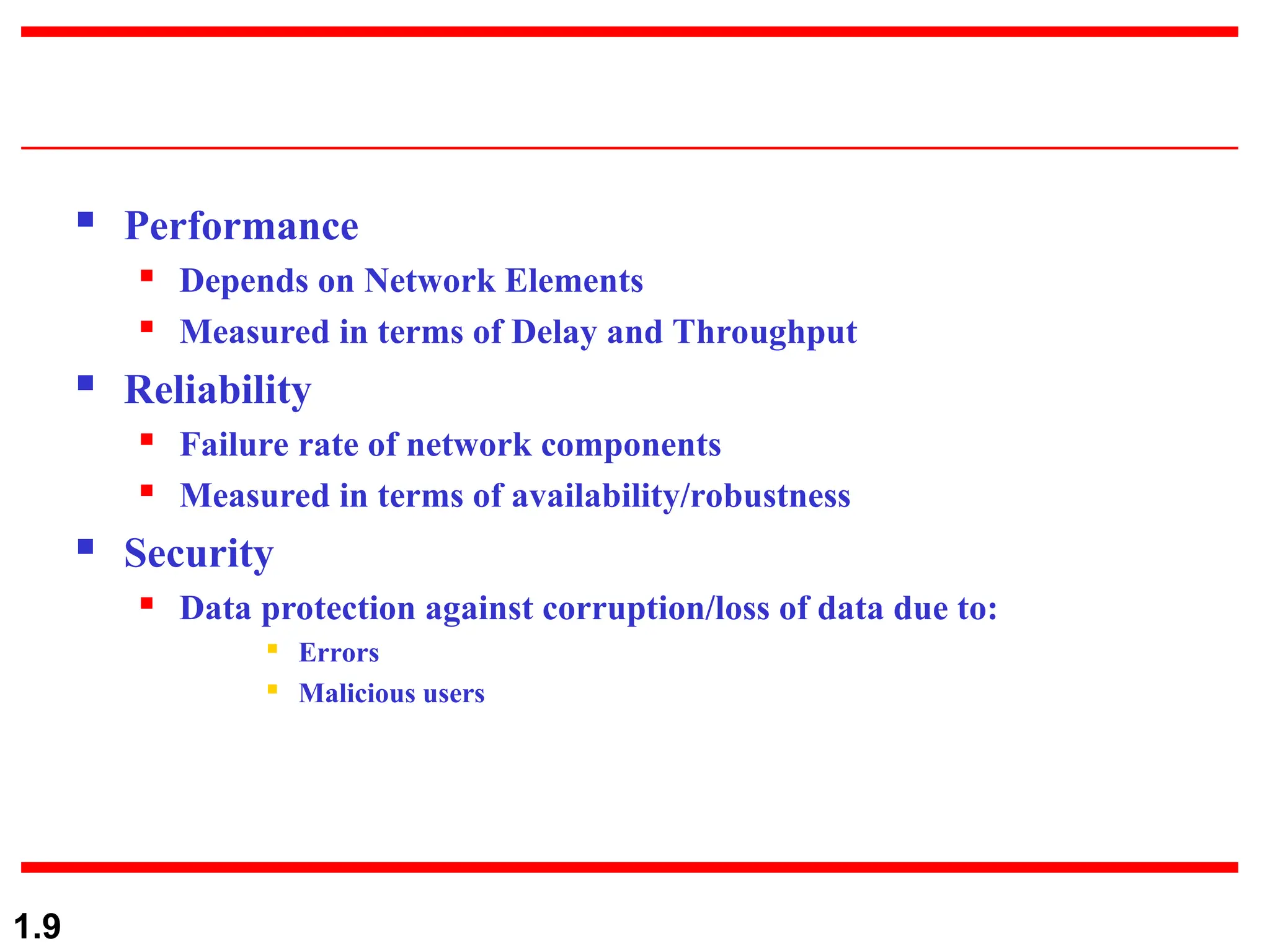
 Performance
 Depends on Network Elements
 Measured in terms of Delay and Throughput
 Reliability
 Failure rate of network components
 Measured in terms of availability/robustness
 Security
 Data protection against corruption/loss of data due to:
 Errors
 Malicious users
1.10
Physical Structures
 Type of Connection
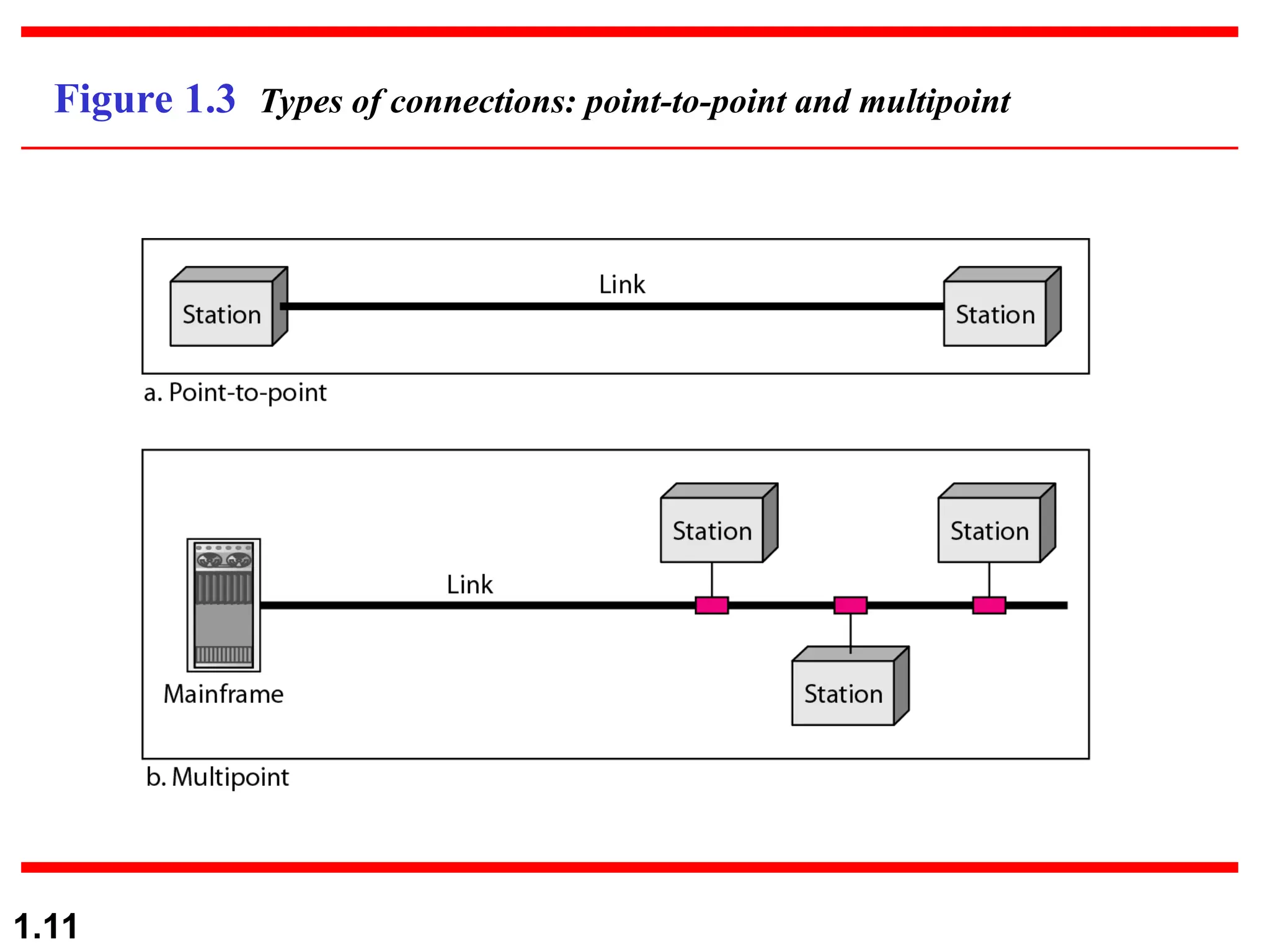
I) Point to Point - single transmitter and receiver

Dedicated link between two devices
 The entire capacity of the channel is reserved

Ex) Microwave link, TV remote control
II) Multipoint - multiple recipients of single transmission

More than two devices share a single link
 Capacity of the channel is either

Spatially shared: Devices can use the link simultaneously
 Timeshare: Users take turns
1.11
Figure 1.3 Types of connections: point-to-point and multipoint
Type of transmission
 unicast, mulitcast, broadcast
I) Unicast
Unicast is the term used to describe communication where a piece of information is sent
from one point to another point. In this case there is just one sender, and one receiver.
Unicast transmission, in which a packet is sent from a single source to a specified
destination, is still the predominant form of transmission on LANs
II)Multicast
Multicast is the term used to describe communication where a piece of information is
sent from one or more points to a set of other points. In this case there is may be one
or more senders, and the information is distributed to a set of receivers (theer may be
no receivers, or any other number of receivers).
One example of an application which may use multicast is a video server sending out
networked TV channels. Simultaneous delivery of high quality video to each of a
large number of delivery platforms will exhaust the capability of even a high
bandwidth network with a powerful video clip server.
1.12
III) Broadcast
Broadcast is the term used to describe communication where a piece of
information is sent from one point to all other points. In this case there is
just one sender, but the information is sent to all connected receivers.
Broadcast transmission is supported on most LANs (e.g. Ethernet), and
may be used to send the same message to all computers on the LAN
1.13
1.14
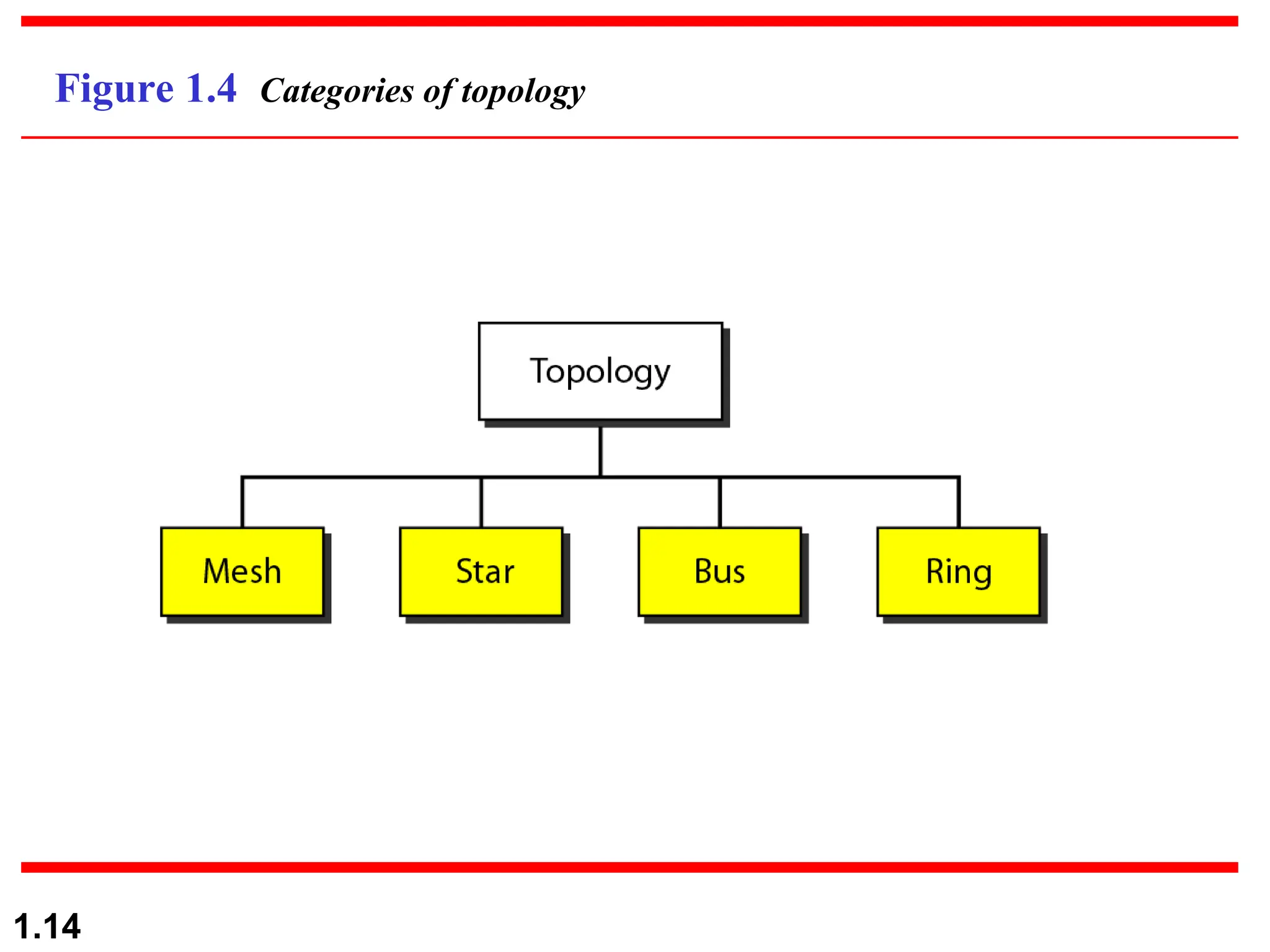
Figure 1.4 Categories of topology
1.15
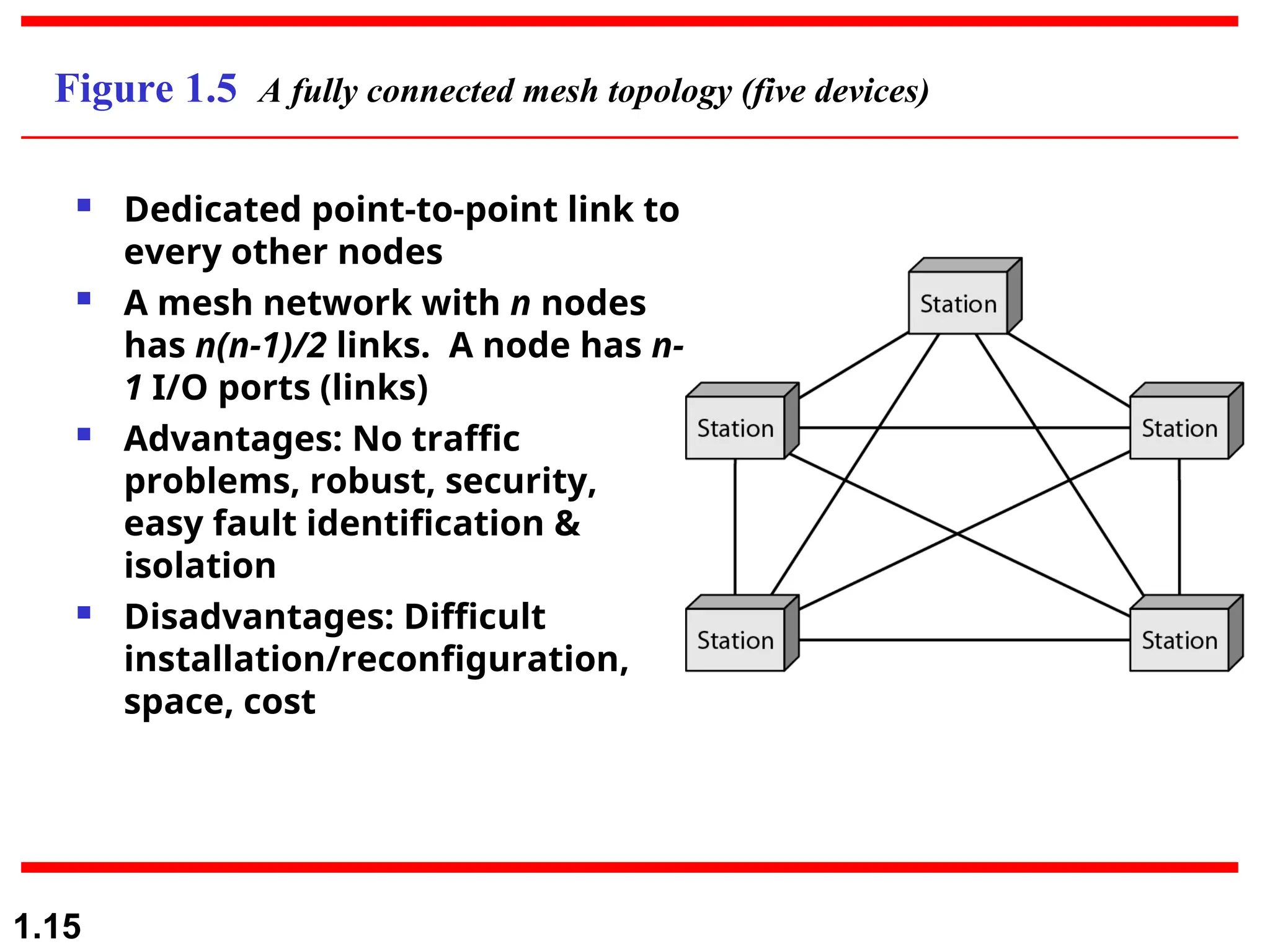
Figure 1.5 A fully connected mesh topology (five devices)
 Dedicated point-to-point link to
every other nodes
 A mesh network with n nodes
has n(n-1)/2 links. A node has n-
1 I/O ports (links)
 Advantages: No traffic
problems, robust, security,
easy fault identification &
isolation
 Disadvantages: Difficult
installation/reconfiguration,
space, cost
1.16
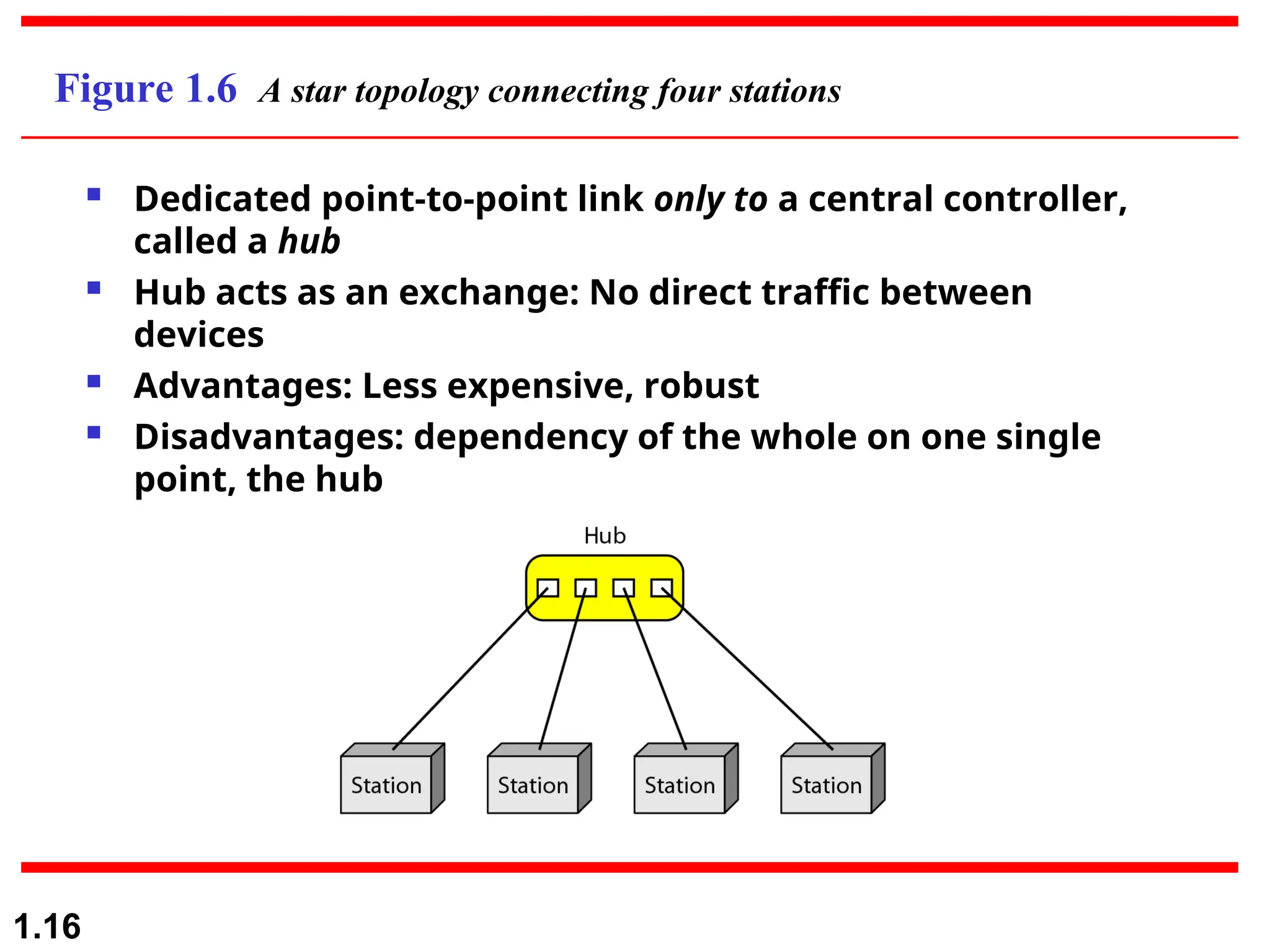
Figure 1.6 A star topology connecting four stations
 Dedicated point-to-point link only to a central controller,
called a hub
 Hub acts as an exchange: No direct traffic between
devices
 Advantages: Less expensive, robust
 Disadvantages: dependency of the whole on one single
point, the hub
1.17
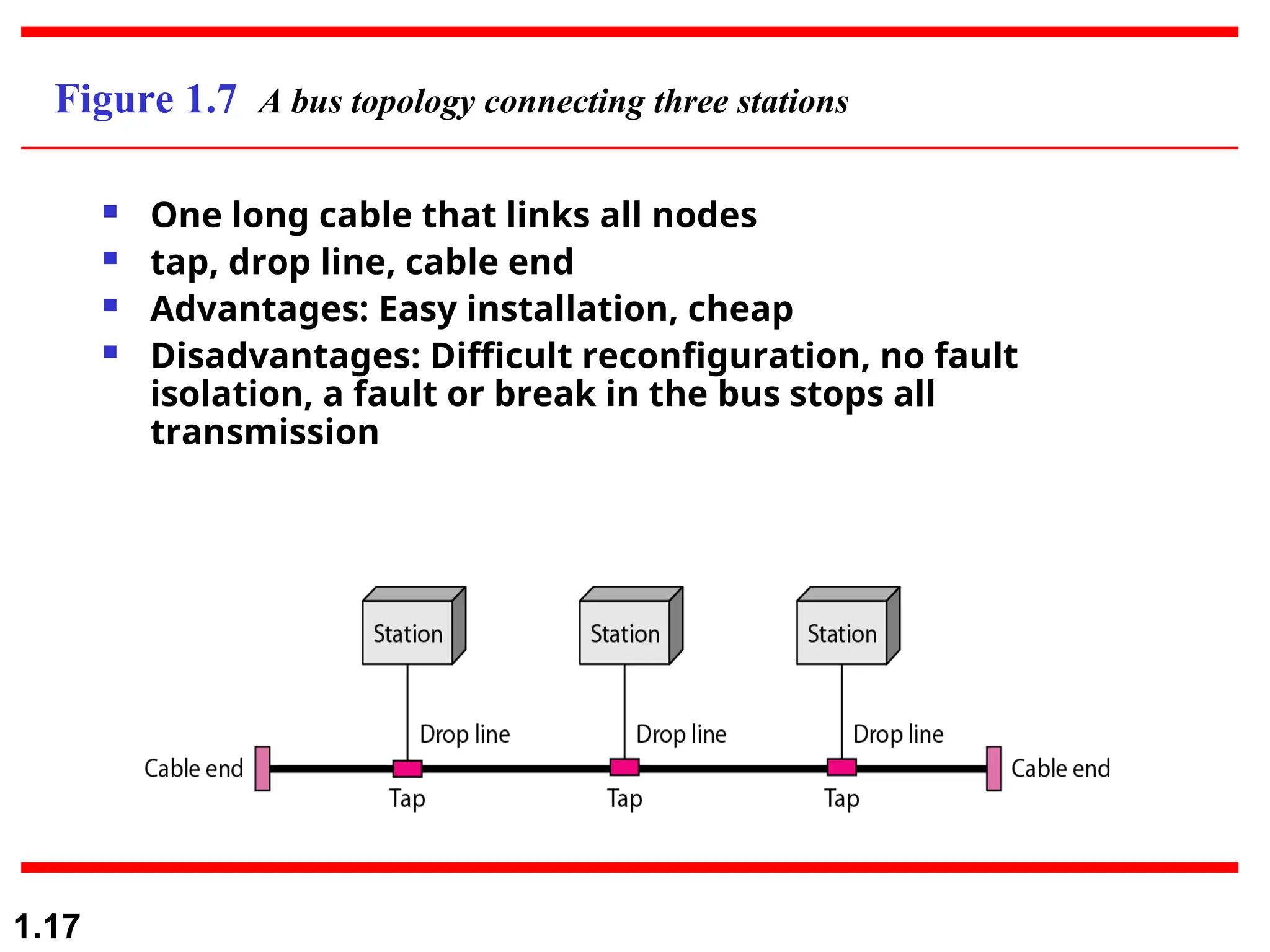
Figure 1.7 A bus topology connecting three stations
 One long cable that links all nodes
 tap, drop line, cable end
 Advantages: Easy installation, cheap
 Disadvantages: Difficult reconfiguration, no fault
isolation, a fault or break in the bus stops all
transmission
1.18
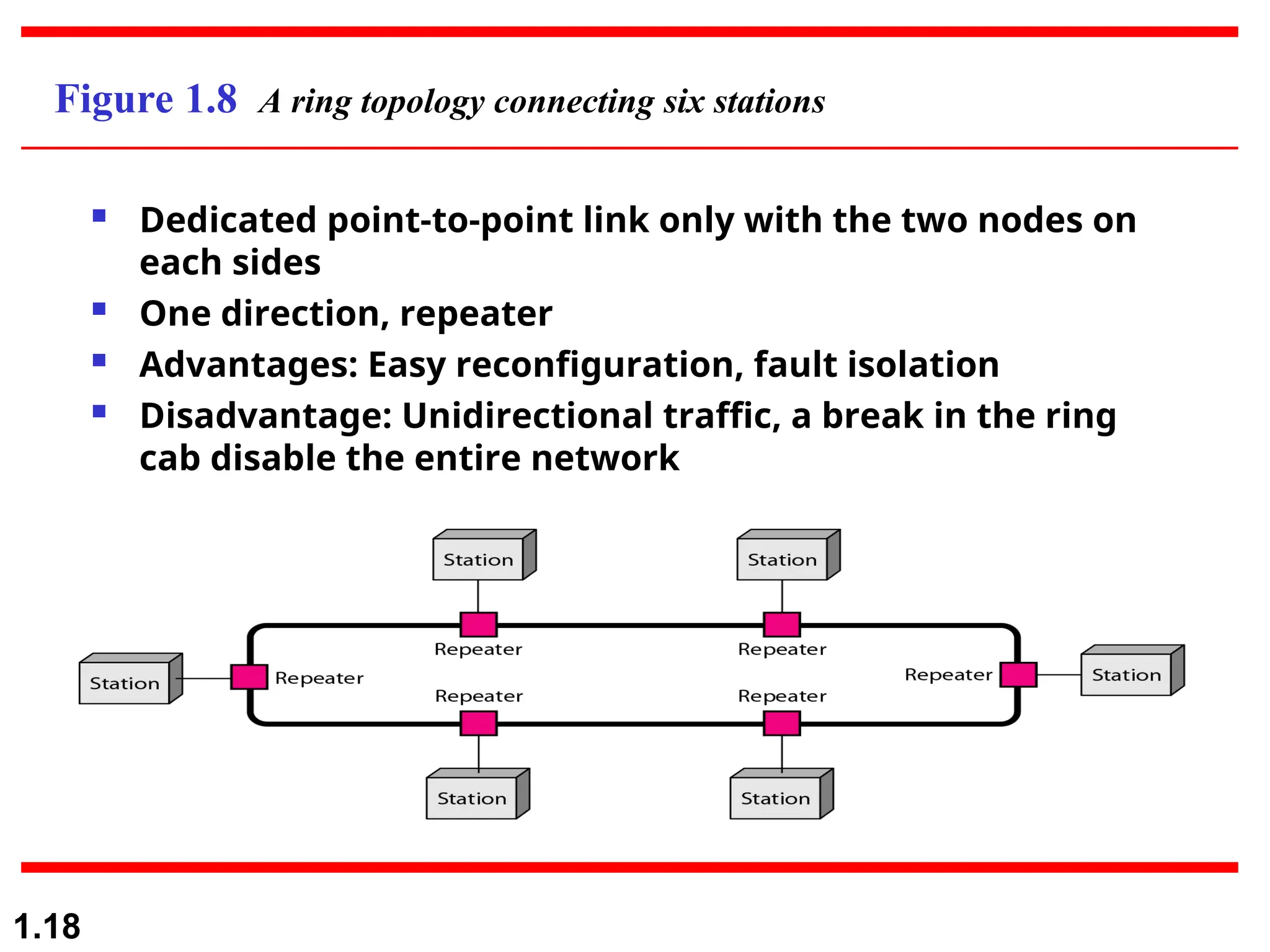
Figure 1.8 A ring topology connecting six stations
 Dedicated point-to-point link only with the two nodes on
each sides
 One direction, repeater
 Advantages: Easy reconfiguration, fault isolation
 Disadvantage: Unidirectional traffic, a break in the ring
cab disable the entire network
1.19
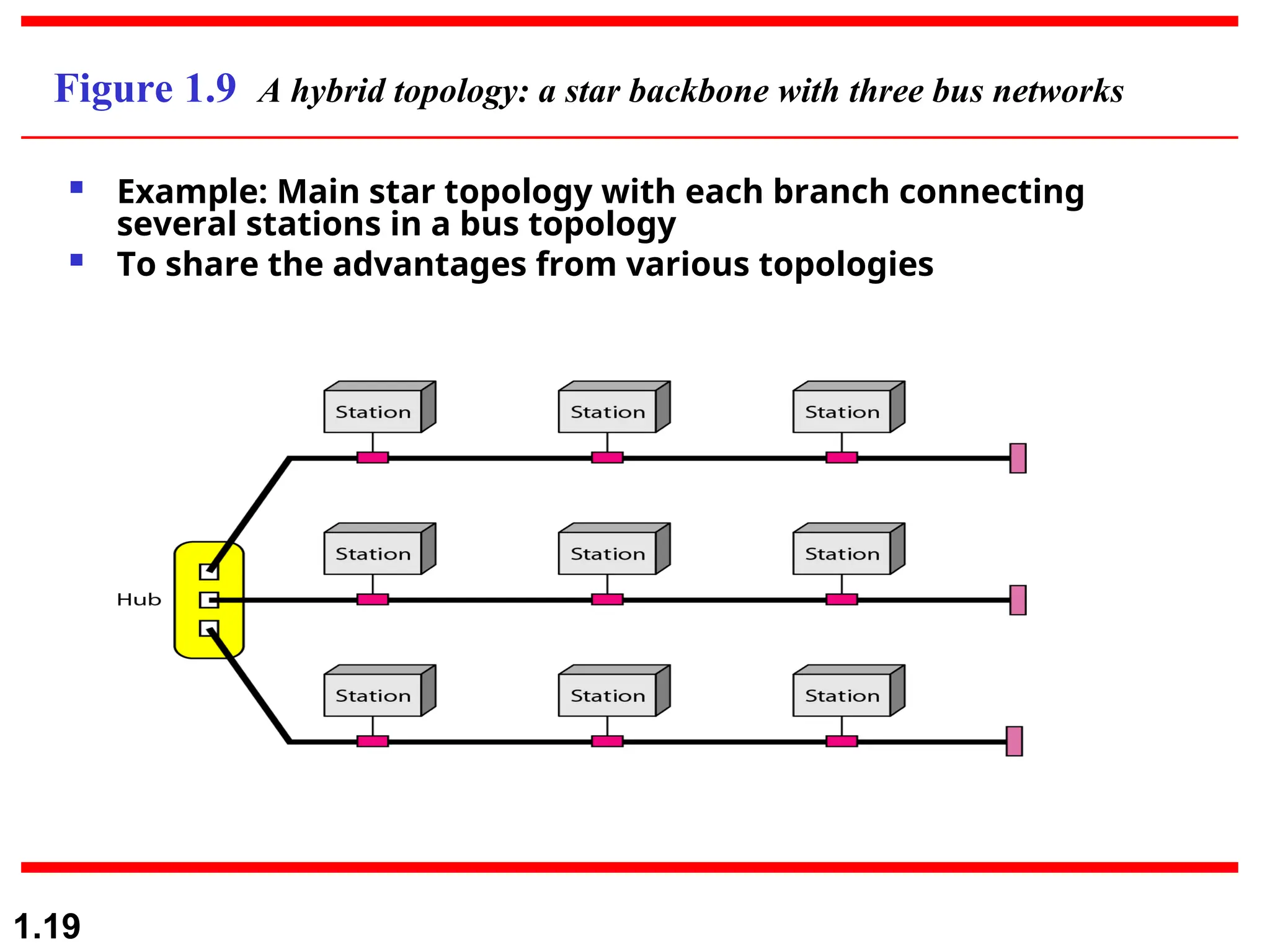
Figure 1.9 A hybrid topology: a star backbone with three bus networks
 Example: Main star topology with each branch connecting
several stations in a bus topology
 To share the advantages from various topologies
1-20
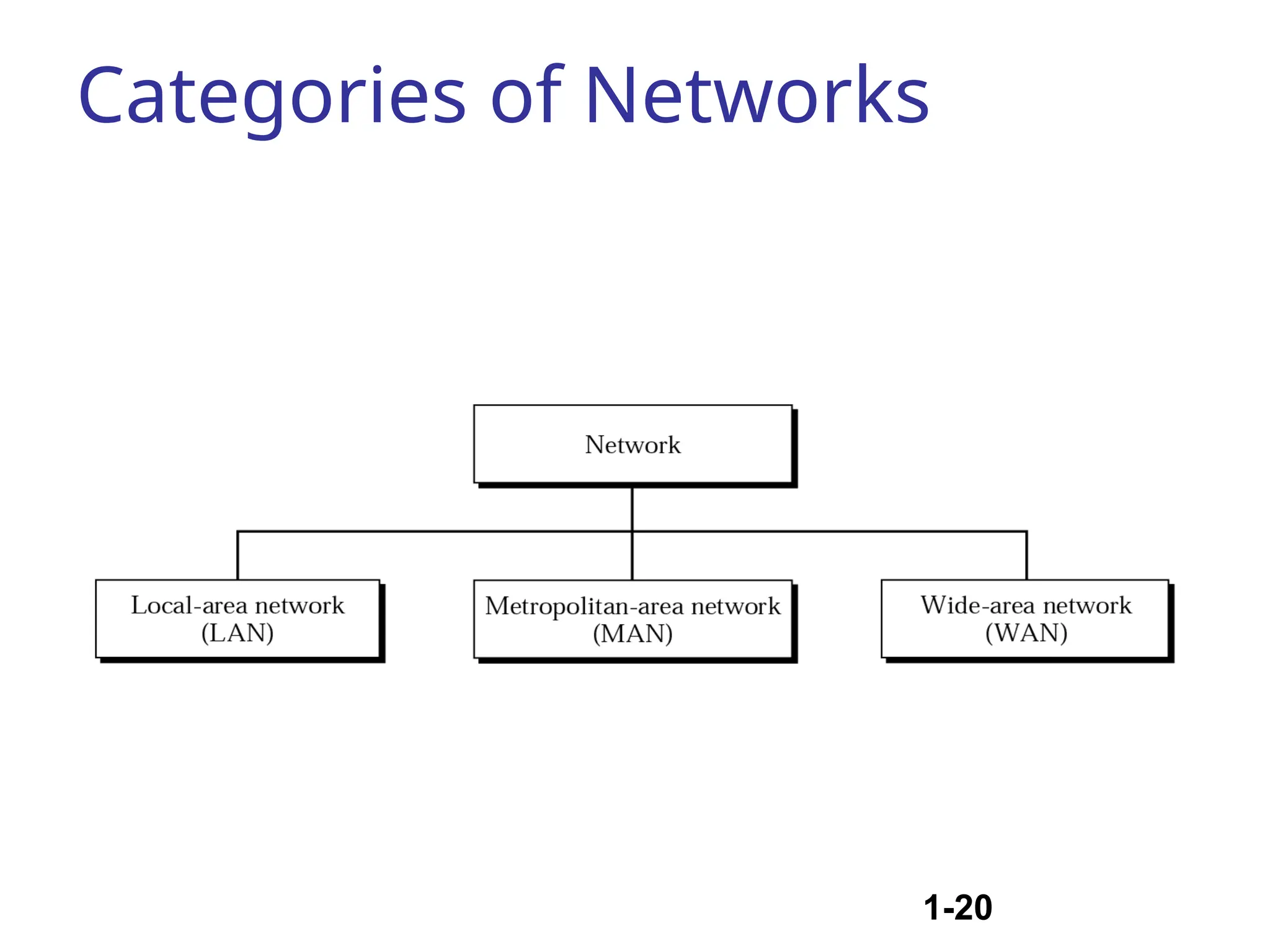
Categories of Networks
1.21
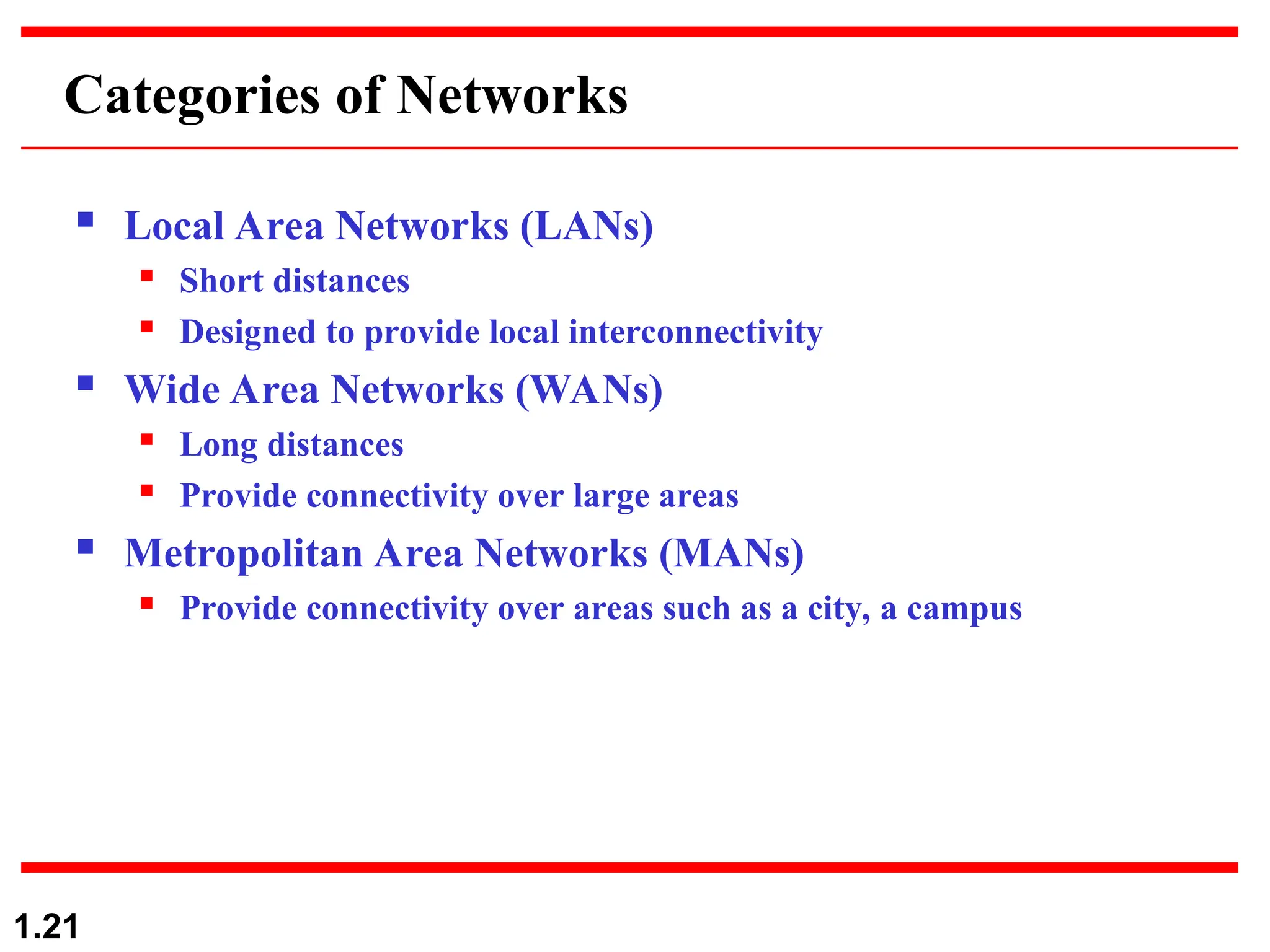
Categories of Networks
 Local Area Networks (LANs)
 Short distances
 Designed to provide local interconnectivity
 Wide Area Networks (WANs)
 Long distances
 Provide connectivity over large areas
 Metropolitan Area Networks (MANs)
 Provide connectivity over areas such as a city, a campus
1.22
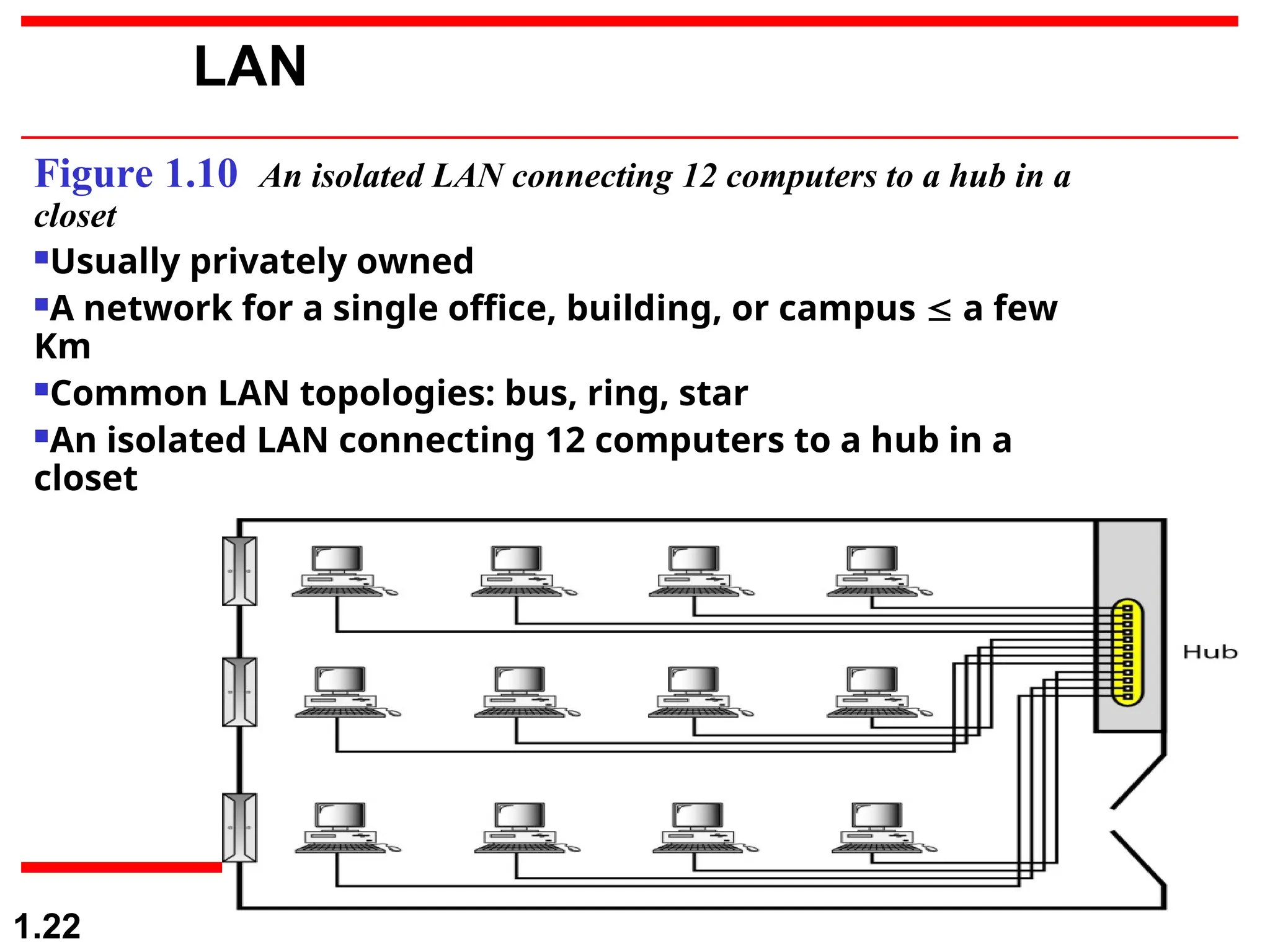
Figure 1.10 An isolated LAN connecting 12 computers to a hub in a
closet
Usually privately owned
A network for a single office, building, or campus  a few
Km
Common LAN topologies: bus, ring, star
An isolated LAN connecting 12 computers to a hub in a
closet
LAN
1-23
MAN
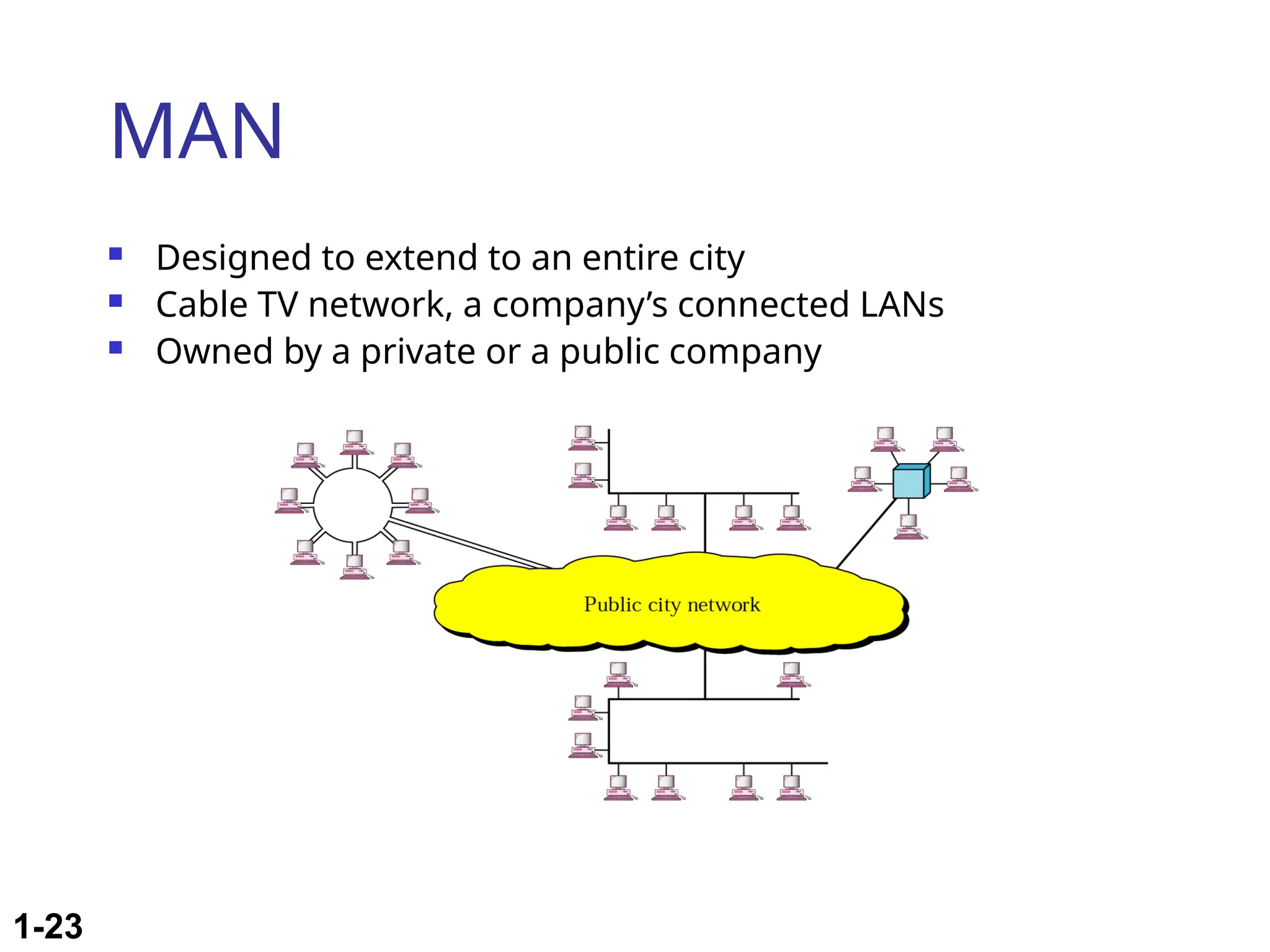
 Designed to extend to an entire city
 Cable TV network, a company’s connected LANs
 Owned by a private or a public company
1-24
WAN
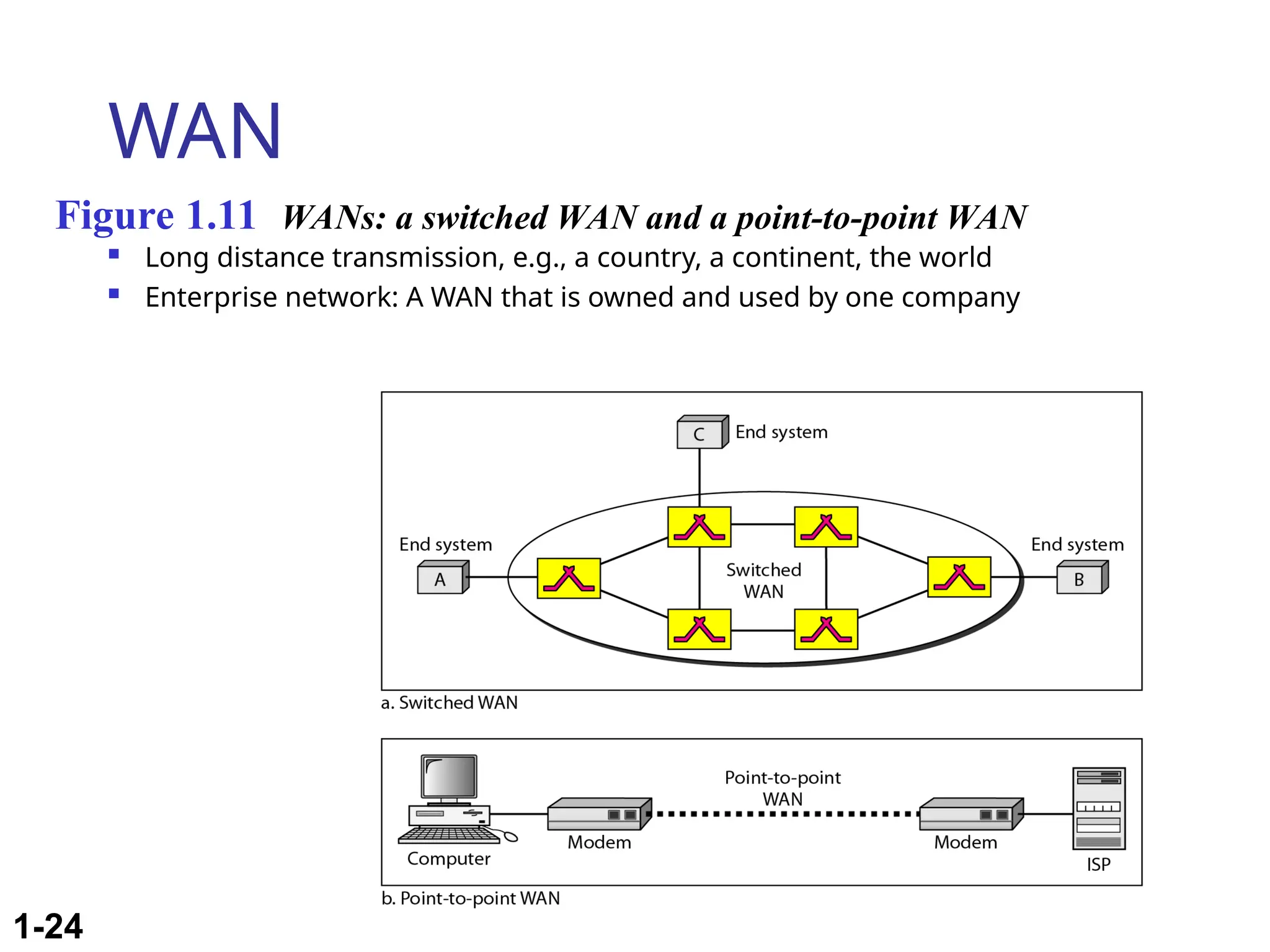
 Long distance transmission, e.g., a country, a continent, the world
 Enterprise network: A WAN that is owned and used by one company
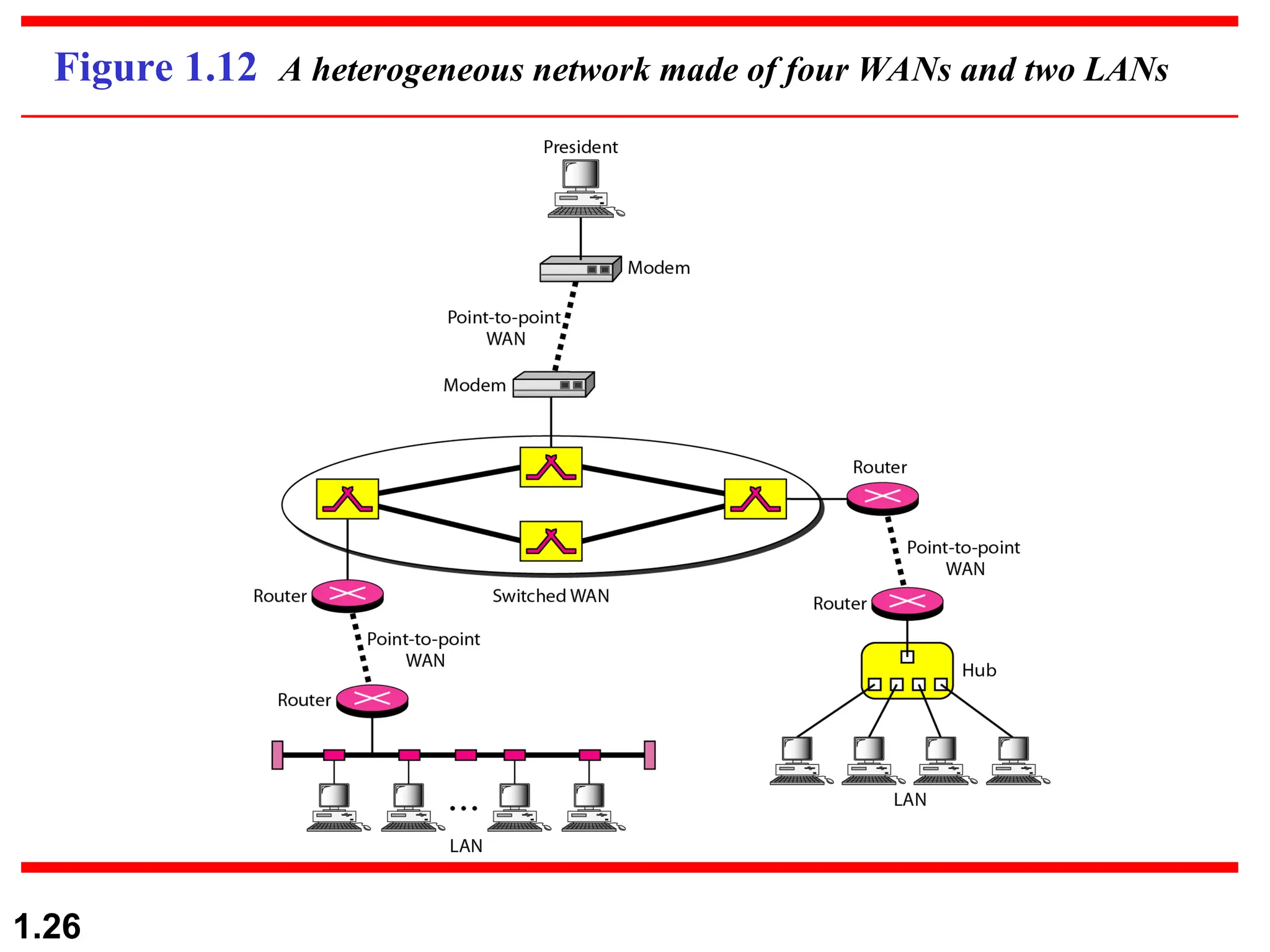
Figure 1.11 WANs: a switched WAN and a point-to-point WAN
1-25
Internetwork
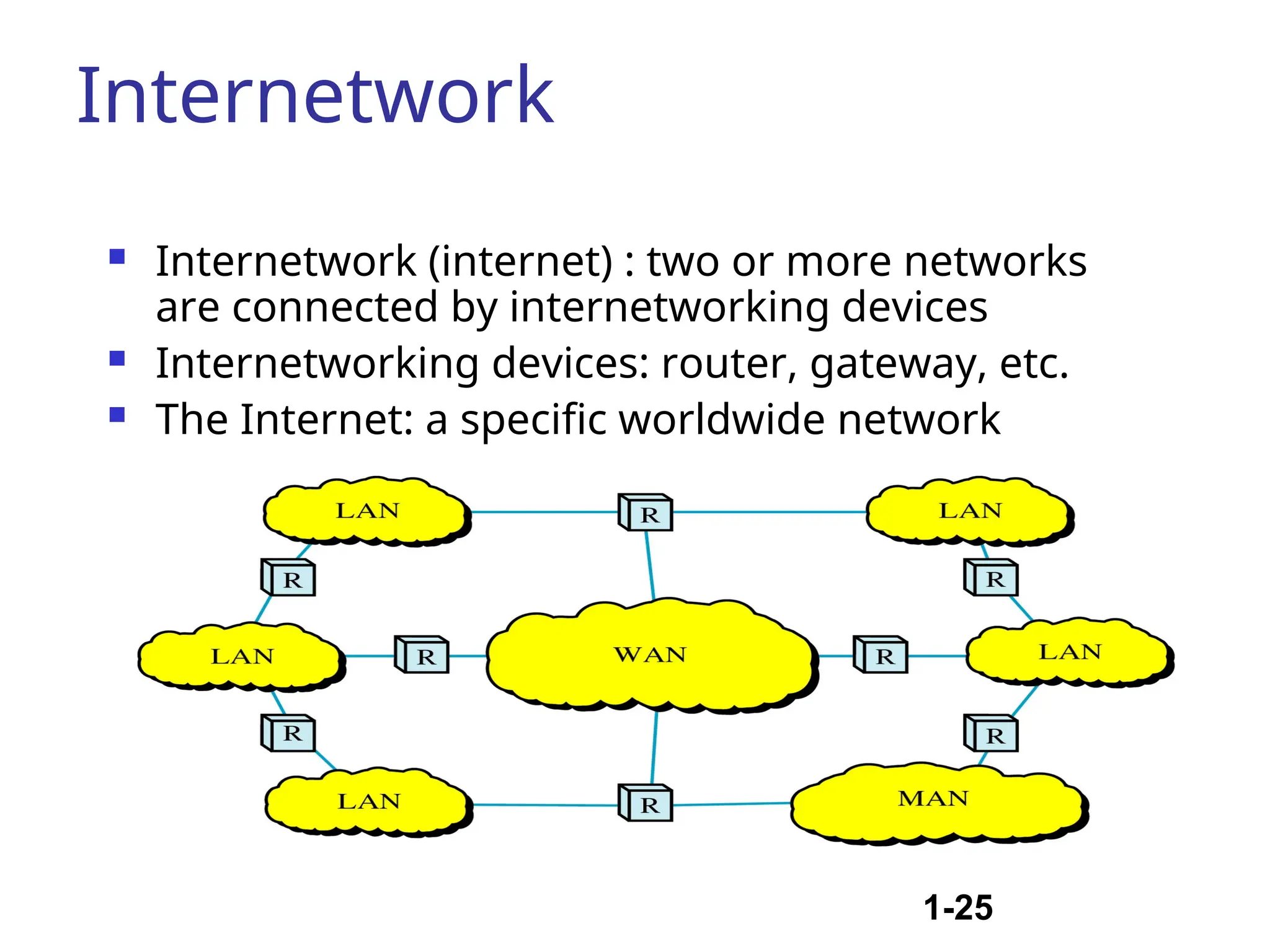
 Internetwork (internet) : two or more networks
are connected by internetworking devices
 Internetworking devices: router, gateway, etc.
 The Internet: a specific worldwide network
1.26
Figure 1.12 A heterogeneous network made of four WANs and two LANs
1.27
1-3 THE INTERNET
1-3 THE INTERNET
The
The Internet
Internet has revolutionized many aspects of our daily
has revolutionized many aspects of our daily
lives. It has affected the way we do business as well as the
way we spend our leisure time. The Internet is a
communication system that has brought a wealth of
information to our fingertips and organized it for our use.
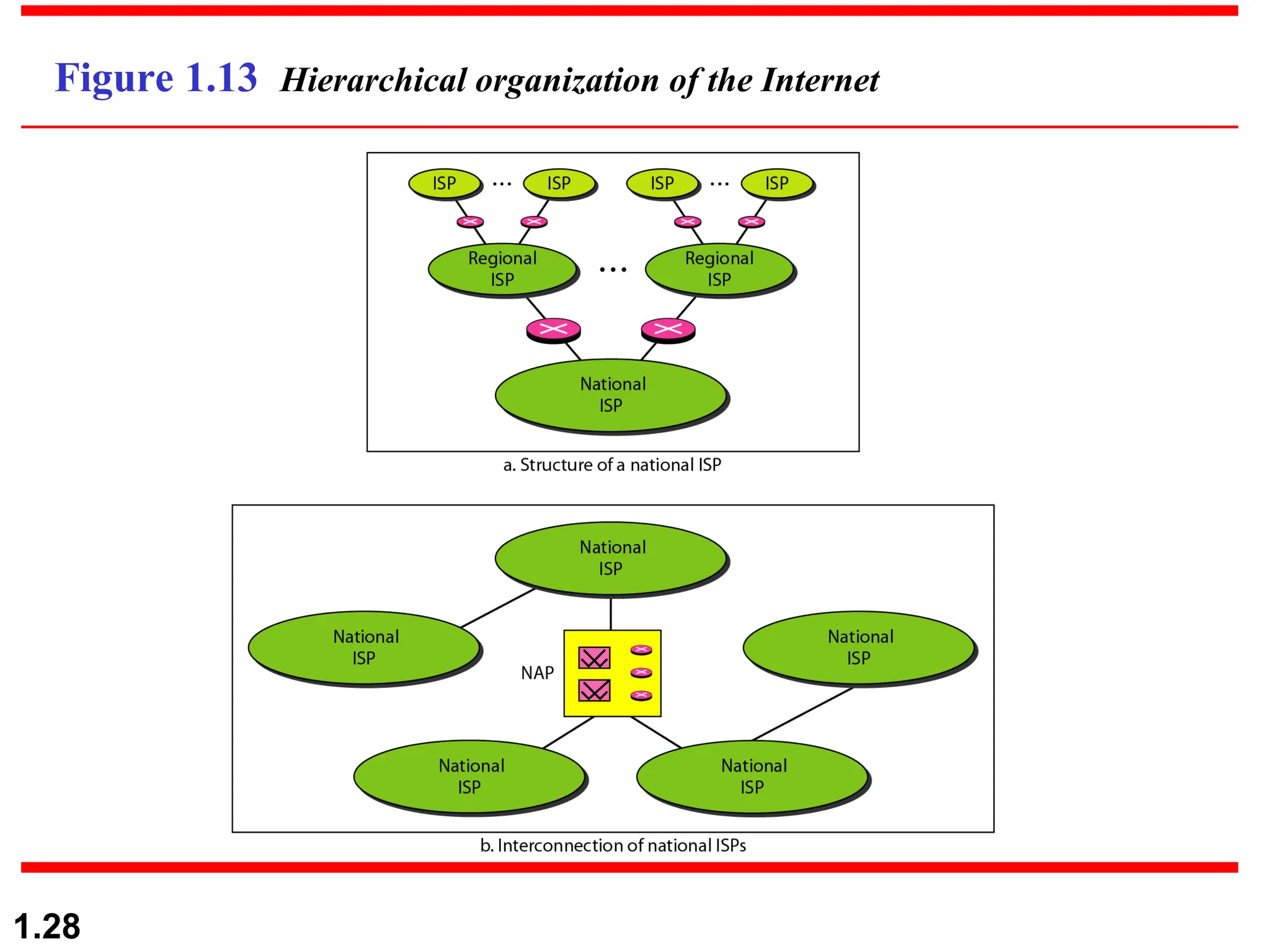
Organization of the Internet
Internet Service Providers (ISPs)
Topics discussed in this section:
1.28
Figure 1.13 Hierarchical organization of the Internet
1.29
1-4 PROTOCOLS
1-4 PROTOCOLS
A protocol is synonymous with rule. It consists of a set of
rules that govern data communications. It determines
what is communicated, how it is communicated and when
it is communicated. The key elements of a protocol are
syntax, semantics and timing
 Syntax
 Semantics
 Timing
Topics discussed in this section:
1.30
Elements of a Protocol
 Syntax
 Structure or format of the data
 Indicates how to read the bits - field delineation
 Semantics
 Interprets the meaning of the bits
 Knows which fields define what action
 Timing
 When data should be sent and what
 Speed at which data should be sent or speed at which it is
being received.
Continivity of data communication chapter 1

  • 1.
    1.1 Chapter 1 Introduction Copyright ©The McGraw-Hill Companies, Inc. Permission required for reproduction or display. Engr. Burhan Ud Din Email: engr.burhan341@gmail.com Department of Electrical Engineering City University Peshawar.
  • 2.
    1.2 1-1 DATA COMMUNICATIONS 1-1DATA COMMUNICATIONS The term The term telecommunication telecommunication means communication at a means communication at a distance. The word distance. The word data data refers to information presented refers to information presented in whatever form is agreed upon by the parties creating in whatever form is agreed upon by the parties creating and using the data. and using the data. Data communications Data communications are the are the exchange of data between two devices via some form of exchange of data between two devices via some form of transmission medium such as a wire cable. transmission medium such as a wire cable.  Components of a data communications system  Data Flow Topics discussed in this section: Topics discussed in this section:
  • 3.
    Components of adata communication system  Source  generates data to be transmitted  Transmitter  Converts data into transmittable signals  Transmission System  Carries data  Receiver  Converts received signal into data  Destination  Takes incoming data
  • 4.
    1.4 Figure 1.1 Componentsof a data communication system
  • 5.
    Modes of Communication/Data Flow Simplex  Unidirectional  As on a one-way street  Half-duplex  Both transmit and receive possible, but not at the same time  Like a one-lane road with two-directional traffic  Walkie-talkie, CB radio  Full-duplex  Transmit and receive simultaneously  Like a two-way street, telephone network  Channel capacity must be divided between two directions
  • 6.
    1.6 Figure 1.2 Dataflow (simplex, half-duplex, and full-duplex)
  • 7.
    1.7 1-2 NETWORKS 1-2 NETWORKS A Anetwork network is a set of devices (often referred to as is a set of devices (often referred to as nodes nodes) ) connected by communication connected by communication links links. A node can be a . A node can be a computer, printer, or any other device capable of sending computer, printer, or any other device capable of sending and/or receiving data generated by other nodes on the and/or receiving data generated by other nodes on the network. A link can be a cable, air, optical fiber, or any network. A link can be a cable, air, optical fiber, or any medium which can transport a signal carrying medium which can transport a signal carrying information. information.  Network Criteria  Physical Structures  Categories of Networks Topics discussed in this section: Topics discussed in this section:
  • 8.
     To beconsidered effective and efficient, a network must meet a number of criteria Network Criteria
  • 9.
    1.9  Performance  Dependson Network Elements  Measured in terms of Delay and Throughput  Reliability  Failure rate of network components  Measured in terms of availability/robustness  Security  Data protection against corruption/loss of data due to:  Errors  Malicious users
  • 10.
    1.10 Physical Structures  Typeof Connection I) Point to Point - single transmitter and receiver  Dedicated link between two devices  The entire capacity of the channel is reserved  Ex) Microwave link, TV remote control II) Multipoint - multiple recipients of single transmission  More than two devices share a single link  Capacity of the channel is either  Spatially shared: Devices can use the link simultaneously  Timeshare: Users take turns
  • 11.
    1.11 Figure 1.3 Typesof connections: point-to-point and multipoint
  • 12.
    Type of transmission unicast, mulitcast, broadcast I) Unicast Unicast is the term used to describe communication where a piece of information is sent from one point to another point. In this case there is just one sender, and one receiver. Unicast transmission, in which a packet is sent from a single source to a specified destination, is still the predominant form of transmission on LANs II)Multicast Multicast is the term used to describe communication where a piece of information is sent from one or more points to a set of other points. In this case there is may be one or more senders, and the information is distributed to a set of receivers (theer may be no receivers, or any other number of receivers). One example of an application which may use multicast is a video server sending out networked TV channels. Simultaneous delivery of high quality video to each of a large number of delivery platforms will exhaust the capability of even a high bandwidth network with a powerful video clip server. 1.12
  • 13.
    III) Broadcast Broadcast isthe term used to describe communication where a piece of information is sent from one point to all other points. In this case there is just one sender, but the information is sent to all connected receivers. Broadcast transmission is supported on most LANs (e.g. Ethernet), and may be used to send the same message to all computers on the LAN 1.13
  • 14.
  • 15.
    1.15 Figure 1.5 Afully connected mesh topology (five devices)  Dedicated point-to-point link to every other nodes  A mesh network with n nodes has n(n-1)/2 links. A node has n- 1 I/O ports (links)  Advantages: No traffic problems, robust, security, easy fault identification & isolation  Disadvantages: Difficult installation/reconfiguration, space, cost
  • 16.
    1.16 Figure 1.6 Astar topology connecting four stations  Dedicated point-to-point link only to a central controller, called a hub  Hub acts as an exchange: No direct traffic between devices  Advantages: Less expensive, robust  Disadvantages: dependency of the whole on one single point, the hub
  • 17.
    1.17 Figure 1.7 Abus topology connecting three stations  One long cable that links all nodes  tap, drop line, cable end  Advantages: Easy installation, cheap  Disadvantages: Difficult reconfiguration, no fault isolation, a fault or break in the bus stops all transmission
  • 18.
    1.18 Figure 1.8 Aring topology connecting six stations  Dedicated point-to-point link only with the two nodes on each sides  One direction, repeater  Advantages: Easy reconfiguration, fault isolation  Disadvantage: Unidirectional traffic, a break in the ring cab disable the entire network
  • 19.
    1.19 Figure 1.9 Ahybrid topology: a star backbone with three bus networks  Example: Main star topology with each branch connecting several stations in a bus topology  To share the advantages from various topologies
  • 20.
  • 21.
    1.21 Categories of Networks Local Area Networks (LANs)  Short distances  Designed to provide local interconnectivity  Wide Area Networks (WANs)  Long distances  Provide connectivity over large areas  Metropolitan Area Networks (MANs)  Provide connectivity over areas such as a city, a campus
  • 22.
    1.22 Figure 1.10 Anisolated LAN connecting 12 computers to a hub in a closet Usually privately owned A network for a single office, building, or campus  a few Km Common LAN topologies: bus, ring, star An isolated LAN connecting 12 computers to a hub in a closet LAN
  • 23.
    1-23 MAN  Designed toextend to an entire city  Cable TV network, a company’s connected LANs  Owned by a private or a public company
  • 24.
    1-24 WAN  Long distancetransmission, e.g., a country, a continent, the world  Enterprise network: A WAN that is owned and used by one company Figure 1.11 WANs: a switched WAN and a point-to-point WAN
  • 25.
    1-25 Internetwork  Internetwork (internet): two or more networks are connected by internetworking devices  Internetworking devices: router, gateway, etc.  The Internet: a specific worldwide network
  • 26.
    1.26 Figure 1.12 Aheterogeneous network made of four WANs and two LANs
  • 27.
    1.27 1-3 THE INTERNET 1-3THE INTERNET The The Internet Internet has revolutionized many aspects of our daily has revolutionized many aspects of our daily lives. It has affected the way we do business as well as the lives. It has affected the way we do business as well as the way we spend our leisure time. The Internet is a way we spend our leisure time. The Internet is a communication system that has brought a wealth of communication system that has brought a wealth of information to our fingertips and organized it for our use. information to our fingertips and organized it for our use. Organization of the Internet Internet Service Providers (ISPs) Topics discussed in this section: Topics discussed in this section:
  • 28.
    1.28 Figure 1.13 Hierarchicalorganization of the Internet
  • 29.
    1.29 1-4 PROTOCOLS 1-4 PROTOCOLS Aprotocol is synonymous with rule. It consists of a set of A protocol is synonymous with rule. It consists of a set of rules that govern data communications. It determines rules that govern data communications. It determines what is communicated, how it is communicated and when what is communicated, how it is communicated and when it is communicated. The key elements of a protocol are it is communicated. The key elements of a protocol are syntax, semantics and timing syntax, semantics and timing  Syntax  Semantics  Timing Topics discussed in this section: Topics discussed in this section:
  • 30.
    1.30 Elements of aProtocol  Syntax  Structure or format of the data  Indicates how to read the bits - field delineation  Semantics  Interprets the meaning of the bits  Knows which fields define what action  Timing  When data should be sent and what  Speed at which data should be sent or speed at which it is being received.