3d Programming I
Dr Anton Gerdelan
gerdela@scss.tcd.ie
3d Programming
●
3d programming is very difficult
●
3d programming is very time consuming
3d Programming
●
Practical knowledge of the latest, low-level
graphics APIs is very valuable (CV)
●
Good grasp of basic concepts in this semester
●
Caveat - You must keep API knowledge up-to-
date or it becomes redundant
Essential Checklist
✔
always have a pencil and paper
✔
solve your problem before you start coding
✔
know how to compile and link against libraries
✔
know how to use memory, pointers, addresses
✔
understand the hardware pipeline
✔
make a 3d maths cheat sheet
✔
do debugging (visual and programmatic)
✔
print the Quick Reference Card for OpenGL
✔
start assignments ASAP
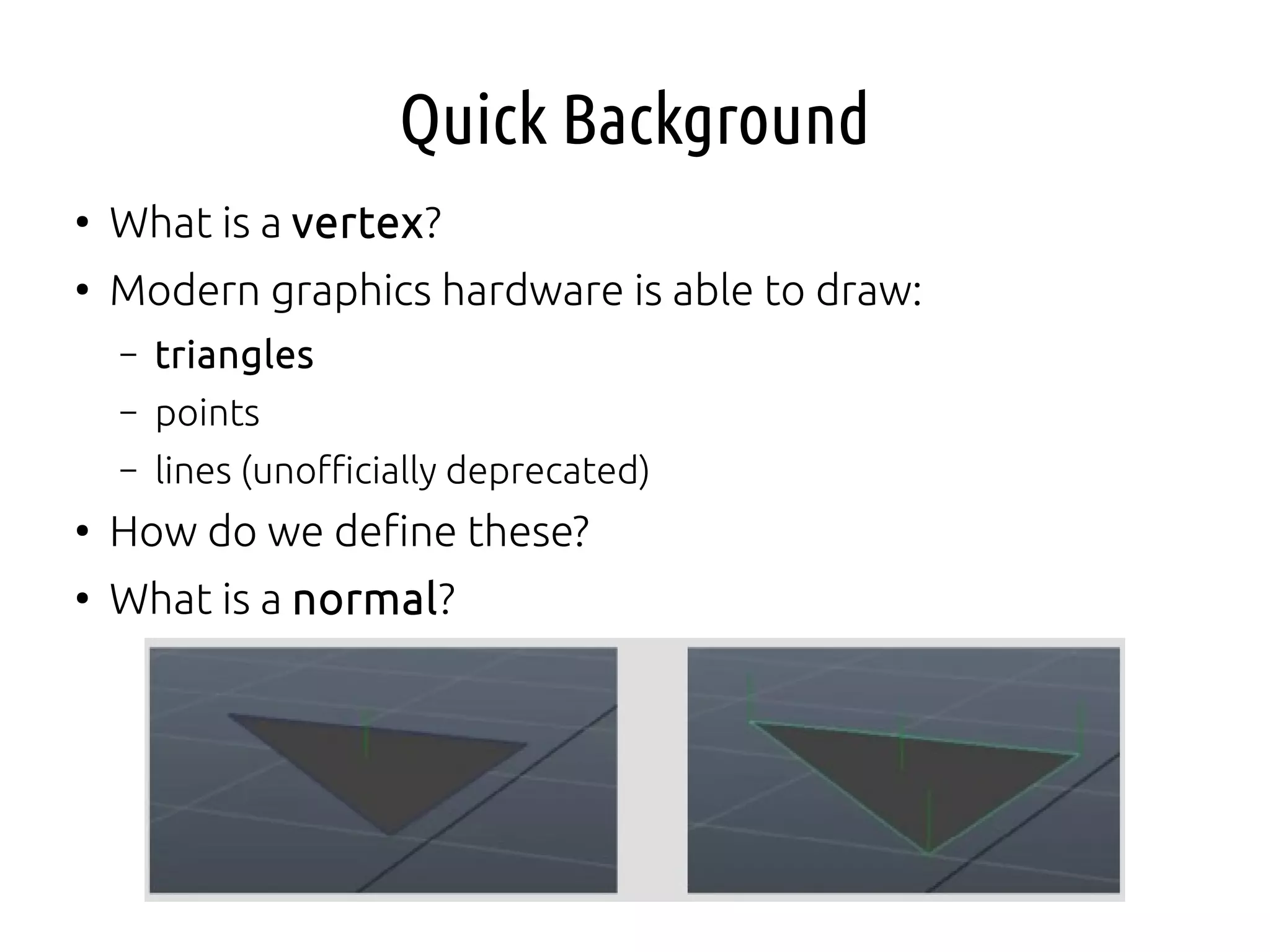
Quick Background
●
What is a vertex?
●
Modern graphics hardware is able to draw:
– triangles
– points
– lines (unofficially deprecated)
●
How do we define these?
●
What is a normal?
OpenGL
●
Open Grapics Library - originally the IrisGL by SGI
●
Managed by Khronos Group
{lots of big hw and sw companies}
●
Vector graphics
●
Only the spec. is sort-of open
●
Various implementations, lots of platforms
●
C API + driver + GLSL shaders
●
All the APIs do the same jobs on hardware, but present
different interfaces
OpenGL Caveats
●
OpenGL has a very clunky old-fashioned C interface that
will definitely confuse
●
OpenGL has been modernised but there is a lot of left-
over “cruft” that you shouldn't use
●
Print the Quick Reference Card and double-check
everything that you use.
http://www.opengl.org/sdk/docs/
●
The naming conventions are very confusing
●
OpenGL is currently being completely re-written to
address these problems
●
I'll try to help steer around these issues - use the
discussion boards if unsure!
OpenGL Global State Machine
●
The OpenGL interface uses an architecture called a
“global state machine”
●
Instead of doing this sort of thing:
Mesh myMesh;
myMesh.setData (some_array);
opengl.drawMesh (myMesh);
●
in a G.S.M. we do this sort of thing [pseudo-code]:
unsigned int mesh_handle;
glGenMesh (&mesh_handle); // okay so far, just C style
glBindMesh (mesh_handle); // my mesh is now “the” mesh
// affects most recently “bound” mesh
glMeshData (some_array);
●
How this might cause a problem later?
OpenGL Global State Machine
●
Operations affect the currently “bound” object
●
Be very careful. Write long functions.
●
Can sometimes “unbind” by binding to 0 (no object)
●
Operations “enable” states like
blending/transparency
●
They affect all subsequently drawn things
●
Don't forget to “disable” things
●
Can get messy in larger programmes
●
Write long functions.
Graphics API Architecture
●
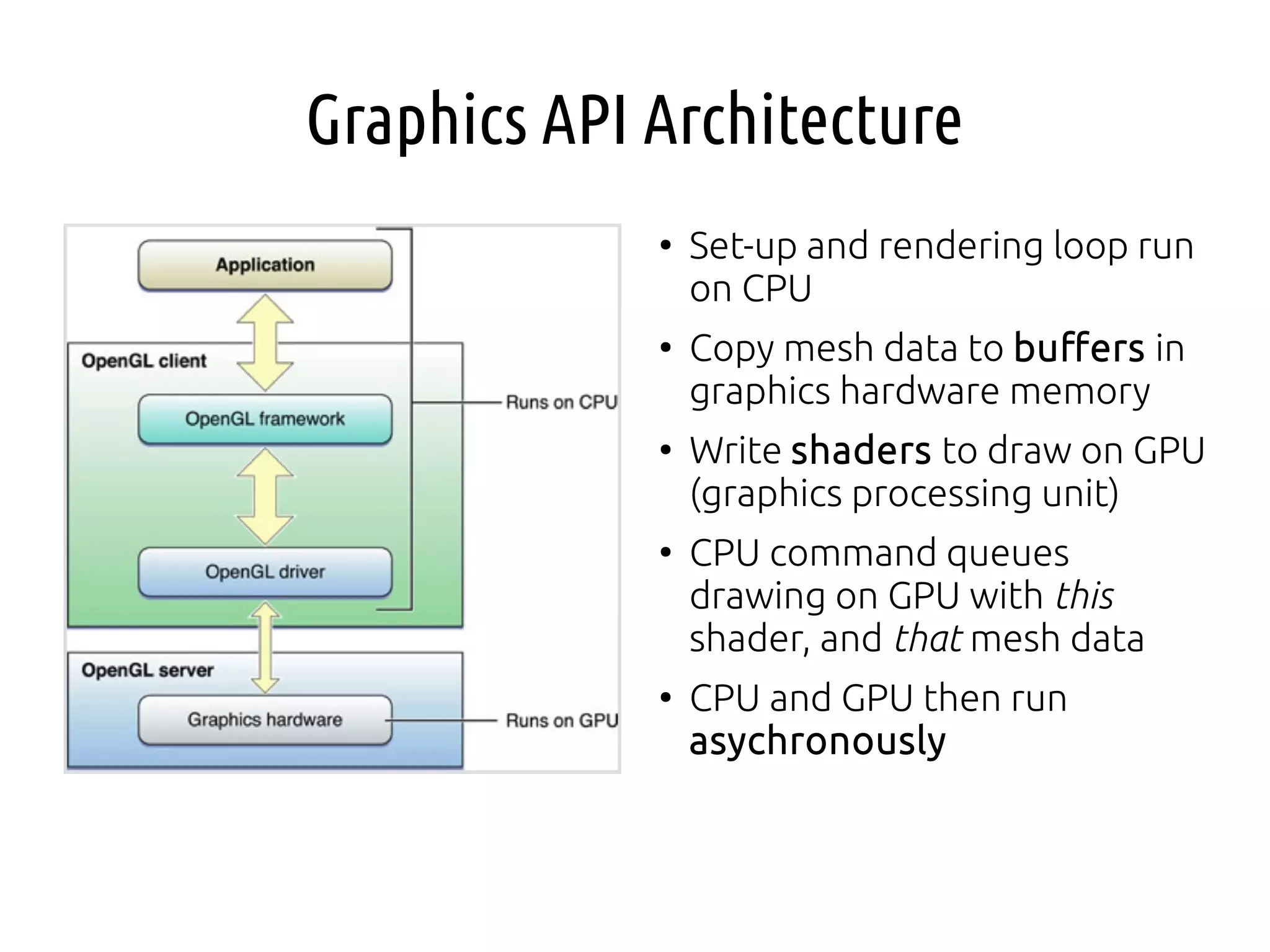
Set-up and rendering loop run
on CPU
●
Copy mesh data to buffers in
graphics hardware memory
●
Write shaders to draw on GPU
(graphics processing unit)
●
CPU command queues
drawing on GPU with this
shader, and that mesh data
●
CPU and GPU then run
asychronously
Before We Look at Code
●
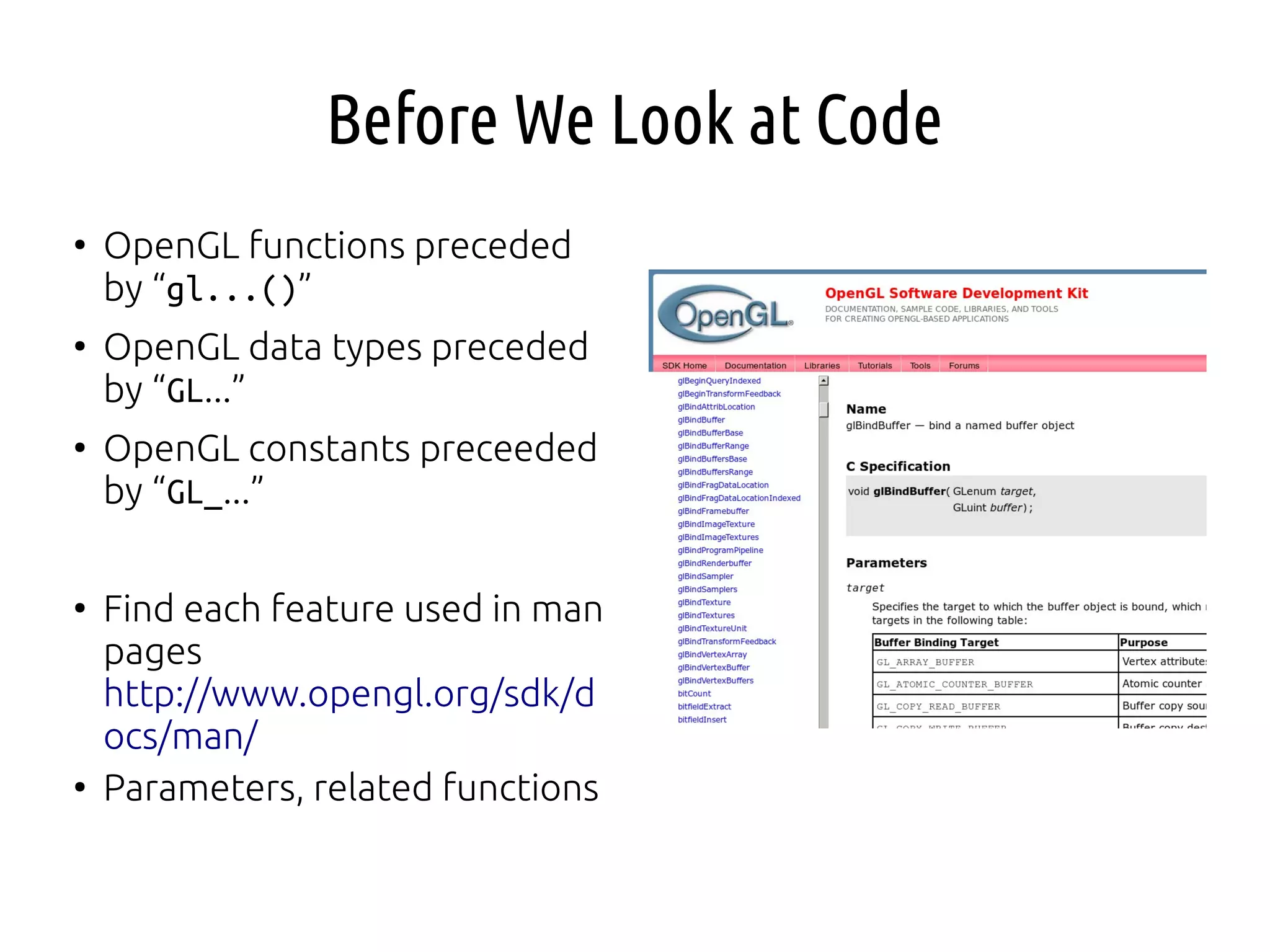
OpenGL functions preceded
by “gl...()”
●
OpenGL data types preceded
by “GL...”
●
OpenGL constants preceeded
by “GL_...”
●
Find each feature used in man
pages
http://www.opengl.org/sdk/d
ocs/man/
●
Parameters, related functions
Walk-Through “Hello Triangle”
●
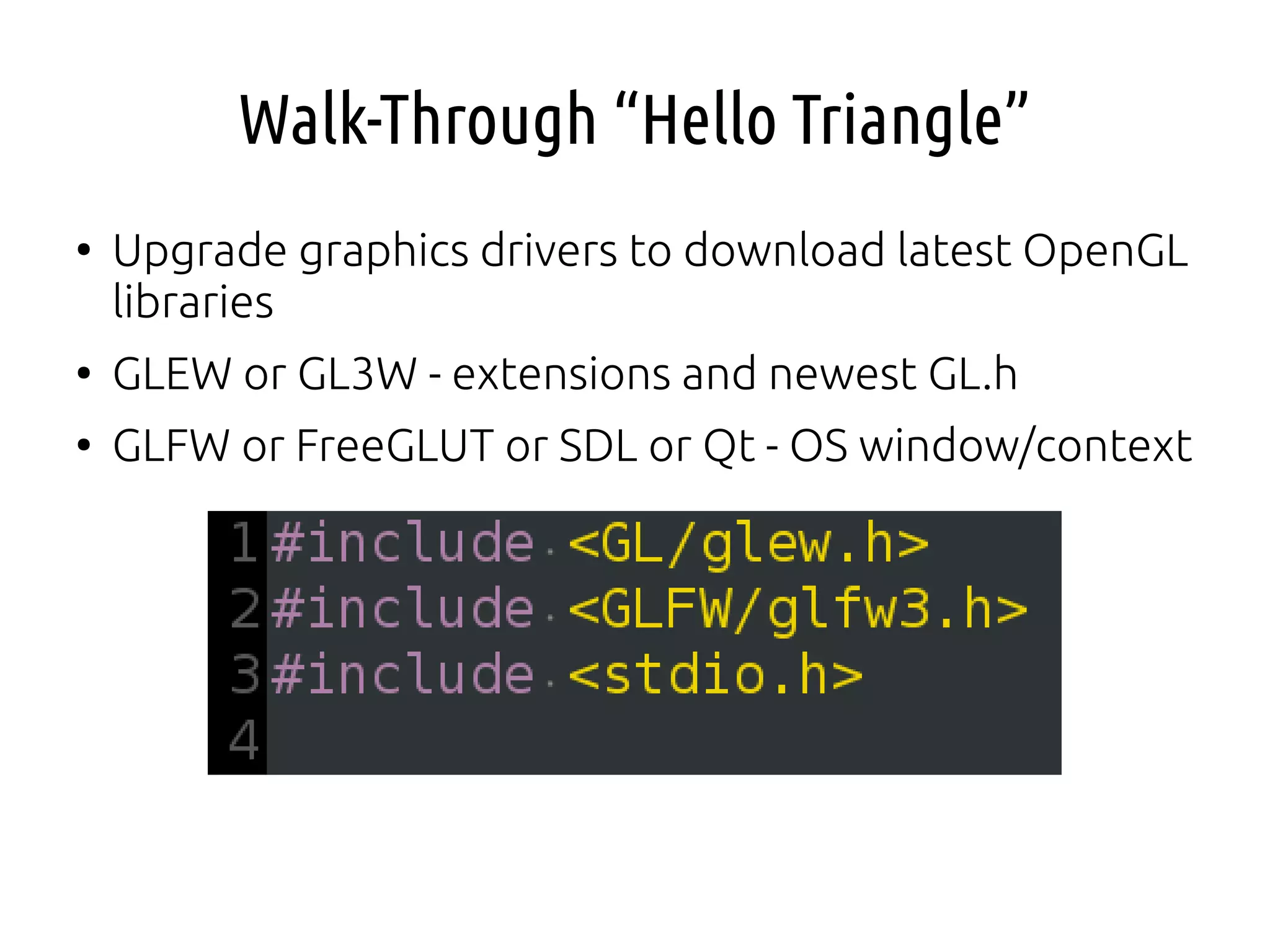
Upgrade graphics drivers to download latest OpenGL
libraries
●
GLEW or GL3W - extensions and newest GL.h
●
GLFW or FreeGLUT or SDL or Qt - OS window/context
Start GLFW (or FreeGLUT)
●
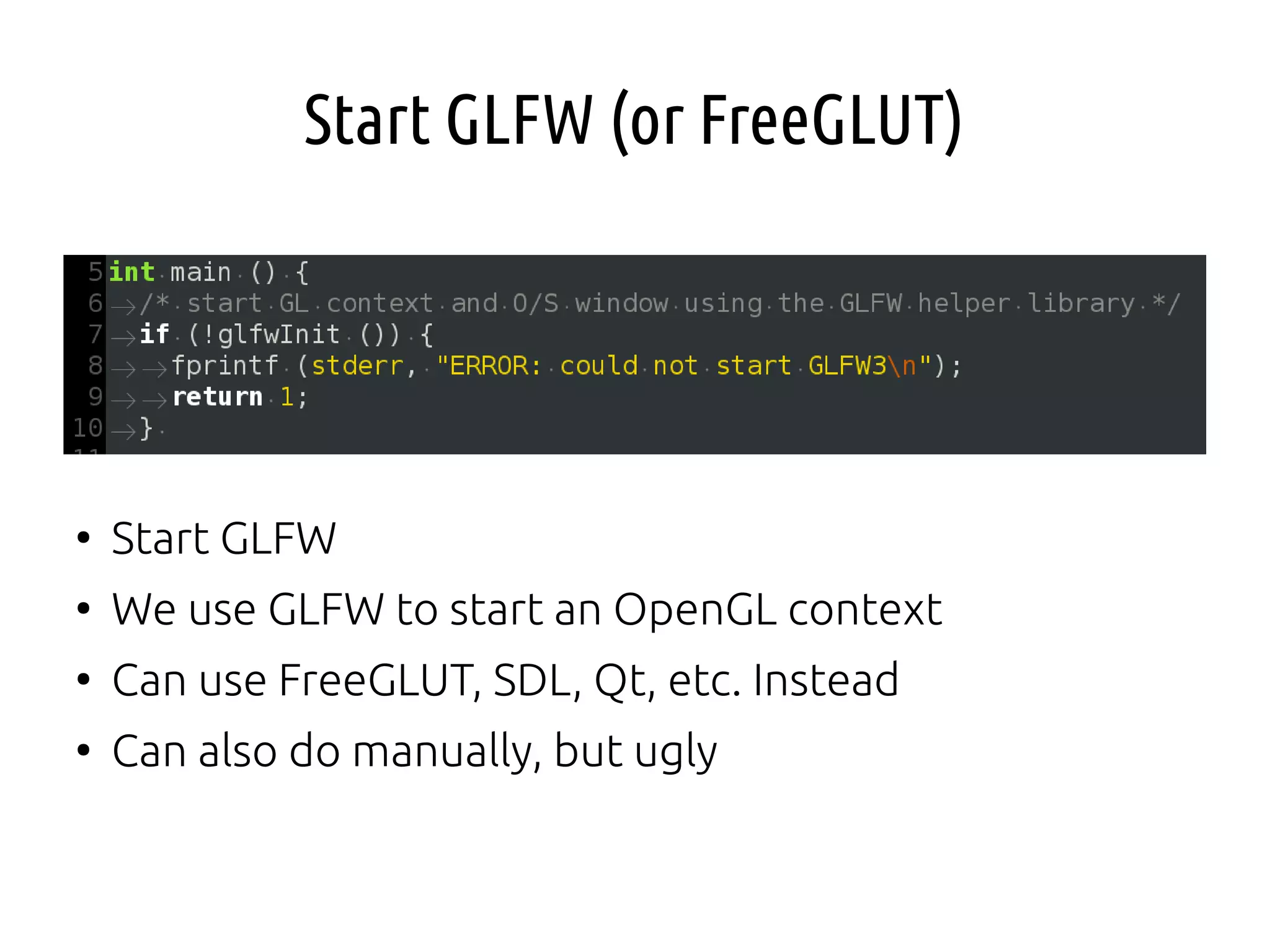
Start GLFW
●
We use GLFW to start an OpenGL context
●
Can use FreeGLUT, SDL, Qt, etc. Instead
●
Can also do manually, but ugly
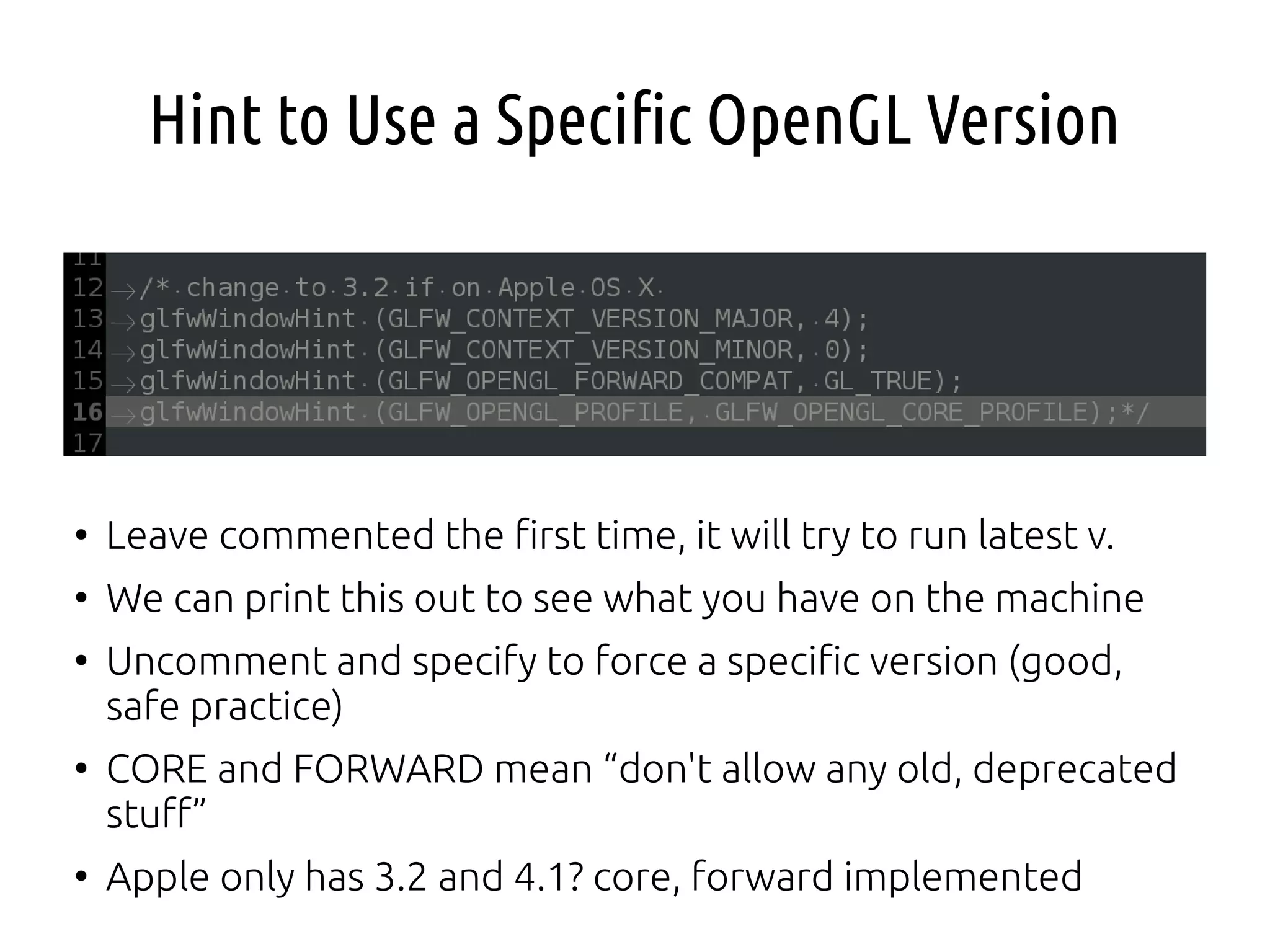
Hint to Use a Specific OpenGL Version
●
Leave commented the first time, it will try to run latest v.
●
We can print this out to see what you have on the machine
●
Uncomment and specify to force a specific version (good,
safe practice)
●
CORE and FORWARD mean “don't allow any old, deprecated
stuff”
●
Apple only has 3.2 and 4.1? core, forward implemented
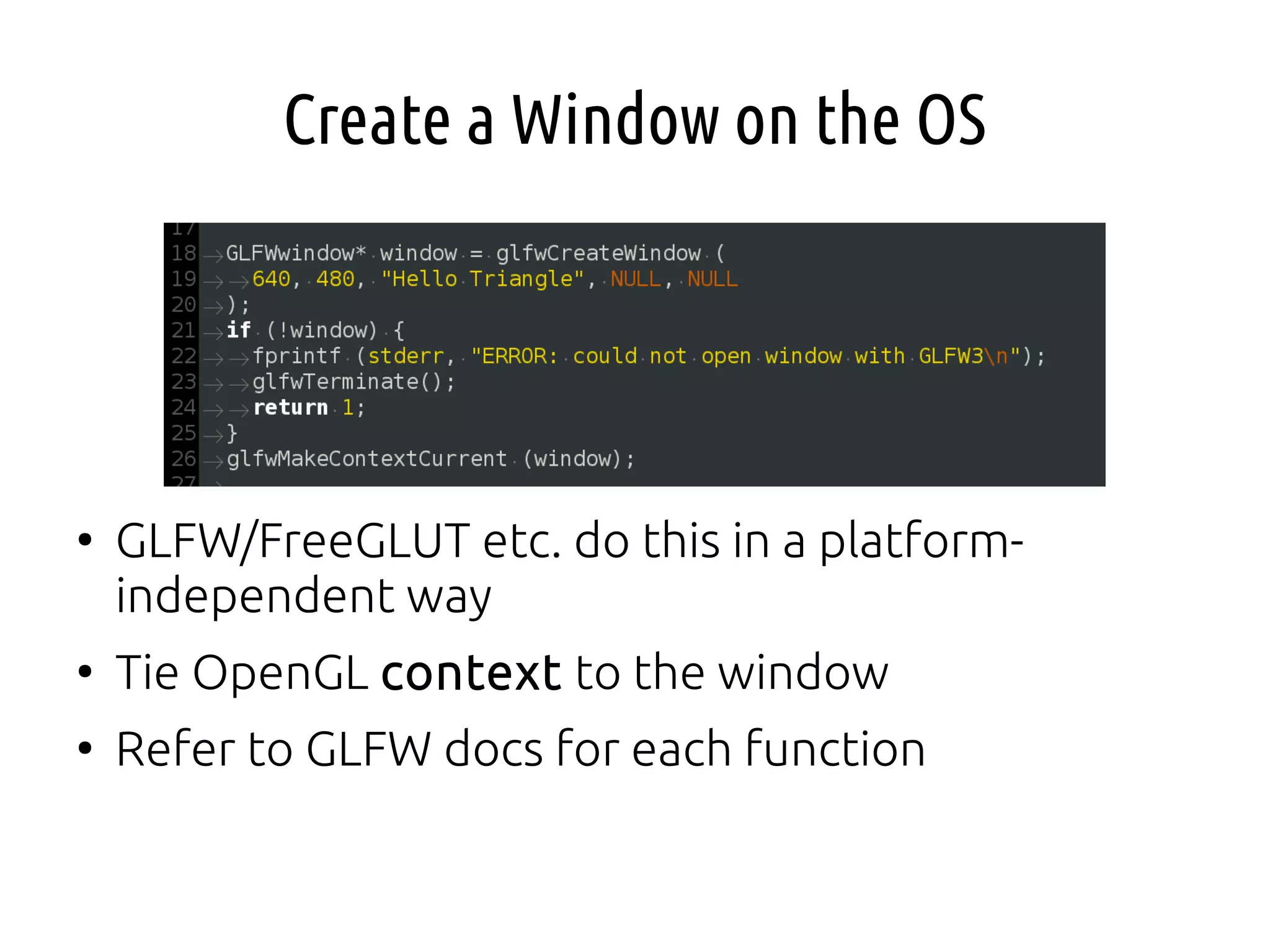
Create a Window on the OS
●
GLFW/FreeGLUT etc. do this in a platform-
independent way
●
Tie OpenGL context to the window
●
Refer to GLFW docs for each function
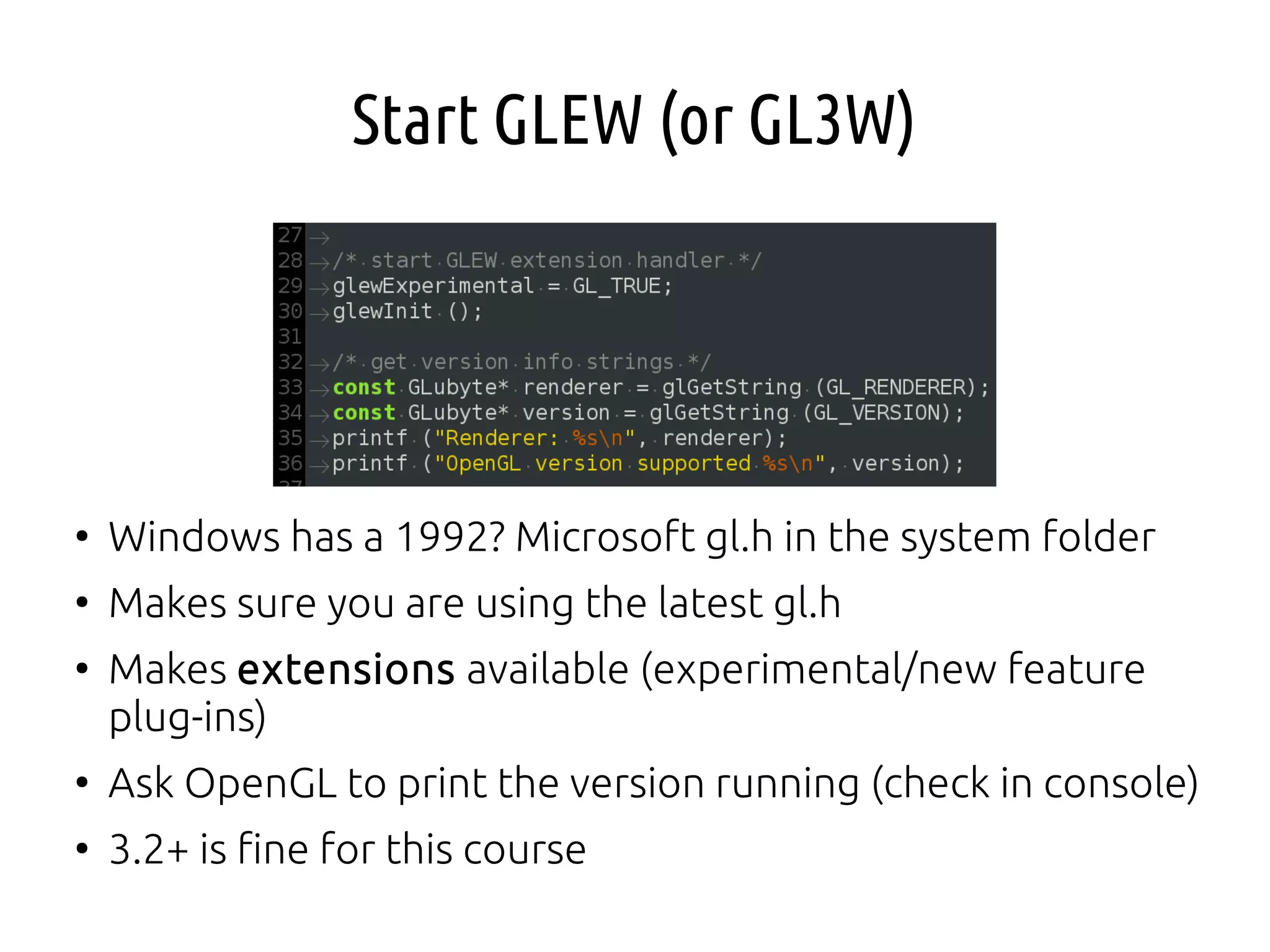
Start GLEW (or GL3W)
●
Windows has a 1992? Microsoft gl.h in the system folder
●
Makes sure you are using the latest gl.h
●
Makes extensions available (experimental/new feature
plug-ins)
●
Ask OpenGL to print the version running (check in console)
●
3.2+ is fine for this course
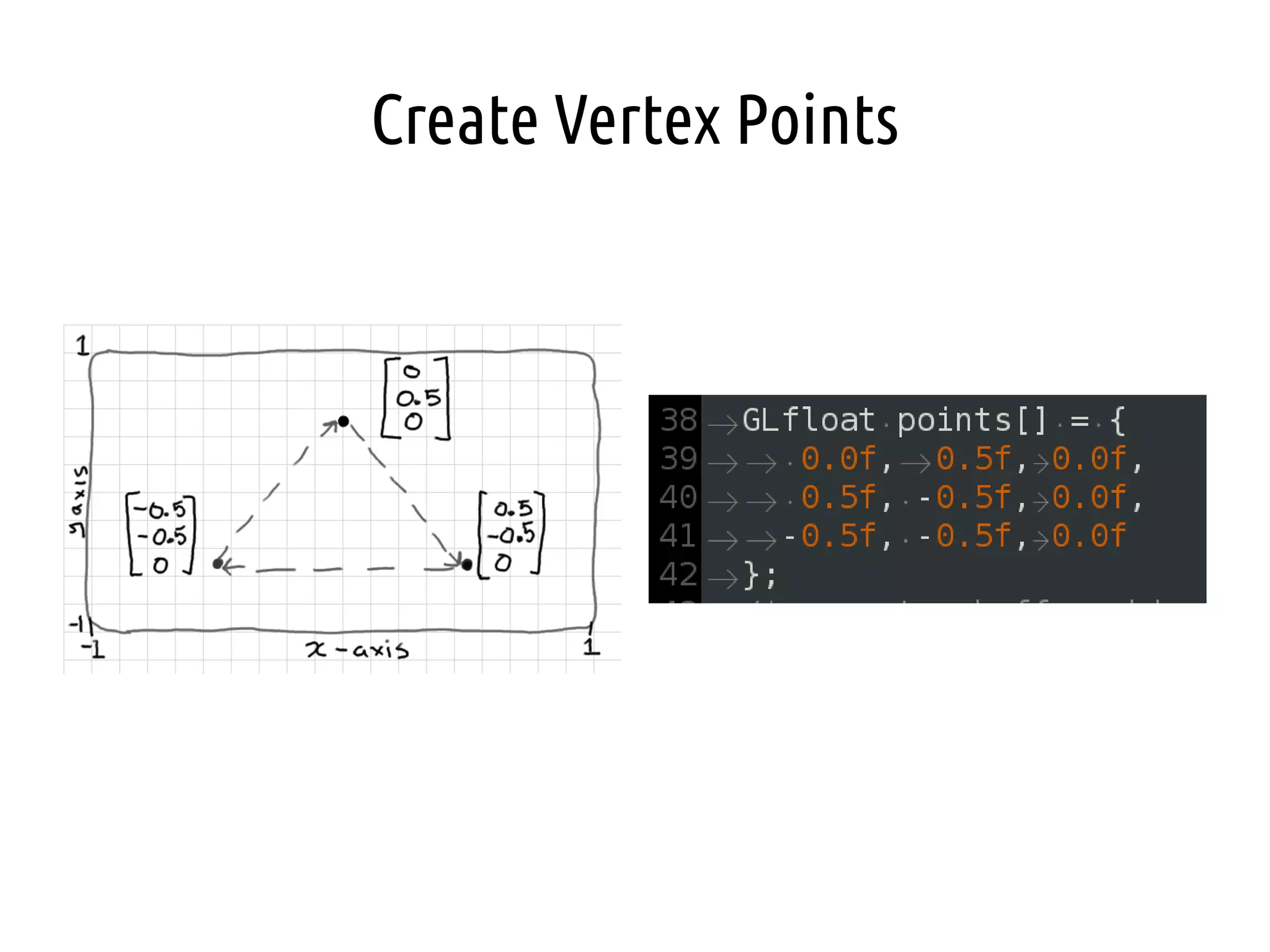
Create Vertex Points
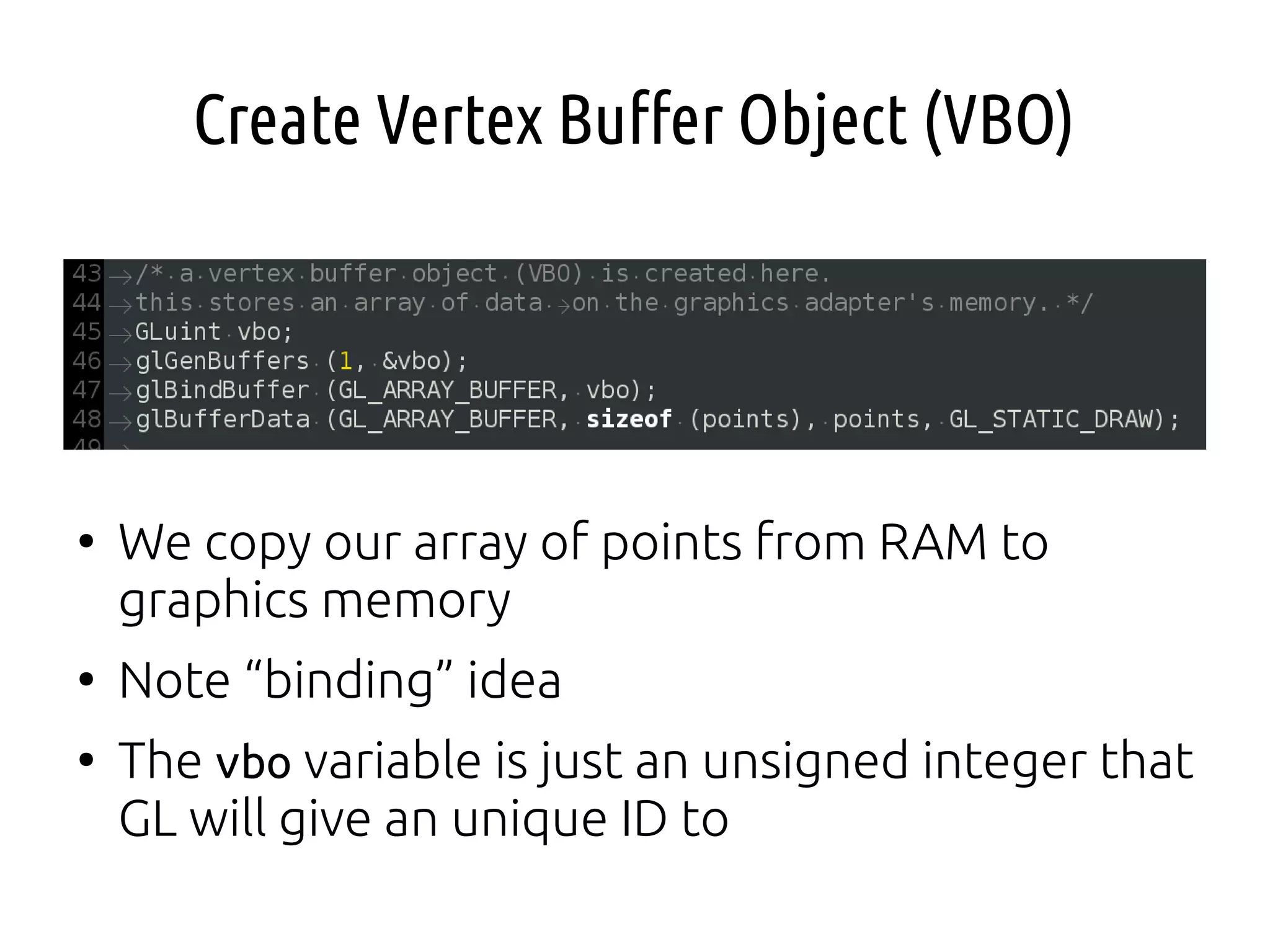
Create Vertex Buffer Object (VBO)
●
We copy our array of points from RAM to
graphics memory
●
Note “binding” idea
●
The vbo variable is just an unsigned integer that
GL will give an unique ID to
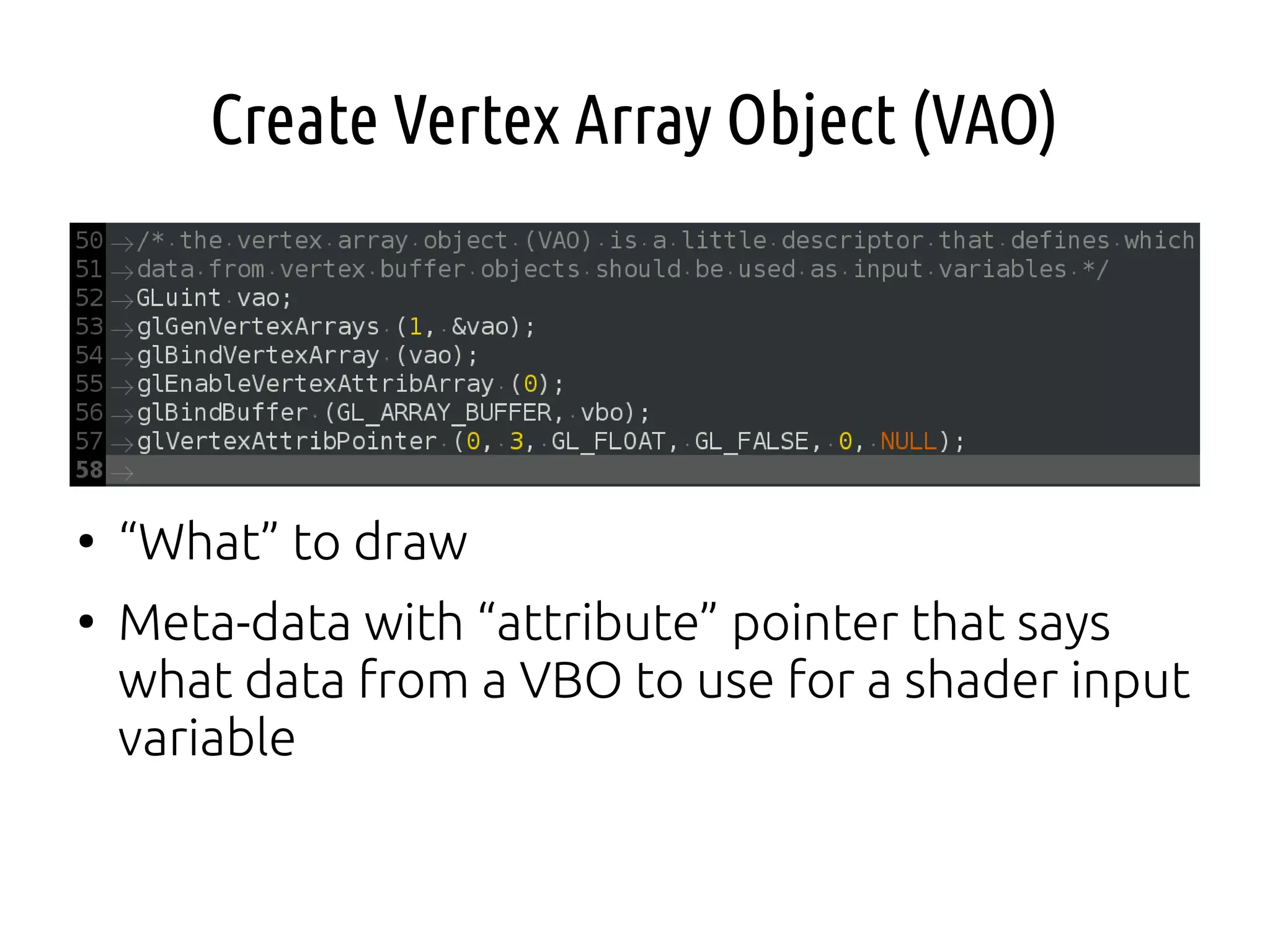
Create Vertex Array Object (VAO)
●
“What” to draw
●
Meta-data with “attribute” pointer that says
what data from a VBO to use for a shader input
variable
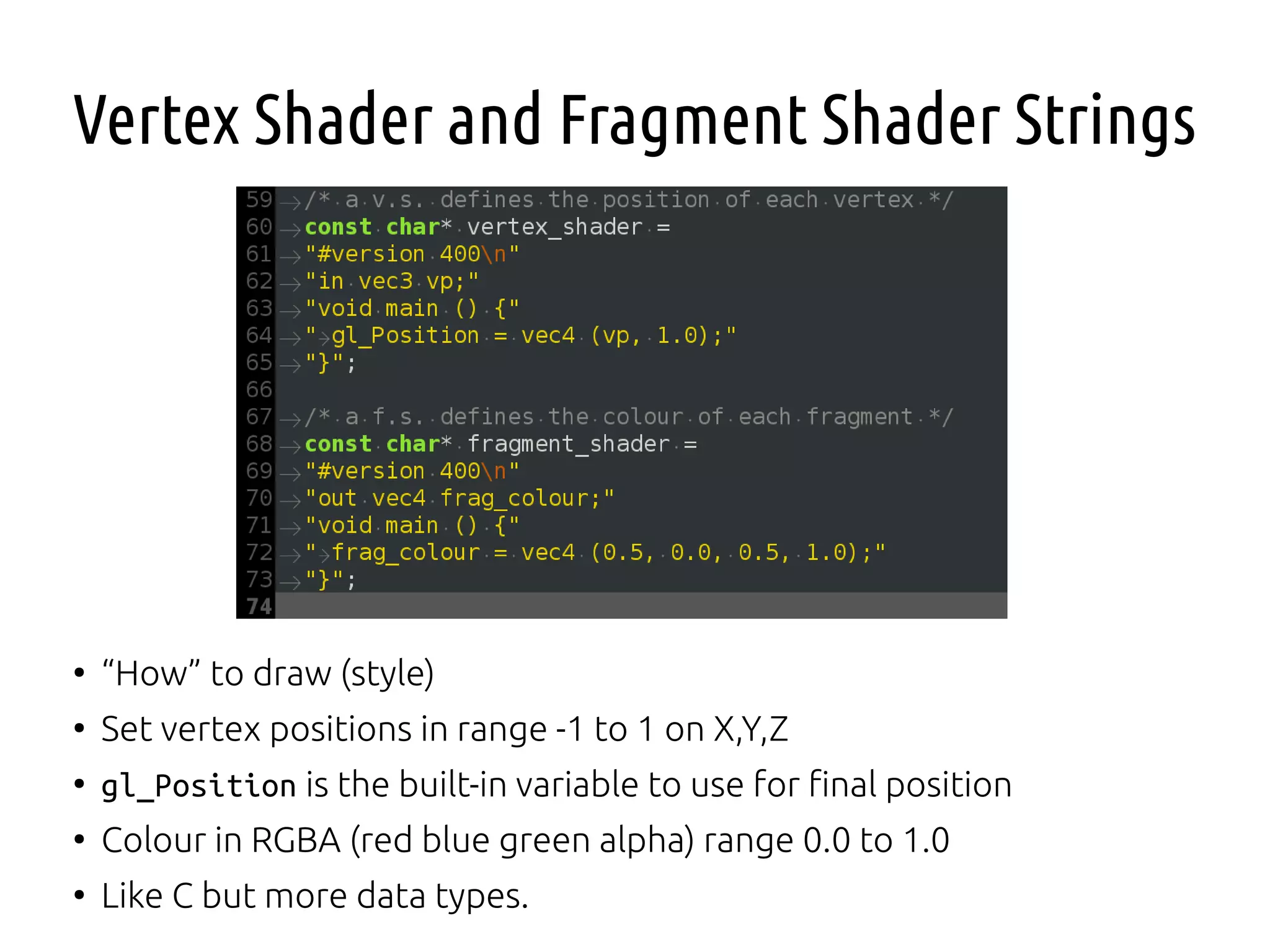
Vertex Shader and Fragment Shader Strings
●
“How” to draw (style)
●
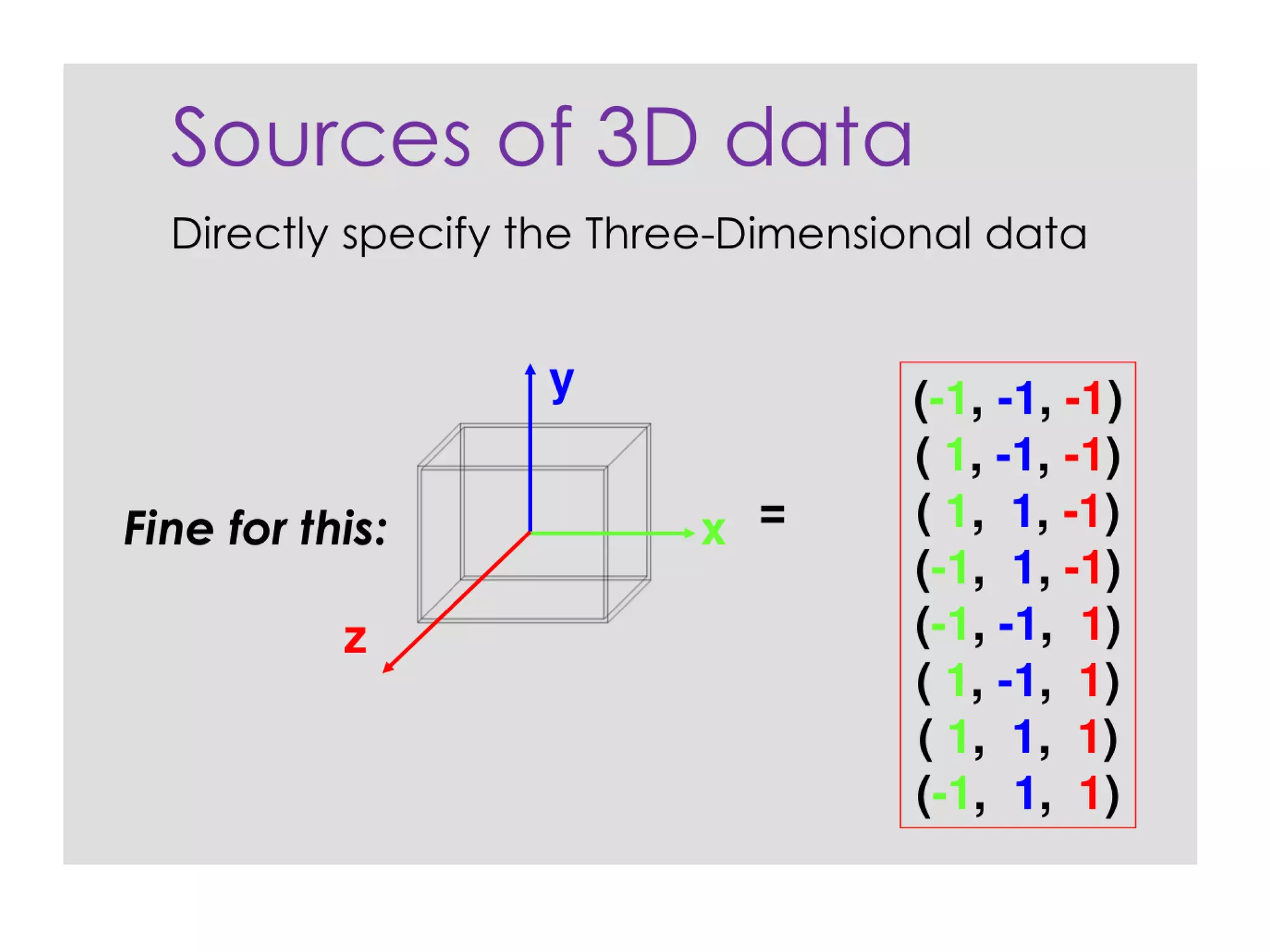
Set vertex positions in range -1 to 1 on X,Y,Z
●
gl_Position is the built-in variable to use for final position
●
Colour in RGBA (red blue green alpha) range 0.0 to 1.0
●
Like C but more data types.
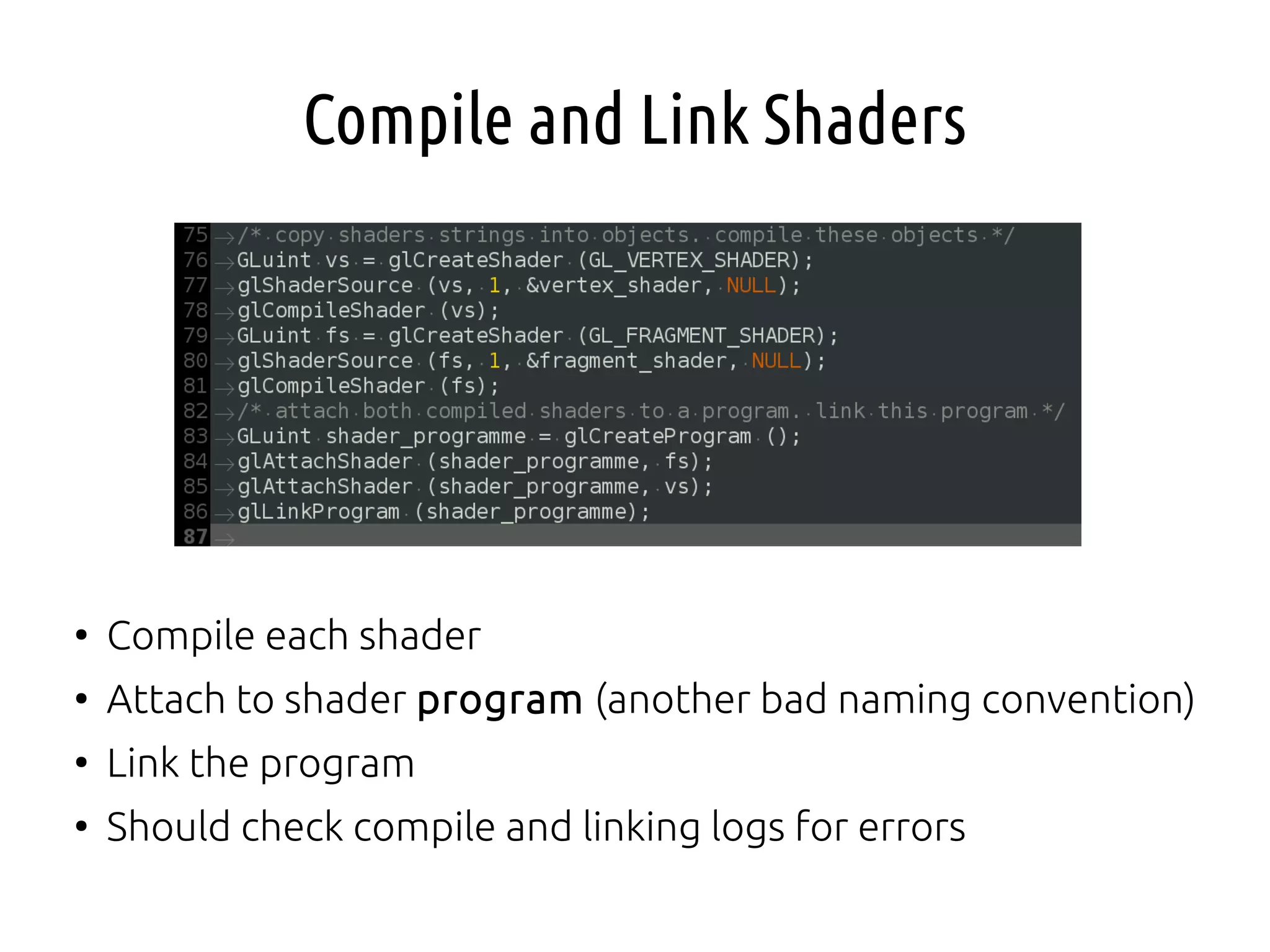
Compile and Link Shaders
●
Compile each shader
●
Attach to shader program (another bad naming convention)
●
Link the program
●
Should check compile and linking logs for errors
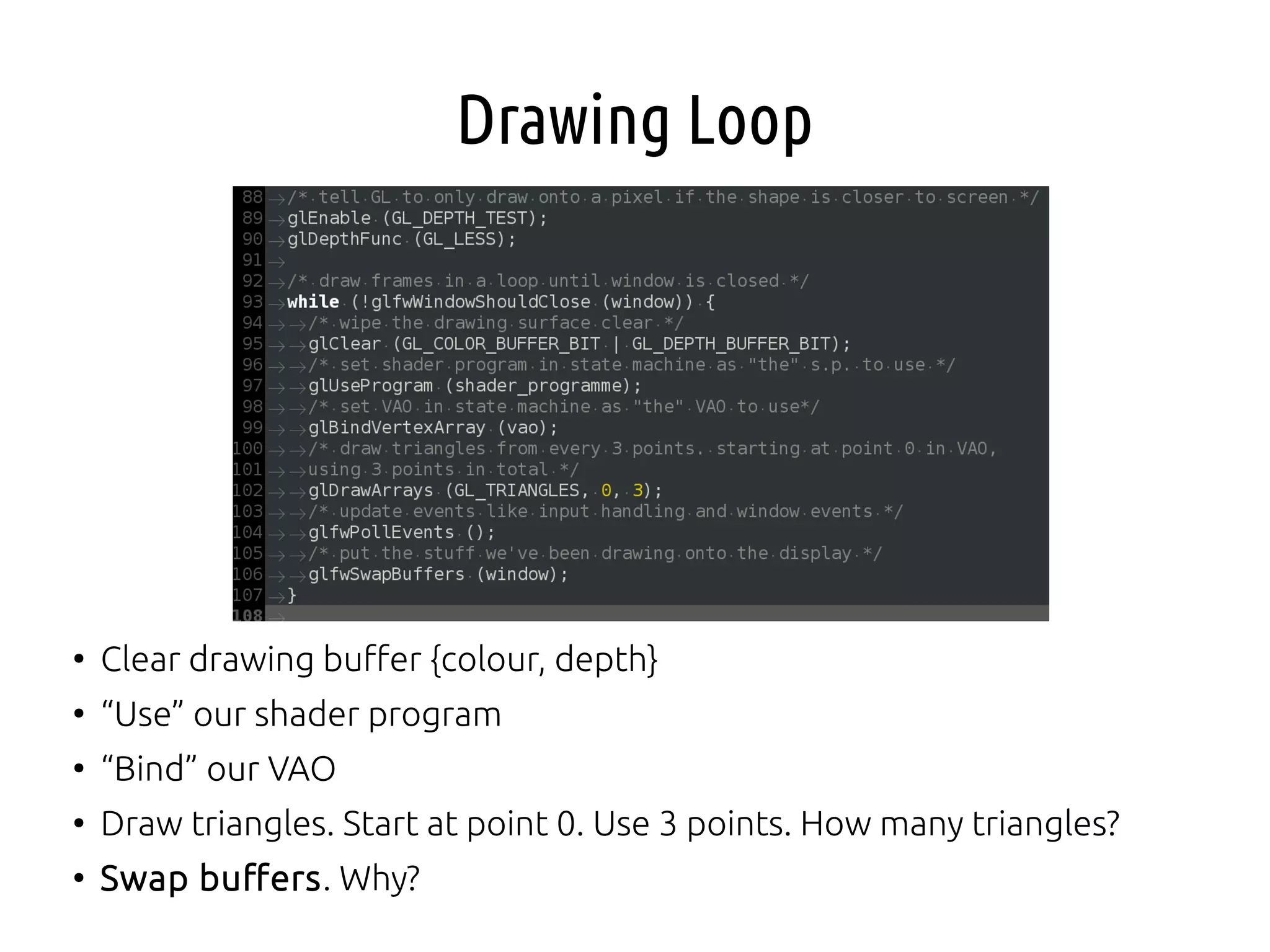
Drawing Loop
●
Clear drawing buffer {colour, depth}
●
“Use” our shader program
●
“Bind” our VAO
●
Draw triangles. Start at point 0. Use 3 points. How many triangles?
●
Swap buffers. Why?
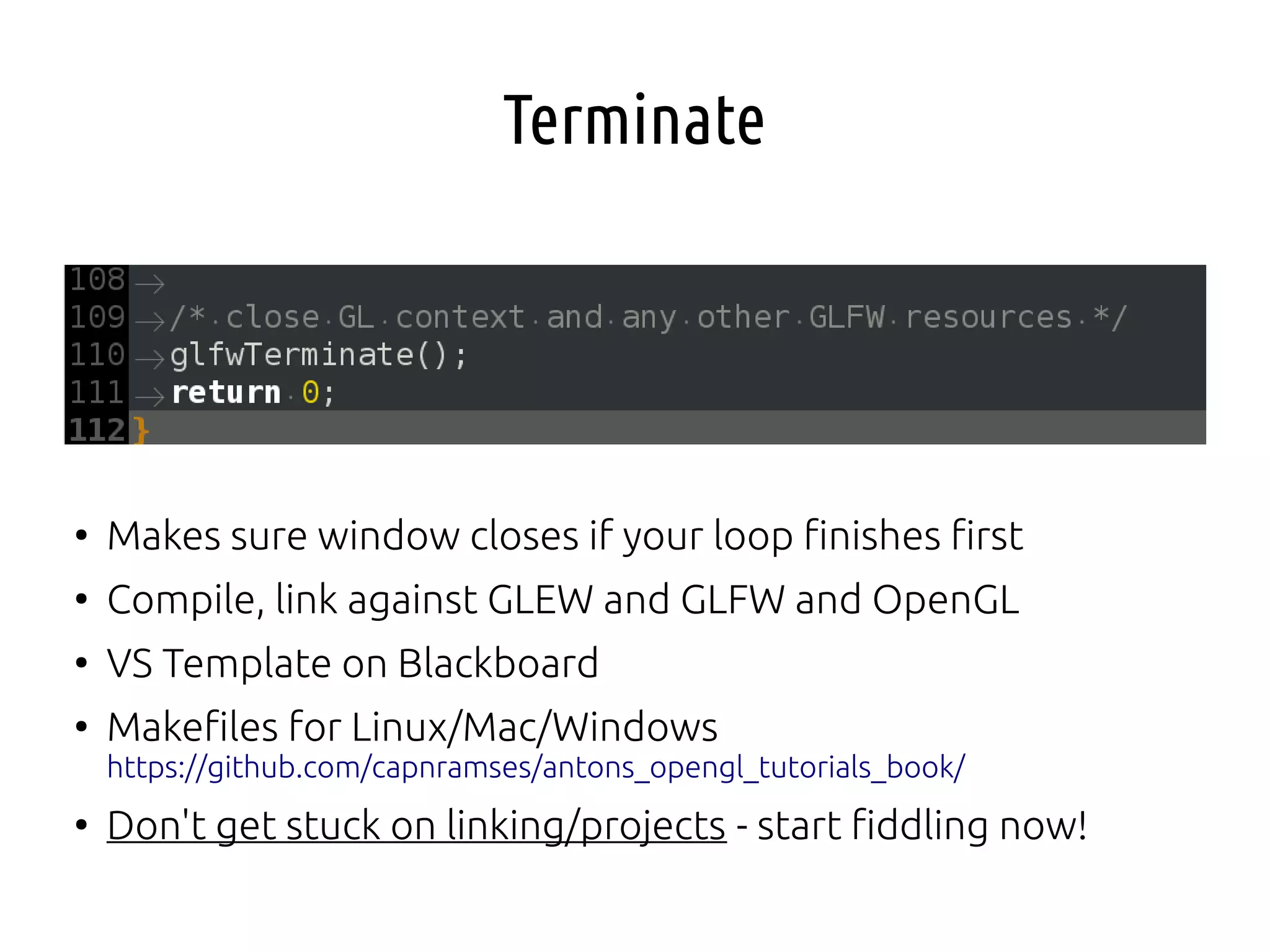
Terminate
●
Makes sure window closes if your loop finishes first
●
Compile, link against GLEW and GLFW and OpenGL
●
VS Template on Blackboard
●
Makefiles for Linux/Mac/Windows
https://github.com/capnramses/antons_opengl_tutorials_book/
●
Don't get stuck on linking/projects - start fiddling now!
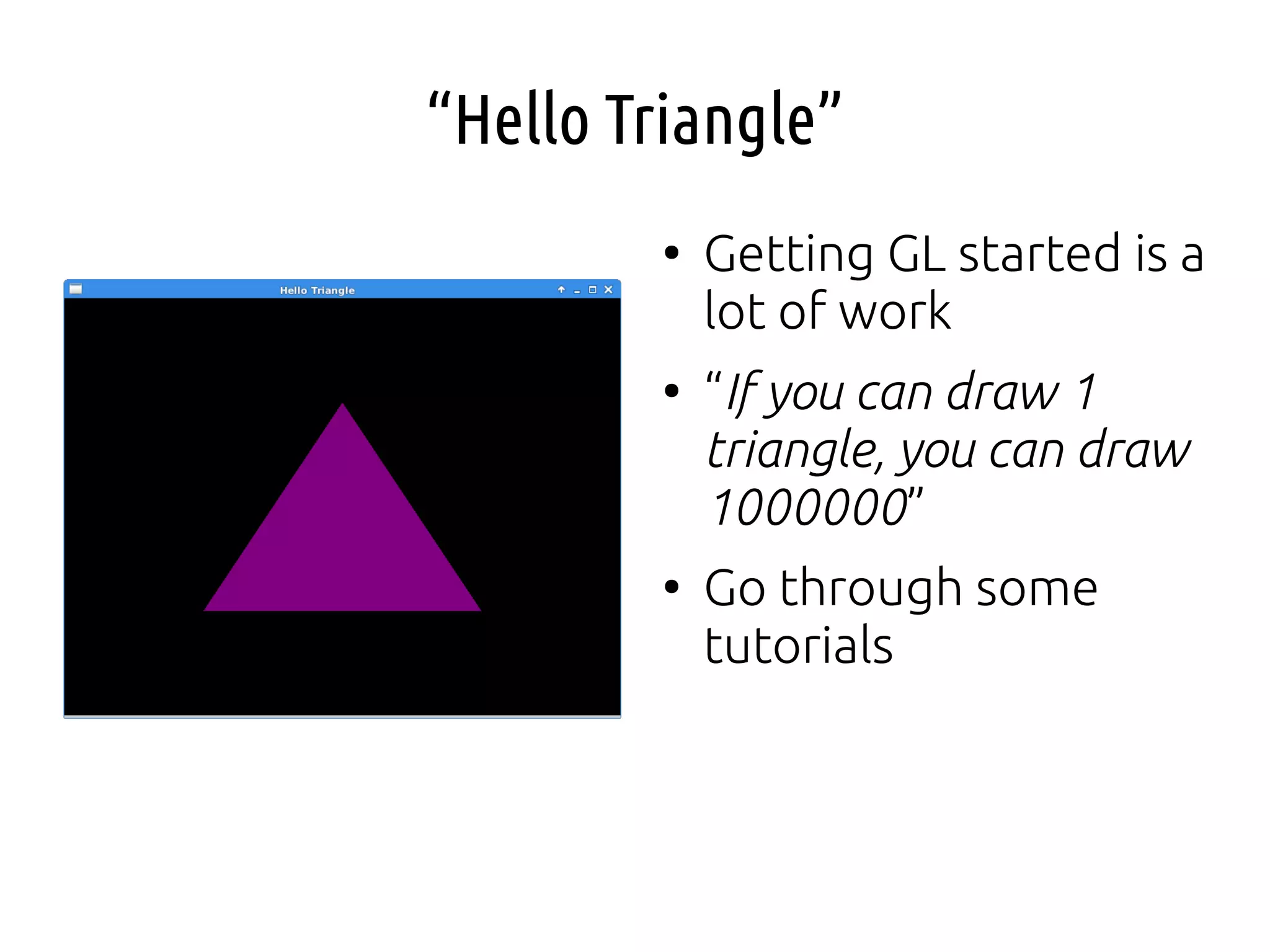
“Hello Triangle”
●
Getting GL started is a
lot of work
●
“If you can draw 1
triangle, you can draw
1000000”
●
Go through some
tutorials
Pause and Review
●
What are the main components of a modern 3d
graphics programme?
●
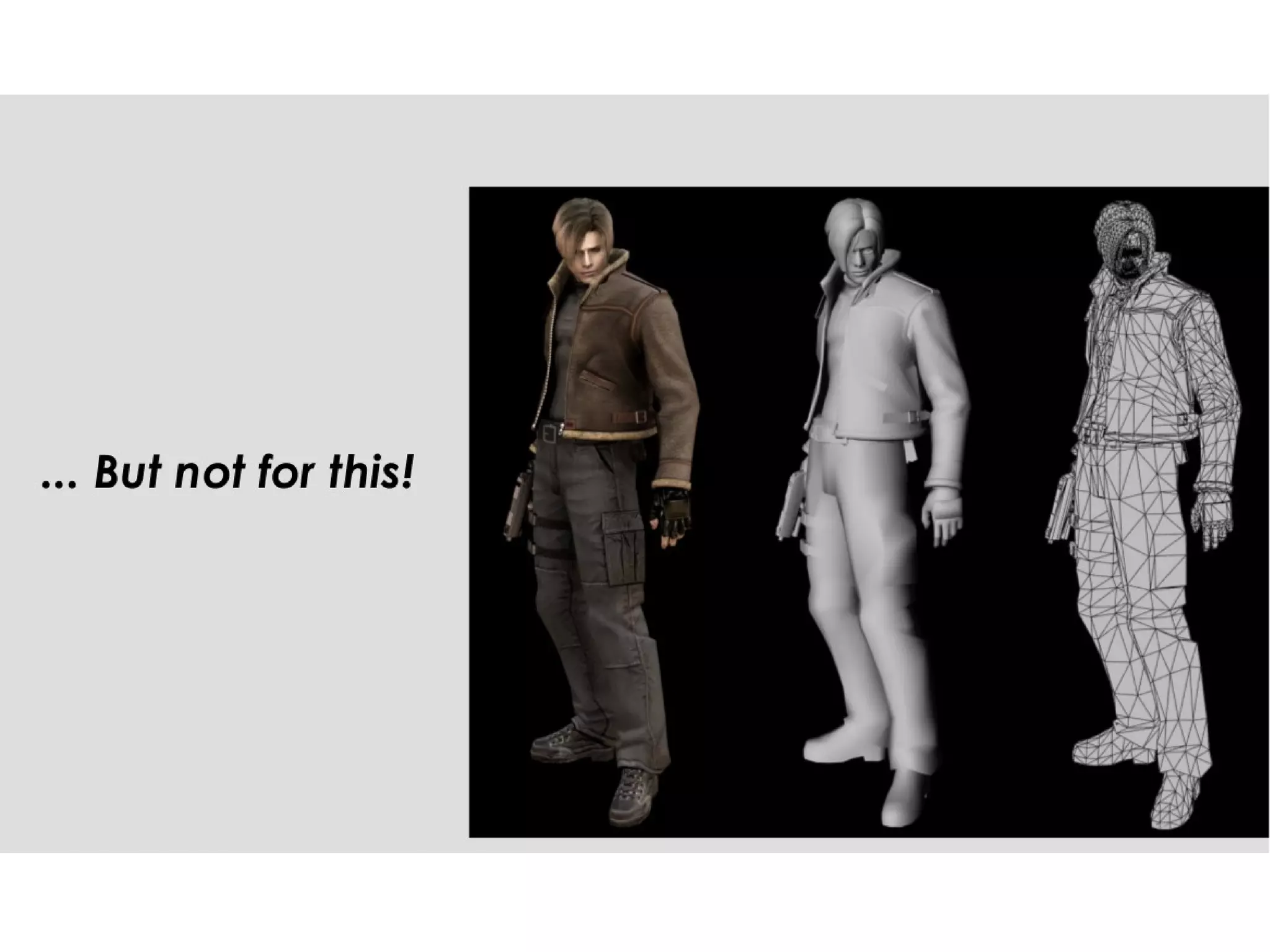
Where do we store mesh data (vertex points)?
●
In what?
●
How do we define the format of the data?
●
What do we need to do before we tell OpenGL
to draw with glDrawArrays() etc.?
Things to Think About or Try
●
Can we change the colour of the triangle drawn?
●
How can we extend the triangle into a square?
●
Could we load mesh data from a file rather than
an array?
●
Shaders can be loaded from files. If you change
a shader in an external file, do you need to re-
compile?
●
How would you draw a second, separate shape?
3d Programming I
Part B
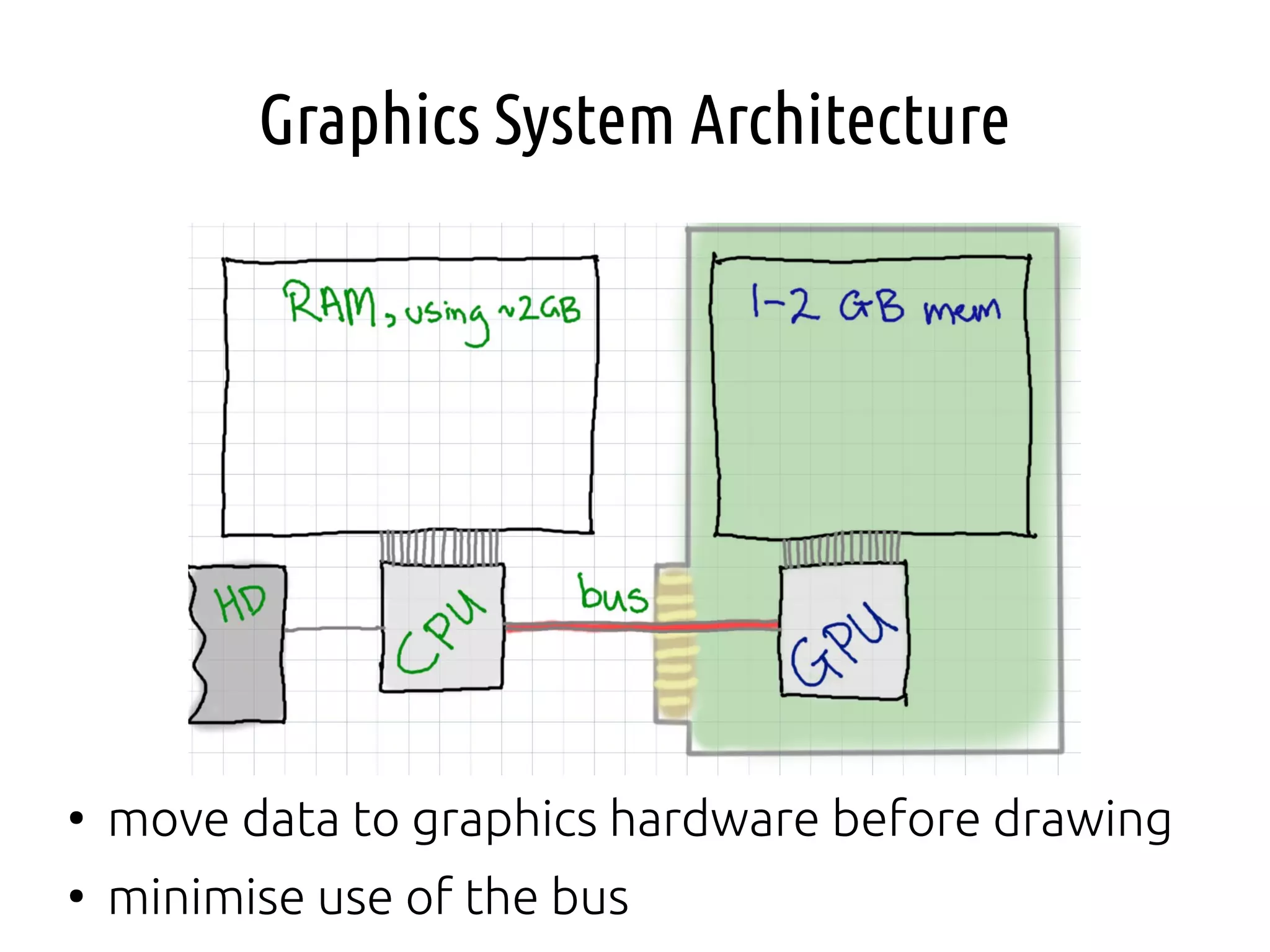
Graphics System Architecture
●
move data to graphics hardware before drawing
●
minimise use of the bus
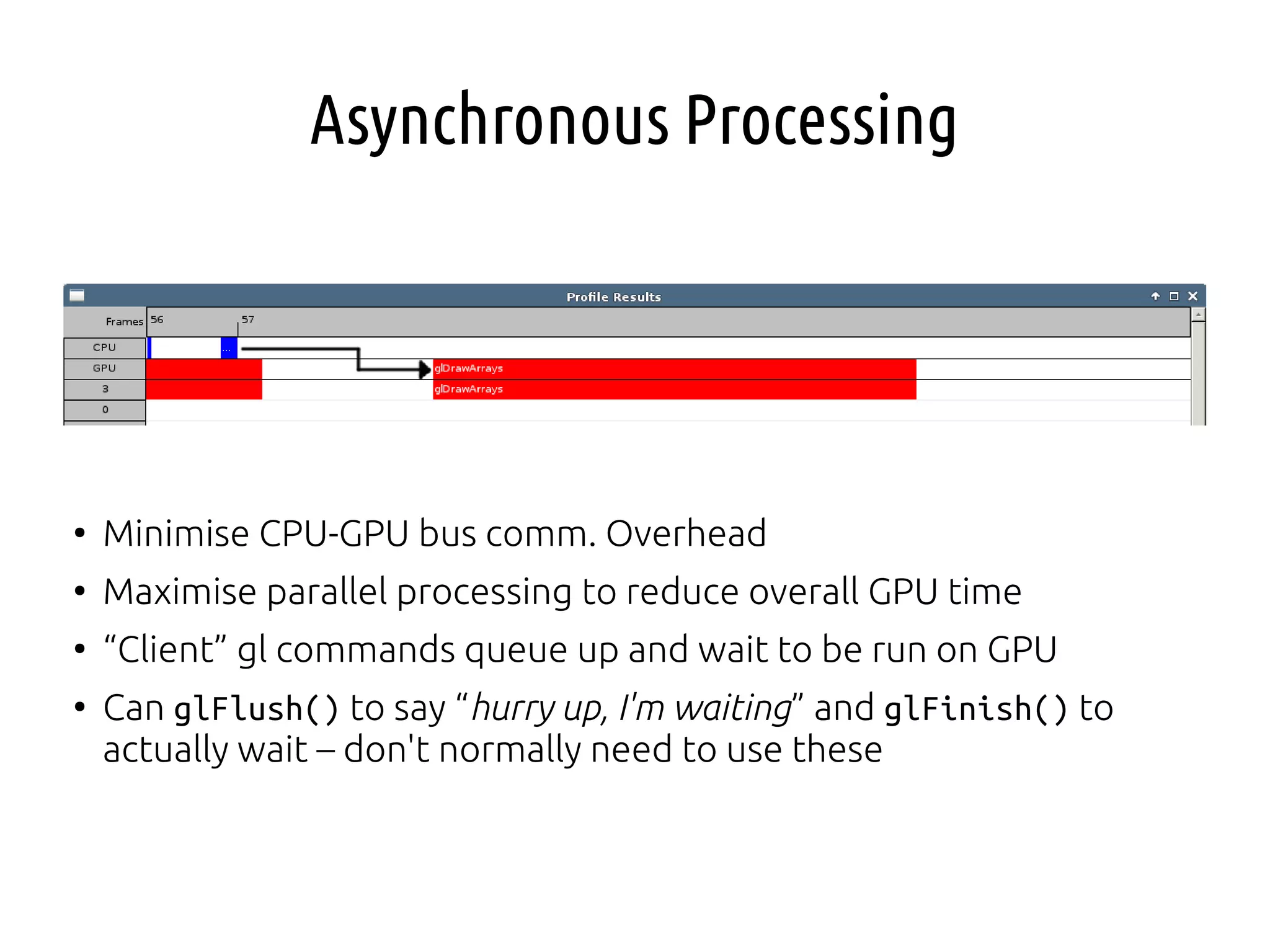
Asynchronous Processing
●
Minimise CPU-GPU bus comm. Overhead
●
Maximise parallel processing to reduce overall GPU time
●
“Client” gl commands queue up and wait to be run on GPU
●
Can glFlush() to say “hurry up, I'm waiting” and glFinish() to
actually wait – don't normally need to use these
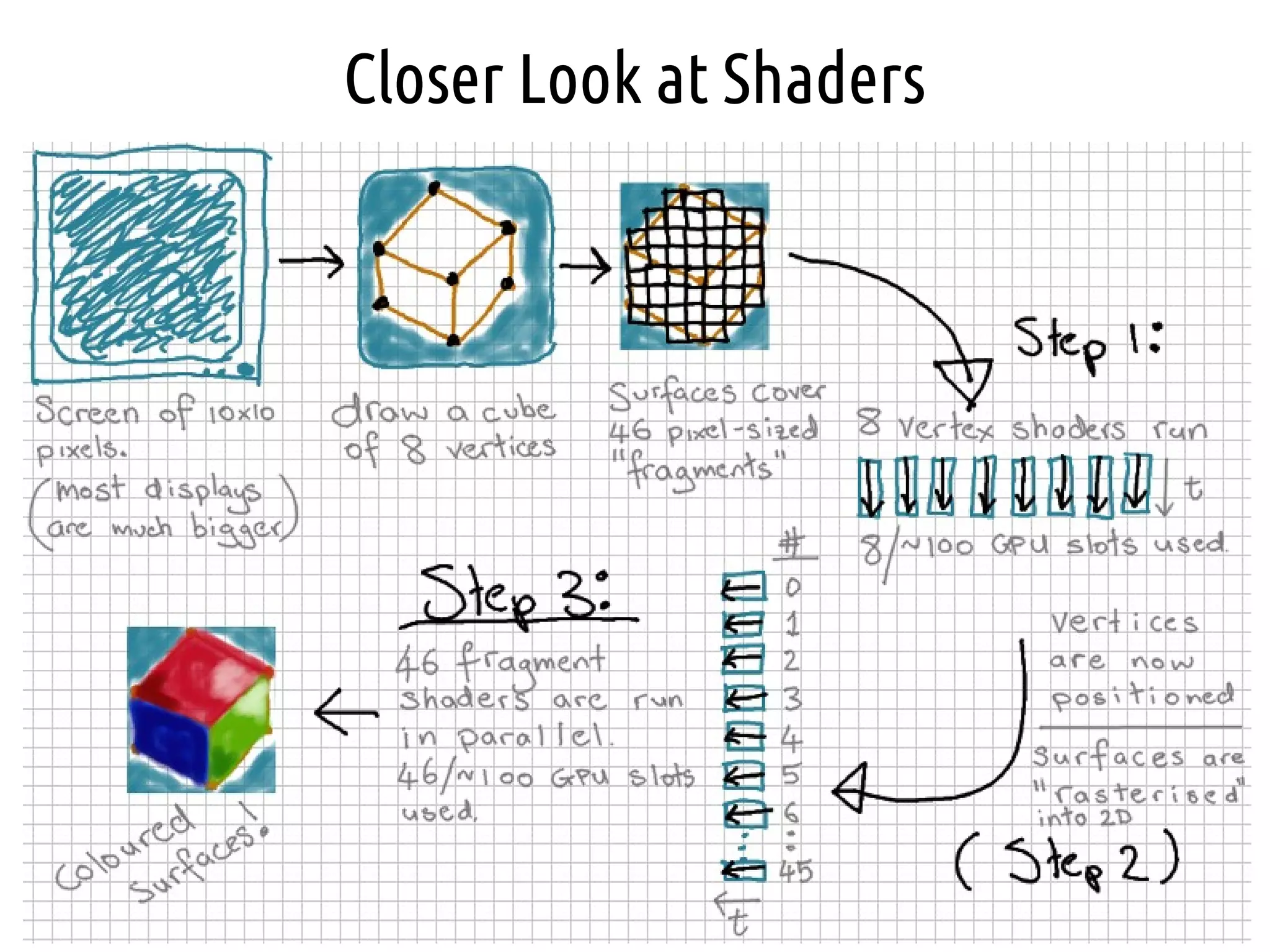
Closer Look at Shaders
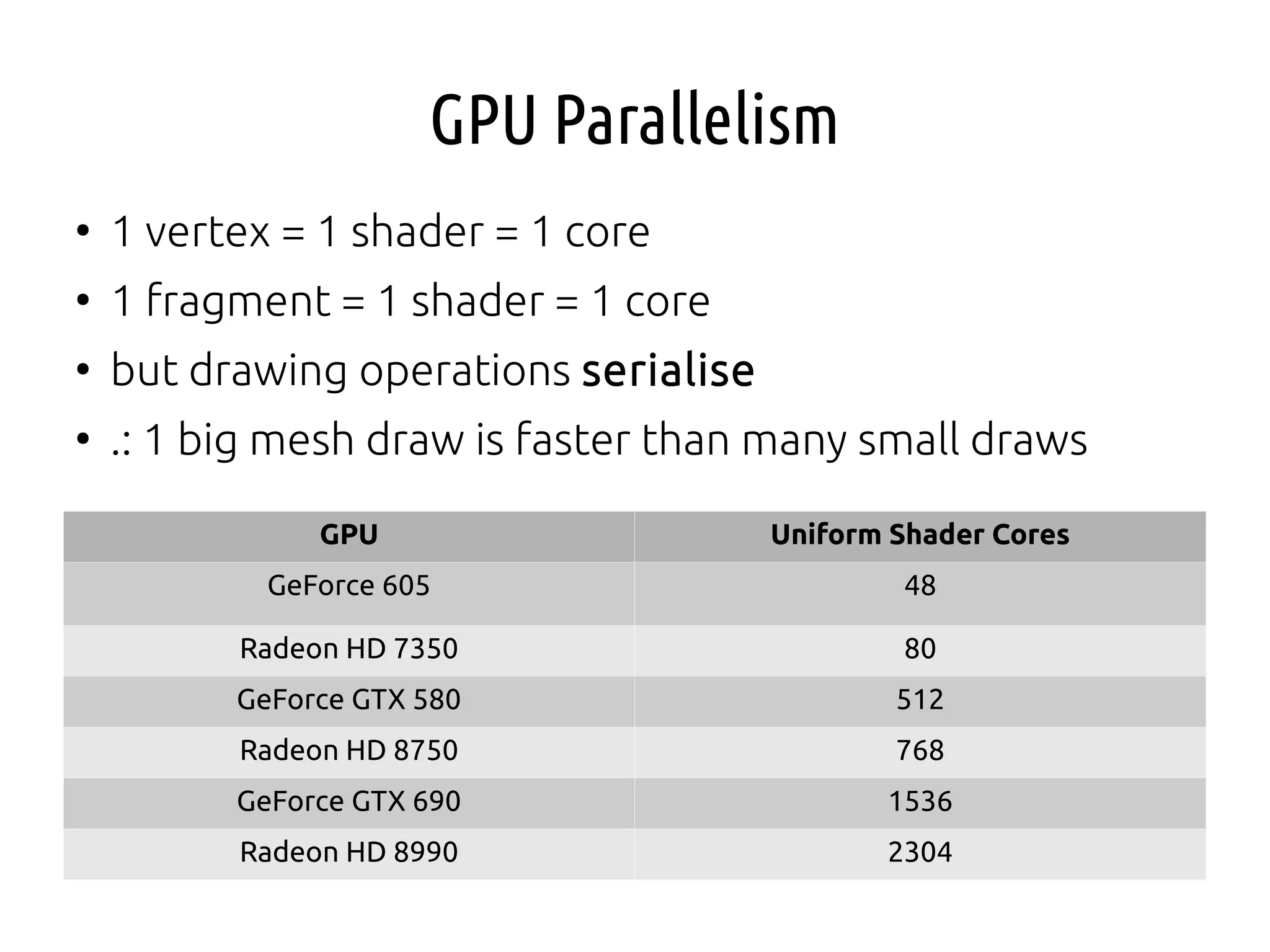
GPU Parallelism
●
1 vertex = 1 shader = 1 core
●
1 fragment = 1 shader = 1 core
●
but drawing operations serialise
●
.: 1 big mesh draw is faster than many small draws
GPU Uniform Shader Cores
GeForce 605 48
Radeon HD 7350 80
GeForce GTX 580 512
Radeon HD 8750 768
GeForce GTX 690 1536
Radeon HD 8990 2304
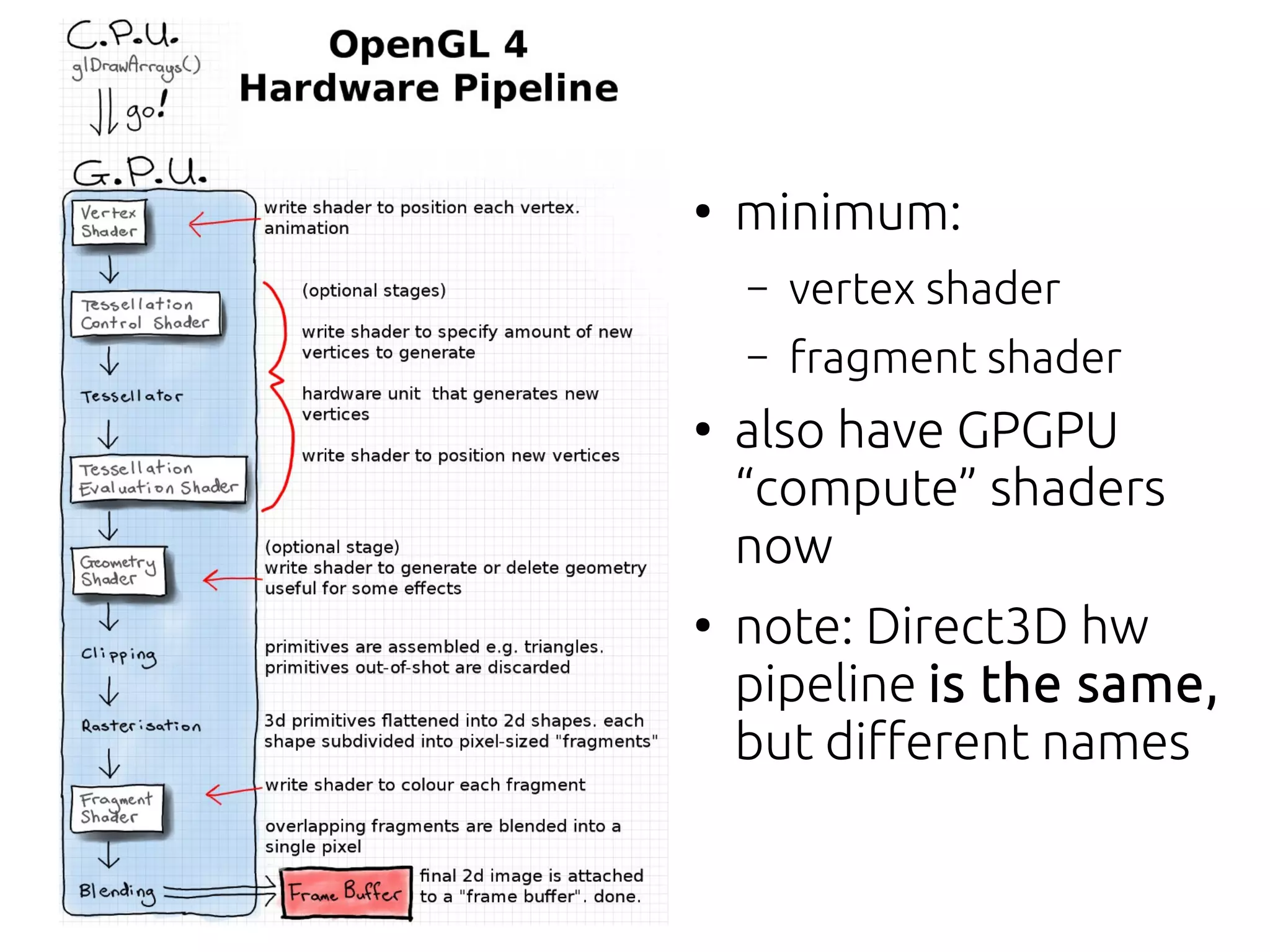
●
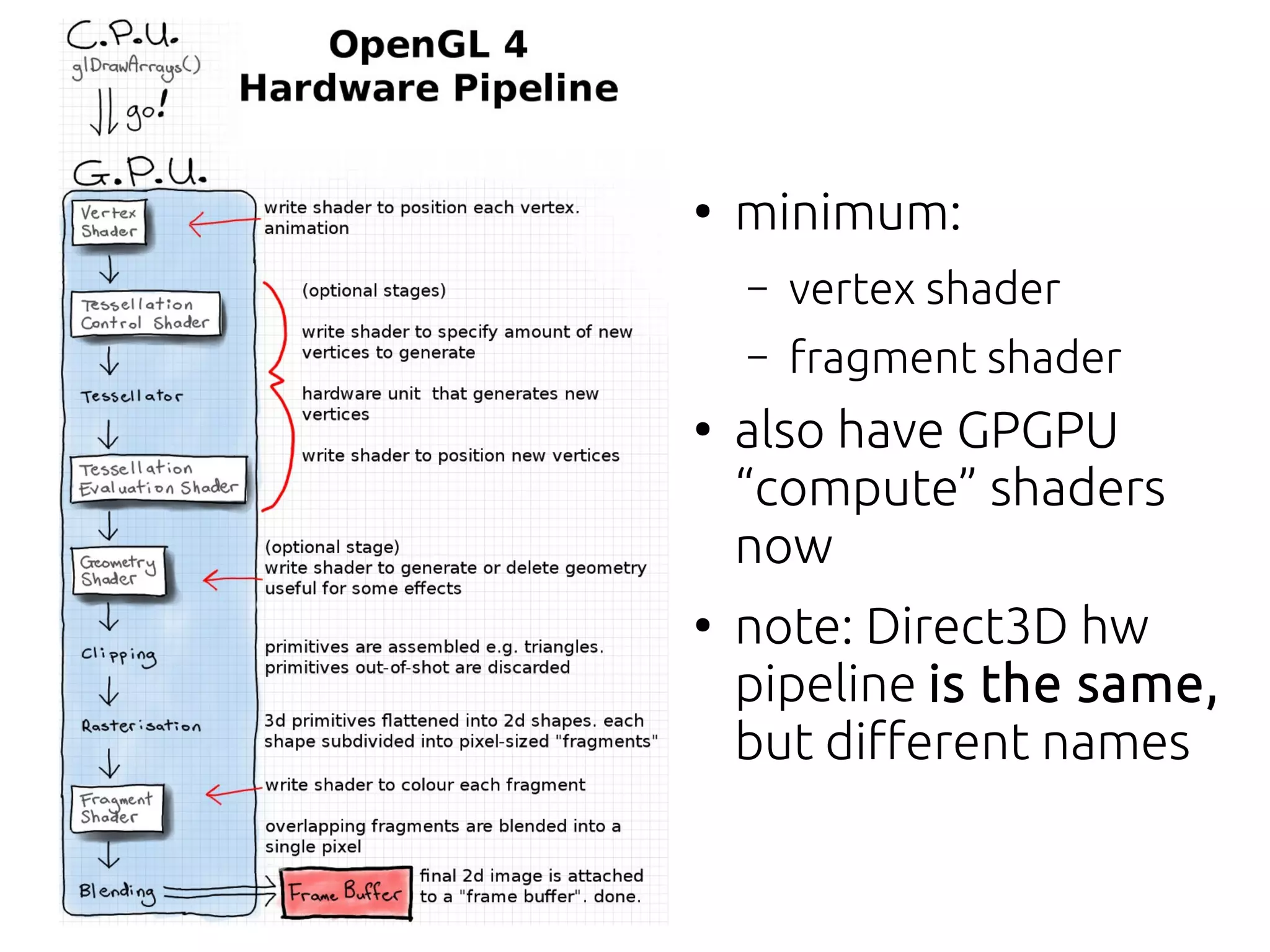
minimum:
– vertex shader
– fragment shader
●
also have GPGPU
“compute” shaders
now
●
note: Direct3D hw
pipeline is the same,
but different names
Difference Between Fragment and Pixels
●
Pixel = “picture element”
●
Fragment = pixel-sized area of a surface
●
Each triangle is divided into fragments on
rasterisation
●
All fragments are drawn, even the obscured ones*
●
If depth testing is enabled closer fragments are
drawn over farther-away fragments
●
.: Huge #s of redundant FS may be executed
Shader Language
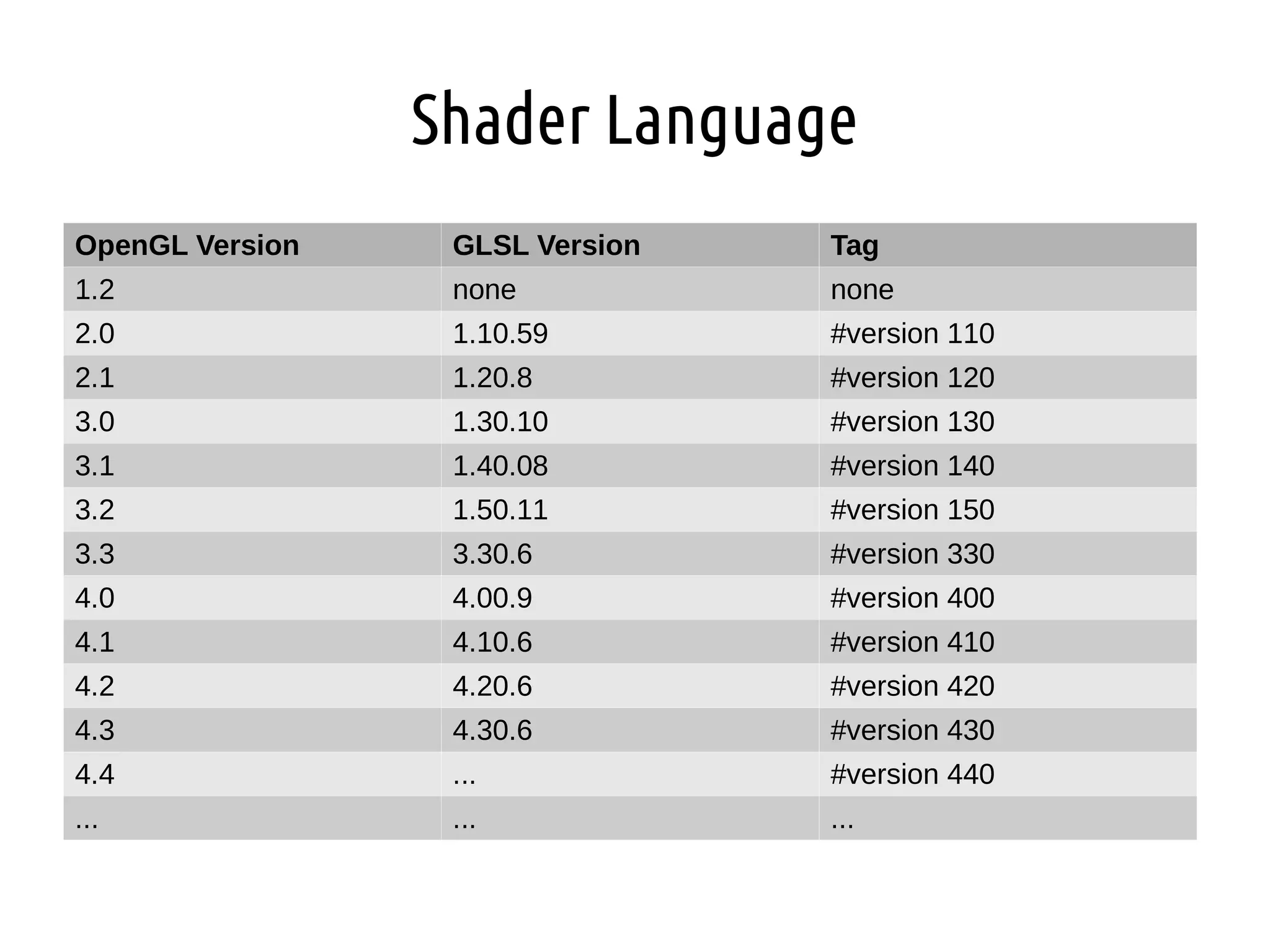
OpenGL Version GLSL Version Tag
1.2 none none
2.0 1.10.59 #version 110
2.1 1.20.8 #version 120
3.0 1.30.10 #version 130
3.1 1.40.08 #version 140
3.2 1.50.11 #version 150
3.3 3.30.6 #version 330
4.0 4.00.9 #version 400
4.1 4.10.6 #version 410
4.2 4.20.6 #version 420
4.3 4.30.6 #version 430
4.4 ... #version 440
... ... ...
GLSL Operators and Data Types
●
Same operators as C
●
no pointers
●
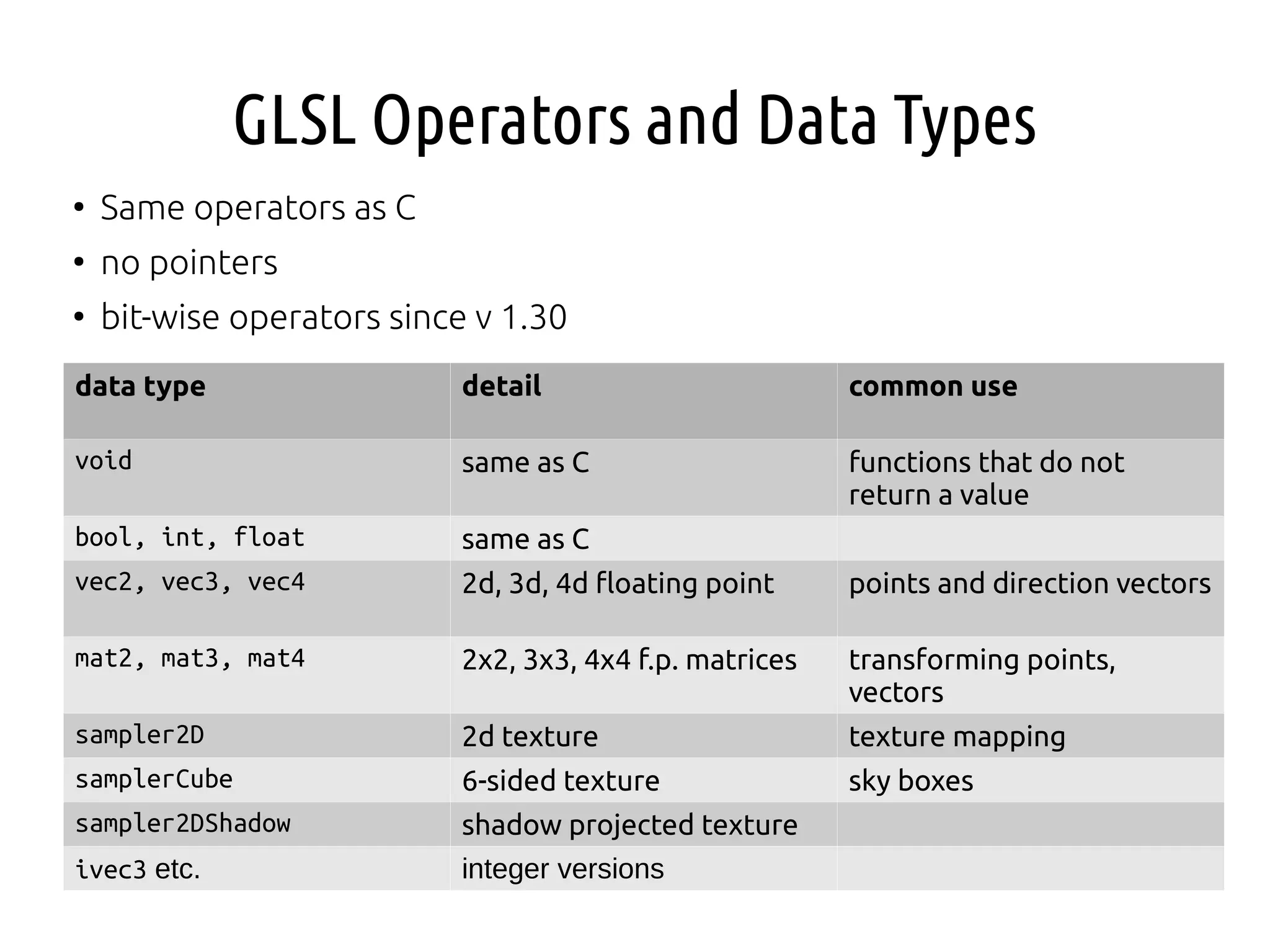
bit-wise operators since v 1.30
data type detail common use
void same as C functions that do not
return a value
bool, int, float same as C
vec2, vec3, vec4 2d, 3d, 4d floating point points and direction vectors
mat2, mat3, mat4 2x2, 3x3, 4x4 f.p. matrices transforming points,
vectors
sampler2D 2d texture texture mapping
samplerCube 6-sided texture sky boxes
sampler2DShadow shadow projected texture
ivec3 etc. integer versions
File Naming Convention
●
Upgarde the template – load shader strings from text files
●
post-fix with
– .vert - vetex shader
– .frag - fragment shader
– .geom - geometry shader
– .comp - compute shader
– .tesc - tessellation control shader
– .tese - tessellation evaluation shader
●
allows you to use a tool like Glslang reference compiler to
check for [obvious] errors
Example Vertex Shader
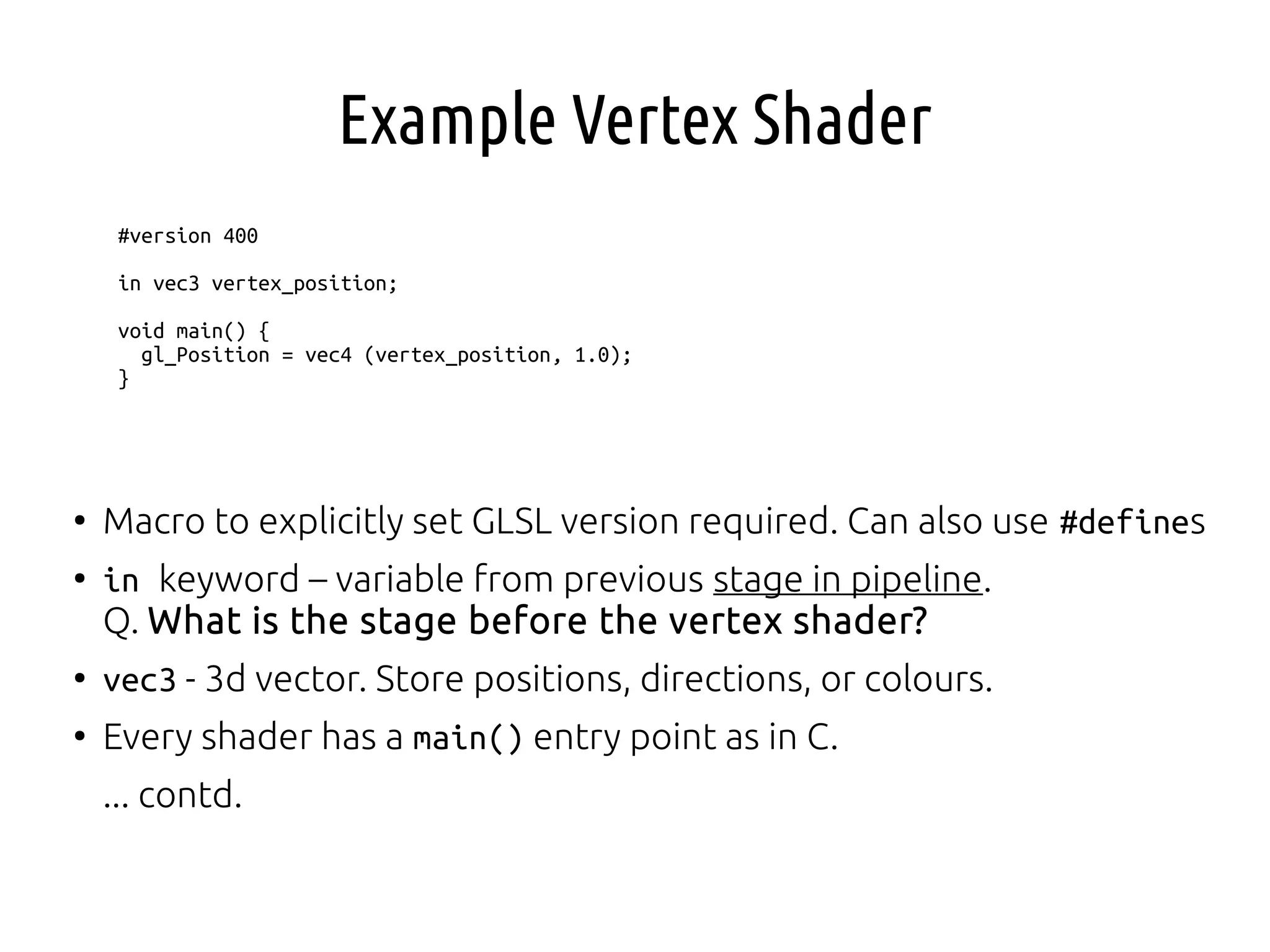
#version 400
in vec3 vertex_position;
void main() {
gl_Position = vec4 (vertex_position, 1.0);
}
●
Macro to explicitly set GLSL version required. Can also use #defines
●
in keyword – variable from previous stage in pipeline.
Q. What is the stage before the vertex shader?
●
vec3 - 3d vector. Store positions, directions, or colours.
●
Every shader has a main() entry point as in C.
... contd.
Example Vertex Shader
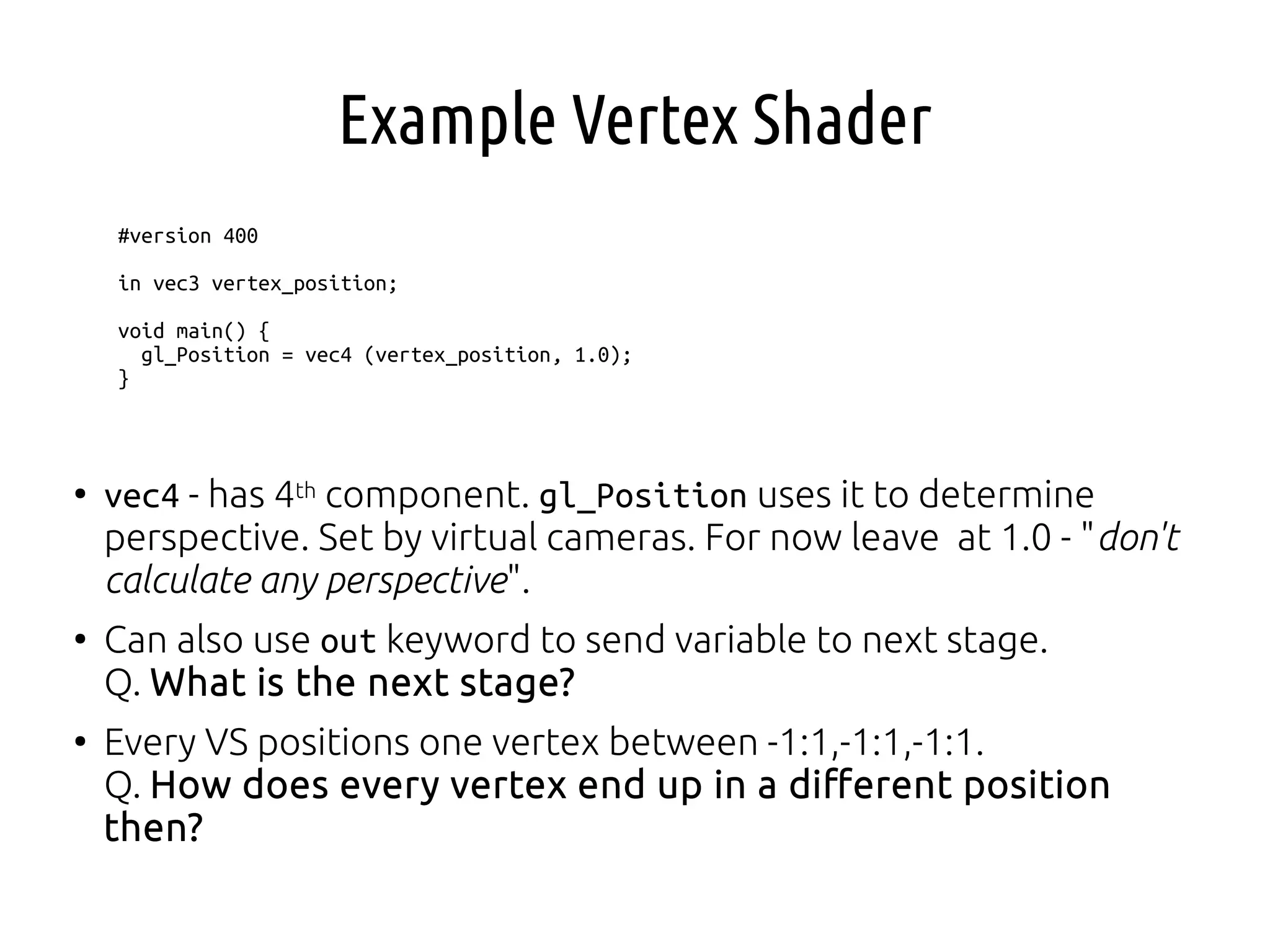
#version 400
in vec3 vertex_position;
void main() {
gl_Position = vec4 (vertex_position, 1.0);
}
●
vec4 - has 4th component. gl_Position uses it to determine
perspective. Set by virtual cameras. For now leave at 1.0 - "don't
calculate any perspective".
●
Can also use out keyword to send variable to next stage.
Q. What is the next stage?
●
Every VS positions one vertex between -1:1,-1:1,-1:1.
Q. How does every vertex end up in a different position
then?
●
minimum:
– vertex shader
– fragment shader
●
also have GPGPU
“compute” shaders
now
●
note: Direct3D hw
pipeline is the same,
but different names
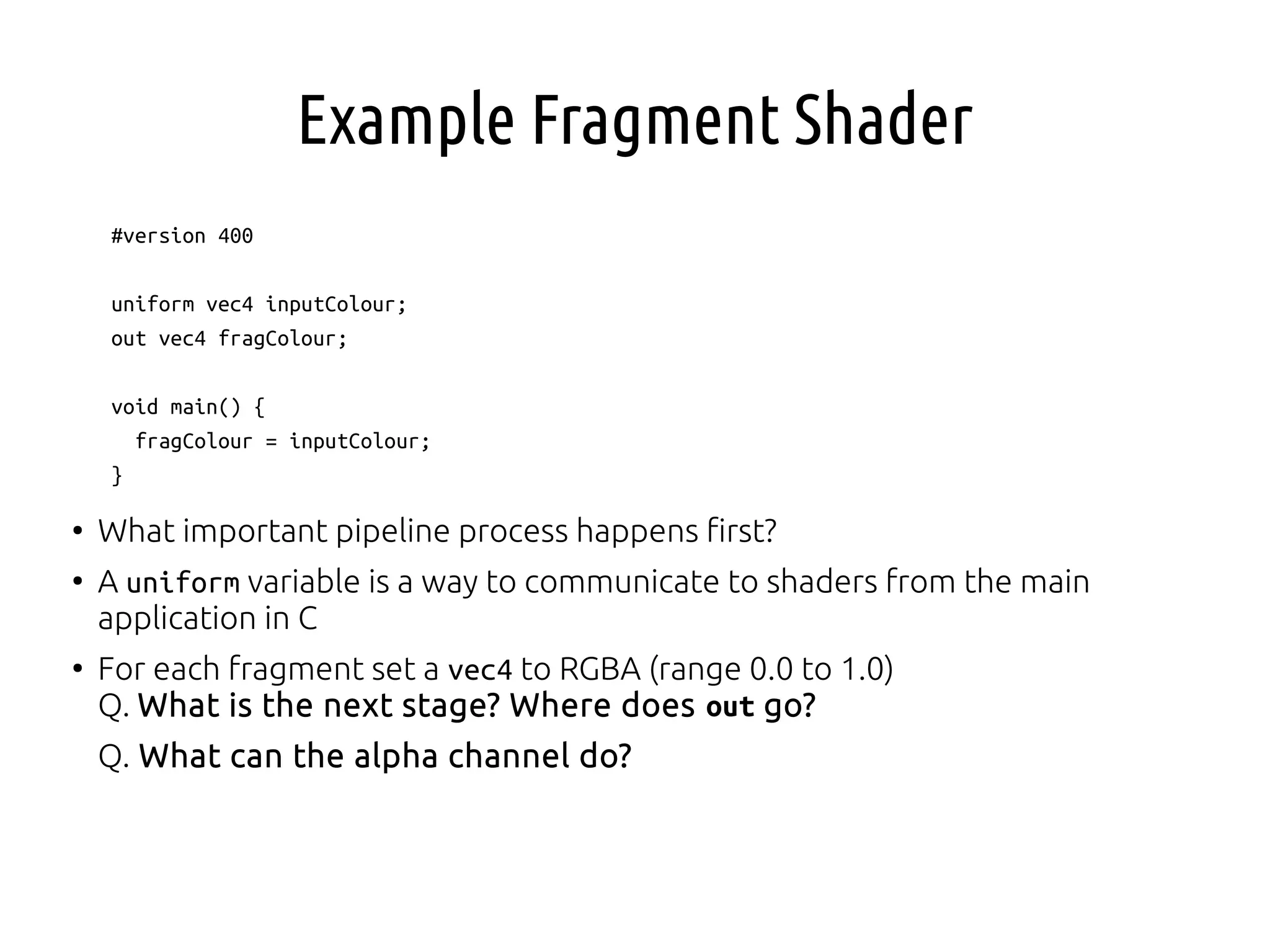
Example Fragment Shader
#version 400
uniform vec4 inputColour;
out vec4 fragColour;
void main() {
fragColour = inputColour;
}
●
What important pipeline process happens first?
●
A uniform variable is a way to communicate to shaders from the main
application in C
●
For each fragment set a vec4 to RGBA (range 0.0 to 1.0)
Q. What is the next stage? Where does out go?
Q. What can the alpha channel do?
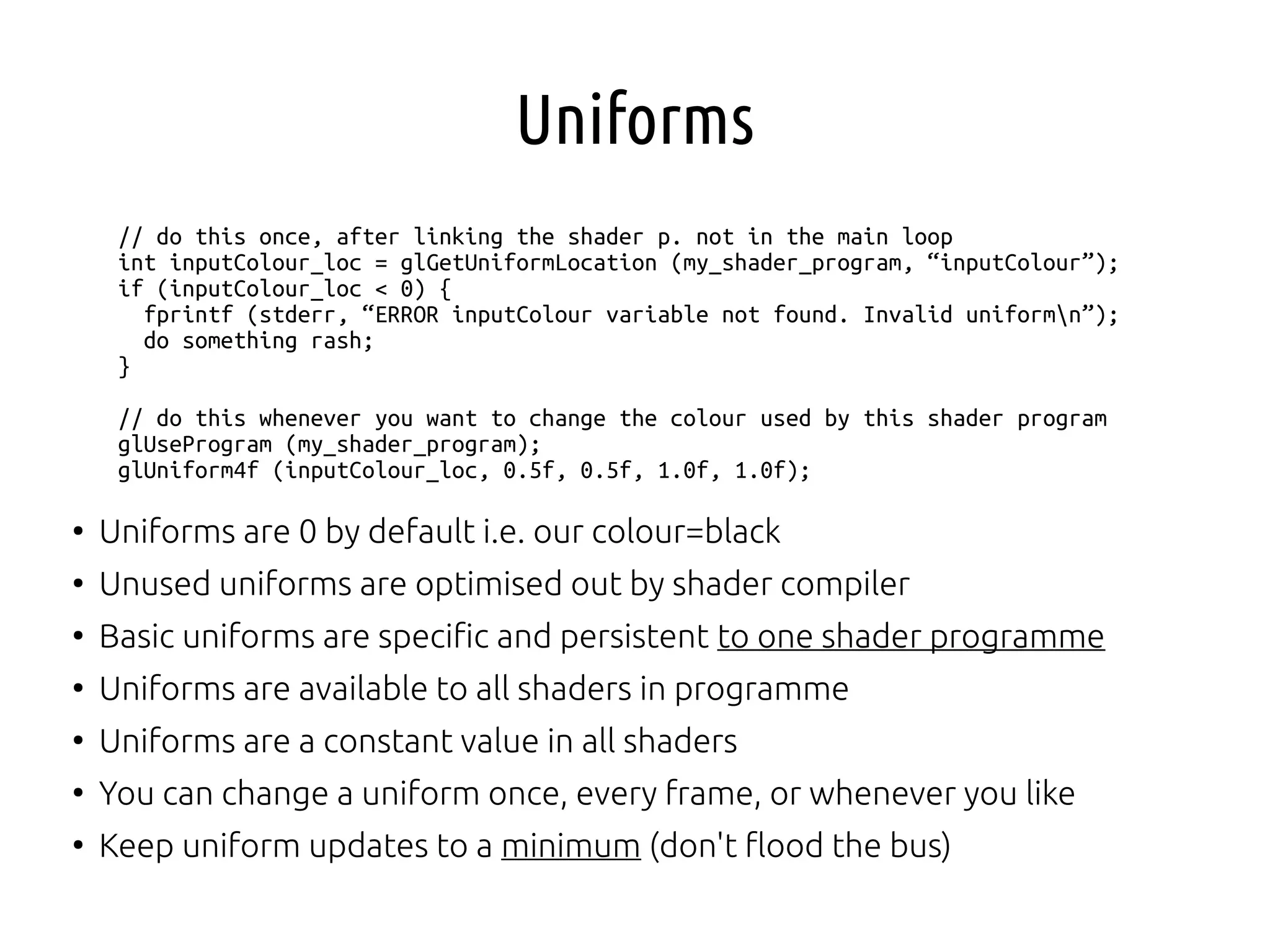
Uniforms
// do this once, after linking the shader p. not in the main loop
int inputColour_loc = glGetUniformLocation (my_shader_program, “inputColour”);
if (inputColour_loc < 0) {
fprintf (stderr, “ERROR inputColour variable not found. Invalid uniformn”);
do something rash;
}
// do this whenever you want to change the colour used by this shader program
glUseProgram (my_shader_program);
glUniform4f (inputColour_loc, 0.5f, 0.5f, 1.0f, 1.0f);
●
Uniforms are 0 by default i.e. our colour=black
●
Unused uniforms are optimised out by shader compiler
●
Basic uniforms are specific and persistent to one shader programme
●
Uniforms are available to all shaders in programme
●
Uniforms are a constant value in all shaders
●
You can change a uniform once, every frame, or whenever you like
●
Keep uniform updates to a minimum (don't flood the bus)
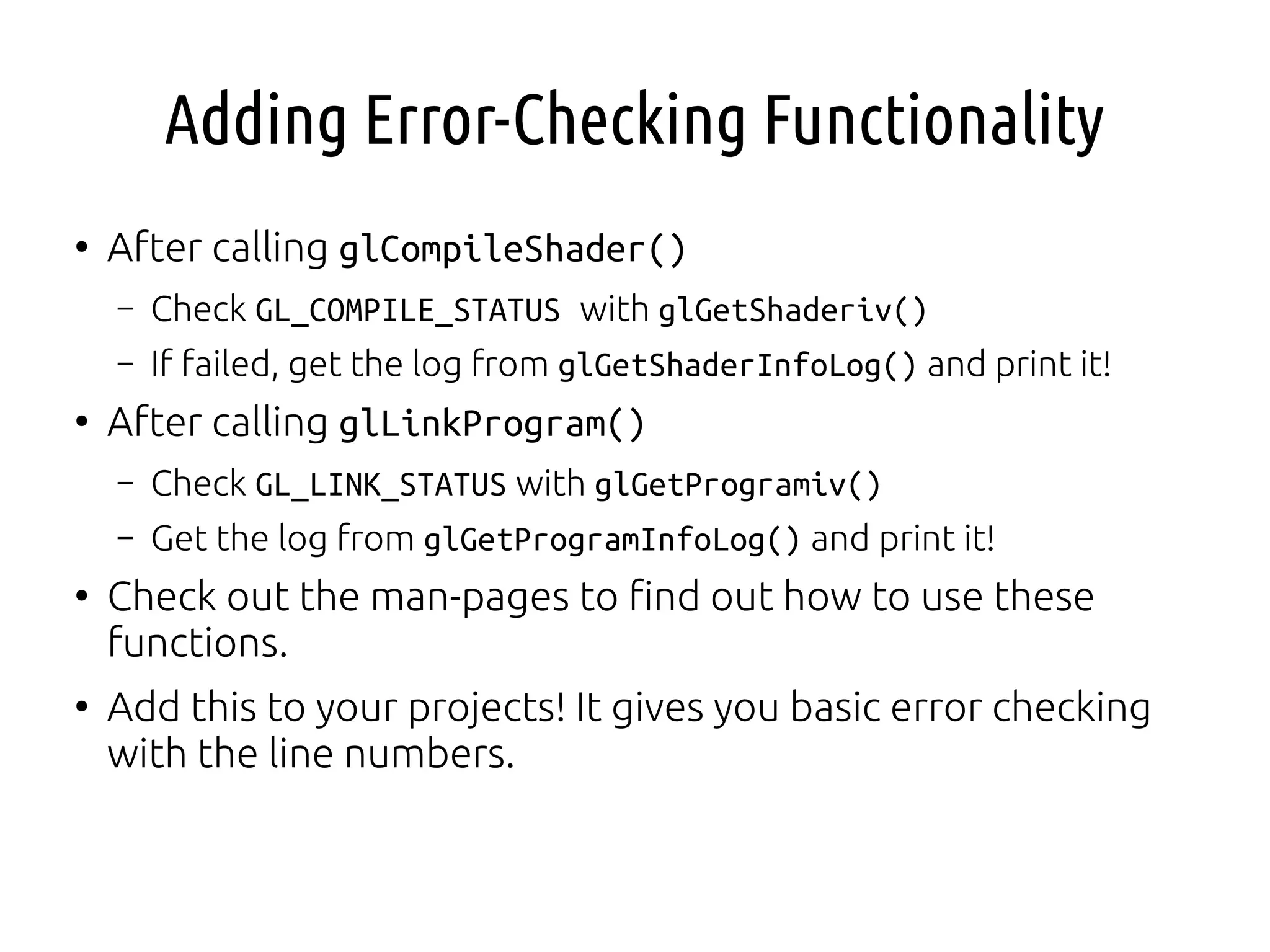
Adding Error-Checking Functionality
●
After calling glCompileShader()
– Check GL_COMPILE_STATUS with glGetShaderiv()
– If failed, get the log from glGetShaderInfoLog() and print it!
●
After calling glLinkProgram()
– Check GL_LINK_STATUS with glGetProgramiv()
– Get the log from glGetProgramInfoLog() and print it!
●
Check out the man-pages to find out how to use these
functions.
●
Add this to your projects! It gives you basic error checking
with the line numbers.
Shadertoy
●
WebGL tool to experiment with shaders
on-the-fly
●
implement entirely in a fragment shader
https://www.shadertoy.com/
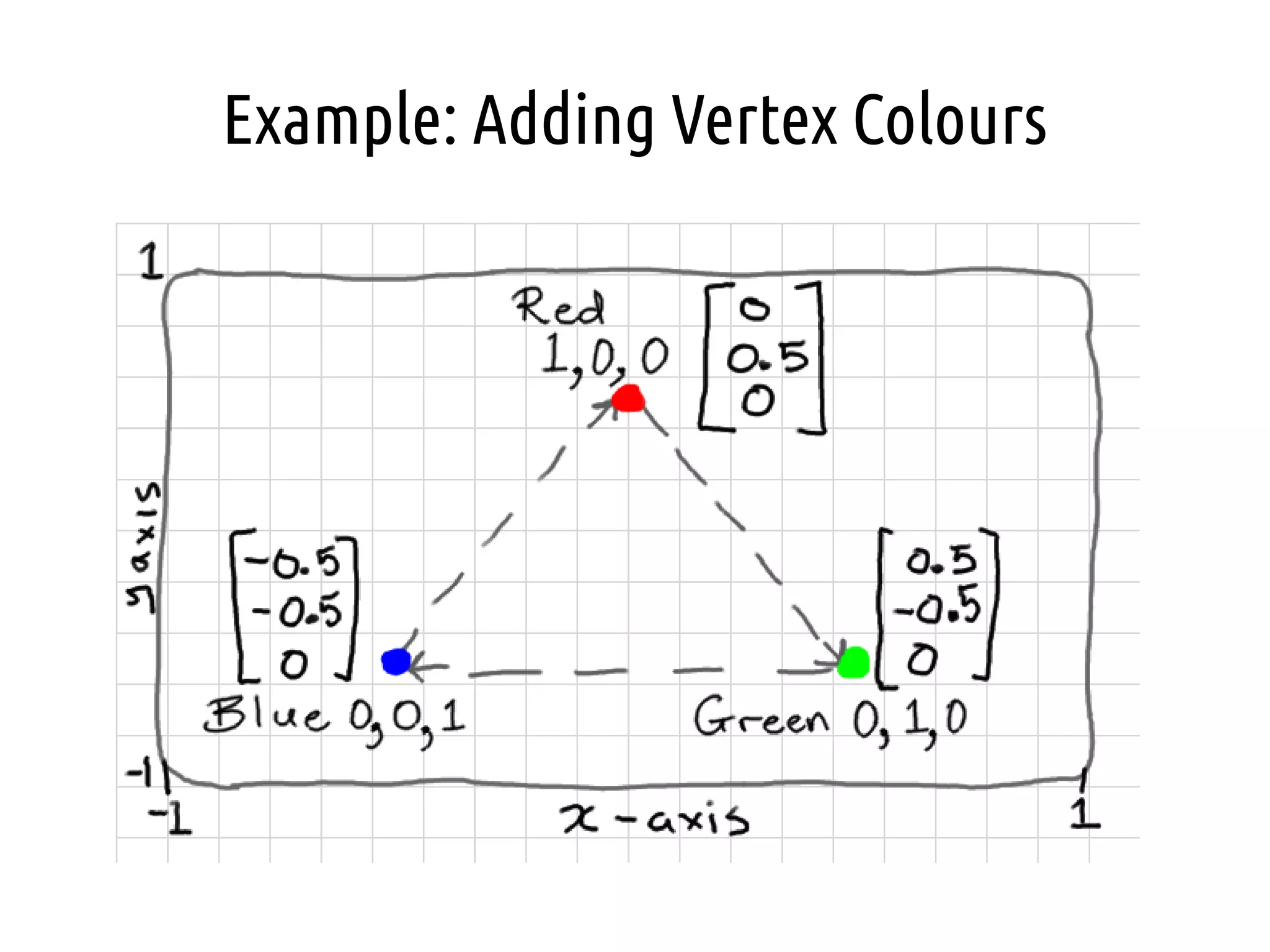
Example: Adding Vertex Colours
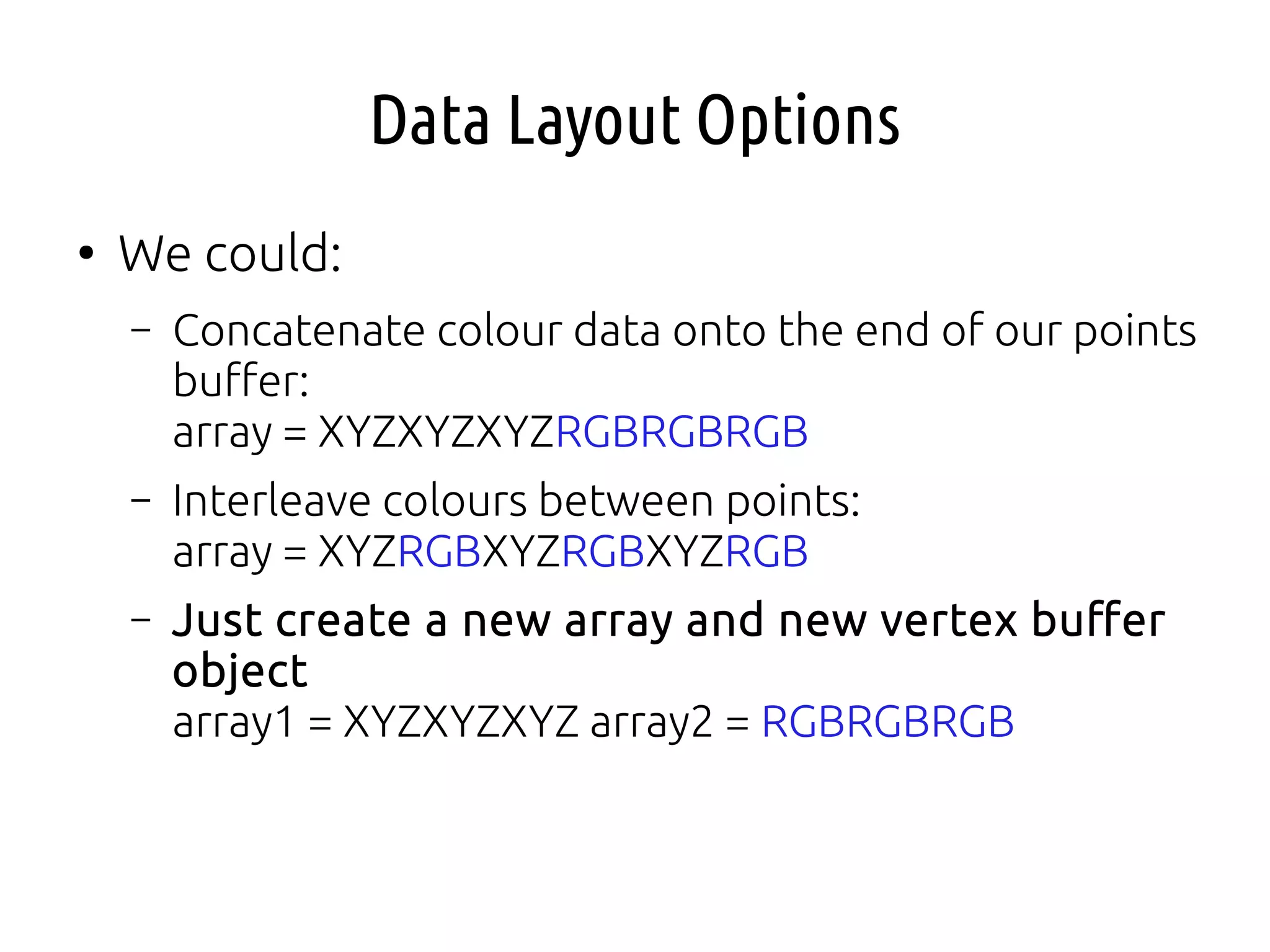
Data Layout Options
●
We could:
– Concatenate colour data onto the end of our points
buffer:
array = XYZXYZXYZRGBRGBRGB
– Interleave colours between points:
array = XYZRGBXYZRGBXYZRGB
– Just create a new array and new vertex buffer
object
array1 = XYZXYZXYZ array2 = RGBRGBRGB
Second Array
GLfloat points[] = {
0.0f, 0.5f, 0.0f,
0.5f, -0.5f, 0.0f,
-0.5f, -0.5f, 0.0f
};
GLfloat colours[] = {
1.0f, 0.0f, 0.0f,
0.0f, 1.0f, 0.0f,
0.0f, 0.0f, 1.0f
};
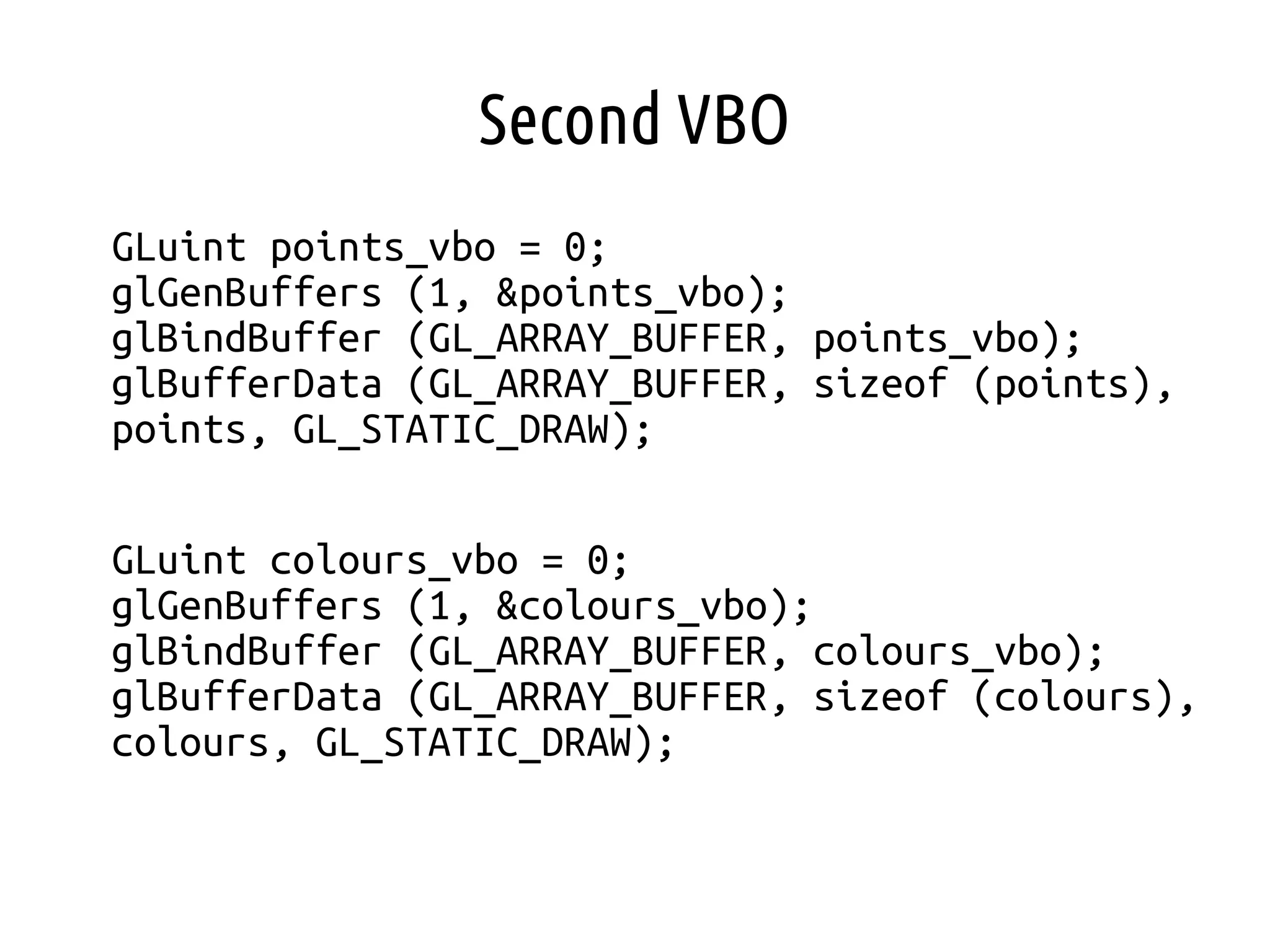
Second VBO
GLuint points_vbo = 0;
glGenBuffers (1, &points_vbo);
glBindBuffer (GL_ARRAY_BUFFER, points_vbo);
glBufferData (GL_ARRAY_BUFFER, sizeof (points),
points, GL_STATIC_DRAW);
GLuint colours_vbo = 0;
glGenBuffers (1, &colours_vbo);
glBindBuffer (GL_ARRAY_BUFFER, colours_vbo);
glBufferData (GL_ARRAY_BUFFER, sizeof (colours),
colours, GL_STATIC_DRAW);
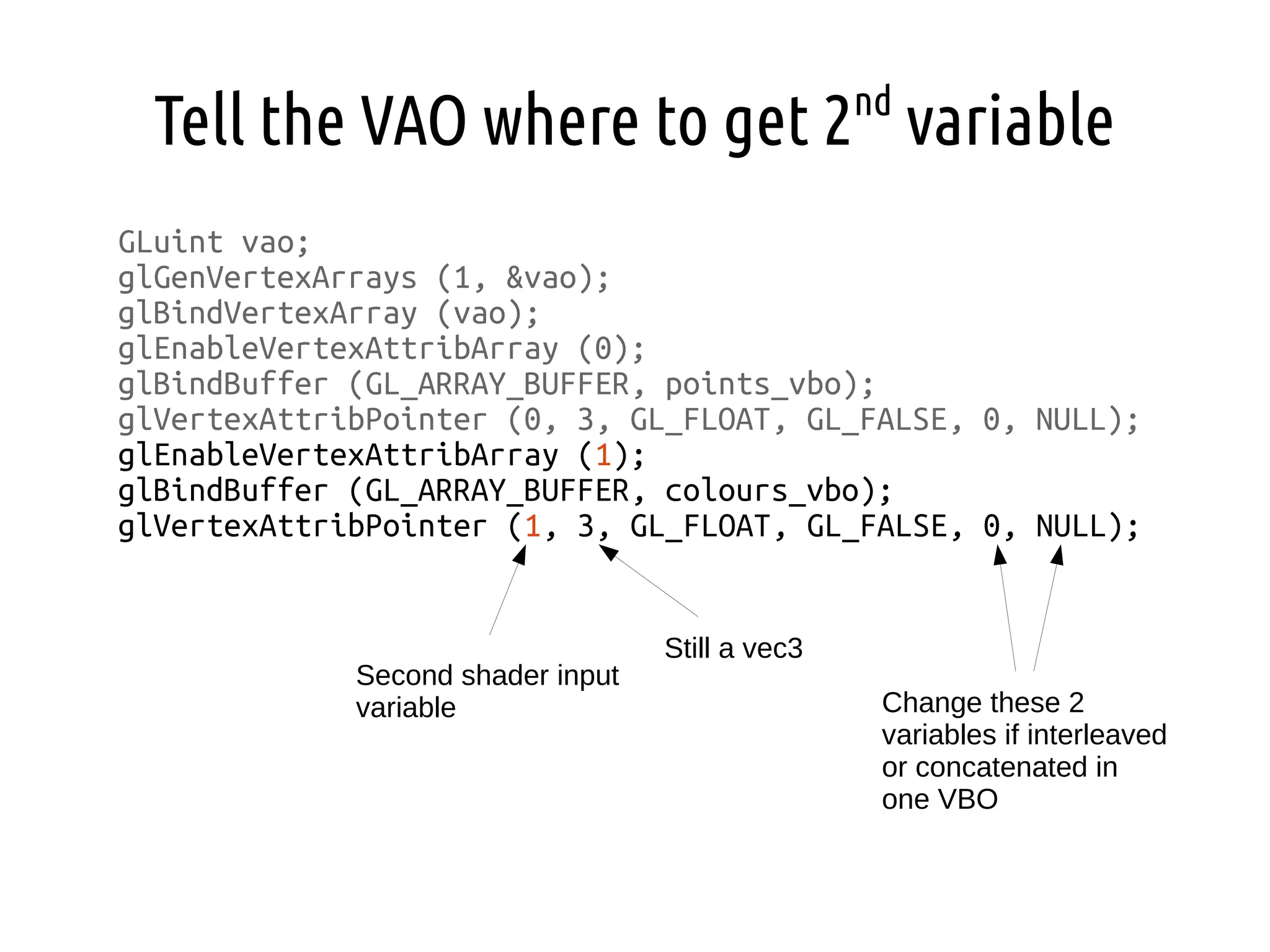
Tell the VAO where to get 2nd
variable
GLuint vao;
glGenVertexArrays (1, &vao);
glBindVertexArray (vao);
glEnableVertexAttribArray (0);
glBindBuffer (GL_ARRAY_BUFFER, points_vbo);
glVertexAttribPointer (0, 3, GL_FLOAT, GL_FALSE, 0, NULL);
glEnableVertexAttribArray (1);
glBindBuffer (GL_ARRAY_BUFFER, colours_vbo);
glVertexAttribPointer (1, 3, GL_FLOAT, GL_FALSE, 0, NULL);
Second shader input
variable
Still a vec3
Change these 2
variables if interleaved
or concatenated in
one VBO
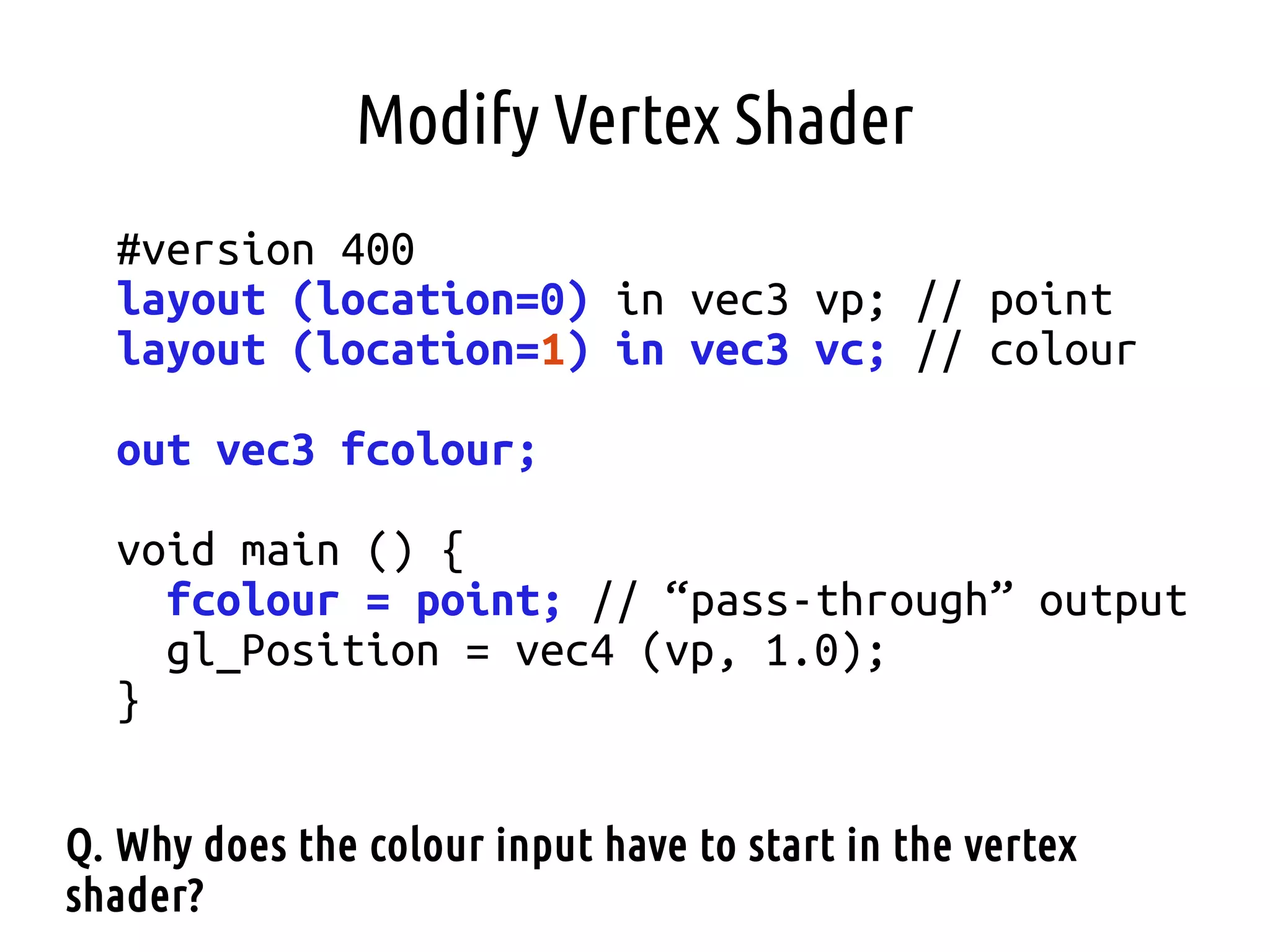
Modify Vertex Shader
#version 400
layout (location=0) in vec3 vp; // point
layout (location=1) in vec3 vc; // colour
out vec3 fcolour;
void main () {
fcolour = point; // “pass-through” output
gl_Position = vec4 (vp, 1.0);
}
Q. Why does the colour input have to start in the vertex
shader?
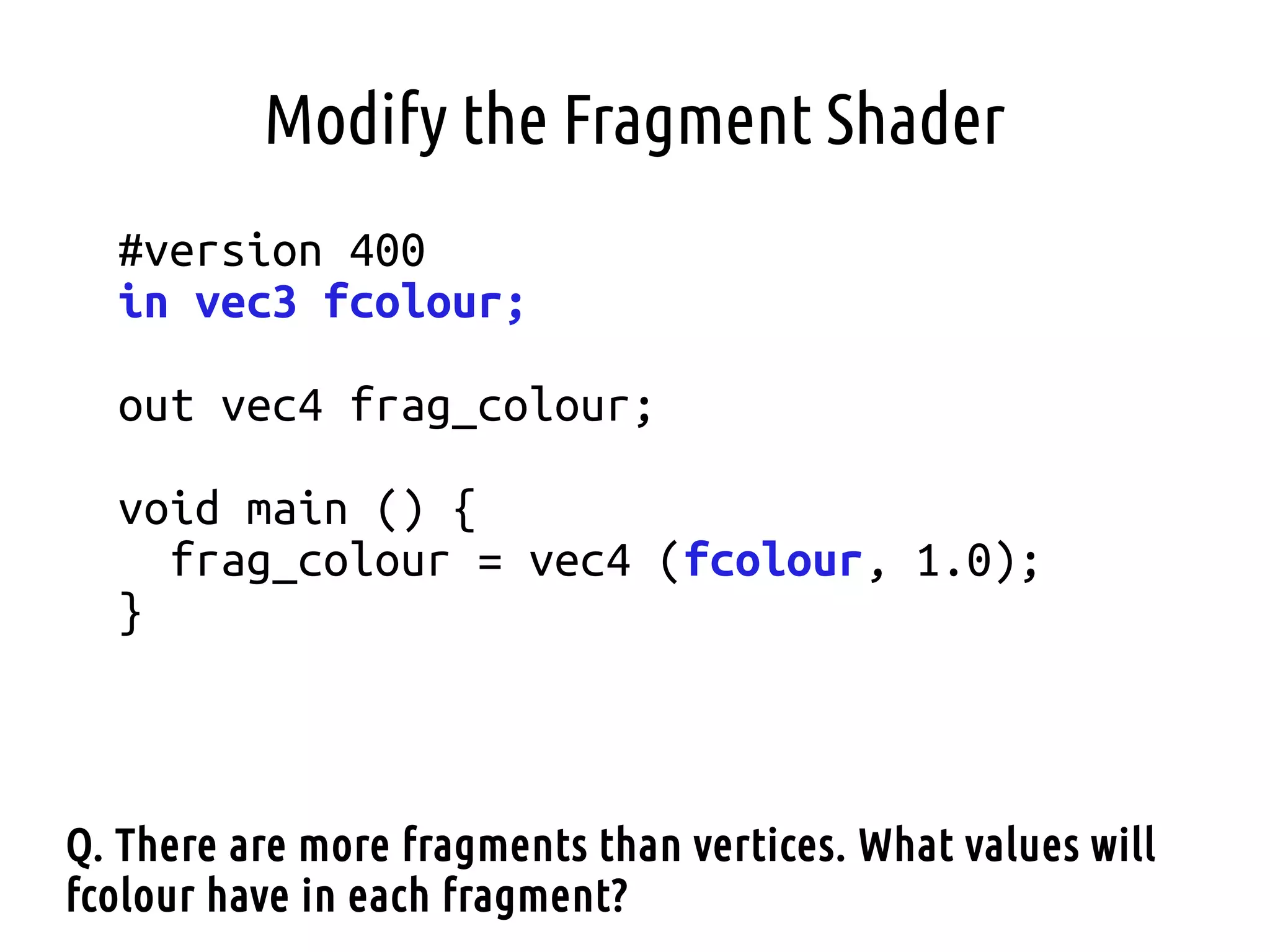
Modify the Fragment Shader
#version 400
in vec3 fcolour;
out vec4 frag_colour;
void main () {
frag_colour = vec4 (fcolour, 1.0);
}
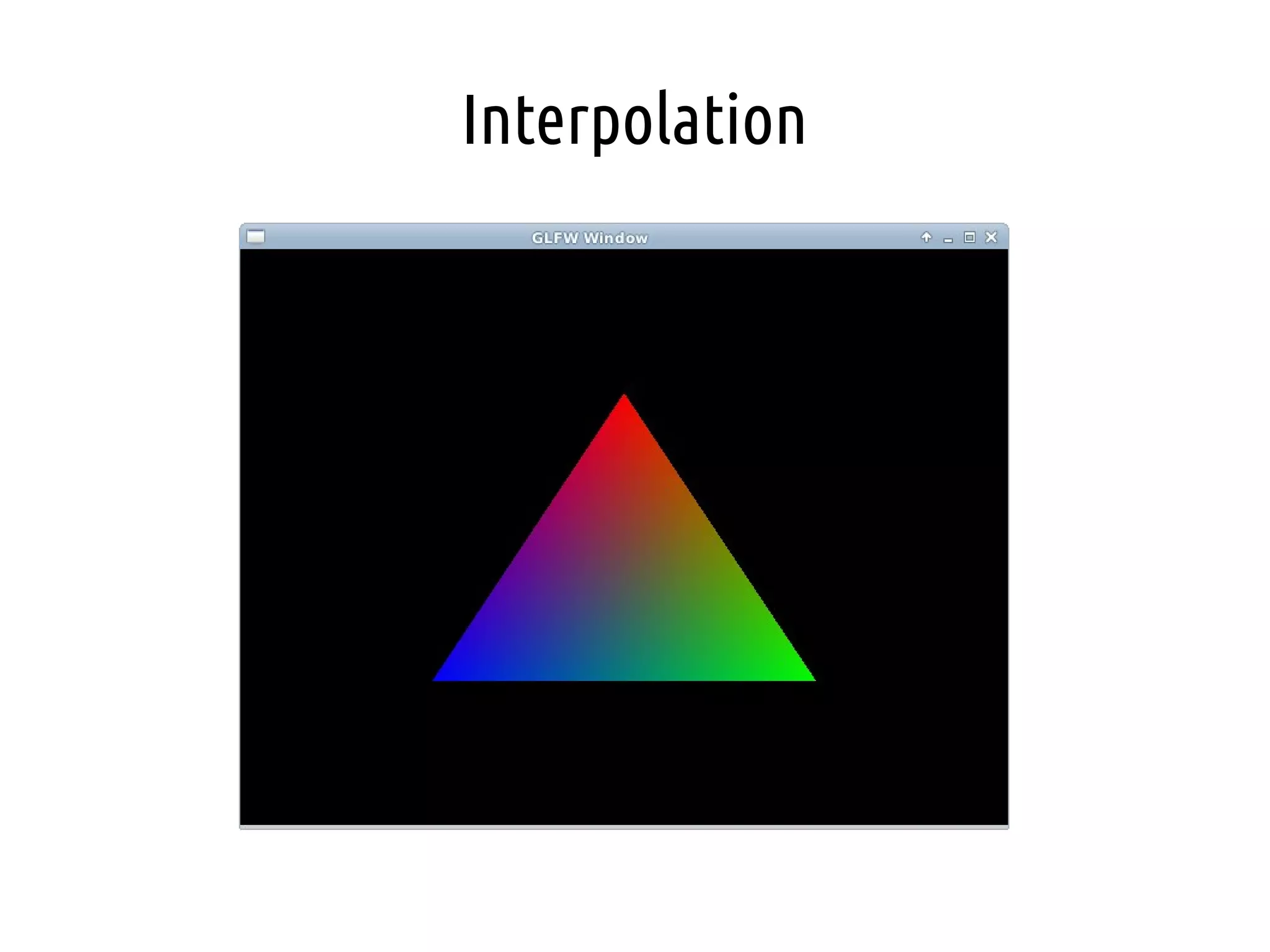
Q. There are more fragments than vertices. What values will
fcolour have in each fragment?
Interpolation
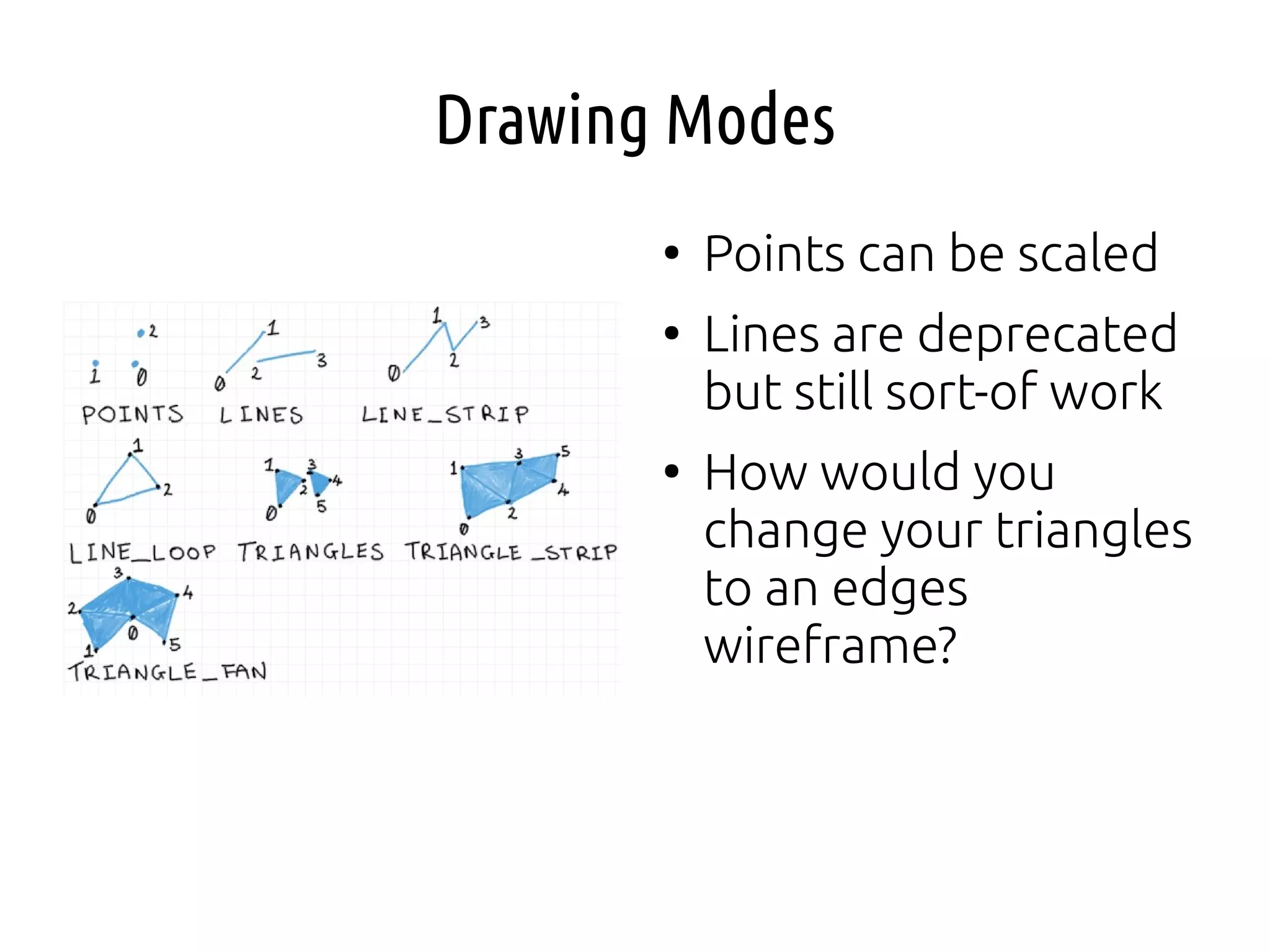
Drawing Modes
●
Points can be scaled
●
Lines are deprecated
but still sort-of work
●
How would you
change your triangles
to an edges
wireframe?
Winding Order and Back-Face Culling
●
Easy optimisation – don't waste time drawing the
back face or inside-facing parts of a mesh
●
How do we define the “front” and “back”
●
= order that points are given
●
Clock-wise order or Counter clock-wise
glEnable (GL_CULL_FACE); // cull face
glCullFace (GL_BACK); // cull back face
glFrontFace (GL_CW); // usually front is CCW

Computer Graphics - Lecture 01 - 3D Programming I

  • 1.
    3d Programming I DrAnton Gerdelan gerdela@scss.tcd.ie
  • 2.
    3d Programming ● 3d programmingis very difficult ● 3d programming is very time consuming
  • 3.
    3d Programming ● Practical knowledgeof the latest, low-level graphics APIs is very valuable (CV) ● Good grasp of basic concepts in this semester ● Caveat - You must keep API knowledge up-to- date or it becomes redundant
  • 4.
    Essential Checklist ✔ always havea pencil and paper ✔ solve your problem before you start coding ✔ know how to compile and link against libraries ✔ know how to use memory, pointers, addresses ✔ understand the hardware pipeline ✔ make a 3d maths cheat sheet ✔ do debugging (visual and programmatic) ✔ print the Quick Reference Card for OpenGL ✔ start assignments ASAP
  • 5.
    Quick Background ● What isa vertex? ● Modern graphics hardware is able to draw: – triangles – points – lines (unofficially deprecated) ● How do we define these? ● What is a normal?
  • 10.
    OpenGL ● Open Grapics Library- originally the IrisGL by SGI ● Managed by Khronos Group {lots of big hw and sw companies} ● Vector graphics ● Only the spec. is sort-of open ● Various implementations, lots of platforms ● C API + driver + GLSL shaders ● All the APIs do the same jobs on hardware, but present different interfaces
  • 11.
    OpenGL Caveats ● OpenGL hasa very clunky old-fashioned C interface that will definitely confuse ● OpenGL has been modernised but there is a lot of left- over “cruft” that you shouldn't use ● Print the Quick Reference Card and double-check everything that you use. http://www.opengl.org/sdk/docs/ ● The naming conventions are very confusing ● OpenGL is currently being completely re-written to address these problems ● I'll try to help steer around these issues - use the discussion boards if unsure!
  • 12.
    OpenGL Global StateMachine ● The OpenGL interface uses an architecture called a “global state machine” ● Instead of doing this sort of thing: Mesh myMesh; myMesh.setData (some_array); opengl.drawMesh (myMesh); ● in a G.S.M. we do this sort of thing [pseudo-code]: unsigned int mesh_handle; glGenMesh (&mesh_handle); // okay so far, just C style glBindMesh (mesh_handle); // my mesh is now “the” mesh // affects most recently “bound” mesh glMeshData (some_array); ● How this might cause a problem later?
  • 13.
    OpenGL Global StateMachine ● Operations affect the currently “bound” object ● Be very careful. Write long functions. ● Can sometimes “unbind” by binding to 0 (no object) ● Operations “enable” states like blending/transparency ● They affect all subsequently drawn things ● Don't forget to “disable” things ● Can get messy in larger programmes ● Write long functions.
  • 14.
    Graphics API Architecture ● Set-upand rendering loop run on CPU ● Copy mesh data to buffers in graphics hardware memory ● Write shaders to draw on GPU (graphics processing unit) ● CPU command queues drawing on GPU with this shader, and that mesh data ● CPU and GPU then run asychronously
  • 15.
    Before We Lookat Code ● OpenGL functions preceded by “gl...()” ● OpenGL data types preceded by “GL...” ● OpenGL constants preceeded by “GL_...” ● Find each feature used in man pages http://www.opengl.org/sdk/d ocs/man/ ● Parameters, related functions
  • 16.
    Walk-Through “Hello Triangle” ● Upgradegraphics drivers to download latest OpenGL libraries ● GLEW or GL3W - extensions and newest GL.h ● GLFW or FreeGLUT or SDL or Qt - OS window/context
  • 17.
    Start GLFW (orFreeGLUT) ● Start GLFW ● We use GLFW to start an OpenGL context ● Can use FreeGLUT, SDL, Qt, etc. Instead ● Can also do manually, but ugly
  • 18.
    Hint to Usea Specific OpenGL Version ● Leave commented the first time, it will try to run latest v. ● We can print this out to see what you have on the machine ● Uncomment and specify to force a specific version (good, safe practice) ● CORE and FORWARD mean “don't allow any old, deprecated stuff” ● Apple only has 3.2 and 4.1? core, forward implemented
  • 19.
    Create a Windowon the OS ● GLFW/FreeGLUT etc. do this in a platform- independent way ● Tie OpenGL context to the window ● Refer to GLFW docs for each function
  • 20.
    Start GLEW (orGL3W) ● Windows has a 1992? Microsoft gl.h in the system folder ● Makes sure you are using the latest gl.h ● Makes extensions available (experimental/new feature plug-ins) ● Ask OpenGL to print the version running (check in console) ● 3.2+ is fine for this course
  • 21.
  • 22.
    Create Vertex BufferObject (VBO) ● We copy our array of points from RAM to graphics memory ● Note “binding” idea ● The vbo variable is just an unsigned integer that GL will give an unique ID to
  • 23.
    Create Vertex ArrayObject (VAO) ● “What” to draw ● Meta-data with “attribute” pointer that says what data from a VBO to use for a shader input variable
  • 24.
    Vertex Shader andFragment Shader Strings ● “How” to draw (style) ● Set vertex positions in range -1 to 1 on X,Y,Z ● gl_Position is the built-in variable to use for final position ● Colour in RGBA (red blue green alpha) range 0.0 to 1.0 ● Like C but more data types.
  • 25.
    Compile and LinkShaders ● Compile each shader ● Attach to shader program (another bad naming convention) ● Link the program ● Should check compile and linking logs for errors
  • 26.
    Drawing Loop ● Clear drawingbuffer {colour, depth} ● “Use” our shader program ● “Bind” our VAO ● Draw triangles. Start at point 0. Use 3 points. How many triangles? ● Swap buffers. Why?
  • 27.
    Terminate ● Makes sure windowcloses if your loop finishes first ● Compile, link against GLEW and GLFW and OpenGL ● VS Template on Blackboard ● Makefiles for Linux/Mac/Windows https://github.com/capnramses/antons_opengl_tutorials_book/ ● Don't get stuck on linking/projects - start fiddling now!
  • 28.
    “Hello Triangle” ● Getting GLstarted is a lot of work ● “If you can draw 1 triangle, you can draw 1000000” ● Go through some tutorials
  • 29.
    Pause and Review ● Whatare the main components of a modern 3d graphics programme? ● Where do we store mesh data (vertex points)? ● In what? ● How do we define the format of the data? ● What do we need to do before we tell OpenGL to draw with glDrawArrays() etc.?
  • 30.
    Things to ThinkAbout or Try ● Can we change the colour of the triangle drawn? ● How can we extend the triangle into a square? ● Could we load mesh data from a file rather than an array? ● Shaders can be loaded from files. If you change a shader in an external file, do you need to re- compile? ● How would you draw a second, separate shape?
  • 31.
  • 32.
    Graphics System Architecture ● movedata to graphics hardware before drawing ● minimise use of the bus
  • 33.
    Asynchronous Processing ● Minimise CPU-GPUbus comm. Overhead ● Maximise parallel processing to reduce overall GPU time ● “Client” gl commands queue up and wait to be run on GPU ● Can glFlush() to say “hurry up, I'm waiting” and glFinish() to actually wait – don't normally need to use these
  • 34.
  • 35.
    GPU Parallelism ● 1 vertex= 1 shader = 1 core ● 1 fragment = 1 shader = 1 core ● but drawing operations serialise ● .: 1 big mesh draw is faster than many small draws GPU Uniform Shader Cores GeForce 605 48 Radeon HD 7350 80 GeForce GTX 580 512 Radeon HD 8750 768 GeForce GTX 690 1536 Radeon HD 8990 2304
  • 36.
    ● minimum: – vertex shader –fragment shader ● also have GPGPU “compute” shaders now ● note: Direct3D hw pipeline is the same, but different names
  • 37.
    Difference Between Fragmentand Pixels ● Pixel = “picture element” ● Fragment = pixel-sized area of a surface ● Each triangle is divided into fragments on rasterisation ● All fragments are drawn, even the obscured ones* ● If depth testing is enabled closer fragments are drawn over farther-away fragments ● .: Huge #s of redundant FS may be executed
  • 38.
    Shader Language OpenGL VersionGLSL Version Tag 1.2 none none 2.0 1.10.59 #version 110 2.1 1.20.8 #version 120 3.0 1.30.10 #version 130 3.1 1.40.08 #version 140 3.2 1.50.11 #version 150 3.3 3.30.6 #version 330 4.0 4.00.9 #version 400 4.1 4.10.6 #version 410 4.2 4.20.6 #version 420 4.3 4.30.6 #version 430 4.4 ... #version 440 ... ... ...
  • 39.
    GLSL Operators andData Types ● Same operators as C ● no pointers ● bit-wise operators since v 1.30 data type detail common use void same as C functions that do not return a value bool, int, float same as C vec2, vec3, vec4 2d, 3d, 4d floating point points and direction vectors mat2, mat3, mat4 2x2, 3x3, 4x4 f.p. matrices transforming points, vectors sampler2D 2d texture texture mapping samplerCube 6-sided texture sky boxes sampler2DShadow shadow projected texture ivec3 etc. integer versions
  • 40.
    File Naming Convention ● Upgardethe template – load shader strings from text files ● post-fix with – .vert - vetex shader – .frag - fragment shader – .geom - geometry shader – .comp - compute shader – .tesc - tessellation control shader – .tese - tessellation evaluation shader ● allows you to use a tool like Glslang reference compiler to check for [obvious] errors
  • 41.
    Example Vertex Shader #version400 in vec3 vertex_position; void main() { gl_Position = vec4 (vertex_position, 1.0); } ● Macro to explicitly set GLSL version required. Can also use #defines ● in keyword – variable from previous stage in pipeline. Q. What is the stage before the vertex shader? ● vec3 - 3d vector. Store positions, directions, or colours. ● Every shader has a main() entry point as in C. ... contd.
  • 42.
    Example Vertex Shader #version400 in vec3 vertex_position; void main() { gl_Position = vec4 (vertex_position, 1.0); } ● vec4 - has 4th component. gl_Position uses it to determine perspective. Set by virtual cameras. For now leave at 1.0 - "don't calculate any perspective". ● Can also use out keyword to send variable to next stage. Q. What is the next stage? ● Every VS positions one vertex between -1:1,-1:1,-1:1. Q. How does every vertex end up in a different position then?
  • 43.
    ● minimum: – vertex shader –fragment shader ● also have GPGPU “compute” shaders now ● note: Direct3D hw pipeline is the same, but different names
  • 44.
    Example Fragment Shader #version400 uniform vec4 inputColour; out vec4 fragColour; void main() { fragColour = inputColour; } ● What important pipeline process happens first? ● A uniform variable is a way to communicate to shaders from the main application in C ● For each fragment set a vec4 to RGBA (range 0.0 to 1.0) Q. What is the next stage? Where does out go? Q. What can the alpha channel do?
  • 45.
    Uniforms // do thisonce, after linking the shader p. not in the main loop int inputColour_loc = glGetUniformLocation (my_shader_program, “inputColour”); if (inputColour_loc < 0) { fprintf (stderr, “ERROR inputColour variable not found. Invalid uniformn”); do something rash; } // do this whenever you want to change the colour used by this shader program glUseProgram (my_shader_program); glUniform4f (inputColour_loc, 0.5f, 0.5f, 1.0f, 1.0f); ● Uniforms are 0 by default i.e. our colour=black ● Unused uniforms are optimised out by shader compiler ● Basic uniforms are specific and persistent to one shader programme ● Uniforms are available to all shaders in programme ● Uniforms are a constant value in all shaders ● You can change a uniform once, every frame, or whenever you like ● Keep uniform updates to a minimum (don't flood the bus)
  • 46.
    Adding Error-Checking Functionality ● Aftercalling glCompileShader() – Check GL_COMPILE_STATUS with glGetShaderiv() – If failed, get the log from glGetShaderInfoLog() and print it! ● After calling glLinkProgram() – Check GL_LINK_STATUS with glGetProgramiv() – Get the log from glGetProgramInfoLog() and print it! ● Check out the man-pages to find out how to use these functions. ● Add this to your projects! It gives you basic error checking with the line numbers.
  • 47.
    Shadertoy ● WebGL tool toexperiment with shaders on-the-fly ● implement entirely in a fragment shader https://www.shadertoy.com/
  • 48.
  • 49.
    Data Layout Options ● Wecould: – Concatenate colour data onto the end of our points buffer: array = XYZXYZXYZRGBRGBRGB – Interleave colours between points: array = XYZRGBXYZRGBXYZRGB – Just create a new array and new vertex buffer object array1 = XYZXYZXYZ array2 = RGBRGBRGB
  • 50.
    Second Array GLfloat points[]= { 0.0f, 0.5f, 0.0f, 0.5f, -0.5f, 0.0f, -0.5f, -0.5f, 0.0f }; GLfloat colours[] = { 1.0f, 0.0f, 0.0f, 0.0f, 1.0f, 0.0f, 0.0f, 0.0f, 1.0f };
  • 51.
    Second VBO GLuint points_vbo= 0; glGenBuffers (1, &points_vbo); glBindBuffer (GL_ARRAY_BUFFER, points_vbo); glBufferData (GL_ARRAY_BUFFER, sizeof (points), points, GL_STATIC_DRAW); GLuint colours_vbo = 0; glGenBuffers (1, &colours_vbo); glBindBuffer (GL_ARRAY_BUFFER, colours_vbo); glBufferData (GL_ARRAY_BUFFER, sizeof (colours), colours, GL_STATIC_DRAW);
  • 52.
    Tell the VAOwhere to get 2nd variable GLuint vao; glGenVertexArrays (1, &vao); glBindVertexArray (vao); glEnableVertexAttribArray (0); glBindBuffer (GL_ARRAY_BUFFER, points_vbo); glVertexAttribPointer (0, 3, GL_FLOAT, GL_FALSE, 0, NULL); glEnableVertexAttribArray (1); glBindBuffer (GL_ARRAY_BUFFER, colours_vbo); glVertexAttribPointer (1, 3, GL_FLOAT, GL_FALSE, 0, NULL); Second shader input variable Still a vec3 Change these 2 variables if interleaved or concatenated in one VBO
  • 53.
    Modify Vertex Shader #version400 layout (location=0) in vec3 vp; // point layout (location=1) in vec3 vc; // colour out vec3 fcolour; void main () { fcolour = point; // “pass-through” output gl_Position = vec4 (vp, 1.0); } Q. Why does the colour input have to start in the vertex shader?
  • 54.
    Modify the FragmentShader #version 400 in vec3 fcolour; out vec4 frag_colour; void main () { frag_colour = vec4 (fcolour, 1.0); } Q. There are more fragments than vertices. What values will fcolour have in each fragment?
  • 55.
  • 56.
    Drawing Modes ● Points canbe scaled ● Lines are deprecated but still sort-of work ● How would you change your triangles to an edges wireframe?
  • 57.
    Winding Order andBack-Face Culling ● Easy optimisation – don't waste time drawing the back face or inside-facing parts of a mesh ● How do we define the “front” and “back” ● = order that points are given ● Clock-wise order or Counter clock-wise glEnable (GL_CULL_FACE); // cull face glCullFace (GL_BACK); // cull back face glFrontFace (GL_CW); // usually front is CCW