Chapter 1
Introduction
1-1 DATA COMMUNICATIONS
The term
The term telecommunication
telecommunication means communication at a
means communication at a
distance. The word
distance. The word data
data refers to information presented
refers to information presented
in whatever form is agreed upon by the parties creating
and using the data.
and using the data. Data communications
Data communications are the
are the
exchange of data between two devices via some form of
transmission medium such as a wire cable.
 Components of a data communications system
 Data Flow
Topics discussed in this section:
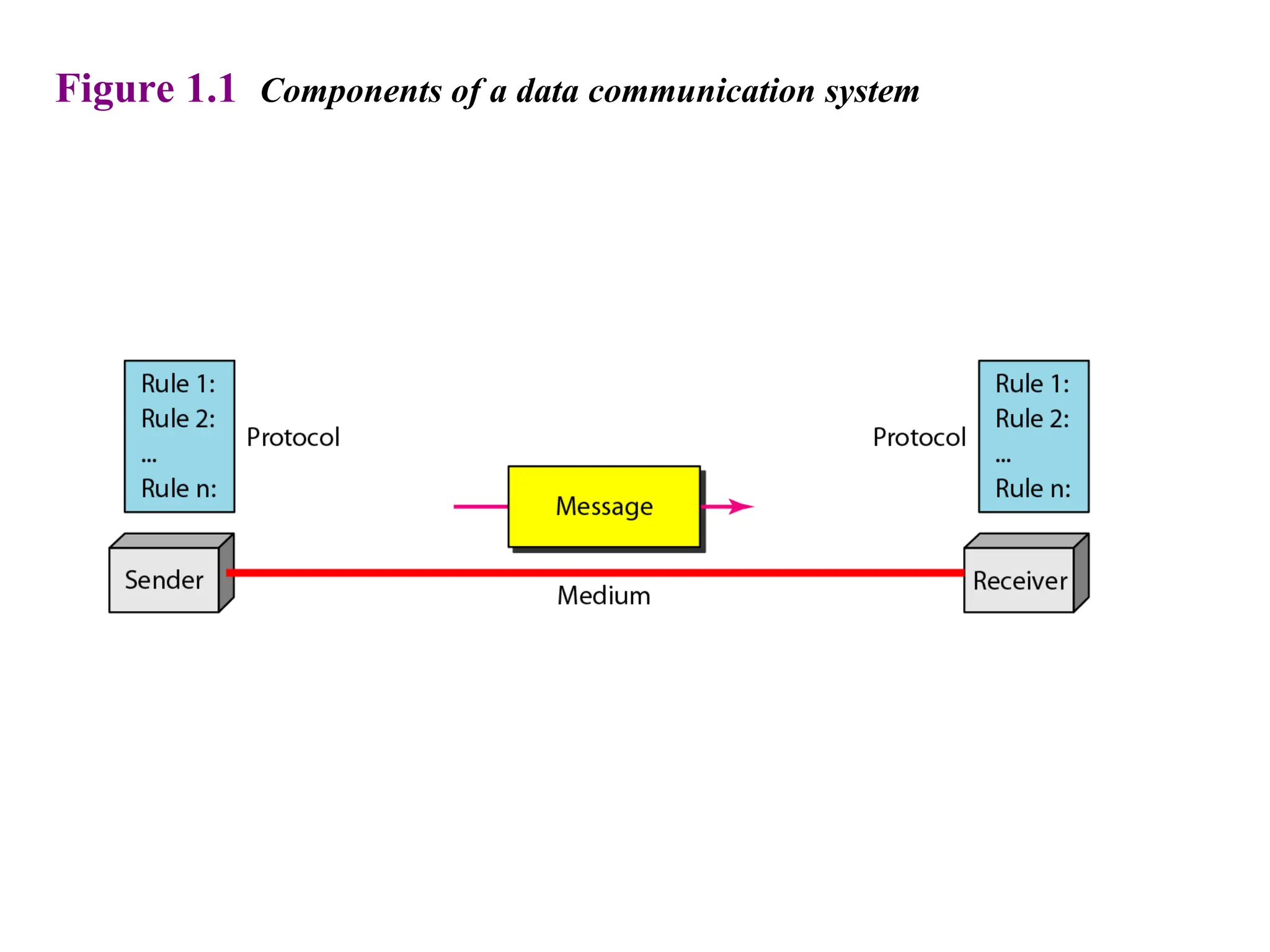
Figure 1.1 Components of a data communication system
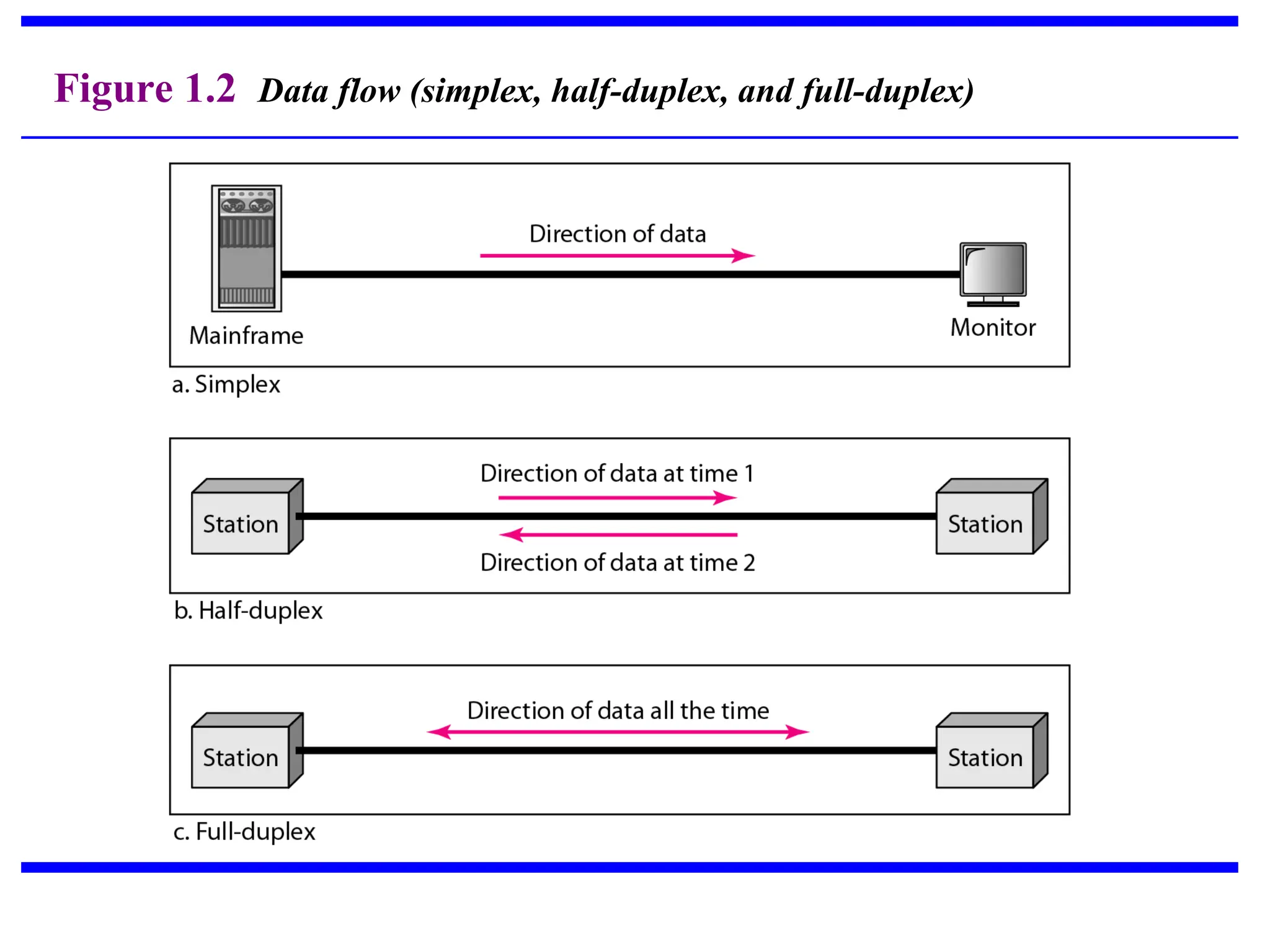
Figure 1.2 Data flow (simplex, half-duplex, and full-duplex)
1-2 NETWORKS
1-2 NETWORKS
A
A network
network is a set of devices (often referred to as
is a set of devices (often referred to as nodes
nodes)
)
connected by communication
connected by communication links
links. A node can be a
. A node can be a
computer, printer, or any other device capable of sending
and/or receiving data generated by other nodes on the
network. A link can be a cable, air, optical fiber, or any
medium which can transport a signal carrying
information.
information.
 Network Criteria
 Physical Structures
 Categories of Networks
Topics discussed in this section:
• Performance
– Depends on Network Elements
– Measured in terms of Delay(Time taken to do the delivery)
and Throughput(how much data transferred successfully)
• Reliability
– Degree to which network is trustworthy, consistent and
dependable.
– It is measured by frequency of failures it is undergoing and
time it takes to recover from failure.
– Overall Robustness of the network.
• Security
– Data protection against corruption/loss of data due to:
– Errors
– Malicious users
Network Criteria
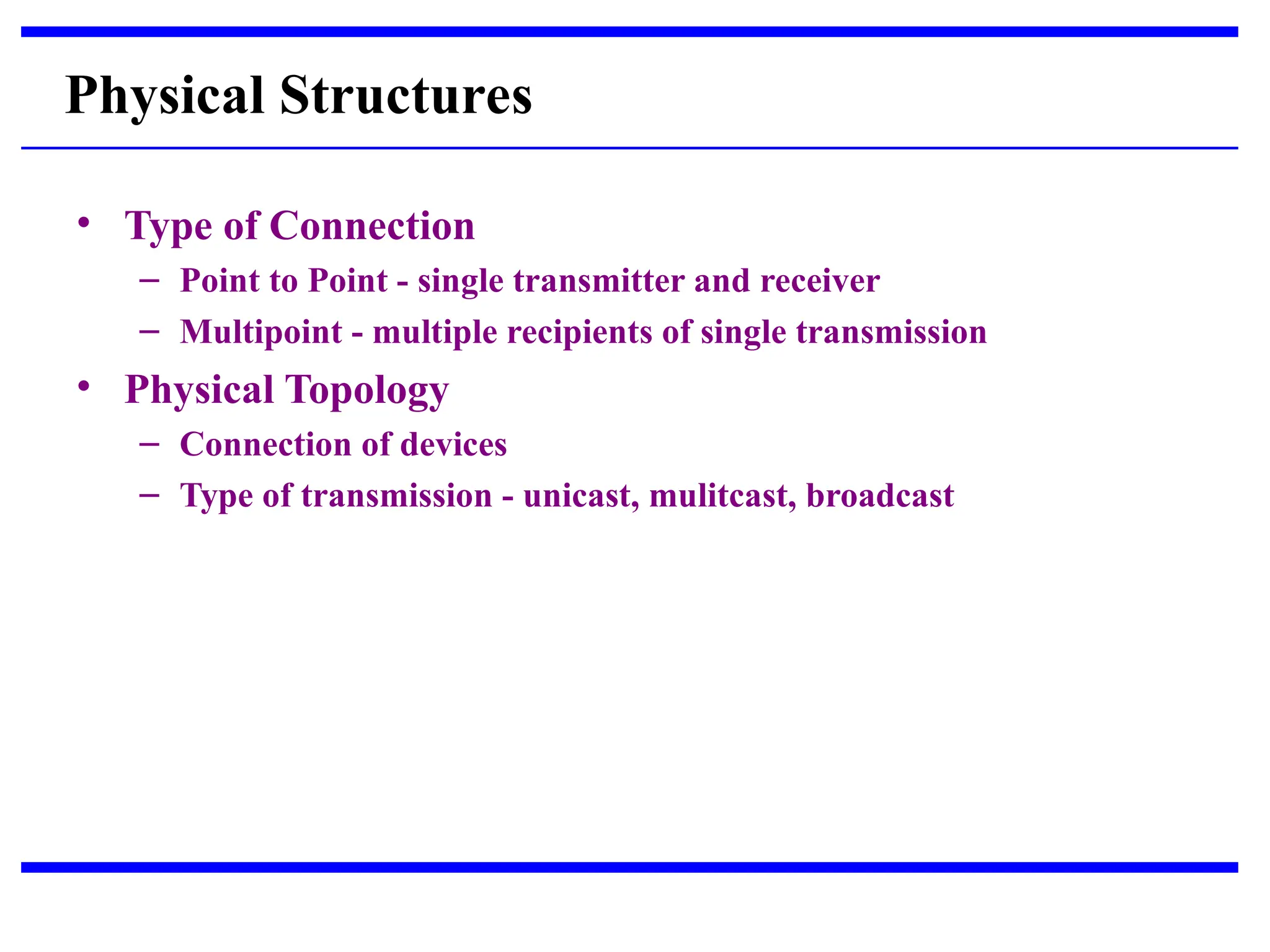
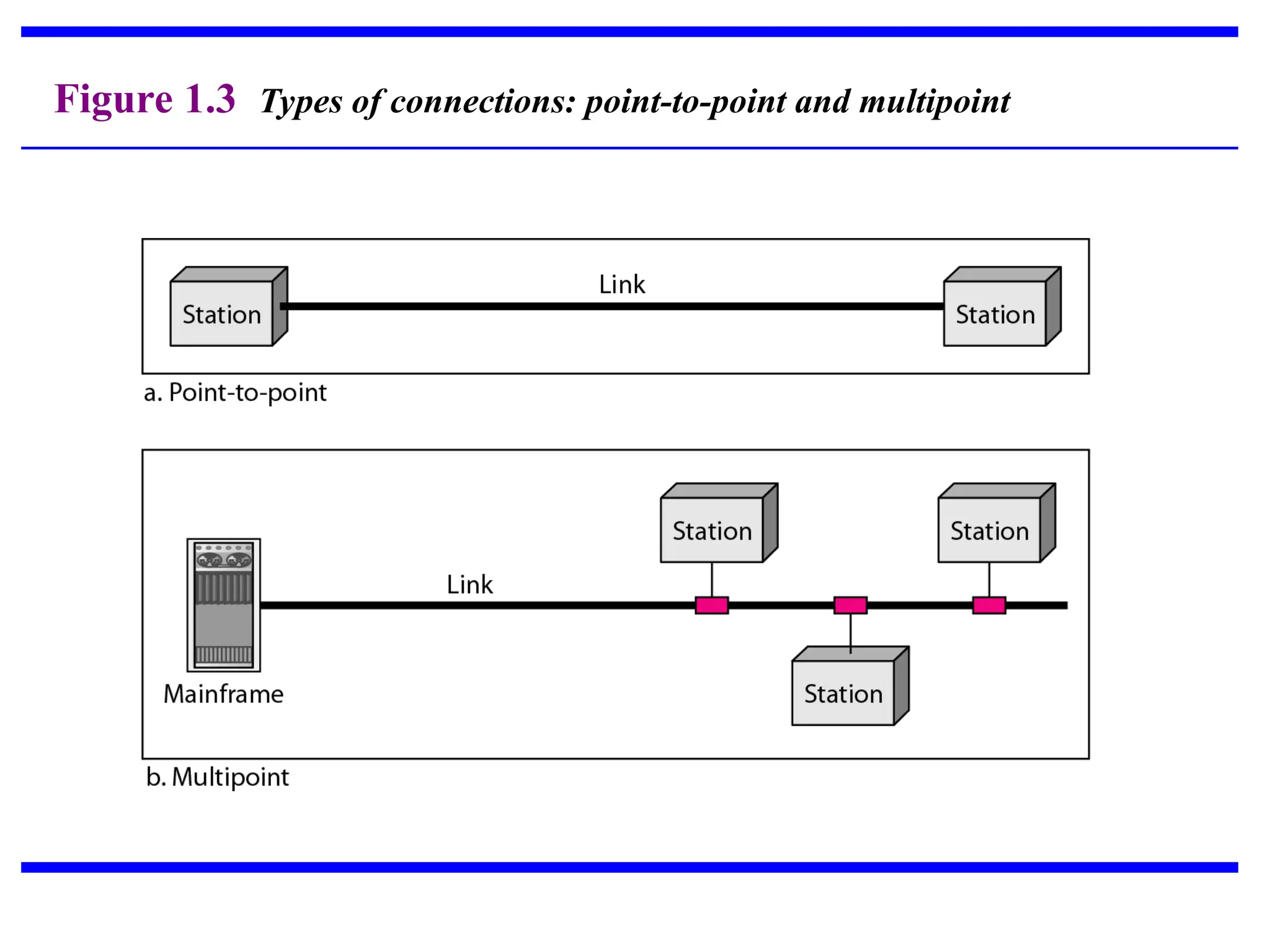
• Type of Connection
– Point to Point - single transmitter and receiver
– Multipoint - multiple recipients of single transmission
• Physical Topology
– Connection of devices
– Type of transmission - unicast, mulitcast, broadcast
Physical Structures
Figure 1.3 Types of connections: point-to-point and multipoint
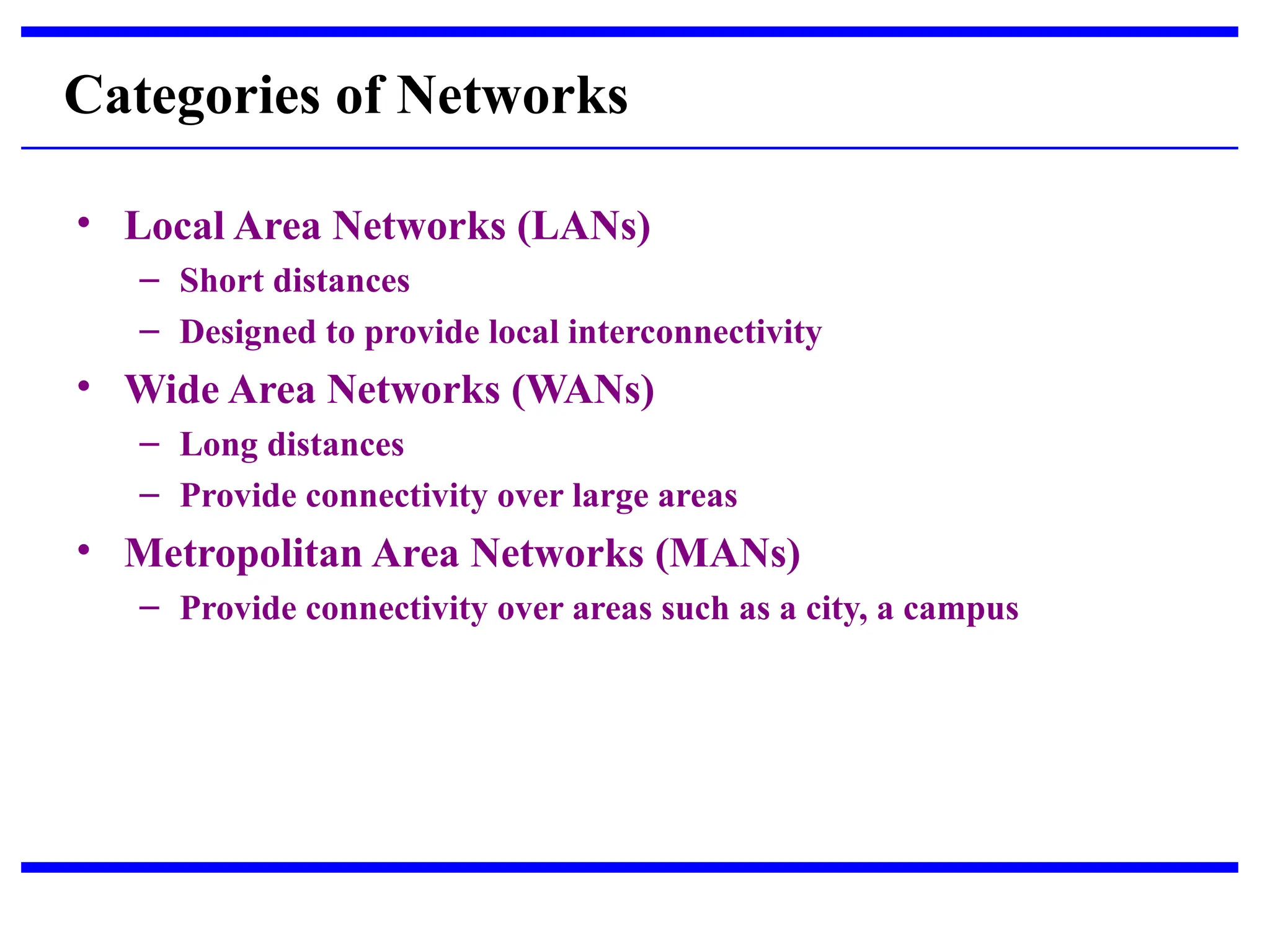
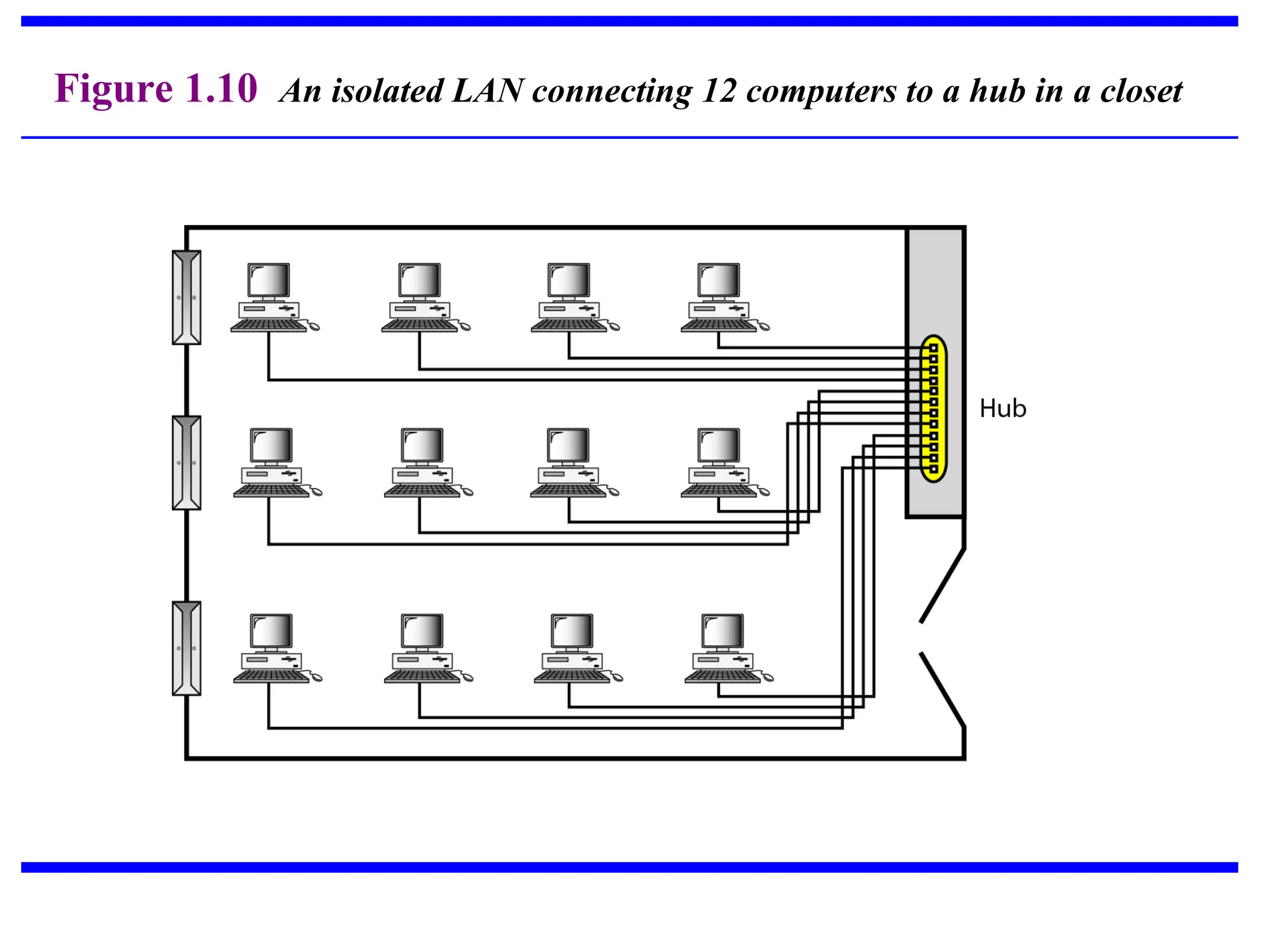
• Local Area Networks (LANs)
– Short distances
– Designed to provide local interconnectivity
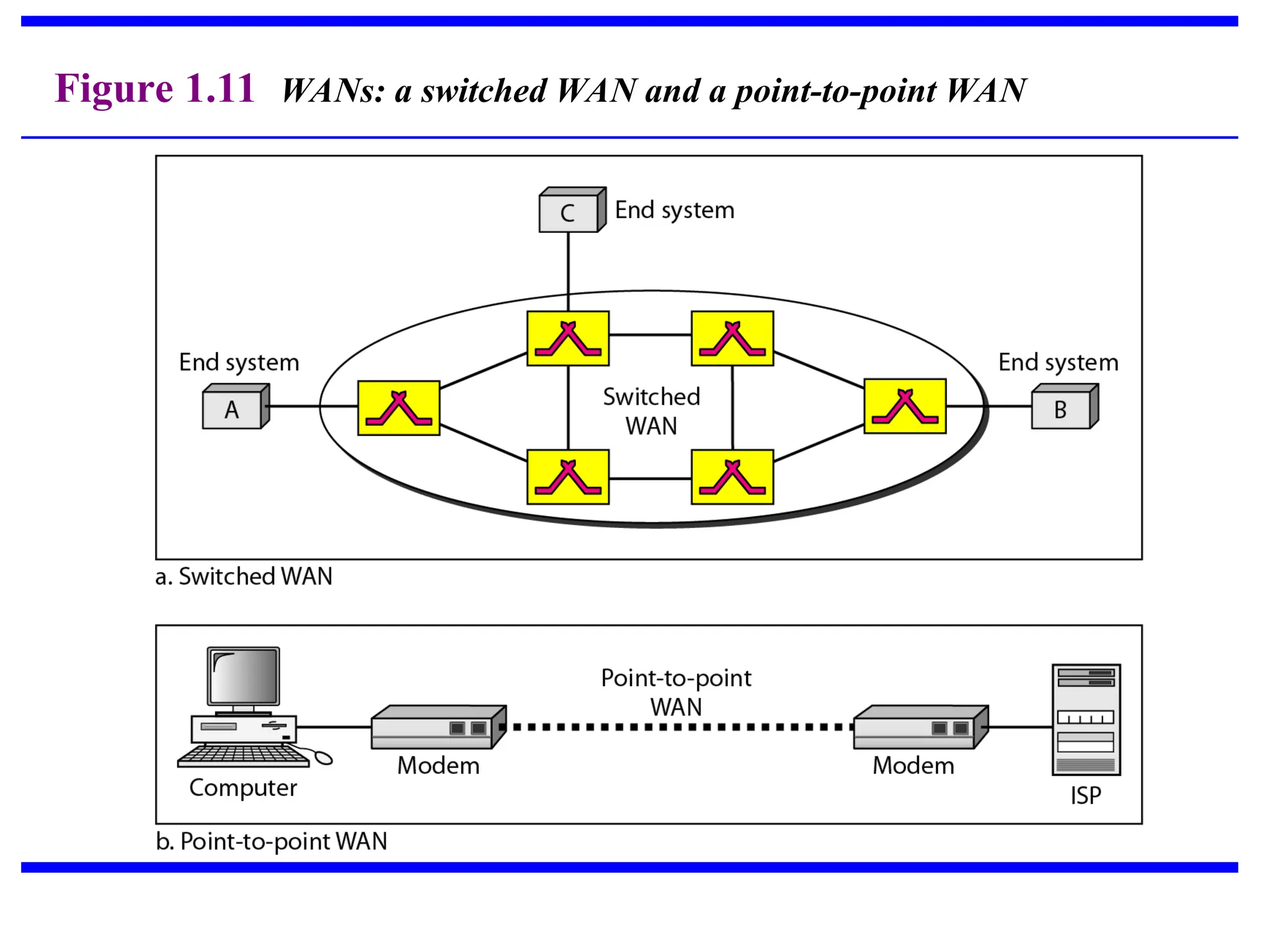
• Wide Area Networks (WANs)
– Long distances
– Provide connectivity over large areas
• Metropolitan Area Networks (MANs)
– Provide connectivity over areas such as a city, a campus
Categories of Networks
Figure 1.10 An isolated LAN connecting 12 computers to a hub in a closet
Figure 1.11 WANs: a switched WAN and a point-to-point WAN
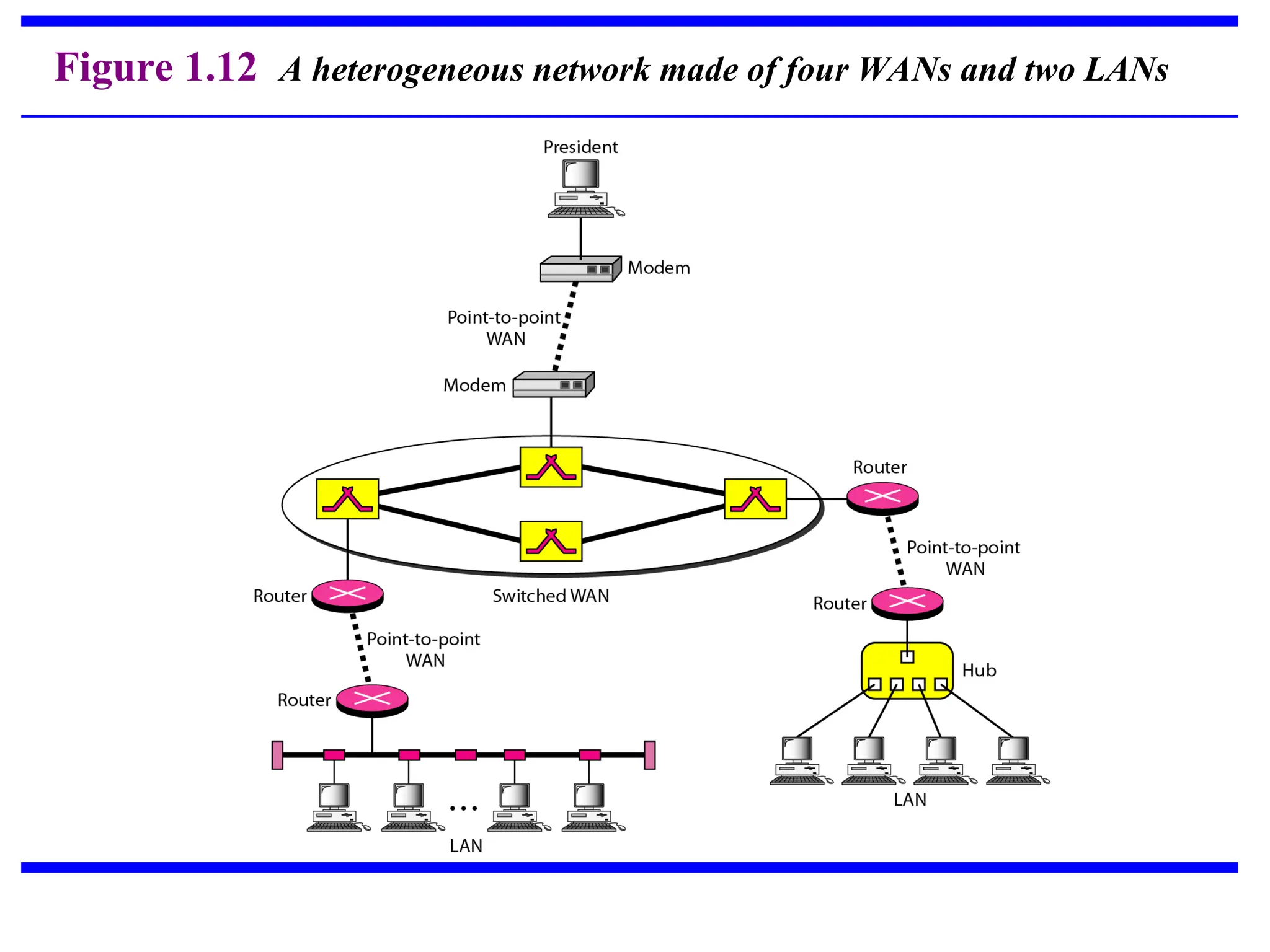
Figure 1.12 A heterogeneous network made of four WANs and two LANs
1-3 THE INTERNET
1-3 THE INTERNET
The
The Internet
Internet is defined as a global network of linked
is defined as a global network of linked
computers, servers, phones and smart appliances that
communicate with each other using the TCP standard to
anable the fast exchange of information and files along
with other types of services.
Organization of the Internet
Internet Service Providers (ISPs)
Topics discussed in this section:
1-4 PROTOCOLS
1-4 PROTOCOLS
A protocol is synonymous with rule. It consists of a set of
rules that govern data communications. It determines
what is communicated, how it is communicated and when
it is communicated. The key elements of a protocol are
syntax, semantics and timing
 Syntax
 Semantics
 Timing
Topics discussed in this section:
• Syntax
– Structure or format of the data
– Indicates how to read the bits - field delineation
• Semantics
– Interprets the meaning of the bits
– Knows which fields define what action
• Timing
– When data should be sent and what
– Speed at which data should be sent or speed at which it is
being received.
Elements of a Protocol
SWITCHING
SWITCHING
Switching is the process of transferring data packets from
one device to another in a network, or from one network
to another, using specific devices called switches.
A switch is a hardware device in a network that connects
other devices, like computers and servers. It helps
multiple devices share a network without their data
interfering with each other.
What is a Switch?
SWITCHING
• When the distance between devices and the
total number of devices increase beyond the
capacities of the media and equipment, mesh,
bus, star, and ring topologies cannot be
readily and feasibly used.
• Solution: Switching
• A switched network consists of a series of interlinked
nodes called switches.
• Switches are devices that are capable of creating temporary
connections between two or more devices linked to the
switch but not to each other.
Circuit Switching
• Creates a direct physical connection between two
devices.
• A circuit switch is a device with n inputs and m
outputs that creates a temporary connection
between an input link and an output link.
• Switches can use either space-division or time-
division.
PACKET SWITCHING
• Circuit switching wastes the data link; data
transmission tends to be bursty.
• In circuit switching, both source and destination
must have the same data rate.
• Circuit switching is inflexible: Once the circuit is
established, all parts of the transmission take the
same path.
• Circuit switching sees all transmissions as equal,
no priority.
• Packet Switching: Data is transmitted in discrete
units of potentially variable length blocks called
packets.
• Each packet contains a header that carries control
information.
• At each node, the packet is stored and then routed
according to the information in its header.
Message Switching
• A node receives a message, stores it until the
appropriate route is free, then sends it along
(store and forward).
• In message switching, the message is stored in a
secondary storage (disk), while in packet
switching, packets are stored and forwarded
from RAM.
• Was common in 60s and 70s.
What is the internet
• Internet is a global system of interconnected
computer networks that use the standard
Internet protocol (often called TCP/IP) to serve
billions of users worldwide. It is a network of
networks that consists of millions of private,
public, academic, business, and government
networks, of local to global scope, that are
linked by networking technologies.
2. DSL
• DSL stands for Digital Subscriber Line.
• It is an internet connection that is always “on”.
• uses 2 lines so your phone is not tied up when
your computer is connected.
• There is also no need to dial a phone number
to connect.
• DSL uses a router to transport data.
• Speed: 128K to 8 Mbps
3. Cable
• Cable provides an internet connection through a
cable modem and operates over cable TV lines.
• There are different speeds depending on if you are
uploading data transmissions or downloading.
• The coax cable provides a much greater bandwidth
over dial-up or DSL telephone lines.
• Speed: 512K to 20 Mbp.
4. Wireless
• Wireless, or Wi-Fi, does not use telephone
lines or cables to connect to the internet.
• It uses radio frequency.
• Wireless is also an always on connection
and it can be accessed from just about
anywhere.
• Speed: 5 Mbps to 20 Mbps.
5. Satellite
• Satellite accesses the internet via a
satellite in Earth’s orbit.
• The enormous distance that a signal
travels from earth to satellite and back
again, provides a delayed connection
compared to cable and DSL.
• Speed: 12K to 2.0 Mbps
6. Cellular
• Cellular. Cellular technology provides wireless
Internet access through cell phones. The speeds vary
depending on the provider, but the most common
are 3G and 4G speeds. A 3G is a term that describes
a 3rd
generation cellular network obtaining mobile
speeds of around 2.0 Mbps. 4G is the fourth
generation of cellular wireless standards. The goal of
4G is to achieve peak mobile speeds of 100 Mbps but
the reality is about 21 Mbps currently.

CHP_1.ppt computer networking concepts DATA

  • 1.
  • 2.
    1-1 DATA COMMUNICATIONS 1-1DATA COMMUNICATIONS The term The term telecommunication telecommunication means communication at a means communication at a distance. The word distance. The word data data refers to information presented refers to information presented in whatever form is agreed upon by the parties creating in whatever form is agreed upon by the parties creating and using the data. and using the data. Data communications Data communications are the are the exchange of data between two devices via some form of exchange of data between two devices via some form of transmission medium such as a wire cable. transmission medium such as a wire cable.  Components of a data communications system  Data Flow Topics discussed in this section: Topics discussed in this section:
  • 3.
    Figure 1.1 Componentsof a data communication system
  • 4.
    Figure 1.2 Dataflow (simplex, half-duplex, and full-duplex)
  • 5.
    1-2 NETWORKS 1-2 NETWORKS A Anetwork network is a set of devices (often referred to as is a set of devices (often referred to as nodes nodes) ) connected by communication connected by communication links links. A node can be a . A node can be a computer, printer, or any other device capable of sending computer, printer, or any other device capable of sending and/or receiving data generated by other nodes on the and/or receiving data generated by other nodes on the network. A link can be a cable, air, optical fiber, or any network. A link can be a cable, air, optical fiber, or any medium which can transport a signal carrying medium which can transport a signal carrying information. information.  Network Criteria  Physical Structures  Categories of Networks Topics discussed in this section: Topics discussed in this section:
  • 6.
    • Performance – Dependson Network Elements – Measured in terms of Delay(Time taken to do the delivery) and Throughput(how much data transferred successfully) • Reliability – Degree to which network is trustworthy, consistent and dependable. – It is measured by frequency of failures it is undergoing and time it takes to recover from failure. – Overall Robustness of the network. • Security – Data protection against corruption/loss of data due to: – Errors – Malicious users Network Criteria
  • 7.
    • Type ofConnection – Point to Point - single transmitter and receiver – Multipoint - multiple recipients of single transmission • Physical Topology – Connection of devices – Type of transmission - unicast, mulitcast, broadcast Physical Structures
  • 8.
    Figure 1.3 Typesof connections: point-to-point and multipoint
  • 9.
    • Local AreaNetworks (LANs) – Short distances – Designed to provide local interconnectivity • Wide Area Networks (WANs) – Long distances – Provide connectivity over large areas • Metropolitan Area Networks (MANs) – Provide connectivity over areas such as a city, a campus Categories of Networks
  • 10.
    Figure 1.10 Anisolated LAN connecting 12 computers to a hub in a closet
  • 11.
    Figure 1.11 WANs:a switched WAN and a point-to-point WAN
  • 12.
    Figure 1.12 Aheterogeneous network made of four WANs and two LANs
  • 13.
    1-3 THE INTERNET 1-3THE INTERNET The The Internet Internet is defined as a global network of linked is defined as a global network of linked computers, servers, phones and smart appliances that computers, servers, phones and smart appliances that communicate with each other using the TCP standard to communicate with each other using the TCP standard to anable the fast exchange of information and files along anable the fast exchange of information and files along with other types of services. with other types of services. Organization of the Internet Internet Service Providers (ISPs) Topics discussed in this section: Topics discussed in this section:
  • 14.
    1-4 PROTOCOLS 1-4 PROTOCOLS Aprotocol is synonymous with rule. It consists of a set of A protocol is synonymous with rule. It consists of a set of rules that govern data communications. It determines rules that govern data communications. It determines what is communicated, how it is communicated and when what is communicated, how it is communicated and when it is communicated. The key elements of a protocol are it is communicated. The key elements of a protocol are syntax, semantics and timing syntax, semantics and timing  Syntax  Semantics  Timing Topics discussed in this section: Topics discussed in this section:
  • 15.
    • Syntax – Structureor format of the data – Indicates how to read the bits - field delineation • Semantics – Interprets the meaning of the bits – Knows which fields define what action • Timing – When data should be sent and what – Speed at which data should be sent or speed at which it is being received. Elements of a Protocol
  • 16.
    SWITCHING SWITCHING Switching is theprocess of transferring data packets from one device to another in a network, or from one network to another, using specific devices called switches. A switch is a hardware device in a network that connects other devices, like computers and servers. It helps multiple devices share a network without their data interfering with each other. What is a Switch?
  • 17.
    SWITCHING • When thedistance between devices and the total number of devices increase beyond the capacities of the media and equipment, mesh, bus, star, and ring topologies cannot be readily and feasibly used. • Solution: Switching
  • 18.
    • A switchednetwork consists of a series of interlinked nodes called switches. • Switches are devices that are capable of creating temporary connections between two or more devices linked to the switch but not to each other.
  • 19.
    Circuit Switching • Createsa direct physical connection between two devices. • A circuit switch is a device with n inputs and m outputs that creates a temporary connection between an input link and an output link. • Switches can use either space-division or time- division.
  • 20.
    PACKET SWITCHING • Circuitswitching wastes the data link; data transmission tends to be bursty. • In circuit switching, both source and destination must have the same data rate. • Circuit switching is inflexible: Once the circuit is established, all parts of the transmission take the same path. • Circuit switching sees all transmissions as equal, no priority.
  • 21.
    • Packet Switching:Data is transmitted in discrete units of potentially variable length blocks called packets. • Each packet contains a header that carries control information. • At each node, the packet is stored and then routed according to the information in its header.
  • 22.
    Message Switching • Anode receives a message, stores it until the appropriate route is free, then sends it along (store and forward). • In message switching, the message is stored in a secondary storage (disk), while in packet switching, packets are stored and forwarded from RAM. • Was common in 60s and 70s.
  • 23.
    What is theinternet • Internet is a global system of interconnected computer networks that use the standard Internet protocol (often called TCP/IP) to serve billions of users worldwide. It is a network of networks that consists of millions of private, public, academic, business, and government networks, of local to global scope, that are linked by networking technologies.
  • 24.
    2. DSL • DSLstands for Digital Subscriber Line. • It is an internet connection that is always “on”. • uses 2 lines so your phone is not tied up when your computer is connected. • There is also no need to dial a phone number to connect. • DSL uses a router to transport data. • Speed: 128K to 8 Mbps
  • 25.
    3. Cable • Cableprovides an internet connection through a cable modem and operates over cable TV lines. • There are different speeds depending on if you are uploading data transmissions or downloading. • The coax cable provides a much greater bandwidth over dial-up or DSL telephone lines. • Speed: 512K to 20 Mbp.
  • 26.
    4. Wireless • Wireless,or Wi-Fi, does not use telephone lines or cables to connect to the internet. • It uses radio frequency. • Wireless is also an always on connection and it can be accessed from just about anywhere. • Speed: 5 Mbps to 20 Mbps.
  • 27.
    5. Satellite • Satelliteaccesses the internet via a satellite in Earth’s orbit. • The enormous distance that a signal travels from earth to satellite and back again, provides a delayed connection compared to cable and DSL. • Speed: 12K to 2.0 Mbps
  • 28.
    6. Cellular • Cellular.Cellular technology provides wireless Internet access through cell phones. The speeds vary depending on the provider, but the most common are 3G and 4G speeds. A 3G is a term that describes a 3rd generation cellular network obtaining mobile speeds of around 2.0 Mbps. 4G is the fourth generation of cellular wireless standards. The goal of 4G is to achieve peak mobile speeds of 100 Mbps but the reality is about 21 Mbps currently.