1
BULE HORA UNIVERSITY
Collage of Business and Economics
Department of Business
Administration and Information
Systems
Data Communication and Computer Networks
2
CHAPTERTHREE
NETWORKTYPES
3
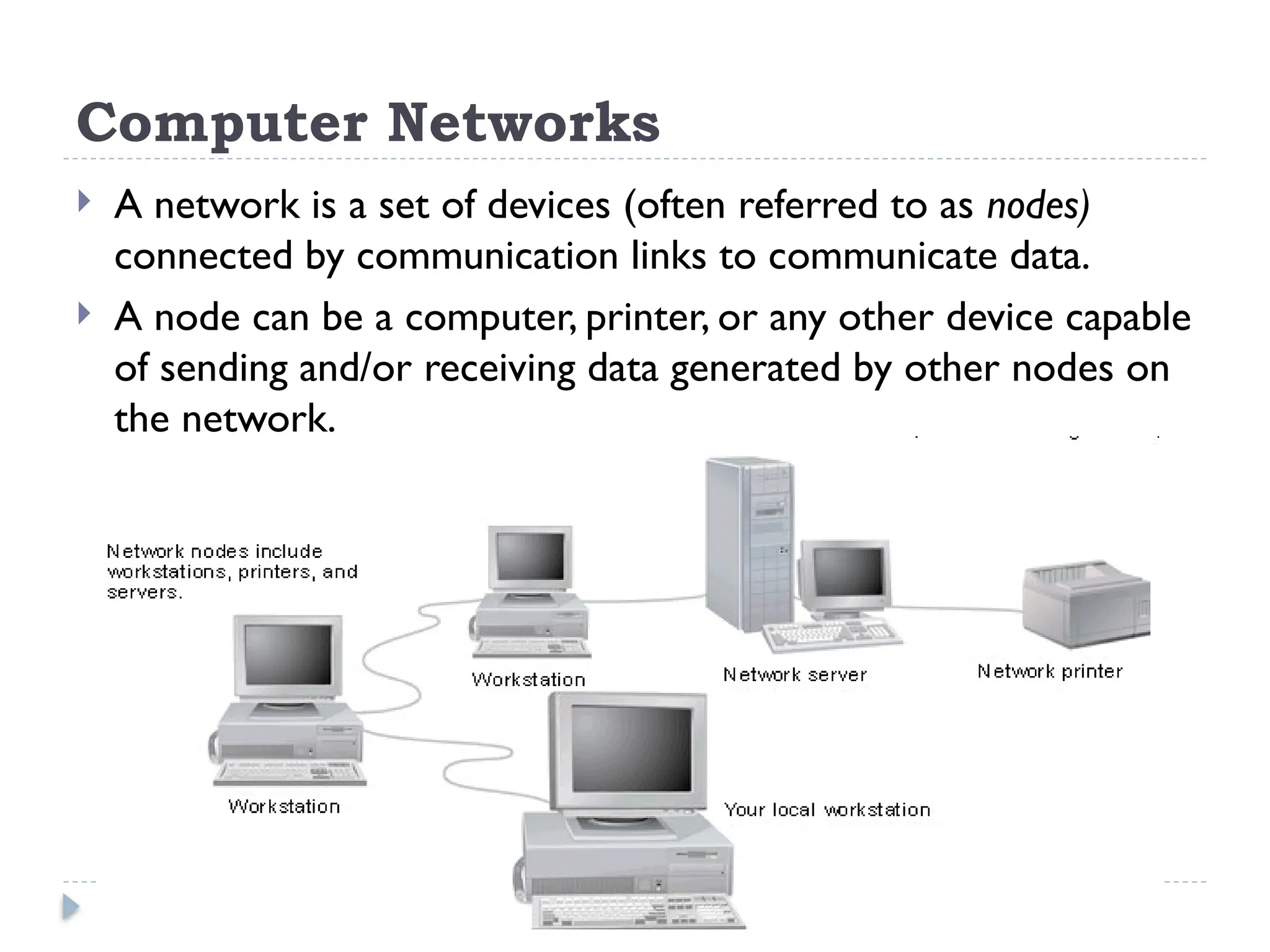
Computer Networks
 A network is a set of devices (often referred to as nodes)
connected by communication links to communicate data.
 A node can be a computer, printer, or any other device capable
of sending and/or receiving data generated by other nodes on
the network.
4
Types of Computer networks
 Computer networks are classified based on various
factors.
 They include:
 Geographical span -LAN, MAN and WAN
 Administration -Private network & public
network
 Architecture-Client/Server & peer-to-peer
 A private network is used inside an organization.
5
Types of Network- Geographical Span
LAN
 A local area network (LAN) is usually privately owned
and links the devices in a single office, building, or
campus.
 LAN size is limited to a few kilometres.
 In the early 1980s, LANs might have consisted of a
handful of computers connected in a peer-to-peer
fashion.
 Today’s LANs are typically much larger and more
complex client/server networks.
6
MAN
 A metropolitan area network (MAN) is a network
with a size between a LAN and aWAN.
 It normally covers the area inside a town or a city.
 MAN-is A network that is larger than a LAN and
connects clients and servers from multiple buildings.
 Because of the distance it covers, a MAN may use
different transmission technology and media than a
LAN.
7
WAN
 A wide area network (WAN) provides long-distance
transmission of data, image, audio, and video
information over large geographic areas that may
comprise a country, a continent, or even the whole
world.
 The largest and most varied WAN in the world is the
Internet.
8
Types of Network-Architecture
 Computers can be positioned on a network in different
ways relative to each other.
 They can have different levels of control over shared
resources.
 They can also be made to communicate and share
resources according to different schemes.
 The following sections describe two fundamental
network models:
 peer-to-peer and client/server.
9
Peer-to-Peer
 In a peer-to-peer network:-
 There are no dedicated servers.
 There is no hierarchy among the computers.
 All the computers are equal and therefore are known as
peers.
 Each computer functions as both a client and a server.
 There is no administrator responsible for the entire
network.
 The user at each computer determines what data on that
computer is shared on the network.
10
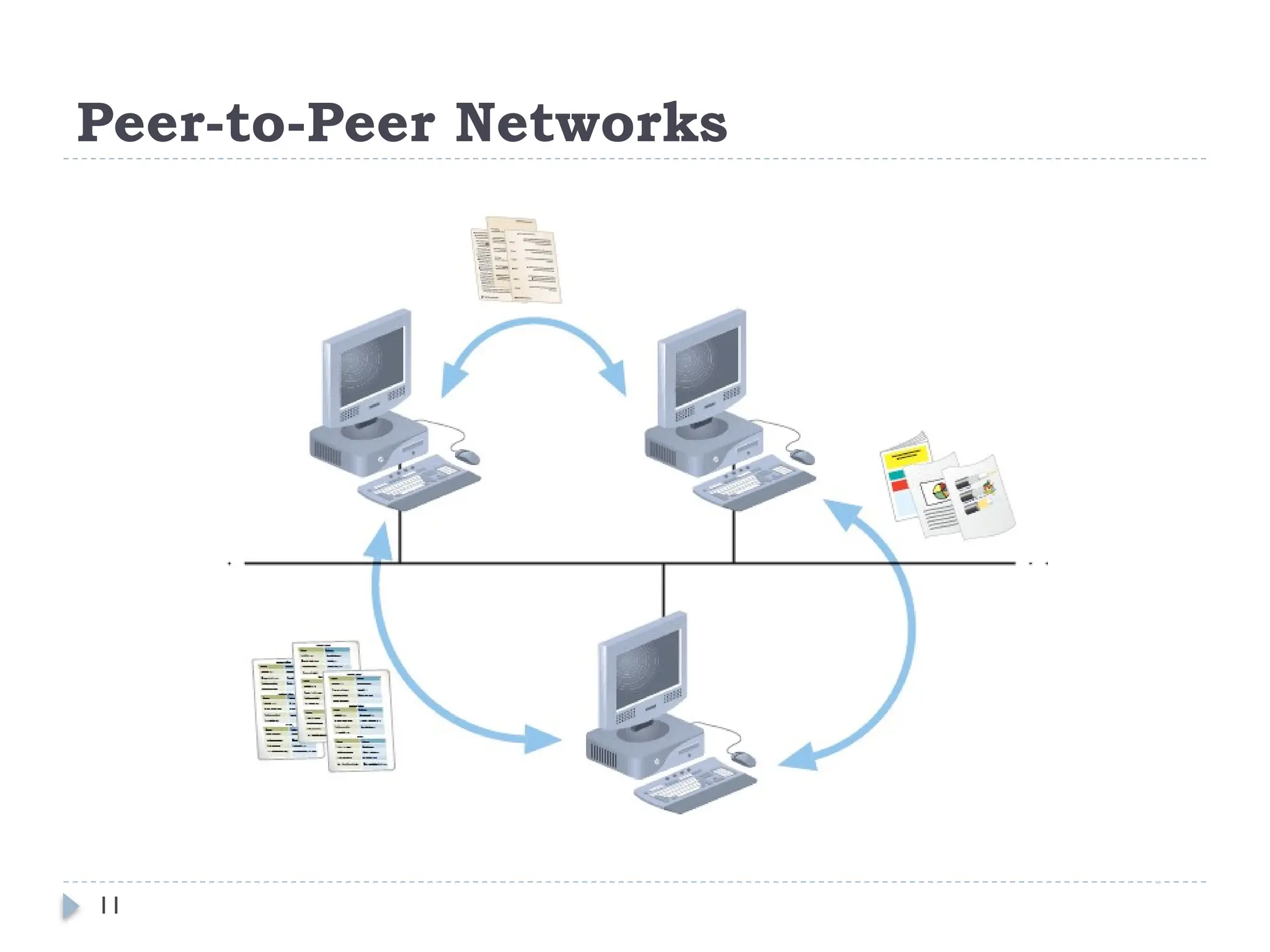
Peer-to-Peer Networks
 The simplest form of a network is a peer-to-peer
network.
 In a peer-to-peer network, every computer can
communicate directly with every other computer.
 By default, no computer on a peer-to-peer network has
more authority than another.
 However, each computer can be configured to share only
some of its resources and prevent access to other
resources.
 Every computer is capable of sending and receiving
information to and from every other computer.
11
Peer-to-Peer Networks
12
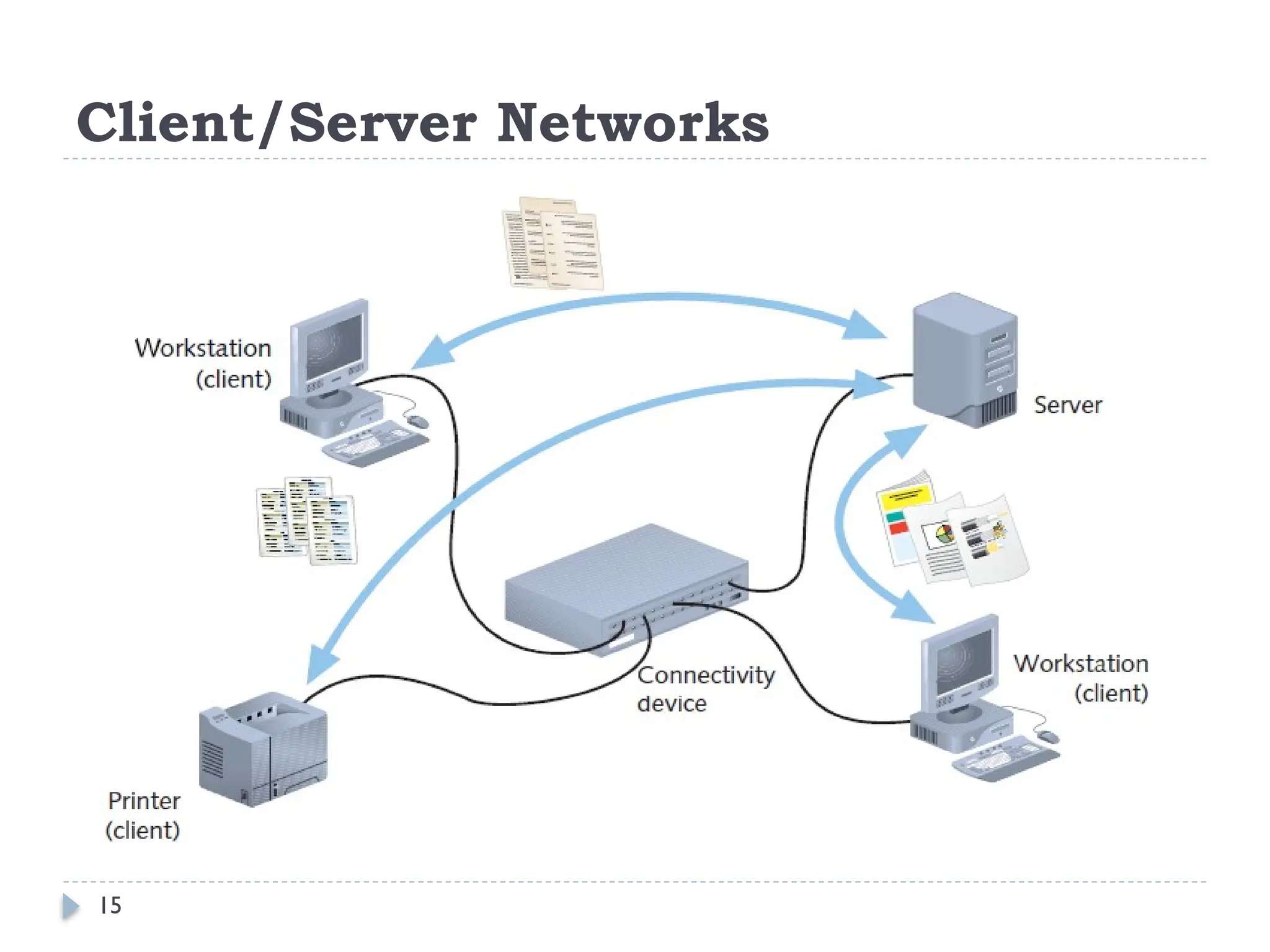
Client/Server Networks
 A network that uses a server to enable clients to share data,
data storage space, and devices is known as a client/server
network.
 Client—A computer on the network that requests
resources or services from another computer on a network.
 Clients usually take the form of personal computers, also
known as workstations.
 Every computer on a client/server network acts as a client or
a server.
 Clients on a client/server network do not share their
resources directly with each other, but rather use the server
as an intermediary.
13
Client/Server Networks
 Clients and servers communicate through connectivity
devices such as switches or routers.
 Server—A computer on the network that manages
shared resources; servers usually have more processing
power, memory, and hard disk space than clients.
 To function as a server, a computer must be running an
NOS (network operating system).
 An NOS is a special type of software designed to do the
following:
 Manage data and other resources for a number of clients.
 Ensure that only authorized users access the network.
14
Client/Server Networks
 Restrict when and from where users can access the
network.
 Dictate which rules computers will use to communicate.
 Supply applications to clients.
 Examples of NOS: UNIX and Linux, Microsoft
Windows Server 2003 or Server 2008, and Mac OS
X Server.
 (But, stand-alone computer, or a client computer, uses
an operating system, such as Windows XP/7 or
WindowsVista, which has more limited resource
management capabilities.)
15
Client/Server Networks
16
Client/Server
 In an environment with more than 10 users, a peer-to-
peer will probably not be adequate.
 Therefore, most networks have/required dedicated
servers.
 A dedicated server is one that functions only as a server
and is not used as a client or workstation.
 Client requests the server to serve the requests.
 Specialized Servers
 Some of the examples of different types of servers
included on many large networks.
17
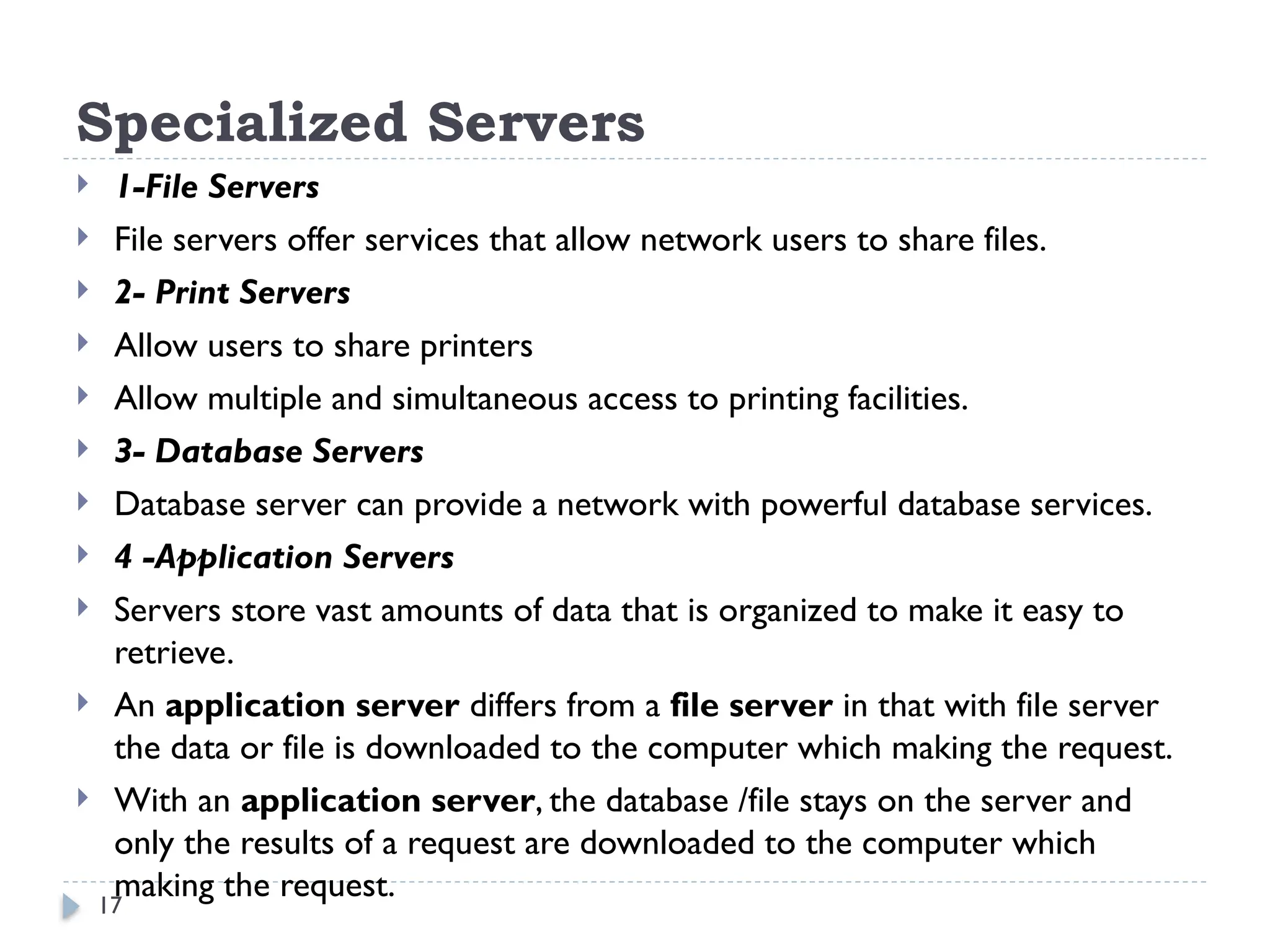
Specialized Servers
 1-File Servers
 File servers offer services that allow network users to share files.
 2- Print Servers
 Allow users to share printers
 Allow multiple and simultaneous access to printing facilities.
 3- Database Servers
 Database server can provide a network with powerful database services.
 4 -Application Servers
 Servers store vast amounts of data that is organized to make it easy to
retrieve.
 An application server differs from a file server in that with file server
the data or file is downloaded to the computer which making the request.
 With an application server, the database /file stays on the server and
only the results of a request are downloaded to the computer which
making the request.
18
Specialized Servers
 5-Mail Servers
 Mail servers - separate server and client applications.
 Data selectively downloaded from the server to the
client.
 6-Web Servers
 Stores different web pages.
 7- Proxy Server
 A Proxy Server implements Internet connectivity and
network security for an entire organization.
19
Network Topologies
 Types of Connection
 There are two possible types of connections: point-to-point and
multipoint.
 Point-to-Point
 A point-to-point connection provides a dedicated link between
two devices.
 The entire capacity of the link is reserved for transmission
between those two devices.
e.g connection b/n television and its remote control
 Multipoint
 A multipoint connection is one in which more than two specific
devices share a single link.
20
Physical Topology
 The topology of a network is the geometric
representation of the relationship of all the links and
linking devices (usually called nodes) to one another.
 The topology- is physical layout of a computer network.
 Topologies vary according to the needs of the
organization, available hardware and expertise.
 There are five basic topologies possible:
 Bus
 Ring
 Star
 Mesh
 Hybrid
21
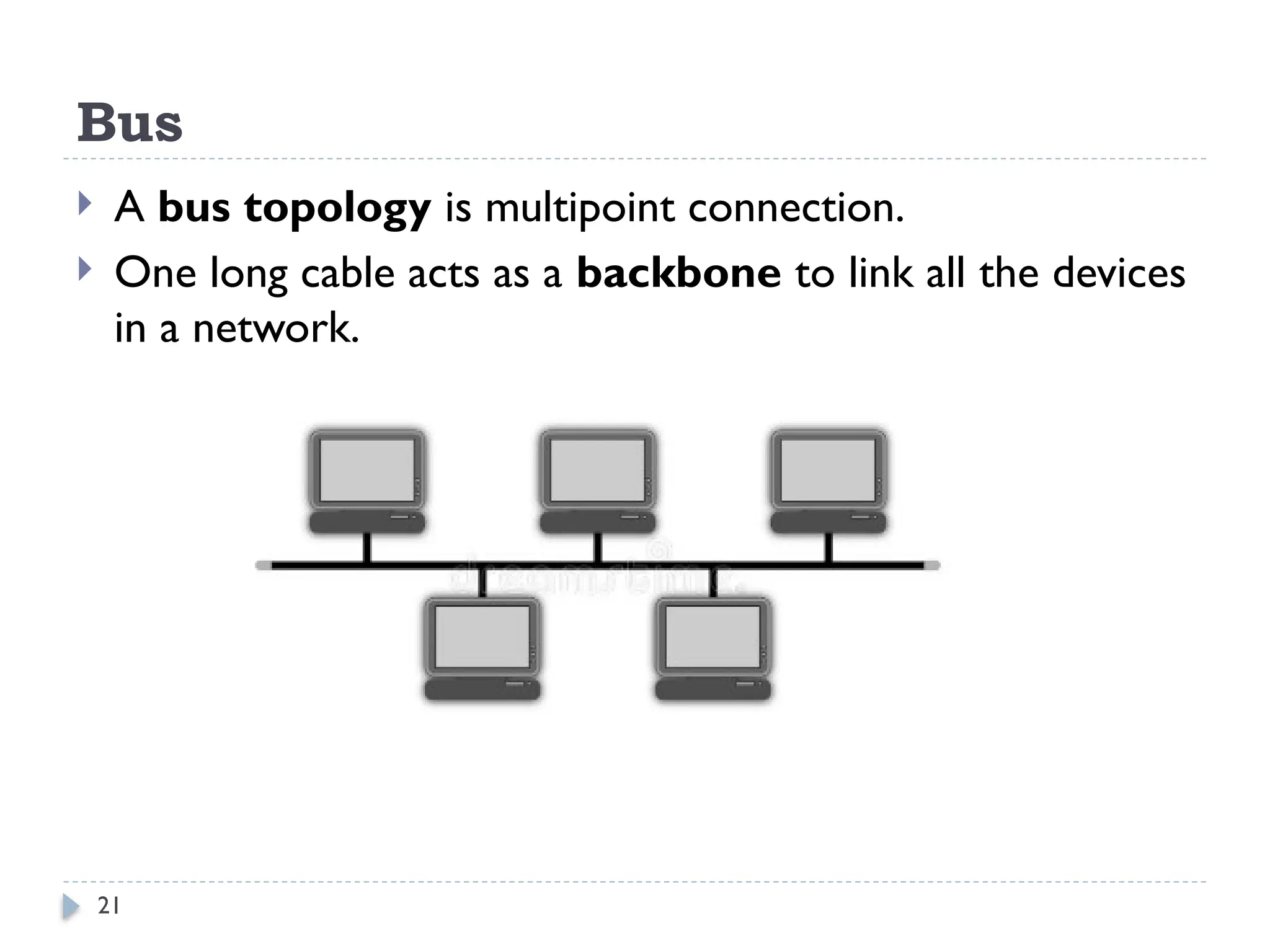
Bus
 A bus topology is multipoint connection.
 One long cable acts as a backbone to link all the devices
in a network.
22
Bus
Advantages
 Connecting a computer or peripheral to a linear bus is easy.
 This topology requires least amount of cabling to connect
the computers and therefore, less expensive.
 It is easy to extend a bus since two cables can be joined
into longer cable with a connector.
Disadvantages
 Entire network shuts down if there is a failure on the
backbone.
 Heavy traffic can slow down a bus because computers on
such networks do not coordinate.
23
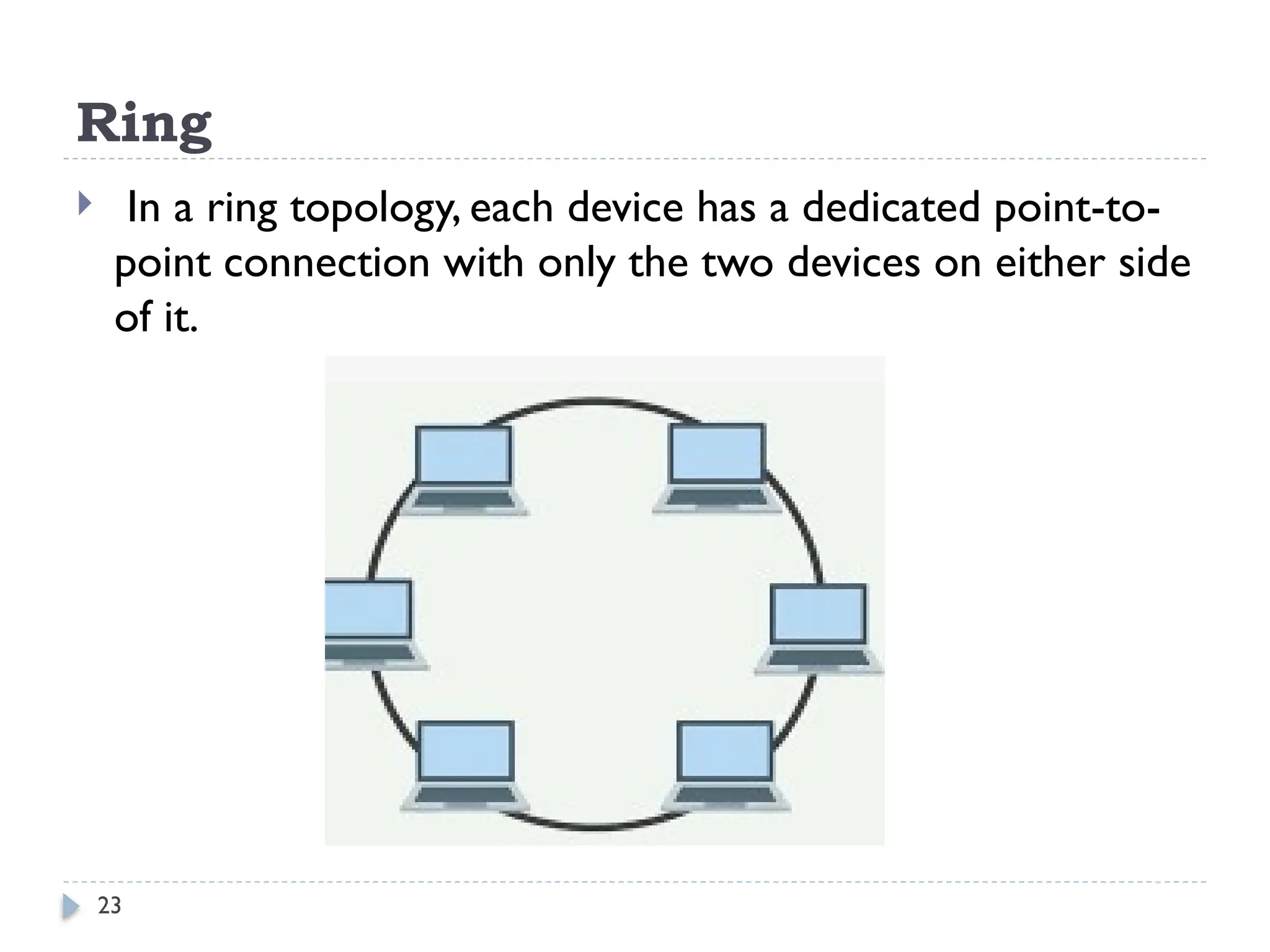
Ring
 In a ring topology, each device has a dedicated point-to-
point connection with only the two devices on either side
of it.
24
Ring
Advantage
 Ring topology is easy to install and reconfigure.
 Every computer is given equal access to the ring.
 Hence, no single computer can monopolize the network.
Disadvantages
 Failure in any cable or node breaks the loop and can take
down the entire network.
 Maximum ring length and number of nodes are limited.
25
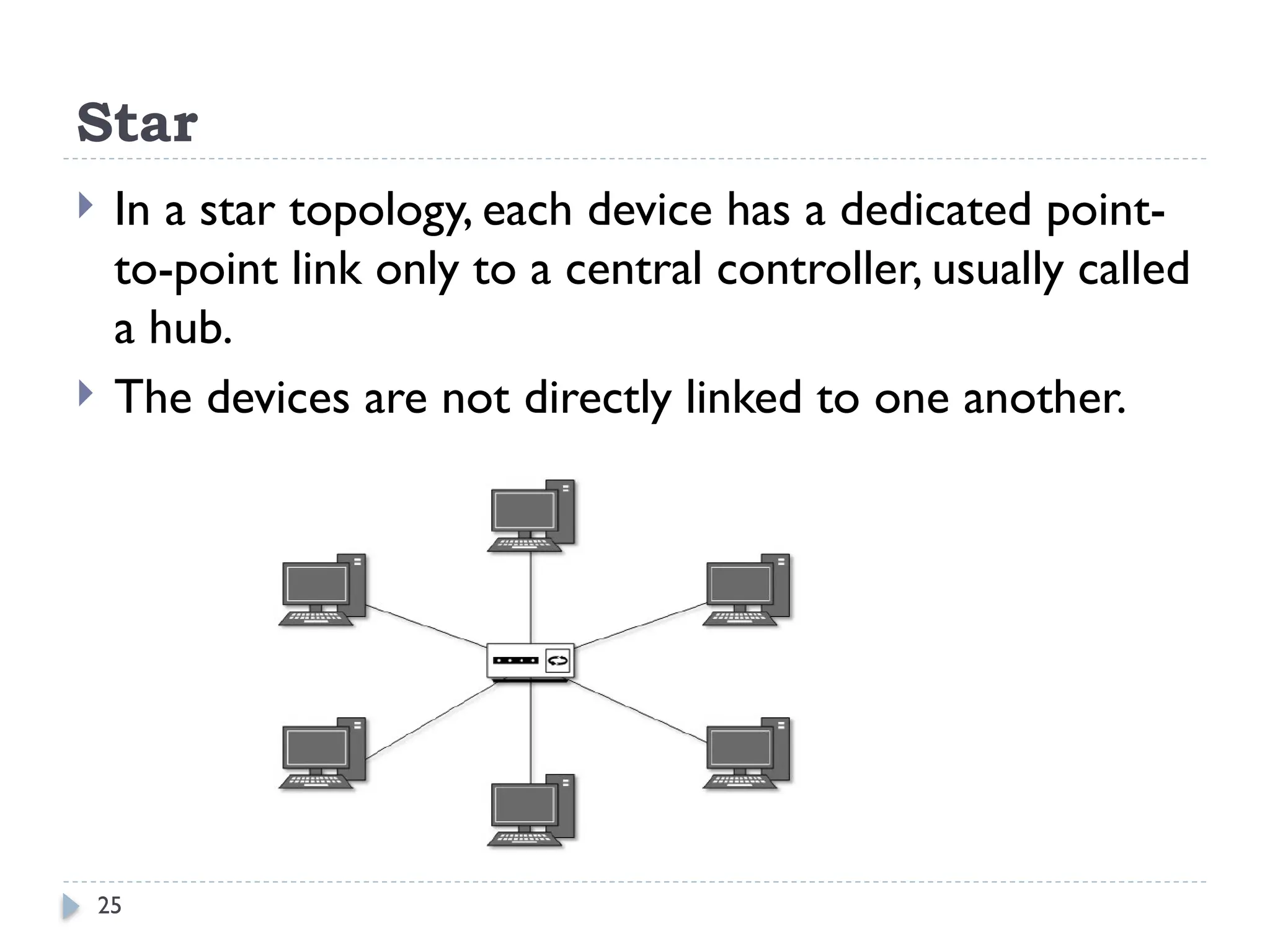
Star
 In a star topology, each device has a dedicated point-
to-point link only to a central controller, usually called
a hub.
 The devices are not directly linked to one another.
26
Star
 Advantages of Star
 Star topology is easy to install and wire.
 The network is not disrupted even if a node fails or is
removed from the network.
 Fault detection and removal of faulty parts is easier in star
topology.
 Disadvantages of Star
 It requires a longer length of cable.
 If the hub fails, nodes attached to it are disabled.
 The cost of the hub makes the network expensive as
compared to bus and ring topology.
27
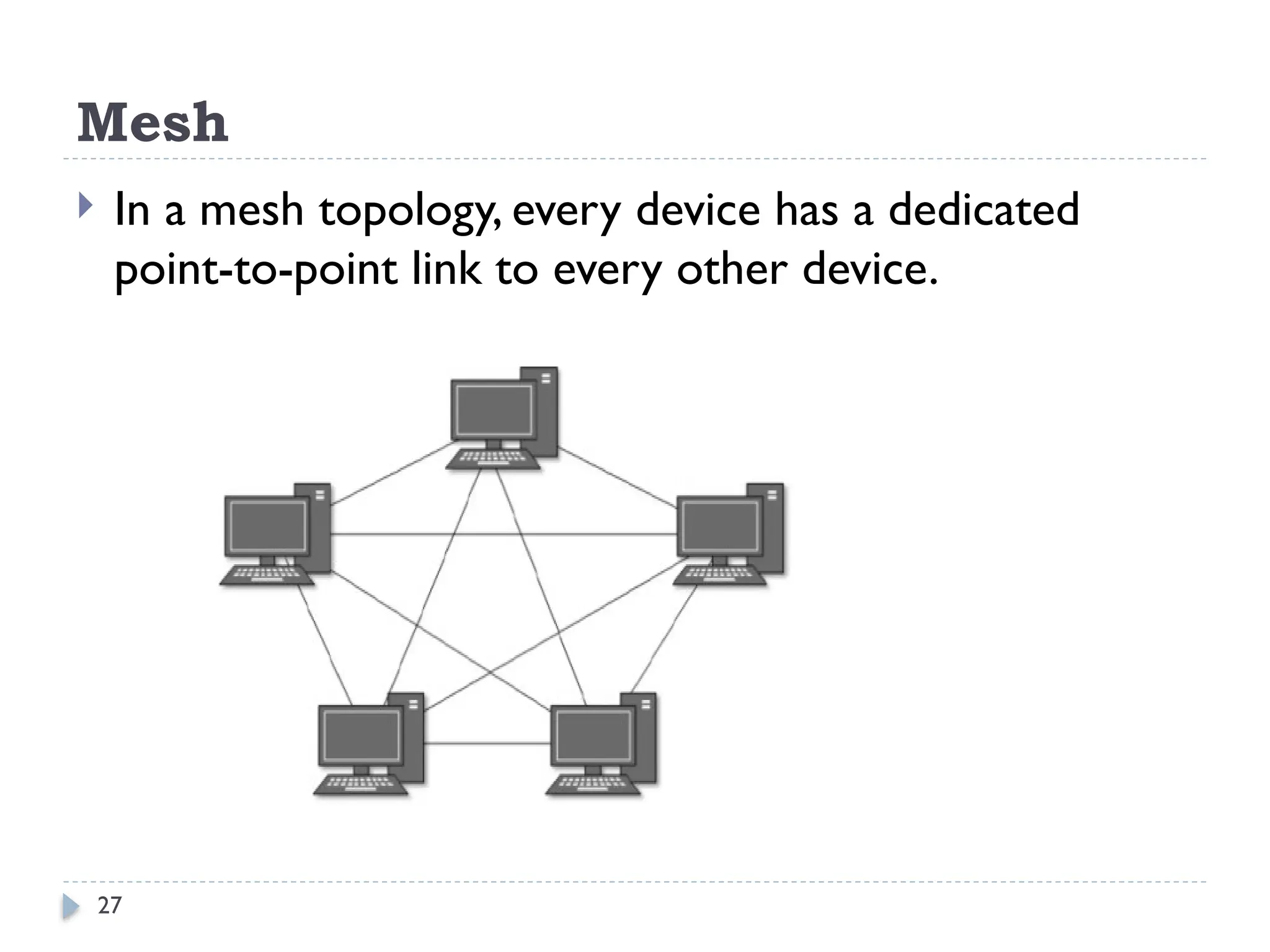
Mesh
 In a mesh topology, every device has a dedicated
point-to-point link to every other device.
28
Mesh
 Advantages of MeshTopology
 The use of large number of links eliminates network
congestion.
 If one link becomes unusable, it does not disable the
entire system.
 Disadvantages of MeshTopology
 The amount of required cabling is very large.
 As every node is connected to the other, installation and
reconfiguration is very difficult.
 The amount of hardware required in this type of
topology can make it expensive to implement.
29
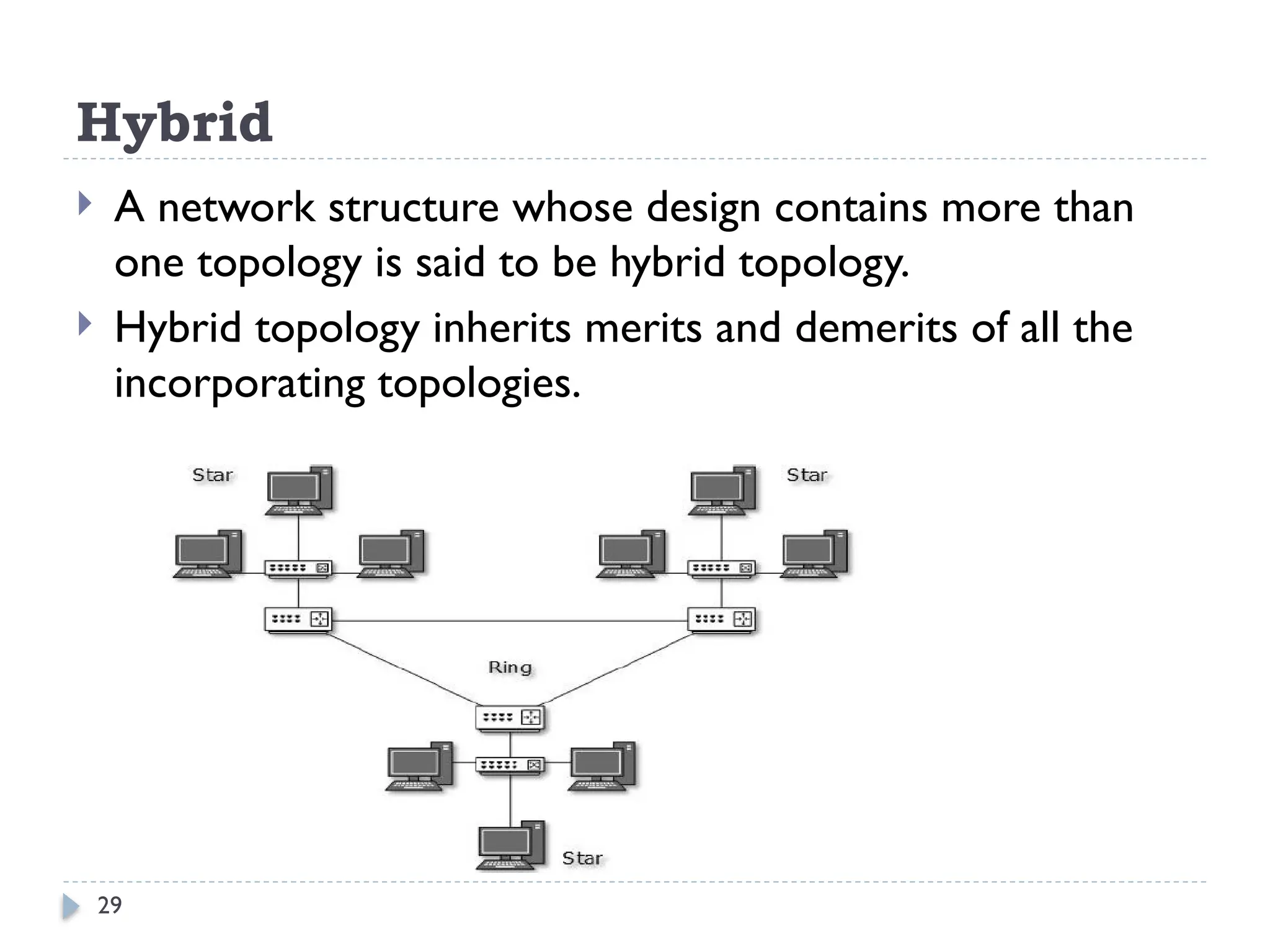
Hybrid
 A network structure whose design contains more than
one topology is said to be hybrid topology.
 Hybrid topology inherits merits and demerits of all the
incorporating topologies.
30
Types of Network, based on Ownership
 Private Network
 A private network is a network in which
various restrictions are imposed to secure the
network, to restrict unauthorized access.
 This type of network is privately owned by a
single or group of people for their personal
use.
 Local Area Network(LAN) can be used as a
private network.
31
Public Network
 A public network is a network that has
the least or no restrictions on it. It can be
freely accessed by anyone, without any
restrictions.
 This type of network is publicly owned by
the government or NGOs.
 Metropolitan Area Network(MAN) and
Wide Area Network(WAN) can be used
as a public network.
32
THANK YOU!

chapter 3. Networks and Computer types

  • 1.
    1 BULE HORA UNIVERSITY Collageof Business and Economics Department of Business Administration and Information Systems Data Communication and Computer Networks
  • 2.
  • 3.
    3 Computer Networks  Anetwork is a set of devices (often referred to as nodes) connected by communication links to communicate data.  A node can be a computer, printer, or any other device capable of sending and/or receiving data generated by other nodes on the network.
  • 4.
    4 Types of Computernetworks  Computer networks are classified based on various factors.  They include:  Geographical span -LAN, MAN and WAN  Administration -Private network & public network  Architecture-Client/Server & peer-to-peer  A private network is used inside an organization.
  • 5.
    5 Types of Network-Geographical Span LAN  A local area network (LAN) is usually privately owned and links the devices in a single office, building, or campus.  LAN size is limited to a few kilometres.  In the early 1980s, LANs might have consisted of a handful of computers connected in a peer-to-peer fashion.  Today’s LANs are typically much larger and more complex client/server networks.

  • 6.
    6 MAN  A metropolitanarea network (MAN) is a network with a size between a LAN and aWAN.  It normally covers the area inside a town or a city.  MAN-is A network that is larger than a LAN and connects clients and servers from multiple buildings.  Because of the distance it covers, a MAN may use different transmission technology and media than a LAN.
  • 7.
    7 WAN  A widearea network (WAN) provides long-distance transmission of data, image, audio, and video information over large geographic areas that may comprise a country, a continent, or even the whole world.  The largest and most varied WAN in the world is the Internet.
  • 8.
    8 Types of Network-Architecture Computers can be positioned on a network in different ways relative to each other.  They can have different levels of control over shared resources.  They can also be made to communicate and share resources according to different schemes.  The following sections describe two fundamental network models:  peer-to-peer and client/server.
  • 9.
    9 Peer-to-Peer  In apeer-to-peer network:-  There are no dedicated servers.  There is no hierarchy among the computers.  All the computers are equal and therefore are known as peers.  Each computer functions as both a client and a server.  There is no administrator responsible for the entire network.  The user at each computer determines what data on that computer is shared on the network.
  • 10.
    10 Peer-to-Peer Networks  Thesimplest form of a network is a peer-to-peer network.  In a peer-to-peer network, every computer can communicate directly with every other computer.  By default, no computer on a peer-to-peer network has more authority than another.  However, each computer can be configured to share only some of its resources and prevent access to other resources.  Every computer is capable of sending and receiving information to and from every other computer.
  • 11.
  • 12.
    12 Client/Server Networks  Anetwork that uses a server to enable clients to share data, data storage space, and devices is known as a client/server network.  Client—A computer on the network that requests resources or services from another computer on a network.  Clients usually take the form of personal computers, also known as workstations.  Every computer on a client/server network acts as a client or a server.  Clients on a client/server network do not share their resources directly with each other, but rather use the server as an intermediary.
  • 13.
    13 Client/Server Networks  Clientsand servers communicate through connectivity devices such as switches or routers.  Server—A computer on the network that manages shared resources; servers usually have more processing power, memory, and hard disk space than clients.  To function as a server, a computer must be running an NOS (network operating system).  An NOS is a special type of software designed to do the following:  Manage data and other resources for a number of clients.  Ensure that only authorized users access the network.
  • 14.
    14 Client/Server Networks  Restrictwhen and from where users can access the network.  Dictate which rules computers will use to communicate.  Supply applications to clients.  Examples of NOS: UNIX and Linux, Microsoft Windows Server 2003 or Server 2008, and Mac OS X Server.  (But, stand-alone computer, or a client computer, uses an operating system, such as Windows XP/7 or WindowsVista, which has more limited resource management capabilities.)
  • 15.
  • 16.
    16 Client/Server  In anenvironment with more than 10 users, a peer-to- peer will probably not be adequate.  Therefore, most networks have/required dedicated servers.  A dedicated server is one that functions only as a server and is not used as a client or workstation.  Client requests the server to serve the requests.  Specialized Servers  Some of the examples of different types of servers included on many large networks.
  • 17.
    17 Specialized Servers  1-FileServers  File servers offer services that allow network users to share files.  2- Print Servers  Allow users to share printers  Allow multiple and simultaneous access to printing facilities.  3- Database Servers  Database server can provide a network with powerful database services.  4 -Application Servers  Servers store vast amounts of data that is organized to make it easy to retrieve.  An application server differs from a file server in that with file server the data or file is downloaded to the computer which making the request.  With an application server, the database /file stays on the server and only the results of a request are downloaded to the computer which making the request.
  • 18.
    18 Specialized Servers  5-MailServers  Mail servers - separate server and client applications.  Data selectively downloaded from the server to the client.  6-Web Servers  Stores different web pages.  7- Proxy Server  A Proxy Server implements Internet connectivity and network security for an entire organization.
  • 19.
    19 Network Topologies  Typesof Connection  There are two possible types of connections: point-to-point and multipoint.  Point-to-Point  A point-to-point connection provides a dedicated link between two devices.  The entire capacity of the link is reserved for transmission between those two devices. e.g connection b/n television and its remote control  Multipoint  A multipoint connection is one in which more than two specific devices share a single link.
  • 20.
    20 Physical Topology  Thetopology of a network is the geometric representation of the relationship of all the links and linking devices (usually called nodes) to one another.  The topology- is physical layout of a computer network.  Topologies vary according to the needs of the organization, available hardware and expertise.  There are five basic topologies possible:  Bus  Ring  Star  Mesh  Hybrid
  • 21.
    21 Bus  A bustopology is multipoint connection.  One long cable acts as a backbone to link all the devices in a network.
  • 22.
    22 Bus Advantages  Connecting acomputer or peripheral to a linear bus is easy.  This topology requires least amount of cabling to connect the computers and therefore, less expensive.  It is easy to extend a bus since two cables can be joined into longer cable with a connector. Disadvantages  Entire network shuts down if there is a failure on the backbone.  Heavy traffic can slow down a bus because computers on such networks do not coordinate.
  • 23.
    23 Ring  In aring topology, each device has a dedicated point-to- point connection with only the two devices on either side of it.
  • 24.
    24 Ring Advantage  Ring topologyis easy to install and reconfigure.  Every computer is given equal access to the ring.  Hence, no single computer can monopolize the network. Disadvantages  Failure in any cable or node breaks the loop and can take down the entire network.  Maximum ring length and number of nodes are limited.
  • 25.
    25 Star  In astar topology, each device has a dedicated point- to-point link only to a central controller, usually called a hub.  The devices are not directly linked to one another.
  • 26.
    26 Star  Advantages ofStar  Star topology is easy to install and wire.  The network is not disrupted even if a node fails or is removed from the network.  Fault detection and removal of faulty parts is easier in star topology.  Disadvantages of Star  It requires a longer length of cable.  If the hub fails, nodes attached to it are disabled.  The cost of the hub makes the network expensive as compared to bus and ring topology.
  • 27.
    27 Mesh  In amesh topology, every device has a dedicated point-to-point link to every other device.
  • 28.
    28 Mesh  Advantages ofMeshTopology  The use of large number of links eliminates network congestion.  If one link becomes unusable, it does not disable the entire system.  Disadvantages of MeshTopology  The amount of required cabling is very large.  As every node is connected to the other, installation and reconfiguration is very difficult.  The amount of hardware required in this type of topology can make it expensive to implement.
  • 29.
    29 Hybrid  A networkstructure whose design contains more than one topology is said to be hybrid topology.  Hybrid topology inherits merits and demerits of all the incorporating topologies.
  • 30.
    30 Types of Network,based on Ownership  Private Network  A private network is a network in which various restrictions are imposed to secure the network, to restrict unauthorized access.  This type of network is privately owned by a single or group of people for their personal use.  Local Area Network(LAN) can be used as a private network.
  • 31.
    31 Public Network  Apublic network is a network that has the least or no restrictions on it. It can be freely accessed by anyone, without any restrictions.  This type of network is publicly owned by the government or NGOs.  Metropolitan Area Network(MAN) and Wide Area Network(WAN) can be used as a public network.
  • 32.