CentralizedLogManagement
with
ElasticStack
Outline
• Problem Statement
• Elastic Stack
• Log Management Service
– Architecture Design
– Implementation Details
– Advanced Design
• Querying Data
• Data Backup/Restore
• Management & Monitoring Tools
Problem Statement
• Context
– In Microservices architecture, an application consists of multiple services and service
instances that are running on multiple machines.
– Each service instance generates writes information about what it is doing to a log file.
• Problem
– How to query information related to system operation from the data efficiently.
– How to troubleshoot bugs from multiple log files
• Solution
– Build a log management service with Elastic Stack, because it is a mature and complete
open source tool.
What is the ELK Stack?
ref
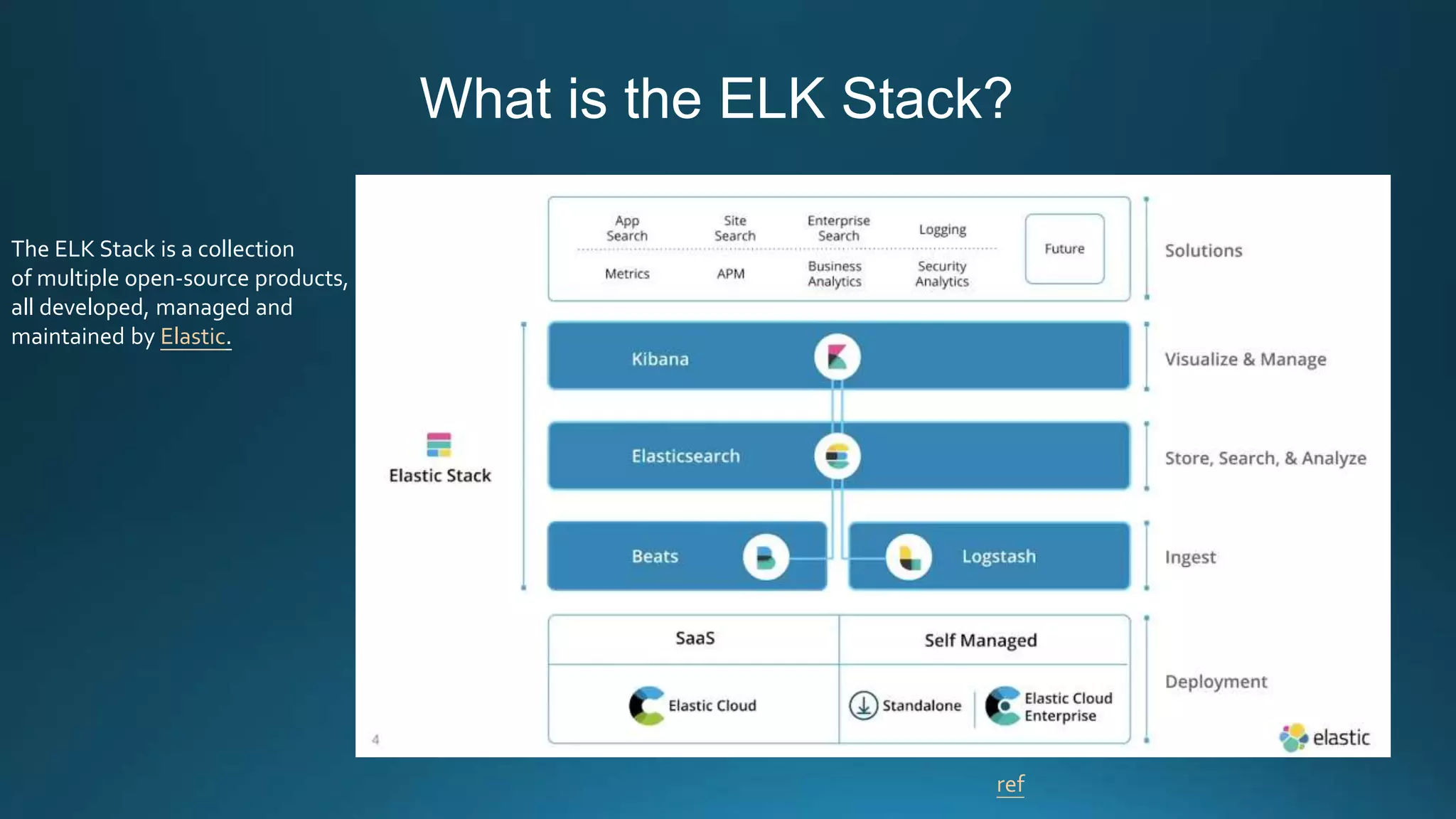
The ELK Stack is a collection
of multiple open-source products,
all developed, managed and
maintained by Elastic.
What is the ELK Stack?
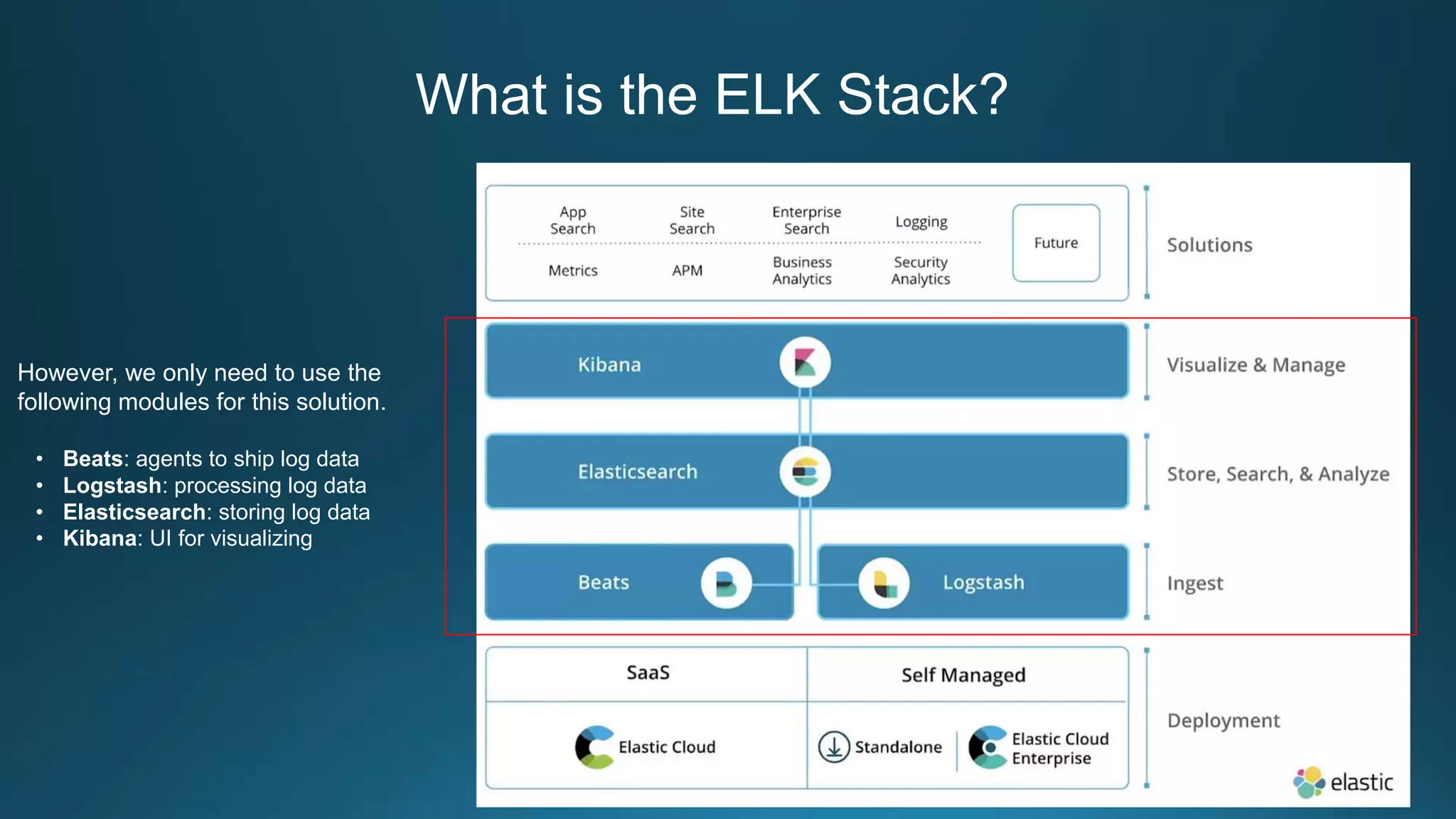
However, we only need to use the
following modules for this solution.
• Beats: agents to ship log data
• Logstash: processing log data
• Elasticsearch: storing log data
• Kibana: UI for visualizing
Elasticsearch Basic Concepts
• Index
– An index contains one or multiple types
– An Elasticsearch index is an independent chunk of document and stored on the disk
in the same set of files
• Type
– A type can be thought of as a table in a RDB
– A type has one or more documents
• Document
– A document is normally a JSON
representation of your data
Elasticsearch Basic Concepts
• Cluster
– A cluster has one or more nodes. Clusters are identified by their names. (default
cluster name= elasticsearch)
• Node
– A node is an instance of Elasticsearch
– Multiple nodes can join the same cluster. With a cluster of multiple nodes, the same
data can be spread across multiple servers.
• Shard
– An index can be divided into shards.
– There are two types of shards
• primary
• replica
Elasticsearch Basic Concepts
• Node types
– Master node: in charge of cluster management
– Data node: Data nodes hold data and perform CRUD, search, and aggregations.
– Ingest node: for pre-processing documents before indexing
– Machine learning node
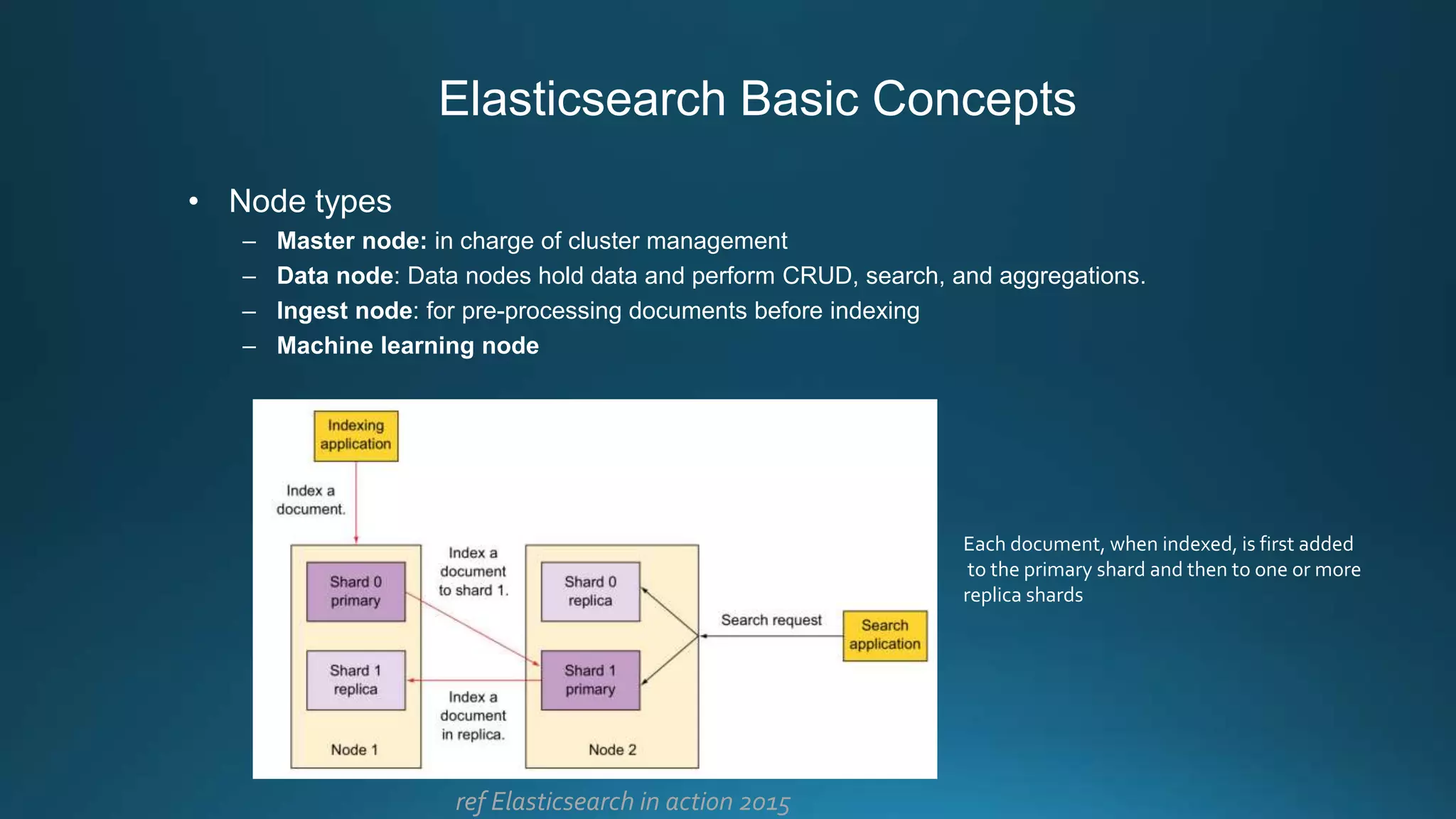
Each document, when indexed, is first added
to the primary shard and then to one or more
replica shards
ref Elasticsearch in action 2015
Elasticsearch Basic Concepts
• Minimum master nodes
– We can specify a property that Elasticsearch evaluates to find out the minimum
number of nodes that are needed as master eligible
• Split Brain Problem
– To avoid this problem, we can use discovery.zen.minimum_master_nodes
setting for cluster setup.
– The value of this setting can be derived as: ( Total number of nodes / 2 ) + 1
For example: If we have 4 nodes, so we should keep this value to 3
discovery.zen.minimum_master_nodes=3
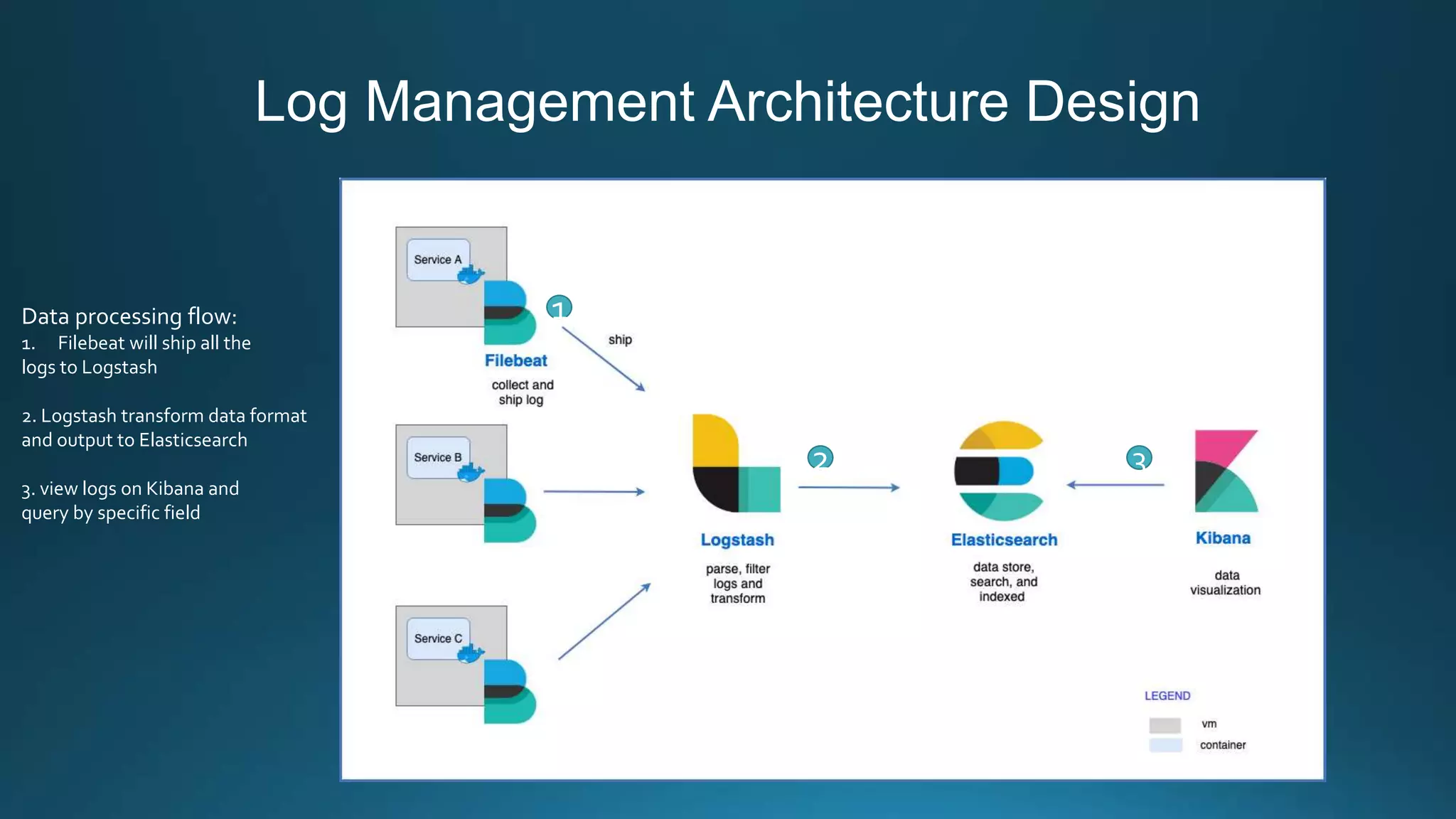
Log Management Architecture Design
1
2 3
Data processing flow:
1. Filebeat will ship all the
logs to Logstash
2. Logstash transform data format
and output to Elasticsearch
3. view logs on Kibana and
query by specific field
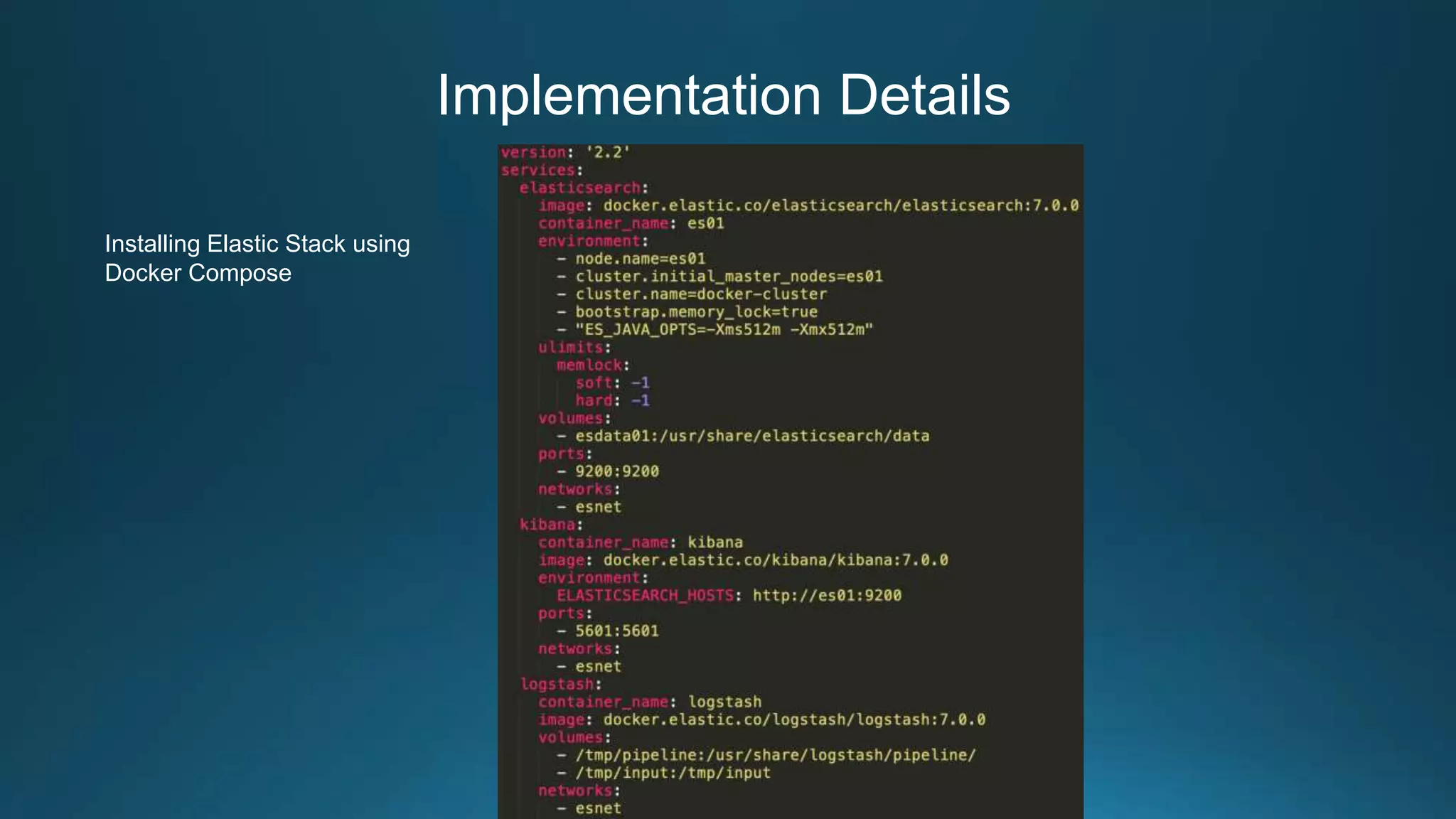
Implementation Details
Installing Elastic Stack using
Docker Compose
Implementation Details
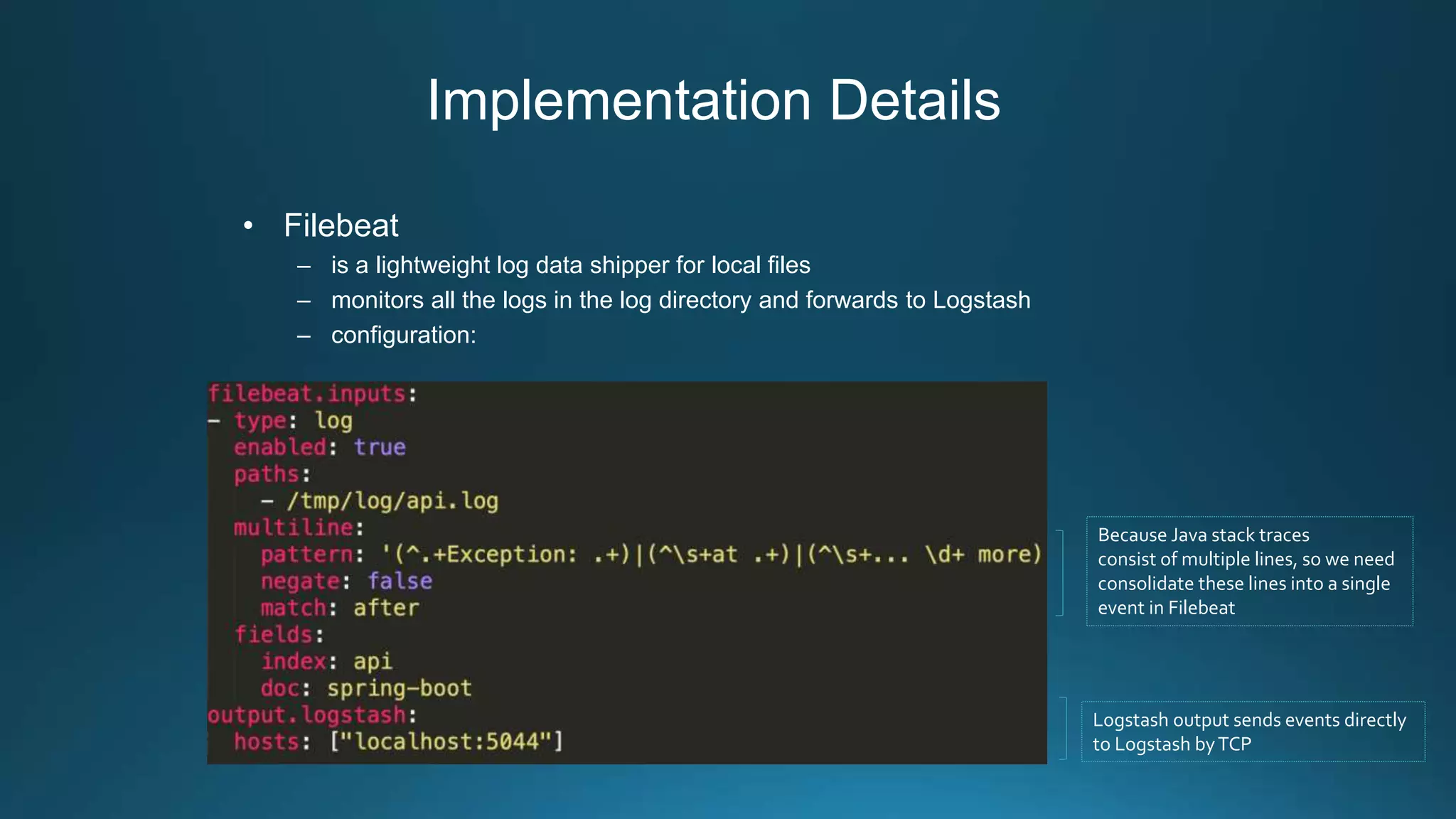
• Filebeat
– is a lightweight log data shipper for local files
– monitors all the logs in the log directory and forwards to Logstash
– configuration:
Because Java stack traces
consist of multiple lines, so we need
consolidate these lines into a single
event in Filebeat
Logstash output sends events directly
to Logstash byTCP
Implementation Details
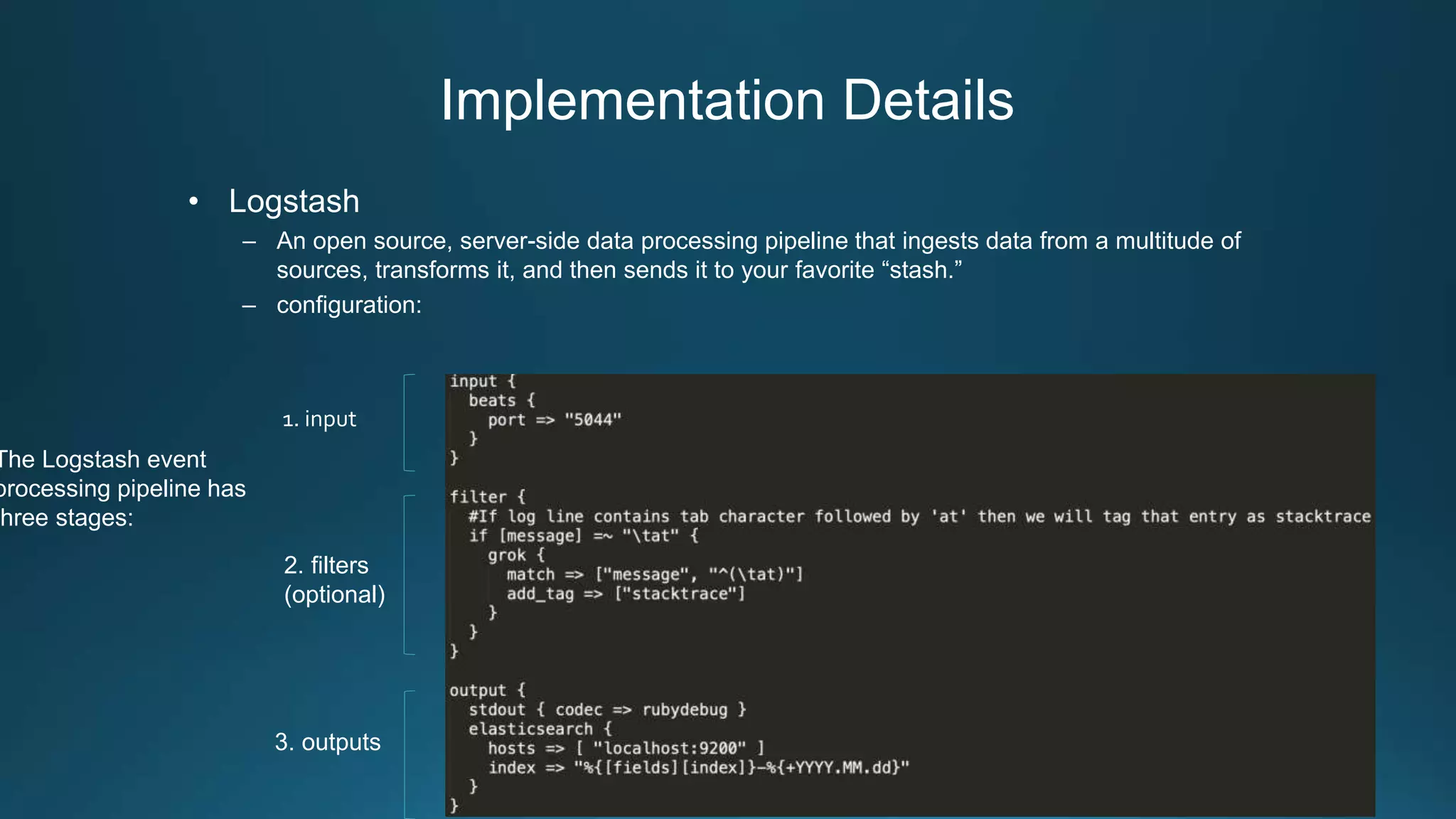
• Logstash
– An open source, server-side data processing pipeline that ingests data from a multitude of
sources, transforms it, and then sends it to your favorite “stash.”
– configuration:
The Logstash event
processing pipeline has
three stages:
1. input
2. filters
(optional)
3. outputs
Implementation Details
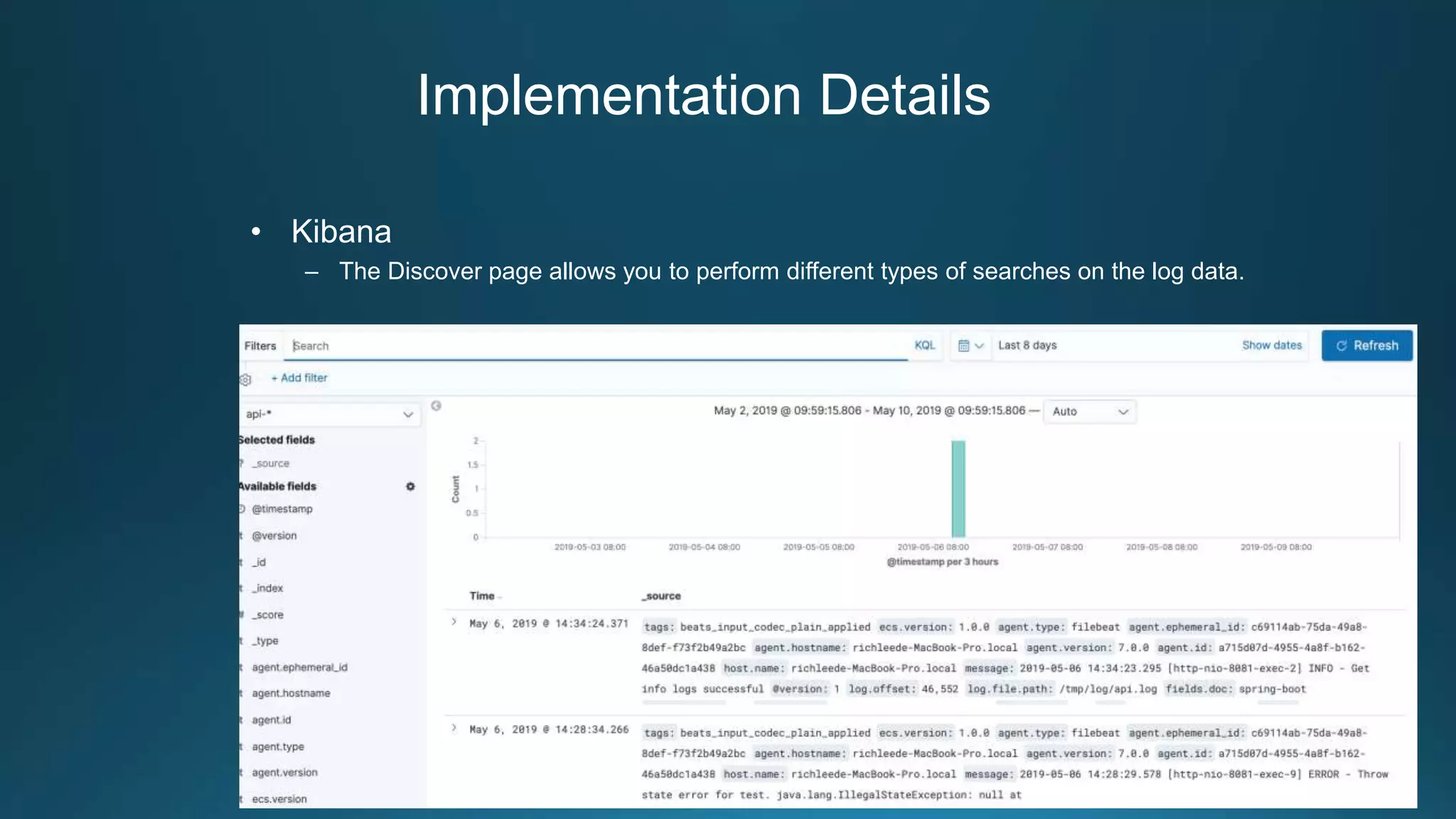
• Kibana
– The Discover page allows you to perform different types of searches on the log data.
Advanced Design for Large Amounts of Logs
• Context:
– When the service increases, the amount of data in the log will become larger
– Following a production incident, logs can suddenly surge
• Problem:
– The receiving end (Logstash or Elasticsearch) will be the main bottleneck.
– Suddenly surge logs will overwhelm your logging infrastructure.
• Solution:
– To protect Logstash and Elasticsearch against such data bursts, users deploy buffering
mechanisms to act as message brokers.
Advanced Design for Large Amounts of Logs
• Apache Kafka is a Publish-Subscribe messaging system, originated at
Linkedin in 2009, open sourced in 2011. Apache Kafka has some
characteristics such as:
– Kafka was designed to be distributed inherently.This makes Kakfa be very easy to scale
out.
– High throughput, high performance
– Guarantee the fault-tolerant in term of machine failure.
Advanced Design for Large Amounts of Logs
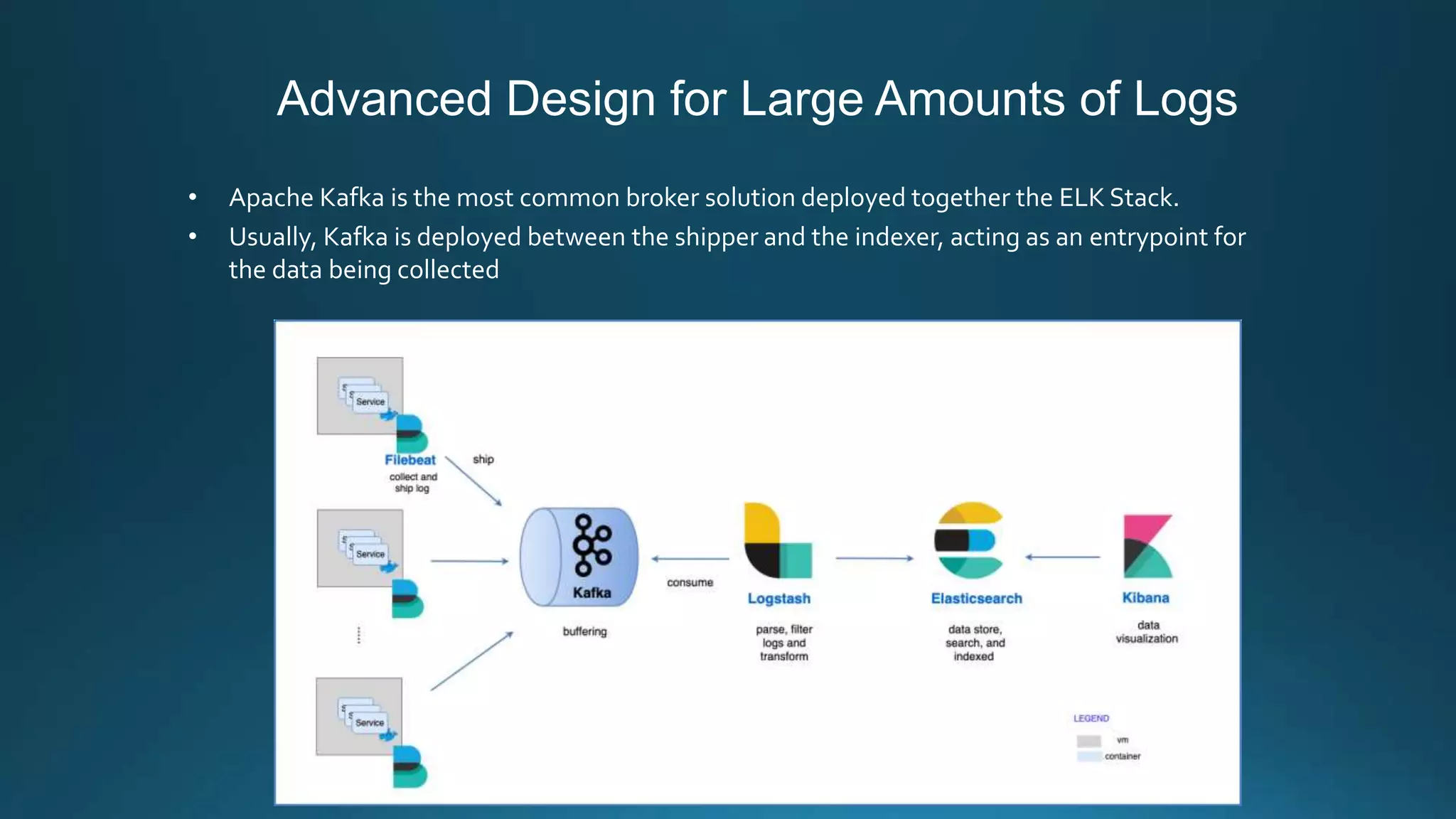
• Apache Kafka is the most common broker solution deployed together the ELK Stack.
• Usually, Kafka is deployed between the shipper and the indexer, acting as an entrypoint for
the data being collected
Advanced Design for Large Amounts of Logs
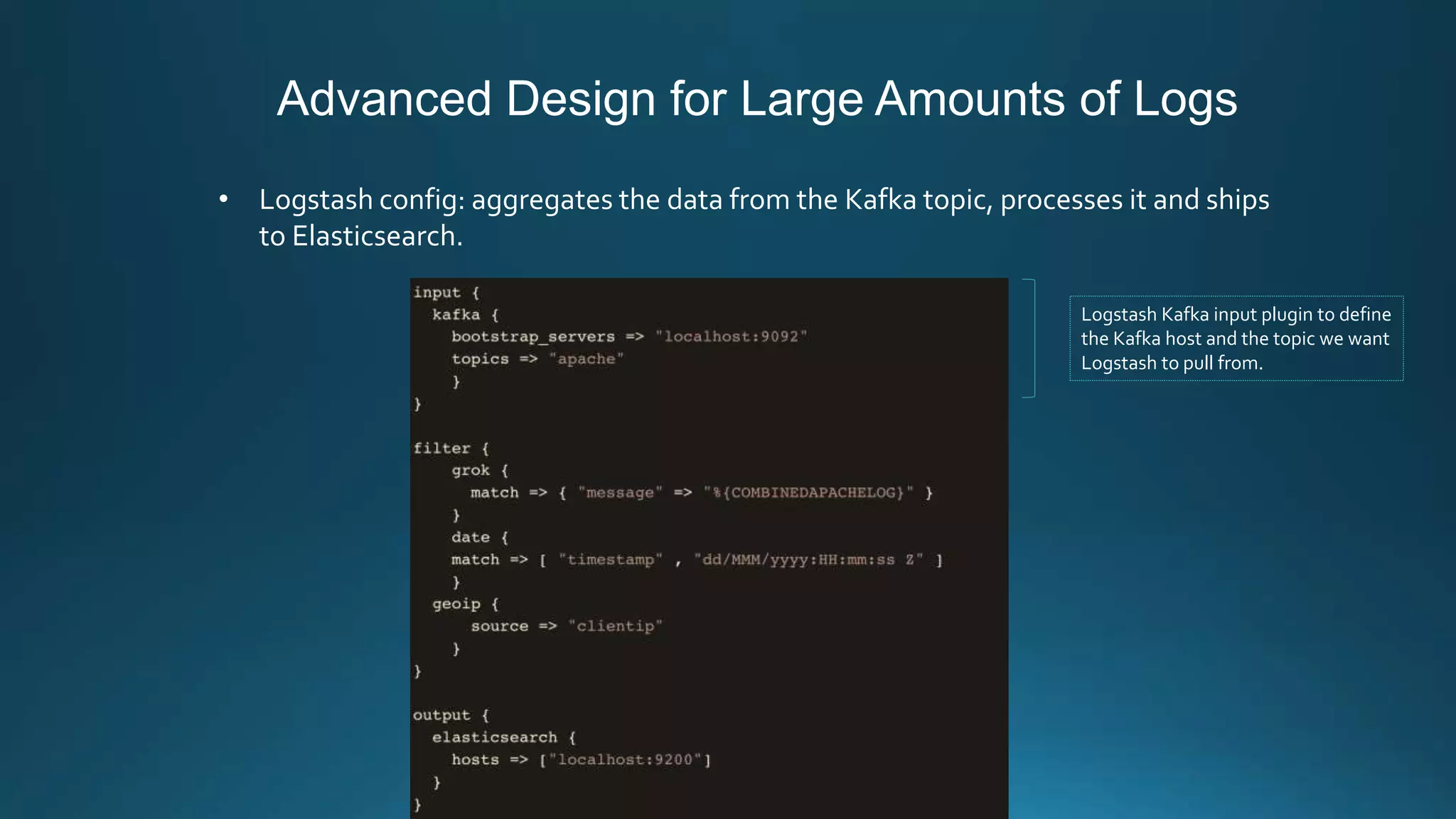
• Logstash config: aggregates the data from the Kafka topic, processes it and ships
to Elasticsearch.
Logstash Kafka input plugin to define
the Kafka host and the topic we want
Logstash to pull from.
Advanced Design for Large Amounts of Logs
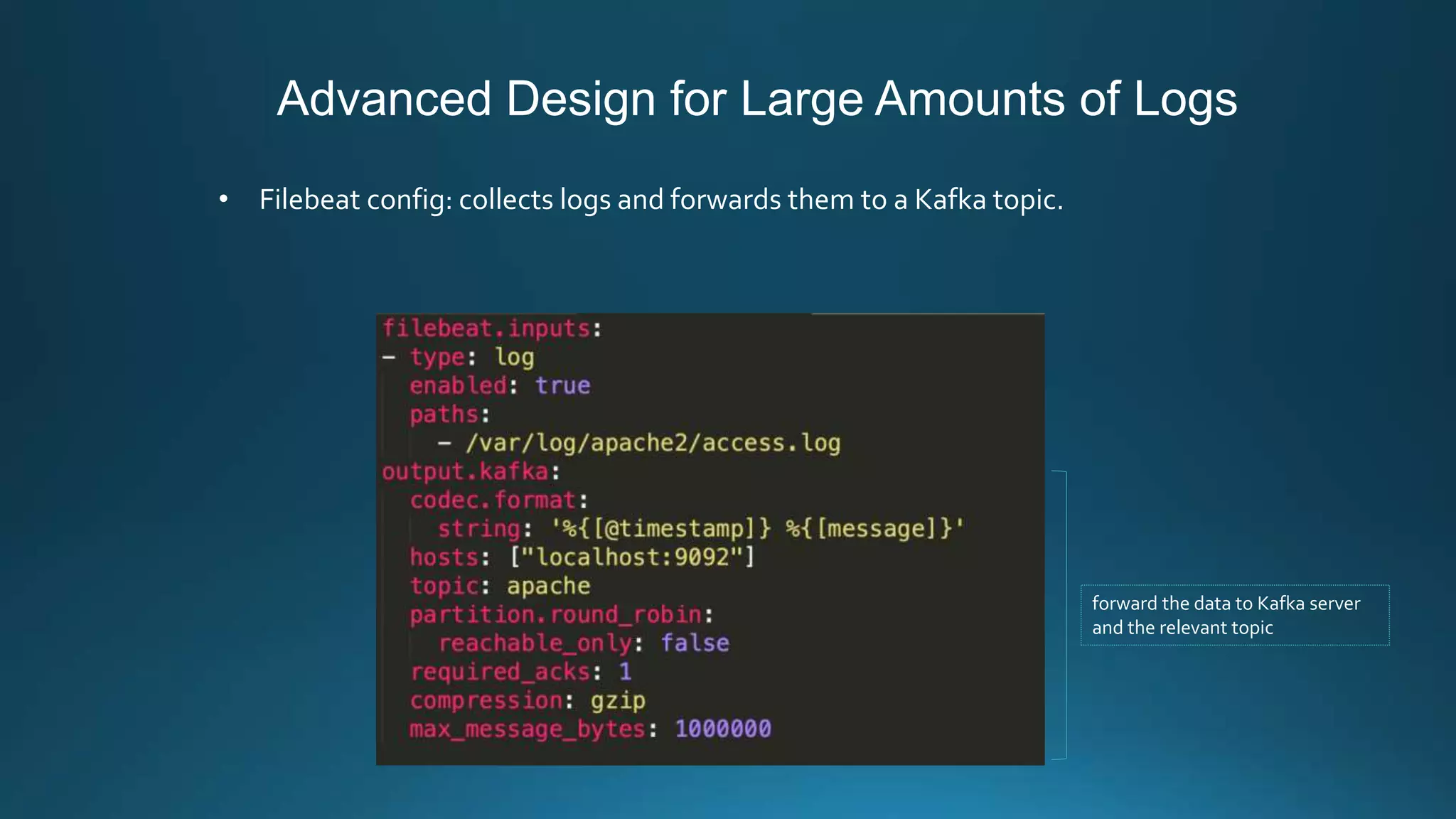
• Filebeat config: collects logs and forwards them to a Kafka topic.
forward the data to Kafka server
and the relevant topic
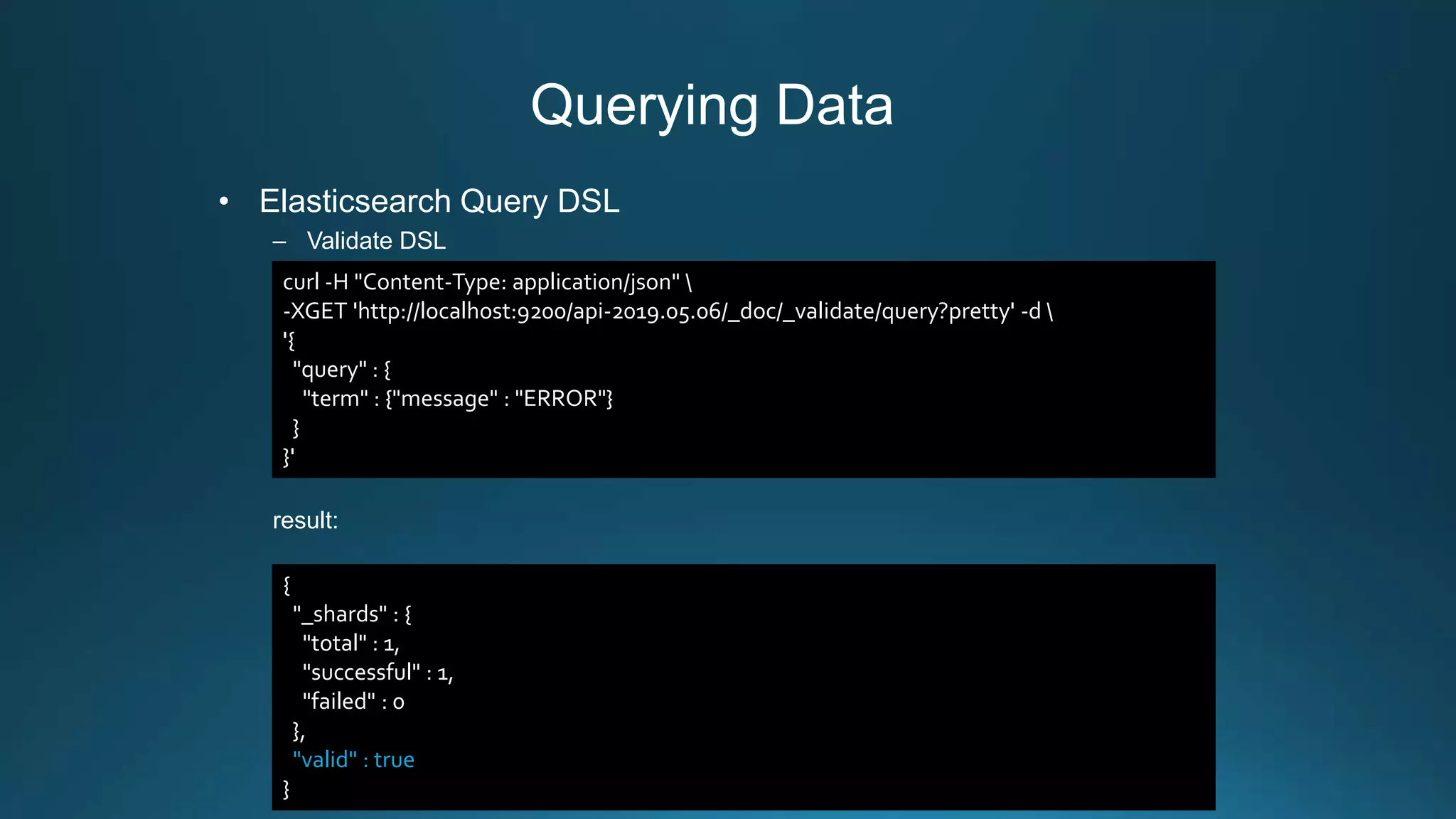
Querying Data
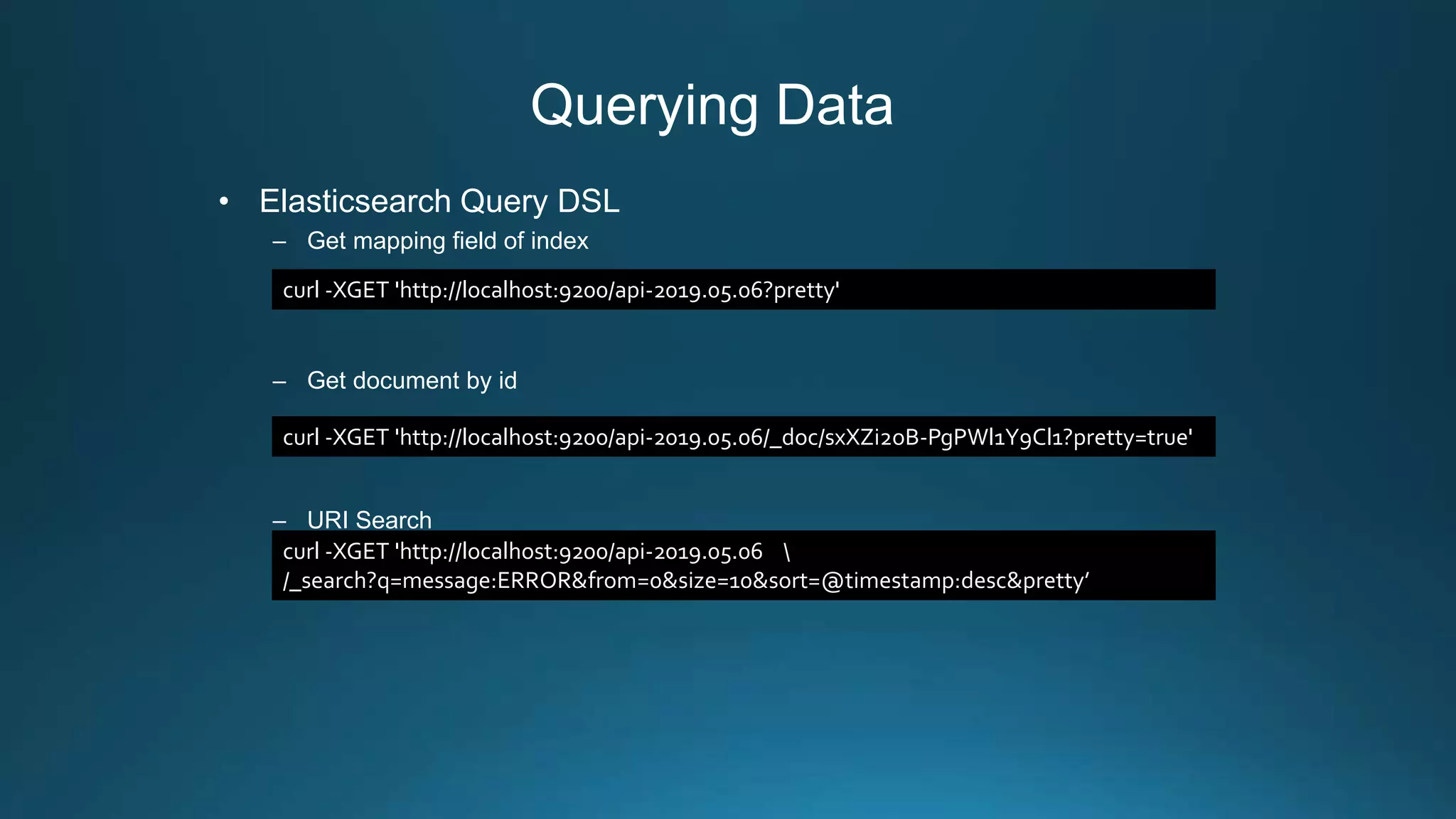
• Elasticsearch Query DSL
– Get mapping field of index
– Get document by id
– URI Search
curl -XGET 'http://localhost:9200/api-2019.05.06?pretty'
curl -XGET 'http://localhost:9200/api-2019.05.06/_doc/sxXZi2oB-PgPWl1Y9Cl1?pretty=true'
curl -XGET 'http://localhost:9200/api-2019.05.06 
/_search?q=message:ERROR&from=0&size=10&sort=@timestamp:desc&pretty’
Querying Data
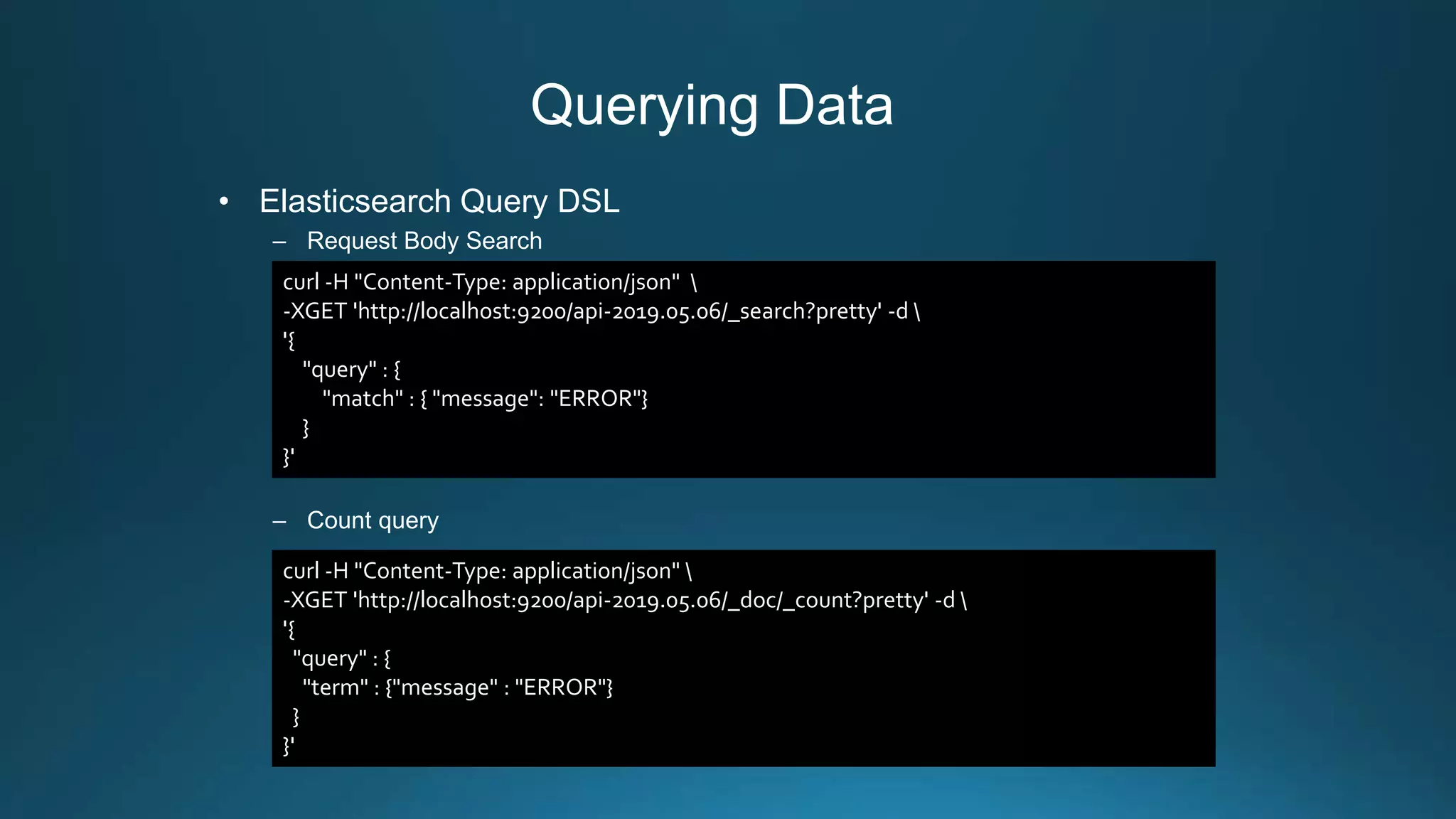
• Elasticsearch Query DSL
– Request Body Search
– Count query
curl -H "Content-Type: application/json" 
-XGET 'http://localhost:9200/api-2019.05.06/_search?pretty' -d 
'{
"query" : {
"match" : { "message": "ERROR"}
}
}'
curl -H "Content-Type: application/json" 
-XGET 'http://localhost:9200/api-2019.05.06/_doc/_count?pretty' -d 
'{
"query" : {
"term" : {"message" : "ERROR"}
}
}'
Querying Data
• Elasticsearch Query DSL
– Validate DSL
result:
curl -H "Content-Type: application/json" 
-XGET 'http://localhost:9200/api-2019.05.06/_doc/_validate/query?pretty' -d 
'{
"query" : {
"term" : {"message" : "ERROR"}
}
}'
{
"_shards" : {
"total" : 1,
"successful" : 1,
"failed" : 0
},
"valid" : true
}
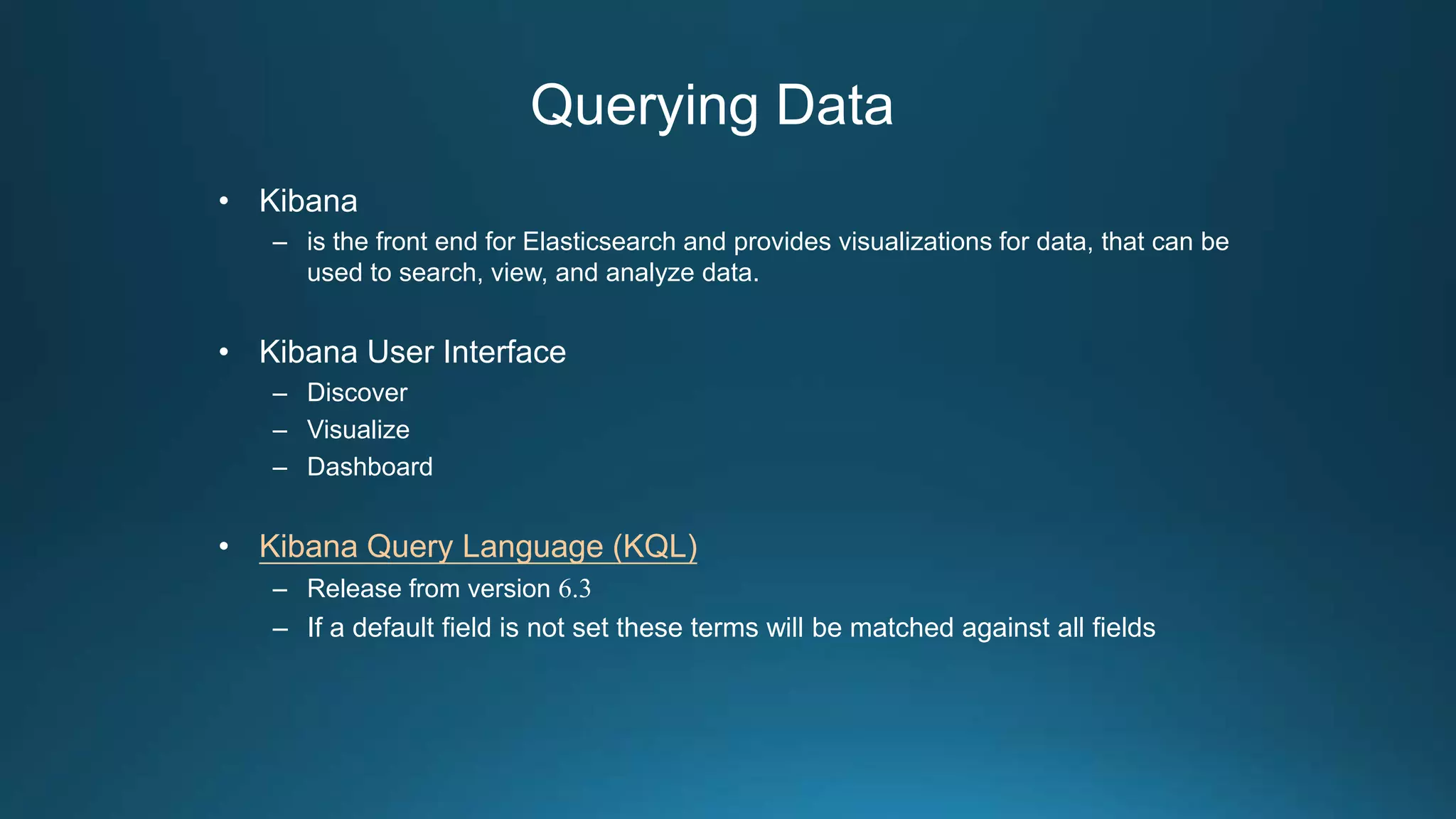
Querying Data
• Kibana
– is the front end for Elasticsearch and provides visualizations for data, that can be
used to search, view, and analyze data.
• Kibana User Interface
– Discover
– Visualize
– Dashboard
• Kibana Query Language (KQL)
– Release from version 6.3
– If a default field is not set these terms will be matched against all fields
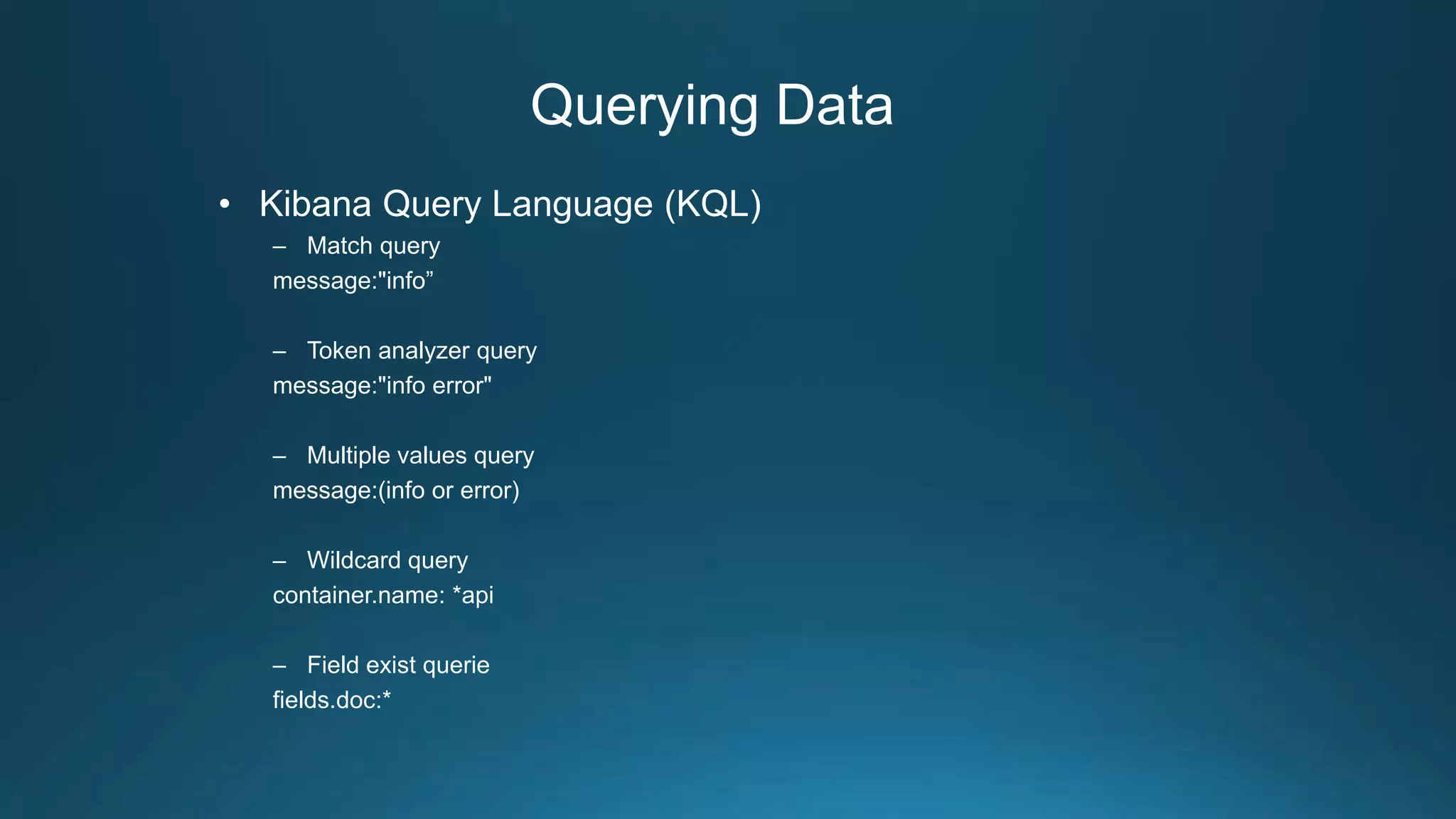
Querying Data
• Kibana Query Language (KQL)
– Match query
message:"info”
– Token analyzer query
message:"info error"
– Multiple values query
message:(info or error)
– Wildcard query
container.name: *api
– Field exist querie
fields.doc:*
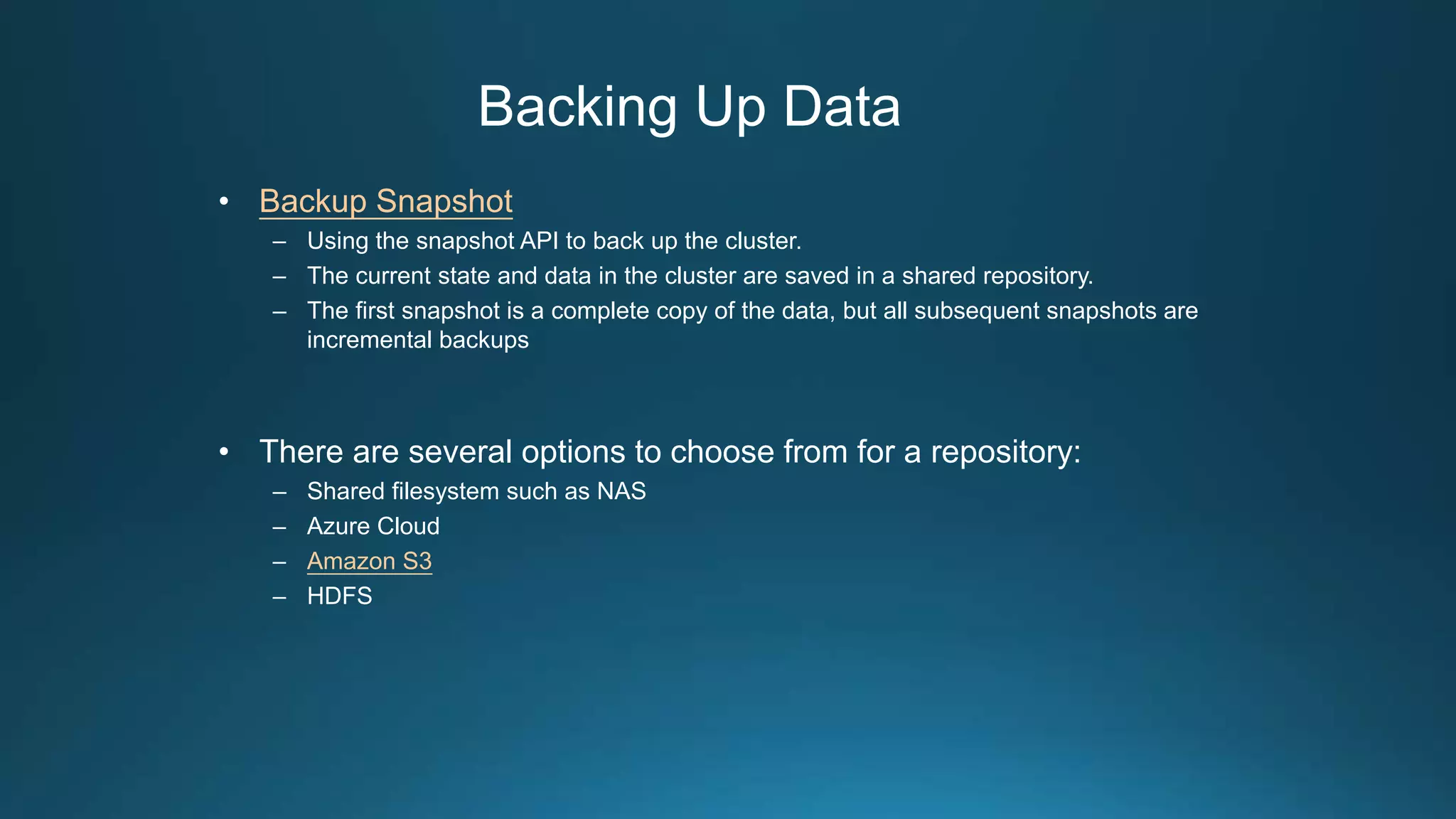
Backing Up Data
• Backup Snapshot
– Using the snapshot API to back up the cluster.
– The current state and data in the cluster are saved in a shared repository.
– The first snapshot is a complete copy of the data, but all subsequent snapshots are
incremental backups
• There are several options to choose from for a repository:
– Shared filesystem such as NAS
– Azure Cloud
– Amazon S3
– HDFS
Backing Up Data
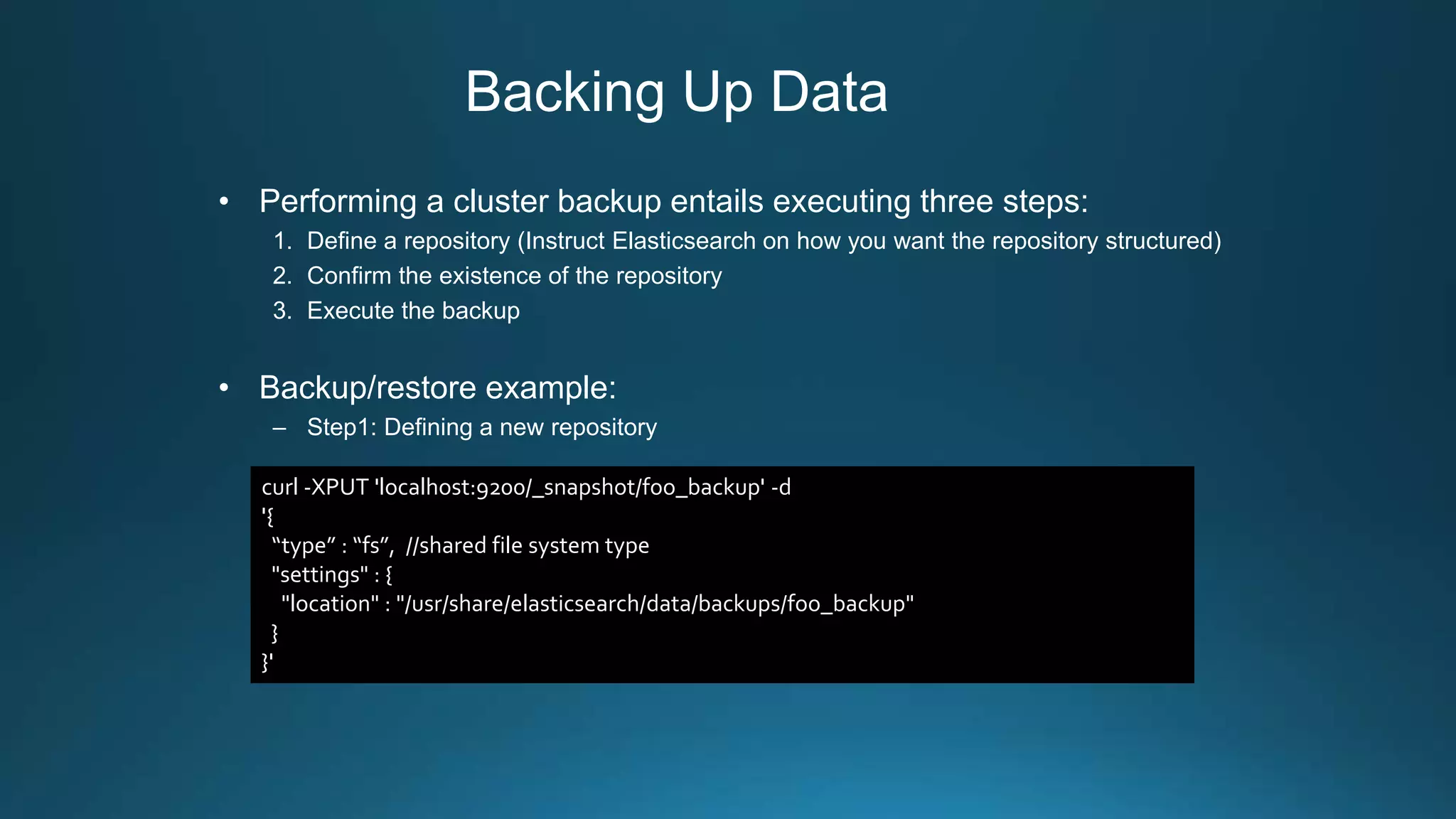
• Performing a cluster backup entails executing three steps:
1. Define a repository (Instruct Elasticsearch on how you want the repository structured)
2. Confirm the existence of the repository
3. Execute the backup
• Backup/restore example:
– Step1: Defining a new repository
curl -XPUT 'localhost:9200/_snapshot/foo_backup' -d
'{
“type” : “fs”, //shared file system type
"settings" : {
"location" : "/usr/share/elasticsearch/data/backups/foo_backup"
}
}'
Backing Up Data
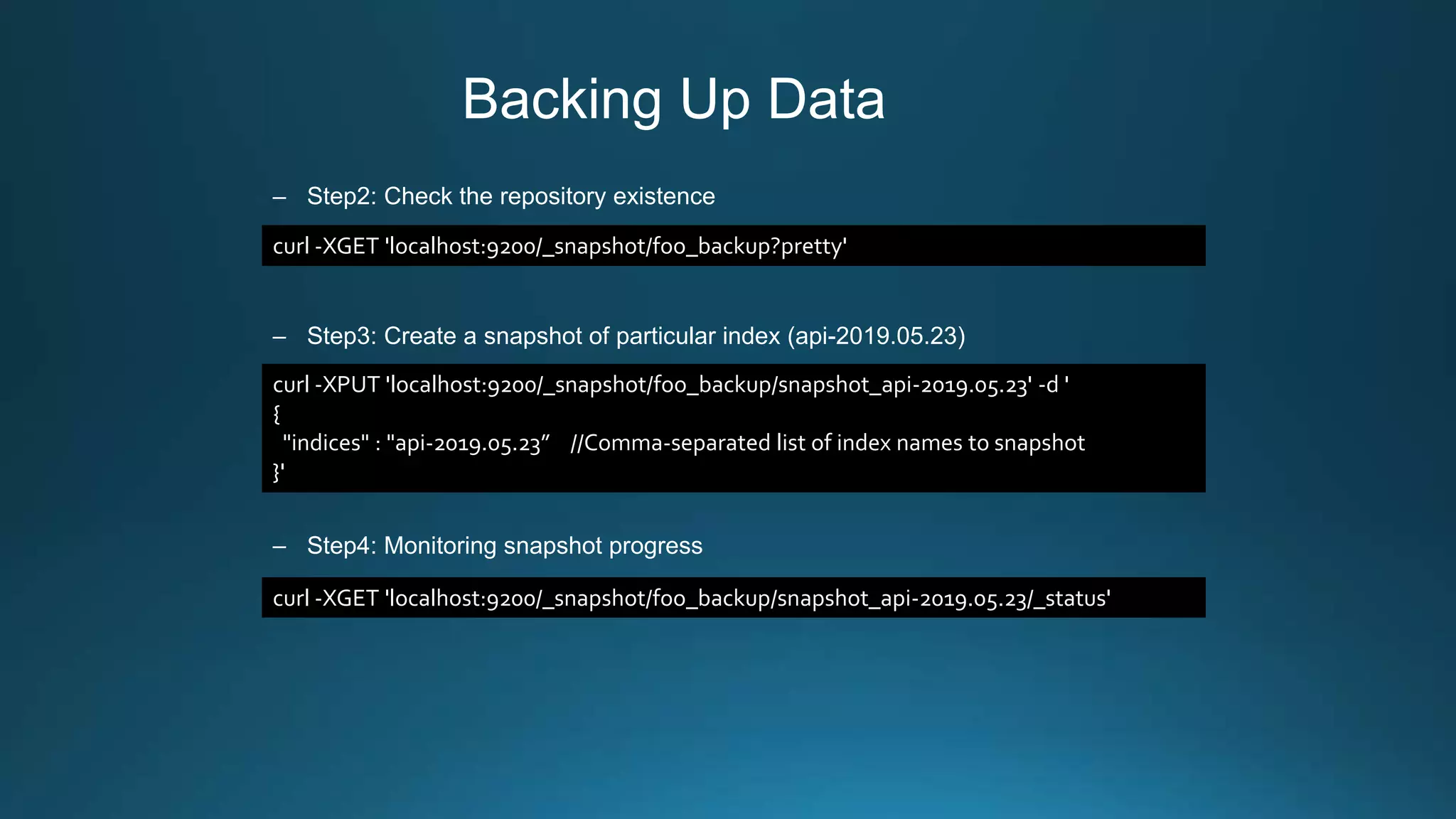
– Step2: Check the repository existence
– Step3: Create a snapshot of particular index (api-2019.05.23)
– Step4: Monitoring snapshot progress
curl -XGET 'localhost:9200/_snapshot/foo_backup?pretty'
curl -XPUT 'localhost:9200/_snapshot/foo_backup/snapshot_api-2019.05.23' -d '
{
"indices" : "api-2019.05.23” //Comma-separated list of index names to snapshot
}'
curl -XGET 'localhost:9200/_snapshot/foo_backup/snapshot_api-2019.05.23/_status'
Backing Up Data
– Step5: Retrieving information on the state of a given snapshot
response:
curl -XGET 'localhost:9200/_snapshot/foo_backup/snapshot_api-2019.05.23'
{
"snapshots": [
{
"snapshot": "napshot_api-2019.05.23",
"uuid": "knM5TEZrRxKhIqvpPQO74w",
"version_id": 7000099,
"version": "7.0.0",
"indices": [“api-2019.05.23"],
"include_global_state": true,
"state": "SUCCESS",
"start_time": "2019-05-24T06:30:11.737Z",
"start_time_in_millis": 1558679411737,
"end_time": "2019-05-24T06:30:11.791Z",
"end_time_in_millis": 1558679411791,
"duration_in_millis": 54,
"failures": [],
"shards": {
"total": 1,
"failed": 0,
"successful": 1
}
}
]
}
Backing Up Data
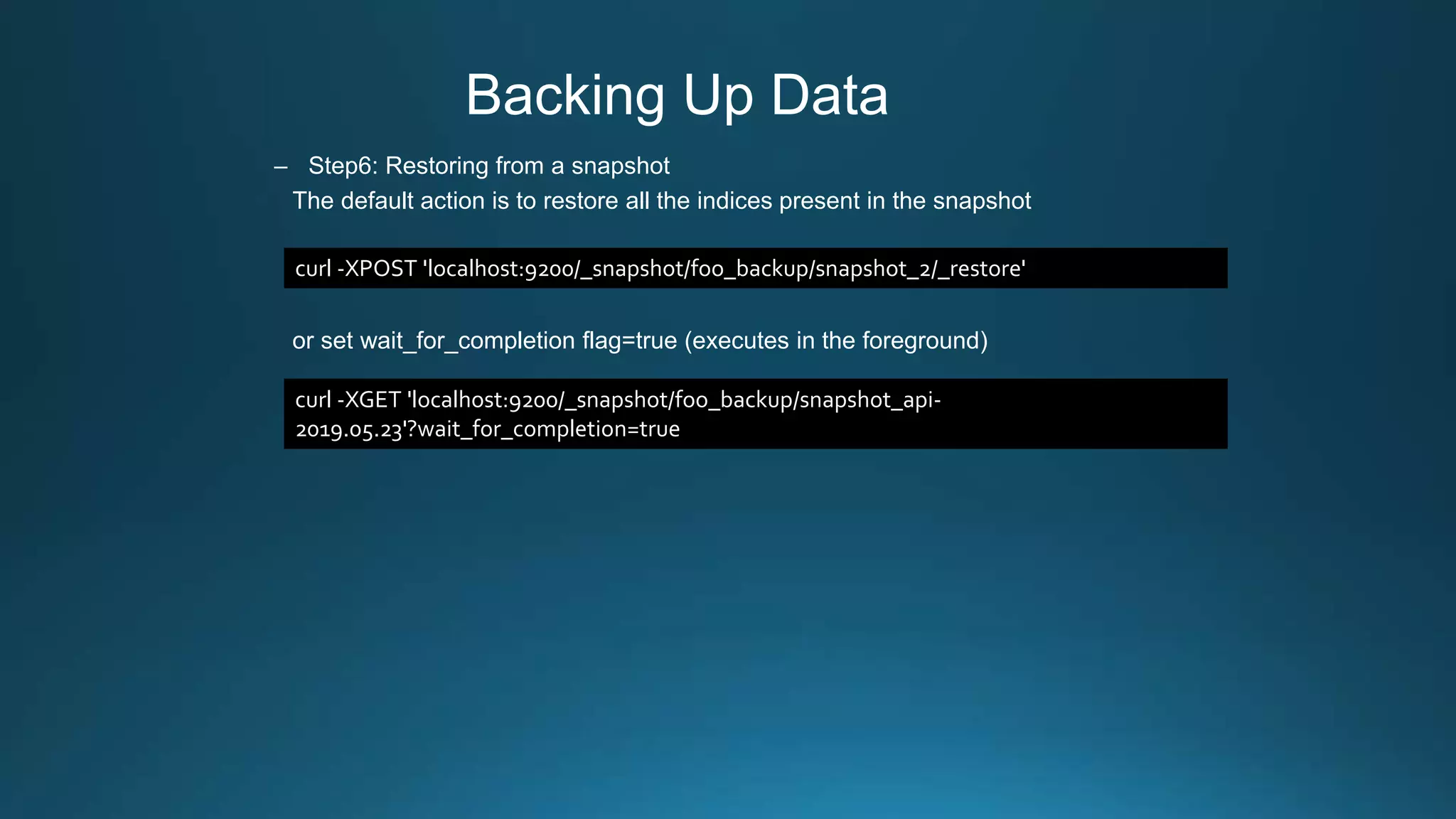
– Step6: Restoring from a snapshot
The default action is to restore all the indices present in the snapshot
or set wait_for_completion flag=true (executes in the foreground)
curl -XPOST 'localhost:9200/_snapshot/foo_backup/snapshot_2/_restore'
curl -XGET 'localhost:9200/_snapshot/foo_backup/snapshot_api-
2019.05.23'?wait_for_completion=true
Housekeeping Strategy
• Time-based indices
– Index name pattern: <index_name>.yyyy.MM.dd
– faster and reduces to remove documents and reduces memory CPU and overhead (delete by
index directly)
– large amounts of bulk deletions can result in large Lucene index segments
• Cron Job: delete the index seven days before every AM 2:oo
For example: if housekeeping is 7 days and today is 2019/06/08, then delete 6/01 index
Indices: [
“api-2019.06.01”, (deleted)
“api-2019.06.02”,
“api-2019.06.03”,
“api-2019.06.04”,
“api-2019.06.05”,
“api-2019.06.06”,
“api-2019.06.07”,
“api-2019.06.08”
]
keep 7 days
Management & Monitoring Tools
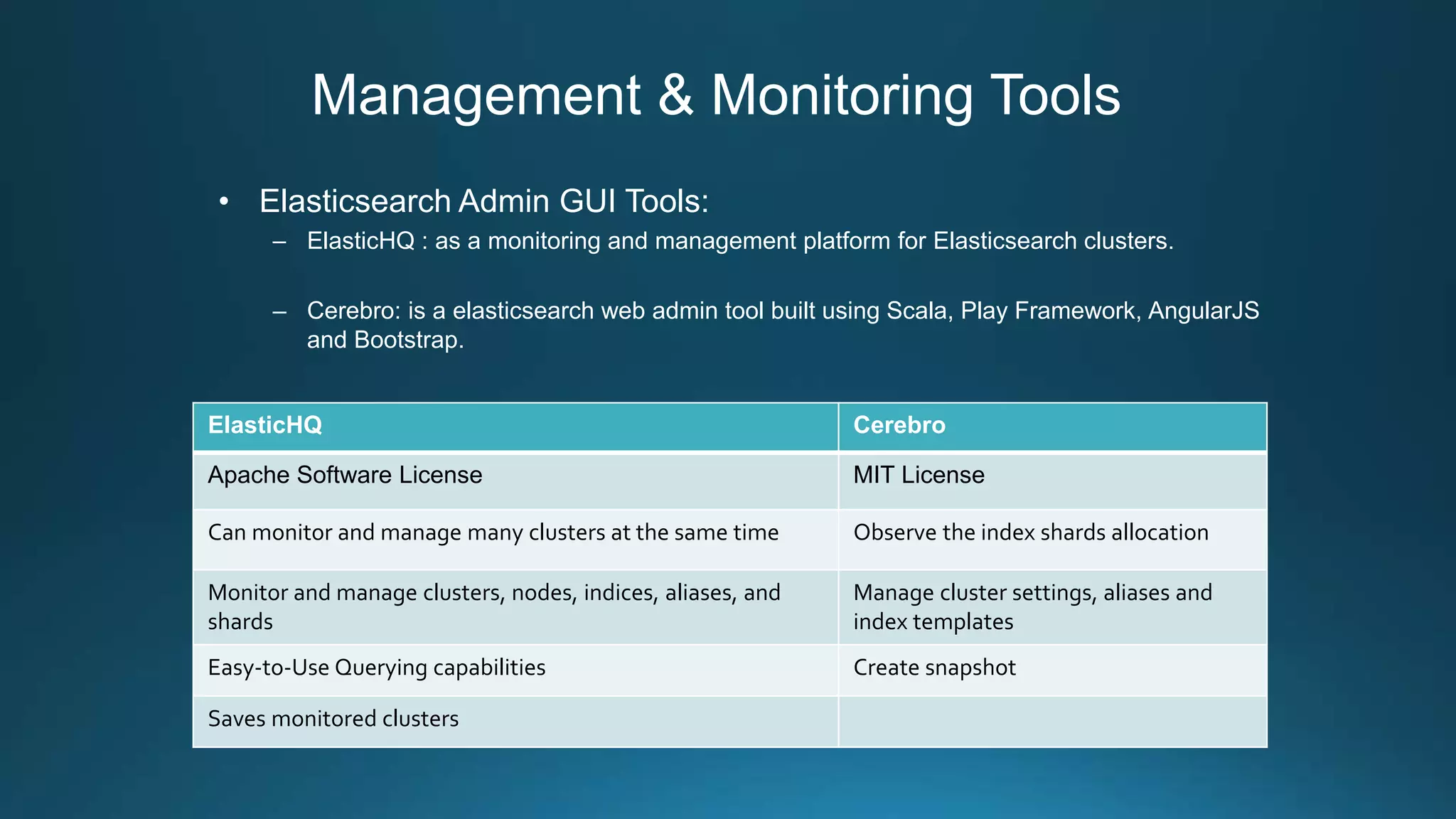
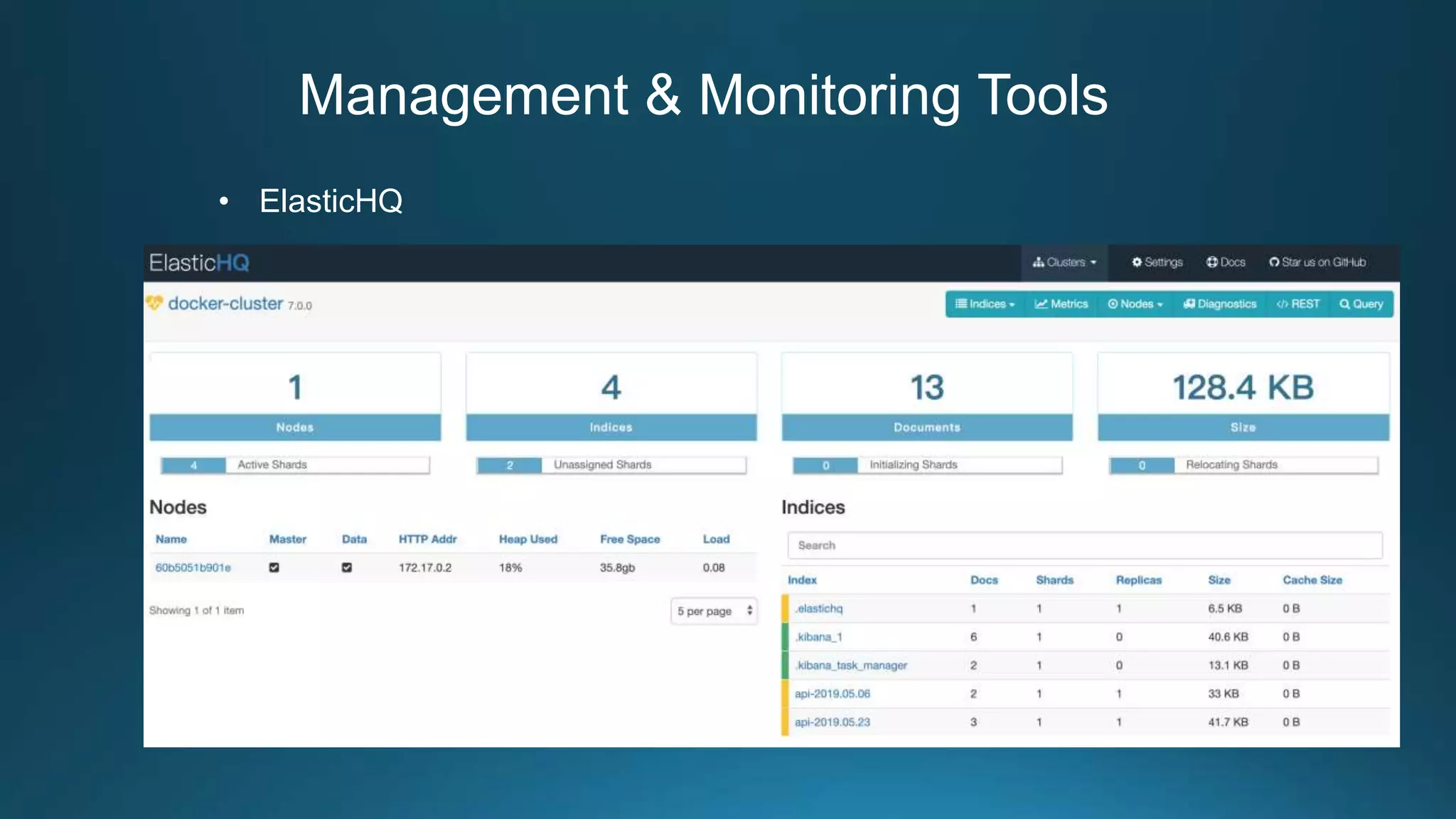
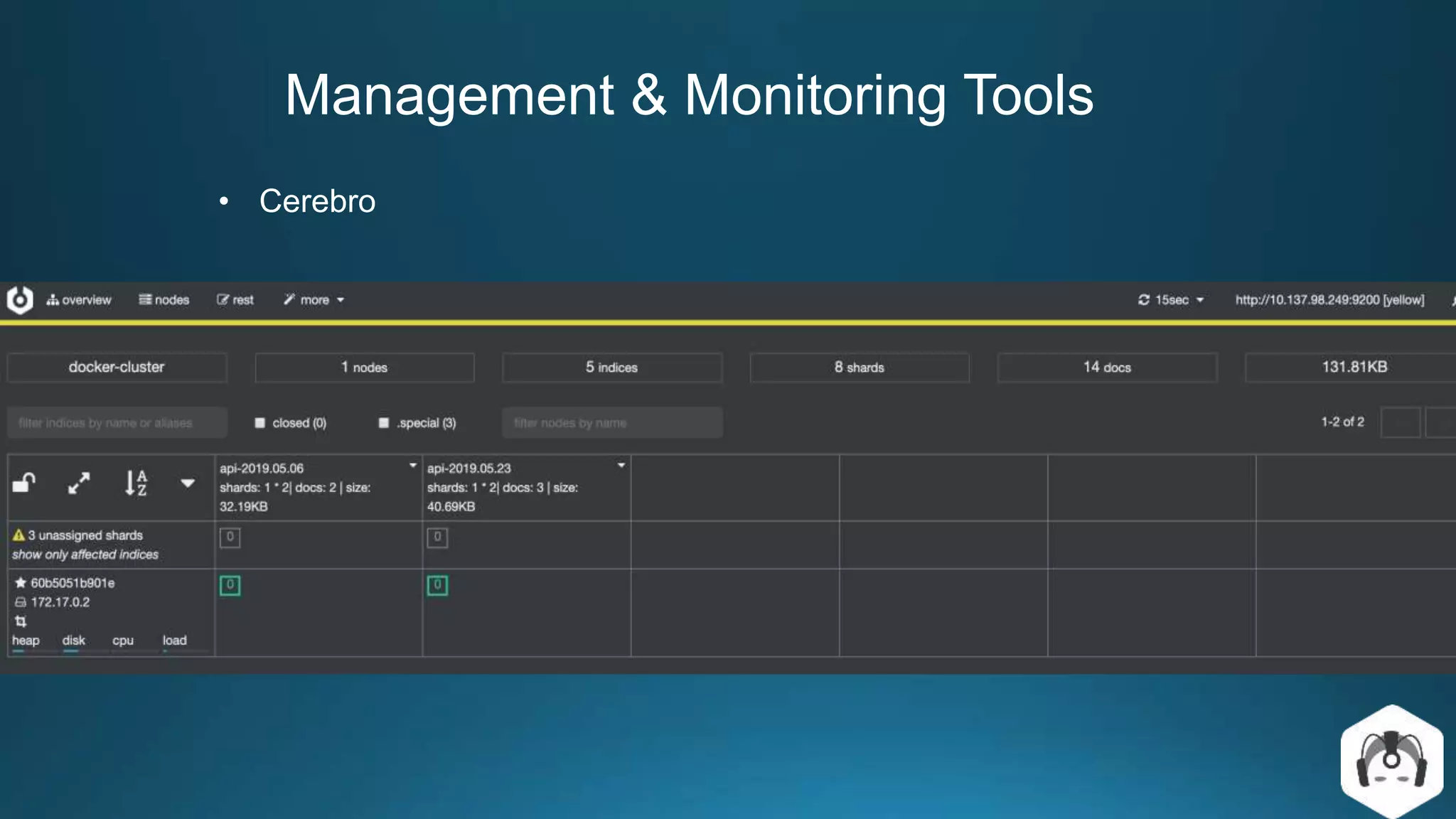
• Elasticsearch Admin GUI Tools:
– ElasticHQ : as a monitoring and management platform for Elasticsearch clusters.
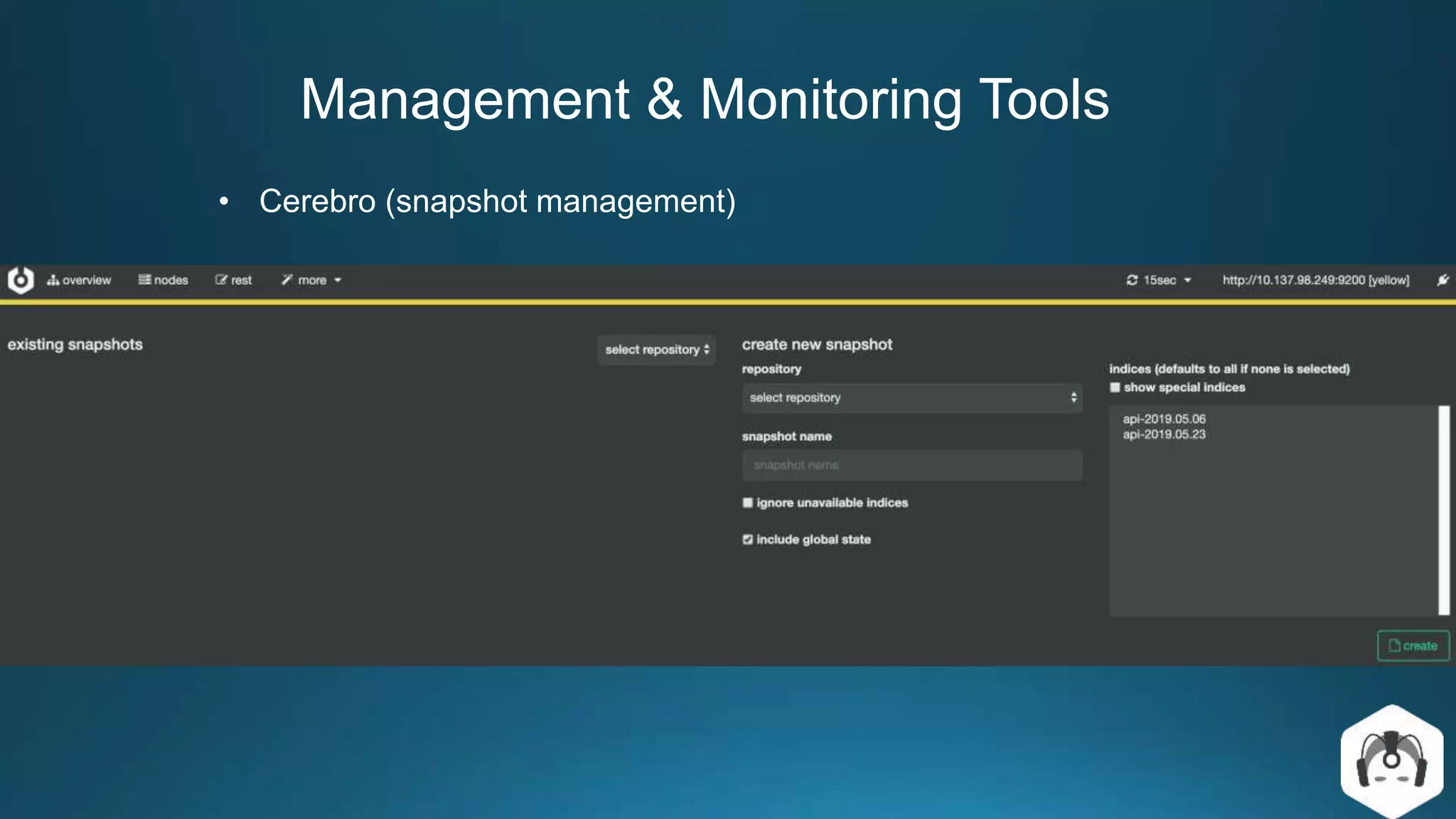
– Cerebro: is a elasticsearch web admin tool built using Scala, Play Framework, AngularJS
and Bootstrap.
ElasticHQ Cerebro
Apache Software License MIT License
Can monitor and manage many clusters at the same time Observe the index shards allocation
Monitor and manage clusters, nodes, indices, aliases, and
shards
Manage cluster settings, aliases and
index templates
Easy-to-Use Querying capabilities Create snapshot
Saves monitored clusters
Management & Monitoring Tools
• ElasticHQ
Management & Monitoring Tools
• Cerebro
Management & Monitoring Tools
• Cerebro (snapshot management)

Centralized log-management-with-elastic-stack

  • 1.
  • 2.
    Outline • Problem Statement •Elastic Stack • Log Management Service – Architecture Design – Implementation Details – Advanced Design • Querying Data • Data Backup/Restore • Management & Monitoring Tools
  • 3.
    Problem Statement • Context –In Microservices architecture, an application consists of multiple services and service instances that are running on multiple machines. – Each service instance generates writes information about what it is doing to a log file. • Problem – How to query information related to system operation from the data efficiently. – How to troubleshoot bugs from multiple log files • Solution – Build a log management service with Elastic Stack, because it is a mature and complete open source tool.
  • 4.
    What is theELK Stack? ref The ELK Stack is a collection of multiple open-source products, all developed, managed and maintained by Elastic.
  • 5.
    What is theELK Stack? However, we only need to use the following modules for this solution. • Beats: agents to ship log data • Logstash: processing log data • Elasticsearch: storing log data • Kibana: UI for visualizing
  • 6.
    Elasticsearch Basic Concepts •Index – An index contains one or multiple types – An Elasticsearch index is an independent chunk of document and stored on the disk in the same set of files • Type – A type can be thought of as a table in a RDB – A type has one or more documents • Document – A document is normally a JSON representation of your data
  • 7.
    Elasticsearch Basic Concepts •Cluster – A cluster has one or more nodes. Clusters are identified by their names. (default cluster name= elasticsearch) • Node – A node is an instance of Elasticsearch – Multiple nodes can join the same cluster. With a cluster of multiple nodes, the same data can be spread across multiple servers. • Shard – An index can be divided into shards. – There are two types of shards • primary • replica
  • 8.
    Elasticsearch Basic Concepts •Node types – Master node: in charge of cluster management – Data node: Data nodes hold data and perform CRUD, search, and aggregations. – Ingest node: for pre-processing documents before indexing – Machine learning node Each document, when indexed, is first added to the primary shard and then to one or more replica shards ref Elasticsearch in action 2015
  • 9.
    Elasticsearch Basic Concepts •Minimum master nodes – We can specify a property that Elasticsearch evaluates to find out the minimum number of nodes that are needed as master eligible • Split Brain Problem – To avoid this problem, we can use discovery.zen.minimum_master_nodes setting for cluster setup. – The value of this setting can be derived as: ( Total number of nodes / 2 ) + 1 For example: If we have 4 nodes, so we should keep this value to 3 discovery.zen.minimum_master_nodes=3
  • 10.
    Log Management ArchitectureDesign 1 2 3 Data processing flow: 1. Filebeat will ship all the logs to Logstash 2. Logstash transform data format and output to Elasticsearch 3. view logs on Kibana and query by specific field
  • 11.
  • 12.
    Implementation Details • Filebeat –is a lightweight log data shipper for local files – monitors all the logs in the log directory and forwards to Logstash – configuration: Because Java stack traces consist of multiple lines, so we need consolidate these lines into a single event in Filebeat Logstash output sends events directly to Logstash byTCP
  • 13.
    Implementation Details • Logstash –An open source, server-side data processing pipeline that ingests data from a multitude of sources, transforms it, and then sends it to your favorite “stash.” – configuration: The Logstash event processing pipeline has three stages: 1. input 2. filters (optional) 3. outputs
  • 14.
    Implementation Details • Kibana –The Discover page allows you to perform different types of searches on the log data.
  • 15.
    Advanced Design forLarge Amounts of Logs • Context: – When the service increases, the amount of data in the log will become larger – Following a production incident, logs can suddenly surge • Problem: – The receiving end (Logstash or Elasticsearch) will be the main bottleneck. – Suddenly surge logs will overwhelm your logging infrastructure. • Solution: – To protect Logstash and Elasticsearch against such data bursts, users deploy buffering mechanisms to act as message brokers.
  • 16.
    Advanced Design forLarge Amounts of Logs • Apache Kafka is a Publish-Subscribe messaging system, originated at Linkedin in 2009, open sourced in 2011. Apache Kafka has some characteristics such as: – Kafka was designed to be distributed inherently.This makes Kakfa be very easy to scale out. – High throughput, high performance – Guarantee the fault-tolerant in term of machine failure.
  • 17.
    Advanced Design forLarge Amounts of Logs • Apache Kafka is the most common broker solution deployed together the ELK Stack. • Usually, Kafka is deployed between the shipper and the indexer, acting as an entrypoint for the data being collected
  • 18.
    Advanced Design forLarge Amounts of Logs • Logstash config: aggregates the data from the Kafka topic, processes it and ships to Elasticsearch. Logstash Kafka input plugin to define the Kafka host and the topic we want Logstash to pull from.
  • 19.
    Advanced Design forLarge Amounts of Logs • Filebeat config: collects logs and forwards them to a Kafka topic. forward the data to Kafka server and the relevant topic
  • 20.
    Querying Data • ElasticsearchQuery DSL – Get mapping field of index – Get document by id – URI Search curl -XGET 'http://localhost:9200/api-2019.05.06?pretty' curl -XGET 'http://localhost:9200/api-2019.05.06/_doc/sxXZi2oB-PgPWl1Y9Cl1?pretty=true' curl -XGET 'http://localhost:9200/api-2019.05.06 /_search?q=message:ERROR&from=0&size=10&sort=@timestamp:desc&pretty’
  • 21.
    Querying Data • ElasticsearchQuery DSL – Request Body Search – Count query curl -H "Content-Type: application/json" -XGET 'http://localhost:9200/api-2019.05.06/_search?pretty' -d '{ "query" : { "match" : { "message": "ERROR"} } }' curl -H "Content-Type: application/json" -XGET 'http://localhost:9200/api-2019.05.06/_doc/_count?pretty' -d '{ "query" : { "term" : {"message" : "ERROR"} } }'
  • 22.
    Querying Data • ElasticsearchQuery DSL – Validate DSL result: curl -H "Content-Type: application/json" -XGET 'http://localhost:9200/api-2019.05.06/_doc/_validate/query?pretty' -d '{ "query" : { "term" : {"message" : "ERROR"} } }' { "_shards" : { "total" : 1, "successful" : 1, "failed" : 0 }, "valid" : true }
  • 23.
    Querying Data • Kibana –is the front end for Elasticsearch and provides visualizations for data, that can be used to search, view, and analyze data. • Kibana User Interface – Discover – Visualize – Dashboard • Kibana Query Language (KQL) – Release from version 6.3 – If a default field is not set these terms will be matched against all fields
  • 24.
    Querying Data • KibanaQuery Language (KQL) – Match query message:"info” – Token analyzer query message:"info error" – Multiple values query message:(info or error) – Wildcard query container.name: *api – Field exist querie fields.doc:*
  • 25.
    Backing Up Data •Backup Snapshot – Using the snapshot API to back up the cluster. – The current state and data in the cluster are saved in a shared repository. – The first snapshot is a complete copy of the data, but all subsequent snapshots are incremental backups • There are several options to choose from for a repository: – Shared filesystem such as NAS – Azure Cloud – Amazon S3 – HDFS
  • 26.
    Backing Up Data •Performing a cluster backup entails executing three steps: 1. Define a repository (Instruct Elasticsearch on how you want the repository structured) 2. Confirm the existence of the repository 3. Execute the backup • Backup/restore example: – Step1: Defining a new repository curl -XPUT 'localhost:9200/_snapshot/foo_backup' -d '{ “type” : “fs”, //shared file system type "settings" : { "location" : "/usr/share/elasticsearch/data/backups/foo_backup" } }'
  • 27.
    Backing Up Data –Step2: Check the repository existence – Step3: Create a snapshot of particular index (api-2019.05.23) – Step4: Monitoring snapshot progress curl -XGET 'localhost:9200/_snapshot/foo_backup?pretty' curl -XPUT 'localhost:9200/_snapshot/foo_backup/snapshot_api-2019.05.23' -d ' { "indices" : "api-2019.05.23” //Comma-separated list of index names to snapshot }' curl -XGET 'localhost:9200/_snapshot/foo_backup/snapshot_api-2019.05.23/_status'
  • 28.
    Backing Up Data –Step5: Retrieving information on the state of a given snapshot response: curl -XGET 'localhost:9200/_snapshot/foo_backup/snapshot_api-2019.05.23' { "snapshots": [ { "snapshot": "napshot_api-2019.05.23", "uuid": "knM5TEZrRxKhIqvpPQO74w", "version_id": 7000099, "version": "7.0.0", "indices": [“api-2019.05.23"], "include_global_state": true, "state": "SUCCESS", "start_time": "2019-05-24T06:30:11.737Z", "start_time_in_millis": 1558679411737, "end_time": "2019-05-24T06:30:11.791Z", "end_time_in_millis": 1558679411791, "duration_in_millis": 54, "failures": [], "shards": { "total": 1, "failed": 0, "successful": 1 } } ] }
  • 29.
    Backing Up Data –Step6: Restoring from a snapshot The default action is to restore all the indices present in the snapshot or set wait_for_completion flag=true (executes in the foreground) curl -XPOST 'localhost:9200/_snapshot/foo_backup/snapshot_2/_restore' curl -XGET 'localhost:9200/_snapshot/foo_backup/snapshot_api- 2019.05.23'?wait_for_completion=true
  • 30.
    Housekeeping Strategy • Time-basedindices – Index name pattern: <index_name>.yyyy.MM.dd – faster and reduces to remove documents and reduces memory CPU and overhead (delete by index directly) – large amounts of bulk deletions can result in large Lucene index segments • Cron Job: delete the index seven days before every AM 2:oo For example: if housekeeping is 7 days and today is 2019/06/08, then delete 6/01 index Indices: [ “api-2019.06.01”, (deleted) “api-2019.06.02”, “api-2019.06.03”, “api-2019.06.04”, “api-2019.06.05”, “api-2019.06.06”, “api-2019.06.07”, “api-2019.06.08” ] keep 7 days
  • 31.
    Management & MonitoringTools • Elasticsearch Admin GUI Tools: – ElasticHQ : as a monitoring and management platform for Elasticsearch clusters. – Cerebro: is a elasticsearch web admin tool built using Scala, Play Framework, AngularJS and Bootstrap. ElasticHQ Cerebro Apache Software License MIT License Can monitor and manage many clusters at the same time Observe the index shards allocation Monitor and manage clusters, nodes, indices, aliases, and shards Manage cluster settings, aliases and index templates Easy-to-Use Querying capabilities Create snapshot Saves monitored clusters
  • 32.
    Management & MonitoringTools • ElasticHQ
  • 33.
    Management & MonitoringTools • Cerebro
  • 34.
    Management & MonitoringTools • Cerebro (snapshot management)