CCNA Guide to Cisco Networking Fundamentals  Chapter 10 Access Lists
Objectives Describe the usage and rules of access lists Establish standard IP access lists Produce extended IP access lists Apply access lists to interfaces Monitor and verify access lists CCNA Guide to Cisco Networking Fundamentals
Objectives (continued) Create named access lists Use Security Device Manager to create standard and extended IP access lists Use Security Device Manager to create a router firewall CCNA Guide to Cisco Networking Fundamentals
Access Lists: Usage and Rules Access lists Permit or deny statements that filter traffic based on the source address, destination address, protocol type, and port number of a packet Available for IP, IPX, AppleTalk, and many other protocols CCNA Guide to Cisco Networking Fundamentals
Access List Usage You can create a standard access list that examines a packet for the packet’s source header information deny any  statement Implicitly blocks all packets that do not meet the requirements of the access list Exists even though it is not shown as part of the access list With careful planning, you can create access lists that control which traffic crosses particular links And which segments of your network will have access to others CCNA Guide to Cisco Networking Fundamentals
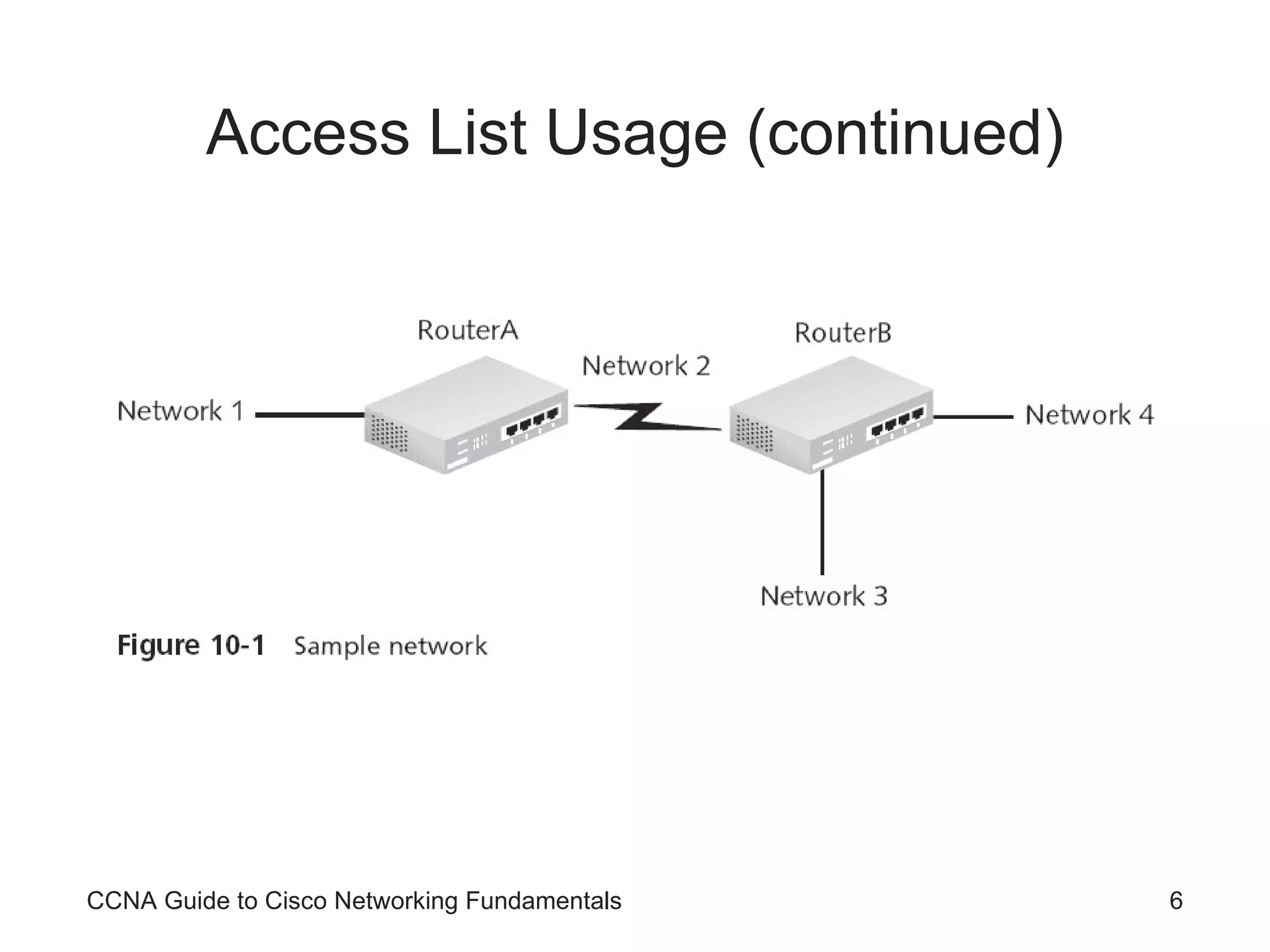
Access List Usage (continued) CCNA Guide to Cisco Networking Fundamentals
Problems with Access Lists Lack of planning is one of the most common problems associated with access lists The need to enter the list sequentially into the router also presents problems You cannot move individual statements once they are entered When making changes, you must remove the list, using the  no access-list [list number]  command, and then retype the commands Access lists begin working the second they are applied to an interface CCNA Guide to Cisco Networking Fundamentals
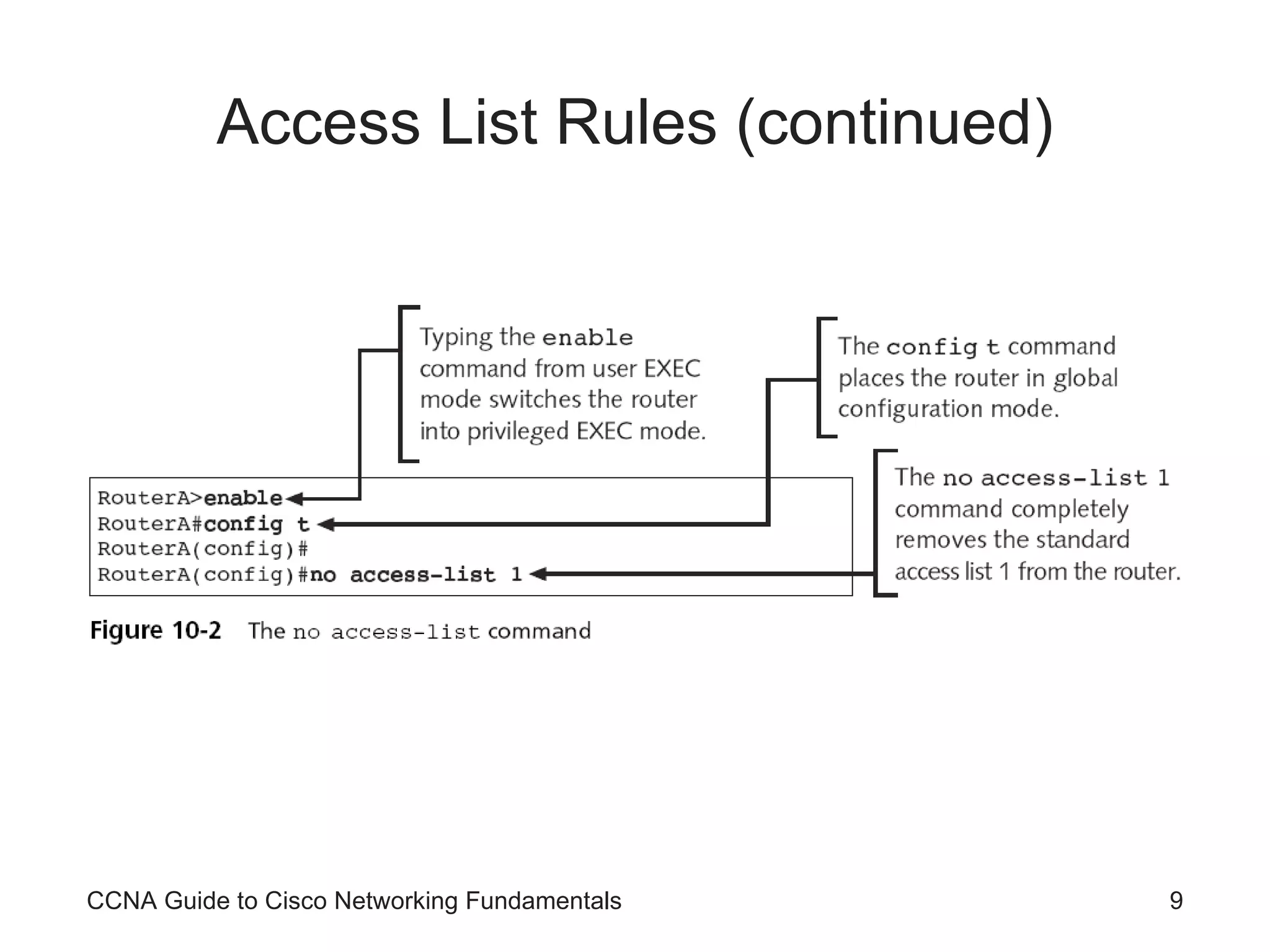
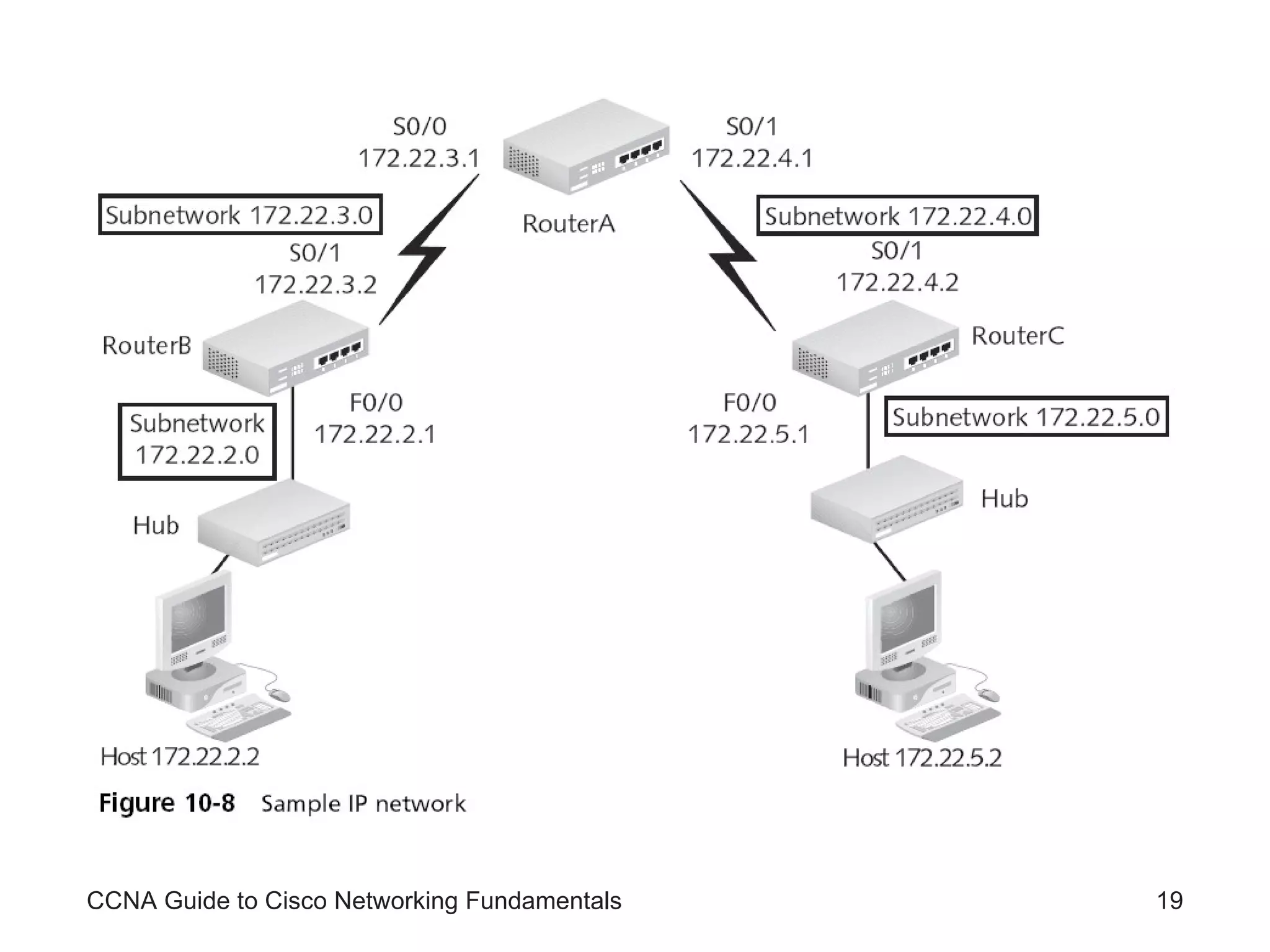
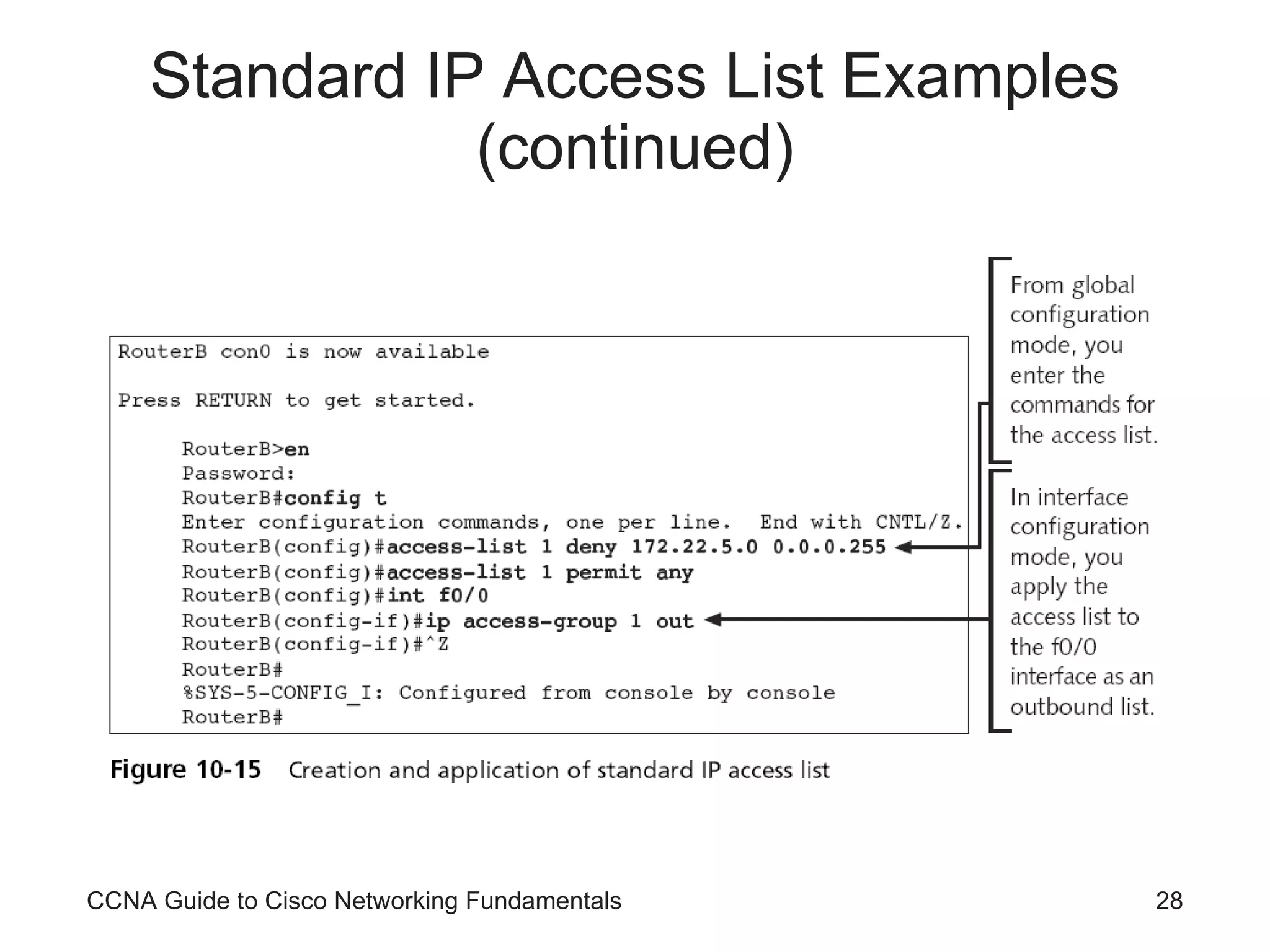
Access List Rules Example of the structure of a standard IP access list: RouterA(config)#access-list 1 deny 172.22.5.2 0.0.0.0 RouterA(config)#access-list 1 deny 172.22.5.3 0.0.0.0 RouterA(config)# access-list 1 permit any Router applies each line in the order in which you type it into the access list The  no access-list  [list #]  command is used to remove an access list CCNA Guide to Cisco Networking Fundamentals
Access List Rules (continued) CCNA Guide to Cisco Networking Fundamentals
Access List Rules (continued) As a general rule, the lines with the most potential matches should be first in the list So that packets will not undergo unnecessary processing You should avoid unnecessarily long access lists After you create access lists, you must apply them to interfaces so they can begin filtering traffic You apply a list as either an outgoing or an incoming filter CCNA Guide to Cisco Networking Fundamentals
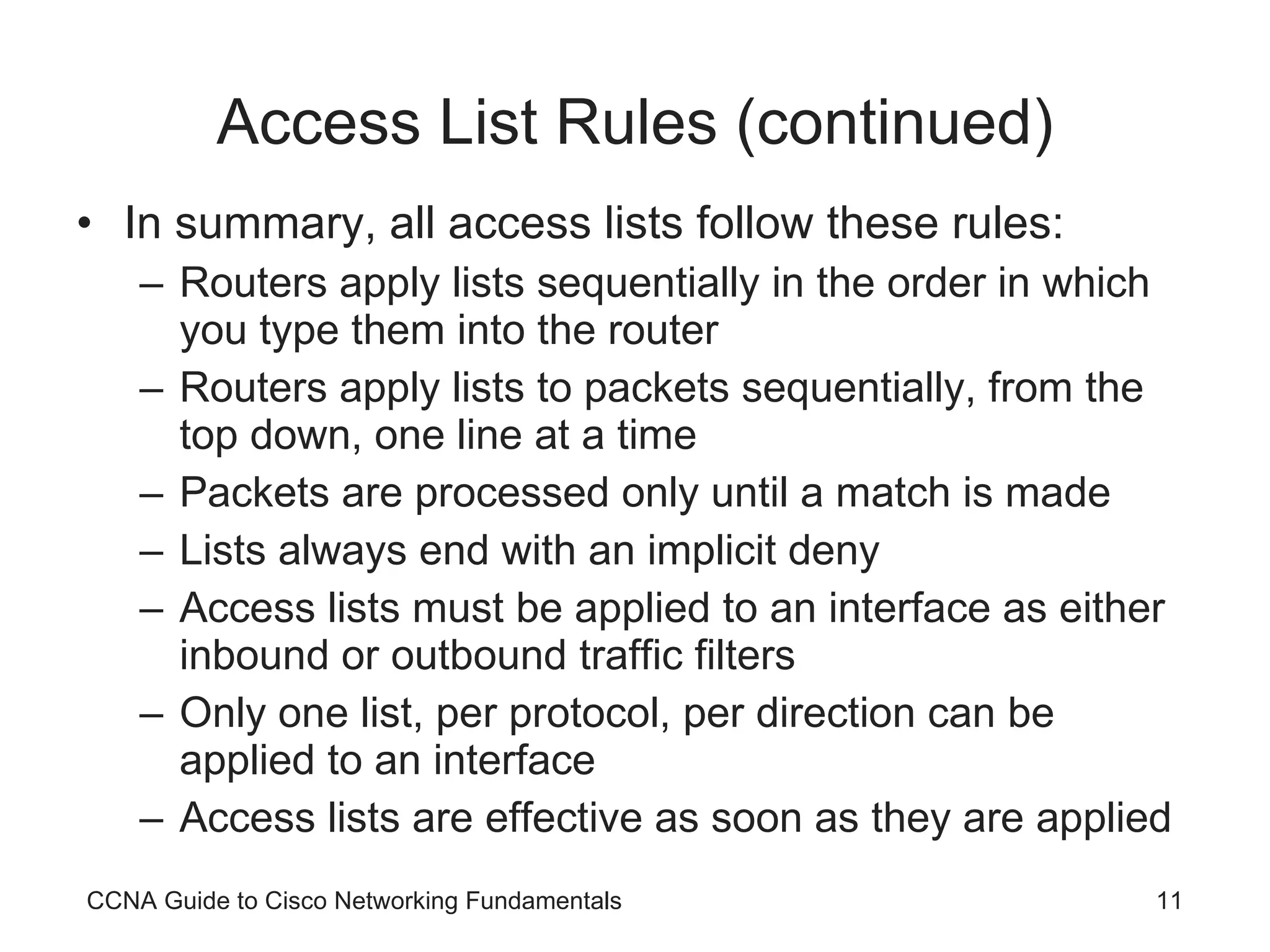
Access List Rules (continued) In summary, all access lists follow these rules: Routers apply lists sequentially in the order in which you type them into the router Routers apply lists to packets sequentially, from the top down, one line at a time Packets are processed only until a match is made Lists always end with an implicit deny Access lists must be applied to an interface as either inbound or outbound traffic filters Only one list, per protocol, per direction can be applied to an interface Access lists are effective as soon as they are applied CCNA Guide to Cisco Networking Fundamentals
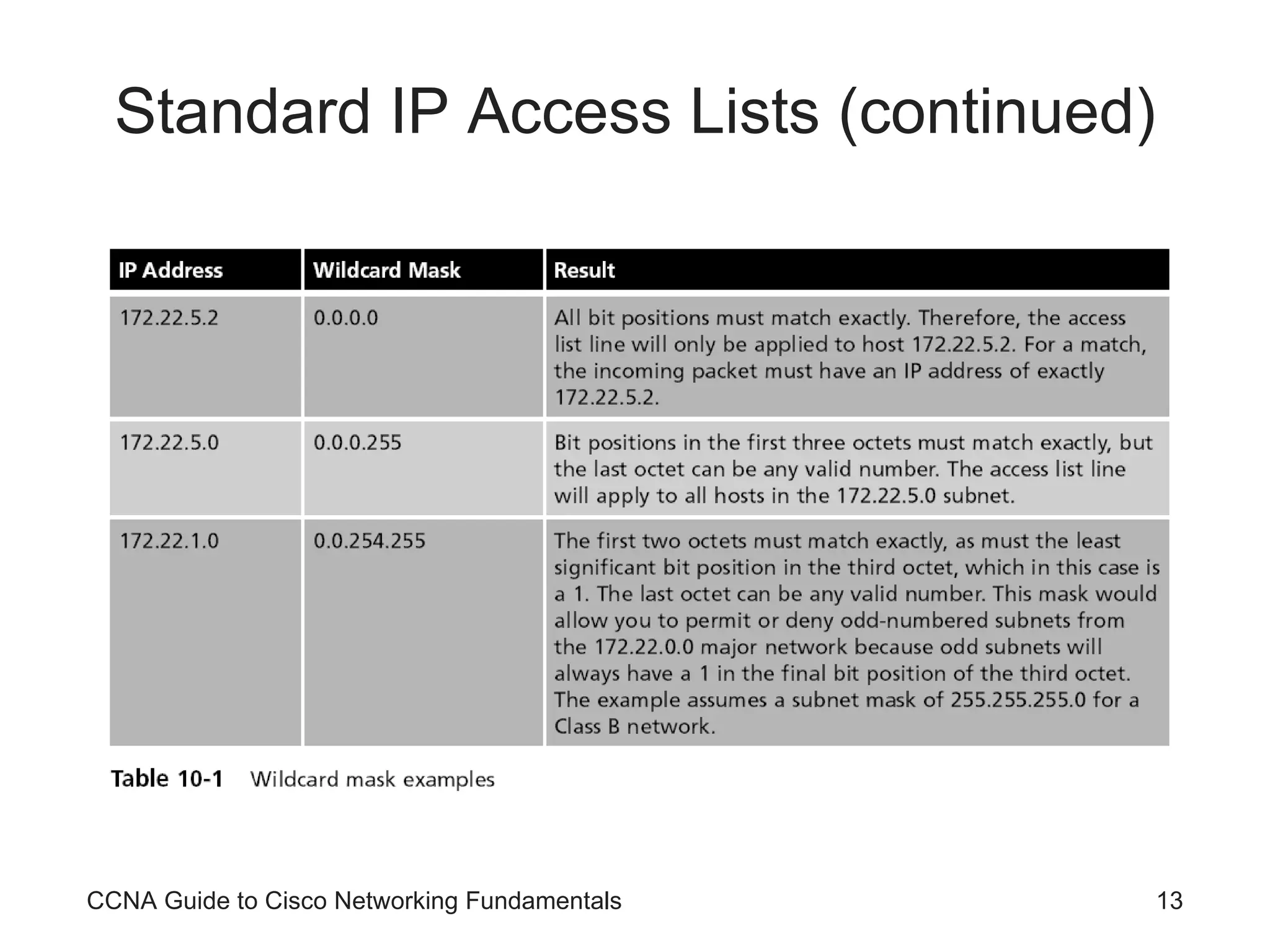
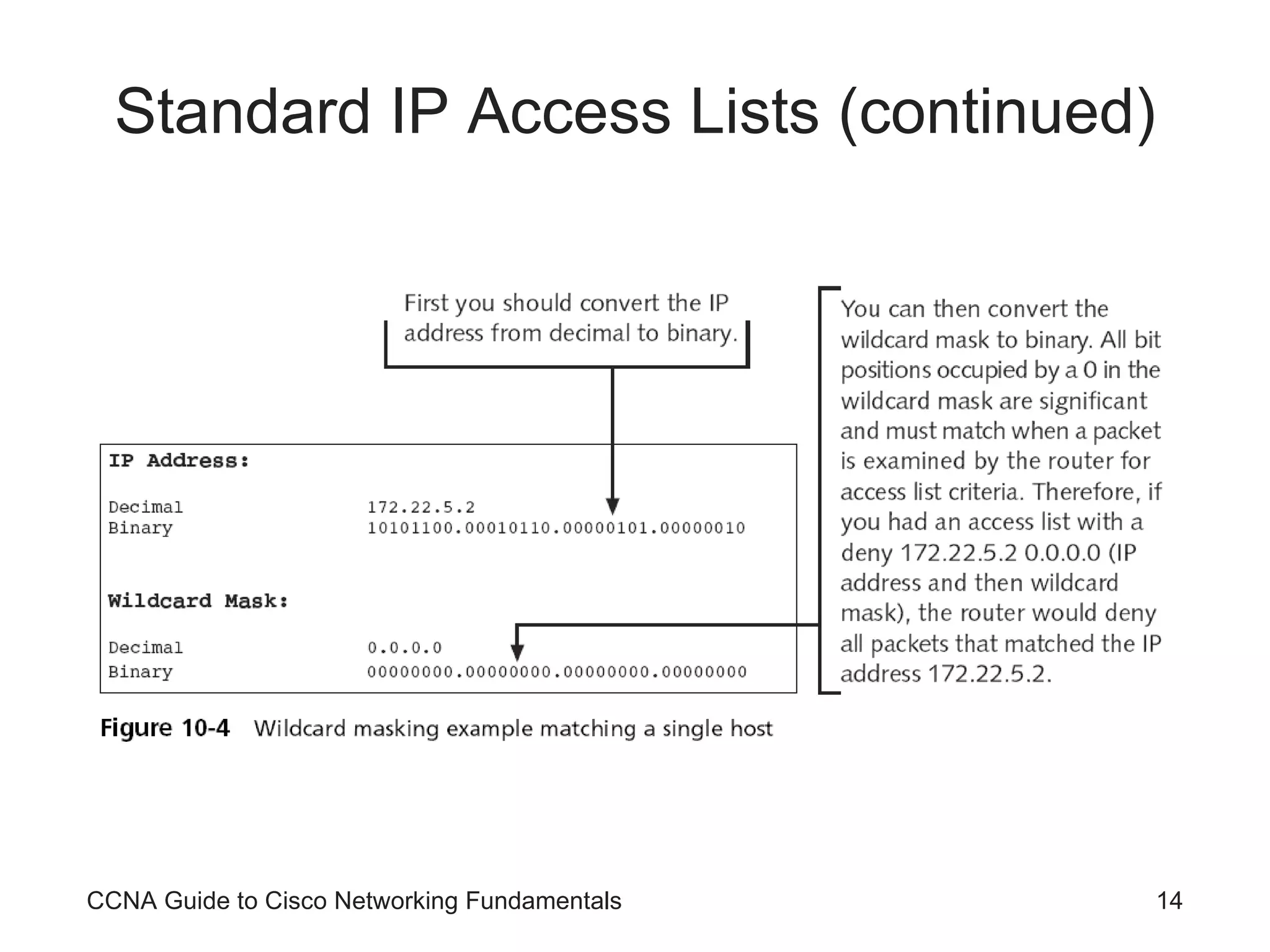
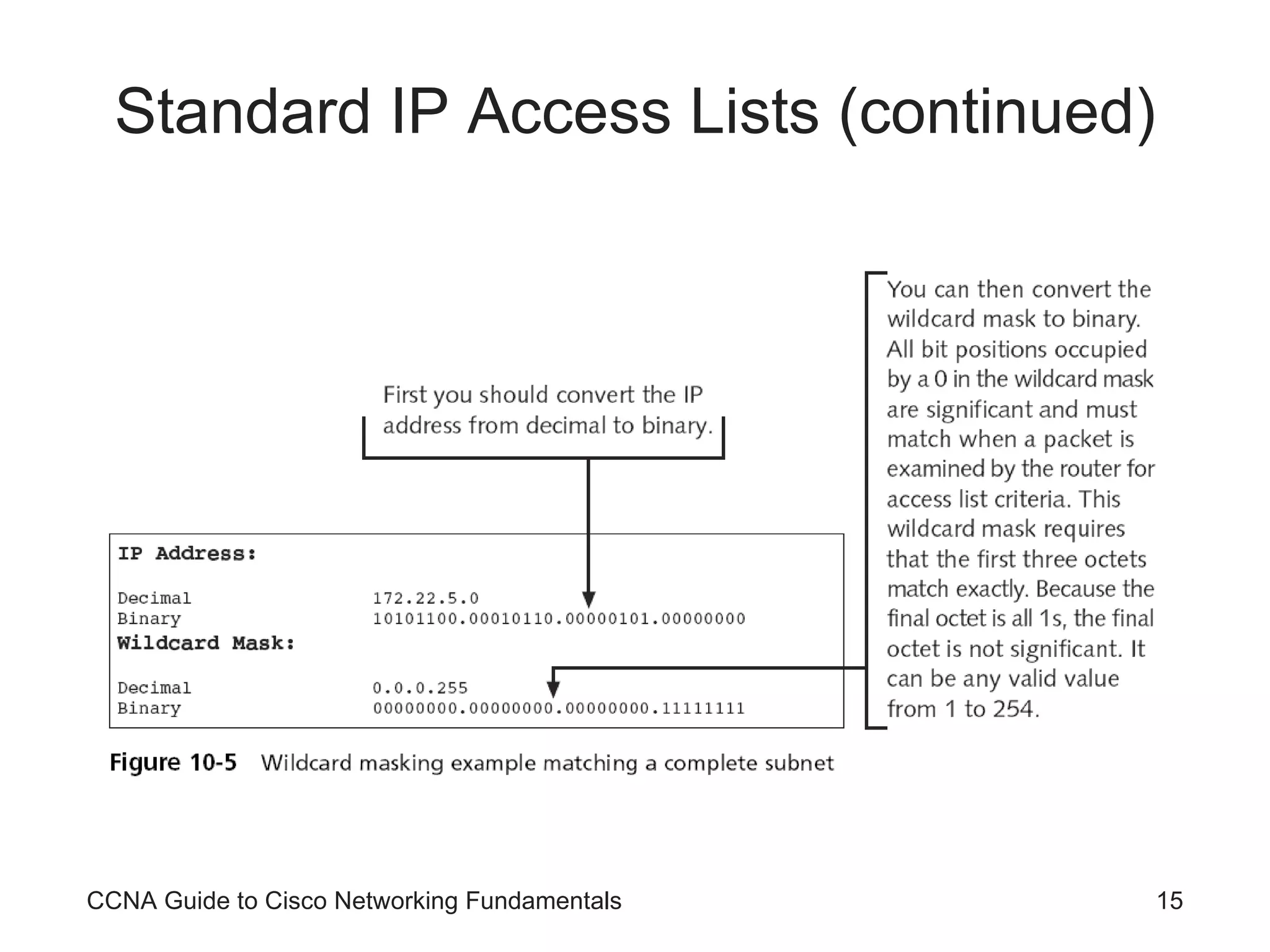
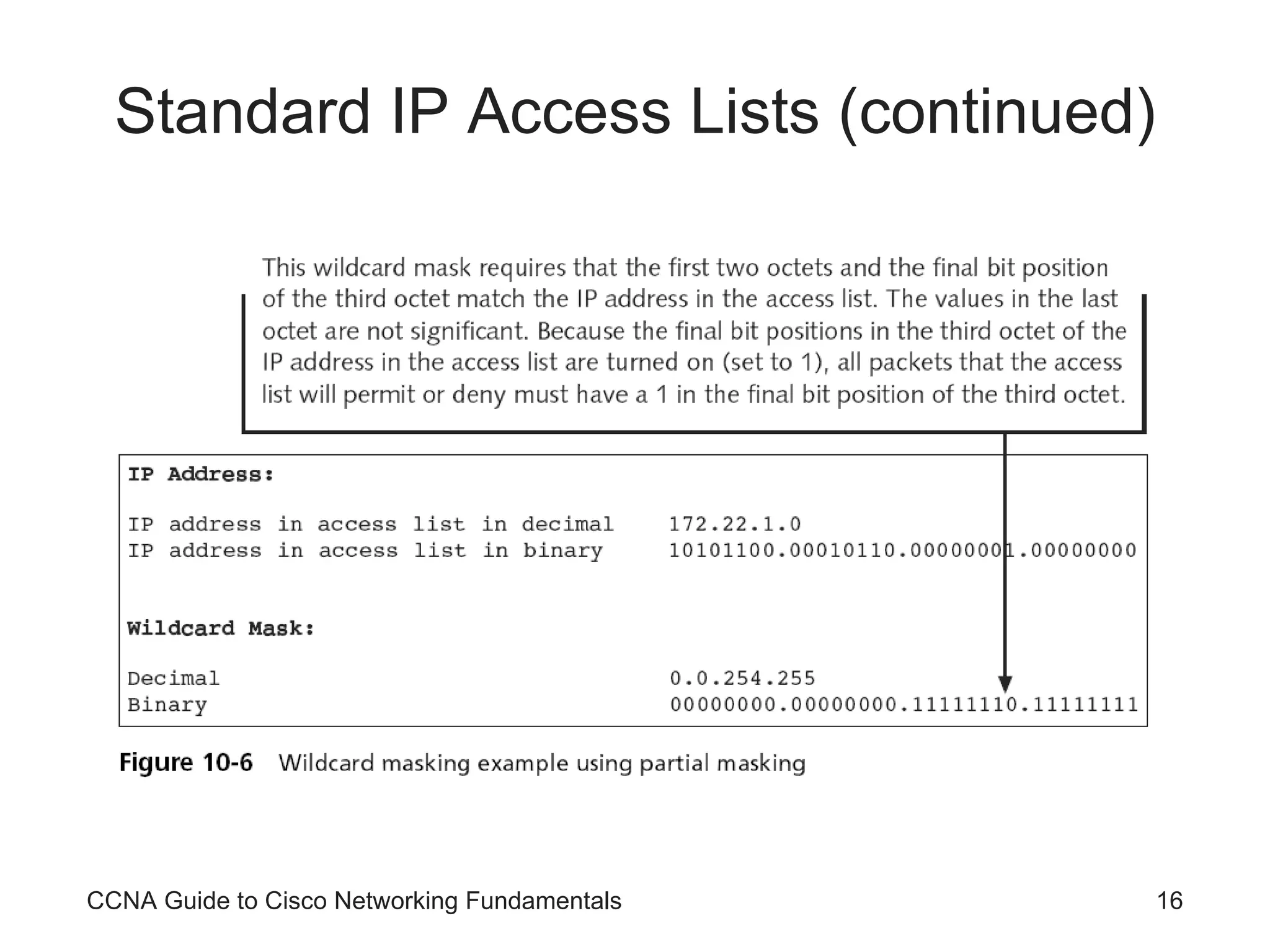
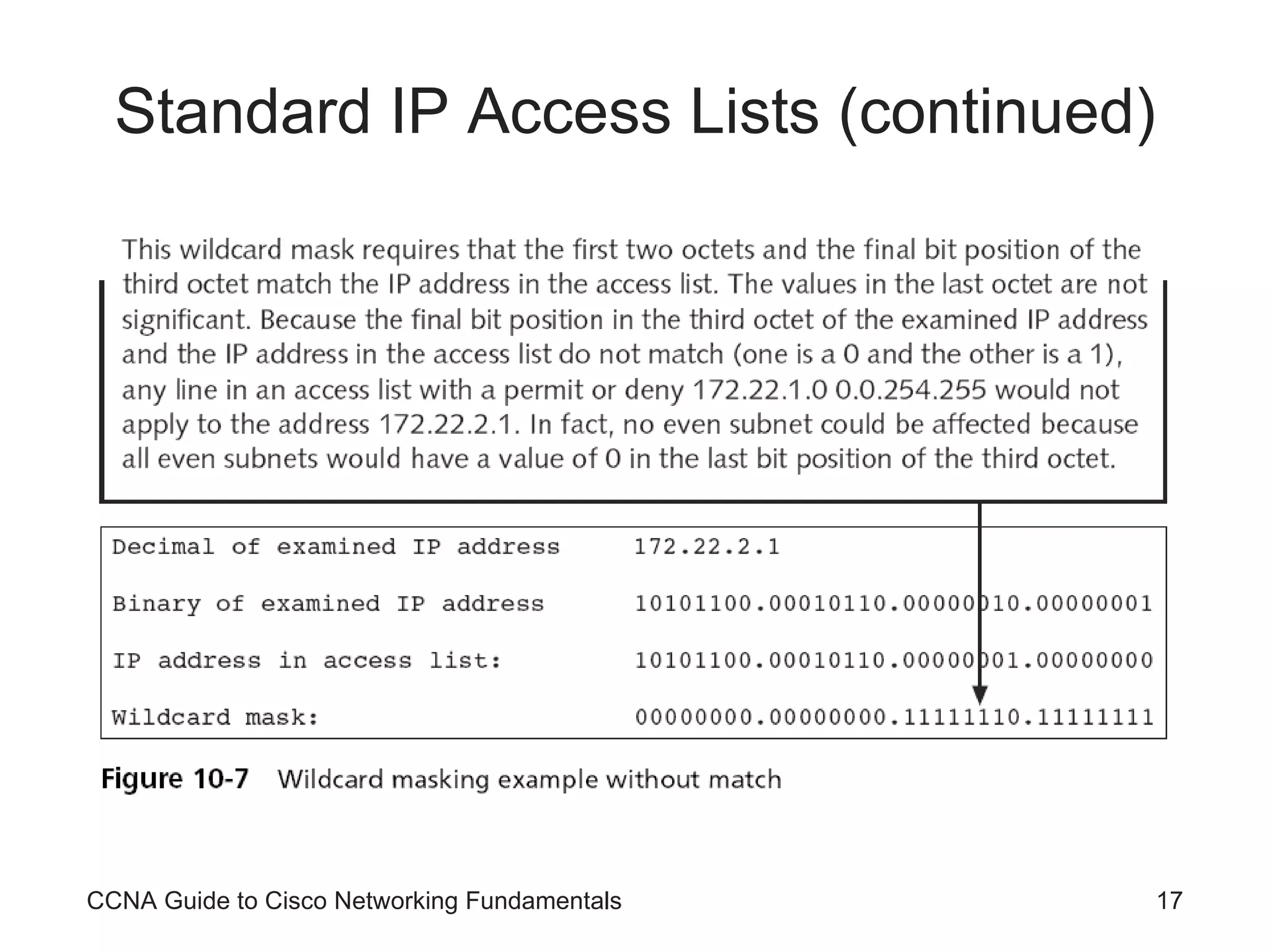
Standard IP Access Lists Standard IP access lists Filter network traffic based on the source IP address only Using a standard IP access list, you can filter traffic by a host IP, subnet, or a network address Configure standard IP access lists: access-list  [list #] [permit|deny] [source address] [source wildcard mask] Routers use wildcards to determine which bits in an address will be significant CCNA Guide to Cisco Networking Fundamentals
Standard IP Access Lists (continued) CCNA Guide to Cisco Networking Fundamentals
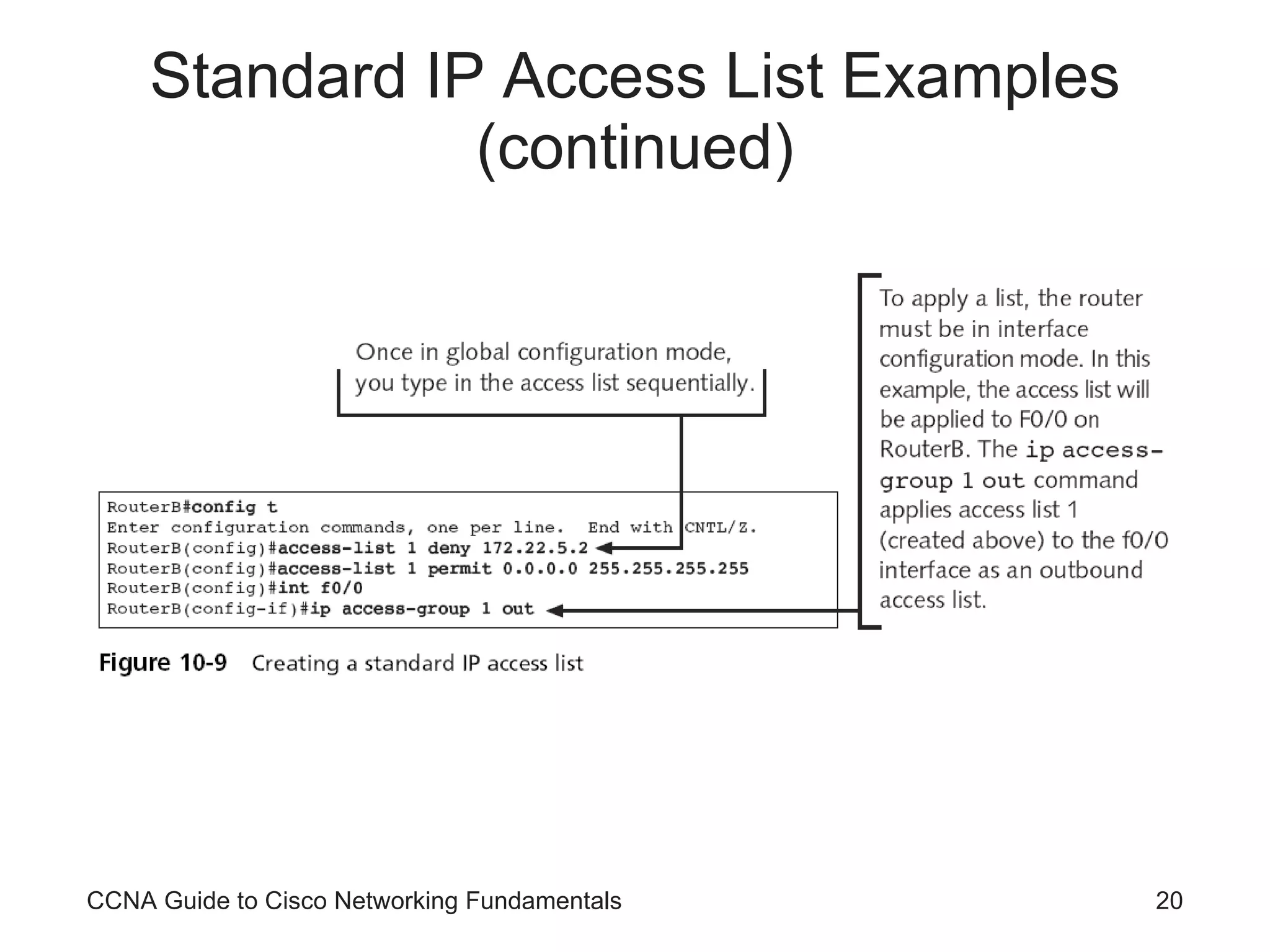
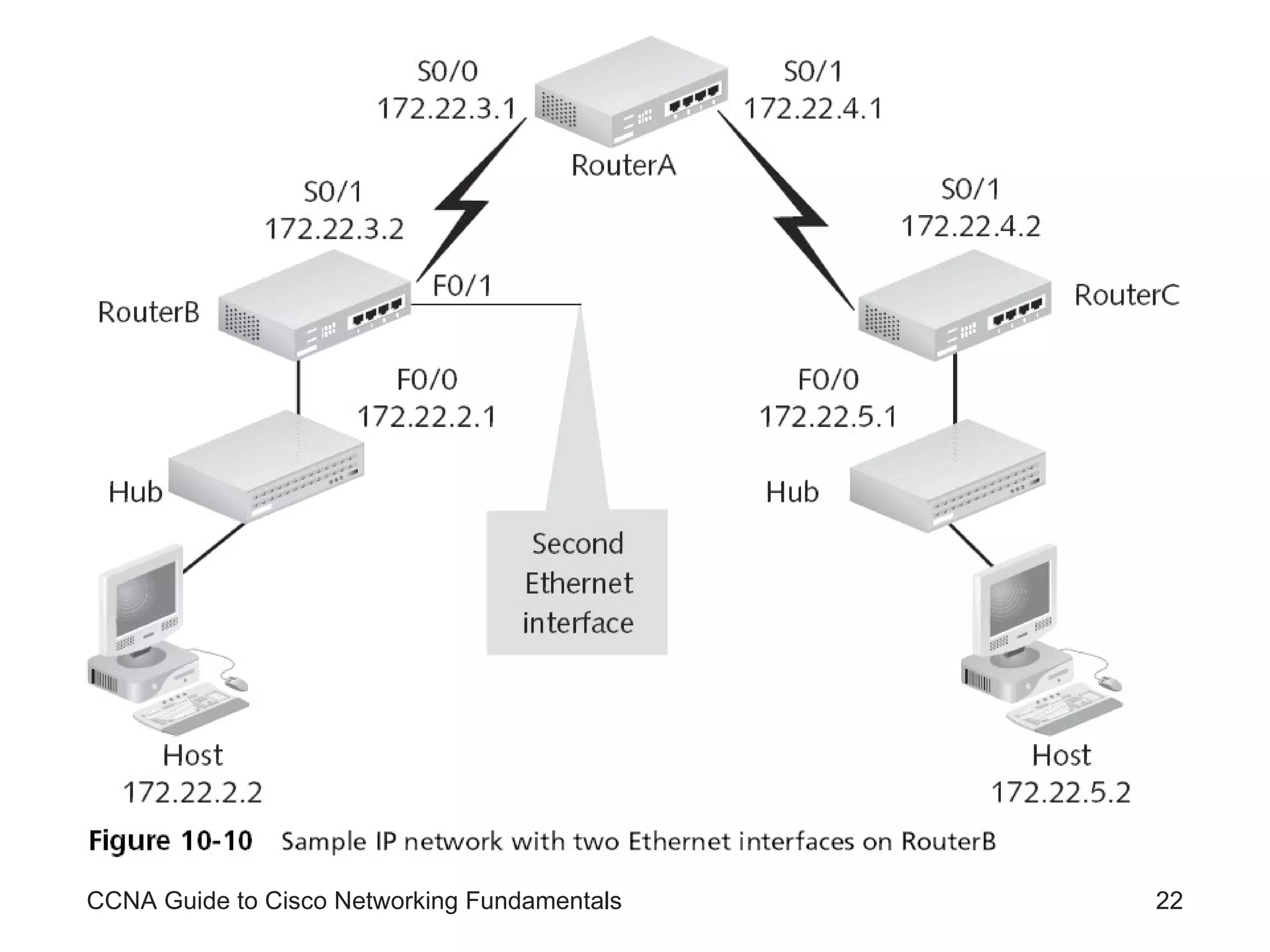
Standard IP Access List Examples Standard IP access lists permit or deny packets based only on the source address Addresses can be a single host address, a subnet address, or a full network address CCNA Guide to Cisco Networking Fundamentals
CCNA Guide to Cisco Networking Fundamentals
Standard IP Access List Examples (continued) CCNA Guide to Cisco Networking Fundamentals
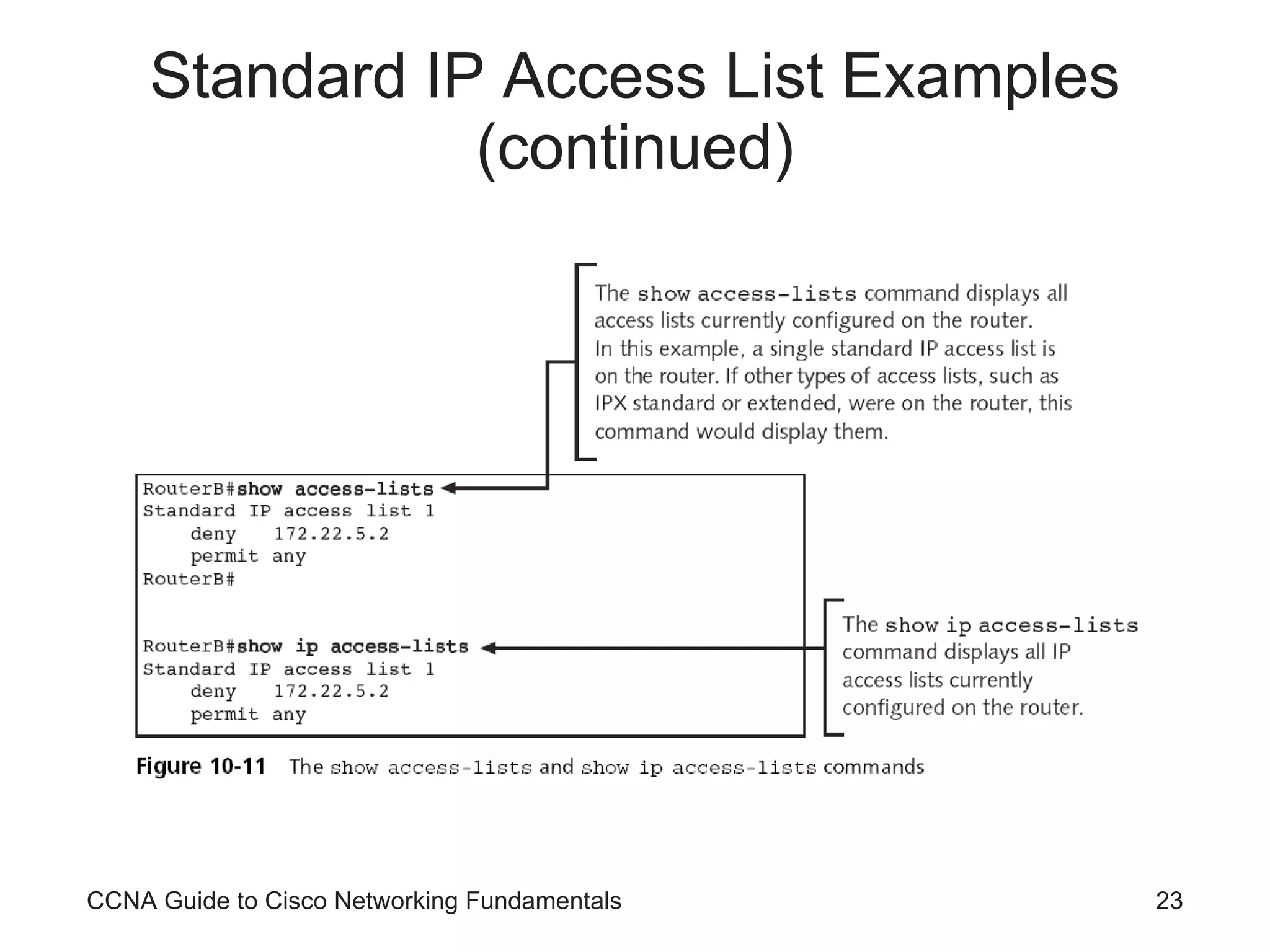
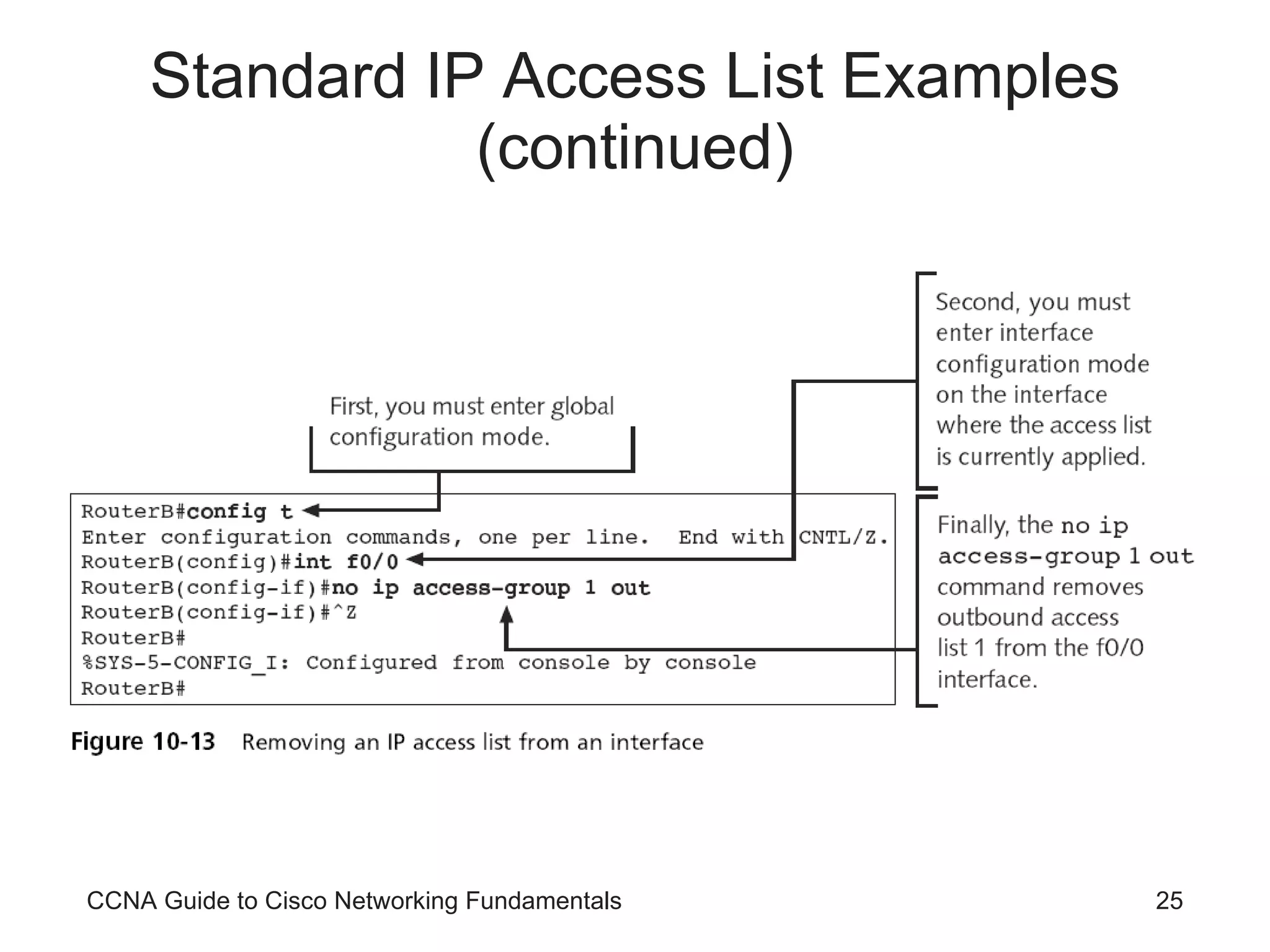
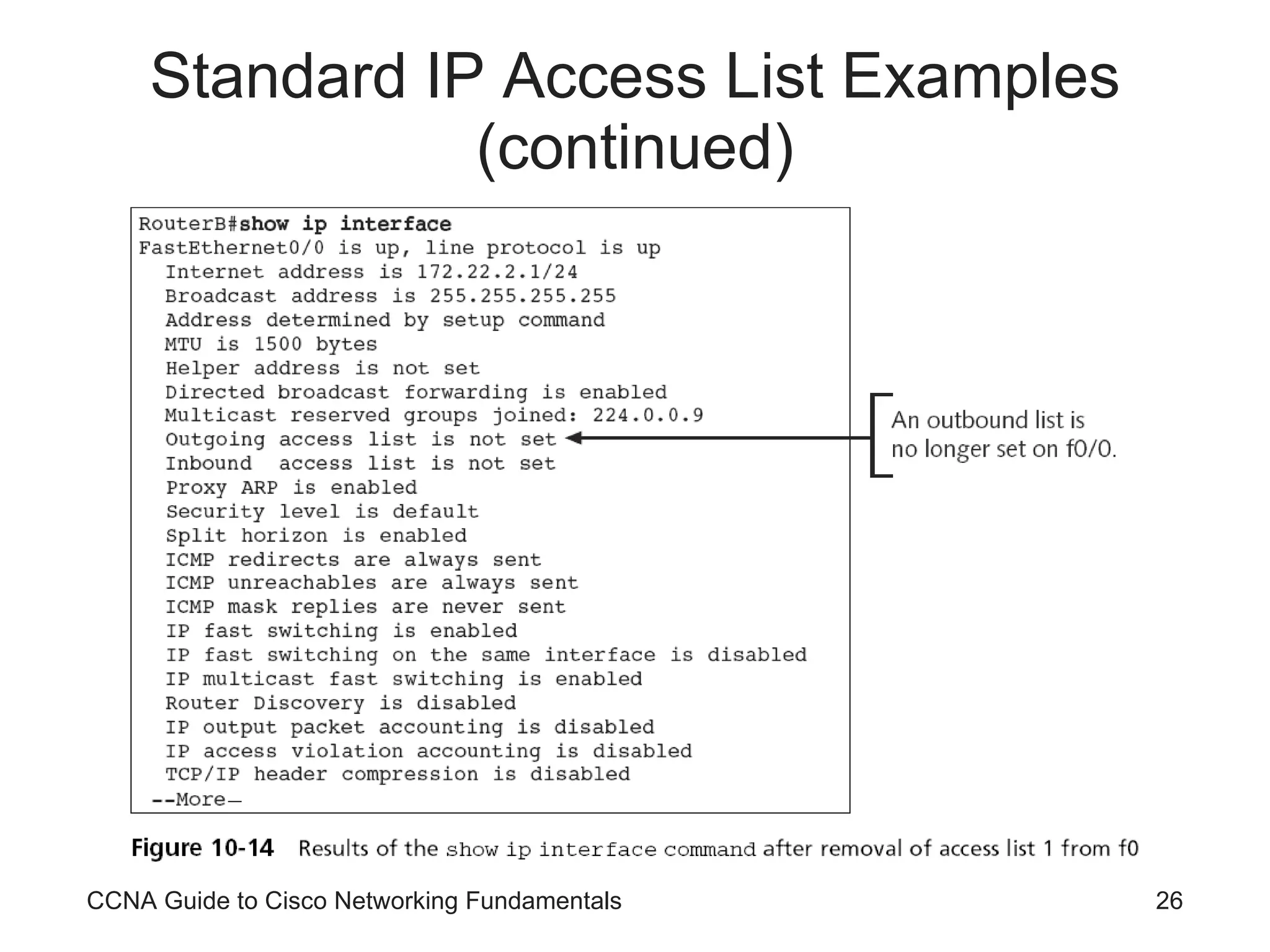
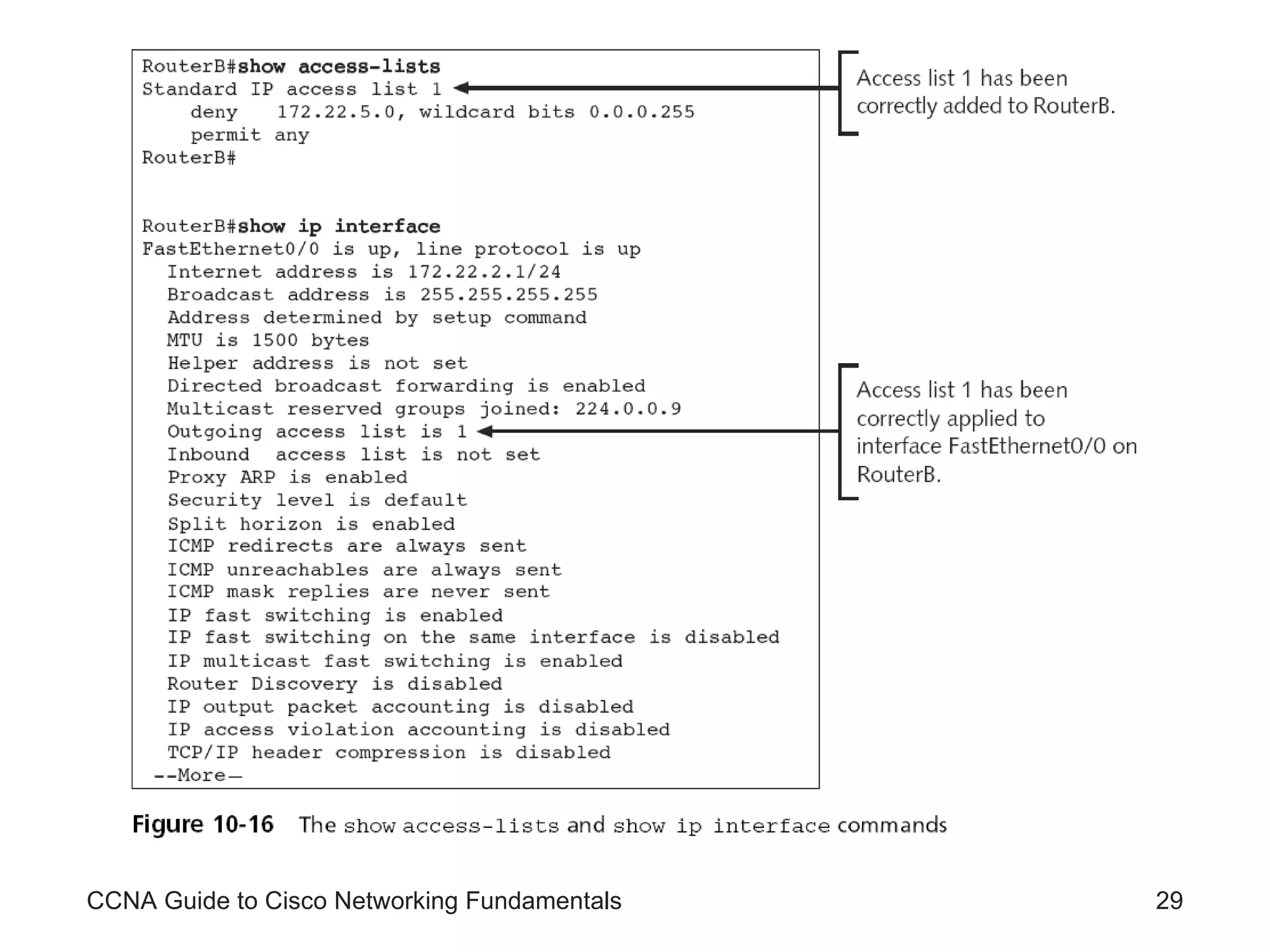
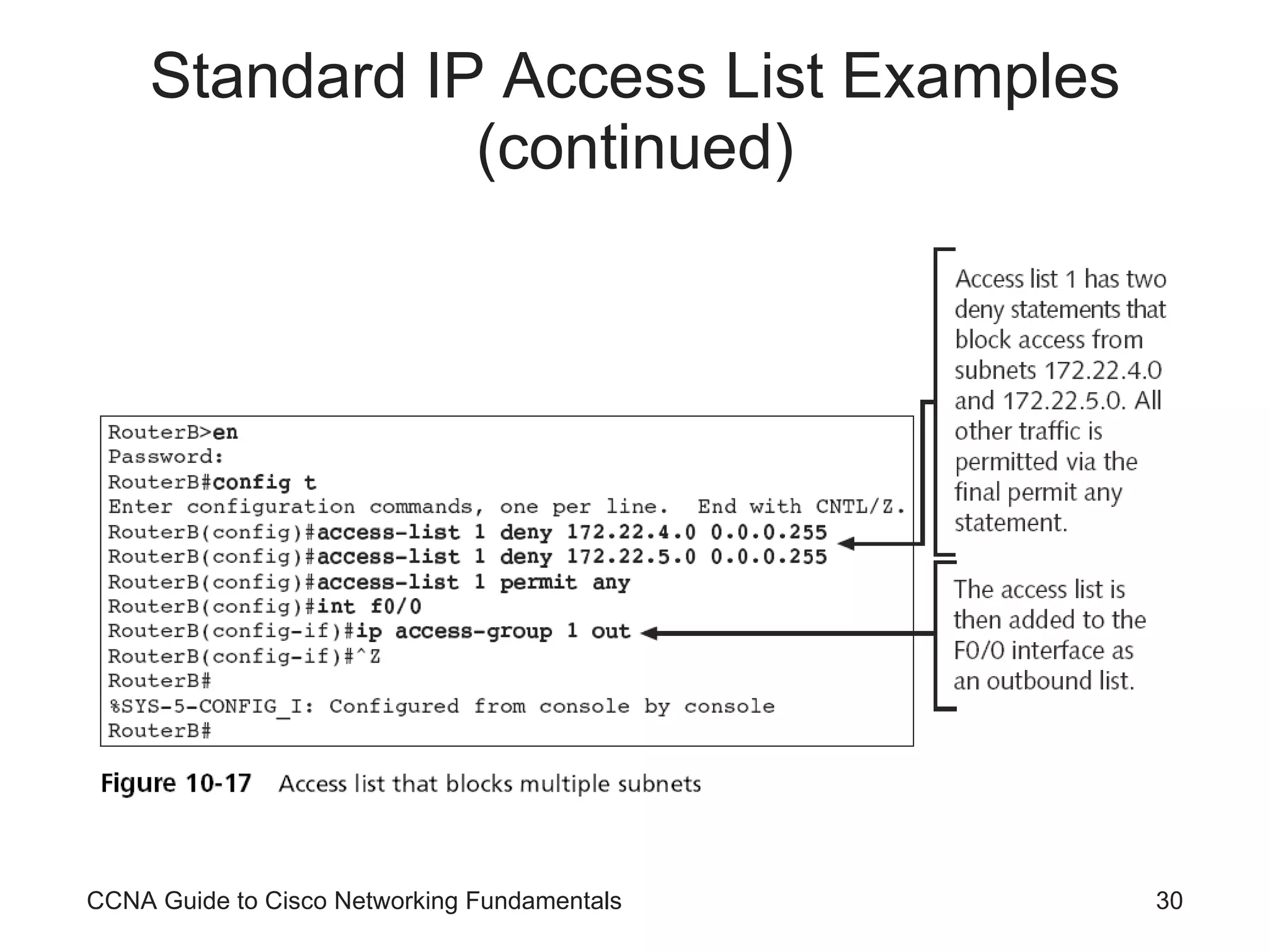
Standard IP Access List Examples (continued) Correct placement of a list is imperative To view the access lists defined on your router, use the  show access-lists  command For IP access lists you could also use the  show ip access-lists  command If you decide that an access list needs to be removed from an interface You can remove it with the  no ip access-group [ list # ]  command CCNA Guide to Cisco Networking Fundamentals
CCNA Guide to Cisco Networking Fundamentals
Standard IP Access List Examples (continued) CCNA Guide to Cisco Networking Fundamentals
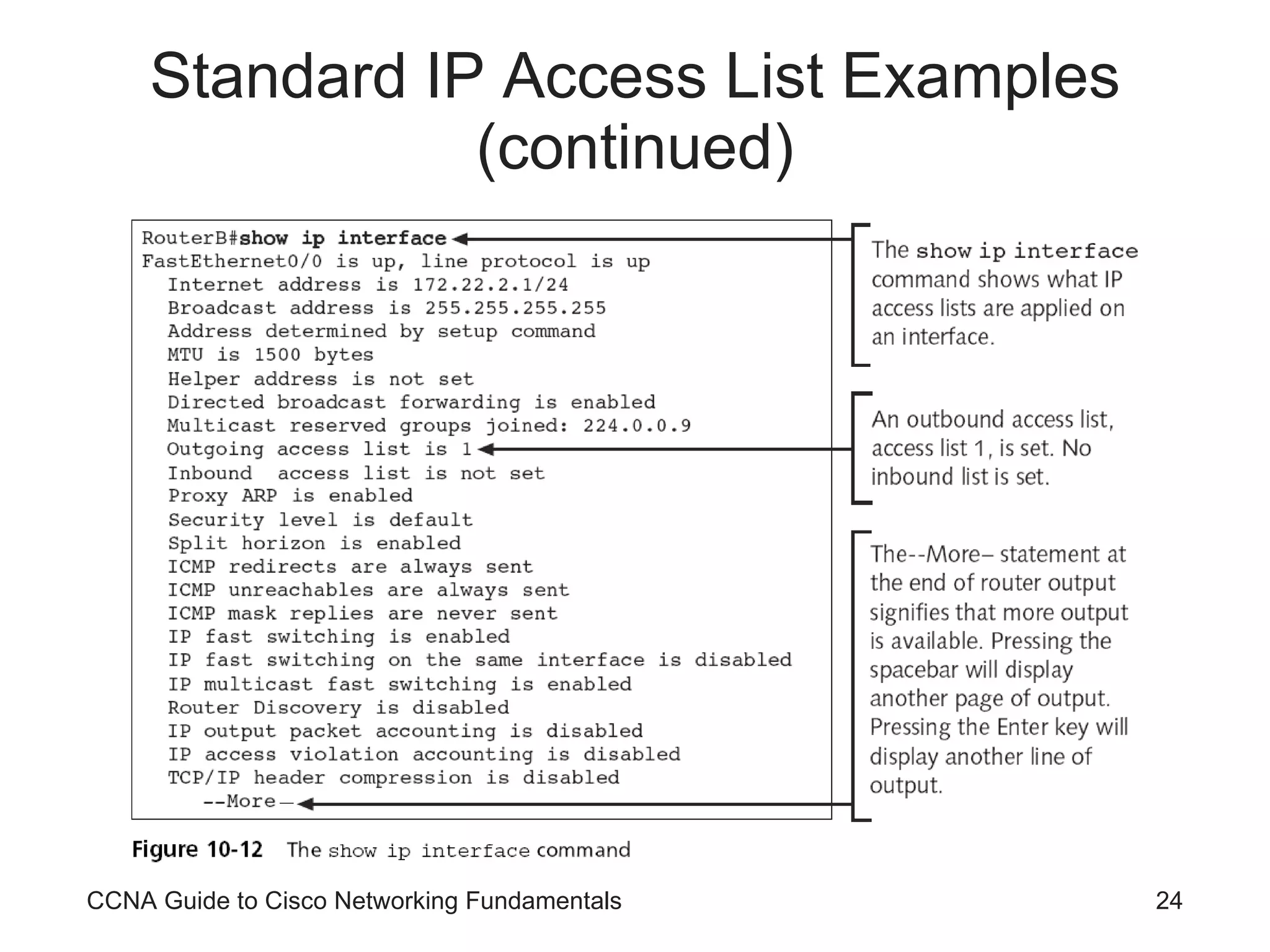
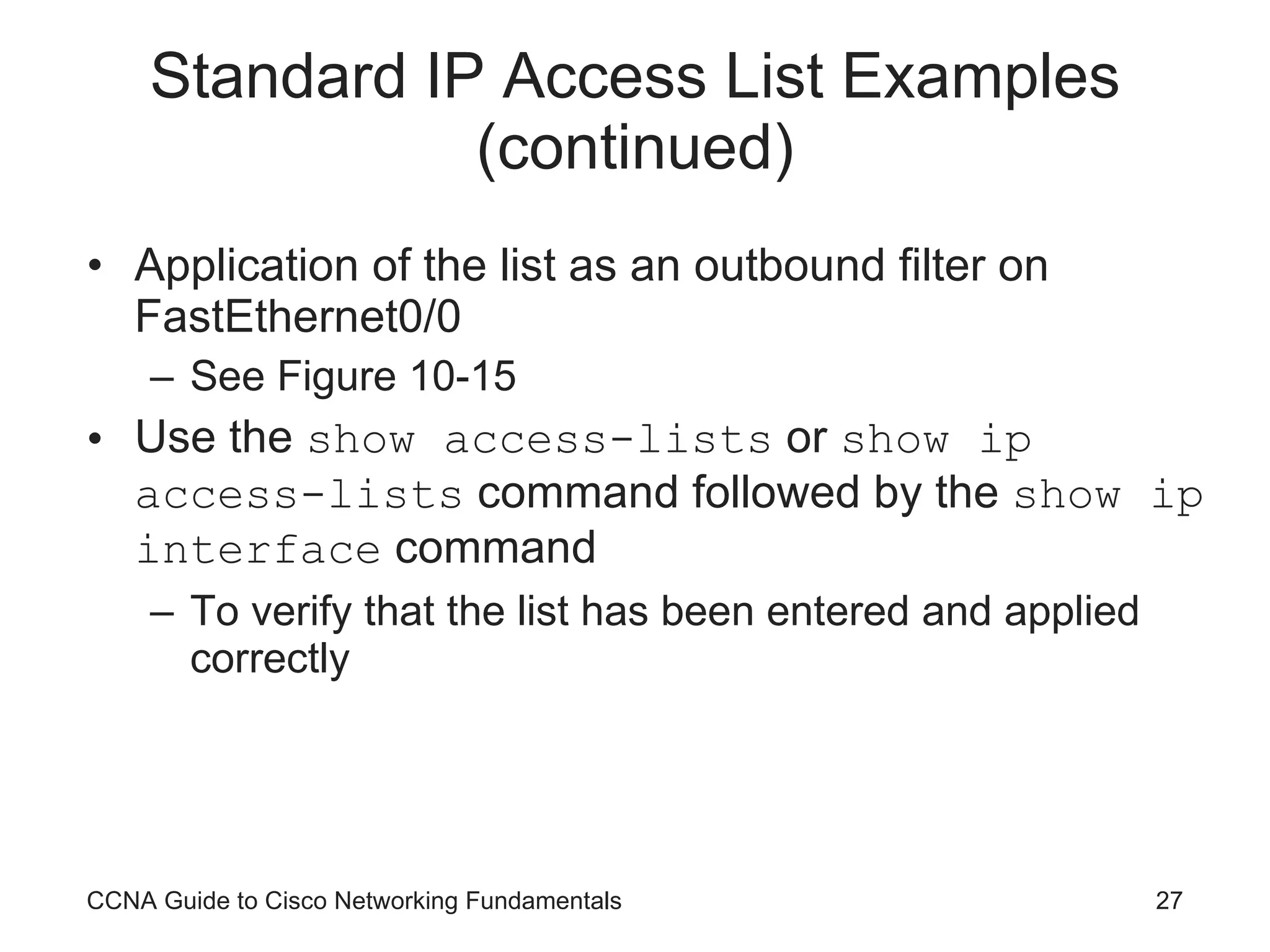
Standard IP Access List Examples (continued) Application of the list as an outbound filter on FastEthernet0/0 See Figure 10-15 Use the  show access-lists  or  show ip access-lists  command followed by the  show ip interface  command To verify that the list has been entered and applied correctly CCNA Guide to Cisco Networking Fundamentals
Standard IP Access List Examples (continued) CCNA Guide to Cisco Networking Fundamentals
CCNA Guide to Cisco Networking Fundamentals
Standard IP Access List Examples (continued) CCNA Guide to Cisco Networking Fundamentals
Monitoring Standard IP Access Lists Three main commands are available for monitoring access lists on your router show access-lists show ip access-lists show interfaces  or  show ip interface Use the  no access-list  [list #]  command to remove the list Use the  no ip accessgroup  [list #][direction]  command to remove the application of the list CCNA Guide to Cisco Networking Fundamentals
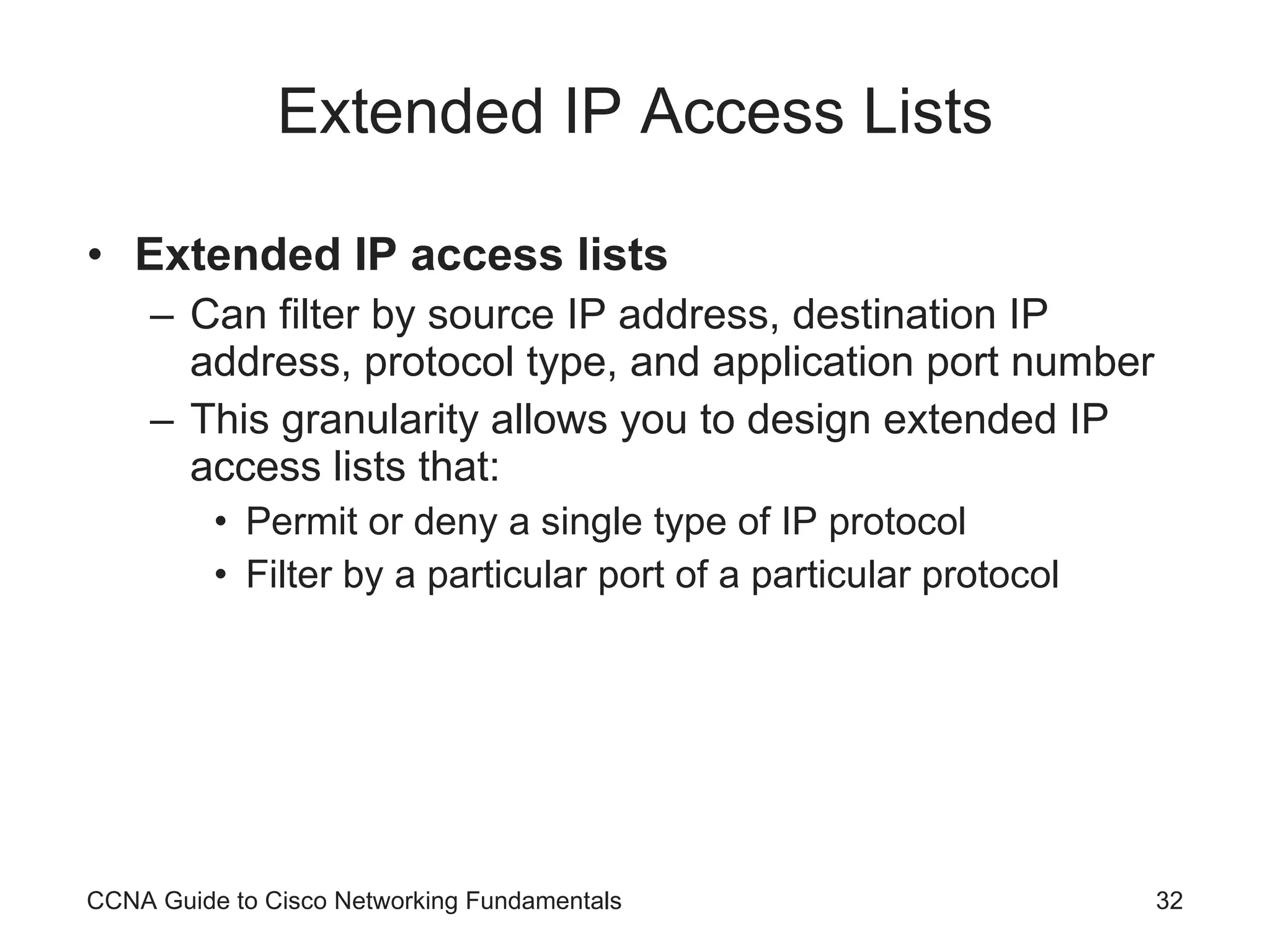
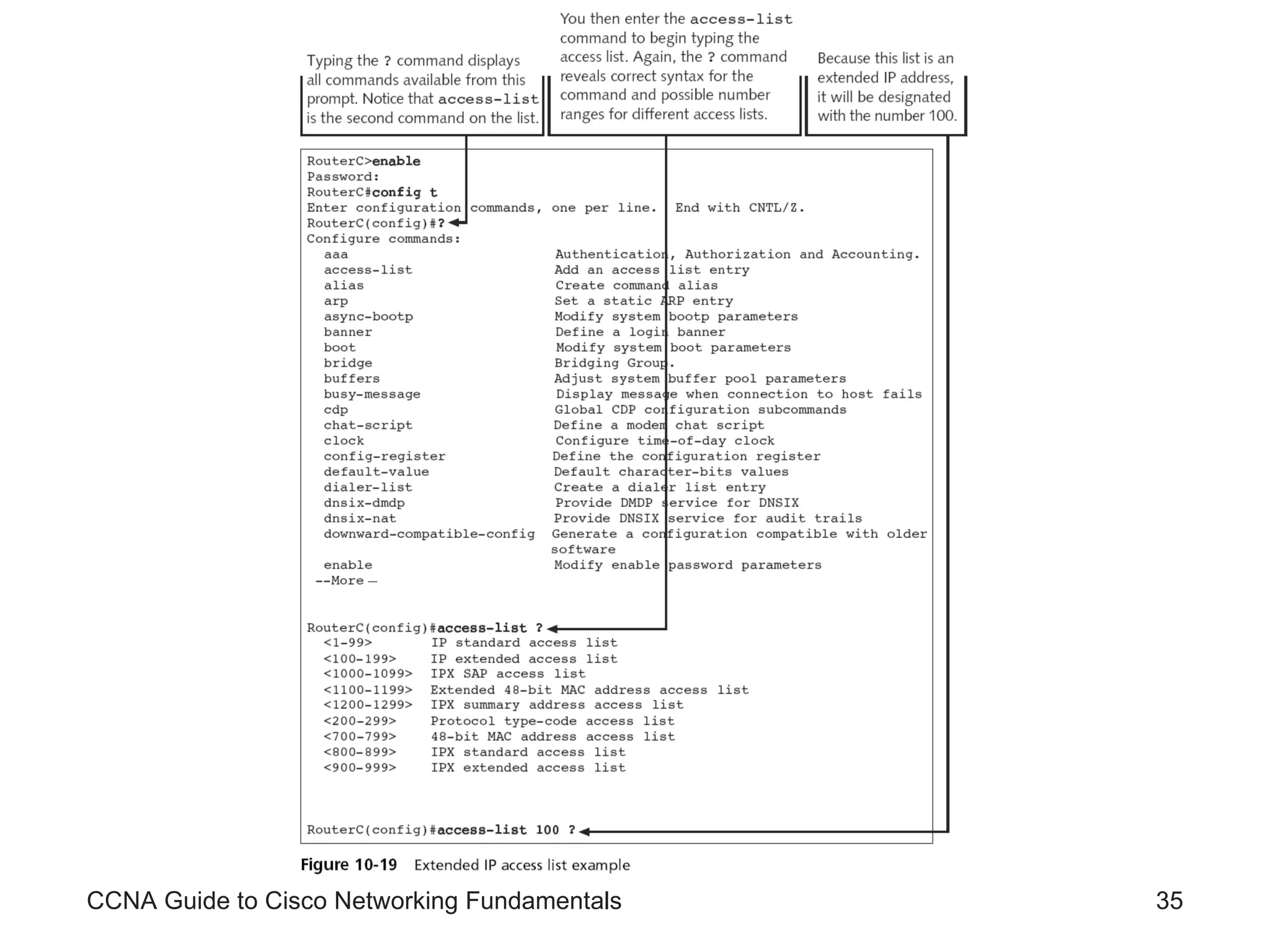
Extended IP Access Lists Extended IP access lists Can filter by source IP address, destination IP address, protocol type, and application port number This granularity allows you to design extended IP access lists that: Permit or deny a single type of IP protocol Filter by a particular port of a particular protocol CCNA Guide to Cisco Networking Fundamentals
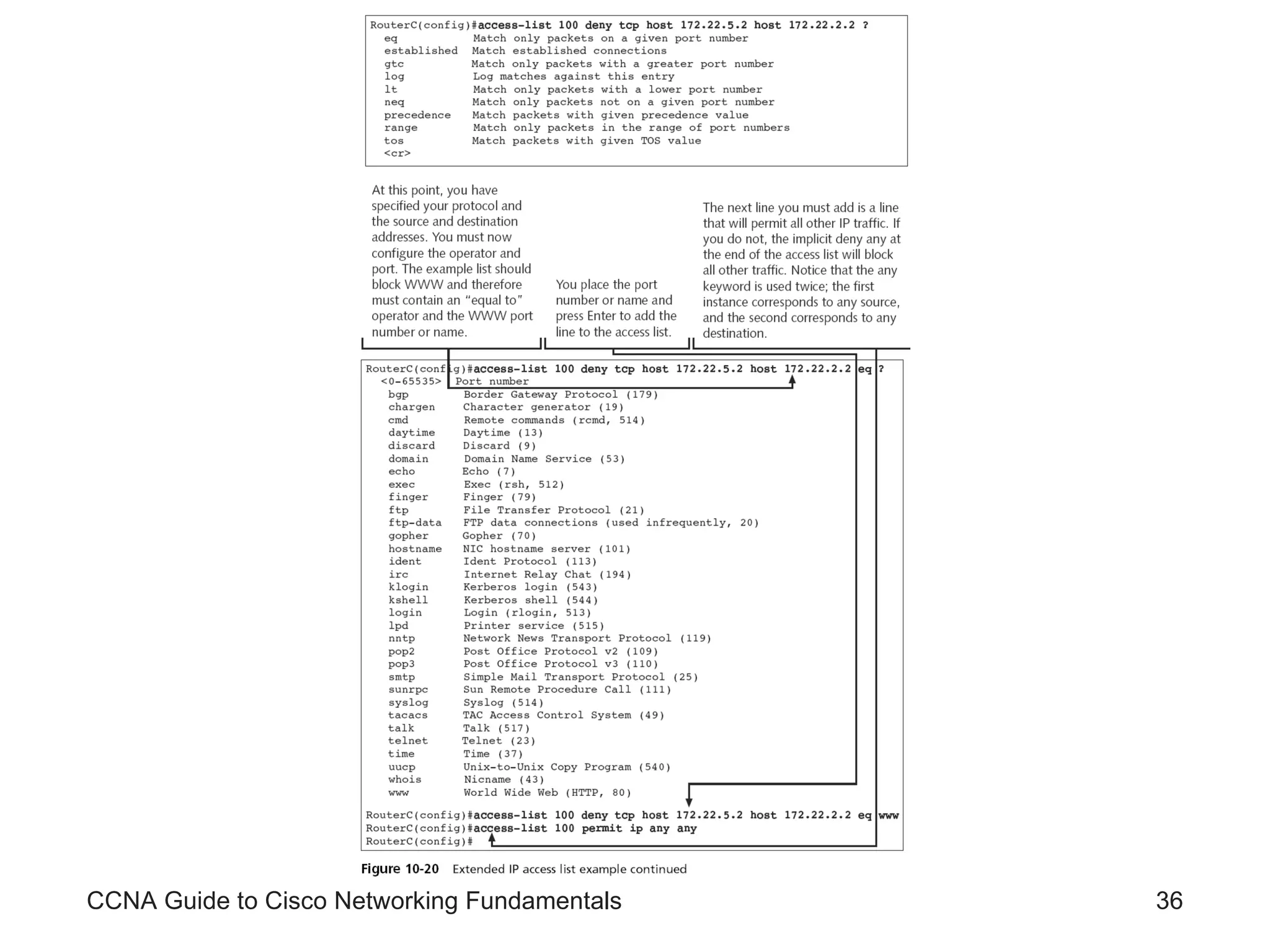
Extended IP Access Lists (continued) To configure extended IP access lists, you must create the list and then apply it to an interface using the following syntax access-list  [list #] [permit|deny] [protocol] [source IP address] [source wildcard mask] [operator] [port] [destination IP address] [destination wildcard mask] [operator] [port] [log] CCNA Guide to Cisco Networking Fundamentals
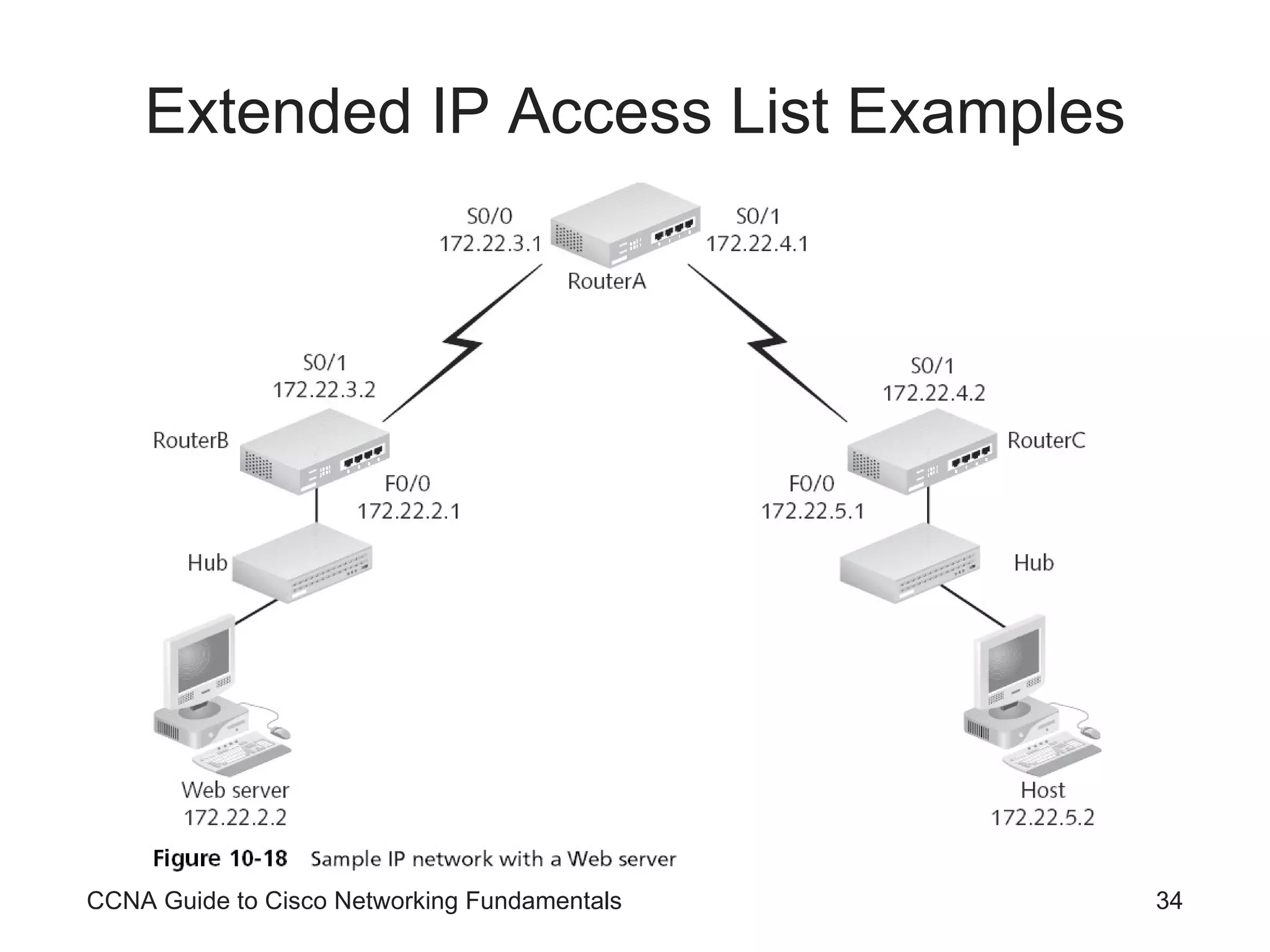
Extended IP Access List Examples CCNA Guide to Cisco Networking Fundamentals
CCNA Guide to Cisco Networking Fundamentals
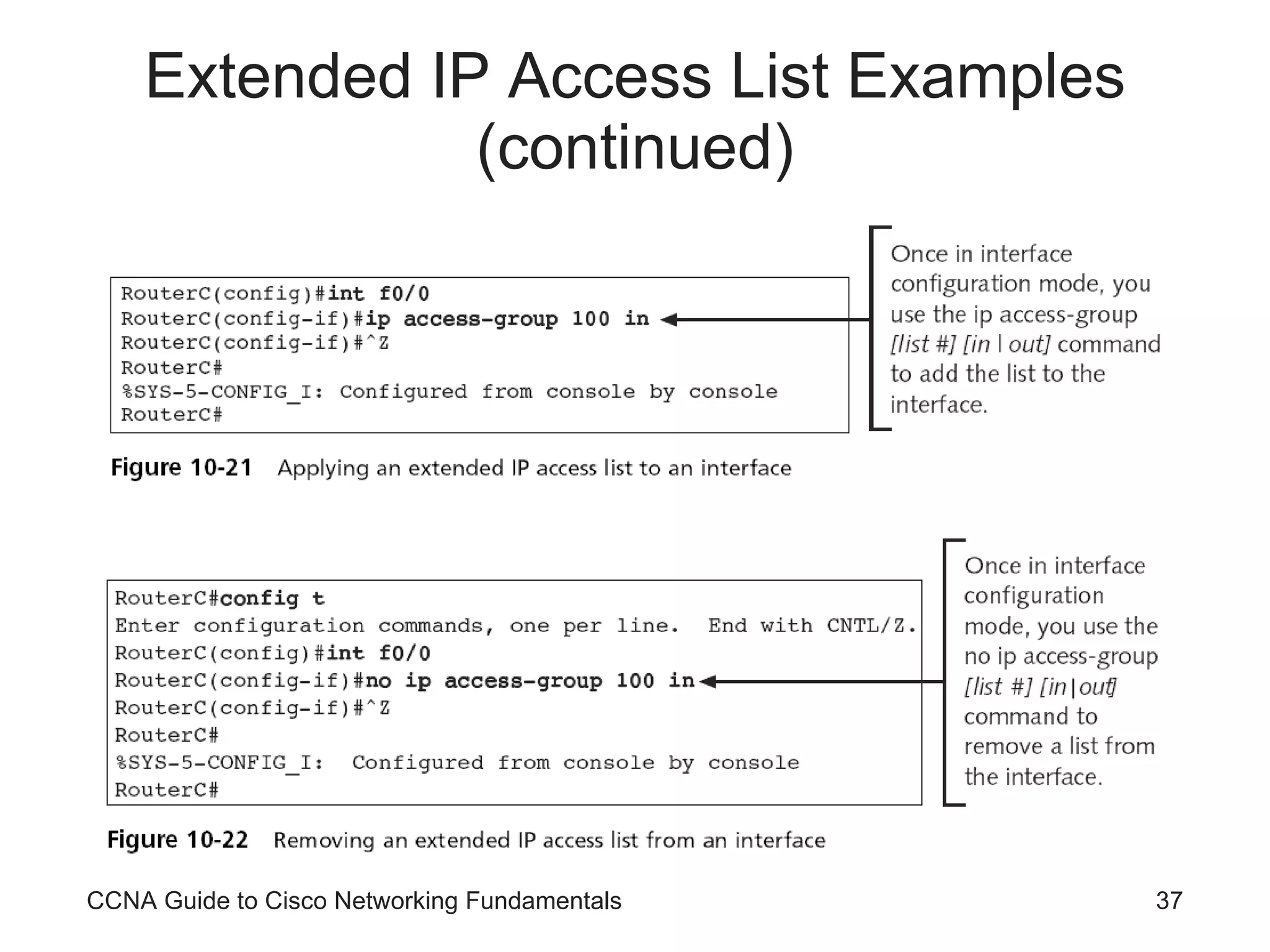
Extended IP Access List Examples (continued) CCNA Guide to Cisco Networking Fundamentals
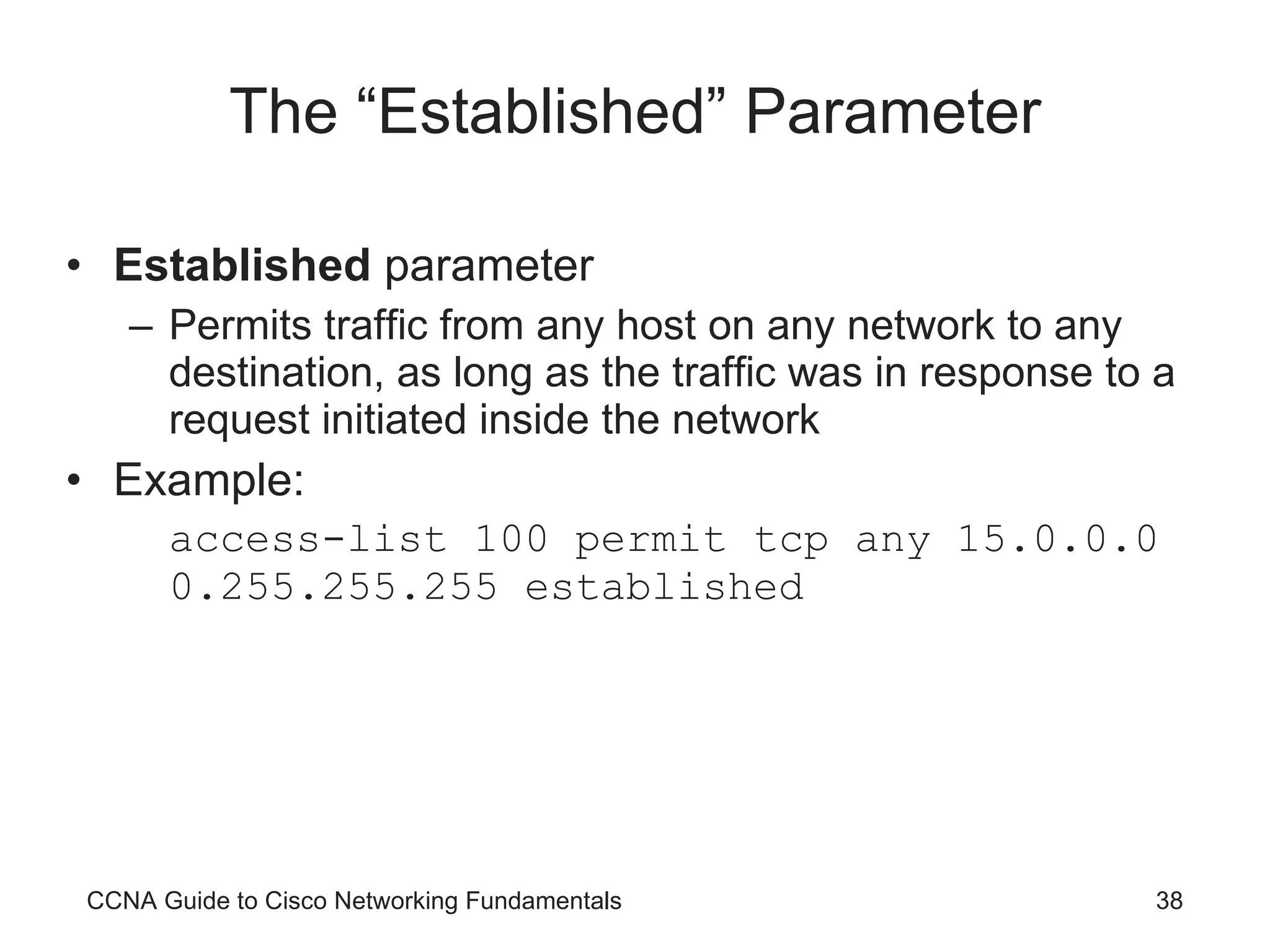
The “Established” Parameter Established  parameter Permits traffic from any host on any network to any destination, as long as the traffic was in response to a request initiated inside the network Example: access-list 100 permit tcp any 15.0.0.0 0.255.255.255 established CCNA Guide to Cisco Networking Fundamentals
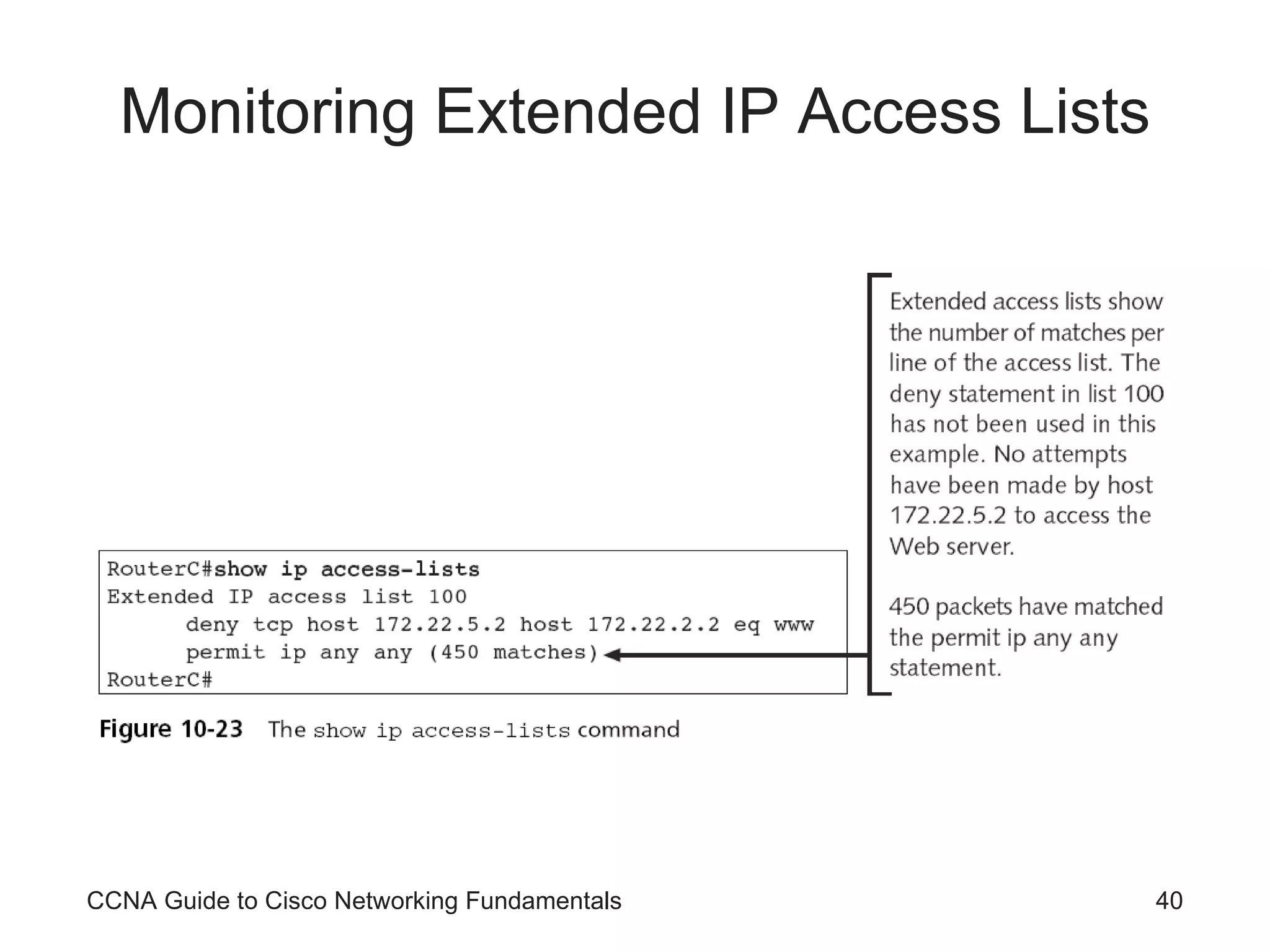
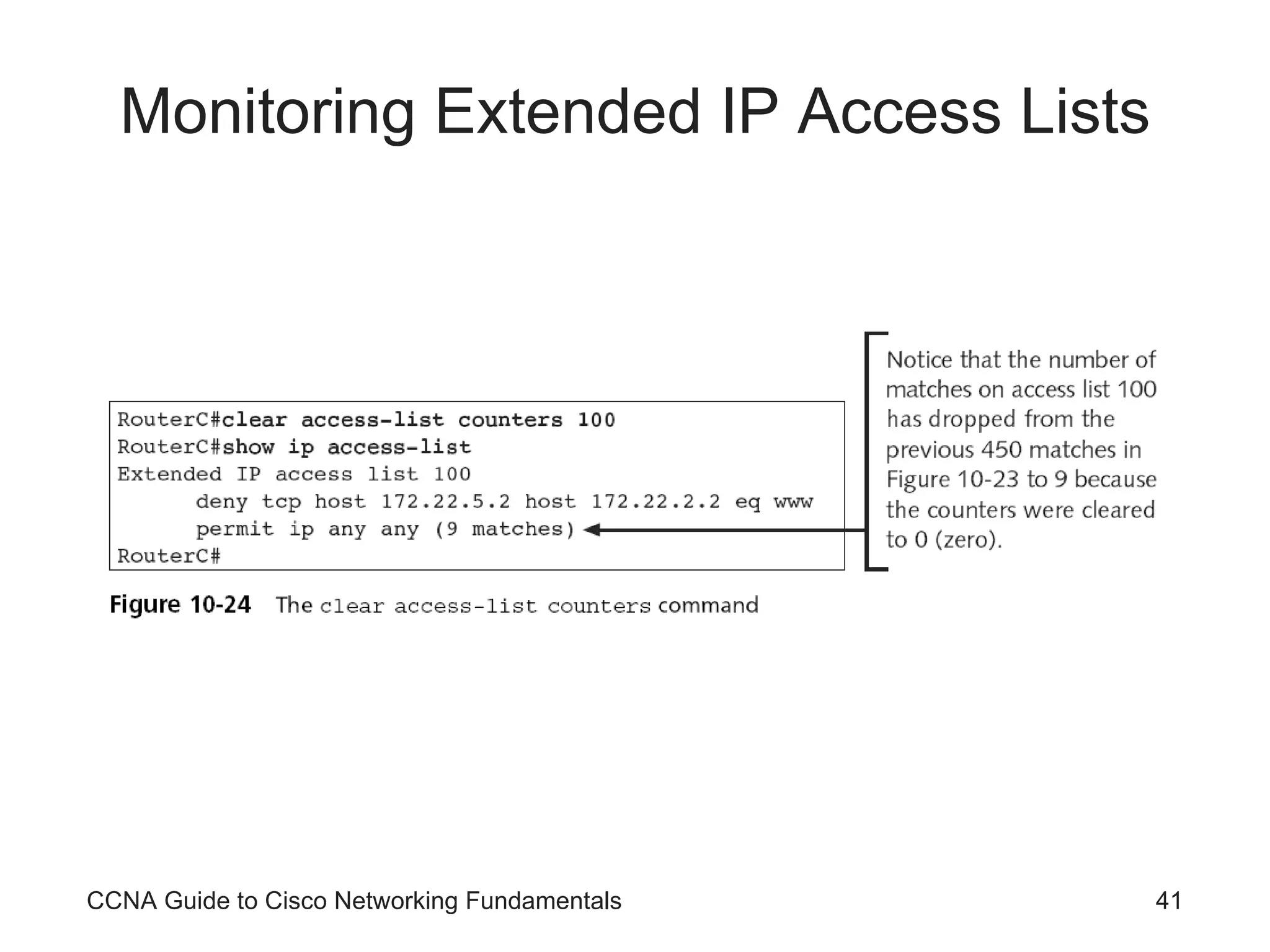
Monitoring Extended IP Access Lists The same commands used to monitor standard IP access lists are used to monitor extended IP access lists Extended IP lists keep track of the number of packets that pass each line of an access list The  clear access-list counters  [list #]  command clears the counters The  no access-list  [list#]  command removes the list  The  no ip access-group  [list#] [direction]  command removes the application of the list CCNA Guide to Cisco Networking Fundamentals
Monitoring Extended IP Access Lists CCNA Guide to Cisco Networking Fundamentals
Using Named Lists Named access lists In Cisco IOS versions 11.2 and above, names instead of numbers can be used to identify lists To name a standard IP access list, use the following syntax: RouterC(config)#ip access-list standard  [name] To name an extended IP access list, use the following syntax: RouterC(config)#ip access-list extended  [name] CCNA Guide to Cisco Networking Fundamentals
Using Named Lists (continued) Once the list is named, the  permit  or  deny  statement is entered The commands follow the same syntax as unnamed lists The beginning part of the command is not included To apply a standard IP named list to an interface, the syntax is: RouterC(config-if)#ip access-group  [name] [in | out] CCNA Guide to Cisco Networking Fundamentals
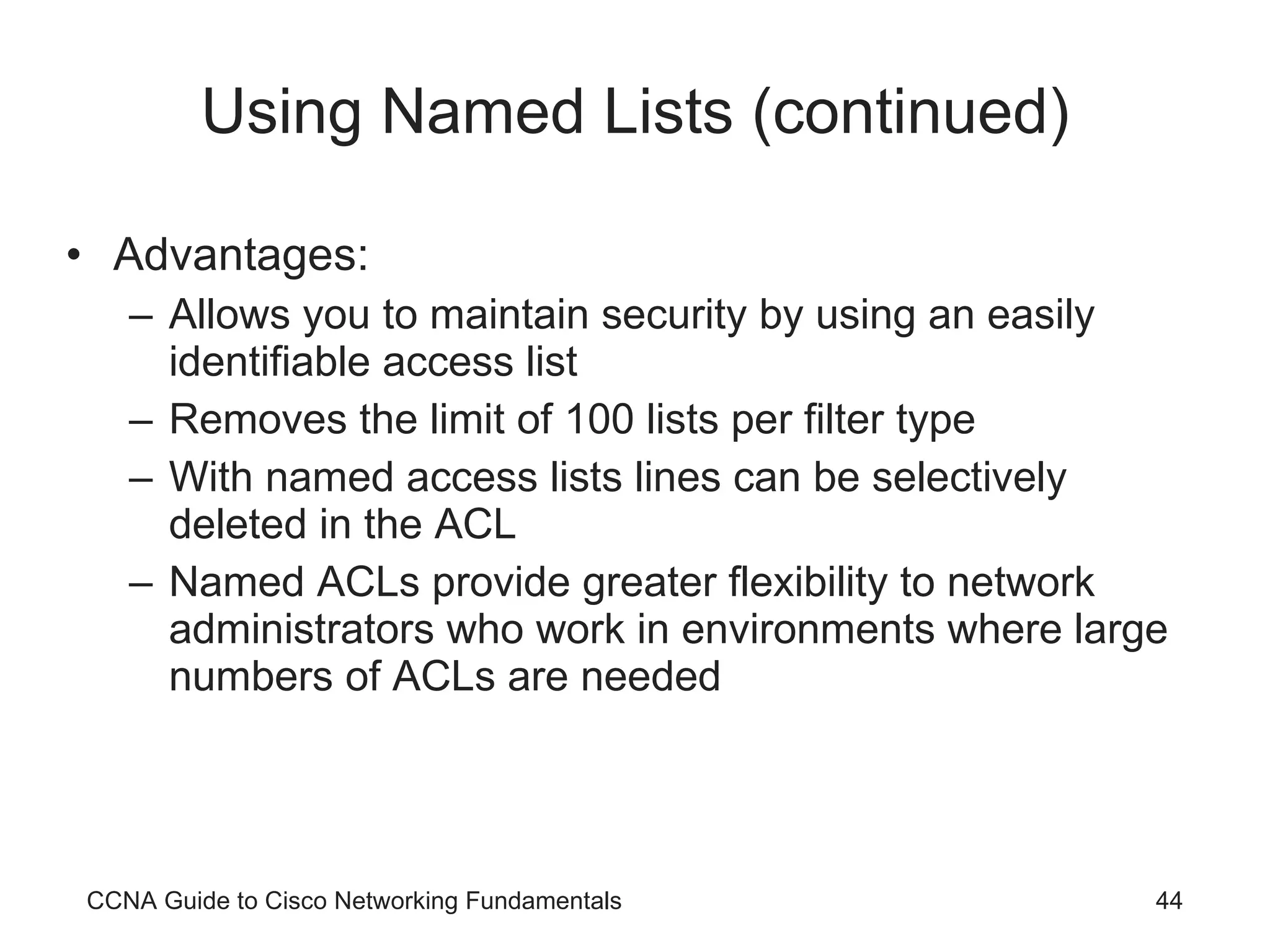
Using Named Lists (continued) Advantages: Allows you to maintain security by using an easily identifiable access list Removes the limit of 100 lists per filter type With named access lists lines can be selectively deleted in the ACL Named ACLs provide greater flexibility to network administrators who work in environments where large numbers of ACLs are needed CCNA Guide to Cisco Networking Fundamentals
Controlling VTY Line Access Access lists are used for both traffic flow and security One useful security feature of access lists is restricting access to telnet on your router By controlling VTY line access You must first create a standard IP access list that permits the management workstation RouterA(config)#access-list 12 permit 192.168.12.12 0.0.0.0 Then, it must be applied to the VTY lines access-class [acl #] in | out CCNA Guide to Cisco Networking Fundamentals
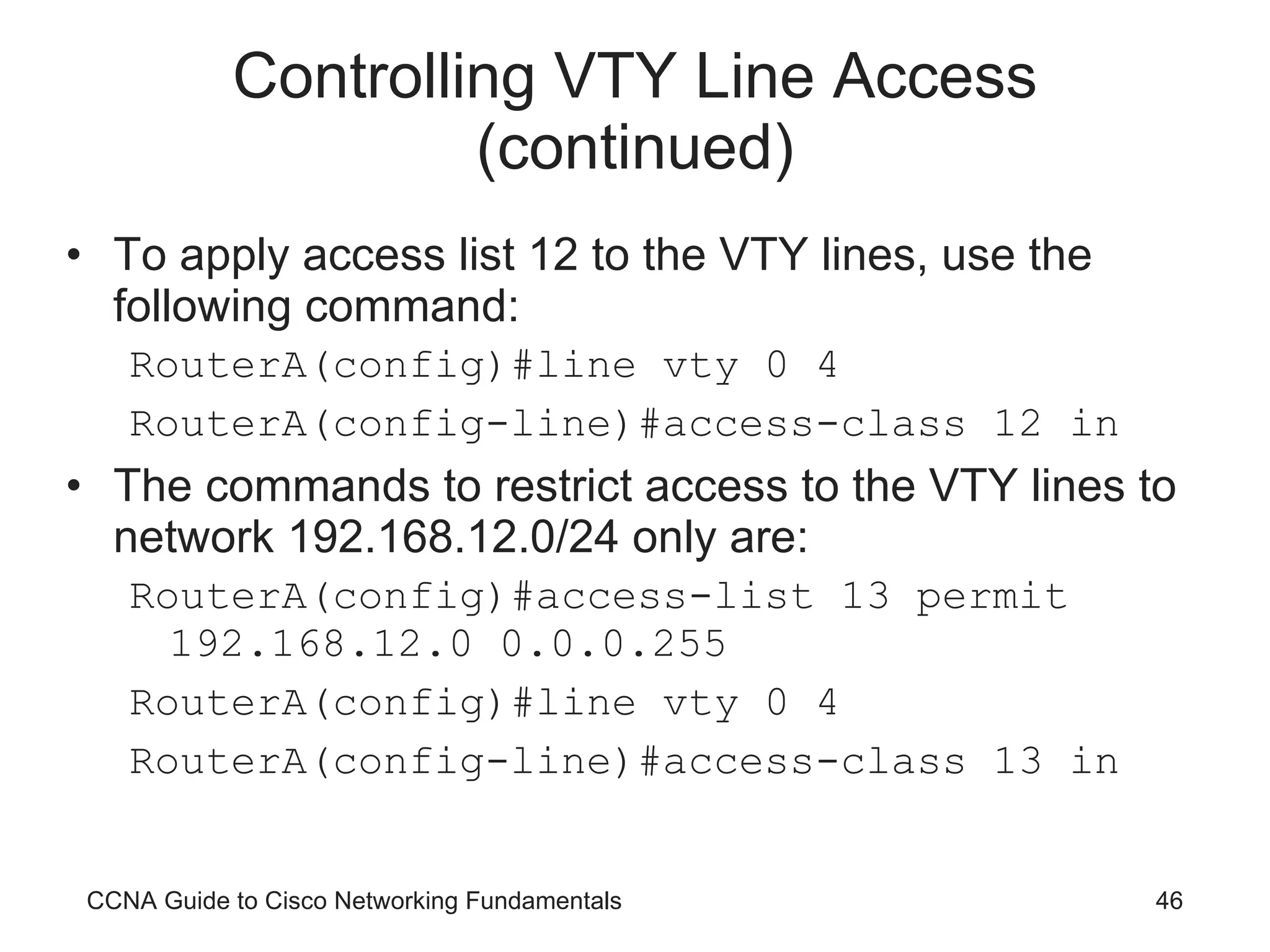
Controlling VTY Line Access (continued) To apply access list 12 to the VTY lines, use the following command: RouterA(config)#line vty 0 4 RouterA(config-line)#access-class 12 in The commands to restrict access to the VTY lines to network 192.168.12.0/24 only are: RouterA(config)#access-list 13 permit 192.168.12.0 0.0.0.255 RouterA(config)#line vty 0 4 RouterA(config-line)#access-class 13 in CCNA Guide to Cisco Networking Fundamentals
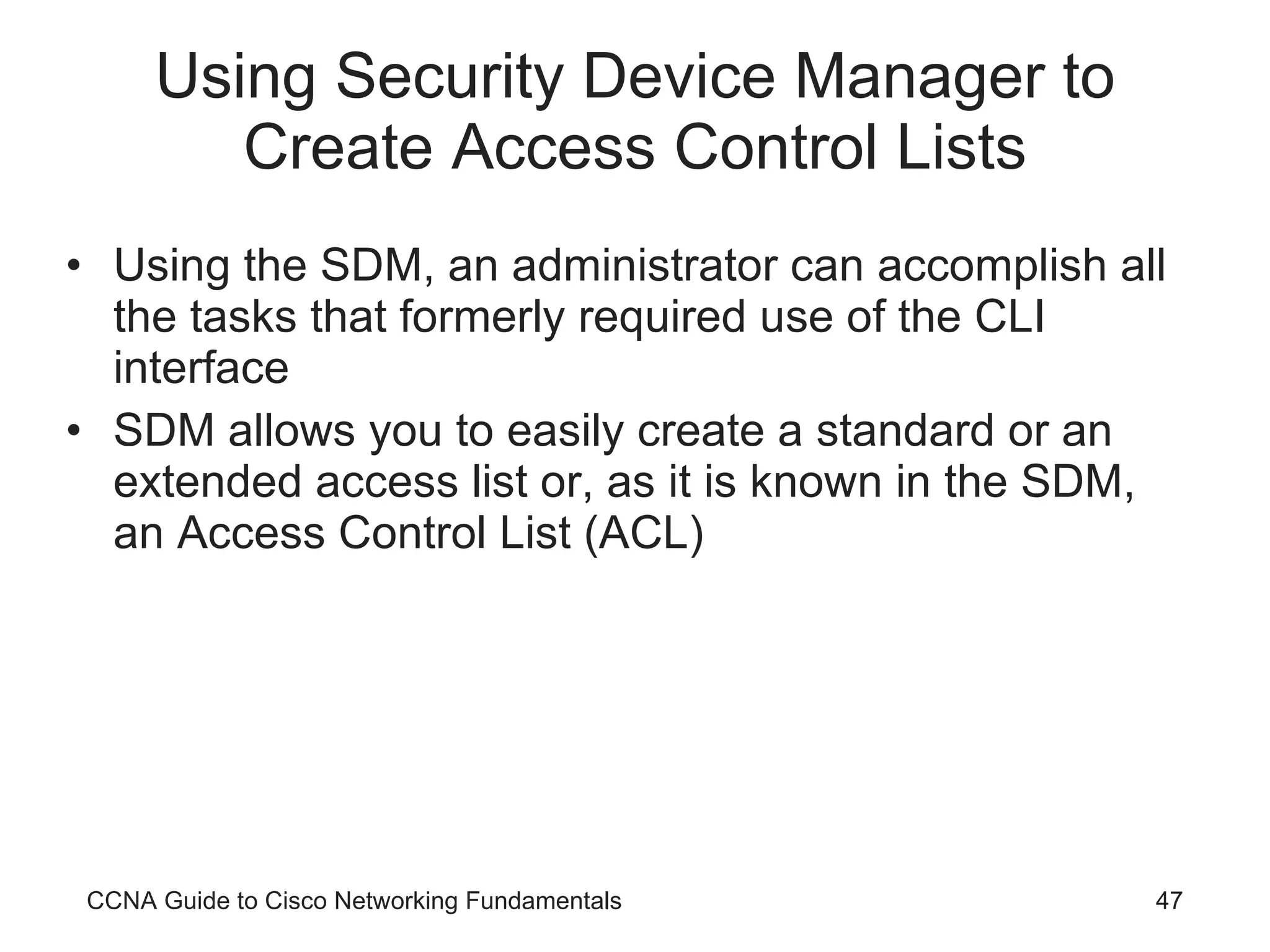
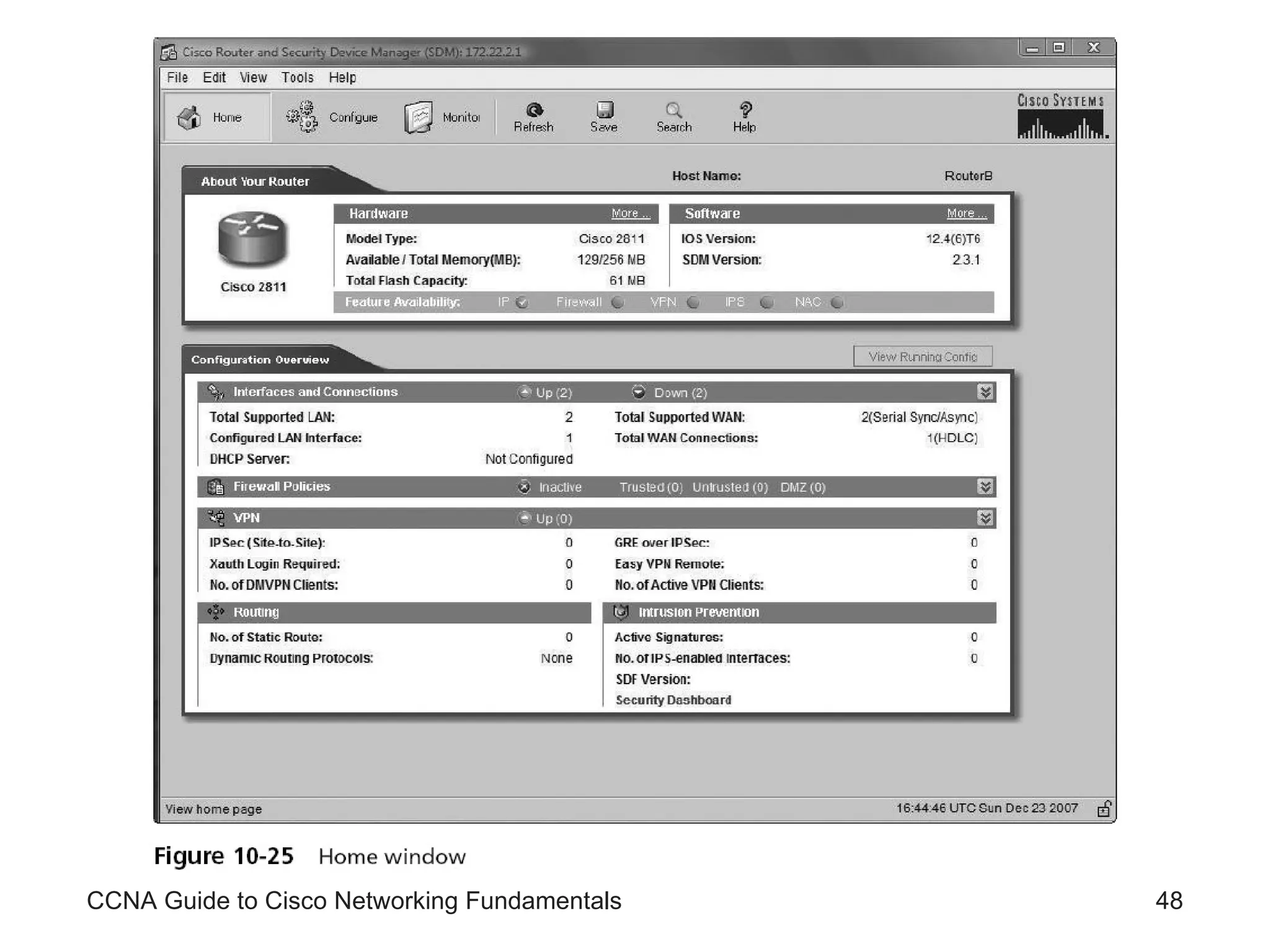
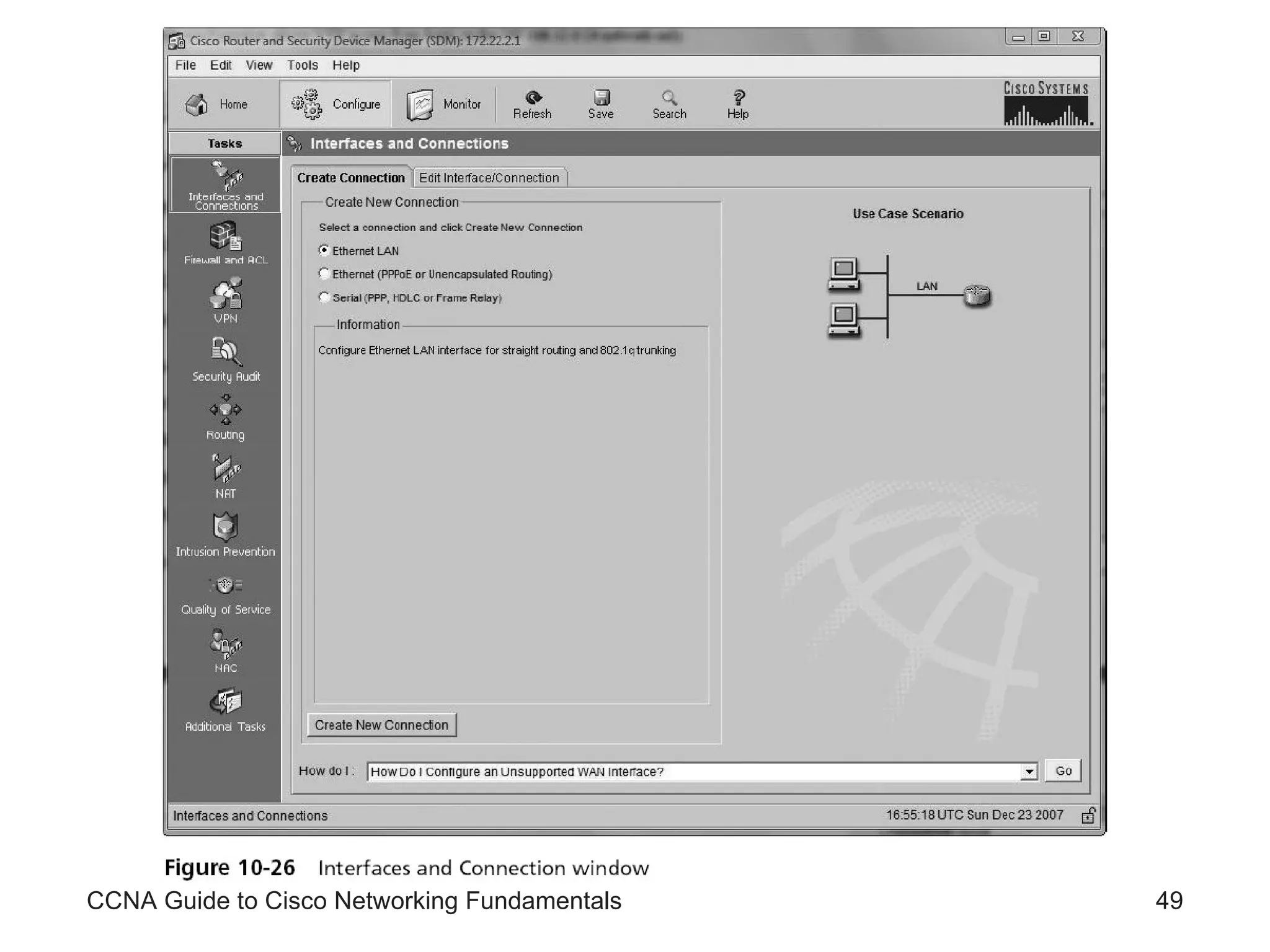
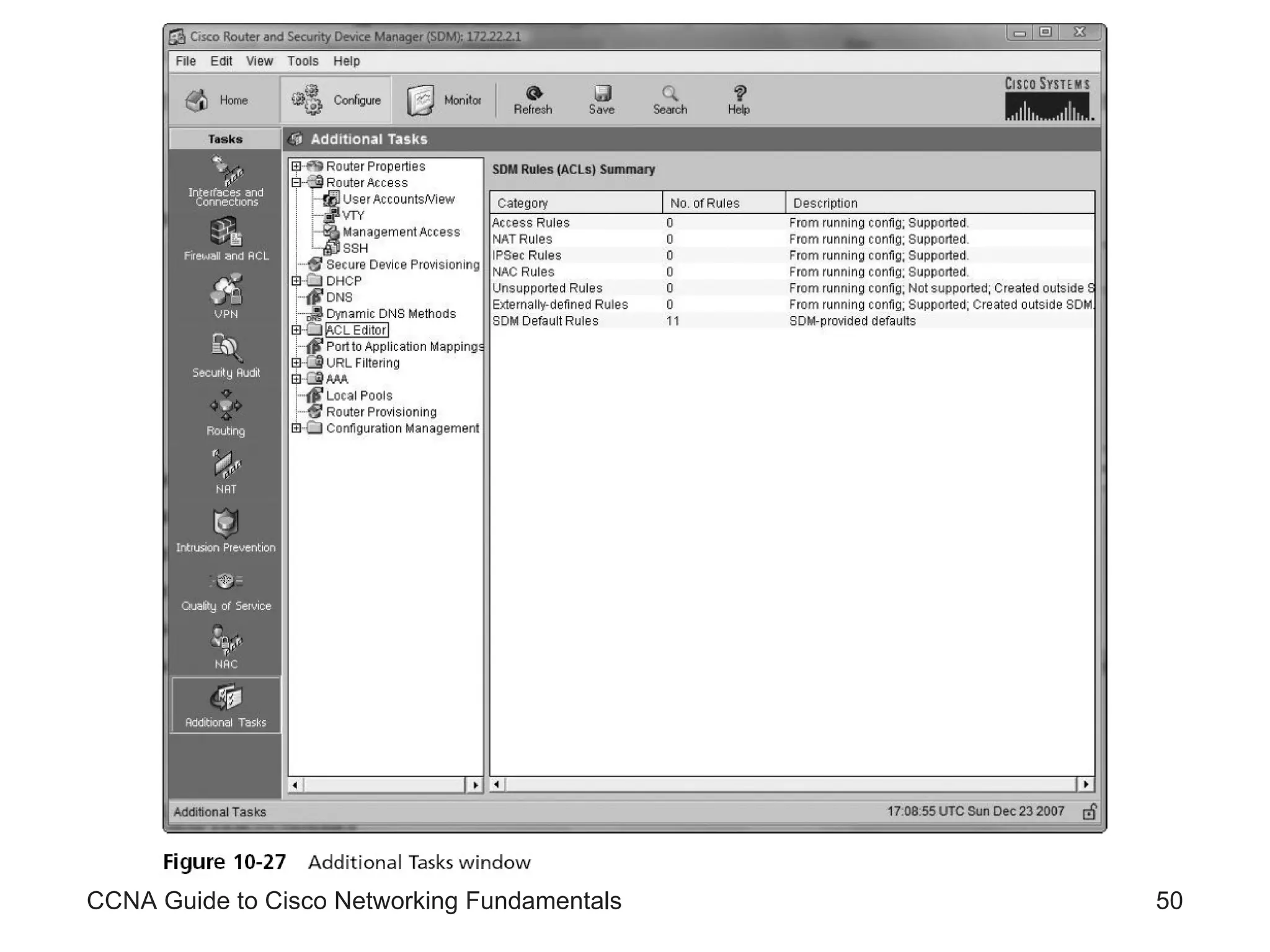
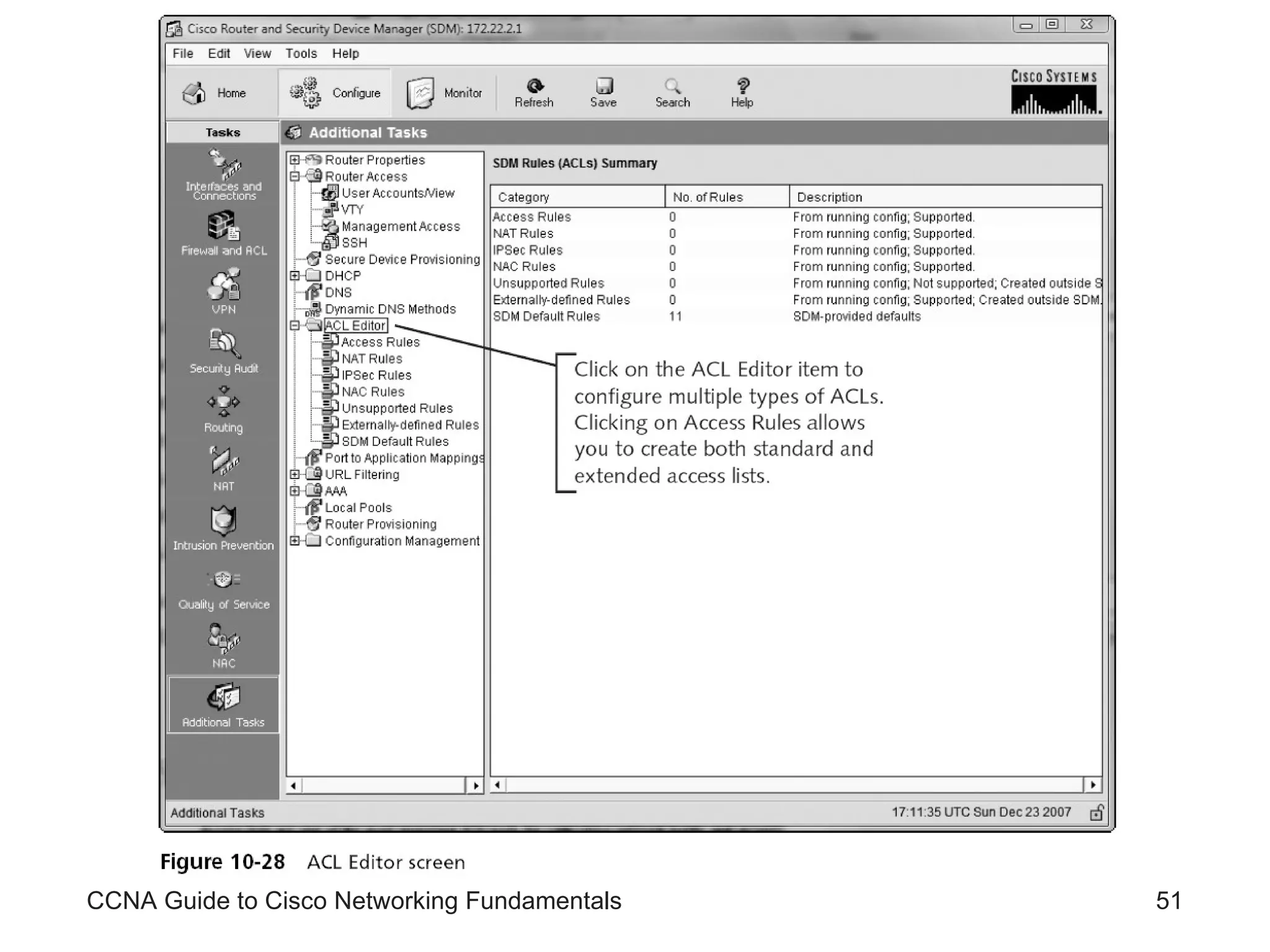
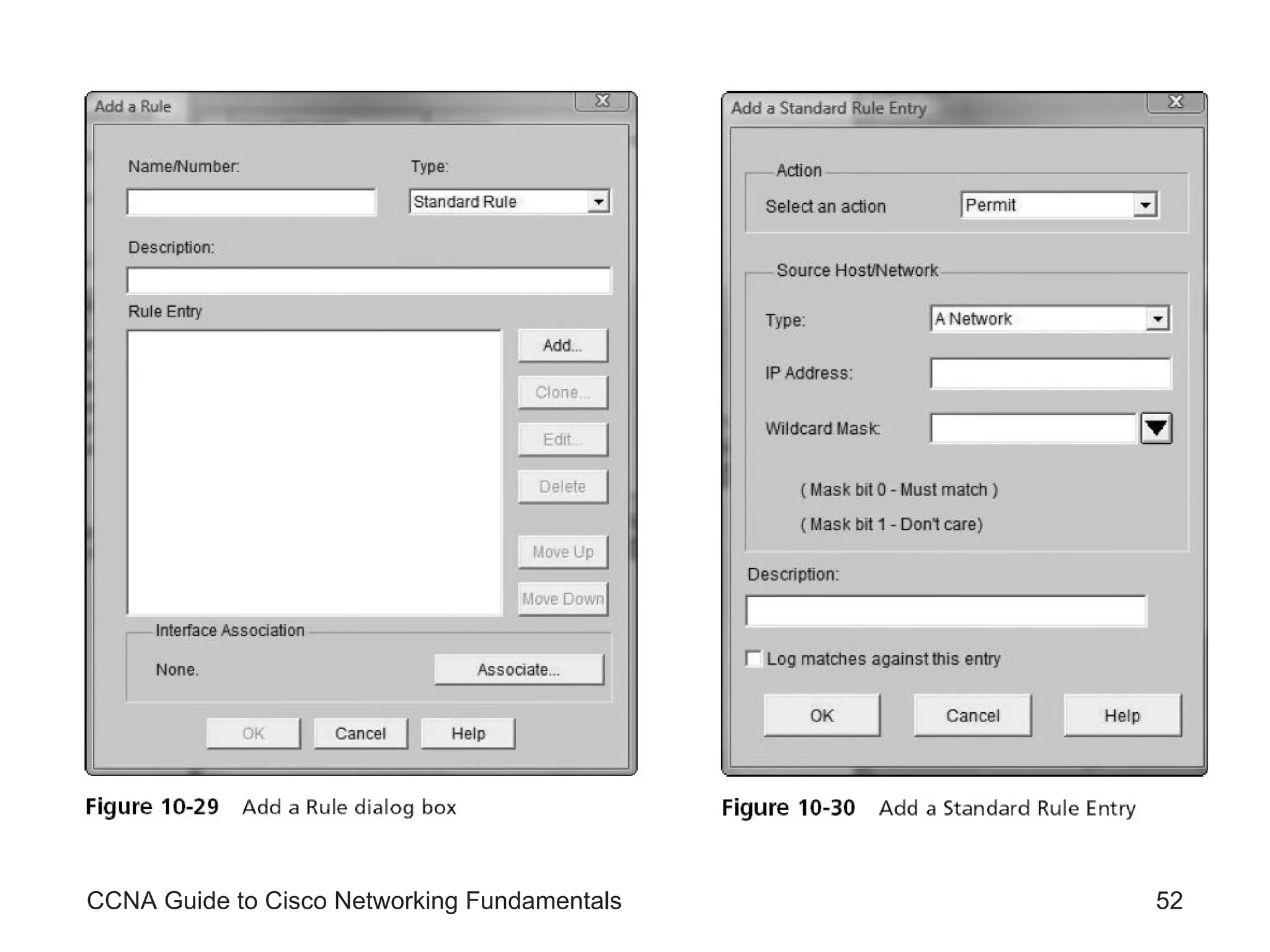
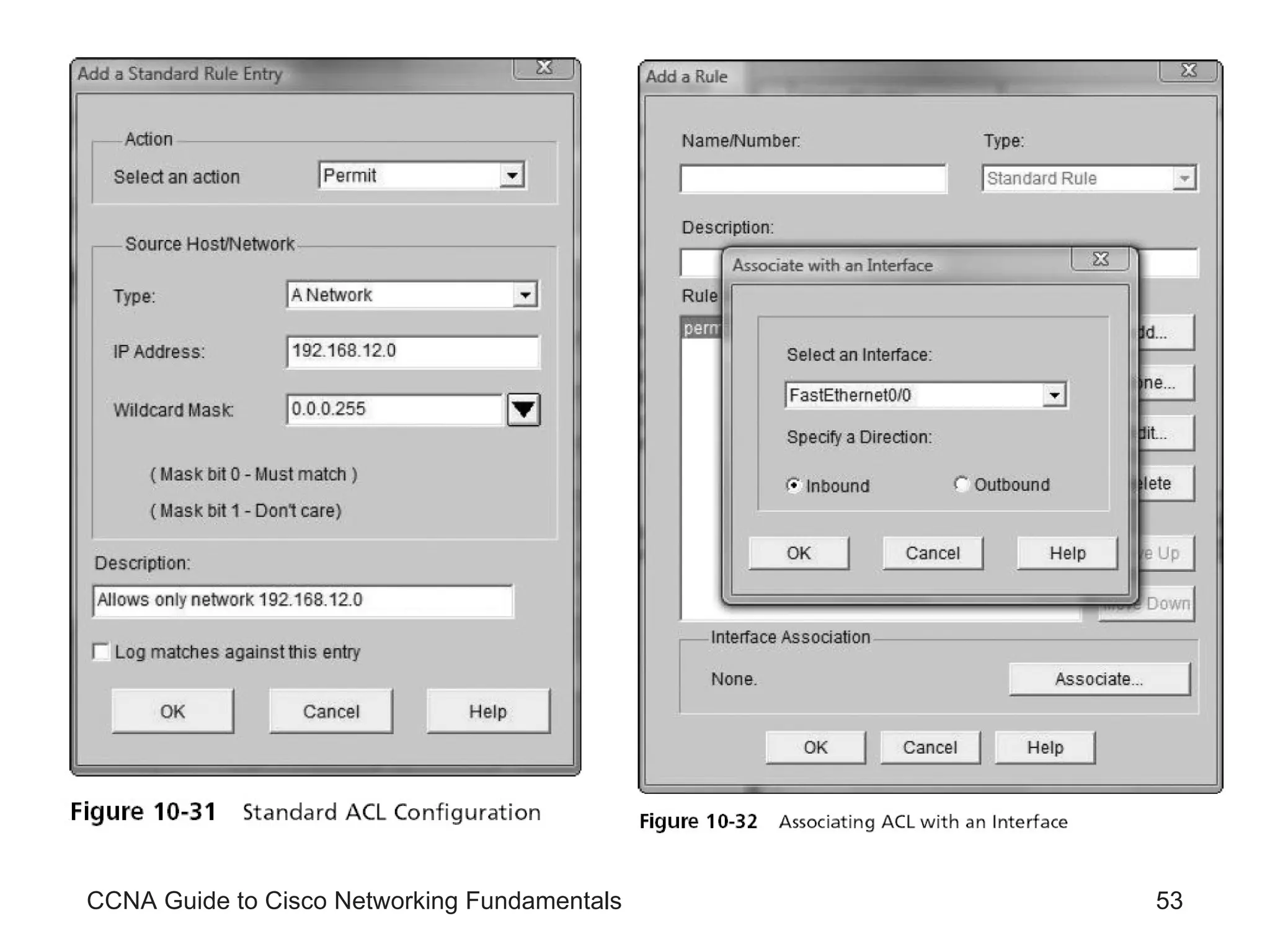
Using Security Device Manager to Create Access Control Lists Using the SDM, an administrator can accomplish all the tasks that formerly required use of the CLI interface SDM allows you to easily create a standard or an extended access list or, as it is known in the SDM, an Access Control List (ACL) CCNA Guide to Cisco Networking Fundamentals
CCNA Guide to Cisco Networking Fundamentals
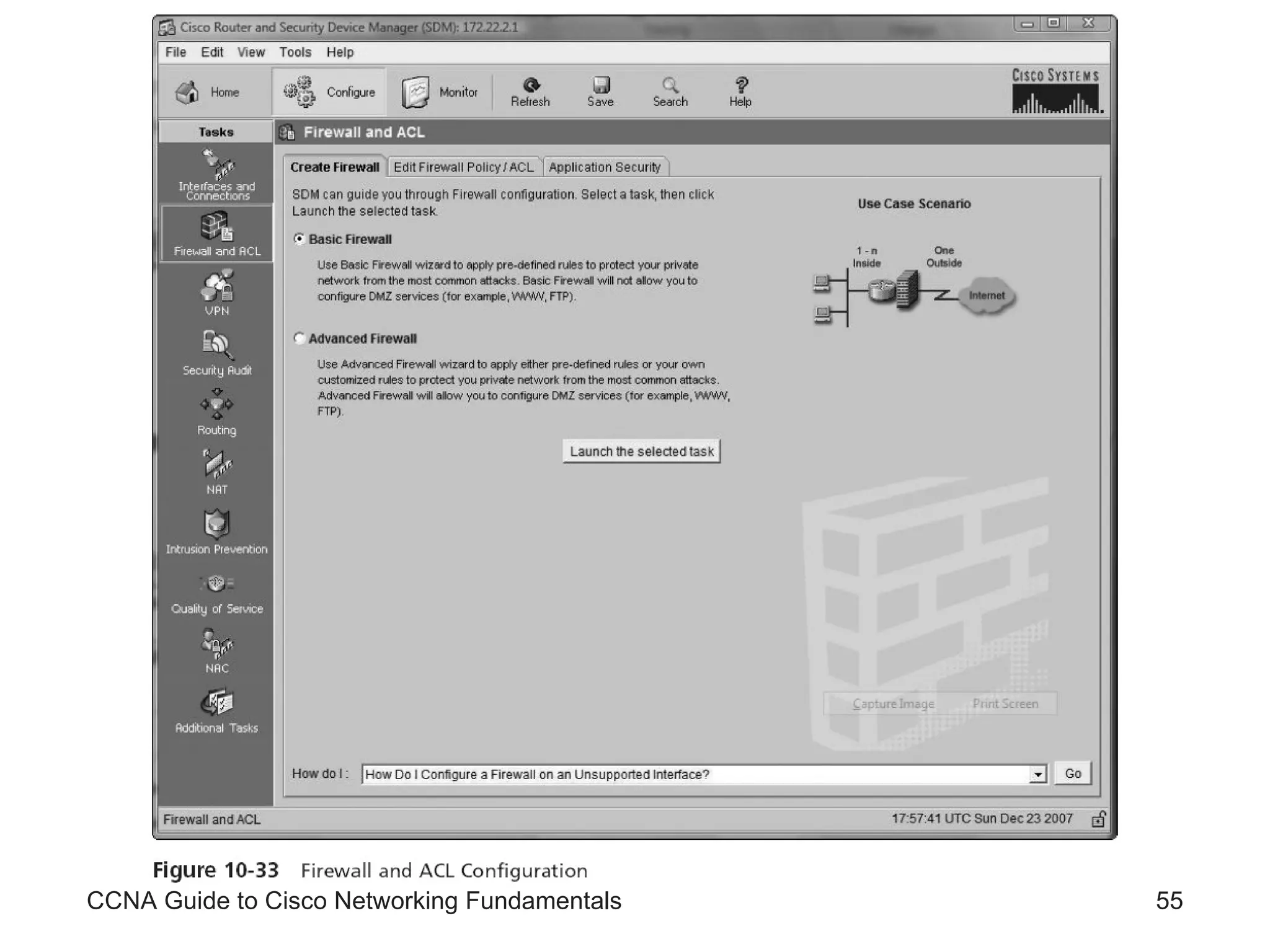
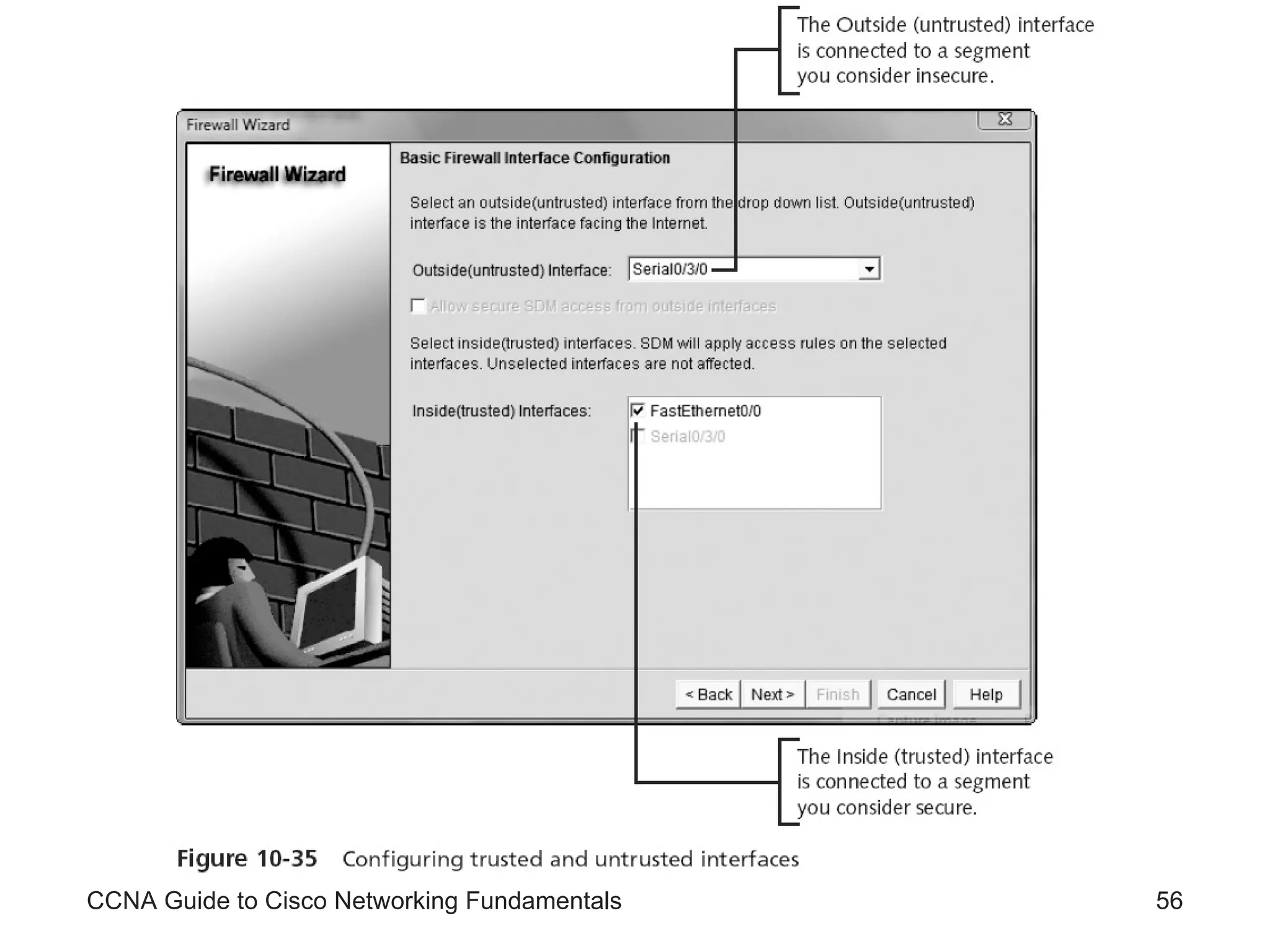
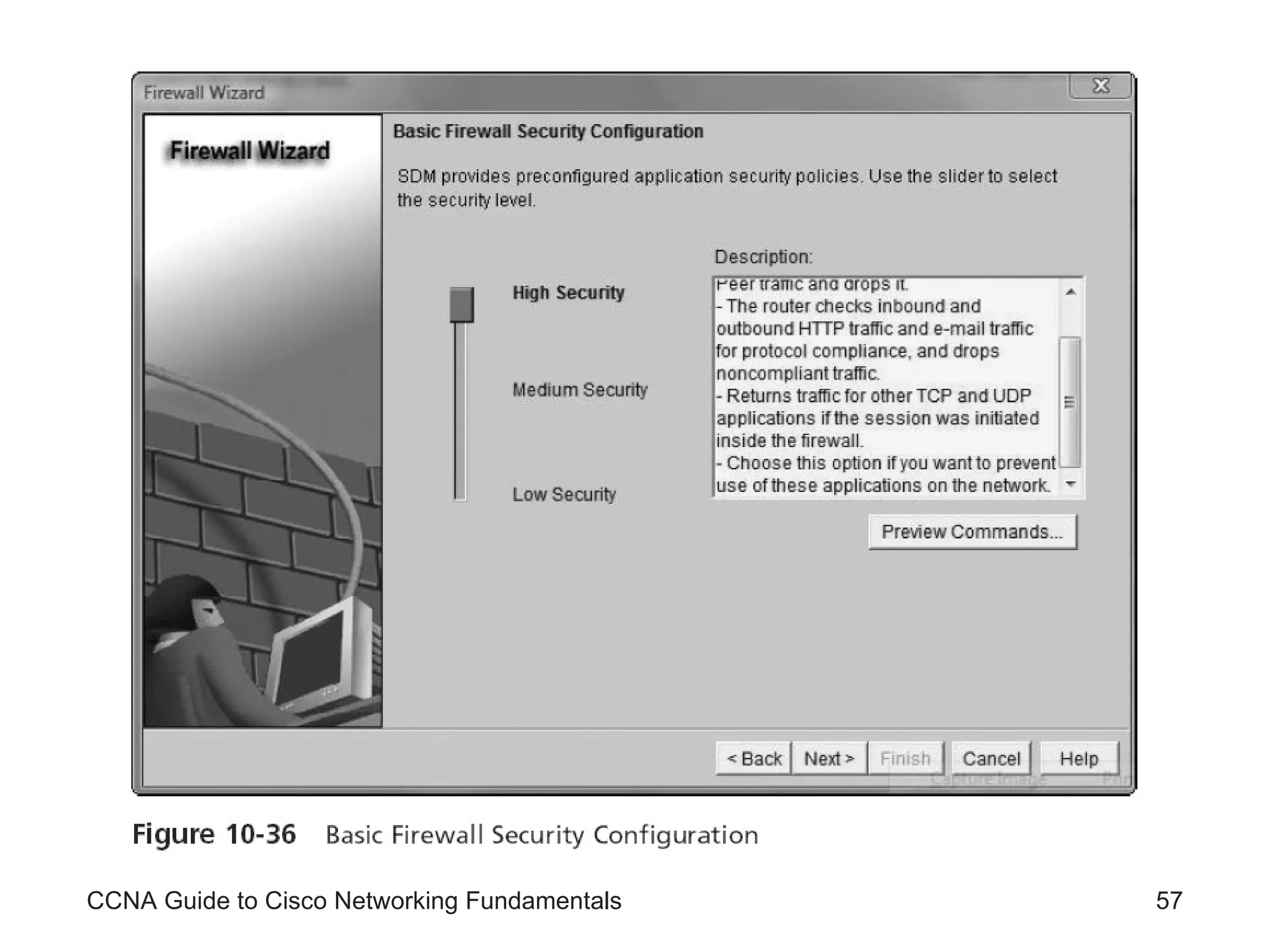
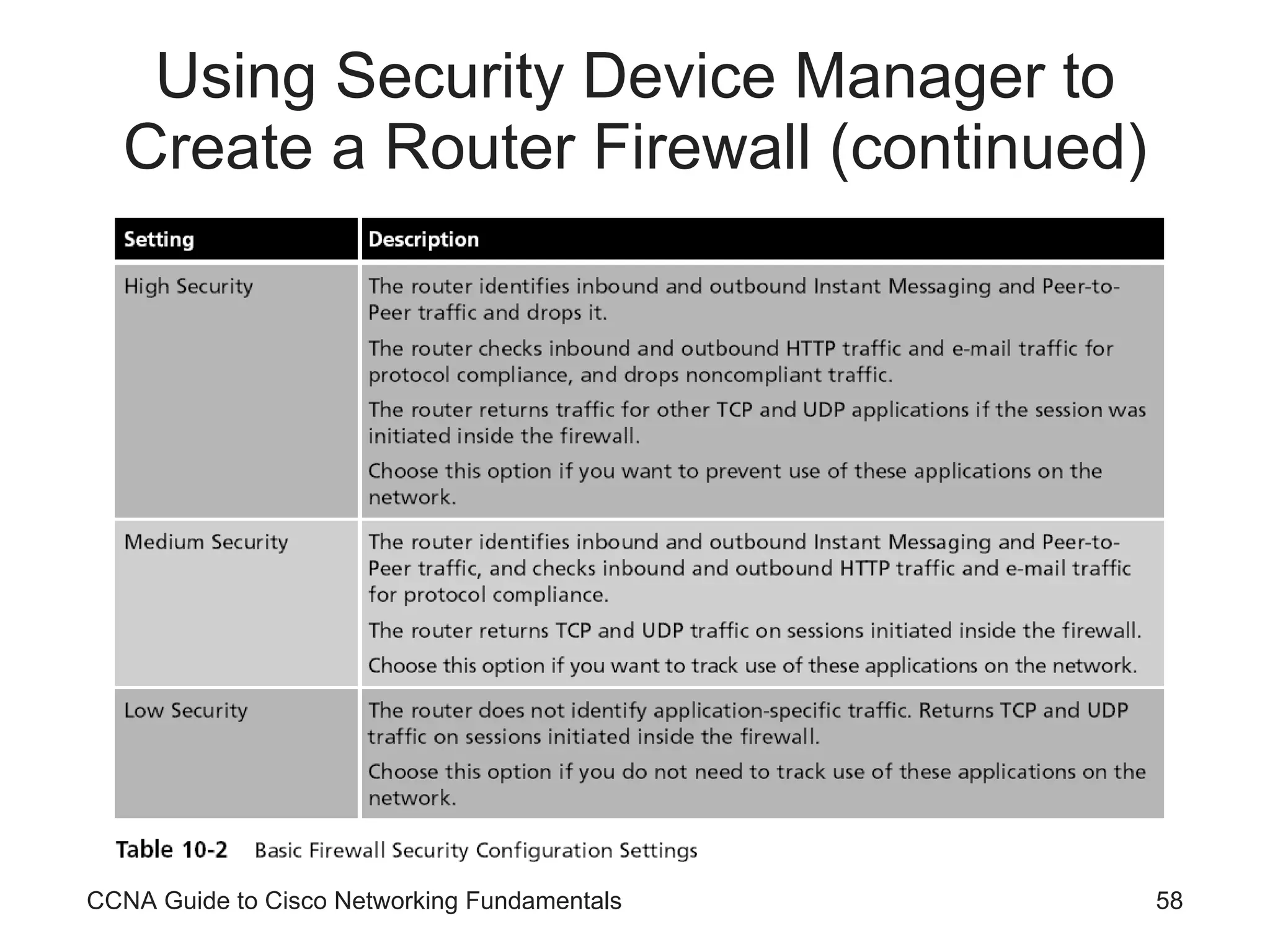
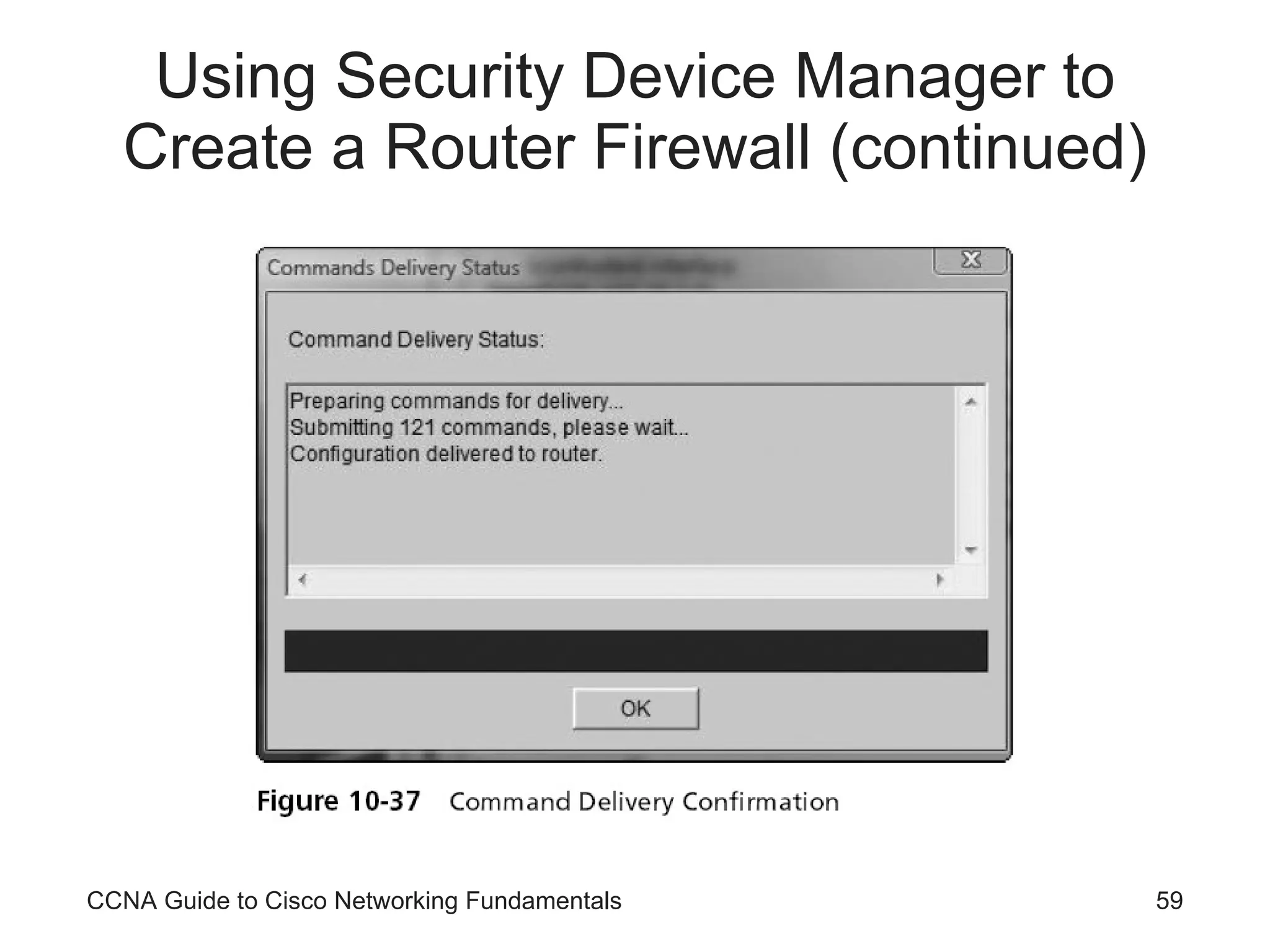
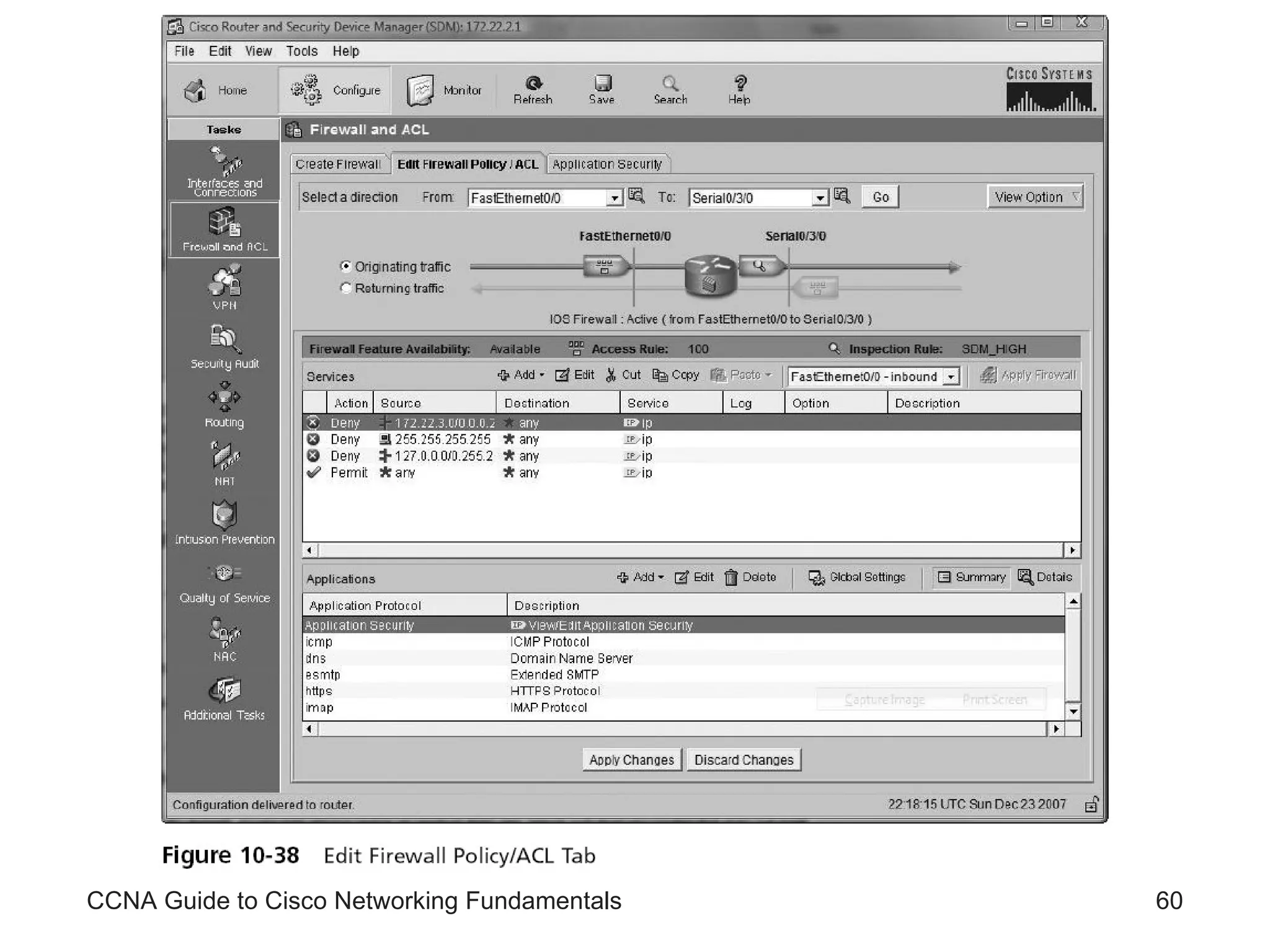
Using Security Device Manager to Create a Router Firewall Unlike the CLI, the SDM allows a router to be configured as a firewall CCNA Guide to Cisco Networking Fundamentals
CCNA Guide to Cisco Networking Fundamentals
Using Security Device Manager to Create a Router Firewall (continued) CCNA Guide to Cisco Networking Fundamentals
CCNA Guide to Cisco Networking Fundamentals
Summary Access lists are one of the most important IOS tools for controlling network traffic and security Access lists are created in a two-step process All access lists are created sequentially and applied sequentially to all packets that enter an interface where the list is applied By default, access lists always end in an implicit  deny any  statement Only one access list per direction (inbound or outbound) per protocol can be applied to an interface CCNA Guide to Cisco Networking Fundamentals
Summary (continued) Standard IP access lists allow you to filter traffic based on the source IP address of a packet Extended IP access lists filter traffic based on source, destination, protocol type, and application type Access lists can be used to restrict telnet by controlling VTY line access Ranges of numbers represent all access lists CCNA Guide to Cisco Networking Fundamentals
Summary (continued) The SDM can be used to configure both standard and extended ACLs via the Additional Tasks configuration tab The SDM can be used to configure a router as either a Basic or Advanced firewall The main difference between a Basic and Advanced firewall is the ability to configure DMZ interfaces in the Advanced firewall setup wizard CCNA Guide to Cisco Networking Fundamentals

CCNA Access Lists

  • 1.
    CCNA Guide toCisco Networking Fundamentals Chapter 10 Access Lists
  • 2.
    Objectives Describe theusage and rules of access lists Establish standard IP access lists Produce extended IP access lists Apply access lists to interfaces Monitor and verify access lists CCNA Guide to Cisco Networking Fundamentals
  • 3.
    Objectives (continued) Createnamed access lists Use Security Device Manager to create standard and extended IP access lists Use Security Device Manager to create a router firewall CCNA Guide to Cisco Networking Fundamentals
  • 4.
    Access Lists: Usageand Rules Access lists Permit or deny statements that filter traffic based on the source address, destination address, protocol type, and port number of a packet Available for IP, IPX, AppleTalk, and many other protocols CCNA Guide to Cisco Networking Fundamentals
  • 5.
    Access List UsageYou can create a standard access list that examines a packet for the packet’s source header information deny any statement Implicitly blocks all packets that do not meet the requirements of the access list Exists even though it is not shown as part of the access list With careful planning, you can create access lists that control which traffic crosses particular links And which segments of your network will have access to others CCNA Guide to Cisco Networking Fundamentals
  • 6.
    Access List Usage(continued) CCNA Guide to Cisco Networking Fundamentals
  • 7.
    Problems with AccessLists Lack of planning is one of the most common problems associated with access lists The need to enter the list sequentially into the router also presents problems You cannot move individual statements once they are entered When making changes, you must remove the list, using the no access-list [list number] command, and then retype the commands Access lists begin working the second they are applied to an interface CCNA Guide to Cisco Networking Fundamentals
  • 8.
    Access List RulesExample of the structure of a standard IP access list: RouterA(config)#access-list 1 deny 172.22.5.2 0.0.0.0 RouterA(config)#access-list 1 deny 172.22.5.3 0.0.0.0 RouterA(config)# access-list 1 permit any Router applies each line in the order in which you type it into the access list The no access-list [list #] command is used to remove an access list CCNA Guide to Cisco Networking Fundamentals
  • 9.
    Access List Rules(continued) CCNA Guide to Cisco Networking Fundamentals
  • 10.
    Access List Rules(continued) As a general rule, the lines with the most potential matches should be first in the list So that packets will not undergo unnecessary processing You should avoid unnecessarily long access lists After you create access lists, you must apply them to interfaces so they can begin filtering traffic You apply a list as either an outgoing or an incoming filter CCNA Guide to Cisco Networking Fundamentals
  • 11.
    Access List Rules(continued) In summary, all access lists follow these rules: Routers apply lists sequentially in the order in which you type them into the router Routers apply lists to packets sequentially, from the top down, one line at a time Packets are processed only until a match is made Lists always end with an implicit deny Access lists must be applied to an interface as either inbound or outbound traffic filters Only one list, per protocol, per direction can be applied to an interface Access lists are effective as soon as they are applied CCNA Guide to Cisco Networking Fundamentals
  • 12.
    Standard IP AccessLists Standard IP access lists Filter network traffic based on the source IP address only Using a standard IP access list, you can filter traffic by a host IP, subnet, or a network address Configure standard IP access lists: access-list [list #] [permit|deny] [source address] [source wildcard mask] Routers use wildcards to determine which bits in an address will be significant CCNA Guide to Cisco Networking Fundamentals
  • 13.
    Standard IP AccessLists (continued) CCNA Guide to Cisco Networking Fundamentals
  • 14.
    Standard IP AccessLists (continued) CCNA Guide to Cisco Networking Fundamentals
  • 15.
    Standard IP AccessLists (continued) CCNA Guide to Cisco Networking Fundamentals
  • 16.
    Standard IP AccessLists (continued) CCNA Guide to Cisco Networking Fundamentals
  • 17.
    Standard IP AccessLists (continued) CCNA Guide to Cisco Networking Fundamentals
  • 18.
    Standard IP AccessList Examples Standard IP access lists permit or deny packets based only on the source address Addresses can be a single host address, a subnet address, or a full network address CCNA Guide to Cisco Networking Fundamentals
  • 19.
    CCNA Guide toCisco Networking Fundamentals
  • 20.
    Standard IP AccessList Examples (continued) CCNA Guide to Cisco Networking Fundamentals
  • 21.
    Standard IP AccessList Examples (continued) Correct placement of a list is imperative To view the access lists defined on your router, use the show access-lists command For IP access lists you could also use the show ip access-lists command If you decide that an access list needs to be removed from an interface You can remove it with the no ip access-group [ list # ] command CCNA Guide to Cisco Networking Fundamentals
  • 22.
    CCNA Guide toCisco Networking Fundamentals
  • 23.
    Standard IP AccessList Examples (continued) CCNA Guide to Cisco Networking Fundamentals
  • 24.
    Standard IP AccessList Examples (continued) CCNA Guide to Cisco Networking Fundamentals
  • 25.
    Standard IP AccessList Examples (continued) CCNA Guide to Cisco Networking Fundamentals
  • 26.
    Standard IP AccessList Examples (continued) CCNA Guide to Cisco Networking Fundamentals
  • 27.
    Standard IP AccessList Examples (continued) Application of the list as an outbound filter on FastEthernet0/0 See Figure 10-15 Use the show access-lists or show ip access-lists command followed by the show ip interface command To verify that the list has been entered and applied correctly CCNA Guide to Cisco Networking Fundamentals
  • 28.
    Standard IP AccessList Examples (continued) CCNA Guide to Cisco Networking Fundamentals
  • 29.
    CCNA Guide toCisco Networking Fundamentals
  • 30.
    Standard IP AccessList Examples (continued) CCNA Guide to Cisco Networking Fundamentals
  • 31.
    Monitoring Standard IPAccess Lists Three main commands are available for monitoring access lists on your router show access-lists show ip access-lists show interfaces or show ip interface Use the no access-list [list #] command to remove the list Use the no ip accessgroup [list #][direction] command to remove the application of the list CCNA Guide to Cisco Networking Fundamentals
  • 32.
    Extended IP AccessLists Extended IP access lists Can filter by source IP address, destination IP address, protocol type, and application port number This granularity allows you to design extended IP access lists that: Permit or deny a single type of IP protocol Filter by a particular port of a particular protocol CCNA Guide to Cisco Networking Fundamentals
  • 33.
    Extended IP AccessLists (continued) To configure extended IP access lists, you must create the list and then apply it to an interface using the following syntax access-list [list #] [permit|deny] [protocol] [source IP address] [source wildcard mask] [operator] [port] [destination IP address] [destination wildcard mask] [operator] [port] [log] CCNA Guide to Cisco Networking Fundamentals
  • 34.
    Extended IP AccessList Examples CCNA Guide to Cisco Networking Fundamentals
  • 35.
    CCNA Guide toCisco Networking Fundamentals
  • 36.
    CCNA Guide toCisco Networking Fundamentals
  • 37.
    Extended IP AccessList Examples (continued) CCNA Guide to Cisco Networking Fundamentals
  • 38.
    The “Established” ParameterEstablished parameter Permits traffic from any host on any network to any destination, as long as the traffic was in response to a request initiated inside the network Example: access-list 100 permit tcp any 15.0.0.0 0.255.255.255 established CCNA Guide to Cisco Networking Fundamentals
  • 39.
    Monitoring Extended IPAccess Lists The same commands used to monitor standard IP access lists are used to monitor extended IP access lists Extended IP lists keep track of the number of packets that pass each line of an access list The clear access-list counters [list #] command clears the counters The no access-list [list#] command removes the list The no ip access-group [list#] [direction] command removes the application of the list CCNA Guide to Cisco Networking Fundamentals
  • 40.
    Monitoring Extended IPAccess Lists CCNA Guide to Cisco Networking Fundamentals
  • 41.
    Monitoring Extended IPAccess Lists CCNA Guide to Cisco Networking Fundamentals
  • 42.
    Using Named ListsNamed access lists In Cisco IOS versions 11.2 and above, names instead of numbers can be used to identify lists To name a standard IP access list, use the following syntax: RouterC(config)#ip access-list standard [name] To name an extended IP access list, use the following syntax: RouterC(config)#ip access-list extended [name] CCNA Guide to Cisco Networking Fundamentals
  • 43.
    Using Named Lists(continued) Once the list is named, the permit or deny statement is entered The commands follow the same syntax as unnamed lists The beginning part of the command is not included To apply a standard IP named list to an interface, the syntax is: RouterC(config-if)#ip access-group [name] [in | out] CCNA Guide to Cisco Networking Fundamentals
  • 44.
    Using Named Lists(continued) Advantages: Allows you to maintain security by using an easily identifiable access list Removes the limit of 100 lists per filter type With named access lists lines can be selectively deleted in the ACL Named ACLs provide greater flexibility to network administrators who work in environments where large numbers of ACLs are needed CCNA Guide to Cisco Networking Fundamentals
  • 45.
    Controlling VTY LineAccess Access lists are used for both traffic flow and security One useful security feature of access lists is restricting access to telnet on your router By controlling VTY line access You must first create a standard IP access list that permits the management workstation RouterA(config)#access-list 12 permit 192.168.12.12 0.0.0.0 Then, it must be applied to the VTY lines access-class [acl #] in | out CCNA Guide to Cisco Networking Fundamentals
  • 46.
    Controlling VTY LineAccess (continued) To apply access list 12 to the VTY lines, use the following command: RouterA(config)#line vty 0 4 RouterA(config-line)#access-class 12 in The commands to restrict access to the VTY lines to network 192.168.12.0/24 only are: RouterA(config)#access-list 13 permit 192.168.12.0 0.0.0.255 RouterA(config)#line vty 0 4 RouterA(config-line)#access-class 13 in CCNA Guide to Cisco Networking Fundamentals
  • 47.
    Using Security DeviceManager to Create Access Control Lists Using the SDM, an administrator can accomplish all the tasks that formerly required use of the CLI interface SDM allows you to easily create a standard or an extended access list or, as it is known in the SDM, an Access Control List (ACL) CCNA Guide to Cisco Networking Fundamentals
  • 48.
    CCNA Guide toCisco Networking Fundamentals
  • 49.
    CCNA Guide toCisco Networking Fundamentals
  • 50.
    CCNA Guide toCisco Networking Fundamentals
  • 51.
    CCNA Guide toCisco Networking Fundamentals
  • 52.
    CCNA Guide toCisco Networking Fundamentals
  • 53.
    CCNA Guide toCisco Networking Fundamentals
  • 54.
    Using Security DeviceManager to Create a Router Firewall Unlike the CLI, the SDM allows a router to be configured as a firewall CCNA Guide to Cisco Networking Fundamentals
  • 55.
    CCNA Guide toCisco Networking Fundamentals
  • 56.
    CCNA Guide toCisco Networking Fundamentals
  • 57.
    CCNA Guide toCisco Networking Fundamentals
  • 58.
    Using Security DeviceManager to Create a Router Firewall (continued) CCNA Guide to Cisco Networking Fundamentals
  • 59.
    Using Security DeviceManager to Create a Router Firewall (continued) CCNA Guide to Cisco Networking Fundamentals
  • 60.
    CCNA Guide toCisco Networking Fundamentals
  • 61.
    Summary Access listsare one of the most important IOS tools for controlling network traffic and security Access lists are created in a two-step process All access lists are created sequentially and applied sequentially to all packets that enter an interface where the list is applied By default, access lists always end in an implicit deny any statement Only one access list per direction (inbound or outbound) per protocol can be applied to an interface CCNA Guide to Cisco Networking Fundamentals
  • 62.
    Summary (continued) StandardIP access lists allow you to filter traffic based on the source IP address of a packet Extended IP access lists filter traffic based on source, destination, protocol type, and application type Access lists can be used to restrict telnet by controlling VTY line access Ranges of numbers represent all access lists CCNA Guide to Cisco Networking Fundamentals
  • 63.
    Summary (continued) TheSDM can be used to configure both standard and extended ACLs via the Additional Tasks configuration tab The SDM can be used to configure a router as either a Basic or Advanced firewall The main difference between a Basic and Advanced firewall is the ability to configure DMZ interfaces in the Advanced firewall setup wizard CCNA Guide to Cisco Networking Fundamentals