C#
LECTURE
Abid Kohistani.
C# Operators
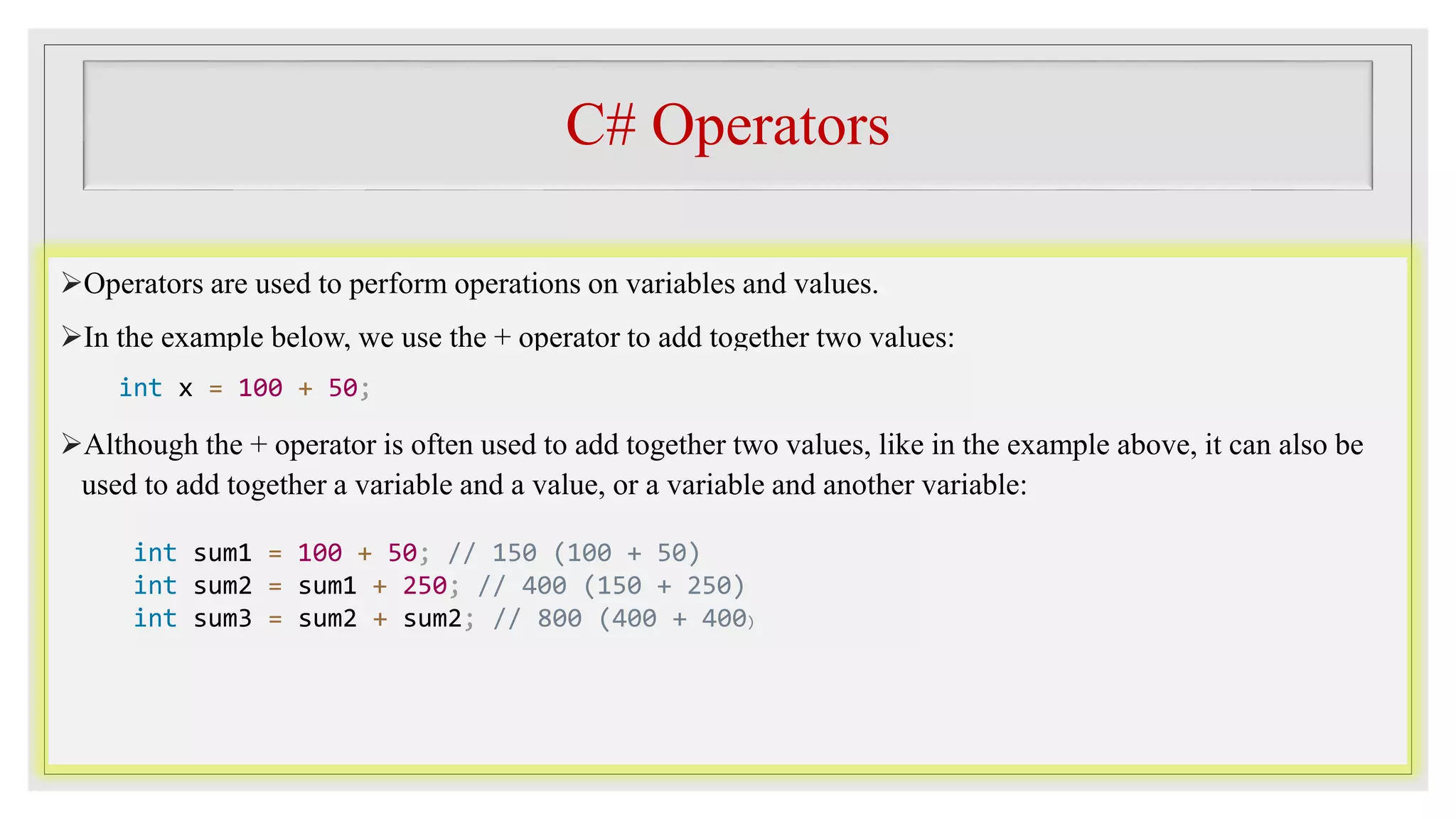
Operators are used to perform operations on variables and values.
In the example below, we use the + operator to add together two values:
Although the + operator is often used to add together two values, like in the example above, it can also be
used to add together a variable and a value, or a variable and another variable:
int x = 100 + 50;
int sum1 = 100 + 50; // 150 (100 + 50)
int sum2 = sum1 + 250; // 400 (150 + 250)
int sum3 = sum2 + sum2; // 800 (400 + 400)
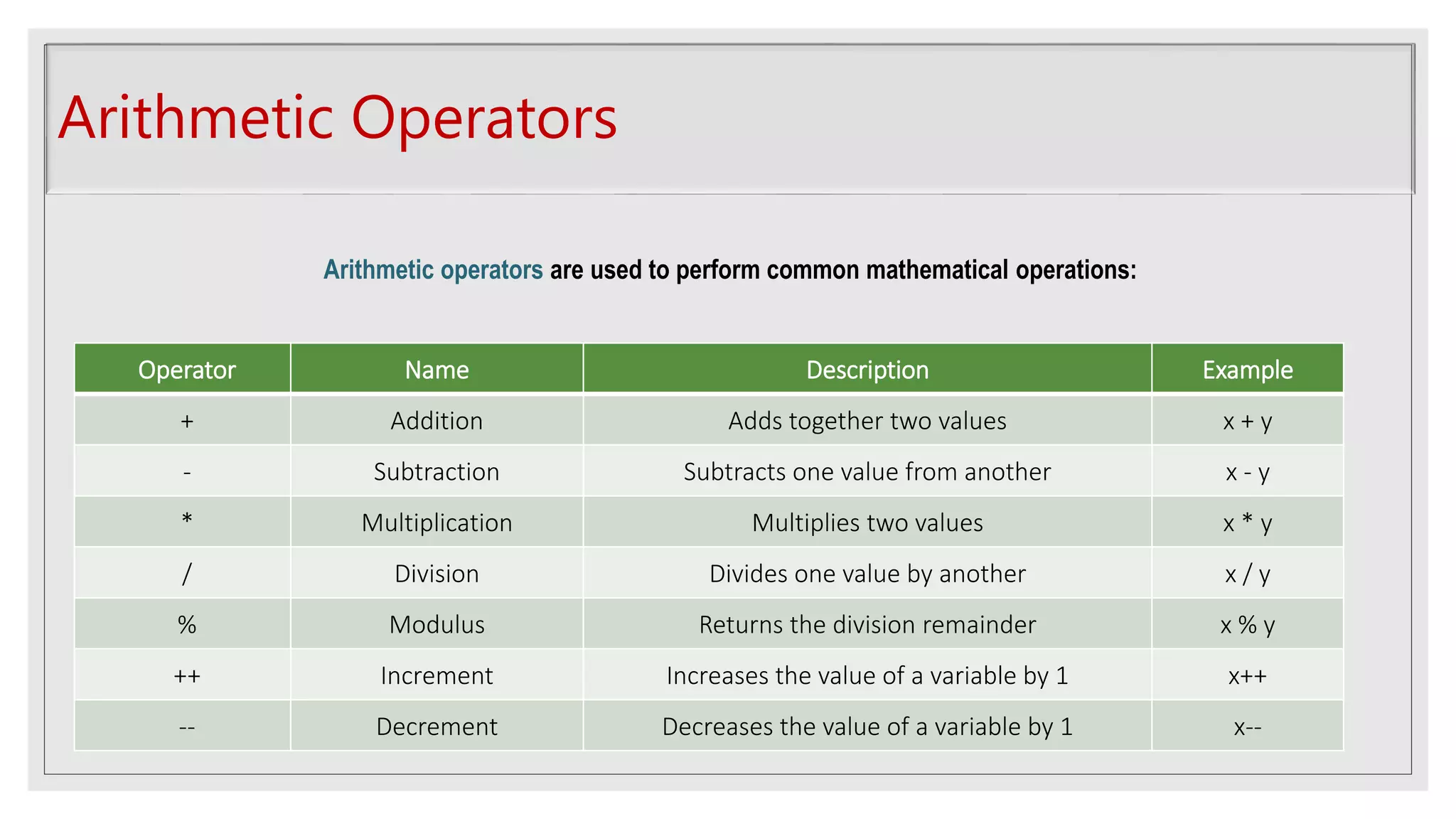
Arithmetic Operators
Operator Name Description Example
+ Addition Adds together two values x + y
- Subtraction Subtracts one value from another x - y
* Multiplication Multiplies two values x * y
/ Division Divides one value by another x / y
% Modulus Returns the division remainder x % y
++ Increment Increases the value of a variable by 1 x++
-- Decrement Decreases the value of a variable by 1 x--
Arithmetic operators are used to perform common mathematical operations:
Assignment Operators
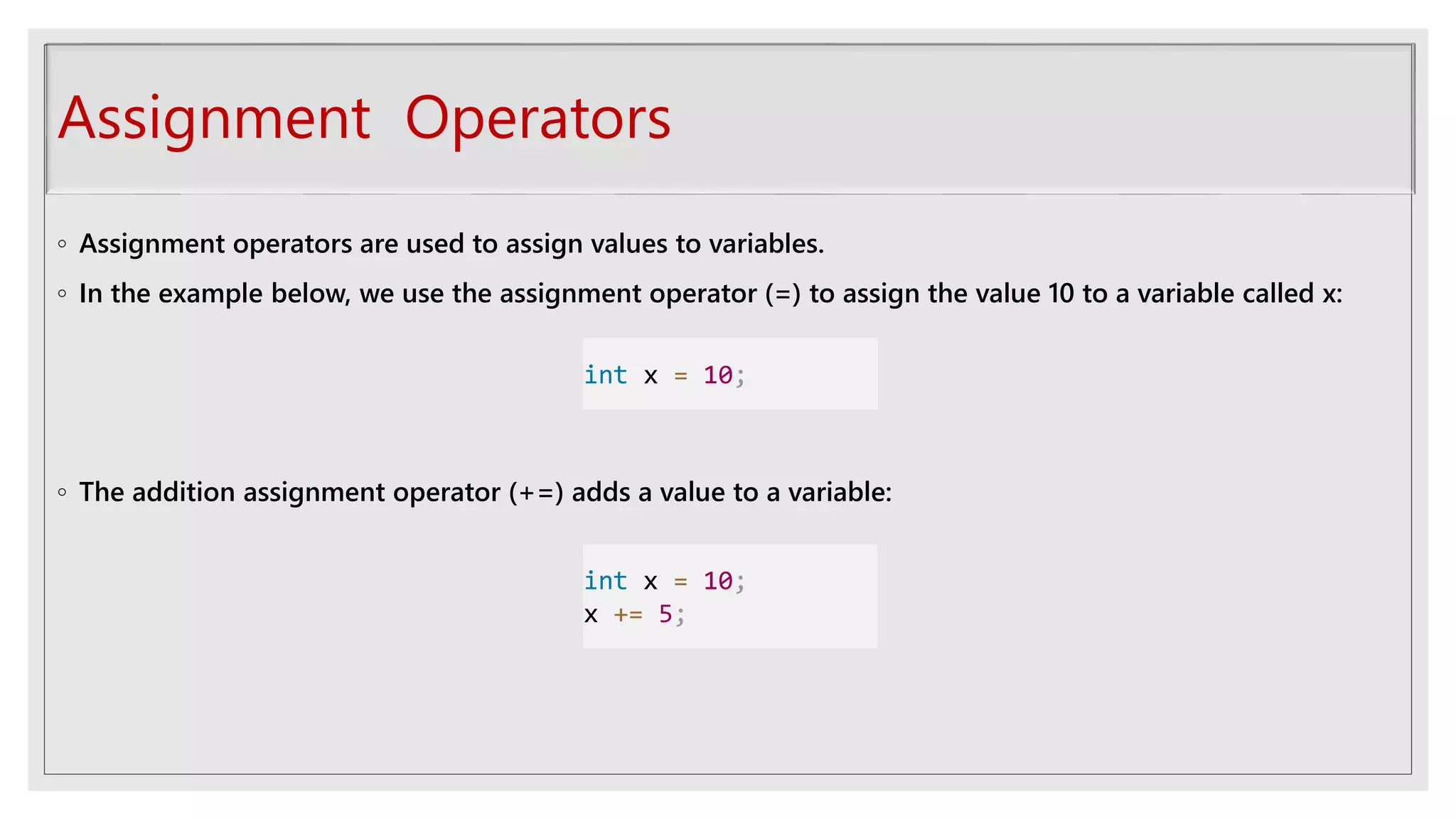
◦ Assignment operators are used to assign values to variables.
◦ In the example below, we use the assignment operator (=) to assign the value 10 to a variable called x:
◦ The addition assignment operator (+=) adds a value to a variable:
int x = 10;
int x = 10;
x += 5;
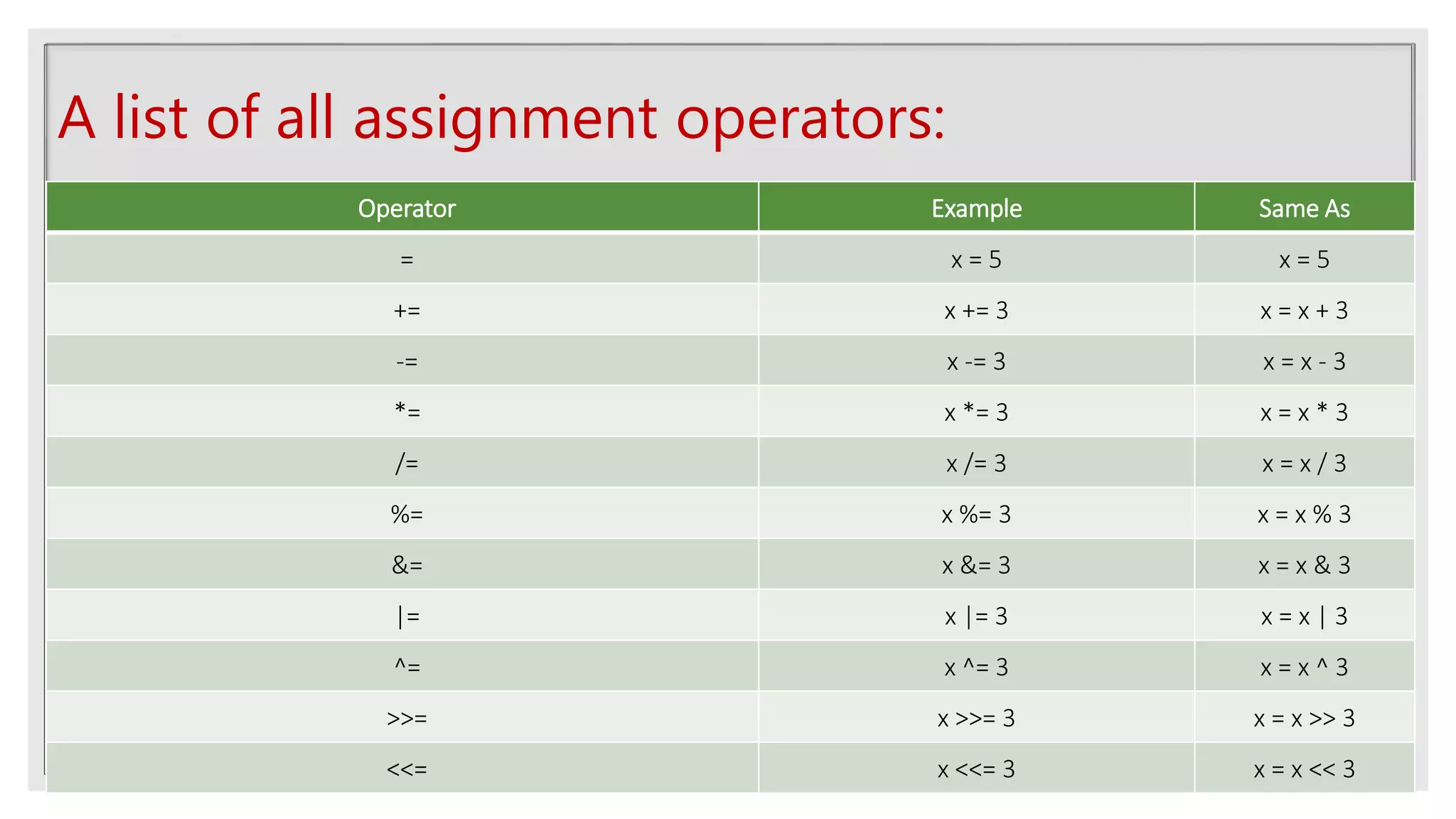
A list of all assignment operators:
Operator Example Same As
= x = 5 x = 5
+= x += 3 x = x + 3
-= x -= 3 x = x - 3
*= x *= 3 x = x * 3
/= x /= 3 x = x / 3
%= x %= 3 x = x % 3
&= x &= 3 x = x & 3
|= x |= 3 x = x | 3
^= x ^= 3 x = x ^ 3
>>= x >>= 3 x = x >> 3
<<= x <<= 3 x = x << 3
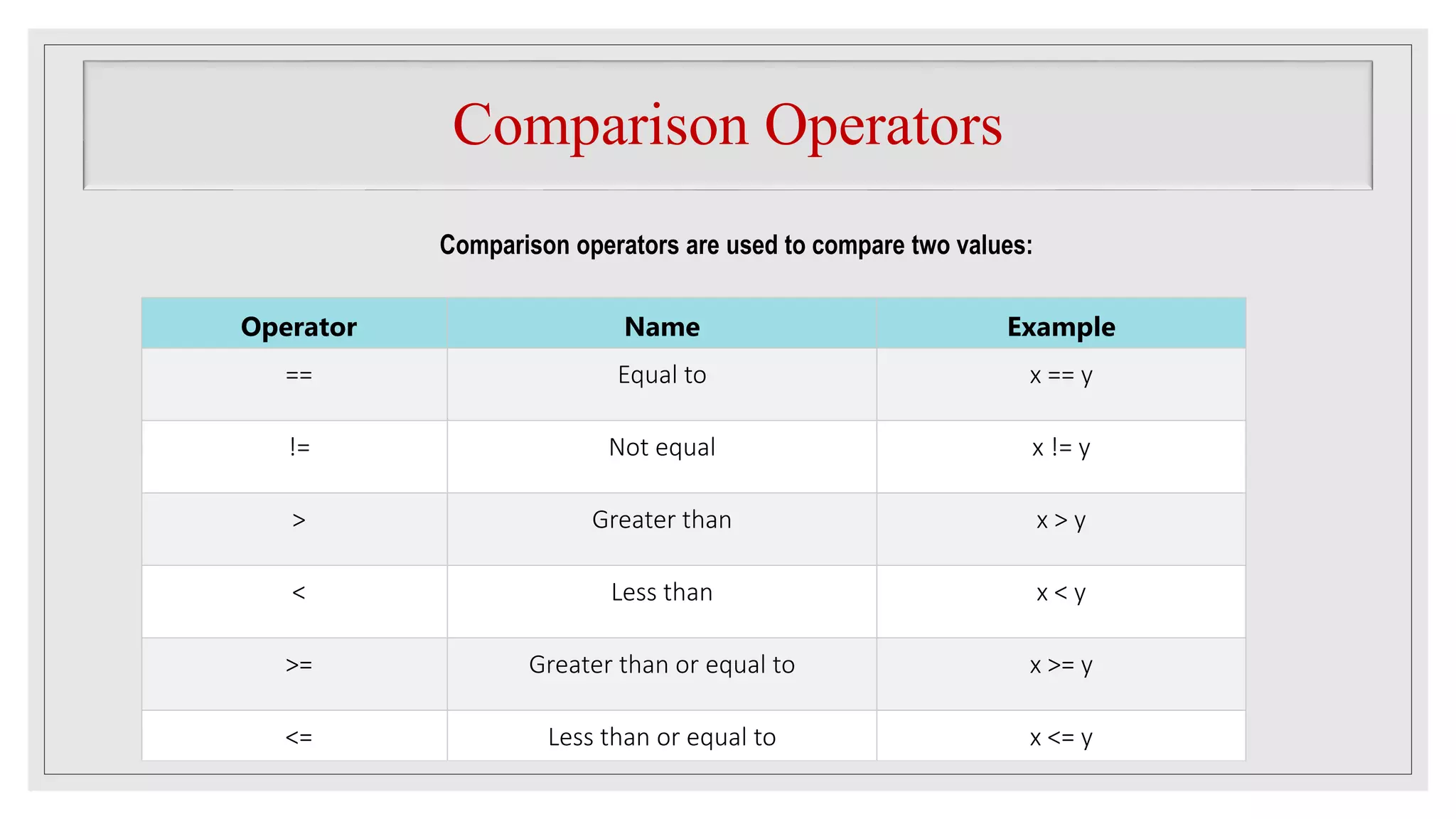
Comparison Operators
Operator Name Example
== Equal to x == y
!= Not equal x != y
> Greater than x > y
< Less than x < y
>= Greater than or equal to x >= y
<= Less than or equal to x <= y
Comparison operators are used to compare two values:
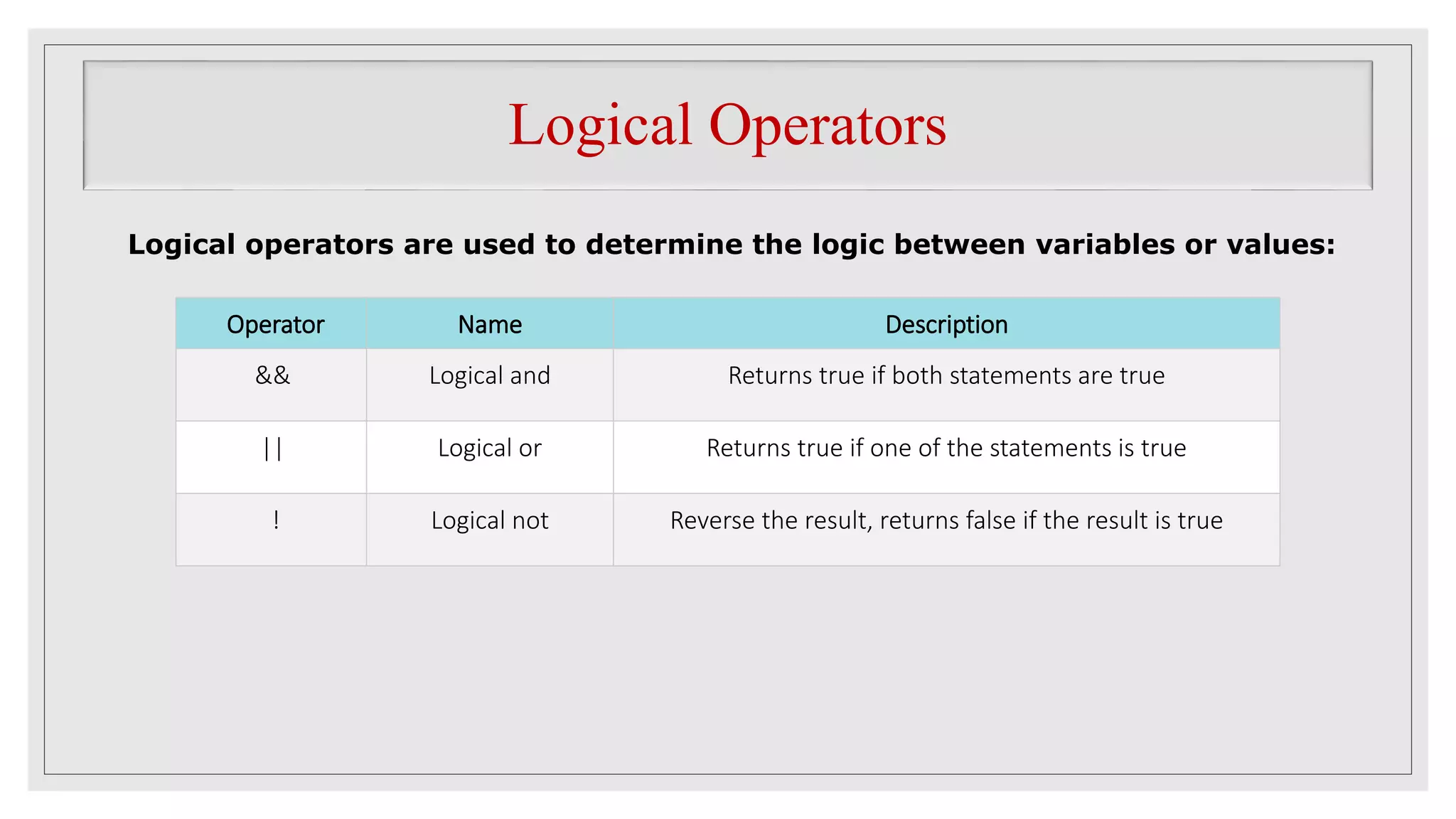
Logical Operators
Operator Name Description
&& Logical and Returns true if both statements are true
|| Logical or Returns true if one of the statements is true
! Logical not Reverse the result, returns false if the result is true
Logical operators are used to determine the logic between variables or values:
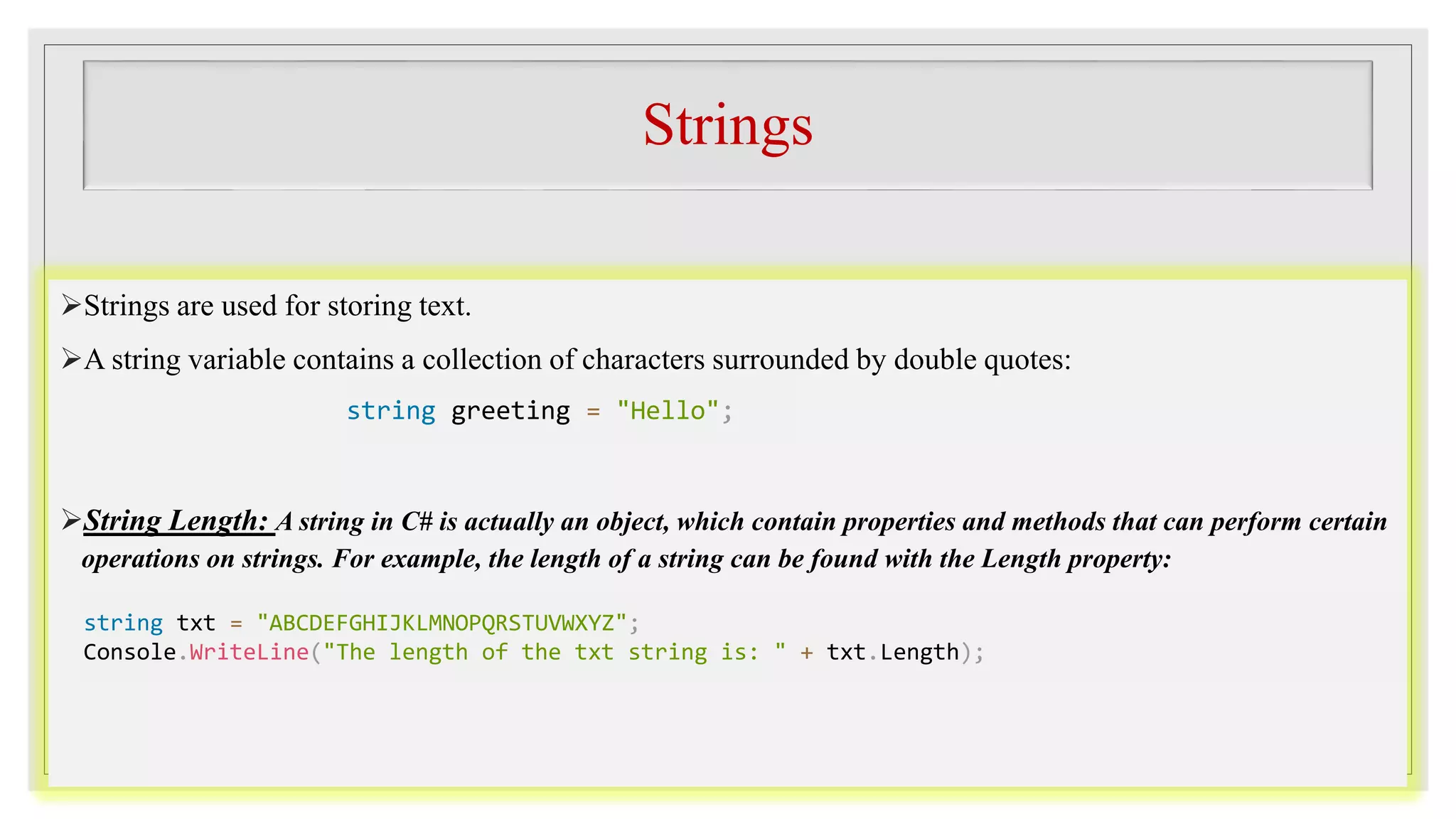
Strings
Strings are used for storing text.
A string variable contains a collection of characters surrounded by double quotes:
String Length: A string in C# is actually an object, which contain properties and methods that can perform certain
operations on strings. For example, the length of a string can be found with the Length property:
string greeting = "Hello";
string txt = "ABCDEFGHIJKLMNOPQRSTUVWXYZ";
Console.WriteLine("The length of the txt string is: " + txt.Length);
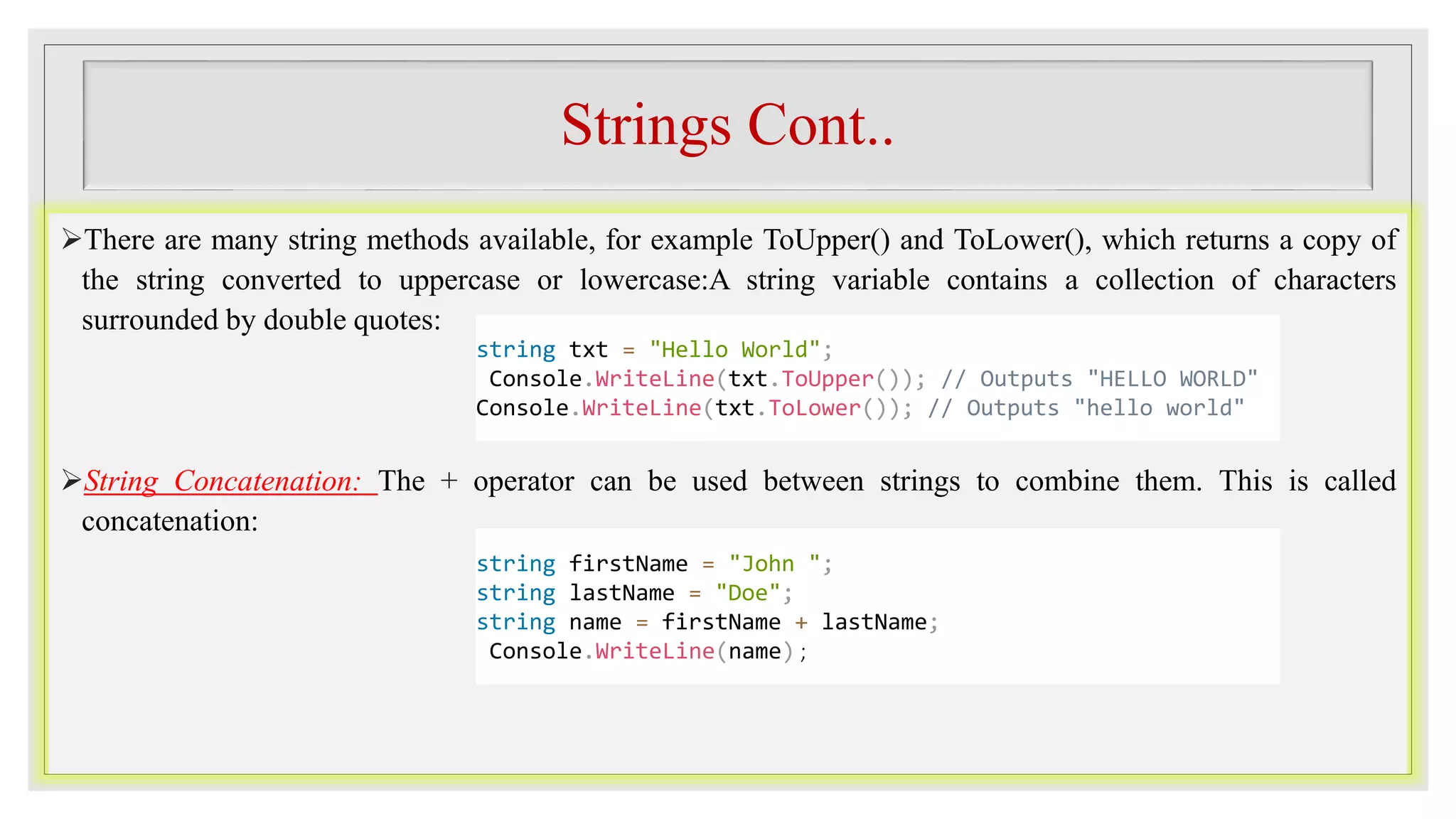
Strings Cont..
There are many string methods available, for example ToUpper() and ToLower(), which returns a copy of
the string converted to uppercase or lowercase:A string variable contains a collection of characters
surrounded by double quotes:
String Concatenation: The + operator can be used between strings to combine them. This is called
concatenation:
string txt = "Hello World";
Console.WriteLine(txt.ToUpper()); // Outputs "HELLO WORLD"
Console.WriteLine(txt.ToLower()); // Outputs "hello world"
string firstName = "John ";
string lastName = "Doe";
string name = firstName + lastName;
Console.WriteLine(name) ;
Strings Cont..
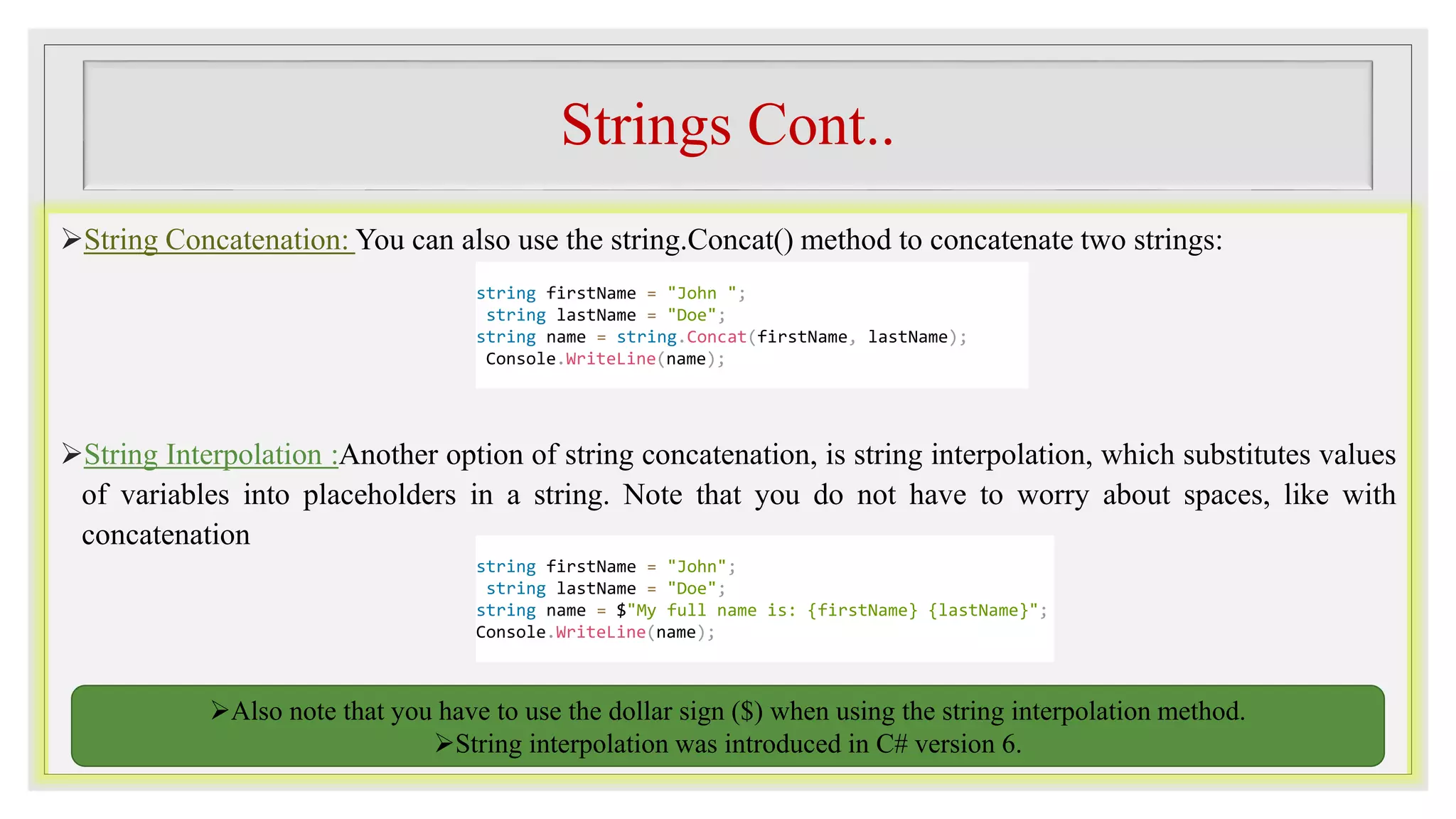
String Concatenation: You can also use the string.Concat() method to concatenate two strings:
String Interpolation :Another option of string concatenation, is string interpolation, which substitutes values
of variables into placeholders in a string. Note that you do not have to worry about spaces, like with
concatenation
Also note that you have to use the dollar sign ($) when using the string interpolation method.
String interpolation was introduced in C# version 6.
string firstName = "John ";
string lastName = "Doe";
string name = string.Concat(firstName, lastName);
Console.WriteLine(name);
string firstName = "John";
string lastName = "Doe";
string name = $"My full name is: {firstName} {lastName}";
Console.WriteLine(name);
Strings Cont..
Access Strings: You can access the characters in a string by referring to its index number inside square
brackets [ ].
You can also find the index position of a specific character in a string, by using the IndexOf() method:
string myString = "Hello";
Console.WriteLine(myString[0]); // Outputs "H"
Note: String indexes start with 0: [0] is the first character. [1] is the second character,
etc.
string myString = "Hello"; Console.WriteLine(myString.IndexOf("e")); // Outputs "1"
Special Characters
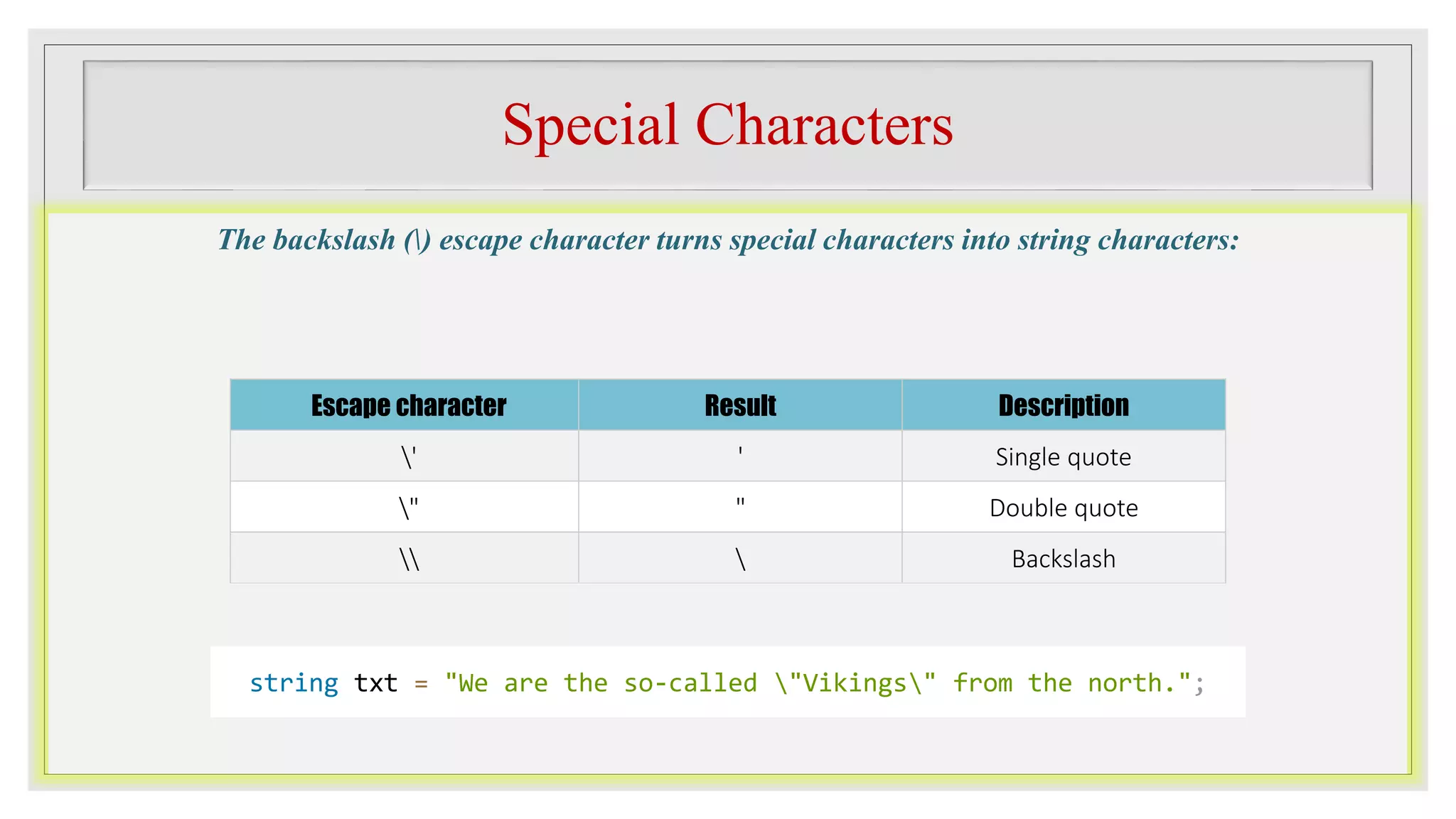
The backslash () escape character turns special characters into string characters:
Escape character Result Description
' ' Single quote
" " Double quote
  Backslash
string txt = "We are the so-called "Vikings" from the north.";
Special Characters Cont..
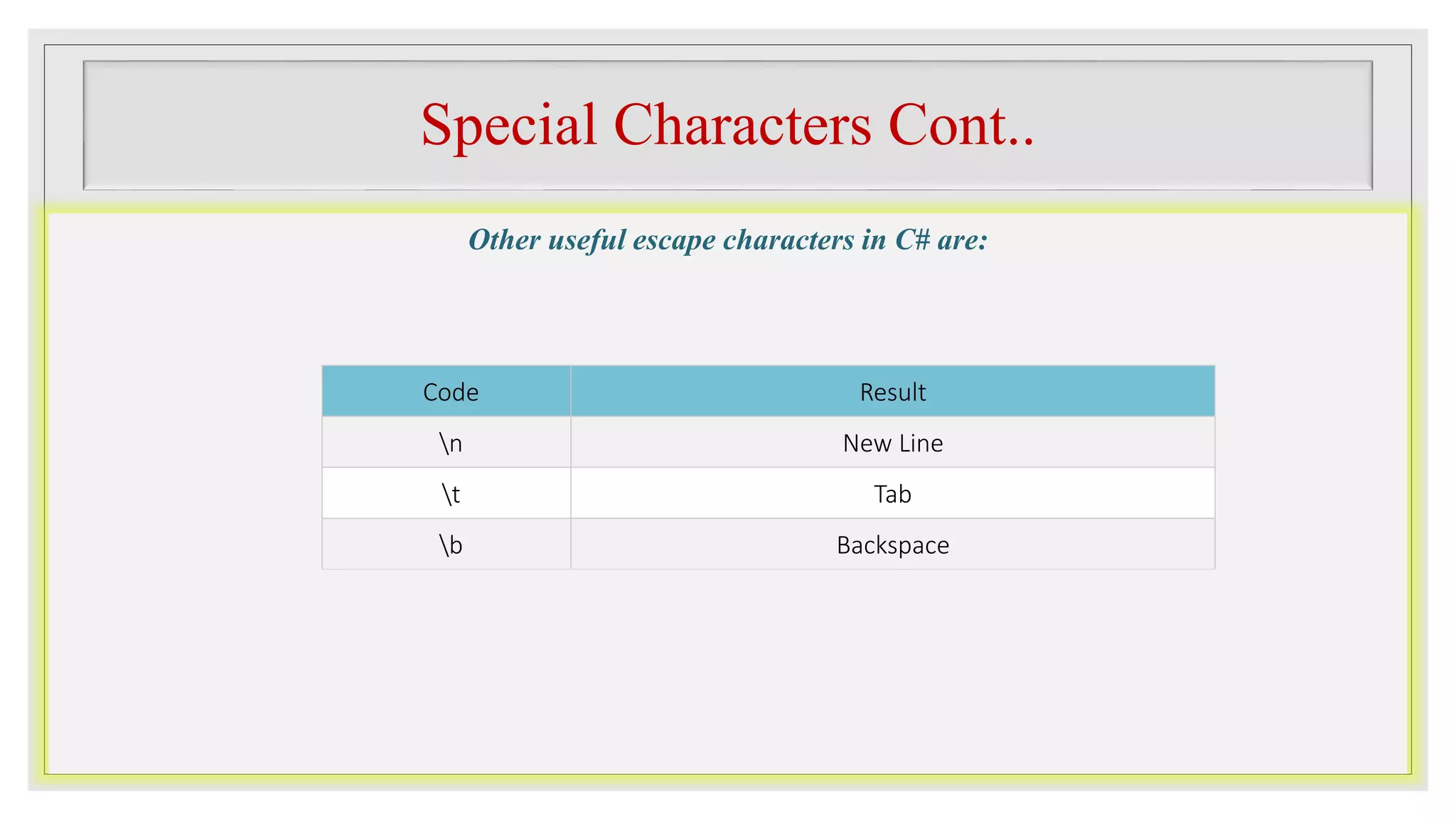
Other useful escape characters in C# are:
Code Result
n New Line
t Tab
b Backspace
END

C# Operators. (C-Sharp Operators)

  • 1.
  • 2.
    C# Operators Operators areused to perform operations on variables and values. In the example below, we use the + operator to add together two values: Although the + operator is often used to add together two values, like in the example above, it can also be used to add together a variable and a value, or a variable and another variable: int x = 100 + 50; int sum1 = 100 + 50; // 150 (100 + 50) int sum2 = sum1 + 250; // 400 (150 + 250) int sum3 = sum2 + sum2; // 800 (400 + 400)
  • 3.
    Arithmetic Operators Operator NameDescription Example + Addition Adds together two values x + y - Subtraction Subtracts one value from another x - y * Multiplication Multiplies two values x * y / Division Divides one value by another x / y % Modulus Returns the division remainder x % y ++ Increment Increases the value of a variable by 1 x++ -- Decrement Decreases the value of a variable by 1 x-- Arithmetic operators are used to perform common mathematical operations:
  • 4.
    Assignment Operators ◦ Assignmentoperators are used to assign values to variables. ◦ In the example below, we use the assignment operator (=) to assign the value 10 to a variable called x: ◦ The addition assignment operator (+=) adds a value to a variable: int x = 10; int x = 10; x += 5;
  • 5.
    A list ofall assignment operators: Operator Example Same As = x = 5 x = 5 += x += 3 x = x + 3 -= x -= 3 x = x - 3 *= x *= 3 x = x * 3 /= x /= 3 x = x / 3 %= x %= 3 x = x % 3 &= x &= 3 x = x & 3 |= x |= 3 x = x | 3 ^= x ^= 3 x = x ^ 3 >>= x >>= 3 x = x >> 3 <<= x <<= 3 x = x << 3
  • 6.
    Comparison Operators Operator NameExample == Equal to x == y != Not equal x != y > Greater than x > y < Less than x < y >= Greater than or equal to x >= y <= Less than or equal to x <= y Comparison operators are used to compare two values:
  • 7.
    Logical Operators Operator NameDescription && Logical and Returns true if both statements are true || Logical or Returns true if one of the statements is true ! Logical not Reverse the result, returns false if the result is true Logical operators are used to determine the logic between variables or values:
  • 8.
    Strings Strings are usedfor storing text. A string variable contains a collection of characters surrounded by double quotes: String Length: A string in C# is actually an object, which contain properties and methods that can perform certain operations on strings. For example, the length of a string can be found with the Length property: string greeting = "Hello"; string txt = "ABCDEFGHIJKLMNOPQRSTUVWXYZ"; Console.WriteLine("The length of the txt string is: " + txt.Length);
  • 9.
    Strings Cont.. There aremany string methods available, for example ToUpper() and ToLower(), which returns a copy of the string converted to uppercase or lowercase:A string variable contains a collection of characters surrounded by double quotes: String Concatenation: The + operator can be used between strings to combine them. This is called concatenation: string txt = "Hello World"; Console.WriteLine(txt.ToUpper()); // Outputs "HELLO WORLD" Console.WriteLine(txt.ToLower()); // Outputs "hello world" string firstName = "John "; string lastName = "Doe"; string name = firstName + lastName; Console.WriteLine(name) ;
  • 10.
    Strings Cont.. String Concatenation:You can also use the string.Concat() method to concatenate two strings: String Interpolation :Another option of string concatenation, is string interpolation, which substitutes values of variables into placeholders in a string. Note that you do not have to worry about spaces, like with concatenation Also note that you have to use the dollar sign ($) when using the string interpolation method. String interpolation was introduced in C# version 6. string firstName = "John "; string lastName = "Doe"; string name = string.Concat(firstName, lastName); Console.WriteLine(name); string firstName = "John"; string lastName = "Doe"; string name = $"My full name is: {firstName} {lastName}"; Console.WriteLine(name);
  • 11.
    Strings Cont.. Access Strings:You can access the characters in a string by referring to its index number inside square brackets [ ]. You can also find the index position of a specific character in a string, by using the IndexOf() method: string myString = "Hello"; Console.WriteLine(myString[0]); // Outputs "H" Note: String indexes start with 0: [0] is the first character. [1] is the second character, etc. string myString = "Hello"; Console.WriteLine(myString.IndexOf("e")); // Outputs "1"
  • 12.
    Special Characters The backslash() escape character turns special characters into string characters: Escape character Result Description ' ' Single quote " " Double quote Backslash string txt = "We are the so-called "Vikings" from the north.";
  • 13.
    Special Characters Cont.. Otheruseful escape characters in C# are: Code Result n New Line t Tab b Backspace
  • 14.