Python Basics
LECTURE 1
Python
▪a programming language that lets you work
quickly and integrate systems more effectively
(Python Software Foundation)
▪created by Guido van Rossum (1990)
▪named after the popular British comedy troupe
Monty Python’s Flying Circus
ECE115.2: Object Oriented Programming for ECE Prepared by: Engr. Ria Marie P. Cordova
Why Python?
▪works on different platforms (Windows, Mac, Linux,
Raspberry Pi, etc.)
▪has a simple syntax
▪runs on an interpreter system
▪can be treated in a procedural way, an object-
oriented way or a functional way
ECE115.2: Object Oriented Programming for ECE Prepared by: Engr. Ria Marie P. Cordova
Why Python?
▪has extremely rich libraries
▪has extensive online documentation
▪has multiple programming communities
▪has diverse applications:
✓ web development (server-side)
✓ software development
✓ mathematics
✓ system scripting
ECE115.2: Object Oriented Programming for ECE Prepared by: Engr. Ria Marie P. Cordova
Python Input/Output Functions
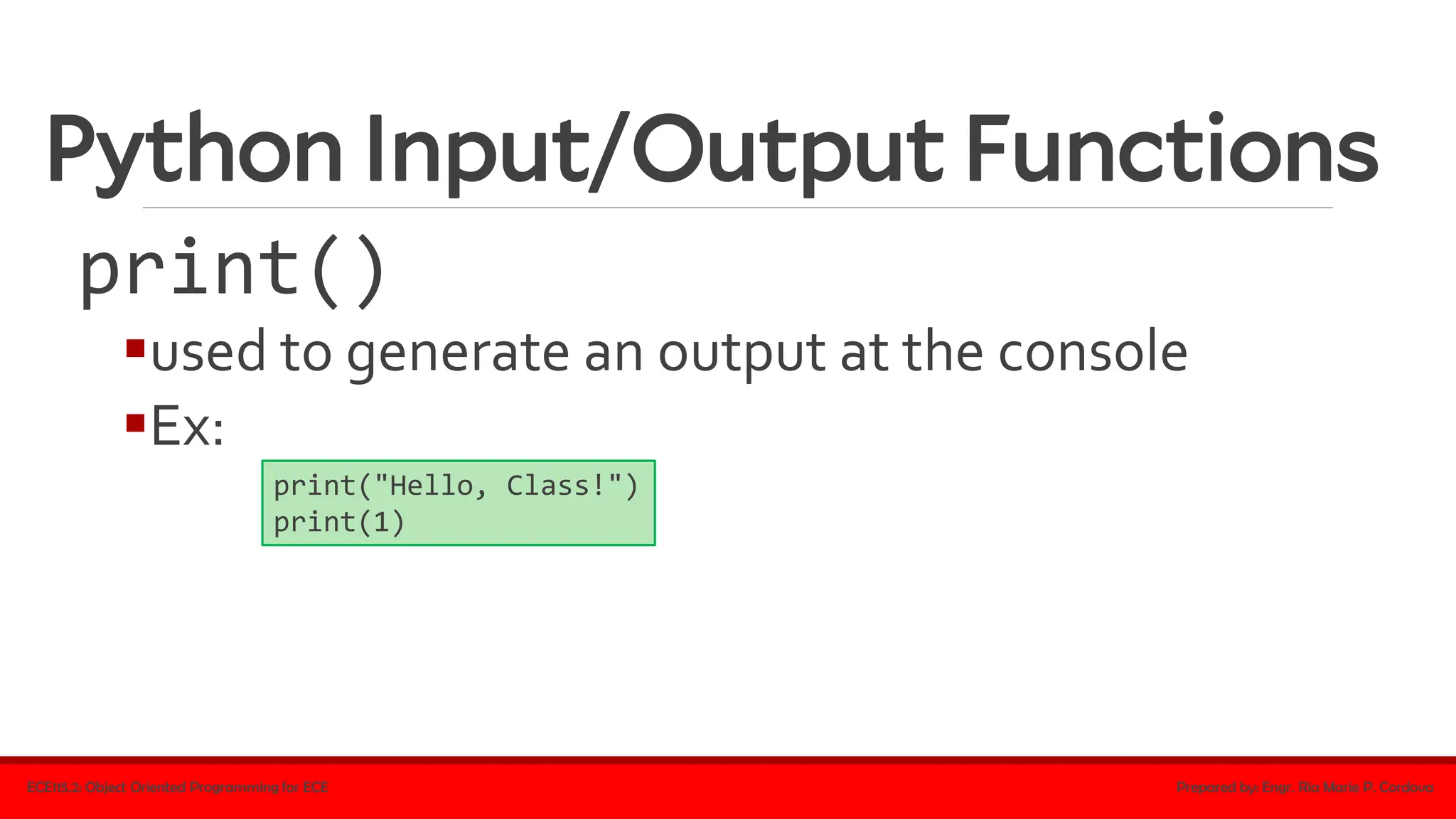
print()
▪used to generate an output at the console
▪Ex:
ECE115.2: Object Oriented Programming for ECE Prepared by: Engr. Ria Marie P. Cordova
print("Hello, Class!")
print(1)
Python Input/Output Functions
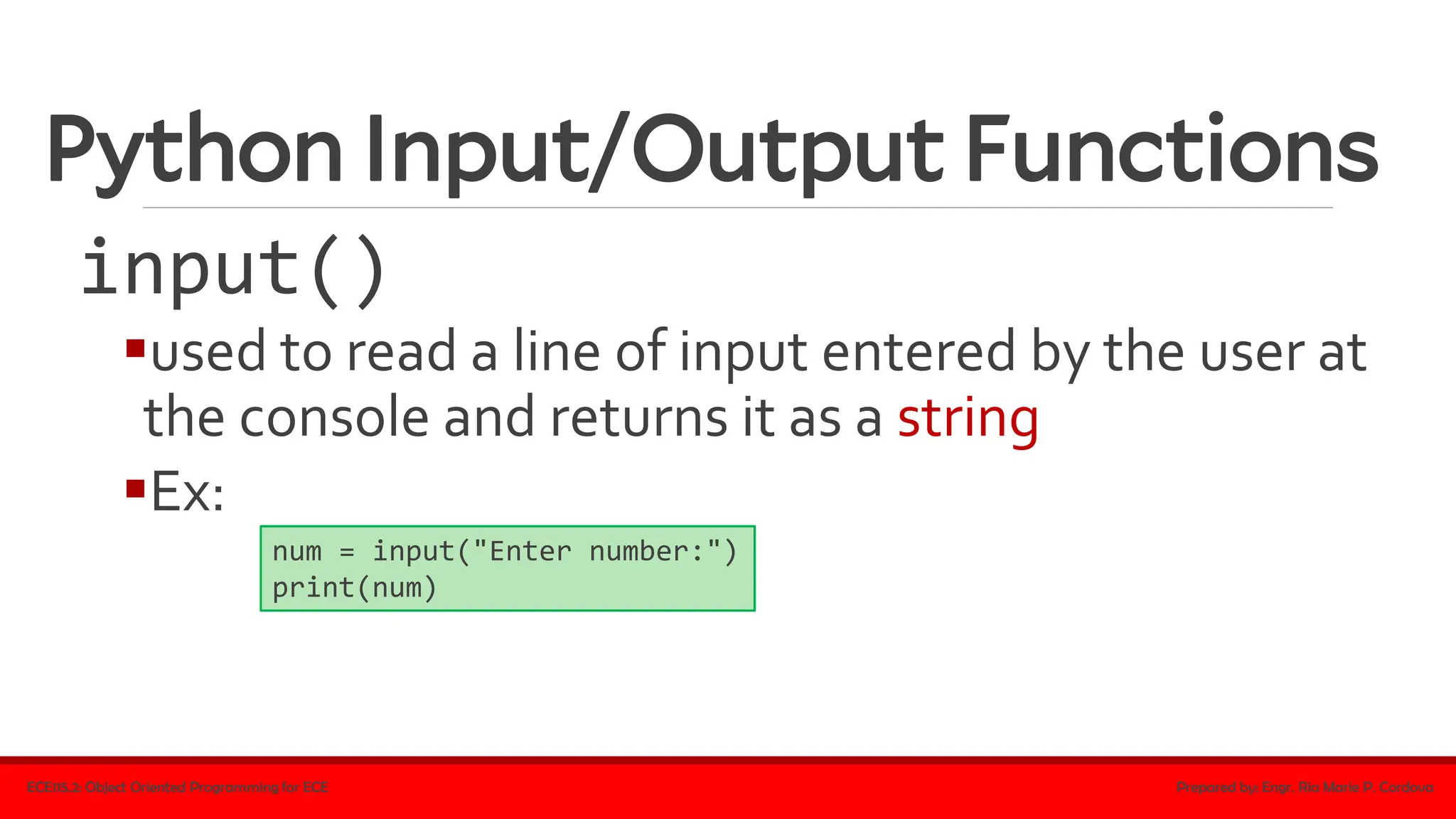
input()
▪used to read a line of input entered by the user at
the console and returns it as a string
▪Ex:
ECE115.2: Object Oriented Programming for ECE Prepared by: Engr. Ria Marie P. Cordova
num = input("Enter number:")
print(num)
Python Syntax
▪indentation
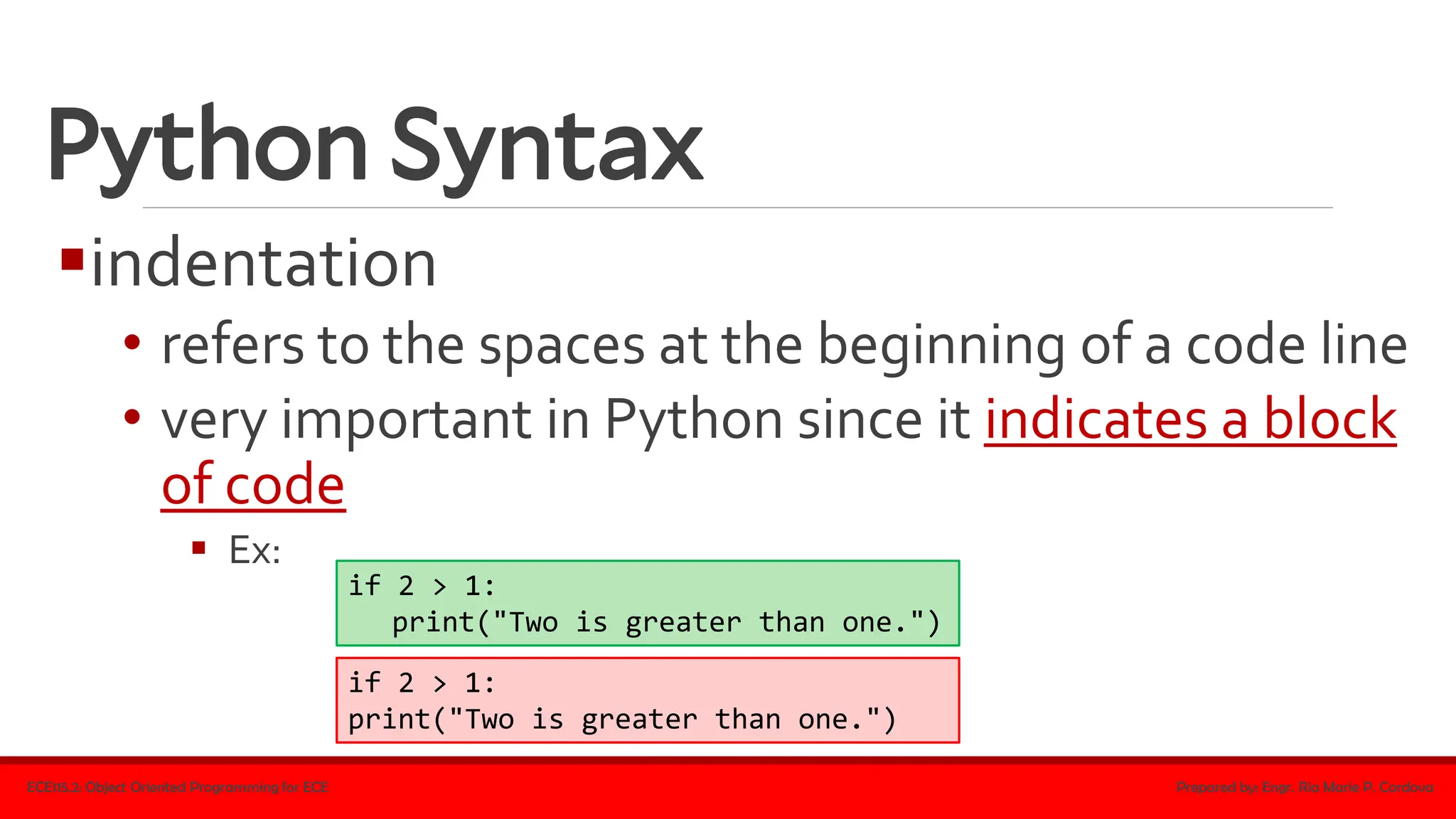
• refers to the spaces at the beginning of a code line
• very important in Python since it indicates a block
of code
▪ Ex:
ECE115.2: Object Oriented Programming for ECE Prepared by: Engr. Ria Marie P. Cordova
if 2 > 1:
print("Two is greater than one.")
if 2 > 1:
print("Two is greater than one.")
Python Syntax
▪indentation
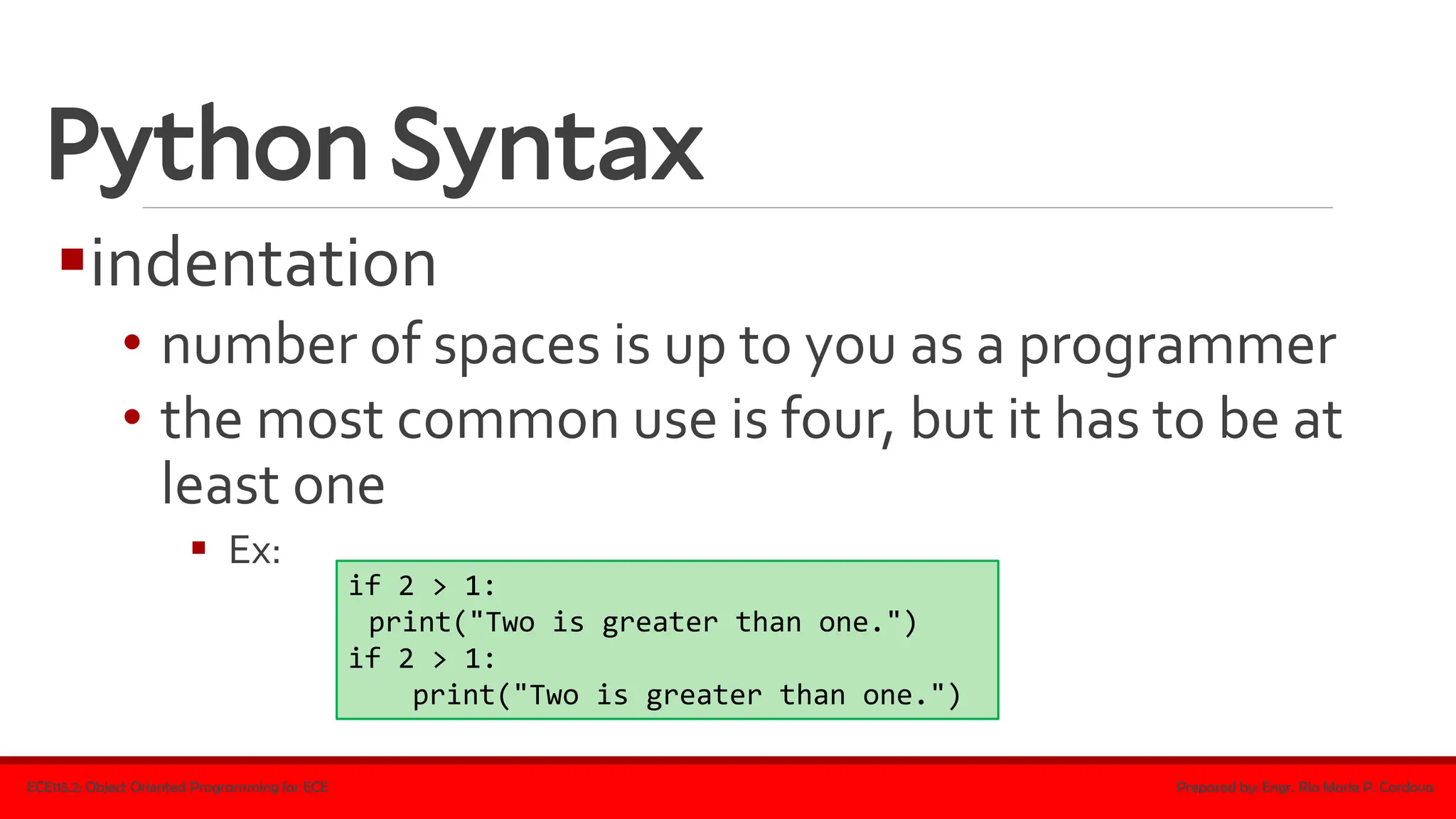
• number of spaces is up to you as a programmer
• the most common use is four, but it has to be at
least one
▪ Ex:
ECE115.2: Object Oriented Programming for ECE Prepared by: Engr. Ria Marie P. Cordova
if 2 > 1:
print("Two is greater than one.")
if 2 > 1:
print("Two is greater than one.")
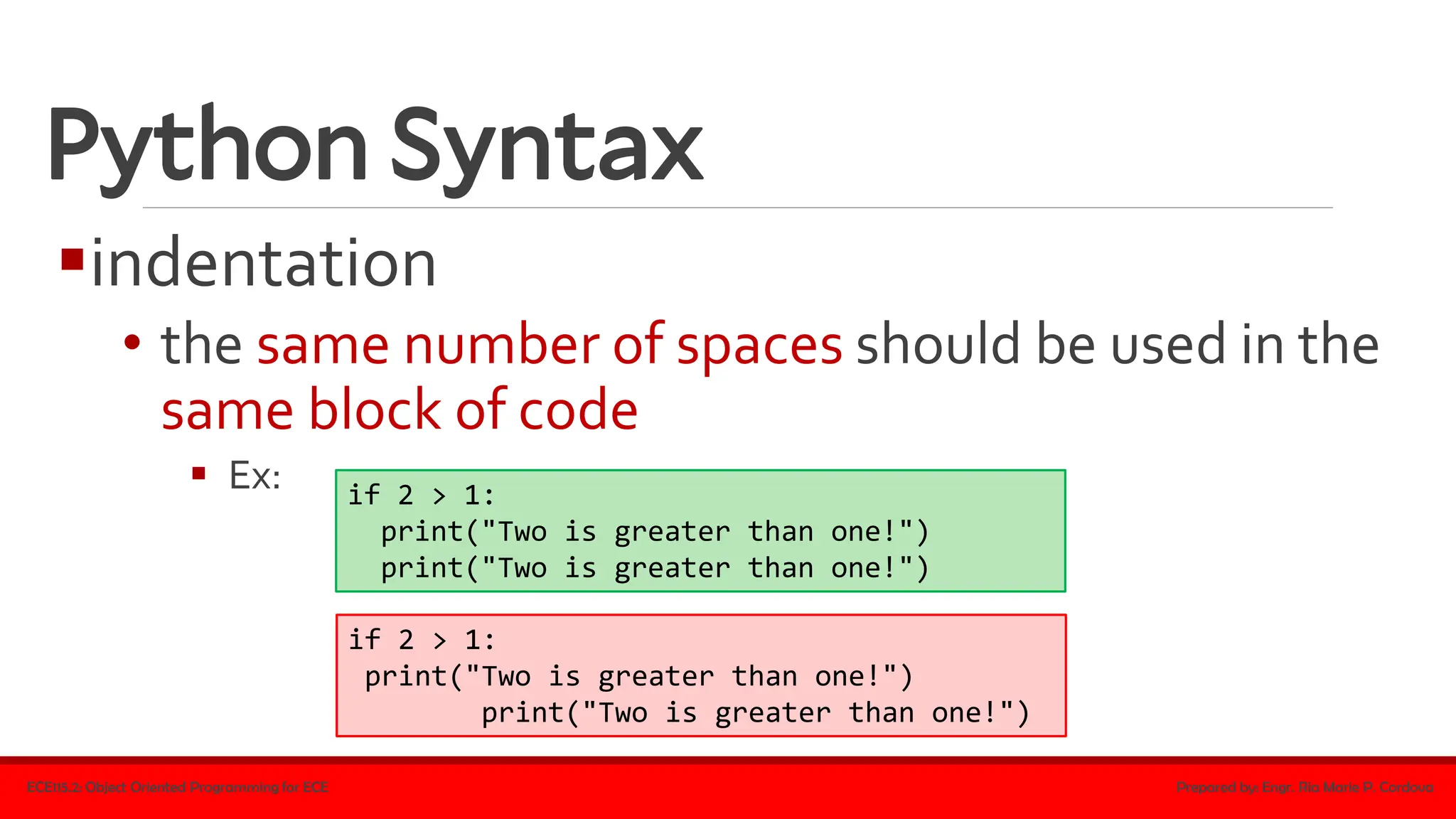
Python Syntax
▪indentation
• the same number of spaces should be used in the
same block of code
▪ Ex:
ECE115.2: Object Oriented Programming for ECE Prepared by: Engr. Ria Marie P. Cordova
if 2 > 1:
print("Two is greater than one!")
if 2 > 1:
print("Two is greater than one!")
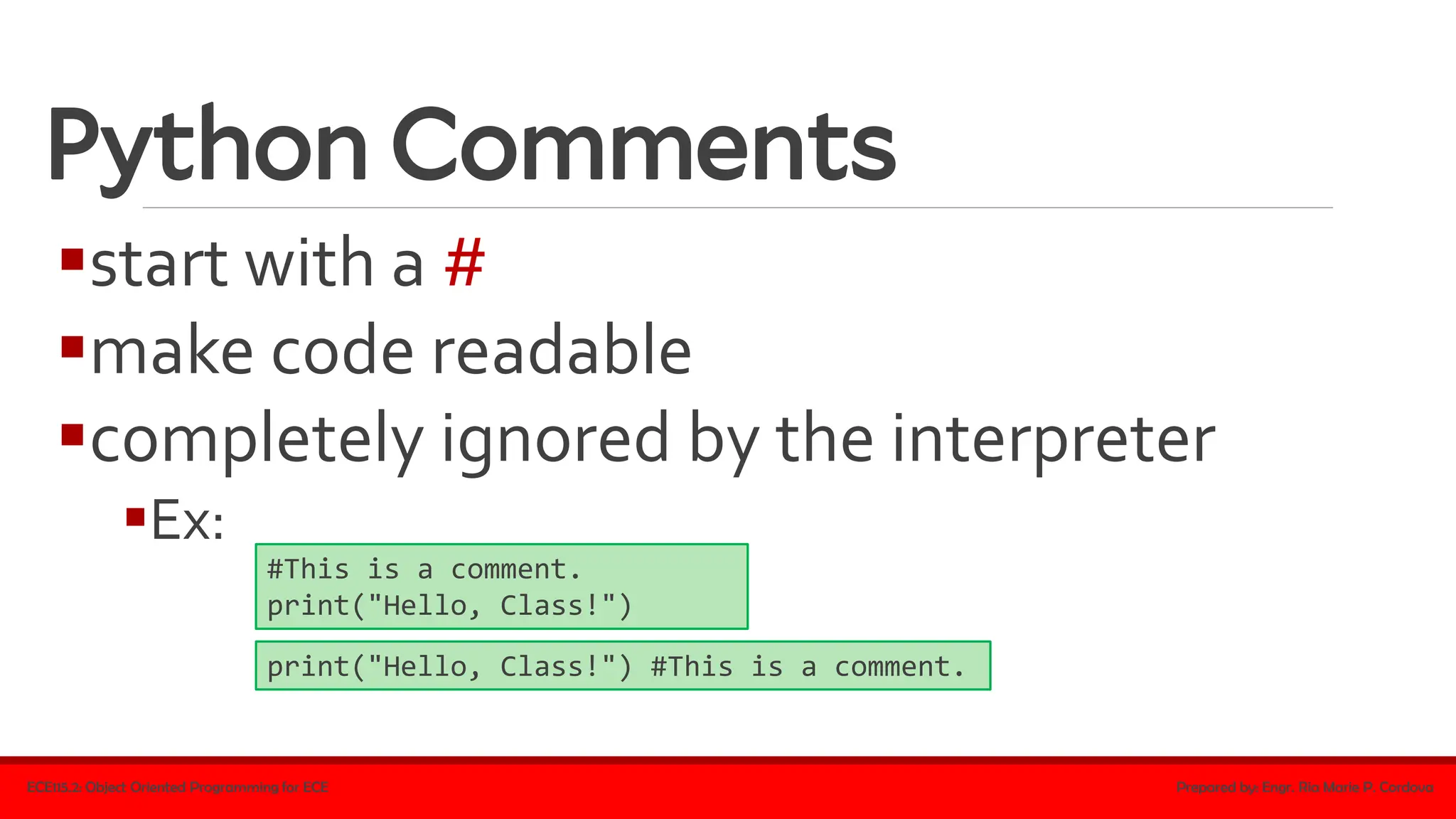
Python Comments
▪start with a #
▪make code readable
▪completely ignored by the interpreter
▪Ex:
ECE115.2: Object Oriented Programming for ECE Prepared by: Engr. Ria Marie P. Cordova
#This is a comment.
print("Hello, Class!")
print("Hello, Class!") #This is a comment.
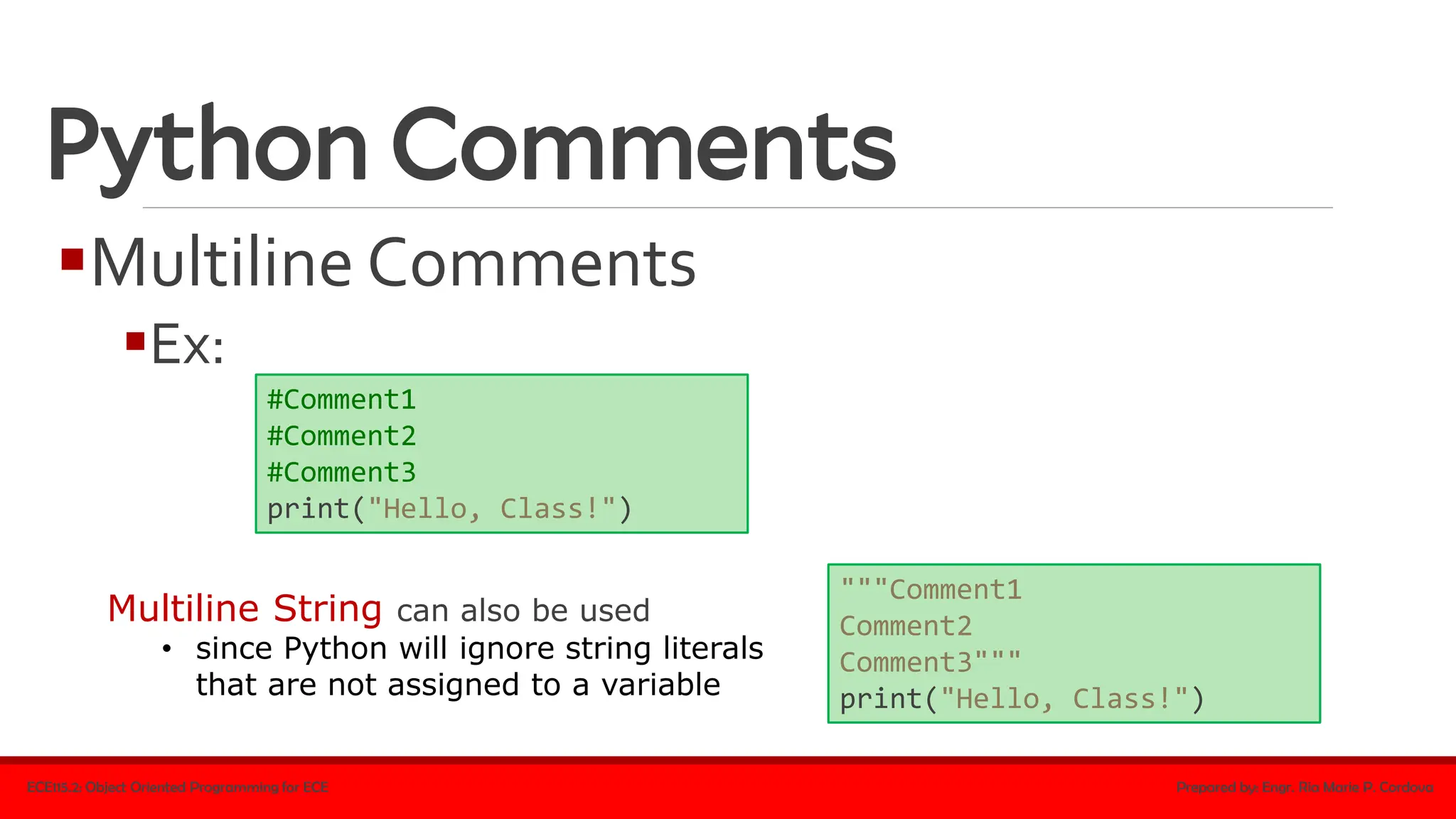
Python Comments
▪Multiline Comments
▪Ex:
ECE115.2: Object Oriented Programming for ECE Prepared by: Engr. Ria Marie P. Cordova
#Comment1
#Comment2
#Comment3
print("Hello, Class!")
"""Comment1
Comment2
Comment3"""
print("Hello, Class!")
Multiline String can also be used
• since Python will ignore string literals
that are not assigned to a variable
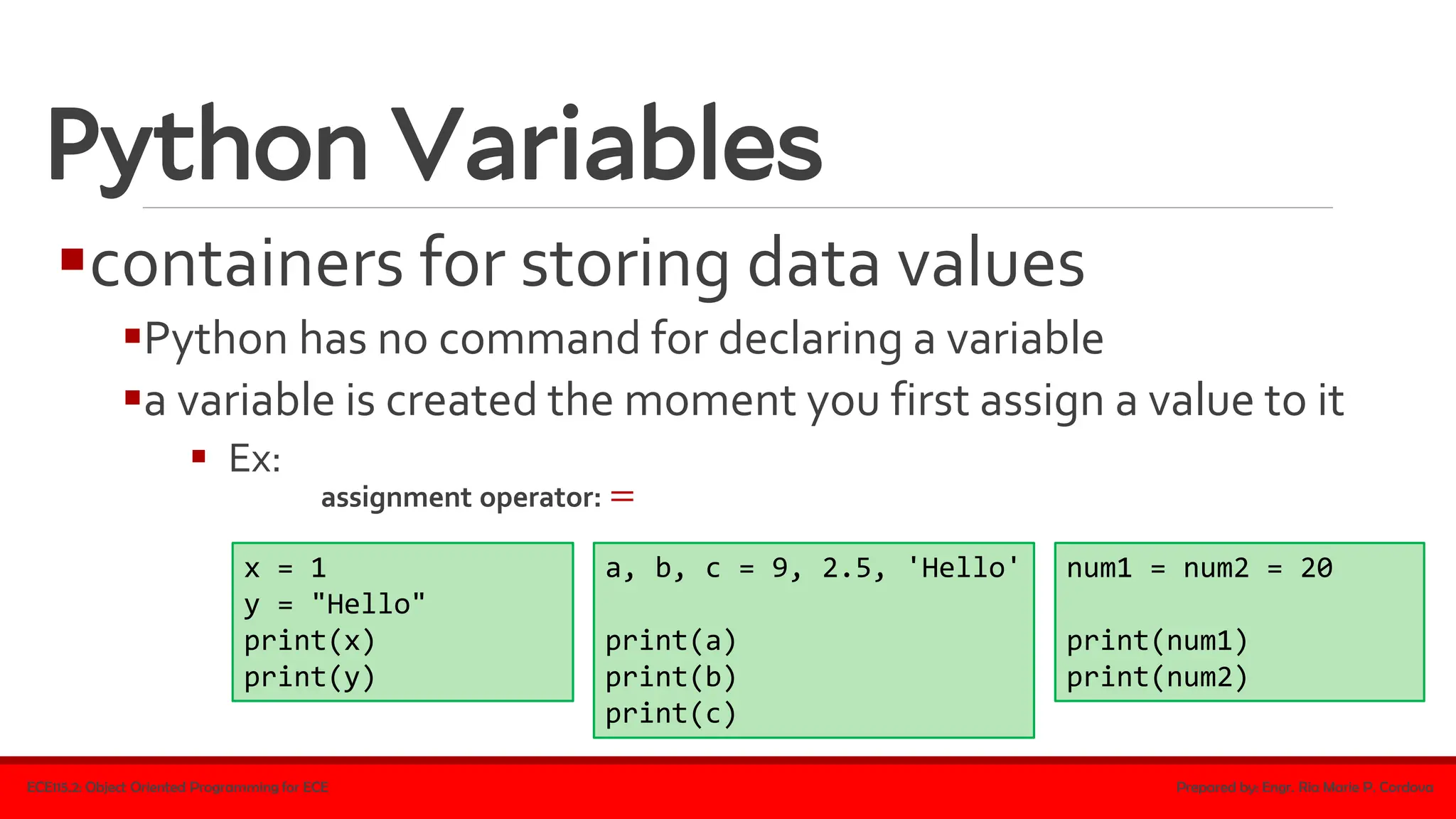
Python Variables
▪containers for storing data values
▪Python has no command for declaring a variable
▪a variable is created the moment you first assign a value to it
▪ Ex:
ECE115.2: Object Oriented Programming for ECE Prepared by: Engr. Ria Marie P. Cordova
x = 1
y = "Hello"
print(x)
print(y)
assignment operator: =
a, b, c = 9, 2.5, 'Hello'
print(a)
print(b)
print(c)
num1 = num2 = 20
print(num1)
print(num2)
Python Variables
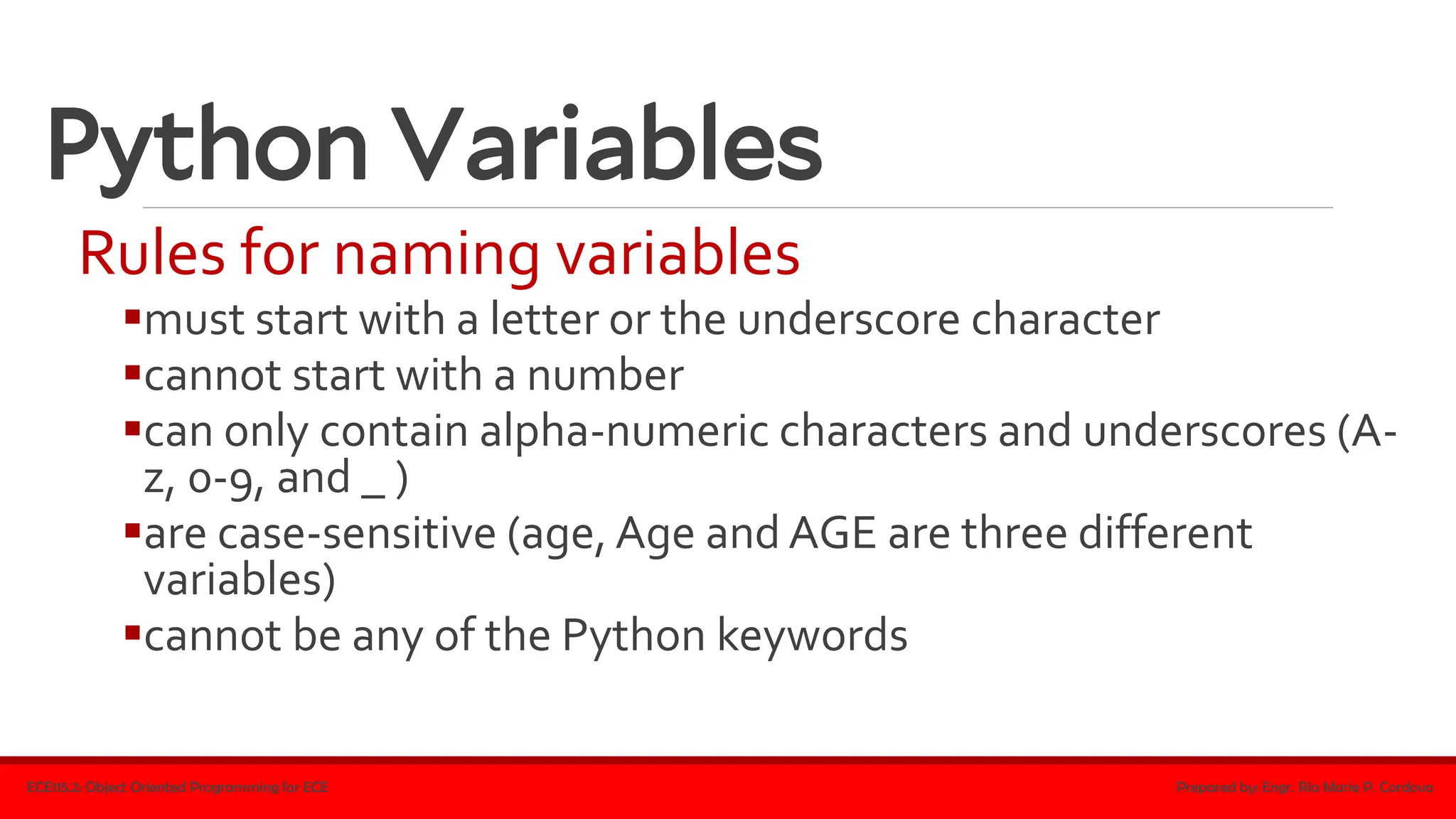
Rules for naming variables
▪must start with a letter or the underscore character
▪cannot start with a number
▪can only contain alpha-numeric characters and underscores (A-
z, 0-9, and _ )
▪are case-sensitive (age, Age and AGE are three different
variables)
▪cannot be any of the Python keywords
ECE115.2: Object Oriented Programming for ECE Prepared by: Engr. Ria Marie P. Cordova
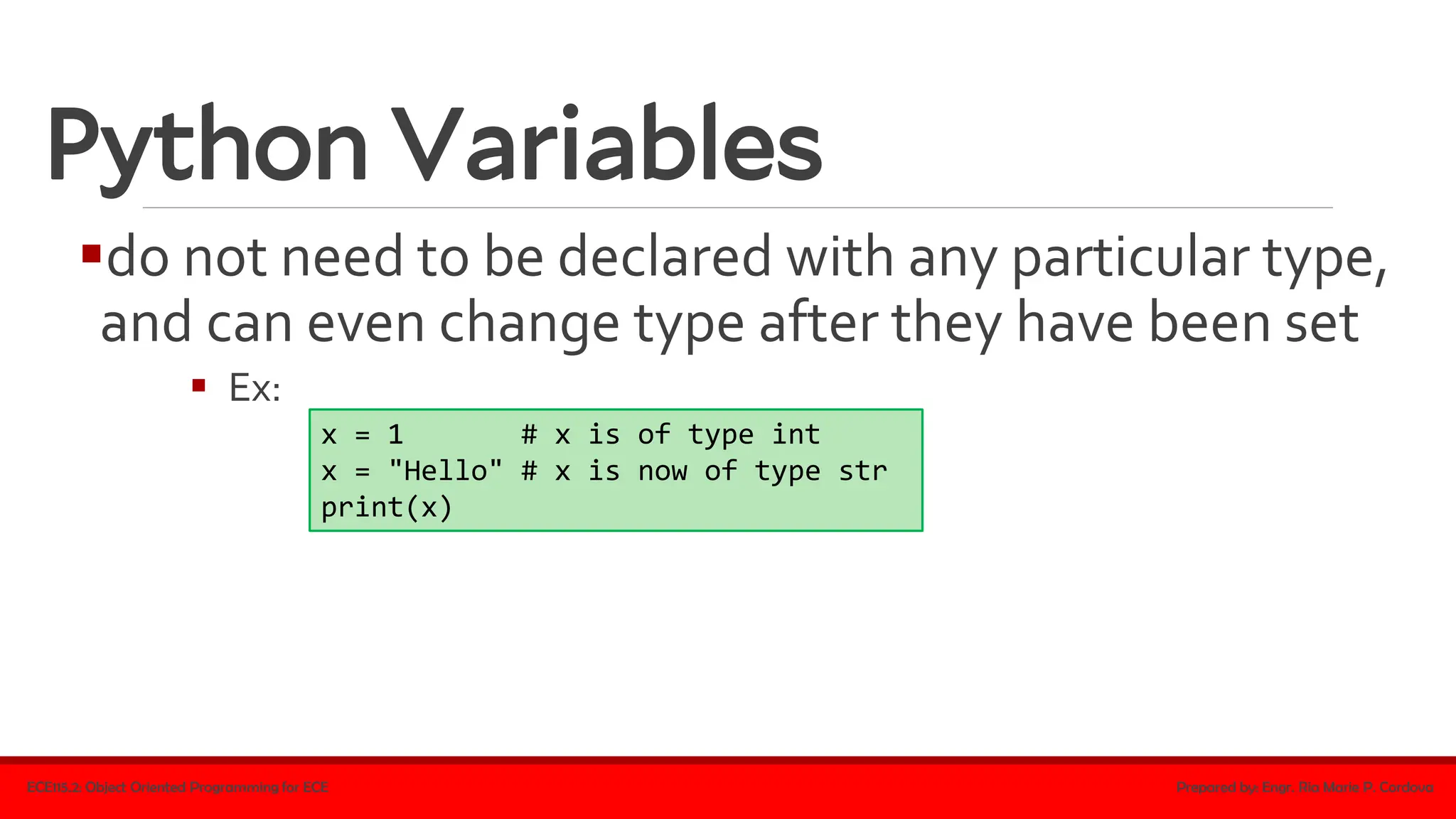
Python Variables
▪do not need to be declared with any particular type,
and can even change type after they have been set
▪ Ex:
ECE115.2: Object Oriented Programming for ECE Prepared by: Engr. Ria Marie P. Cordova
x = 1 # x is of type int
x = "Hello" # x is now of type str
print(x)
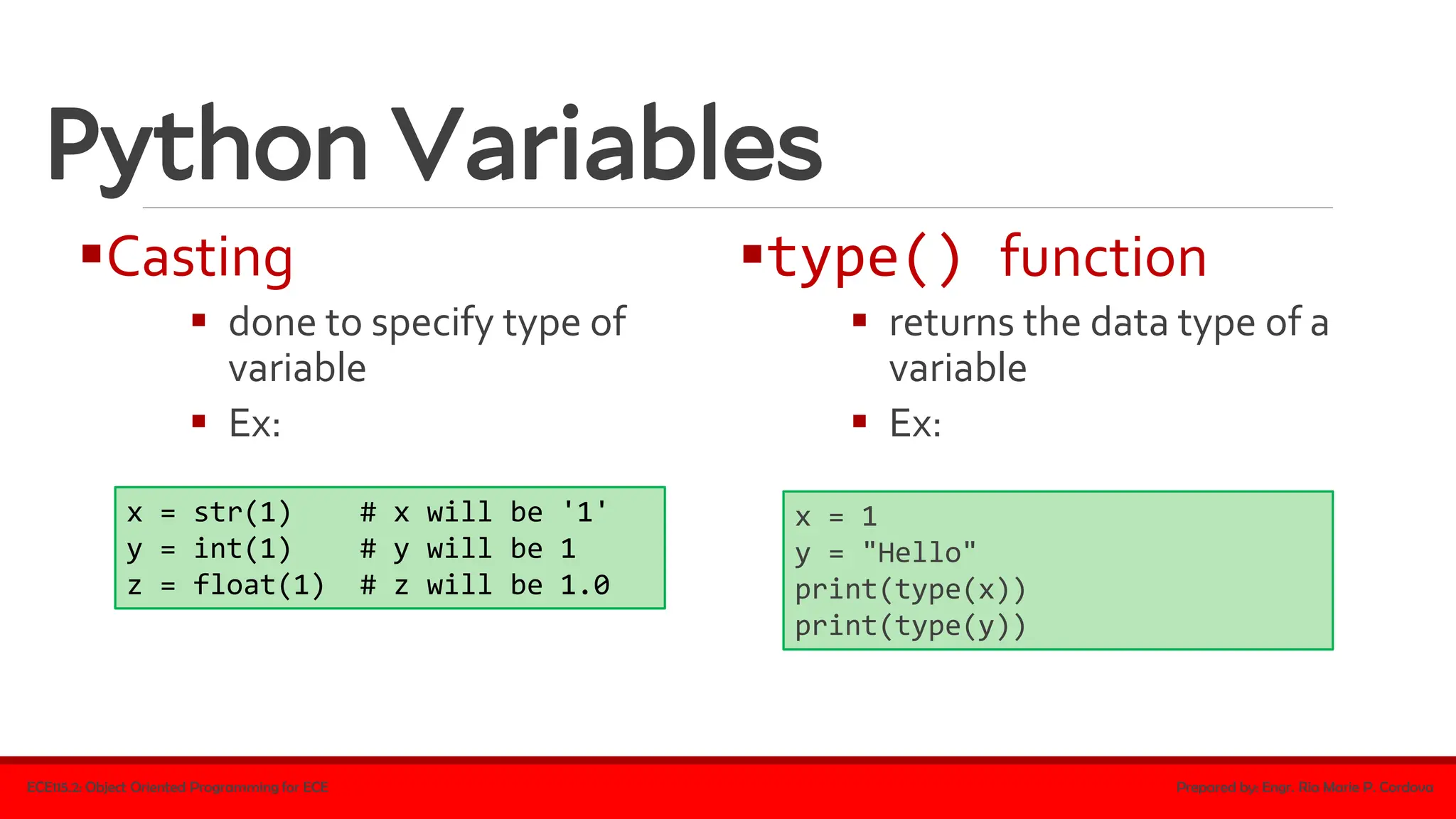
Python Variables
▪Casting
▪ done to specify type of
variable
▪ Ex:
ECE115.2: Object Oriented Programming for ECE Prepared by: Engr. Ria Marie P. Cordova
x = str(1) # x will be '1'
y = int(1) # y will be 1
z = float(1) # z will be 1.0
▪type() function
▪ returns the data type of a
variable
▪ Ex:
x = 1
y = "Hello"
print(type(x))
print(type(y))
Python Variables
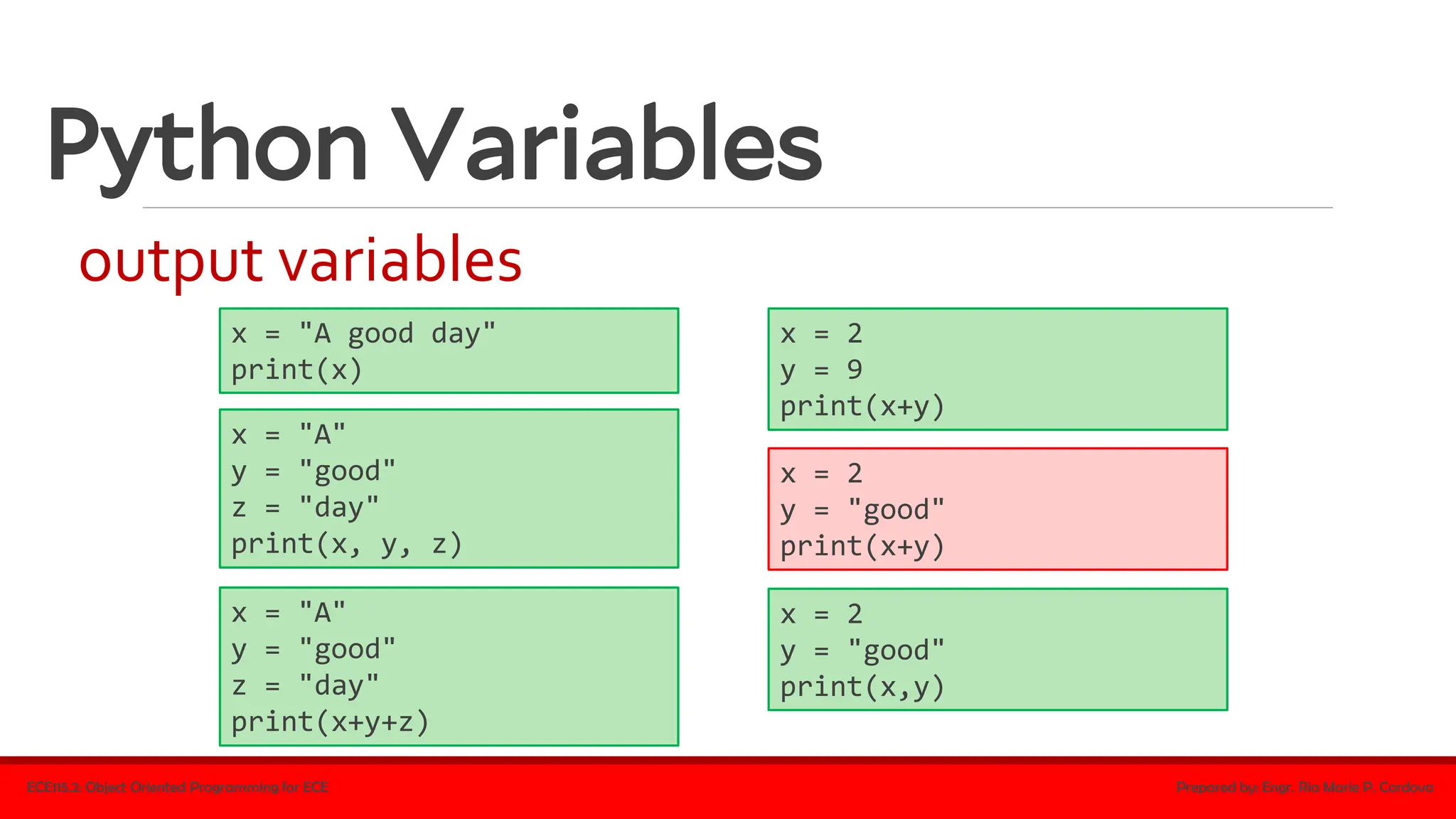
output variables
ECE115.2: Object Oriented Programming for ECE Prepared by: Engr. Ria Marie P. Cordova
x = "A good day"
print(x)
x = "A"
y = "good"
z = "day"
print(x, y, z)
x = "A"
y = "good"
z = "day"
print(x+y+z)
x = 2
y = 9
print(x+y)
x = 2
y = "good"
print(x+y)
x = 2
y = "good"
print(x,y)
Python Variables
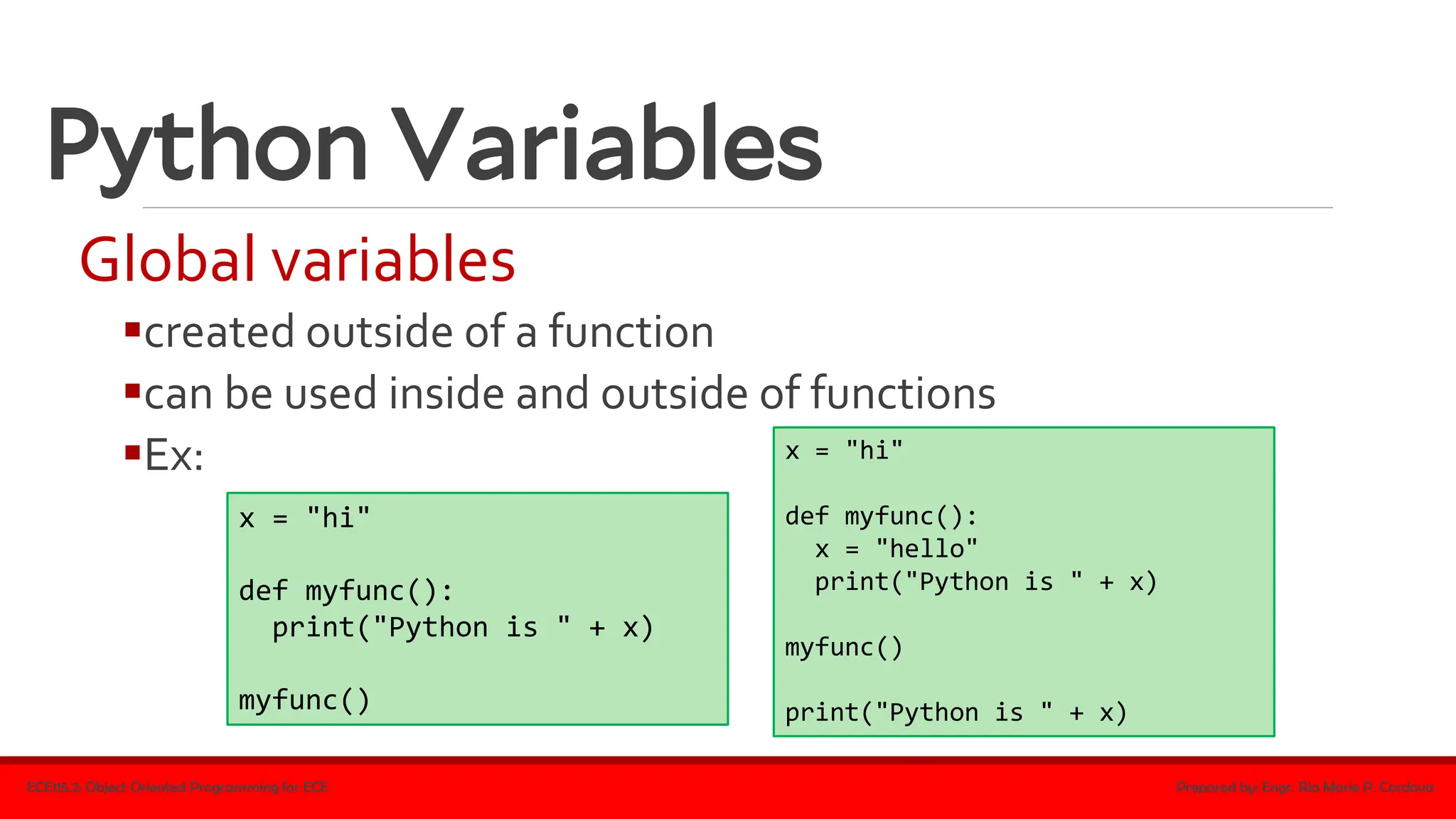
Global variables
▪created outside of a function
▪can be used inside and outside of functions
▪Ex:
ECE115.2: Object Oriented Programming for ECE Prepared by: Engr. Ria Marie P. Cordova
x = "hi"
def myfunc():
print("Python is " + x)
myfunc()
x = "hi"
def myfunc():
x = "hello"
print("Python is " + x)
myfunc()
print("Python is " + x)
Python Data Types
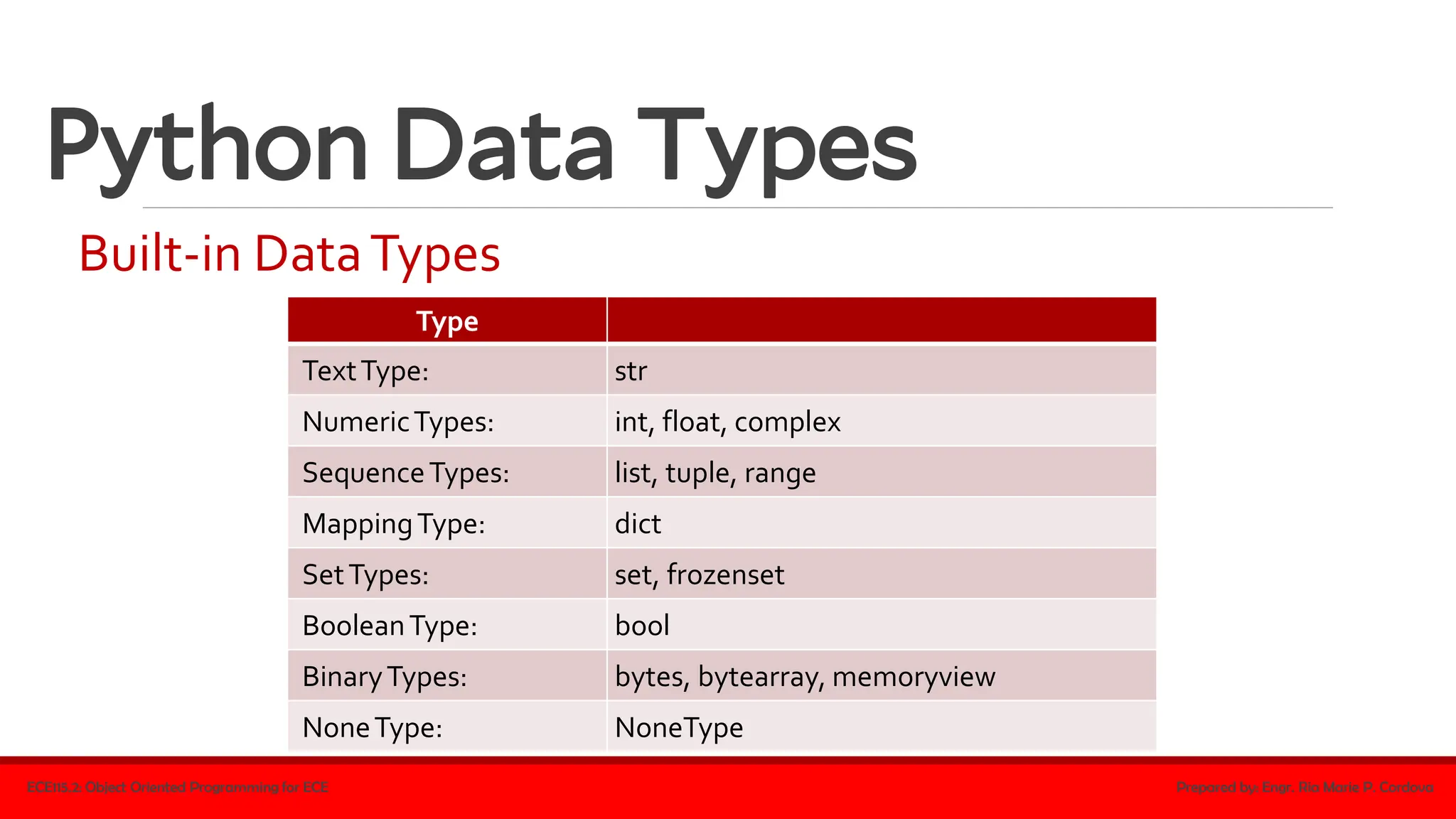
Built-in DataTypes
ECE115.2: Object Oriented Programming for ECE Prepared by: Engr. Ria Marie P. Cordova
Type
TextType: str
NumericTypes: int, float, complex
SequenceTypes: list, tuple, range
MappingType: dict
SetTypes: set, frozenset
BooleanType: bool
BinaryTypes: bytes, bytearray, memoryview
NoneType: NoneType
Python Data Types
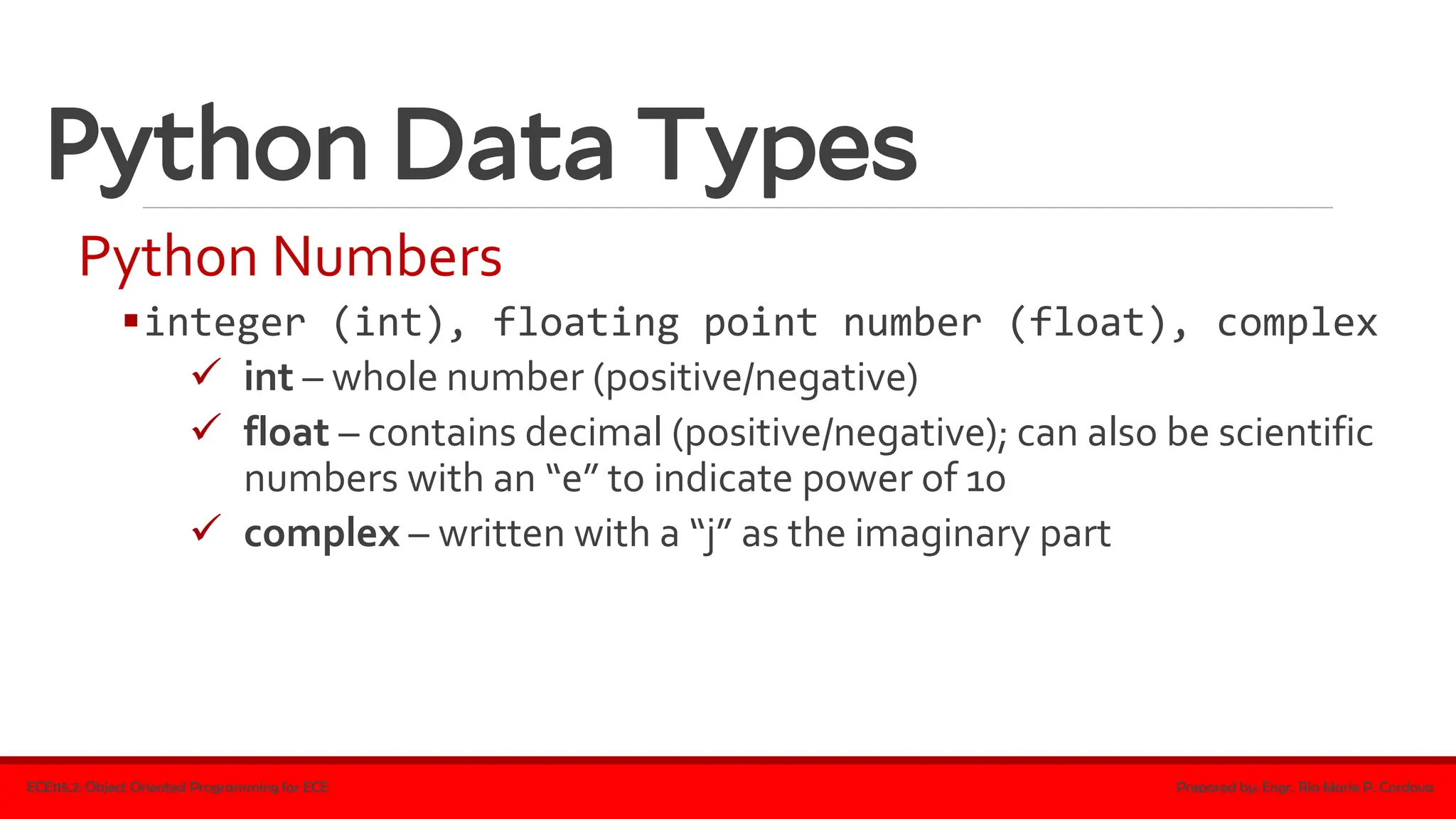
Python Numbers
▪integer (int), floating point number (float), complex
✓ int – whole number (positive/negative)
✓ float – contains decimal (positive/negative); can also be scientific
numbers with an “e” to indicate power of 10
✓ complex – written with a “j” as the imaginary part
ECE115.2: Object Oriented Programming for ECE Prepared by: Engr. Ria Marie P. Cordova
Python Data Types
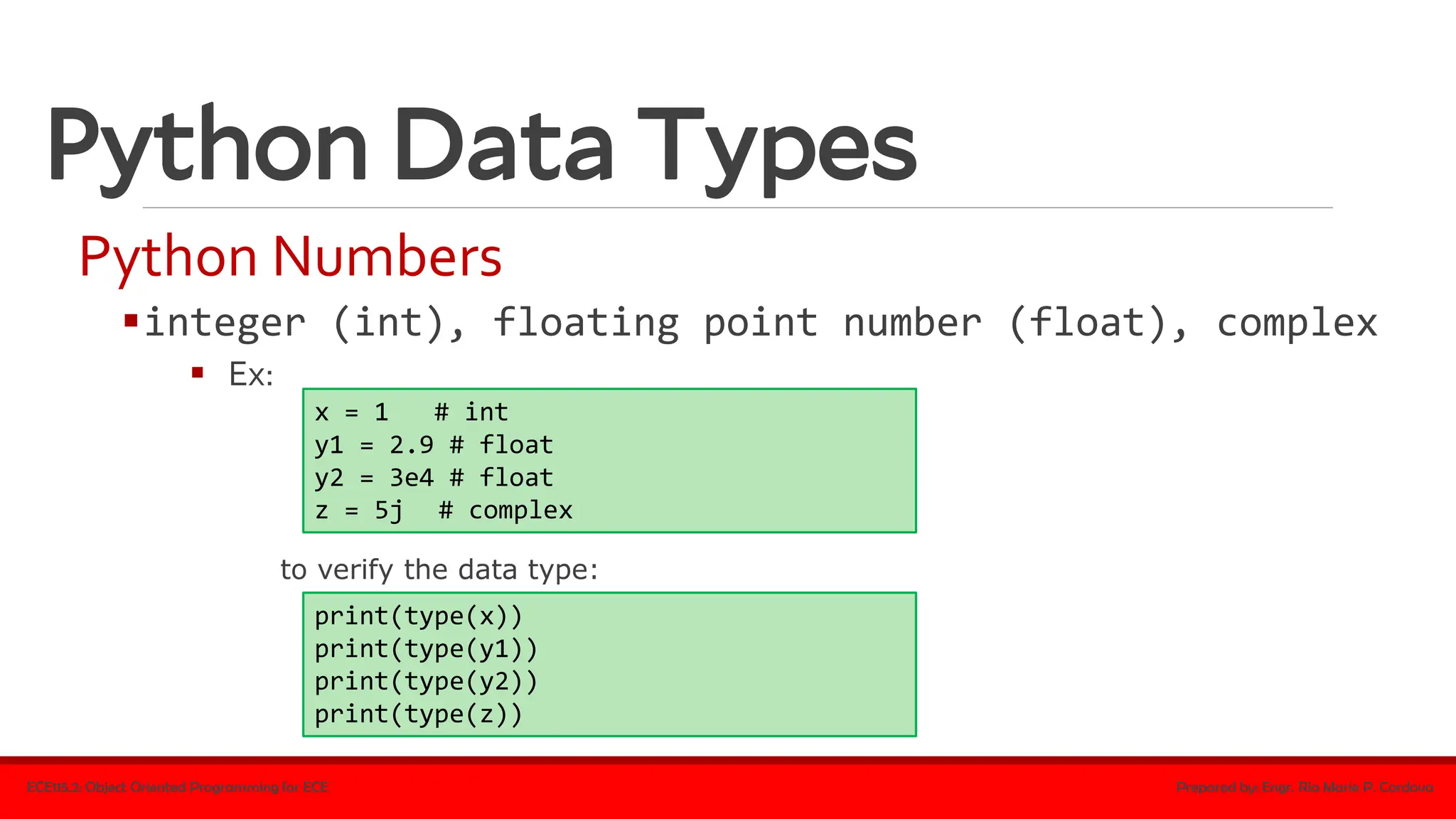
Python Numbers
▪integer (int), floating point number (float), complex
▪ Ex:
ECE115.2: Object Oriented Programming for ECE Prepared by: Engr. Ria Marie P. Cordova
x = 1 # int
y1 = 2.9 # float
y2 = 3e4 # float
z = 5j # complex
print(type(x))
print(type(y1))
print(type(y2))
print(type(z))
to verify the data type:
Python Data Types
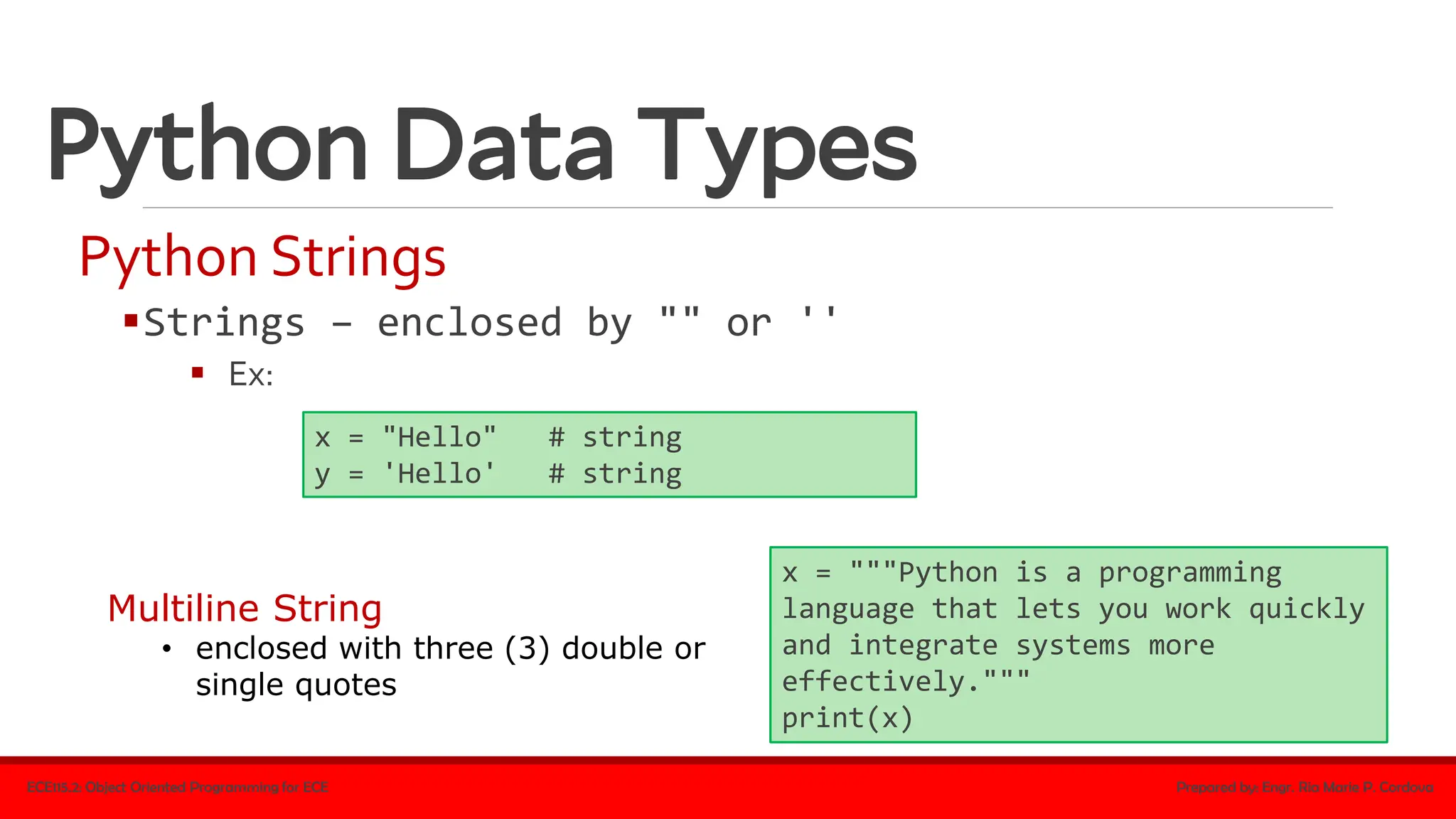
Python Strings
▪Strings – enclosed by "" or ''
▪ Ex:
ECE115.2: Object Oriented Programming for ECE Prepared by: Engr. Ria Marie P. Cordova
x = "Hello" # string
y = 'Hello' # string
x = """Python is a programming
language that lets you work quickly
and integrate systems more
effectively."""
print(x)
Multiline String
• enclosed with three (3) double or
single quotes
Python Data Types
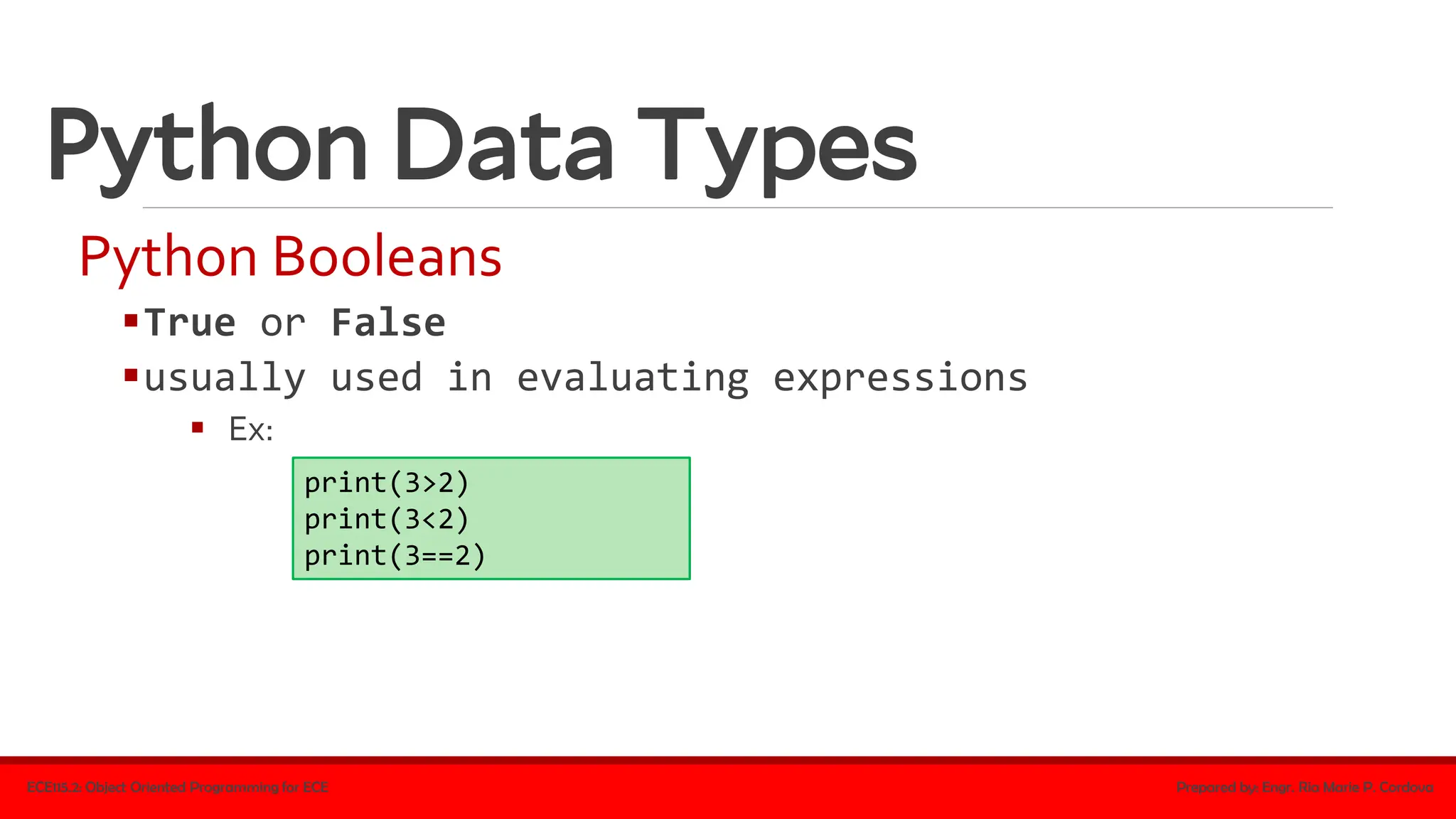
Python Booleans
▪True or False
▪usually used in evaluating expressions
▪ Ex:
ECE115.2: Object Oriented Programming for ECE Prepared by: Engr. Ria Marie P. Cordova
print(3>2)
print(3<2)
print(3==2)
Python Data Types
Python Booleans
▪bool() function
▪ evaluates any value to true or false
▪if a value has content, it is evaluated to true (i.e. any string is true except empty string,
any number is true except 0, etc.)
▪empty values, such as (),[],{},"",0,and None, evaluate to false
▪ Ex:
ECE115.2: Object Oriented Programming for ECE Prepared by: Engr. Ria Marie P. Cordova
bool("a") #true
bool("1") #true
bool('') #false
bool(None) #false
Python Data Types
Lists
▪used to store multiple items in a single variable
ECE115.2: Object Oriented Programming for ECE Prepared by: Engr. Ria Marie P. Cordova
colorList = ["red", "blue", "yellow", "green"]
print(colorList)
✓Items in a list are ordered, changeable, and
allow duplicate values
✓They are indexed (1st item has index [0], the 2nd
item has index [1], and so on)
enclosed with
brackets
Python Data Types
Lists
▪can be of any data type
▪can contain different data types
▪defined as objects with the data type 'list'
ECE115.2: Object Oriented Programming for ECE Prepared by: Engr. Ria Marie P. Cordova
list1 = ["red", "blue", "yellow"]
list2 = [1, 3, 5, 7, 9]
list3 = [False, True, False]
list1 = ["Peter", 30, "male", True, "Mary", 29, "female"]
Python Data Types
Lists
▪len() function
▪ determines the number of items in a list
▪ Ex:
ECE115.2: Object Oriented Programming for ECE Prepared by: Engr. Ria Marie P. Cordova
colorList = ["red", "blue", "yellow", "green"]
print(len(colorList))
Python Data Types
Lists
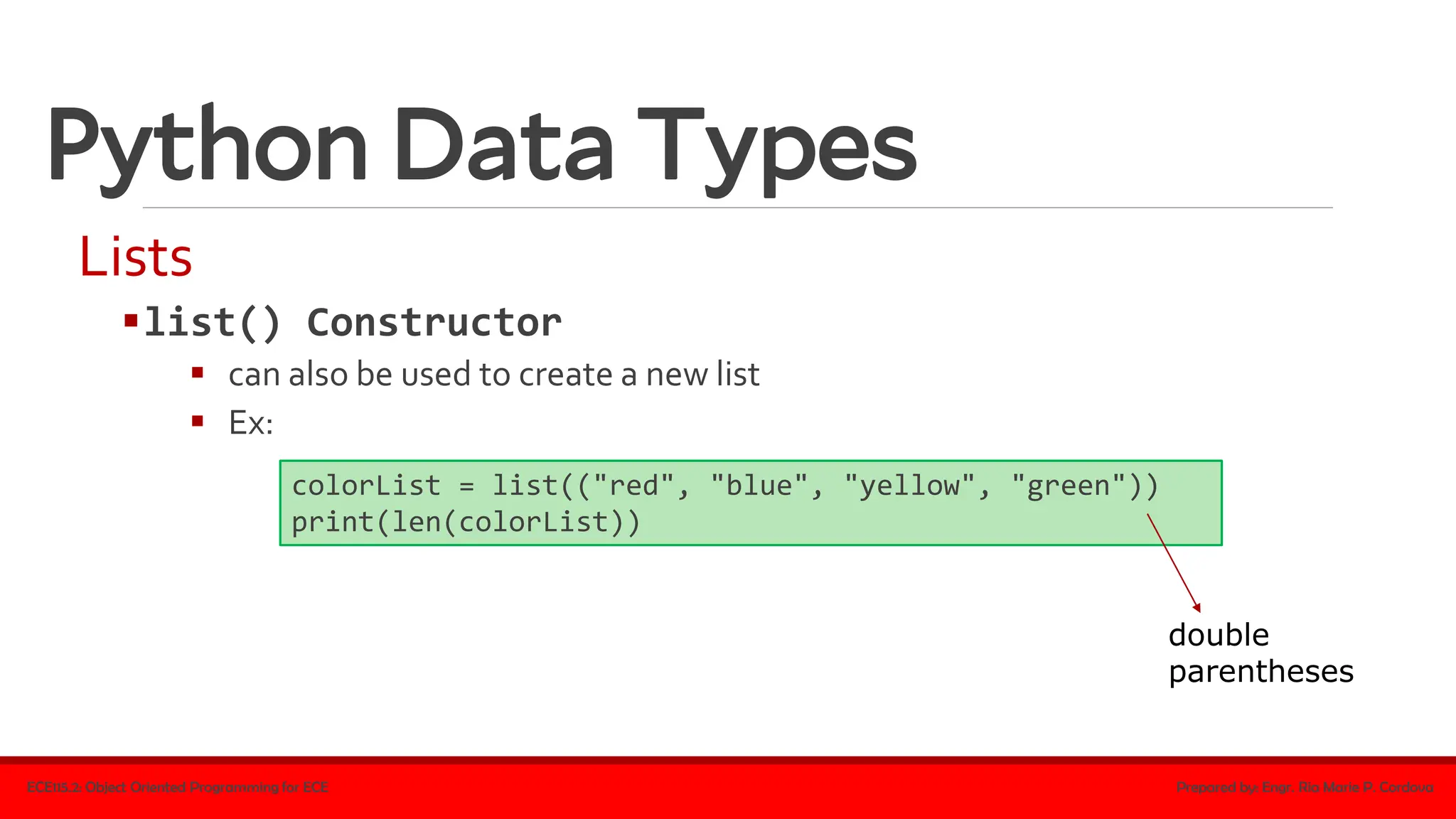
▪list() Constructor
▪ can also be used to create a new list
▪ Ex:
ECE115.2: Object Oriented Programming for ECE Prepared by: Engr. Ria Marie P. Cordova
colorList = list(("red", "blue", "yellow", "green"))
print(len(colorList))
double
parentheses
Python Data Types
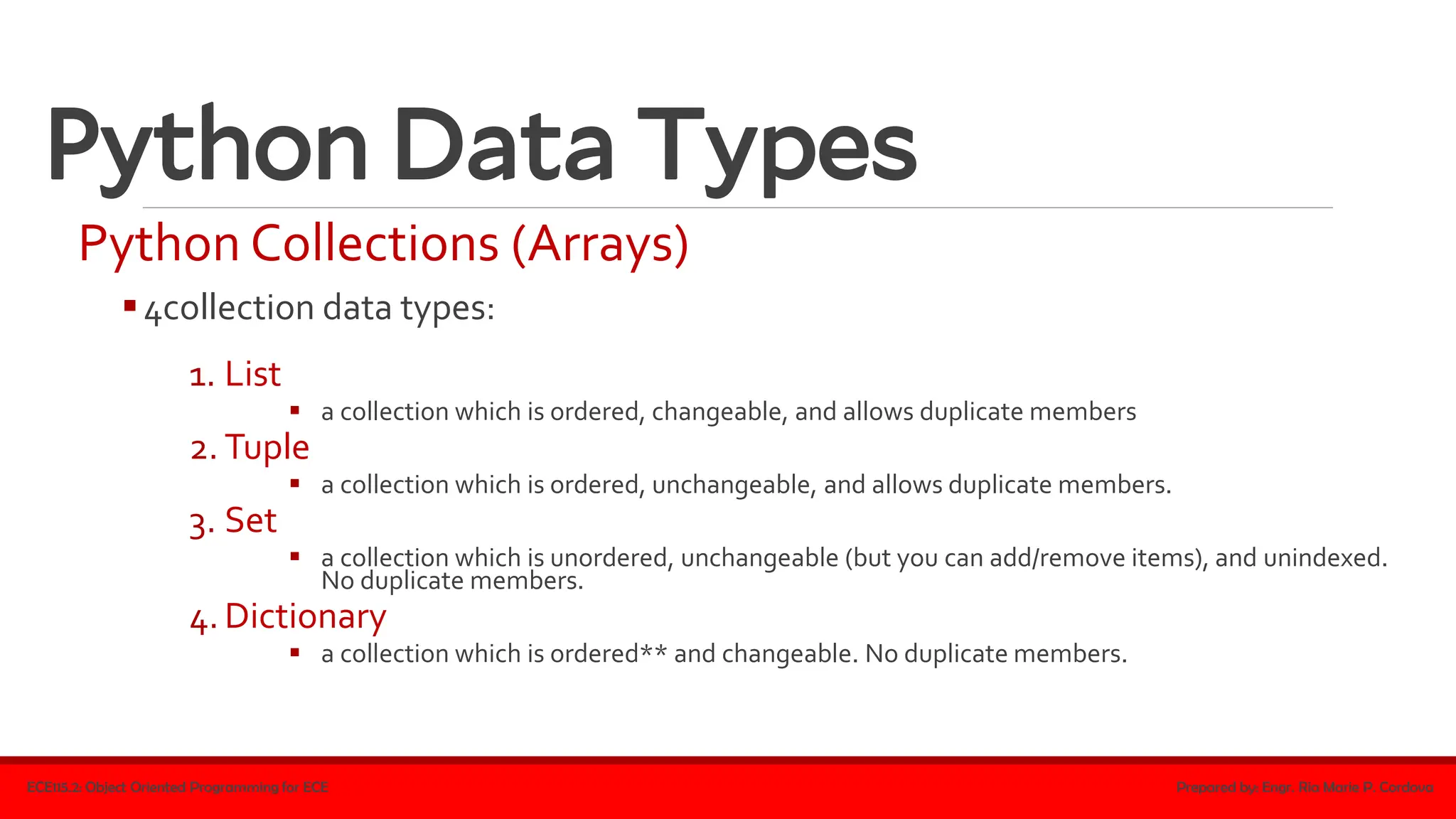
Python Collections (Arrays)
▪4collection data types:
1. List
▪ a collection which is ordered, changeable, and allows duplicate members
2. Tuple
▪ a collection which is ordered, unchangeable, and allows duplicate members.
3. Set
▪ a collection which is unordered, unchangeable (but you can add/remove items), and unindexed.
No duplicate members.
4. Dictionary
▪ a collection which is ordered** and changeable. No duplicate members.
ECE115.2: Object Oriented Programming for ECE Prepared by: Engr. Ria Marie P. Cordova
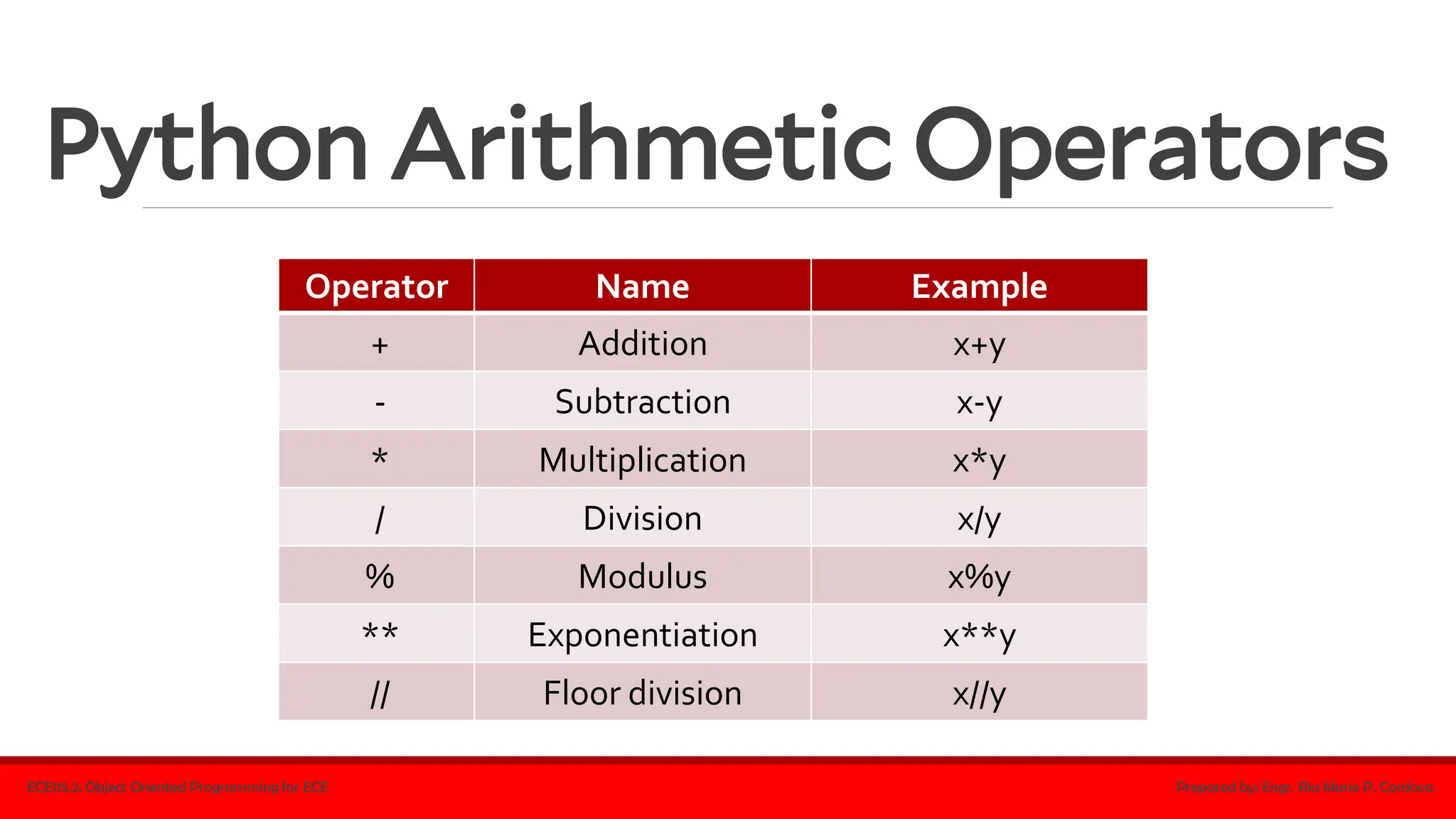
Python Arithmetic Operators
ECE115.2: Object Oriented Programming for ECE Prepared by: Engr. Ria Marie P. Cordova
Operator Name Example
+ Addition x+y
- Subtraction x-y
* Multiplication x*y
/ Division x/y
% Modulus x%y
** Exponentiation x**y
// Floor division x//y
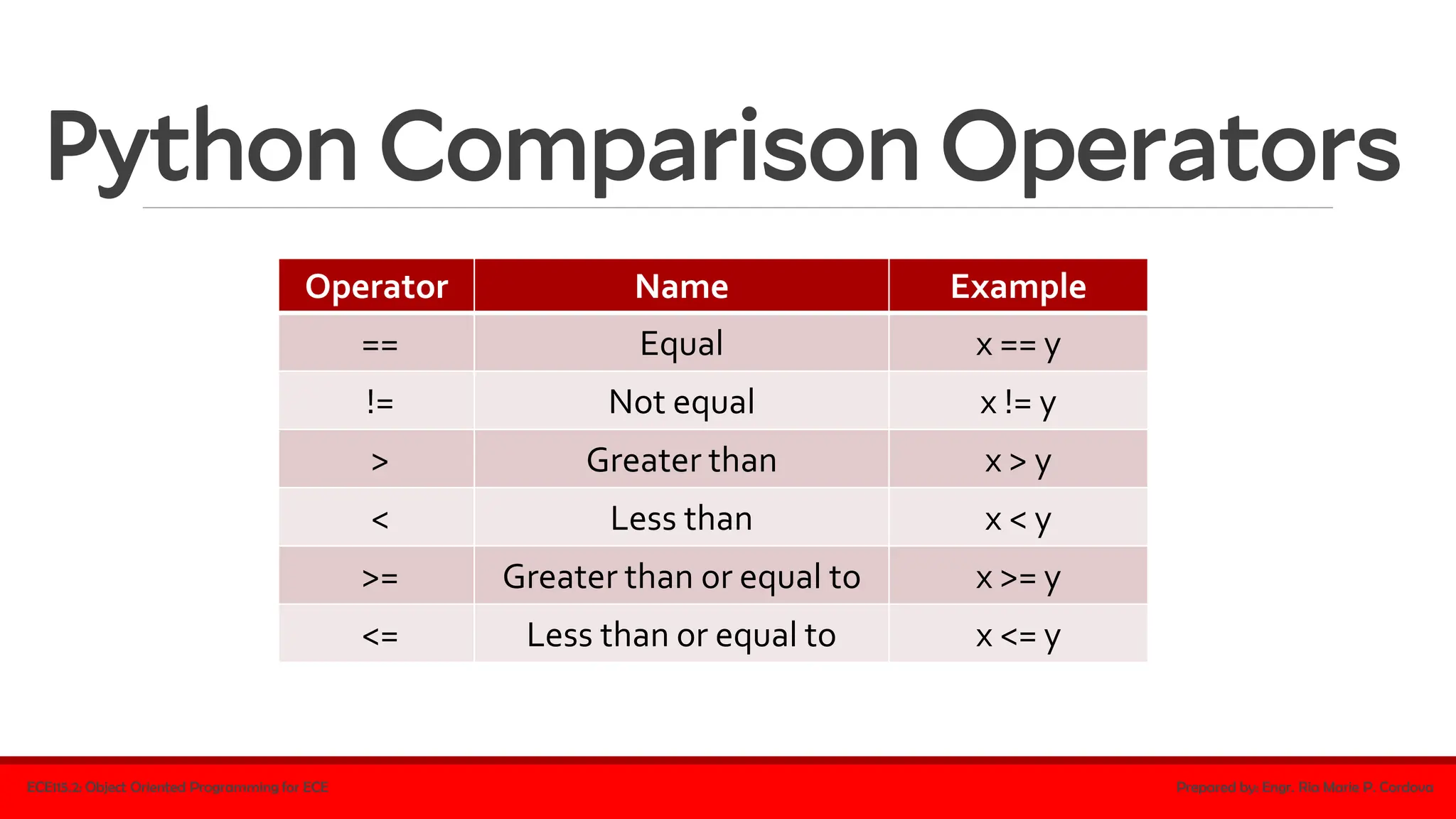
Python Comparison Operators
ECE115.2: Object Oriented Programming for ECE Prepared by: Engr. Ria Marie P. Cordova
Operator Name Example
== Equal x == y
!= Not equal x != y
> Greater than x > y
< Less than x < y
>= Greater than or equal to x >= y
<= Less than or equal to x <= y
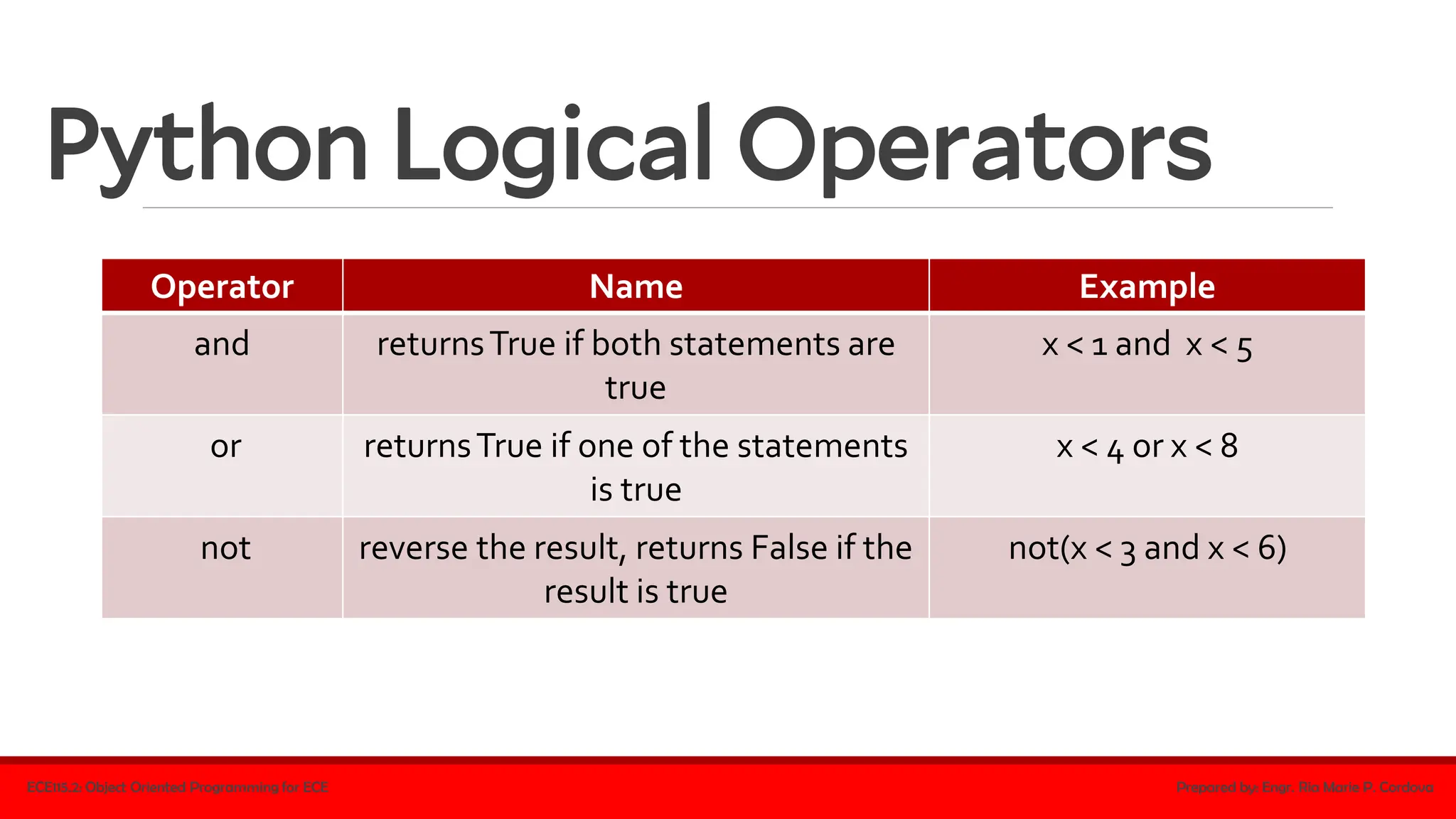
Python Logical Operators
ECE115.2: Object Oriented Programming for ECE Prepared by: Engr. Ria Marie P. Cordova
Operator Name Example
and returnsTrue if both statements are
true
x < 1 and x < 5
or returnsTrue if one of the statements
is true
x < 4 or x < 8
not reverse the result, returns False if the
result is true
not(x < 3 and x < 6)
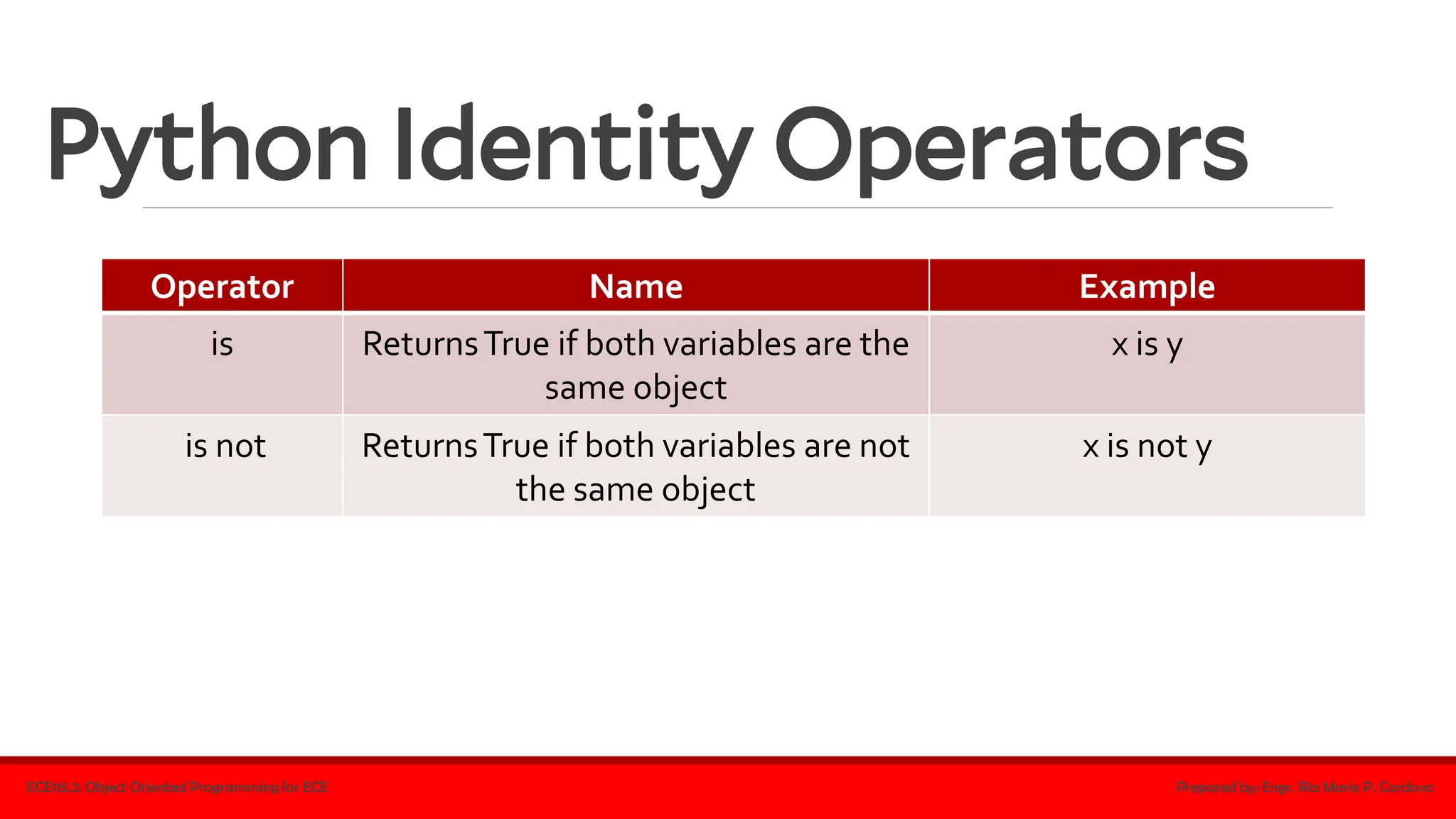
Python Identity Operators
ECE115.2: Object Oriented Programming for ECE Prepared by: Engr. Ria Marie P. Cordova
Operator Name Example
is ReturnsTrue if both variables are the
same object
x is y
is not ReturnsTrue if both variables are not
the same object
x is not y
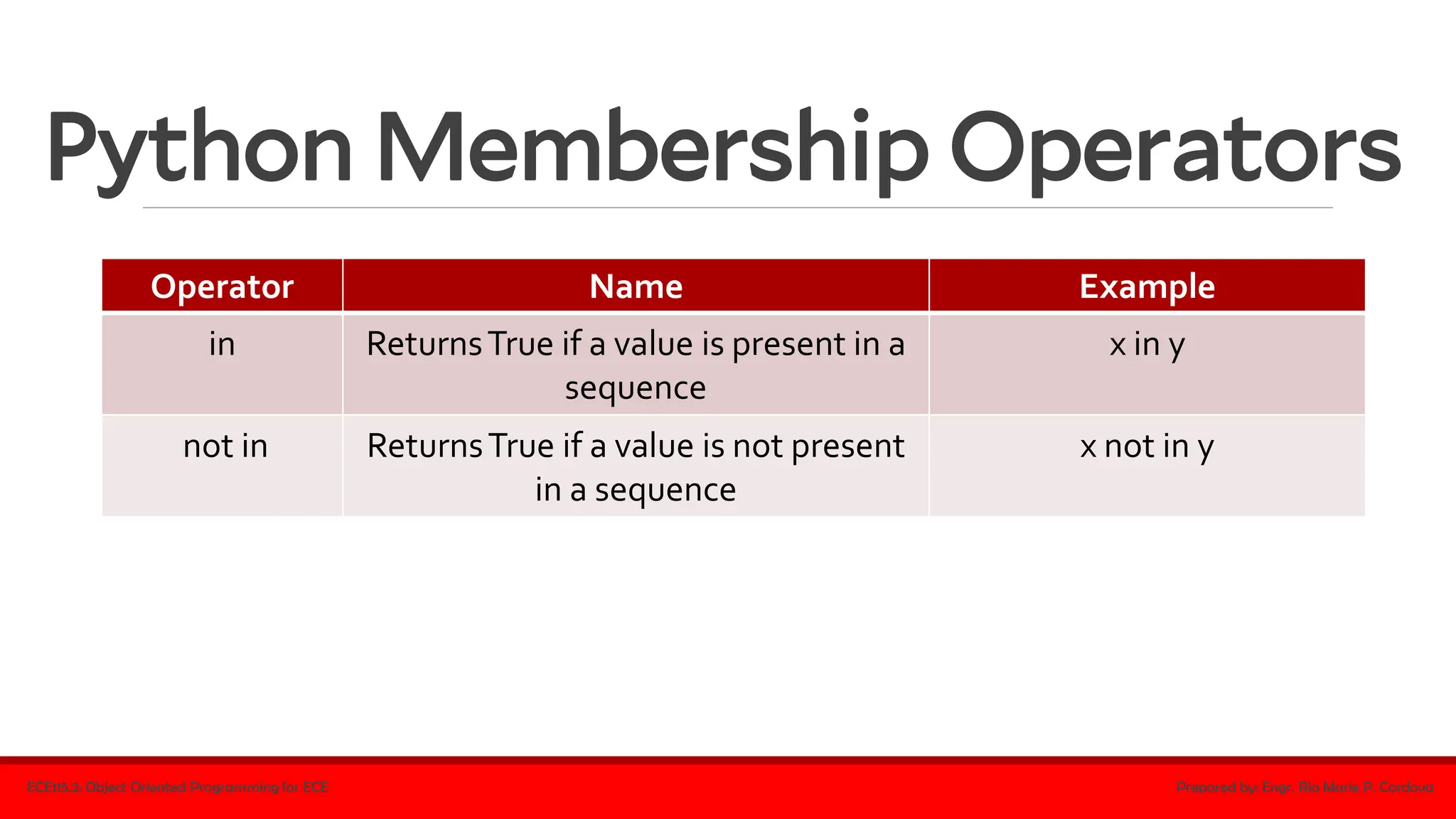
Python Membership Operators
ECE115.2: Object Oriented Programming for ECE Prepared by: Engr. Ria Marie P. Cordova
Operator Name Example
in ReturnsTrue if a value is present in a
sequence
x in y
not in ReturnsTrue if a value is not present
in a sequence
x not in y
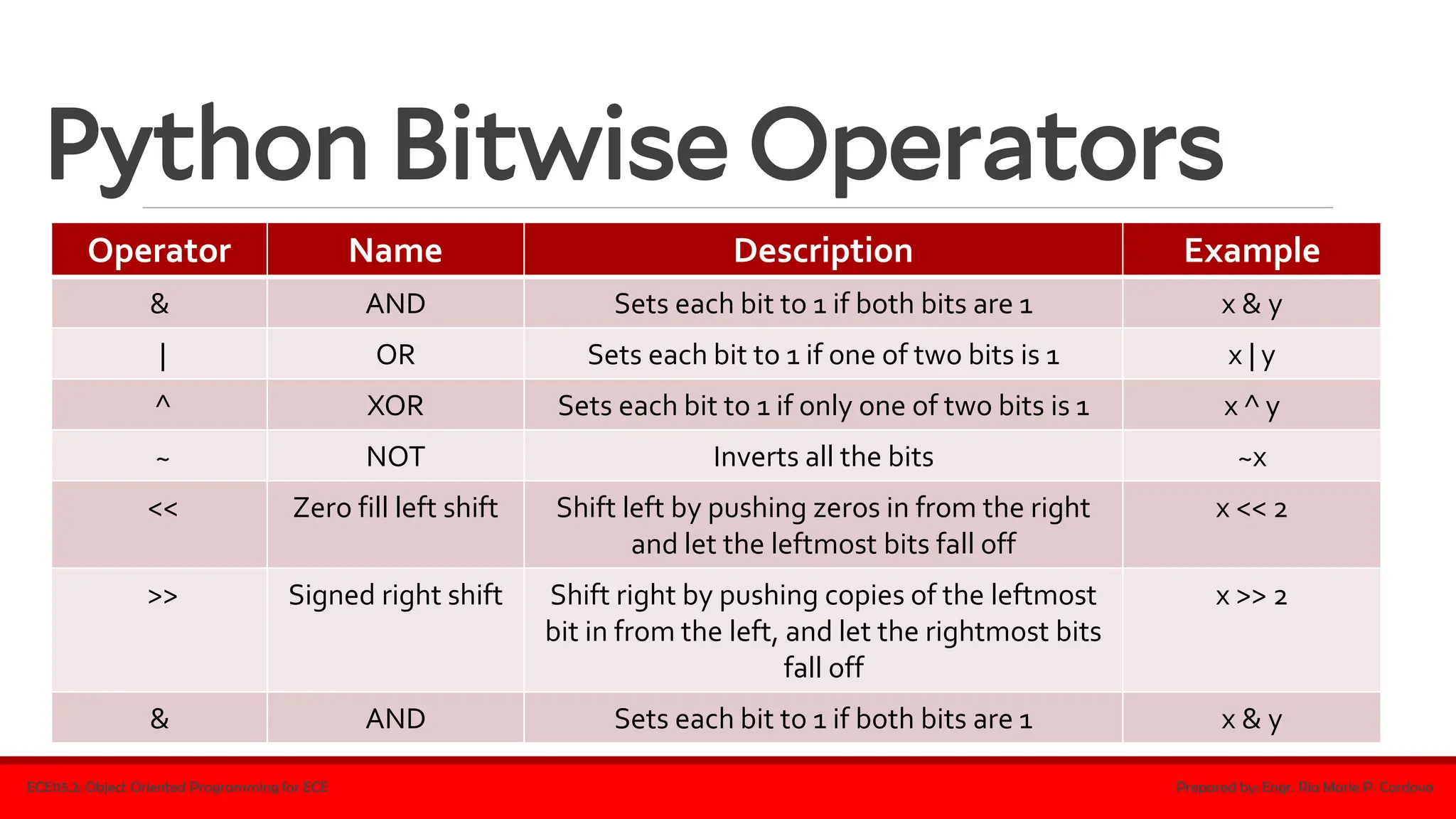
Python Bitwise Operators
ECE115.2: Object Oriented Programming for ECE Prepared by: Engr. Ria Marie P. Cordova
Operator Name Description Example
& AND Sets each bit to 1 if both bits are 1 x & y
| OR Sets each bit to 1 if one of two bits is 1 x | y
^ XOR Sets each bit to 1 if only one of two bits is 1 x ^ y
~ NOT Inverts all the bits ~x
<< Zero fill left shift Shift left by pushing zeros in from the right
and let the leftmost bits fall off
x << 2
>> Signed right shift Shift right by pushing copies of the leftmost
bit in from the left, and let the rightmost bits
fall off
x >> 2
& AND Sets each bit to 1 if both bits are 1 x & y
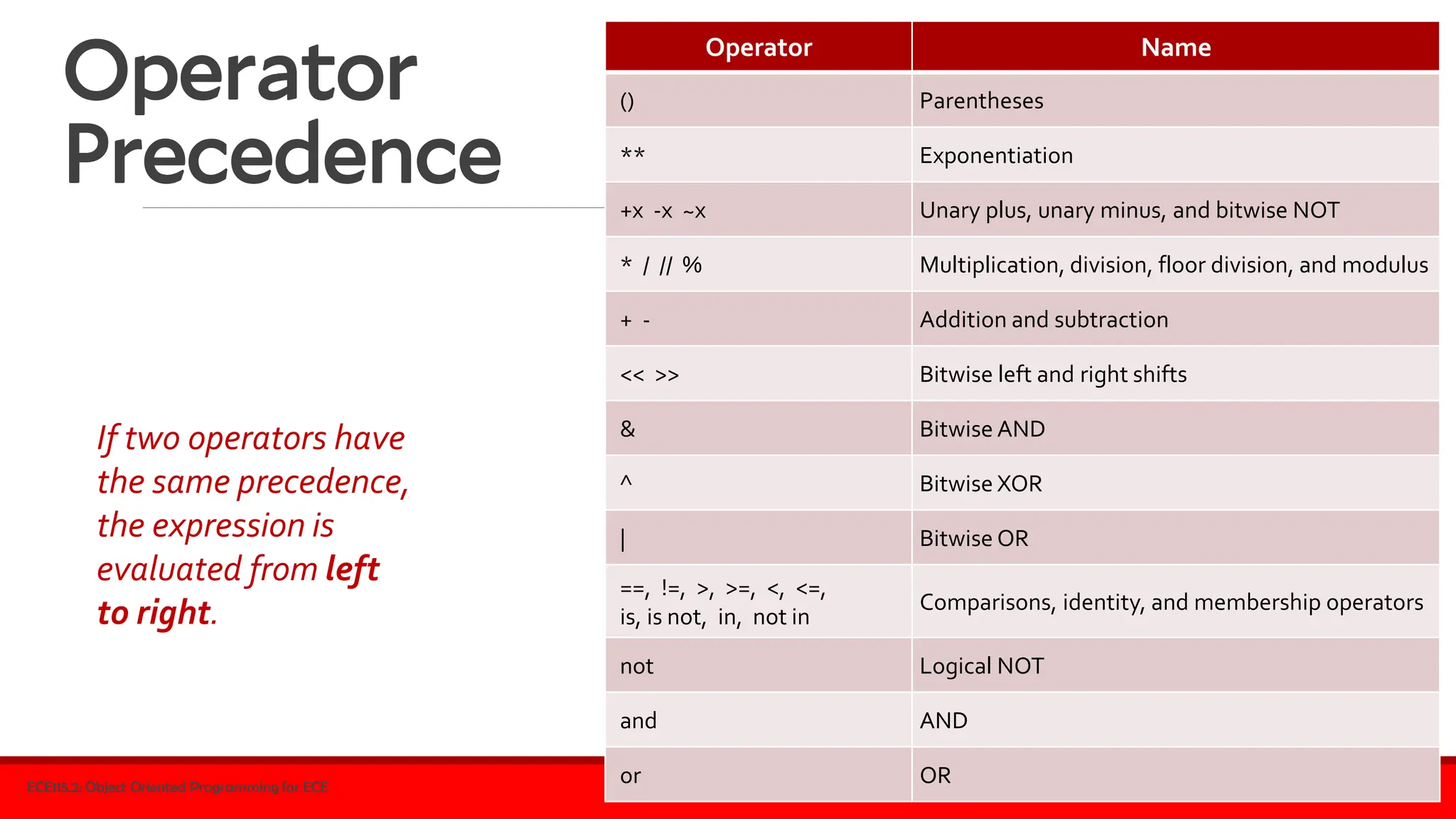
Operator
Precedence
ECE115.2: Object Oriented Programming for ECE Prepared by: Engr. Ria Marie P. Cordova
Operator Name
() Parentheses
** Exponentiation
+x -x ~x Unary plus, unary minus, and bitwise NOT
* / // % Multiplication, division, floor division, and modulus
+ - Addition and subtraction
<< >> Bitwise left and right shifts
& Bitwise AND
^ Bitwise XOR
| Bitwise OR
==, !=, >, >=, <, <=,
is, is not, in, not in
Comparisons, identity, and membership operators
not Logical NOT
and AND
or OR
If two operators have
the same precedence,
the expression is
evaluated from left
to right.
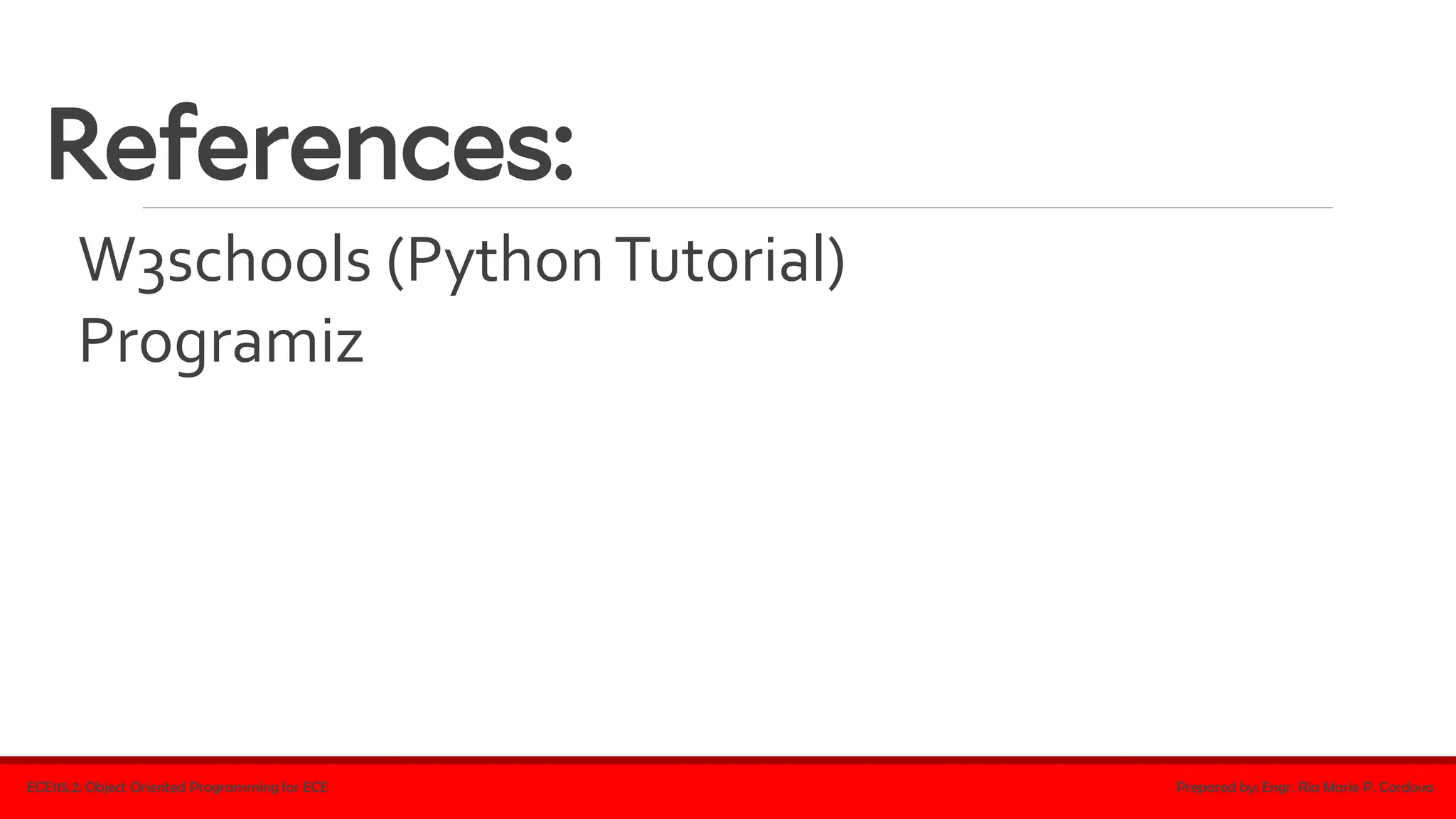
References:
W3schools (PythonTutorial)
Programiz
ECE115.2: Object Oriented Programming for ECE Prepared by: Engr. Ria Marie P. Cordova

Basics of Python Programming in one PDF File.pdf

  • 1.
  • 2.
    Python ▪a programming languagethat lets you work quickly and integrate systems more effectively (Python Software Foundation) ▪created by Guido van Rossum (1990) ▪named after the popular British comedy troupe Monty Python’s Flying Circus ECE115.2: Object Oriented Programming for ECE Prepared by: Engr. Ria Marie P. Cordova
  • 3.
    Why Python? ▪works ondifferent platforms (Windows, Mac, Linux, Raspberry Pi, etc.) ▪has a simple syntax ▪runs on an interpreter system ▪can be treated in a procedural way, an object- oriented way or a functional way ECE115.2: Object Oriented Programming for ECE Prepared by: Engr. Ria Marie P. Cordova
  • 4.
    Why Python? ▪has extremelyrich libraries ▪has extensive online documentation ▪has multiple programming communities ▪has diverse applications: ✓ web development (server-side) ✓ software development ✓ mathematics ✓ system scripting ECE115.2: Object Oriented Programming for ECE Prepared by: Engr. Ria Marie P. Cordova
  • 5.
    Python Input/Output Functions print() ▪usedto generate an output at the console ▪Ex: ECE115.2: Object Oriented Programming for ECE Prepared by: Engr. Ria Marie P. Cordova print("Hello, Class!") print(1)
  • 6.
    Python Input/Output Functions input() ▪usedto read a line of input entered by the user at the console and returns it as a string ▪Ex: ECE115.2: Object Oriented Programming for ECE Prepared by: Engr. Ria Marie P. Cordova num = input("Enter number:") print(num)
  • 7.
    Python Syntax ▪indentation • refersto the spaces at the beginning of a code line • very important in Python since it indicates a block of code ▪ Ex: ECE115.2: Object Oriented Programming for ECE Prepared by: Engr. Ria Marie P. Cordova if 2 > 1: print("Two is greater than one.") if 2 > 1: print("Two is greater than one.")
  • 8.
    Python Syntax ▪indentation • numberof spaces is up to you as a programmer • the most common use is four, but it has to be at least one ▪ Ex: ECE115.2: Object Oriented Programming for ECE Prepared by: Engr. Ria Marie P. Cordova if 2 > 1: print("Two is greater than one.") if 2 > 1: print("Two is greater than one.")
  • 9.
    Python Syntax ▪indentation • thesame number of spaces should be used in the same block of code ▪ Ex: ECE115.2: Object Oriented Programming for ECE Prepared by: Engr. Ria Marie P. Cordova if 2 > 1: print("Two is greater than one!") print("Two is greater than one!") if 2 > 1: print("Two is greater than one!") print("Two is greater than one!")
  • 10.
    Python Comments ▪start witha # ▪make code readable ▪completely ignored by the interpreter ▪Ex: ECE115.2: Object Oriented Programming for ECE Prepared by: Engr. Ria Marie P. Cordova #This is a comment. print("Hello, Class!") print("Hello, Class!") #This is a comment.
  • 11.
    Python Comments ▪Multiline Comments ▪Ex: ECE115.2:Object Oriented Programming for ECE Prepared by: Engr. Ria Marie P. Cordova #Comment1 #Comment2 #Comment3 print("Hello, Class!") """Comment1 Comment2 Comment3""" print("Hello, Class!") Multiline String can also be used • since Python will ignore string literals that are not assigned to a variable
  • 12.
    Python Variables ▪containers forstoring data values ▪Python has no command for declaring a variable ▪a variable is created the moment you first assign a value to it ▪ Ex: ECE115.2: Object Oriented Programming for ECE Prepared by: Engr. Ria Marie P. Cordova x = 1 y = "Hello" print(x) print(y) assignment operator: = a, b, c = 9, 2.5, 'Hello' print(a) print(b) print(c) num1 = num2 = 20 print(num1) print(num2)
  • 13.
    Python Variables Rules fornaming variables ▪must start with a letter or the underscore character ▪cannot start with a number ▪can only contain alpha-numeric characters and underscores (A- z, 0-9, and _ ) ▪are case-sensitive (age, Age and AGE are three different variables) ▪cannot be any of the Python keywords ECE115.2: Object Oriented Programming for ECE Prepared by: Engr. Ria Marie P. Cordova
  • 14.
    Python Variables ▪do notneed to be declared with any particular type, and can even change type after they have been set ▪ Ex: ECE115.2: Object Oriented Programming for ECE Prepared by: Engr. Ria Marie P. Cordova x = 1 # x is of type int x = "Hello" # x is now of type str print(x)
  • 15.
    Python Variables ▪Casting ▪ doneto specify type of variable ▪ Ex: ECE115.2: Object Oriented Programming for ECE Prepared by: Engr. Ria Marie P. Cordova x = str(1) # x will be '1' y = int(1) # y will be 1 z = float(1) # z will be 1.0 ▪type() function ▪ returns the data type of a variable ▪ Ex: x = 1 y = "Hello" print(type(x)) print(type(y))
  • 16.
    Python Variables output variables ECE115.2:Object Oriented Programming for ECE Prepared by: Engr. Ria Marie P. Cordova x = "A good day" print(x) x = "A" y = "good" z = "day" print(x, y, z) x = "A" y = "good" z = "day" print(x+y+z) x = 2 y = 9 print(x+y) x = 2 y = "good" print(x+y) x = 2 y = "good" print(x,y)
  • 17.
    Python Variables Global variables ▪createdoutside of a function ▪can be used inside and outside of functions ▪Ex: ECE115.2: Object Oriented Programming for ECE Prepared by: Engr. Ria Marie P. Cordova x = "hi" def myfunc(): print("Python is " + x) myfunc() x = "hi" def myfunc(): x = "hello" print("Python is " + x) myfunc() print("Python is " + x)
  • 18.
    Python Data Types Built-inDataTypes ECE115.2: Object Oriented Programming for ECE Prepared by: Engr. Ria Marie P. Cordova Type TextType: str NumericTypes: int, float, complex SequenceTypes: list, tuple, range MappingType: dict SetTypes: set, frozenset BooleanType: bool BinaryTypes: bytes, bytearray, memoryview NoneType: NoneType
  • 19.
    Python Data Types PythonNumbers ▪integer (int), floating point number (float), complex ✓ int – whole number (positive/negative) ✓ float – contains decimal (positive/negative); can also be scientific numbers with an “e” to indicate power of 10 ✓ complex – written with a “j” as the imaginary part ECE115.2: Object Oriented Programming for ECE Prepared by: Engr. Ria Marie P. Cordova
  • 20.
    Python Data Types PythonNumbers ▪integer (int), floating point number (float), complex ▪ Ex: ECE115.2: Object Oriented Programming for ECE Prepared by: Engr. Ria Marie P. Cordova x = 1 # int y1 = 2.9 # float y2 = 3e4 # float z = 5j # complex print(type(x)) print(type(y1)) print(type(y2)) print(type(z)) to verify the data type:
  • 21.
    Python Data Types PythonStrings ▪Strings – enclosed by "" or '' ▪ Ex: ECE115.2: Object Oriented Programming for ECE Prepared by: Engr. Ria Marie P. Cordova x = "Hello" # string y = 'Hello' # string x = """Python is a programming language that lets you work quickly and integrate systems more effectively.""" print(x) Multiline String • enclosed with three (3) double or single quotes
  • 22.
    Python Data Types PythonBooleans ▪True or False ▪usually used in evaluating expressions ▪ Ex: ECE115.2: Object Oriented Programming for ECE Prepared by: Engr. Ria Marie P. Cordova print(3>2) print(3<2) print(3==2)
  • 23.
    Python Data Types PythonBooleans ▪bool() function ▪ evaluates any value to true or false ▪if a value has content, it is evaluated to true (i.e. any string is true except empty string, any number is true except 0, etc.) ▪empty values, such as (),[],{},"",0,and None, evaluate to false ▪ Ex: ECE115.2: Object Oriented Programming for ECE Prepared by: Engr. Ria Marie P. Cordova bool("a") #true bool("1") #true bool('') #false bool(None) #false
  • 24.
    Python Data Types Lists ▪usedto store multiple items in a single variable ECE115.2: Object Oriented Programming for ECE Prepared by: Engr. Ria Marie P. Cordova colorList = ["red", "blue", "yellow", "green"] print(colorList) ✓Items in a list are ordered, changeable, and allow duplicate values ✓They are indexed (1st item has index [0], the 2nd item has index [1], and so on) enclosed with brackets
  • 25.
    Python Data Types Lists ▪canbe of any data type ▪can contain different data types ▪defined as objects with the data type 'list' ECE115.2: Object Oriented Programming for ECE Prepared by: Engr. Ria Marie P. Cordova list1 = ["red", "blue", "yellow"] list2 = [1, 3, 5, 7, 9] list3 = [False, True, False] list1 = ["Peter", 30, "male", True, "Mary", 29, "female"]
  • 26.
    Python Data Types Lists ▪len()function ▪ determines the number of items in a list ▪ Ex: ECE115.2: Object Oriented Programming for ECE Prepared by: Engr. Ria Marie P. Cordova colorList = ["red", "blue", "yellow", "green"] print(len(colorList))
  • 27.
    Python Data Types Lists ▪list()Constructor ▪ can also be used to create a new list ▪ Ex: ECE115.2: Object Oriented Programming for ECE Prepared by: Engr. Ria Marie P. Cordova colorList = list(("red", "blue", "yellow", "green")) print(len(colorList)) double parentheses
  • 28.
    Python Data Types PythonCollections (Arrays) ▪4collection data types: 1. List ▪ a collection which is ordered, changeable, and allows duplicate members 2. Tuple ▪ a collection which is ordered, unchangeable, and allows duplicate members. 3. Set ▪ a collection which is unordered, unchangeable (but you can add/remove items), and unindexed. No duplicate members. 4. Dictionary ▪ a collection which is ordered** and changeable. No duplicate members. ECE115.2: Object Oriented Programming for ECE Prepared by: Engr. Ria Marie P. Cordova
  • 29.
    Python Arithmetic Operators ECE115.2:Object Oriented Programming for ECE Prepared by: Engr. Ria Marie P. Cordova Operator Name Example + Addition x+y - Subtraction x-y * Multiplication x*y / Division x/y % Modulus x%y ** Exponentiation x**y // Floor division x//y
  • 30.
    Python Comparison Operators ECE115.2:Object Oriented Programming for ECE Prepared by: Engr. Ria Marie P. Cordova Operator Name Example == Equal x == y != Not equal x != y > Greater than x > y < Less than x < y >= Greater than or equal to x >= y <= Less than or equal to x <= y
  • 31.
    Python Logical Operators ECE115.2:Object Oriented Programming for ECE Prepared by: Engr. Ria Marie P. Cordova Operator Name Example and returnsTrue if both statements are true x < 1 and x < 5 or returnsTrue if one of the statements is true x < 4 or x < 8 not reverse the result, returns False if the result is true not(x < 3 and x < 6)
  • 32.
    Python Identity Operators ECE115.2:Object Oriented Programming for ECE Prepared by: Engr. Ria Marie P. Cordova Operator Name Example is ReturnsTrue if both variables are the same object x is y is not ReturnsTrue if both variables are not the same object x is not y
  • 33.
    Python Membership Operators ECE115.2:Object Oriented Programming for ECE Prepared by: Engr. Ria Marie P. Cordova Operator Name Example in ReturnsTrue if a value is present in a sequence x in y not in ReturnsTrue if a value is not present in a sequence x not in y
  • 34.
    Python Bitwise Operators ECE115.2:Object Oriented Programming for ECE Prepared by: Engr. Ria Marie P. Cordova Operator Name Description Example & AND Sets each bit to 1 if both bits are 1 x & y | OR Sets each bit to 1 if one of two bits is 1 x | y ^ XOR Sets each bit to 1 if only one of two bits is 1 x ^ y ~ NOT Inverts all the bits ~x << Zero fill left shift Shift left by pushing zeros in from the right and let the leftmost bits fall off x << 2 >> Signed right shift Shift right by pushing copies of the leftmost bit in from the left, and let the rightmost bits fall off x >> 2 & AND Sets each bit to 1 if both bits are 1 x & y
  • 35.
    Operator Precedence ECE115.2: Object OrientedProgramming for ECE Prepared by: Engr. Ria Marie P. Cordova Operator Name () Parentheses ** Exponentiation +x -x ~x Unary plus, unary minus, and bitwise NOT * / // % Multiplication, division, floor division, and modulus + - Addition and subtraction << >> Bitwise left and right shifts & Bitwise AND ^ Bitwise XOR | Bitwise OR ==, !=, >, >=, <, <=, is, is not, in, not in Comparisons, identity, and membership operators not Logical NOT and AND or OR If two operators have the same precedence, the expression is evaluated from left to right.
  • 36.
    References: W3schools (PythonTutorial) Programiz ECE115.2: ObjectOriented Programming for ECE Prepared by: Engr. Ria Marie P. Cordova