REST API
Intro- API
● HTTP API
● Way of sharing data over internet
● Problem:
– No standard way of implementing.
● Solution:
– REST architecture
REST
● Representational State Transfer.
● Term invented by Roy Fielding
● Standard way for implementing API.
● CRUD is directly mapped to HTTP verb.
REST architecture constraints
● Unifrom Interface
– Resource based
– Resource manipulation through representation.
– Self descriptive messages
– Hypermedia as the Engine of Application
State(HATEOAS)
● Stateless
● Cacheable
REST architecture constraints
● Client/Server
● Layered
● Code on Demand
REST API
● Collection of resources with 4 aspects
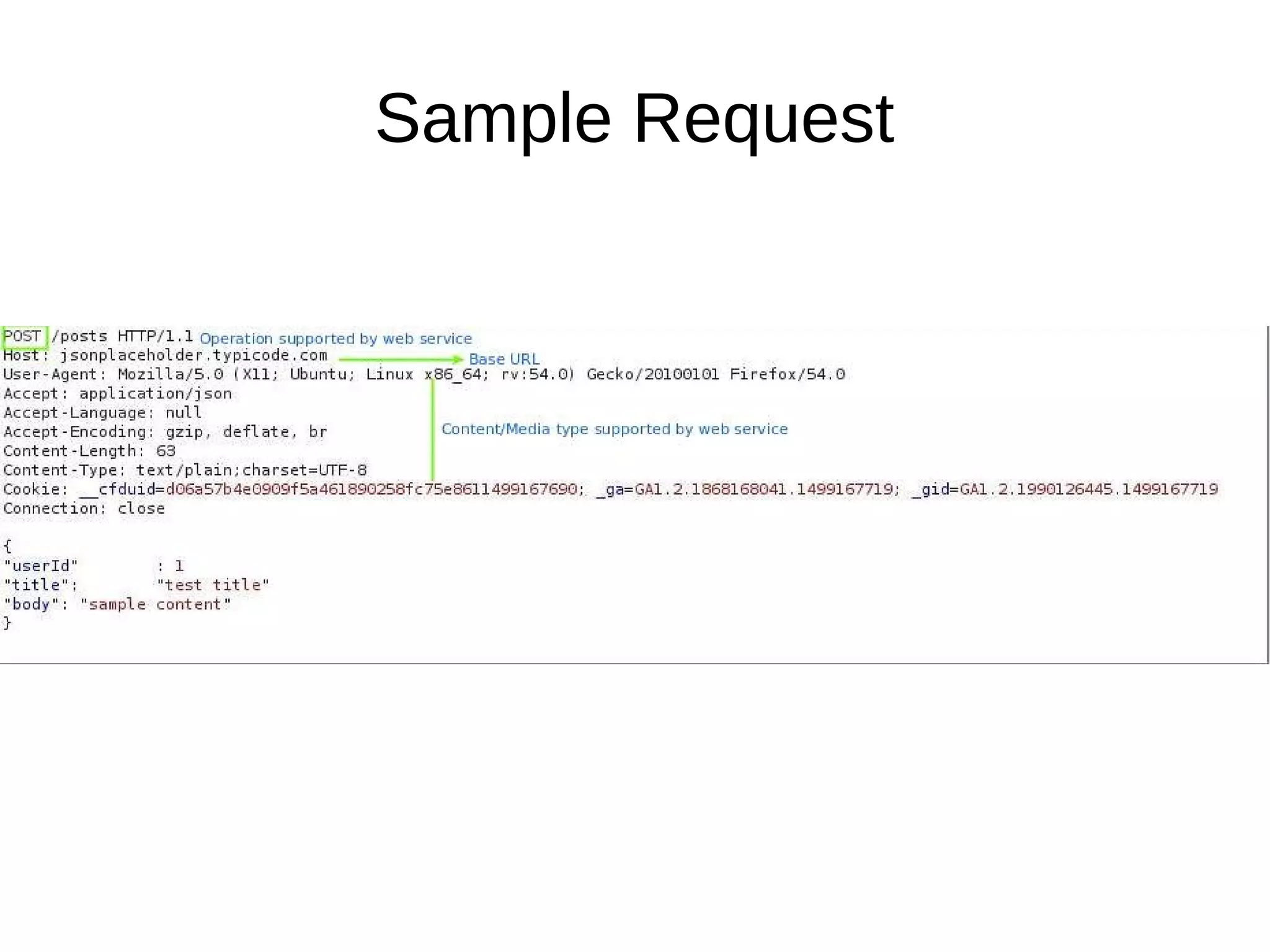
– Base URI of a web service,
– Content type supported by the web service,
– Operations supported by the web service,
– API must be hypertext driven.
Sample Request
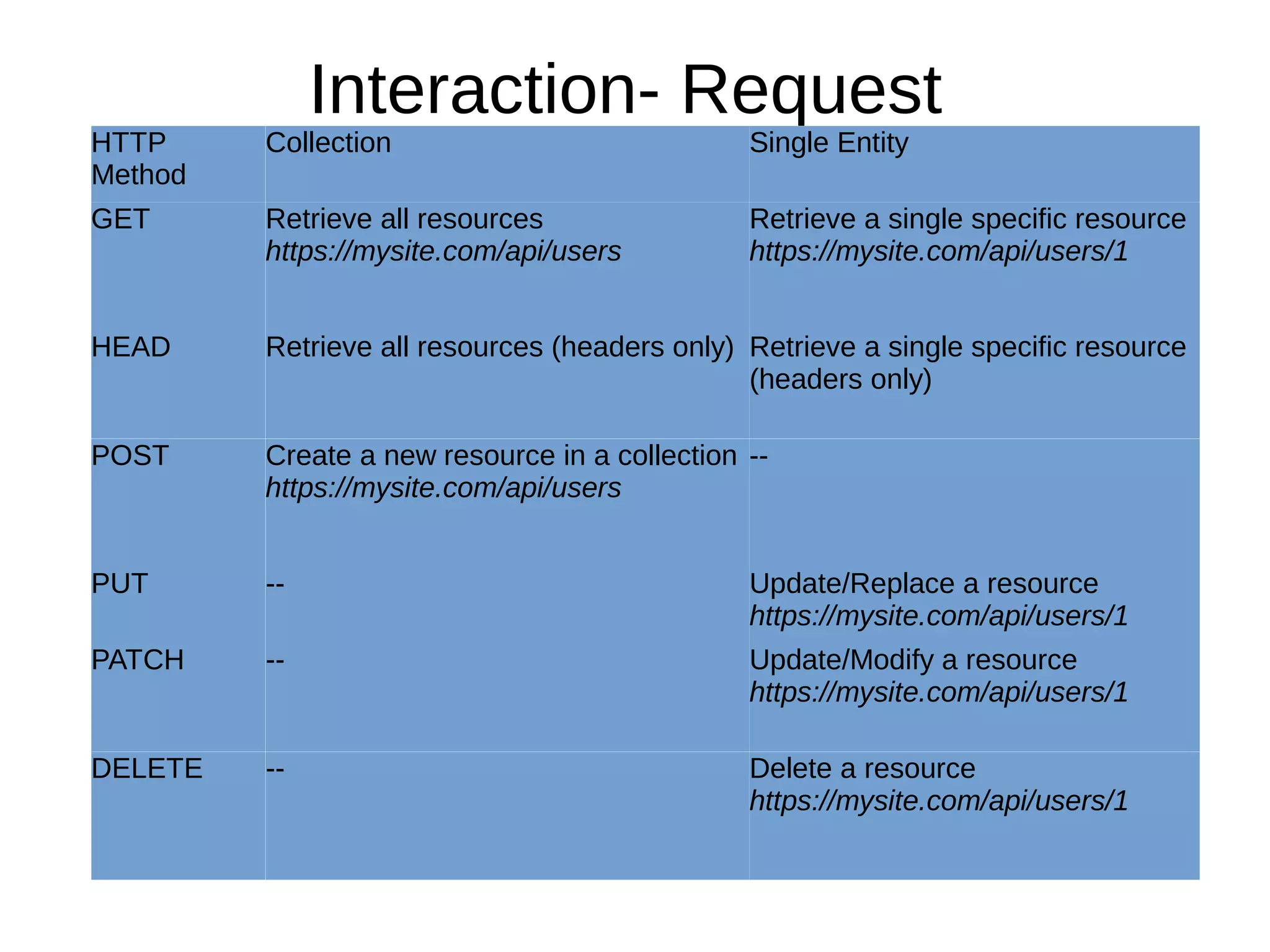
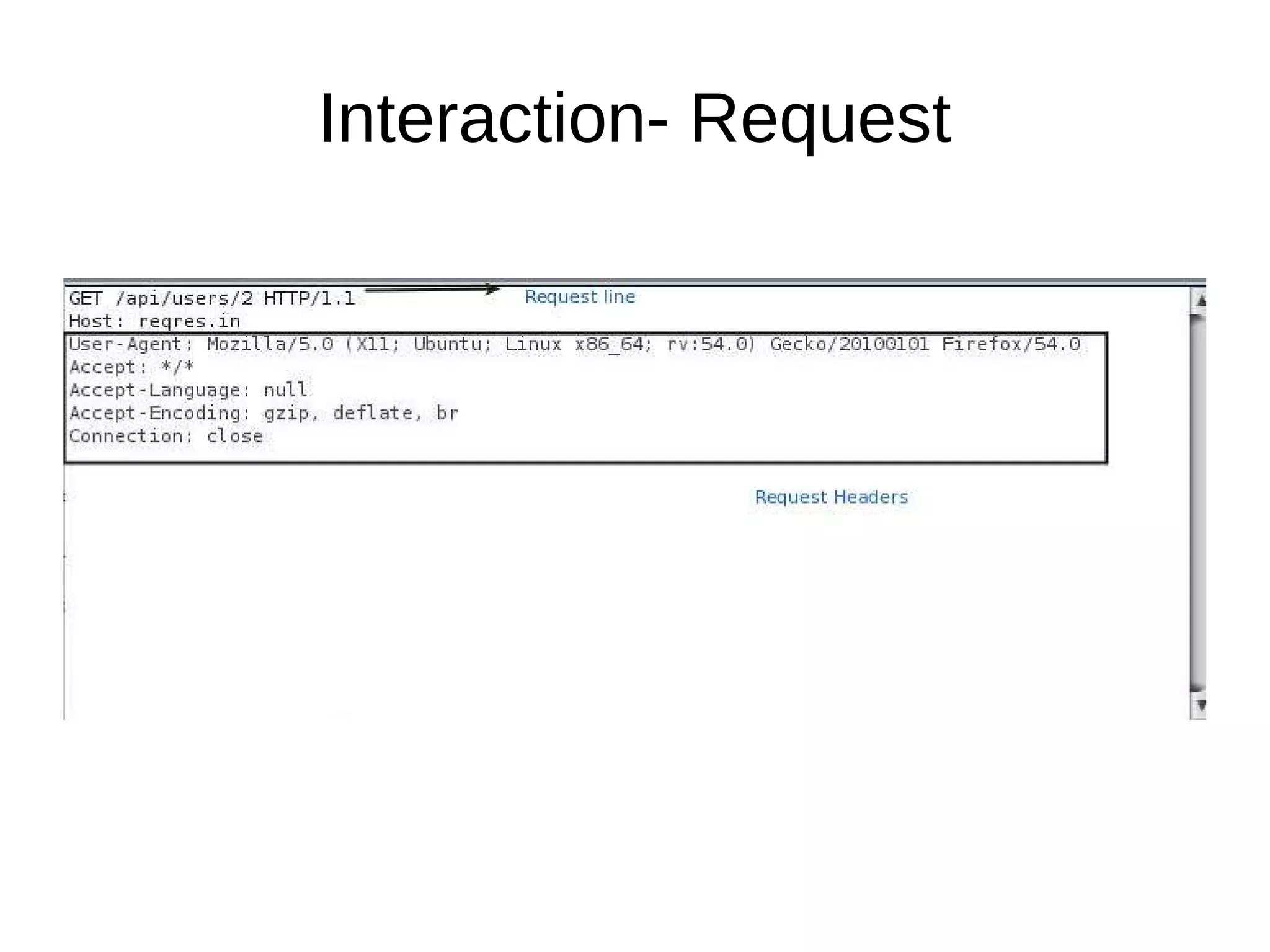
Interaction- Request
HTTP
Method
Collection Single Entity
GET Retrieve all resources
https://mysite.com/api/users
Retrieve a single specific resource
https://mysite.com/api/users/1
HEAD Retrieve all resources (headers only) Retrieve a single specific resource
(headers only)
POST Create a new resource in a collection
https://mysite.com/api/users
--
PUT -- Update/Replace a resource
https://mysite.com/api/users/1
PATCH -- Update/Modify a resource
https://mysite.com/api/users/1
DELETE -- Delete a resource
https://mysite.com/api/users/1
Interaction- Request
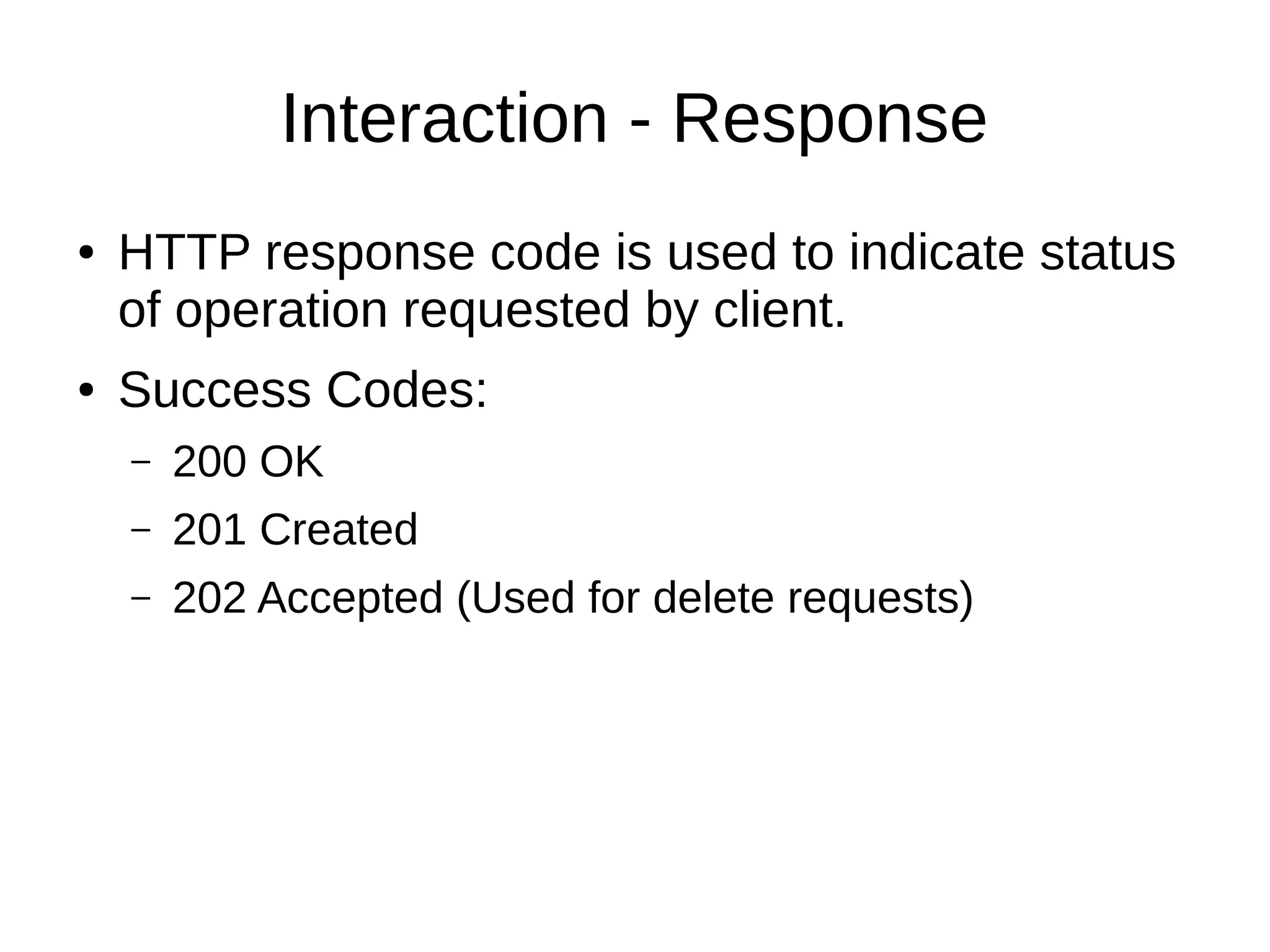
Interaction - Response
● HTTP response code is used to indicate status
of operation requested by client.
● Success Codes:
– 200 OK
– 201 Created
– 202 Accepted (Used for delete requests)
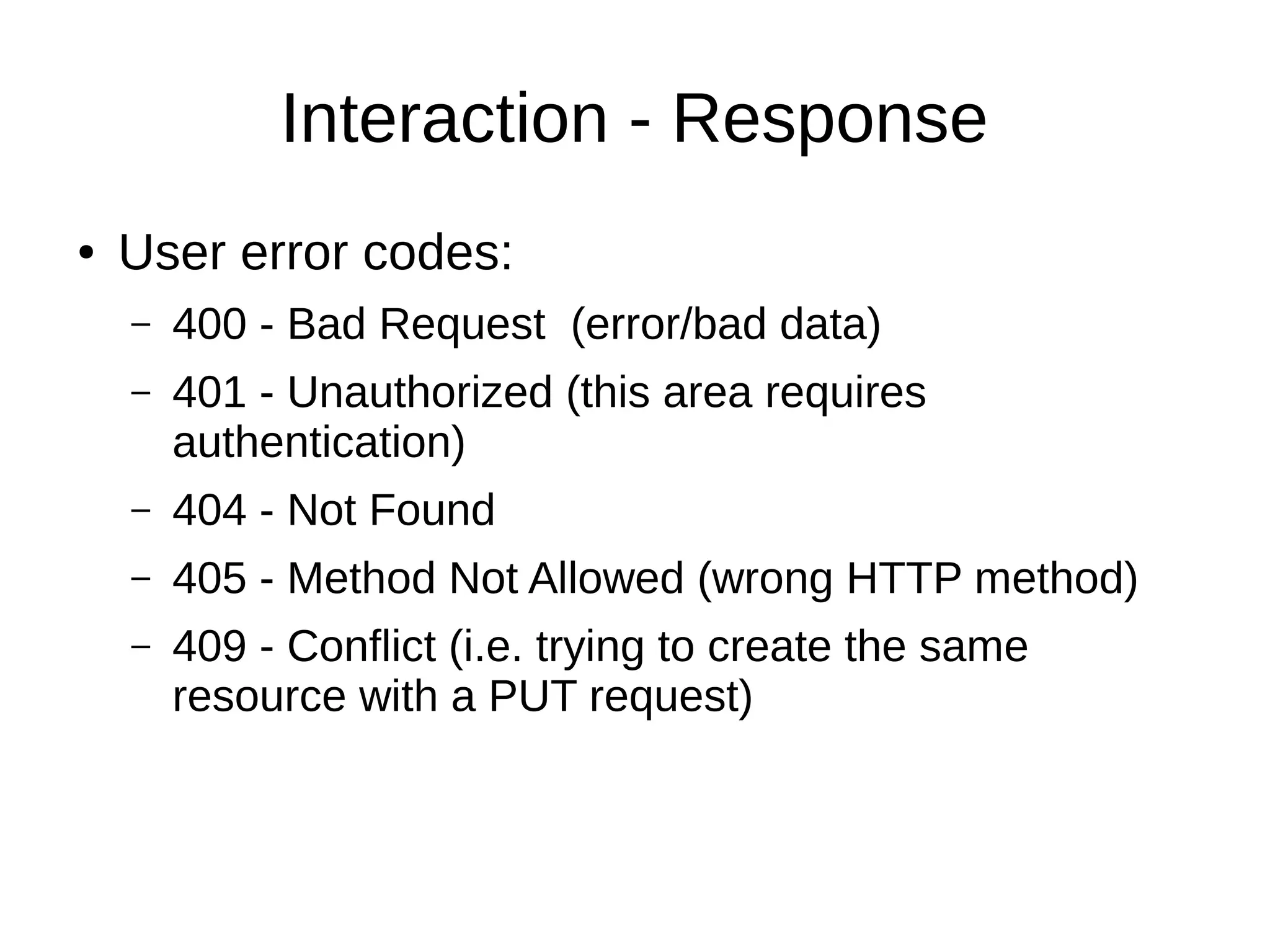
Interaction - Response
● User error codes:
– 400 - Bad Request (error/bad data)
– 401 - Unauthorized (this area requires
authentication)
– 404 - Not Found
– 405 - Method Not Allowed (wrong HTTP method)
– 409 - Conflict (i.e. trying to create the same
resource with a PUT request)
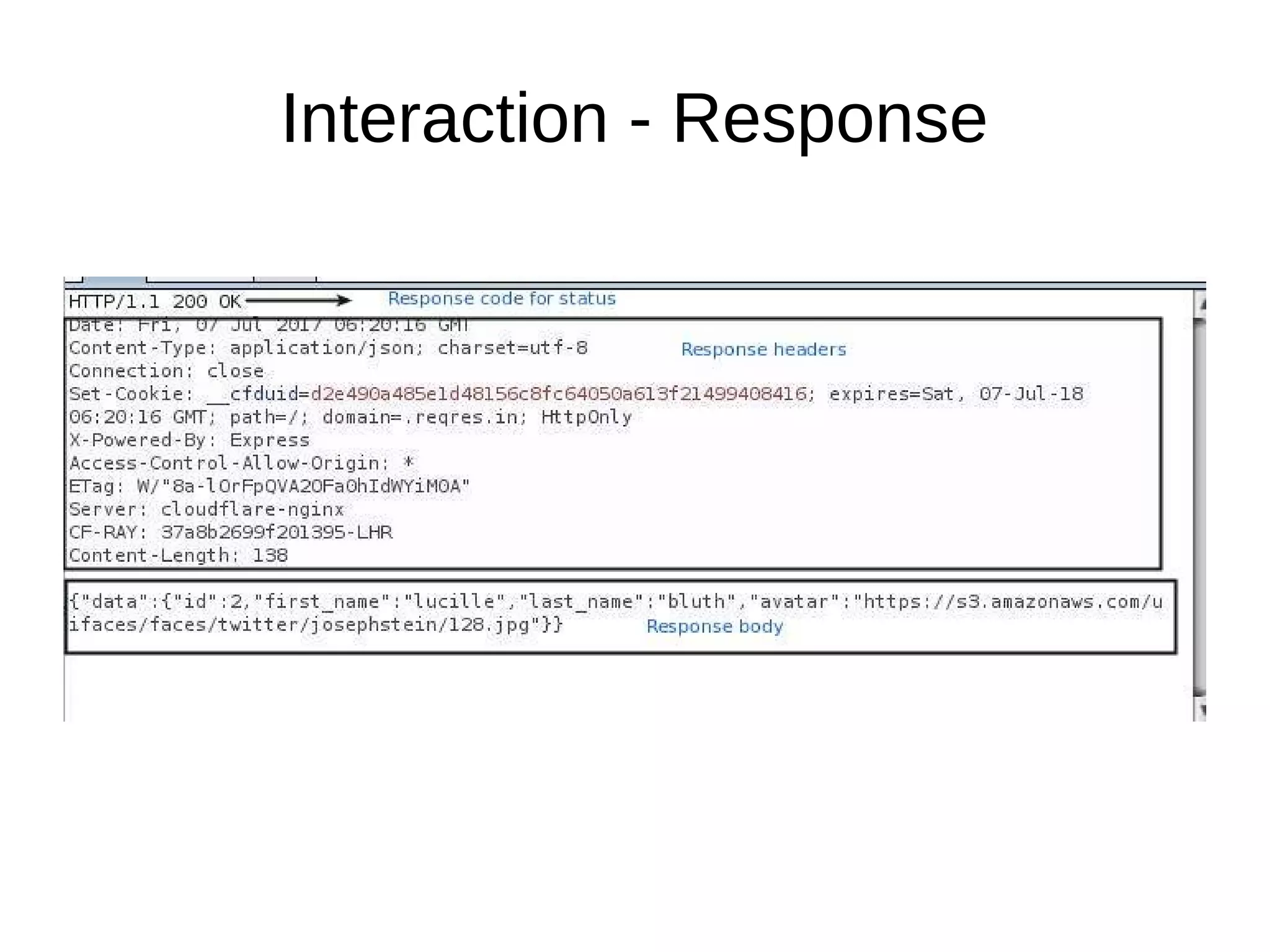
Interaction - Response
Attacking REST API
Enumeration
Scenarios
● Documentation/ Programming guide is
available.
– Check authentication process implemented.
– Check URL style used.
– Check HTTP headers(Standard and Non standard)
– Analyze error codes and description.
Scenarios
● Documentation/ Programming guide is NOT available.
– Record and analyze interaction between web application and API by
using local proxy.
– Check for HTTP headers.
– Analyze URL pattern/Post requst body for variables.
– Check for structured pattern such as JSON, XML, YAML.
– Check for cookie and authorisation headers, try to get idea
authentication/authorization process.
– Google captured API url, you might get documentation online.
Attacks
Injection
SQL Injection
● Check for parameters used for querying
database.
– URL parameters,
– POST request body
– HTTP headers
● Check for false positive, incase of filters
Authentication
● Basic Auth
● HMAC(Hash Based Message Authentication)
● OAuth
● Custom
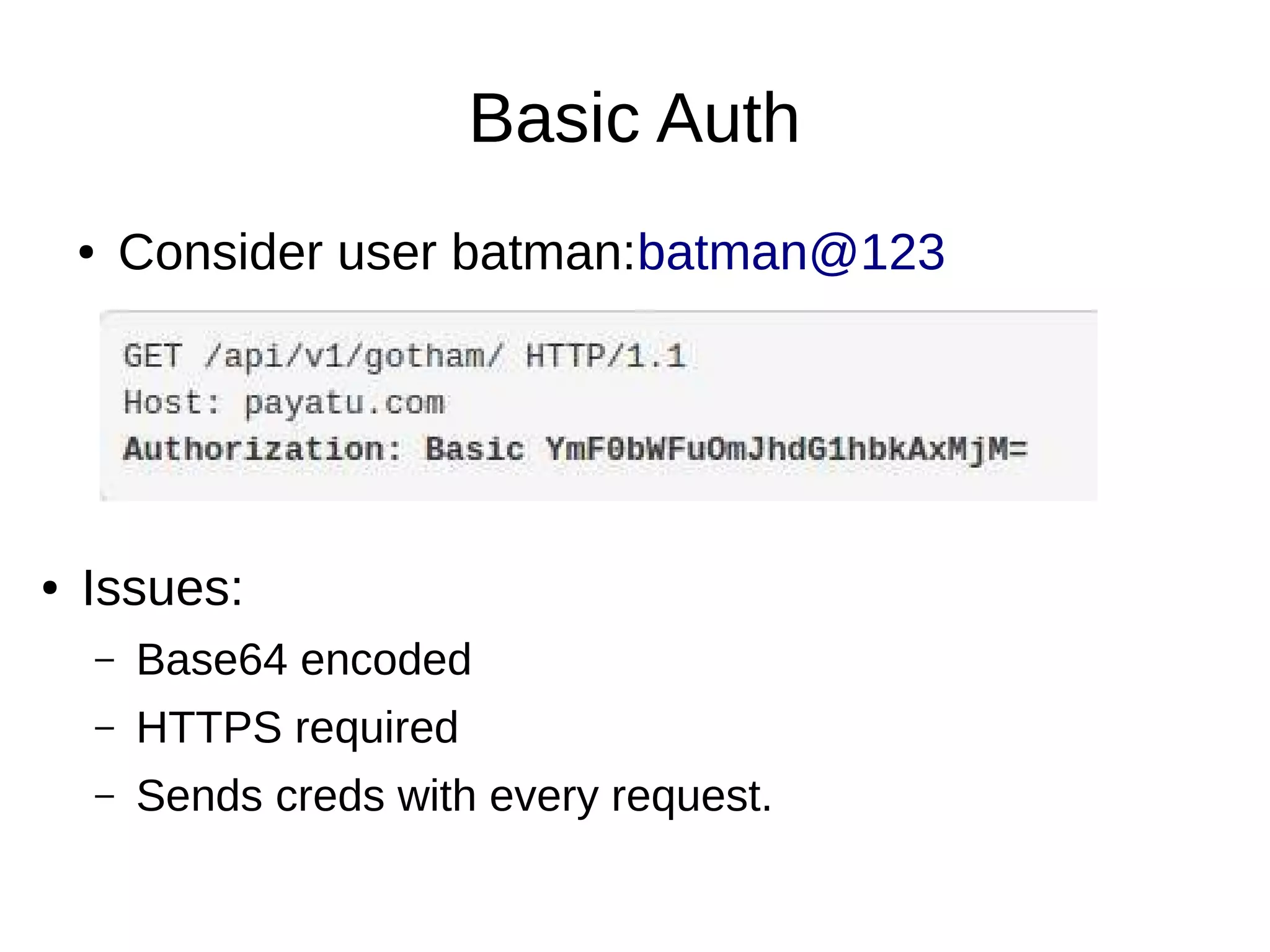
Basic Auth
● Consider user batman:batman@123
● Issues:
– Base64 encoded
– HTTPS required
– Sends creds with every request.
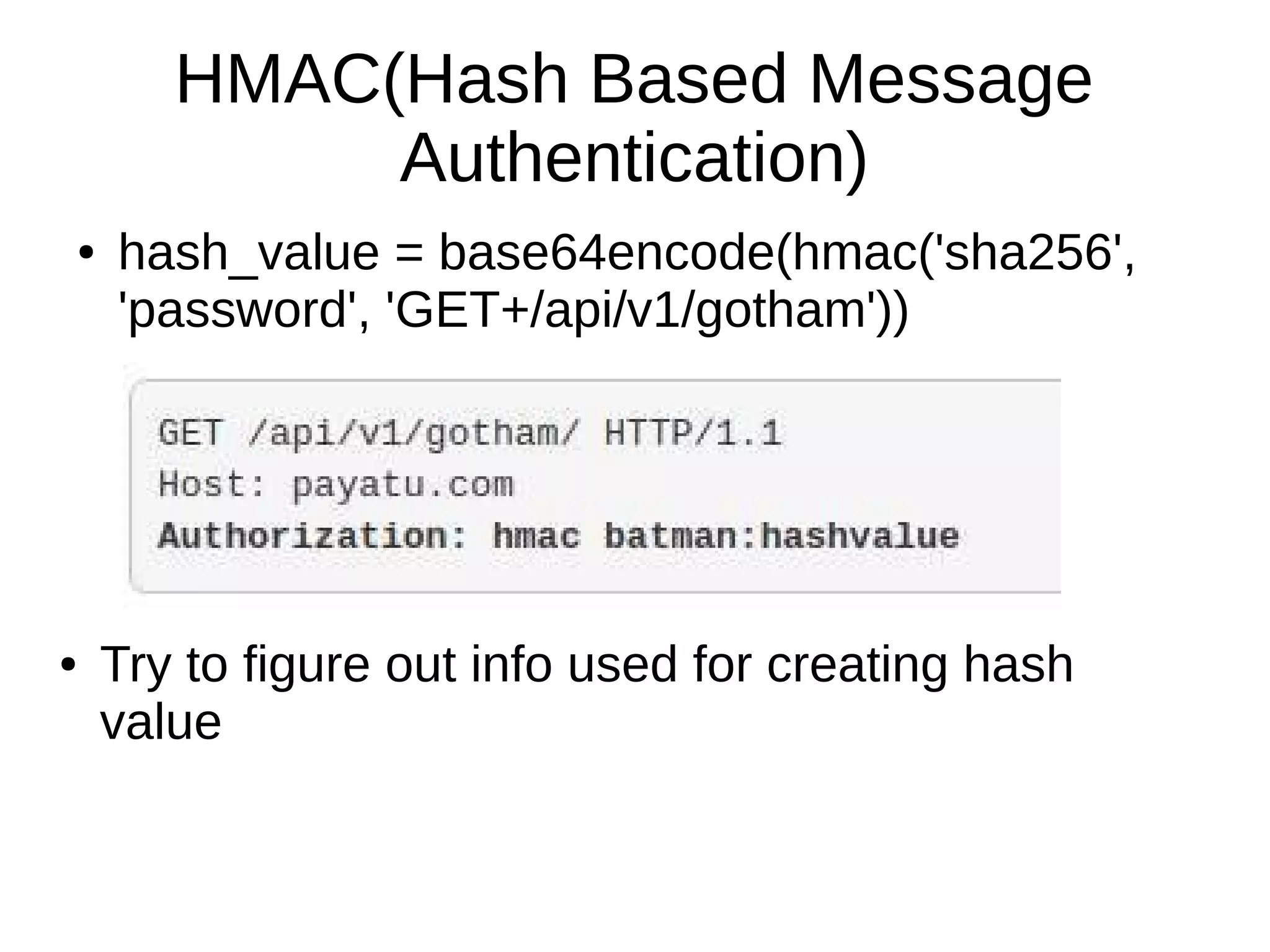
HMAC(Hash Based Message
Authentication)
● hash_value = base64encode(hmac('sha256',
'password', 'GET+/api/v1/gotham'))
● Try to figure out info used for creating hash
value
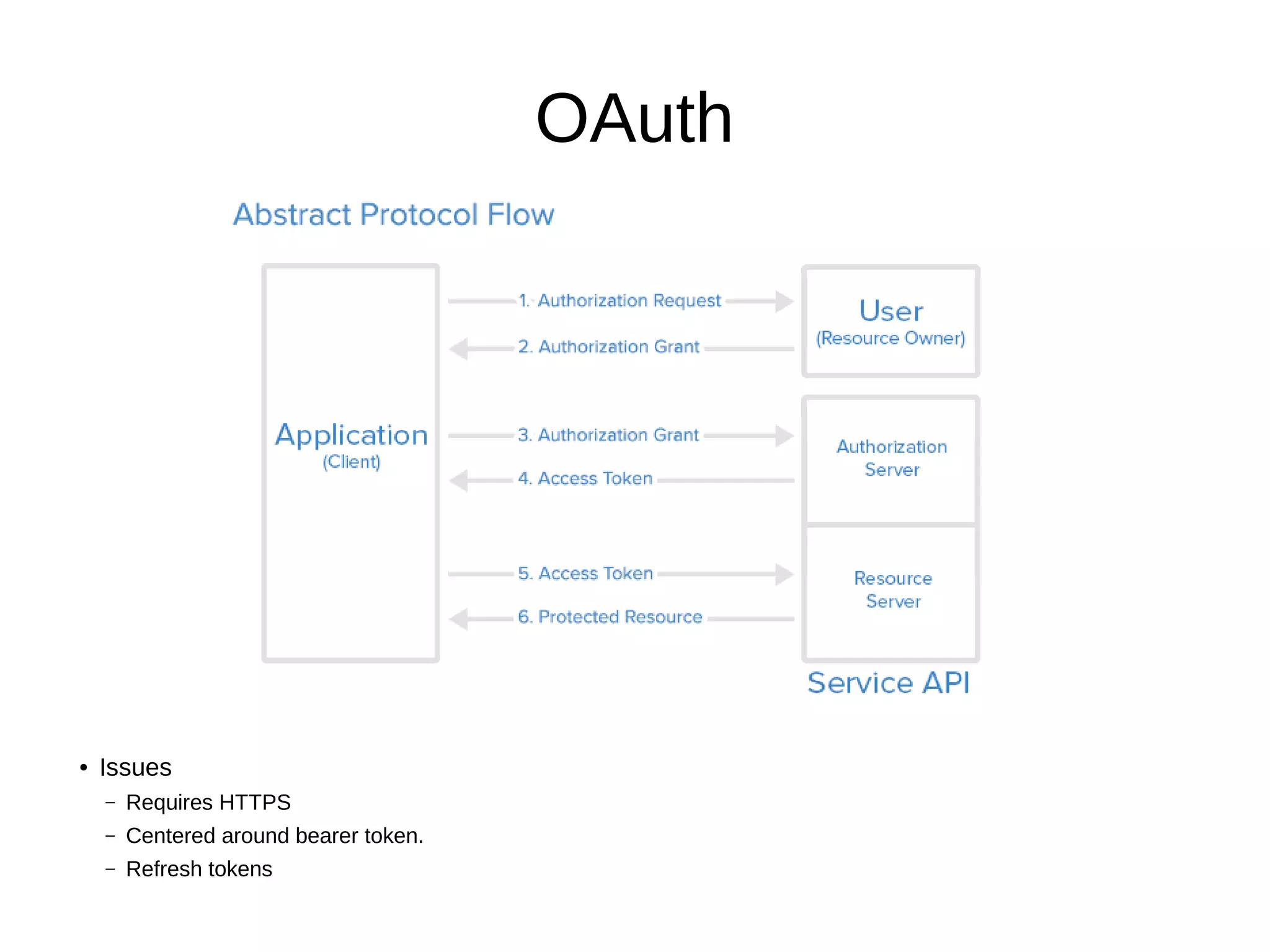
OAuth
● Issues
– Requires HTTPS
– Centered around bearer token.
– Refresh tokens
General Test cases - Auth
● Repeat invalidated token
● Check token timeout
● Try to obtain token without password field.
● Check for keys or creds in URL.
Cross Site Scripting
● Server side encoding
● DOM XSS
● Totally dependent on client application.
Access Control
Access Control
● Different HTTP methods.
● Resource identifier, manipulate it
● Non standard HTTP headers, URL parameters
which signifies user role.
– Ex UserType, IsAdmin
● POST request body
Rate Limit Implementation
Throttling
● Number of requests per access token per time window.
● HTTP response code 429 – Too Many Requests
● Check for
– Anonymous user & authenticated user.
– Different HTTP methods
– Client is temporarily blocked for too many error codes.
– Check for HTTP headers related to rate limiting.
Throttling
● Headers used for throttling:
– x-rate-limit-limit: Maximum rate limit allowed for an API end point
– x-rate-limit-remaining: Number of request remaining for the time
window
– x-rate-limit-reset: Remaining time before window gets reset.
● Some variations
– X-RateLimit-UserLimit
– X-RateLimit-UserRemaining
– X-RateLimit-UserReset
– X-RateLimit-ClientLimit
– X-RateLimit-ClientRemaining
SSL
● Check for a self-signed certificate.
● SSL pinning implemented at server side.
Information Disclosure
● Development/Hosting platform info
● Stack trace
● Unintended information exposure(Response
body)
CSRF
CSRF
● POST, PATCH, PUT, DELETE
● HTTP headers
– Ex- X-CSRF, X-CSRF-Token
● User controlled entity
– URL param, HTTP Referer headers,etc.

Attacking REST API

  • 1.
  • 2.
    Intro- API ● HTTPAPI ● Way of sharing data over internet ● Problem: – No standard way of implementing. ● Solution: – REST architecture
  • 3.
    REST ● Representational StateTransfer. ● Term invented by Roy Fielding ● Standard way for implementing API. ● CRUD is directly mapped to HTTP verb.
  • 4.
    REST architecture constraints ●Unifrom Interface – Resource based – Resource manipulation through representation. – Self descriptive messages – Hypermedia as the Engine of Application State(HATEOAS) ● Stateless ● Cacheable
  • 5.
    REST architecture constraints ●Client/Server ● Layered ● Code on Demand
  • 6.
    REST API ● Collectionof resources with 4 aspects – Base URI of a web service, – Content type supported by the web service, – Operations supported by the web service, – API must be hypertext driven.
  • 7.
  • 8.
    Interaction- Request HTTP Method Collection SingleEntity GET Retrieve all resources https://mysite.com/api/users Retrieve a single specific resource https://mysite.com/api/users/1 HEAD Retrieve all resources (headers only) Retrieve a single specific resource (headers only) POST Create a new resource in a collection https://mysite.com/api/users -- PUT -- Update/Replace a resource https://mysite.com/api/users/1 PATCH -- Update/Modify a resource https://mysite.com/api/users/1 DELETE -- Delete a resource https://mysite.com/api/users/1
  • 9.
  • 10.
    Interaction - Response ●HTTP response code is used to indicate status of operation requested by client. ● Success Codes: – 200 OK – 201 Created – 202 Accepted (Used for delete requests)
  • 11.
    Interaction - Response ●User error codes: – 400 - Bad Request (error/bad data) – 401 - Unauthorized (this area requires authentication) – 404 - Not Found – 405 - Method Not Allowed (wrong HTTP method) – 409 - Conflict (i.e. trying to create the same resource with a PUT request)
  • 12.
  • 13.
  • 14.
  • 15.
    Scenarios ● Documentation/ Programmingguide is available. – Check authentication process implemented. – Check URL style used. – Check HTTP headers(Standard and Non standard) – Analyze error codes and description.
  • 16.
    Scenarios ● Documentation/ Programmingguide is NOT available. – Record and analyze interaction between web application and API by using local proxy. – Check for HTTP headers. – Analyze URL pattern/Post requst body for variables. – Check for structured pattern such as JSON, XML, YAML. – Check for cookie and authorisation headers, try to get idea authentication/authorization process. – Google captured API url, you might get documentation online.
  • 17.
  • 18.
  • 19.
    SQL Injection ● Checkfor parameters used for querying database. – URL parameters, – POST request body – HTTP headers ● Check for false positive, incase of filters
  • 20.
    Authentication ● Basic Auth ●HMAC(Hash Based Message Authentication) ● OAuth ● Custom
  • 21.
    Basic Auth ● Consideruser batman:batman@123 ● Issues: – Base64 encoded – HTTPS required – Sends creds with every request.
  • 22.
    HMAC(Hash Based Message Authentication) ●hash_value = base64encode(hmac('sha256', 'password', 'GET+/api/v1/gotham')) ● Try to figure out info used for creating hash value
  • 23.
    OAuth ● Issues – RequiresHTTPS – Centered around bearer token. – Refresh tokens
  • 24.
    General Test cases- Auth ● Repeat invalidated token ● Check token timeout ● Try to obtain token without password field. ● Check for keys or creds in URL.
  • 25.
  • 26.
    Cross Site Scripting ●Server side encoding ● DOM XSS ● Totally dependent on client application.
  • 27.
  • 28.
    Access Control ● DifferentHTTP methods. ● Resource identifier, manipulate it ● Non standard HTTP headers, URL parameters which signifies user role. – Ex UserType, IsAdmin ● POST request body
  • 29.
  • 30.
    Throttling ● Number ofrequests per access token per time window. ● HTTP response code 429 – Too Many Requests ● Check for – Anonymous user & authenticated user. – Different HTTP methods – Client is temporarily blocked for too many error codes. – Check for HTTP headers related to rate limiting.
  • 31.
    Throttling ● Headers usedfor throttling: – x-rate-limit-limit: Maximum rate limit allowed for an API end point – x-rate-limit-remaining: Number of request remaining for the time window – x-rate-limit-reset: Remaining time before window gets reset. ● Some variations – X-RateLimit-UserLimit – X-RateLimit-UserRemaining – X-RateLimit-UserReset – X-RateLimit-ClientLimit – X-RateLimit-ClientRemaining
  • 32.
    SSL ● Check fora self-signed certificate. ● SSL pinning implemented at server side.
  • 33.
  • 34.
    Information Disclosure ● Development/Hostingplatform info ● Stack trace ● Unintended information exposure(Response body)
  • 35.
  • 36.
    CSRF ● POST, PATCH,PUT, DELETE ● HTTP headers – Ex- X-CSRF, X-CSRF-Token ● User controlled entity – URL param, HTTP Referer headers,etc.