1
CS/COE0447
Computer Organization &
Assembly Language
Chapter 3
2
Topics
• Negative binary integers
– Sign magnitude, 1’s complement, 2’s complement
– Sign extension, ranges, arithmetic
• Signed versus unsigned operations
• Overflow (signed and unsigned)
• Branch instructions: branching backwards
• Implementations of addition, multiplication, division
• Floating point numbers
– Binary fractions
– IEEE 754 floating point standard
– Operations
• underflow
• Implementations of addition and multiplication (less detail than for integers)
• Floating-point instructions in MIPS
• Guard and Round bits
3
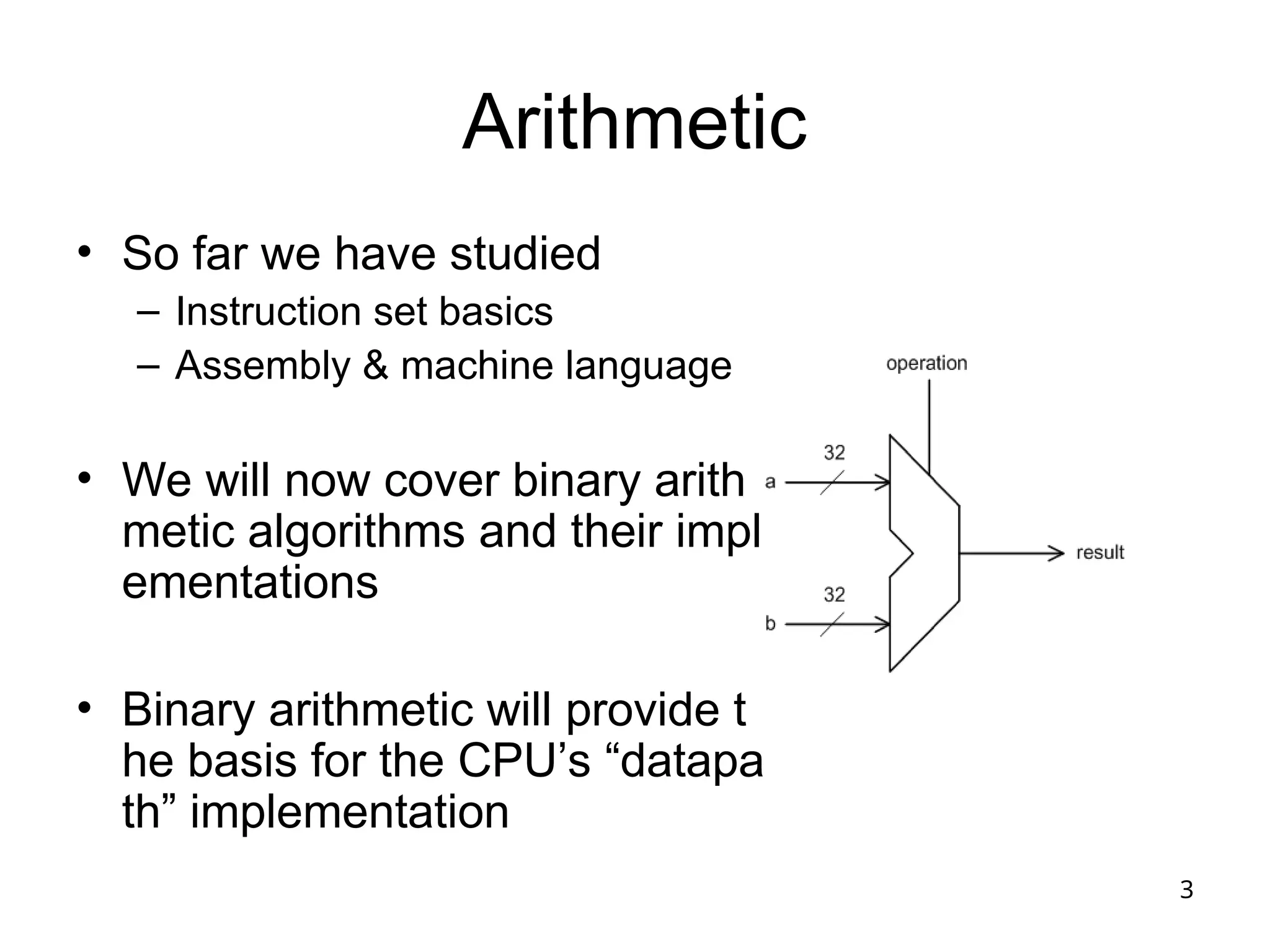
Arithmetic
• So far we have studied
– Instruction set basics
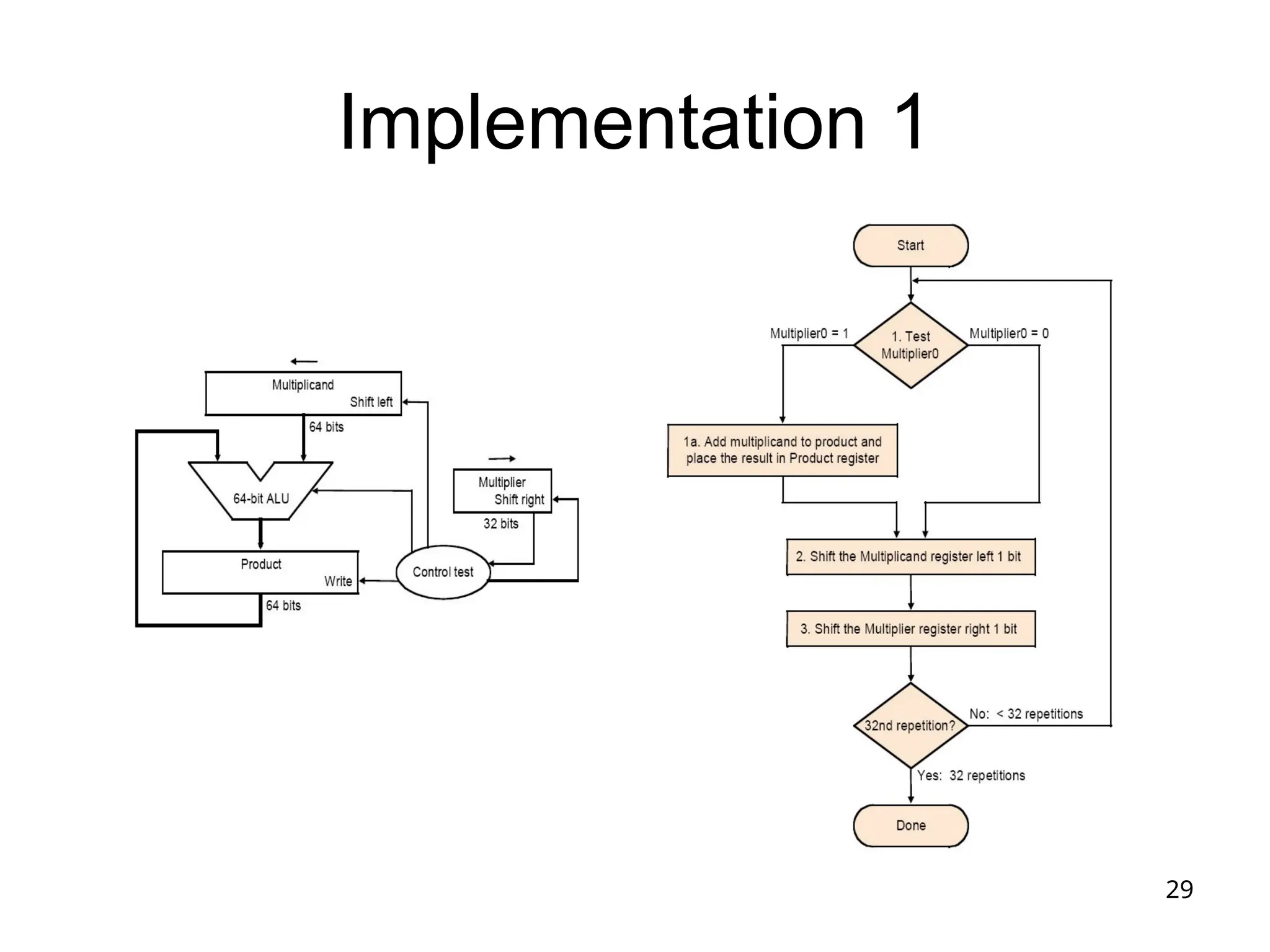
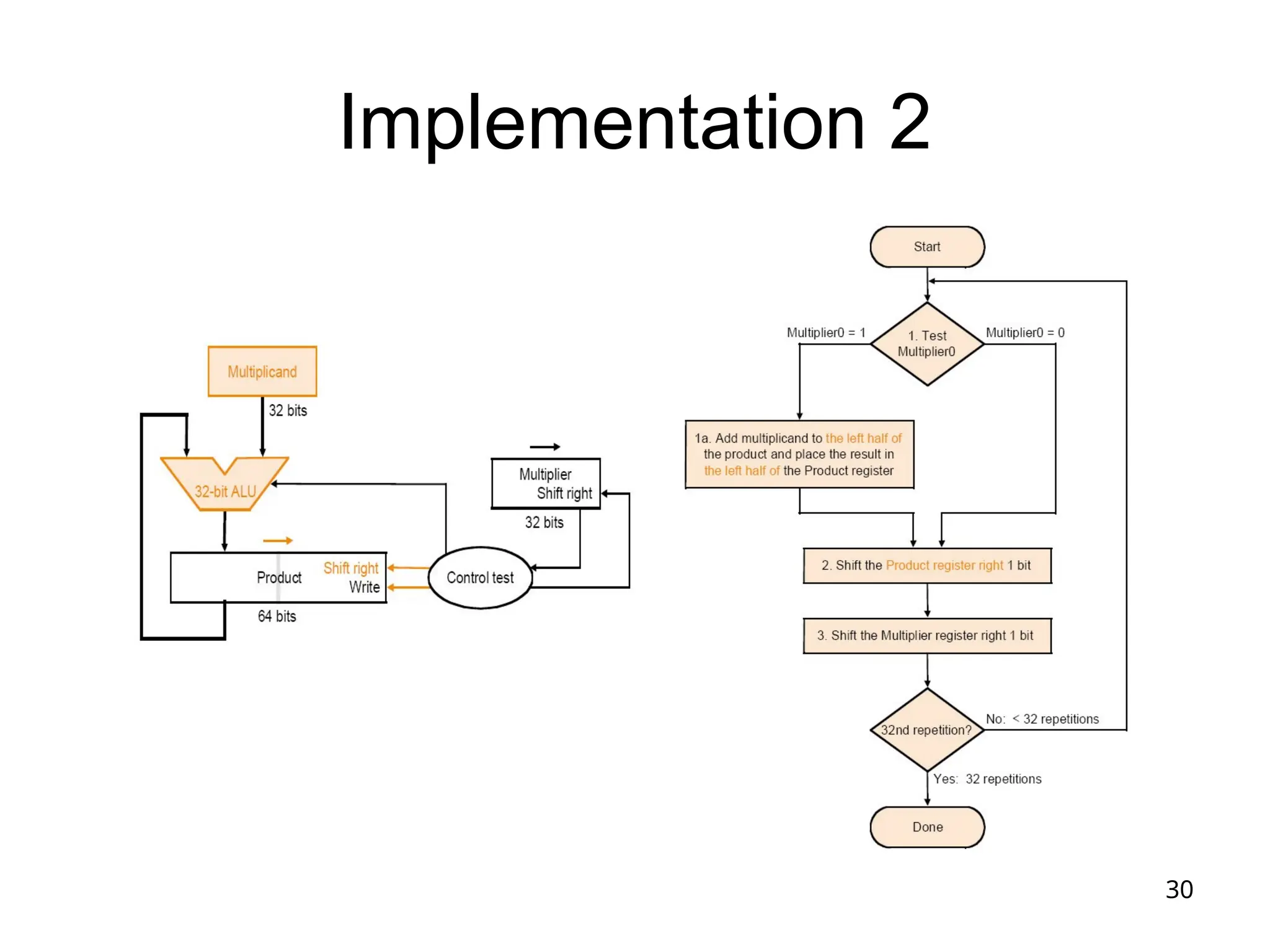
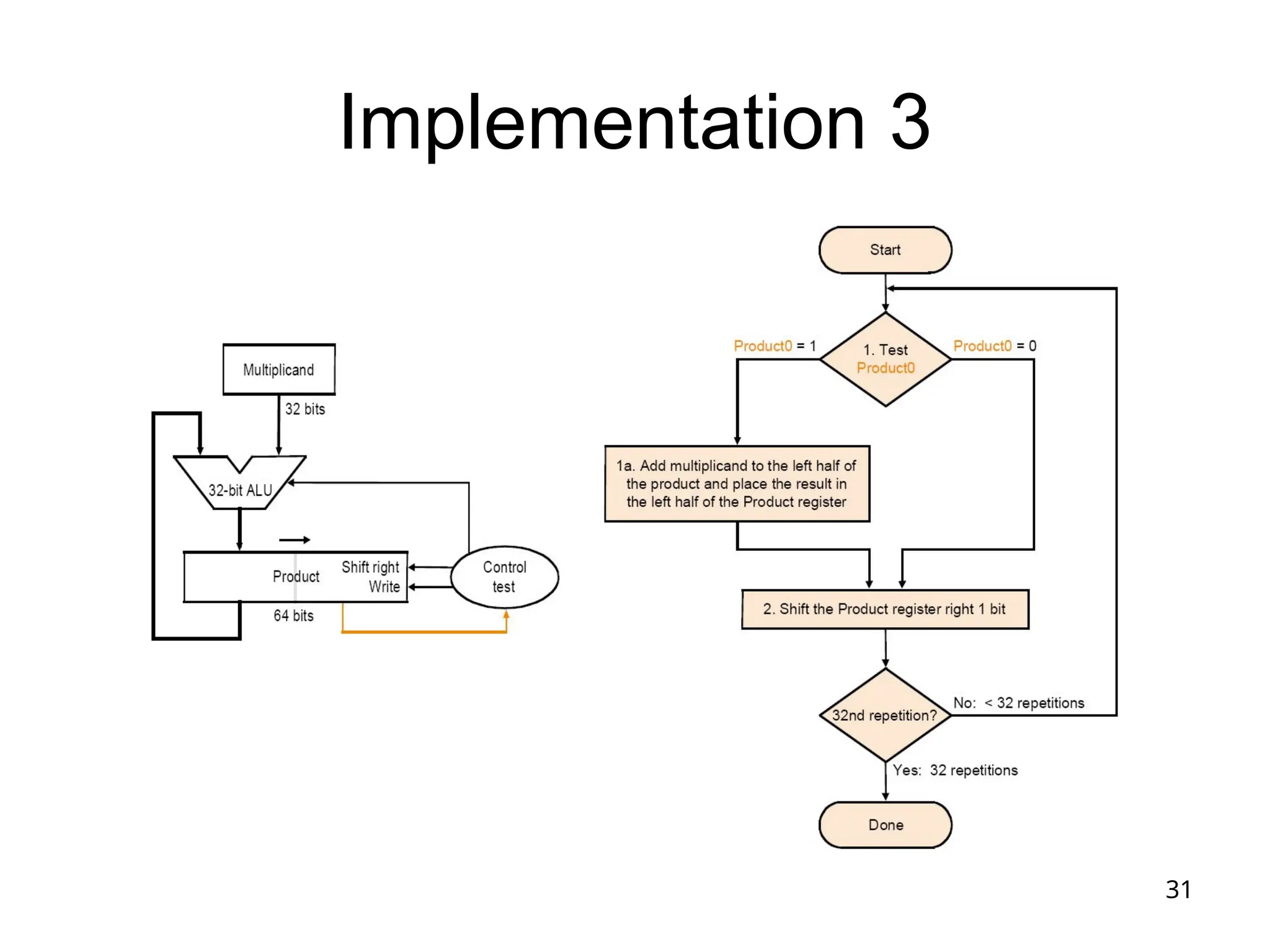
– Assembly & machine language
• We will now cover binary arith
metic algorithms and their impl
ementations
• Binary arithmetic will provide t
he basis for the CPU’s “datapa
th” implementation
4
Binary Number Representation
• We looked at unsigned numbers before
– B31B30…B2B1B0
– B31231
+B30230
+…+B222
+B121
+B020
• Now we want to deal with more complicated cases
– Negative integers
– Real numbers (a.k.a. floating-point numbers)
• We’ll start with negative integers
– Bit patterns and what they represent…
– We’ll see 3 schemes; the 3rd
(2’s complement) is used
in most computers
5
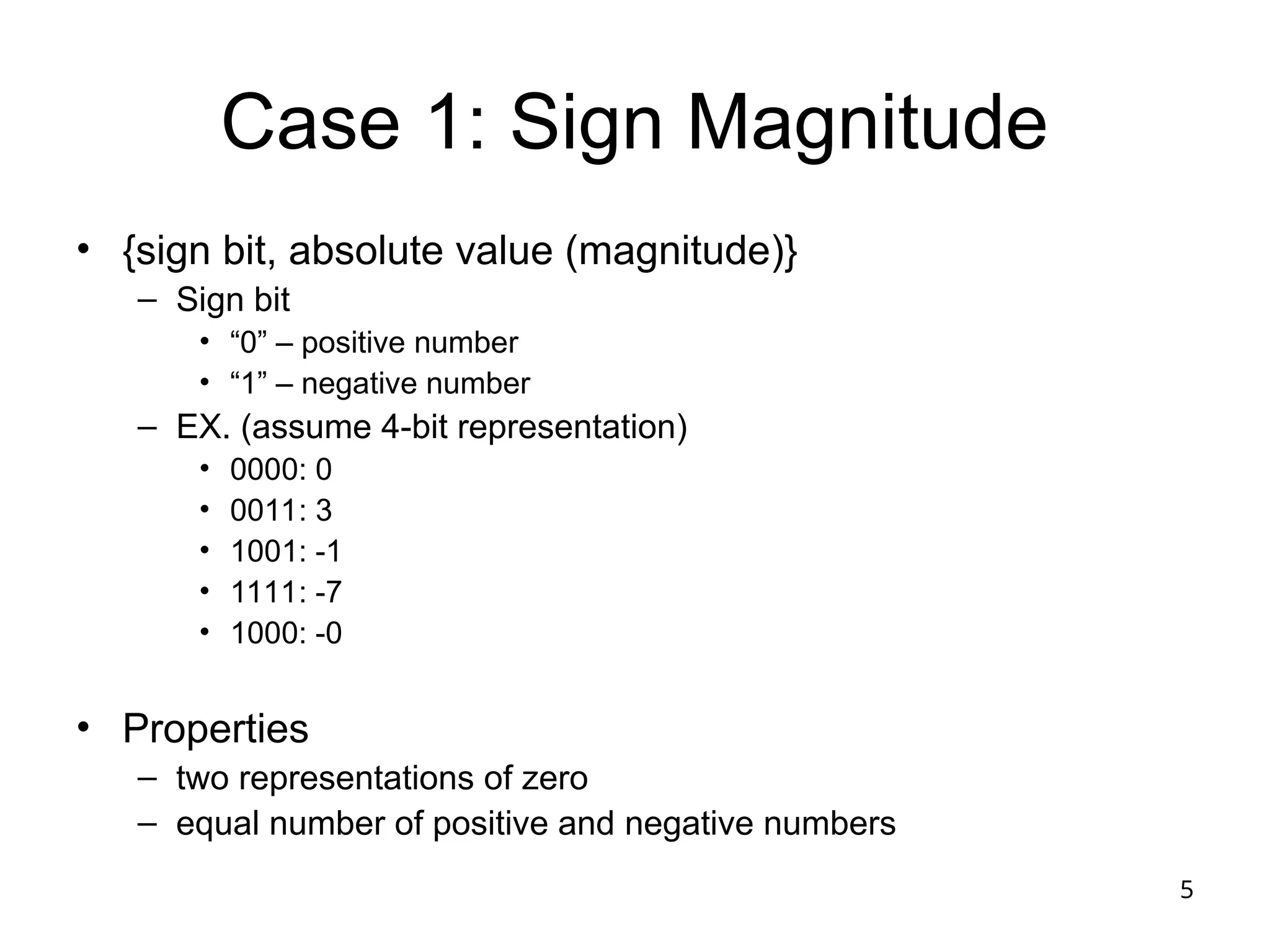
Case 1: Sign Magnitude
• {sign bit, absolute value (magnitude)}
– Sign bit
• “0” – positive number
• “1” – negative number
– EX. (assume 4-bit representation)
• 0000: 0
• 0011: 3
• 1001: -1
• 1111: -7
• 1000: -0
• Properties
– two representations of zero
– equal number of positive and negative numbers
6
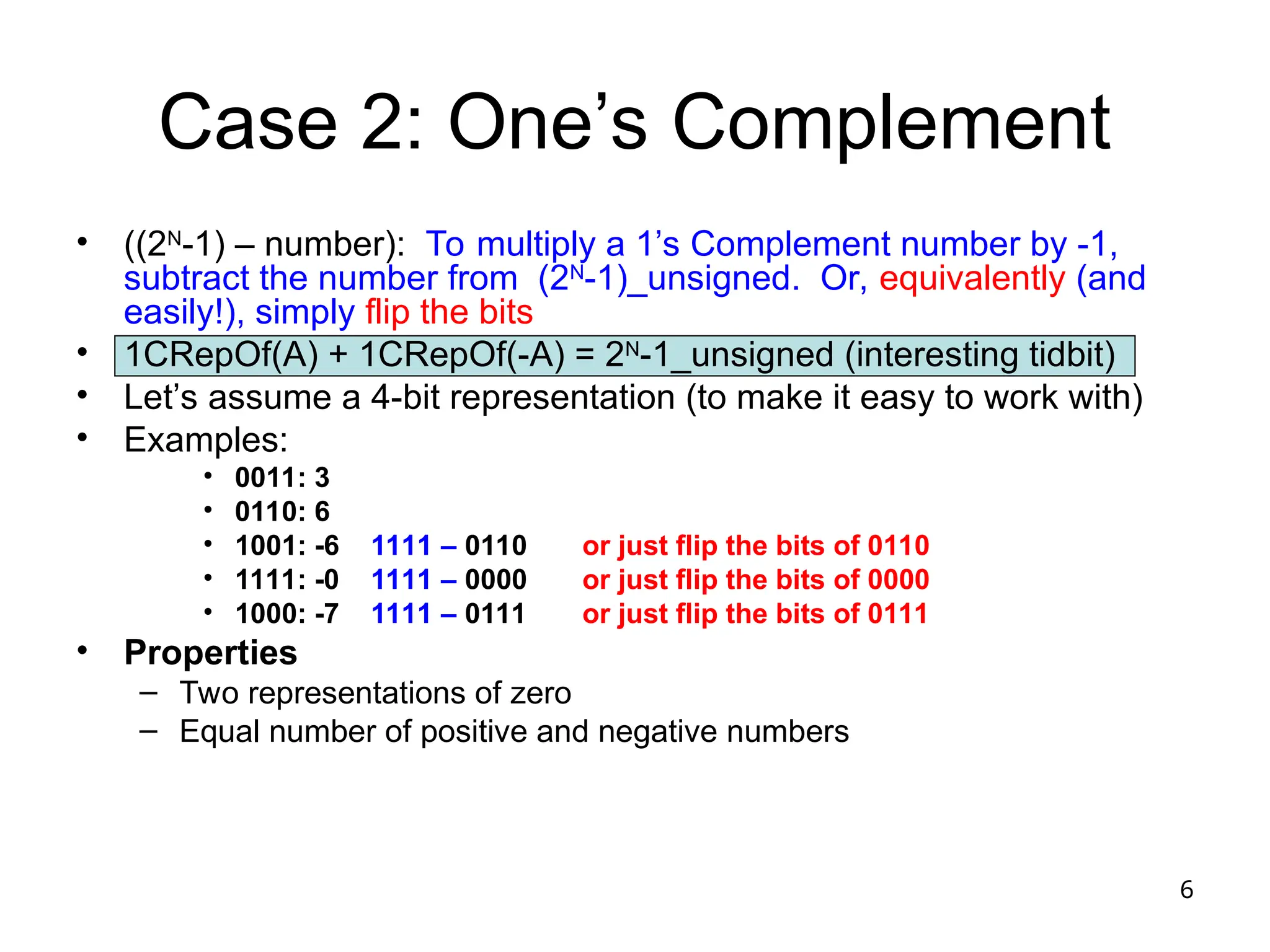
Case 2: One’s Complement
• ((2N
-1) – number): To multiply a 1’s Complement number by -1,
subtract the number from (2N
-1)_unsigned. Or, equivalently (and
easily!), simply flip the bits
• 1CRepOf(A) + 1CRepOf(-A) = 2N
-1_unsigned (interesting tidbit)
• Let’s assume a 4-bit representation (to make it easy to work with)
• Examples:
• 0011: 3
• 0110: 6
• 1001: -6 1111 – 0110 or just flip the bits of 0110
• 1111: -0 1111 – 0000 or just flip the bits of 0000
• 1000: -7 1111 – 0111 or just flip the bits of 0111
• Properties
– Two representations of zero
– Equal number of positive and negative numbers
7
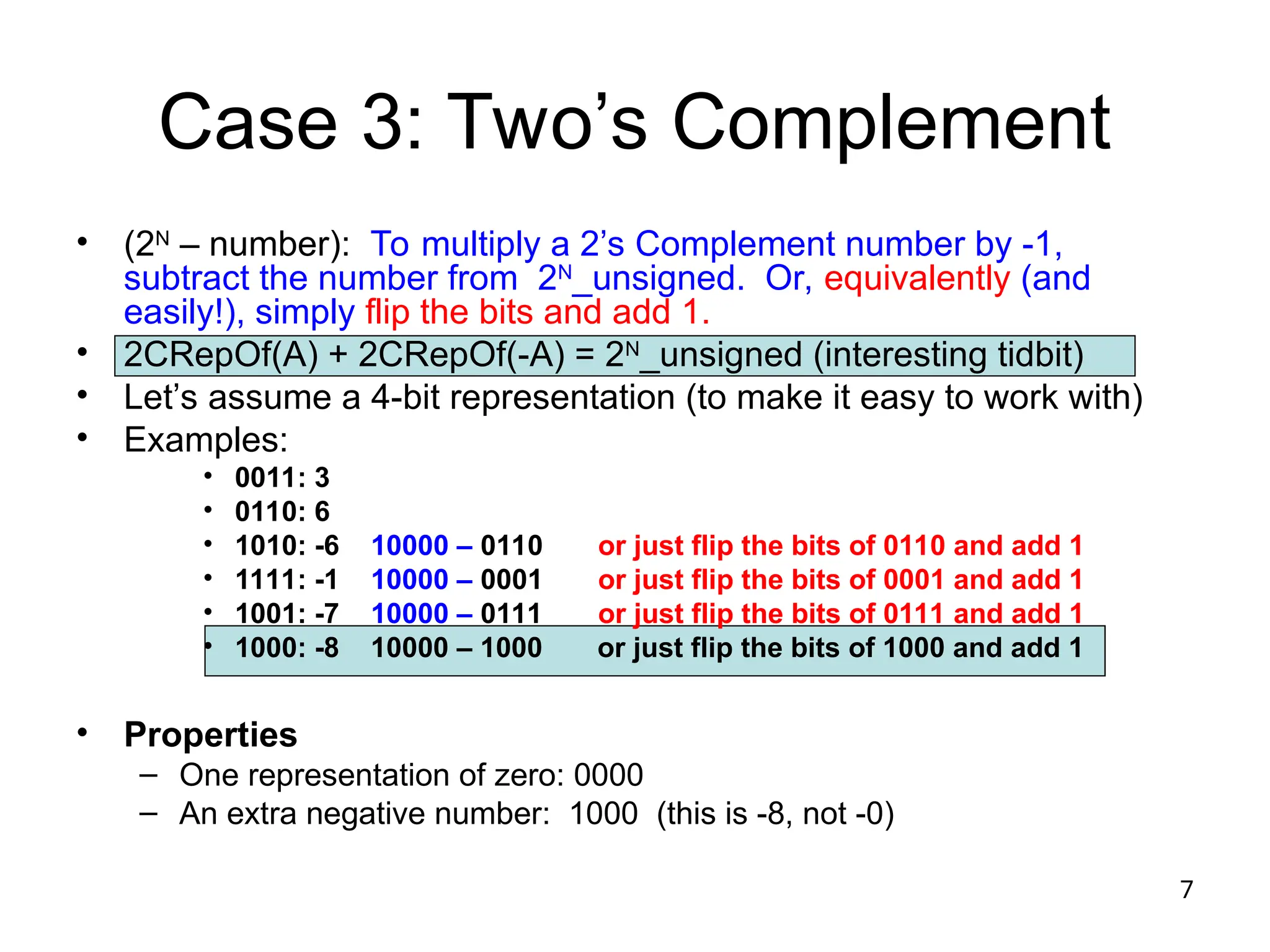
Case 3: Two’s Complement
• (2N
– number): To multiply a 2’s Complement number by -1,
subtract the number from 2N
_unsigned. Or, equivalently (and
easily!), simply flip the bits and add 1.
• 2CRepOf(A) + 2CRepOf(-A) = 2N
_unsigned (interesting tidbit)
• Let’s assume a 4-bit representation (to make it easy to work with)
• Examples:
• 0011: 3
• 0110: 6
• 1010: -6 10000 – 0110 or just flip the bits of 0110 and add 1
• 1111: -1 10000 – 0001 or just flip the bits of 0001 and add 1
• 1001: -7 10000 – 0111 or just flip the bits of 0111 and add 1
• 1000: -8 10000 – 1000 or just flip the bits of 1000 and add 1
• Properties
– One representation of zero: 0000
– An extra negative number: 1000 (this is -8, not -0)
8
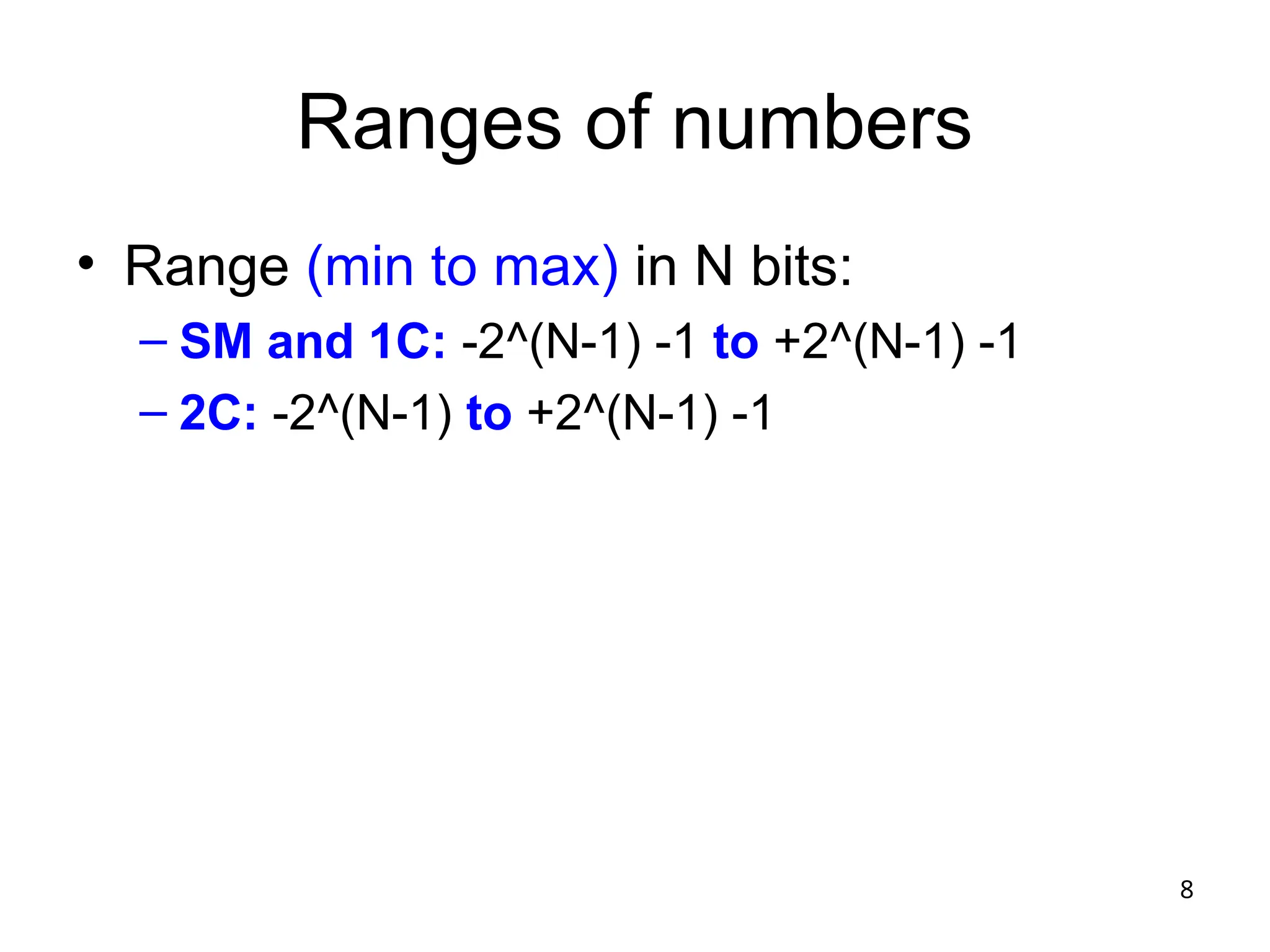
Ranges of numbers
• Range (min to max) in N bits:
– SM and 1C: -2^(N-1) -1 to +2^(N-1) -1
– 2C: -2^(N-1) to +2^(N-1) -1
9
Sign Extension
• #s are often cast into vars with more capacity
• Sign extension (in all 3 representations): extend
the sign bit to the left, and everything works out
• la $t0,0x00400033
• addi $t1,$t0, 7
• addi $t2,$t0, -7
• R[rt] = R[rs] + SignExtImm
• SignExtImm = {16{immediate[15]},immediate}
10
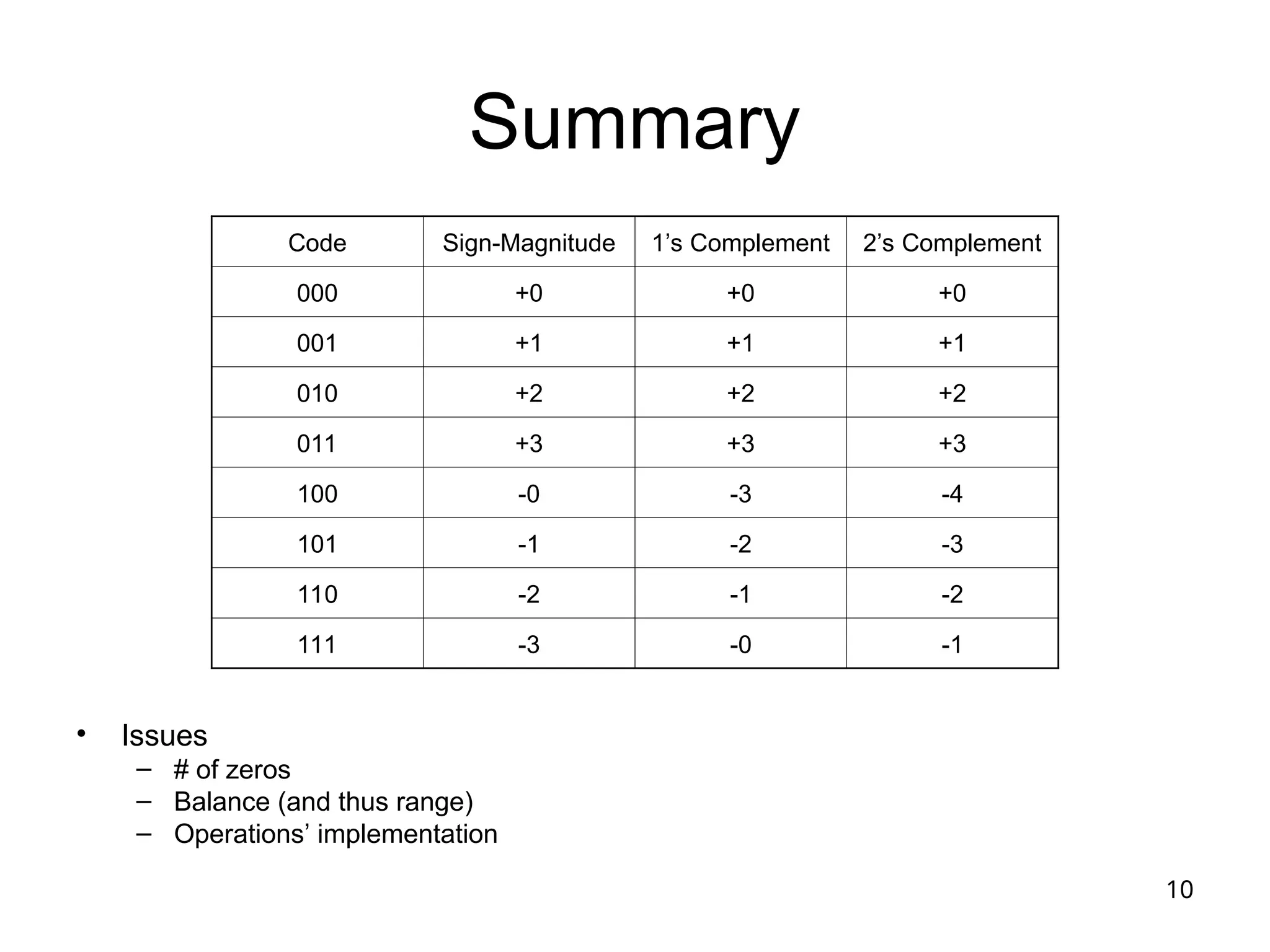
Summary
• Issues
– # of zeros
– Balance (and thus range)
– Operations’ implementation
Code Sign-Magnitude 1’s Complement 2’s Complement
000 +0 +0 +0
001 +1 +1 +1
010 +2 +2 +2
011 +3 +3 +3
100 -0 -3 -4
101 -1 -2 -3
110 -2 -1 -2
111 -3 -0 -1
11
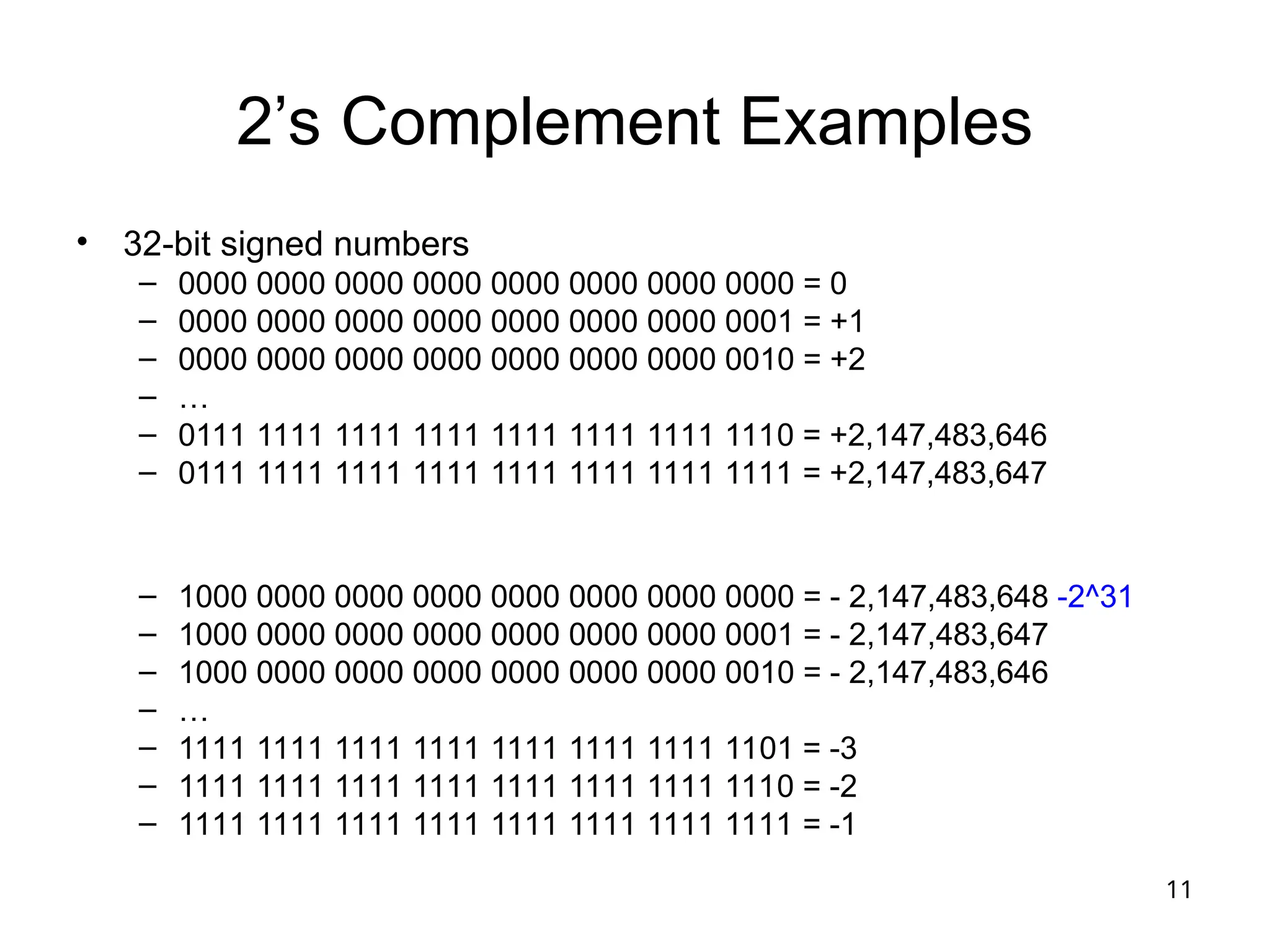
2’s Complement Examples
• 32-bit signed numbers
– 0000 0000 0000 0000 0000 0000 0000 0000 = 0
– 0000 0000 0000 0000 0000 0000 0000 0001 = +1
– 0000 0000 0000 0000 0000 0000 0000 0010 = +2
– …
– 0111 1111 1111 1111 1111 1111 1111 1110 = +2,147,483,646
– 0111 1111 1111 1111 1111 1111 1111 1111 = +2,147,483,647
– 1000 0000 0000 0000 0000 0000 0000 0000 = - 2,147,483,648 -2^31
– 1000 0000 0000 0000 0000 0000 0000 0001 = - 2,147,483,647
– 1000 0000 0000 0000 0000 0000 0000 0010 = - 2,147,483,646
– …
– 1111 1111 1111 1111 1111 1111 1111 1101 = -3
– 1111 1111 1111 1111 1111 1111 1111 1110 = -2
– 1111 1111 1111 1111 1111 1111 1111 1111 = -1
12
Addition
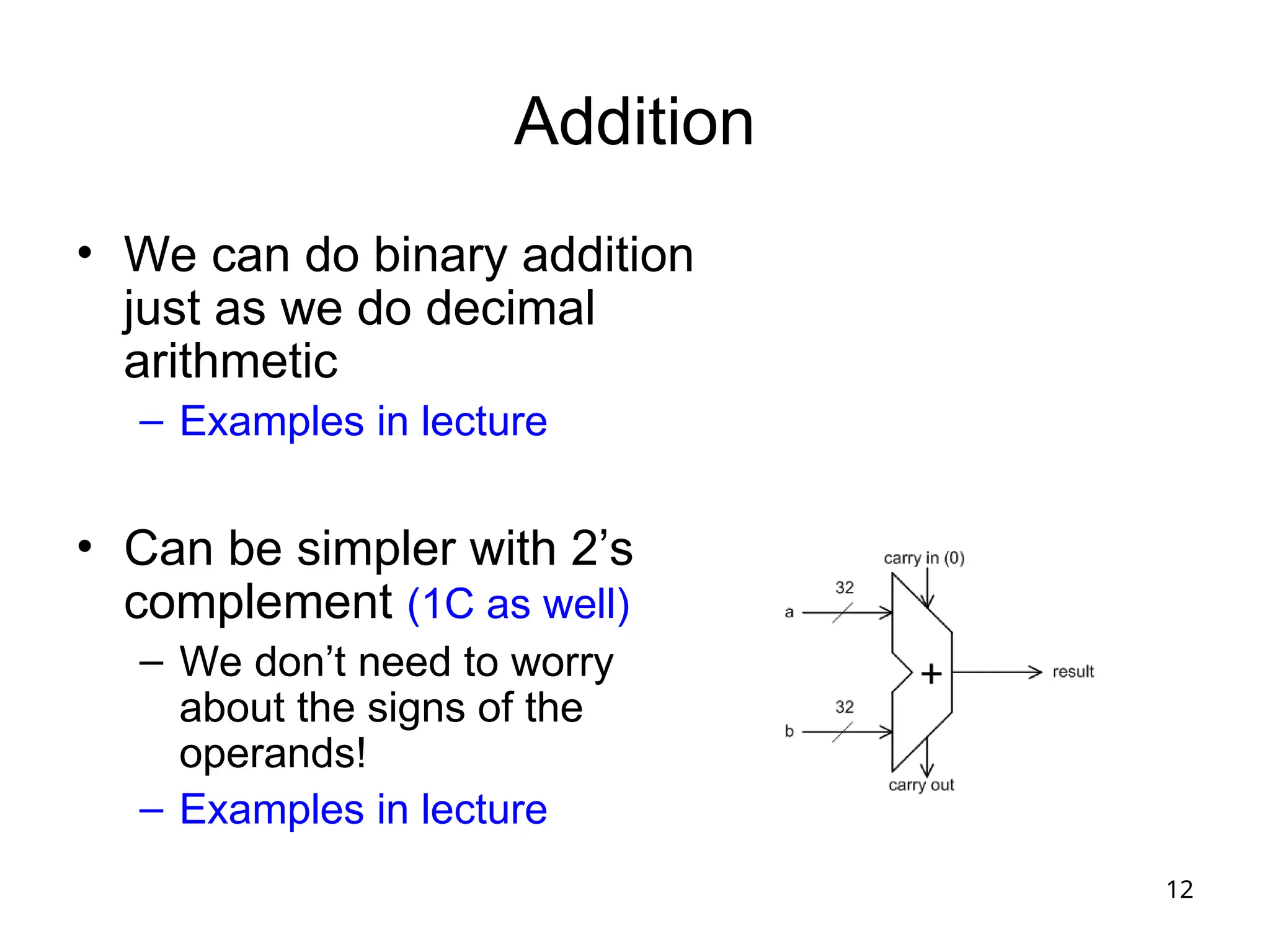
• We can do binary addition
just as we do decimal
arithmetic
– Examples in lecture
• Can be simpler with 2’s
complement (1C as well)
– We don’t need to worry
about the signs of the
operands!
– Examples in lecture
13
Subtraction
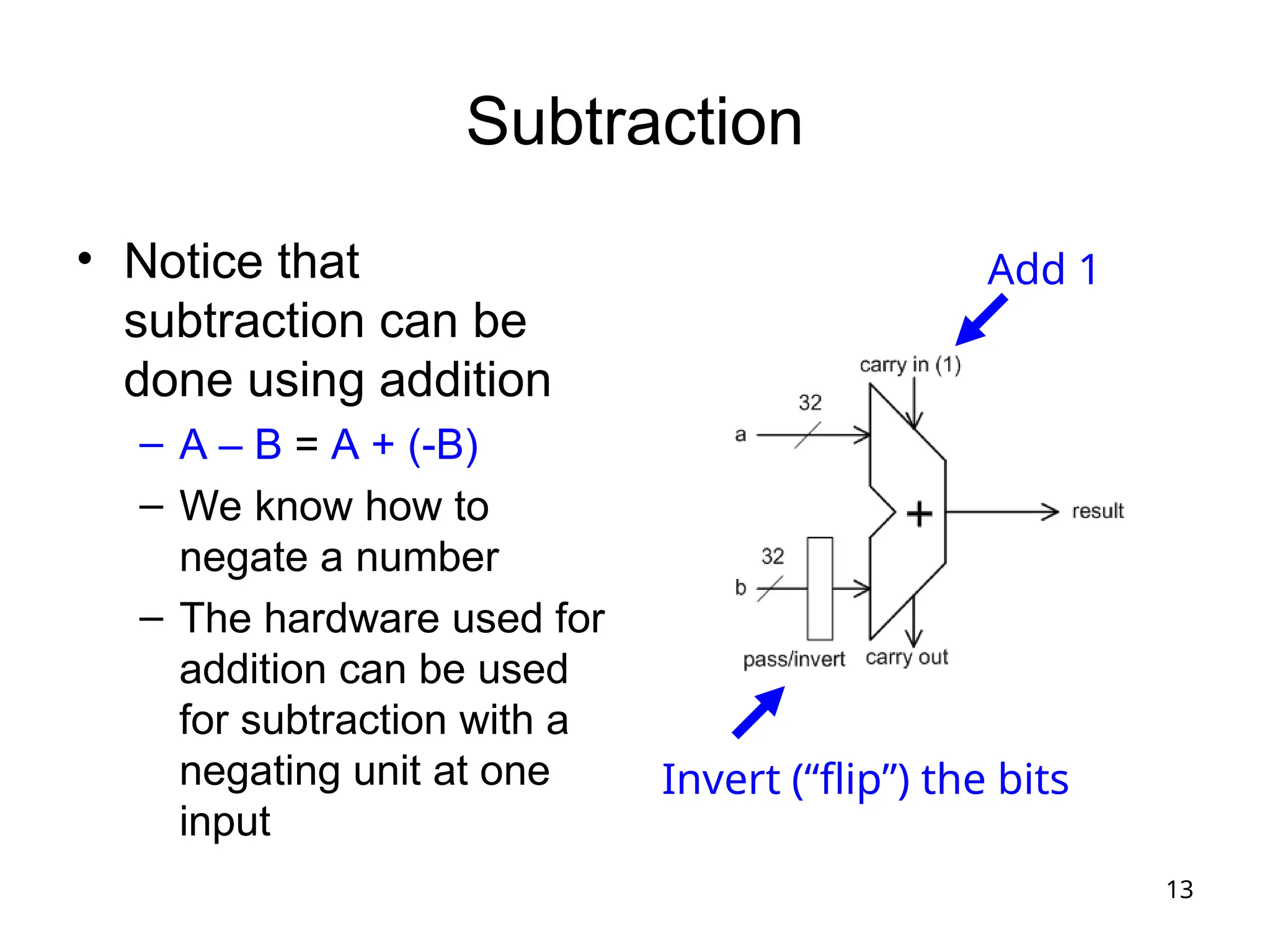
• Notice that
subtraction can be
done using addition
– A – B = A + (-B)
– We know how to
negate a number
– The hardware used for
addition can be used
for subtraction with a
negating unit at one
input
Add 1
Invert (“flip”) the bits
14
Signed versus Unsigned
Operations
• “unsigned” operations view the operands a
s positive numbers, even if the most signifi
cant bit is 1
• Example: 1100 is 12_unsigned but -4_2C
• Example: slt versus sltu
– li $t0,-4
– li $t1,10
– slt $t3,$t0,$t1 $t3 = 1
– sltu $t4,$t0,$t1 $t4 = 0 !!
15
Signed Overflow
• Because we use a limited number of bits to
represent a number, the result of an operation
may not fit  “overflow”
• No overflow when
– We add two numbers with different signs
– We subtract a number with the same sign
• Overflow when
– Adding two positive numbers yields a negative
number
– Adding two negative numbers yields a positive
number
– How about subtraction?
16
Overflow
• On an overflow, the CPU can
– Generate an exception
– Set a flag in a status register
– Do nothing
• In MIPS on green card:
– add, addi, sub: footnote (1) May cause overflow exce
ption
17
Overflow with Unsigned Operations
• addu, addiu, subu
– Footnote (1) is not listed for these instructions
on the green card
– This tells us that, In MIPS, nothing is done on
unsigned overflow
– How could it be detected for, e.g., add?
• Carry out of the most significant position (in some
architectures, a condition code is set on unsigned
overflow, which IS the carry out from the top positi
on)
18
Branch Instructions: Branching
Backwards
• # $t3 = 1 + 2 + 2 + 2 + 2; $t4 = 1 + 3 + 3 + 3 + 3
• li $t0,0 li $t3,1 li $t4, 1
• loop: addi $t3,$t3,2
• addi $t4,$t4,3
• addi $t0,$t0,1
• slti $t5,$t0,4
• bne $t5,$zero,loop machine code: 0x15a0fffc
• BranchAddr = {14{imm[15]}, imm, 2’b0}
19
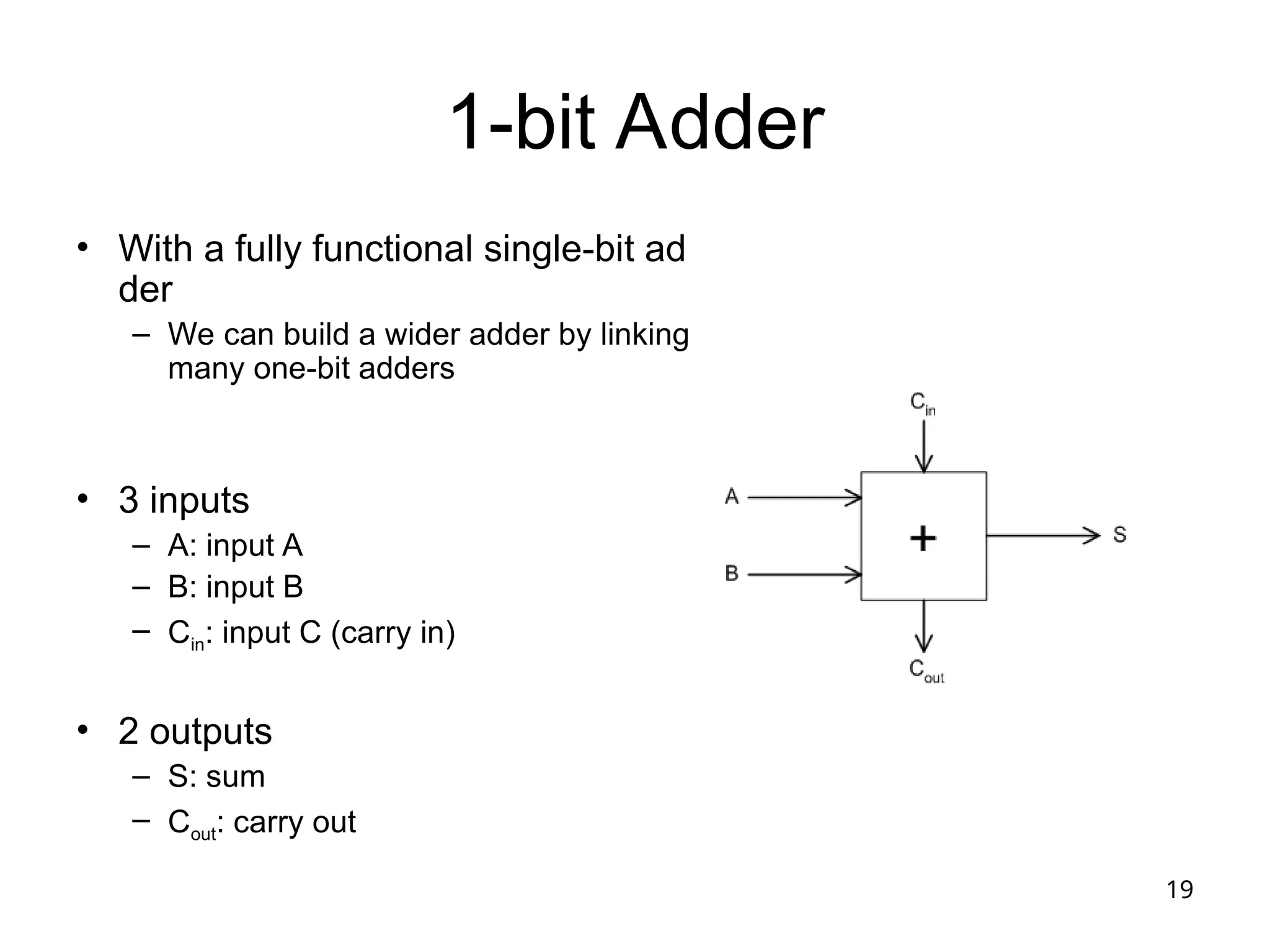
1-bit Adder
• With a fully functional single-bit ad
der
– We can build a wider adder by linking
many one-bit adders
• 3 inputs
– A: input A
– B: input B
– Cin: input C (carry in)
• 2 outputs
– S: sum
– Cout: carry out
20
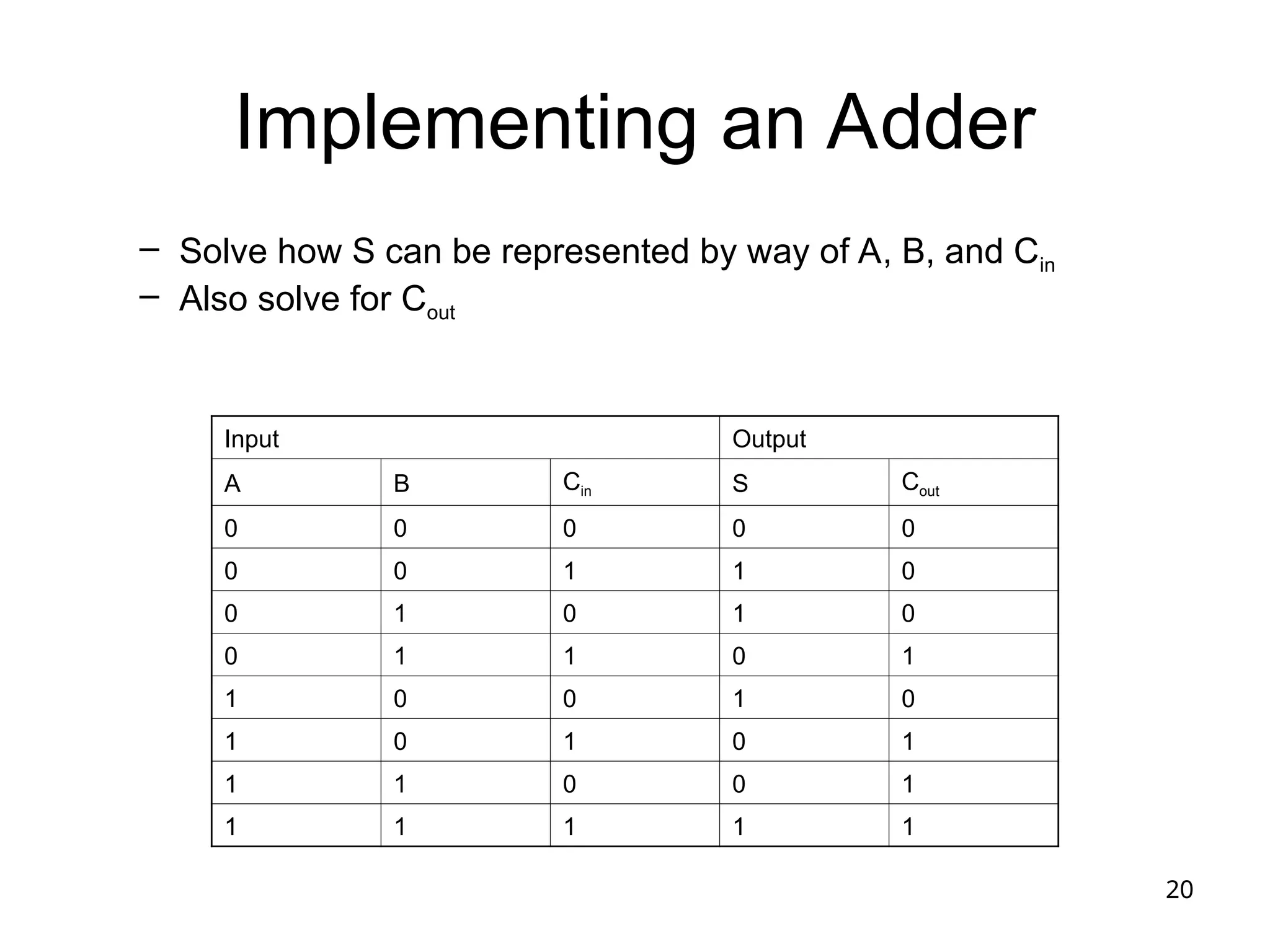
Implementing an Adder
– Solve how S can be represented by way of A, B, and Cin
– Also solve for Cout
Input Output
A B Cin S Cout
0 0 0 0 0
0 0 1 1 0
0 1 0 1 0
0 1 1 0 1
1 0 0 1 0
1 0 1 0 1
1 1 0 0 1
1 1 1 1 1
21
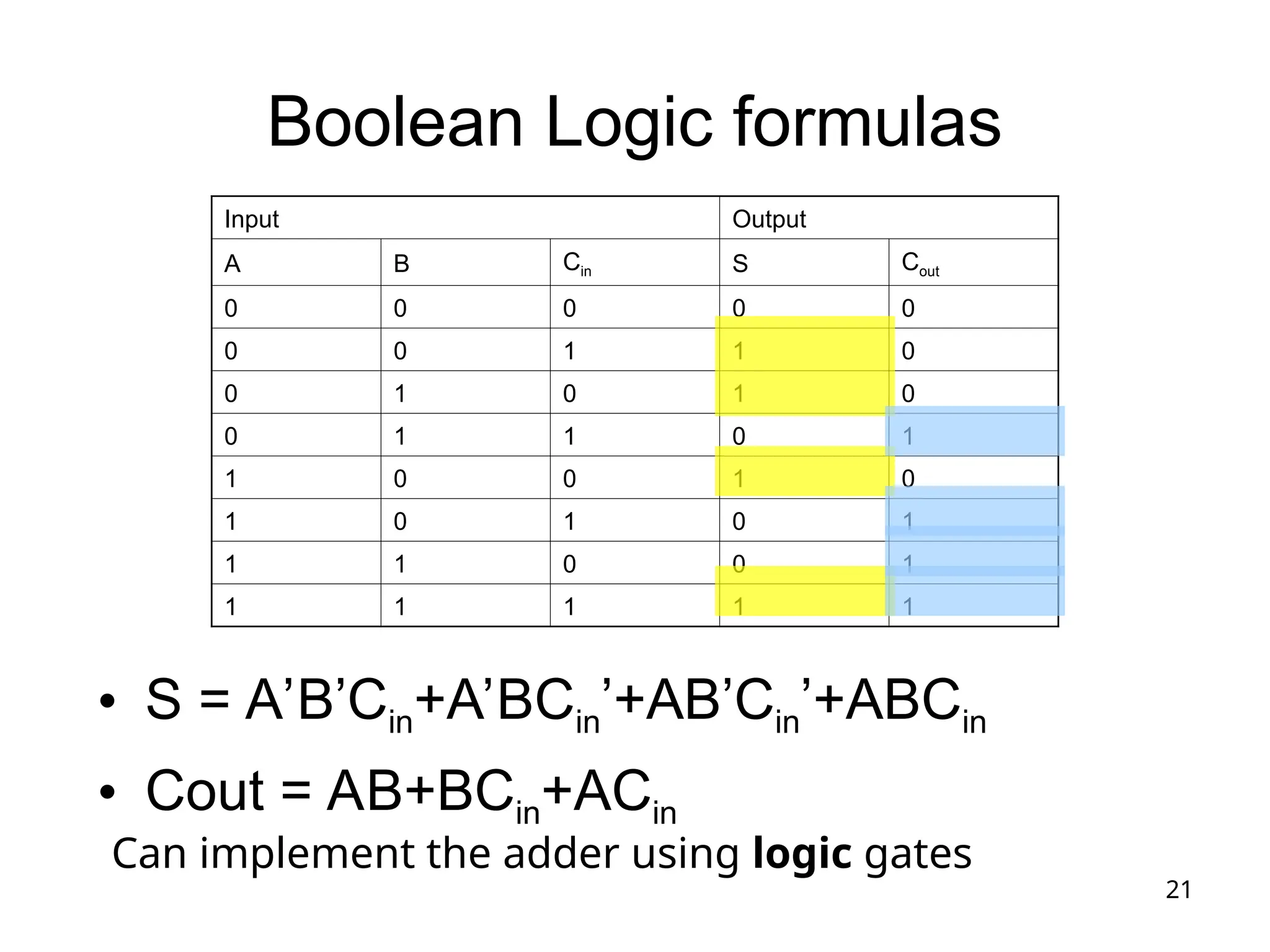
Boolean Logic formulas
• S = A’B’Cin+A’BCin’+AB’Cin’+ABCin
• Cout = AB+BCin+ACin
Input Output
A B Cin S Cout
0 0 0 0 0
0 0 1 1 0
0 1 0 1 0
0 1 1 0 1
1 0 0 1 0
1 0 1 0 1
1 1 0 0 1
1 1 1 1 1
Can implement the adder using logic gates
22
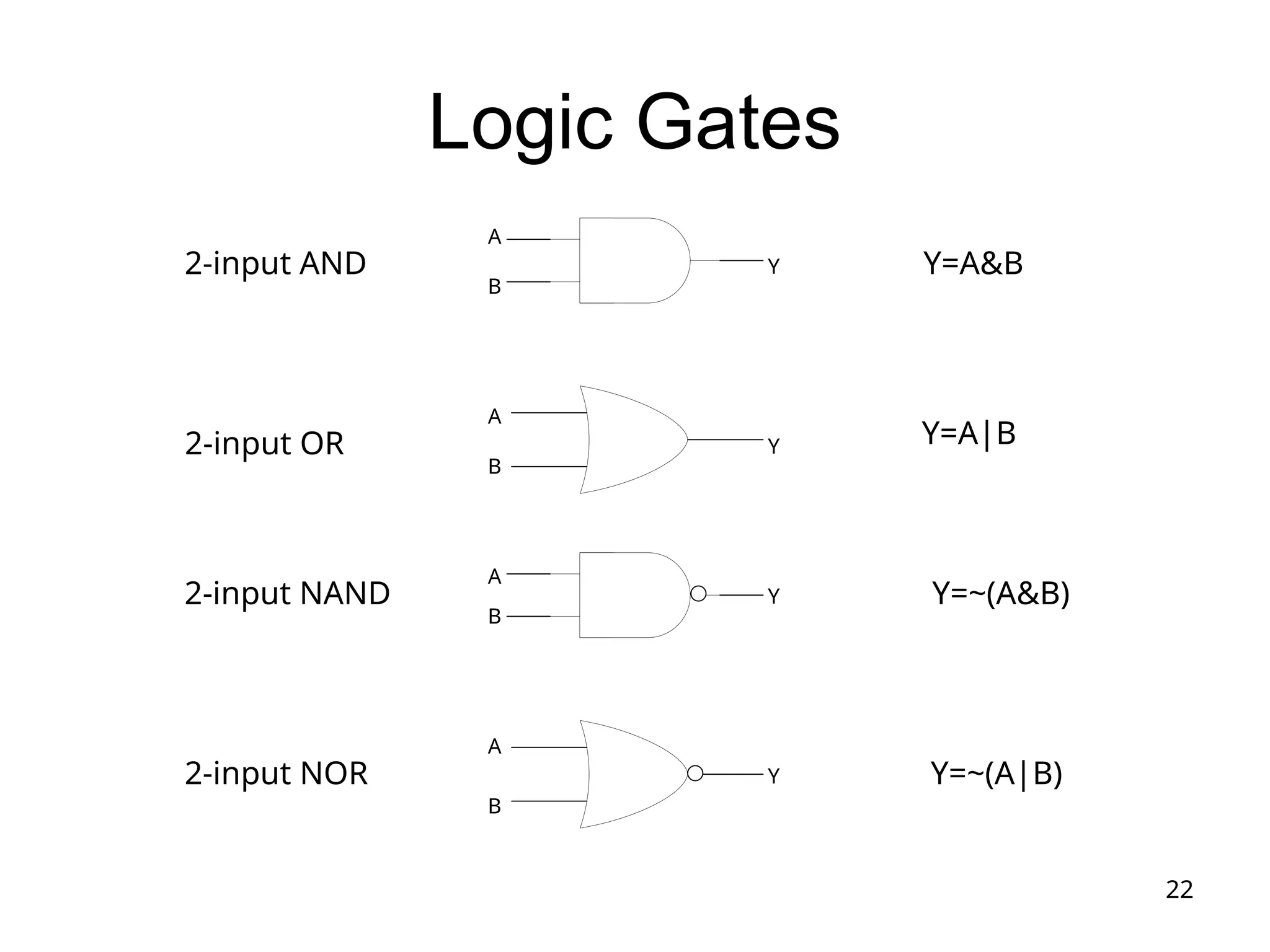
Logic Gates
Y=A&B
Y=A|B
Y=~(A&B)
Y=~(A|B)
2-input AND
2-input OR
2-input NAND
2-input NOR
A
B
A
A
A
B
B
B
Y
Y
Y
Y
23
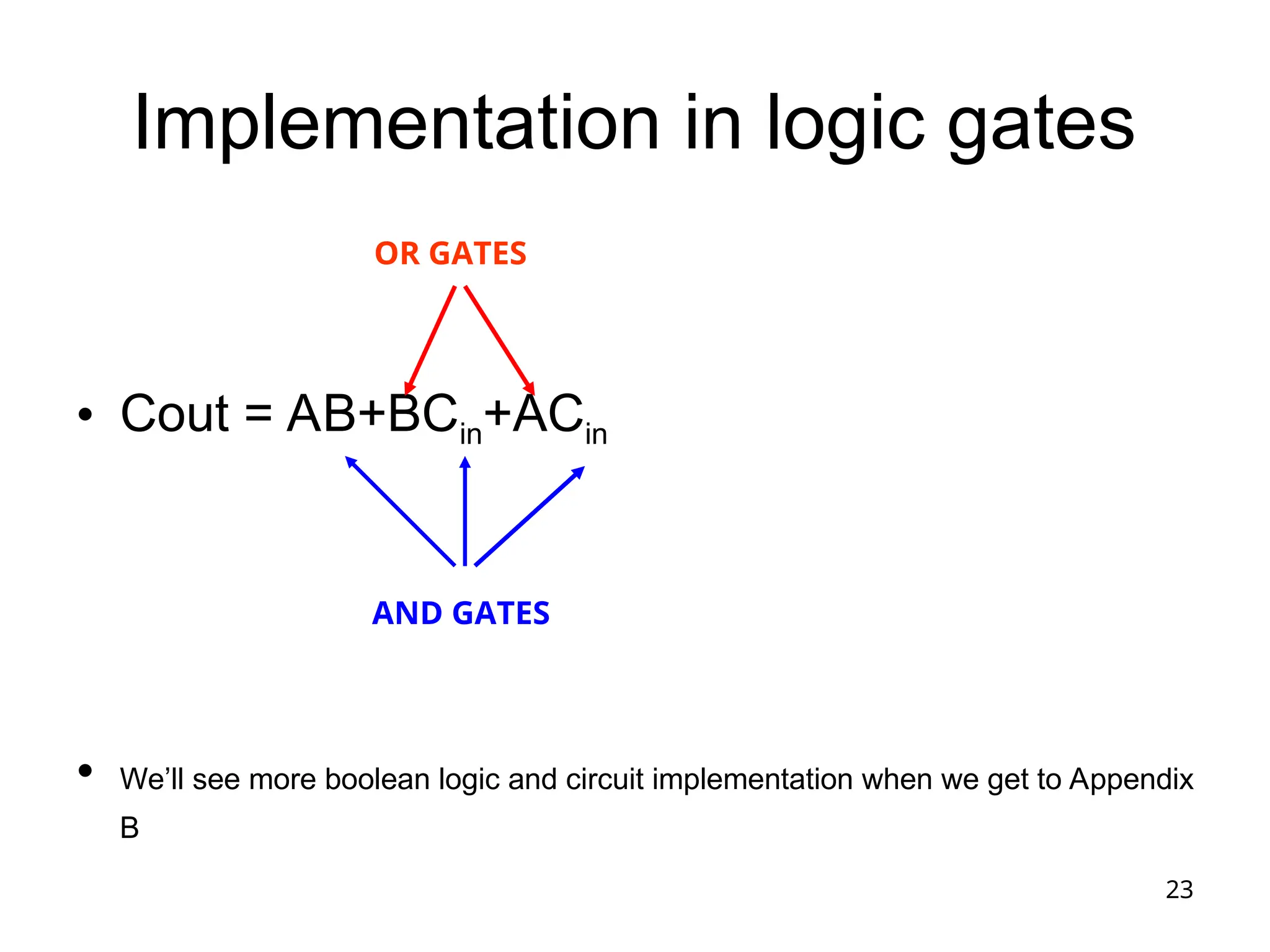
Implementation in logic gates
• Cout = AB+BCin+ACin
• We’ll see more boolean logic and circuit implementation when we get to Appendix
B
AND GATES
OR GATES
24
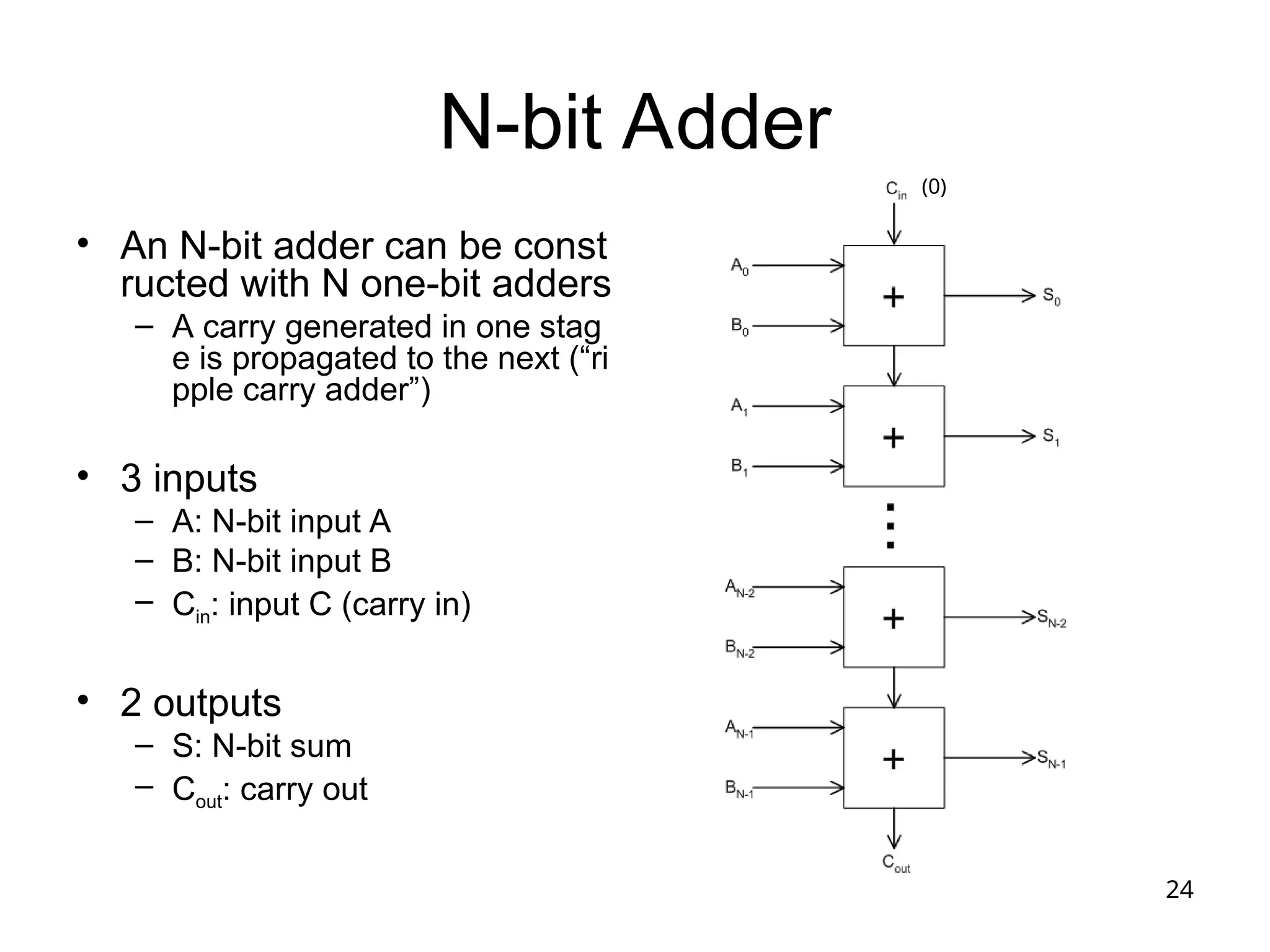
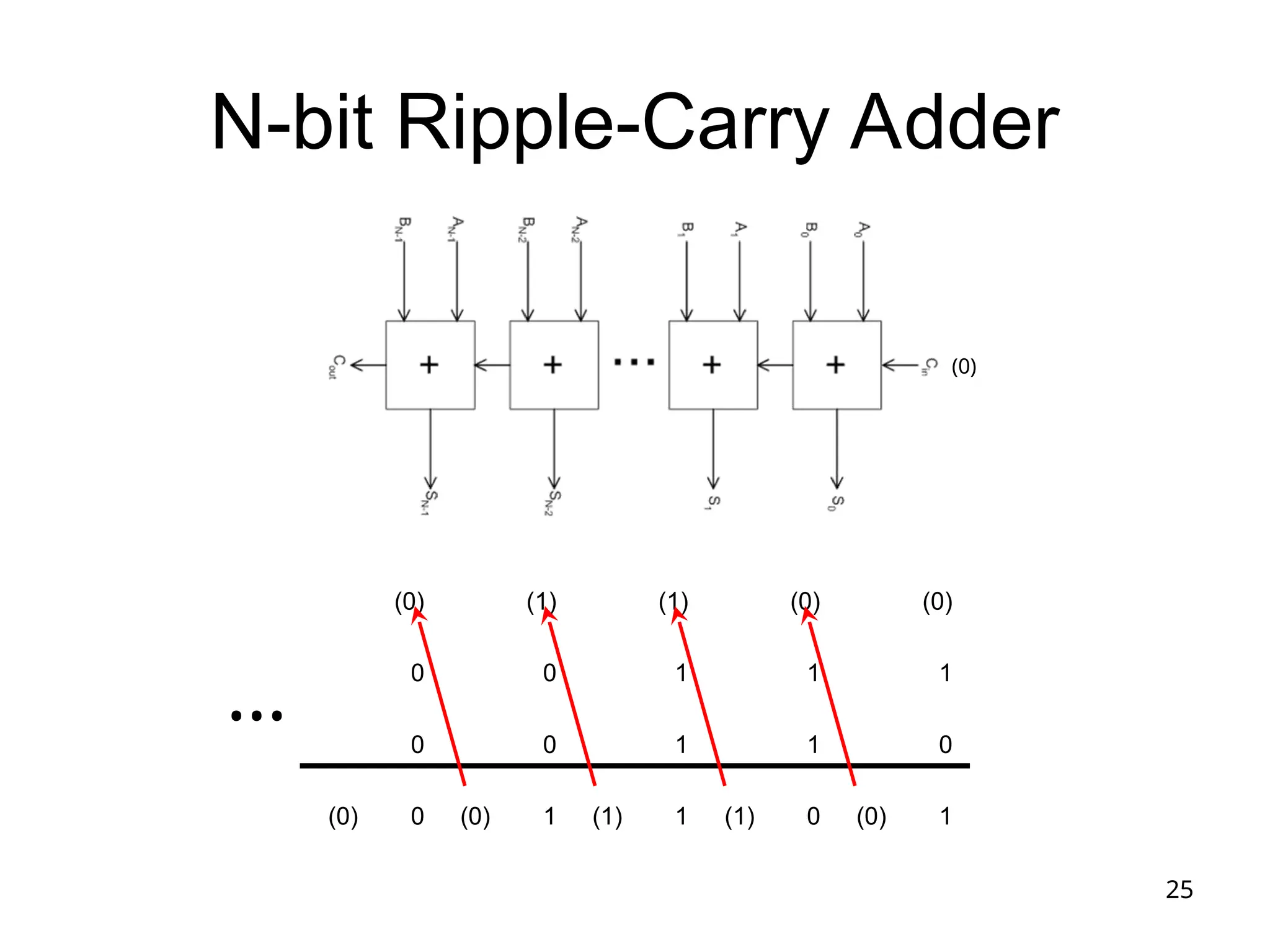
N-bit Adder
• An N-bit adder can be const
ructed with N one-bit adders
– A carry generated in one stag
e is propagated to the next (“ri
pple carry adder”)
• 3 inputs
– A: N-bit input A
– B: N-bit input B
– Cin: input C (carry in)
• 2 outputs
– S: N-bit sum
– Cout: carry out
(0)
25
N-bit Ripple-Carry Adder
(0) (1) (1) (0) (0)
0 0 1 1 1
0 0 1 1 0
(0) 0 (0) 1 (1) 1 (1) 0 (0) 1
…
(0)
26
Multiplication
• More complicated operation, so more
complicated circuits
• Outline
– Human longhand, to remind ourselves of the
steps involved
– Multiplication hardware
• Text has 3 versions, showing evolution to help you
better understand how the circuits work
27
Multiplication Here – see what book
says
• More complicated than addition
– A straightforward implementation will involve shifts
and adds
• More complex operation can lead to
– More area (on silicon) and/or
– More time (multiple cycles or longer clock cycle
time)
• Let’s begin from a simple, straightforward
method
28
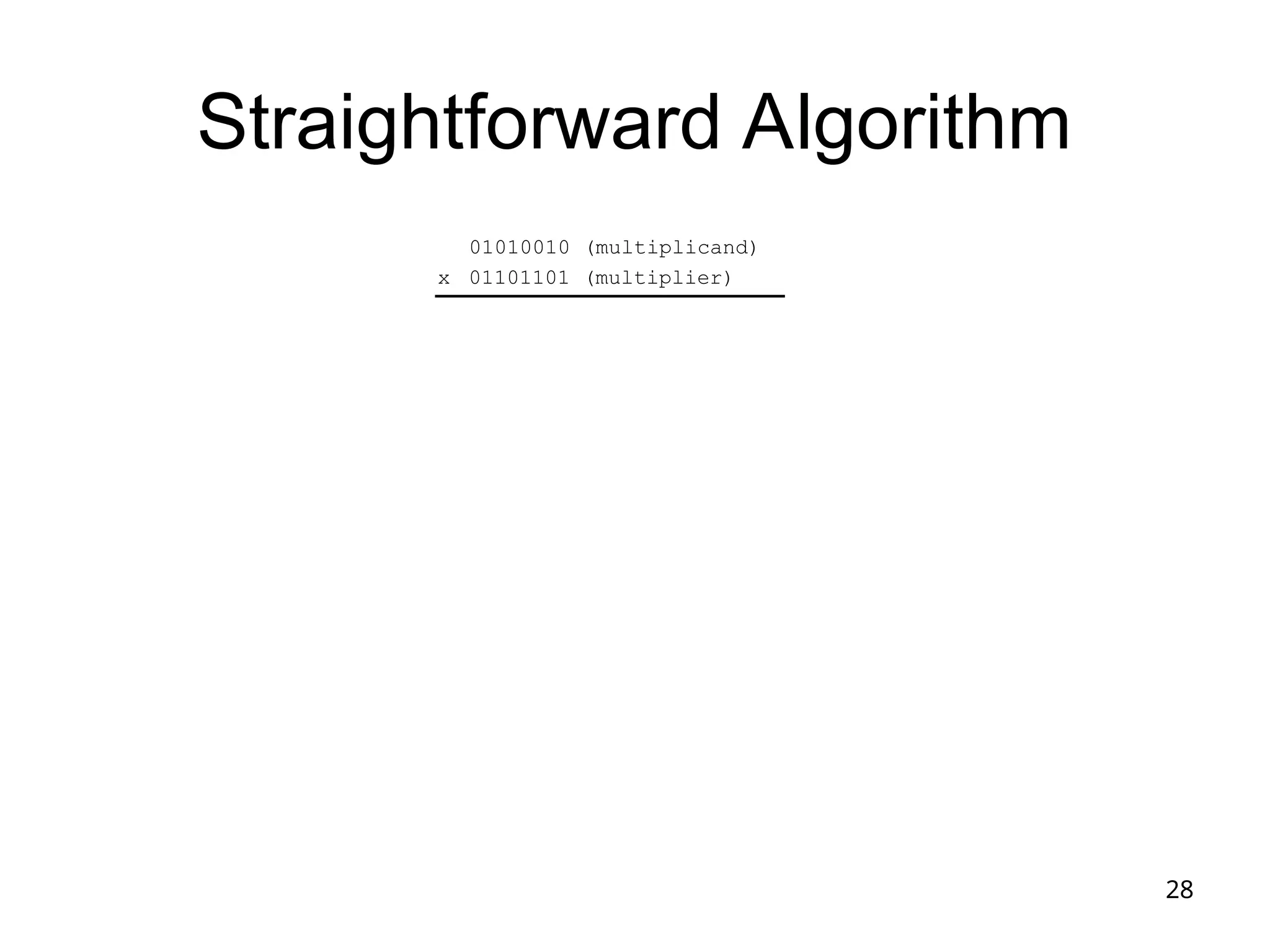
Straightforward Algorithm
01010010 (multiplicand)
01101101 (multiplier)
x
29
Implementation 1
30
Implementation 2
31
Implementation 3
32
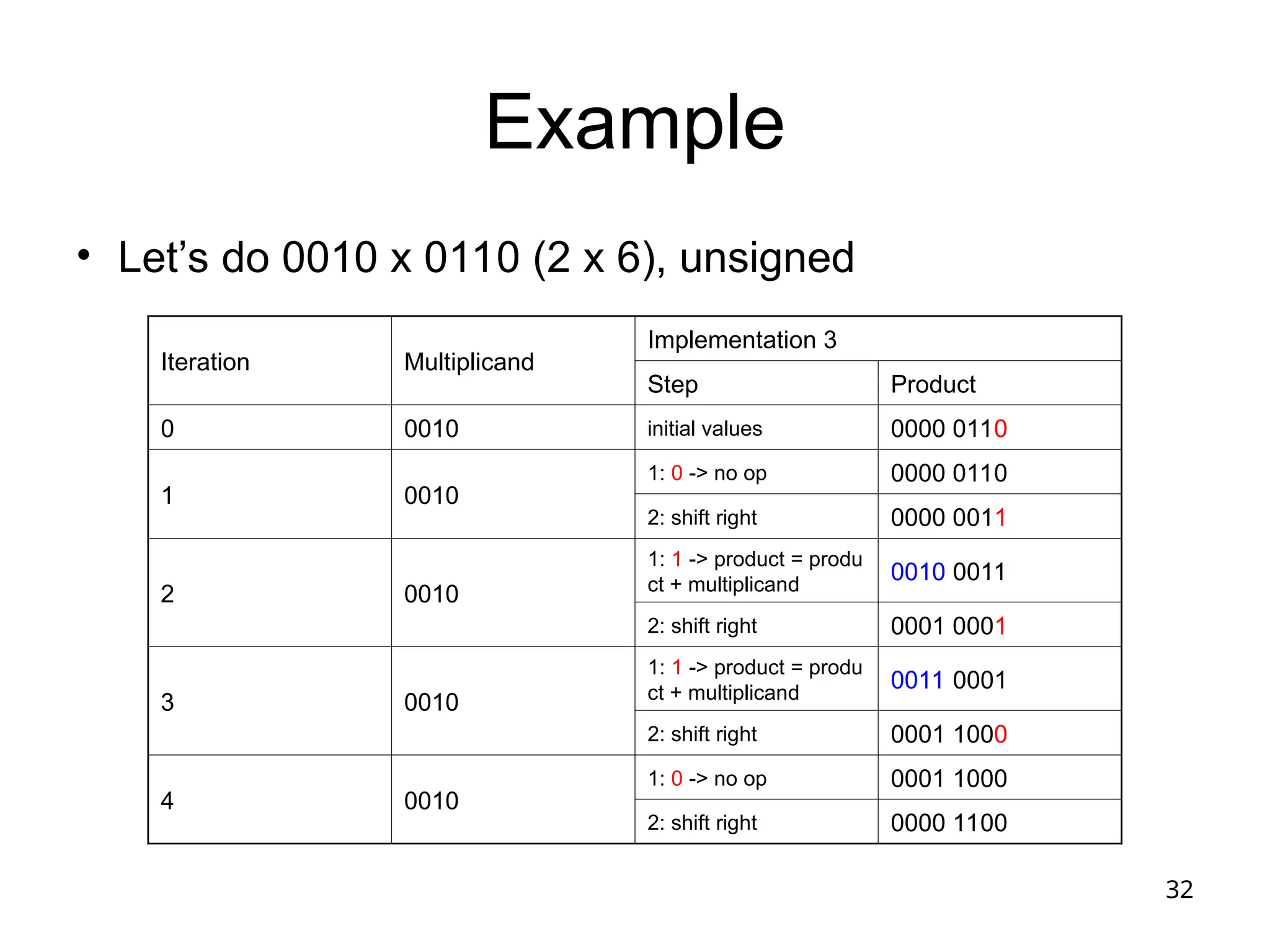
Example
• Let’s do 0010 x 0110 (2 x 6), unsigned
Iteration Multiplicand
Implementation 3
Step Product
0 0010 initial values 0000 0110
1 0010
1: 0 -> no op 0000 0110
2: shift right 0000 0011
2 0010
1: 1 -> product = produ
ct + multiplicand
0010 0011
2: shift right 0001 0001
3 0010
1: 1 -> product = produ
ct + multiplicand
0011 0001
2: shift right 0001 1000
4 0010
1: 0 -> no op 0001 1000
2: shift right 0000 1100
33
Binary Division
• Dividend = Divider  Quotient + Remainder
• Even more complicated
– Still, it can be implemented by way of shifts and
addition/subtraction
– We will study a method based on the paper-and-
pencil method
– We confine our discussions to unsigned numbers only
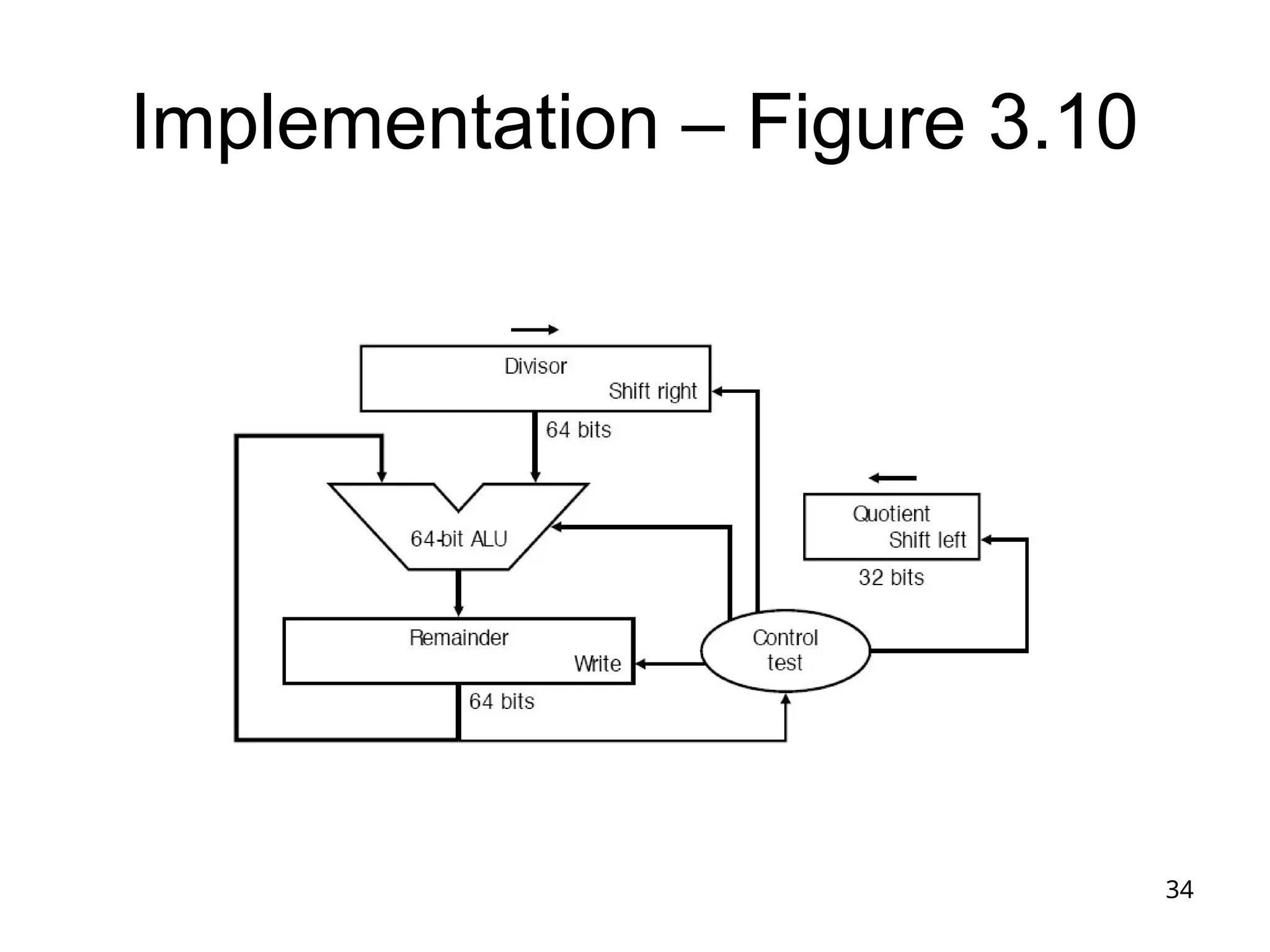
34
Implementation – Figure 3.10
35
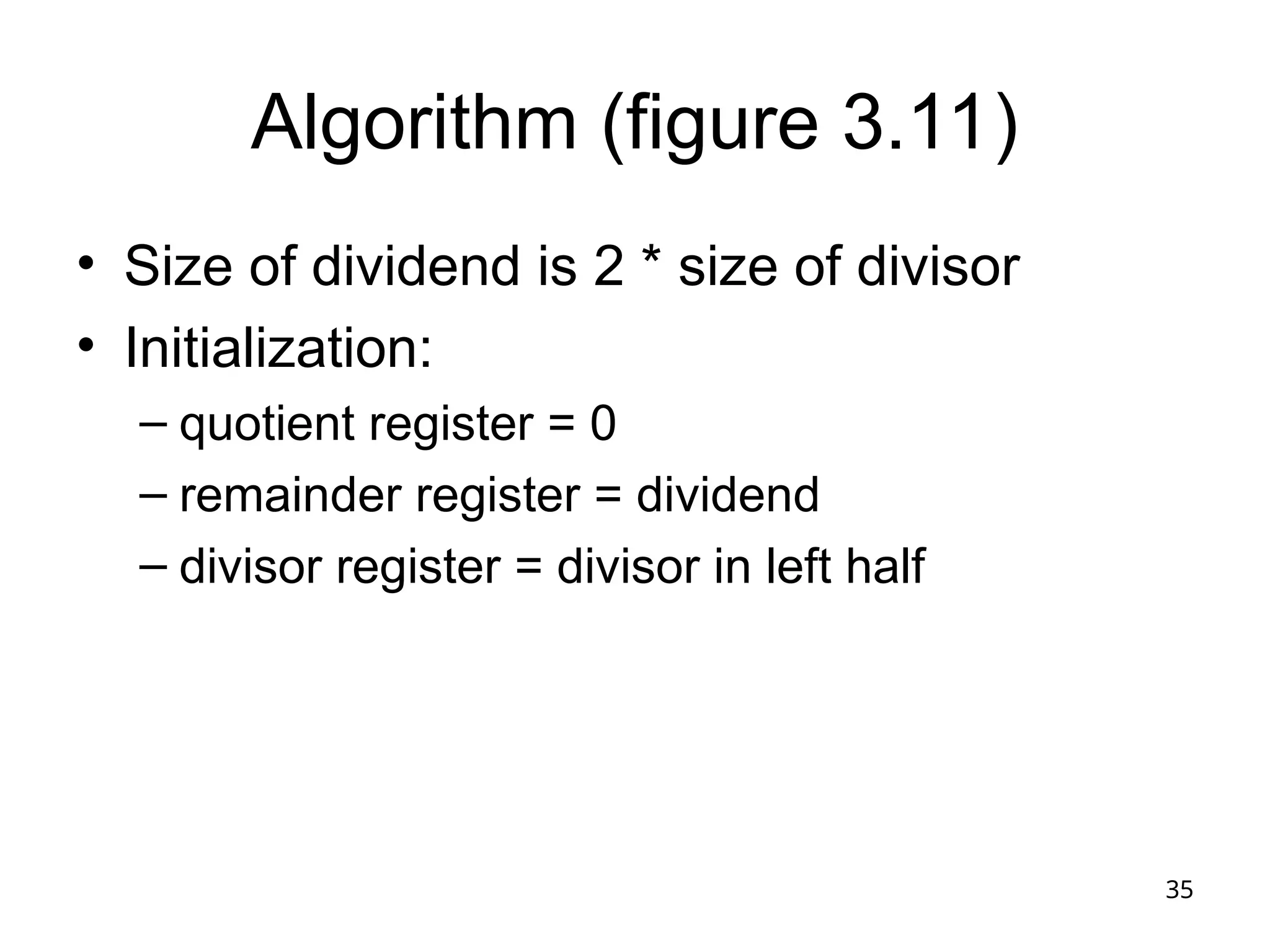
Algorithm (figure 3.11)
• Size of dividend is 2 * size of divisor
• Initialization:
– quotient register = 0
– remainder register = dividend
– divisor register = divisor in left half
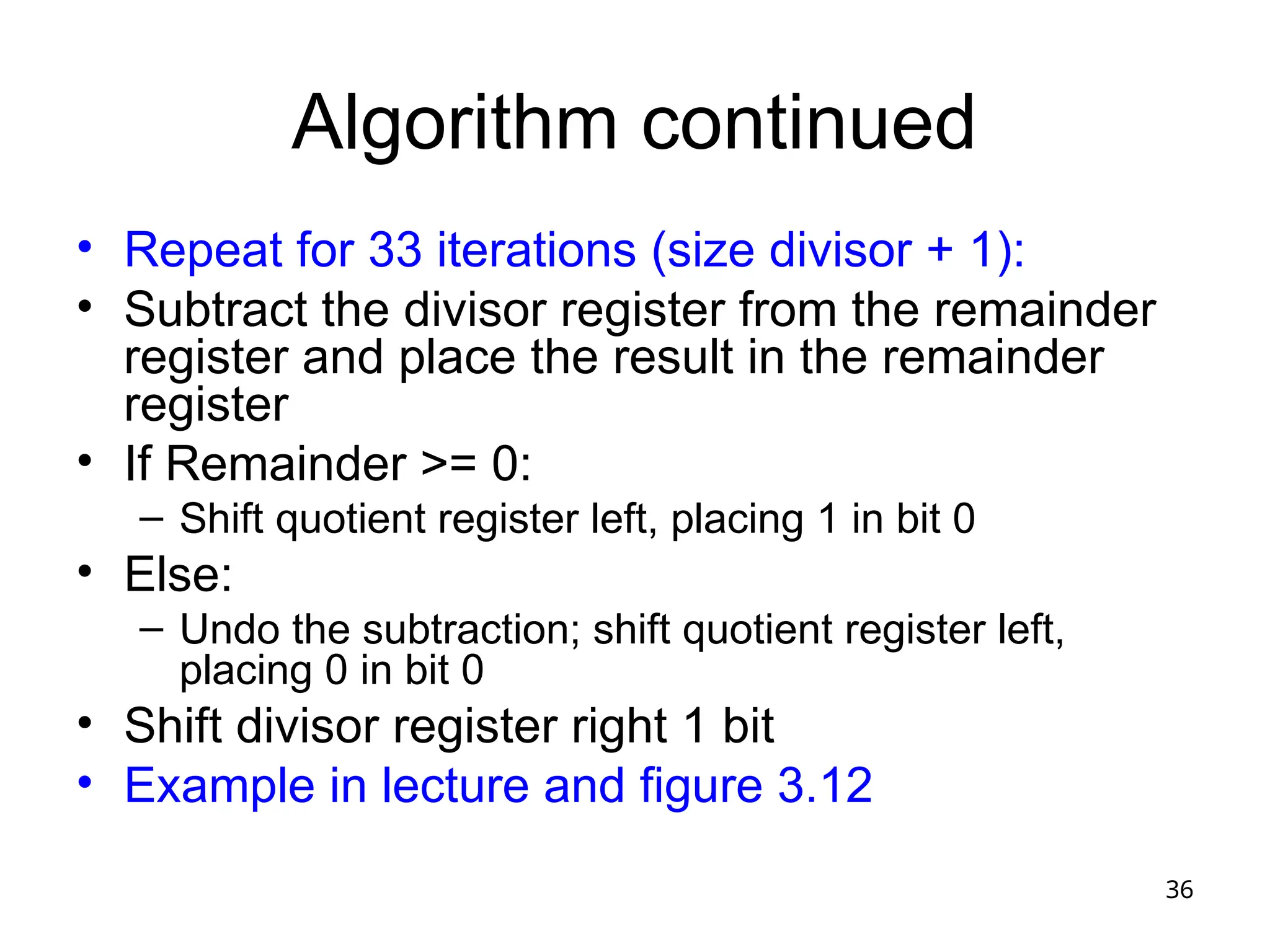
36
Algorithm continued
• Repeat for 33 iterations (size divisor + 1):
• Subtract the divisor register from the remainder
register and place the result in the remainder
register
• If Remainder >= 0:
– Shift quotient register left, placing 1 in bit 0
• Else:
– Undo the subtraction; shift quotient register left,
placing 0 in bit 0
• Shift divisor register right 1 bit
• Example in lecture and figure 3.12
37
Floating-Point (FP) Numbers
• Computers need to deal with real numbers
– Fraction (e.g., 3.1416)
– Very small number (e.g., 0.000001)
– Very large number (e.g., 2.75961011
)
• Components: sign, exponent, mantissa
– (-1)sign
mantissa2exponent
– More bits for mantissa gives more accuracy
– More bits for exponent gives wider range
• A case for FP representation standard
– Portability issues
– Improved implementations
 IEEE754 standard
38
Binary Fractions for Humans
• Lecture: binary fractions and their decimal
equivalents
• Lecture: translating decimal fractions into
binary
• Lecture: idea of normalized representation
• Then we’ll go on with IEEE standard
floating point representation
39
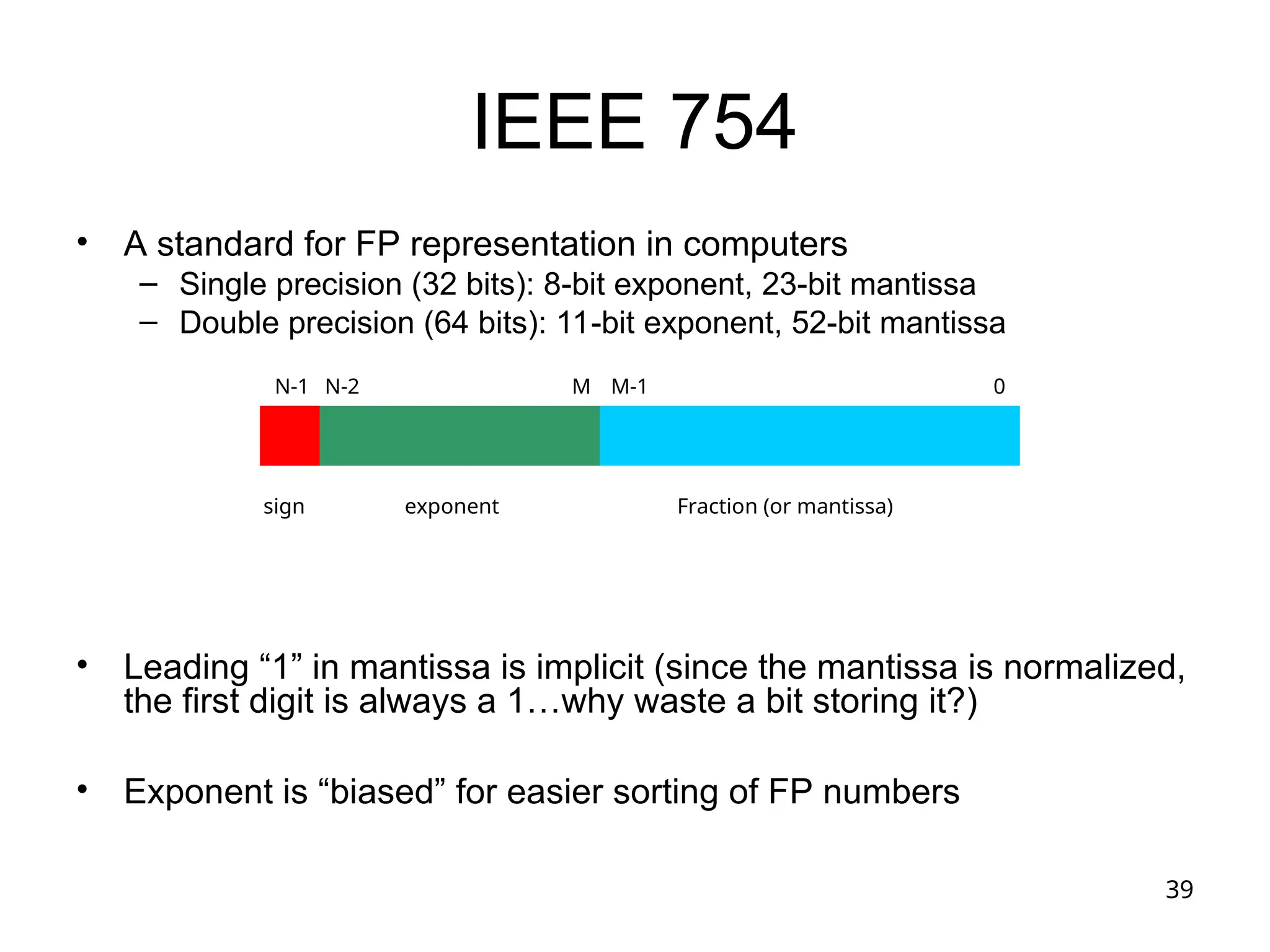
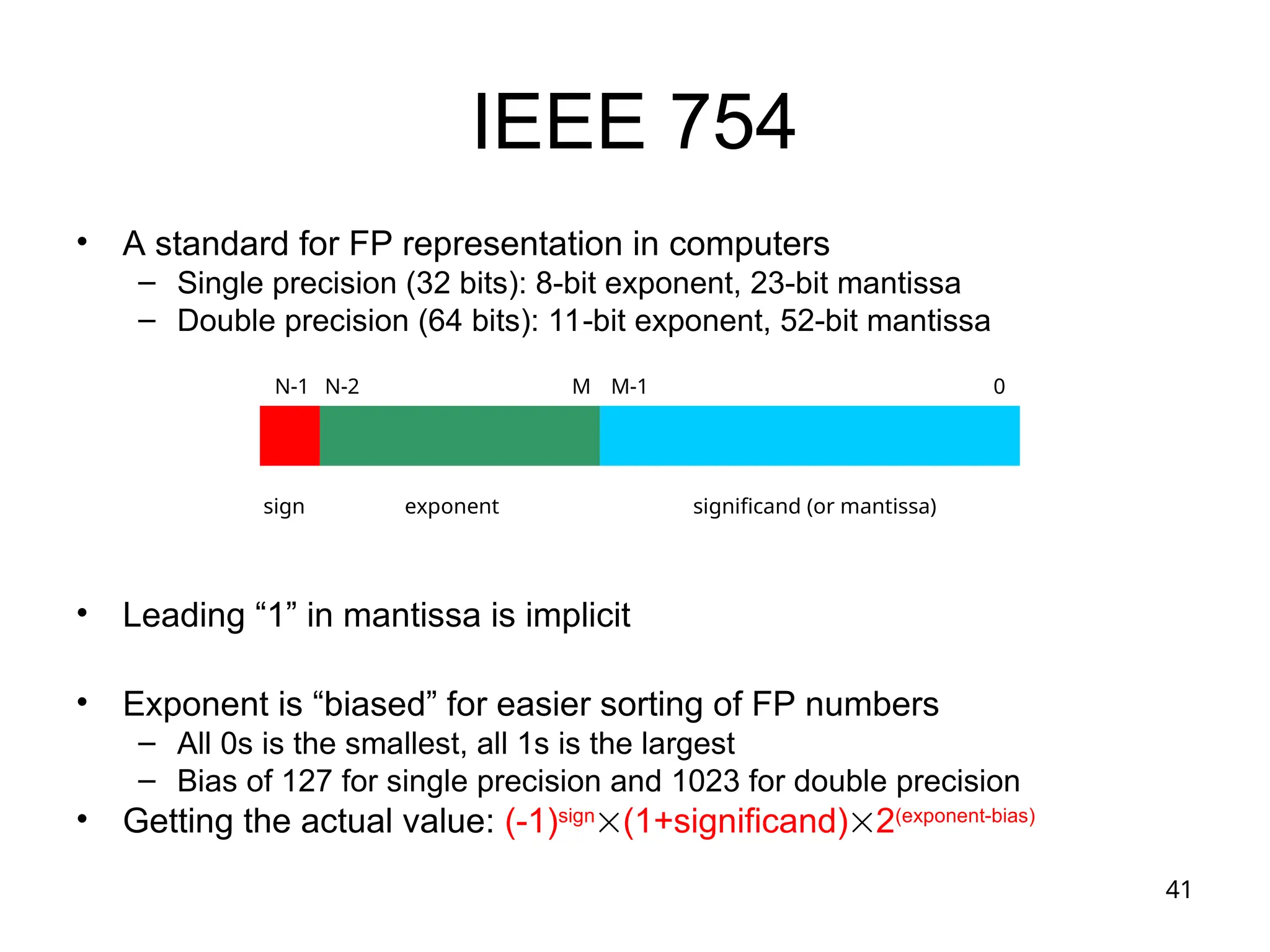
IEEE 754
• A standard for FP representation in computers
– Single precision (32 bits): 8-bit exponent, 23-bit mantissa
– Double precision (64 bits): 11-bit exponent, 52-bit mantissa
• Leading “1” in mantissa is implicit (since the mantissa is normalized,
the first digit is always a 1…why waste a bit storing it?)
• Exponent is “biased” for easier sorting of FP numbers
sign exponent Fraction (or mantissa)
0
M-1
N-1 N-2 M
40
“Biased” Representation
• We’ve looked at different binary number representations so far
– Sign-magnitude
– 1’s complement
– 2’s complement
• Now one more representation: biased representation
– 000…000 is the smallest number
– 111…111 is the largest number
– To get the real value, subtract the “bias” from the bit pattern, interpreting
bit pattern as an unsigned number
– Representation = Value + Bias
• Bias for “exponent” field in IEEE 754
– 127 (single precision)
– 1023 (double precision)
41
IEEE 754
• A standard for FP representation in computers
– Single precision (32 bits): 8-bit exponent, 23-bit mantissa
– Double precision (64 bits): 11-bit exponent, 52-bit mantissa
• Leading “1” in mantissa is implicit
• Exponent is “biased” for easier sorting of FP numbers
– All 0s is the smallest, all 1s is the largest
– Bias of 127 for single precision and 1023 for double precision
• Getting the actual value: (-1)sign
(1+significand)2(exponent-bias)
sign exponent significand (or mantissa)
0
M-1
N-1 N-2 M
42
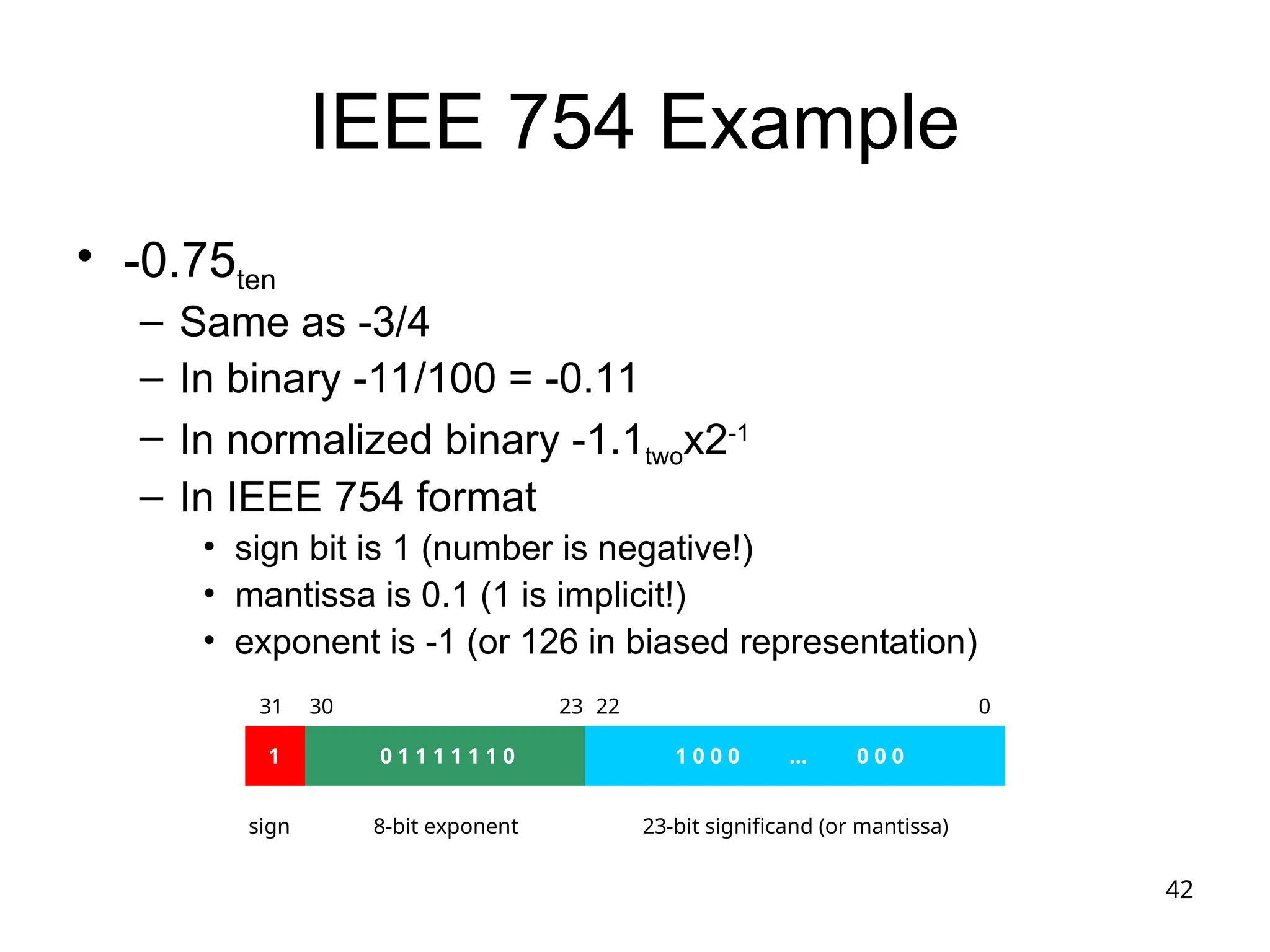
IEEE 754 Example
• -0.75ten
– Same as -3/4
– In binary -11/100 = -0.11
– In normalized binary -1.1twox2-1
– In IEEE 754 format
• sign bit is 1 (number is negative!)
• mantissa is 0.1 (1 is implicit!)
• exponent is -1 (or 126 in biased representation)
sign 8-bit exponent 23-bit significand (or mantissa)
0
22
31 30 23
1 0 1 1 1 1 1 1 0 1 0 0 0 … 0 0 0
43
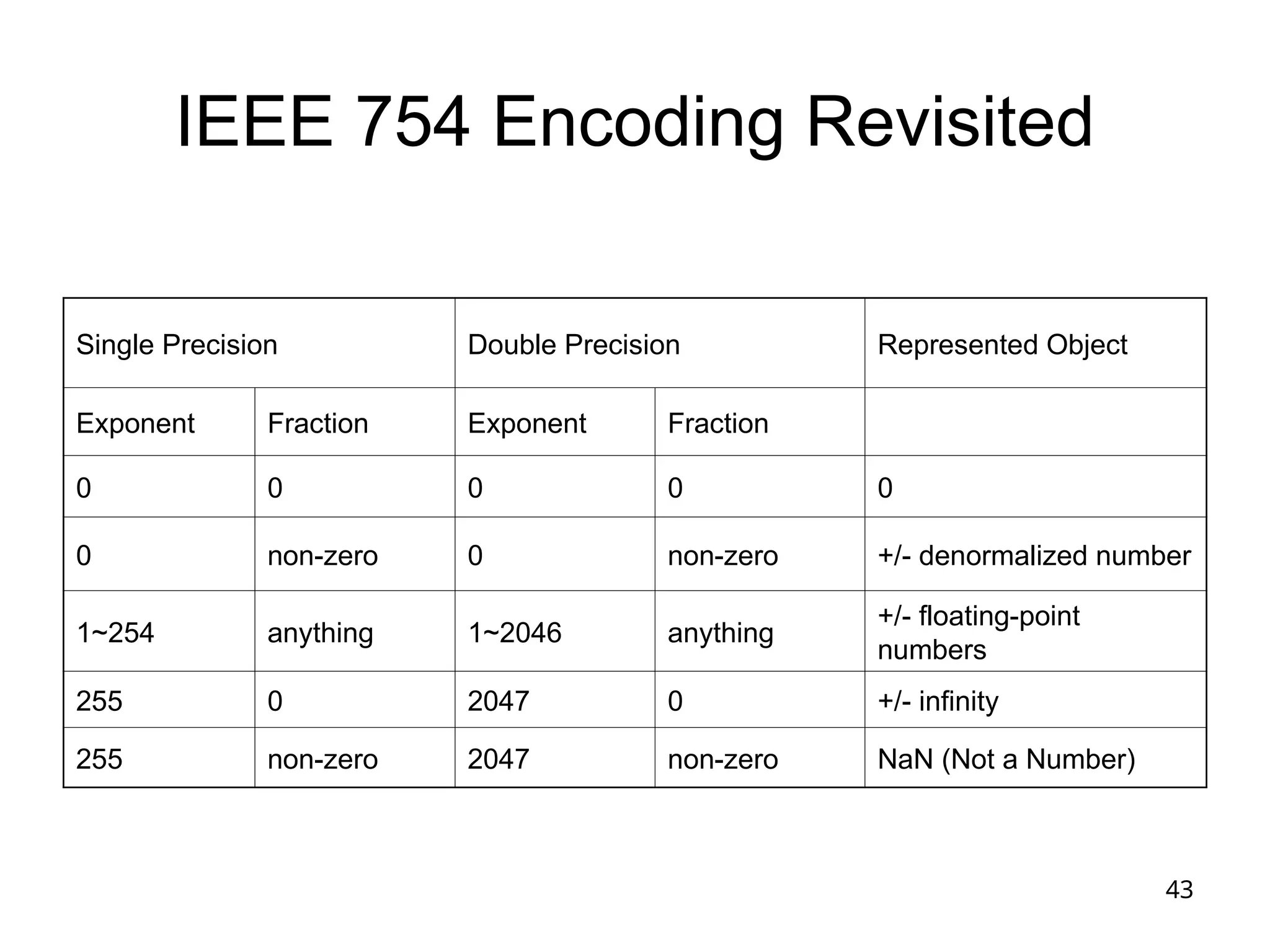
IEEE 754 Encoding Revisited
Single Precision Double Precision Represented Object
Exponent Fraction Exponent Fraction
0 0 0 0 0
0 non-zero 0 non-zero +/- denormalized number
1~254 anything 1~2046 anything
+/- floating-point
numbers
255 0 2047 0 +/- infinity
255 non-zero 2047 non-zero NaN (Not a Number)
44
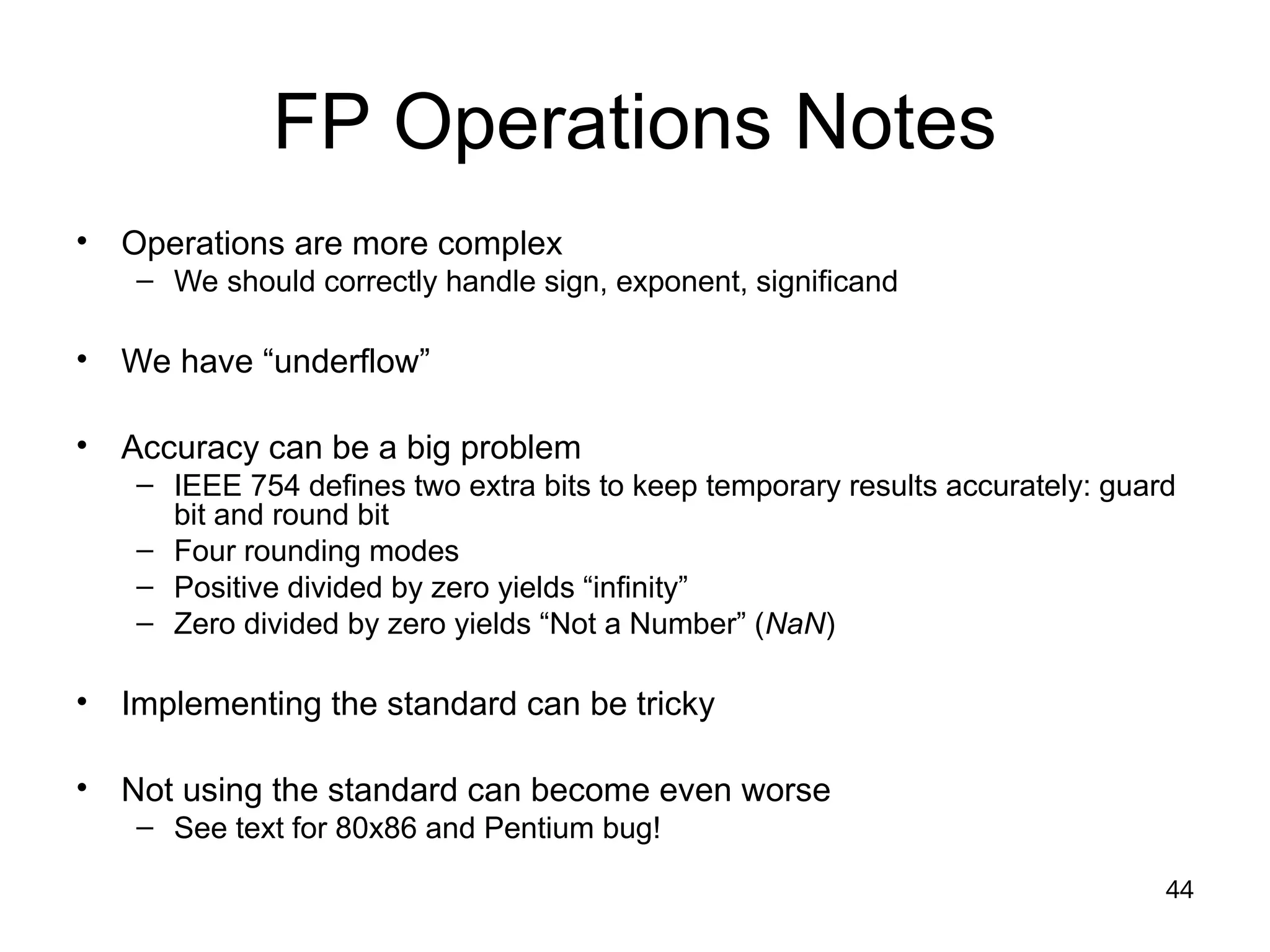
FP Operations Notes
• Operations are more complex
– We should correctly handle sign, exponent, significand
• We have “underflow”
• Accuracy can be a big problem
– IEEE 754 defines two extra bits to keep temporary results accurately: guard
bit and round bit
– Four rounding modes
– Positive divided by zero yields “infinity”
– Zero divided by zero yields “Not a Number” (NaN)
• Implementing the standard can be tricky
• Not using the standard can become even worse
– See text for 80x86 and Pentium bug!
45
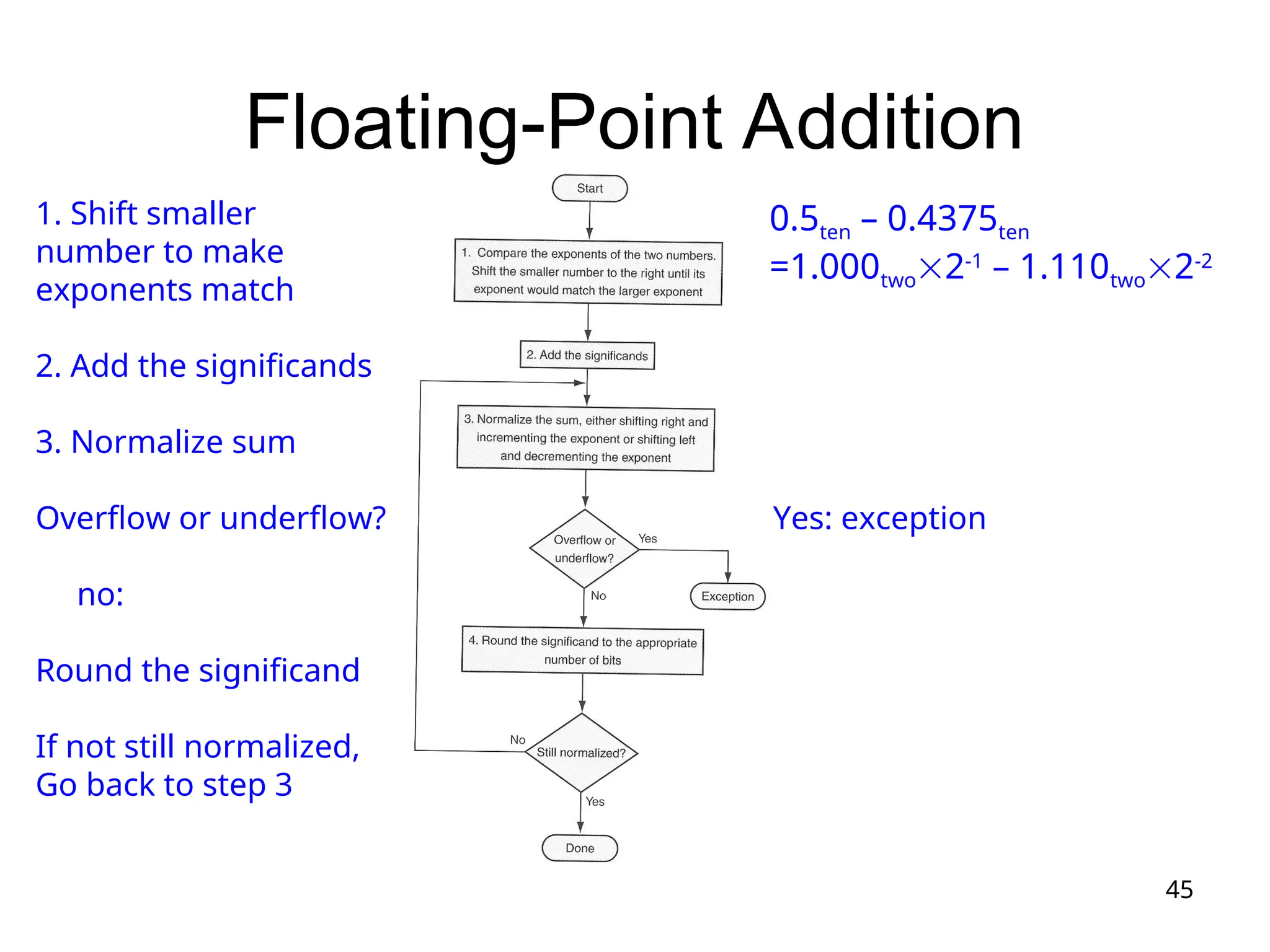
Floating-Point Addition
0.5ten – 0.4375ten
=1.000two2-1
– 1.110two2-2
1. Shift smaller
number to make
exponents match
2. Add the significands
3. Normalize sum
Overflow or underflow? Yes: exception
no:
Round the significand
If not still normalized,
Go back to step 3
46
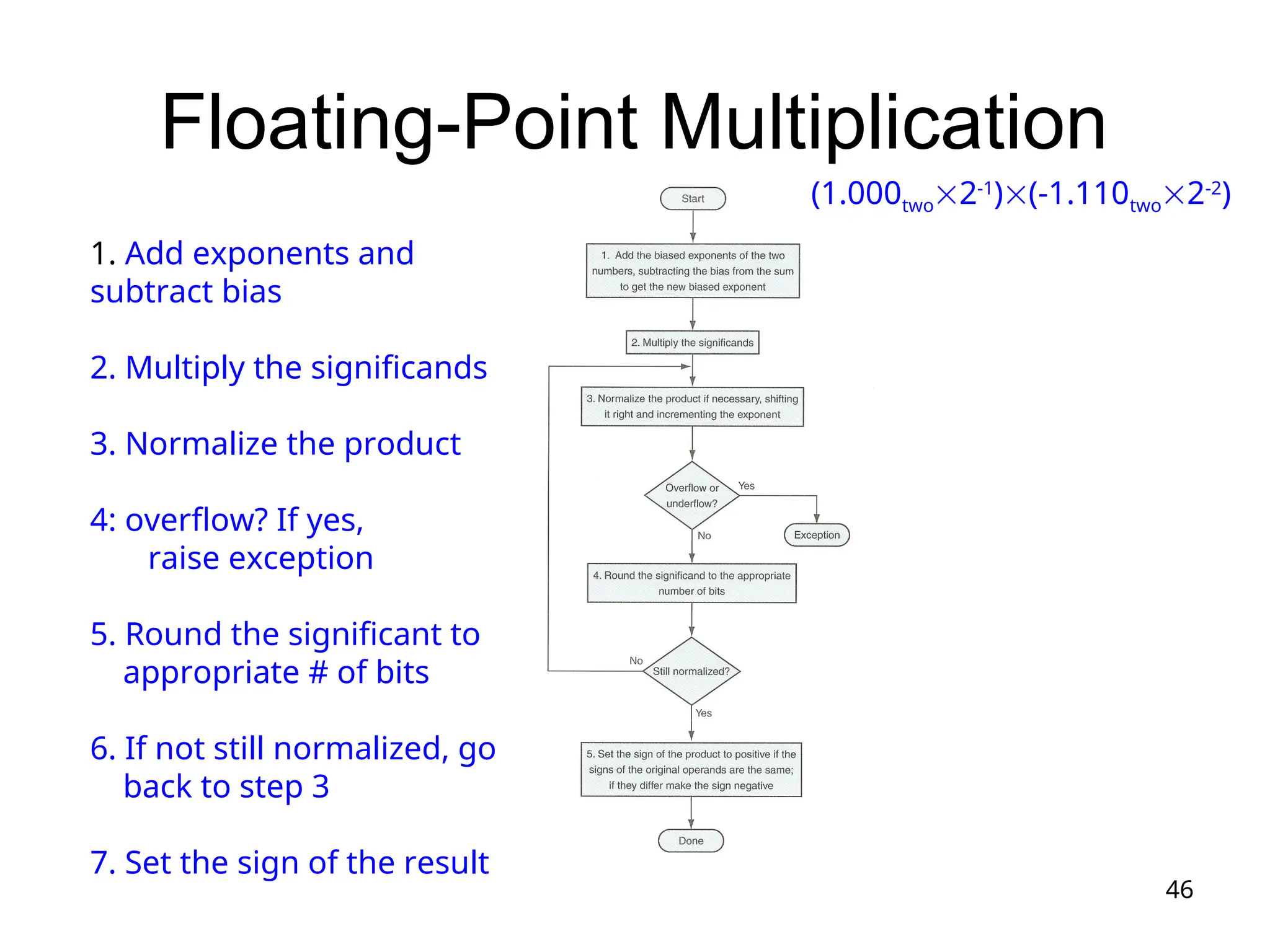
Floating-Point Multiplication
(1.000two2-1
)(-1.110two2-2
)
1. Add exponents and
subtract bias
2. Multiply the significands
3. Normalize the product
4: overflow? If yes,
raise exception
5. Round the significant to
appropriate # of bits
6. If not still normalized, go
back to step 3
7. Set the sign of the result
47
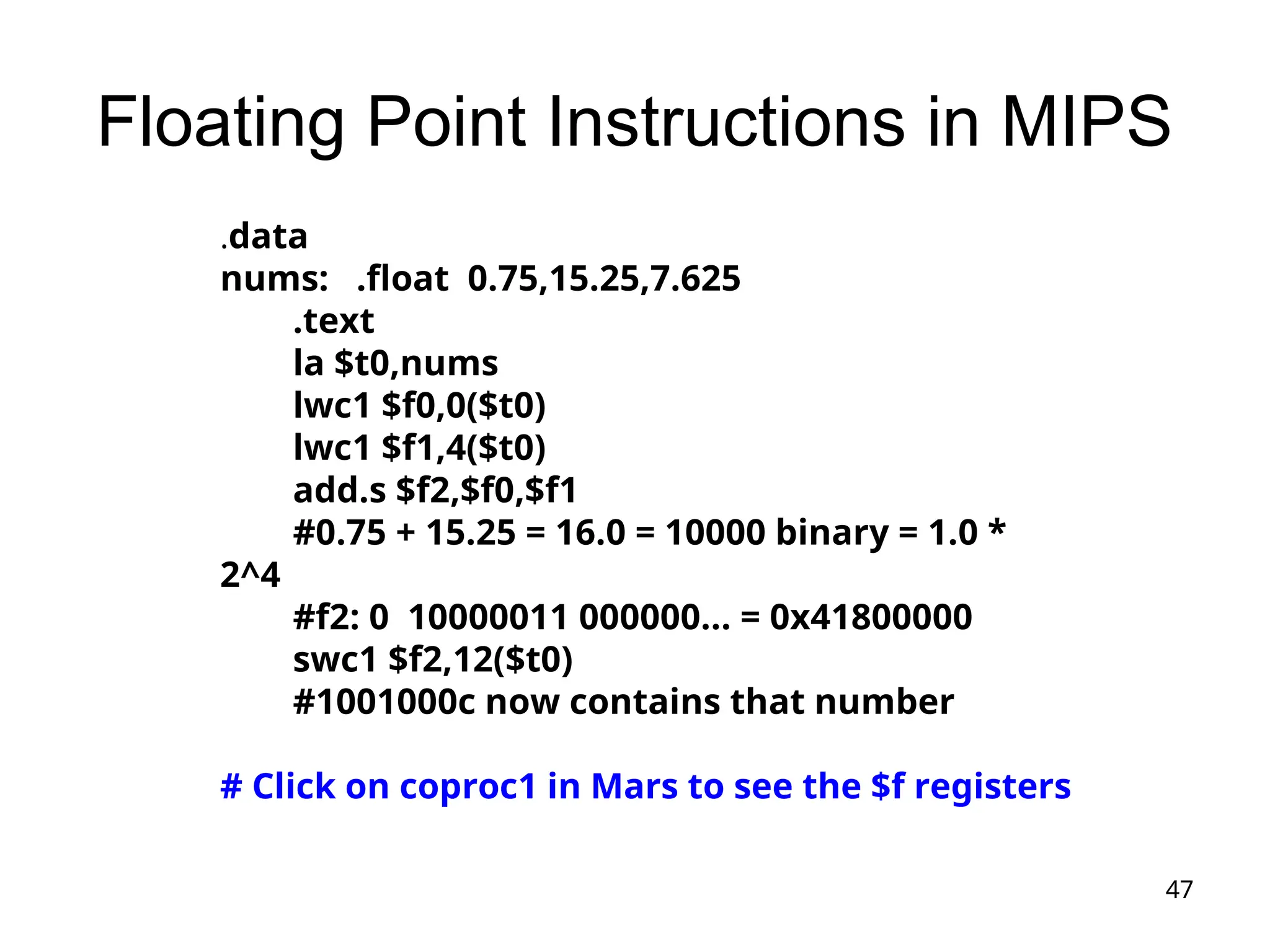
Floating Point Instructions in MIPS
.data
nums: .float 0.75,15.25,7.625
.text
la $t0,nums
lwc1 $f0,0($t0)
lwc1 $f1,4($t0)
add.s $f2,$f0,$f1
#0.75 + 15.25 = 16.0 = 10000 binary = 1.0 *
2^4
#f2: 0 10000011 000000... = 0x41800000
swc1 $f2,12($t0)
#1001000c now contains that number
# Click on coproc1 in Mars to see the $f registers
48
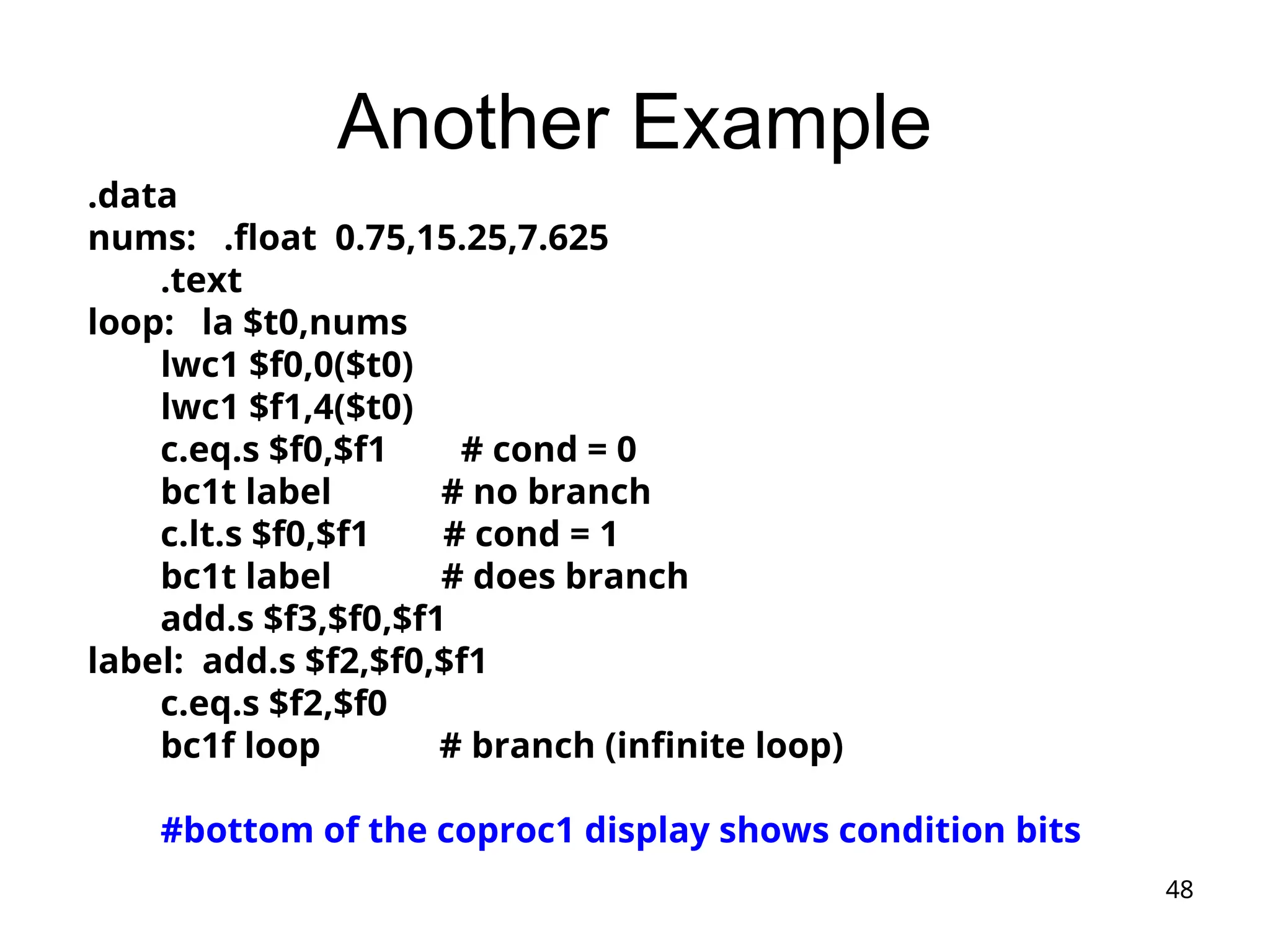
Another Example
.data
nums: .float 0.75,15.25,7.625
.text
loop: la $t0,nums
lwc1 $f0,0($t0)
lwc1 $f1,4($t0)
c.eq.s $f0,$f1 # cond = 0
bc1t label # no branch
c.lt.s $f0,$f1 # cond = 1
bc1t label # does branch
add.s $f3,$f0,$f1
label: add.s $f2,$f0,$f1
c.eq.s $f2,$f0
bc1f loop # branch (infinite loop)
#bottom of the coproc1 display shows condition bits
49
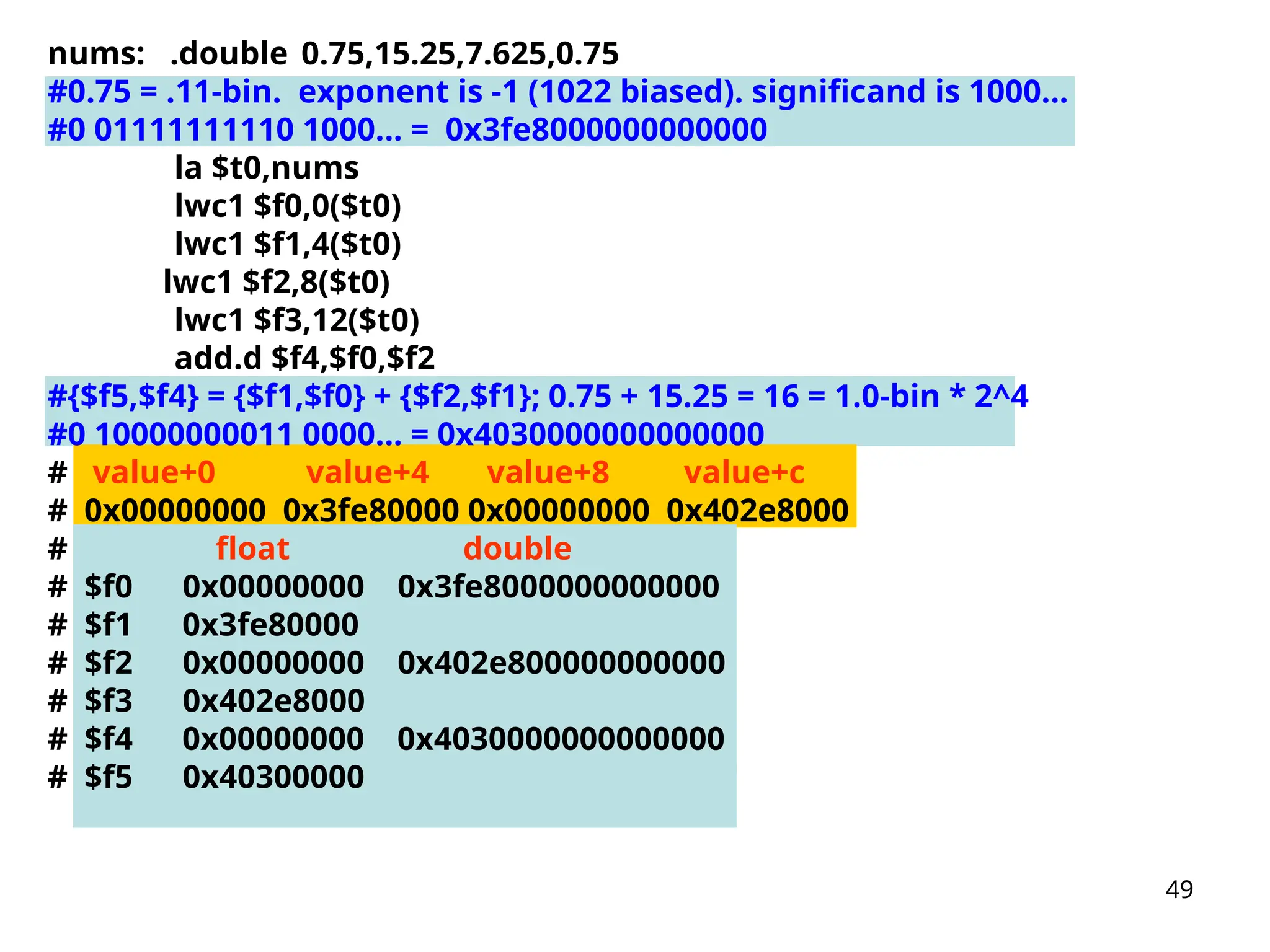
nums: .double 0.75,15.25,7.625,0.75
#0.75 = .11-bin. exponent is -1 (1022 biased). significand is 1000...
#0 01111111110 1000... = 0x3fe8000000000000
la $t0,nums
lwc1 $f0,0($t0)
lwc1 $f1,4($t0)
lwc1 $f2,8($t0)
lwc1 $f3,12($t0)
add.d $f4,$f0,$f2
#{$f5,$f4} = {$f1,$f0} + {$f2,$f1}; 0.75 + 15.25 = 16 = 1.0-bin * 2^4
#0 10000000011 0000... = 0x4030000000000000
# value+0 value+4 value+8 value+c
# 0x00000000 0x3fe80000 0x00000000 0x402e8000
# float double
# $f0 0x00000000 0x3fe8000000000000
# $f1 0x3fe80000
# $f2 0x00000000 0x402e800000000000
# $f3 0x402e8000
# $f4 0x00000000 0x4030000000000000
# $f5 0x40300000
50
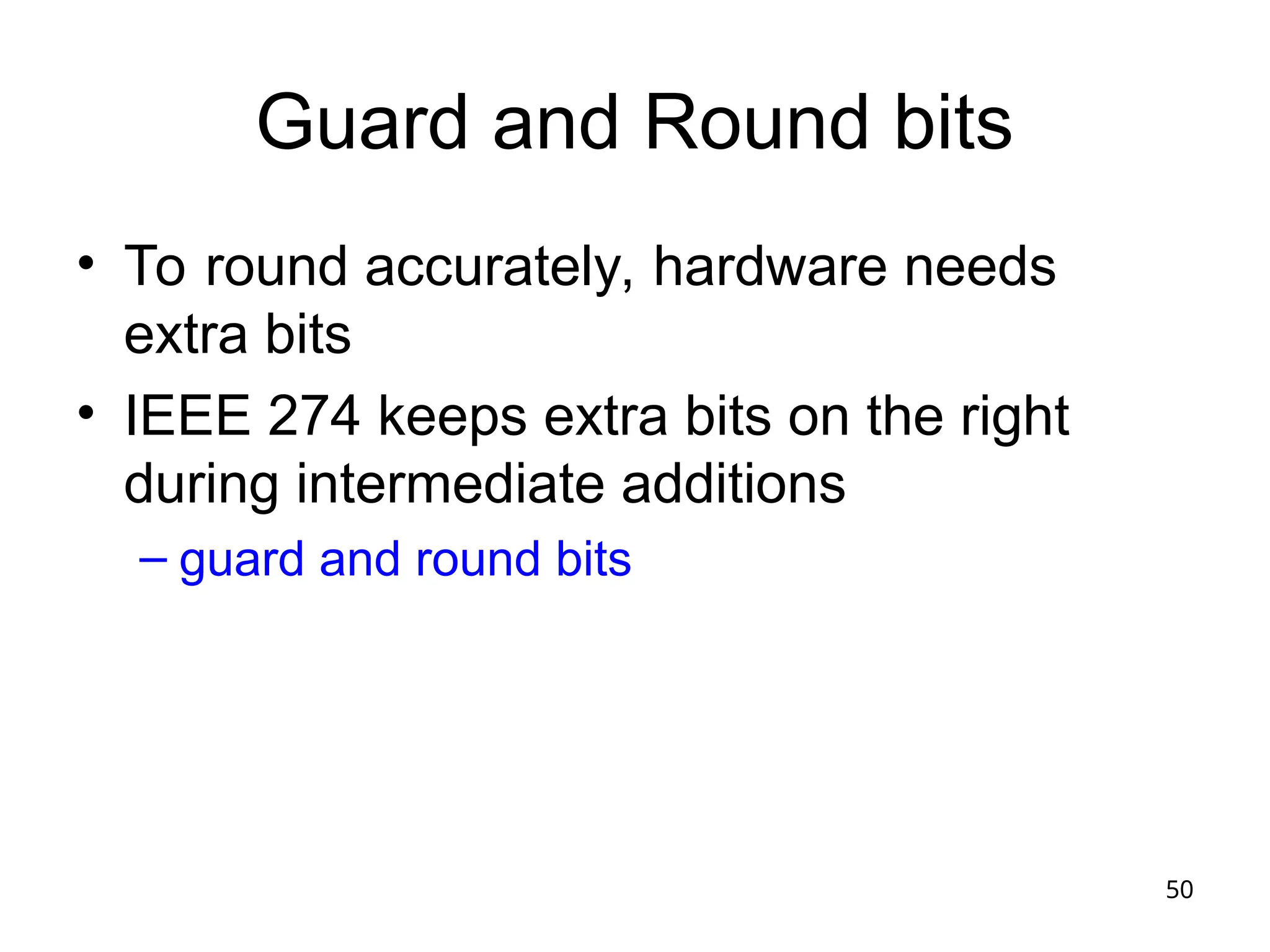
Guard and Round bits
• To round accurately, hardware needs
extra bits
• IEEE 274 keeps extra bits on the right
during intermediate additions
– guard and round bits
51
Example (in decimal)
With Guard and Round bits
• 2.56 * 10^0 + 2.34 * 10^2
• Assume 3 significant digits
• 0.0256 * 10^2 + 2.34 * 10^2
• 2.3656 [guard=5; round=6]
• Round step 1: 2.366
• Round step 2: 2.37
52
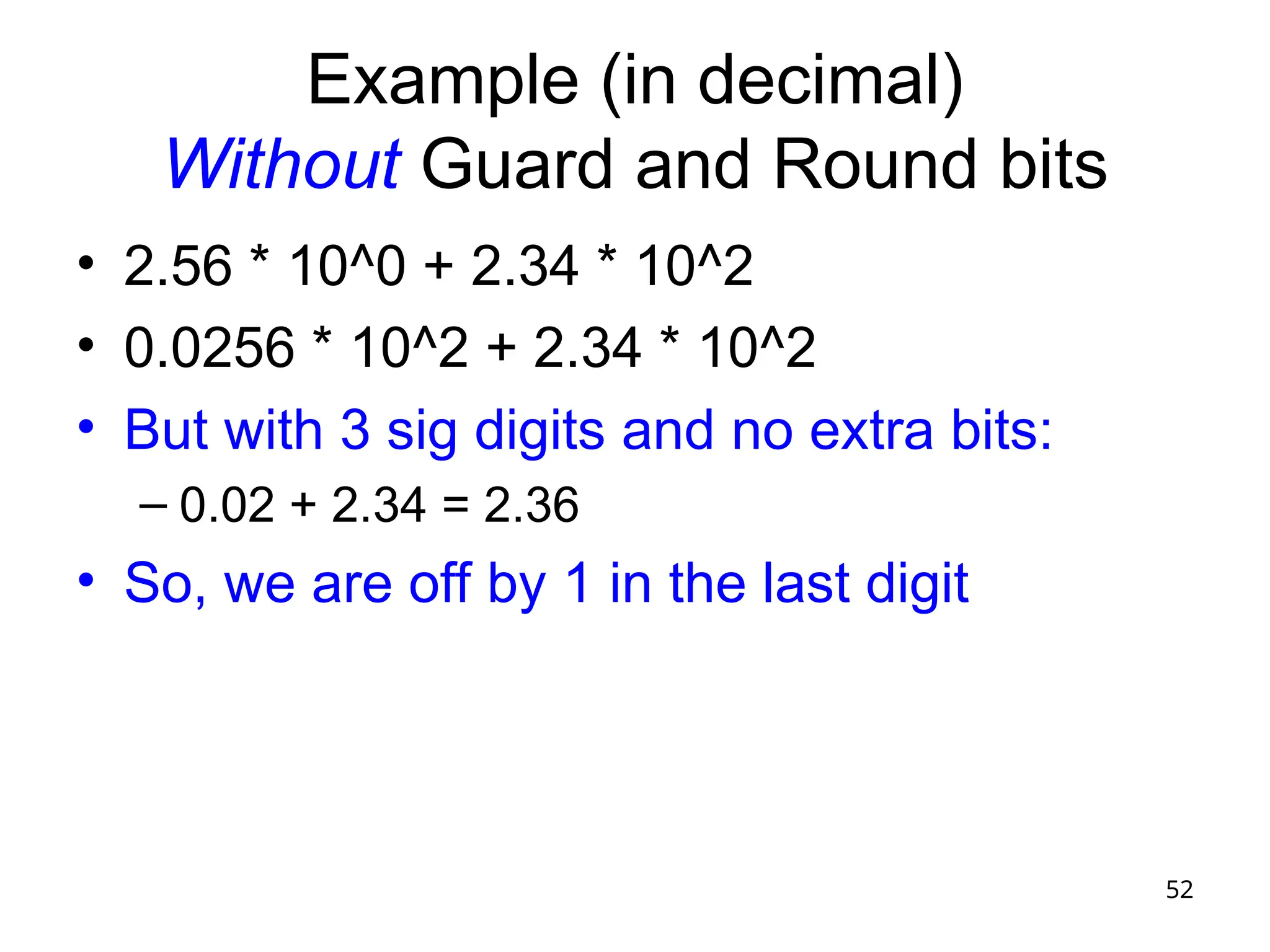
Example (in decimal)
Without Guard and Round bits
• 2.56 * 10^0 + 2.34 * 10^2
• 0.0256 * 10^2 + 2.34 * 10^2
• But with 3 sig digits and no extra bits:
– 0.02 + 2.34 = 2.36
• So, we are off by 1 in the last digit
assembly language programming , advantage, use

  • 1.
  • 2.
    2 Topics • Negative binaryintegers – Sign magnitude, 1’s complement, 2’s complement – Sign extension, ranges, arithmetic • Signed versus unsigned operations • Overflow (signed and unsigned) • Branch instructions: branching backwards • Implementations of addition, multiplication, division • Floating point numbers – Binary fractions – IEEE 754 floating point standard – Operations • underflow • Implementations of addition and multiplication (less detail than for integers) • Floating-point instructions in MIPS • Guard and Round bits
  • 3.
    3 Arithmetic • So farwe have studied – Instruction set basics – Assembly & machine language • We will now cover binary arith metic algorithms and their impl ementations • Binary arithmetic will provide t he basis for the CPU’s “datapa th” implementation
  • 4.
    4 Binary Number Representation •We looked at unsigned numbers before – B31B30…B2B1B0 – B31231 +B30230 +…+B222 +B121 +B020 • Now we want to deal with more complicated cases – Negative integers – Real numbers (a.k.a. floating-point numbers) • We’ll start with negative integers – Bit patterns and what they represent… – We’ll see 3 schemes; the 3rd (2’s complement) is used in most computers
  • 5.
    5 Case 1: SignMagnitude • {sign bit, absolute value (magnitude)} – Sign bit • “0” – positive number • “1” – negative number – EX. (assume 4-bit representation) • 0000: 0 • 0011: 3 • 1001: -1 • 1111: -7 • 1000: -0 • Properties – two representations of zero – equal number of positive and negative numbers
  • 6.
    6 Case 2: One’sComplement • ((2N -1) – number): To multiply a 1’s Complement number by -1, subtract the number from (2N -1)_unsigned. Or, equivalently (and easily!), simply flip the bits • 1CRepOf(A) + 1CRepOf(-A) = 2N -1_unsigned (interesting tidbit) • Let’s assume a 4-bit representation (to make it easy to work with) • Examples: • 0011: 3 • 0110: 6 • 1001: -6 1111 – 0110 or just flip the bits of 0110 • 1111: -0 1111 – 0000 or just flip the bits of 0000 • 1000: -7 1111 – 0111 or just flip the bits of 0111 • Properties – Two representations of zero – Equal number of positive and negative numbers
  • 7.
    7 Case 3: Two’sComplement • (2N – number): To multiply a 2’s Complement number by -1, subtract the number from 2N _unsigned. Or, equivalently (and easily!), simply flip the bits and add 1. • 2CRepOf(A) + 2CRepOf(-A) = 2N _unsigned (interesting tidbit) • Let’s assume a 4-bit representation (to make it easy to work with) • Examples: • 0011: 3 • 0110: 6 • 1010: -6 10000 – 0110 or just flip the bits of 0110 and add 1 • 1111: -1 10000 – 0001 or just flip the bits of 0001 and add 1 • 1001: -7 10000 – 0111 or just flip the bits of 0111 and add 1 • 1000: -8 10000 – 1000 or just flip the bits of 1000 and add 1 • Properties – One representation of zero: 0000 – An extra negative number: 1000 (this is -8, not -0)
  • 8.
    8 Ranges of numbers •Range (min to max) in N bits: – SM and 1C: -2^(N-1) -1 to +2^(N-1) -1 – 2C: -2^(N-1) to +2^(N-1) -1
  • 9.
    9 Sign Extension • #sare often cast into vars with more capacity • Sign extension (in all 3 representations): extend the sign bit to the left, and everything works out • la $t0,0x00400033 • addi $t1,$t0, 7 • addi $t2,$t0, -7 • R[rt] = R[rs] + SignExtImm • SignExtImm = {16{immediate[15]},immediate}
  • 10.
    10 Summary • Issues – #of zeros – Balance (and thus range) – Operations’ implementation Code Sign-Magnitude 1’s Complement 2’s Complement 000 +0 +0 +0 001 +1 +1 +1 010 +2 +2 +2 011 +3 +3 +3 100 -0 -3 -4 101 -1 -2 -3 110 -2 -1 -2 111 -3 -0 -1
  • 11.
    11 2’s Complement Examples •32-bit signed numbers – 0000 0000 0000 0000 0000 0000 0000 0000 = 0 – 0000 0000 0000 0000 0000 0000 0000 0001 = +1 – 0000 0000 0000 0000 0000 0000 0000 0010 = +2 – … – 0111 1111 1111 1111 1111 1111 1111 1110 = +2,147,483,646 – 0111 1111 1111 1111 1111 1111 1111 1111 = +2,147,483,647 – 1000 0000 0000 0000 0000 0000 0000 0000 = - 2,147,483,648 -2^31 – 1000 0000 0000 0000 0000 0000 0000 0001 = - 2,147,483,647 – 1000 0000 0000 0000 0000 0000 0000 0010 = - 2,147,483,646 – … – 1111 1111 1111 1111 1111 1111 1111 1101 = -3 – 1111 1111 1111 1111 1111 1111 1111 1110 = -2 – 1111 1111 1111 1111 1111 1111 1111 1111 = -1
  • 12.
    12 Addition • We cando binary addition just as we do decimal arithmetic – Examples in lecture • Can be simpler with 2’s complement (1C as well) – We don’t need to worry about the signs of the operands! – Examples in lecture
  • 13.
    13 Subtraction • Notice that subtractioncan be done using addition – A – B = A + (-B) – We know how to negate a number – The hardware used for addition can be used for subtraction with a negating unit at one input Add 1 Invert (“flip”) the bits
  • 14.
    14 Signed versus Unsigned Operations •“unsigned” operations view the operands a s positive numbers, even if the most signifi cant bit is 1 • Example: 1100 is 12_unsigned but -4_2C • Example: slt versus sltu – li $t0,-4 – li $t1,10 – slt $t3,$t0,$t1 $t3 = 1 – sltu $t4,$t0,$t1 $t4 = 0 !!
  • 15.
    15 Signed Overflow • Becausewe use a limited number of bits to represent a number, the result of an operation may not fit  “overflow” • No overflow when – We add two numbers with different signs – We subtract a number with the same sign • Overflow when – Adding two positive numbers yields a negative number – Adding two negative numbers yields a positive number – How about subtraction?
  • 16.
    16 Overflow • On anoverflow, the CPU can – Generate an exception – Set a flag in a status register – Do nothing • In MIPS on green card: – add, addi, sub: footnote (1) May cause overflow exce ption
  • 17.
    17 Overflow with UnsignedOperations • addu, addiu, subu – Footnote (1) is not listed for these instructions on the green card – This tells us that, In MIPS, nothing is done on unsigned overflow – How could it be detected for, e.g., add? • Carry out of the most significant position (in some architectures, a condition code is set on unsigned overflow, which IS the carry out from the top positi on)
  • 18.
    18 Branch Instructions: Branching Backwards •# $t3 = 1 + 2 + 2 + 2 + 2; $t4 = 1 + 3 + 3 + 3 + 3 • li $t0,0 li $t3,1 li $t4, 1 • loop: addi $t3,$t3,2 • addi $t4,$t4,3 • addi $t0,$t0,1 • slti $t5,$t0,4 • bne $t5,$zero,loop machine code: 0x15a0fffc • BranchAddr = {14{imm[15]}, imm, 2’b0}
  • 19.
    19 1-bit Adder • Witha fully functional single-bit ad der – We can build a wider adder by linking many one-bit adders • 3 inputs – A: input A – B: input B – Cin: input C (carry in) • 2 outputs – S: sum – Cout: carry out
  • 20.
    20 Implementing an Adder –Solve how S can be represented by way of A, B, and Cin – Also solve for Cout Input Output A B Cin S Cout 0 0 0 0 0 0 0 1 1 0 0 1 0 1 0 0 1 1 0 1 1 0 0 1 0 1 0 1 0 1 1 1 0 0 1 1 1 1 1 1
  • 21.
    21 Boolean Logic formulas •S = A’B’Cin+A’BCin’+AB’Cin’+ABCin • Cout = AB+BCin+ACin Input Output A B Cin S Cout 0 0 0 0 0 0 0 1 1 0 0 1 0 1 0 0 1 1 0 1 1 0 0 1 0 1 0 1 0 1 1 1 0 0 1 1 1 1 1 1 Can implement the adder using logic gates
  • 22.
    22 Logic Gates Y=A&B Y=A|B Y=~(A&B) Y=~(A|B) 2-input AND 2-inputOR 2-input NAND 2-input NOR A B A A A B B B Y Y Y Y
  • 23.
    23 Implementation in logicgates • Cout = AB+BCin+ACin • We’ll see more boolean logic and circuit implementation when we get to Appendix B AND GATES OR GATES
  • 24.
    24 N-bit Adder • AnN-bit adder can be const ructed with N one-bit adders – A carry generated in one stag e is propagated to the next (“ri pple carry adder”) • 3 inputs – A: N-bit input A – B: N-bit input B – Cin: input C (carry in) • 2 outputs – S: N-bit sum – Cout: carry out (0)
  • 25.
    25 N-bit Ripple-Carry Adder (0)(1) (1) (0) (0) 0 0 1 1 1 0 0 1 1 0 (0) 0 (0) 1 (1) 1 (1) 0 (0) 1 … (0)
  • 26.
    26 Multiplication • More complicatedoperation, so more complicated circuits • Outline – Human longhand, to remind ourselves of the steps involved – Multiplication hardware • Text has 3 versions, showing evolution to help you better understand how the circuits work
  • 27.
    27 Multiplication Here –see what book says • More complicated than addition – A straightforward implementation will involve shifts and adds • More complex operation can lead to – More area (on silicon) and/or – More time (multiple cycles or longer clock cycle time) • Let’s begin from a simple, straightforward method
  • 28.
  • 29.
  • 30.
  • 31.
  • 32.
    32 Example • Let’s do0010 x 0110 (2 x 6), unsigned Iteration Multiplicand Implementation 3 Step Product 0 0010 initial values 0000 0110 1 0010 1: 0 -> no op 0000 0110 2: shift right 0000 0011 2 0010 1: 1 -> product = produ ct + multiplicand 0010 0011 2: shift right 0001 0001 3 0010 1: 1 -> product = produ ct + multiplicand 0011 0001 2: shift right 0001 1000 4 0010 1: 0 -> no op 0001 1000 2: shift right 0000 1100
  • 33.
    33 Binary Division • Dividend= Divider  Quotient + Remainder • Even more complicated – Still, it can be implemented by way of shifts and addition/subtraction – We will study a method based on the paper-and- pencil method – We confine our discussions to unsigned numbers only
  • 34.
  • 35.
    35 Algorithm (figure 3.11) •Size of dividend is 2 * size of divisor • Initialization: – quotient register = 0 – remainder register = dividend – divisor register = divisor in left half
  • 36.
    36 Algorithm continued • Repeatfor 33 iterations (size divisor + 1): • Subtract the divisor register from the remainder register and place the result in the remainder register • If Remainder >= 0: – Shift quotient register left, placing 1 in bit 0 • Else: – Undo the subtraction; shift quotient register left, placing 0 in bit 0 • Shift divisor register right 1 bit • Example in lecture and figure 3.12
  • 37.
    37 Floating-Point (FP) Numbers •Computers need to deal with real numbers – Fraction (e.g., 3.1416) – Very small number (e.g., 0.000001) – Very large number (e.g., 2.75961011 ) • Components: sign, exponent, mantissa – (-1)sign mantissa2exponent – More bits for mantissa gives more accuracy – More bits for exponent gives wider range • A case for FP representation standard – Portability issues – Improved implementations  IEEE754 standard
  • 38.
    38 Binary Fractions forHumans • Lecture: binary fractions and their decimal equivalents • Lecture: translating decimal fractions into binary • Lecture: idea of normalized representation • Then we’ll go on with IEEE standard floating point representation
  • 39.
    39 IEEE 754 • Astandard for FP representation in computers – Single precision (32 bits): 8-bit exponent, 23-bit mantissa – Double precision (64 bits): 11-bit exponent, 52-bit mantissa • Leading “1” in mantissa is implicit (since the mantissa is normalized, the first digit is always a 1…why waste a bit storing it?) • Exponent is “biased” for easier sorting of FP numbers sign exponent Fraction (or mantissa) 0 M-1 N-1 N-2 M
  • 40.
    40 “Biased” Representation • We’velooked at different binary number representations so far – Sign-magnitude – 1’s complement – 2’s complement • Now one more representation: biased representation – 000…000 is the smallest number – 111…111 is the largest number – To get the real value, subtract the “bias” from the bit pattern, interpreting bit pattern as an unsigned number – Representation = Value + Bias • Bias for “exponent” field in IEEE 754 – 127 (single precision) – 1023 (double precision)
  • 41.
    41 IEEE 754 • Astandard for FP representation in computers – Single precision (32 bits): 8-bit exponent, 23-bit mantissa – Double precision (64 bits): 11-bit exponent, 52-bit mantissa • Leading “1” in mantissa is implicit • Exponent is “biased” for easier sorting of FP numbers – All 0s is the smallest, all 1s is the largest – Bias of 127 for single precision and 1023 for double precision • Getting the actual value: (-1)sign (1+significand)2(exponent-bias) sign exponent significand (or mantissa) 0 M-1 N-1 N-2 M
  • 42.
    42 IEEE 754 Example •-0.75ten – Same as -3/4 – In binary -11/100 = -0.11 – In normalized binary -1.1twox2-1 – In IEEE 754 format • sign bit is 1 (number is negative!) • mantissa is 0.1 (1 is implicit!) • exponent is -1 (or 126 in biased representation) sign 8-bit exponent 23-bit significand (or mantissa) 0 22 31 30 23 1 0 1 1 1 1 1 1 0 1 0 0 0 … 0 0 0
  • 43.
    43 IEEE 754 EncodingRevisited Single Precision Double Precision Represented Object Exponent Fraction Exponent Fraction 0 0 0 0 0 0 non-zero 0 non-zero +/- denormalized number 1~254 anything 1~2046 anything +/- floating-point numbers 255 0 2047 0 +/- infinity 255 non-zero 2047 non-zero NaN (Not a Number)
  • 44.
    44 FP Operations Notes •Operations are more complex – We should correctly handle sign, exponent, significand • We have “underflow” • Accuracy can be a big problem – IEEE 754 defines two extra bits to keep temporary results accurately: guard bit and round bit – Four rounding modes – Positive divided by zero yields “infinity” – Zero divided by zero yields “Not a Number” (NaN) • Implementing the standard can be tricky • Not using the standard can become even worse – See text for 80x86 and Pentium bug!
  • 45.
    45 Floating-Point Addition 0.5ten –0.4375ten =1.000two2-1 – 1.110two2-2 1. Shift smaller number to make exponents match 2. Add the significands 3. Normalize sum Overflow or underflow? Yes: exception no: Round the significand If not still normalized, Go back to step 3
  • 46.
    46 Floating-Point Multiplication (1.000two2-1 )(-1.110two2-2 ) 1. Addexponents and subtract bias 2. Multiply the significands 3. Normalize the product 4: overflow? If yes, raise exception 5. Round the significant to appropriate # of bits 6. If not still normalized, go back to step 3 7. Set the sign of the result
  • 47.
    47 Floating Point Instructionsin MIPS .data nums: .float 0.75,15.25,7.625 .text la $t0,nums lwc1 $f0,0($t0) lwc1 $f1,4($t0) add.s $f2,$f0,$f1 #0.75 + 15.25 = 16.0 = 10000 binary = 1.0 * 2^4 #f2: 0 10000011 000000... = 0x41800000 swc1 $f2,12($t0) #1001000c now contains that number # Click on coproc1 in Mars to see the $f registers
  • 48.
    48 Another Example .data nums: .float0.75,15.25,7.625 .text loop: la $t0,nums lwc1 $f0,0($t0) lwc1 $f1,4($t0) c.eq.s $f0,$f1 # cond = 0 bc1t label # no branch c.lt.s $f0,$f1 # cond = 1 bc1t label # does branch add.s $f3,$f0,$f1 label: add.s $f2,$f0,$f1 c.eq.s $f2,$f0 bc1f loop # branch (infinite loop) #bottom of the coproc1 display shows condition bits
  • 49.
    49 nums: .double 0.75,15.25,7.625,0.75 #0.75= .11-bin. exponent is -1 (1022 biased). significand is 1000... #0 01111111110 1000... = 0x3fe8000000000000 la $t0,nums lwc1 $f0,0($t0) lwc1 $f1,4($t0) lwc1 $f2,8($t0) lwc1 $f3,12($t0) add.d $f4,$f0,$f2 #{$f5,$f4} = {$f1,$f0} + {$f2,$f1}; 0.75 + 15.25 = 16 = 1.0-bin * 2^4 #0 10000000011 0000... = 0x4030000000000000 # value+0 value+4 value+8 value+c # 0x00000000 0x3fe80000 0x00000000 0x402e8000 # float double # $f0 0x00000000 0x3fe8000000000000 # $f1 0x3fe80000 # $f2 0x00000000 0x402e800000000000 # $f3 0x402e8000 # $f4 0x00000000 0x4030000000000000 # $f5 0x40300000
  • 50.
    50 Guard and Roundbits • To round accurately, hardware needs extra bits • IEEE 274 keeps extra bits on the right during intermediate additions – guard and round bits
  • 51.
    51 Example (in decimal) WithGuard and Round bits • 2.56 * 10^0 + 2.34 * 10^2 • Assume 3 significant digits • 0.0256 * 10^2 + 2.34 * 10^2 • 2.3656 [guard=5; round=6] • Round step 1: 2.366 • Round step 2: 2.37
  • 52.
    52 Example (in decimal) WithoutGuard and Round bits • 2.56 * 10^0 + 2.34 * 10^2 • 0.0256 * 10^2 + 2.34 * 10^2 • But with 3 sig digits and no extra bits: – 0.02 + 2.34 = 2.36 • So, we are off by 1 in the last digit