markers on a DOM element (attribute, element name, 
comment or CSS class); 
"... a way to tech HTML new tricks."; 
anything (within your app) ; 
a function that's attached to a DOM element: 
a whole execution environment; 
a micro-application; 
<!-- Built in directive --> 
<div ng-repeat="item in items"> </div> 
<!-- Custom directive --> 
<my-directive> </my-directive> 
<!-- OR --> 
<div my-directive> </div>
event handling; 
behavior management; 
template pre-processing and insertion; 
data-binding; 
UI Widgets; 
much more.
1. Declarative, Model-Driven Behaviour 
2. Modularity, Reusability across contexts 
3. Keep it local 
<!-- Imperative Way --> 
<button id="1" class="B C"></button> 
<!-- V.s. Declarative way--> 
<button my-action-handler></button>
Directive Names Angular uses a convention borrowed 
from other JS projects: names in HTML are hyphenated 
<my-directive> </my-directive> 
.directive('myDirective', function(){ 
}); 
while identifiers in the JS are camel-cased
angular 
.module('myApp', []) 
.directive('myDirective', function(){ 
return{ 
link: function(scope, lement, attrs, ctrl){ 
element.bind("mouseenter", function(){ 
element.css({color: 'red'}); 
}); 
}, 
require: '', 
controller: ['$scope', '$element', function($scope, $element){}], 
scope: false, 
transclude: false, 
restrict: 'E', 
template: "<div>Hello, World!</div>" 
}; 
}); 
Everything but is optional.
The params are supplied as args not injected: 
scope associated with the directive 
DOM element wrapped by jQLite 
an object containing the html attributes defined 
on the element 
Reference to controller object
Templates can be stored as strings on the 
property; 
They can also be loaded from a file, using 
property
Directives can be restricted to a specific context, so 
the accidentally usage can be avoided: 
- Element 
- Attribute 
- Class 
Can be used as a single string: ' '; 
Defaults to ' '
We have the option, in directives, of using either: 
the same scope (scope from the environment that 
directive lives) 
a child scope that inherits from current scope 
a new isolate scope 
.directive('myDirective', function(){ 
return { 
//scope: false // default, use local scope 
//scope: true // create a child of local scope 
//Create a new isolate scope 
scope: { 
} 
} 
});
Angular provides ways to bind the value of properties in 
isolate scope to attributes on the element, using special 
operators: 
- Local scope property 
- Bi-directional binding 
- Parent execution binding 
scope: { 
local1: '@attr1', 
local2: '=attr1', 
local3: '&attr3' 
}
Plunker link
Transclude allow to pass in an entire template, 
including its scope, to a directive. 
In order for scope to be passed in, the scope option 
must be isolated, , or set to . 
<div sidebox title="Links"> 
<ul> 
<li>First link</li> 
<li>Second link</li> 
</ul> 
</div> 
<script type="text/ng-template" id="directive.template.html"> 
{{ title }} 
angular.module('myApp', []) 
.directive('sidebox', function() { 
return { 
restrict: 'EA', 
scope: { 
title: '@' 
}, 
transclude: true, 
templateUrl: 'directive.template.html' 
});
The main use case for a controller is when we want to provide reusable 
behavior between directives 
As the link function is only available inside the current directive, any 
behavior defined within is not shareable 
Because a directive can require the controller of another directive, 
controllers are a good choice for placing actions that will be used by 
multiple directives.
The option can be set to a string or an array of 
strings. 
The string(s) contain the name of another directive. 
is used to provide the controller of the required 
directive as the fourth parameter of the current directive’s 
linking function 
The string(s) provided to the require option may optionally be prefixed with the 
following options: 
- If the required controller is not found on the directive provided, pass 
look upwards on its parent chain for the controller in the require option 
optionally require the controller and look up the parent chain for the 
controller
<level-one> 
<level-two> 
<level-three> 
Hello {{name}} 
</level-three> 
</level-two> 
</level-one> 
function createDirective(name){ 
return function(){ 
return { 
restrict: 'E', 
compile: function(tElem, tAttrs){ 
console.log(name + ': compile => ' + tElem.html()); 
return { 
pre: function(scope, iElem, iAttrs){ 
console.log(name + ': pre link => ' + iElem.html()); 
}, 
post: function(scope, iElem, iAttrs){ 
console.log(name + ': post link => ' + iElem.html()); 
} 
} 
} 
} 
} 
} 
angular.module('myModule', []) 
.directive('levelOne', createDirective('levelOne')) 
.directive('levelTwo', createDirective('levelTwo')) 
.directive('levelThree', createDirective('levelThree')); 
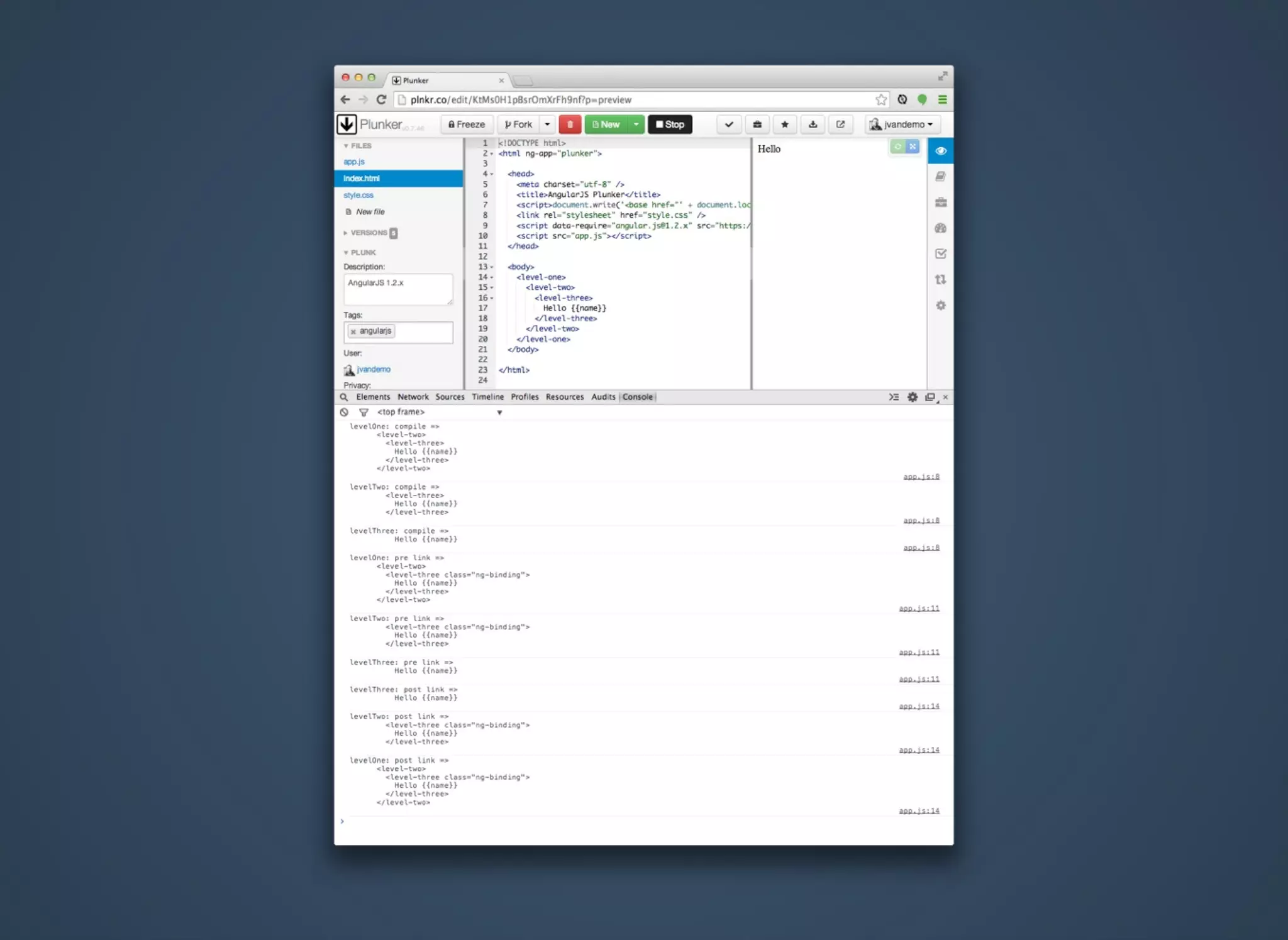
let AngularJS process three nested directives where each directive has its own 
, and function that logs a line to the console so we can identify them.
1. Angular start to process the DOM when it detects that the DOM is ready; 
2. it bumps into the element and knows from its directive definition that 
some action needs to be performed: 
1. Because a function is defined in the directive definition 
object, it is called and the element's DOM is passed as an argument to the 
function; 
2. Once the compile function of the directive has run, Angular 
recursively traverses deeper into the DOM and repeats the same compilation 
step for the and <level-three> elements.
1. After Angular travels down the DOM and has run all the 
functions, it traverses back up again and runs all associated 
functions. 
2. The DOM is now traversed in the opposite direction and thus the 
functions are called in reverse order. 
3. This reverse order guarantees that the functions of all 
child elements have run by the time the function of the 
parent element is run. 
4. Once Angular has called the function of a directive, it 
creates an instance element of the template element and 
provides a scope for the instance. 
5. So by the time the linking occurs, the instance element and scope 
are already available and they are passed by Angular as 
arguments to the function.
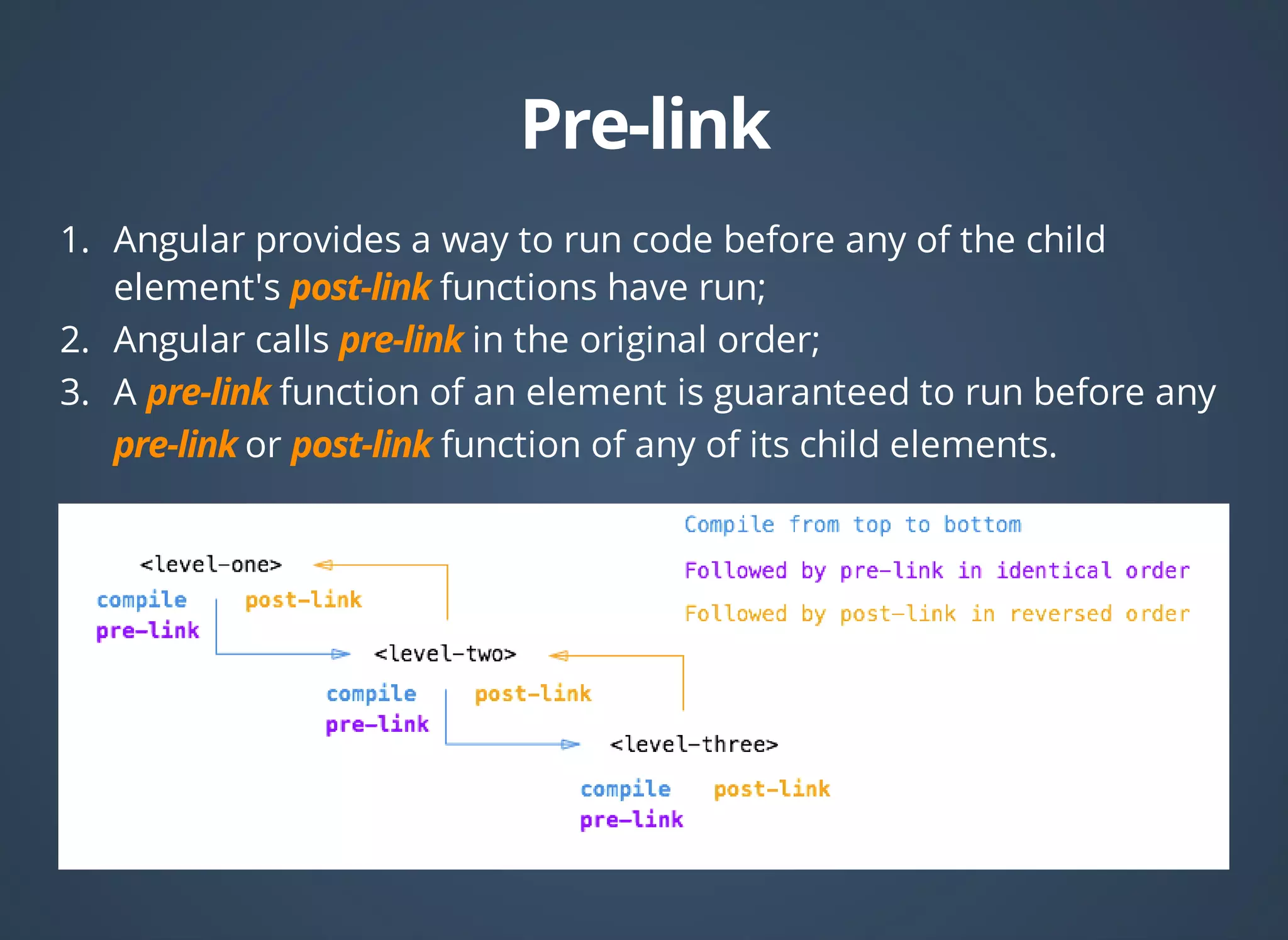
1. Angular provides a way to run code before any of the child 
element's functions have run; 
2. Angular calls in the original order; 
3. A function of an element is guaranteed to run before any 
or function of any of its child elements.
Use only to change the original DOM (template element) before 
Angular creates an instance of it and before a scope is created. 
Use to implement logic that runs when Angular has already 
compiled the child elements, but before any of the child 
element's and functions have been called. 
Use to execute logic, knowing that all child elements have been 
compiled and all and post-link functions of child 
elements have been executed.
The nitty-gritty of compile and link functions inside AngularJS directives
Plunker link
Angular Api Reference 
ng-book 
The nitty-gritty of compile and link functions inside 
AngularJS directives

Angular custom directives

  • 2.
    markers on aDOM element (attribute, element name, comment or CSS class); "... a way to tech HTML new tricks."; anything (within your app) ; a function that's attached to a DOM element: a whole execution environment; a micro-application; <!-- Built in directive --> <div ng-repeat="item in items"> </div> <!-- Custom directive --> <my-directive> </my-directive> <!-- OR --> <div my-directive> </div>
  • 3.
    event handling; behaviormanagement; template pre-processing and insertion; data-binding; UI Widgets; much more.
  • 4.
    1. Declarative, Model-DrivenBehaviour 2. Modularity, Reusability across contexts 3. Keep it local <!-- Imperative Way --> <button id="1" class="B C"></button> <!-- V.s. Declarative way--> <button my-action-handler></button>
  • 5.
    Directive Names Angularuses a convention borrowed from other JS projects: names in HTML are hyphenated <my-directive> </my-directive> .directive('myDirective', function(){ }); while identifiers in the JS are camel-cased
  • 6.
    angular .module('myApp', []) .directive('myDirective', function(){ return{ link: function(scope, lement, attrs, ctrl){ element.bind("mouseenter", function(){ element.css({color: 'red'}); }); }, require: '', controller: ['$scope', '$element', function($scope, $element){}], scope: false, transclude: false, restrict: 'E', template: "<div>Hello, World!</div>" }; }); Everything but is optional.
  • 7.
    The params aresupplied as args not injected: scope associated with the directive DOM element wrapped by jQLite an object containing the html attributes defined on the element Reference to controller object
  • 8.
    Templates can bestored as strings on the property; They can also be loaded from a file, using property
  • 9.
    Directives can berestricted to a specific context, so the accidentally usage can be avoided: - Element - Attribute - Class Can be used as a single string: ' '; Defaults to ' '
  • 10.
    We have theoption, in directives, of using either: the same scope (scope from the environment that directive lives) a child scope that inherits from current scope a new isolate scope .directive('myDirective', function(){ return { //scope: false // default, use local scope //scope: true // create a child of local scope //Create a new isolate scope scope: { } } });
  • 11.
    Angular provides waysto bind the value of properties in isolate scope to attributes on the element, using special operators: - Local scope property - Bi-directional binding - Parent execution binding scope: { local1: '@attr1', local2: '=attr1', local3: '&attr3' }
  • 12.
  • 13.
    Transclude allow topass in an entire template, including its scope, to a directive. In order for scope to be passed in, the scope option must be isolated, , or set to . <div sidebox title="Links"> <ul> <li>First link</li> <li>Second link</li> </ul> </div> <script type="text/ng-template" id="directive.template.html"> {{ title }} angular.module('myApp', []) .directive('sidebox', function() { return { restrict: 'EA', scope: { title: '@' }, transclude: true, templateUrl: 'directive.template.html' });
  • 14.
    The main usecase for a controller is when we want to provide reusable behavior between directives As the link function is only available inside the current directive, any behavior defined within is not shareable Because a directive can require the controller of another directive, controllers are a good choice for placing actions that will be used by multiple directives.
  • 15.
    The option canbe set to a string or an array of strings. The string(s) contain the name of another directive. is used to provide the controller of the required directive as the fourth parameter of the current directive’s linking function The string(s) provided to the require option may optionally be prefixed with the following options: - If the required controller is not found on the directive provided, pass look upwards on its parent chain for the controller in the require option optionally require the controller and look up the parent chain for the controller
  • 17.
    <level-one> <level-two> <level-three> Hello {{name}} </level-three> </level-two> </level-one> function createDirective(name){ return function(){ return { restrict: 'E', compile: function(tElem, tAttrs){ console.log(name + ': compile => ' + tElem.html()); return { pre: function(scope, iElem, iAttrs){ console.log(name + ': pre link => ' + iElem.html()); }, post: function(scope, iElem, iAttrs){ console.log(name + ': post link => ' + iElem.html()); } } } } } } angular.module('myModule', []) .directive('levelOne', createDirective('levelOne')) .directive('levelTwo', createDirective('levelTwo')) .directive('levelThree', createDirective('levelThree')); let AngularJS process three nested directives where each directive has its own , and function that logs a line to the console so we can identify them.
  • 20.
    1. Angular startto process the DOM when it detects that the DOM is ready; 2. it bumps into the element and knows from its directive definition that some action needs to be performed: 1. Because a function is defined in the directive definition object, it is called and the element's DOM is passed as an argument to the function; 2. Once the compile function of the directive has run, Angular recursively traverses deeper into the DOM and repeats the same compilation step for the and <level-three> elements.
  • 21.
    1. After Angulartravels down the DOM and has run all the functions, it traverses back up again and runs all associated functions. 2. The DOM is now traversed in the opposite direction and thus the functions are called in reverse order. 3. This reverse order guarantees that the functions of all child elements have run by the time the function of the parent element is run. 4. Once Angular has called the function of a directive, it creates an instance element of the template element and provides a scope for the instance. 5. So by the time the linking occurs, the instance element and scope are already available and they are passed by Angular as arguments to the function.
  • 23.
    1. Angular providesa way to run code before any of the child element's functions have run; 2. Angular calls in the original order; 3. A function of an element is guaranteed to run before any or function of any of its child elements.
  • 24.
    Use only tochange the original DOM (template element) before Angular creates an instance of it and before a scope is created. Use to implement logic that runs when Angular has already compiled the child elements, but before any of the child element's and functions have been called. Use to execute logic, knowing that all child elements have been compiled and all and post-link functions of child elements have been executed.
  • 25.
    The nitty-gritty ofcompile and link functions inside AngularJS directives
  • 26.
  • 27.
    Angular Api Reference ng-book The nitty-gritty of compile and link functions inside AngularJS directives