ANDROID CODING
GUIDELINES
BY EDUHUBANDROID
https://www.facebook.com/eduhubAndroi
SUMMARY
• Coding style
• Package style
• Naming convention
• Variables
• Comments
CODING STYLE
• Coding style is differ from developer to developer.
• There is no specific coding standards define by Google or Android so
this documentation only create as per Developer’s Experience and
knowledge
• Follow some specific package structure in each Application
• Preferable package name of App is
com.domainname.applicationname to avoid conflicts in Play Store
• Define common methods in one java file for reusability
• So this document is for Beginner and Mid level Developer
PACKAGE STYLE
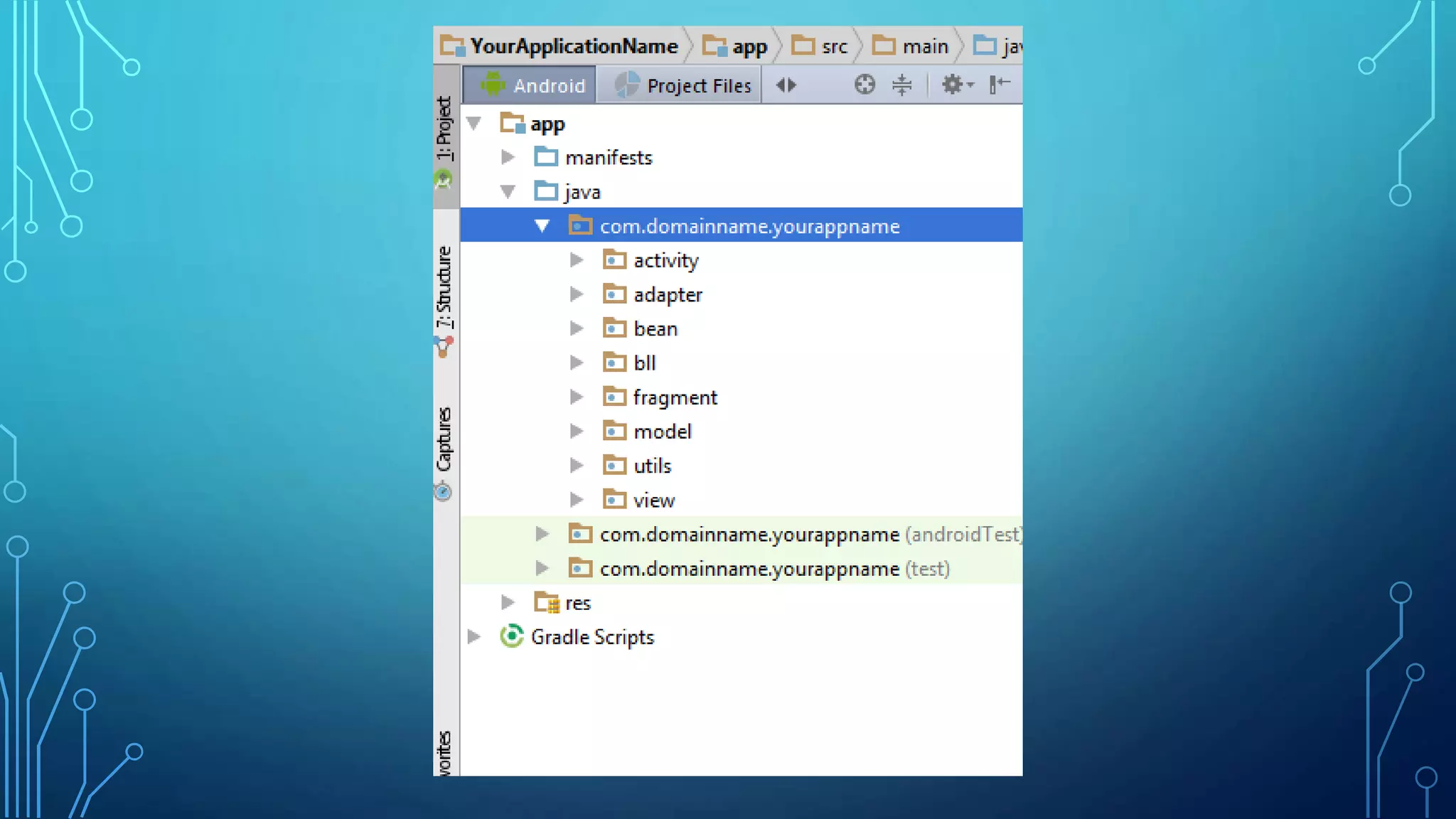
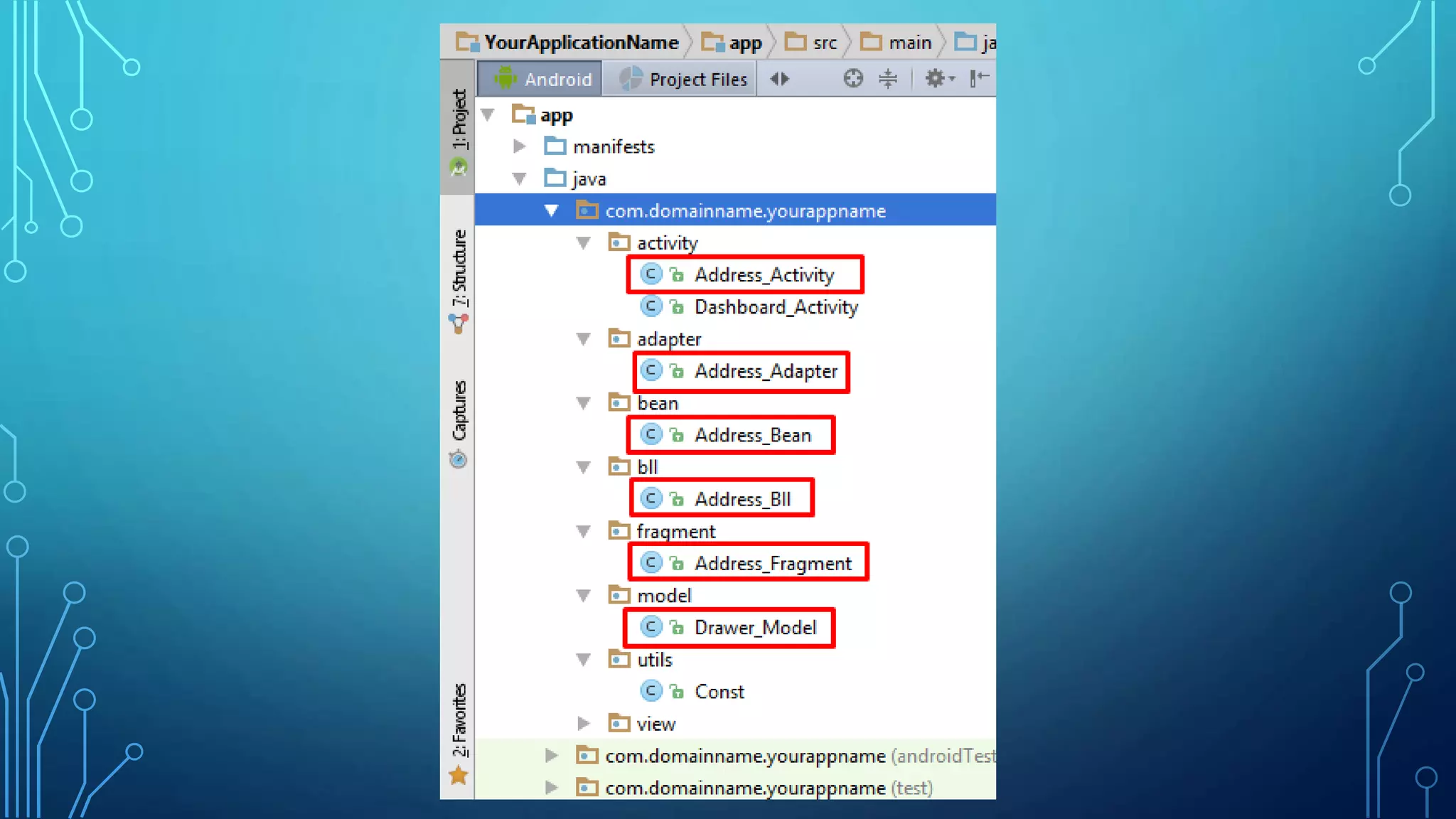
• As previously define App package name should be
com.domainname.applicationname so create sub packages
inside it.
• Sub packages should be like activity , fragment , adapter , utils ,
model , view , bean , bll etc…
• Each package name have the specific java classes for some
specific functionality
• Put specific classes in respective packages
NAMING CONVENTION
• Filename should be meaningful and specific according to
functionality
• Filename should not be short name like add.java & fg.java
• Provide file name with it’s specific package like activity file
name define as Dashboard_Activity.java and
Address_Fragment.java
• Searching file would be easy due to this naming convention
• So the developer can identify the file according to it’s
functionality and specification after the long time for Future
Enhancements
VARIABLES AND COMMENTS
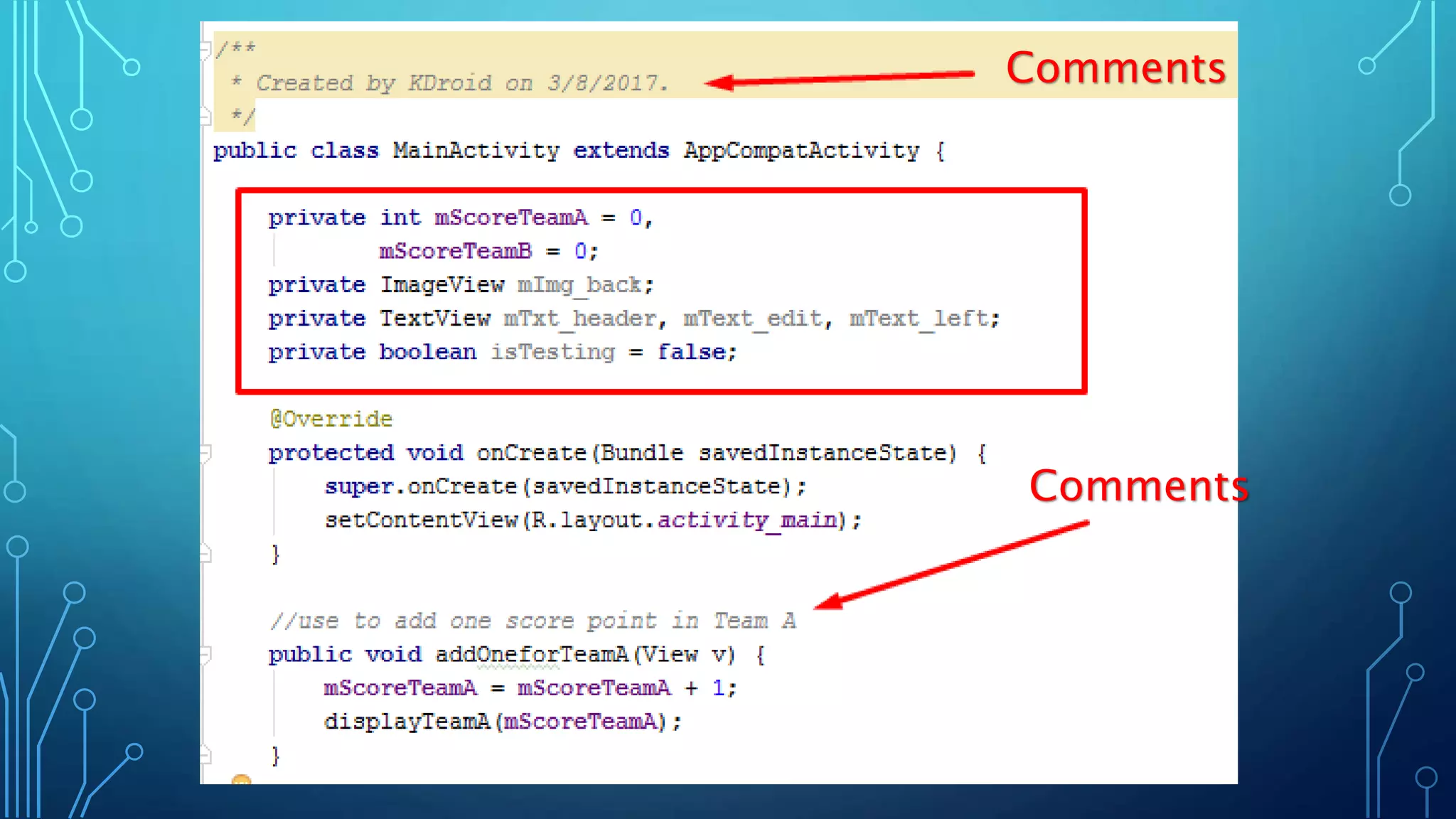
• Variables name is in camel case like mCount , mEdt_Username ,
mFilename
• Boolean variables define like isFileavailble and isData
• Do not define public static variables everywhere in different classes
• Define all needed public static variables in one Const file in utils
package
• Ignore public static variable usage in coding
• XML element variable should be identify with it’s naming like
mEdt_Username, mTxt_submit , mLn_parant , mRl_main
• Add appropriate comments for methods and classes
Comments
Comments
THANK YOU…
Knowledge is your power…………keep learning

Android coding guidlines

  • 1.
  • 2.
    SUMMARY • Coding style •Package style • Naming convention • Variables • Comments
  • 3.
    CODING STYLE • Codingstyle is differ from developer to developer. • There is no specific coding standards define by Google or Android so this documentation only create as per Developer’s Experience and knowledge • Follow some specific package structure in each Application • Preferable package name of App is com.domainname.applicationname to avoid conflicts in Play Store • Define common methods in one java file for reusability • So this document is for Beginner and Mid level Developer
  • 4.
    PACKAGE STYLE • Aspreviously define App package name should be com.domainname.applicationname so create sub packages inside it. • Sub packages should be like activity , fragment , adapter , utils , model , view , bean , bll etc… • Each package name have the specific java classes for some specific functionality • Put specific classes in respective packages
  • 6.
    NAMING CONVENTION • Filenameshould be meaningful and specific according to functionality • Filename should not be short name like add.java & fg.java • Provide file name with it’s specific package like activity file name define as Dashboard_Activity.java and Address_Fragment.java • Searching file would be easy due to this naming convention • So the developer can identify the file according to it’s functionality and specification after the long time for Future Enhancements
  • 8.
    VARIABLES AND COMMENTS •Variables name is in camel case like mCount , mEdt_Username , mFilename • Boolean variables define like isFileavailble and isData • Do not define public static variables everywhere in different classes • Define all needed public static variables in one Const file in utils package • Ignore public static variable usage in coding • XML element variable should be identify with it’s naming like mEdt_Username, mTxt_submit , mLn_parant , mRl_main • Add appropriate comments for methods and classes
  • 9.
  • 10.
    THANK YOU… Knowledge isyour power…………keep learning