AKBAR PEERBHOY COLLEGE OF COMMERCE AND ECONOMICS 
T. Y. B. Sc. IT Adv. Java Journal 2014-15 
PRACTICAL NO: 1 
/* 
Roll No: 31 Name : Fahad Shaikh 
Write a java program to present a set of choices for a user to select 
Stationary products and 
display the price of Product after Selection from the list. 
*/ 
import java.awt.*; 
import javax.swing.*; 
import javax.swing.event.*; 
public class Prog01 extends JFrame 
implements ListSelectionListener 
{ 
private JList list; 
private JLabel lbl; 
private String[] product ={"Pen", "Pensil", "Erazer", "Marker", "Ruler", "Note Book"}; 
private String[] price ={"Rs. 5","Rs. 2", "Rs. 3","Rs. 25", "Rs. 5", "Rs. 10"}; 
public Prog01() 
{ 
setTitle("Roll No:- 31 Name :- Shaikh Fahad "); 
setVisible(true); 
setDefaultCloseOperation(EXIT_ON_CLOSE); 
list = new JList(product); 
Name of Student: Shaikh Fahad Subject: Adv. Java Teachers Sign: ______________________ 
Page 1 Roll No of Student: 31 Date: 19-09-14
AKBAR PEERBHOY COLLEGE OF COMMERCE AND ECONOMICS 
T. Y. B. Sc. IT Adv. Java Journal 2014-15 
list.setSelectedIndex(0); 
list.setSelectionMode(ListSelectionModel.SINGLE_SELECTION); 
list.addListSelectionListener(this); 
lbl = new JLabel(); 
lbl.setText("Price of "+list.getSelectedValue()+" is "+price[0]); 
Container cnt =getContentPane(); 
JScrollPane jsp = new JScrollPane(list); 
cnt.add(jsp); 
cnt.add(lbl, "South"); 
pack(); 
} 
public void valueChanged(ListSelectionEvent les) 
{ 
lbl.setText("Price of "+list.getSelectedValue()+" is "+price[list.getSelectedIndex()]); 
} 
public static void main(String[] ar) 
{ 
new Prog01(); 
} 
} 
Name of Student: Shaikh Fahad Subject: Adv. Java Teachers Sign: ______________________ 
Page 2 Roll No of Student: 31 Date: 19-09-14
AKBAR PEERBHOY COLLEGE OF COMMERCE AND ECONOMICS 
T. Y. B. Sc. IT Adv. Java Journal 2014-15 
PRACTICAL 2 
/* 
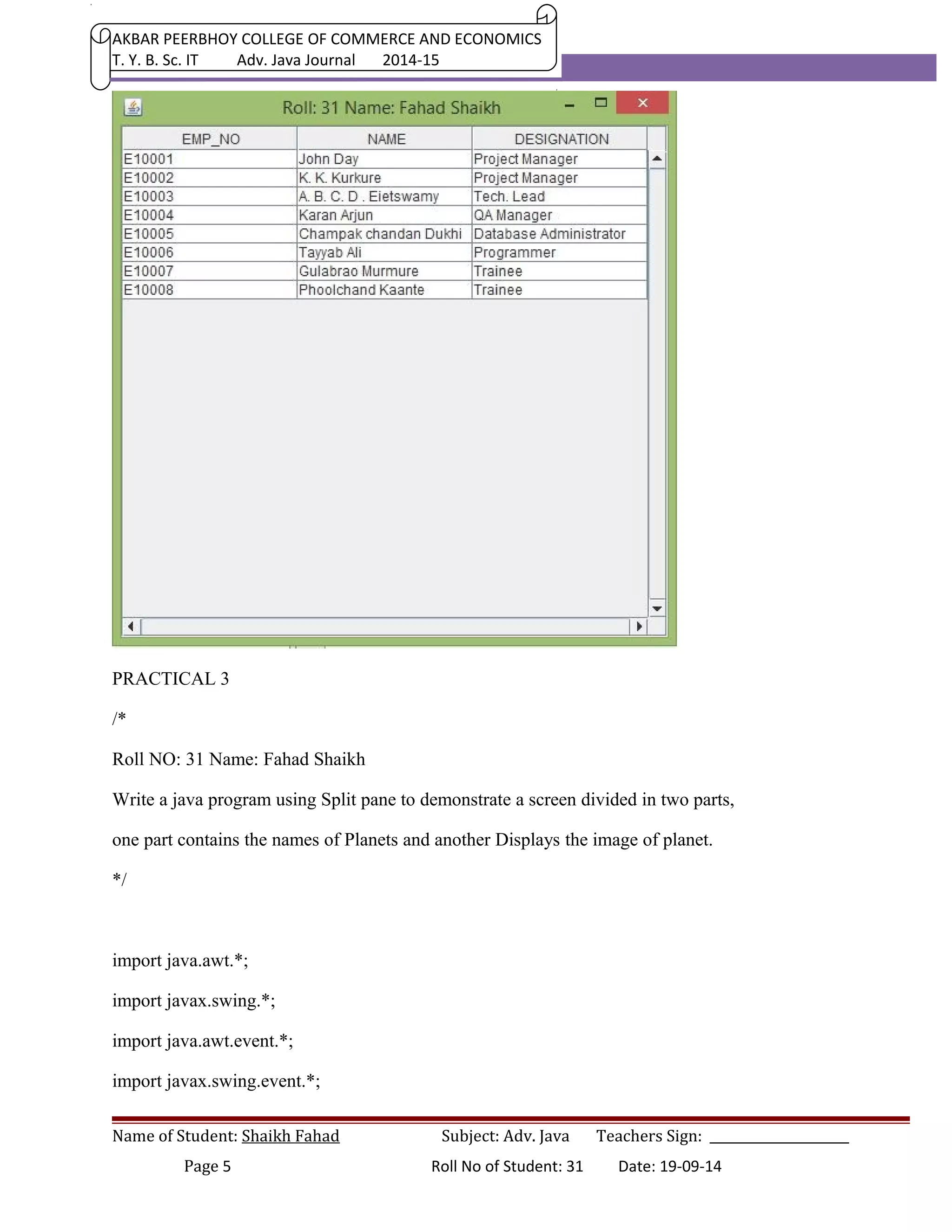
Write a java program to demonstrate typical Editable Table, describing employee details for a 
software company. 
*/ 
import java.awt.*; 
import javax.swing.*; 
public class Prog02 extends JFrame 
{ 
private String[] col={"EMP_NO","NAME","DESIGNATION"}; 
private String[][] data={{"E10001", "John Day", "Project Manager"}, 
{"E10002", "K. K. Kurkure", "Project Manager"}, 
{"E10003", "A. B. C. D . Eietswamy", "Tech. Lead"}, 
{"E10004", "Karan Arjun", "QA Manager"}, 
{"E10005", "Champak chandan Dukhi", "Database Administrator"}, 
Name of Student: Shaikh Fahad Subject: Adv. Java Teachers Sign: ______________________ 
Page 3 Roll No of Student: 31 Date: 19-09-14
AKBAR PEERBHOY COLLEGE OF COMMERCE AND ECONOMICS 
T. Y. B. Sc. IT Adv. Java Journal 2014-15 
{"E10006", "Tayyab Ali", "Programmer"}, 
{"E10007", "Gulabrao Murmure", "Trainee"}, 
{"E10008", "Phoolchand Kaante", "Trainee"}, 
}; 
private JTable tab; 
public Prog02() 
{ 
setTitle("Roll:31 Name: Shaikh Fahad"); 
setVisible(true); 
setDefaultCloseOperation(EXIT_ON_CLOSE); 
tab = new JTable(data, col); 
JScrollPane jsp = new JScrollPane(tab, JScrollPane.VERTICAL_SCROLLBAR_ALWAYS, 
JScrollPane.HORIZONTAL_SCROLLBAR_ALWAYS); 
Container cnt = getContentPane(); 
cnt.add(jsp); 
pack(); 
} 
public static void main(String[] ar) 
{ 
new Prog02(); 
} 
} 
Name of Student: Shaikh Fahad Subject: Adv. Java Teachers Sign: ______________________ 
Page 4 Roll No of Student: 31 Date: 19-09-14
AKBAR PEERBHOY COLLEGE OF COMMERCE AND ECONOMICS 
T. Y. B. Sc. IT Adv. Java Journal 2014-15 
PRACTICAL 3 
/* 
Roll NO: 31 Name: Fahad Shaikh 
Write a java program using Split pane to demonstrate a screen divided in two parts, 
one part contains the names of Planets and another Displays the image of planet. 
*/ 
import java.awt.*; 
import javax.swing.*; 
import java.awt.event.*; 
import javax.swing.event.*; 
Name of Student: Shaikh Fahad Subject: Adv. Java Teachers Sign: ______________________ 
Page 5 Roll No of Student: 31 Date: 19-09-14
AKBAR PEERBHOY COLLEGE OF COMMERCE AND ECONOMICS 
T. Y. B. Sc. IT Adv. Java Journal 2014-15 
public class Prog_03 extends JFrame 
implements ListSelectionListener 
{ 
private String[] planets={"EARTH", "JUPITER", "Mars", "Mercuery", 
"Neptune", "Pluto", "Saturn", "Uranus", "Venus" }; 
private Container cnt ; 
private JList list; 
private JLabel lbl; 
public Prog_03() 
{ 
setTitle("Roll No: 31 Name:Shaikh Fahad"); 
setVisible(true); 
setDefaultCloseOperation(EXIT_ON_CLOSE); 
cnt = getContentPane(); 
list = new JList(planets); 
list.setSelectionMode(ListSelectionModel.SINGLE_SELECTION); 
list.setSelectedIndex(0); 
list.addListSelectionListener(this); 
lbl = new JLabel(); 
lbl.setIcon(new ImageIcon("Images/0.jpg")); 
JSplitPane sp = new JSplitPane (JSplitPane.HORIZONTAL_SPLIT, list, lbl); 
cnt.add(sp); 
pack(); 
Name of Student: Shaikh Fahad Subject: Adv. Java Teachers Sign: ______________________ 
Page 6 Roll No of Student: 31 Date: 19-09-14
AKBAR PEERBHOY COLLEGE OF COMMERCE AND ECONOMICS 
T. Y. B. Sc. IT Adv. Java Journal 2014-15 
setResizable(false); 
} 
public void valueChanged(ListSelectionEvent lse) 
{ 
int index= list.getSelectedIndex(); 
lbl.setIcon(new ImageIcon("Images/"+index+".jpg")); 
} 
public static void main(String[] args) 
{ 
new Prog_03(); 
} 
} 
PRACTICAL 04 
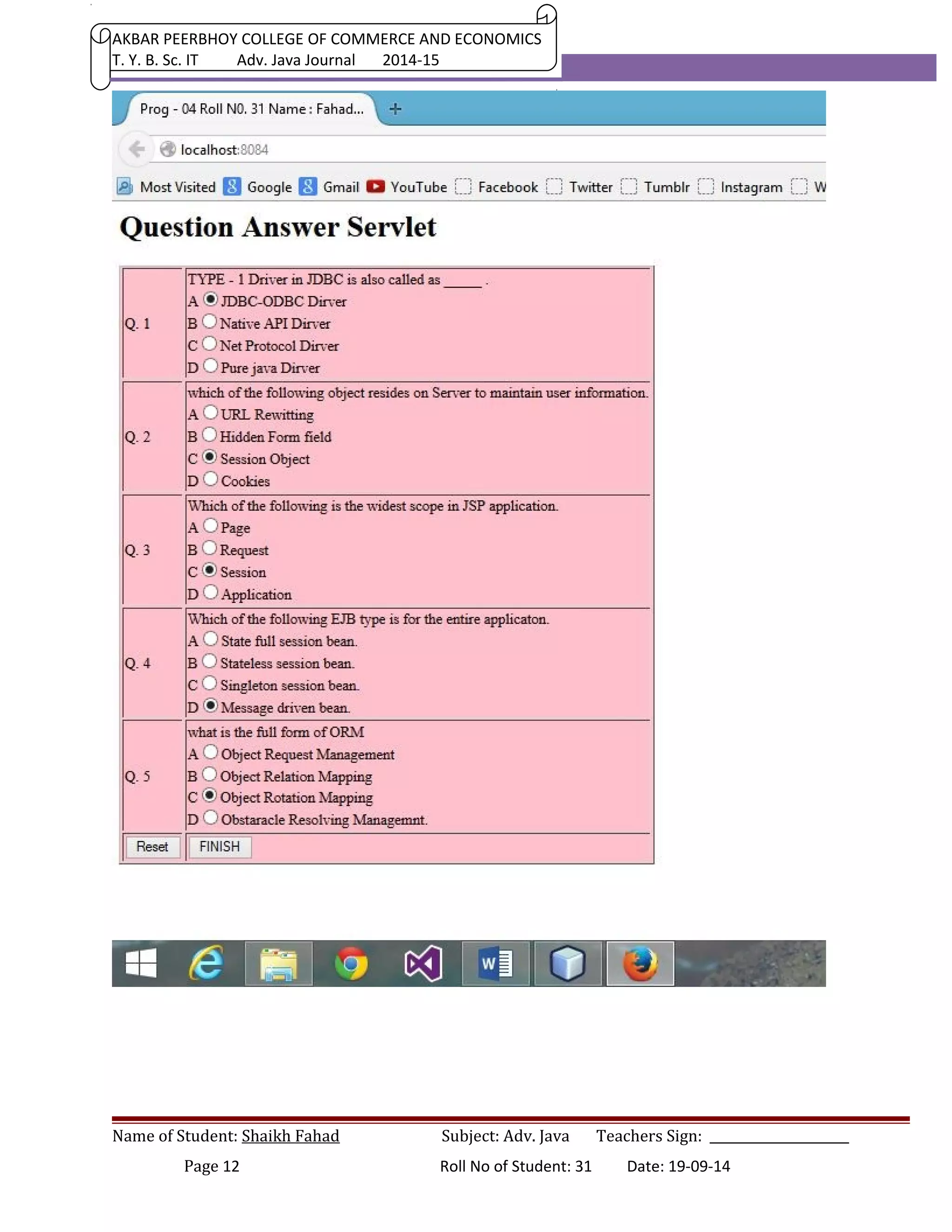
Develop Simple Servlet Question Answer application to demonstrate use of 
HttpServletRequest and HttpServletResponse interfaces. 
INDEX.JSP 
<html> 
<head><title> 
Prog - 04 Roll No: 31 Name : Shaikh Fahad 
</title></head> 
<body> 
<h1> Question Answer Servlet</h1> 
<form action = "QAServlet" > 
<table bgcolor="pink" border="1"> 
<tr> 
Name of Student: Shaikh Fahad Subject: Adv. Java Teachers Sign: ______________________ 
Page 7 Roll No of Student: 31 Date: 19-09-14
AKBAR PEERBHOY COLLEGE OF COMMERCE AND ECONOMICS 
T. Y. B. Sc. IT Adv. Java Journal 2014-15 
<td>Q. 1</td> 
<td> 
TYPE - 1 Driver in JDBC is also called as _____ . 
<br>A<input type=radio name=a1 value="1a">JDBC-ODBC Dirver 
<br>B<input type=radio name=a1 value="1b">Native API Dirver 
<br>C<input type=radio name=a1 value="1c">Net Protocol Dirver 
<br>D<input type=radio name=a1 value="1d">Pure java Dirver 
</td> 
</tr> 
<tr> 
<td>Q. 2</td> 
<td> 
which of the following object resides on Server to maintain user information. 
<br>A<input type=radio name=a2 value="2a">URL Rewitting 
<br>B<input type=radio name=a2 value="2b">Hidden Form field 
<br>C<input type=radio name=a2 value="2c">Session Object 
<br>D<input type=radio name=a2 value="2d">Cookies 
</td> 
</tr> 
<tr> 
<td>Q. 3</td> 
<td> 
Which of the following is the widest scope in JSP application. 
<br>A<input type=radio name=a3 value="3a">Page 
<br>B<input type=radio name=a3 value="3b">Request 
Name of Student: Shaikh Fahad Subject: Adv. Java Teachers Sign: ______________________ 
Page 8 Roll No of Student: 31 Date: 19-09-14
AKBAR PEERBHOY COLLEGE OF COMMERCE AND ECONOMICS 
T. Y. B. Sc. IT Adv. Java Journal 2014-15 
<br>C<input type=radio name=a3 value="3c">Session 
<br>D<input type=radio name=a3 value="3d">Application 
</td> 
</tr> 
<tr> 
<td>Q. 4</td> 
<td> 
Which of the following EJB type is for the entire applicaton. 
<br>A<input type=radio name=a4 value="4a">State ful session Bean 
<br>B<input type=radio name=a4 value="4b">Stateless session bean 
<br>C<input type=radio name=a4 value="4c">Singleton session bean 
<br>D<input type=radio name=a4 value="4d">Message driven bean. 
</td> 
</tr> 
<tr> 
<td>Q. 5</td> 
<td> 
what is the full form of ORM 
<br>A<input type=radio name=a5 value="5a">Object Request Management 
<br>B<input type=radio name=a5 value="5b">Object Relation MApping 
<br>C<input type=radio name=a5 value="5c">Object Rotaion Mapping 
<br>D<input type=radio name=a5 value="5d">Obstaracle Resolving Managemnt. 
</td> 
</tr> 
<tr> 
Name of Student: Shaikh Fahad Subject: Adv. Java Teachers Sign: ______________________ 
Page 9 Roll No of Student: 31 Date: 19-09-14
AKBAR PEERBHOY COLLEGE OF COMMERCE AND ECONOMICS 
T. Y. B. Sc. IT Adv. Java Journal 2014-15 
<td> 
<input type="reset"> 
</td> 
<td> 
<input type=submit value="FINISH" > 
</td> 
</tr> 
</table> 
</form> 
</body> 
</html> 
/* 
* QAServlet.java 
* Created on September 19, 2013, 10:06 AM 
*/ 
package MyClasses; 
import java.*; 
import javax.servlet.*; 
import javax.servlet.http.*; 
public class QAServlet extends HttpServlet { 
public void service(HttpServletRequest hreq, HttpServletResponse hres) 
throws ServletException, IOException 
{ 
Name of Student: Shaikh Fahad Subject: Adv. Java Teachers Sign: ______________________ 
Page 10 Roll No of Student: 31 Date: 19-09-14
AKBAR PEERBHOY COLLEGE OF COMMERCE AND ECONOMICS 
T. Y. B. Sc. IT Adv. Java Journal 2014-15 
hres.setContentType("text/html"); 
PrintWriter pw = hres.getWriter(); 
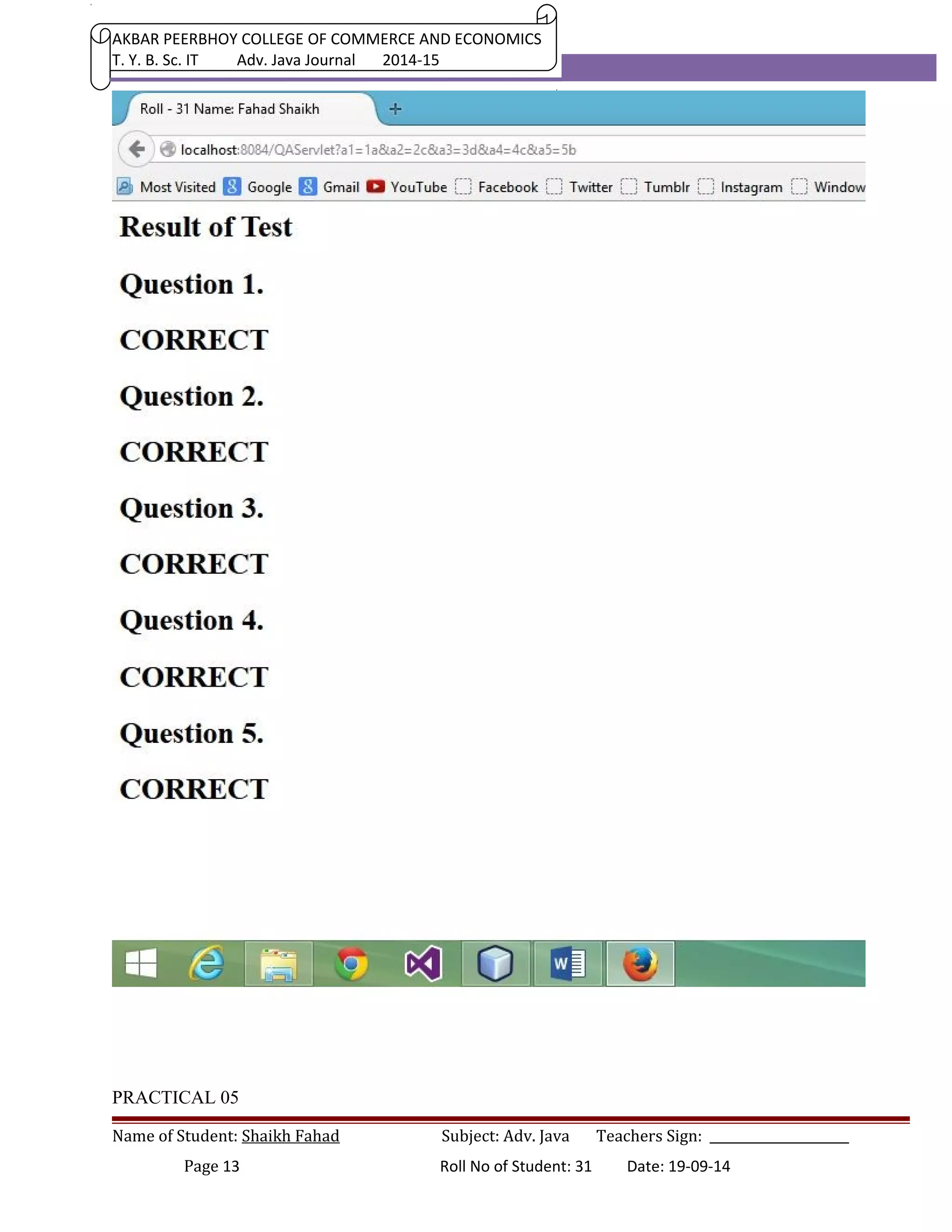
pw.println("<head><title>Roll No:31 Name: Shaikh Fahad</title></head>");pw.print("<h1>Result of 
Test </h1>"); 
pw.println("<h1> Question 1. </h1>"); 
if(hreq.getParameter("a1").equals("1a")) pw.println("<h1>CORRECT</h1>"); 
else pw.println("<h1>INCORRECT</h1>"); 
pw.println("<h1> Question 2. </h1>"); 
if(hreq.getParameter("a2").equals("2c")) pw.println("<h1>CORRECT</h1>"); 
else pw.println("<h1>INCORRECT</h1>"); 
pw.println("<h1> Question 3. </h1>"); 
if(hreq.getParameter("a3").equals("3d")) pw.println("<h1>CORRECT</h1>"); 
else pw.println("<h1>INCORRECT</h1>"); 
pw.println("<h1> Question 4. </h1>"); 
if(hreq.getParameter("a4").equals("4c")) pw.println("<h1>CORRECT</h1>"); 
else pw.println("<h1>INCORRECT</h1>"); 
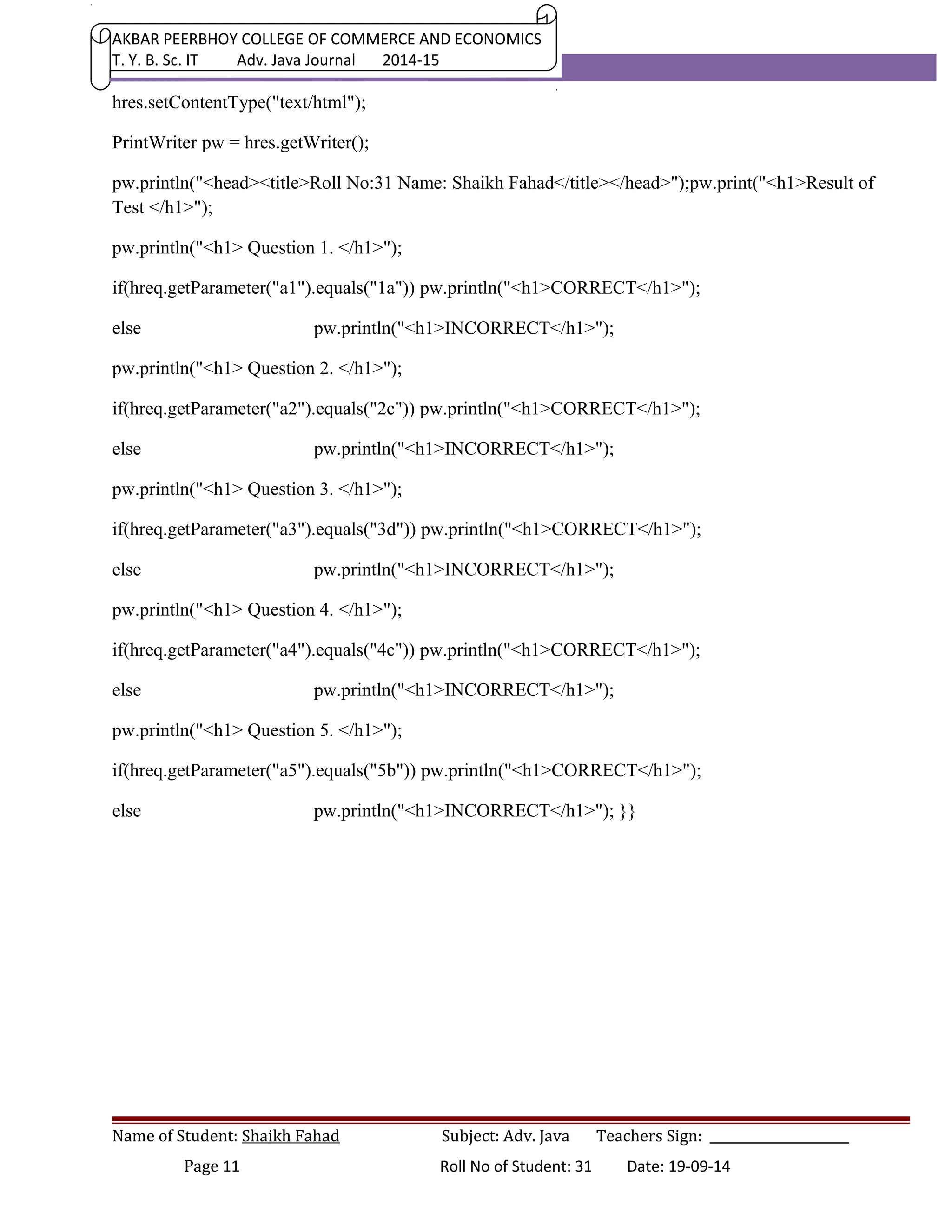
pw.println("<h1> Question 5. </h1>"); 
if(hreq.getParameter("a5").equals("5b")) pw.println("<h1>CORRECT</h1>"); 
else pw.println("<h1>INCORRECT</h1>"); }} 
Name of Student: Shaikh Fahad Subject: Adv. Java Teachers Sign: ______________________ 
Page 11 Roll No of Student: 31 Date: 19-09-14
AKBAR PEERBHOY COLLEGE OF COMMERCE AND ECONOMICS 
T. Y. B. Sc. IT Adv. Java Journal 2014-15 
Name of Student: Shaikh Fahad Subject: Adv. Java Teachers Sign: ______________________ 
Page 12 Roll No of Student: 31 Date: 19-09-14
AKBAR PEERBHOY COLLEGE OF COMMERCE AND ECONOMICS 
T. Y. B. Sc. IT Adv. Java Journal 2014-15 
PRACTICAL 05 
Name of Student: Shaikh Fahad Subject: Adv. Java Teachers Sign: ______________________ 
Page 13 Roll No of Student: 31 Date: 19-09-14
AKBAR PEERBHOY COLLEGE OF COMMERCE AND ECONOMICS 
T. Y. B. Sc. IT Adv. Java Journal 2014-15 
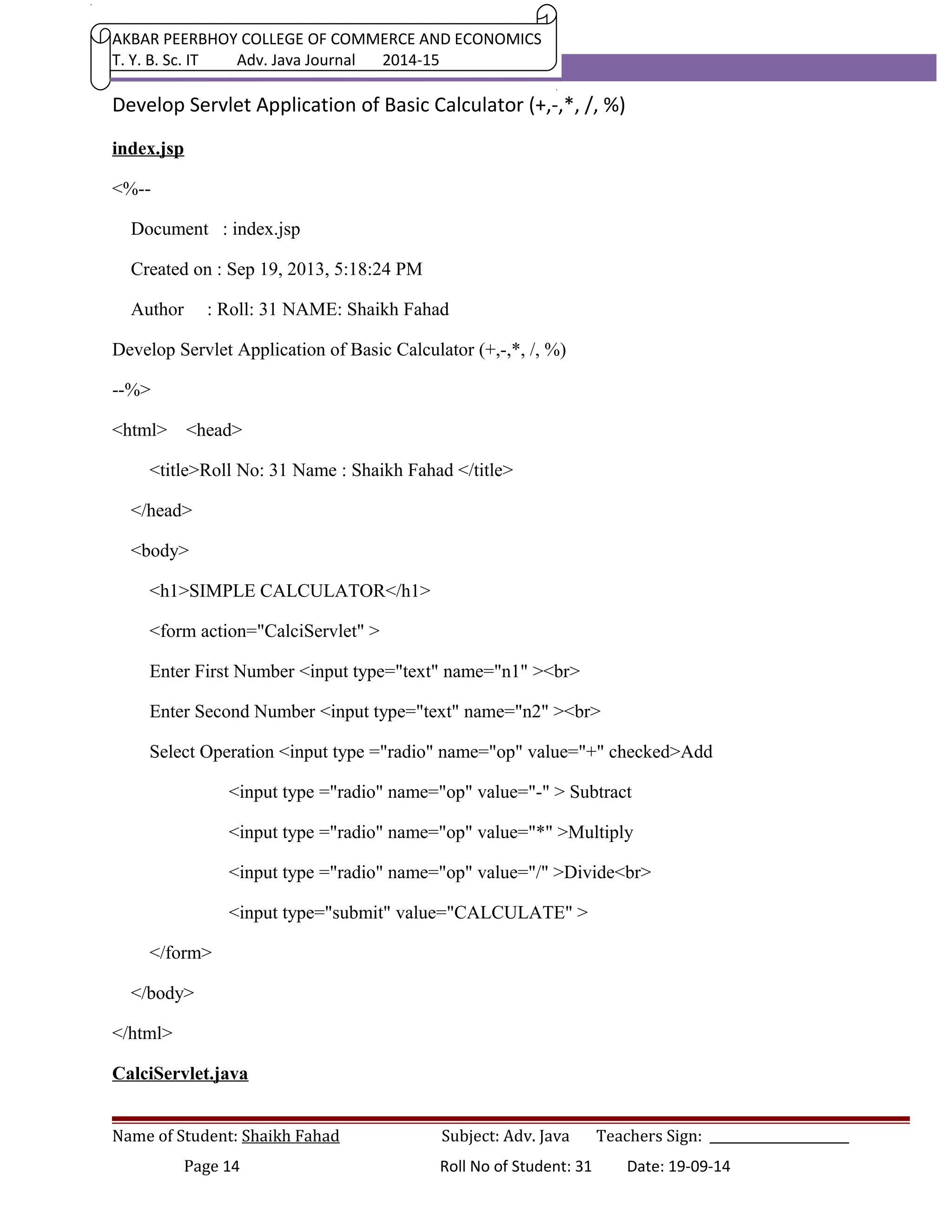
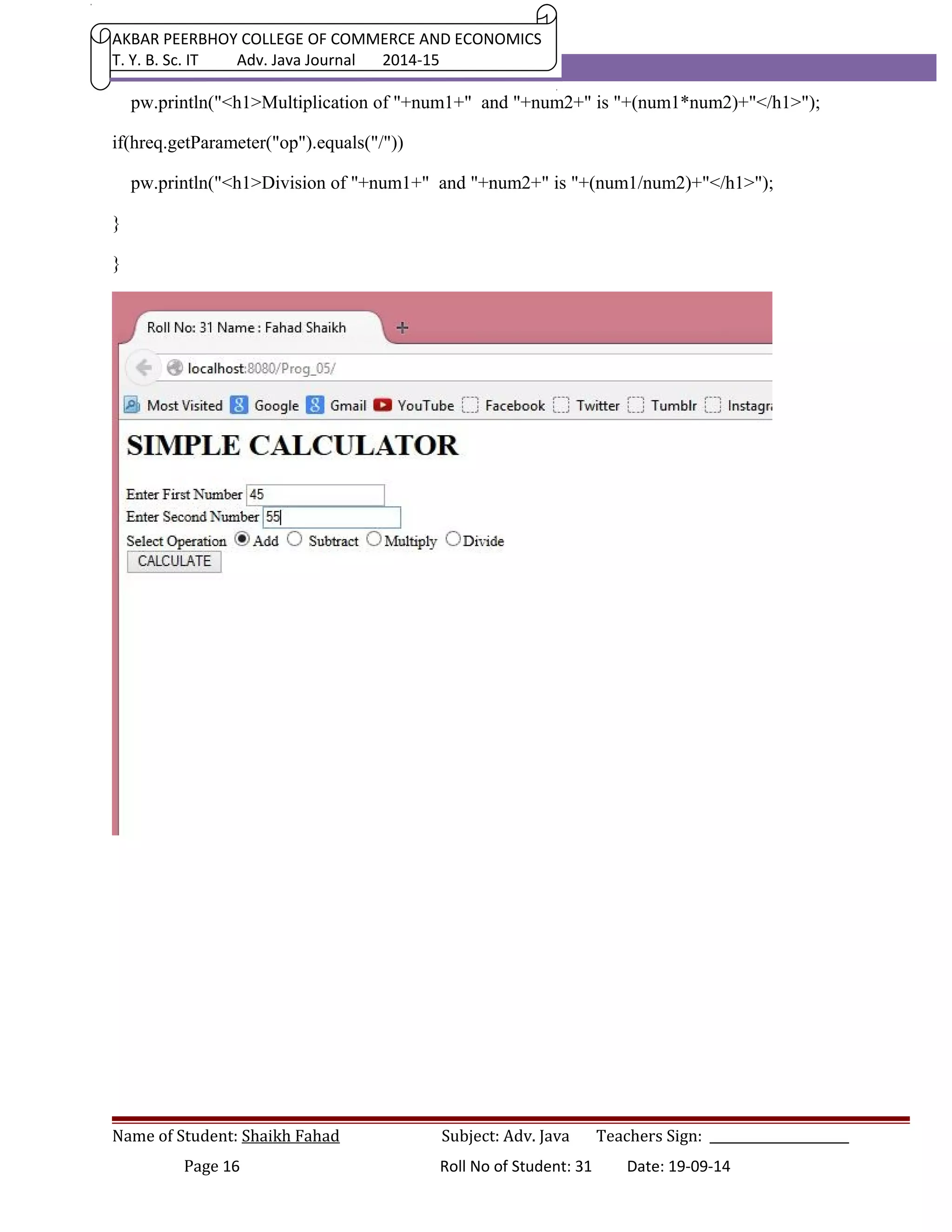
Develop Servlet Application of Basic Calculator (+,-,*, /, %) 
index.jsp 
<%-- 
Document : index.jsp 
Created on : Sep 19, 2013, 5:18:24 PM 
Author : Roll: 31 NAME: Shaikh Fahad 
Develop Servlet Application of Basic Calculator (+,-,*, /, %) 
--%> 
<html> <head> 
<title>Roll No: 31 Name : Shaikh Fahad </title> 
</head> 
<body> 
<h1>SIMPLE CALCULATOR</h1> 
<form action="CalciServlet" > 
Enter First Number <input type="text" name="n1" ><br> 
Enter Second Number <input type="text" name="n2" ><br> 
Select Operation <input type ="radio" name="op" value="+" checked>Add 
<input type ="radio" name="op" value="-" > Subtract 
<input type ="radio" name="op" value="*" >Multiply 
<input type ="radio" name="op" value="/" >Divide<br> 
<input type="submit" value="CALCULATE" > 
</form> 
</body> 
</html> 
CalciServlet.java 
Name of Student: Shaikh Fahad Subject: Adv. Java Teachers Sign: ______________________ 
Page 14 Roll No of Student: 31 Date: 19-09-14
AKBAR PEERBHOY COLLEGE OF COMMERCE AND ECONOMICS 
T. Y. B. Sc. IT Adv. Java Journal 2014-15 
package MyClasses; 
import java.io.*; 
import javax.servlet.*; 
import javax.servlet.http.*; 
/** 
* 
* @author Roll: 31 Name: Shaikh Fahad 
* Develop Servlet Application of Basic Calculator (+,-,*, /, %) 
*/ 
public class CalciServlet extends HttpServlet { 
public void service(HttpServletRequest hreq, HttpServletResponse hres) 
throws ServletException, IOException 
{ 
PrintWriter pw = hres.getWriter(); 
hres.setContentType("Text/html"); 
double num1 = Double.parseDouble(hreq.getParameter("n1")); 
double num2 = Double.parseDouble(hreq.getParameter("n2")); 
pw.println("<html><head><title>Roll:31Name: Shaikh Fahad </title><head>"); 
pw.println("<h1>Roll:31 Name: Shaikh Fahad </h1>"); 
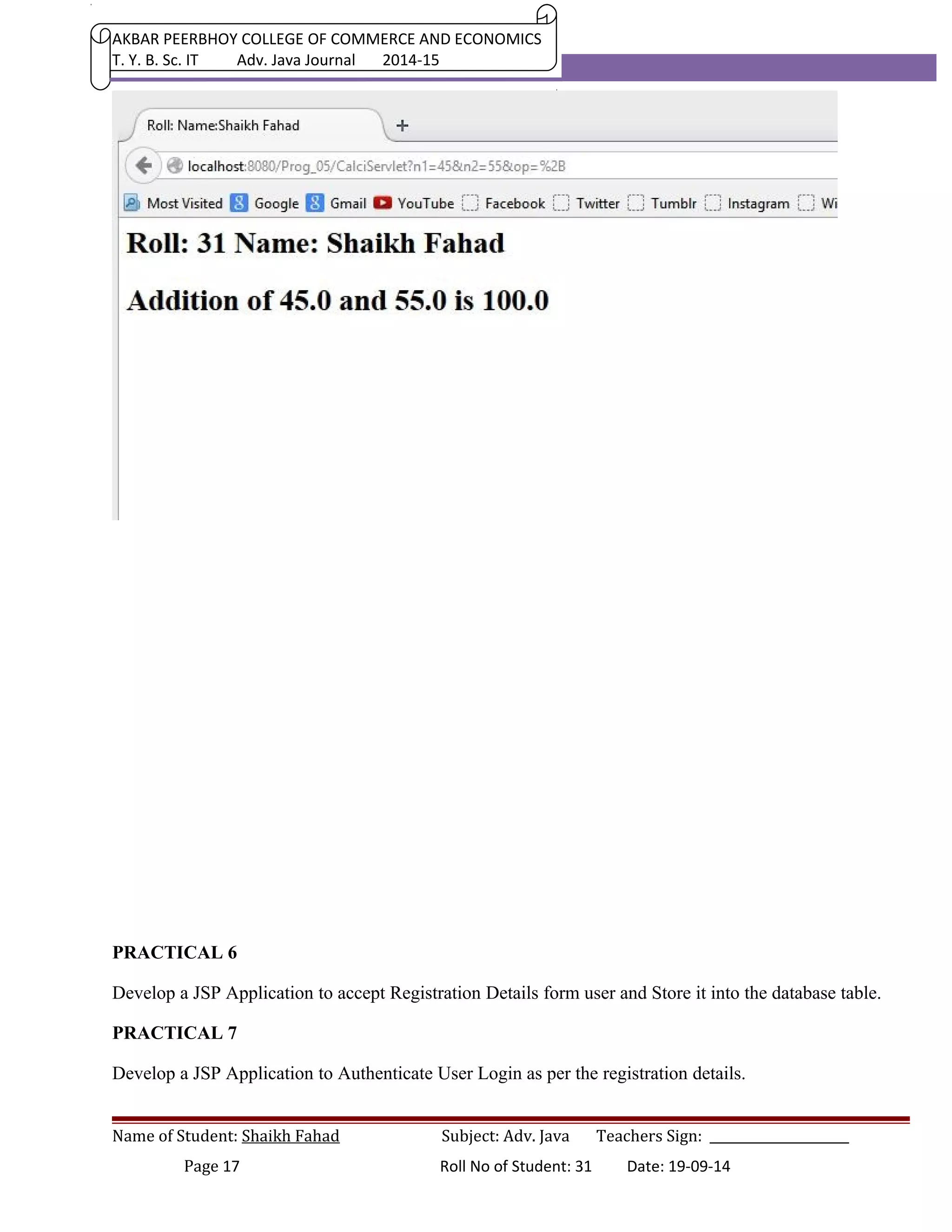
if(hreq.getParameter("op").equals("+")) 
pw.println("<h1>Addition of "+num1+" and "+num2+" is "+(num1+num2)+"</h1>"); 
if(hreq.getParameter("op").equals("-")) 
pw.println("<h1>Subtraction of "+num1+" and "+num2+" is "+(num1-num2)+"</h1>"); 
if(hreq.getParameter("op").equals("*")) 
Name of Student: Shaikh Fahad Subject: Adv. Java Teachers Sign: ______________________ 
Page 15 Roll No of Student: 31 Date: 19-09-14
AKBAR PEERBHOY COLLEGE OF COMMERCE AND ECONOMICS 
T. Y. B. Sc. IT Adv. Java Journal 2014-15 
pw.println("<h1>Multiplication of "+num1+" and "+num2+" is "+(num1*num2)+"</h1>"); 
if(hreq.getParameter("op").equals("/")) 
pw.println("<h1>Division of "+num1+" and "+num2+" is "+(num1/num2)+"</h1>"); 
} 
} 
Name of Student: Shaikh Fahad Subject: Adv. Java Teachers Sign: ______________________ 
Page 16 Roll No of Student: 31 Date: 19-09-14
AKBAR PEERBHOY COLLEGE OF COMMERCE AND ECONOMICS 
T. Y. B. Sc. IT Adv. Java Journal 2014-15 
PRACTICAL 6 
Develop a JSP Application to accept Registration Details form user and Store it into the database table. 
PRACTICAL 7 
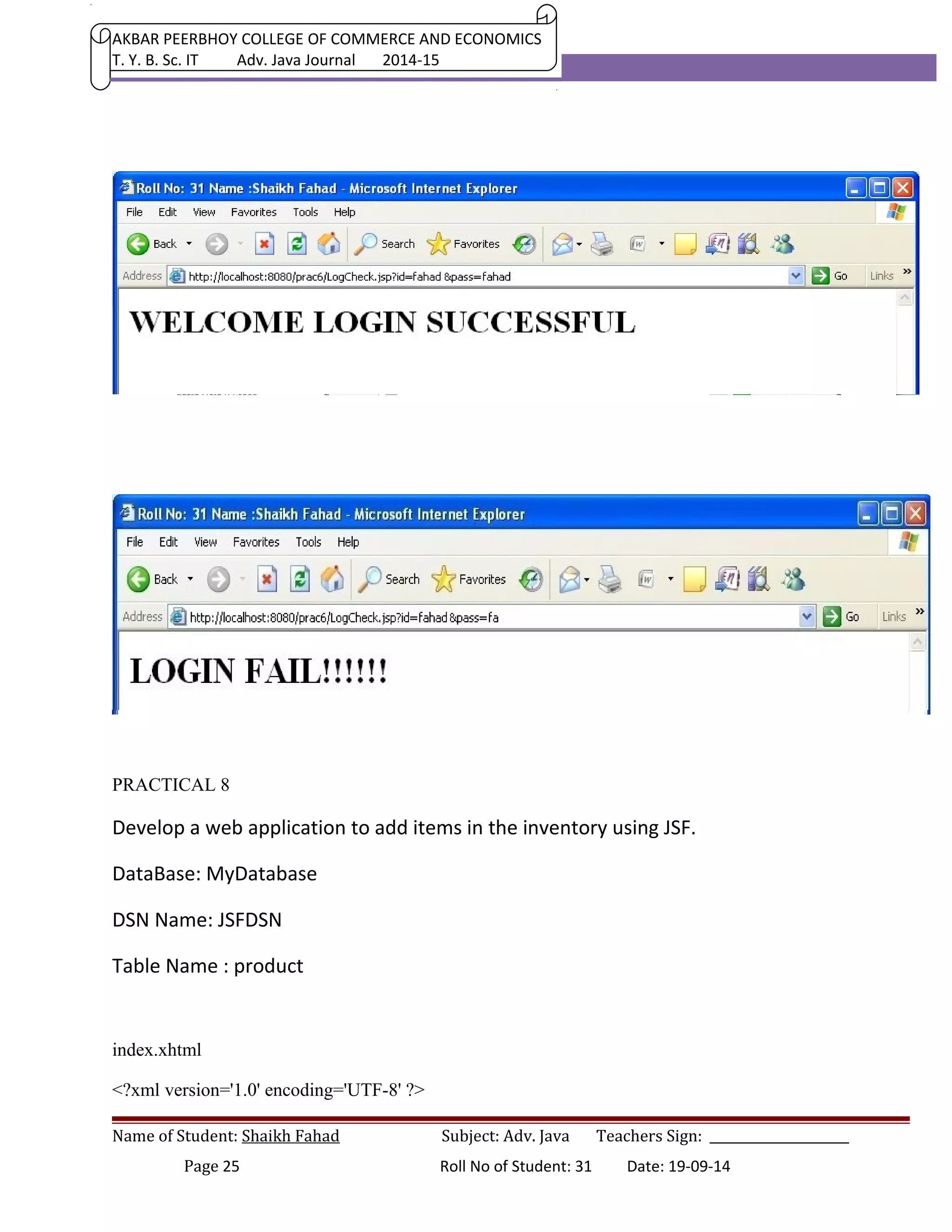
Develop a JSP Application to Authenticate User Login as per the registration details. 
Name of Student: Shaikh Fahad Subject: Adv. Java Teachers Sign: ______________________ 
Page 17 Roll No of Student: 31 Date: 19-09-14
AKBAR PEERBHOY COLLEGE OF COMMERCE AND ECONOMICS 
T. Y. B. Sc. IT Adv. Java Journal 2014-15 
If login success the forward user to Index Page otherwise show login failure Message. 
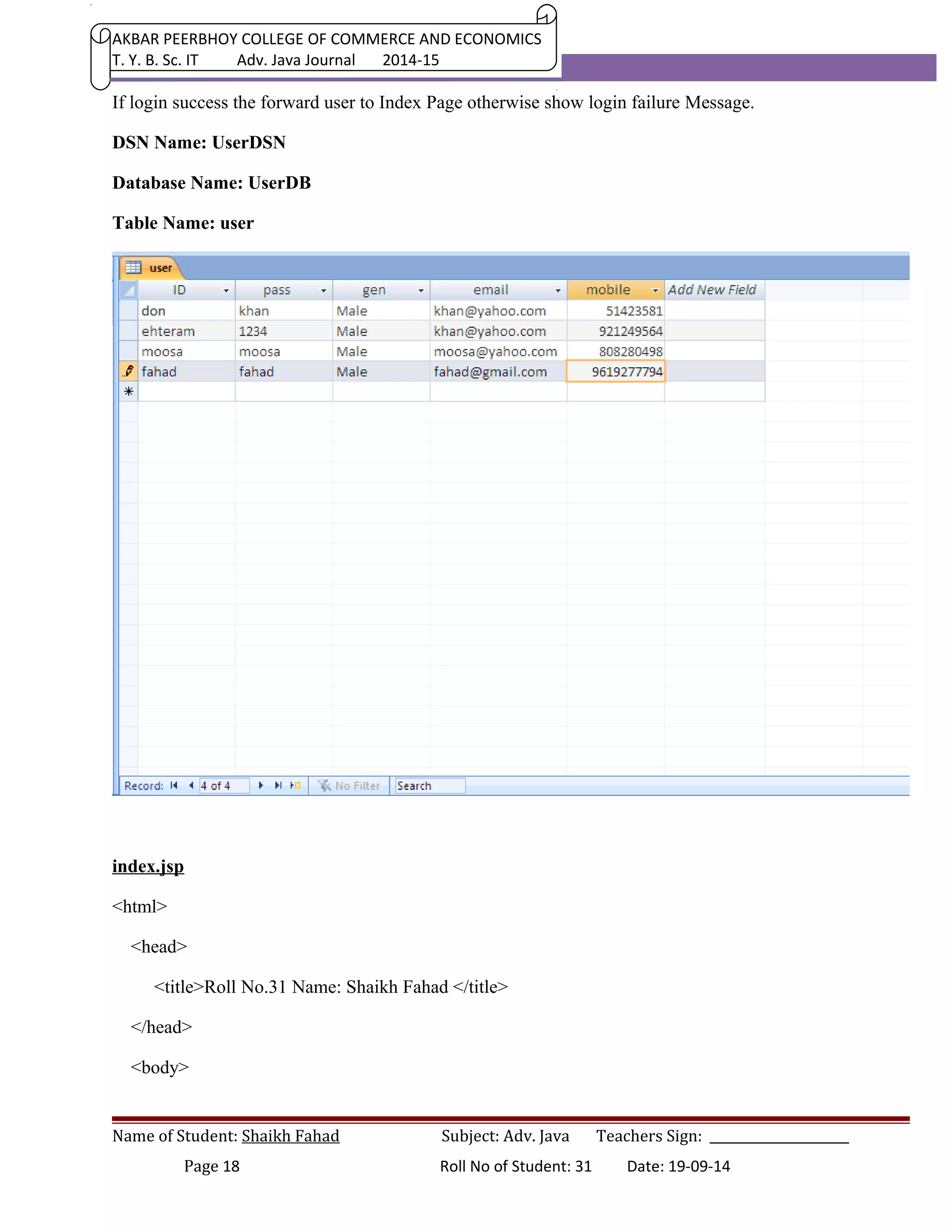
DSN Name: UserDSN 
Database Name: UserDB 
Table Name: user 
index.jsp 
<html> 
<head> 
<title>Roll No.31 Name: Shaikh Fahad </title> 
</head> 
<body> 
Name of Student: Shaikh Fahad Subject: Adv. Java Teachers Sign: ______________________ 
Page 18 Roll No of Student: 31 Date: 19-09-14
AKBAR PEERBHOY COLLEGE OF COMMERCE AND ECONOMICS 
T. Y. B. Sc. IT Adv. Java Journal 2014-15 
<h1>Roll No.31 Name: Shaikh Fahad </h1> 
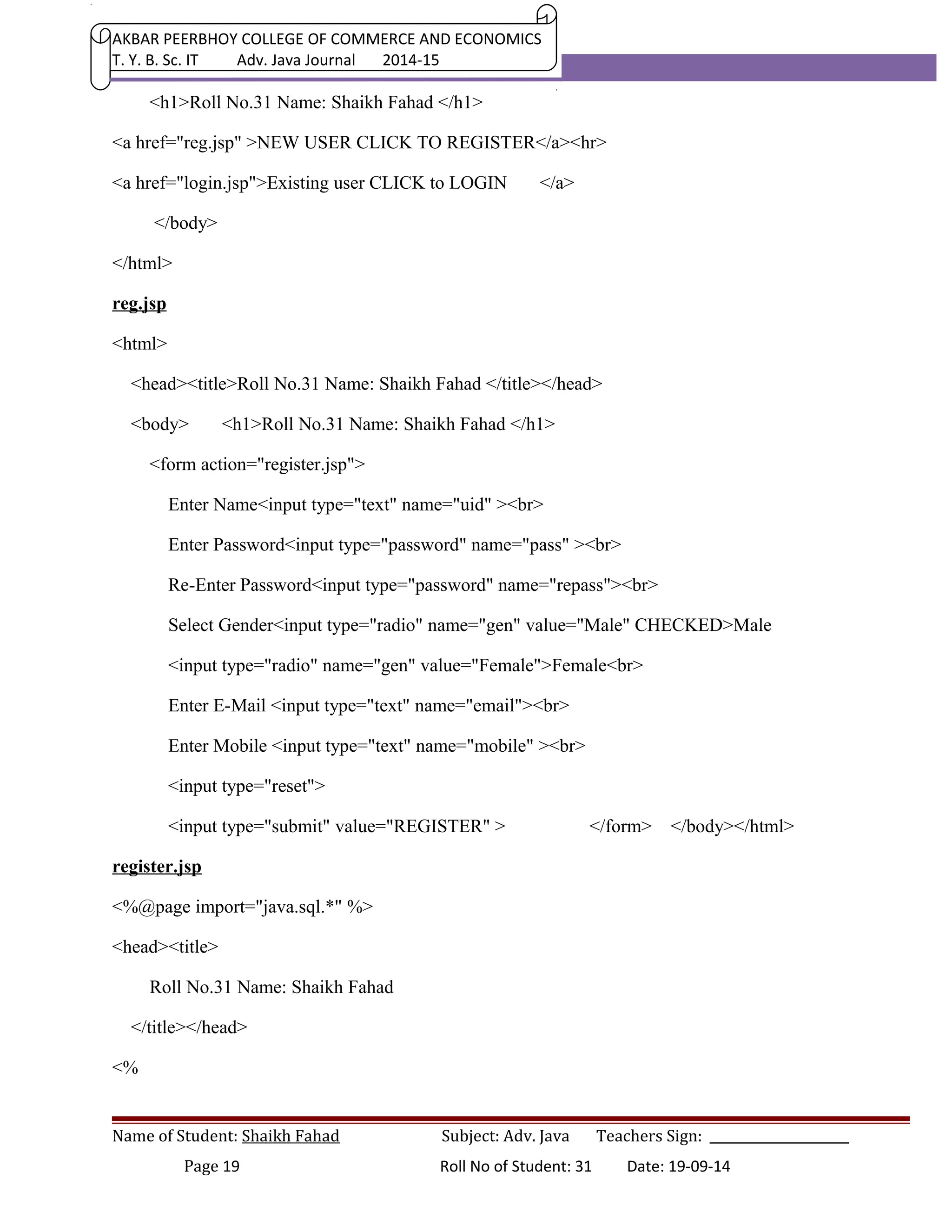
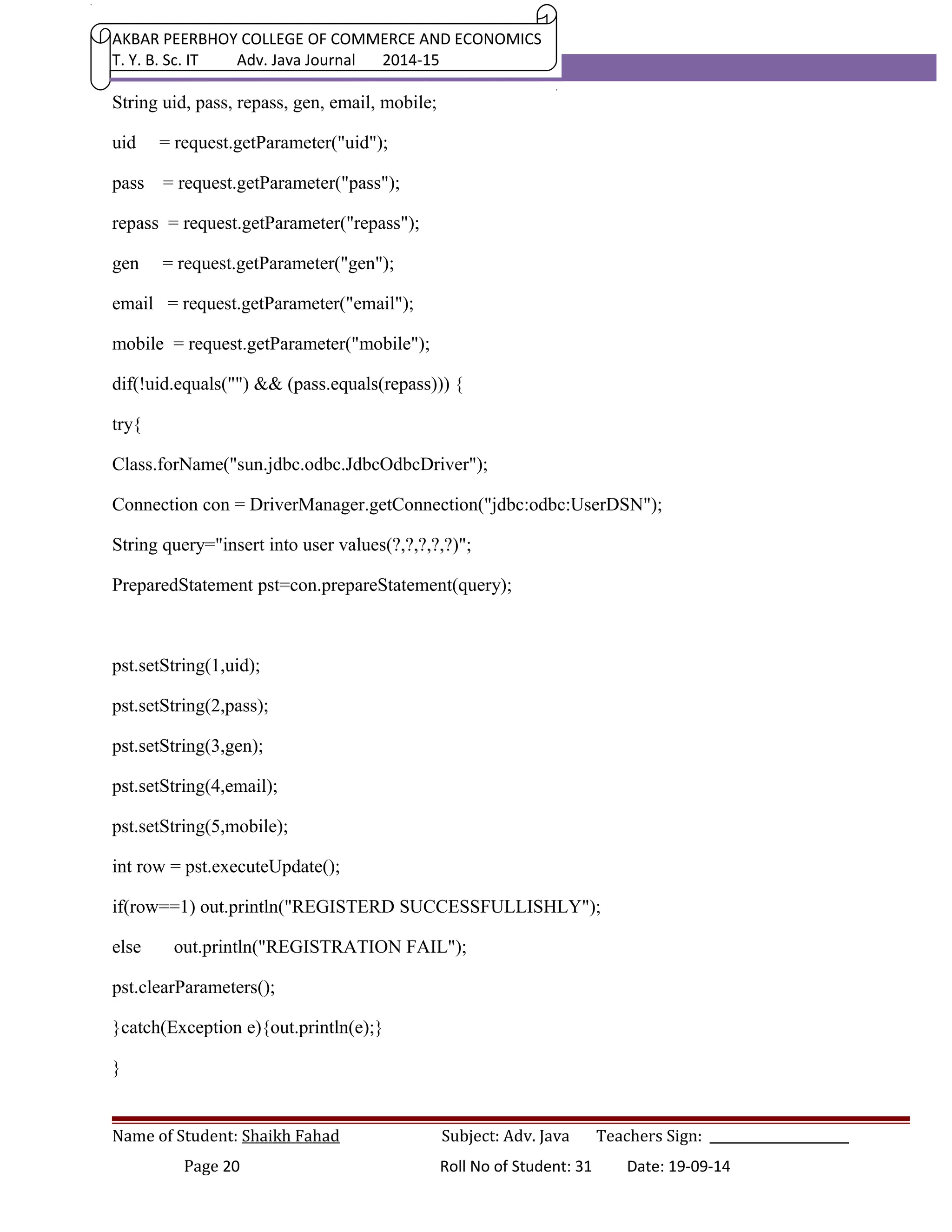
<a href="reg.jsp" >NEW USER CLICK TO REGISTER</a><hr> 
<a href="login.jsp">Existing user CLICK to LOGIN </a> 
</body> 
</html> 
reg.jsp 
<html> 
<head><title>Roll No.31 Name: Shaikh Fahad </title></head> 
<body> <h1>Roll No.31 Name: Shaikh Fahad </h1> 
<form action="register.jsp"> 
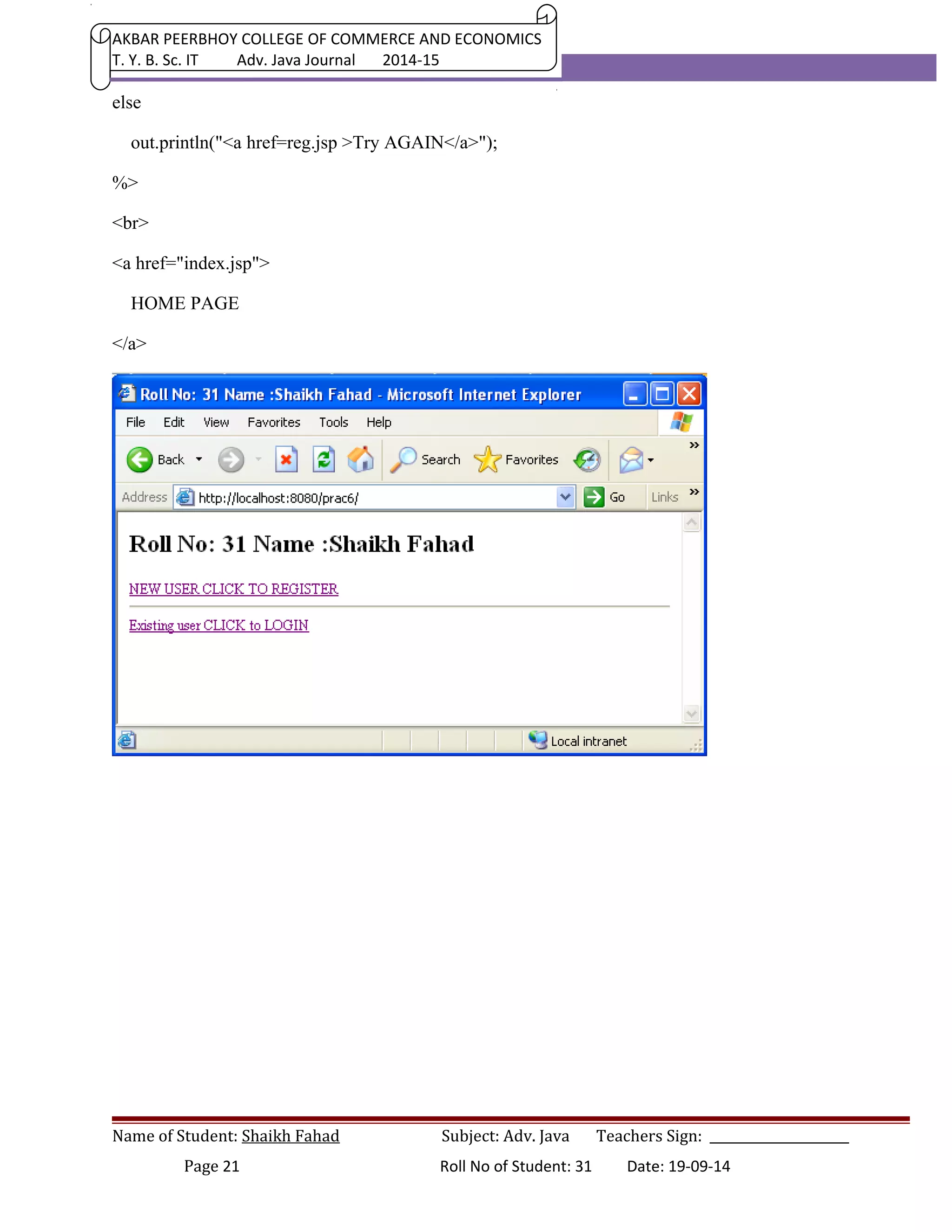
Enter Name<input type="text" name="uid" ><br> 
Enter Password<input type="password" name="pass" ><br> 
Re-Enter Password<input type="password" name="repass"><br> 
Select Gender<input type="radio" name="gen" value="Male" CHECKED>Male 
<input type="radio" name="gen" value="Female">Female<br> 
Enter E-Mail <input type="text" name="email"><br> 
Enter Mobile <input type="text" name="mobile" ><br> 
<input type="reset"> 
<input type="submit" value="REGISTER" > </form> </body></html> 
register.jsp 
<%@page import="java.sql.*" %> 
<head><title> 
Roll No.31 Name: Shaikh Fahad 
</title></head> 
<% 
Name of Student: Shaikh Fahad Subject: Adv. Java Teachers Sign: ______________________ 
Page 19 Roll No of Student: 31 Date: 19-09-14
AKBAR PEERBHOY COLLEGE OF COMMERCE AND ECONOMICS 
T. Y. B. Sc. IT Adv. Java Journal 2014-15 
String uid, pass, repass, gen, email, mobile; 
uid = request.getParameter("uid"); 
pass = request.getParameter("pass"); 
repass = request.getParameter("repass"); 
gen = request.getParameter("gen"); 
email = request.getParameter("email"); 
mobile = request.getParameter("mobile"); 
dif(!uid.equals("") && (pass.equals(repass))) { 
try{ 
Class.forName("sun.jdbc.odbc.JdbcOdbcDriver"); 
Connection con = DriverManager.getConnection("jdbc:odbc:UserDSN"); 
String query="insert into user values(?,?,?,?,?)"; 
PreparedStatement pst=con.prepareStatement(query); 
pst.setString(1,uid); 
pst.setString(2,pass); 
pst.setString(3,gen); 
pst.setString(4,email); 
pst.setString(5,mobile); 
int row = pst.executeUpdate(); 
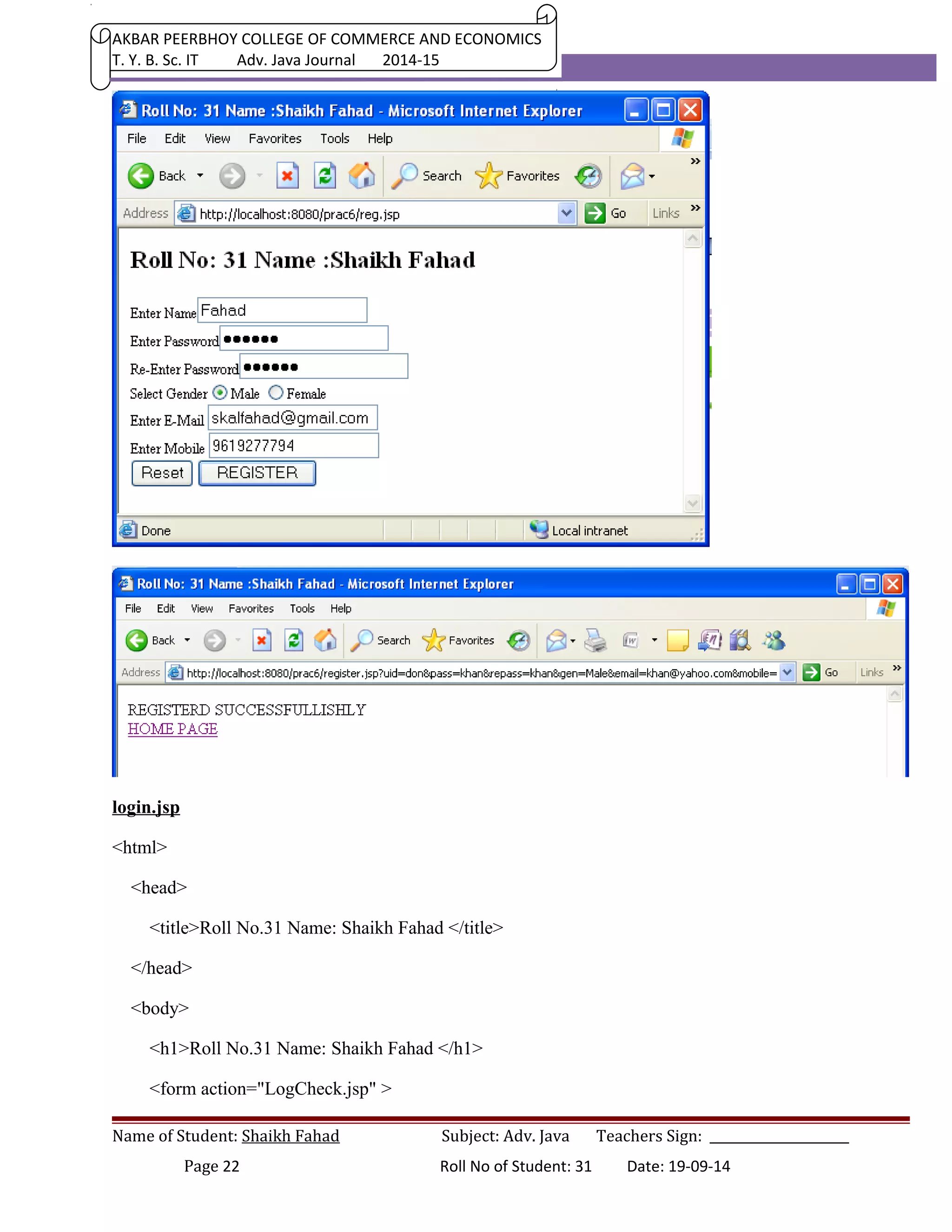
if(row==1) out.println("REGISTERD SUCCESSFULLISHLY"); 
else out.println("REGISTRATION FAIL"); 
pst.clearParameters(); 
}catch(Exception e){out.println(e);} 
} 
Name of Student: Shaikh Fahad Subject: Adv. Java Teachers Sign: ______________________ 
Page 20 Roll No of Student: 31 Date: 19-09-14
AKBAR PEERBHOY COLLEGE OF COMMERCE AND ECONOMICS 
T. Y. B. Sc. IT Adv. Java Journal 2014-15 
else 
out.println("<a href=reg.jsp >Try AGAIN</a>"); 
%> 
<br> 
<a href="index.jsp"> 
HOME PAGE 
</a> 
Name of Student: Shaikh Fahad Subject: Adv. Java Teachers Sign: ______________________ 
Page 21 Roll No of Student: 31 Date: 19-09-14
AKBAR PEERBHOY COLLEGE OF COMMERCE AND ECONOMICS 
T. Y. B. Sc. IT Adv. Java Journal 2014-15 
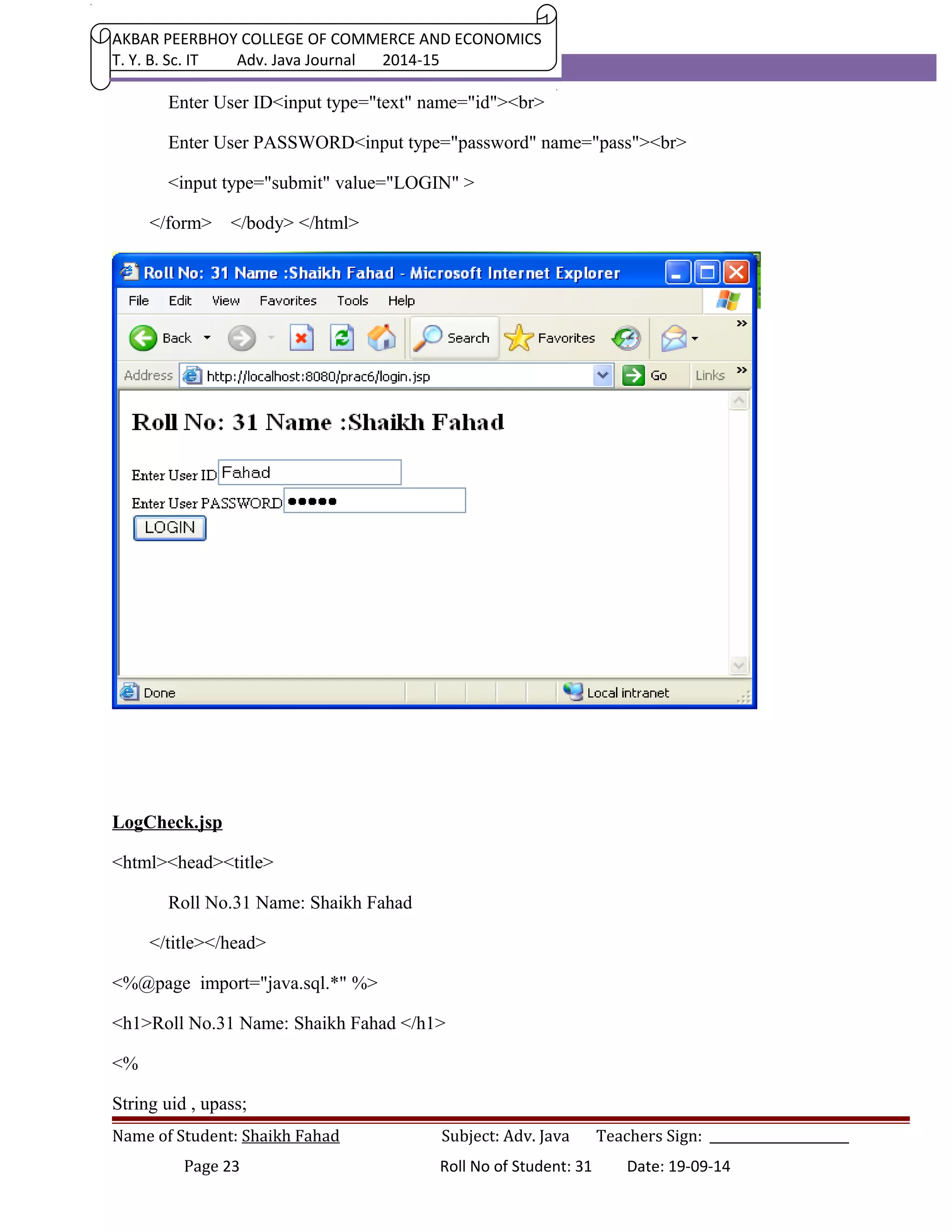
login.jsp 
<html> 
<head> 
<title>Roll No.31 Name: Shaikh Fahad </title> 
</head> 
<body> 
<h1>Roll No.31 Name: Shaikh Fahad </h1> 
<form action="LogCheck.jsp" > 
Name of Student: Shaikh Fahad Subject: Adv. Java Teachers Sign: ______________________ 
Page 22 Roll No of Student: 31 Date: 19-09-14
AKBAR PEERBHOY COLLEGE OF COMMERCE AND ECONOMICS 
T. Y. B. Sc. IT Adv. Java Journal 2014-15 
Enter User ID<input type="text" name="id"><br> 
Enter User PASSWORD<input type="password" name="pass"><br> 
<input type="submit" value="LOGIN" > 
</form> </body> </html> 
LogCheck.jsp 
<html><head><title> 
Roll No.31 Name: Shaikh Fahad 
</title></head> 
<%@page import="java.sql.*" %> 
<h1>Roll No.31 Name: Shaikh Fahad </h1> 
<% 
String uid , upass; 
Name of Student: Shaikh Fahad Subject: Adv. Java Teachers Sign: ______________________ 
Page 23 Roll No of Student: 31 Date: 19-09-14
AKBAR PEERBHOY COLLEGE OF COMMERCE AND ECONOMICS 
T. Y. B. Sc. IT Adv. Java Journal 2014-15 
uid = request.getParameter("id"); 
upass=request.getParameter("pass"); 
try{ 
Class.forName("sun.jdbc.odbc.JdbcOdbcDriver"); 
Connection con = DriverManager.getConnection("jdbc:odbc:UserDSN"); 
String query="select pass from user where ID=?"; 
PreparedStatement pst=con.prepareStatement(query); 
pst.setString(1,uid); 
ResultSet rs = pst.executeQuery(); 
if(rs.next()){ 
if(rs.getString(1).equals(upass)) 
{%> 
<jsp:forward page="success.jsp"></jsp:forward> 
<% 
} 
else{ 
%> 
<jsp:forward page="fail.jsp"></jsp:forward> 
<% 
} 
} 
else {out.println("USER NOT EXIST");} 
}catch(Exception e){out.print(e);} 
%> 
Name of Student: Shaikh Fahad Subject: Adv. Java Teachers Sign: ______________________ 
Page 24 Roll No of Student: 31 Date: 19-09-14
AKBAR PEERBHOY COLLEGE OF COMMERCE AND ECONOMICS 
T. Y. B. Sc. IT Adv. Java Journal 2014-15 
PRACTICAL 8 
Develop a web application to add items in the inventory using JSF. 
DataBase: MyDatabase 
DSN Name: JSFDSN 
Table Name : product 
index.xhtml 
<?xml version='1.0' encoding='UTF-8' ?> 
Name of Student: Shaikh Fahad Subject: Adv. Java Teachers Sign: ______________________ 
Page 25 Roll No of Student: 31 Date: 19-09-14
AKBAR PEERBHOY COLLEGE OF COMMERCE AND ECONOMICS 
T. Y. B. Sc. IT Adv. Java Journal 2014-15 
<html xmlns="http://www.w3.org/1999/xhtml" 
xmlns:h="http://java.sun.com/jsf/html" 
xmlns:f="http://java.sun.com/jsf/core"> 
<h:head> 
<title>Roll No.31 Name: Shaikh Fahad </title> 
</h:head> 
<h:body> 
<h1>Roll No.31 Name: Shaikh Fahad </h1> 
<h:form> 
<h:outputLabel for="txtName" > 
<h:outputText value="Enter Product Name" /> 
</h:outputLabel> 
<h:inputText id="txtName" value="#{p.name}" > 
</h:inputText> 
<br></br> 
<h:outputLabel for="txtQty" > 
<h:outputText value="Enter Product Quantity" /> 
</h:outputLabel> 
<h:inputText id="txtQty" value="#{p.qty}" > 
</h:inputText> 
<br></br> 
<h:outputLabel for="txtPrice" > 
<h:outputText value="Enter Unit Price" /> 
</h:outputLabel> 
Name of Student: Shaikh Fahad Subject: Adv. Java Teachers Sign: ______________________ 
Page 26 Roll No of Student: 31 Date: 19-09-14
AKBAR PEERBHOY COLLEGE OF COMMERCE AND ECONOMICS 
T. Y. B. Sc. IT Adv. Java Journal 2014-15 
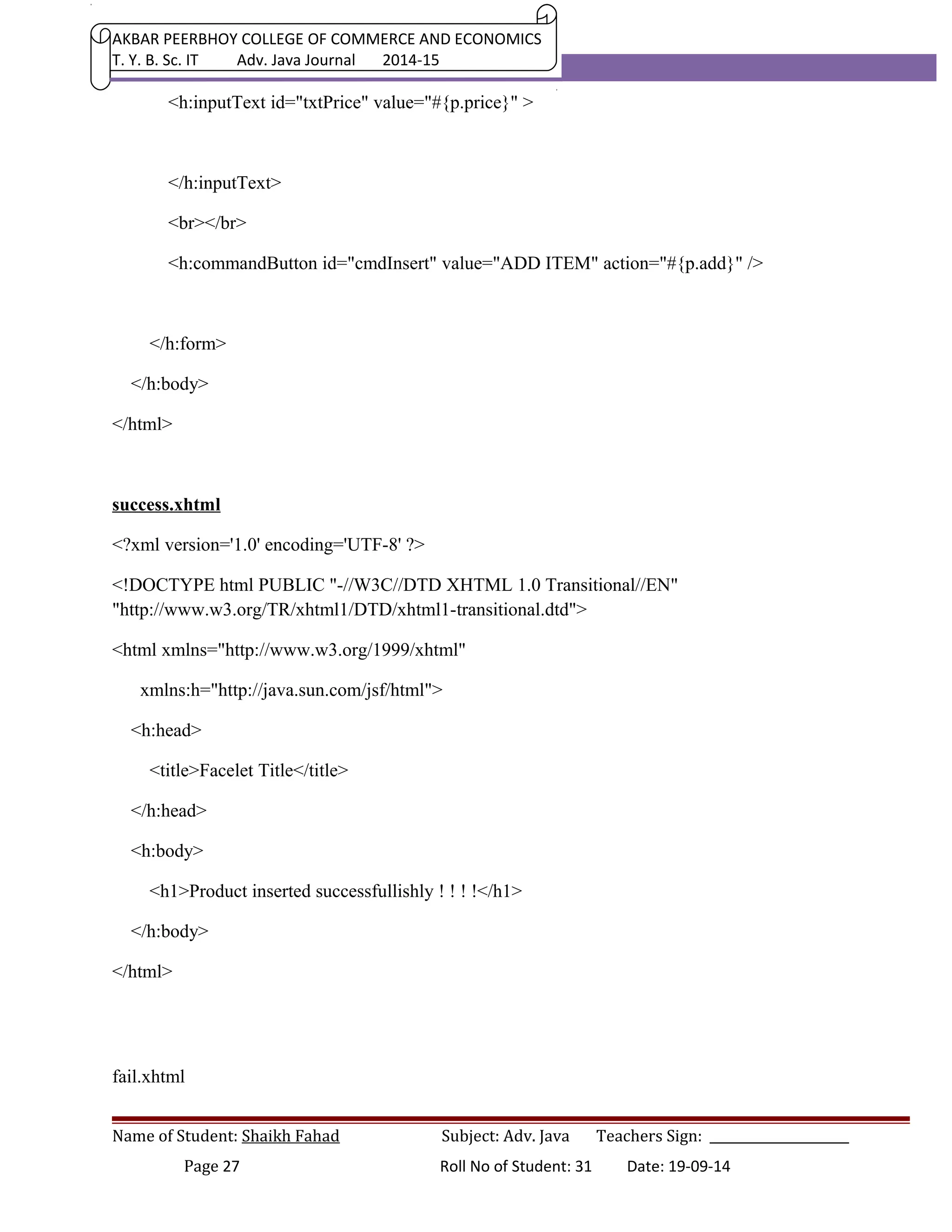
<h:inputText id="txtPrice" value="#{p.price}" > 
</h:inputText> 
<br></br> 
<h:commandButton id="cmdInsert" value="ADD ITEM" action="#{p.add}" /> 
</h:form> 
</h:body> 
</html> 
success.xhtml 
<?xml version='1.0' encoding='UTF-8' ?> 
<!DOCTYPE html PUBLIC "-//W3C//DTD XHTML 1.0 Transitional//EN" 
"http://www.w3.org/TR/xhtml1/DTD/xhtml1-transitional.dtd"> 
<html xmlns="http://www.w3.org/1999/xhtml" 
xmlns:h="http://java.sun.com/jsf/html"> 
<h:head> 
<title>Facelet Title</title> 
</h:head> 
<h:body> 
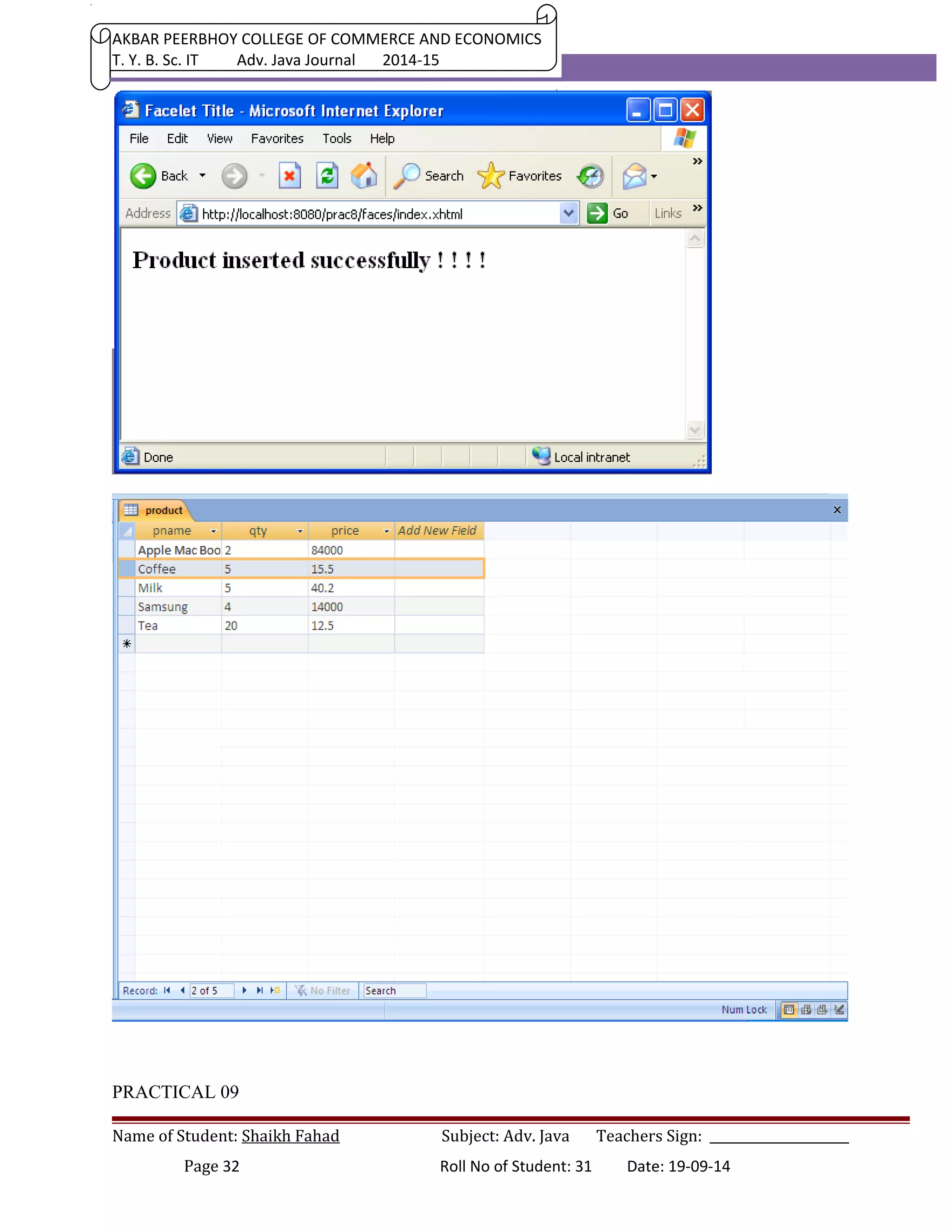
<h1>Product inserted successfullishly ! ! ! !</h1> 
</h:body> 
</html> 
fail.xhtml 
Name of Student: Shaikh Fahad Subject: Adv. Java Teachers Sign: ______________________ 
Page 27 Roll No of Student: 31 Date: 19-09-14
AKBAR PEERBHOY COLLEGE OF COMMERCE AND ECONOMICS 
T. Y. B. Sc. IT Adv. Java Journal 2014-15 
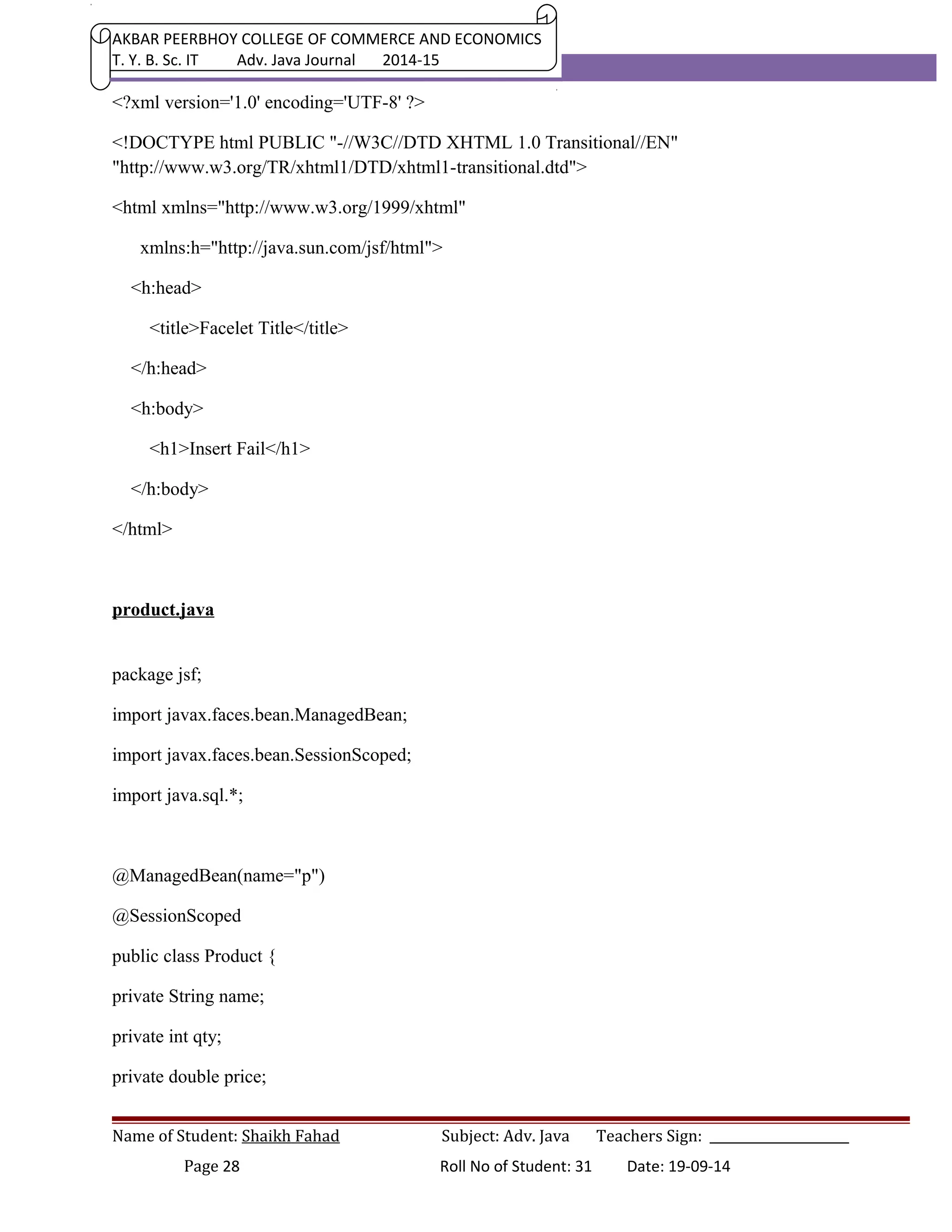
<?xml version='1.0' encoding='UTF-8' ?> 
<!DOCTYPE html PUBLIC "-//W3C//DTD XHTML 1.0 Transitional//EN" 
"http://www.w3.org/TR/xhtml1/DTD/xhtml1-transitional.dtd"> 
<html xmlns="http://www.w3.org/1999/xhtml" 
xmlns:h="http://java.sun.com/jsf/html"> 
<h:head> 
<title>Facelet Title</title> 
</h:head> 
<h:body> 
<h1>Insert Fail</h1> 
</h:body> 
</html> 
product.java 
package jsf; 
import javax.faces.bean.ManagedBean; 
import javax.faces.bean.SessionScoped; 
import java.sql.*; 
@ManagedBean(name="p") 
@SessionScoped 
public class Product { 
private String name; 
private int qty; 
private double price; 
Name of Student: Shaikh Fahad Subject: Adv. Java Teachers Sign: ______________________ 
Page 28 Roll No of Student: 31 Date: 19-09-14
AKBAR PEERBHOY COLLEGE OF COMMERCE AND ECONOMICS 
T. Y. B. Sc. IT Adv. Java Journal 2014-15 
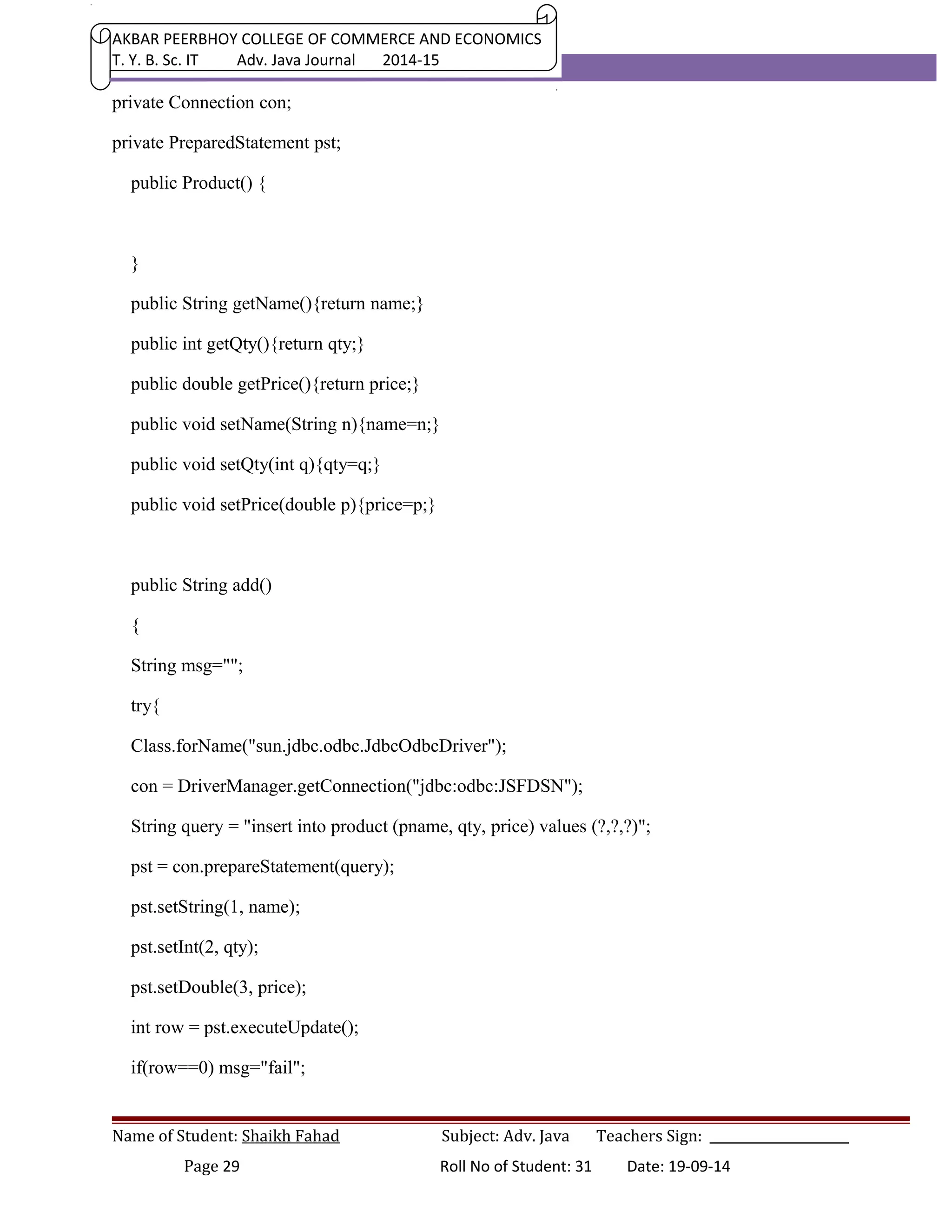
private Connection con; 
private PreparedStatement pst; 
public Product() { 
} 
public String getName(){return name;} 
public int getQty(){return qty;} 
public double getPrice(){return price;} 
public void setName(String n){name=n;} 
public void setQty(int q){qty=q;} 
public void setPrice(double p){price=p;} 
public String add() 
{ 
String msg=""; 
try{ 
Class.forName("sun.jdbc.odbc.JdbcOdbcDriver"); 
con = DriverManager.getConnection("jdbc:odbc:JSFDSN"); 
String query = "insert into product (pname, qty, price) values (?,?,?)"; 
pst = con.prepareStatement(query); 
pst.setString(1, name); 
pst.setInt(2, qty); 
pst.setDouble(3, price); 
int row = pst.executeUpdate(); 
if(row==0) msg="fail"; 
Name of Student: Shaikh Fahad Subject: Adv. Java Teachers Sign: ______________________ 
Page 29 Roll No of Student: 31 Date: 19-09-14
AKBAR PEERBHOY COLLEGE OF COMMERCE AND ECONOMICS 
T. Y. B. Sc. IT Adv. Java Journal 2014-15 
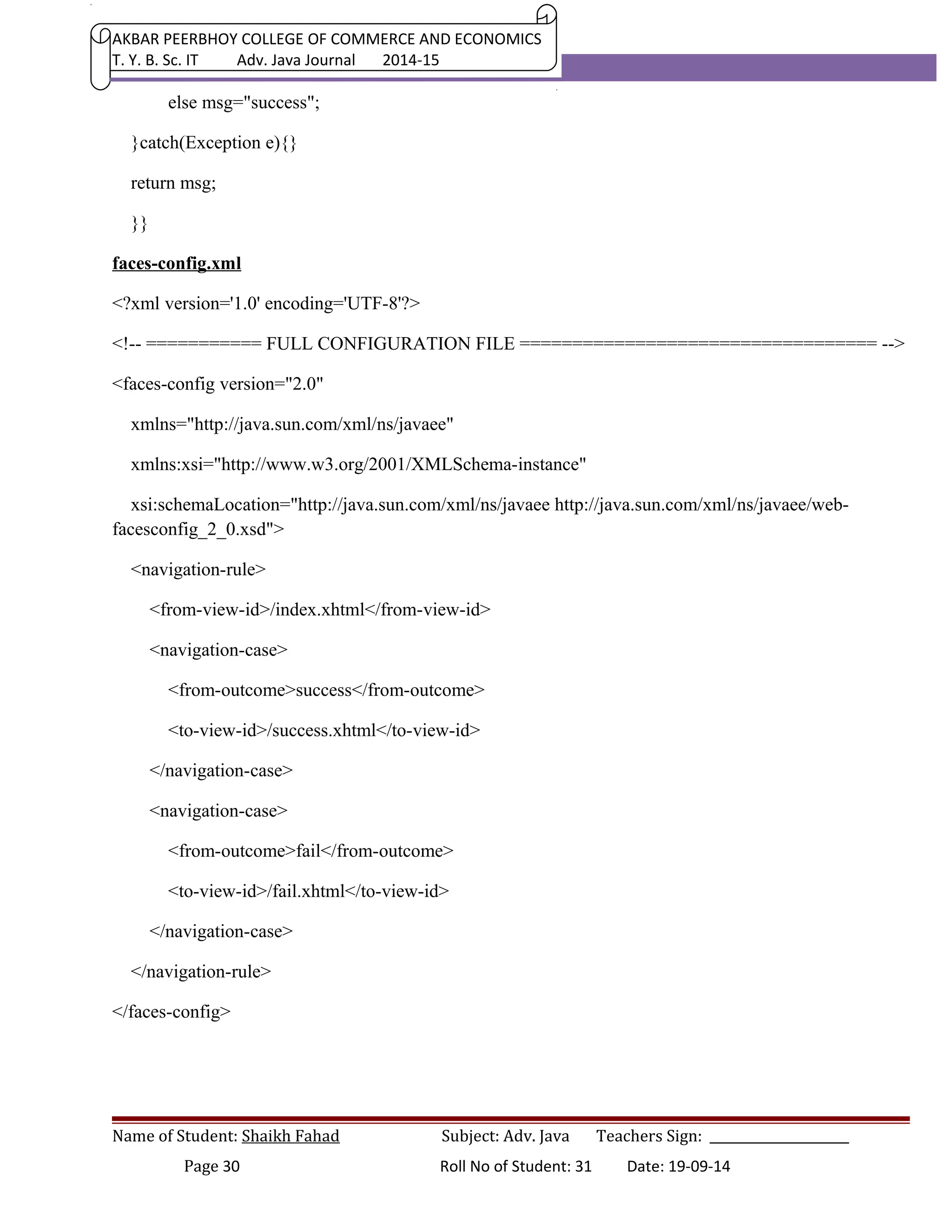
else msg="success"; 
}catch(Exception e){} 
return msg; 
}} 
faces-config.xml 
<?xml version='1.0' encoding='UTF-8'?> 
<!-- =========== FULL CONFIGURATION FILE ================================== --> 
<faces-config version="2.0" 
xmlns="http://java.sun.com/xml/ns/javaee" 
xmlns:xsi="http://www.w3.org/2001/XMLSchema-instance" 
xsi:schemaLocation="http://java.sun.com/xml/ns/javaee http://java.sun.com/xml/ns/javaee/web-facesconfig_ 
2_0.xsd"> 
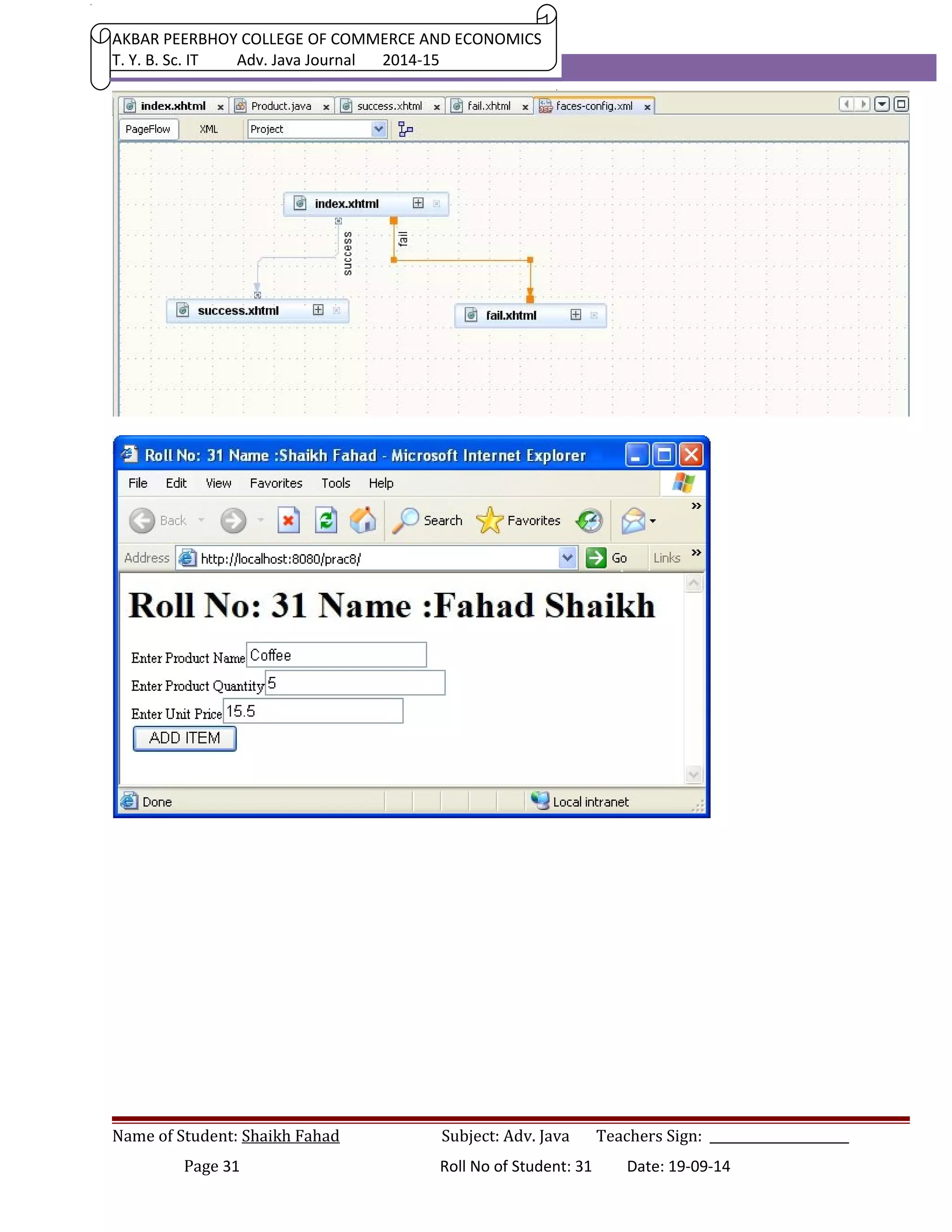
<navigation-rule> 
<from-view-id>/index.xhtml</from-view-id> 
<navigation-case> 
<from-outcome>success</from-outcome> 
<to-view-id>/success.xhtml</to-view-id> 
</navigation-case> 
<navigation-case> 
<from-outcome>fail</from-outcome> 
<to-view-id>/fail.xhtml</to-view-id> 
</navigation-case> 
</navigation-rule> 
</faces-config> 
Name of Student: Shaikh Fahad Subject: Adv. Java Teachers Sign: ______________________ 
Page 30 Roll No of Student: 31 Date: 19-09-14
AKBAR PEERBHOY COLLEGE OF COMMERCE AND ECONOMICS 
T. Y. B. Sc. IT Adv. Java Journal 2014-15 
Name of Student: Shaikh Fahad Subject: Adv. Java Teachers Sign: ______________________ 
Page 31 Roll No of Student: 31 Date: 19-09-14
AKBAR PEERBHOY COLLEGE OF COMMERCE AND ECONOMICS 
T. Y. B. Sc. IT Adv. Java Journal 2014-15 
PRACTICAL 09 
Name of Student: Shaikh Fahad Subject: Adv. Java Teachers Sign: ______________________ 
Page 32 Roll No of Student: 31 Date: 19-09-14
AKBAR PEERBHOY COLLEGE OF COMMERCE AND ECONOMICS 
T. Y. B. Sc. IT Adv. Java Journal 2014-15 
PRACTICAL 09 
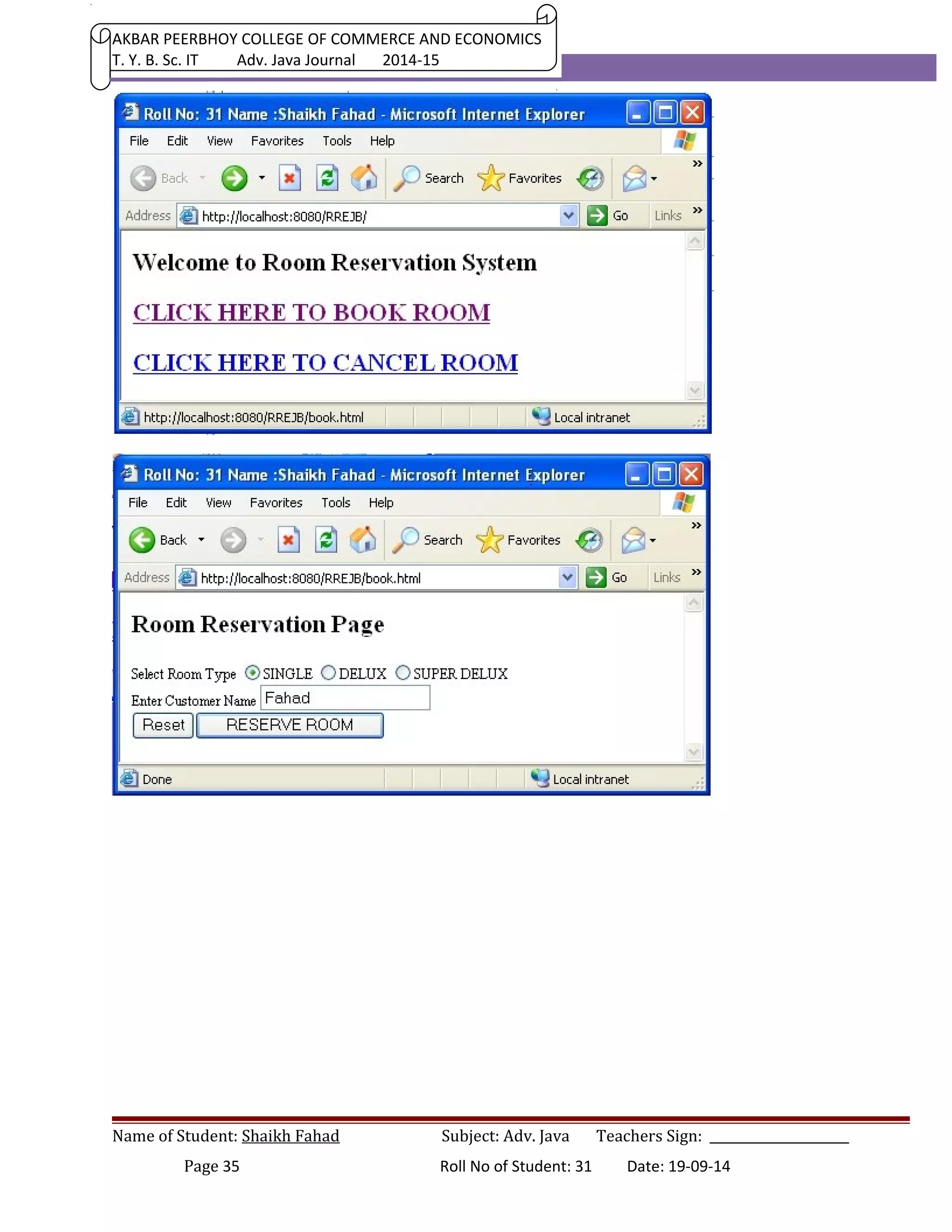
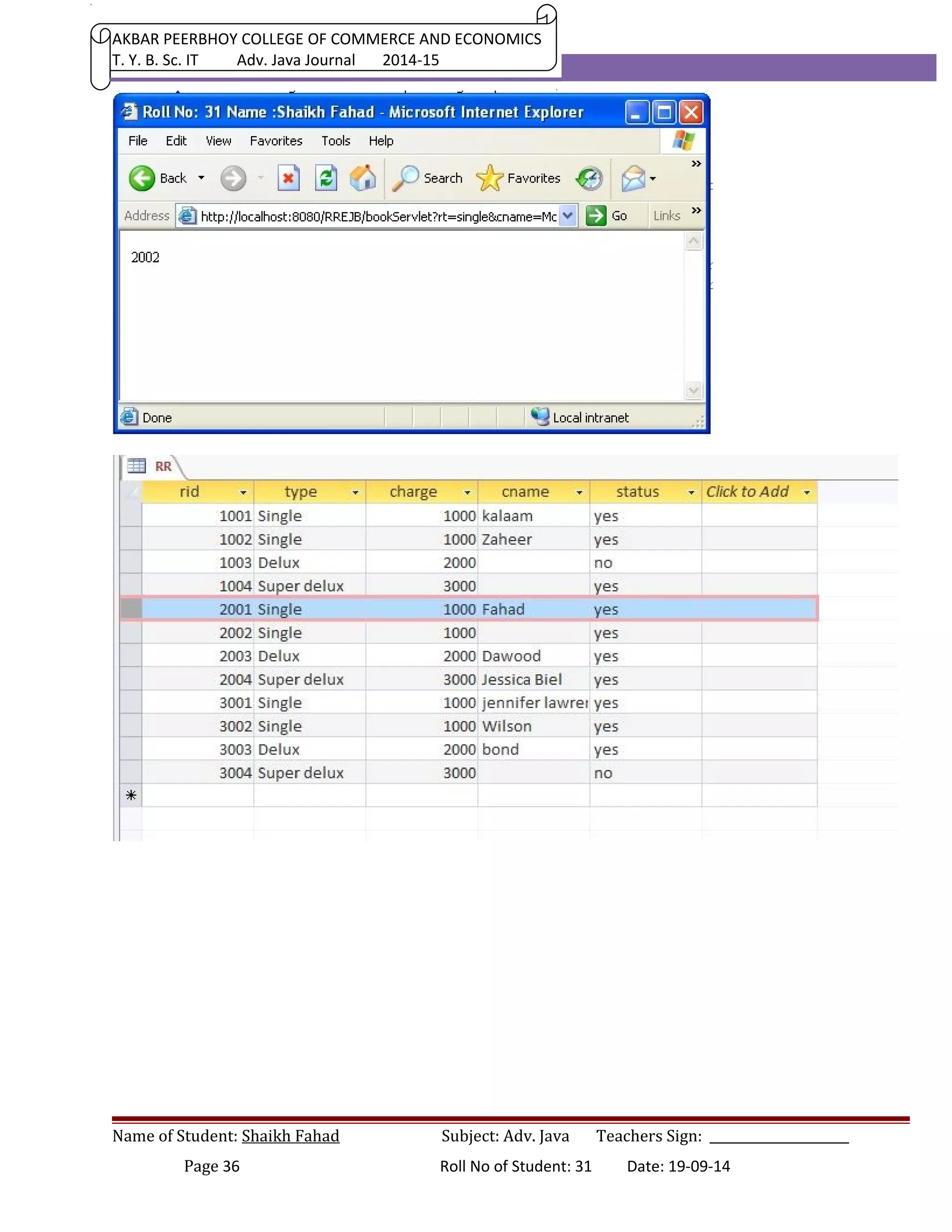
Develop a Room Reservation System Application Using Enterprise Java Beans. 
Index.jsp 
<html> 
<title> Roll No.31 Name: Shaikh Fahad </title> 
<body> 
<h1>Welcome to Room Reservation System</h1> 
<h1><a href="book.html" >CLICK HERE TO BOOK ROOM</a><br></h1> 
<h1><a href="cancel.html" >CLICK HERE TO CANCEL ROOM</a><br></h1> 
</body> 
</html> 
book.html 
<html> 
<head> 
<title> Roll No.31 Name: Shaikh Fahad </title> 
</head> 
<body> 
<h1>Room Reservation Page</h1> 
<form action="bookServlet" > 
Select Room Type 
<input type="radio" name="rt" value="single" checked >SINGLE 
<input type="radio" name="rt" value="delux" >DELUX 
<input type="radio" name="rt" value="super delux" >SUPER DELUX<br> 
Enter Customer Name <input type="text" name="cname" ><br> 
<input type="reset" ><input type="submit" value="RESERVE ROOM" > 
Name of Student: Shaikh Fahad Subject: Adv. Java Teachers Sign: ______________________ 
Page 33 Roll No of Student: 31 Date: 19-09-14
AKBAR PEERBHOY COLLEGE OF COMMERCE AND ECONOMICS 
T. Y. B. Sc. IT Adv. Java Journal 2014-15 
</form> 
</body> 
</html> 
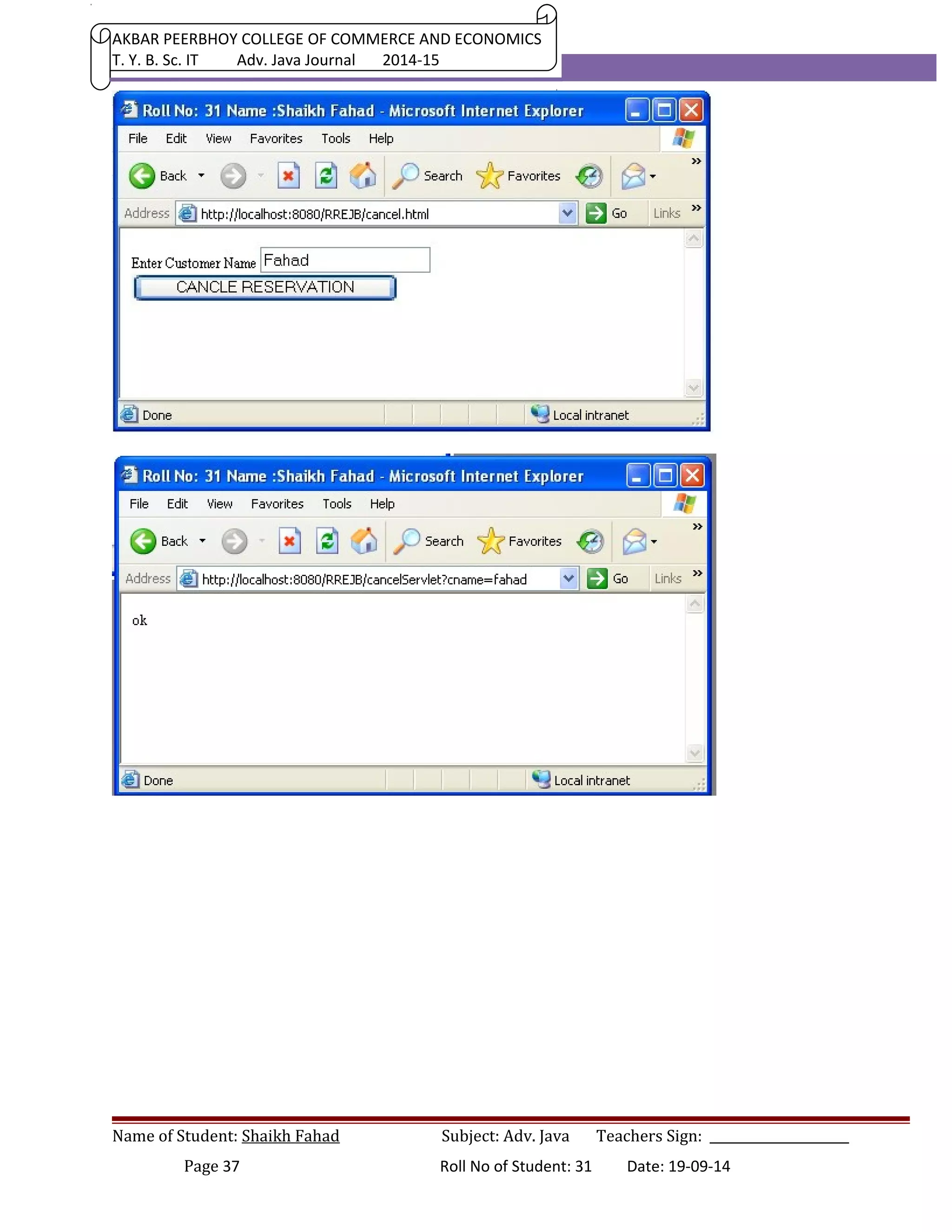
cancel.html 
<html> 
<head> 
<title> Roll No.31 Name: Shaikh Fahad </title> 
</head> 
<body> 
<form action="cancelServlet" > 
Enter Customer Name <input type="text" name="cname" ><br> 
<input type="submit" value="CANCLE RESERVATION" > 
</form> 
</body> 
</html> 
Name of Student: Shaikh Fahad Subject: Adv. Java Teachers Sign: ______________________ 
Page 34 Roll No of Student: 31 Date: 19-09-14
AKBAR PEERBHOY COLLEGE OF COMMERCE AND ECONOMICS 
T. Y. B. Sc. IT Adv. Java Journal 2014-15 
Name of Student: Shaikh Fahad Subject: Adv. Java Teachers Sign: ______________________ 
Page 35 Roll No of Student: 31 Date: 19-09-14
AKBAR PEERBHOY COLLEGE OF COMMERCE AND ECONOMICS 
T. Y. B. Sc. IT Adv. Java Journal 2014-15 
Name of Student: Shaikh Fahad Subject: Adv. Java Teachers Sign: ______________________ 
Page 36 Roll No of Student: 31 Date: 19-09-14
AKBAR PEERBHOY COLLEGE OF COMMERCE AND ECONOMICS 
T. Y. B. Sc. IT Adv. Java Journal 2014-15 
Name of Student: Shaikh Fahad Subject: Adv. Java Teachers Sign: ______________________ 
Page 37 Roll No of Student: 31 Date: 19-09-14

Advanced Java - Praticals

  • 1.
    AKBAR PEERBHOY COLLEGEOF COMMERCE AND ECONOMICS T. Y. B. Sc. IT Adv. Java Journal 2014-15 PRACTICAL NO: 1 /* Roll No: 31 Name : Fahad Shaikh Write a java program to present a set of choices for a user to select Stationary products and display the price of Product after Selection from the list. */ import java.awt.*; import javax.swing.*; import javax.swing.event.*; public class Prog01 extends JFrame implements ListSelectionListener { private JList list; private JLabel lbl; private String[] product ={"Pen", "Pensil", "Erazer", "Marker", "Ruler", "Note Book"}; private String[] price ={"Rs. 5","Rs. 2", "Rs. 3","Rs. 25", "Rs. 5", "Rs. 10"}; public Prog01() { setTitle("Roll No:- 31 Name :- Shaikh Fahad "); setVisible(true); setDefaultCloseOperation(EXIT_ON_CLOSE); list = new JList(product); Name of Student: Shaikh Fahad Subject: Adv. Java Teachers Sign: ______________________ Page 1 Roll No of Student: 31 Date: 19-09-14
  • 2.
    AKBAR PEERBHOY COLLEGEOF COMMERCE AND ECONOMICS T. Y. B. Sc. IT Adv. Java Journal 2014-15 list.setSelectedIndex(0); list.setSelectionMode(ListSelectionModel.SINGLE_SELECTION); list.addListSelectionListener(this); lbl = new JLabel(); lbl.setText("Price of "+list.getSelectedValue()+" is "+price[0]); Container cnt =getContentPane(); JScrollPane jsp = new JScrollPane(list); cnt.add(jsp); cnt.add(lbl, "South"); pack(); } public void valueChanged(ListSelectionEvent les) { lbl.setText("Price of "+list.getSelectedValue()+" is "+price[list.getSelectedIndex()]); } public static void main(String[] ar) { new Prog01(); } } Name of Student: Shaikh Fahad Subject: Adv. Java Teachers Sign: ______________________ Page 2 Roll No of Student: 31 Date: 19-09-14
  • 3.
    AKBAR PEERBHOY COLLEGEOF COMMERCE AND ECONOMICS T. Y. B. Sc. IT Adv. Java Journal 2014-15 PRACTICAL 2 /* Write a java program to demonstrate typical Editable Table, describing employee details for a software company. */ import java.awt.*; import javax.swing.*; public class Prog02 extends JFrame { private String[] col={"EMP_NO","NAME","DESIGNATION"}; private String[][] data={{"E10001", "John Day", "Project Manager"}, {"E10002", "K. K. Kurkure", "Project Manager"}, {"E10003", "A. B. C. D . Eietswamy", "Tech. Lead"}, {"E10004", "Karan Arjun", "QA Manager"}, {"E10005", "Champak chandan Dukhi", "Database Administrator"}, Name of Student: Shaikh Fahad Subject: Adv. Java Teachers Sign: ______________________ Page 3 Roll No of Student: 31 Date: 19-09-14
  • 4.
    AKBAR PEERBHOY COLLEGEOF COMMERCE AND ECONOMICS T. Y. B. Sc. IT Adv. Java Journal 2014-15 {"E10006", "Tayyab Ali", "Programmer"}, {"E10007", "Gulabrao Murmure", "Trainee"}, {"E10008", "Phoolchand Kaante", "Trainee"}, }; private JTable tab; public Prog02() { setTitle("Roll:31 Name: Shaikh Fahad"); setVisible(true); setDefaultCloseOperation(EXIT_ON_CLOSE); tab = new JTable(data, col); JScrollPane jsp = new JScrollPane(tab, JScrollPane.VERTICAL_SCROLLBAR_ALWAYS, JScrollPane.HORIZONTAL_SCROLLBAR_ALWAYS); Container cnt = getContentPane(); cnt.add(jsp); pack(); } public static void main(String[] ar) { new Prog02(); } } Name of Student: Shaikh Fahad Subject: Adv. Java Teachers Sign: ______________________ Page 4 Roll No of Student: 31 Date: 19-09-14
  • 5.
    AKBAR PEERBHOY COLLEGEOF COMMERCE AND ECONOMICS T. Y. B. Sc. IT Adv. Java Journal 2014-15 PRACTICAL 3 /* Roll NO: 31 Name: Fahad Shaikh Write a java program using Split pane to demonstrate a screen divided in two parts, one part contains the names of Planets and another Displays the image of planet. */ import java.awt.*; import javax.swing.*; import java.awt.event.*; import javax.swing.event.*; Name of Student: Shaikh Fahad Subject: Adv. Java Teachers Sign: ______________________ Page 5 Roll No of Student: 31 Date: 19-09-14
  • 6.
    AKBAR PEERBHOY COLLEGEOF COMMERCE AND ECONOMICS T. Y. B. Sc. IT Adv. Java Journal 2014-15 public class Prog_03 extends JFrame implements ListSelectionListener { private String[] planets={"EARTH", "JUPITER", "Mars", "Mercuery", "Neptune", "Pluto", "Saturn", "Uranus", "Venus" }; private Container cnt ; private JList list; private JLabel lbl; public Prog_03() { setTitle("Roll No: 31 Name:Shaikh Fahad"); setVisible(true); setDefaultCloseOperation(EXIT_ON_CLOSE); cnt = getContentPane(); list = new JList(planets); list.setSelectionMode(ListSelectionModel.SINGLE_SELECTION); list.setSelectedIndex(0); list.addListSelectionListener(this); lbl = new JLabel(); lbl.setIcon(new ImageIcon("Images/0.jpg")); JSplitPane sp = new JSplitPane (JSplitPane.HORIZONTAL_SPLIT, list, lbl); cnt.add(sp); pack(); Name of Student: Shaikh Fahad Subject: Adv. Java Teachers Sign: ______________________ Page 6 Roll No of Student: 31 Date: 19-09-14
  • 7.
    AKBAR PEERBHOY COLLEGEOF COMMERCE AND ECONOMICS T. Y. B. Sc. IT Adv. Java Journal 2014-15 setResizable(false); } public void valueChanged(ListSelectionEvent lse) { int index= list.getSelectedIndex(); lbl.setIcon(new ImageIcon("Images/"+index+".jpg")); } public static void main(String[] args) { new Prog_03(); } } PRACTICAL 04 Develop Simple Servlet Question Answer application to demonstrate use of HttpServletRequest and HttpServletResponse interfaces. INDEX.JSP <html> <head><title> Prog - 04 Roll No: 31 Name : Shaikh Fahad </title></head> <body> <h1> Question Answer Servlet</h1> <form action = "QAServlet" > <table bgcolor="pink" border="1"> <tr> Name of Student: Shaikh Fahad Subject: Adv. Java Teachers Sign: ______________________ Page 7 Roll No of Student: 31 Date: 19-09-14
  • 8.
    AKBAR PEERBHOY COLLEGEOF COMMERCE AND ECONOMICS T. Y. B. Sc. IT Adv. Java Journal 2014-15 <td>Q. 1</td> <td> TYPE - 1 Driver in JDBC is also called as _____ . <br>A<input type=radio name=a1 value="1a">JDBC-ODBC Dirver <br>B<input type=radio name=a1 value="1b">Native API Dirver <br>C<input type=radio name=a1 value="1c">Net Protocol Dirver <br>D<input type=radio name=a1 value="1d">Pure java Dirver </td> </tr> <tr> <td>Q. 2</td> <td> which of the following object resides on Server to maintain user information. <br>A<input type=radio name=a2 value="2a">URL Rewitting <br>B<input type=radio name=a2 value="2b">Hidden Form field <br>C<input type=radio name=a2 value="2c">Session Object <br>D<input type=radio name=a2 value="2d">Cookies </td> </tr> <tr> <td>Q. 3</td> <td> Which of the following is the widest scope in JSP application. <br>A<input type=radio name=a3 value="3a">Page <br>B<input type=radio name=a3 value="3b">Request Name of Student: Shaikh Fahad Subject: Adv. Java Teachers Sign: ______________________ Page 8 Roll No of Student: 31 Date: 19-09-14
  • 9.
    AKBAR PEERBHOY COLLEGEOF COMMERCE AND ECONOMICS T. Y. B. Sc. IT Adv. Java Journal 2014-15 <br>C<input type=radio name=a3 value="3c">Session <br>D<input type=radio name=a3 value="3d">Application </td> </tr> <tr> <td>Q. 4</td> <td> Which of the following EJB type is for the entire applicaton. <br>A<input type=radio name=a4 value="4a">State ful session Bean <br>B<input type=radio name=a4 value="4b">Stateless session bean <br>C<input type=radio name=a4 value="4c">Singleton session bean <br>D<input type=radio name=a4 value="4d">Message driven bean. </td> </tr> <tr> <td>Q. 5</td> <td> what is the full form of ORM <br>A<input type=radio name=a5 value="5a">Object Request Management <br>B<input type=radio name=a5 value="5b">Object Relation MApping <br>C<input type=radio name=a5 value="5c">Object Rotaion Mapping <br>D<input type=radio name=a5 value="5d">Obstaracle Resolving Managemnt. </td> </tr> <tr> Name of Student: Shaikh Fahad Subject: Adv. Java Teachers Sign: ______________________ Page 9 Roll No of Student: 31 Date: 19-09-14
  • 10.
    AKBAR PEERBHOY COLLEGEOF COMMERCE AND ECONOMICS T. Y. B. Sc. IT Adv. Java Journal 2014-15 <td> <input type="reset"> </td> <td> <input type=submit value="FINISH" > </td> </tr> </table> </form> </body> </html> /* * QAServlet.java * Created on September 19, 2013, 10:06 AM */ package MyClasses; import java.*; import javax.servlet.*; import javax.servlet.http.*; public class QAServlet extends HttpServlet { public void service(HttpServletRequest hreq, HttpServletResponse hres) throws ServletException, IOException { Name of Student: Shaikh Fahad Subject: Adv. Java Teachers Sign: ______________________ Page 10 Roll No of Student: 31 Date: 19-09-14
  • 11.
    AKBAR PEERBHOY COLLEGEOF COMMERCE AND ECONOMICS T. Y. B. Sc. IT Adv. Java Journal 2014-15 hres.setContentType("text/html"); PrintWriter pw = hres.getWriter(); pw.println("<head><title>Roll No:31 Name: Shaikh Fahad</title></head>");pw.print("<h1>Result of Test </h1>"); pw.println("<h1> Question 1. </h1>"); if(hreq.getParameter("a1").equals("1a")) pw.println("<h1>CORRECT</h1>"); else pw.println("<h1>INCORRECT</h1>"); pw.println("<h1> Question 2. </h1>"); if(hreq.getParameter("a2").equals("2c")) pw.println("<h1>CORRECT</h1>"); else pw.println("<h1>INCORRECT</h1>"); pw.println("<h1> Question 3. </h1>"); if(hreq.getParameter("a3").equals("3d")) pw.println("<h1>CORRECT</h1>"); else pw.println("<h1>INCORRECT</h1>"); pw.println("<h1> Question 4. </h1>"); if(hreq.getParameter("a4").equals("4c")) pw.println("<h1>CORRECT</h1>"); else pw.println("<h1>INCORRECT</h1>"); pw.println("<h1> Question 5. </h1>"); if(hreq.getParameter("a5").equals("5b")) pw.println("<h1>CORRECT</h1>"); else pw.println("<h1>INCORRECT</h1>"); }} Name of Student: Shaikh Fahad Subject: Adv. Java Teachers Sign: ______________________ Page 11 Roll No of Student: 31 Date: 19-09-14
  • 12.
    AKBAR PEERBHOY COLLEGEOF COMMERCE AND ECONOMICS T. Y. B. Sc. IT Adv. Java Journal 2014-15 Name of Student: Shaikh Fahad Subject: Adv. Java Teachers Sign: ______________________ Page 12 Roll No of Student: 31 Date: 19-09-14
  • 13.
    AKBAR PEERBHOY COLLEGEOF COMMERCE AND ECONOMICS T. Y. B. Sc. IT Adv. Java Journal 2014-15 PRACTICAL 05 Name of Student: Shaikh Fahad Subject: Adv. Java Teachers Sign: ______________________ Page 13 Roll No of Student: 31 Date: 19-09-14
  • 14.
    AKBAR PEERBHOY COLLEGEOF COMMERCE AND ECONOMICS T. Y. B. Sc. IT Adv. Java Journal 2014-15 Develop Servlet Application of Basic Calculator (+,-,*, /, %) index.jsp <%-- Document : index.jsp Created on : Sep 19, 2013, 5:18:24 PM Author : Roll: 31 NAME: Shaikh Fahad Develop Servlet Application of Basic Calculator (+,-,*, /, %) --%> <html> <head> <title>Roll No: 31 Name : Shaikh Fahad </title> </head> <body> <h1>SIMPLE CALCULATOR</h1> <form action="CalciServlet" > Enter First Number <input type="text" name="n1" ><br> Enter Second Number <input type="text" name="n2" ><br> Select Operation <input type ="radio" name="op" value="+" checked>Add <input type ="radio" name="op" value="-" > Subtract <input type ="radio" name="op" value="*" >Multiply <input type ="radio" name="op" value="/" >Divide<br> <input type="submit" value="CALCULATE" > </form> </body> </html> CalciServlet.java Name of Student: Shaikh Fahad Subject: Adv. Java Teachers Sign: ______________________ Page 14 Roll No of Student: 31 Date: 19-09-14
  • 15.
    AKBAR PEERBHOY COLLEGEOF COMMERCE AND ECONOMICS T. Y. B. Sc. IT Adv. Java Journal 2014-15 package MyClasses; import java.io.*; import javax.servlet.*; import javax.servlet.http.*; /** * * @author Roll: 31 Name: Shaikh Fahad * Develop Servlet Application of Basic Calculator (+,-,*, /, %) */ public class CalciServlet extends HttpServlet { public void service(HttpServletRequest hreq, HttpServletResponse hres) throws ServletException, IOException { PrintWriter pw = hres.getWriter(); hres.setContentType("Text/html"); double num1 = Double.parseDouble(hreq.getParameter("n1")); double num2 = Double.parseDouble(hreq.getParameter("n2")); pw.println("<html><head><title>Roll:31Name: Shaikh Fahad </title><head>"); pw.println("<h1>Roll:31 Name: Shaikh Fahad </h1>"); if(hreq.getParameter("op").equals("+")) pw.println("<h1>Addition of "+num1+" and "+num2+" is "+(num1+num2)+"</h1>"); if(hreq.getParameter("op").equals("-")) pw.println("<h1>Subtraction of "+num1+" and "+num2+" is "+(num1-num2)+"</h1>"); if(hreq.getParameter("op").equals("*")) Name of Student: Shaikh Fahad Subject: Adv. Java Teachers Sign: ______________________ Page 15 Roll No of Student: 31 Date: 19-09-14
  • 16.
    AKBAR PEERBHOY COLLEGEOF COMMERCE AND ECONOMICS T. Y. B. Sc. IT Adv. Java Journal 2014-15 pw.println("<h1>Multiplication of "+num1+" and "+num2+" is "+(num1*num2)+"</h1>"); if(hreq.getParameter("op").equals("/")) pw.println("<h1>Division of "+num1+" and "+num2+" is "+(num1/num2)+"</h1>"); } } Name of Student: Shaikh Fahad Subject: Adv. Java Teachers Sign: ______________________ Page 16 Roll No of Student: 31 Date: 19-09-14
  • 17.
    AKBAR PEERBHOY COLLEGEOF COMMERCE AND ECONOMICS T. Y. B. Sc. IT Adv. Java Journal 2014-15 PRACTICAL 6 Develop a JSP Application to accept Registration Details form user and Store it into the database table. PRACTICAL 7 Develop a JSP Application to Authenticate User Login as per the registration details. Name of Student: Shaikh Fahad Subject: Adv. Java Teachers Sign: ______________________ Page 17 Roll No of Student: 31 Date: 19-09-14
  • 18.
    AKBAR PEERBHOY COLLEGEOF COMMERCE AND ECONOMICS T. Y. B. Sc. IT Adv. Java Journal 2014-15 If login success the forward user to Index Page otherwise show login failure Message. DSN Name: UserDSN Database Name: UserDB Table Name: user index.jsp <html> <head> <title>Roll No.31 Name: Shaikh Fahad </title> </head> <body> Name of Student: Shaikh Fahad Subject: Adv. Java Teachers Sign: ______________________ Page 18 Roll No of Student: 31 Date: 19-09-14
  • 19.
    AKBAR PEERBHOY COLLEGEOF COMMERCE AND ECONOMICS T. Y. B. Sc. IT Adv. Java Journal 2014-15 <h1>Roll No.31 Name: Shaikh Fahad </h1> <a href="reg.jsp" >NEW USER CLICK TO REGISTER</a><hr> <a href="login.jsp">Existing user CLICK to LOGIN </a> </body> </html> reg.jsp <html> <head><title>Roll No.31 Name: Shaikh Fahad </title></head> <body> <h1>Roll No.31 Name: Shaikh Fahad </h1> <form action="register.jsp"> Enter Name<input type="text" name="uid" ><br> Enter Password<input type="password" name="pass" ><br> Re-Enter Password<input type="password" name="repass"><br> Select Gender<input type="radio" name="gen" value="Male" CHECKED>Male <input type="radio" name="gen" value="Female">Female<br> Enter E-Mail <input type="text" name="email"><br> Enter Mobile <input type="text" name="mobile" ><br> <input type="reset"> <input type="submit" value="REGISTER" > </form> </body></html> register.jsp <%@page import="java.sql.*" %> <head><title> Roll No.31 Name: Shaikh Fahad </title></head> <% Name of Student: Shaikh Fahad Subject: Adv. Java Teachers Sign: ______________________ Page 19 Roll No of Student: 31 Date: 19-09-14
  • 20.
    AKBAR PEERBHOY COLLEGEOF COMMERCE AND ECONOMICS T. Y. B. Sc. IT Adv. Java Journal 2014-15 String uid, pass, repass, gen, email, mobile; uid = request.getParameter("uid"); pass = request.getParameter("pass"); repass = request.getParameter("repass"); gen = request.getParameter("gen"); email = request.getParameter("email"); mobile = request.getParameter("mobile"); dif(!uid.equals("") && (pass.equals(repass))) { try{ Class.forName("sun.jdbc.odbc.JdbcOdbcDriver"); Connection con = DriverManager.getConnection("jdbc:odbc:UserDSN"); String query="insert into user values(?,?,?,?,?)"; PreparedStatement pst=con.prepareStatement(query); pst.setString(1,uid); pst.setString(2,pass); pst.setString(3,gen); pst.setString(4,email); pst.setString(5,mobile); int row = pst.executeUpdate(); if(row==1) out.println("REGISTERD SUCCESSFULLISHLY"); else out.println("REGISTRATION FAIL"); pst.clearParameters(); }catch(Exception e){out.println(e);} } Name of Student: Shaikh Fahad Subject: Adv. Java Teachers Sign: ______________________ Page 20 Roll No of Student: 31 Date: 19-09-14
  • 21.
    AKBAR PEERBHOY COLLEGEOF COMMERCE AND ECONOMICS T. Y. B. Sc. IT Adv. Java Journal 2014-15 else out.println("<a href=reg.jsp >Try AGAIN</a>"); %> <br> <a href="index.jsp"> HOME PAGE </a> Name of Student: Shaikh Fahad Subject: Adv. Java Teachers Sign: ______________________ Page 21 Roll No of Student: 31 Date: 19-09-14
  • 22.
    AKBAR PEERBHOY COLLEGEOF COMMERCE AND ECONOMICS T. Y. B. Sc. IT Adv. Java Journal 2014-15 login.jsp <html> <head> <title>Roll No.31 Name: Shaikh Fahad </title> </head> <body> <h1>Roll No.31 Name: Shaikh Fahad </h1> <form action="LogCheck.jsp" > Name of Student: Shaikh Fahad Subject: Adv. Java Teachers Sign: ______________________ Page 22 Roll No of Student: 31 Date: 19-09-14
  • 23.
    AKBAR PEERBHOY COLLEGEOF COMMERCE AND ECONOMICS T. Y. B. Sc. IT Adv. Java Journal 2014-15 Enter User ID<input type="text" name="id"><br> Enter User PASSWORD<input type="password" name="pass"><br> <input type="submit" value="LOGIN" > </form> </body> </html> LogCheck.jsp <html><head><title> Roll No.31 Name: Shaikh Fahad </title></head> <%@page import="java.sql.*" %> <h1>Roll No.31 Name: Shaikh Fahad </h1> <% String uid , upass; Name of Student: Shaikh Fahad Subject: Adv. Java Teachers Sign: ______________________ Page 23 Roll No of Student: 31 Date: 19-09-14
  • 24.
    AKBAR PEERBHOY COLLEGEOF COMMERCE AND ECONOMICS T. Y. B. Sc. IT Adv. Java Journal 2014-15 uid = request.getParameter("id"); upass=request.getParameter("pass"); try{ Class.forName("sun.jdbc.odbc.JdbcOdbcDriver"); Connection con = DriverManager.getConnection("jdbc:odbc:UserDSN"); String query="select pass from user where ID=?"; PreparedStatement pst=con.prepareStatement(query); pst.setString(1,uid); ResultSet rs = pst.executeQuery(); if(rs.next()){ if(rs.getString(1).equals(upass)) {%> <jsp:forward page="success.jsp"></jsp:forward> <% } else{ %> <jsp:forward page="fail.jsp"></jsp:forward> <% } } else {out.println("USER NOT EXIST");} }catch(Exception e){out.print(e);} %> Name of Student: Shaikh Fahad Subject: Adv. Java Teachers Sign: ______________________ Page 24 Roll No of Student: 31 Date: 19-09-14
  • 25.
    AKBAR PEERBHOY COLLEGEOF COMMERCE AND ECONOMICS T. Y. B. Sc. IT Adv. Java Journal 2014-15 PRACTICAL 8 Develop a web application to add items in the inventory using JSF. DataBase: MyDatabase DSN Name: JSFDSN Table Name : product index.xhtml <?xml version='1.0' encoding='UTF-8' ?> Name of Student: Shaikh Fahad Subject: Adv. Java Teachers Sign: ______________________ Page 25 Roll No of Student: 31 Date: 19-09-14
  • 26.
    AKBAR PEERBHOY COLLEGEOF COMMERCE AND ECONOMICS T. Y. B. Sc. IT Adv. Java Journal 2014-15 <html xmlns="http://www.w3.org/1999/xhtml" xmlns:h="http://java.sun.com/jsf/html" xmlns:f="http://java.sun.com/jsf/core"> <h:head> <title>Roll No.31 Name: Shaikh Fahad </title> </h:head> <h:body> <h1>Roll No.31 Name: Shaikh Fahad </h1> <h:form> <h:outputLabel for="txtName" > <h:outputText value="Enter Product Name" /> </h:outputLabel> <h:inputText id="txtName" value="#{p.name}" > </h:inputText> <br></br> <h:outputLabel for="txtQty" > <h:outputText value="Enter Product Quantity" /> </h:outputLabel> <h:inputText id="txtQty" value="#{p.qty}" > </h:inputText> <br></br> <h:outputLabel for="txtPrice" > <h:outputText value="Enter Unit Price" /> </h:outputLabel> Name of Student: Shaikh Fahad Subject: Adv. Java Teachers Sign: ______________________ Page 26 Roll No of Student: 31 Date: 19-09-14
  • 27.
    AKBAR PEERBHOY COLLEGEOF COMMERCE AND ECONOMICS T. Y. B. Sc. IT Adv. Java Journal 2014-15 <h:inputText id="txtPrice" value="#{p.price}" > </h:inputText> <br></br> <h:commandButton id="cmdInsert" value="ADD ITEM" action="#{p.add}" /> </h:form> </h:body> </html> success.xhtml <?xml version='1.0' encoding='UTF-8' ?> <!DOCTYPE html PUBLIC "-//W3C//DTD XHTML 1.0 Transitional//EN" "http://www.w3.org/TR/xhtml1/DTD/xhtml1-transitional.dtd"> <html xmlns="http://www.w3.org/1999/xhtml" xmlns:h="http://java.sun.com/jsf/html"> <h:head> <title>Facelet Title</title> </h:head> <h:body> <h1>Product inserted successfullishly ! ! ! !</h1> </h:body> </html> fail.xhtml Name of Student: Shaikh Fahad Subject: Adv. Java Teachers Sign: ______________________ Page 27 Roll No of Student: 31 Date: 19-09-14
  • 28.
    AKBAR PEERBHOY COLLEGEOF COMMERCE AND ECONOMICS T. Y. B. Sc. IT Adv. Java Journal 2014-15 <?xml version='1.0' encoding='UTF-8' ?> <!DOCTYPE html PUBLIC "-//W3C//DTD XHTML 1.0 Transitional//EN" "http://www.w3.org/TR/xhtml1/DTD/xhtml1-transitional.dtd"> <html xmlns="http://www.w3.org/1999/xhtml" xmlns:h="http://java.sun.com/jsf/html"> <h:head> <title>Facelet Title</title> </h:head> <h:body> <h1>Insert Fail</h1> </h:body> </html> product.java package jsf; import javax.faces.bean.ManagedBean; import javax.faces.bean.SessionScoped; import java.sql.*; @ManagedBean(name="p") @SessionScoped public class Product { private String name; private int qty; private double price; Name of Student: Shaikh Fahad Subject: Adv. Java Teachers Sign: ______________________ Page 28 Roll No of Student: 31 Date: 19-09-14
  • 29.
    AKBAR PEERBHOY COLLEGEOF COMMERCE AND ECONOMICS T. Y. B. Sc. IT Adv. Java Journal 2014-15 private Connection con; private PreparedStatement pst; public Product() { } public String getName(){return name;} public int getQty(){return qty;} public double getPrice(){return price;} public void setName(String n){name=n;} public void setQty(int q){qty=q;} public void setPrice(double p){price=p;} public String add() { String msg=""; try{ Class.forName("sun.jdbc.odbc.JdbcOdbcDriver"); con = DriverManager.getConnection("jdbc:odbc:JSFDSN"); String query = "insert into product (pname, qty, price) values (?,?,?)"; pst = con.prepareStatement(query); pst.setString(1, name); pst.setInt(2, qty); pst.setDouble(3, price); int row = pst.executeUpdate(); if(row==0) msg="fail"; Name of Student: Shaikh Fahad Subject: Adv. Java Teachers Sign: ______________________ Page 29 Roll No of Student: 31 Date: 19-09-14
  • 30.
    AKBAR PEERBHOY COLLEGEOF COMMERCE AND ECONOMICS T. Y. B. Sc. IT Adv. Java Journal 2014-15 else msg="success"; }catch(Exception e){} return msg; }} faces-config.xml <?xml version='1.0' encoding='UTF-8'?> <!-- =========== FULL CONFIGURATION FILE ================================== --> <faces-config version="2.0" xmlns="http://java.sun.com/xml/ns/javaee" xmlns:xsi="http://www.w3.org/2001/XMLSchema-instance" xsi:schemaLocation="http://java.sun.com/xml/ns/javaee http://java.sun.com/xml/ns/javaee/web-facesconfig_ 2_0.xsd"> <navigation-rule> <from-view-id>/index.xhtml</from-view-id> <navigation-case> <from-outcome>success</from-outcome> <to-view-id>/success.xhtml</to-view-id> </navigation-case> <navigation-case> <from-outcome>fail</from-outcome> <to-view-id>/fail.xhtml</to-view-id> </navigation-case> </navigation-rule> </faces-config> Name of Student: Shaikh Fahad Subject: Adv. Java Teachers Sign: ______________________ Page 30 Roll No of Student: 31 Date: 19-09-14
  • 31.
    AKBAR PEERBHOY COLLEGEOF COMMERCE AND ECONOMICS T. Y. B. Sc. IT Adv. Java Journal 2014-15 Name of Student: Shaikh Fahad Subject: Adv. Java Teachers Sign: ______________________ Page 31 Roll No of Student: 31 Date: 19-09-14
  • 32.
    AKBAR PEERBHOY COLLEGEOF COMMERCE AND ECONOMICS T. Y. B. Sc. IT Adv. Java Journal 2014-15 PRACTICAL 09 Name of Student: Shaikh Fahad Subject: Adv. Java Teachers Sign: ______________________ Page 32 Roll No of Student: 31 Date: 19-09-14
  • 33.
    AKBAR PEERBHOY COLLEGEOF COMMERCE AND ECONOMICS T. Y. B. Sc. IT Adv. Java Journal 2014-15 PRACTICAL 09 Develop a Room Reservation System Application Using Enterprise Java Beans. Index.jsp <html> <title> Roll No.31 Name: Shaikh Fahad </title> <body> <h1>Welcome to Room Reservation System</h1> <h1><a href="book.html" >CLICK HERE TO BOOK ROOM</a><br></h1> <h1><a href="cancel.html" >CLICK HERE TO CANCEL ROOM</a><br></h1> </body> </html> book.html <html> <head> <title> Roll No.31 Name: Shaikh Fahad </title> </head> <body> <h1>Room Reservation Page</h1> <form action="bookServlet" > Select Room Type <input type="radio" name="rt" value="single" checked >SINGLE <input type="radio" name="rt" value="delux" >DELUX <input type="radio" name="rt" value="super delux" >SUPER DELUX<br> Enter Customer Name <input type="text" name="cname" ><br> <input type="reset" ><input type="submit" value="RESERVE ROOM" > Name of Student: Shaikh Fahad Subject: Adv. Java Teachers Sign: ______________________ Page 33 Roll No of Student: 31 Date: 19-09-14
  • 34.
    AKBAR PEERBHOY COLLEGEOF COMMERCE AND ECONOMICS T. Y. B. Sc. IT Adv. Java Journal 2014-15 </form> </body> </html> cancel.html <html> <head> <title> Roll No.31 Name: Shaikh Fahad </title> </head> <body> <form action="cancelServlet" > Enter Customer Name <input type="text" name="cname" ><br> <input type="submit" value="CANCLE RESERVATION" > </form> </body> </html> Name of Student: Shaikh Fahad Subject: Adv. Java Teachers Sign: ______________________ Page 34 Roll No of Student: 31 Date: 19-09-14
  • 35.
    AKBAR PEERBHOY COLLEGEOF COMMERCE AND ECONOMICS T. Y. B. Sc. IT Adv. Java Journal 2014-15 Name of Student: Shaikh Fahad Subject: Adv. Java Teachers Sign: ______________________ Page 35 Roll No of Student: 31 Date: 19-09-14
  • 36.
    AKBAR PEERBHOY COLLEGEOF COMMERCE AND ECONOMICS T. Y. B. Sc. IT Adv. Java Journal 2014-15 Name of Student: Shaikh Fahad Subject: Adv. Java Teachers Sign: ______________________ Page 36 Roll No of Student: 31 Date: 19-09-14
  • 37.
    AKBAR PEERBHOY COLLEGEOF COMMERCE AND ECONOMICS T. Y. B. Sc. IT Adv. Java Journal 2014-15 Name of Student: Shaikh Fahad Subject: Adv. Java Teachers Sign: ______________________ Page 37 Roll No of Student: 31 Date: 19-09-14