ADVANCED DEBUGGING
LARISSA BARRA | MICHEL BUENO
IN XCODE
WHY THESE TIPS, AND
WHY “ADVANCED”?
ADVANCED DEBUGGING IN XCODE
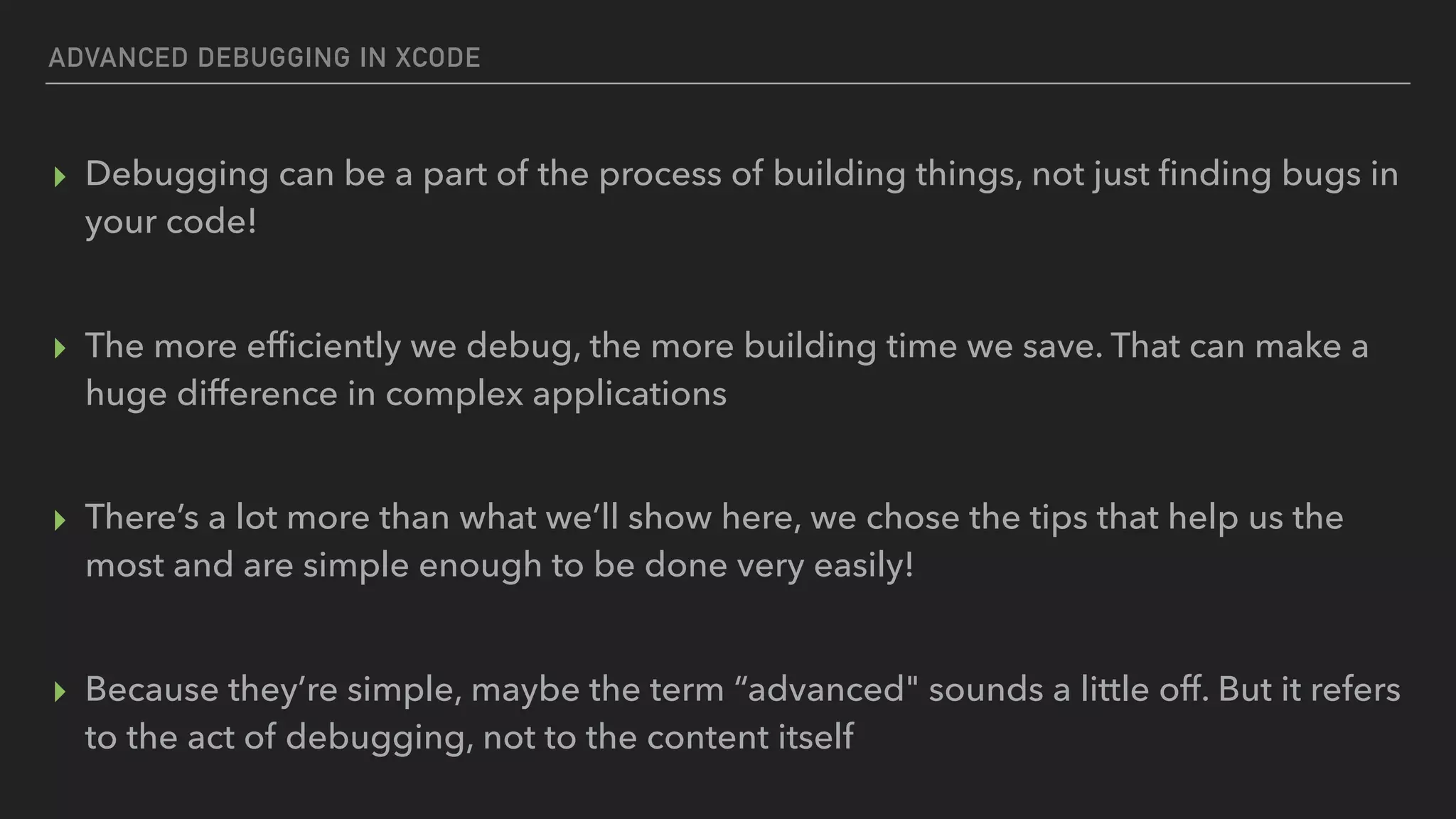
▸ Debugging can be a part of the process of building things, not just finding bugs in
your code!

▸ The more efficiently we debug, the more building time we save. That can make a
huge difference in complex applications

▸ There’s a lot more than what we’ll show here, we chose the tips that help us the
most and are simple enough to be done very easily!

▸ Because they’re simple, maybe the term “advanced" sounds a little off. But it refers
to the act of debugging, not to the content itself
ADVANCED DEBUGGING IN XCODE
TOPICS COVERED
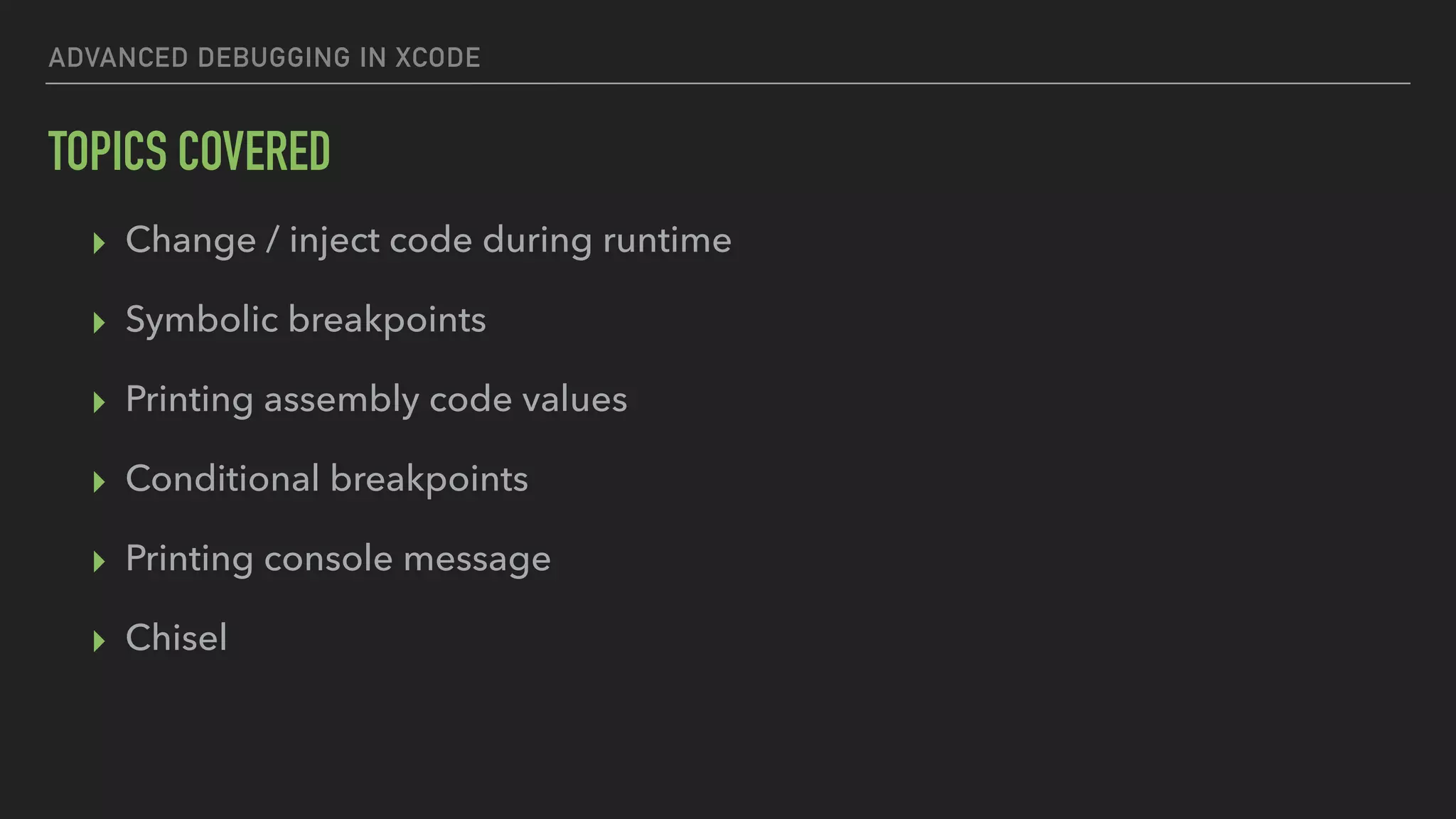
▸ Change / inject code during runtime
▸ Symbolic breakpoints
▸ Printing assembly code values
▸ Conditional breakpoints
▸ Printing console message
▸ Chisel
WHO ARE WE
LARISSA BARRA
MOBILE ENGINEER @ THOUGHTWORKS
linkedin.com/in/larissabconde
lbarra@thoughtworks.com
MICHEL BUENO
MOBILE ENGINEER @ THOUGHTWORKS
linkedin.com/in/michelbueno
mbueno@thoughtworks.com
WHAT IS LLDB
LLDB is the default debugger in Xcode on macOS
and supports debugging C, Objective-C and C++
on the desktop and iOS devices and simulator.
https://lldb.llvm.org
ADVANCED DEBUGGING IN XCODE
ON TO DEBUGGING!
CHANGE / INJECT CODE
DURING RUNTIME
ADVANCED DEBUGGING IN XCODE - CHANGE / INJECT CODE DURING RUNTIME
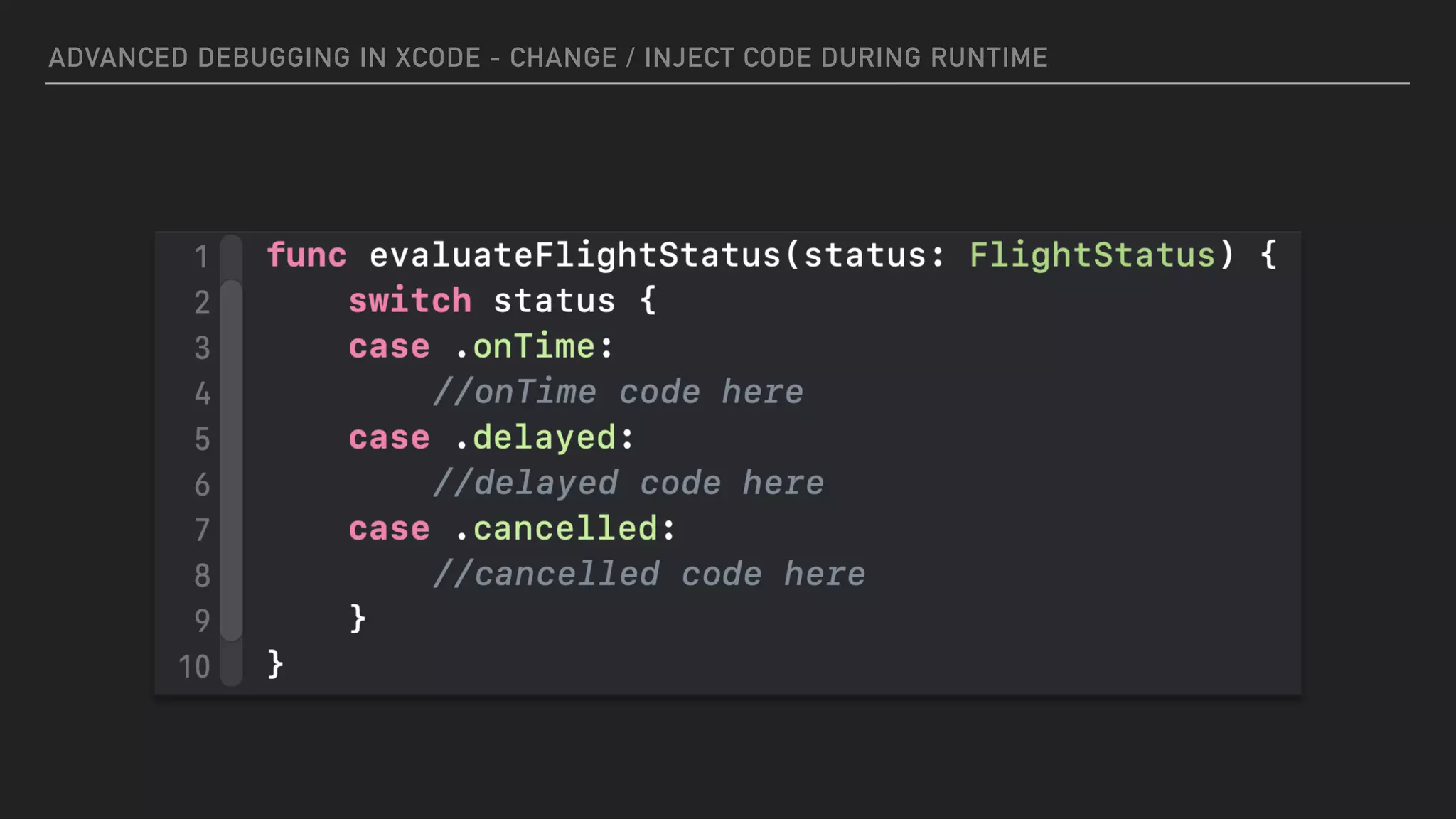
IMAGINE THAT…
▸ You’re developing code to show a flight’s status
▸ You get this status from an external data source (database, API, whatever)
▸ Possible status values are:
▸ On time
▸ Delayed
▸ Cancelled
ADVANCED DEBUGGING IN XCODE - CHANGE / INJECT CODE DURING RUNTIME
2
ADVANCED DEBUGGING IN XCODE - CHANGE / INJECT CODE DURING RUNTIME
2
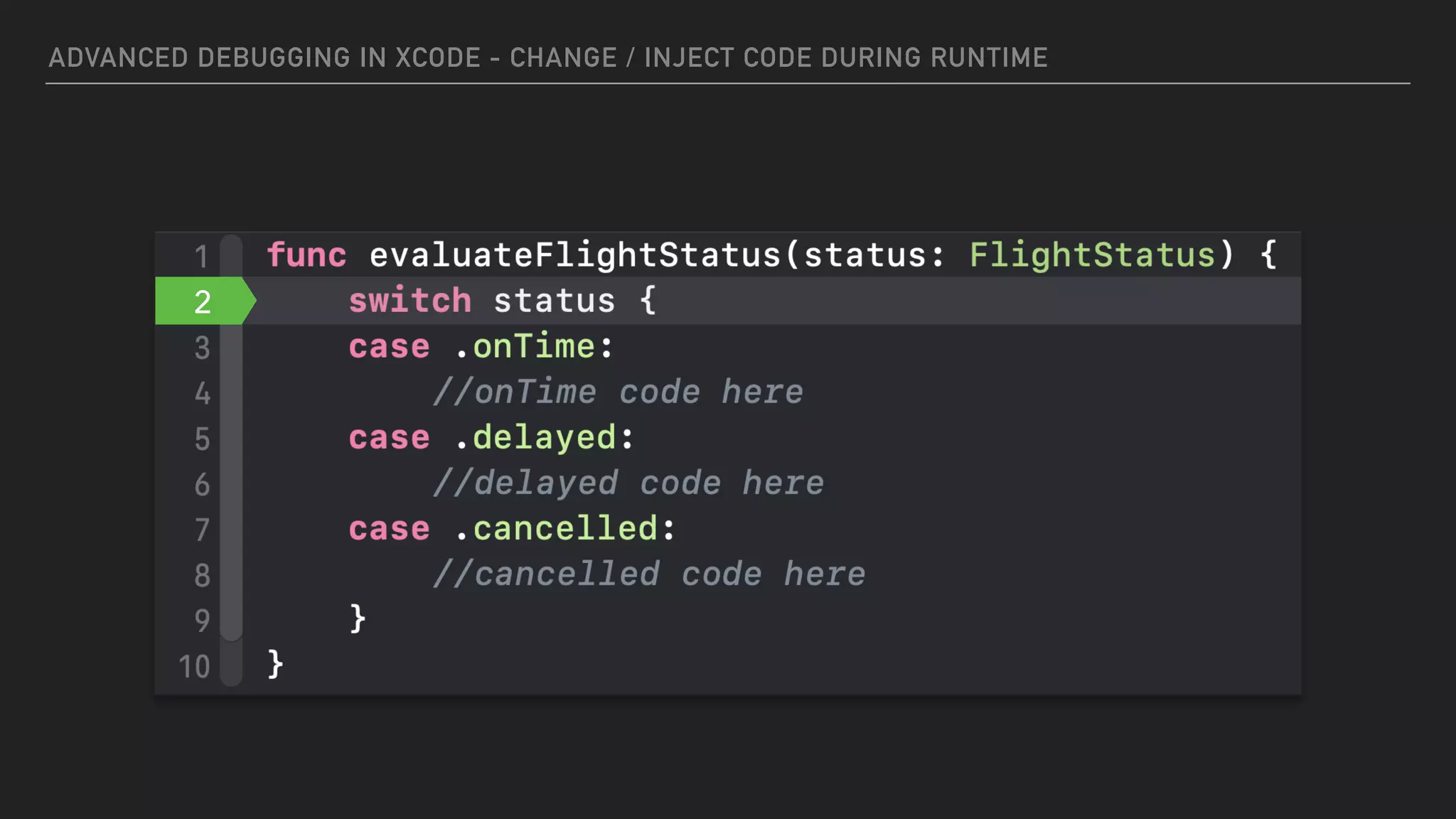
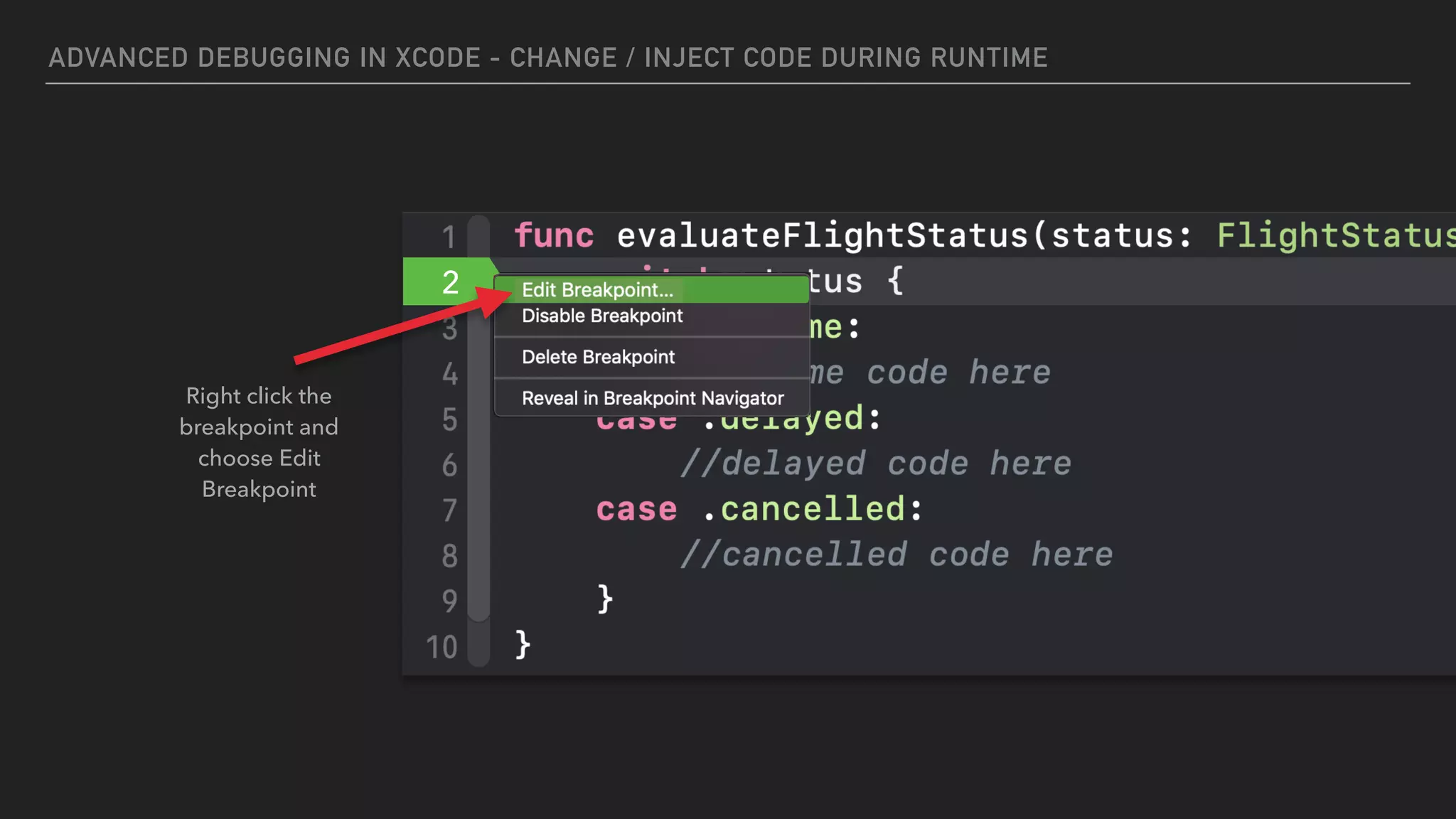
Right click the
breakpoint and
choose Edit
Breakpoint
ADVANCED DEBUGGING IN XCODE - CHANGE / INJECT CODE DURING RUNTIME
2
2
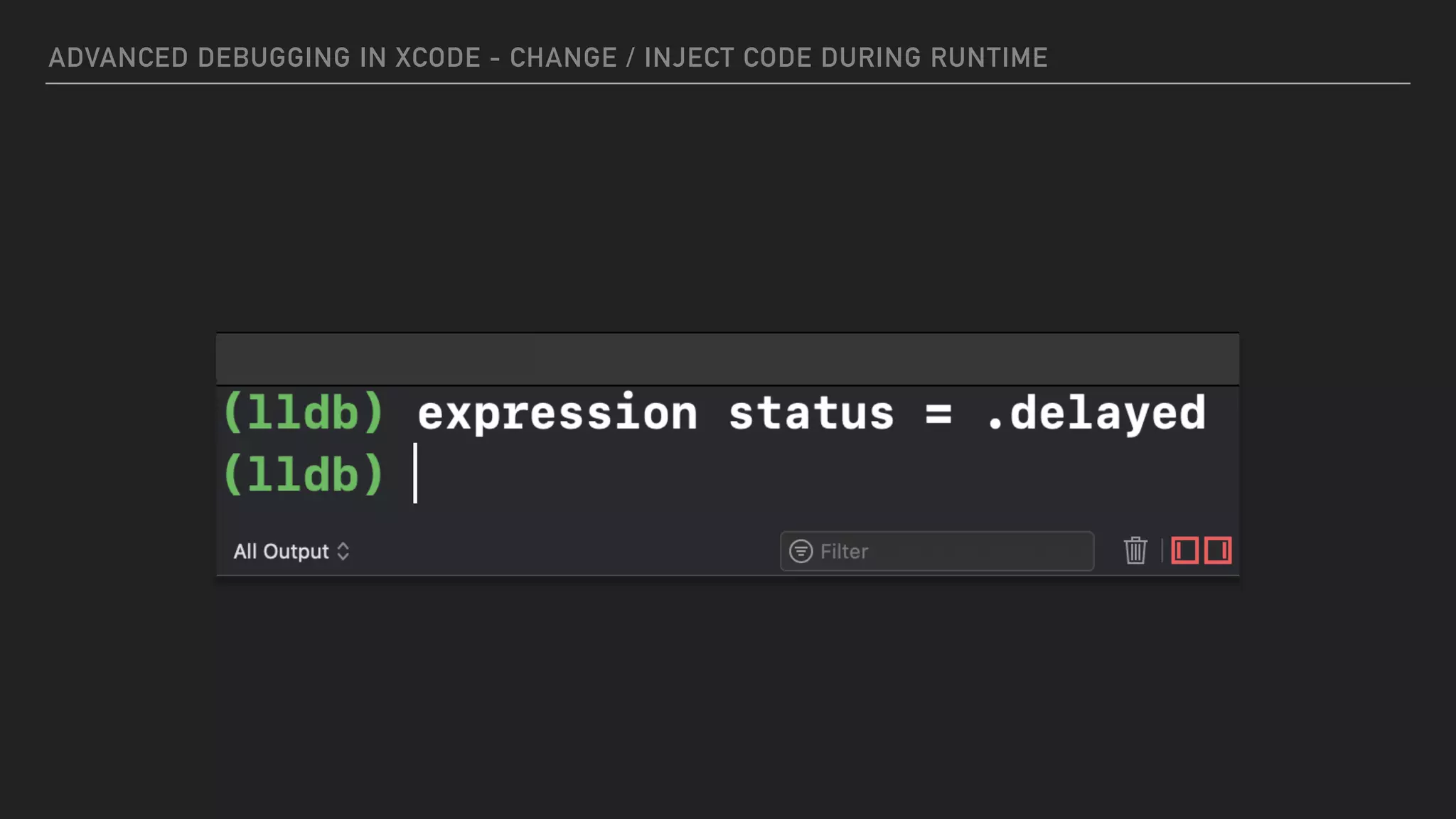
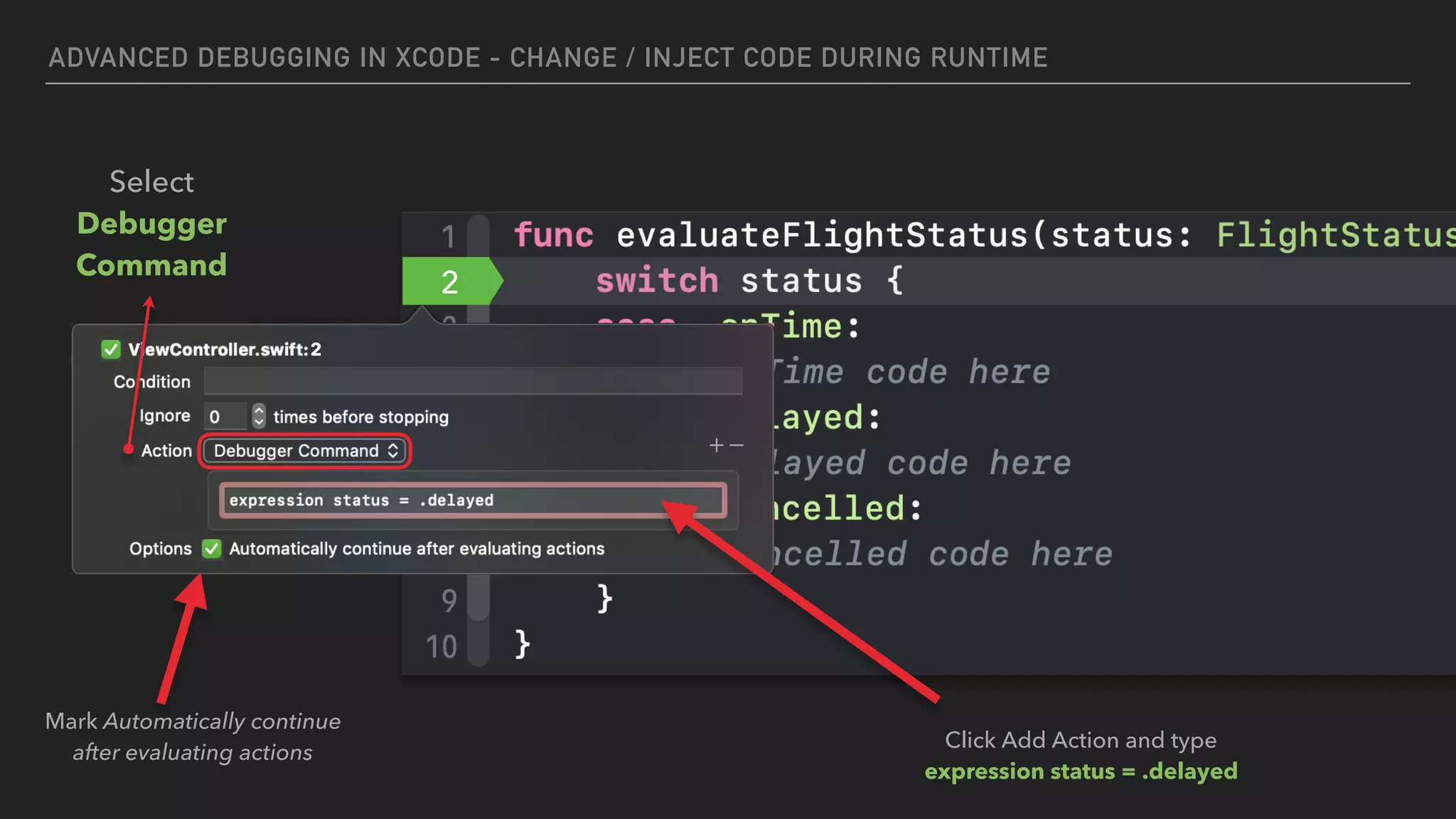
Click Add Action and type
expression status = .delayed
Mark Automatically continue
after evaluating actions
Select
Debugger
Command
SYMBOLIC
BREAKPOINTS
ADVANCED DEBUGGING IN XCODE - SYMBOLIC BREAKPOINTS
SYMBOLIC BREAKPOINT:
▸ A breakpoint that hits every time a method is called, for every instance of the
particular class in your current debugging session.
▸ Helps you easily track the location of any SDK method call you want
(apparently, it doesn’t work for your own code)
▸ You must use Objective-C syntax, even for Swift code. Example:
▸ To see every a time a text is set to any label, use -[UILabel setText:]
ADVANCED DEBUGGING IN XCODE - SYMBOLIC BREAKPOINTS
Go to Breakpoint
Navigator and add a
Symbolic Breakpoint
The symbol can be any method of
any class you want.
You must use Objective-C syntax.
-[UILabel setText:]
ADVANCED DEBUGGING IN XCODE - SYMBOLIC BREAKPOINTS
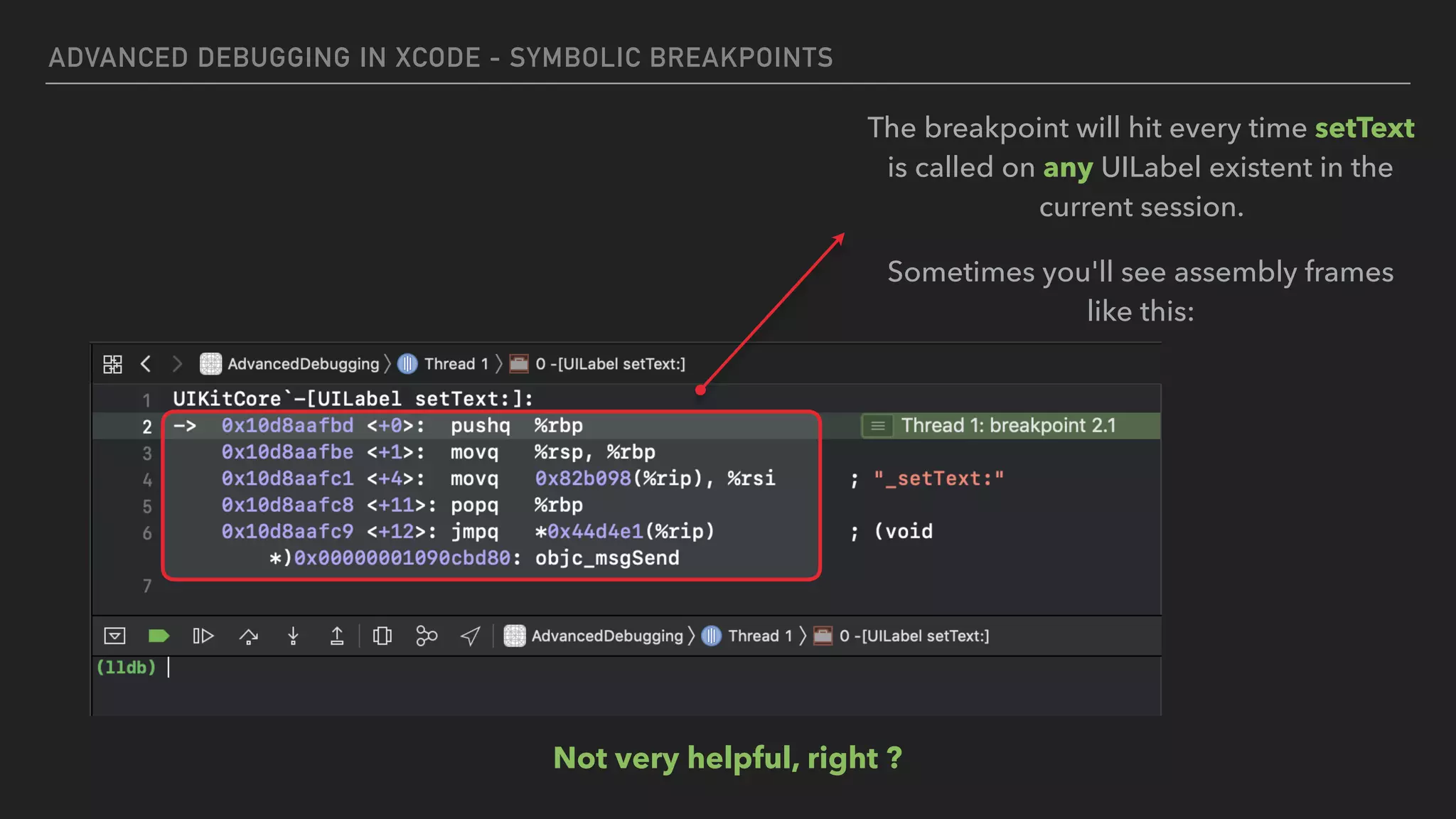
Not very helpful, right ?
The breakpoint will hit every time setText
is called on any UILabel existent in the
current session.
Sometimes you'll see assembly frames
like this:
PRINTING ASSEMBLY
CODE VALUES
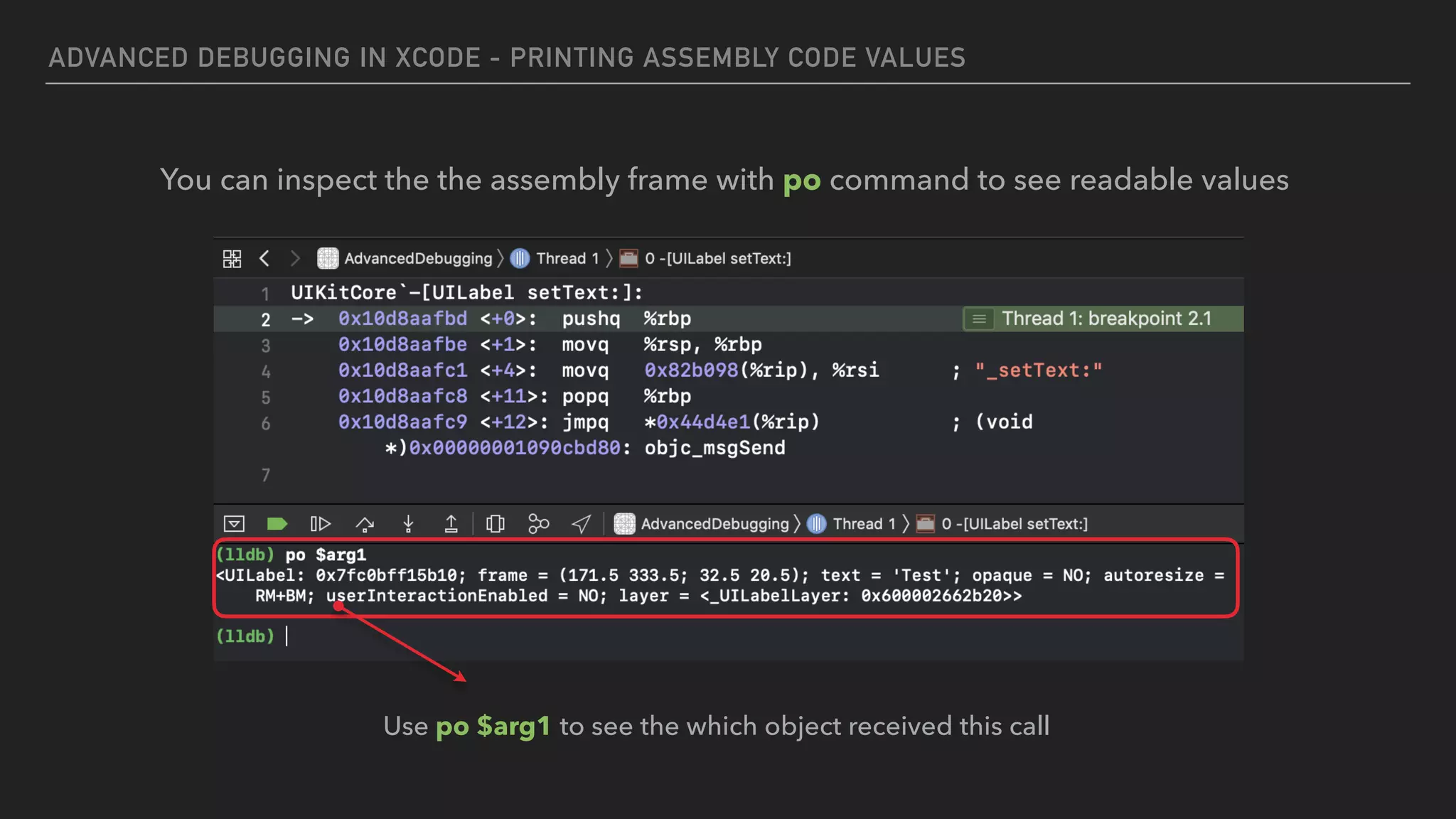
ADVANCED DEBUGGING IN XCODE - PRINTING ASSEMBLY CODE VALUES
You can inspect the the assembly frame with po command to see readable values
Use po $arg1 to see the which object received this call
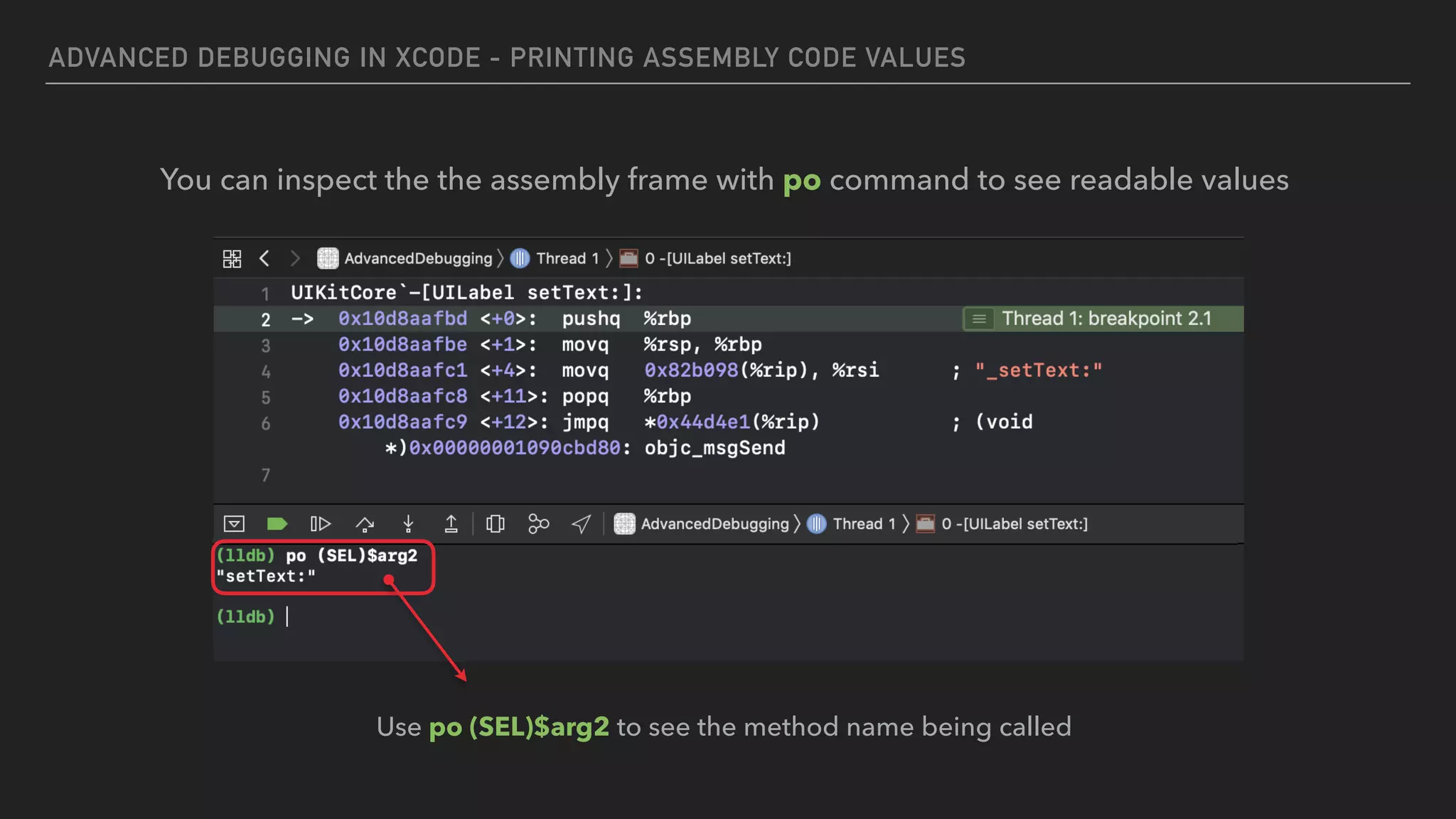
ADVANCED DEBUGGING IN XCODE - PRINTING ASSEMBLY CODE VALUES
You can inspect the the assembly frame with po command to see readable values
Use po (SEL)$arg2 to see the method name being called
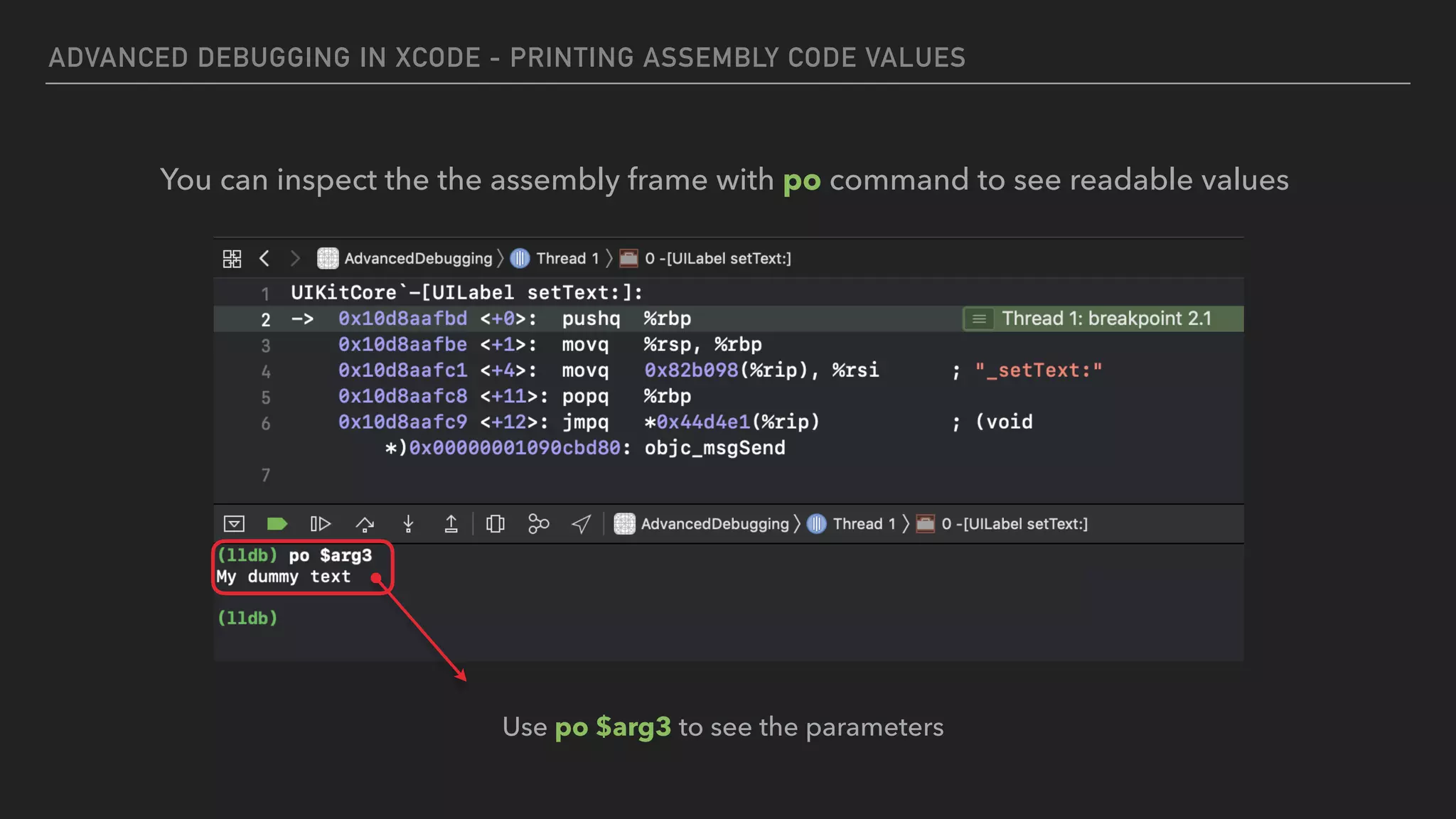
ADVANCED DEBUGGING IN XCODE - PRINTING ASSEMBLY CODE VALUES
You can inspect the the assembly frame with po command to see readable values
Use po $arg3 to see the parameters
CONDITIONAL
BREAKPOINTS
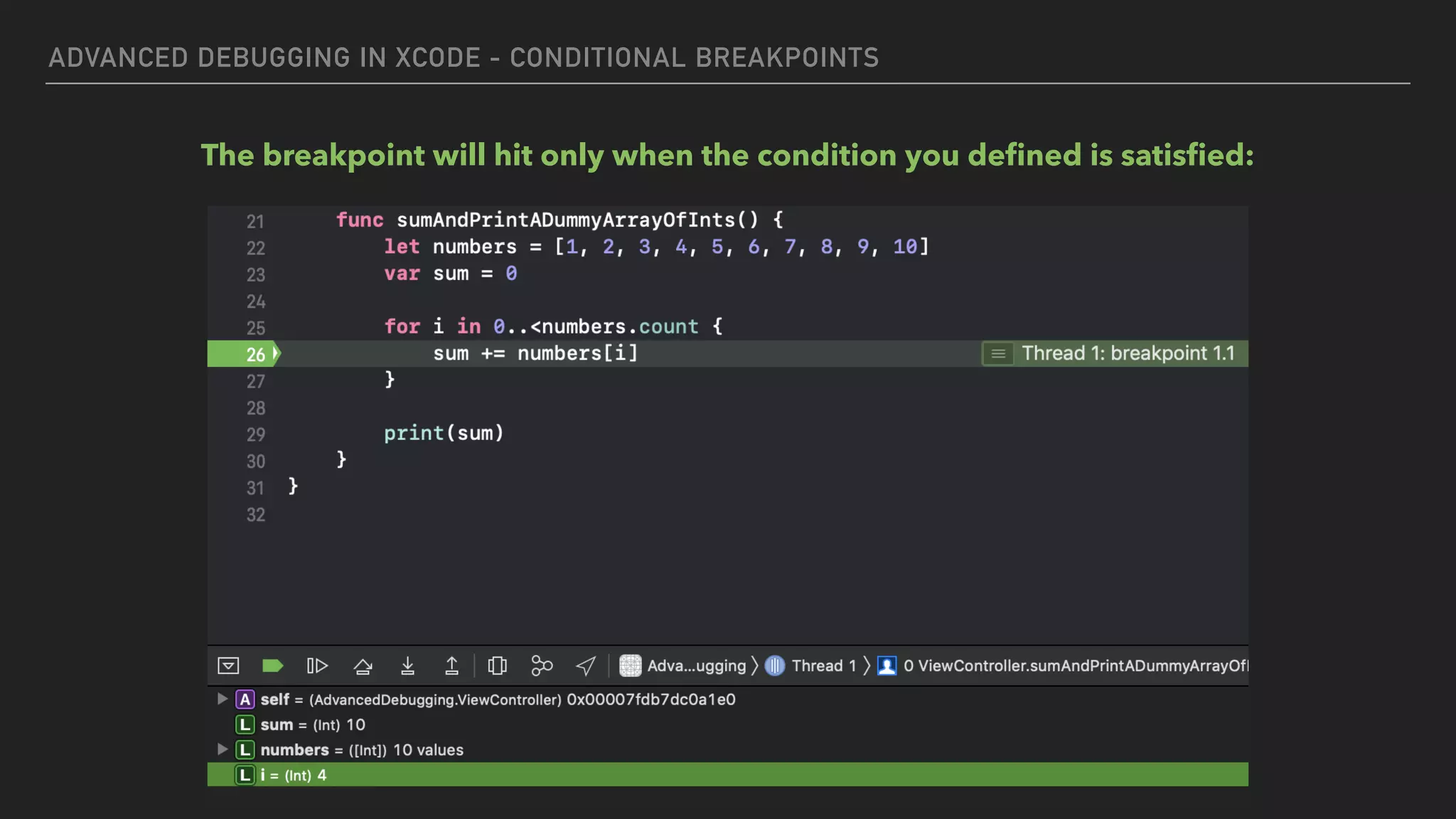
ADVANCED DEBUGGING IN XCODE - CONDITIONAL BREAKPOINTS
IMAGINE THAT…
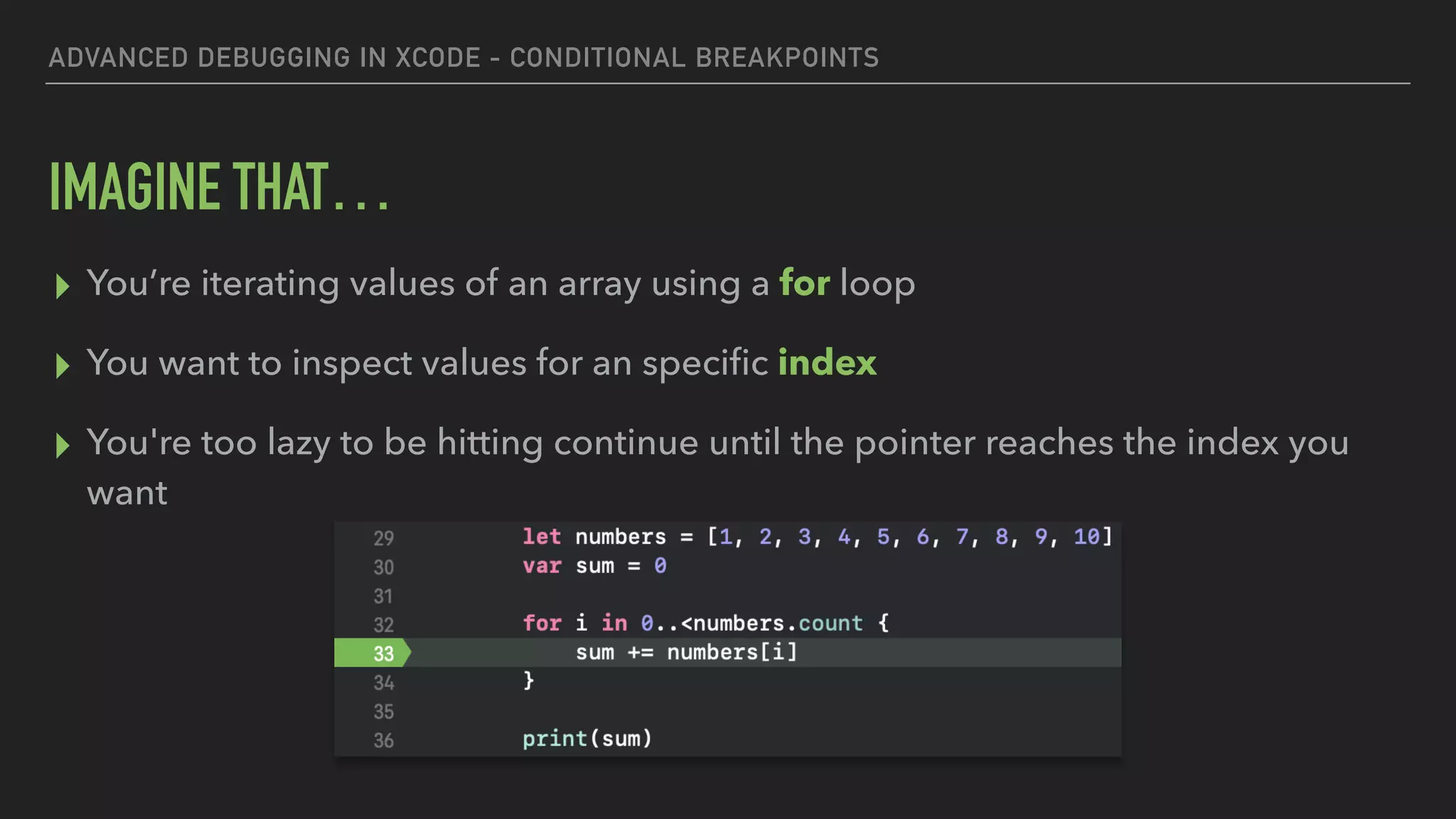
▸ You’re iterating values of an array using a for loop
▸ You want to inspect values for an specific index
▸ You're too lazy to be hitting continue until the pointer reaches the index you
want
ADVANCED DEBUGGING IN XCODE - CONDITIONAL BREAKPOINTS
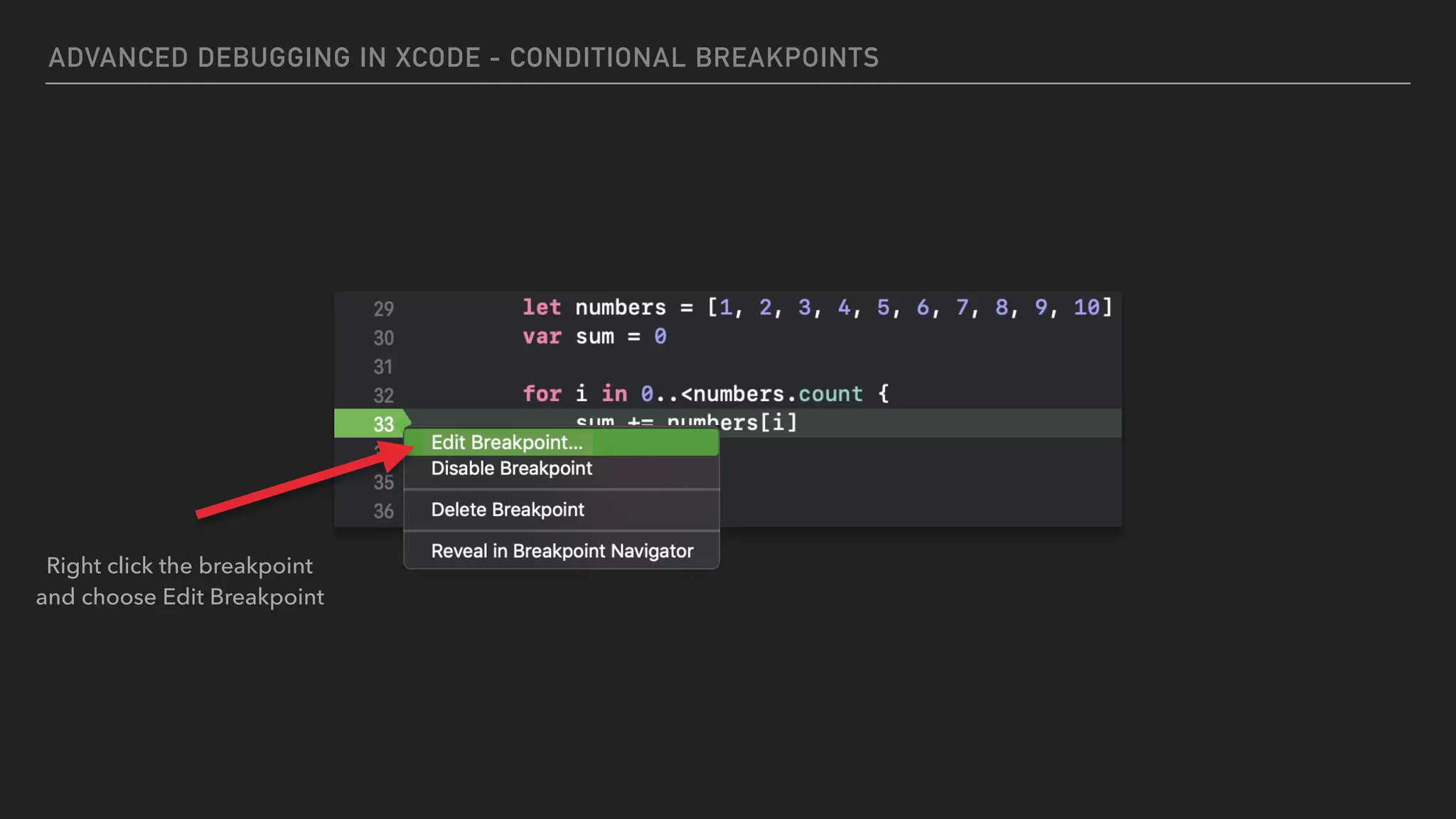
Right click the breakpoint
and choose Edit Breakpoint
ADVANCED DEBUGGING IN XCODE - CONDITIONAL BREAKPOINTS
thread jump —by 1
36
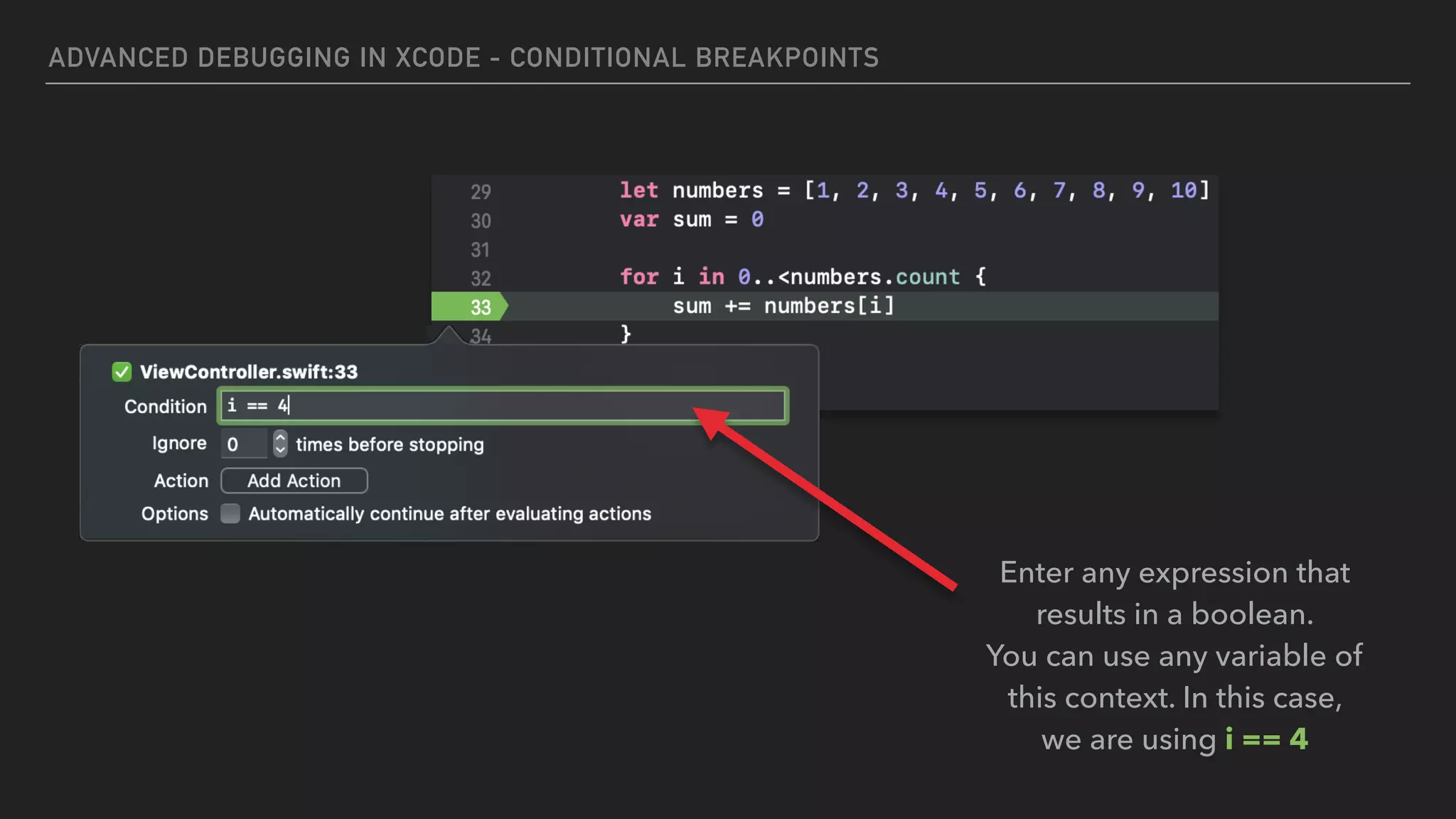
Enter any expression that
results in a boolean.
You can use any variable of
this context. In this case,
we are using i == 4
ADVANCED DEBUGGING IN XCODE - CONDITIONAL BREAKPOINTS
The breakpoint will hit only when the condition you defined is satisfied:
PRINTING CONSOLE
MESSAGE
ADVANCED DEBUGGING IN XCODE - PRINT CONSOLE MESSAGE
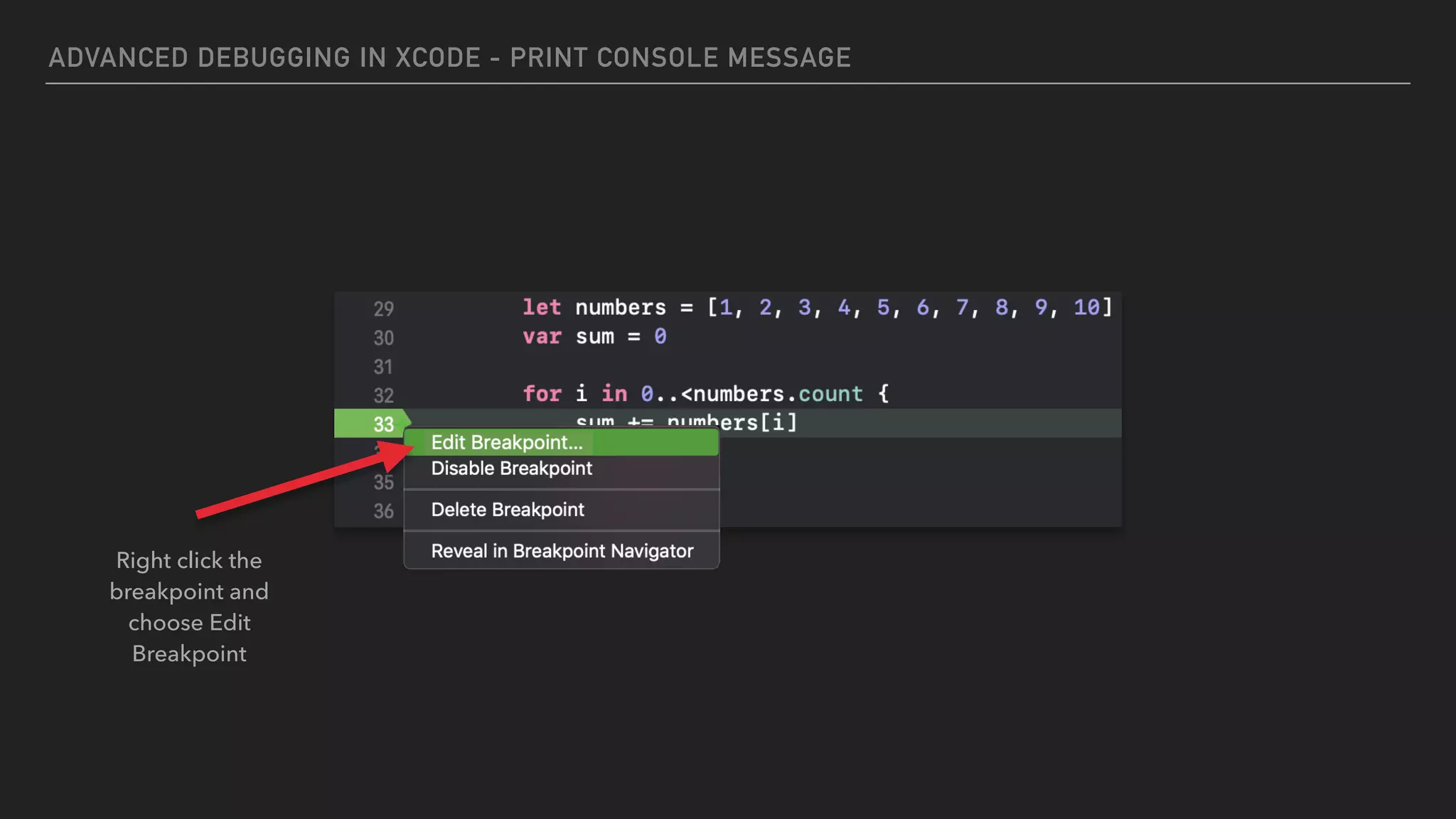
Right click the
breakpoint and
choose Edit
Breakpoint
ADVANCED DEBUGGING IN XCODE - PRINT CONSOLE MESSAGE
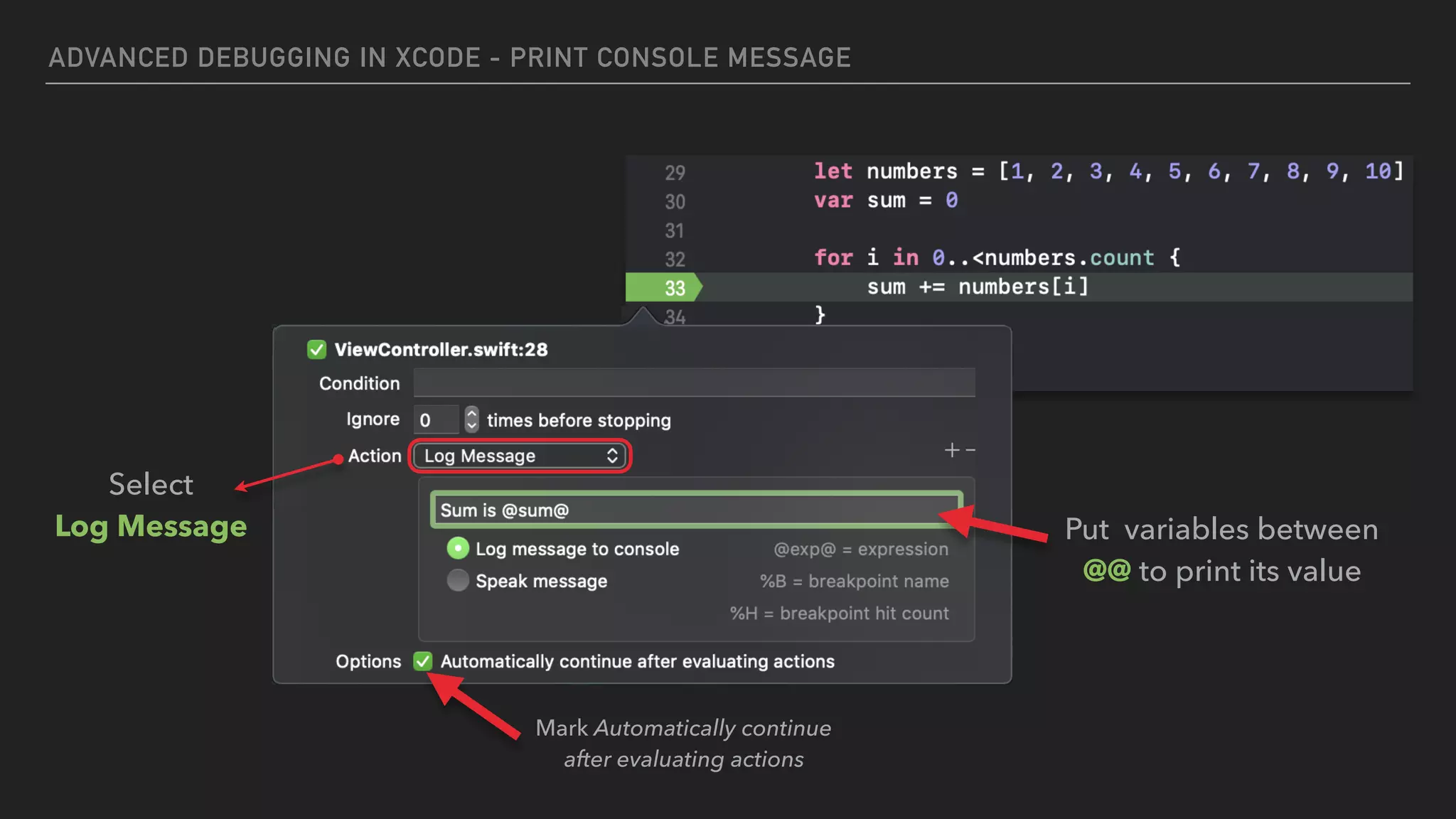
36
Select
Log Message Put variables between
@@ to print its value
Mark Automatically continue
after evaluating actions
ADVANCED DEBUGGING IN XCODE - PRINT CONSOLE MESSAGE
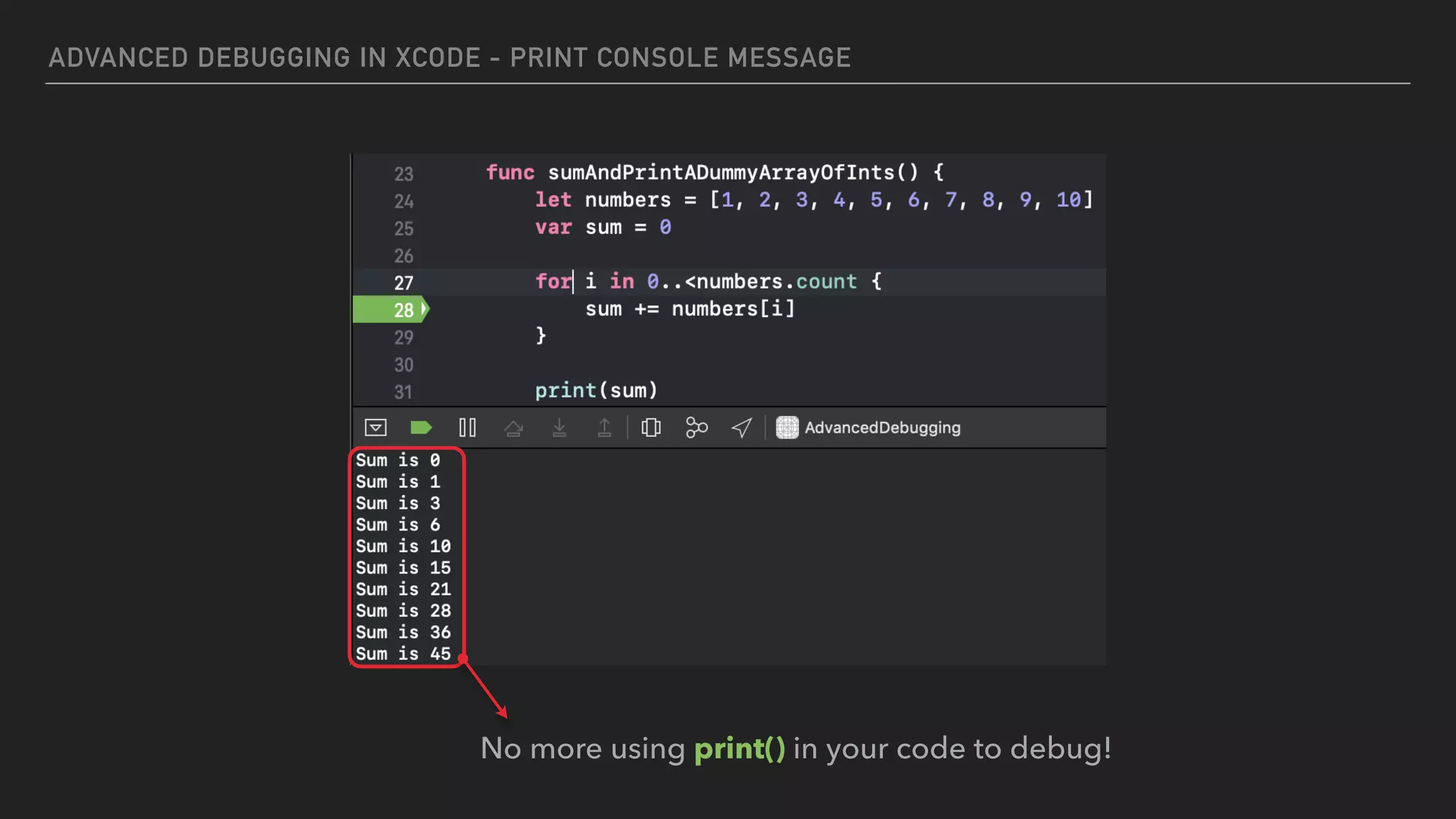
No more using print() in your code to debug!
CHISEL
OTHER USEFUL LLDB COMMANDS WITH
ADVANCED DEBUGGING IN XCODE - OTHER USEFUL LLDB COMMANDS WITH CHISEL
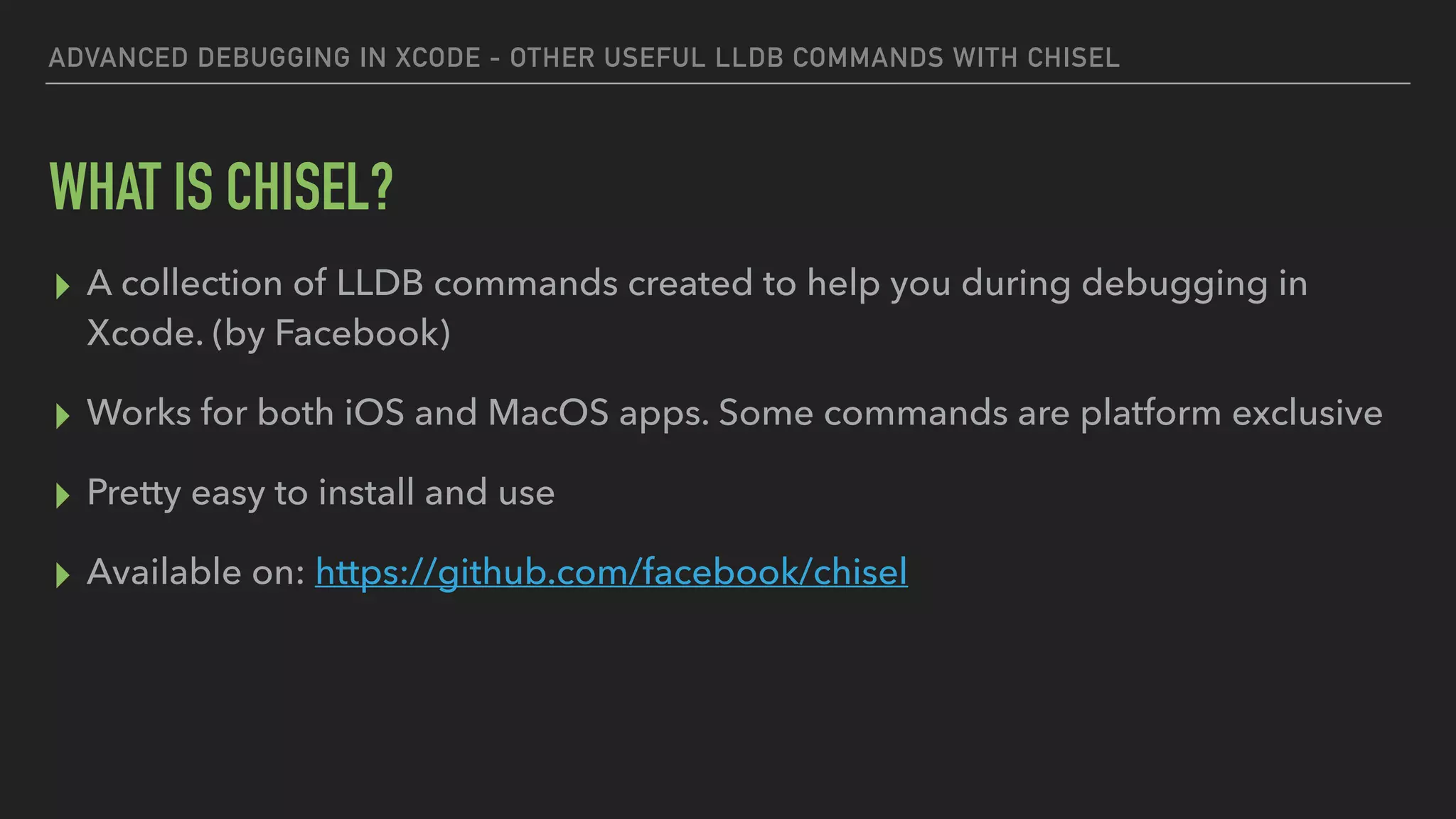
WHAT IS CHISEL?
▸ A collection of LLDB commands created to help you during debugging in
Xcode. (by Facebook)
▸ Works for both iOS and MacOS apps. Some commands are platform exclusive
▸ Pretty easy to install and use
▸ Available on: https://github.com/facebook/chisel
ADVANCED DEBUGGING IN XCODE - OTHER USEFUL LLDB COMMANDS WITH CHISEL
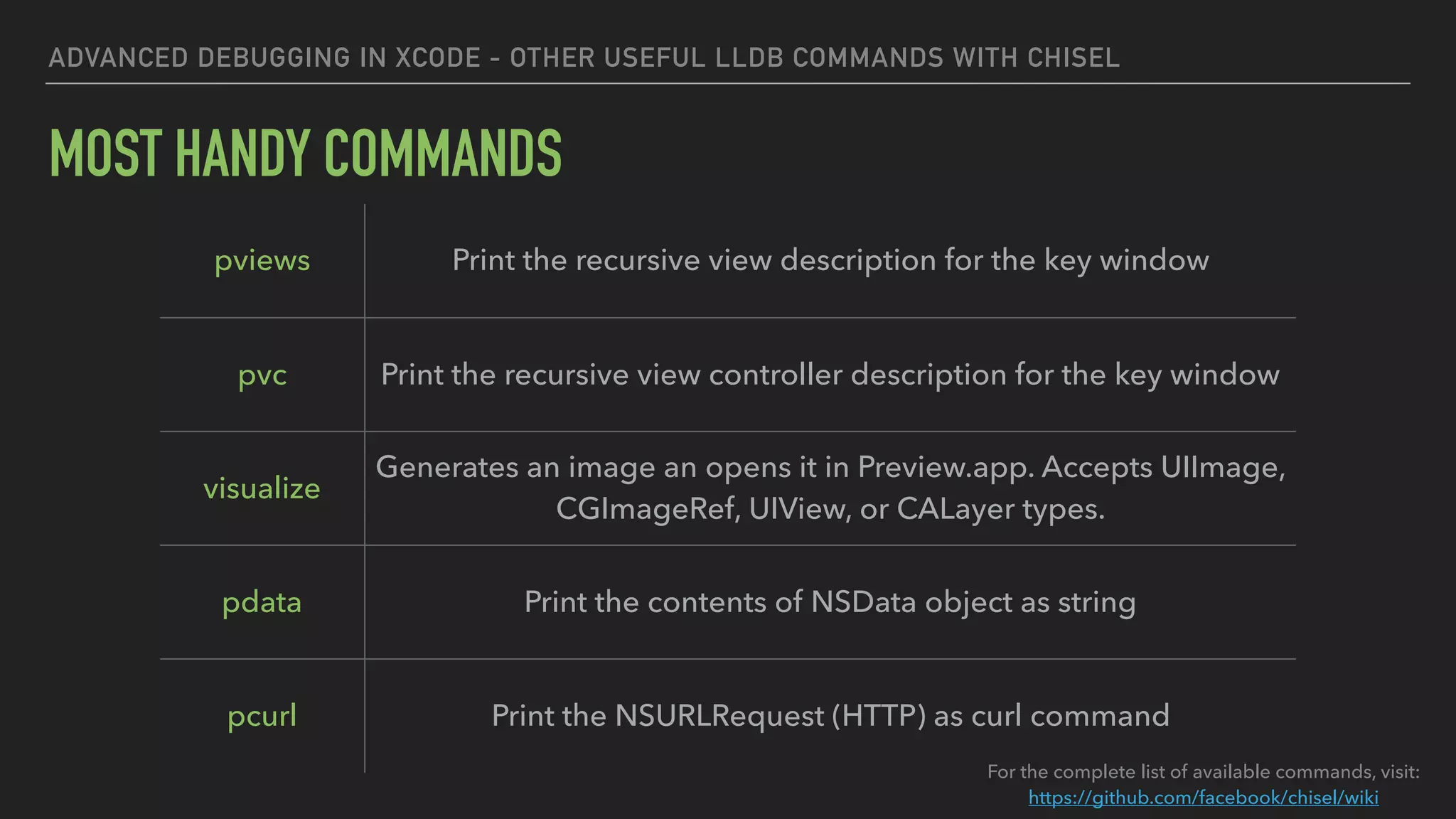
MOST HANDY COMMANDS
pviews Print the recursive view description for the key window
pvc Print the recursive view controller description for the key window
visualize
Generates an image an opens it in Preview.app. Accepts UIImage,
CGImageRef, UIView, or CALayer types.
pdata Print the contents of NSData object as string
pcurl Print the NSURLRequest (HTTP) as curl command
For the complete list of available commands, visit:
https://github.com/facebook/chisel/wiki
ADVANCED DEBUGGING IN XCODE - OTHER USEFUL LLDB COMMANDS WITH CHISEL
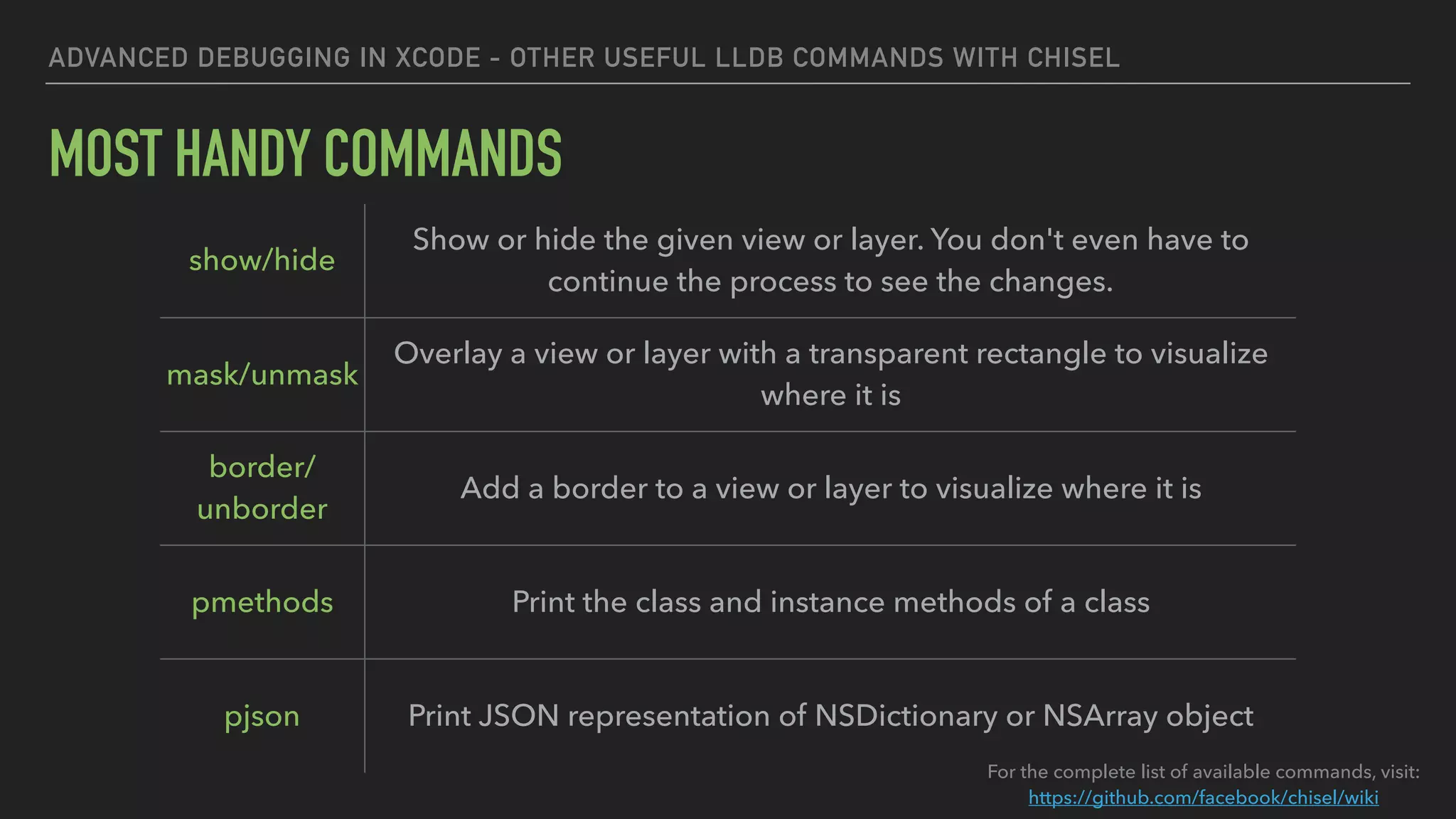
MOST HANDY COMMANDS
For the complete list of available commands, visit:
https://github.com/facebook/chisel/wiki
show/hide
Show or hide the given view or layer. You don't even have to
continue the process to see the changes.
mask/unmask
Overlay a view or layer with a transparent rectangle to visualize
where it is
border/
unborder
Add a border to a view or layer to visualize where it is
pmethods Print the class and instance methods of a class
pjson Print JSON representation of NSDictionary or NSArray object
DEMO
RECAP
ADVANCED DEBUGGING IN XCODE - RECAP
RECAP
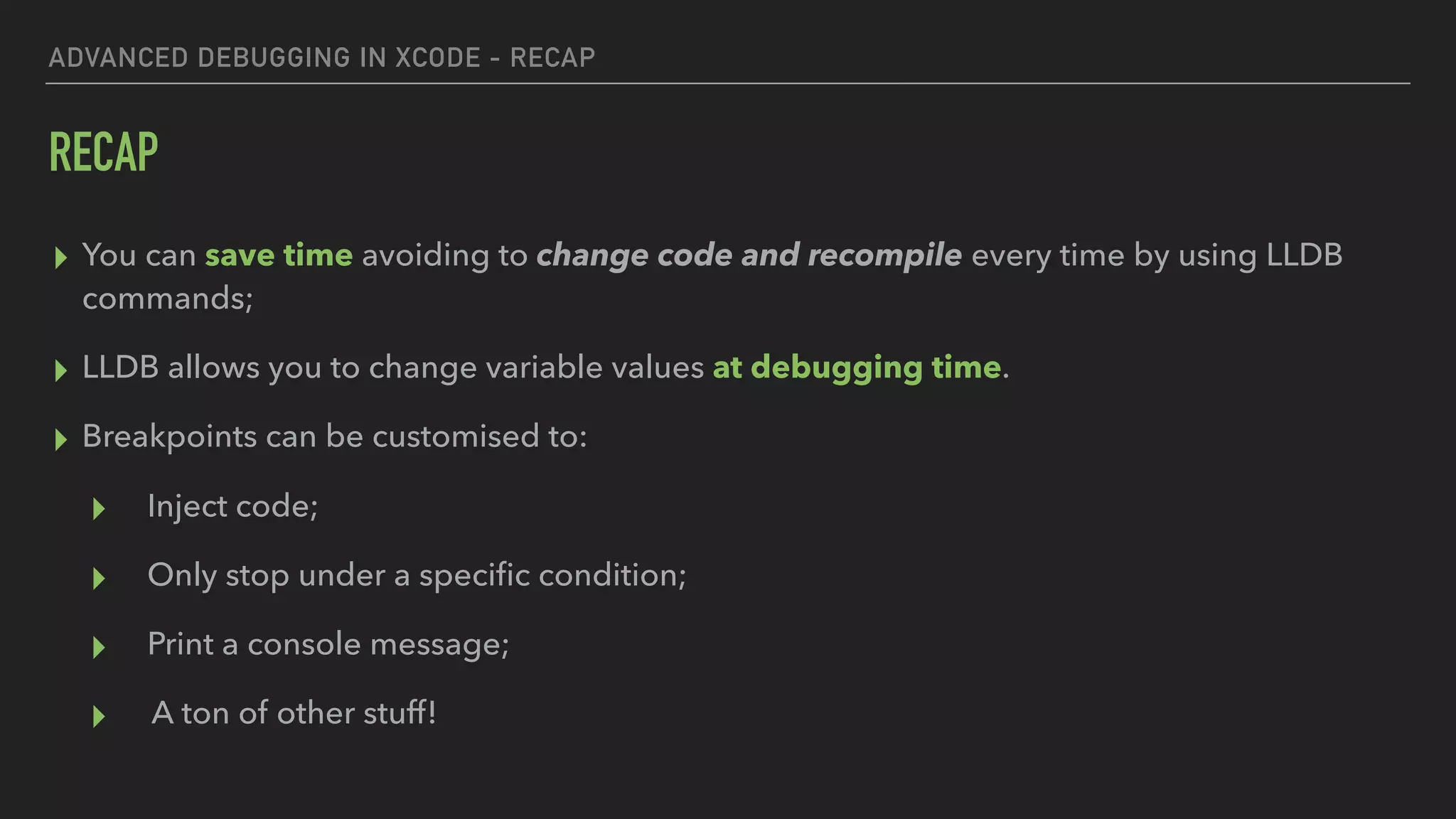
▸ You can save time avoiding to change code and recompile every time by using LLDB
commands;
▸ LLDB allows you to change variable values at debugging time.
▸ Breakpoints can be customised to:
▸ Inject code;
▸ Only stop under a specific condition;
▸ Print a console message;
▸ A ton of other stuff!
ADVANCED DEBUGGING IN XCODE - RECAP
RECAP
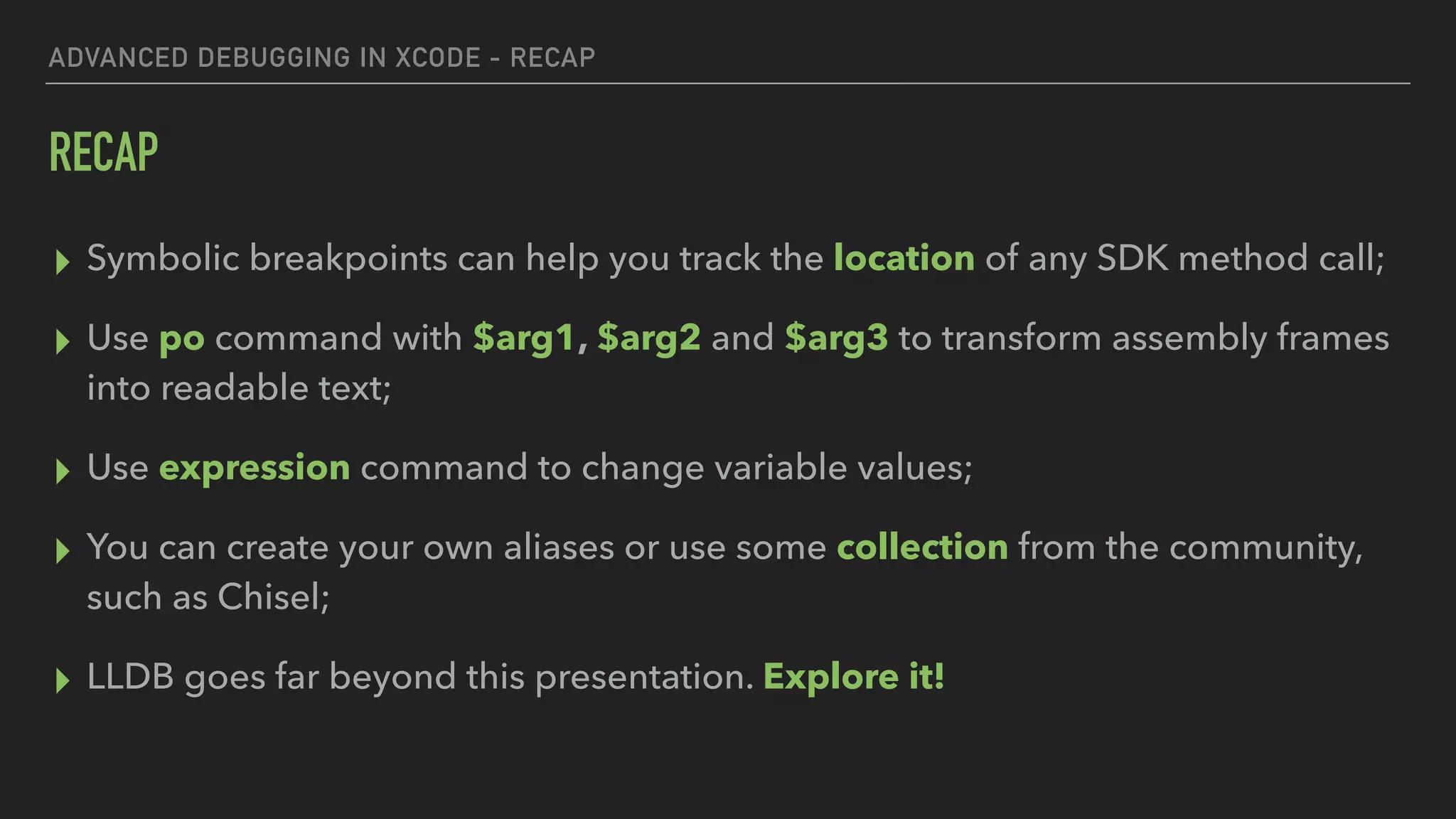
▸ Symbolic breakpoints can help you track the location of any SDK method call;
▸ Use po command with $arg1, $arg2 and $arg3 to transform assembly frames
into readable text;
▸ Use expression command to change variable values;
▸ You can create your own aliases or use some collection from the community,
such as Chisel;
▸ LLDB goes far beyond this presentation. Explore it!
ADVANCED DEBUGGING IN XCODE - RECAP
RECOMMENDED READING:
▸ 2018's WWCD Debugging session:
https://developer.apple.com/videos/play/wwdc2018/412/
▸ Dancing in the Debugger — A Waltz with LLDB
https://www.objc.io/issues/19-debugging/lldb-debugging/
THATS ALL FOLKS!
Larissa Barra
linkedin.com/in/larissabconde
lbarra@thoughtworks.com
Michel Bueno
linkedin.com/in/michelbueno
mbueno@thoughtworks.com
We are hiring!

Advanced Debugging in XCode

  • 1.
    ADVANCED DEBUGGING LARISSA BARRA| MICHEL BUENO IN XCODE
  • 2.
    WHY THESE TIPS,AND WHY “ADVANCED”?
  • 3.
    ADVANCED DEBUGGING INXCODE ▸ Debugging can be a part of the process of building things, not just finding bugs in your code!
 ▸ The more efficiently we debug, the more building time we save. That can make a huge difference in complex applications
 ▸ There’s a lot more than what we’ll show here, we chose the tips that help us the most and are simple enough to be done very easily!
 ▸ Because they’re simple, maybe the term “advanced" sounds a little off. But it refers to the act of debugging, not to the content itself
  • 4.
    ADVANCED DEBUGGING INXCODE TOPICS COVERED ▸ Change / inject code during runtime ▸ Symbolic breakpoints ▸ Printing assembly code values ▸ Conditional breakpoints ▸ Printing console message ▸ Chisel
  • 5.
  • 6.
    LARISSA BARRA MOBILE ENGINEER@ THOUGHTWORKS linkedin.com/in/larissabconde lbarra@thoughtworks.com
  • 7.
    MICHEL BUENO MOBILE ENGINEER@ THOUGHTWORKS linkedin.com/in/michelbueno mbueno@thoughtworks.com
  • 8.
  • 9.
    LLDB is thedefault debugger in Xcode on macOS and supports debugging C, Objective-C and C++ on the desktop and iOS devices and simulator. https://lldb.llvm.org ADVANCED DEBUGGING IN XCODE
  • 10.
  • 11.
    CHANGE / INJECTCODE DURING RUNTIME
  • 12.
    ADVANCED DEBUGGING INXCODE - CHANGE / INJECT CODE DURING RUNTIME IMAGINE THAT… ▸ You’re developing code to show a flight’s status ▸ You get this status from an external data source (database, API, whatever) ▸ Possible status values are: ▸ On time ▸ Delayed ▸ Cancelled
  • 13.
    ADVANCED DEBUGGING INXCODE - CHANGE / INJECT CODE DURING RUNTIME
  • 14.
    ADVANCED DEBUGGING INXCODE - CHANGE / INJECT CODE DURING RUNTIME 2
  • 15.
    ADVANCED DEBUGGING INXCODE - CHANGE / INJECT CODE DURING RUNTIME
  • 16.
    ADVANCED DEBUGGING INXCODE - CHANGE / INJECT CODE DURING RUNTIME 2 Right click the breakpoint and choose Edit Breakpoint
  • 17.
    ADVANCED DEBUGGING INXCODE - CHANGE / INJECT CODE DURING RUNTIME 2 2 Click Add Action and type expression status = .delayed Mark Automatically continue after evaluating actions Select Debugger Command
  • 18.
  • 19.
    ADVANCED DEBUGGING INXCODE - SYMBOLIC BREAKPOINTS SYMBOLIC BREAKPOINT: ▸ A breakpoint that hits every time a method is called, for every instance of the particular class in your current debugging session. ▸ Helps you easily track the location of any SDK method call you want (apparently, it doesn’t work for your own code) ▸ You must use Objective-C syntax, even for Swift code. Example: ▸ To see every a time a text is set to any label, use -[UILabel setText:]
  • 20.
    ADVANCED DEBUGGING INXCODE - SYMBOLIC BREAKPOINTS Go to Breakpoint Navigator and add a Symbolic Breakpoint The symbol can be any method of any class you want. You must use Objective-C syntax. -[UILabel setText:]
  • 21.
    ADVANCED DEBUGGING INXCODE - SYMBOLIC BREAKPOINTS Not very helpful, right ? The breakpoint will hit every time setText is called on any UILabel existent in the current session. Sometimes you'll see assembly frames like this:
  • 22.
  • 23.
    ADVANCED DEBUGGING INXCODE - PRINTING ASSEMBLY CODE VALUES You can inspect the the assembly frame with po command to see readable values Use po $arg1 to see the which object received this call
  • 24.
    ADVANCED DEBUGGING INXCODE - PRINTING ASSEMBLY CODE VALUES You can inspect the the assembly frame with po command to see readable values Use po (SEL)$arg2 to see the method name being called
  • 25.
    ADVANCED DEBUGGING INXCODE - PRINTING ASSEMBLY CODE VALUES You can inspect the the assembly frame with po command to see readable values Use po $arg3 to see the parameters
  • 26.
  • 27.
    ADVANCED DEBUGGING INXCODE - CONDITIONAL BREAKPOINTS IMAGINE THAT… ▸ You’re iterating values of an array using a for loop ▸ You want to inspect values for an specific index ▸ You're too lazy to be hitting continue until the pointer reaches the index you want
  • 28.
    ADVANCED DEBUGGING INXCODE - CONDITIONAL BREAKPOINTS Right click the breakpoint and choose Edit Breakpoint
  • 29.
    ADVANCED DEBUGGING INXCODE - CONDITIONAL BREAKPOINTS thread jump —by 1 36 Enter any expression that results in a boolean. You can use any variable of this context. In this case, we are using i == 4
  • 30.
    ADVANCED DEBUGGING INXCODE - CONDITIONAL BREAKPOINTS The breakpoint will hit only when the condition you defined is satisfied:
  • 31.
  • 32.
    ADVANCED DEBUGGING INXCODE - PRINT CONSOLE MESSAGE Right click the breakpoint and choose Edit Breakpoint
  • 33.
    ADVANCED DEBUGGING INXCODE - PRINT CONSOLE MESSAGE 36 Select Log Message Put variables between @@ to print its value Mark Automatically continue after evaluating actions
  • 34.
    ADVANCED DEBUGGING INXCODE - PRINT CONSOLE MESSAGE No more using print() in your code to debug!
  • 35.
  • 36.
    ADVANCED DEBUGGING INXCODE - OTHER USEFUL LLDB COMMANDS WITH CHISEL WHAT IS CHISEL? ▸ A collection of LLDB commands created to help you during debugging in Xcode. (by Facebook) ▸ Works for both iOS and MacOS apps. Some commands are platform exclusive ▸ Pretty easy to install and use ▸ Available on: https://github.com/facebook/chisel
  • 37.
    ADVANCED DEBUGGING INXCODE - OTHER USEFUL LLDB COMMANDS WITH CHISEL MOST HANDY COMMANDS pviews Print the recursive view description for the key window pvc Print the recursive view controller description for the key window visualize Generates an image an opens it in Preview.app. Accepts UIImage, CGImageRef, UIView, or CALayer types. pdata Print the contents of NSData object as string pcurl Print the NSURLRequest (HTTP) as curl command For the complete list of available commands, visit: https://github.com/facebook/chisel/wiki
  • 38.
    ADVANCED DEBUGGING INXCODE - OTHER USEFUL LLDB COMMANDS WITH CHISEL MOST HANDY COMMANDS For the complete list of available commands, visit: https://github.com/facebook/chisel/wiki show/hide Show or hide the given view or layer. You don't even have to continue the process to see the changes. mask/unmask Overlay a view or layer with a transparent rectangle to visualize where it is border/ unborder Add a border to a view or layer to visualize where it is pmethods Print the class and instance methods of a class pjson Print JSON representation of NSDictionary or NSArray object
  • 39.
  • 40.
  • 41.
    ADVANCED DEBUGGING INXCODE - RECAP RECAP ▸ You can save time avoiding to change code and recompile every time by using LLDB commands; ▸ LLDB allows you to change variable values at debugging time. ▸ Breakpoints can be customised to: ▸ Inject code; ▸ Only stop under a specific condition; ▸ Print a console message; ▸ A ton of other stuff!
  • 42.
    ADVANCED DEBUGGING INXCODE - RECAP RECAP ▸ Symbolic breakpoints can help you track the location of any SDK method call; ▸ Use po command with $arg1, $arg2 and $arg3 to transform assembly frames into readable text; ▸ Use expression command to change variable values; ▸ You can create your own aliases or use some collection from the community, such as Chisel; ▸ LLDB goes far beyond this presentation. Explore it!
  • 43.
    ADVANCED DEBUGGING INXCODE - RECAP RECOMMENDED READING: ▸ 2018's WWCD Debugging session: https://developer.apple.com/videos/play/wwdc2018/412/ ▸ Dancing in the Debugger — A Waltz with LLDB https://www.objc.io/issues/19-debugging/lldb-debugging/
  • 44.
    THATS ALL FOLKS! LarissaBarra linkedin.com/in/larissabconde lbarra@thoughtworks.com Michel Bueno linkedin.com/in/michelbueno mbueno@thoughtworks.com We are hiring!