
SivaramaSundar.D
29th Nov 2012
 Concepts
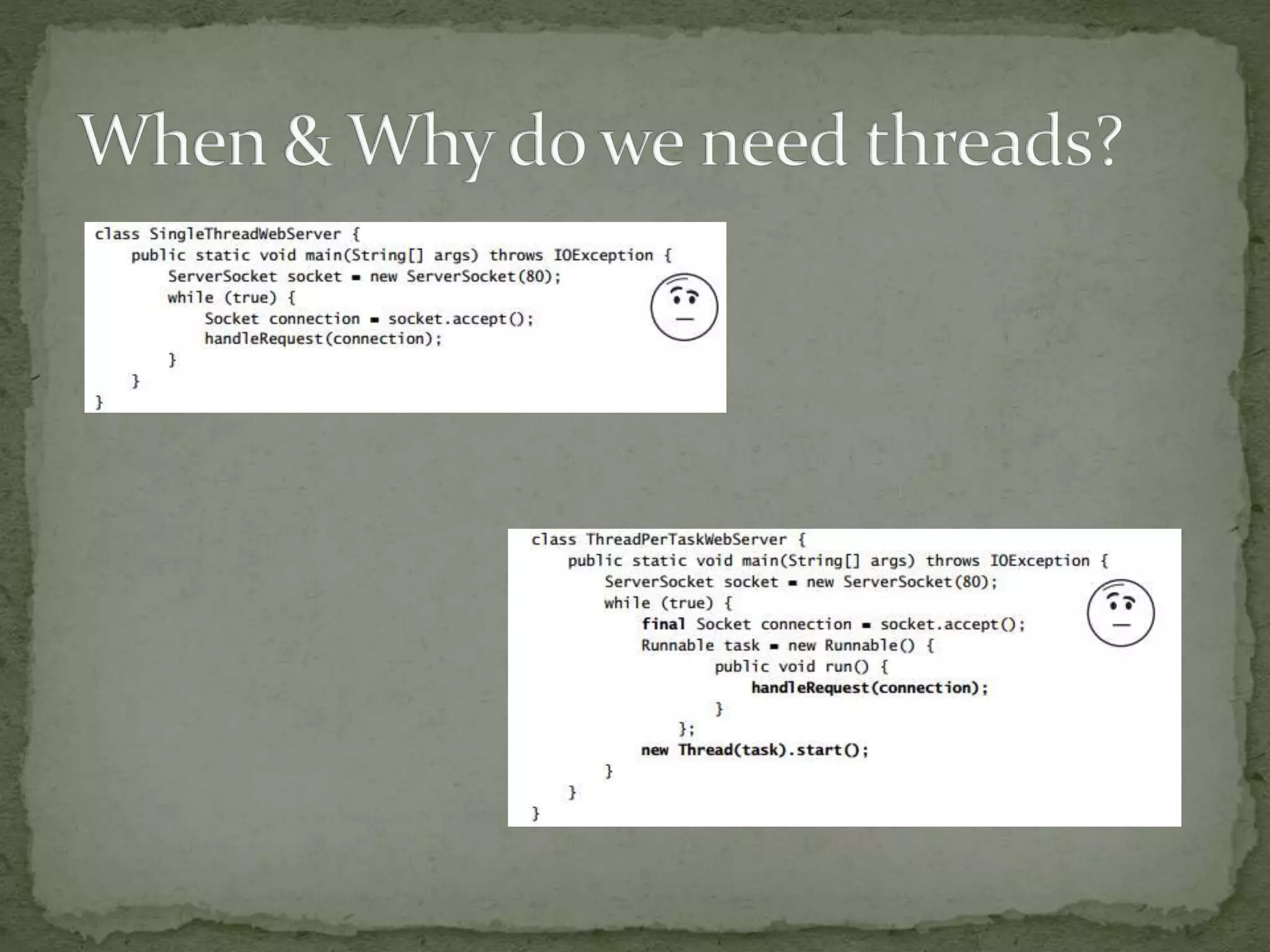
 When & Why do we need threads
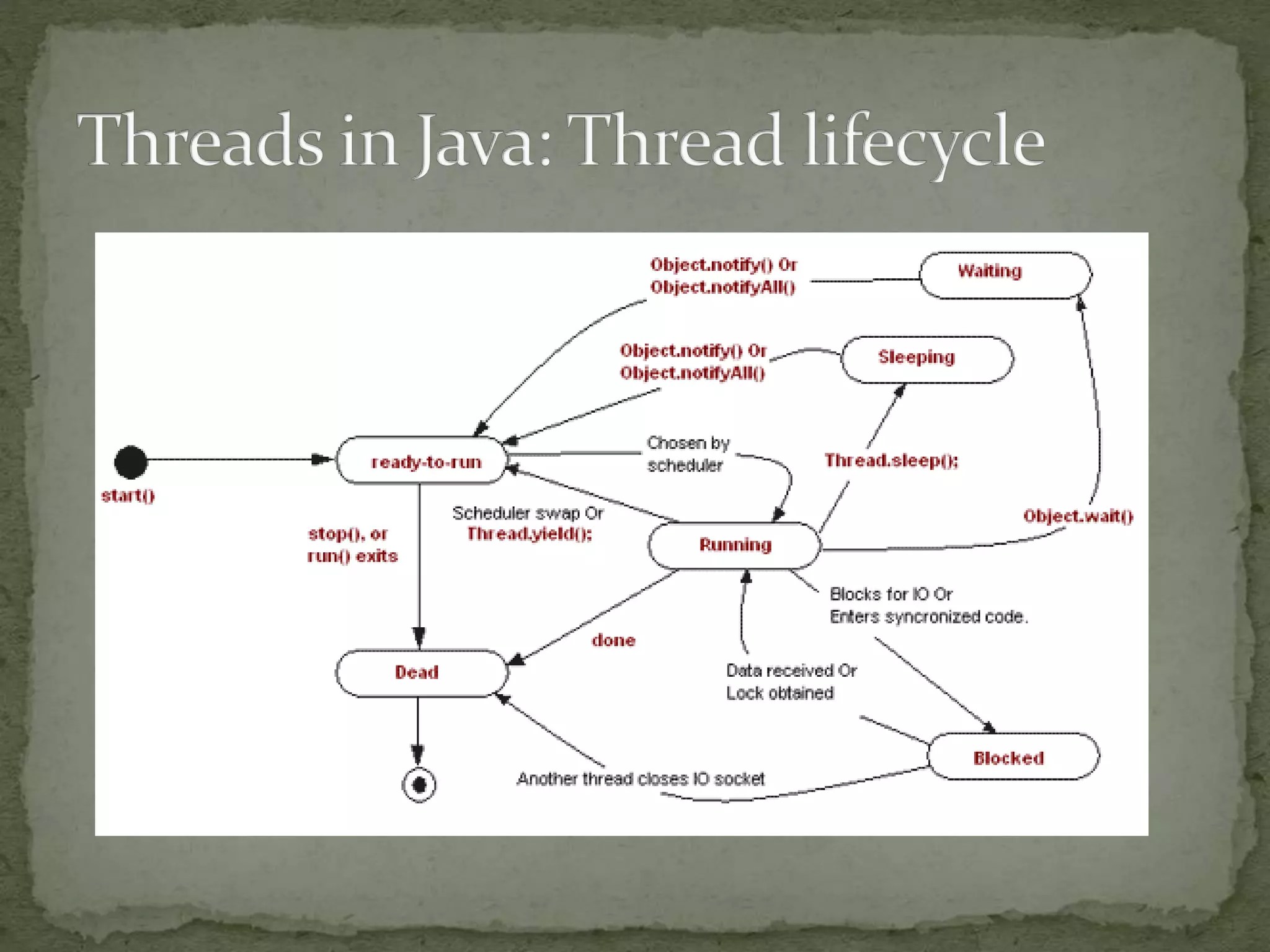
 Threads in java
 Concurrency: Thread control & Synchronization
 Concurrency: Data management between threads
 Best practices: Threading the right way;
 Q&A
 Processes
 A Process has a self-contained execution environment; an application, in general terms – with own
memory address space; with a main execution thread; which can own O/S resource handles – files,
sockets etc.
 1..* threads; Each process has one Main thread;
 System threads – GC, Object finalization, JVM housekeeping
 Timers and User created threads
 Threads
 Execution unit – to execute a sequence of instructions
 Owns: Stack, Program Counter, Local variables
 Shares: Memory, Filehandles, Process States
 ThreadGroups
 Grouping threads into a logical collection; Not used much.
 ThreadPools
 A thread pool is a collection of threads set aside for a specific task; Ex: webserver thread pool; saves
thread creation overheads everytime;
 execute(Runnable command)
 Used for executing large numbers of asynchronous tasks
 provide a boundary mechanism to create and managing the resources within the pool
 Better thread management; Cleaner shutdown of threads;
 Ability to Add, Remove, Enumerate future tasks; Apt for a scheduler;
 Multitasking – Receive data via a socket & write to file(s)
 A Server handling multiple concurrent requests to serve data
 Make the UI more responsive
 Number crunching; Bulk data processing;
 Take advantage of multiprocessor systems
 Simplify program logic when there are multiple independent
entities
 Perform blocking I/O without blocking the entire program
 Ex:
 A Webserver
 A real time device monitor to display device parameters
 A Monitoring application, polling multiple sources & providing live
updates
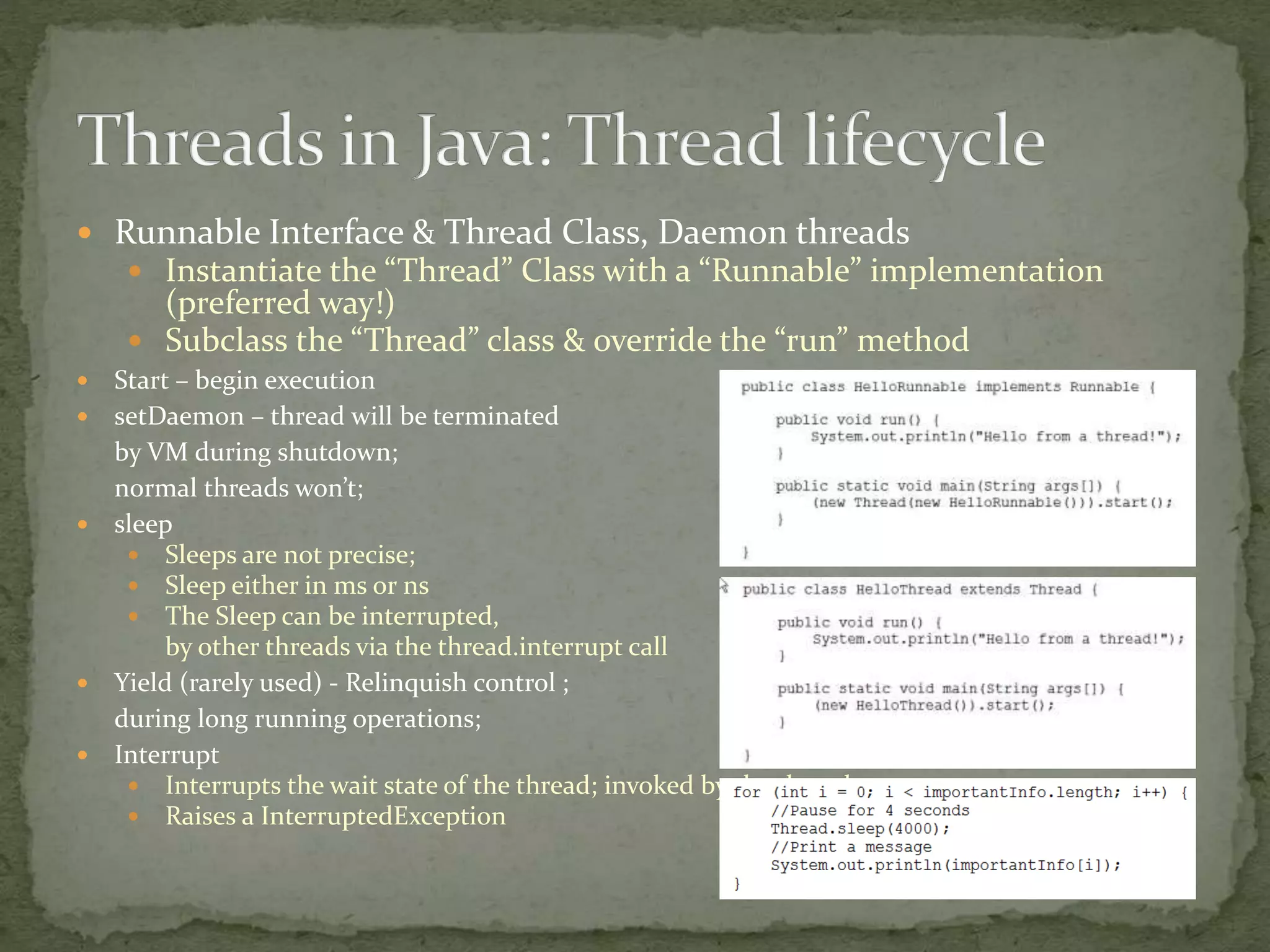
 Runnable Interface & Thread Class, Daemon threads
 Instantiate the “Thread” Class with a “Runnable” implementation
(preferred way!)
 Subclass the “Thread” class & override the “run” method
 Start – begin execution
 setDaemon – thread will be terminated
by VM during shutdown;
normal threads won’t;
 sleep
 Sleeps are not precise;
 Sleep either in ms or ns
 The Sleep can be interrupted,
by other threads via the thread.interrupt call
 Yield (rarely used) - Relinquish control ;
during long running operations;
 Interrupt
 Interrupts the wait state of the thread; invoked by the thread owner;
 Raises a InterruptedException
 Join
 Makes the calling thread wait until other thread completes;
 Typical usage: make sure all the child threads are terminated;
 Can be interrupted by the thread.interrupt call
 wait
 Notify – Wakes up the thread waiting on the given object’s
monitor
 notifyAll – Wakes up all the threads waiting on the given
object’s monitor
 Obselete methods
 suspend
 resume
 Stop – use internal flags, join, wait & interrupt mechanisms
instead
 Timers, TimerTask (Daemon)
 Schedule tasks (Runnable) for future execution in a
background thread. Tasks may be scheduled for one-time
execution, or for repeated execution at regular intervals
 Schedule (task, delay)
 ThreadFactory
 Help create threads of a given type; subclassed threads
 ThreadInfo
 Contains the information about a thread
 ThreadReference
 Object ref. with additional access to thread-specific
information from the target VM. Provides access to internal
stack frames, monitor references.
 Why Synchronization
 Prevent shared data corruption / thread interference / data integrity
 Code
 Locks (Monitors)- Synchronized, Volatile
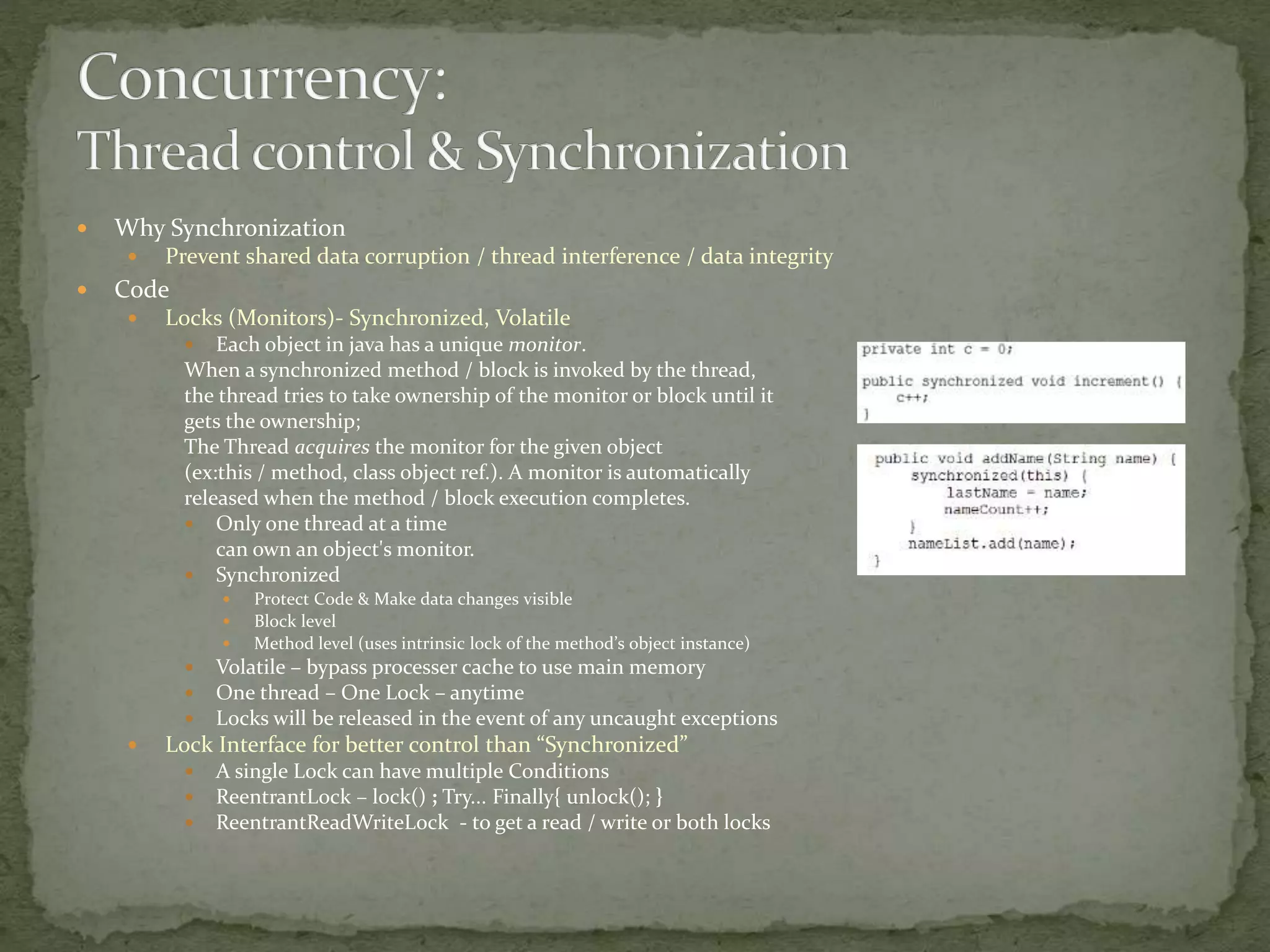
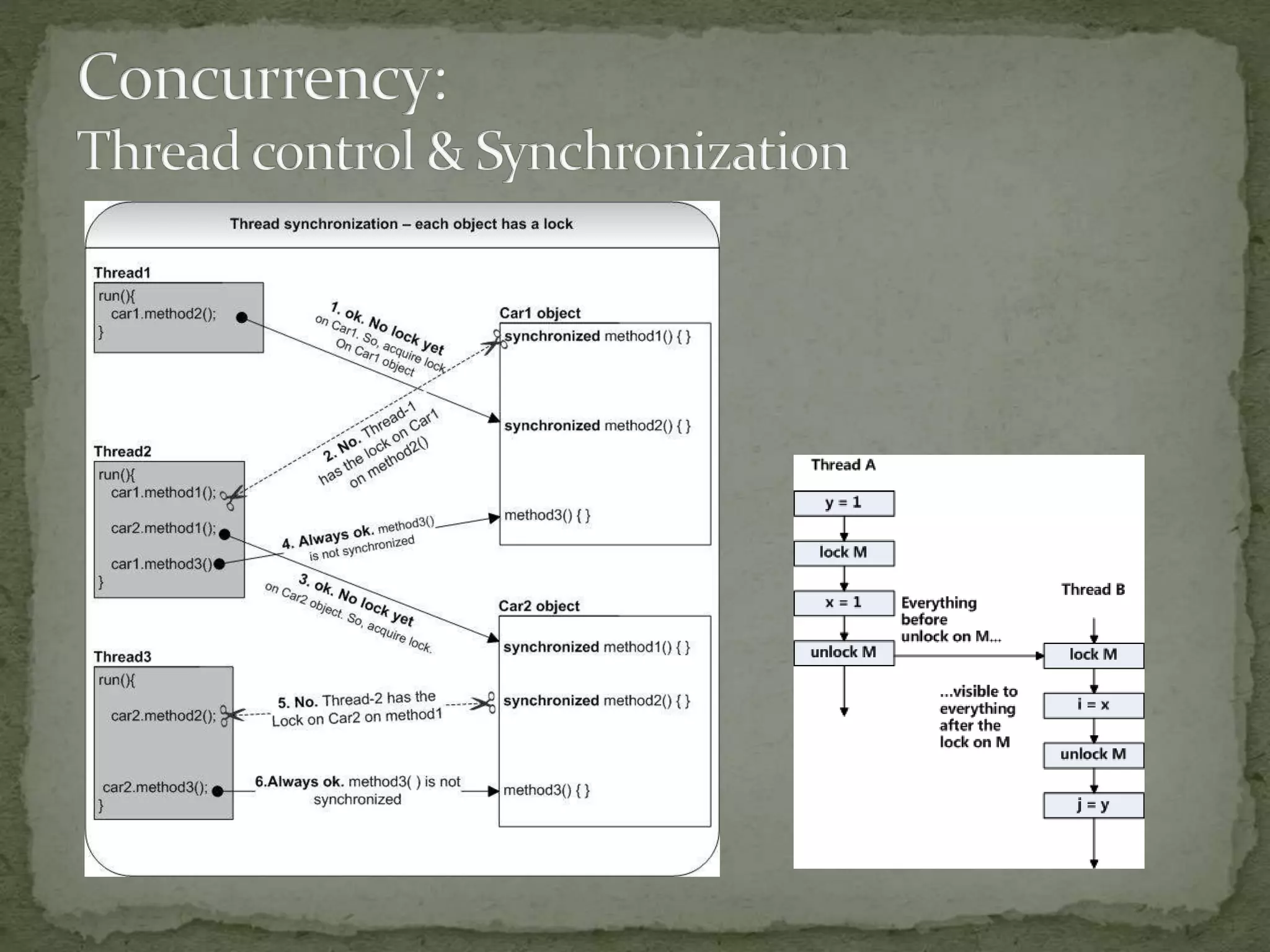
 Each object in java has a unique monitor.
When a synchronized method / block is invoked by the thread,
the thread tries to take ownership of the monitor or block until it
gets the ownership;
The Thread acquires the monitor for the given object
(ex:this / method, class object ref.). A monitor is automatically
released when the method / block execution completes.
 Only one thread at a time
can own an object's monitor.
 Synchronized
 Protect Code & Make data changes visible
 Block level
 Method level (uses intrinsic lock of the method’s object instance)
 Volatile – bypass processer cache to use main memory
 One thread – One Lock – anytime
 Locks will be released in the event of any uncaught exceptions
 Lock Interface for better control than “Synchronized”
 A single Lock can have multiple Conditions
 ReentrantLock – lock() ; Try... Finally{ unlock(); }
 ReentrantReadWriteLock - to get a read / write or both locks
 Data
 Semaphores– Semaphore (Counting Semaphore)
 acquire(), release()
 Mechanism to control access to a pool of shared resource, between
multiple processes, threads
 Acts like a gate – for a limited access pool / lift – with a fixed
capacity; some threads have to yield control, for the other threads to
access the shared data;
 While Locks are exclusive, semaphores are not
 Other examples:
 Fixed no. of meeting rooms – with controlled access
 Mutexes – Same as a binary semaphore (lock - yes/no), but
across processes
 Normally mutexes has owners
 Typical usage – to ensure single instance of an application / process
 ThreadLocal<T>
 Provide Local variables for the thread (can be accessed only within this thread)
 Each thread holds an implicit reference to its copy of a thread-local variable as long as the thread is alive
 When a thread dies; the thread local variables are subject to GC
 Java.utils.concurrent
 ThreadPoolExecutor, ScheduledThreadPoolExecutor
 Java.util.Collections classes with built in support for handling concurrency & access from multiple
threads; uses collection segmentation & hence supports non-blocking – ex: the whole collection
is not locked;
 ConcurrentHashMap
 ConcurrentLinkedDeque
 ConcurrentLinkedQueue
 ConcurrentSkipListMap
 ConcurrentSkipListSet
 Make normal collections thread safe via - java.util.Collections methods;
blocking – ex: whole collection is locked;
 SynchronousQueue
 SynchronizedCollection
 SynchronizedSet
 SynchronizedList
 SynchronizedMap
 SynchronizedSortedSet
 SynchronizedSortedMap
 Deadlock
 T1 -> W1; T1.DoSomething waits for W2.
 T2 -> W2; T2.DoSomething waits for W1.
 Hard to debug – but jConsole, jStack helps (demo with
jConsole);
 Simplify locks / avoid arbitrary synchronization
 Race Condition
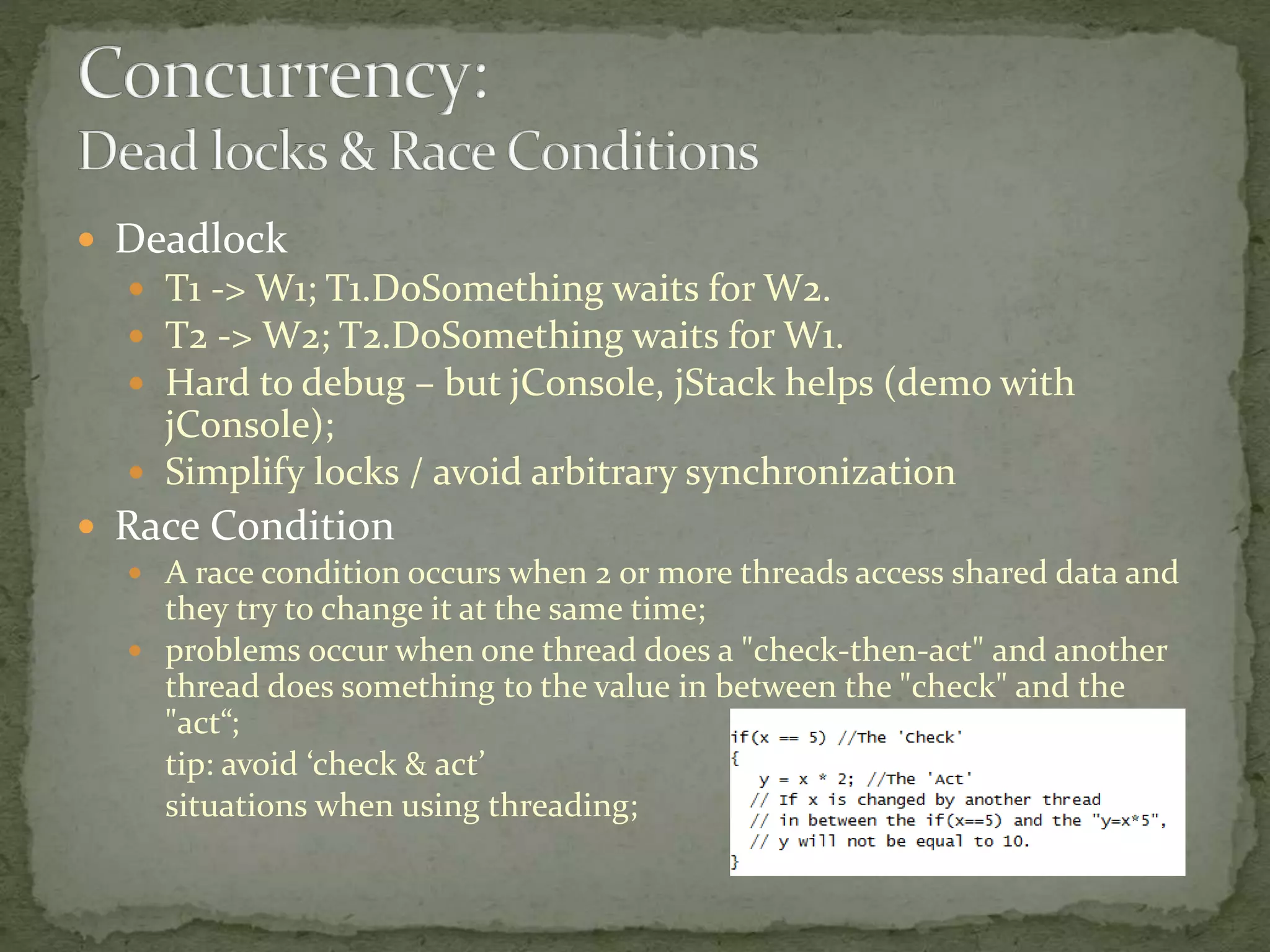
 A race condition occurs when 2 or more threads access shared data and
they try to change it at the same time;
 problems occur when one thread does a "check-then-act" and another
thread does something to the value in between the "check" and the
"act“;
tip: avoid ‘check & act’
situations when using threading;
 White-boarding & Brainstorming
 Document / Comment all threading code; Be Aware of the synchronized keyword used as
part of the method name – it is easy to miss if that a synchronized method uses an
intrinsic lock; synchronized blocks are easier to spot;
 Thorough Code Reviews
 Use locks judiciously – lock while writes
 Wait for spawned threads to complete, or force stop
 Exception handling – a thread will terminate on an unhandled exception
Make use of Thread.setDefaultUncaughtExceptionHandler -handler for all threads in the VM
or
setUncaughtExceptionHandler(Thread.UncaughtExceptionHandler eh) - handler for single specific
thread
 Use immutable classes – Ex: String, Integer, BigDecimal, as they make concurrency
handling simple
 Know when JVM performs the synchronization for you: Static Initializer, final fields,
Creating objects before threads
 Avoid nested locks; to prevent deadlocks;
 Don't invoke methods on other objects while holding a lock. (Sounds crazy; )
 Ensure that when you acquire multiple locks, you always acquire the locks in
the same order in all threads.
 Keep the synchronized blocks as short as possible;
 Don’t use blocking code inside a synchronized block – ex: Inputstream.read()
 Don’t tamper thread priorities; leave it to the JVM & O/S
 Avoid starvation of resources; Don’t code long running threads;
 Aids in debugging threading issues:
 Thread.holdsLock (Object lockObj)- true if lock is held
 Thread.dumpStack()
 Inspect using Thread.State / getState()
 Provide a thread name when creating a thread
 Logs – with thread id’s;
 ThreadInfo class
 Threaddumps - Provide a stack trace of all running threads
 (tool from jdk) jstack <pid> >> threaddumps.log
 (alternate) use jConsole to monitor the jvm & analyze stack trace of all live threads
 Using the “SendSignal.exe” to send a “break” signal to the process to get a thread dump
 Threading explained in simple terms-
http://www.tutorialspoint.com/java/java_multithreading.htm
http://www.tutorialspoint.com/java/java_thread_synchronization.htm
http://www.tutorialspoint.com/java/java_multithreading.htm
http://www.tutorialspoint.com/java/java_thread_communication.htm
http://www.tutorialspoint.com/java/java_thread_deadlock.htm
 Java Concurrency in Practice – Book – www.Jcip.net
 Hardcode multi-threading in java -
http://conferences.embarcadero.com/article/32141
 Analyzing thread dumps-
http://www.javacodegeeks.com/2012/03/jvm-how-to-analyze-thread-
dump.html
 ThreadApp.java
 SimpleJavaThread.java
 Deadlock.java
 A.java
 B.java
 NewThread.java
 SuspendResume.java
 Pool.java
Threading in java - a pragmatic primer

Threading in java - a pragmatic primer

  • 1.
  • 2.
     Concepts  When& Why do we need threads  Threads in java  Concurrency: Thread control & Synchronization  Concurrency: Data management between threads  Best practices: Threading the right way;  Q&A
  • 3.
     Processes  AProcess has a self-contained execution environment; an application, in general terms – with own memory address space; with a main execution thread; which can own O/S resource handles – files, sockets etc.  1..* threads; Each process has one Main thread;  System threads – GC, Object finalization, JVM housekeeping  Timers and User created threads  Threads  Execution unit – to execute a sequence of instructions  Owns: Stack, Program Counter, Local variables  Shares: Memory, Filehandles, Process States  ThreadGroups  Grouping threads into a logical collection; Not used much.  ThreadPools  A thread pool is a collection of threads set aside for a specific task; Ex: webserver thread pool; saves thread creation overheads everytime;  execute(Runnable command)  Used for executing large numbers of asynchronous tasks  provide a boundary mechanism to create and managing the resources within the pool  Better thread management; Cleaner shutdown of threads;  Ability to Add, Remove, Enumerate future tasks; Apt for a scheduler;
  • 4.
     Multitasking –Receive data via a socket & write to file(s)  A Server handling multiple concurrent requests to serve data  Make the UI more responsive  Number crunching; Bulk data processing;  Take advantage of multiprocessor systems  Simplify program logic when there are multiple independent entities  Perform blocking I/O without blocking the entire program  Ex:  A Webserver  A real time device monitor to display device parameters  A Monitoring application, polling multiple sources & providing live updates
  • 7.
     Runnable Interface& Thread Class, Daemon threads  Instantiate the “Thread” Class with a “Runnable” implementation (preferred way!)  Subclass the “Thread” class & override the “run” method  Start – begin execution  setDaemon – thread will be terminated by VM during shutdown; normal threads won’t;  sleep  Sleeps are not precise;  Sleep either in ms or ns  The Sleep can be interrupted, by other threads via the thread.interrupt call  Yield (rarely used) - Relinquish control ; during long running operations;  Interrupt  Interrupts the wait state of the thread; invoked by the thread owner;  Raises a InterruptedException
  • 8.
     Join  Makesthe calling thread wait until other thread completes;  Typical usage: make sure all the child threads are terminated;  Can be interrupted by the thread.interrupt call  wait  Notify – Wakes up the thread waiting on the given object’s monitor  notifyAll – Wakes up all the threads waiting on the given object’s monitor  Obselete methods  suspend  resume  Stop – use internal flags, join, wait & interrupt mechanisms instead
  • 9.
     Timers, TimerTask(Daemon)  Schedule tasks (Runnable) for future execution in a background thread. Tasks may be scheduled for one-time execution, or for repeated execution at regular intervals  Schedule (task, delay)  ThreadFactory  Help create threads of a given type; subclassed threads  ThreadInfo  Contains the information about a thread  ThreadReference  Object ref. with additional access to thread-specific information from the target VM. Provides access to internal stack frames, monitor references.
  • 10.
     Why Synchronization Prevent shared data corruption / thread interference / data integrity  Code  Locks (Monitors)- Synchronized, Volatile  Each object in java has a unique monitor. When a synchronized method / block is invoked by the thread, the thread tries to take ownership of the monitor or block until it gets the ownership; The Thread acquires the monitor for the given object (ex:this / method, class object ref.). A monitor is automatically released when the method / block execution completes.  Only one thread at a time can own an object's monitor.  Synchronized  Protect Code & Make data changes visible  Block level  Method level (uses intrinsic lock of the method’s object instance)  Volatile – bypass processer cache to use main memory  One thread – One Lock – anytime  Locks will be released in the event of any uncaught exceptions  Lock Interface for better control than “Synchronized”  A single Lock can have multiple Conditions  ReentrantLock – lock() ; Try... Finally{ unlock(); }  ReentrantReadWriteLock - to get a read / write or both locks
  • 12.
     Data  Semaphores–Semaphore (Counting Semaphore)  acquire(), release()  Mechanism to control access to a pool of shared resource, between multiple processes, threads  Acts like a gate – for a limited access pool / lift – with a fixed capacity; some threads have to yield control, for the other threads to access the shared data;  While Locks are exclusive, semaphores are not  Other examples:  Fixed no. of meeting rooms – with controlled access  Mutexes – Same as a binary semaphore (lock - yes/no), but across processes  Normally mutexes has owners  Typical usage – to ensure single instance of an application / process
  • 13.
     ThreadLocal<T>  ProvideLocal variables for the thread (can be accessed only within this thread)  Each thread holds an implicit reference to its copy of a thread-local variable as long as the thread is alive  When a thread dies; the thread local variables are subject to GC  Java.utils.concurrent  ThreadPoolExecutor, ScheduledThreadPoolExecutor  Java.util.Collections classes with built in support for handling concurrency & access from multiple threads; uses collection segmentation & hence supports non-blocking – ex: the whole collection is not locked;  ConcurrentHashMap  ConcurrentLinkedDeque  ConcurrentLinkedQueue  ConcurrentSkipListMap  ConcurrentSkipListSet  Make normal collections thread safe via - java.util.Collections methods; blocking – ex: whole collection is locked;  SynchronousQueue  SynchronizedCollection  SynchronizedSet  SynchronizedList  SynchronizedMap  SynchronizedSortedSet  SynchronizedSortedMap
  • 14.
     Deadlock  T1-> W1; T1.DoSomething waits for W2.  T2 -> W2; T2.DoSomething waits for W1.  Hard to debug – but jConsole, jStack helps (demo with jConsole);  Simplify locks / avoid arbitrary synchronization  Race Condition  A race condition occurs when 2 or more threads access shared data and they try to change it at the same time;  problems occur when one thread does a "check-then-act" and another thread does something to the value in between the "check" and the "act“; tip: avoid ‘check & act’ situations when using threading;
  • 15.
     White-boarding &Brainstorming  Document / Comment all threading code; Be Aware of the synchronized keyword used as part of the method name – it is easy to miss if that a synchronized method uses an intrinsic lock; synchronized blocks are easier to spot;  Thorough Code Reviews  Use locks judiciously – lock while writes  Wait for spawned threads to complete, or force stop  Exception handling – a thread will terminate on an unhandled exception Make use of Thread.setDefaultUncaughtExceptionHandler -handler for all threads in the VM or setUncaughtExceptionHandler(Thread.UncaughtExceptionHandler eh) - handler for single specific thread  Use immutable classes – Ex: String, Integer, BigDecimal, as they make concurrency handling simple  Know when JVM performs the synchronization for you: Static Initializer, final fields, Creating objects before threads  Avoid nested locks; to prevent deadlocks;
  • 16.
     Don't invokemethods on other objects while holding a lock. (Sounds crazy; )  Ensure that when you acquire multiple locks, you always acquire the locks in the same order in all threads.  Keep the synchronized blocks as short as possible;  Don’t use blocking code inside a synchronized block – ex: Inputstream.read()  Don’t tamper thread priorities; leave it to the JVM & O/S  Avoid starvation of resources; Don’t code long running threads;  Aids in debugging threading issues:  Thread.holdsLock (Object lockObj)- true if lock is held  Thread.dumpStack()  Inspect using Thread.State / getState()  Provide a thread name when creating a thread  Logs – with thread id’s;  ThreadInfo class  Threaddumps - Provide a stack trace of all running threads  (tool from jdk) jstack <pid> >> threaddumps.log  (alternate) use jConsole to monitor the jvm & analyze stack trace of all live threads  Using the “SendSignal.exe” to send a “break” signal to the process to get a thread dump
  • 17.
     Threading explainedin simple terms- http://www.tutorialspoint.com/java/java_multithreading.htm http://www.tutorialspoint.com/java/java_thread_synchronization.htm http://www.tutorialspoint.com/java/java_multithreading.htm http://www.tutorialspoint.com/java/java_thread_communication.htm http://www.tutorialspoint.com/java/java_thread_deadlock.htm  Java Concurrency in Practice – Book – www.Jcip.net  Hardcode multi-threading in java - http://conferences.embarcadero.com/article/32141  Analyzing thread dumps- http://www.javacodegeeks.com/2012/03/jvm-how-to-analyze-thread- dump.html
  • 18.
     ThreadApp.java  SimpleJavaThread.java Deadlock.java  A.java  B.java  NewThread.java  SuspendResume.java  Pool.java

Editor's Notes

  • #6 Pub-Sub messaging Multiple devices sending updates to a UI A Logging service / Common logging component in a huge system, which gets log messages from all other subsystems and persists them via a single thread; ---------- For simple background tasks; simple threads suffice For above options, all the synchronizations mechanisms are needed
  • #14 Ex: Apache web-server, with a configurable thread pool, where in threads shall be pre-created and new threads created only when the number of requests become higher and cannot be served by the present pool