


How to Use GTR's Website
This page describes how to use GTR to find tests and other genetic information. The content of this site is designed to assist health care providers and researchers navigating the landscape of genetic tests. Patients and consumers with specific questions about a genetic test should contact a health care provider or a genetics professional.
NIH does not independently verify information submitted to the GTR; it relies on submitters to provide information that is accurate and not misleading. NIH makes no endorsements of tests or laboratories listed in GTR. GTR is not a substitute for medical advice.
This page is focused on how to find information in GTR. For submission related information, see https://www.ncbi.nlm.nih.gov/gtr/docs/submit/. Use the navigation menu (above) for this documentation, as well as the search box specific to the documentation to get to the topic of interest.
Getting started
Find tests in GTR using the simple search box
GTR supports searching by
- Condition name
- Gene symbol
- Laboratory name
- Any term or phrase
Enter a gene symbol, condition name, or lab name into the search box, and select the most appropriate option from the autosuggest menu. Alternatively, continue typing your term or phrase. Press Enter or click the Search button to run the search.
You can enter a single term or multiple terms.

The search results page has the following features shown in the image below.
- Search term, condition 'Warfarin response' (A).
- The list of tests with laboratory information is displayed in a table with count of conditions, genes and methods; result count is shown above the table (B).
- Link to 'See all labs' (C) will open a popup with the list of labs (C).
- The summary box at the top includes links to the condition page in GTR for the condition 'Warfarin response', synonyms, and associated genes (D).
- For tests that have been selected with the compare icon, click the compare button to open a popup with the list of tests to compare. Click 'Show comparison' in the popup to open the comparison page (E). See Compare tests
- Download the GTR data for all or a subset of tests. Click the checkbox to select a test for which to download data. Clicking the checkbox at the top to select all tests on the page. If no tests are selected, then all tests in the result set will be downloaded (F). See Download
- Use the filters in the filter panel such as method used in the test, certifications, and location of the laboratory to narrow down the list of tests.

Quick links from the GTR home page
- Biochemical genetic tests
- Cancer tests
- Cardiovascular tests
- CGH tests
- Cytogenetic tests
- Human genome and Whole exome tests
- Mitochondrial genome tests
- Pharmacogenetic tests
- Single gene tests
- All GTR data
GeneReviews and GTR
GeneReviews® are expert-authored, peer-reviewed disease descriptions that apply genetic testing to the diagnosis, management, and genetic counseling of patients and families with specific inherited conditions. A full description of GeneReviews and a complete listing of disease summaries is in NCBI's Bookshelf.
Find a GeneReviews record from GTR
GeneReviews now has its own search box on the GTR home page. To search GeneReviews, start entering a term in the search box, and select from the autosuggest menu, which includes GeneReviews titles. You will be taken directly to the GeneReview in Bookshelf. Alternatively, you can continue entering your term or phrase. In this case, you will be presented with Bookshelf search results with GeneReviews matching your term or phrase.

GeneReviews Advanced Search in Bookshelf is also available. You can combine searches using AND/OR/NOT for Disease name, Gene symbol, Protein name, Author, Full text, and All fields. Autocomplete dictionaries support your queries. To learn more, see the GeneReviews Advanced Search Help.
You can also access an alphabetical list of GeneReviews authors and their titles and scan What's New in GeneReviews for newly posted, updated, and revised Reviews.
GeneReviews is also integrated into GTR. When viewing a test in GTR, related GeneReviews are found under the section Additional Information, Reviews. When searching GTR, if you select a condition name from the autosuggest dropdown menu in the GTR search box, a "Summary box" will display above the search results showing information about the term. Clicking on the link to the condition will take you to the condition page. If there is a GeneReview related to this condition, the GeneReview description will be displayed on the condition page with links to the specific sections of the GeneReview in Bookshelf. There is also a Reviews discovery panel on the right with link to GeneReviews in PubMed.
Find tests in GTR from a GeneReview record
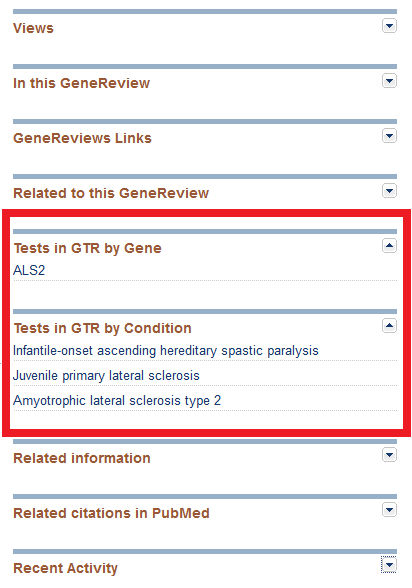
GeneReviews staff have made an editorial decision not to provide active links to GTR within the body of GeneReviews where GeneTests Laboratory Directory links were formerly located (Table 1). However, new links on the right-hand panel labeled ‘Tests in GTR by Gene’ and ‘Tests in GTR by Condition’ lead to test information in GTR, as shown in this image:
Information about GTR's data sources
Please refer to the 2013 publication in Nucleic Acids Research, "The NIH genetic testing registry: a new, centralized database of genetic tests to enable access to comprehensive information and improve transparency". Links can be found here.