
Text data often contains noise such as special characters, unnecessary numbers or irrelevant symbols. To extract meaningful information, preprocessing is required. Python Regex module helps in cleaning and transforming text efficiently by pattern matching and removal of unwanted elements.
Removing Special Characters
To remove unwanted characters from a text:
- We can define a pattern and exclude certain characters using ^ inside square brackets [].
- The + symbol indicates one or more occurrences of the pattern.
Here in this code removes the specified special characters from the text and combines the remaining parts into a clean string.
re.findall() returns a list of all substrings that match the regex pattern
import re

text = "Eshant @# is happ$y!"
cleaned = re.findall(r'[^@#$!]+', text)
print(cleaned)
print(''.join(cleaned))
Output:
['Eshant ', ' is happ', 'y']
Eshant is happy
Here, the regex removed special characters and using join(), we combined the list into a proper string.
Excluding Specific Characters
Regex provides shorthand symbols to include or exclude certain character types:
- \d: matches digits
- \D: excludes digits
- \w: matches alphanumeric characters
- \W: excludes alphanumeric characters
Here in this code we extracts all characters from the text except digits, effectively removing the numbers.
text = "I'm Ashish and 123"
print(re.findall(r'\D+', text))
Output:
["I'm Ashish and "]
Using \D+ excluded all digits and kept the rest of the text.
Finding Patterns
Regular expressions allow you to extract specific patterns from text, such as URLs, email addresses or words with hyphens. Here in the code it uses a regular expression to find and extract words connected by hyphens including patterns with one or two hyphens from the text.
text = "Geeks-for-Geeks works-it-out wklfd-dfjgk-fjkds"
patterns = re.findall(r'\w+-\w+(?:-\w+)?', text)
print(patterns)
Output:
['Geeks-for-Geeks', 'works-it-out', 'wklfd-dfjgk-fjkds']
Phone Number Pattern Matching
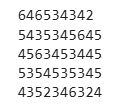
Regular expressions can be used to identify and extract phone numbers from text by matching specific digit patterns making it easier to locate contact information during text pre processing.
Here in this code we extracts phone number–like patterns using regex and then removes the hyphens to print only the numeric digits.
for no in ["64-6534-342", "543-5345-645", "4563-453-445", "53-5453-5345", "435-234-6324"]:
    print(re.findall(r'\d+-\d+-\d+', no)[0].replace('-', ''))
Output:
Removing Extra Spaces
Text often contains multiple spaces or inconsistent spacing. Regex can normalize whitespace.
re.sub() replaces all occurrences of a regex pattern with a specified string.
- \s+ matches one or more whitespace characters.
- .strip() removes leading and trailing spaces.
text = "This   is  a    messy   text"
clean_text = re.sub(r'\s+', ' ', text).strip()
print(clean_text)
Output:
This is a messy text
Lowercasing Text
Now we will converts all text to lowercase to ensure uniformity and prevent duplicate tokens in NLP tasks.
- .lower() converts all characters to lowercase.
- Standardize text for NLP or comparison tasks.
text = "Python Is Fun!"
clean_text = text.lower()
print(clean_text)
Output:
python is fun!
Removing Punctuation
Now we will remove punctuation characters while preserving words and spaces which is useful for tokenization or counting.
- [^\w\s] matches everything except letters, digits and spaces.
- re.sub() removes punctuation while keeping words and spaces intact.
text = "Hello, world! How's it going?"
clean_text = re.sub(r'[^\w\s]', '', text)
print(clean_text)
Output:
Hello world Hows it going
Extracting Email Addresses
Now we will find all email addresses in text which is useful for data extraction or contact information retrieval.
- [\w.-]+@[\w.-]+\.\w+ matches typical email patterns.
- re.findall() returns a list of email addresses.
text = "Contact us at support@example.com or admin@site.org"
emails = re.findall(r'\b[\w.-]+@[\w.-]+\.\w+\b', text)
print(emails)
Output:
['support@example.com', 'admin@site.org']
Replacing Words or Patterns
Now we will replaces specific words or patterns in text with options for case-insensitive replacements.
- cats? matches "cat" or "cats", ignoring case.
- re.sub() replaces the matched words with "dogs".
text = "I love cats. Cats are amazing."
clean_text = re.sub(r'cats?', 'dogs', text, flags=re.IGNORECASE)
print(clean_text)
Output:
I love dogs. dogs are amazing.
Removing HTML Tags
Text collected from web pages often contains HTML tags that are not useful for analysis. Regex can be used to remove these tags and extract only the readable content.
- <.*?> matches any HTML tag enclosed within < >.
- re.sub() removes all matched tags, leaving only plain text.
import re

text = "<p>Hello <b>World</b>, welcome to <a href='#'>Python</a></p>"
clean_text = re.sub(r'<.*?>', '', text)
print(clean_text)
Output:
Hello World, welcome to Python
Combining Multiple Preprocessing Steps
This approach applies several cleaning operations—like lowercasing, removing digits and punctuation and normalizing spaces—in a single function to produce clean, ready-to-use text for NLP or machine learning tasks.
def preprocess_text(text):
    text = text.lower()
    text = re.sub(r'\d+', '', text)
    text = re.sub(r'[^\w\s]', '', text)
    text = re.sub(r'\s+', ' ', text).strip()
    return text

text = "Hello!!! My number is 12345.   Welcome..."
clean_text = preprocess_text(text)
print(clean_text)
Output:
hello my number is welcome