

ArrayList is a non-generic collection class that stores elements as object and can contain values of different data types. It is defined in the System.Collections namespace.
- Its capacity automatically grows as elements are added.
- It provides methods such as Add(), Remove(), Insert(), and Sort().
- Value types are boxed when added and unboxed or cast when retrieved.
Example: Program to creates an ArrayList, adds elements of different data types, and displays them.
using System;
using System.Collections;

class Geeks
{
    public static void Main()
    {
        // Create an ArrayList
        ArrayList list = new ArrayList();

        // Add elements of different data types
        list.Add(10);
        list.Add("Geeks");
        list.Add(20.5);
        list.Add(true);

        // Display the elements
        foreach (object item in list)
        {
            Console.WriteLine(item);
        }
    }
}
Output
10
Geeks
20.5
True
Explanation:
- ArrayList is created using the System.Collections namespace.
- Add() adds elements to the ArrayList.
- The foreach loop iterates through the elements and displays them.
Declaration
The ArrayList class is declared by creating an instance of the class.
Syntax:
ArrayList arrayListName = new ArrayList();
Hierarchy of ArrayList
The ArrayList class is defined in the System.Collections namespace and inherits from the Object class. It implements the IList, ICollection, IEnumerable, and ICloneable interfaces.
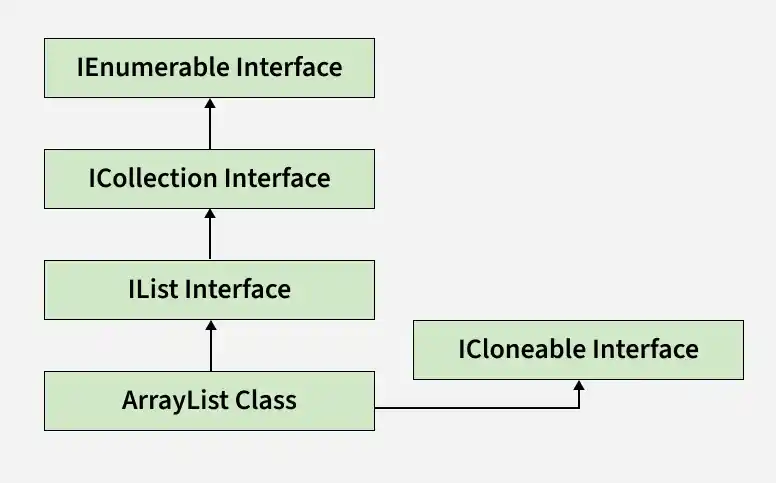
Constructors of ArrayList
The ArrayList class provides constructors to create an empty collection, specify an initial capacity, or initialize it with elements from another collection.
1. ArrayList()
Creates an empty ArrayList with the default initial capacity.
ArrayList list = new ArrayList();
2. ArrayList(int)
Creates an empty ArrayList with the specified initial capacity.
ArrayList list = new ArrayList(10);
Here, 10 specifies the initial capacity of the ArrayList.
3. ArrayList(ICollection)
Creates an ArrayList containing elements copied from the specified collection.
ArrayList list = new ArrayList(new string[] { "A", "B", "C" });
Here, the elements of the specified collection are copied into the new ArrayList.
Note:
ArrayListis a legacy non-generic collection. For new development,List<T>is generally preferred because it provides type safety and avoids unnecessary boxing and unboxing.
Operations on ArrayList
The ArrayList class supports various operations for accessing, inserting, searching, sorting, and reversing elements.
Accessing Elements
Elements in an ArrayList can be accessed using a zero-based index.
using System;
using System.Collections;

class Geeks
{
    public static void Main()
    {
        ArrayList list = new ArrayList();

        list.Add("Geeks");
        list.Add("For");
        list.Add("Geeks");

        Console.WriteLine("First element: " + list[0]);
        Console.WriteLine("Second element: " + list[1]);
    }
}
Output
First element: Geeks
Second element: For
Inserting Elements
The Insert() method inserts an element at the specified index and shifts subsequent elements to the right.
using System;
using System.Collections;

class Geeks
{
    public static void Main()
    {
        ArrayList list = new ArrayList();

        list.Add(10);
        list.Add(30);

        list.Insert(1, 20);

        foreach (object item in list)
        {
            Console.WriteLine(item);
        }
    }
}
Output
10
20
30
Checking Whether an Element Exists
The Contains() method determines whether the specified element exists in the ArrayList.
using System;
using System.Collections;

class Geeks
{
    public static void Main()
    {
        ArrayList list = new ArrayList();

        list.Add(10);
        list.Add(20);
        list.Add(30);

        Console.WriteLine(list.Contains(20));
        Console.WriteLine(list.Contains(50));
    }
}
Output
True
False
Finding the Index of an Element
The IndexOf() method returns the index of the first occurrence of the specified element.
using System;
using System.Collections;

class Geeks
{
    public static void Main()
    {
        ArrayList list = new ArrayList();

        list.Add("C#");
        list.Add("Java");
        list.Add("Python");

        Console.WriteLine("Index: " + list.IndexOf("Java"));
    }
}
Output
Index: 1
Sorting Elements
The Sort() method sorts the elements in the ArrayList.
using System;
using System.Collections;

class Geeks
{
    public static void Main()
    {
        ArrayList numbers = new ArrayList();

        numbers.Add(40);
        numbers.Add(10);
        numbers.Add(30);
        numbers.Add(20);

        numbers.Sort();

        foreach (object number in numbers)
        {
            Console.WriteLine(number);
        }
    }
}
Output
10
20
30
40
Reversing Elements
The Reverse() method reverses the order of the elements in the ArrayList.
using System;
using System.Collections;

class Geeks
{
    public static void Main()
    {
        ArrayList list = new ArrayList();

        list.Add(10);
        list.Add(20);
        list.Add(30);

        list.Reverse();

        foreach (object item in list)
        {
            Console.WriteLine(item);
        }
    }
}
Output
30
20
10
Removing Elements from ArrayList
The ArrayList class provides four methods for removing elements from a collection:
- Remove: Removes the first occurrence of the specified object from the ArrayList.
- RemoveAt: Removes the element at the specified index.
- RemoveRange: Removes a specified range of elements starting at the specified index.
- Clear: Removes all elements from the ArrayList.
using System;
using System.Collections;

class Geeks
{
    public static void Main()
    {
        // Creating ArrayList
        ArrayList arrayList = new ArrayList();

        // Adding elements
        arrayList.Add('G');
        arrayList.Add('E');
        arrayList.Add('E');
        arrayList.Add('K');
        arrayList.Add('S');
        arrayList.Add('F');
        arrayList.Add('O');
        arrayList.Add('R');
        arrayList.Add('G');
        arrayList.Add('E');
        arrayList.Add('E');
        arrayList.Add('K');
        arrayList.Add('S');

        Console.WriteLine("Initial number of elements: "
                          + arrayList.Count);

        // Remove the first occurrence of 'G'
        arrayList.Remove('G');

        Console.WriteLine("After Remove(): "
                          + arrayList.Count);

        // Remove the element at index 8
        arrayList.RemoveAt(8);

        Console.WriteLine("After RemoveAt(): "
                          + arrayList.Count);

        // Remove 3 elements starting from index 1
        arrayList.RemoveRange(1, 3);

        Console.WriteLine("After RemoveRange(): "
                          + arrayList.Count);

        // Remove all elements
        arrayList.Clear();

        Console.WriteLine("After Clear(): "
                          + arrayList.Count);
    }
}
Output
Initial number of elements: 13
After Remove(): 12
After RemoveAt(): 11
After RemoveRange(): 8
After Clear(): 0
Properties of ArrayList
The ArrayList class provides properties to access its elements and manage its capacity and synchronization.
| Property | Description |
|---|---|
| Capacity | Gets or sets the number of elements that the ArrayList can contain. |
| Count | Gets the number of elements actually contained in the ArrayList. |
| IsFixedSize | Gets a value indicating whether the ArrayList has a fixed size. |
| IsReadOnly | Gets a value indicating whether the ArrayList is read-only. |
| IsSynchronized | Gets a value indicating whether access to the ArrayList is synchronized. |
| Item[Int32] | Gets or sets the element at the specified index. |
| SyncRoot | Gets an object that can be used to synchronize access to the ArrayList. |
Methods of ArrayList
The ArrayList class provides methods for adding, removing, searching, sorting, and managing elements.
| Method | Description |
|---|---|
| Add(Object) | Adds an element to the end of the ArrayList. |
| AddRange(ICollection) | Adds the elements of a collection to the end of the ArrayList. |
| BinarySearch(Object) | Searches the sorted ArrayList for a specified element. |
| Clear() | Removes all elements from the ArrayList. |
| Clone() | Creates a shallow copy of the ArrayList. |
| Contains(Object) | Determines whether the specified element exists in the ArrayList. |
| CopyTo(Array) | Copies the entire ArrayList to a compatible one-dimensional array. |
| GetRange(Int32, Int32) | Returns an ArrayList containing a range of elements from the current collection. |
| IndexOf(Object) | Returns the index of the first occurrence of the specified element. |
| Insert(Int32, Object) | Inserts an element at the specified index. |
| InsertRange(Int32, ICollection) | Inserts the elements of a collection at the specified index. |
| LastIndexOf(Object) | Returns the index of the last occurrence of the specified element. |
| Remove(Object) | Removes the first occurrence of the specified element. |
| RemoveAt(Int32) | Removes the element at the specified index. |
| RemoveRange(Int32, Int32) | Removes a specified number of elements from the specified index. |
| Reverse() | Reverses the order of the elements in the ArrayList. |
| SetRange(Int32, ICollection) | Copies the elements of a collection over a specified range of elements in the ArrayList. |
| Sort() | Sorts the elements in the ArrayList. |
| ToArray() | Copies the elements of the ArrayList to a new array. |
| TrimToSize() | Sets the capacity of the ArrayList to the actual number of elements it contains. |