
MailerLite Review: Tried & Tested Features, Cost, Comparison (2026)


MailerLite is an affordable email marketing software. The company was founded in 2005 and has grown impressively. Over 1,000,000 companies use MailerLite each month. So they are very popular, but is MailerLite the best email marketing service for you?
I signed up for a new account for this MailerLite review. And tested the features as a new user. Get ready for a run-through with all the features, pros, cons, and MailerLite pricing using our review methodology and scoring.
MailerLite Review Summary:
- MailerLite is a simple, effective, free email newsletter software that does the job.
- They have an excellent free plan and even on paid plans, it is cheaper than competitors like Mailchimp.
- Automation isn’t as elaborate as for instance ActiveCampaign, but very effective.
- We found this email tool easy to use and easy to set up.
- With all the features you expect, MailerLite is certainly worth its salt.
MailerLite’s Core Features
You might be wondering: “MailerLite email marketing, what does it do?”
Well, for an easy email marketing service, it does a lot. MailerLite has some cool functionality up its sleeve. Here are the most notable MailerLite features:

- Send email campaigns. Create email newsletters with MailerLite, send your email promotions, or use RSS to automatically send digests from your blog content.
- A/B split testing. Email campaign optimization with A/B split testing of subject lines, email content, and more.
- Grow your audience. Create forms and targeted pop-ups from MailerLite on your site as email list builders and get more subscribers.
- Segment your subscribers. “Marie Kondo” your subscribers to deliver the most relevant messages. You can group by their characteristics (for example, age, gender, country), by their activities (emails clicked, opened) and make lists.
- Build your website and landing pages. With MailerLite, you can not only build emails, but also landing pages, opt-in forms and (mini) sites. They’ll even host it for you.
- Marketing automation. Start with a simple automatic welcome email flow. Or, build a ten-stage, multi-flow-step onboarding process for new customers. Powerful.
- AI Writing. MailerLite’s AI writes headlines, product descriptions, and even full newsletters. And it can suggest ideas to make your content more engaging.
- Great pricing and value for money. MailerLite is very cheap compared to its competitors. You get a lot of value for money.
- Solid support. 24/7 live chat support to troubleshoot any issues you might have on all paid plans. MailerLite’s support team was quick and responsive during testing.
MailerLite Pros & Cons

Pros:
- It’s an affordable email marketing tool. MailerLite is cheaper than almost anyone else with a similar feature set. It stacks up well against the market leader, Mailchimp. And it’s 76% cheaper.
- Solid landing page and website builder. This part is where MailerLite is especially strong. You won’t find many other email marketing platforms that have a website builder.
- No-nonsense automation editor. MailerLite has triggers like someone joins a group, fills out a form, or clicks a link. Workflow steps include emails, delays, conditions, and actions to guide subscribers through the journey.
- Simple, clean interface. MailerLite keeps things easy without holding you back from doing sophisticated email marketing.
- Strong email editor with great pre-made modules. Having lots of predesigned layouts make it very quick to create and customize templates.
Cons:
- Doesn’t have website tracking. ActiveCampaign and others have automation that can trigger directly from website visits.
- The free version doesn’t have any templates. We’d love to see some templates in MailerLite’s free plan. But you can quickly create your own from scratch with the predesigned layouts.
- Missing some advanced features. MailerLite lacks a built-in CRM, more detailed reporting, and spam testing tools. Even some similarly priced alternatives like Brevo have an integrated CRM.
Is MailerLite for you?
Recommended if:
- You’re a small business, solopreneur, or freelancer. MailerLite is easy to use and has more than enough features to handle regular newsletters, automations, landing pages, and forms without a steep learning curve.
- You’re looking for a budget email marketing tool with premium features. MailerLite is 76% cheaper compared to Mailchimp. MailerLite’s plans start from $9/month. And you get similar features and more email sends on MailerLite.
- You’re a smaller ecommerce store. MailerLite has Shopify and WooCommerce integrations. Add products to your emails, automate ecommerce campaigns, and track purchases.
- You’re looking for a free tool to get started with email marketing. MailerLite is one of the best free email marketing tools. You get most of the features, 500 subscribers, and 12,000 emails a month. We’d like to see some email templates on the free plan.
Not recommended if:
- You’re looking for advanced marketing automation. MailerLite’s automation builder can power quite sophisticated workflows. It’s better than Mailchimp’s automation, but it isn’t as advanced as ActiveCampaign’s.
- You’re looking for an integrated sales CRM. If you’re looking for marketing and sales tools in one platform, MailerLite isn’t for you. Check out our overview of the best CRMs with email marketing.
Sign up to MailerLite for free
MailerLite Review Rating Details
Ease of Use | MailerLite is very easy to use, and at the same time, you can do quite advanced things. |
Email Editor | MailerLite makes creating email campaigns simple. You can build your emails with the drag-and-drop editor or import custom HTML. The editor has 12 modules like video blocks, product features, countdown timers, and surveys. The AI assistant can help write and translate your content. |
| Email Templates | 90+ email templates. There’s a lot of variety, and MailerLite’s templates have modern and mobile-responsive designs. I’d love to see some email templates in the free plan. |
Email Types | MailerLite has 5 different types: newsletters, AB testing, auto-resend, RSS triggered, and automated. |
Marketing Automation | MailerLite’s automation can power quite sophisticated workflows. It’s better than Mailchimp’s automation, but it isn’t as advanced as ActiveCampaign’s. You can easily build workflows using triggers like when someone joins a group, fills out a form, or clicks a link. Add emails, delays, conditions, and actions to guide subscribers through the journey. Multiple triggers are available in the Advanced plan. |
| List Management | The subscriber and list management features in MailerLite are solid without being overwhelming. You can build segments based on fields, behavior, and purchases. Save these filtered groups as segments to use in campaigns. Import subscribers with file uploads or directly from Mailchimp. MailerLite gives you the tools to keep your list well-organized. |
| Personalisation | Personalize with any contact field and dynamic content. A caveat with dynamic content is that if you want to show one block for men and one for women, you need to use two blocks. You can’t have variations of the same block without duplicating them. |
| Landing Pages & Forms | Landing page and website builder to create smaller sites and take payments. 30+ landing page templates. Inline forms and popups. The pop-up forms have several triggers to automate virtually anything after a form is filled. You can host pages on MailerLite or your custom domain. |
Reporting & Analytics | Email stats show list growth, open rate, click rate, unsubscribe rate. You can also check top domains and email clients. |
| Customer Service | 24/7 live chat support on the Advanced plan. 24/7 email support on the Growing Business plan. Well-organized knowledge base with tons of articles and videos. It was easy to find answers during our testing. |
| Deliverability | MailerLite has full support for SPF, DKIM, and DMARC authentication. Domain verification is required for sending to make sure your emails are properly authenticated. It automatically includes List-Unsubscribe headers for easy opt-outs, reducing spam complaints. MailerLite doesn’t support custom tracking or return-path domains, meaning full domain alignment isn’t possible. Throttling controls aren’t available, but MailerLite’s internal systems manage sending speeds effectively. |
| Spam and Design Check ❌ | MailerLite’s spam and design checks are bare-bones. It lets you preview your newsletter on desktop and mobile and send yourself a test email. But it won’t show you how emails render in various clients or catch broken links and HTML formatting issues. |
| AI Writing ✔️ | MailerLite’s AI can write headlines, product descriptions, and even full newsletters. It can also help to translate your email content. And if you’ve hit writer’s block, it can suggest ideas to make more engaging content. AI writing is available in the email editor and landing page builder. And it can suggest subject lines for your campaign. |
| Integrations & API ✔️ | 130+ native integrations, including ecommerce platforms, email verification services, landing page builders, and CRM platforms. If you can’t find an integration, you can use Zapier to integrate MailerLite with 5000+ apps or the API for custom integrations. |
| User Permissions ✔️ | Assign custom user permissions for campaigns, subscribers, forms, landing pages, websites, automation, billing, settings, and templates. 4 default user permissions are available for administrator, manager, viewer, and accountant. |
| GDRP & Legal Compliance ✔️ | MailerLite has your back, protecting your subscribers’ data so you can focus on your business. Data stays fully within EU servers. Consent collection is clean: you can add GDPR fields to forms, and the system automatically logs consent timestamps, IPs, and sources. Subscriber data exports or deletions take just a few clicks. |
| Interface Languages | MailerLite is available in 3 languages: English, Spanish, and Polish. |
| Customer Satisfaction | MailerLite gets lots of positive reviews from customers. It has 4.7 on Capterra and 4.6 stars on G2 during our research. |
Overall Score

MailerLite is a strong pick for small and mid-size businesses looking for an easy-to-use email marketing tool with room to grow. Its drag-and-drop editor, solid automation, and 90 email templates make building campaigns simple. With the website builder, helpful AI tools, and good support, MailerLite is a well-rounded, budget-friendly choice for most email marketers.
Get started with MailerLite for free here
Getting started with MailerLite
Starting a MailerLite account takes 1 minute. You just need to fill in your company, name, email, and a password. After you sign up to MailerLite, you’re asked to verify your email and complete your profile. Both take about 5 minutes to complete, and then you can start exploring the platform.
Creating your first email list and adding contacts is a walk in the park. I was done in 5 minutes. MailerLite will automatically remove duplicate and role-based emails during import.
MailerLite has a clever authentication setup that does the heavy lifting for you. It will detect your DNS provider, so you can just log in and set it up in 2 minutes.
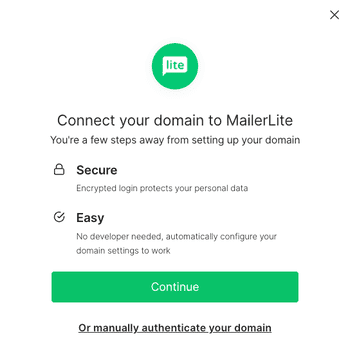
I could set all this up in less than 30 minutes and start creating campaigns and pages.
MailerLite Review: Email Marketing Software
You can use MailerLite to send emails, promotions, and newsletters to your subscribers. But it can host web pages, automate emails, and more. So let’s get into the details.
For this MailerLite review, I tested:
- Sending email campaigns
- Building sign-up forms
- Creating websites and landing pages
- Segmenting email lists
- Automating emails
Read our full platform walkthrough to find out how MailerLite performs.
MailerLite review: Sending email campaigns
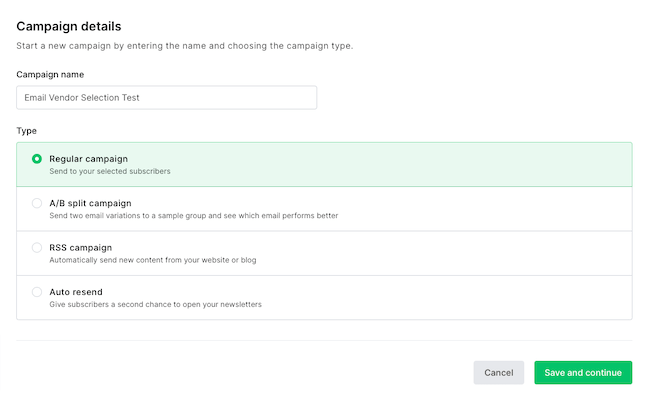
Of course, MailerLite can send regular email campaigns, but more advanced functionality is available as well. Let’s walk through the 4 types of email campaigns you can send:
- Email campaigns: Your standard email send. Give the campaign a name, target a group of subscribers, and create an email to send them.
- A/B split campaigns: Optimise your emails. Test one email against another – whether it’s the subject lines, content, or From name for email campaign optimization.
- Auto resend campaigns: Similar to a regular campaign, but now the campaign is resent to those who didn’t react to your first send. Handy to increase opens and clicks.
- RSS campaign: Have a blog? Automate new campaigns going out as you publish your new content on your website. Ideal for bloggers and low-maintenance email newsletters.
Email templates in MailerLite
To quickly start your campaign, you can use one of the more than 90 free email newsletter templates that MailerLite gives you in the paid plan. There is a lot of variety, and templates have modern and mobile-responsive designs. It’s easy to quickly build a beautiful email.
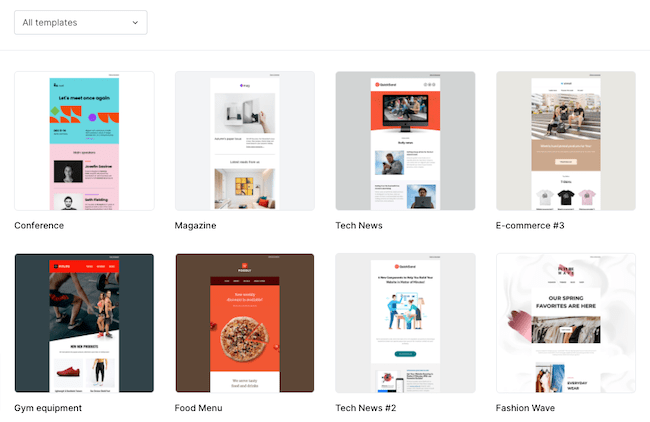
If you want to create your own template, no problem. Your business is unique, dammit! 😀 Most will start with the drag-and-drop email editor, but you can also import HTML and edit it with the custom HTML editor. Once made, you can reuse previous emails as an email template for your next campaigns.
MailerLite Email Editor
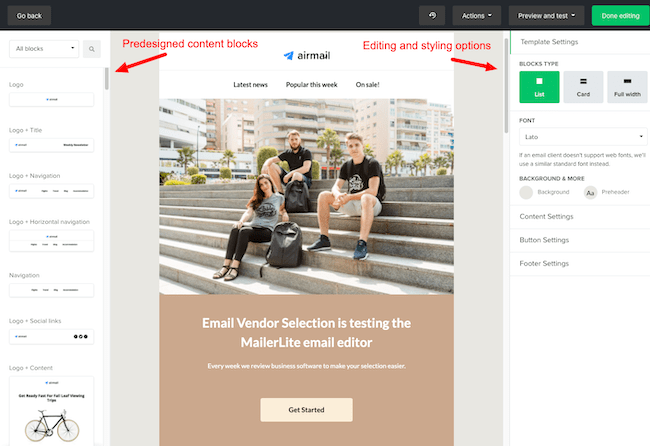
The MailerLite email editor is the main playground. There are over 20 pre-built modules. You can drag them from the left onto the canvas.
Dynamic content blocks
Now that we have our email template, on to the fun stuff. In MailerLite you can make the content dynamic. Show a block only to one group for instant personalization. A caveat is that if you want to show one block for men and one for women, you need to use two blocks – you can’t have “variations” of the same block without duplicating them. No deal-breaker.
Special drag-and-drop blocks include:
- Video blocks with animated GIFs
- Product feature blocks
- Social media posts
- Countdown timers
- RSS templates
- Survey blocks
Your header, footer, and global styles can be easily standardized across all emails. So you don’t have to change all of those individually every time you update them.
AI writing assistant
A standout feature of MailerLite’s drag-and-drop email editor is the AI writing assistant. Write headlines, product descriptions, and even full newsletters. It can also help to localize your email content with translations. And if you’ve hit writer’s block, it can suggest ideas to make more engaging content.
YouTube email embeds
Video in email is hot. MailerLite makes it easy to embed a video from YouTube. You enter the URL and the email editor will turn the video into an animated GIF for you. This is pretty cool, I wish I had that functionality in Marketo.
Send preview
Once your email is done, share it with colleagues with a preview send, to let them check it before sending your email. Or you can share a link, or download a PDF. Email reviews are in desktop mode and mobile. Personalization isn’t included in those previews though.
Schedule sending
Now we can go on to select our email subscribers. MailerLite has advanced logic for targeting your email to exactly the right segments. You can schedule a send at a static time, or based on subscriber time zone (so all subscribers get the email at the same local time).
MailerLite Review: What do we think of the Email Campaigns?
Most time in email marketing software is spent in email creation, so it needs to be good. MailerLite doesn’t disappoint.
- Solid email marketing platform with many features
- Strong email editor with 90+ modern email templates
- Easy to use, and several advanced features (YouTube embeds, yes please!)
Overall, I’m impressed by what you get for the price here. The email editor has loads of features. With the email templates, you will have a head start on creating beautiful email campaigns. It’s very easy to use (Mailchimp users will feel right at home) and at the same time, you can do quite advanced things.
There are plenty of large companies that I know are not taking advantage of half this functionality. So it will take you a while to outgrow the platform for email editing and campaign deployment.
Test-drive the MailerLite editor here
MailerLite form builder and pop-ups
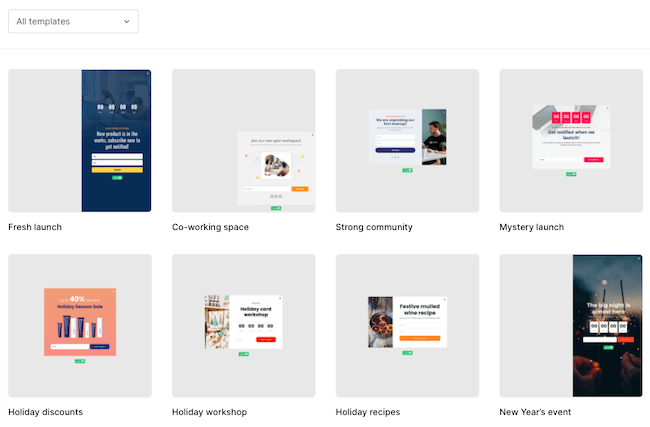
With MailerLite Forms, you can design your newsletter subscription forms for site visitors and promotion pop-ups that advertise a sale. There are two types of forms: pop-up forms and embedded forms.
The form and pop-up editor
When building a website pop-up, templates are the preferred starting point. Or you could jump straight to the editor and build it all exactly as you want. Creating a form or pop-up is pretty straightforward.
You can customize fonts, text, color, and add images. You can add form fields, so you get more than only an email address. Ask for customer preferences, names, addresses, whatever you like.
Forms are simpler than the email newsletter builder. You choose a format (default, horizontal, or card with image) and that is what you get.
Form and pop-up automation
After building the opt-in form, you add the follow-up flow. Maybe you want new subscribers to confirm their subscription, and then send multiple automated follow-up emails (MailerLite marketing automation).
It’s nice to be able to choose double-opt-in form-by-form. You don’t need to specify it for your whole instance. That’s a nice bit of flexibility. You can build out a Europe form for GDPR legislation, and another for the US, where email laws are a bit more, shall we say….loose!
Now we set when your pop-up appears, based on time, on the page/scroll depth down the page or/ only on certain pages. Very effective are exit intent pop-up, showing a pop-up when someone starts to leave a webpage.
There are Mailerlite WordPress plugins and a Shopify integration, so the form and pop-ups snippet can be added automatically on those platforms.
Forms and Pop-ups in MailerLite: quite advanced
Forms in MailerLite are included in all of their plans and it’s quite advanced, so you won’t need to have a separate pop-up software. The pop-up forms have several triggers, and you can automate virtually anything after a form is filled.
A marketer can use this functionality to build advanced campaigns where a user fills in a form and goes through a series of emails designed to convert on a particular product. Can’t beat that for this price.
MailerLite Website and landing page builder
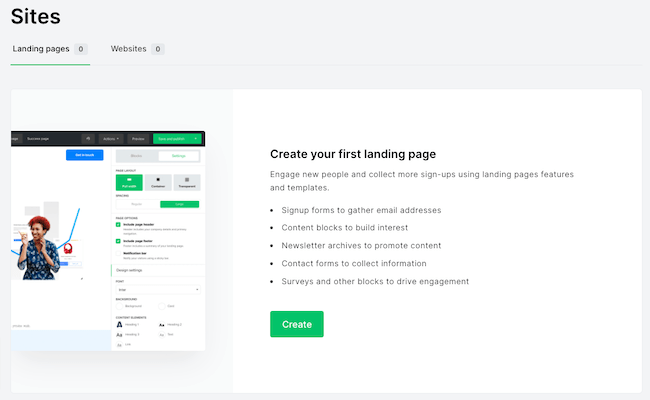
MailerLite has a website and landing page builder. But are MailerLite’s landing page features competition to a CMS like WordPress?
You can host MailerLite’s landing pages and websites either on their domain (.mailerpage.com) or display it on your site. So if you already have a website set up, you might want to use MailerLite’s landing page creator to add a few extra landing pages.
Alternatively, if you don’t have a website, use the website builder to create a minisite of your own. Quickly get a page up and running with MailerLite’s hosting, and in the future, you could migrate to something else.
Let’s look at the functionality.
MailerLite’s landing page editor

You can create a landing page from scratch, or use one of the 30 MailerLite premade landing page templates. (on the paid plan).
The page editor looks and feels the same as the email editor (as it should!). You can add in modular “content blocks” with the drag-and-drop builder.
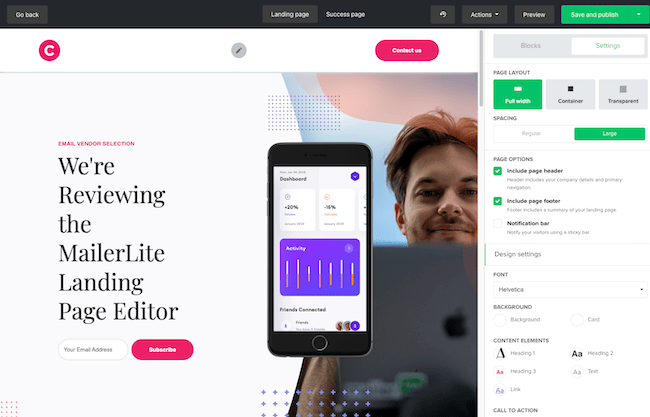
On the final page, you can edit the landing page settings. These include:
- Page title
- The URL of the page
- SEO settings such as page metadata
- Social sharing descriptions and metadata
- Google Analytics tracking codes
MailerLite’s website builder
The MailerLite website builder allows you to create simple websites with multiple pages.
The only quirky thing is when you create a MailerLite site, you have to connect it to a subscriber group. It doesn’t affect anything negatively, but it was a bit confusing at first. Forms can be connected to multiple groups.
The site templates are based on different industries and use cases. For testing, I picked a real estate website: a five-page template with featured properties on the homepage, individual listing pages, and a “meet the team” page. I haven’t sold a house yet, but who knows :D.
The editor is the same as the landing page editor. The templates are quite good – you don’t need to change that much.
MailerLite Reviews: Site builder, what do we think?
Really great functionality here. You can build out a pretty slick website with a feature included in your email marketing software. Best parts?
- Full-featured website builder
- Sell digital products and take payments within MailerLite
- User-friendly and a range of useful templates included
While its email marketing functionality might be similar to MailerLite competitors, its landing page and website functionality is better. This gives some incentive for users to go to for more than email marketing. Using MailerLite as WordPress for their CMS and hosting. Not everyone will use it but when you do, it will save quite some dollars.
Segmentation and Personalisation: Subscriber management in MailerLite
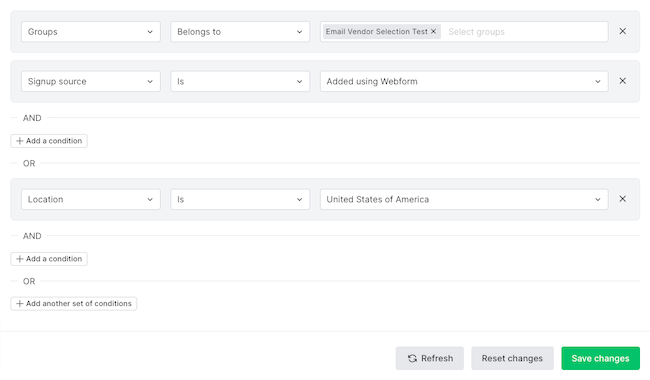
Let’s review the “Subscribers” section in MailerLite. This is where you will manage your email list, create segmentation groups, create new fields, and do list reporting. Let’s zoom in on the email list management features.
Start at the all subscribers section
This is where you will find all of your subscribers. With filters, you can drill into subsets. Filter on any database field or behavioral filters such as a member of campaign/number of emails sent, and the like.
You can combine filters to get more advanced. After nailing down your selection, save the segment for use in other parts of MailerLite.
Add new subscribers as they sign up. Other options are to upload a CSV/TXT file, copy and paste from Excel, or import from a linked Mailchimp database. If you are migrating from Mailchimp, that is very handy.
Segmenting your subscribers in MailerLite
Segments and groups are powerful in MailerLite. Here you build automated dynamic or static groups of your subscribers. For Mailchimp users, MailerLite groups are similar to Mailchimp Lists. MailerLite segmentations are similar to….Mailchimp segments.
So, how would you use segments? You can create a segmentation or group based on:
- Existing group membership (static lists)
- Any database field
- Any other segment
- Email campaign membership
- Automation membership (see email automation)
- Behavioral (number of emails sent, opened or clicked)
- Purchases (with an integration to your online store)
You can combine all segmentations above. That should take care of….every crazy segmentation scheme you can come up with.
Email analytics in MailerLite
In the stats section is where we find the reporting on your list. You can run the stats of either “all subscribers”, or a specific group. MailerLite will pull together all the data for this group and give you a drill-down.
Email stats available are: list growth, average open and click rate, and unsubscribe metrics. Additionally, you can see top domains and email clients.
Cool feature: Automatically remove non-engaged subscribers
The last tab is a cool feature called “Clean up inactive”. It quickly finds and unsubscribes people on your list who haven’t opened an email for six months. This will help you keep a clean and engaged list, improving deliverability, and reducing the chance of hitting the spam box. Of course, it’s in everyone’s best interest to get you in the inbox and high email deliverability.
MailerLite reviews: Subscriber management
The subscriber and list management features in MailerLite are solid without being overwhelming.
- Group subscribers dynamically (via segments) or statically (via groups)
- Create your own new fields
- Report on email subscribers
It’s segmentation features that allow you to do more sophisticated email marketing. Compared to Mailchimp, MailerLite subscriber management and reporting are solid. We’d love to see tag-based segmentation in there soon like you’d have in Brevo for instance.
Email marketing automation in MailerLite
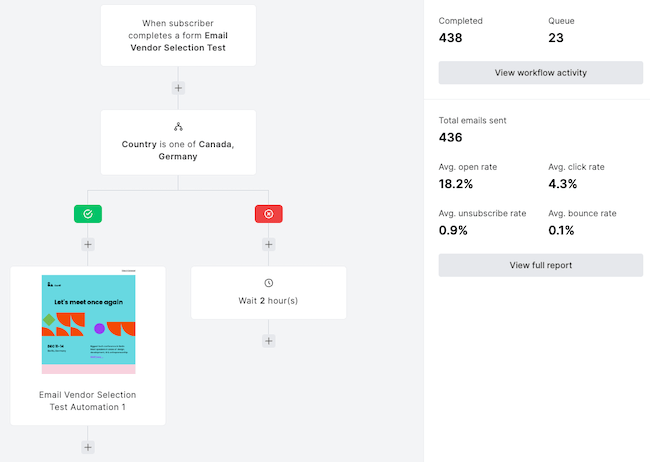
MailerLite Automation brings automated email flows to your subscribers. For example, set up a welcome email series using MailerLite autoresponders. Initially, you’ll land on the MailerLite Automations dashboard.
We’ll create a workflow and build out our automated flows in the automation editor. Start with a trigger. What’s starting this workflow?
Available automation triggers in MailerLite:
- When a subscriber joins a group
- A link gets clicked
- When a subscriber completes a form
- When a subscriber’s field is updated
- The anniversary of a date
- The exact match of a particular date from your database
This means you can trigger automation workflows on obvious things like form fills and subscribing – but also the end of a free trial (based on a date), when they join particular groups, and so on. Unfortunately, you can’t trigger based on web page visits.
You use modules to guide people through the flow. There are four options for a module: Email, Delay, Condition, and Action.
By adding conditions in MailerLite, you can build quite advanced automation. lt’s more than enough for those that don’t have super complex needs. And MailerLite has tutorial videos available to help you get started.
MailerLite’s automation feature: overall thoughts
The email automation side of MailerLite is great value-for-money. It’s included in every plan. You can use automation to power quite sophisticated setups. In Mailchimp vs MailerLite, MailerLite takes the automation cake – but isn’t as advanced as for instance ActiveCampaign.
If you are looking to do more triggered email marketing and autoresponders, you will get a lot of value out of MailerLite’s automation.
MailerLite Integrations
MailerLite 130+ integrations, including connections for eCommerce and CMS systems. Like the Mailerlite Shopify, Woocommerce, and WordPress integration. Next to those, you can integrate 5000+ tools through Zapier, or you can use the MailerLite API.
These integrations will save you lots of time, since you can avoid manual imports of subscribers, trigger an abandoned cart email, pull your products from Shopify into the email editor… you get the idea.
Don’t forget that MailerLite has a lot of the functionality of these external tools anyway. For example, MailerLite does list growth pop-ups, as does, for instance, NinjaPopups. The beauty is now, you can use the tool that works best for you.
MailerLite pricing: How much does MailerLite cost?
MailerLite pricing is based on the number of subscribers. You get unlimited monthly emails and all platform functions.
If you want to try out the software, Mailerlite is free for up to 500 subscribers and 12,000 emails a month. You get most of the features on the free plan.
Once you get started with MailerLite, you will also get access to 24/7 live chat support, email templates, auto-resend emails, and up to three users.
| Free | – 500 contacts – 12,000 email sends |
| $10 | – 500 contacts – Growing Business plan with unlimited email sends. |
| $15 | – 1,000 contacts – Growing Business plan with unlimited email sends. |
| $25 | – 2,500 contacts – Growing Business plan with unlimited email sends. |
| $39 | – 5,000 contacts – Growing Business plan with unlimited email sends. |
| $73 | – 10,000 contacts – Growing Business plan with unlimited email sends. |
MailerLite pricing & packages are extremely cheap for what you get. It’s worth hopping on the free plan and having a look at their email marketing, forms, site builder, and marketing automation tools. See full pricing and discount here.
MailerLite Discount
If you are ready to try out MailerLite, we have an extra discount for you. Because when we spoke to the MailerLite team, they wanted you to get started on your favorite plan, basically totally free.
If you register for a new account, start your free trial via this page you get…
- Full month free plan with all features
- Another 10% discount if you pay for the year
Try MailerLite for free > (Extras included)
MailerLite vs Mailchimp – Email services compared
Looking for an email service like Mailchimp? This is the comparison many people will be making: Mailchimp vs MailerLite.
Quickly breaking it down:
- Email editor. MailerLite versus MailChimp email editing experience is close. Both are very easy to use.
- Pricing: MailerLite is almost 50% cheaper for 5K contacts and 26% cheaper for 10K contacts than Mailchimp. how much cheaper depends on the number of subscribers.
- Send postcards. Mailchimp allows you to send postcards as you would email campaigns to 27 countries. MailerLite doesn’t.
- Web building functionality. MailerLite’s webpage builder is stronger, and they provide more templates to get started.
- Automation functionality. This isn’t very close – you can do much more automation with MailerLite compared to Mailchimp
- Ad functionality. Mailchimp allows you to create Google Adwords and Facebook / Instagram ads from within their platform. You’d do it directly in the ad platform if you are using MailerLite.
The rest of it likely comes down to personal preference. Both platforms are very good at what they do and offer an impressive range of features for a very reasonable price. Check out this MailerLite vs Mailchimp comparison guide and our full Mailchimp review for details.
MailerLite Review: Conclusion and Scoring
MailerLite is an email marketing service with much more punch than just email blast software. For $10/month, you can create email campaigns, automate a new subscriber onboarding process, and build and host your landing page. Can’t beat that.
- MailerLite is simple and effective. It is newsletter software that does the job.
- The MailerLite email editor is easy to use, and the whole system is easy to set up.
- They have an excellent free plan and paid plans are cheaper than competitors like Mailchimp.
- Automation is effective, yet not as elaborate as full marketing automation tools.
- With all the features you expect, MailerLite is certainly worth its salt.
And if you’re just starting, they have a free plan for up to 500 subscribers and 12.000 emails.
I can say it MailerLite one of the best choices for bloggers, small businesses, and senders that like a clean email interface. In addition, everyone who was thinking about Mailchimp can find a great home at MailerLite.
Try MailerLite for free > (Extras included)
Expert reviewed 2026 status and recognitions
Mailerlite is expert reviewed and recognised in the following categories.
* Expert reviewed
* Best small business
* Top Mailchimp alternative
* Best Value