
 Still on Drupal 7? Security support for Drupal 7 ended on 5 January 2025. Please visit our Drupal 7 End of Life resources page to review all of your options.
Re-imaging dev environment
If a developer requests to have their Drupal.org development environment re-imaged, here is the process.
Note: This will destroy everything in the development environment! Make sure the requesting user has back ups.
- First, connect to Jenkins.
- Run the destroy_development_environment job. Enter:
Site: drupal.org (this is the site you want to clone.)
Name: [the part of the URL that comes before "-drupal.redesign.devdrupal.org", such as "metrics"]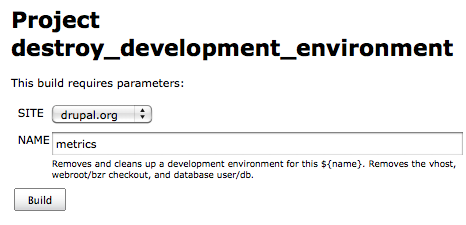
Be absolutely sure you type the right thing in here and don't obliterate someone else's development environment. There is no confirm, no "pass go and collect $200", the site is gone once this job runs.
- Once this job complete, choose the deploy_development_environment job. Enter:
Site: drupal.org (this is the site you want to clone.)
Name: [the part of the URL that comes before "-drupal.redesign.devdrupal.org", such as "metrics". This should be named around an "initiative," rather than a person whenever possible.]
Comment: [a description of the site and what it's for. This should reference a Drupal.org issue where changes are being discussed.]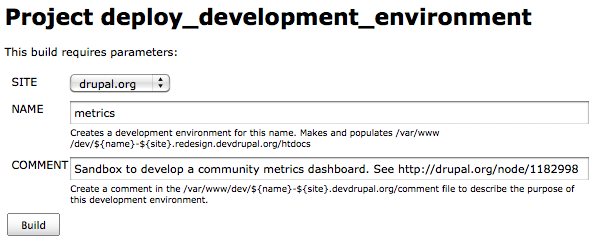
This job will take about an hour and 45 minutes to complete.
- Post back to the issue that the request has been fulfilled, then mark it "fixed".
Help improve this page
You can:
- Log in, click Edit, and edit this page
- Log in, click Discuss, update the Page status value, and suggest an improvement
- Log in and create a Documentation issue with your suggestion

