
 Still on Drupal 7? Security support for Drupal 7 ended on 5 January 2025. Please visit our Drupal 7 End of Life resources page to review all of your options.
On this page
Managing users on dev server
After a user has requested a drupal.org sandbox, here's how to set them up with an account:
- If they're asking for a new sandbox, make sure there's sufficient space first.
- First, connect to Jenkins.
- Run the create_user_devwww job. Enter:
username: their drupal.org username
sshkey: Their full SSH key, available by clicking edit, then copy/pasting the entry at http://drupal.org/user/X/ssh-keys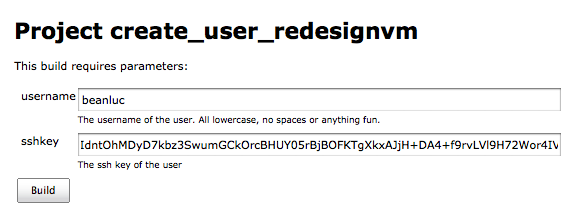
Note: This works in the 90% case. It will fail if a user has OSL LDAP access (e.g. for production server access) which only a handful of people have, but they're all trusted and most of them do stuff on Drupal.org so this does come up sometimes.
If that's the case, contact Narayan or Neil.
Resolving a lockout
If a user has locked themselves out via DenyHosts (gets error "ssh_exchange_identification: Connection closed by remote host"), admins with sudo access on devwww can purge the denyhosts list by running the following:
$ sudo /sbin/service denyhosts stop sent DenyHosts SIGTERM $ sudo vim /etc/hosts.deny edit the entry with an old date, ex:
# DenyHosts: Fri Mar 9 19:30:39 2010 | sshd: 137.149.66.189
$ sudo denyhosts.py -c /etc/denyhosts.conf --purge $ sudo /sbin/service denyhosts start starting DenyHosts: /usr/bin/env python /usr/bin/denyhosts.py --daemon --config=/etc/denyhosts.confChanging an SSH key
If a user reports the problem "ssh_exchange_identification: Connection closed by remote host" when logging into devwww, either their SSH key changed, or there is some other problem with it.
To fix, issue the following command on devwww:
sudo vim ~[username]/.ssh/authorized_keys or
sudo nano ~[username]/.ssh/authorized_keys (Enter your LDAP/Jenkins password when prompted)
Then, add/replace the key accordingly.
Help improve this page
You can:
- Log in, click Edit, and edit this page
- Log in, click Discuss, update the Page status value, and suggest an improvement
- Log in and create a Documentation issue with your suggestion

