
 Still on Drupal 7? Security support for Drupal 7 ended on 5 January 2025. Please visit our Drupal 7 End of Life resources page to review all of your options.
Overview
This documentation guide provides instructions upgrading a Drupal 6 or Drupal 7 site to Drupal 10 (or later). For upgrading from Drupal 8 or later to the latest major versions (for example, from Drupal 8 to Drupal 10, or Drupal 9 to Drupal 10), refer to Upgrading from Drupal 8 (or later) to a newer major version.
There are separate instructions for minor and patch version site updates. (For example, updating from Drupal 9.3.6 to 9.3.8, or 9.2.14 to 9.3.8.)
Upgrading to Drupal 10 (or later) from Drupal 6 or 7 requires migration
Drupal 10 (or later) significantly changed the way content and configuration is stored in the database. Because of this, an update can't simply be applied to an existing Drupal 6/7 site. Instead, the content and configuration data from the Drupal 6/7 site must be migrated to a new Drupal 10 (or later) site. This is done using the Migrate and Migrate Drupal modules provided by Drupal core in Drupal 8 and above, and then upgrading either in a web browser or by using Drush.
Drupal core provides an upgrade path for all modules that were in Drupal 6 core and Drupal 7 core.
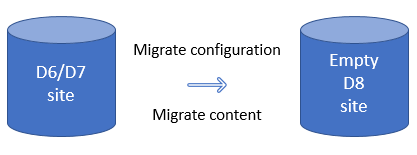
Examples of configuration migration: Content types, field definitions, and user roles are configuration entities which can be migrated to Drupal 10 (or later).
Examples of content migration: Nodes, users, and taxonomy terms are examples of content entities which can be migrated to Drupal 10 (or later).
Additional Considerations
- Not all contributed modules have automatic upgrade paths. This may require a manual or custom migration.
- Drupal 10 (or later) significantly changed how themes are structured. These changes can't be migrated. Instead, a theme must be rebuilt to work in Drupal 10 (or later).
- Although there are automated tools available, setting these up can still be a complex process. If a site does not have much content or custom configuration, some users may find it easier/faster to manually create this data in the new site. This should be determined on a per-case basis.
For the next steps, see Preparing a site for upgrade to Drupal 10.
Help improve this page
You can:
- Log in, click Edit, and edit this page
- Log in, click Discuss, update the Page status value, and suggest an improvement
- Log in and create a Documentation issue with your suggestion

