
 Still on Drupal 7? Security support for Drupal 7 ended on 5 January 2025. Please visit our Drupal 7 End of Life resources page to review all of your options.
Providing module-defined local tasks
Local tasks are a Drupal system to render route-specific links (eg tasks, commands or actions), usually rendered as menu tabs below page title and above the content.
Local tasks:
- may take up to two levels;
- may be dynamically positioned as a block;
- defined in YAML based declarative format in
example.links.task.ymlfile - mostly used on administrative pages or visible to authenticated users, but frontend pages like user pages or the registration/login/new password pages also use local tasks.
Here some examples of local tasks:

Example: Local tasks on login page for unauthenticated user.

Example: Local tasks on a page with a theme for user with editor permissions.
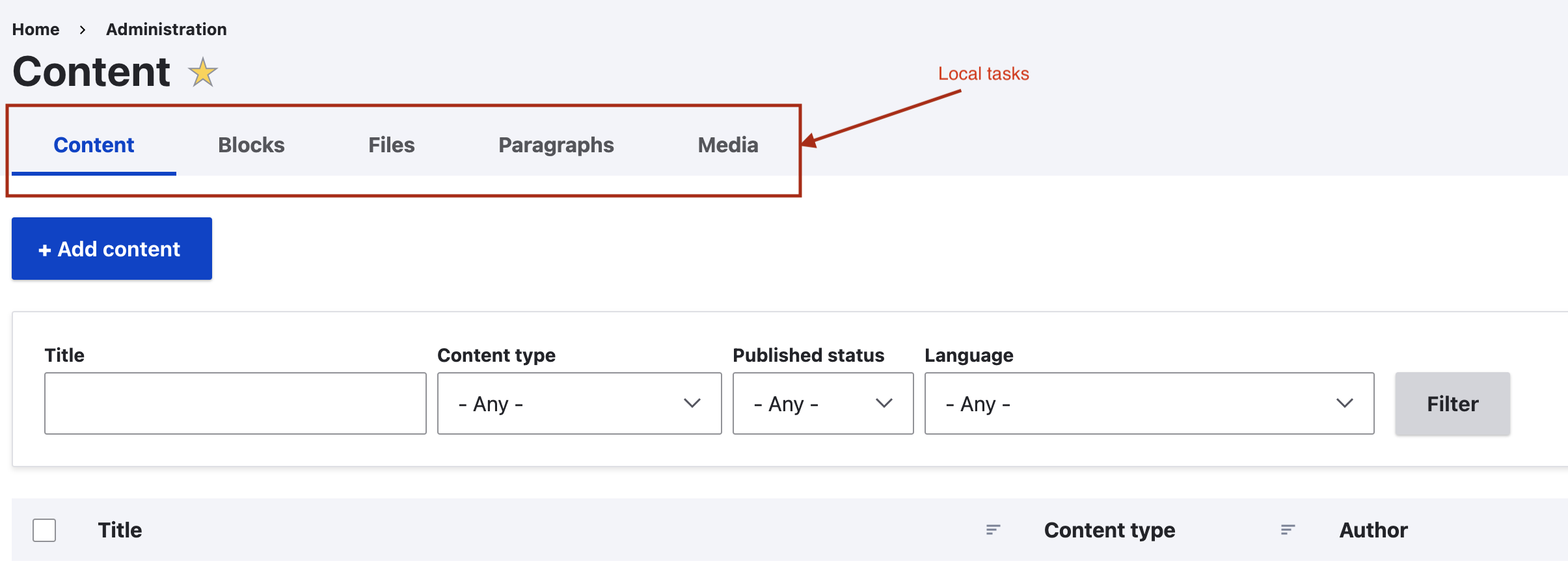
Example: Local tasks on an admin page.
Define static local tasks
Most local tasks that you need to define will be static, and can therefore be provided in a file named after your module, e.g., if the module name is 'example', the file will be example.links.task.yml and placed in the root of the module.
# example.links.task.yml

example.admin: # The first plugin ID
  route_name: example.admin
  title: 'Settings'
  base_route: example.admin

example.admin_3rd_party: # The second plugin ID
  route_name: example.admin_3rd_party
  title: 'Third party services'
  base_route: example.admin
  options:
    attributes:
      style: 'color: red;'
      class:
        - 'button--primary'
  weight: 100
This file would define two tabs, one for the example.admin route and another for the example.admin_3rd_party route. It is advised that you define the plugin ID (the top level YAML key) the same way you name the route for consistency. If you need to reuse the same route name for different tabs (either because you need a subtab, see below, or you want to integrate the same route under a different tab), then append a sensible suffix to the route name to form the tab name.
The title of the tab will show up on the user interface and the tab where the base_route is the same as the name of the route where the "default" tab appears.
The base_route is used to group together related tabs.
You can also provide weights for the tabs if needed with the weight key, which the tab whose route is the same as the base_route will by default get a negative weight and appear on the left.
To provide multiple levels of tabs (also known as secondary tabs), use the parent_id to relate a tab to its parent and use the same base_route to group the set of tabs together. Note that if parent_id is supplied, then the base_route value can and should be omitted, since it will be supplied from the parent local task.
For example, look at the local tasks defined by the views_ui module:
# views_ui.links.task.yml

# (1) Default tab
views_ui.list_tab:
  route_name: entity.view.collection
  title: List
  base_route: entity.view.collection

# (2) Non-default tab
views_ui.settings_tab:
  route_name: views_ui.settings_basic
  title: Settings
  base_route: entity.view.collection

# (3) Default subtab
views_ui.settings_basic_tab:
  route_name: views_ui.settings_basic
  title: Basic
  parent_id: views_ui.settings_tab

# (4) Non-default subtab
views_ui.settings_advanced_tab:
  route_name: views_ui.settings_advanced
  title: Advanced
  parent_id: views_ui.settings_tab
  weight: 10
Visually, the tabs and subtabs appear integrated in the views UI admin interface:
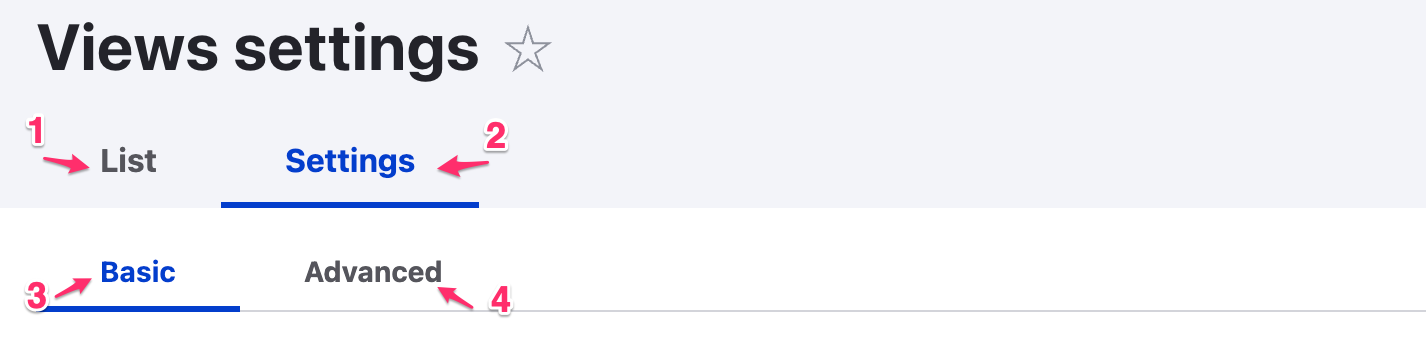
Views UI tabs example.
Finally, you can provide string context for the tab title in a title_context key, so if the tab text is ambiguous (such as 'Extend', 'May', etc.) the string context helps translators pick the right translation. This is later passed on to t().
Keys are:
route_name(required): The machine name of the local task route - this also determines where it's displayed.route_parameters(optional): List of parameters names and values for the route.title(optional): The title of the local task. By default, it will be passed through t() and localized. Strings with spaces should use single quotes.title_context(optional): context for t()base_route(optional): The route where the "root" tab (generally the top, leftmost one) is displayed and which serves to group a set of tabs.parent_id(optional): The plugin ID of the tab that is the parent - only relevant for 2nd level tabs. If this is set, base_route should be omitted and will be supplied from the parentoptions(optional): The set of localized options added to an element like attributes (class, id, style, etc..).weight(optional): The integer weight (lower weight tabs are further left, default is 0).
You must have at least two tabs
Please note, that if you have just a one tab, then it will not be displayed. Remember this when you create sub tabs (secondary tabs).
You must have a default tab to see other tabs
Please, note that you must have defined a default tab with same route_name and base_route to see other tabs.
# example.links.task.yml

example.admin: # This tab is required to display others on the base_route.
  route_name: example.admin  // route_name has to be same as base_route.
  title: 'Settings'
  base_route: example.admin // base_route has to be same as route_name.
Using routes with parameters
If you want to create a tab pointing, for example, to a taxonomy vocabulary that requires some parameters, they can be defined under the route_parameters key:
example.taxonomy.request_reasons:
  title: "Request reasons"
  route_name: entity.taxonomy_vocabulary.overview_form
  route_parameters:
    taxonomy_vocabulary: request_reasons
  base_route: example.main
Dynamic local task generation
Sometimes a static list of local tasks is not enough. For example, Views, Content translation and Configuration translation add local tasks to a wide variety of pages in Drupal. To achieve this, add a local task with a derivative key pointing to a class that generates the dynamic local tasks. Your example.links.task.yml would look like the following:
example.local_tasks:
  deriver: 'Drupal\example\Plugin\Derivative\DynamicLocalTasks'
  weight: 100
Generate the local tasks in the derivative class placed at src/Plugin/Derivative/DynamicLocalTasks.php based on the above reference:
namespace Drupal\example\Plugin\Derivative;

use Drupal\Component\Plugin\Derivative\DeriverBase;

/**
 * Defines dynamic local tasks.
 */
class DynamicLocalTasks extends DeriverBase {

  /**
   * {@inheritdoc}
   */
  public function getDerivativeDefinitions($base_plugin_definition) {
    // Implement dynamic logic to provide values for the same keys as in example.links.task.yml.
    $this->derivatives['example.task_id'] = $base_plugin_definition;
    $this->derivatives['example.task_id']['title'] = "I'm a tab";
    $this->derivatives['example.task_id']['route_name'] = 'example.route';
    return parent::getDerivativeDefinitions($base_plugin_definition);
  }

}
In this example, we don't do anything dynamic, but you would only use this code structure if you do need to generate dynamic local tasks.
See config_translation.links.task.yml and ConfigTranslationLocalTasks for a more involved example.
If you need to use parent_id with your dynamic tasks, be sure to prefix the parent_id with the deriver ID from *task.yml. For example:
$this->derivatives['example.task_id']['parent_id'] = "example.local_tasks:example.task_id"
Customising local task behavior
You can customize the behavior of your local tasks by extending LocalTaskDefault. For example, you can provide a dynamic title. You need to provide the class name of the custom local task implementation on the local task definition in the class key.
For example, see UserTrackerTab which is dependent on the current user ID in the path. It is defined with this tracker.links.task.yml entry (note the class key):
tracker.users_recent_tab:
  route_name: tracker.users_recent_content
  title: 'My recent content'
  base_route: tracker.page
  class: '\Drupal\tracker\Plugin\Menu\UserTrackerTab'
Another core example is ConfigTranslationLocalTask.
Altering local tasks
Use hook_menu_local_tasks_alter to alter existing local tasks.
Help improve this page
You can:
- Log in, click Edit, and edit this page
- Log in, click Discuss, update the Page status value, and suggest an improvement
- Log in and create a Documentation issue with your suggestion

