
 Still on Drupal 7? Security support for Drupal 7 ended on 5 January 2025. Please visit our Drupal 7 End of Life resources page to review all of your options.
Configure Views for debugging
Last updated on
2 May 2019
- Navigate to admin/structure/views/settings/advanced.
- In the Debugging section, enable the following option:
- Add Views signature to all SQL queries All Views-generated queries will include the name of the views and display 'view-name:display-name' as a string at the end of the SELECT clause. This makes identifying Views queries in database server logs simpler, but should only be used when troubleshooting.
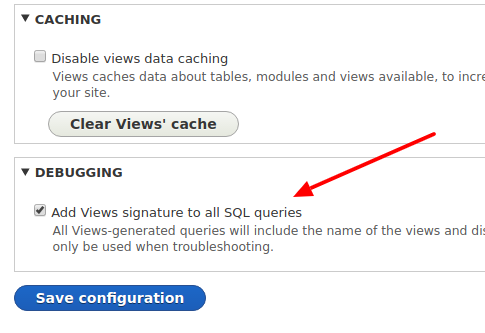
- Add Views signature to all SQL queries All Views-generated queries will include the name of the views and display 'view-name:display-name' as a string at the end of the SELECT clause. This makes identifying Views queries in database server logs simpler, but should only be used when troubleshooting.
- To verify the Views-generated queries, Navigate to admin/structure/views/settings (Basic). In the Live Preview Settings, enable the "Show the SQL query" option.

- After that, we can see the Views signature on the SQL Queries in the Preview section.

Help improve this page
Page status: No known problems
You can:
You can:
- Log in, click Edit, and edit this page
- Log in, click Discuss, update the Page status value, and suggest an improvement
- Log in and create a Documentation issue with your suggestion

