
 Still on Drupal 7? Security support for Drupal 7 ended on 5 January 2025. Please visit our Drupal 7 End of Life resources page to review all of your options.
On this page
- Preview
- Storage limits
- Multiversion concurrency control
- B-Tree indexes
- Full-Text Search Indexes
- Index caches
- Cluster Database Support
- Backup or point in time recovery
- Transactions
- Geospatial Datatype Support
- T-tree indexes
- Clustered indexes
- Compressed data
- Replication support
- Query cache support
- Locking granularity
- Geospatial indexing support
- Hash indexes
- Data caches
- Encrypted data
- Foreign key support
- Update Statistics for data dictionary
- Conclusion
- Charset
- Byte
- Use
Encoding, Collation and Storage
Drupal 7 will no longer be supported after January 5, 2025. Learn more and find resources for Drupal 7 sites
This documentation needs work. See "Help improve this page" in the sidebar.
Storage Engines or Table Types:
A Storage Engine is a software module that a database management system uses to create, read, update data from a database. In other words, Storage Engines are underlying software components that handle operations and manage information.
You can see Storage and Collation settings of a table by selecting a MySQL's table and clicking on the Operations tab in phpMyAdmin.
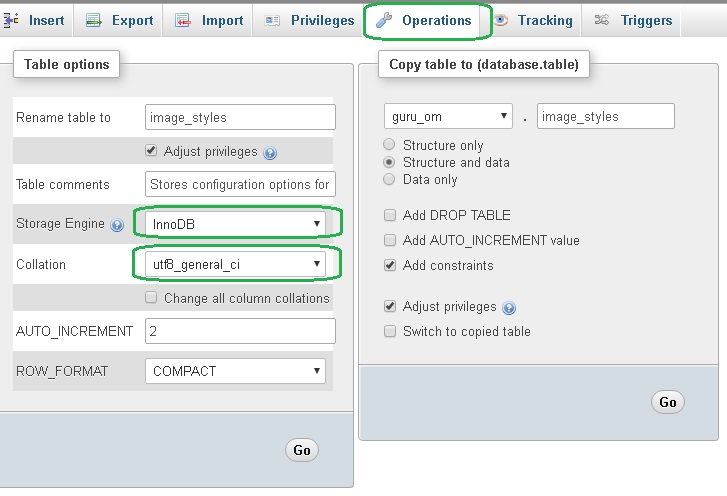
MySQL includes character set support that enables you to store data using a variety of character sets and perform comparisons according to a variety of collations. You can specify character sets at the server, database, table, and column level. MySQL supports the use of character sets for the MyISAM, MEMORY, and InnoDB storage engines.
InnoDB and MyISAM are two most common storage engines for MySQL. The following table compares both storage engines in detail.
Character Sets and Collations:
You must have come across following terms several times while dealing with MySQL databases:
| utf8_general_ci | utf8mb4_general_ci | latin1_swedish_ci |
| utf8_unicode_ci | utf8mb4_unicode_ci |
The first part of the string represents Character Encoding and the second and last part represents Collation.
| Character Encoding | latin1,utf8, uft8mb4 |
|---|---|
| Collation | swedish_ci,general_ci, unicode_ci |
First of all, let's have a look at character encodings.
A Characterset determines encoding and range of characters.
If you need to handle special characters, like letters with accents you use utf8 encoding. However, this encoding won’t handle emojis. For that, you’ll need utf8mb4, available since MySQL 5.5.3. If you don’t care about any of that, simply go with the default, latin1.
A note of warning when migrating from utf8 to utf8mb4. In utf8, a character can be encoded in a maximum of 3 bytes. In utf8mb4, we add an extra byte to store special characters like smileys. That changes the maximum length a column or index can hold. So if a column was a varchar(256) in utf8, it should now be a varchar(191) in utf8mb4.
| Charset | Description | Default Collation | MaxLen |
|---|---|---|---|
| latin1 | cp1252 West European | latin1_swedish_ci | 1 |
| utf8 | UTF-8 Unicode | utf8_general_ci | 3 |
| utf8mb4 | UTF-8 Unicode | utf8mb4_general_ci | 4 |
latin1 contains the basic ASCII set of unaccented alphanumeric characters and punctuations. Its sort order is swedish and its case insensitive. So, why Swedish and not English? Its because MySQL was originally developed in Sweden and Swedish uses the same sort order as English. So, this default is fine for English.
Each character in the latin1 character set is stored in a single byte.
But, the characters in utf8 and utf8mb4 are variable in length.
Why is Varchar often considered more storage-friendly than Char?
Have a look at the following chart:
+--------------------------------------------------+
| Character Set      |  CHAR(40)  | VARCHAR(40)    |
+--------------------+------------+----------------+
| latin1             |  40 bytes  |                |
+--------------------+------------| Actual length  |
| utf8               |  120 bytes |       +        |
+--------------------+------------| 1 or 2 bytes   |
| utf8mb4            |  160 bytes |                |
+--------------------------------------------------+
With a fixed length CHAR column defined to store 40 characters, latin1 just uses 40 bytes, but with multibyte character sets like utf8 and utf8mb4 MySQL needs to reserve enough storage space to accommodate the widest character in the set.
A variable length varchar column, on the other hand, uses only the actual length plus one or two bytes.
Consequently, it is much more efficient to use Varchar with utf8 and utf8mb4 even for fixed length strings.
How do utf8 and utf8mb4 store characters?
Understanding Collation:
One one side where Character set defines how text is stored, Collation defines how they are sorted and compared.
utf8mb4_unicode_ci is based on the Unicode standard for sorting and comparison, which sorts accurately in a very wide range of languages.
utf8mb4_unicode_ci, which uses the Unicode rules for sorting and comparison, employs a fairly complex algorithm for correct sorting in a wide range of languages and when using a wide range of special characters. These rules need to take into account language-specific conventions; not everybody sorts their characters in what we would call 'alphabetical order'.
utf8mb4_general_ci fails to implement all of the Unicode sorting rules, which will result in undesirable sorting in some situations, such as when using particular languages or characters.
utf8mb4_general_ci is faster at comparisons and sorting because it takes a bunch of performance-related shortcuts.
As far as Latin (ie "European") languages go, there is not much difference between the Unicode sorting and the simplified utf8mb4_general_ci sorting in MySQL.
In non-latin languages, such as Asian languages or languages with different alphabets, there may be a lot more differences between Unicode sorting and the simplified utf8mb4_general_ci sorting. The suitability of utf8mb4_general_ci will depend heavily on the language used. For some languages, it'll be quite inadequate.
Help improve this page
You can:
- Log in, click Edit, and edit this page
- Log in, click Discuss, update the Page status value, and suggest an improvement
- Log in and create a Documentation issue with your suggestion

