
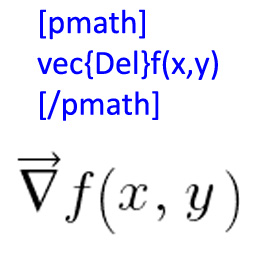
Description
WPMathPub renders mathematical equations in WordPress using the mathpublisher rendering engine, supporting both pmath native syntax and LaTeX-style input and generating high-quality PNG images with transparent backgrounds.
Unlike MathJax-based plugins, WPMathPub performs server-side rendering, producing static equation images that display consistently across browsers and devices without requiring client-side JavaScript.
This approach provides reliable rendering for:
- WordPress posts and pages
- RSS feeds
- Cached pages
- Environments where JavaScript rendering is not desirable
WPMathPub extends the classic mathpublisher engine with modern WordPress integration including shortcode support, LaTeX translation, image caching, and configurable rendering options.
Mathematical Equation Rendering
Mathematical expressions can be embedded directly into WordPress content using the pmath shortcode.
Example:
[pmath]x^2 + y^2 = z^2[/pmath]
Custom size and color:
[pmath size=18 color="blue"]E = mc^2[/pmath]
LaTeX input:
[pmath latex=1]\frac{a}{b}[/pmath]
Expressions are rendered as PNG images using the GD and FreeType libraries and cached for efficient reuse.
Features
- pmath expression rendering
- LaTeX command translation (PHPMathPublisher subset)
- Server-side PNG equation generation
- Gutenberg WPMathPub math block with PMath and LaTeX mode switching
- Halo-free color rendering with alpha transparency
- Transparent background support for dark themes
- Minimal WordPress database footprint
- Efficient PNG image caching
- WordPress admin tools panel
- Configurable default equation size
- Configurable default equation color with color picker
- Installation status display
- PNG image cache status and control
- Policy control for cleanup on plugin delete
Screenshots

Example rendered equation in page 
Example rendered equation in comment 
Example Gutenberg block 
Example from syntax page 
WordPress admin configuration panel top 
WordPress admin configuration panel bottom


Blocks
This plugin provides 1 block.
- Math (WPMathPub)
Installation
- Upload the plugin folder to the
/wp-content/plugins/directory. - Activate the plugin through the WordPress Plugins menu.
- Optional: change defaults under Tools WPMathPub.
FAQ
-
How do I get started with WPMathPub?
-
Here are two references:
- Check out the WPMathPub math publisher page for the user guide.
- Check out the WPMathPub syntax page for a complete cross-reference of all pmath native and LaTeX supported commands.
-
Does this plugin require MathJax?
-
No. WPMathPub renders equations server-side as PNG images using the mathpublisher rendering engine.
-
Does it support LaTeX?
-
Yes. Many LaTeX math commands are translated into pmath syntax before rendering. See the syntax reference page for the full list of supported commands.
-
Where are rendered images stored?
-
Rendered equation images are cached in:
/wp-content/uploads/wpmathpub/math-img/ -
Why does the plugin generate PNG images instead of SVG?
-
The plugin preserves compatibility with the mathpublisher rendering engine, which produces raster images. PNG output ensures consistent rendering across browsers.
Reviews


Contributors & Developers
“WPMathPub” is open source software. The following people have contributed to this plugin.
Contributors
Translate “WPMathPub” into your language.
Interested in development?
Browse the code, check out the SVN repository, or subscribe to the development log by RSS.
Changelog
3.0.2
- Added color= shortcode attribute with hex and named color support
- Added LaTeX input mode via latex=1 shortcode attribute with full PHPMathPublisher syntax coverage
- Added Gutenberg WPMathPub math block with PMath/LaTeX mode switching and real-time preview
- Added admin panel default equation color setting with WordPress color picker
- Added admin panel default equation size setting
- Added uninstall.php to remove plugin database options on delete
- Fixed Greek Omega symbol rendering (three stacked bugs resolved)
- Fixed matrix and tabular LaTeX conversion
- Fixed tabular border string parsing to respect LaTeX | and \hline markers
- Improved PNG image cache handling and cache key discipline
- Improved rendering stability across PHP 7.2 through 8.3