
Description
The Pixel Manager is the most complete conversion tracking plugin for WooCommerce. Set up Google Ads conversion tracking, Google Analytics GA4 e-commerce tracking, Meta/Facebook Pixel, TikTok Pixel, and more – in minutes, not hours. No coding required.
Unlike Google Tag Manager (GTM), which requires significant technical expertise to configure WooCommerce e-commerce tracking correctly, the Pixel Manager provides a turnkey solution with over 12 years of development. It automatically handles edge cases like payment gateway redirects, order duplication prevention, and consent mode – all the things that take hours to get right with manual tag management.
🚀 Endorsed by Google’s Tag Team
This plugin was recommended to us by Google’s Tag Implementation Team. That should say enough.
This plugin was demonstrated to me by a Google Tagging Support person. ‘nough said 🙂
We’re using this for our biggest clients and it’s working great!
Pixel Manager for WooCommerce is the go-to plugin for both tech wizards and casual users.
What makes the Pixel Manager different?
Most WooCommerce tracking plugins only handle the basics: firing a conversion pixel on the thank you page. The Pixel Manager goes much further. It tracks the entire e-commerce customer journey – from product impressions and add-to-cart events through checkout and purchase – across all major advertising and analytics platforms simultaneously. This gives you complete data for conversion optimization, dynamic remarketing audience building, and accurate ROAS reporting.
The Pro version adds server-side tracking (Conversion API / CAPI) that sends conversion data directly from your server to advertising platforms. This bypasses browser limitations like ad blockers, Safari ITP cookie restrictions, and network issues – typically recovering up to 30% more conversions that browser-only tracking misses. Our unique Automatic Conversion Recovery (ACR) feature goes even further by automatically identifying and recovering missed conversions nightly.
Key Benefits
✅ Easy setup – just enter your tracking IDs and you’re done.
✅ Accurate e-commerce event tracking across all platforms.
✅ GDPR and CCPA compliant with Google Consent Mode v2.
✅ Works with 15+ consent management platforms out of the box.
✅ Lightweight – won’t slow down your WooCommerce store.
✅ Payment Gateway Accuracy Report – diagnose conversion tracking drops.
✅ Automatic Conversion Recovery (ACR) – recover lost conversions (Pro).
Free Tracking Pixels
- Google Ads Pixel – conversion value tracking, dynamic remarketing, cart item data
- Google Analytics Pixel (GA4) – full Enhanced E-Commerce tracking
- Meta Ads Pixel (Facebook Pixel) – remarketing events and custom audiences
- Hotjar Pixel – heatmaps and session recordings
Free Features
- Google Tag Gateway for Advertisers – first-party tracking through Google’s servers
- Google Consent Mode v2 – full compliance with EU, UK, and US privacy regulations
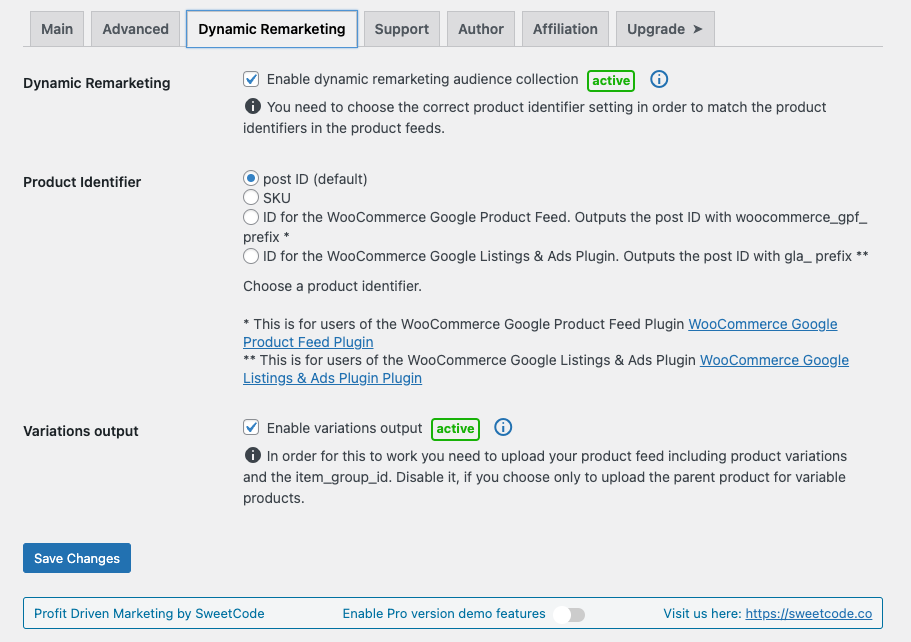
- Google Ads Dynamic Remarketing – build audiences based on product interactions
- Google Ads Cart Item Tracking – feed cart data to Smart Shopping and Performance Max campaigns
- Google Shopping New Customer Parameter – optimize for new customer acquisition
- GA4 Enhanced E-Commerce – track product impressions, add to cart, checkout steps, and purchases
- Meta Remarketing Events – ViewContent, AddToCart, InitiateCheckout, Purchase
- Basic Order Duplication Prevention – avoid counting the same conversion twice
- Customizable filters – fine-tune tracking output for your specific setup
- Lazy-loaded product list support – works with infinite scroll and AJAX product loading
- Payment Gateway Accuracy Report – identify which payment gateways cause conversion tracking drops
Have a look at the full feature list over here.
Premium Tracking Pixels
- Adroll Ads
- Contentsquare Statistics
- CrazyEgg Analytics
- LinkedIn Ads
- Microsoft Ads (Bing Ads)
- Outbrain Ads
- Pinterest Ads
- Reddit Ads
- Snapchat Ads
- Taboola Ads
- TikTok Ads
- X (Twitter) Ads
- VWO (Visual Website Optimizer) – A/B testing
Premium Features
- Automatic Conversion Recovery (ACR) – automatically recover missed conversions nightly
- Server-side tracking (CAPI) – Meta, TikTok, Pinterest, Snapchat, Reddit, GA4 Measurement Protocol
- Advanced Order Duplication Prevention
- Google Ads Enhanced Conversions – first-party data for improved attribution
- Google Ads Conversion Adjustments – send refund data back to Google Ads
- Scroll Tracking – measure how far visitors scroll on your pages
- Automatic Phone and Link Click Tracking
Have a look at the full feature list over here.
Ready to recover lost conversions and get accurate tracking data? Visit sweetcode.com to learn more about the Pro version.
Documentation
Comprehensive setup guides, troubleshooting, and API references: Open the documentation
News
Consent Management
The Pixel Manager integrates with all major Consent Management Platforms (CMPs) to ensure your tracking pixels respect visitor consent choices. It supports Google Consent Mode v2, including region-specific consent defaults for the EU, UK, and US states with privacy regulations.
Compatible consent management plugins:
- Beautiful and Responsive Cookie Consent
- Cookiebot
- Cookie Confirm
- Cookie Script
- Complianz GDPR/CCPA Cookie Consent
- Cookie Notice
- Cookie Notice & Compliance for GDPR / CCPA
- Cookie Law Info
- GDPR Cookie Compliance
- WP AutoTerms
- CookiePro by OneTrust
- Termly
- Iubenda
- WP Consent API
- WP Cookie Consent
Please read the following for additional setup information
Requirements
Security Review
Although we follow security best practices, we wanted to ensure that we didn’t miss anything. So, we had the plugin reviewed by Patchstack, a cybersecurity company specializing in WordPress security.
The summary of their report was: “We were unable to detect any vulnerabilities that would impact the security status of the plugin in a serious way.”
Managed Vulnerability Disclosure Program
We are committed to ensuring the security of our customers and their data. If you believe you have found a security vulnerability in the Pixel Manager for WooCommerce, we encourage you to report it through Patchstack our security partner. Patchstack runs a managed Vulnerability Disclosure Program (mVDP) that helps us receive, triage, and respond to reported vulnerabilities. Patchstack also provides a reward for the responsible disclosure of security vulnerabilities. Report a vulnerability
Screenshots
Settings page 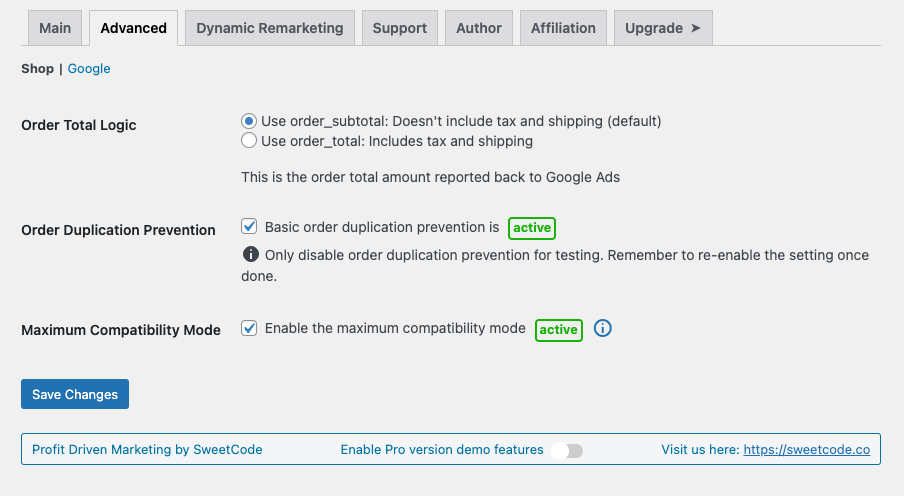


Installation
-
Upload the plugin directory into your plugin’s directory
/wp-content/plugins/ -
Activate the plugin through the ‘Plugins’ menu in WordPress
-
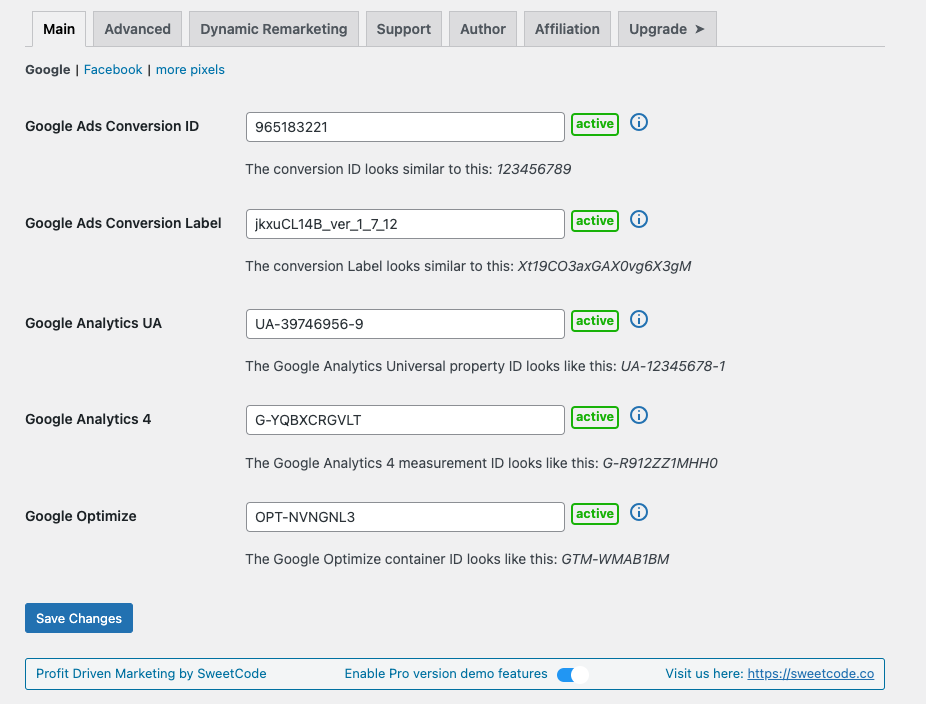
Get the Google Ads conversion ID and the conversion label. You will find both values in the Google Ads conversion tracking code. Get the conversion ID and the conversion label
-
In the WordPress admin panel go to WooCommerce and then into the ‘Google Ads Conversion Tracking’ menu. Please enter the conversion ID and the conversion label into their respective fields.
-
Head over to our documentation and follow our installation guides. Here are some of our most popular guides:
-
And read through our FAQ.
FAQ
-
How does Pixel Manager compare to Google Tag Manager (GTM)?
-
While Google Tag Manager is free, it requires significant technical expertise and many hours of configuration to set up proper WooCommerce e-commerce tracking. You need to create custom data layers, configure triggers and tags for each platform, handle consent mode integration manually, and test extensively to avoid tracking errors. The Pixel Manager provides a turnkey alternative that’s optimized specifically for WooCommerce with over 12 years of development. It automatically configures the correct e-commerce events, handles edge cases like payment gateway redirects and order deduplication, and includes unique features like Automatic Conversion Recovery (ACR) and the Payment Gateway Accuracy Report that GTM cannot replicate. Most users find Pixel Manager saves dozens of hours compared to manual GTM setup, while delivering more accurate conversion data.
-
What is server-side tracking (Conversion API / CAPI) and why does it matter?
-
Server-side tracking sends conversion data directly from your WooCommerce server to advertising platforms like Meta (Facebook), TikTok, Pinterest, Snapchat, Reddit, and Google Analytics 4 – rather than relying solely on browser-based pixels. This results in more reliable, accurate tracking because it works even when browser tracking is limited by ad blockers, Safari ITP cookie restrictions, browser privacy settings, VPNs, or network issues. Our Pro version typically recovers up to 30% more conversions compared to browser-only tracking, directly improving your campaign optimization and ROAS calculations.
-
How does Automatic Conversion Recovery (ACR) work?
-
ACR is our unique Pro feature that automatically recovers conversions missed due to tracking issues – whether from payment gateway redirects (like PayPal), browser limitations, ad blockers, or network problems. It runs nightly using the WordPress Action Scheduler, identifies WooCommerce orders that weren’t properly tracked by your advertising pixels, and sends the conversion data to your advertising platforms retroactively (within the allowed attribution windows). This can recover approximately 50% of otherwise lost conversions, directly improving your Google Ads, Meta, and TikTok campaign performance.
-
Does the Pixel Manager support Google Consent Mode v2?
-
Yes. The Pixel Manager fully supports Google Consent Mode v2, including the new
ad_user_dataandad_personalizationparameters required by Google since March 2024. It also supports region-specific consent defaults for the EU, UK, and 11+ US states with privacy regulations. The plugin integrates with 15+ consent management platforms (CMPs) out of the box, automatically adjusting tracking behavior based on visitor consent choices. This ensures your WooCommerce store is compliant with GDPR, CCPA, and other privacy regulations while still collecting the maximum amount of conversion data allowed. -
What WooCommerce e-commerce events does the Pixel Manager track?
-
The Pixel Manager tracks the complete e-commerce customer journey: product list views (impressions), product detail views, add to cart, remove from cart, begin checkout, add payment info, and purchase events. These events are sent simultaneously to all configured tracking pixels (Google Ads, GA4, Meta, TikTok, etc.) with standardized product data including product ID, name, category, brand, price, and quantity. This comprehensive event tracking powers Google Analytics GA4 Enhanced E-Commerce reports, Google Ads Smart Shopping and Performance Max campaigns, Meta dynamic remarketing ads, and TikTok product catalog campaigns.
-
Can I use the Pixel Manager to track Google Ads conversions on WooCommerce?
-
Yes. The Pixel Manager makes Google Ads conversion tracking setup on WooCommerce straightforward. Simply enter your Google Ads Conversion ID and Conversion Label, and the plugin automatically tracks purchase conversions with accurate order values, fires dynamic remarketing events for audience building, sends cart item data to optimize Performance Max and Shopping campaigns, tracks the Google Shopping new customer parameter for new customer acquisition campaigns, and supports Enhanced Conversions (Pro) for improved attribution using first-party data.
-
Will the Pixel Manager slow down my WooCommerce store?
-
No. Performance is a core design priority. The back-end code is small and efficient with fast, cached database queries. Larger tasks like ACR processing run during off-peak hours using the WordPress Action Scheduler. The front-end JavaScript library is compiled, tree-shaken to only load code for active pixels, minified, and pre-compressed with gzip and brotli. The Pro version adds lazy loading of the tracking library to further reduce impact on page load time. Many users report the Pixel Manager is faster than alternative tracking plugins and significantly lighter than a comparable Google Tag Manager setup.
-
Is there detailed documentation for the plugin?
-
Yes. Head over to this link: Documentation
-
How do I check if the plugin is working properly?
-
- Turn off any kind of caching and / or minification plugins.
- Log out of the shop.
- Turn off any kind of ad or script blocker in your browser.
- Search for one of your keywords and click on one of your ads.
- Purchase an item from your shop.
- Wait up to 48 hours until the conversion shows up in Google Ads. (usually takes only a few hours)
With the Google Tag Assistant you will also be able to see the tag fired on the thankyou page.
-
HPOS (High Performance Orders Storage)
-
The Pixel Manager is ready for the new WooCommerce High Performance Orders Storage (HPOS) feature.
-
Plugin compatibility
-
Our plugin is designed to work seamlessly with 99.99% of all other plugins. In the rare event of a conflict with a third-party plugin, we typically identify a fix or workaround quickly.
To illustrate its broad compatibility, here are a few examples of third-party plugins that work well with the Pixel Manager:
- Async Javascript
- Automptimize
- CartFlows
- Cloudflare Plugin
- Cost of Goods for WooCommerce (WPFactory)
- Doofinder for WooCommerce
- FlyingPress
- Hummingbird
- Litespeed Cache
- Litespeed ESI
- NitroPack
- Siteground Optimizer
- W3 Total Cache
- WooCommerce Brands
- WooCommerce Composite Products
- WooCommerce Cost of Goods (SkyVerge)
- WooCommerce Deposits
- WooCommerce Google Product Feed
- WooCommerce Subscriptions
- WooCommerce Wishlists
- Woo Discount Rules
- WP Fastest Cache
- WP Marketing Robot Feed Manager
- WP Optimize
- WP Rocket
- WP Super Cache
- YITH WooCommerce Brands
- YITH WooCommerce Wishlist
Rest assured, this is just a small sample, and the Pixel Manager should integrate smoothly with almost all other plugins you may use.
-
Do you have videos that show how to set up the plugin and get most out of it?
-
Yes, they are part of the step by step documentation. Head over to this link: Documentation
-
I get a fatal error and I am running old versions of WordPress and/or WooCommerce. What can I do?
-
As this is a free plugin we don’t support old versions of WordPress and WooCommerce. You will have to update your installation.
-
I am using an offsite payment gateway and the conversions are not being tracked. What can I do?
-
Offsite payment gateways (like PayPal Standard) redirect visitors away from your WooCommerce store during checkout, which can prevent browser-based conversion tracking from firing. The free version cannot fully solve this, but the Pro version’s Automatic Conversion Recovery (ACR) feature specifically addresses this problem by detecting untracked orders and sending the conversion data server-side. We generally recommend using direct payment gateways (like Stripe, PayPal Commerce Platform, or Mollie) for the best tracking accuracy and higher conversion rates.
-
I’ve done everything right in the test, but it still doesn’t work. What can I do?
-
Here is a non-exhaustive list of causes that might interfere with the plugin code.
- Minification plugins try to minify the JavaScript code of the plugin. Not all minification plugins do this good enough and can cause problems. Turn off the JavaScript minification and try again.
- Caching could also cause problems if caching is set too aggressively. Generally don’t ever enable HTML caching on a WooCommerce shop, as it can cause troubles with plugins that generate dynamic output.
-
I see issues in the backend of my shop. Admin pages get rendered weird, and popups don’t go away when I click to close them. How can I fix this?
-
You probably have some script or ad blocker activated. Deactivate it and the issues should go away. Usually you can disable the blocker for just that particular site (your WooCommerce back end).
Our plugin injects tracking pixels on the front end of WooCommerce shops. As a consequence scripts of our plugin have been added to some privacy filter lists. The idea is to prevent the scripts running if a shop visitor has some ad blocker enabled and wants to visit the front end of the shop. This is totally ok for visitors of the front end of the shop. But, it becomes an issue for admins of the shop who have a blocker activated in their browser and visit the backend of the shop.
Unfortunately, there is no way for us to generally approve our scripts in all blockers for the WooCommerce back end.
Therefore, we recommend admins of the shop to exclude their own shop from the blocker in their browser.
-
Where can I report a bug or suggest improvements?
-
Please post your problem in the Pixel Manager for WooCommerce Support forum: Link
You can send the link to the front page of your shop too if you think it would be of help. -
How can I report security bugs?
-
You can report security bugs through the Patchstack Vulnerability Disclosure Program. The Patchstack team helps validate, triage, and handle any security vulnerabilities. Report a security vulnerability.
Reviews


Contributors & Developers
“Pixel Manager for WooCommerce – Conversion Tracking, Google Ads, GA4, TikTok, Dynamic Remarketing” is open source software. The following people have contributed to this plugin.
Contributors


“Pixel Manager for WooCommerce – Conversion Tracking, Google Ads, GA4, TikTok, Dynamic Remarketing” has been translated into 8 locales. Thank you to the translators for their contributions.
Interested in development?
Browse the code, check out the SVN repository, or subscribe to the development log by RSS.
Changelog
1.58.5
Release date – 24.03.2026
- Tweak: Updated PHPCS tooling (WPCS 3.3.0, woocommerce-sniffs 1.0.1) and resolved all coding standards violations
- Tweak: Added support for Google Ads conversion ID format (AW-) as a valid GA4 measurement ID
- Tweak: Improved tracking accuracy analysis performance and reliability
- Tweak: Added event-driven tracking accuracy table — per-order real-time writes replace the nightly batch analysis, with automatic 3-month backfill and graceful fallback to transients during transition
- Tweak: Added comprehensive Action Scheduler cleanup on plugin deactivation, preventing orphaned pending tasks for tracking accuracy, duplication prevention, HTTP logging, LTV calculation, and SSP sync
- Tweak: Fixed WP Rocket JS minification and combination breaking webpack chunk loading (ChunkLoadError) — PMW scripts are now always excluded from WP Rocket’s minify and combine features, independent of compatibility mode
- Tweak: Removed Maximum Compatibility Mode setting — JS optimization exclusions (minify, combine, delay JS on critical pages) are now automatic for all supported performance plugins
- Fix: Fixed Google Tag Gateway proxy returning 400 errors on some shops due to overly aggressive path sanitization
- Fix: Fixed Google Tag Gateway proxy generating malformed conversion tracking URLs on some shops due to double-rewriting CCM paths
1.58.4
Release date – 16.03.2026
- Tweak: Fixed Google Tag Gateway proxy causing Apache AH00124 internal redirect loops on some hosting configurations — proxy now follows Google FPS redirects server-side and uses absolute URLs in Location headers to prevent Apache from misinterpreting relative paths as internal redirects
- Fix: Fixed PHP 8.5 deprecation warnings in the standalone Google Tag Gateway proxy breaking GA4 tracking — replaced deprecated $http_response_header with http_get_last_response_headers() (PHP 8.4+) with backward-compatible fallback, and conditionally skipped no-op curl_close() on PHP 8.0+
1.58.3
Release date – 10.03.2026
1.58.2
Release date – 10.03.2026
- Tweak: Improved WP Rocket’s Delay JavaScript breaking purchase tracking when PMW lazy loading is active — now excludes all PMW scripts from WP Rocket optimization instead of only the lazy loader
1.58.1
Release date – 10.03.2026
- New: Added support for WooCommerce’s built-in Cost of Goods Sold feature for profit margin calculations (available since WooCommerce 9.5)
- Tweak: Improved COGS retrieval to only check active sources, preventing stale data from deactivated plugins
1.58.0
Release date – 02.03.2026
- New: Added unified IP exclusion filter (
pmw_ip_exclusion_list) to block specific IPs and CIDR ranges from all tracking — browser pixels, browser-initiated S2S, server-side purchase events, and SSP proxy - New: Declared compatibility with WooCommerce Product Instance Caching (experimental feature in WooCommerce 10.5+)
- Tweak: Added support for suppressed Google Ads and GA4 tags in the Google Tag Gateway Proxy
1.57.0
Release date – 24.02.2026
- New: Implemented account created event tracking
- New: Added Abilities API integration
- Tweak: Implement cross-tab session synchronization for improved data consistency
- Tweak: Added modern styling and impact indicators to opportunity cards
- Tweak: Bumped up WC version compatibility to 10.5
- Tweak: Enhanced GTG Proxy: Improved config resilience, reduced unnecessary health check requests, and added periodic config refresh
- Tweak: Implemented REST API for saving settings via AJAX; refactored admin tabs and enhance section rendering
- Tweak: Update styles for impact badges and add Google Automated Discounts and Customer Reviews opportunities
1.56.0
Release date – 02.02.2026
- Tweak: Google Tag Gateway Proxy: Improved handling of config file
1.55.1
Release date – 29.01.2026
- Fix: Fixed the bug which did not save the dismissed button click in the database for the trial notification
1.55.0
Release date – 26.01.2026
- Tweak: Activated an opportunity notification for the Google Tag Gateway Proxy feature
- Tweak: Updated pixel registry adapter capabilities for consistency with the decentralized architecture
- Tweak: Added filter to control output of cart item data inline script for theme compatibility
- Tweak: Refactored the internal event handling system for better maintainability
- Tweak: Large refactor which renamed wpm to pmw
- Tweak: Enhanced event handling for product variations and improve conditional triggers
- Tweak: Enhanced active opportunities notification with impact level breakdown and improved styling
- Tweak: Revamped rating notice UI and logic for better user experience
- Tweak: Enhanced opportunities header with statistics and dismissal tracking
- Tweak: Added backup section styles and improve table row highlighting
- Tweak: Updated documentation links to use the new path structure
- Tweak: Added Cookie Confirm CMP integration
- Tweak: Added support for Beautiful and Responsive Cookie Consent plugin
- Tweak: Updated script behavior for tracking on specific pages when Flying Press is active
- Tweak: Enhanced race condition protection when renaming temporary config file in GTG_Proxy
- Tweak: Improved proxy URL handling based on GTG handler type in Pixel Manager
- Tweak: Updated GTG handler detection logic to rely on session cache and remove unnecessary server-side checks
- Tweak: Updated GTG proxy config cache handling on activation and improve config file management
- Fix: Add back view_cart event listener
- Fix: Prevent division by zero for free orders in order value calculation
1.54.1
Release date – 15.12.2025
- Tweak: Added a missing check for Contentsquare
1.54.0
Release date – 15.12.2025
* Tweak: Admin UX improvements in the settings page.
* Tweak: Refactored opportunity card output: sort by impact level and streamline dismissed opportunities
* Tweak: Enhanced client IP address handling
* Tweak: Added external object cache detection and enhanced debug info output
* Tweak: Enhanced transient handling: add verification for transient storage to improve reliability with external object caches
1.53.0
Release date – 09.12.2025
- New: Implement Google Tag Gateway Proxy for proxying requests to Google’s First-Party Servers
- Tweak: Added support for loading deprecated functions with user toggle in settings
- Tweak: Simplified documentation link retrieval by removing unnecessary parameters
- Tweak: Added notification badges
- Tweak: Enhanced Facebook Pixel script loading and user data caching
- Tweak: Added multiple enhancement opportunity notifications for various settings
- Tweak: Added crossDomain option to AJAX requests
- Tweak: Replaced jQuery.ajax with native script loading for improved performance and error handling
- Tweak: Removed unused code and files
1.52.1
Release date – 03.12.2025
- Tweak: Added new documenation links.
- Tweak: Updated the GA4 tag ID format.
- Tweak: Updated Google tag ID suppression logic in functions.js
- Tweak: Implemented public front-end API for third-party integrations with event dispatching and consent context
1.52.0
Release date – 01.12.2025
- Tweak: Bumped up WP version compatibility to 6.9
- Tweak: Filter out non-existent or unpublished products from transient data
- Tweak: Refactored pixel file structure to unify server-side and browser-side handling, implementing a centralized pixel registry for improved management and automatic detection of active pixels.
- Tweak: Added validations for some input data.
1.51.1
Release date – 27.11.2025
- Fix: Fixed chunk loading compatibility with script optimization plugins (that combine JavaScript) by setting the .js public path dynamically (with an absolute instead of a relative path).
- Fix: Disabled the Composer APCU optimization since it caused loading issues on a small subset of servers.
1.51.0
Release date – 25.11.2025
- New: Event filtering system.
- Tweak: Added error handling in the queue runner.
- Tweak: Added null and undefined check in visitor permission logic.
- Tweak: Updated the documentation links.
- Tweak: Bumped up Facebook CAPI API version to v24.0.
- Fix: Fixed chunk loading compatibility with script optimization plugins (SiteGround Optimizer, Autoptimize, WP Rocket, etc.) by implementing webpack runtime publicPath configuration.
1.50.1
Release date – 19.11.2025
- Fix: Fixed undefined check for visitorAllowed cache.
1.50.0
Release date – 16.11.2025
- New: Split the tracking library into chunks to only load the necessary code for the active pixels and features.
- Tweak: Switched bot detection from IP based to user-agent based for better accuracy, flexibility, and much smaller file size.
- Tweak: Added support in the pmw_google_ads_conversion_identifiers filter for multiple labels for the same Google Ads conversion ID.
- Tweak: Updated vendor packages.
- Tweak: Added filter to take over control of the Reddit tracking pixel in case the Reddit pixel is active in the Pixel Manager and the official Reddit for WooCommerce plugin is also active.
1.49.3
Release date – 06.11.2025
- Tweak: Replaced Cody widget with Chatbase widget.
- Tweak: Added chatbot widget with side panel.
- Fix: Fixed product ID validation and filtered unpublished products in get_products_for_datalayer_by_product_ids. (CVE-2025-12545)
1.49.2
Release date – 07.10.2025
- Tweak: Expanded consent mode regions by adding entries for 11 additional U.S. states.
- Tweak: Updated the
add-to-cartURL parameter handling to include an optionalquantityparameter. - Tweak: Added payment type details to Google Analytics events.
- Tweak: Refactored order item price handling for Google Ads cart items to always exclude tax.
- Tweak: Automatically detect disabled Google tags after combining Google tags and prevent running a config command for them.
- Tweak: Updated vendor packages.
- Tweak: Refactored gateway analysis calculations for improved clarity and accuracy.
- Tweak: Bumped up WC version compatibility to 10.2
- Fix: Moved the GLA activation filter to the init hook. It prevented other Pixel Manager filters from being applied.
1.49.1
Release date – 18.06.2025
- Tweak: Updated plugin URI to SweetCode site.
- Tweak: Automatic options backup on plugin upgrades.
- Fix: Fixed edge-case XSS vulnerabilities related to unquoted product ID injection in post-editing scenarios. Exploitation required specific conditions and permissions.
- Fix: Fixed the “Show recent log file” link in the logs tab.
1.49.0
Release date – 10.06.2025
- New: Added a new queue runner _pmwq for developers who want to run Pixel Manager functions, no matter when the Pixel Manager is loaded.
- New: Added a new automatic settings backup feature.
- Tweak: Updated Wistia embed script and styling for better integration.
- Tweak: Various admin UX improvements.
- Tweak: Added a health check for the Google Tag Gateway.
- Tweak: Removed some unused code.
- Tweak: Added method to convert LTV order values to base currency when the shop uses specific multi-currency plugins.
- Tweak: Improved payment gateway retrieval logic.
- Tweak: Bumped up WC version compatibility to 9.9
1.48.0
Release date – 22.05.2025
- New: Support for Google tag gateway for advertisers.
- Tweak: Many code improvements to reduce Plugin Check warnings and errors.
- Tweak: Bumped up WP version compatibility to 6.8
- Tweak: Bumped up WC version compatibility to 9.8
- Tweak: Added filter to declare WP Consent API compatibility.
- Tweak: Removed some cruft.
- Tweak: Added console log for Meta (Facebook) custom event tracking.
- Tweak: Updated vendor packages.
- Tweak: Optimized the show_variation event listener to prevent issues on small subset of themes.
- Tweak: Added optional fallback URL for the script loader.
- Tweak: Optimized filter loading.
- Tweak: Optimized the event script for Google shortcodes.
- Tweak: Improved the cache purge logic to also purge transients that cache certain options.
- Fix: Removed a possible recursion to prevent a memory overallocation error in some edge cases in class-opportunties.php.
- Fix: Fixed the facebook_for_woocommerce_integration_pixel_enabled filter.
1.47.1
Release date – 17.04.2025
- New: Released the free version of the plugin on the woocommerce.org marketplace.
1.47.0
Release date – 31.03.2025
- Tweak: Cast permission callback return values to prevent semgrep warnings.
- Tweak: Added a feature to show the PMW pro features demo in the wp.org playground.
- Tweak: Removed some cruft.
- Tweak: Added new pmw_options filter that allows to filter the options array before it is used.
- Tweak: Added order extra details output that helps with debugging.
- Tweak: Improved the loading logic to prevent fatal errors if several versions of the plugin are activated at the same time.
- Tweak: Numerous code syntax improvements.
- Tweak: Improved variation name output for GA4.
- Tweak: Added support fo the new WooCommerce internal brand feature.
- Tweak: Improved the update_cart event listener.
1.46.1
Release date – 27.01.2025
- Tweak: Cast permission_callback input variable into bool.
- Tweak: Workaround for a rare Google tracking ID URL bug.
- Tweak: Added a safeguard to prevent a fatal error in some edge cases when third-party code changes the data output from a string to an array in prepare_custom_rest_handlers.
- Tweak: Bumped up WC version compatibility to 9.6
1.46.0
Release date – 09.01.2025
- New: Added support for the Cookiefirst CMP.
- Tweak: Added safeguard to get_payment_gateways method to prevent a fatal error in some edge cases when a payment gateway is not following the WooCommerce standard.
- Tweak: Added data collection placeholder for gateway analysis when the analysis is run when no orders have been processed through the Pixel Manager yet.
- Tweak: Bumped up WC version compatibility to 9.5
- Tweak: Bumped up WP version compatibility to 6.7
- Tweak: Switched gtag.js ID priority from GA4 to Google Ads, as GA4 in rare cases is buggy and returns a 404.
- Tweak: Prevent double logging of payment method change.
- Tweak: Reactivated the AI support chat bot.
1.45.0
Release date – 29.10.2024
- Tweak: Allow shop managers to access the settings page.
- Tweak: Updated vendor packages.
Earlier versions
For the changelog of earlier versions, please refer to the changelog in the /changelog-archive/ folder.