

Description
PressPrimer Assignment is a professional assignment submission and grading plugin that gives WordPress educators everything they need to collect student work, provide meaningful feedback, and track grades, all without juggling email attachments, shared drives, or clunky LMS add-ons.
Students get a clean, focused submission experience. Teachers get a centralized grading dashboard. And you keep full control of your data on your own WordPress site.
This is a genuinely free plugin. Unlimited assignments, unlimited submissions, full grading tools, LMS integration, and email notifications are all included at no cost. We earn upgrades by building specialized features worth paying for, not by crippling what you get for free.
Why PressPrimer Assignment?
Built-in assignment tools in WordPress LMS plugins are often afterthoughts, limited to basic file uploads with no real grading workflow, limited feedback options, and dated interfaces. Dedicated assignment platforms charge monthly fees with per-student pricing that gets expensive fast.
PressPrimer Assignment delivers a focused, polished assignment workflow with the features educators actually need:
- Flexible Submission Types – Accept file uploads, rich text submissions, or let students choose. Support for PDF, DOCX, TXT, RTF, ODT, and image files out of the box.
- Grade Without Leaving WordPress – A dedicated grading queue with a side-by-side interface: the student’s document renders on the left while you score and write feedback on the right. Built-in viewers for PDF, Word documents, images, and text files mean you never have to download, open, and track files on your desktop.
- Native LMS Integration – Works with LearnDash and Tutor LMS. Assignments appear in lessons, passing grades trigger lesson completion, and instructor roles are mapped automatically.
- Secure File Handling – Six-layer file validation and permission-based file serving. Student files are never directly accessible via URL.
- Customizable Email Notifications – Automatic emails for submission confirmation, grade release, and new submission alerts. Fully customizable templates with token placeholders.
- Three Professional Themes – Default, Modern, and Minimal themes that match the PressPrimer Quiz visual style.
Features Included Free
PressPrimer Assignment includes everything you need to manage assignments at any scale:
Assignment Creation
- Unlimited assignments with title, description, instructions, and grading guidelines
- Configurable maximum points and passing score
- Three submission types: file upload, text/rich text, or student’s choice
- Configurable file types, file size limits (up to 100 MB), and multiple files per submission
- Assignment categories for organization
- Draft, Published, and Archived status workflow
- Resubmission support with configurable attempt limits
Student Submission Experience
- Drag-and-drop file upload with progress indicators
- TinyMCE rich text editor with live word count and auto-save drafts
- Submission preview with confirmation before final submit
- Student notes field for context or questions
- View submission status, grade, and instructor feedback
- Previous submission history with feedback for each attempt
- [pressprimer_assignment_my_submissions] shortcode for a personal submissions dashboard
Grading & Feedback
- Centralized grading queue with filter and sort
- Side-by-side grading interface: document viewer on the left, grading panel on the right
- Built-in viewers render PDF, DOCX, images, and text files directly in WordPress; no downloading required
- Score input with automatic pass/fail calculation
- Rich text feedback field
- Grading guidelines reference panel pulled from the assignment
- Status workflow: Submitted, Grading, Graded, Returned
Email Notifications
- Submission confirmation, grade notification, and new submission alert emails
- Customizable subject and body templates per email type
- Token placeholders: student name, assignment title, score, feedback URL, and more
- Custom from name, from email, and logo
- Test email feature in settings
Admin Dashboard & Reports
- Dashboard with submission statistics, activity chart, and recent submissions
- Reports page with filterable submission data
Security & Accessibility
- Six-layer file upload validation (extension whitelist, MIME verification, double-extension blocking, dangerous file rejection)
- Files stored outside webroot with permission-based serving through PHP
- Capability-based access control (teachers see only their own assignments)
- WordPress Privacy API integration (Tools > Export/Erase Personal Data)
- Clean uninstall with optional complete data and file removal
- Three professional themes with responsive design, RTL support, and print styles
- Keyboard navigation, screen reader support, and reduced motion preferences
Perfect For
- LearnDash course creators who need a better assignment experience than the built-in tool
- Tutor LMS instructors who want document submission and grading in their courses
- University departments collecting essays, lab reports, or research papers
- Corporate trainers gathering certification documents and project deliverables
- Standalone WordPress educators who need assignments without a full LMS
- Online course entrepreneurs selling courses with graded assignments
Built-in Integrations
PressPrimer Assignment detects and integrates with popular WordPress LMS plugins automatically.
LearnDash: Attach assignments to lessons or topics via the editor sidebar. Passing an assignment can automatically mark the lesson or topic complete. LearnDash Group Leaders are granted teacher-level permissions to create assignments and grade their students’ submissions. The “Mark Complete” button is hidden until a required assignment is passed.
Tutor LMS: Attach assignments to lessons via the course builder. Passing an assignment can auto-complete the lesson and trigger course completion when all lessons are done. Tutor LMS Instructors are granted teacher-level permissions. If both PressPrimer Quiz and PressPrimer Assignment are attached to a lesson, both must be passed before the lesson completes.
Uncanny Automator: Four triggers available—user submits an assignment, user is graded, user passes, user fails. Each trigger includes a full set of tokens (assignment title, score, feedback, student info, grader info, and more) for use in automated workflows.
All integrations are included in the free version.
Built for Developers
- Action hooks for assignment creation, submission, grading, and email events
- Filter hooks for submission permissions, file access, email templates, and role mapping
- Full REST API for assignments, submissions, files, categories, and statistics
- Custom database tables with automatic schema migration
- Extensible settings panel with tab registration hooks
Documentation & Support
Source Code & Development
The full uncompressed source code for all JavaScript and CSS files is available in our public GitHub repository:
The /src directory contains all unminified source files. The plugin uses webpack for building production assets. To rebuild from source:
- Clone the repository
- Run
npm installto install dependencies - Run
npm run buildto compile assets
Privacy
PressPrimer Assignment stores student submission data (files, text, grades, and feedback) in your WordPress database under your full control. No data is transmitted to external servers. All submitted files are stored in a protected directory under wp-content/uploads/ppa-submissions/ and served via PHP with permission checks.
The plugin integrates with the WordPress Privacy API:
- Tools > Export Personal Data — includes all submissions, grades, feedback, and uploaded file metadata for the requested user.
- Tools > Erase Personal Data — permanently deletes all submissions, grades, and uploaded files for the requested user.
Administrators can permanently delete all plugin data (database tables, uploaded files, options, and user meta) via Settings > Advanced > “Remove all data on uninstall” before uninstalling the plugin.
Screenshots
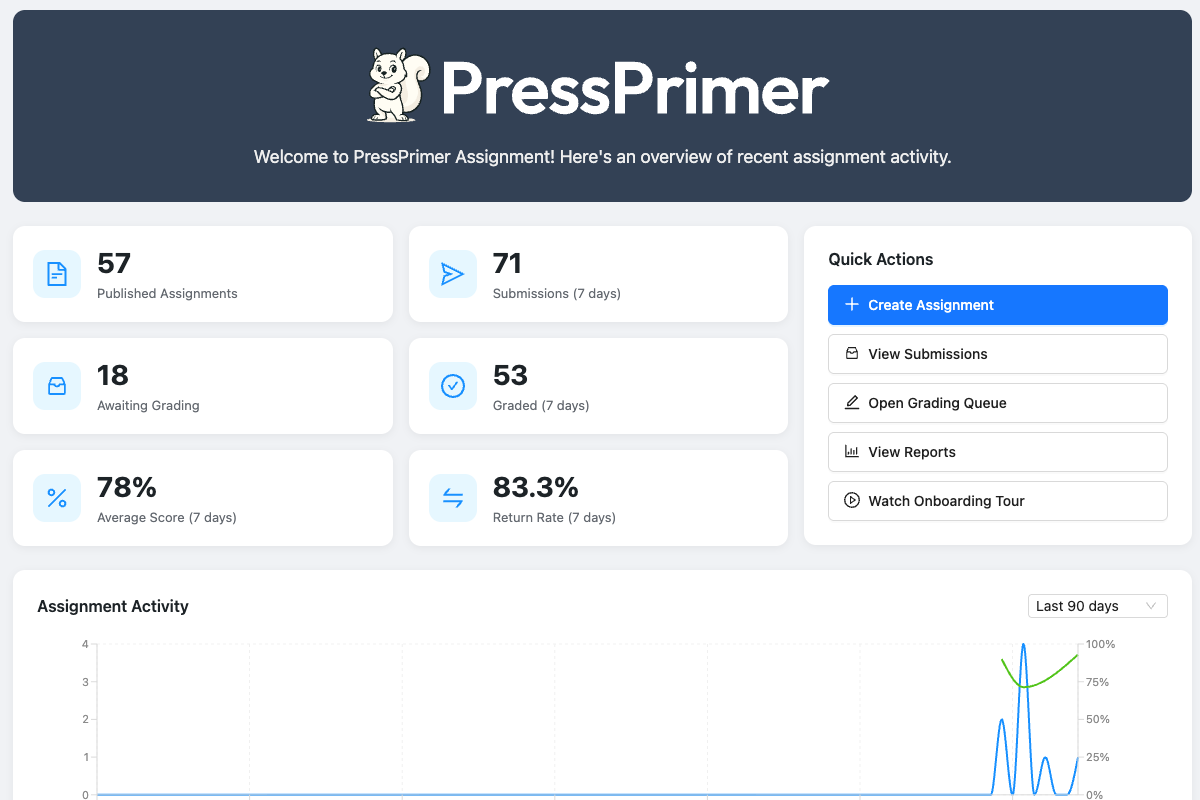
Dashboard showing key stats, quick actions, and assignment activity 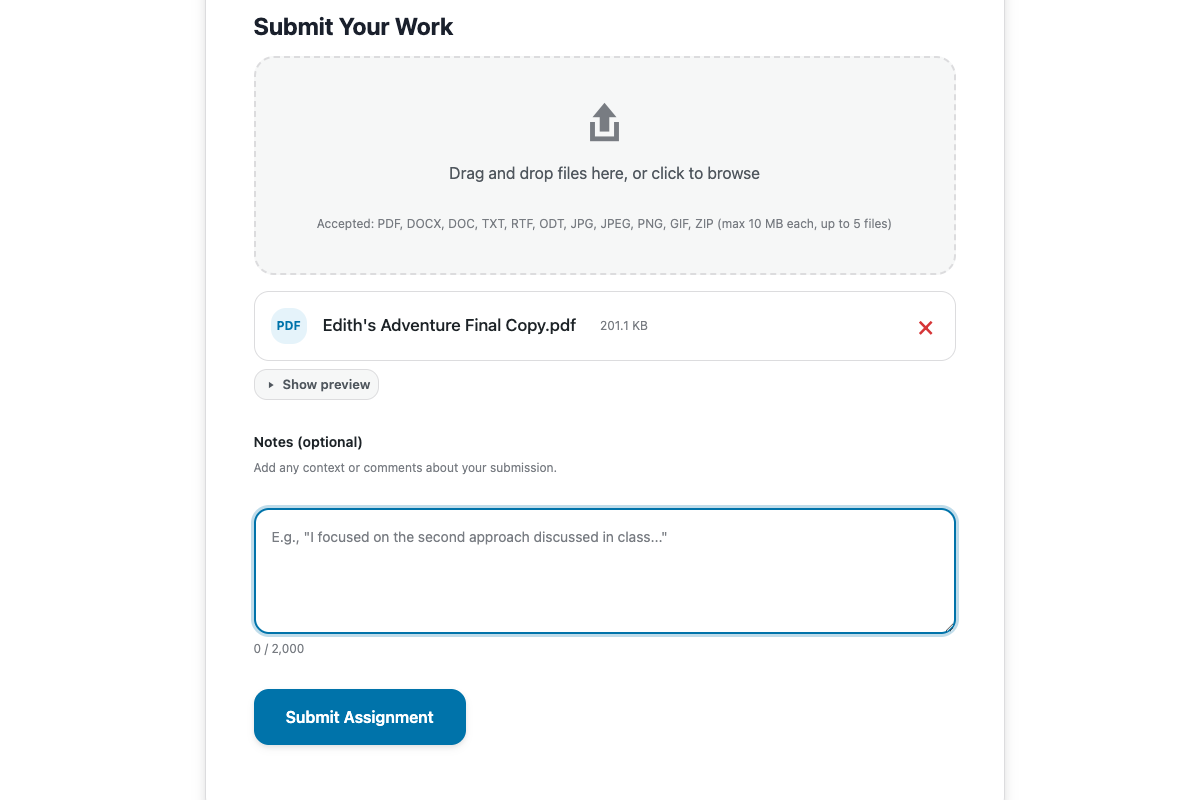
Upload support for a variety of document formats, including PDF, Word, and images 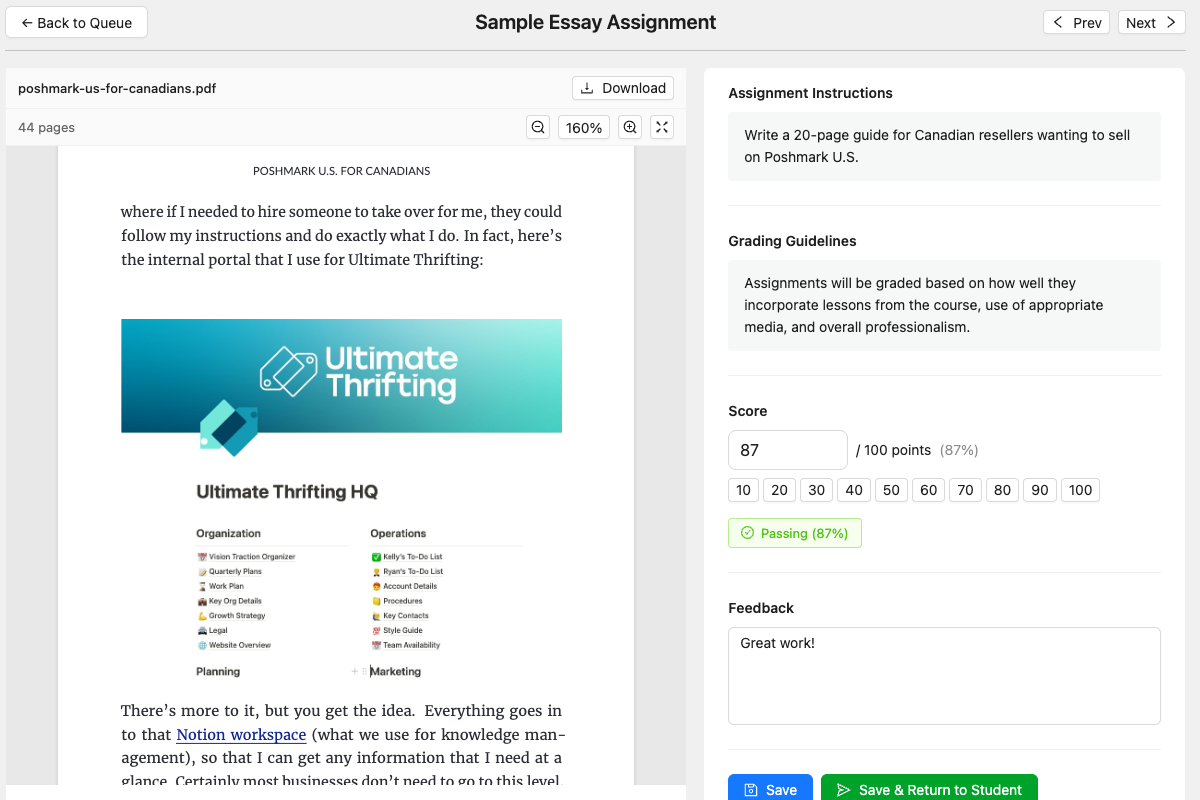
Side-by-side grading interface with embedded document viewer and feedback panel 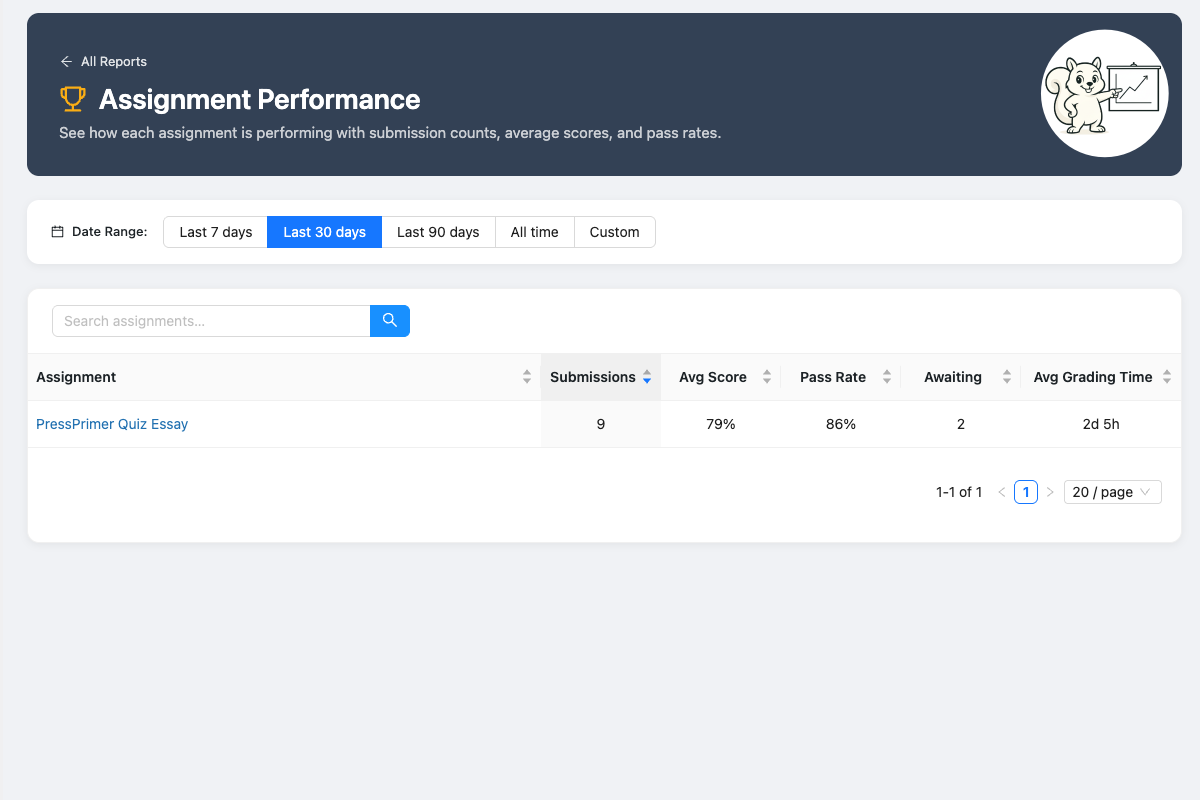
Reports show how each assessment is performing 
Assignment text editor with autosave and formatting controls


Blocks
This plugin provides 2 blocks.
- PPA Assignment Display an assignment for users to submit.
- PPA My Submissions Display a list of the current user's assignment submissions.
Installation
Automatic Installation
- Go to Plugins > Add New in your WordPress admin
- Search for “PressPrimer Assignment”
- Click Install Now and then Activate
- Navigate to PressPrimer Assignment in your admin menu to get started
LMS Integration
If you have LearnDash or Tutor LMS installed, integration features enable automatically.
FAQ
-
Is this really free, or is it a limited trial?
-
It’s genuinely free and not locked down. PressPrimer Assignment includes unlimited assignments, unlimited submissions, full grading tools, LMS integrations, email notifications, and three professional themes in the free version. We believe in earning upgrades by offering genuinely valuable features, not by crippling the free experience.
-
Does this work with LearnDash?
-
Yes. PressPrimer Assignment integrates natively with LearnDash. Attach assignments to lessons or topics, and passing grades can automatically trigger lesson completion. LearnDash Group Leaders receive teacher-level permissions to create assignments and grade submissions. The integration activates automatically when LearnDash is detected.
-
Does this work with Tutor LMS?
-
Yes. Assignments integrate with Tutor LMS lessons via the editor sidebar and course builder. Passing grades can auto-complete lessons, and course completion triggers when all lessons are done. Tutor LMS Instructors receive teacher-level permissions automatically.
-
Can I use this without an LMS plugin?
-
Absolutely. PressPrimer Assignment works as a standalone plugin. Use the
[pressprimer_assignment]shortcode to embed assignments on any page or post. The LMS integrations are a bonus that enable automatically when an LMS is detected—they don’t restrict standalone use. -
Does this work with PressPrimer Quiz?
-
Yes. Both plugins are part of the PressPrimer suite and are designed to work together. When both are active, they share the Groups infrastructure and Teacher role for a unified experience. Each plugin also works independently.
-
What file types can students upload?
-
By default: PDF, DOCX, TXT, RTF, ODT, JPG, JPEG, PNG, and GIF. Administrators can configure allowed file types per assignment. All uploads go through six layers of security validation including MIME type verification and dangerous file blocking.
-
Can students submit text instead of files?
-
Yes. Each assignment can be configured to accept file uploads, text/rich text submissions, or let the student choose. Text submissions use a TinyMCE editor with live word and character counts, auto-save drafts, and a 50,000-character limit.
-
How does the grading interface work?
-
The grading interface uses a side-by-side layout. The student’s submitted document renders directly in the left panel. PDF, DOCX, images, and text files all display without downloading. The right panel has fields for score, pass/fail status, and rich text feedback, plus a reference panel showing the assignment’s grading guidelines.
-
Can I customize the email notifications?
-
Yes. Each email type (submission confirmation, grade notification, admin alert) has its own customizable subject and body template. Templates support token placeholders for dynamic content like student name, assignment title, score, and feedback. You can also set a custom from name, from email, and upload a logo for the email header.
Reviews

Contributors & Developers
“PressPrimer Assignment” is open source software. The following people have contributed to this plugin.
Contributors
Translate “PressPrimer Assignment” into your language.
Interested in development?
Browse the code, check out the SVN repository, or subscribe to the development log by RSS.
Changelog
1.0.0
- Initial release