
Description
AskAny is the Most Advanced AI-Powered WordPress Chat Plugin. Transform your WordPress site into an intelligent, self-service support hub with cutting-edge AI RAG Architecture (Retrieval-Augmented Generation) technology, Intelligent Content Indexing, semantic search, and real-time Server-Sent Events (SSE) communication with human support capabilities.
AskAny delivers 24/7 customer service, built-in feedback system, intelligent product recommendations, and seamless WooCommerce integration with order tracking that transforms visitors into customers.
🚀 AskAny AI | 📖 Documentation | 💬 Pro Support
AskAny is not just a chatbot – it’s a complete AI-powered customer engagement platform that:
✅ Provides accurate, cited answers using RAG
✅ Supports multiple AI providers for flexibility
✅ Delivers real-time communication with SSE
✅ Indexes all your WordPress content automatically
✅ Integrates with WooCommerce, Slack, and more
✅ Offers beautiful markdown formatting
✅ Includes live agent support
✅ Provides comprehensive analytics
✅ Ensures 100% uptime with fallback mode
✅ Optimizes costs with smart caching
Transform your WordPress site into an intelligent, self-service support hub today!
Let’s grow, connect, and build together! 🚀
-
🤝 Join our community on Facebook:
Facebook -
🎥 Subscribe to our YouTube channel:
YouTube -
🐦 Follow us on X (Twitter):
X / Twitter
🎯 Why Choose AskAny Over Other AI Chatbots and What Makes AskAny Awesome?
- 🧠 Multiple AI Providers – Choose from 6+ leading AI providers
- 🔍 Advanced RAG (Semantic Search) – Understands meaning, not just keywords
- ⚡ Real-time Communication – Instant responses with Server-Sent Events
- 📚 Intelligent Content Indexing – Automatically learns from your entire WordPress site
- 💬 Live Agent Support – Seamless handoff from AI to human agents
- 🎨 Beautiful Markdown Support – Rich, formatted responses
- 📊 Comprehensive Analytics – Track performance and optimize
- 🔌 Powerful Integrations – WooCommerce, Slack, and more
🔥 Revolutionary Features That Set AskAny Apart
1. Multi-Provider AI Support 🤖
Choose the AI provider that fits your needs and budget:
- DeepSeek – Cost-effective, powerful reasoning
- OpenAI (GPT-4, GPT-3.5) – Industry-leading performance
- Anthropic Claude – Advanced reasoning and safety
- Google Gemini – Multimodal AI capabilities
- X.AI Grok – Real-time knowledge
- OpenRouter – Access to 100+ models from multiple providers
Why it’s awesome:
– Switch providers anytime without losing data
– Compare performance and costs
– Use the best model for each use case
– No vendor lock-in
2. RAG Architecture (Retrieval-Augmented Generation) 🧠
The game-changer for accurate AI responses.
What is RAG?
RAG combines AI language models with your actual content using semantic search. Instead of the AI guessing or hallucinating, it retrieves relevant information from your site and uses it to generate accurate, cited responses.
Key Features:
🔍 Semantic Search
– Understands meaning and context, not just keywords
– Finds conceptually related content
– Works in multiple languages
– Provides source citations
⚡ Hybrid Search
– Combines semantic search with keyword matching
– Best of both worlds for maximum accuracy
– Ensures exact terms aren’t missed
– Recommended for production sites
🎯 RAG Optimization
– Content Hash Caching – Reuses embeddings for duplicate content (0 API calls)
– Batch Embedding API – Processes multiple texts in one request (10x fewer API calls)
– Smart Update Detection – Only re-embeds when content actually changes
– 90% API Quota Savings – Dramatically reduces costs
3. Intelligent Content Indexing 📚
AskAny automatically indexes your entire WordPress site:
Indexed Content Types:
- ✅ Posts & Pages
- ✅ Custom Post Types
- ✅ WooCommerce Products
- ✅ Product Categories & Tags
- ✅ Custom Fields & Meta Data
- ✅ Comments
- ✅ Menus & Widgets
- ✅ PDF Documents
- ✅ External Sources (URLs, APIs)
- ✅ Q&A Pairs
- ✅ FAQs
Smart Features:
- Automatic Updates – Reindexes when content changes
- Health Monitoring – Track indexing status and quality
- Selective Indexing – Choose what to include/exclude
- Chunking – Handles large documents intelligently
- Content Statistics – See what’s indexed at a glance
4. Industry-First SSE Technology ⚡
AskAny is the only WordPress AI chatbot using Server-Sent Events for true real-time performance:
– 🌐 90% Less Server Load – Ultra-light performance with no heavy polling
– ⚡ Instant Message Delivery – Real-time responses like WhatsApp/Telegram
– 🛡️ Automatic Fallback – Seamlessly switches to polling if SSE unavailable
– 📱 Zero Configuration – Works instantly without technical setup
Technology:
- Server-Sent Events (SSE) – Push-based real-time updates
- Automatic Fallback – Gracefully degrades to polling if SSE not supported
- Low Server Load – More efficient than traditional polling
- Instant Responses – No delay, no refresh needed
5. Hybrid AI and Human Support 👥
- Live Agent Dashboard: Real-time chat management interface
- Seamless Handoff: AI-to-agent transition without losing context
- Agent Assignment: Assign specific agents to conversations
- 24/7 Coverage: AI handles off-hours, agents take complex queries
- Performance Analytics: Track AI vs human response metrics
6. Fallback Mode 🛡️
Never leave customers hanging.
When AI API is unavailable or fails:
– ✅ Continues working with indexed content
– ✅ Smart pattern matching for common questions
– ✅ Handles greetings and basic queries
– ✅ Product information from WooCommerce
– ✅ Seamless user experience
Why it’s awesome:
– 100% uptime guarantee
– No “AI is down” messages
– Maintains professional image
– Essential for production sites
7. WooCommerce Integration 🛒
AI-powered e-commerce support.
Order Tracking:
- Check order status by email
- Check by order ID
- Check by transaction ID
- Real-time order information
- Shipping status updates
Product Information:
- AI answers product questions
- Recommends related products
- Explains features and specifications
- Compares products
- Handles pricing queries
8. Slack Integration 📢
Get notified instantly, respond from anywhere.
Features:
- Real-time chat notifications
- Forward user messages to Slack
- Optional AI response forwarding
- Optional agent response forwarding
- Channel-based routing
- Rich message formatting
Use Cases:
- Team notifications
- Support ticket creation
- Response monitoring
- Team collaboration
9. Home Page Customization 🎨
Create a welcoming chat experience.
Customizable Elements:
- Welcome message
- Logo upload
- Agent avatars
- FAQ section with markdown
- Custom links
- Documentation links
- News section (PRO)
- Get Started page (PRO)
FAQ Management:
- Markdown editor
- Edit/Preview tabs
- Active/Inactive toggle
- Expandable answers
- Beautiful rendering
10. Q&A Management ❓
Train your AI with custom Q&A pairs.
Features:
- Markdown editor for answers
- Edit/Preview tabs
- Bulk import/export
- Active/Inactive toggle
- Search and filter
- Priority ordering
Use Cases:
- Company policies
- Product specifications
- Troubleshooting guides
- Common questions
- Custom responses
11. PDF Import & Management 📄
Make your PDF documents searchable.
Features:
- Drag & drop upload
- Automatic text extraction
- Chunking for large files
- Metadata management
- Search within PDFs
- RAG integration
Supported:
- Product manuals
- Documentation
- Guides & tutorials
- Policies & procedures
- Technical specifications
12. External Sources 🌐
Connect any external data source.
Supported Types:
- Website URLs
- REST APIs
- JSON endpoints
- XML feeds
- Custom integrations
Features:
- Automatic content fetching
- Scheduled updates
- Content transformation
- Error handling
- Status monitoring
13. Database Management 💾
Complete control over your data.
Features:
- Storage Overview – See size of all tables
- Quick Actions – Clean, optimize, export with one click
- Date Filtering – Delete data by date range
- Export/Import – CSV and JSON formats
- Optimize Tables – Reclaim space, improve performance
- Truncate – Clear all data safely
Managed Tables:
- Chat sessions & messages
- Q&A pairs
- External sources
- Content index
- PDF index
- User agents
- API statistics
- Feature requests
- Bug reports
- RAG embeddings
14. API Statistics & Performance 📊
Track everything, optimize costs.
Metrics:
- Total API requests
- Success/failure rates
- Average response time
- Token usage
- Cost tracking
- Provider comparison
- Daily performance trends
- Error analysis
Insights:
- Identify bottlenecks
- Optimize costs
- Monitor reliability
- Track usage patterns
15. Feature Requests & Bug Reports 🐛
Built-in feedback system.
For Users:
- Submit feature requests through chat
- Report bugs easily
- Track submission status
- Get updates
For Admins:
- Centralized feedback management
- Priority assignment
- Status tracking
- User communication
- Export reports
16. Multi-Language Support 🌍
Speak your customers’ language.
Supported Languages:
- Auto-detect user language
- English
- Bengali (বাংলা)
- Spanish (Español)
- French (Français)
- German (Deutsch)
- Italian (Italiano)
- Portuguese (Português)
- Russian (Русский)
- Japanese (日本語)
- Chinese (中文)
- Arabic (العربية)
- Hindi (हिन्दी)
- And more…
17. Contact Form Integration 📧
Seamless form integration.
Features:
- Embed any contact form
- Support for Contact Form 7
- Support for WPForms
- Support for Gravity Forms
- Custom shortcode support
- In-chat form display
18. User & Agent Management 👥
Manage your support team.
Features:
- Agent profiles
- Avatar management
- Role assignment
- Activity tracking
- Performance metrics
- Online/offline status
19. Chat Logs & History 📝
Complete conversation records.
Features:
- Full chat history
- Search and filter
- Export conversations
- User identification
- Session tracking
- Timestamp records
Use Cases:
- Quality assurance
- Training material
- Dispute resolution
- Performance analysis
- Compliance
20. Floating Widget 🎈
Always accessible, never intrusive.
Features:
- Customizable position (bottom-right/left)
- Custom avatar
- Custom header text
- Smooth animations
- Mobile responsive
- Minimizable
🏆 Perfect For Every Business Type
E-commerce & Retail
– Product recommendations and comparisons
– Order support and tracking
– Abandoned cart recovery
– Customer service automation
SaaS & Technology
– Technical documentation assistance
– Feature explanations and demos
– Onboarding support
– Troubleshooting guides
Healthcare & Professional Services
– Appointment scheduling assistance
– FAQ automation
– Service information
– Patient/client support
Education & Training
– Course information and enrollment
– Student support and guidance
– Resource recommendations
– Academic assistance
🚀 Getting Started in Under 5 Minutes
- Install & Activate – One-click installation from WordPress repository
- Choose AI Provider – Add OpenAI, DeepSeek, or Gemini API key
- Configure Settings – Customize appearance and behavior
- Add Knowledge – Upload PDFs or index existing content
- Go Live – Enable floating widget or use shortcode
🎁 Free vs Pro Comparison
Free Version Includes:
✅ AI chatbot with all providers
✅ Chatbot customization
✅ Full WooCommerce integration
✅ PDF upload and indexing
✅ Limited Live agent handoff
✅ Limited Custom Q&A management
✅ Limited analytics
✅ Shortcode support
Pro Version Adds:
🚀 Unlimited agent management
🚀 Unlimited external sources can add
🚀 Unlimited Q&A Pair
🚀 Unlimited Live Chat, Custom Link, FAQ, Document Management
🚀 Priority support
🛡️ Privacy & Security
AskAny is built with privacy and security as core principles:
– Encrypted Communications – All messages encrypted
– Local Data Storage – Your data stays on your server
– No Third-Party Dependencies – Direct API connections only
– Session Security – Secure session management
🌍 Multilingual & Accessibility
- Translation Ready – Full i18n support with .pot file
- RTL Support – Right-to-left language compatibility
- Accessibility Compliant – WCAG 2.1 AA standards
- Screen Reader Friendly – Proper ARIA labels and structure
- Keyboard Navigation – Full keyboard accessibility
📊 Analytics & Insights
Track your chatbot performance with comprehensive analytics:
– Response Time Metrics – Monitor AI and agent performance
– User Engagement Stats – Conversation length and satisfaction
– Popular Questions – Identify common customer needs
– Conversion Tracking – Measure chat-to-sale conversions
– Agent Performance – Individual agent statistics
🔗 Integrations & Compatibility
Form Plugins:
– Contact Form 7
– Simple Form
– WPForms
– Gravity Forms
– Ninja Forms
– Formidable Forms
E-commerce:
– WooCommerce (native integration)
– Easy Digital Downloads
– WP eCommerce
Page Builders:
– Elementor
– Beaver Builder
– Divi Builder
– Gutenberg (native)
Caching Plugins:
– WP Rocket
– W3 Total Cache
– WP Super Cache
– LiteSpeed Cache
🚀 Performance Optimization
- Lazy Loading – Scripts load only when needed
- Minified Assets – Optimized CSS and JavaScript
- Database Optimization – Efficient queries and indexing
- CDN Compatible – Works with all major CDNs
- Caching Friendly – Compatible with all caching solutions
Ready to transform your website with the most advanced AI chatbot for WordPress? Install AskAny today and experience the difference!
Use Cases
-
Customer Support
- Answer product queries instantly
- Provide shipping and return information
- Handle policy questions automatically
- Assist with technical support issues
- Escalate complex issues to human agents
-
E-commerce Assistant
- Intelligent product recommendations
- Real-time price and stock inquiries
- Shopping cart assistance
- Order tracking and updates
- Abandoned cart recovery
-
Knowledge Base
- Automated FAQ responses
- Document and manual search
- Policy information delivery
- Technical documentation access
- Training material assistance
-
Website Guide
- Navigation assistance for visitors
- Content discovery and recommendations
- Feature explanations and tutorials
- Service information delivery
- Lead generation and qualification
-
Lead Generation
- Capture visitor information
- Qualify potential customers
- Schedule appointments and demos
- Collect feedback and surveys
- Guide users through sales funnel
Privacy Notes
AskAny connects to AI service providers to generate intelligent responses based on your indexed content, PDFs, and Q&A pairs. Your data privacy and security are our top priorities.
Data Processing:
Data is sent to and retrieved from the following AI service interfaces:
https://api.openai.com/v1/chat/completions(OpenAI)https://api.deepseek.com/v1/chat/completions(DeepSeek)https://generativelanguage.googleapis.com/v1beta/models/(Google Gemini)
Service Providers:
– OpenRouter – Terms | Privacy
– OpenAI – Terms | Privacy
– Anthropic – Terms | Privacy
– Google – Terms | Privacy
– X.AI – Terms | Privacy
– DeepSeek – Terms | Privacy
Privacy Compliance:
– All data processing is transparent and user-controlled
– No personal information is stored without explicit consent
– Messages are encrypted during transmission
– Local data storage on your WordPress server
– GDPR compliant with built-in privacy controls
Data Retention:
– Chat history is stored locally in your WordPress database
– You have full control over data retention periods
– Built-in tools for data export and cleanup
– Automatic data anonymization options
Policy Information
Please review the complete terms of use and data protection policies for the AI providers you choose:
- OpenAI: OpenAI Policies
- DeepSeek AI: DeepSeek Terms of Service
- Google Gemini:
Screenshots
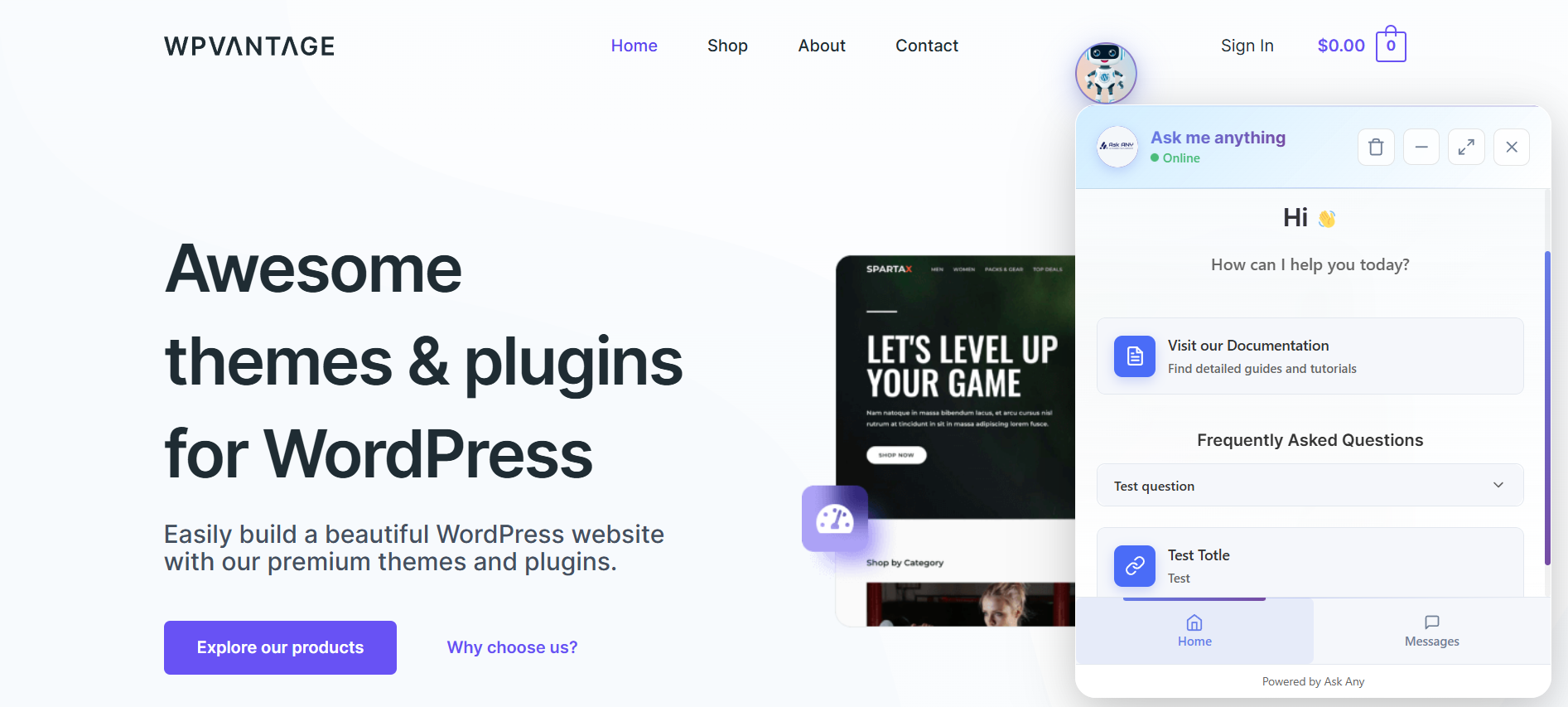
💬 Chat Widget in Action
Experience the live frontend chat widget with real-time messaging and seamless product interaction.
🧑💻 Agent Chat Interface
Manage conversations from the backend with smooth AI-to-agent handoff for efficient customer support.
🏠 Homepage Settings
Customize the chat homepage with agent profiles, FAQs, display options, and useful quick links.
🤖 AI Assistant Setup
Connect and configure your AI assistant with support for multiple providers and advanced configuration options.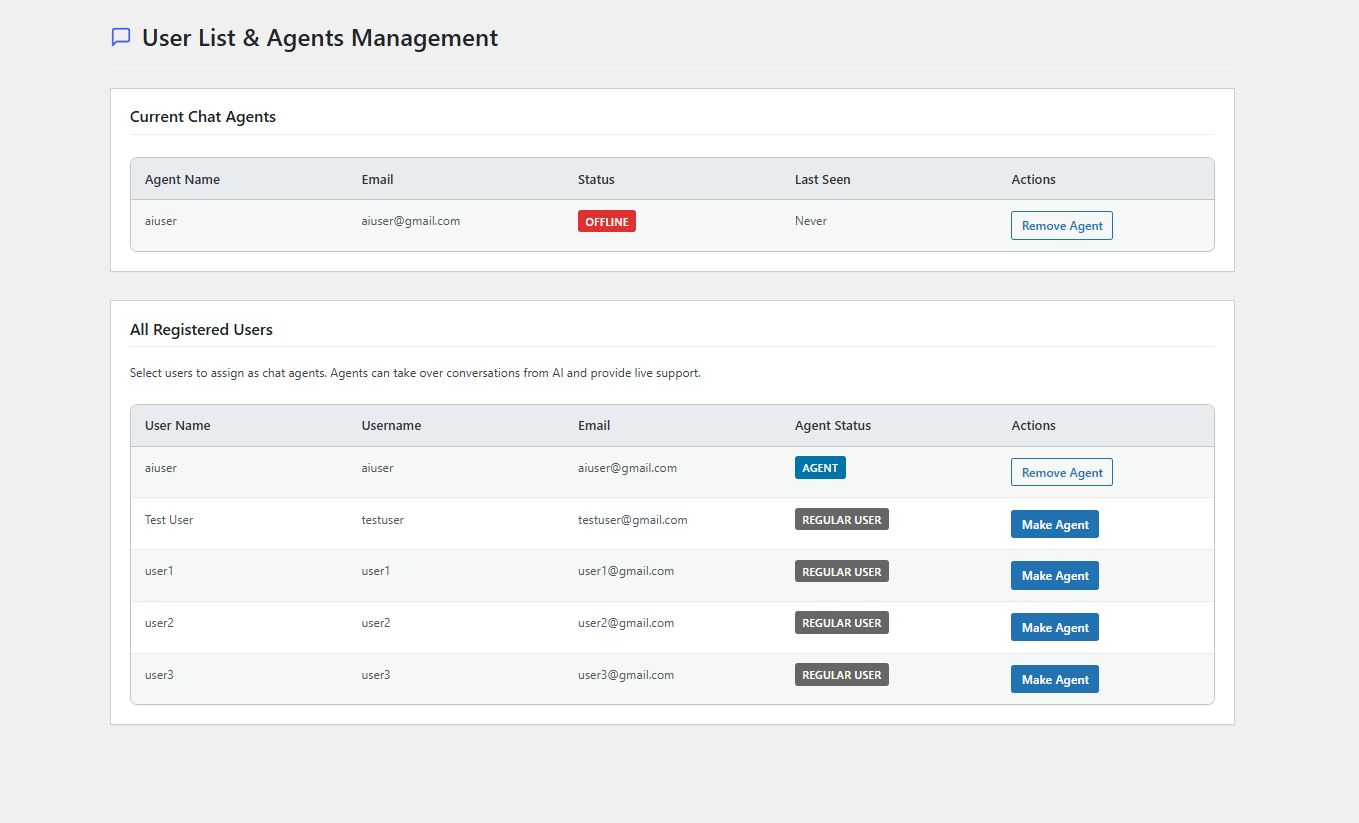
👥 AI Agent Management
Create, manage, and organize multiple AI agents with role-based access and performance monitoring.
⚡ AI Replies in Chat Panel
Get instant AI-generated responses directly in the chat panel with full Markdown formatting and contextual understanding.
🧩 Embed Form Support
Easily embed contact forms and lead generation tools anywhere on your website.
🧠 Retrieval-Augmented Generation (RAG)
Integrate a powerful RAG system that combines AI language models with your website content for accurate, context-aware responses.
🔗 Integrations Page
Connect with services like WooCommerce and Slack, with upcoming integrations for Telegram and WhatsApp.
❓ Q&A Management Page
Add structured Q&A data to help the AI learn and improve responses, especially in fallback scenarios.
🌐 External Source Management
Index external websites as knowledge sources so the AI can retrieve and reference additional information.
🗄️ Database Management Page
Monitor database table sizes and easily clean, optimize, or export tables with a single click.
🗄️ Typing Animation
Askany now support Character-by-character text reveal with Blinking cursor during typing.


Installation
- Upload the plugin files to
/wp-content/plugins/askanydirectory - Activate the plugin through the ‘Plugins’ menu in WordPress
- Configure the plugin settings in the AskAny menu
- Add your AI API keys (OpenAI, DeepSeek, or Gemini)
- Index your content and upload relevant PDFs
- Add the chat widget using shortcode or automatic placement
Quick Setup Guide
Step 1: Get Your API Key
To use AskAny’s AI features, you need an API key from one of the supported providers:
- OpenAI: Register at OpenAI Platform to obtain your key
- Find your key at: OpenAI API Key Location
- DeepSeek: Register at DeepSeek Platform to obtain your key
- Google Gemini: Log in to Google AI Studio to generate your Gemini API key
Step 2: Configure AskAny
1. Go to AskAny AI > Settings in your WordPress admin
2. Select your preferred AI provider
3. Enter your API key
4. Test the connection
5. Customize your chat widget appearance
Step 3: Add Knowledge
1. Go to AskAny AI > Content Index to automatically index your WordPress content
2. Visit AskAny AI > PDF Files to upload documents and manuals
3. Use AskAny AI > External Sources to index external websites
4. Add custom Q&A pairs in AskAny AI > Q&A Management
Step 4: Deploy Your Chatbot
– Enable the floating widget in settings, or
– Use the shortcode [askany_chat] on any page or post
– Customize the position, theme, and behavior to match your site
FAQ
-
Which AI models and providers are supported?
-
AskAny supports multiple AI providers for maximum flexibility:
– OpenAI: GPT-4o, GPT-4o-mini, GPT-4.1, O4-mini
– DeepSeek: DeepSeek-Chat (cost-effective option)
– Google Gemini: Gemini 2.0 Flash, Gemini 2.5 Flash-LiteYou can switch between providers or use multiple providers with automatic failover.
-
Does it work with WooCommerce?
-
Yes! AskAny has native WooCommerce integration that includes:
– Product information display with images and pricing
– Real-time stock status and availability
– Smart product recommendations
– Direct add-to-cart functionality from chat
– Order tracking and customer support -
Can it read and search PDF documents?
-
Absolutely! AskAny can process and index PDF documents, making their content searchable through the chat interface. Simply upload PDFs through the admin panel, and the AI will automatically extract and index the content for intelligent responses.
-
How is chat history and user data handled?
-
- Chat history is stored locally in your WordPress database
- Data retention periods are fully customizable
- Users can clear their chat history manually
- All data processing is GDPR compliant
- Built-in privacy controls and data export tools
-
Can I customize the chatbot’s appearance?
-
Yes! AskAny offers extensive customization options:
– Upload custom avatars and icons
– Adjustable widget positioning
– Responsive design for all devices -
How does the live agent handoff work?
-
AskAny features seamless AI-to-human support transition:
– Agents can take over any AI conversation in real-time
– Context and conversation history are preserved
– Agents receive notifications for new conversations
– Performance analytics track AI vs human interactions
– 24/7 AI coverage with human escalation when needed -
Is it compatible with page builders and themes?
-
Yes! AskAny works with all major WordPress themes and page builders:
– Page Builders: Elementor, Beaver Builder, Divi, Gutenberg
– Themes: All WordPress themes (tested with popular ones)
– Caching: Compatible with WP Rocket, W3 Total Cache, LiteSpeed
– Forms: Contact Form 7, WPForms, Gravity Forms, Ninja Forms -
How do I add the chatbot to my website?
-
You have multiple options:
1. Floating Widget: Enable in settings for site-wide display
2. Shortcode: Use[askany_chat]on any page or post
3. Widget: Add to sidebars using the WordPress widget -
What makes AskAny different from other chatbot plugins?
-
AskAny stands out with unique features:
– Multi-AI Provider Support: Switch between OpenAI, DeepSeek, Gemini
– Server-Sent Events: Real-time messaging with 90% less server load
– Live Agent Integration: Seamless AI-to-human handoff
– Advanced Knowledge Base: PDF processing + external website indexing
– Native WooCommerce: Built-in e-commerce features
– Enterprise Features: Advanced analytics, database management -
Can I use it for lead generation?
-
Yes! AskAny includes powerful lead generation features:
– Integrated contact forms within chat
– Custom Q&A flows for lead qualification
– User information collection and storage
– Integration with popular form plugins
– Analytics to track conversion rates -
Is technical support available?
-
We provide comprehensive support:
– Free Support: WordPress.org support forum
– Documentation: Complete setup and usage guides
– Video Tutorials: Step-by-step video instructions
– Community: Active user community for tips and tricks
– Pro Support: Priority support for Pro users -
How do I optimize performance?
-
AskAny is built for performance:
– Enable Server-Sent Events (SSE) for real-time messaging
– Use database optimization tools in the admin panel
– Configure caching plugin compatibility
– Optimize AI provider selection based on your needs
– Regular database cleanup and maintenance
Reviews

Contributors & Developers
“AI-Powered Chat Assistant & Live Agent using SSE, RAG Architecture- AskAny” is open source software. The following people have contributed to this plugin.
Contributors

Interested in development?
Browse the code, check out the SVN repository, or subscribe to the development log by RSS.
Changelog
1.11.0 – 27 March 2026
-
🌐 Web Search (Smart AI Fallback & Enhancement)
Added a new Web Search system that allows AI to answer questions beyond your site content using its built-in knowledge — without external API calls.Modes:
Fallback – Uses site content first, then fills gaps with AI knowledge (recommended)
Always Enhance – Combines site content with AI knowledge for richer responses -
✍️ Response Tone Control
Added control over how AI responses are written.Human – Removes AI-like phrases
Professional – Formal and structured
Friendly – Conversational tone
Robotic – Neutral system-style -
⏱ Typing Animation Speed Control
Introduced multiple typing speed options for chat responses.Regular – Default speed
Fast – Quicker
Faster – Very quick
Instant – Immediate with subtle animation -
📱 Mobile App Push Bridge
Added support for real-time push notifications and mobile chat via Android app.Install APK and start receiving instant notifications
Chat with users directly from mobile
No need to log in to the website -
✨ Other Improvements
Performance enhancements and frontend chat panel UI improvements
1.10.0 – 06 Jan 2026
-
🧠 New RAG Architecture (Retrieval-Augmented Generation)
Introduced a powerful RAG system that combines AI language models with your website content using semantic search.
Instead of generating guesses, the AI retrieves relevant information from your indexed content to produce accurate and context-aware responses. -
🤖 Expanded AI Provider Support (6+ Providers)
Added support for multiple leading AI providers, giving users greater flexibility and performance options:
DeepSeek, OpenAI (GPT-4 / GPT-3.5 new model support), Anthropic Claude, Google Gemini (new models added), X.AI Grok, and OpenRouter with access to 100+ models. -
🔎 Hybrid Search System
Implemented Hybrid Search combining RAG retrieval with intelligent content indexing to improve response accuracy and relevance. -
📊 Dedicated RAG Management Panel
Added a new management interface to monitor and control embeddings, view embedding statistics, handle error logs, retry failed processes, and manage indexing actions. -
⚡ RAG Optimization for Lower API Usage
Introduced Content Hash Caching and Batch API processing, reducing embedding API quota usage by up to 90% while improving performance. -
💬 Improved Live Chat Markdown Support
Live chat responses now support full Markdown formatting for clearer and more structured AI replies. -
📚 Markdown Support for Q&A and Homepage FAQ
Q&A management and Homepage FAQ sections now support Markdown formatting for richer content display.
1.9.0 – 24 Feb 2026
-
🧠 Full Conversation Context for AI
The AI now receives the complete conversation history (no more truncation), allowing it to learn from past interactions and deliver more accurate, context-aware responses. -
⚙️ Improved AI Indexing System
Upgraded the internal indexing method to enhance response intelligence, speed, and overall performance. -
✨ New: AI Order Status Tracking
Customers can now check their order status directly through chat by providing their email, order ID, or transaction ID — fast and hassle-free. -
📚 AI Learns from Mistakes
Enhanced learning capabilities enable the AI to review past responses and continuously improve over time. -
🆕 New: Bug Report & Feature Request Mode
Users can now directly report bugs or submit feature requests through the chat interface.
Each submission generates a unique tracking ID, making it easy to monitor, manage, and respond to feedback efficiently. -
📰 New: Blog Post Integration in Frontend Chat
Blog posts can now be embedded inside the chat interface via a Homepage button tab.
Users can browse blog listings and read full articles in a clean, distraction-free Reader View mode — without leaving the chat. -
🛠️ Bug Fix: Get Started Page Form
Fixed an issue that occurred when activating the Get Started page with a form enabled.
1.8.0 – 30 Jan 2026
-
🔔 Unread Message Badge
Instantly spot new conversations with a clear unread count badge in the live chat admin panel. -
🔗 Powerful Integrations
Seamlessly connect AskAny with your favorite tools and platforms to supercharge your chat workflow. -
👀 Q&A Pair Viewer
Easily view and review saved Q&A pairs for better knowledge management. -
🔄 Q&A Import & Export
Move your Q&A pairs effortlessly between sites with simple import and export options.
1.7.0 – 14 Jan 2026
- ✨ New AI Response Language model
- ✨ SDK updated
1.6.1 – 24 Dec 2025
- Enhancement: SDK updated
1.6.0 – 09 Dec 2025
- ✨ New Get Started Page with form
- ⚙️ New Database Management with Filter and Quick Actions
1.5.3 – 05 Dec 2025
- ⚙️ Fixed duplicate message response
1.5.2 – 03 Dec 2025
- Enhancement: WP 6.9 compatibility
1.5.1 – 12 Nov 2025
- ✨ Improved frontend chat typing indicator
- ⚙️ Fixed all frontend bug and logs
1.5.0 – 11 Nov 2025
- 🌐 New Gemini AI intagration and new Open AI models Introduced
- ✨ Improved frontend chat panel with avatar
- ⚙️ Improved admin chat panel with avatar
- 💬 Improved chat panel with AI response and markdown format
- 👀 Improved chat indexing for templates and docs
For a detailed list of updates, refer to our Changelog.
For older changelog entries, please see the additional changelog.txt file delivered with the plugin.