To reduce installation size, firmware provided by linux-firmware is now
compressed with zstd. Ensure you are running a supported kernel when updating to
linux-firmware-20260309_1 or later:
linux5.10>=5.10.251_1linux5.15>=5.15.201_1linux6.1>=6.1.127_1linux6.6>=6.6.68_1linux6.12>=6.12.7_1linux6.18, linux6.19, or any later versionrpi-kernel>=6.12.67_1pinephone-kernel>=6.1.7_2If you cannot run one of these kernels, you can hold the linux-firmware packages
at their currently-installed version:
# xbps-pkgdb -m hold linux-firmware linux-firmware-amd linux-firmware-broadcom \
linux-firmware-intel linux-firmware-network linux-firmware-nvidia linux-firmware-qualcomm
libxbps: fix issues with updating packages in unpacked state. duncaen
libxbps: run all scripts before and after unpacking all packages,
to avoid running things in a half unpacked state. duncaen
libxbps: fix configuration parsing with missing trailing newline
and remove trailing spaces from values. eater, duncaen
libxbps: fix XBPS_ARCH environment variable if architecture
is also defined in a configuration file. duncaen
libxbps: fix memory leaks. ArsenArsen
libxbps: fix file descriptor leaks. gt7-void
libxbps: fix temporary redirect in libfetch. ericonr
libxbps: fix how the automatic/manual mode is set when replacing a
package using replaces. This makes it possible to correctly replace
manually installed packages using a transitional packages. duncaen
libxbps: fix inconsistent dependency resolution when a dependency
is on hold. xbps will now exit with ENODEV (19) if a held dependency
breaks the installation or update of a package instead of just ignoring
it, resulting in an inconsistent pkgdb. #393 duncaen
libxbps: fix issues with XBPS_FLAG_INSTALL_AUTO where already installed
packages would get marked automatically installed when they are being
updated while installing new packages in automatically installed mode.
#557 duncaen
libxbps: when reinstalling a package, don’t remove directories that are still
part of the new package. This avoids the recreation of directories which
trips up runsv, as it keeps an fd to the service directory open that would
be deleted and recreated. #561 duncaen
xbps-install(1): list reinstalled packages. chocimier
xbps-install(1): in dry-run mode, ignore out of space error. chocimier
xbps-install(1): fix bug where a repo-locked dependency could be updated
from a repository it was not locked to. chocimier
xbps-fetch(1): make sure to exit with failure if a failure was encountered.
duncaen
xbps-fetch(1): fix printing uninitialized memory in error cases. duncaen
xbps-pkgdb(1): remove mtime checks, they are unreliable on fat filesystems
and xbps does not rely on mtime matching the package anymore. duncaen
xbps-checkvers(1): with --installed also list subpackages. chocimier
xbps-remove(1): fix dry-run cache cleaning inconsistencies. duncaen
xbps-remove(1): allow removing “uninstalled” packages (packages in the cache
that are still up to date but no long installed) from the package
cache by specifying the -O/--clean-cache flag twice. #530 duncaen
xbps-query(1): --cat now works in either repo or pkgdb mode. duncaen
xbps-query(1): --list-repos/-L list all repos including ones that
fail to open. chocimier
xbps.d(5): describe ignorepkg more precisely. chocimier
libxbps, xbps-install(1), xbps-remove(1), xbps-reconfigure(1),
xbps-alternatives(1): add XBPS_SYSLOG environment variable to overwrite
syslog configuration option. duncaen
libxbps: Resolve performance issue caused by the growing number of virtual packages
in the Void Linux repository. #625 duncaen
libxbps: Merge the staging data into the repository index (repodata) file.
This allows downloading the staging index from remote repositories without
having to keep the two index files in sync. #575 duncaen
xbps-install(1), xbps-query(1), xbps-checkvers(1), xbps.d(5): Added --staging flag,
XBPS_STAGING environment variable and staging=true|false configuration option.
Enabling staging allows xbps to use staged packages from remote repositories.
duncaen
xbps-install(1), xbps-remove(1): Print package install and removal messages once,
below the transaction summary, before applying the transaction. #572 chocimier
xbps-query(1): Improved argument parsing allows package arguments anywhere in the
arguments. #588 classabbyamp
xbps-install(1): Make dry-run output consistent/machine parsable. #611 classabbyamp
libxbps: Do not url-escape tilde character in path for better compatibility with
some servers. #607 gmbeard
libxbps: use the proper ASN1 signature type for packages. Signatures now have a .sig2
extension. #565 classabbyamp
xbps-uhelper(1): add verbose output for pkgmatch and cmpver subcommands if the
-v/--verbose flag is specified. #549 classabbyamp
xbps-uhelper(1): support multiple arguments for many subcommands to improve pipelined
performance. #536 classabbyamp
xbps-alternatives(1): Add -R/--repository mode to -l/--list to show alternatives
of packages in the repository. #340 duncaen
libxbps: fix permanent (308) redirects when fetching packages and repositories. duncaen
xbps-remove(1): ignores file not found errors for files it deletes. duncaen
libxbps: the preserve package metadata is now also respected for package removals. duncaen
xbps-pkgdb(1): new --checks allows to choose which checks are run. #352 ericonr, duncaen
Full Changelog: https://github.com/void-linux/xbps/compare/0.59.2...0.60
In today’s fast-paced digital landscape, businesses must continuously innovate to remain competitive and drive growth. That is why we are thrilled to unveil our latest solution, Void Linux: Enterprise Edition. Leveraging cutting-edge technology, this next-generation operating system offers unparalleled value, superior return on investment (ROI), and exceptional operational excellence.
Void Enterprise sets itself apart from traditional enterprise solutions by delivering a more secure, stable, and high-performance experience for your business-critical applications. Our solution is built upon the proven foundation of Void Linux, renowned for its reliability and robustness in data centers and cloud environments.
Our team of experts has meticulously designed each component to work harmoniously together, resulting in seamless integration and efficient resource utilization. This streamlined infrastructure not only minimizes operational costs but also maximizes your IT resources’ potential.
At the heart of Void Enterprise lies its commitment to simplifying complex processes. By automating repetitive tasks and providing intuitive management tools, our solution empowers your IT team to focus on more strategic initiatives that drive business growth.
We believe in giving back control to administrators, which is why we have included a comprehensive suite of automation features designed specifically for enterprise environments. With Void Enterprise, you can effortlessly manage infrastructure provisioning, configuration, and updates without the need for extensive scripting knowledge or manual intervention.
As businesses increasingly move toward hybrid and multi-cloud strategies, Void Enterprise ensures seamless integration with popular cloud platforms. This enables organizations to maximize their investment in existing infrastructure while easily extending resources into the cloud to support evolving business demands.
Our solution comes equipped with advanced containerization capabilities, allowing you to quickly scale applications and workloads without over-provisioning or wasting resources. This results in improved ROI as your IT team can efficiently allocate resources and achieve desired outcomes at a lower total cost of ownership.
We understand that migrating to new technology can be challenging. That’s why Void Enterprise Edition is designed for easy integration with your existing infrastructure. Our solution provides robust compatibility with an extensive range of applications, ensuring minimal disruption during the transition process.
Our dedicated team is committed to providing top-notch support and assistance throughout every stage of your journey toward operational excellence. From initial deployment to ongoing maintenance, we’ve got you covered.
Void Linux: Enterprise Edition represents a quantum leap forward in enterprise technology solutions. It delivers value, improves ROI, and enhances operational excellence by combining the power of next-generation technology with unmatched ease of use and seamless integration capabilities.
Get ready to elevate your business operations to new heights with Void Linux: Enterprise Edition. Experience the future of IT infrastructure today!
You can find Void Linux Enterprise images for x86_64 and x86_64-musl on our downloads page and on our many mirrors.
Contact your Void Enterprise distributor or systems integrator to purchase a license key today!
You may verify the authenticity of the images by following the instructions in the handbook, and using the following minisign key information:
untrusted comment: minisign public key 4D951FCB5722B6A4
RWSktiJXyx+VTT+tvaAOgJY5iLlt1tiQw6q3giH1+Fs2J7RnYaAewRHw
We’re pleased to announce that the 20250202 image set has been promoted to current and is now generally available.
You can find the new images on our downloads page and on our many mirrors.
This release introduces support for several arm64 UEFI devices:
Live ISOs for aarch64 and aarch64-musl should also support other arm64
devices that support UEFI and can run a mainline (standard) kernel.
Additionally, this image release includes:
xfce-flavored live ISOsxgenfstab, a new script from xtools
to simplify generation of /etc/fstab for chroot installsand the following changes:
nomodeset
(void-packages #52545)nomodeset
(void-mklive 380f0fd)380f0fd)growpart. See
the handbook
for more details
(void-mklive #379)void-installer now includes a post-installation menu to enable services on the installed system
(void-mklive #389)rpi-aarch64 and rpi-aarch64-musl PLATFORMFSes and platform images should now
support the recently-released Raspberry Pi 500 and CM5.You may verify the authenticity of the images by following the instructions in the handbook, and using the following minisign key information:
untrusted comment: minisign public key 4D56E70F102AF9F9
RWT5+SoQD+dWTeOdNuc4Q/jq2+3+jpql7+JJp4WukkxTdpsZlk2EGuPj

At long last, Void is saying goodbye to Python 2. Python ended support for
Python 2 in 2020, but Void still had over 200 packages that depended on it.
Since then, Void contributors have
updated, patched, or removed
these packages. For the moment, Python 2 will remain in the repositories as
python2 (along with python2-setuptools and python2-pip). python is
now a metapackage that will soon point to python3.
One of the biggest blockers for this project was some of Void’s own infrastructure: our buildbot, which builds all packages for delivery to users. For a long time, we were stuck on buildbot 0.8.12 (released on 21 April 2015 and using Python 2), because it was complex to get working, had many moving parts, and was fairly fragile. To update it to a modern version would require significant time and effort.
Now, we move into the future: we’ve upgraded our buildbot to version 4.0, and it is now being managed via our orchestration system, Nomad, to improve reliability, observability, and reproducibility in deployment. Check out the 2023 Infrastructure Week series of blog posts for more info about how and why Void uses Nomad.
Visit the new buildbot dashboard at build.voidlinux.org and watch your packages build!
The Void project is pleased to welcome aboard another new member, @tranzystorekk.
Interested in seeing your name in a future update here? Read our Contributing Page and find a place to help out! New members are invited from the community of contributors.
We’re pleased to announce that the 20240314 image set has been promoted to current and is now generally available.
You can find the new images on our downloads page and on our many mirrors.
Some highlights of this release:
abbd636)/boot partition of 256MiB instead of 64MiB
(@classabbyamp in
#368)rpi-aarch64* PLATFORMFSes and images now support the Raspberry Pi 5.
After installation, the kernel can be
switched
to the Raspberry Pi 5-specific rpi5-kernel.
You may verify the authenticity of the images by following the instructions on the downloads page, and using the following minisign key information:
untrusted comment: minisign public key A3FCFCCA9D356F86
RWSGbzWdyvz8o4nrhY1nbmHLF6QiFH/AQXs1mS/0X+t1x3WwUA16hdc/
In an effort to simplify the usage of xbps-src,
there has been a small change to how masterdirs (the containers xbps-src uses
to build packages) are created and used.
The default masterdir is now called masterdir-<arch>, except when masterdir
already exists or when using xbps-src in a container (where it’s still masterdir).
When creating a masterdir for an alternate architecture or libc, the previous syntax was:
./xbps-src -m <name> binary-bootstrap <arch>
Now, the <arch> should be specified using the new -A (host architecture)
flag:
./xbps-src -A <arch> binary-bootstrap
This will create a new masterdir called masterdir-<arch> in the root of your
void-packages repository checkout.
Arbitrarily-named masterdirs can still be created with -m <name>.
Instead of specifying the alternative masterdir directly, you can now use the
-A (host architecture) flag to use the masterdir-<arch> masterdir:
./xbps-src -A <arch> pkg <pkgname>
Arbitrarily-named masterdirs can still be used with -m <name>.
The Void project is pleased to welcome aboard 2 new members.
Joining us to work on packages are @oreo639 and @cinerea0.
Interested in seeing your name in a future update here? Read our Contributing Page and find a place to help out! New members are invited from the community of contributors.
With the update to glibc 2.38, libcrypt.so.1 is no longer provided by
glibc.
Libcrypt is an important library for several core system packages that use
cryptographic functions, including pam. The library has changed versions, and
the legacy version is still available for precompiled or proprietary
applications. The new version is available on Void as libxcrypt and the legacy
version is libxcrypt-compat.
With this change, some kinds of partial upgrades can leave PAM unable to
function. This breaks tools like sudo, doas, and su, as well as breaking
authentication to your system. Symptoms include messages like “PAM
authentication error: Module is unknown”. If this has happened to you, you can
either:
init=/bin/sh to your kernel command-line in the bootloader and
downgrade
glibc,libxcrypt-compatEither of these steps should allow you to access your system as normal and run a full update.
To ensure the disastrous partial upgrade (described above) cannot happen,
glibc-2.38_3 now depends on libxcrypt-compat. With this change, it is safe
to perform partial upgrades that include glibc 2.38.
Void is a complex system, and over time we make changes to reduce this
complexity, or shift it to easier to manage components. Recently
through the fantastic work of one of our maintainers classabbyamp
our repository sync system has been dramatically improved.
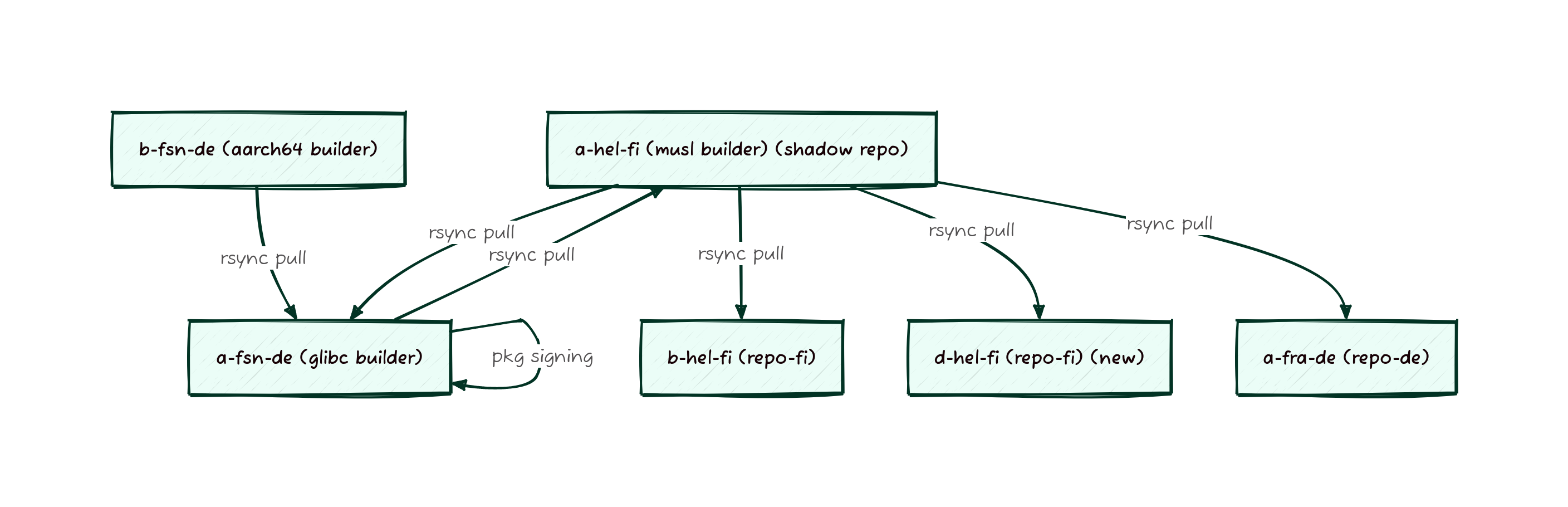
Previously our system was based on a series of host managed rsyncs running on either snooze or cron based timers. These syncs would push files to a central location to be signed and then distributed. This central location is sometimes referred to as the “shadow repo” since its not directly available to end users to synchronize from, and we don’t usually allow anyone outside Void to have access to it.
As you might have noticed from the Fastly Overview the packages take a long path from builders to repos. What is not obvious from the graph shown is that the shadow repo previously lived on the musl builder, meaning that packages would get built there, copied to the glibc builder, then copied back to the musl builder and finally copied to a mirror. So many copies! To streamline this process, the shadow mirror is now just the glibc server, since that’s where the packages have to wind up for architectural reasons anyway. This means we were able to cut out 2 rsyncs and reclaim a large amount of space on the musl builder, making the entire process less fragile and more streamlined.
But just removing rsyncs isn’t all that was done. To improve the time it takes for packages to make it to users, we’ve also switched the builders from using a time based sync to using lsyncd to take more active management of the synchronization process. In addition to moving to a more sustainable sync process, the entire process was moved up into our Nomad managed environment. Nomad allows us to more easily update services, monitor them for long term trends, and to make it clearer where services are deployed.
In addition to fork-lifting the sync processes, we also forklifted void-updates, xlocate, xq-api (package search), and the generation of the docs-site into Nomad. These changes represent some of the very last services that were not part of our modernized container orchestrated infrastructure.
Visually, this is what the difference looks like. Here’s before:

And here’s what the sync looks like now, note that there aren’t any cycles for syncs now:

If you run a downstream mirror we need your help! If your mirror
has existed for long enough, its possible that you were still
synchronizing from alpha.de.repo.voidlinux.org, which has been a dead
servername for several years now. Since moving around sync traffic is
key to our ability to keep the lights on, we’ve provisioned a new
dedicated DNS record for mirrors to talk to. The new
repo-sync.voidlinux.org is the preferred origin point for all sync
traffic and using it means that we can transparently move the sync
origin during maintenance rather than causing an rsync hang on your
sync job. Please check where you’re mirroring from and update
accordingly.
Happy Pythonmas! It’s October, which means it’s Python 3 update season. This year, along with the usual large set of updates for Python packages, a safety feature for pip, the Python package manager, has been activated. To ensure that Python packages installed via XBPS and those installed via pip don’t interfere with one another, the system-wide Python environment has been marked as “externally managed”.
If you try to use pip3 or pip3 --user outside of a Python virtual environment,
you may see this error that provides guidance on how to deploy a virtual
environment suitable for use with pip:
This system-wide Python installation is managed by the Void Linux package
manager, XBPS. Installation of Python packages from other sources is not
normally allowed.
To install a Python package not offered by Void Linux, consider using a virtual
environment, e.g.:
python3 -m venv /path/to/venv
/path/to/venv/pip install <package>
Appending the flag --system-site-packages to the first command will give the
virtual environment access to any Python package installed via XBPS.
Invoking python, pip, and executables installed by pip in /path/to/venv/bin
should automatically use the virtual environment. Alternatively, source its
activation script to add the environment to the command search path for a shell:
. /path/to/venv/activate
After activation, running
deactivate
will remove the environment from the search path without destroying it.
The XBPS package python3-pipx provides pipx, a convenient tool to automatically
manage virtual environments for individual Python applications.
You can read more about this change on Python’s website in PEP 668.
To simplify the use of Void-based containers, all Void container images
tagged 20231003R1 or later will explicitly ignore the “externally managed”
marker. Containers based on these images will still be able to use pip to
install Python packages in the container-wide environment.
If you really want to be able to install packages with pip in the system- or user-wide Python environment, there are several options, but beware: this can cause hard-to-debug issues with Python applications, or issues when updating with XBPS.
--break-system-packages flag. This only applies to the current invocation.pip3 config set install.break-system-packages True.
This will apply to all future invocations.noextract=/usr/lib/python*/EXTERNALLY-MANAGED rule to your
XBPS configuration and re-install the
python3 package. This will apply to all future invocations.To simplify the container experience, we’ve revamped the way Void’s OCI container images are built and tagged.
In short:
mini flavor is no longer built, as they did not work as intendedYou can check out the available images on the Download page or on Github.
If you’re interested in the technical details, you can take a look at the pull request for these changes.
| Old Image | New Image | Notes |
|---|---|---|
voidlinux/voidlinux |
ghcr.io/void-linux/void-glibc |
Wow, you’ve been using two-year-old images! |
voidlinux/voidlinux-musl |
ghcr.io/void-linux/void-musl |
|
ghcr.io/void-linux/void-linux:*-full-* |
ghcr.io/void-linux/void-glibc-full |
|
ghcr.io/void-linux/void-linux:*-full-*-musl |
ghcr.io/void-linux/void-musl-full |
|
ghcr.io/void-linux/void-linux:*-thin-* |
ghcr.io/void-linux/void-glibc |
|
ghcr.io/void-linux/void-linux:*-thin-*-musl |
ghcr.io/void-linux/void-musl |
|
ghcr.io/void-linux/void-linux:*-mini-* |
ghcr.io/void-linux/void-glibc |
mini images are no longer built |
ghcr.io/void-linux/void-linux:*-mini-*-musl |
ghcr.io/void-linux/void-musl |
|
ghcr.io/void-linux/void-linux:*-thin-bb-* |
ghcr.io/void-linux/void-glibc-busybox |
|
ghcr.io/void-linux/void-linux:*-thin-bb-*-musl |
ghcr.io/void-linux/void-musl-busybox |
|
ghcr.io/void-linux/void-linux:*-mini-bb-* |
ghcr.io/void-linux/void-glibc-busybox |
mini images are no longer built |
ghcr.io/void-linux/void-linux:*-mini-bb-*-musl |
ghcr.io/void-linux/void-musl-busybox |
Void runs a distributed team of maintainers and contributors. Making infrastructure work for any team is a confluence of goals, user experience choices, and hard requirements. Making infrastructure work for a distributed team adds on the complexity of accessing everything securely over the open internet, and doing so in a way that is still convenient and easy to setup. After all, a light switch is difficult to use is likely to lead to lights being left on.
We take several design criteria into mind when designing new systems and services that make Void work. We also periodically re-evaluate systems that have been built to ensure that they still follow good design practices in a way that we are able to maintain, and that does what we want. Lets dive in to some of these design practices.
VPNs, or Virtual Private Networks are ways of interconnecting systems such that the network in between appears to vanish beneath a layer of abstraction. WireGuard, OpenVPN, and IPSec are examples of VPNs. OpenVPN and IPSec, a client program handles encryption and decryption of traffic on a tunnel or tap device that translates packets into and out of the kernel network stack. If you work in a field that involves using a computer for your job, your employer may make use of a VPN to grant your device connectivity to their corporate network environment without you having to be physically present in a building. VPN technologies can also be used to make multiple physical sites appear to all be on the same network.
Void uses WireGuard to provide machine-to-machine connectivity for our fleet, but only within our fleet. Maintainers always access services without a VPN. Why do we do this, and how do we do it? First the why. We operate in this way because corporate VPNs are often cumbersome, require split horizon DNS (where you get different DNS answers depending on where you resolve from) and require careful planning to make sure no subnet overlap occurs between the VPN, the network you are connecting to, and your local network. If there were an overlap, the kernel would be unable to determine where to send the packets since it has multiple routes for the same subnets. There are cases where this is a valid network topology (ECMP), but that is not what is being discussed here. We also have no reason to use a VPN. Most of the use cases that still require a VPN have to do with transporting arbitrary TCP streams across a network, but this is unnecessary. For Void, all our services are either HTTP based or are transported over SSH.
For almost all our systems that we interact with daily, either a web interface or HTTP-based API is provided. For the devspace file hosting system, maintainers can use SFTP via SSH. Both HTTP and SSH have robust, extremely well tested authentication and encryption options. When designing a system for secure access, defense in depth is important, but so is trust that the cryptographic primitives you have selected actually work. We trust that HTTPS works, and so there is no need to wrap the connection in an additional layer of encryption. The same goes for SSH, which we use exclusively public-key authentication for. This choice is sometimes challenging to maintain, since it means that we need to ensure highly available HTTP proxies and secure, easily maintained SSH key implementations, we have found it works well for us. In addition to the static files that all our tier 1 mirrors serve, the mirrors are additionally capable of acting as proxies. This allows us to terminate the externally trusted TLS session at a webserver running nginx, and then pass the traffic over our internal encrypted fabric to the destination service.
For SSH we simply make use of AuthorizedKeysCommand to summon keys
from NetAuth allowing authorized maintainers to log onto servers or
ssh-enabled services wherever their keys are validated. For the
devspace service which has a broader ACL than our base hardware, we
can enhance its separation by running an SFTP server distinct from the
host sshd. This allows us to ensure that it is impossible for a key
validated for devspace to inadvertently authorize a shell login to the
underlying host.
For all other services, we make use of the service level authentication as and when required. We use combinations of Native NetAuth, LDAP proxies, and PAM helpers to make all access seamless for maintainers via our single sign on system. Removing the barrier of a VPN also means that during an outage, there’s one less component we need to troubleshoot and debug, and one less place for systems to break.
Distributed systems are often made up of complex, interdependent sub-assemblies. This level of complexity is fine for dedicated teams who are paid to maintain systems day in and day out, but is difficult to pull off with an all-volunteer team that works on Void in their free time. Distributed systems are also best understood on a whiteboard, and this doesn’t lend itself well to making a change on a laptop from a train, or reviewing a delta from a tablet between other tasks. While substantive changes are almost always made from a full terminal, the ratio of substantive changes to items requiring only quick verification is significant, and its important to maintain a level of understand-ability.
In order to maintain the level of understand-ability of the infrastructure at a level that permits a reasonable time investment, we make use of composable systems. Composable systems can best be thought of as infrastructure built out of common sub-assemblies. Think Lego blocks for servers. This allows us to have a common base library of components, for example webservers, synchronization primitives, and timers, and then build these into complex systems through joining their functionality together.
We primarily use containers to achieve this composeability. Each container performs a single task or a well defined sub-process in a larger workflow. For example we can look at the workflow required to serve https://man.voidlinux.org/. In this workflow, a task runs periodically to extract all man pages from all packages, then another process runs to copy those files to the mirrors, and finally a process runs to produce an HTTP response to a given man page request. Notice there that its an HTTP response, but the man site is served securely over HTTPS. This is because across all of our web-based services we make use of common infrastructure such as load balancers and our internal network. This allows applications to focus on their individual functions without needing to think about the complexity of serving an encrypted connection to the outside world.
By designing our systems this way, we also gain another neat feature: local testing. Since applications can be broken down into smaller building blocks, we can take just the single building block under scrutiny and run it locally. Likewise, we can upgrade individual components of the system to determine if they improve or worsen a problem. With some clever configuration, we can even upgrade half of a system that’s highly available and compare the old and new implementations side by side to see if we like one over the other. This composability enables us to configure complex systems as individual, understandable components.
Its worth clarifying though that this is not necessarily a microservices architecture. We don’t really have any services that could be defined as microservices in the conventional sense. Instead this architecture should be thought of as the Unix Philosophy as applied to infrastructure components. Each component has a single well understood goal and that’s all it does. Other goals are accomplished by other services.
We assemble all our various composed services into the service suite that Void provides via our orchestration system (Nomad) and our load balancers (nginx) which allow us to present the various disparate systems as though they were one to the outside world, while still maintaining them as separate service “verticals” side by side each other internally.
Void’s packages repo is a large git repo with hundreds of contributors and many maintainers. This package bazaar contains all manner of different software that is updated, verified, and accepted by a team that spans the globe. Our infrastructure is no different, but involves fewer people. We make use of two key systems to enable our Infrastructure as Code (IaC) approach.
The first of these tools is Ansible. Ansible is a configuration management utility written in python which can programatically SSH into machines, template files, install and remove packages and more. Ansible takes its instructions as collections of YAML files called roles that are assembled into playbooks (composeability!). These roles come from either the main void-infrastructure repo, or as individual modules from the void-ansible-roles organization on GitHub. Since this is code checked into Git, we can use ansible-lint to ensure that the code is consistent and lint-free. We can then review the changes as a diff, and work on various features on branches just like changes to void-packages. The ability to review what changed is also a powerful debugging tool to allow us to see if a configuration delta led to or resolved a problem, and if we’ve encountered any similar kind of change in the past.
The second tool we use regularly is Terraform. Whereas Ansible configures servers, Terraform configures services. We can apply Terraform to almost any service that has an API as most popular services that Void consumes have terraform providers. We use Terraform to manage our policy files that are loaded into Nomad, Consul and Vault, we use it to provision and deprovision machines on DigitalOcean, Google and AWS, and we use it to update our DNS records as services change. Just like Ansible, Terraform has a linter, a robust module system for code re-use, and a really convenient system for producing a diff between what the files say the service should be doing and what it actually is doing.
Perhaps the most important use of Terraform for us is the formalized onboarding and offboarding process for maintainers. When a new maintainer is proposed and has been accepted through discussion within the Void team, we’ll privately reach out to them to ask if they want to join the project. Given that a candidate accepts the offer to join the group of pkg-committers, the action that formally brings them on to the team is a patch applied to the Terraform that manages our GitHub organization and its members. We can then log approvals, welcome the new contributor to our team with suitable emoji, and grant access all in one convenient place.
Infrastructure as Code allows our distributed team to easily maintain our complex systems with a written record that we can refer back to. The ability to defer changes to an asynchronous review is imperative to manage the workflows of a distributed team.
Of course, all the infrastructure in the world doesn’t help if the people using it can’t effectively communicate. To make sure this issue doesn’t occur for Void, we have multiple forms of communication with different features. For real-time discussions and even some slower ones, we make use of IRC on Libera.chat. Though many communities appear to be moving away from synchronous text, we find that it works well for us. IRC is a great protocol that allows each member of the team to connect using the interface that they believe is the best for them, as well as to allow our automated systems to connect in as well.
For conversations that need more time or are generally going to be longer we make use of email or a group-scoped discussion on GitHub. This allows for threaded messaging and a topic that can persist for days or weeks if needed. Maintaining a long running thread can help us tease apart complicated issues or ensure everyone’s voice is heard. Long time users of Void may remember our forum, which has since been supplanted by a subreddit and most recently GitHub Discussions. These threaded message boards are also examples of places that we converse and exchange status information, but in a more social context.
For discussion that needs to pertain directly to our infrastructure, we open tickets against the infrastructure repo. This provides an extremely clear place to report issues, discuss fixes, and collate information relating to ongoing work. It also allows us to leverage GitHub’s commit message parsing to automatically resolve a discussion thread once a fix has been applied by closing the issue. For really large changes, we can also use GitHub projects, though in recent years we have not made use of this particular organization system for issues (we use tags).
No matter where we converse though, its always important to make sure we converse clearly and concisely. Void’s team speaks a variety of languages, though we mostly converse in English which is not known for its intuitive clarity. When making hazardous changes, we often push changes to a central location and ask for explicit review of dangerous parts, and call out clearly what the concerns are and what requires review. In this way we ensure that all of Void’s various services stay up, and our team members stay informed.
This post was authored by maldridge who runs most of the day to day
operations of the Void fleet. On behalf of the entire Void team, I
hope you have enjoyed this week’s dive into the infrastructure that
makes Void happen, and have learned some new things. We’re always
working to improve systems and make them easier to maintain or provide
more useful features, so if you want to contribute, join us in IRC.
Feel free to ask questions about this post or any of our others this
week on GitHub
Discussions
or in IRC.
Yesterday we looked at what Void does to monitor the various services and systems that provide all our services, and how we can be alerted when issues occur. When we’re alerted, this means that whatever’s gone wrong needs to be handled by a human, but not always. Sometimes an alert can trip if we have systems down for planned maintenance activities. During these windows, we intentionally take down services in order to repair, replace, or upgrade components so that we don’t have unexpected breakage later.
When possible, we always prefer for services to go down during a planned maintenance window. This allows for services to come down cleanly and for people involved to have planned for the time investment to effect changes to the system. We take planned downtime when its not possible to make a change to a system with it up, or when it would be unsafe to do so. Examples of planned downtime include kernel upgrades, major version changes of container runtimes, and major package upgrades.
When we plan for an interruption, the relevant people will agree on a date usually at least a week in the future and will talk about what the impacts will be. Based on these conversations the team will then decide whether or not to post a blog post or notification to social media that an interruption is coming. Most of the changes we do don’t warrant this, but some changes will interrupt services in either an unintuitive way or for an extended period of time. Usually just rebooting a mirror server doesn’t warrant a notification, but suspending the sync to one for a few days would.
Unplanned downtime is usually much more exciting because it is by definition unexpected. These events happen when something breaks. By and large the most common way that things break for Void is running out of space on disk. This happens because while disk drives are cheap, getting a drive that can survive years powered on with high read/write load is still not a straightforward ask. Especially not a straightforward problem if you want high performance throughput with low latency. The build servers need large volumes of scratch space while building certain packages due to the need to maintain large caches or lots of object files prior to linking. These large elastic use cases mean that we can have hundreds of gigabytes of free space and then over the course of a single build run out of space.
When this happens, we have to log on to a box and look at where we can reclaim some space and possibly dispatch builds back through the system one architecture at a time to ensure they use low enough space requirements to complete. We also have to make sure that when we clean space, we’re not cleaning files that will be immediately redownloaded. One of the easiest places to claim space back from, after all, is the cache of downloaded files. The primary point of complication in this workflow can be getting a build to restart. Sometimes we have builds that get submitted in specific orders and when a crash occurs in the middle we may need to re-queue the builds to ensure dependencies get built in the right order.
Sometimes downtime occurs due to network partitions. Void runs in many datacenters around the globe, and incidents ranging from street repaving to literal ship anchors can disrupt the fiber optic cables connecting our various network sites together. When this happens, we can often arrive upon a state where people can see both sides of the split, but our machines can’t see each other anymore. Sometimes we’re able to fix this by manually reloading routes or cycling tunnels between machines, but often times its easier for us to just drain services from an affected location and wait out the issue using our remaining capacity elsewhere.
As was alluded to with network partitions, we take a lot of steps to mitigate downtime and the effects of unplanned incidents. A large part of this effort goes into making as much content as possible static so that it can be served from minimal infrastructure, usually nothing more than an nginx instance. This is how the docs, infrastructure docs, main website, and a number of services like xlocate work. There’s a batch task that runs to refresh the information, it gets copied to multiple servers, and then as long as at least one of those servers remains up the service remains up.
Mirrors of course are highly available by being byte-for-byte copies of each other. Since the mirrors are static files, they’re easy to make available redundantly. We also configure all mirrors to be able to serve under any name, so during an extended outage, the DNS entry for a given name can be changed and the traffic serviced by another mirror. This allows us to present the illusion that the mirrors don’t go down when we perform longer maintenance at the cost of some complexity in the DNS layer. The mirrors don’t just host static content though. We also serve the https://man.voidlinux.org site from the mirrors which involves a CGI executable and a collection of static man pages to be available. The nginx frontends on each mirror are configured to first seek out their local services, but if those are unavailable they will reach across Void’s private network to find an instance of the service that is up.
This private network is a mesh of wireguard tunnels that span all our different machines and different providers. You can think of it like a multi-cloud VPC which enables us to ignore a lot of the complexity that would otherwise manifest when operating in a multi-cloud design pattern. The private network also allows us to use distributed service instances while still fronting them through relatively few points. This improves security because very few people and places need access to the certificates for voidlinux.org, as opposed to the certificates having to be present on every machine.
For services that are containerized, we have an additional set of tricks available that can let us lessen the effects of a downed server. As long as the task in question doesn’t require access to specific disks or data that are not available elsewhere, Nomad can reschedule the task to some other machine and update its entry in our internal service catalog so that other services know where to find it. This allows us to move things like our IRC bots and some parts of our mirror control infrastructure around when hosts are unavailable, rather than those services having to be unavailable for the duration of a host level outage. If we know that the downtime is coming in advance, we can actually instruct Nomad to smoothly remove services from the specific machine in question and relocate those services somewhere else. When the relocation is handled as a specific event rather than as the result of a machine going away, the service interruption is measured in seconds.
Of course there is no free lunch, and these choices come with trade-offs. Some of the design choices we’ve made have to do with the difference in effort required to test a service locally and debug it remotely. Containers help a lot with this process since its possible to run the exact same image with the exact same code in it as what is running in the production instance. This also lets us insulate Void’s infrastructure from any possible breakage caused by a bad update, since each service is encapsulated and resistant to bad updates. We simply review each service’s behavior as they are updated individually and this results in a clean migration path from one version to another without any question of if it will work or not. If we do discover a problem, the infrastructure is checked into git and the old versions of the containers are retained, so we can easily roll back.
We leverage the containers to make the workflows easier to debug in the general case, but of course the complexity doesn’t go away. Its important to understand that container orchestrators don’t remove complexity, quite to the contrary they increase it. What they do is shift and concentrate the complexity from one group of people (application developers) to another (infrastructure teams). This shift allows for fewer people to need to have to care about the specifics of running applications or deploying servers, since they truly can say “well it works on my machine” and be reasonably confident that the same container will work when deployed on the fleet.
The last major trade-off that we make when deciding where to run something is thinking about how hard it will be to move later if we decide we’re unhappy with the provider. Void is actually currently in the process of migrating our email server from one host to another at the time of writing due to IP reputation issues at our previous hosting provider. In order to make it easier to perform the migration, we deployed the mail server originally as a container via Nomad, which means that standing up the new mail server is as easy as moving the DNS entries and telling Nomad that the old mail server should be drained of workload.
Our infrastructure only works as well as the software running on it, but we do spend a lot of time making sure that the experience of developing and deploying that software is as easy as possible.
This has been day four of Void’s infrastructure week. Tomorrow we’ll
wrap up the series with a look at how we make distributed
infrastructure work for our distributed team. This post was authored
by maldridge who runs most of the day to day operations of the Void
fleet. Feel free to ask questions on GitHub
Discussions
or in IRC.
So far we’ve looked at a relatively sizable fleet of machines scattered across a number of different providers, technologies, and management styles. We’ve then looked at the myriad of services that were running on top of the fleet and the tools used to deploy and maintain those services. At its heart, Void is a large distributed system with many parts working in concert to provide the set of features that end users and maintainers engage with.
Like any machine, Void’s infrastructure has wear items, parts that require replacement, and components that break unexpectedly. When this happens we need to identify the problem, determine the cause, formulate a plan to return to service, and execute a set of workflows to either permanently resolve the issue, or temporarily bypass a problem to buy time while we work on a more permanent fix.
Lets go through the different systems and services that allow us to work out what’s gone wrong, or what’s still going right. We can broadly divide these systems into two kinds of monitoring solutions. In the first category we have logs. Logs are easy to understand conceptually because they exist all around us on every system. Metrics are a bit more abstract, and usually measure specific quantifiable qualities of a system or service. Void makes use of both Logs and Metrics to determine how the fleet is operating.
Metrics quantify some part of a system. You can think of metrics as a wall of gauges and charts that measure how a system works, similarly to the dashboard of a car that provides information about the speed of the vehicle, the rotational speed of the engine, and the coolant temperature and fuel levels. In Void’s case, metrics refers to quantities like available disk space, number of requests per minute to a webserver, time spent processing a mirror sync and other similar items.
We collect these metrics to a central point on a dedicated machine using Prometheus, which is a widely adopted metrics monitoring system. Prometheus “scrapes” all our various sources of metrics by downloading data from them over HTTP, parsing it, and adding it to a time-series database. From this database we can then query for how a metric has changed over time in addition to whatever its current value is. This is on the surface not that interesting, but it turns out to be extremely useful since it allows checking how a value has changed over time. Humans turn out to be really good at pattern recognition, but machines are still better and we can have Prometheus predict trend lines, compute rates and compare them, and line up a bunch of different metrics onto the same graph so we can compare what different values were reading at the same time.
The metrics that Prometheus fetches come from programs that are collectively referred to as exporters. These exporters export the status information of the system they integrate with. Lets look at the individual exporters that Void uses and some examples of the metrics they provide.
Perhaps the most widely deployed exporter, the node_exporter
provides information about nodes. In this case a node is a server
somewhere, and the exporter provides a lot of general information
about how the server is performing. Since it is a generic exporter,
we get many many metrics out of it, not all of which apply to the Void
fleet.
Some of the metrics that are exported include the status of the disk,
memory, cpu and network, as well as more specialized information such
as the number of context switches and various kernel level values from
/proc.
The SSL Exporter provides information about the various TLS certificates in use across the fleet. It does this by probing the remote services to retrieve the certificate and then extract values from it. Having these values allows us to alert on certificates that are expiring soon and have failed to renew, as well as to ensure that the target sites are reachable at all.
Void’s build farm makes use of ccache to speed up rebuilds when a
build needs to be stopped and restarted. This is rarely useful
because software has already had a test build by the time it makes it
to our systems. However for large packages such as chromium, Firefox,
and boost where a failure can occur due to an out of space condition
or memory exhaustion. Having the compiler cache statistics allows us
to determine if we’re efficiently using the cache.
The repository exporter is custom software that runs in two different configurations for Void. In the first configuration it checks our internal sync workflows and repository status. The metrics that are reported include the last time a given repository was updated, how long it took to copy from its origin builder to the shadow mirror, and whether or not the repository is currently staging changes or if the data is fully consistent. This status information allows maintainers to quickly and easily check whether a long running build has fully flushed through the system and the repositories are in steady state. It also provides a convenient way for us to catch problems with stuck rsync jobs where the rsync service may have become hung mid-copy.
In the second deployment the repo exporter looks not at Void’s repos, but all of the mirrors. The information gathered in this case is whether the remote repo is still synchronizing with the current repodata or not, and how far behind the origin the remote repo is. The exporter can also work out how long a given mirror takes to sync if the remote mirror has configured timer files in their sync workflow, which can help us to alert a mirror sponsor to an issue at their end.
Logs in Void’s infrastructure are conceptually not unlike the files on
disk in /var/log on a Void system. We have two primary systems that
store and retrieve logs within our fleet.
The build system produces copious amounts of log output that we need to retain effectively forever to be able to look back on if a problem occurs in a more recent version of a package and we want to know if the problem has always been present. Because of this, we use buildbot’s built in log storage to store a large volume of logs on disk with locality to the build servers. These build logs aren’t searchable, nor are they structured. Its just the output of the build workflow and xbps-src’s status messages written to disk.
Service logs are a bit more interesting, since these are logs that come from the broad collection of tasks that run on Nomad and may be themselves entirely ephemeral. The sync processes are a good example of this workflow where the process only exists as long as the copy runs, and then the task goes away, but we still need a way to determine if any faults occurred. To achieve this result, we stream the logs to Loki.
Loki is a complex distributed log processing system which we run in all-in-one mode to reduce its operational overhead. The practical benefit of Loki is that it handles the full text searching and label indexing of our structure log data. Structured logs simply refers to the idea that the logs are more than just raw text, but have some organizational hierarchy such as tags, JSON data, or a similar kind of metadata that enables fast and efficient cataloging of text data.
Just collecting metrics and logs is one thing, actually using it to draw meaningful conclusions about the fleet and what its doing is another. We want to be able to visualize the data, but we also don’t want to have to constantly be watching graphs to determine when something is wrong. We use different systems to access the data depending on whether a human or a machine is going to watch it.
For human access, we make use of Grafana to display nice graphs and dashboards. You can actually view all our public dashboards at https://grafana.voidlinux.org where you can see the mirror status, the builder status, and various other at-a-glance views of our systems. We use grafana to quickly explore the data and query logs when diagnosing a fault because its extremely optimized for this use case. We also are able to edit dashboards on the fly to produce new views of data which can help explain or visualize a fault.
For machines, we need some other way to observe the data. This kind of workflow, where we want the machine to observe the data and raise an alarm or alert if something is wrong is actually built in to Prometheus. We just load a collection of alerting rules which tell Prometheus what to look for in the pile of data at its disposal.
These rules look for things like predictions that the amount of free disk space will reach zero within 4 hours, the system load being too high for too long, or a machine thrashing too many context switches. Since these rules use the same query language that humans use to interactively explore the data, it allows for one-off graphs to quickly become alerts if we decide an issue that is intermittent is something we should keep an eye on long term. These alerts then raise conditions that a human needs to validate and potentially respond to, but that isn’t something Prometheus does.
Fortunately for managing alerts, we can simply deploy the Prometheus Alertmanager, and this is what we do. This dedicated software takes care of receiving, deduplicating and grouping, and then forwarding alerts to other systems to actually do the summoning of a human to do something about the alert. In larger organizations, an alertmanager configuration would also route different alerts to different teams of people. Since Void is a relatively small organization, we just need the general pool of people who can do something to be made aware. There are lots of ways to do this, but the easiest is to just send the alerts to IRC.
This involves an IRC bot, and fortunately Google already had one publicly available we could run. The alertrelay bot connects to IRC on one end and alertmanager on the other and passes alerts to an IRC channel where all the maintainers are. We can’t acknowledge the alerts from IRC, but most of the time we’re just generally keeping an eye on things and making sure no part of the fleet crashes in a way that automatic recovery doesn’t work.
Between metrics and logs we can paint a complete picture of what’s going on anywhere in the fleet and the status of key systems. Whether its a performance question or an outage in progress, the tools at our disposal allow us to introspect systems without having to log in directly to any particular system.
This has been day three of Void’s infrastructure week. Check back
tomorrow to learn about what we do when things go wrong, and how we
recover from failure scenarios. This post was authored by maldridge
who runs most of the day to day operations of the Void fleet. Feel
free to ask questions on GitHub
Discussions
or in IRC.
Yesterday we looked at what kinds of infrastructure Void has, how its managed, and what makes each kind unique and differently suited. Today we’ll look at what runs on the infrastructure, and what it does. We’ll then finally look at how we make sure it keeps running in the event of an error or disruption.
Void runs, broadly speaking, two different categories of services. In the first category, we have the tooling that supports maintainers and makes it easier or in some cases possible to work on Void. These are services that most users are unaware of, and in general don’t interact with. In the second category of services are systems that general end users of Void interact with and are more likely to know about or recognize.
We’ll first talk about public services that are broadly available to both maintainers and general consumers of Void Linux. These are almost, but not entirely, web based services that are accessed via a browser. See how many of these services you recognize.
Void’s website (the one you are reading right now) is a GitHub pages
Jekyll site. This content is checked into git rendered by a worker
process in the GitHub network, and then published to a CDN where you
can read it. Additionally the Jekyll software produces feeds suitable
for consumption in an RSS reader. The website is probably our
simplest service and the easiest to copy on your own since it requires
no special infrastructure, just a GitHub account to setup.
Void’s mirrors are simple nginx webservers that host static copies of
all our software. This also includes some other sites that include
content that we host ourselves, such as the docs
site and the dedicated infrastructure
docs site. We host these from our
own system since they both use mdbook, which is not as straightforward
to use with a hosting service like GitHub Pages. We also run these
sites this way so that they are broadly copied in the event of a
failure in any of our systems. Did you know you can go to /docs on
any mirror to read the Void handbook?
Popcorn is a package statistics service that provides information about the popularity of packages as provided by systems that have opted in to have their package information reported. Though we are evaluating ways to replace the data provide by Popcorn, it still provides good real-world data on package installs. You can learn more about Popcorn in the handbook.
The Sources Site (https://sources.voidlinux.org) provides a copy of all the sources as our build servers consumed them. This provides a way for us to quickly and easily make sure that we have the same source to troubleshoot a bad build with when finding the fault may require more than just the build error logs.
Some functionality on our website requires the ability to query the
Void repository data. This is accomplished by fronting the repository
data by a service called xq-api which provides query functionality
on top of the repodata files. The data is refreshed frequently, so
new packages quickly show up in the website search results as well as
making sure that packages that are no longer available in our repos
are removed promptly.
At one time prior to the introduction of our docs site, Void maintained a MediaWiki instance. While MediaWiki is extremely powerful software and is a great choice for hosting a wiki, Void found that our wiki was being slowly filled with hyper-specific guides, lots of abandoned pages, and lower quality versions of pages that exist on the Arch Linux Wiki. While we ported over a large number of pages to the docs that remained generally applicable, we also felt it was important to archive the entire wiki as it appeared before releasing the resources powering it. This was accomplished using a wiki crawler which could convert the wiki itself into an archive format that we now serve with kiwix server. You can find that old content at https://wiki.voidlinux.org should it interest you.
Void makes available a copy of all the contents of our man page
database online so users can easily search for commands even when not
on a Void enabled system, such as during install time when internet
access may not be available yet from a Void device. This service
involves a task which routinely extracts the man pages from all
packages using a program that is specific to XBPS, and then the files
are arranged on disk to be served by the mdocml man page server,
which is a program we obtain from OpenBSD. You can browse our online
manuals at https://man.voidlinux.org.
Not all services are meant for public consumption. A number of Void’s services are meant to help maintainers be more productive, produce build artifacts, or generally make our workflows easier to accomplish.
The build pipeline was discussed in detail in another
post, but we’ll recap that post
here. In general there are a handful of powerful servers that we run
automated compiler tasks on that run xbps-src whenever the contents
of void-packages is updated. Once the packages are built, they are
collected to a central point, signed cryptographically to attest that
they are in fact packages produced by Void, and then they are copied
out to mirrors around the world for users to download.
The build pipeline is the single largest collection of moving parts within our infrastructure, and is usually the component that breaks the most often as it has many exciting failure modes. Some of the author’s favorites include running out of disk, stuck connection poll loops, and rsync just wandering off instead of synchronizing packages.
Void maintainers have access to email on the voidlinux.org domain. To provide this service, Void runs an email server. We make use of maddy which provides a convenient all in one mail server. It works well at our scale, and doesn’t require a significant amount of maintainer time to make work. Though most of us access the mail using a combination of desktop and CLI clients, we also run a copy of the Alps web frontend which allows quick and easy access to mail when away from normal console services.
Sometimes when preparing a fix or updating a package, a maintainer will want to share this new built artifact with others to gather feedback or see if the fix works. To enable this quickly and easily, we have a dedicated webserver and SFTP share box for these files. You can see things we’re currently working on or haven’t yet cleaned up at https://devspace.voidlinux.org/ where the files are organized by maintainer.
Sometimes end users will be asked to fetch a build from devspace when filing an issue ticket to verify that a particular fix works, or that a given problem continues to exist when rebuilding a package or disk image from clean sources.
Void’s team communicates primarily via IRC. In order to allow our
infrastructure to communicate with us, we have a pair of IRC bots that
inform us of status changes. The more chatty of the bots,
void-robot tells us when PRs change status or when references change
on Void’s many git repos. This allows us to know when changes are
going out, and its not uncommon for a maintainer to just ping someone
else with a single ^ to gesture at a push or reference the bot has
printed to the channel.
The second bot speaks on behalf of our monitoring infrastructure and notifies us when things break or when they’re resolved. We’ll take a deeper look at monitoring in a future post and look more at what this bot does then.
Many of Void’s more modern services run on top of containers managed by Hashicorp Nomad. These services retrieve secrets from Hashicorp Vault, and can locate each other using Hashicorp Consul. The use of these tools allows us to largely abstract out what provider any given software is running on and where it resides in the world. This also makes it much easier when we need to replace a host or take one down for maintenance without interrupting access to user facing services.
The use of well understood tools like the Hashistack also makes it much easier for us to subdivide systems and check components locally.
With all these services, it would be inconvenient for maintainers to need to maintain separate usernames and passwords for everything. In order to avoid this, we use Single Sign On concepts where all services that support it reach out to a centralized secure authentication service. You can read more about NetAuth at https://netauth.org.
For some of Void’s older services, notably the build farm itself, our services are configured, provisioned, and maintained using Ansible just like the underlying OS configuration. This works well, but has some drawbacks in being difficult to test, difficult to change in an idempotent way, and difficult to explain to others since its firmly the realm of infrastructure engineering. Trying to explain to someone how a hundred lines of yaml gets converted into a working webserver requires detours through a number of other assorted technologies.
Void’s newer services run uniformly as containers and are managed by Nomad. This enables us to dynamically move workloads around, have machines self-heal and update in coordination with the fleet, and to provide a lens into our infrastructure for people to see. You can explore all our running containers in a limited read-only context by looking at the nomad dashboard. Before you go trying to open a security notice though, we’re aware that buttons that shouldn’t be visible look like they’re clickable. Rest assured that the anonymous policy that provides the view access can’t actually stop jobs or drain nodes (we’ve reported this UI bug a few times already).
What Nomad does under the hood is actually really clever. It assesses what we want to run, and what resources we have available to run it. It then applies any constraints we’ve set on the services themselves. These constraints encode information like requiring locality to a particular disk in the fleet, or requiring that two copies of a service reside on different hosts. This then gets converted into a plan of what services will run where, and the workload of applications is distributed to all machines in the fleet. If a server fails to check in periodically, the workload on it is considered “lost” and can be restarted elsewhere if allowed. When we need to move between providers or update hardware, Nomad provides a way for us to quickly and easily work out how much of a machine we’re actually consuming as well as actually performing the movement of the services from one location to another.
While Nomad is very clever and makes a lot of things much easier, we do still have a number of services that run directly on the Void system installed to the machines. For services that run on top of the metal directly we almost always use runit to supervise the tasks and restart them when they crash. This works well, but does tightly couple the service to the machine on which it is installed, and requires coordination with Ansible to make sure that restarts happen when they are supposed to during maintenance activities. For services that run in containers, we can simply set the restart policy on the container and allow the runtime to supervise the services as well as any cascading restarts that need to happen, such as when certificates are renewed or rotated.
In general, all our services have at least one layer of service supervision in the form of Void’s runit-based init system, and in many cases more application specific level supervision occurs, often with status checks to validate and check assumptions made about the readiness of a service.
This has been day two of Void’s infrastructure week. Check back
tomorrow to learn about how we know that the services we run are up,
and how we verify that once they’re up, they’re behaving as expected..
This post was authored by maldridge who runs most of the day to day
operations of the Void fleet. Feel free to ask questions on GitHub
Discussions
or in IRC.
This week we’ll be taking a look into the infrastructure that runs and operates Void. We’ll look at what we run, where it runs, and why it is setup the way it is. Overall at the end of the week you should have a better understanding of what actually makes Void happen at a mechanical level.
Infrastructure, as the term is used by Void, refers to systems, services, or machines that are owned or operated by the Void Linux project to provide the services that make Void a reality. These services range from our build farm and mirror infrastructure, to email servers for maintainers, to hosted services such as the Fastly CDN mirror. Void runs in many places on many kinds of providers, so lets take a deeper look into the kinds of hosts that Void makes use of.
The easiest to understand infrastructure that Void operates is physical hardware. These are computers in either server form factors, small form factor systems, or even just high performance consumer devices that are used by the project to provide compute resources for the software we need to run. Our hardware resources are split across a number of datacenters, but the point of commonality of owned physical hardware is that someone within the Void project actually bought and owns the device we’re running on.
Owning the hardware is very different from a Cloud model where you pay per unit time that the resources are consumed, instead hardware like this is usually installed in a datacenter and co-located with many other servers. If you’ve never had the opportunity to visit a datacenter, they are basically large warehouse style buildings with rows of cabinets each containing some number of servers with high performance network and cooling available. The economy of scale of getting so many servers together in one location makes it more cost effective to provide extremely fast networks, high performance air conditioning, and reliable power usually sourced from multiple different grid connections and on-site redundant supplies.
Void currently maintains owned machines in datacenters in the US and Europe. Since we don’t always have maintainers who live near enough to just go to the datacenter, when things go wrong and we need to go “hands-on” to the machines, we have to make use of “Remote Hands”. Remote Hands, sometimes called “Smart Hands” refers to the process wherein we open a ticket with the datacenter facility explaining what we want them to do, and which machine we want them to do it to. There’s usually a security verification challenge-response that is unique to each operator, but after some shuffling, the ticket is processed and someone physically goes to our machines and interacts with them. Almost always the ticket will be for one of 2 things: some component has failed, and we would like to buy a new one and have it installed (hard drives, memory) or the machine has become locked up in some way that we just need them to go hold in the power button. Most of our hardware doesn’t have remote management capability, so we need someone to go physically push the buttons.
Occasionally, the problems are worse though, and we need to actually be able to interact with the machine. When this happens, we’ll request that a KVM/iKVM/Spider/Hydra be attached, which provides a kind of remote desktop style of access, wherein an external device presents itself as a mouse and keyboard to the machine in question, and then streams the video output back to us. We can use these devices to be able to quickly recover from bad kernel updates, failed hardware, or even initial provisioning if the provider doesn’t natively offer Void as an operating system choice, since most KVM devices allow us to remotely mount a disk image to the host as though a USB drive were plugged in.
Owned hardware is nice, but its also extremely expensive to initially setup, and is a long-term investment where we know we’ll want to use those resources for an extended period of time. We have relatively few of these machines, but the ones we do have are very large capacity, high performance servers.
Owning hardware is great, but a specific set of circumstances have to happen for that to be the right choice. The vast majority of Void’s hardware is leased or is leased hardware which is donated for our use. This is hardware that operates exactly the same as physical owned hardware above, but we usually commit to these machines in increments ranging from several months to a year, and can renew or change the contract for the hardware more easily. Most of the build machines fall into this category, since it allows us to upgrade them regularly and ensure we’re always making good use of the resources that are available to us.
Interacting with this hardware is usually a little different from hardware we physically own. Since this hardware comes from facilities where many of the same kind of machine is available, usually more automation exists to be able to remotely manage the systems. In particular we make use of a lot of hardware from Hetzner in Germany and Finland where we make use of the Hetzner Robot to remotely reboot and change the boot image of machines. For hardware that is donated to us, we usually have to reach out to the sponsor and ask them to file the ticket on our behalf since they are the contract holder with the facility. In some cases they’re able to delegate this access to us, but we always keep them in the loop regardless.
For smaller machines, usually having fewer than 4 CPU cores and less than 8GB of memory, the best option available to us will be to get the machine from a cloud. We currently use two cloud hosting providers for machines that are on all the time, and have the ability to spin up additional capacity in two other clouds.
We run a handful of machines at DigitalOcean to provide our control plane services that allow us to coordinate the other machines in the fleet, as well as to provide our single-sign-on services that let maintainers use one ID to access all Void related services and APIs. DigitalOcean has been a project sponsor for several years now, and they were the second cloud provider to get dedicated Void Linux images.
For cloud machines that need to have a little more involved configuration, we run on top of the Hetzner cloud where our existing relationships with Hetzner make it easier for us to justify our requirements, and our longer account standing shows that we’re not going to do dumb things on the platform, like run an open forwarder. Running a mail server on a cloud is itself somewhat challenging, and will be talked about later this week in more detail, so make sure to check back for more in this series.
Though we do not actively run services on AWS or GCP, we do maintain cloud images for these platforms. Sadly in GCP it is not possible for us to make our images broadly available, but it is relatively easy for you to create your own image if you desire to run Void on GCP. Similarly, you can run Void on AWS and make use of their wide service portfolio. We have evaluated in the past providing a ready to run AMI for AWS, but ultimately concluded the trade-off wasn’t worth it. If you’re interested in having a Void image on AWS, let us know.
Void’s fleet spans multiple technologies and architectures, which makes provisioning it a somewhat difficult to follow process. In order of increasing complexity, we have manually managed provisioning, automatically managed OS provisioning and application provisioning, and full environment management in our cloud hosting environments.
This is the most familiar to the average Void user, we just perform these steps remotely. We’ll power on a machine, boot from the live installer, and install the system to disk (almost always with a RAID configuration). Once the machine is installed and configured, we can then manage it remotely like any other machine in the fleet using our machine management tools.
Some systems we run use a Void Linux image to perform the
installation. These are usually smaller VMs being hosted by the
members of the Void project in slack space on our own servers, and so
the automation of a large hosting company doesn’t make sense. These
are systems usually running qemu and where the system gets unpacked
from an image that the administrator will have prepared in advance
containing the qemu guest agent and possibly other software required
to connect to the network.
Cloud managed resources are probably the most exciting of the systems we operate. These are generally managed using Hashicorp Terraform as fully managed environments. By this we mean that the very existence of the virtual server is codified in a file, checked into git, and applied using terraform to grow or shrink the number of resources.
We can only do this in places though that provide the APIs needed to manage resources in this way. We currently have the most resources at DigitalOcean managed with terraform, where our entire footprint on the platform is managed this way. This works out extremely conveniently when we want to add or remove machines, since its just a matter of editing a file and then re-running terraform to make the changes real. Beyond machines though, we also host the DNS records for voidlinux.org in a DigitalOcean DNS Zone. This enables us to easily track changes to DNS since its all in the console, but managed via a git-tracked process.
Having support for terraform is actually a major factor in deciding if we’ll use a commercial hosting service or not. Remember that Void has developers all over the world in different time zones speaking different languages with different availability to actually work on Void. To make it easier to collaborate, we can apply the exact same workflows of distributed review and changes that make void-packages work to void-infrastructure and make feature branches for new servers, send them out for review, and process changes as required.
For services like DigitalOcean’s hosted DNS or Fastly’s CDN, once we push terraform configuration we’re done and the service is live. This works because we’re interfacing with a much larger system and just configuring our small partition of it. For most of Void’s resources though, Void runs on machines either physical or virtual, and once the operating system is installed, we need to apply configuration to it to install packages, configure the system, and make the machines do more than just idle with SSH listening.
Our tool of choice for this is Ansible, which allows us to express a
series of steps as yaml documents that when applied in order,
configure the machine to have a given state. These files are called
“playbooks” and we have multiple different playbooks for different
machine functions, as well as functions common across the fleet.
Usually upon provisioning a new machine, our first task will be to run
the base.yml playbook which configures single sign on, DNS, and
installs some packages that we expect to have available everywhere.
After we’ve done this base configuration step, we apply network.yml
which joins the machines to our network. Given that we run in so many
places where different providers have different network technologies
that are, for the most part, incompatible and proprietary, we need to
operate our own network based on WireGuard to provide secure
connectivity machine to machine.
When we have internal connectivity to Void’s private network available, we can finalize provisioning by running any remaining playbooks that are required to turn the machine into something useful. These playbooks may install services directly, or install a higher level orchestrator that dynamically coordinates services. More on the services themselves later in the week.
Alternatively, why doesn’t Void make use of cloud <x> or hosting
provider <y>. The simple answer is because we have sufficient
capacity with the providers we’re already in and it takes a
non-trivial amount of effort to build out support for new providers.
The longer answer has to do with the semi-unique way that Void is funded, which is entirely by the maintainers. We have chosen not to accept monetary donations since this involves non-trivial understanding of tax law internationally, and for Void, we’ve concluded that’s more effort than its worth. As a result, the selection of hosting providers are either hosts that have reached out and were willing to provide us with promotional credits on the understanding that they were interacting with individuals on behalf of the project, or places that Void maintainers already had accounts and though the services were good quality and good value to run resources for Void.
We regularly do re-evaluate though where we’re running and what resources we make use of both from a reliability standpoint as well as a cost standpoint. If you’re with a hosting provider and want to see Void running in your fleet, drop us a line.
This has been day one of Void’s infrastructure week. Check back
tomorrow to learn about what services we run, how we run them, and how
we make sure they keep running. This post was authored by maldridge
who runs most of the day to day operations of the Void fleet. Feel
free to ask questions on GitHub
Discussions
or in IRC.
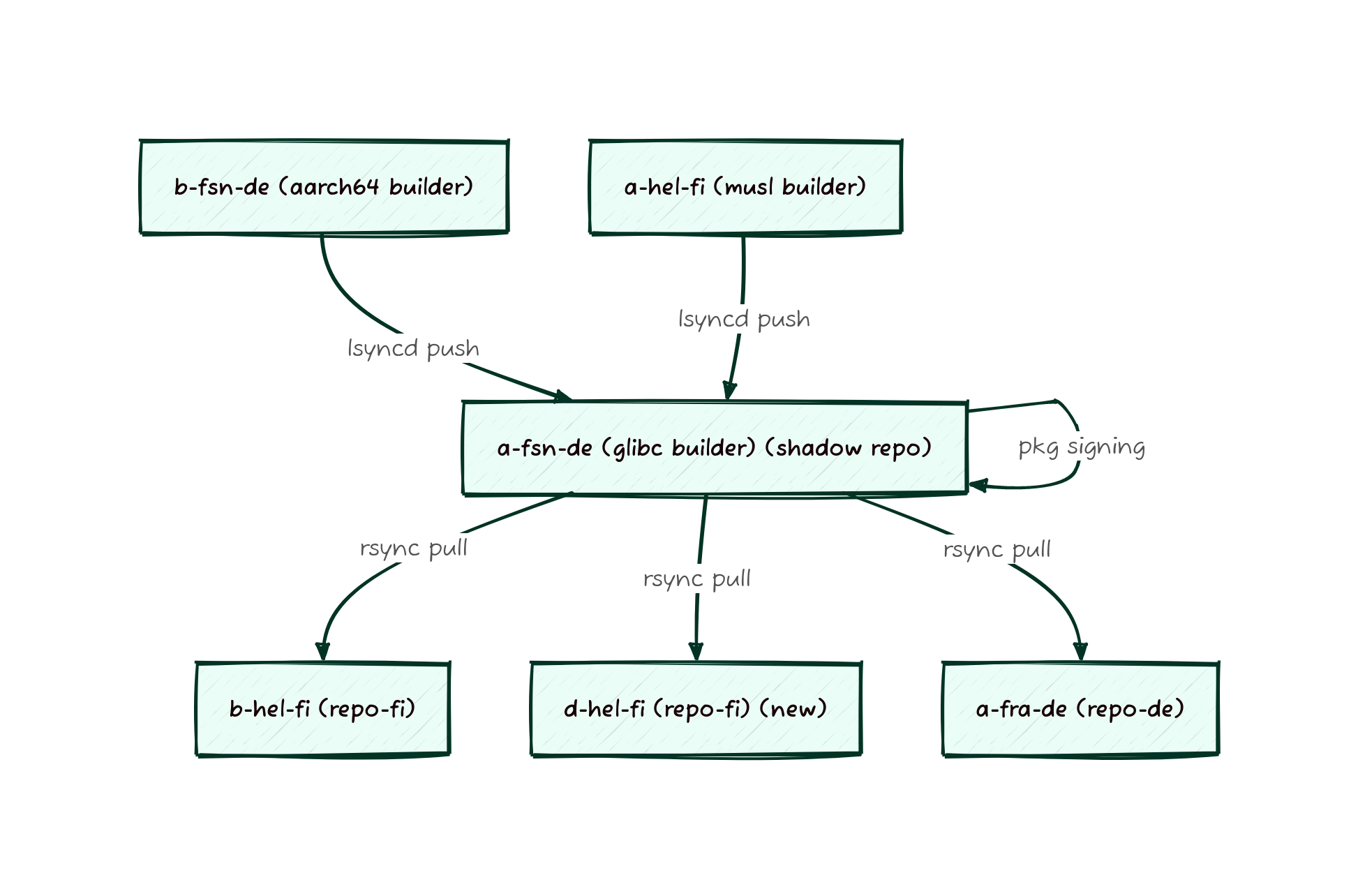
We’re pleased to announce that the 20230628 image set has been promoted to current and is now generally available.
You can find the new images on our downloads page and on our many mirrors.
Some highlights of this release:
xmirror
(@classabbyamp in
#318)The console screenreader espeakup, the braille TTY driver brltty, and the
GUI screenreader orca are now included in all live ISOs for x86_64 and i686.
To learn more about this, read the documentation in the Void Linux
Handbook.
You may verify the authenticity of the images by following the instructions on the downloads page, and using the following minisign key information:
untrusted comment: minisign public key 5D7153E025EC26B6
RWS2Juwl4FNxXe0NtAdYushNLM3GtJ6poGkZ0Up1P/9YLcCK4xlSWAfs
Void has now dropped the long-deprecated pipewire-media-session session manager
from its pipewire package, bringing it inline with the upstream default
configuration. If you are currently using pipewire, you must migrate to
wireplumber or pipewire will cease to function properly. Refer to
Void documentation
if you need guidance when making this change.
The oft-confusing services for pipewire, pipewire-pulse,
wireplumber, and pulseaudio have been removed from the pipewire,
wireplumber, and pulseaudio packages because they were experimental and
should not have been used for almost all use-cases.
If you are currently using those services and still wish to do so, replacements
for the pipewire and pulseaudio services can be found in
/usr/share/examples/$pkgname/sv/. Otherwise, it is recommended to migrate to
another method of launching pipewire. Refer to
Void documentation
if you need guidance.