Next.js
This guide will walk through setting up your first workflow in a Next.js app. Along the way, you'll learn more about the concepts that are fundamental to using the Workflow SDK in your own projects.
Create Your Next.js Project
Start by creating a new Next.js project. This command will create a new directory named my-workflow-app and set up a Next.js project inside it.
npm create next-app@latest my-workflow-appEnter the newly created directory:
cd my-workflow-appInstall workflow
npm i workflowConfigure Next.js
Wrap your next.config.ts with withWorkflow(). This enables usage of the "use workflow" and "use step" directives.
import { withWorkflow } from "workflow/next";
import type { NextConfig } from "next";

const nextConfig: NextConfig = {
  // … rest of your Next.js config
};

export default withWorkflow(nextConfig); Create Your First Workflow
Create a new file for our first workflow:
import { sleep } from "workflow";

export async function handleUserSignup(email: string) {
 "use workflow";

 const user = await createUser(email);
 await sendWelcomeEmail(user);

 await sleep("5s"); // Pause for 5s - doesn't consume any resources
 await sendOnboardingEmail(user);

 console.log("Workflow is complete! Run 'npx workflow web' to inspect your run")

 return { userId: user.id, status: "onboarded" };
}
We'll fill in those functions next, but let's take a look at this code:
- We define a workflow function with the directive
"use workflow". Think of the workflow function as the orchestrator of individual steps. - The Workflow SDK's
sleepfunction allows us to suspend execution of the workflow without using up any resources. A sleep can be a few seconds, hours, days, or even months long.
Create Your Workflow Steps
Let's now define those missing functions.
import { FatalError } from "workflow"

// Our workflow function defined earlier

async function createUser(email: string) {
  "use step";

  console.log(`Creating user with email: ${email}`);

  // Full Node.js access - database calls, APIs, etc.
  return { id: crypto.randomUUID(), email };
}

async function sendWelcomeEmail(user: { id: string; email: string; }) {
  "use step";

  console.log(`Sending welcome email to user: ${user.id}`);

  if (Math.random() < 0.3) {
  // By default, steps will be retried for unhandled errors
   throw new Error("Retryable!");
  }
}

async function sendOnboardingEmail(user: { id: string; email: string}) {
 "use step";

  if (!user.email.includes("@")) {
    // To skip retrying, throw a FatalError instead
    throw new FatalError("Invalid Email");
  }

 console.log(`Sending onboarding email to user: ${user.id}`);
}
Taking a look at this code:
- Business logic lives inside steps. When a step is invoked inside a workflow, it gets enqueued to run on a separate request while the workflow is suspended, just like
sleep. - If a step throws an error, like in
sendWelcomeEmail, the step will automatically be retried until it succeeds (or hits the step's max retry count). - Steps can throw a
FatalErrorif an error is intentional and should not be retried.
We'll dive deeper into workflows, steps, and other ways to suspend or handle events in Foundations.
Create Your Route Handler
To invoke your new workflow, we'll need to add your workflow to a POST API Route Handler, app/api/signup/route.ts, with the following code:
import { start } from "workflow/api";
import { handleUserSignup } from "@/workflows/user-signup";
import { NextResponse } from "next/server";

export async function POST(request: Request) {
 const { email } = await request.json();

 // Executes asynchronously and doesn't block your app
 await start(handleUserSignup, [email]);

 return NextResponse.json({
  message: "User signup workflow started",
 });
}
This Route Handler creates a POST request endpoint at /api/signup that will trigger your workflow.
Workflows can be triggered from API routes, Server Actions, or any server-side code.
Run in development
To start your development server, run the following command in your terminal in the Next.js root directory:
npm run devOnce your development server is running, you can trigger your workflow by running this command in the terminal:
curl -X POST --json '{"email":"hello@example.com"}' http://localhost:3000/api/signupCheck the Next.js development server logs to see your workflow execute, as well as the steps that are being processed.
Additionally, you can use the Workflow SDK CLI or Web UI to inspect your workflow runs and steps in detail.
# Open the observability Web UI
npx workflow web
# or if you prefer a terminal interface, use the CLI inspect command
npx workflow inspect runs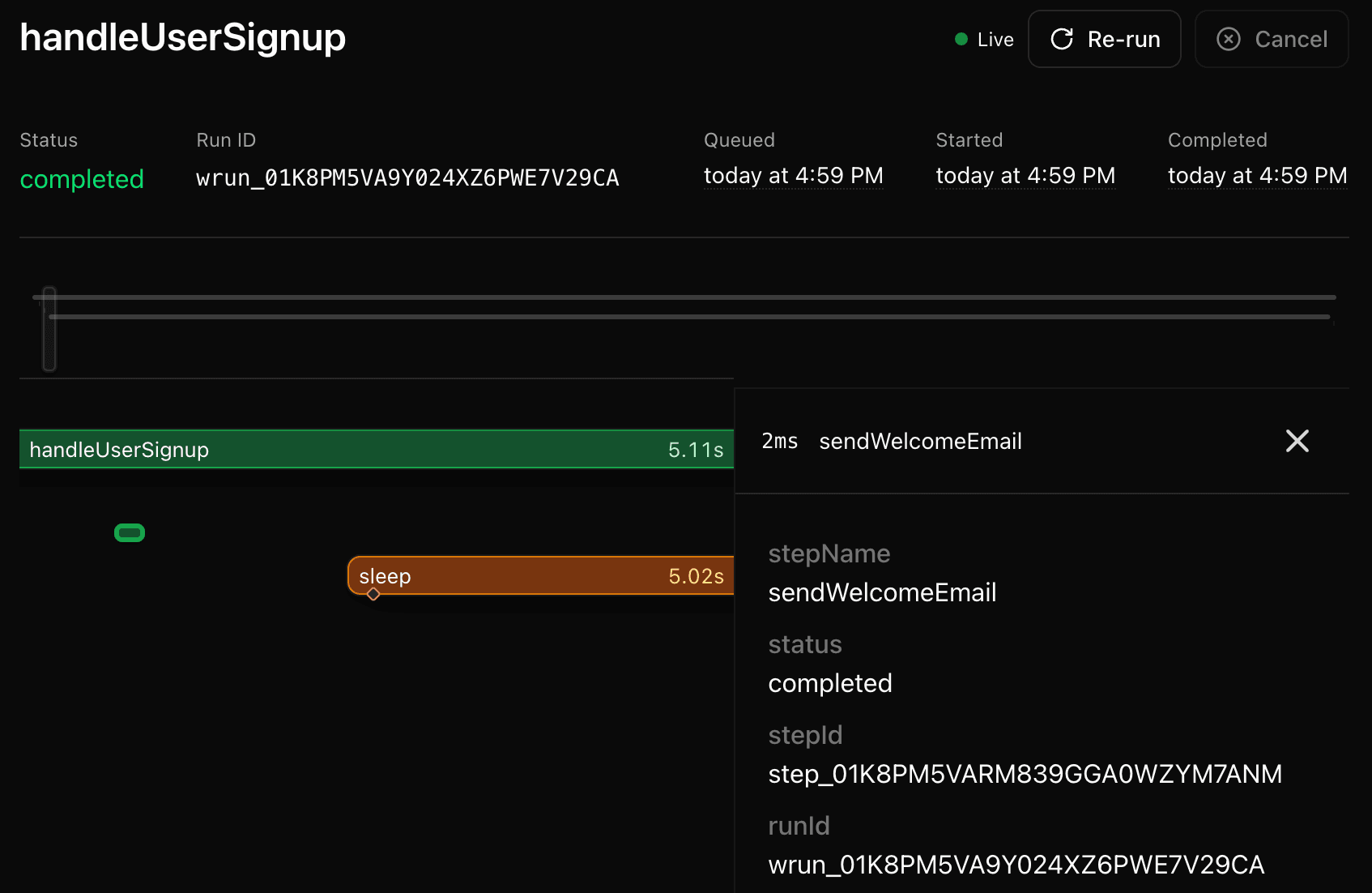
Deploying to production
Workflow SDK apps currently work best when deployed to Vercel and need no special configuration.
Check the Deploying section to learn how your workflows can be deployed elsewhere.
Troubleshooting
Next.js 16.1+ compatibility
If you see this error when upgrading to Next.js 16.1 or later:
Build error occurred
Error: Cannot find module 'next/dist/lib/server-external-packages.json'
Upgrade to workflow@4.0.1-beta.26 or later:
npm install workflow@latestTurborepo caching
If you're using Turborepo in a monorepo, you need to include the generated Workflow routes in your cache outputs. The Workflow SDK generates route handlers at app/.well-known/workflow/ (or src/app/.well-known/workflow/ if your project uses the src directory) during the build process, and these files must be cached alongside your Next.js build output.
Add the following to your turbo.json:
{
  "tasks": {
    "build": {
      "outputs": [
        ".next/**",
        "!.next/cache/**",
        // Include whichever path matches your project layout
        "app/.well-known/workflow/**",
        "src/app/.well-known/workflow/**"
      ]
    }
  }
}
Without this configuration, you may experience intermittent issues where workflows fail to register properly on cache hits, while working correctly on cache misses.
start() says it received an invalid workflow function
If you see this error:
'start' received an invalid workflow function. Ensure the Workflow Development Kit is configured correctly and the function includes a 'use workflow' directive.Check both of these first:
- The workflow function includes
"use workflow". - Your
next.config.tsis wrapped withwithWorkflow().
See start-invalid-workflow-function for full examples and fixes.
Next Steps
- Learn more about the Foundations.
- Check Errors if you encounter issues.
- Explore the API Reference.