security
5540 TopicsWindows 11 10.0.22621.4317 refuses to boot after lubuntu 24.04.3 install
so basically i installed lubuntu 24.04.3 because i wanted to try linux for the first time but now windows 11 refuses to boot after the install (i don't wanna do a clean install) even after a bios level(insydeh2o uefi) revert to factory default settings by refuses to boot i mean sometimes it flashes "reset system" and then it reboots my entire laptop and then it straight up just goes to the ubuntu boot menu upon clicking windows boot manager all it says is "bad shim signature" but at least lubuntu is still bootable, what do i do? laptop model HP Pavilion 14-bf060tx 10/28/2017, 8GB RAM, NVIDIA GeForce 940MX SSD GIGABYTE GP-GSTFS31480GNTD if you need anymore information then tell me in the comments31Views0likes1Comment
DNS-over-TLS on Windows 11: why does the DNS client negotiate TLS 1.2 instead of TLS 1.3?
Hi, We have configured DNS-over-TLS (DoT) on Windows 11 (latest version, 25H2) using: netsh dns add encryption server=<ip> dothost=<hostname> autoupgrade=yes After capturing and analyzing DNS traffic, we noticed that the DNS client always sends a TLS 1.2-only Client Hello, with no supported_versions extension offering TLS 1.3. This causes connection failures with DoT servers that require TLS 1.3. While researching this behavior, we found a Microsoft Q&A discussion mentioning that applications using the legacy SCHANNEL_CRED structure cannot negotiate TLS 1.3, while applications using the newer SCH_CREDENTIALS structure can. Could you confirm whether the Windows DNS client still uses SCHANNEL_CRED for DoT connections? If so, is there a plan to update it to SCH_CREDENTIALS to enable proper TLS 1.3 support? Thank you.53Views0likes3CommentsWindows 11 laptop has tiny text size in file explorer side menu
my laptop has really small text in file explorer side menu and in my browser search and bookmarks bar. i’ve checked my display settings, reset my display driver, restarted my device and nothing has fixed it. i can’t find what is causing it either. any help to get it back to its normal size is appreciated!7Views0likes0CommentsHow screwed am I on Windows 11 PC?
Both CPU and GPU temps were normal. Computer turns on but no screen. Specs : PU - AMD Ryzen 7 7700X CPU Cooler - Lian Li Galahad 240 AIO Motherboard - MSI MAG B850 Tomahawk MAX WiFi GPU - ZOTAG RTX 3070 Ti Gaming Trinity Memory/RAM - VENGEANCE® 32GB (2x16GB) DDR5 DRAM Main/OS Drive - 2TB Kingston KG3000 M.2-2280 NVMe SSD Operating System - Windows 11 Professional Power Supply Unit - EVGA SuperNOVA GM 850-watt 80 + gold rated, fully modular.15Views0likes0CommentsWindows App Updates: Reliability, Productivity, and Security Improvements
The Windows App has seen a significant year of investment, with updates focused on improving connection reliability, usability, and customer‑driven capabilities. In 2025 and early 2026, we delivered split screen for Web, deep linking, Start menu integration, and reliability upgrades powered by RDP multipath and next gen transport intelligence. As we approach the March 2026 end‑of‑support date for the Remote Desktop client, Windows App continues to evolve as the primary supported access experience for Windows in the cloud.6.1KViews3likes7CommentsNo 'trust this computer' prompt showing up on my iPad
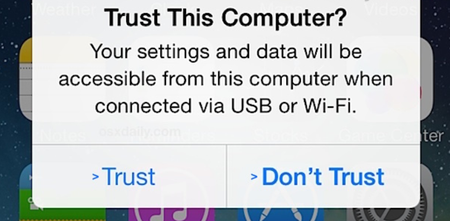
device: iPad Air 5th Generation, iPadOS 18.7.7 Issue: iPad not recognized by Windows 11 for data transfer. Charges only, no Trust popup, no autoplay notification, invisible to iTunes and Device Manager. Was working fine ~6 months ago with an Android cable, Original Apple cable died due to overheating at the adapter end, switched to Portronics cable charging works, no data transfer. 1)Deleted and reinstalled iTunes multiple times Switched between Microsoft Store iTunes and direct download iTunes from apple 2)Deleted all Apple entries from Control Panel 3)Messed around in VPN & Device Management settings, deleted third party configuration profiles 4)Restarted Apple Mobile Device Service and Bonjour Service in services.msc 5)Checked Device Manager ,iPad never appeared even as unknown device 6)Reset Location & Privacy on iPad 7)Reset Network Settings on iPad 8)Signed out of Apple ID completely 9)Deleted Lockdown folder at C:\\ProgramData\\Apple\\Lockdown 10)Attempted Recovery Mode, iPad performed force restart instead 11)Full factory reset of iPad. issue persisted on completely clean device 12)Fresh Windows 11 installation with clean iTunes from apple.com , issue persisted It isn't that my ipad can't read data (i have a type c pendrive , that works completely fine) or even that my cable is charge only (Same cable does data transfer fine when I plug my android into my laptop)26Views0likes1CommentKerberos and the End of RC4: Protocol Hardening and Preparing for CVE‑2026‑20833
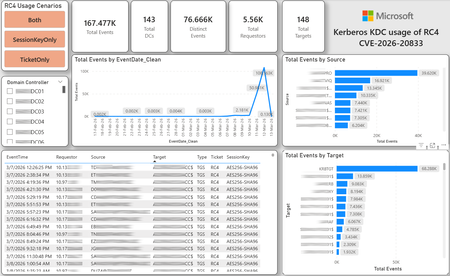
CVE-2026-20833 addresses the continued use of the RC4‑HMAC algorithm within the Kerberos protocol in Active Directory environments. Although RC4 has been retained for many years for compatibility with legacy systems, it is now considered cryptographically weak and unsuitable for modern authentication scenarios. As part of the security evolution of Kerberos, Microsoft has initiated a process of progressive protocol hardening, whose objective is to eliminate RC4 as an implicit fallback, establishing AES128 and AES256 as the default and recommended algorithms. This change should not be treated as optional or merely preventive. It represents a structural change in Kerberos behavior that will be progressively enforced through Windows security updates, culminating in a model where RC4 will no longer be implicitly accepted by the KDC. If Active Directory environments maintain service accounts, applications, or systems dependent on RC4, authentication failures may occur after the application of the updates planned for 2026, especially during the enforcement phases introduced starting in April and finalized in July 2026. For this reason, it is essential that organizations proactively identify and eliminate RC4 dependencies, ensuring that accounts, services, and applications are properly configured to use AES128 or AES256 before the definitive changes to Kerberos protocol behavior take effect. Official Microsoft References CVE-2026-25177 - Security Update Guide - Microsoft - Active Directory Domain Services Elevation of Privilege Vulnerability Microsoft Support – How to manage Kerberos KDC usage of RC4 for service account ticket issuance changes related to CVE-2026-20833 (KB 5073381) Microsoft Learn – Detect and Remediate RC4 Usage in Kerberos AskDS – What is going on with RC4 in Kerberos? Beyond RC4 for Windows authentication | Microsoft Windows Server Blog So, you think you’re ready for enforcing AES for Kerberos? | Microsoft Community Hub Risk Associated with the Vulnerability When RC4 is used in Kerberos tickets, an authenticated attacker can request Service Tickets (TGS) for valid SPNs, capture these tickets, and perform offline brute-force attacks, particularly Kerberoasting scenarios, with the goal of recovering service account passwords. Compared to AES, RC4 allows significantly faster cracking, especially for older accounts or accounts with weak passwords. Technical Overview of the Exploitation In simplified terms, the exploitation flow occurs as follows: The attacker requests a TGS for a valid SPN. The KDC issues the ticket using RC4, when that algorithm is still accepted. The ticket is captured and analyzed offline. The service account password is recovered. The compromised account is used for lateral movement or privilege escalation. Official Timeline Defined by Microsoft Important clarification on enforcement behavior Explicit account encryption type configurations continue to be honored even during enforcement mode. The Kerberos hardening associated with CVE‑2026‑20833 focuses on changing the default behavior of the KDC, enforcing AES-only encryption for TGS ticket issuance when no explicit configuration exists. This approach follows the same enforcement model previously applied to Kerberos session keys in earlier security updates (for example, KB5021131 related to CVE‑2022‑37966), representing another step in the progressive removal of RC4 as an implicit fallback. January 2026 – Audit Phase Starting in January 2026, Microsoft initiated the Audit Phase related to changes in RC4 usage within Kerberos, as described in the official guidance associated with CVE-2026-20833. The primary objective of this phase is to allow organizations to identify existing RC4 dependencies before enforcement changes are applied in later phases. During this phase, no functional breakage is expected, as RC4 is still permitted by the KDC. However, additional auditing mechanisms were introduced, providing greater visibility into how Kerberos tickets are issued in the environment. Analysis is primarily based on the following events recorded in the Security Log of Domain Controllers: Event ID 4768 – Kerberos Authentication Service (AS request / Ticket Granting Ticket) Event ID 4769 – Kerberos Service Ticket Operations (Ticket Granting Service – TGS) Additional events related to the KDCSVC service These events allow identification of: the account that requested authentication the requested service or SPN the source host of the request the encryption algorithm used for the ticket and session key This information is critical for detecting scenarios where RC4 is still being implicitly used, enabling operations teams to plan remediation ahead of the enforcement phase. If these events are not being logged on Domain Controllers, it is necessary to verify whether Kerberos auditing is properly enabled. For Kerberos authentication events to be recorded in the Security Log, the corresponding audit policies must be configured. The minimum recommended configuration is to enable Success auditing for the following subcategories: Kerberos Authentication Service Kerberos Service Ticket Operations Verification can be performed directly on a Domain Controller using the following commands: auditpol /get /subcategory:"Kerberos Service Ticket Operations" auditpol /get /subcategory:"Kerberos Authentication Service" In enterprise environments, the recommended approach is to apply this configuration via Group Policy, ensuring consistency across all Domain Controllers. The corresponding policy can be found at: Computer Configuration - Policies - Windows Settings - Security Settings - Advanced Audit Policy Configuration - Audit Policies - Account Logon Once enabled, these audits record events 4768 and 4769 in the Domain Controllers’ Security Log, allowing analysis tools—such as inventory scripts or SIEM/Log Analytics queries—to accurately identify where RC4 is still present in the Kerberos authentication flow. April 2026 – Enforcement with Manual Rollback With the April 2026 update, the KDC begins operating in AES-only mode (0x18) when the msDS-SupportedEncryptionTypes attribute is not defined. This means RC4 is no longer accepted as an implicit fallback. During this phase, applications, accounts, or computers that still implicitly depend on RC4 may start failing. Manual rollback remains possible via explicit configuration of the attribute in Active Directory. July 2026 – Final Enforcement Starting in July 2026, audit mode and rollback options are removed. RC4 will only function if explicitly configured—a practice that is strongly discouraged. This represents the point of no return in the hardening process. Official Monitoring Approach Microsoft provides official scripts in the repository: https://github.com/microsoft/Kerberos-Crypto/tree/main/scripts The two primary scripts used in this analysis are: Get-KerbEncryptionUsage.ps1 The Get-KerbEncryptionUsage.ps1 script, provided by Microsoft in the Kerberos‑Crypto repository, is designed to identify how Kerberos tickets are issued in the environment by analyzing authentication events recorded on Domain Controllers. Data collection is primarily based on: Event ID 4768 – Kerberos Authentication Service (AS‑REQ / TGT issuance) Event ID 4769 – Kerberos Service Ticket Operations (TGS issuance) From these events, the script extracts and consolidates several relevant fields for authentication flow analysis: Time – when the authentication occurred Requestor – IP address or host that initiated the request Source – account that requested the ticket Target – requested service or SPN Type – operation type (AS or TGS) Ticket – algorithm used to encrypt the ticket SessionKey – algorithm used to protect the session key Based on these fields, it becomes possible to objectively identify which algorithms are being used in the environment, both for ticket issuance and session establishment. This visibility is essential for detecting RC4 dependencies in the Kerberos authentication flow, enabling precise identification of which clients, services, or accounts still rely on this legacy algorithm. Example usage: .\Get-KerbEncryptionUsage.ps1 -Encryption RC4 -Searchscope AllKdcs | Export-Csv -Path .\KerbUsage_RC4_All_ThisDC.csv -NoTypeInformation -Encoding UTF8 Data Consolidation and Analysis In enterprise environments, where event volumes may be high, it is recommended to consolidate script results into analytical tools such as Power BI to facilitate visualization and investigation. The presented image illustrates an example dashboard built from collected results, enabling visibility into: Total events analyzed Number of Domain Controllers involved Number of requesting clients (Requestors) Most frequently involved services or SPNs (Targets) Temporal distribution of events RC4 usage scenarios (Ticket, SessionKey, or both) This type of visualization enables rapid identification of RC4 usage patterns, remediation prioritization, and progress tracking as dependencies are eliminated. Additionally, dashboards help answer key operational questions, such as: Which services still depend on RC4 Which clients are negotiating RC4 for sessions Which Domain Controllers are issuing these tickets Whether RC4 usage is decreasing over time This combined automated collection + analytical visualization approach is the recommended strategy to prepare environments for the Microsoft changes related to CVE‑2026‑20833 and the progressive removal of RC4 in Kerberos. Visualizing Results with Power BI To facilitate analysis and monitoring of RC4 usage in Kerberos, it is recommended to consolidate script results into a Power BI analytical dashboard. 1. Install Power BI Desktop Download and install Power BI Desktop from the official Microsoft website 2. Execute data collection After running the Get-KerbEncryptionUsage.ps1 script, save the generated CSV file to the following directory: C:\Temp\Kerberos_KDC_usage_of_RC4_Logs\KerbEncryptionUsage_RC4.csv 3. Open the dashboard in Power BI Open the file RC4-KerbEncryptionUsage-Dashboards.pbix using Power BI Desktop. If you are interested, please leave a comment on this post with your email address, and I will be happy to share with you. 4. Update the data source If the CSV file is located in a different directory, it will be necessary to adjust the data source path in Power BI. As illustrated, the dashboard uses a parameter named CsvFilePath, which defines the path to the collected CSV file. To adjust it: Open Transform Data in Power BI. Locate the CsvFilePath parameter in the list of Queries. Update the value to the directory where the CSV file was saved. Click Refresh Preview or Refresh to update the data. Click Home → Close & Apply. This approach allows rapid identification of RC4 dependencies, prioritization of remediation actions, and tracking of progress throughout the elimination process. List-AccountKeys.ps1 This script is used to identify which long-term keys are present on user, computer, and service accounts, enabling verification of whether RC4 is still required or whether AES128/AES256 keys are already available. Interpreting Observed Scenarios Microsoft recommends analyzing RC4 usage by jointly considering two key fields present in Kerberos events: Ticket Encryption Type Session Encryption Type Each combination represents a distinct Kerberos behavior, indicating the source of the issue, risk level, and remediation point in the environment. In addition to events 4768 and 4769, updates released starting January 13, 2026, introduce new Kdcsvc events in the System Event Log that assist in identifying RC4 dependencies ahead of enforcement. These events include: Event ID 201 – RC4 usage detected because the client advertises only RC4 and the service does not have msDS-SupportedEncryptionTypes defined. Event ID 202 – RC4 usage detected because the service account does not have AES keys and the msDS-SupportedEncryptionTypes attribute is not defined. Event ID 203 – RC4 usage blocked (enforcement phase) because the client advertises only RC4 and the service does not have msDS-SupportedEncryptionTypes defined. Event ID 204 – RC4 usage blocked (enforcement phase) because the service account does not have AES keys and msDS-SupportedEncryptionTypes is not defined. Event ID 205 – Detection of explicit enablement of insecure algorithms (such as RC4) in the domain policy DefaultDomainSupportedEncTypes. Event ID 206 – RC4 usage detected because the service accepts only AES, but the client does not advertise AES support. Event ID 207 – RC4 usage detected because the service is configured for AES, but the service account does not have AES keys. Event ID 208 – RC4 usage blocked (enforcement phase) because the service accepts only AES and the client does not advertise AES support. Event ID 209 – RC4 usage blocked (enforcement phase) because the service accepts only AES, but the service account does not have AES keys. https://support.microsoft.com/en-gb/topic/how-to-manage-kerberos-kdc-usage-of-rc4-for-service-account-ticket-issuance-changes-related-to-cve-2026-20833-1ebcda33-720a-4da8-93c1-b0496e1910dc They indicate situations where RC4 usage will be blocked in future phases, allowing early detection of configuration issues in clients, services, or accounts. These events are logged under: Log: System Source: Kdcsvc Below are the primary scenarios observed during the analysis of Kerberos authentication behavior, highlighting how RC4 usage manifests across different ticket and session encryption combinations. Each scenario represents a distinct risk profile and indicates specific remediation actions required to ensure compliance with the upcoming enforcement phases. Scenario A – RC4 / RC4 In this scenario, both the Kerberos ticket and the session key are issued using RC4. This is the worst possible scenario from a security and compatibility perspective, as it indicates full and explicit dependence on RC4 in the authentication flow. This condition significantly increases exposure to Kerberoasting attacks, since RC4‑encrypted tickets can be subjected to offline brute-force attacks to recover service account passwords. In addition, environments remaining in this state have a high probability of authentication failure after the April 2026 updates, when RC4 will no longer be accepted as an implicit fallback by the KDC. Events Associated with This Scenario During the Audit Phase, this scenario is typically associated with: Event ID 201 – Kdcsvc Indicates that: the client advertises only RC4 the service does not have msDS-SupportedEncryptionTypes defined the Domain Controller does not have DefaultDomainSupportedEncTypes defined This means RC4 is being used implicitly. This event indicates that the authentication will fail during the enforcement phase. Event ID 202 – Kdcsvc Indicates that: the service account does not have AES keys the service does not have msDS-SupportedEncryptionTypes defined This typically occurs when: legacy accounts have never had their passwords reset only RC4 keys exist in Active Directory Possible Causes Common causes include: the originating client (Requestor) advertises only RC4 the target service (Target) is not explicitly configured to support AES the account has only legacy RC4 keys the msDS-SupportedEncryptionTypes attribute is not defined Recommended Actions To remediate this scenario: Correctly identify the object involved in the authentication flow, typically: a service account (SPN) a computer account or a Domain Controller computer object Verify whether the object has AES keys available using analysis tools or scripts such as List-AccountKeys.ps1. If AES keys are not present, reset the account password, forcing generation of modern cryptographic keys (AES128 and AES256). Explicitly define the msDS-SupportedEncryptionTypes attribute to enable AES support. Recommended value for modern environments: 0x18 (AES128 + AES256) = 24 As illustrated below, this configuration can be applied directly to the msDS-SupportedEncryptionTypes attribute in Active Directory. AES can also be enabled via Active Directory Users and Computers by explicitly selecting: This account supports Kerberos AES 128 bit encryption This account supports Kerberos AES 256 bit encryption These options ensure that new Kerberos tickets are issued using AES algorithms instead of RC4. Temporary RC4 Usage (Controlled Rollback) In transitional scenarios—during migration or troubleshooting—it may be acceptable to temporarily use: 0x1C (RC4 + AES) = 28 This configuration allows the object to accept both RC4 and AES simultaneously, functioning as a controlled rollback while legacy dependencies are identified and corrected. However, the final objective must be to fully eliminate RC4 before the final enforcement phase in July 2026, ensuring the environment operates exclusively with AES128 and AES256. Scenario B – AES / RC4 In this case, the ticket is protected with AES, but the session is still negotiated using RC4. This typically indicates a client limitation, legacy configuration, or restricted advertisement of supported algorithms. Events Associated with This Scenario During the Audit Phase, this scenario may generate: Event ID 206 Indicates that: the service accepts only AES the client does not advertise AES in the Advertised Etypes In this case, the client is the issue. Recommended Action Investigate the Requestor Validate operating system, client type, and advertised algorithms Review legacy GPOs, hardening configurations, or settings that still force RC4 For Linux clients or third‑party applications, review krb5.conf, keytabs, and Kerberos libraries Scenario C – RC4 / AES Here, the session already uses AES, but the ticket is still issued using RC4. This indicates an implicit RC4 dependency on the Target or KDC side, and the environment may fail once enforcement begins. Events Associated with This Scenario This scenario may generate: Event ID 205 Indicates that the domain has explicit insecure algorithm configuration in: DefaultDomainSupportedEncTypes This means RC4 is explicitly allowed at the domain level. Recommended Action Correct the Target object Explicitly define msDS-SupportedEncryptionTypes with 0x18 = 24 Revalidate new ticket issuance to confirm full migration to AES / AES Conclusion CVE‑2026‑20833 represents a structural change in Kerberos behavior within Active Directory environments. Proper monitoring is essential before April 2026, and the msDS-SupportedEncryptionTypes attribute becomes the primary control point for service accounts, computer accounts, and Domain Controllers. July 2026 represents the final enforcement point, after which there will be no implicit rollback to RC4.4.7KViews3likes8Comments