Note: We now recommend using the supervisor pattern directly via tools rather than this library for most use cases. The tool-calling approach gives you more control over context engineering and is the recommended pattern in the LangChain multi-agent guide. See our supervisor tutorial for a step-by-step guide. We're making this library compatible with LangChain 1.0 to help users upgrade their existing code. If you find this library solves a problem that can't be easily addressed with the manual supervisor pattern, we'd love to hear about your use case!
A Python library for creating hierarchical multi-agent systems using LangGraph. Hierarchical systems are a type of multi-agent architecture where specialized agents are coordinated by a central supervisor agent. The supervisor controls all communication flow and task delegation, making decisions about which agent to invoke based on the current context and task requirements.
This library is built on top of LangGraph, a powerful framework for building agent applications, and comes with out-of-box support for streaming, short-term and long-term memory and human-in-the-loop
pip install langgraph-supervisor[!Note] LangGraph Supervisor requires Python >= 3.10
Here's a simple example of a supervisor managing two specialized agents:
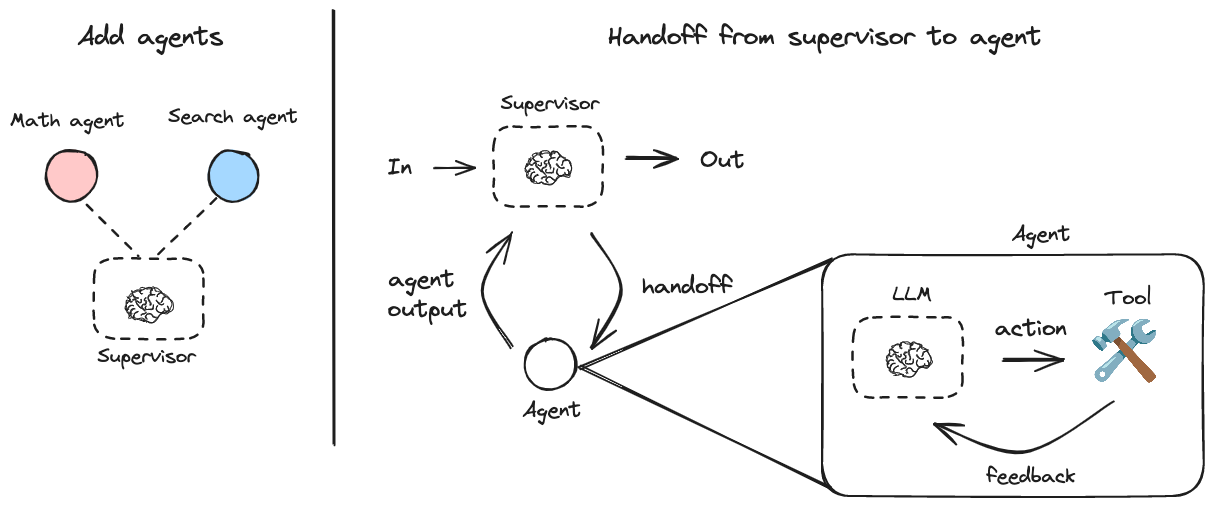
pip install langgraph-supervisor langchain-openai

export OPENAI_API_KEY=<your_api_key>
from langchain_openai import ChatOpenAI
from langgraph_supervisor import create_supervisor
from langgraph.prebuilt import create_react_agent
model = ChatOpenAI(model="gpt-4o")
# Create specialized agents
def add(a: float, b: float) -> float:
"""Add two numbers."""
return a + b
def multiply(a: float, b: float) -> float:
"""Multiply two numbers."""
return a * b
def web_search(query: str) -> str:
"""Search the web for information."""
return (
"Here are the headcounts for each of the FAANG companies in 2024:\n"
"1. **Facebook (Meta)**: 67,317 employees.\n"
"2. **Apple**: 164,000 employees.\n"
"3. **Amazon**: 1,551,000 employees.\n"
"4. **Netflix**: 14,000 employees.\n"
"5. **Google (Alphabet)**: 181,269 employees."
)
math_agent = create_react_agent(
model=model,
tools=[add, multiply],
name="math_expert",
prompt="You are a math expert. Always use one tool at a time."
)
research_agent = create_react_agent(
model=model,
tools=[web_search],
name="research_expert",
prompt="You are a world class researcher with access to web search. Do not do any math."
)
# Create supervisor workflow
workflow = create_supervisor(
[research_agent, math_agent],
model=model,
prompt=(
"You are a team supervisor managing a research expert and a math expert. "
"For current events, use research_agent. "
"For math problems, use math_agent."
)
)
# Compile and run
app = workflow.compile()
result = app.invoke({
"messages": [
{
"role": "user",
"content": "what's the combined headcount of the FAANG companies in 2024?"
}
]
})[!TIP] For developing, debugging, and deploying AI agents and LLM applications, see LangSmith.
You can control how messages from worker agents are added to the overall conversation history of the multi-agent system:
Include full message history from an agent:
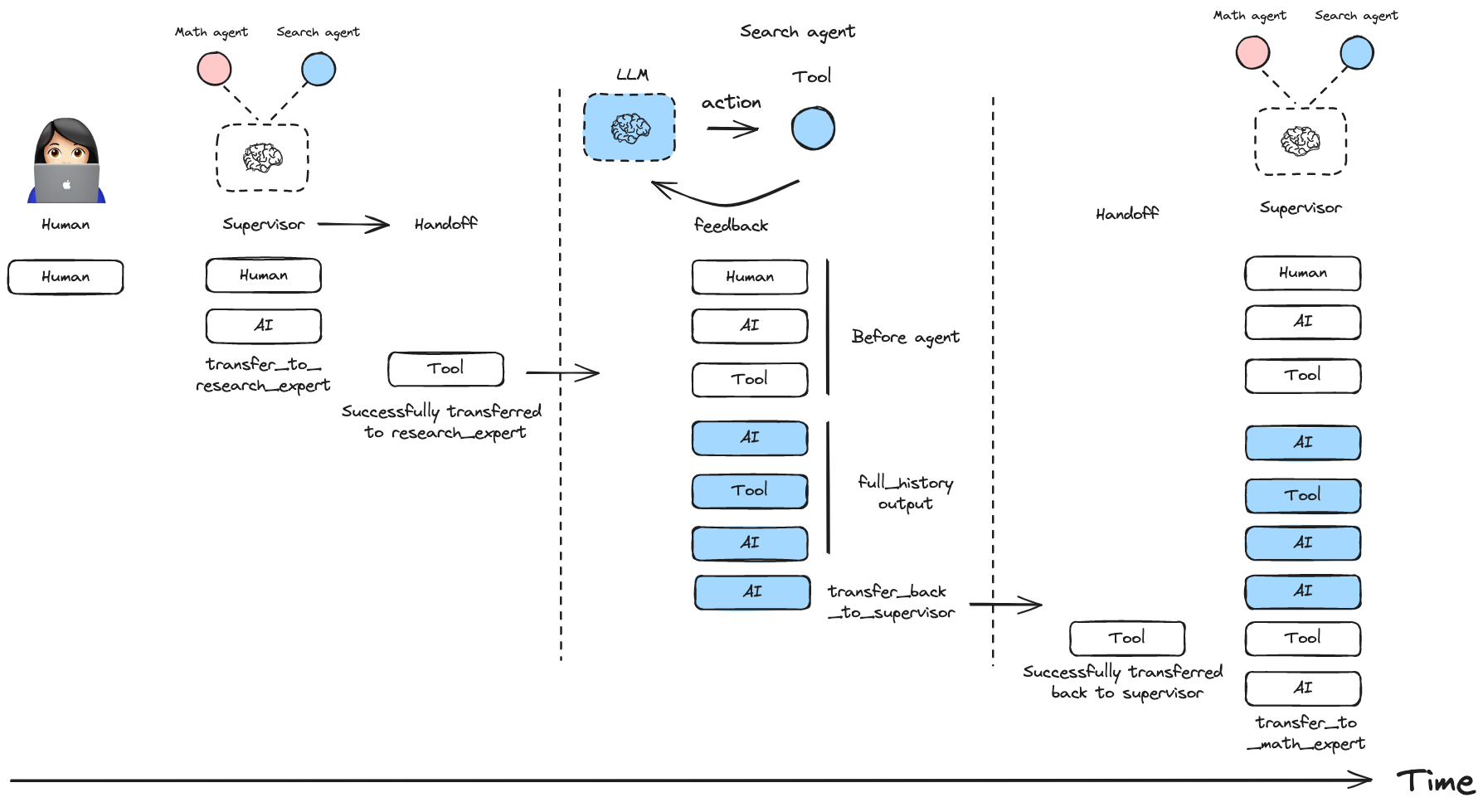
workflow = create_supervisor(
    agents=[agent1, agent2],
    output_mode="full_history"
)
Include only the final agent response:
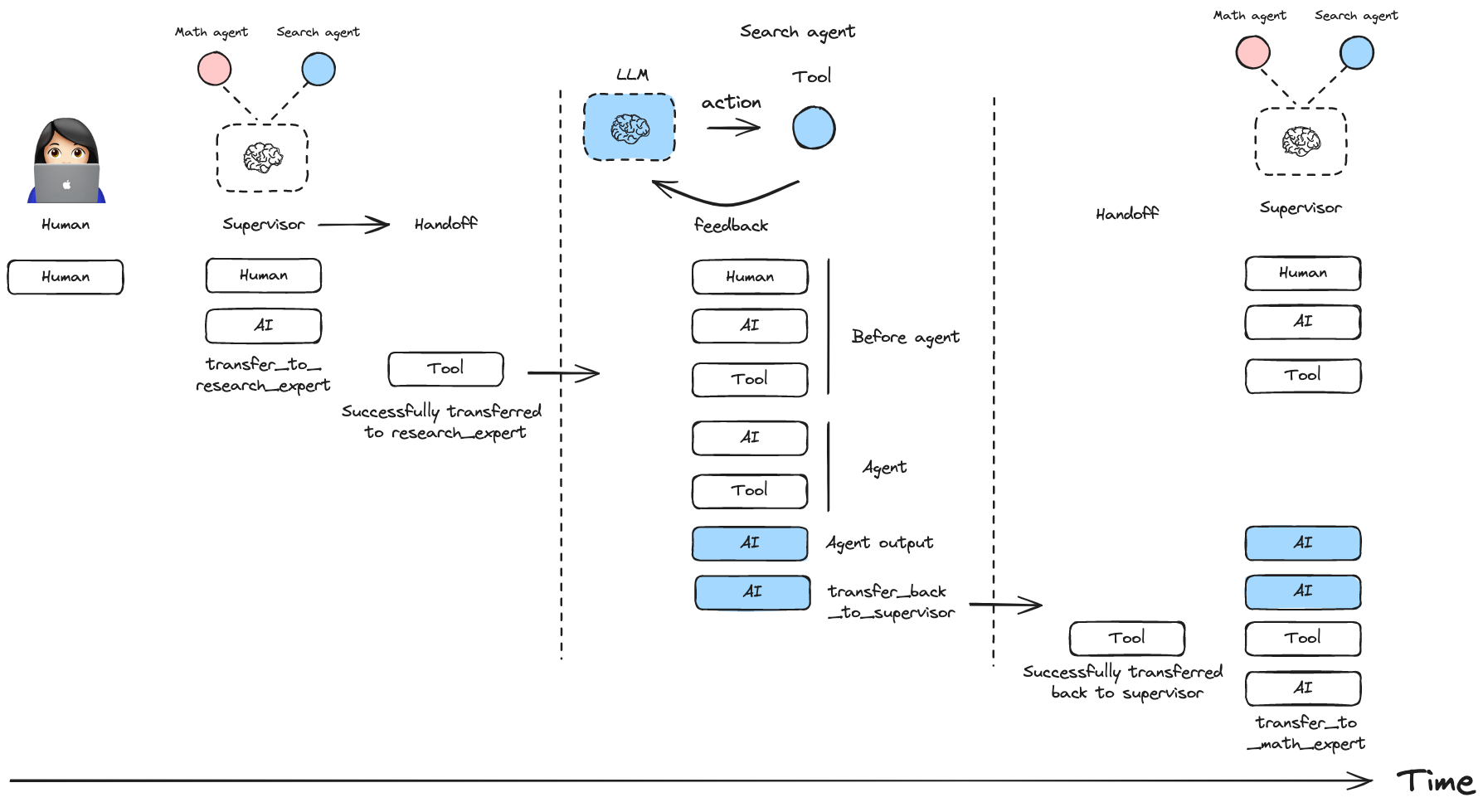
workflow = create_supervisor(
    agents=[agent1, agent2],
    output_mode="last_message"
)You can create multi-level hierarchical systems by creating a supervisor that manages multiple supervisors.
research_team = create_supervisor(
    [research_agent, math_agent],
    model=model,
    supervisor_name="research_supervisor"
).compile(name="research_team")

writing_team = create_supervisor(
    [writing_agent, publishing_agent],
    model=model,
    supervisor_name="writing_supervisor"
).compile(name="writing_team")

top_level_supervisor = create_supervisor(
    [research_team, writing_team],
    model=model,
    supervisor_name="top_level_supervisor"
).compile(name="top_level_supervisor")You can add short-term and long-term memory to your supervisor multi-agent system. Since create_supervisor() returns an instance of StateGraph that needs to be compiled before use, you can directly pass a checkpointer or a store instance to the .compile() method:
from langgraph.checkpoint.memory import InMemorySaver
from langgraph.store.memory import InMemoryStore

checkpointer = InMemorySaver()
store = InMemoryStore()

model = ...
research_agent = ...
math_agent = ...

workflow = create_supervisor(
    [research_agent, math_agent],
    model=model,
    prompt="You are a team supervisor managing a research expert and a math expert.",
)

# Compile with checkpointer/store
app = workflow.compile(
    checkpointer=checkpointer,
    store=store
)By default, the supervisor uses handoff tools created with the prebuilt create_handoff_tool. You can also create your own, custom handoff tools. Here are some ideas on how you can modify the default implementation:
create_handoff_tool passes full message history (all of the messages generated in the supervisor up to this point), as well as a tool message indicating successful handoff.Here is an example of how to pass customized handoff tools to create_supervisor:
from langgraph_supervisor import create_handoff_tool
workflow = create_supervisor(
    [research_agent, math_agent],
    tools=[
        create_handoff_tool(agent_name="math_expert", name="assign_to_math_expert", description="Assign task to math expert"),
        create_handoff_tool(agent_name="research_expert", name="assign_to_research_expert", description="Assign task to research expert")
    ],
    model=model,
)
You can also control whether the handoff tool invocation messages are added to the state. By default, they are added (add_handoff_messages=True), but you can disable this if you want a more concise history:
workflow = create_supervisor(
    [research_agent, math_agent],
    model=model,
    add_handoff_messages=False
)
Additionally, you can customize the prefix used for the automatically generated handoff tools:
workflow = create_supervisor(
    [research_agent, math_agent],
    model=model,
    handoff_tool_prefix="delegate_to"
)
# This will create tools named: delegate_to_research_expert, delegate_to_math_expert
Here is an example of what a custom handoff tool might look like:
from typing import Annotated

from langchain_core.tools import tool, BaseTool, InjectedToolCallId
from langchain_core.messages import ToolMessage
from langgraph.types import Command
from langgraph.prebuilt import InjectedState
from langgraph_supervisor.handoff import METADATA_KEY_HANDOFF_DESTINATION

def create_custom_handoff_tool(*, agent_name: str, name: str | None, description: str | None) -> BaseTool:

    @tool(name, description=description)
    def handoff_to_agent(
        # you can add additional tool call arguments for the LLM to populate
        # for example, you can ask the LLM to populate a task description for the next agent
        task_description: Annotated[str, "Detailed description of what the next agent should do, including all of the relevant context."],
        # you can inject the state of the agent that is calling the tool
        state: Annotated[dict, InjectedState],
        tool_call_id: Annotated[str, InjectedToolCallId],
    ):
        tool_message = ToolMessage(
            content=f"Successfully transferred to {agent_name}",
            name=name,
            tool_call_id=tool_call_id,
        )
        messages = state["messages"]
        return Command(
            goto=agent_name,
            graph=Command.PARENT,
            # NOTE: this is a state update that will be applied to the swarm multi-agent graph (i.e., the PARENT graph)
            update={
                "messages": messages + [tool_message],
                "active_agent": agent_name,
                # optionally pass the task description to the next agent
                # NOTE: individual agents would need to have `task_description` in their state schema
                # and would need to implement logic for how to consume it
                "task_description": task_description,
            },
        )

    handoff_to_agent.metadata = {METADATA_KEY_HANDOFF_DESTINATION: agent_name}
return handoff_to_agentYou can equip the supervisor with a tool to directly forward the last message received from a worker agent straight to the final output of the graph using create_forward_message_tool. This is useful when the supervisor determines that the worker's response is sufficient and doesn't require further processing or summarization by the supervisor itself. It saves tokens for the supervisor and avoids potential misrepresentation of the worker's response through paraphrasing.
from langgraph_supervisor.handoff import create_forward_message_tool

# Assume research_agent and math_agent are defined as before

forwarding_tool = create_forward_message_tool("supervisor") # The argument is the name to assign to the resulting forwarded message
workflow = create_supervisor(
    [research_agent, math_agent],
    model=model,
    # Pass the forwarding tool along with any other custom or default handoff tools
    tools=[forwarding_tool]
)
This creates a tool named forward_message that the supervisor can invoke. The tool expects an argument from_agent specifying which agent's last message should be forwarded directly to the output.
Here's a simple example of a supervisor managing two specialized agentic workflows created using Functional API:
pip install langgraph-supervisor langchain-openai

export OPENAI_API_KEY=<your_api_key>
from langgraph.prebuilt import create_react_agent
from langgraph_supervisor import create_supervisor
from langchain_openai import ChatOpenAI
from langgraph.func import entrypoint, task
from langgraph.graph import add_messages
model = ChatOpenAI(model="gpt-4o")
# Create specialized agents
# Functional API - Agent 1 (Joke Generator)
@task
def generate_joke(messages):
"""First LLM call to generate initial joke"""
system_message = {
"role": "system",
"content": "Write a short joke"
}
msg = model.invoke(
[system_message] + messages
)
return msg
@entrypoint()
def joke_agent(state):
joke = generate_joke(state['messages']).result()
messages = add_messages(state["messages"], [joke])
return {"messages": messages}
joke_agent.name = "joke_agent"
# Graph API - Agent 2 (Research Expert)
def web_search(query: str) -> str:
"""Search the web for information."""
return (
"Here are the headcounts for each of the FAANG companies in 2024:\n"
"1. **Facebook (Meta)**: 67,317 employees.\n"
"2. **Apple**: 164,000 employees.\n"
"3. **Amazon**: 1,551,000 employees.\n"
"4. **Netflix**: 14,000 employees.\n"
"5. **Google (Alphabet)**: 181,269 employees."
)
research_agent = create_react_agent(
model=model,
tools=[web_search],
name="research_expert",
prompt="You are a world class researcher with access to web search. Do not do any math."
)
# Create supervisor workflow
workflow = create_supervisor(
[research_agent, joke_agent],
model=model,
prompt=(
"You are a team supervisor managing a research expert and a joke expert. "
"For current events, use research_agent. "
"For any jokes, use joke_agent."
)
)
# Compile and run
app = workflow.compile()
result = app.invoke({
"messages": [
{
"role": "user",
"content": "Share a joke to relax and start vibe coding for my next project idea."
}
]
})
for m in result["messages"]:
m.pretty_print()Create a tool that can handoff control to the requested agent.
Create a pair of (AIMessage, ToolMessage) to add to the message history when returning control to the supervisor.
Create a tool the supervisor can use to forward a worker message by name.
Add name and content XML tags to the message content.
Remove explicit name and content XML tags from the AI message content.
Attach formatted agent names to the messages passed to and from a language model.
Create a multi-agent supervisor.

