- array keeps track of multiple pieces of information in linear order, a one-dimensional list. However, the data associated with certain systems (a digital image, a board game, etc.) lives in two dimensions. To visualize this data, we need a multi-dimensional data structure, that is, a multi-dimensional array. A two-dimensional array is really nothing more than an array of arrays (a three-dimensional array is an array of arrays of arrays). Think of your dinner. You could have a one-dimensional list of everything you eat:
(lettuce, tomatoes, steak, mashed potatoes, cake, ice cream)Or you could have a two-dimensional list of three courses, each containing two things you eat:
(lettuce, tomatoes) and (steak, mashed potatoes) and (cake, ice cream)In the case of an array, our old-fashioned one-dimensional array looks like this:
int[] myArray = {0,1,2,3};And a two-dimensional array looks like this:
int[][] myArray = { {0,1,2,3}, {3,2,1,0}, {3,5,6,1}, {3,8,3,4} };For our purposes, it is better to think of the two-dimensional array as a matrix. A matrix can be thought of as a grid of numbers, arranged in rows and columns, kind of like a bingo board. We might write the two-dimensional array out as follows to illustrate this point:
int[][] myArray = {  {0, 1, 2, 3},
                     {3, 2, 1, 0},
                     {3, 5, 6, 1},
                     {3, 8, 3, 4}  };
We can use this type of data structure to encode information about an image. For example, the following grayscale image could be represented by the following array:
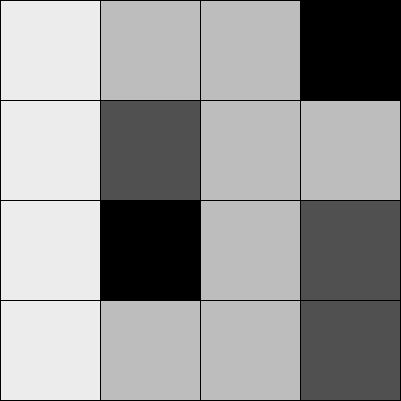
int[][] myArray = {  {236, 189, 189,   0},
                     {236,  80, 189, 189},
                     {236,   0, 189,  80},
                     {236, 189, 189,  80}  };
To walk through every element of a one-dimensional array, we use a for loop, that is:
int[] myArray = new int[10];
for (int i = 0; i < myArray.length; i++) {
  myArray[i] = 0;
}
For a two-dimensional array, in order to reference every element, we must use two nested loops. This gives us a counter variable for every column and every row in the matrix.
int cols = 10;
int rows = 10;
int[][] myArray = new int[cols][rows];

// Two nested loops allow us to visit every spot in a 2D array.
// For every column I, visit every row J.
for (int i = 0; i < cols; i++) {
  for (int j = 0; j < rows; j++) {
    myArray[i][j] = 0;
  }
}
For example, we might write a program using a two-dimensional array to draw a grayscale image.
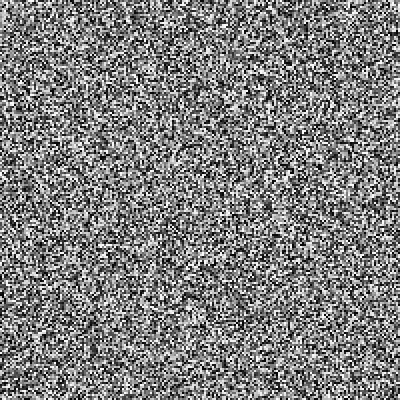
size(200,200);
int cols = width;
int rows = height;

// Declare 2D array
int[][] myArray = new int[cols][rows];

// Initialize 2D array values
for (int i = 0; i < cols; i++) {
  for (int j = 0; j < rows; j++) {
    myArray[i][j] = int(random(255));
  }
}

// Draw points
for (int i = 0; i < cols; i++) {
  for (int j = 0; j < rows; j++) {
    stroke(myArray[i][j]);
    point(i,j);
  }
}
A two-dimensional array can also be used to store objects, which is especially convenient for programming sketches that involve some sort of "grid" or "board." The following example displays a grid of Cell objects stored in a two-dimensional array. Each cell is a rectangle whose brightness oscillates from 0-255 with a sine function.
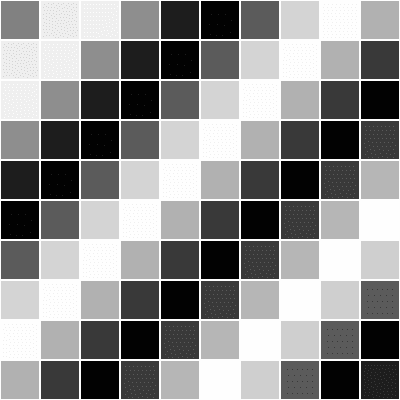
// 2D Array of objects
Cell[][] grid;

// Number of columns and rows in the grid
int cols = 10;
int rows = 10;

void setup() {
  size(200,200);
  grid = new Cell[cols][rows];
  for (int i = 0; i < cols; i++) {
    for (int j = 0; j < rows; j++) {
      // Initialize each object
      grid[i][j] = new Cell(i*20,j*20,20,20,i+j);
    }
  }
}

void draw() {
  background(0);
  // The counter variables i and j are also the column and row numbers and
  // are used as arguments to the constructor for each object in the grid.
  for (int i = 0; i < cols; i++) {
    for (int j = 0; j < rows; j++) {
      // Oscillate and display each object
      grid[i][j].oscillate();
      grid[i][j].display();
    }
  }
}

// A Cell object
class Cell {
  // A cell object knows about its location in the grid
  // as well as its size with the variables x,y,w,h
  float x,y;   // x,y location
  float w,h;   // width and height
  float angle; // angle for oscillating brightness

  // Cell Constructor
  Cell(float tempX, float tempY, float tempW, float tempH, float tempAngle) {
    x = tempX;
    y = tempY;
    w = tempW;
    h = tempH;
    angle = tempAngle;
  }

  // Oscillation means increase angle
  void oscillate() {
    angle += 0.02;
  }

  void display() {
    stroke(255);
    // Color calculated using sine wave
    fill(127+127*sin(angle));
    rect(x,y,w,h);
  }
}


