Quick Answer
To handle JSON in PHP, you will mostly use json_encode() to convert PHP data into JSON and json_decode() to convert JSON back into a PHP array or object.
For JSON files, the usual flow is simple. Read the file with file_get_contents(), decode it with json_decode(), work with the data in PHP, then save it back with json_encode() and file_put_contents().
In modern PHP, it is better to use JSON_THROW_ON_ERROR so invalid JSON does not fail silently. If your project runs on PHP 8.3 or later, you can also use json_validate() when you only want to check whether a JSON string is valid before doing anything else.
<?php
declare(strict_types=1);

$json = '{"name":"Joe","skills":["PHP","MySQL"]}';

$data = json_decode($json, true, 512, JSON_THROW_ON_ERROR);

echo $data['name'];

$newJson = json_encode($data, JSON_PRETTY_PRINT | JSON_THROW_ON_ERROR);

echo $newJson;
This tutorial focuses on the practical side of JSON handling in PHP. You will learn how to encode, decode, validate, read, and write JSON with examples you can actually reuse in real projects.
If you also work with JSON requests sent to a PHP endpoint, read Receive JSON POST in PHP. For the official function details and flag reference, the PHP JSON manual is the best source.
Introduction
JSON is one of the most common ways to exchange data in web applications. In PHP, you will often use it when working with APIs, AJAX requests, configuration files, or structured data stored in files.
The good part is that PHP already gives you built-in functions to handle JSON cleanly. In most cases, everything starts with json_encode() and json_decode(). Once you understand these two functions well, reading and writing JSON becomes straightforward.
In this tutorial, we will see how to encode PHP arrays into JSON, decode JSON into PHP arrays or objects, read JSON from a file, write JSON back to a file, validate JSON, and handle common errors properly. The examples are simple, but they follow practical patterns that are useful in real projects.
For exact syntax and supported flags, you can always refer to the official PHP documentation for json_encode().
How json_encode() Works in PHP
The json_encode() function converts a PHP value into a JSON string. You will usually pass an array or object to it. PHP then returns a JSON-formatted string that you can store, send in an API response, or write to a file.
In real projects, arrays are the most common input. They are easy to build in PHP and easy to convert into JSON.
<?php
declare(strict_types=1);

$user = [
    'id' => 101,
    'name' => 'Joe',
    'email' => 'joe@example.com',
    'skills' => ['PHP', 'MySQL', 'JavaScript'],
    'active' => true
];

$json = json_encode($user, JSON_PRETTY_PRINT | JSON_THROW_ON_ERROR);

echo $json;
The output will look like this:
{
    "id": 101,
    "name": "Joe",
    "email": "joe@example.com",
    "skills": [
        "PHP",
        "MySQL",
        "JavaScript"
    ],
    "active": true
}
Here, JSON_PRETTY_PRINT makes the output easier to read. That is useful for debugging, logs, and tutorial examples. The JSON_THROW_ON_ERROR flag is even more important. It throws an exception if encoding fails, which is much better than silently getting an invalid result.
You can also encode a simple array:
<?php
declare(strict_types=1);

$colors = ['red', 'green', 'blue'];

echo json_encode($colors, JSON_THROW_ON_ERROR);
This produces:
["red","green","blue"]If you are returning JSON from a PHP endpoint, remember that JSON is just a string at this stage. You would usually send the correct response header before outputting it.
<?php
declare(strict_types=1);

$data = [
    'status' => 'success',
    'message' => 'JSON response created successfully'
];

header('Content-Type: application/json; charset=utf-8');
echo json_encode($data, JSON_THROW_ON_ERROR);
How json_decode() Works in PHP
The json_decode() function converts a JSON string into a PHP value. By default, PHP returns an object. If you want an associative array instead, pass true as the second argument.
This is one of the most important things to understand when working with JSON in PHP. The same JSON string can be decoded into either an object or an array based on how you call the function.
Decode JSON into a PHP object
<?php
declare(strict_types=1);

$json = '{"name":"Joe","email":"joe@example.com","active":true}';

$data = json_decode($json, false, 512, JSON_THROW_ON_ERROR);

echo $data->name;
echo $data->email;
In this case, you access the values as object properties using ->.
Decode JSON into an associative array
<?php
declare(strict_types=1);

$json = '{"name":"Joe","email":"joe@example.com","active":true}';

$data = json_decode($json, true, 512, JSON_THROW_ON_ERROR);

echo $data['name'];
echo $data['email'];
For many PHP developers, decoding into an associative array feels more natural because it works well with existing array-based code.
Decode nested JSON data
<?php
declare(strict_types=1);

$json = '{
    "user": {
        "name": "Joe",
        "skills": ["PHP", "MySQL", "JavaScript"]
    }
}';

$data = json_decode($json, true, 512, JSON_THROW_ON_ERROR);

echo $data['user']['name'];
echo $data['user']['skills'][0];
When decoding nested JSON, the structure in PHP follows the JSON structure. Objects become arrays or objects based on your decode mode, and JSON arrays remain ordered lists.
If you are reading JSON submitted from JavaScript, APIs, or external services, json_decode() is usually the first function you will call after receiving the raw JSON string.
For details on the available arguments and behavior, the official PHP documentation for json_decode() is the best reference.
Read JSON from a File in PHP
Reading a JSON file in PHP is a common task. You may use it for configuration files, cached API responses, small local datasets, or import scripts. The usual pattern is to read the file contents first and then decode the JSON string.
<?php
declare(strict_types=1);

$filePath = __DIR__ . '/data/user.json';

if (!file_exists($filePath)) {
    exit('JSON file not found.');
}

$json = file_get_contents($filePath);

if ($json === false) {
    exit('Unable to read the JSON file.');
}

$data = json_decode($json, true, 512, JSON_THROW_ON_ERROR);

echo $data['name'];
echo $data['email'];
This works well for small and medium JSON files. After decoding, you can use the result like any normal PHP array.
Example JSON file
{
    "name": "Joe",
    "email": "joe@example.com",
    "role": "Developer"
}
It is a good idea to check whether the file exists and whether it was read successfully before decoding it. That makes the code easier to debug and safer to use in real applications.
For larger applications, JSON file reading is often used together with validation and exception handling. If the file content is invalid JSON, JSON_THROW_ON_ERROR will immediately show the problem instead of failing silently.
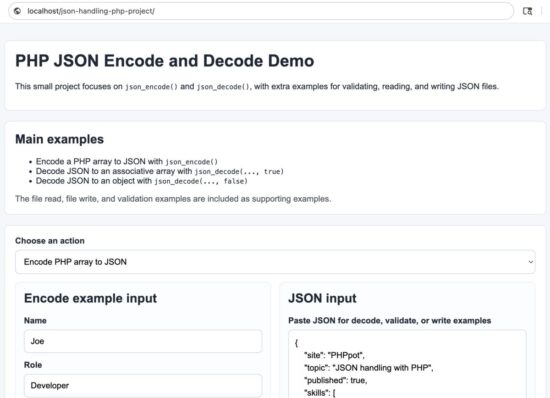
Reading a JSON file in PHP using file_get_contents and json_decode
Write JSON to a File in PHP
Writing JSON to a file is just as common as reading it. A typical flow is to prepare a PHP array, convert it with json_encode(), and save the result with file_put_contents().
<?php
declare(strict_types=1);

$data = [
    'name' => 'Joe',
    'email' => 'joe@example.com',
    'role' => 'Developer',
    'updated_at' => date('c')
];

$json = json_encode($data, JSON_PRETTY_PRINT | JSON_THROW_ON_ERROR);

$filePath = __DIR__ . '/data/user.json';

$result = file_put_contents($filePath, $json);

if ($result === false) {
    exit('Unable to write JSON to the file.');
}

echo 'JSON file written successfully.';
Using JSON_PRETTY_PRINT makes the saved file easier to inspect during development. It is especially helpful when the file is meant to be read by humans later.
Written JSON output
{
    "name": "Joe",
    "email": "joe@example.com",
    "role": "Developer",
    "updated_at": "2026-04-15T10:30:00+05:30"
}
When writing JSON files in a real project, make sure the target directory is writable. Also be careful when multiple requests may write to the same file at the same time. In that case, you may need file locking or a database instead of a plain JSON file.
If you are storing user-provided content before writing it to JSON, validate the incoming data first. JSON itself is only a format. It does not guarantee that the values inside it are correct or safe.
Validate JSON and Handle Errors Properly
One of the most important parts of JSON handling in PHP is error handling. Invalid JSON should not fail silently. That only makes debugging harder.
In older code, you will often see json_last_error() and json_last_error_msg() used after calling json_encode() or json_decode(). That still works, but modern PHP code is cleaner with JSON_THROW_ON_ERROR.
Recommended approach with JSON_THROW_ON_ERROR
<?php
declare(strict_types=1);

$json = '{"name":"Joe","email":"joe@example.com"}';

try {
    $data = json_decode($json, true, 512, JSON_THROW_ON_ERROR);
    echo $data['name'];
} catch (JsonException $e) {
    echo 'JSON error: ' . $e->getMessage();
}
This is the better pattern for production-style code. If the JSON is invalid, PHP throws a JsonException and you can handle it in one clear place.
Older approach with json_last_error_msg()
<?php
declare(strict_types=1);

$json = '{"name":"Joe","email":"joe@example.com",}';

$data = json_decode($json, true);

if (json_last_error() !== JSON_ERROR_NONE) {
    echo 'JSON error: ' . json_last_error_msg();
} else {
    echo $data['name'];
}
This approach is still useful when you work with legacy code, but for new code, JSON_THROW_ON_ERROR is easier to maintain.
Validate JSON before decoding
If your server runs on PHP 8.3 or later, you can use json_validate() when you only want to check whether a string is valid JSON.
<?php
declare(strict_types=1);

$json = '{"name":"Joe","email":"joe@example.com"}';

if (json_validate($json)) {
    echo 'Valid JSON';
} else {
    echo 'Invalid JSON';
}
This is useful when you want a quick validation check before decoding or storing the value. Still, in many cases, decoding with JSON_THROW_ON_ERROR is enough because it both parses and validates.
Security Considerations
JSON handling in PHP is usually straightforward, but there are still a few safety points worth keeping in mind.
- Do not trust decoded JSON automatically. Even if
json_decode()succeeds, the values inside the JSON may still be missing, malformed, or unsafe for your application logic. - Validate expected fields. Check required keys, data types, allowed values, and length limits before using the decoded data.
- Be careful when writing user input to JSON files. JSON is only a storage format. It does not sanitize the content for HTML output, database queries, or shell commands.
- Escape data when displaying it in HTML. If decoded JSON values are printed in a page, wrap them with
htmlspecialchars()to help prevent XSS issues. - Avoid executable shortcuts. Do not use risky patterns such as
eval()to turn user input into PHP data before encoding it as JSON. - Use file permissions carefully. If you store JSON in files, make sure the directory is writable only where needed and is not exposed carelessly.
For example, if you display a value from decoded JSON in HTML, do it safely:
<?php
declare(strict_types=1);

$data = json_decode('{"name":"<script>alert(1)</script>"}', true, 512, JSON_THROW_ON_ERROR);

echo htmlspecialchars($data['name'], ENT_QUOTES, 'UTF-8');
This prints the value as text instead of letting the browser treat it as HTML or script.
Common Errors and Fixes
When JSON handling fails in PHP, the problem is usually small but easy to miss. Here are some common issues and how to fix them.
1. Invalid JSON syntax
A missing quote, extra comma, or broken bracket can make the JSON invalid.
{"name":"Joe","email":"joe@example.com",}The trailing comma makes this invalid. Remove it before decoding.
2. Expecting an array but getting an object
By default, json_decode() returns an object. If your code uses array syntax, pass true as the second argument.
<?php
declare(strict_types=1);

$json = '{"name":"Joe"}';

$data = json_decode($json, true, 512, JSON_THROW_ON_ERROR);

echo $data['name'];
3. UTF-8 encoding problems
PHP JSON functions expect valid UTF-8 strings. If your source data has invalid encoding, encoding may fail.
<?php
declare(strict_types=1);

$value = mb_convert_encoding($value, 'UTF-8', 'UTF-8');
$json = json_encode($value, JSON_THROW_ON_ERROR);
If you work with external files or old data sources, encoding issues are worth checking early.
4. File read or write failure
If file_get_contents() or file_put_contents() fails, check the file path and permissions first. In many cases, the JSON code is fine, but the file path is wrong or the directory is not writable.
5. Decoded data does not contain the expected key
Even valid JSON can still miss fields. Always check before using a value.
<?php
declare(strict_types=1);

$data = json_decode('{"name":"Joe"}', true, 512, JSON_THROW_ON_ERROR);

if (isset($data['email'])) {
    echo $data['email'];
} else {
    echo 'Email key is missing.';
}
Developer FAQ
What is the difference between json_encode() and json_decode() in PHP?
json_encode() converts a PHP array or object into a JSON string. json_decode() converts a JSON string back into a PHP array or object.
Should I decode JSON into an array or an object?
It depends on how the rest of your PHP code is written. Many developers prefer associative arrays because they are easier to work with in common PHP projects. If you want an array, pass true as the second argument to json_decode().
How do I check if a JSON string is valid in PHP?
You can decode it with JSON_THROW_ON_ERROR inside a try and catch block. In PHP 8.3 and later, you can also use json_validate() for a quick validation check.
Why does json_decode() return null?
This usually happens because the JSON is invalid, empty, or not the value you expected. Use JSON_THROW_ON_ERROR or check json_last_error_msg() to see the actual reason.
Can I store JSON in a file using PHP?
Yes. Convert the PHP data into JSON with json_encode() and save it with file_put_contents(). To read it back, use file_get_contents() and json_decode().
Is JSON handling in PHP safe by default?
The JSON functions themselves are safe for encoding and decoding data, but the decoded values still need validation. If you display them in HTML, escape them properly. If you use them in database queries or file operations, validate them for that specific context.
Conclusion
JSON is a standard format for exchanging structured data, and PHP makes it easy to work with through json_encode() and json_decode(). Once you understand these two functions, you can handle most day-to-day JSON tasks with confidence.
In this tutorial, we covered how to encode PHP arrays into JSON, decode JSON into arrays or objects, read JSON from a file, write JSON back to a file, validate JSON, and handle common errors. These are the same patterns you will use in API responses, AJAX handlers, config files, and small data-storage tasks.
For new code, prefer JSON_THROW_ON_ERROR so problems do not fail silently. Also remember that valid JSON is not the same as trusted data. Always validate the decoded values before using them in your application.
Download Source Code
You can download the complete example project used in this tutorial here:
Download the PHP JSON Encode and Decode source code
The download includes practical examples for json_encode(), json_decode(), reading a JSON file, writing a JSON file, and validating JSON with clear error handling.

The best comprehensive, in-depth tutorial on JSON using PHP I have seen. In particular, the example codes are short and sweet. You are rocking.
Thank you Carell for the kind words!
Hey Vincy I learn a lot from tutorial
Thank you Pawan.
Great, I really like it! Youre awesome
Glad you like it Pablo! Thank you.
Would it be possible to add the JS solution if you include jQuery?
In this article, under the sub-heading “Read JSON via AJAX and Process”, there is a code snippet and it uses plain JavaScript solution without using jQuery. Is this what you are looking for?
This code will work irrespective of jQuery’s presence.
The transformation your blog is taking is phenomenal. I can see that things are changing exponentially. In-depth and detailed content, the narration style, everything is changing. This is how you start something, acquire knowledge, continuous improvement, take it to zenith. I must say, appreciations to you. Keep walking!
Thank you Jorge for the kind words.
It’s amazing how Vincy presents and tackles the content. I was already trying to implement JSON, but with this explanation and methods I can improve my applications.
Thank you Vincy!
Fred Zitha, from Mozambique.
Thank you Fred for the amazing words. Welcome.
This is amazing, super thanks for this Vincy.
You are most welcome, Frederick.
This is a great tutorial article on JSON. I particularly like the approach of the content presentation.
Thank you Okpara. You will see more of this kind of tutorials in the future. Keep reading.
This is great and useful article thanks for sharing your knowledge with us
Thank you Jeff.
awesome tutorial
Thank you Austin.
Everything thing you ever needed to process JSON, brilliant article!
Thank you Alan.
WOW. This is the best in-depth tutorial on JSON using PHP. Thank you
Thank you Srinivas.
Really great tutorial ! Thank you.
Welcome Marin.
how can I extract json data according to the payment status? Please help me. I have two status, Success and Failed. How can I conditionaly show the json data.
Decode the JSON, then check the payment status with an if condition.
$data = json_decode($json, true);
if ($data[‘payment_status’] === ‘Success’) {
echo ‘Show success data’;
} elseif ($data[‘payment_status’] === ‘Failed’) {
echo ‘Show failed data’;
}
If your JSON has multiple records, loop through them and check each status the same way. Paste your JSON structure if you want the exact code.
Great job on the tutorial. Your site is very comprehensive and easy to follow. Excellent Job!!!
Thank you Carl.
That was an amazing article! I’m learning a lot with what all of your articles, they are fantastic.
Thank you Alex
I want to update json file on server and multiple users can read that file same time. Is it good way or not in PHP?
Hi Nitin,
To assess it, we need more information. What kind of file is it? use case etc.
I really need this, thanks for your detailed information.
Welcome Ishant.
Thank-you Vincy – this is just a great article – superbly laid out and clear to understand. Thank-you
Welcome Jerry.
It helped, thanks
Welcome Loganathan
i have this array decoded and want to retrieve the value of WorkID… how can I do it?
Array
(
[message] =>
[RecordsStatus] => {“0”:{“WorkID”:”00090210″,”Message”:”Record Created”}}
)
Hi Laey,
The RecordsStatus value is still a JSON string, not a fully decoded PHP array yet. So first decode that part, then read WorkID.
$recordsStatus = json_decode($array[‘RecordsStatus’], true);
$workId = $recordsStatus[0][‘WorkID’];
echo $workId;
That should print:
00090210
If you want to be a little safer, check it like this:
$recordsStatus = json_decode($array[‘RecordsStatus’], true);
if (isset($recordsStatus[0][‘WorkID’])) {
echo $recordsStatus[0][‘WorkID’];
}
The reason is that your outer array is decoded, but RecordsStatus itself contains another JSON-encoded string.
That’s really very cool..
Thank you Michael.
This is the best article on PHP JSON in Internet. Thanks for your effort.
Welcome Kym.