JP7624975B2 - Method, computer program, user interface, and system for analyzing medical image data in virtual multi-user collaboration - Google Patents
Method, computer program, user interface, and system for analyzing medical image data in virtual multi-user collaboration Download PDFInfo
- Publication number
- JP7624975B2 JP7624975B2 JP2022513881A JP2022513881A JP7624975B2 JP 7624975 B2 JP7624975 B2 JP 7624975B2 JP 2022513881 A JP2022513881 A JP 2022513881A JP 2022513881 A JP2022513881 A JP 2022513881A JP 7624975 B2 JP7624975 B2 JP 7624975B2
- Authority
- JP
- Japan
- Prior art keywords
- user
- image data
- medical image
- workspace
- visualization
- Prior art date
- Legal status (The legal status is an assumption and is not a legal conclusion. Google has not performed a legal analysis and makes no representation as to the accuracy of the status listed.)
- Active
Links
Images




Classifications
-
- G—PHYSICS
- G16—INFORMATION AND COMMUNICATION TECHNOLOGY [ICT] SPECIALLY ADAPTED FOR SPECIFIC APPLICATION FIELDS
- G16H—HEALTHCARE INFORMATICS, i.e. INFORMATION AND COMMUNICATION TECHNOLOGY [ICT] SPECIALLY ADAPTED FOR THE HANDLING OR PROCESSING OF MEDICAL OR HEALTHCARE DATA
- G16H80/00—ICT specially adapted for facilitating communication between medical practitioners or patients, e.g. for collaborative diagnosis, therapy or health monitoring
-
- G—PHYSICS
- G06—COMPUTING OR CALCULATING; COUNTING
- G06F—ELECTRIC DIGITAL DATA PROCESSING
- G06F3/00—Input arrangements for transferring data to be processed into a form capable of being handled by the computer; Output arrangements for transferring data from processing unit to output unit, e.g. interface arrangements
- G06F3/01—Input arrangements or combined input and output arrangements for interaction between user and computer
- G06F3/011—Arrangements for interaction with the human body, e.g. for user immersion in virtual reality
- G06F3/012—Head tracking input arrangements
-
- G—PHYSICS
- G06—COMPUTING OR CALCULATING; COUNTING
- G06F—ELECTRIC DIGITAL DATA PROCESSING
- G06F3/00—Input arrangements for transferring data to be processed into a form capable of being handled by the computer; Output arrangements for transferring data from processing unit to output unit, e.g. interface arrangements
- G06F3/01—Input arrangements or combined input and output arrangements for interaction between user and computer
- G06F3/011—Arrangements for interaction with the human body, e.g. for user immersion in virtual reality
- G06F3/014—Hand-worn input/output arrangements, e.g. data gloves
-
- G—PHYSICS
- G06—COMPUTING OR CALCULATING; COUNTING
- G06F—ELECTRIC DIGITAL DATA PROCESSING
- G06F3/00—Input arrangements for transferring data to be processed into a form capable of being handled by the computer; Output arrangements for transferring data from processing unit to output unit, e.g. interface arrangements
- G06F3/01—Input arrangements or combined input and output arrangements for interaction between user and computer
- G06F3/017—Gesture based interaction, e.g. based on a set of recognized hand gestures
-
- G—PHYSICS
- G06—COMPUTING OR CALCULATING; COUNTING
- G06T—IMAGE DATA PROCESSING OR GENERATION, IN GENERAL
- G06T17/00—Three-dimensional [3D] modelling for computer graphics
- G06T17/10—Constructive solid geometry [CSG] using solid primitives, e.g. cylinders, cubes
-
- G—PHYSICS
- G06—COMPUTING OR CALCULATING; COUNTING
- G06T—IMAGE DATA PROCESSING OR GENERATION, IN GENERAL
- G06T19/00—Manipulating three-dimensional [3D] models or images for computer graphics
- G06T19/006—Mixed reality
-
- G—PHYSICS
- G06—COMPUTING OR CALCULATING; COUNTING
- G06T—IMAGE DATA PROCESSING OR GENERATION, IN GENERAL
- G06T19/00—Manipulating three-dimensional [3D] models or images for computer graphics
- G06T19/20—Editing of three-dimensional [3D] images, e.g. changing shapes or colours, aligning objects or positioning parts
-
- G—PHYSICS
- G06—COMPUTING OR CALCULATING; COUNTING
- G06T—IMAGE DATA PROCESSING OR GENERATION, IN GENERAL
- G06T7/00—Image analysis
- G06T7/0002—Inspection of images, e.g. flaw detection
- G06T7/0012—Biomedical image inspection
-
- G—PHYSICS
- G16—INFORMATION AND COMMUNICATION TECHNOLOGY [ICT] SPECIALLY ADAPTED FOR SPECIFIC APPLICATION FIELDS
- G16H—HEALTHCARE INFORMATICS, i.e. INFORMATION AND COMMUNICATION TECHNOLOGY [ICT] SPECIALLY ADAPTED FOR THE HANDLING OR PROCESSING OF MEDICAL OR HEALTHCARE DATA
- G16H30/00—ICT specially adapted for the handling or processing of medical images
- G16H30/20—ICT specially adapted for the handling or processing of medical images for handling medical images, e.g. DICOM, HL7 or PACS
-
- A—HUMAN NECESSITIES
- A61—MEDICAL OR VETERINARY SCIENCE; HYGIENE
- A61B—DIAGNOSIS; SURGERY; IDENTIFICATION
- A61B17/00—Surgical instruments, devices or methods
- A61B2017/00017—Electrical control of surgical instruments
- A61B2017/00216—Electrical control of surgical instruments with eye tracking or head position tracking control
-
- A—HUMAN NECESSITIES
- A61—MEDICAL OR VETERINARY SCIENCE; HYGIENE
- A61B—DIAGNOSIS; SURGERY; IDENTIFICATION
- A61B90/00—Instruments, implements or accessories specially adapted for surgery or diagnosis and not covered by any of the groups A61B1/00 - A61B50/00, e.g. for luxation treatment or for protecting wound edges
- A61B90/36—Image-producing devices or illumination devices not otherwise provided for
- A61B90/361—Image-producing devices, e.g. surgical cameras
- A61B2090/3612—Image-producing devices, e.g. surgical cameras with images taken automatically
-
- A—HUMAN NECESSITIES
- A61—MEDICAL OR VETERINARY SCIENCE; HYGIENE
- A61B—DIAGNOSIS; SURGERY; IDENTIFICATION
- A61B90/00—Instruments, implements or accessories specially adapted for surgery or diagnosis and not covered by any of the groups A61B1/00 - A61B50/00, e.g. for luxation treatment or for protecting wound edges
- A61B90/36—Image-producing devices or illumination devices not otherwise provided for
- A61B2090/364—Correlation of different images or relation of image positions in respect to the body
- A61B2090/365—Correlation of different images or relation of image positions in respect to the body augmented reality, i.e. correlating a live optical image with another image
-
- A—HUMAN NECESSITIES
- A61—MEDICAL OR VETERINARY SCIENCE; HYGIENE
- A61B—DIAGNOSIS; SURGERY; IDENTIFICATION
- A61B90/00—Instruments, implements or accessories specially adapted for surgery or diagnosis and not covered by any of the groups A61B1/00 - A61B50/00, e.g. for luxation treatment or for protecting wound edges
- A61B90/36—Image-producing devices or illumination devices not otherwise provided for
- A61B90/37—Surgical systems with images on a monitor during operation
- A61B2090/372—Details of monitor hardware
-
- A—HUMAN NECESSITIES
- A61—MEDICAL OR VETERINARY SCIENCE; HYGIENE
- A61B—DIAGNOSIS; SURGERY; IDENTIFICATION
- A61B90/00—Instruments, implements or accessories specially adapted for surgery or diagnosis and not covered by any of the groups A61B1/00 - A61B50/00, e.g. for luxation treatment or for protecting wound edges
- A61B90/50—Supports for surgical instruments, e.g. articulated arms
- A61B2090/502—Headgear, e.g. helmet, spectacles
-
- G—PHYSICS
- G06—COMPUTING OR CALCULATING; COUNTING
- G06T—IMAGE DATA PROCESSING OR GENERATION, IN GENERAL
- G06T2207/00—Indexing scheme for image analysis or image enhancement
- G06T2207/10—Image acquisition modality
- G06T2207/10072—Tomographic images
- G06T2207/10081—Computed x-ray tomography [CT]
-
- G—PHYSICS
- G06—COMPUTING OR CALCULATING; COUNTING
- G06T—IMAGE DATA PROCESSING OR GENERATION, IN GENERAL
- G06T2207/00—Indexing scheme for image analysis or image enhancement
- G06T2207/10—Image acquisition modality
- G06T2207/10072—Tomographic images
- G06T2207/10104—Positron emission tomography [PET]
-
- G—PHYSICS
- G06—COMPUTING OR CALCULATING; COUNTING
- G06T—IMAGE DATA PROCESSING OR GENERATION, IN GENERAL
- G06T2219/00—Indexing scheme for manipulating 3D models or images for computer graphics
- G06T2219/024—Multi-user, collaborative environment
-
- G—PHYSICS
- G06—COMPUTING OR CALCULATING; COUNTING
- G06T—IMAGE DATA PROCESSING OR GENERATION, IN GENERAL
- G06T2219/00—Indexing scheme for manipulating 3D models or images for computer graphics
- G06T2219/20—Indexing scheme for editing of 3D models
- G06T2219/2012—Colour editing, changing, or manipulating; Use of colour codes
-
- G—PHYSICS
- G06—COMPUTING OR CALCULATING; COUNTING
- G06T—IMAGE DATA PROCESSING OR GENERATION, IN GENERAL
- G06T2219/00—Indexing scheme for manipulating 3D models or images for computer graphics
- G06T2219/20—Indexing scheme for editing of 3D models
- G06T2219/2016—Rotation, translation, scaling
-
- G—PHYSICS
- G16—INFORMATION AND COMMUNICATION TECHNOLOGY [ICT] SPECIALLY ADAPTED FOR SPECIFIC APPLICATION FIELDS
- G16H—HEALTHCARE INFORMATICS, i.e. INFORMATION AND COMMUNICATION TECHNOLOGY [ICT] SPECIALLY ADAPTED FOR THE HANDLING OR PROCESSING OF MEDICAL OR HEALTHCARE DATA
- G16H30/00—ICT specially adapted for the handling or processing of medical images
- G16H30/40—ICT specially adapted for the handling or processing of medical images for processing medical images, e.g. editing
Landscapes
- Engineering & Computer Science (AREA)
- Health & Medical Sciences (AREA)
- Theoretical Computer Science (AREA)
- Physics & Mathematics (AREA)
- General Engineering & Computer Science (AREA)
- General Physics & Mathematics (AREA)
- Medical Informatics (AREA)
- General Health & Medical Sciences (AREA)
- Epidemiology (AREA)
- Nuclear Medicine, Radiotherapy & Molecular Imaging (AREA)
- Radiology & Medical Imaging (AREA)
- Primary Health Care (AREA)
- Public Health (AREA)
- Software Systems (AREA)
- Computer Graphics (AREA)
- Computer Hardware Design (AREA)
- Human Computer Interaction (AREA)
- Geometry (AREA)
- Architecture (AREA)
- Quality & Reliability (AREA)
- Computer Vision & Pattern Recognition (AREA)
- Biomedical Technology (AREA)
- Pathology (AREA)
- Measuring And Recording Apparatus For Diagnosis (AREA)
- Apparatus For Radiation Diagnosis (AREA)
- Medical Treatment And Welfare Office Work (AREA)
- Processing Or Creating Images (AREA)
Description
本発明は、仮想マルチユーザコラボレーションにおいて医用画像データを分析するための方法、該方法に関連するコンピュータプログラム、該方法で使用されるユーザインターフェース、および該方法を実行するように構成されたシステムに関する。 The present invention relates to a method for analyzing medical image data in a virtual multi-user collaboration, a computer program relating to the method, a user interface for use in the method, and a system configured to perform the method.
医用イメージング技術は、人体または動物の体の三次元(3D)、場合によっては四次元(4D)の医用画像データを提供する。しかし、通常、画像データは二次元(2D)画面上で観察および分析される。したがって、医用画像データが2D画面上で分析および解釈される場合、3Dまたは4Dで提供される医用画像データ上に表現される解剖学的構造間の相対的な空間的関係を誤解するおそれが常に存在する。具体的には、複数人からなる専門家のチームが同じ医用画像データを同時に分析している場合、空間的関係の理解および解釈を誤り、結果として誤った臨床判断が下されるおそれが高い。 Medical imaging technologies provide three-dimensional (3D) and sometimes four-dimensional (4D) medical image data of the human or animal body. However, the image data is typically viewed and analyzed on a two-dimensional (2D) screen. Therefore, when medical image data is analyzed and interpreted on a 2D screen, there is always a risk of misinterpreting the relative spatial relationships between anatomical structures depicted on the medical image data provided in 3D or 4D. Specifically, when a team of experts is analyzing the same medical image data simultaneously, there is a high risk of misunderstanding and misinterpreting the spatial relationships, resulting in incorrect clinical decisions.
マイクロプロセッサ、カメラ、およびセンサの分野における最近の発展により、手頃な価格の消費者向けVRヘッドセットが実現され、マスマーケットに広く受け入れられている。仮想現実(VR)テクノロジーは、仮想環境への完全な没入と3Dコンテンツの立体3D表現とをユーザに提供する。 Recent developments in the fields of microprocessors, cameras, and sensors have enabled affordable consumer VR headsets, which have been widely adopted by the mass market. Virtual reality (VR) technology provides users with complete immersion in a virtual environment and stereoscopic 3D representation of 3D content.
主にゲームおよびエンターテインメント業界によって推進されてきた、トラッキングされるヘッドセットとハンドコントローラ(合わせて18自由度)を介する非常に直感的な制御により、仮想物体と非常に自然にインタラクトすることができ、利便性や使いやすさが向上する。既存のマルチユーザVRアプリケーションはアバターベースであり、複数のユーザが同時に同じシーンにいる状態で、例えば物体のモデルを操作することができる。残念ながら、これらのアバターベースのマルチユーザソリューションは、仮想3Dデータセット、物体(例えば、切断面)、および測定値を有意義かつ時間効率的に評価することが求められる専門的な医用VRコラボレーションのより厳しい要件に十分に適合していない。また、既知の技術は、個別に3Dコンテンツを分析および評価する必要がある専門家のユーザ(例えば、臨床医)には不適当であるように思われる。したがって、VRの可能性を最大限に活用することができ、かつ、同一の3Dデータセットに対して複数人の臨床医が、VR環境が提供する全ての利点とともに効率的かつ同時に作業することを可能にするマルチユーザVRコラボレーションソリューションが望まれている。さらに、専門家ユーザチームのコラボレーション効率を高めるために、各ユーザによる分析および評価の結果を双方向的に、および自動的に共有することが望ましいであろう。 The highly intuitive control via tracked headsets and hand controllers (total 18 degrees of freedom), driven mainly by the gaming and entertainment industry, allows a very natural interaction with virtual objects, improving convenience and ease of use. Existing multi-user VR applications are avatar-based, allowing multiple users to simultaneously be in the same scene, e.g., manipulating a model of an object. Unfortunately, these avatar-based multi-user solutions do not adequately fit the more demanding requirements of professional medical VR collaboration, which requires meaningful and time-efficient evaluation of virtual 3D datasets, objects (e.g., cut surfaces), and measurements. Also, known techniques seem inappropriate for expert users (e.g., clinicians) who need to analyze and evaluate 3D content individually. Therefore, a multi-user VR collaboration solution is desired that can fully exploit the potential of VR and allows multiple clinicians to work efficiently and simultaneously on the same 3D dataset with all the advantages that the VR environment offers. Furthermore, it would be desirable to share the results of the analysis and evaluation by each user bidirectionally and automatically in order to increase the collaboration efficiency of a team of expert users.
David W.Shattuckは、“VR-framework for multiuser virtual reality environment for visualizing neuroimaging data”、Healthcare Technology Letters、受付日:2018年8月13日、受領日:2018年8月20日において、1人のユーザがサーバとしてシステム表示を管理するクライアントサーバモデルを利用することで、VRフレームワークが、同じ仮想空間内で動作する複数人の同時ユーザをサポートできると述べている。各ユーザのVR環境は、ユーザのヘッドセットに接続された個々のネットワークコンピュータによって駆動される。各クライアントコンピュータは、ローカルドライブまたは共有ネットワークドライブ上に存在する、表示されるデータのコピーへのアクセスを有し得る。サーバはTCP/IPポートでクライアントをリッスンし、各クライアントとのネットワーク接続を確立する。クライアントが接続されると、サーバは、ビュー状態情報を有する小さなデータオブジェクトを定期的に送信し、各クライアントはこの情報を用いて表示を更新する。このオブジェクトは、回転、スケール、ボリューム位置、および切断面など、ビューを同期させるために必要なデータを含む。各クライアントは、ヘッドセットおよびコントローラのための姿勢情報をサーバに送信し、サーバは、これらの情報を表示のために他のクライアントにブロードキャストする。個々のクライアントビューには、システム内の他のユーザのヘッドセットおよびコントローラのモデルがレンダリングされる。これは、ユーザが互いに直接インタラクトすることを可能にするとともに、共有物理空間で作業するユーザ間の現実世界での衝突を回避するのにも役立つ。 David W. Shattuck, in "VR-framework for multiuser virtual reality environment for visualizing neuroimaging data," Healthcare Technology Letters, received August 13, 2018, accepted August 20, 2018, states that a VR framework can support multiple simultaneous users operating in the same virtual space by utilizing a client-server model in which one user manages the system display as a server. Each user's VR environment is driven by an individual networked computer connected to the user's headset. Each client computer may have access to a copy of the data to be displayed that resides on a local drive or a shared network drive. The server listens for clients on a TCP/IP port and establishes a network connection with each client. Once connected, the server periodically sends a small data object with view state information, which each client uses to update its display. This object contains the data necessary to synchronize the views, such as rotation, scale, volume position, and cut plane. Each client sends pose information for its headset and controllers to the server, which broadcasts this information to other clients for display. Models of the headsets and controllers of other users in the system are rendered in the individual client views. This allows users to interact directly with each other, and also helps to avoid real-world collisions between users working in a shared physical space.
Klaus Engelは、“Texture-based Volume Visualization for Multiple Users on the World Wide Web”において、放射線データへのリモートアクセスを可能にし、マルチユーザ環境をサポートするテクスチャベースのボリューム視覚化ツールを開示している。このツールは、異種ネットワークにおいて三次元医用ボリュームデータセットの共有表示および共有操作を可能にする。サーバから複数の異なるクライアントマシンにボリュームデータセットが送信され、JAVA(登録商標)対応Webブラウザを使用してローカルに視覚化される。ネットワークトラフィックを削減するために、データ削減および圧縮スキームが提案されている。このアプリケーションは、インタラクティブに動かすことができる視点依存および直交クリッピング平面を可能にする。クライアント側では、ユーザは視覚化セッションに参加し、視点および他の視覚化パラメータを同期することによって、ボリュームデータセットに対する同じビューを得ることができる。視覚化された表示にタグを配置することによって、他のユーザのためにデータセットの興味深い部分にマークを付けることができる。コラボレーションをサポートするために、ユーザはチャットアプレットを用いて、または既存のビデオ会議ツールを使用することによって通信を行う。 In "Texture-based Volume Visualization for Multiple Users on the World Wide Web", Klaus Engel discloses a texture-based volume visualization tool that allows remote access to radiological data and supports a multi-user environment. The tool allows shared viewing and manipulation of three-dimensional medical volume datasets in a heterogeneous network. Volume datasets are transmitted from a server to several different client machines and visualized locally using JAVA-enabled web browsers. To reduce network traffic, data reduction and compression schemes are proposed. The application allows viewpoint-dependent and orthogonal clipping planes that can be interactively moved. On the client side, users can join a visualization session and obtain the same view on the volume dataset by synchronizing the viewpoint and other visualization parameters. Interesting parts of the dataset can be marked for other users by placing tags on the visualized display. To support collaboration, users communicate using a chat applet or by using existing video conferencing tools.
Dieter Schmalstiegは、“Bridging Multiple User Interface Dimensions with Augmented Reality”において、プロダクティビティ環境に真の3Dインタラクションを組み込むために共同拡張現実を使用する実験的ユーザインターフェースシステムを開示している。このコンセプトは、複数のユーザ、複数のホストプラットフォーム、複数のディスプレイタイプ、複数の並行アプリケーション、およびマルチコンテキスト(すなわち、3Dドキュメント)インターフェースを異種分散環境に含めることによって複数のユーザインターフェース次元をブリッジすることに拡張される。コンテキストは、ライブアプリケーションを3D(視覚的)データおよび他のデータとともにカプセル化し、一方、ロケールは幾何学的参照系を編成するために使用される。幾何学的関係(ロケール)を意味的関係(コンテキスト)から分離することにより、ディスプレイの構成に大きな柔軟性がもたらされる。複数のユーザが別々のホストで作業している。複数のユーザはコンテキストを共有できるが、スクリーンフォーマットや個人的な好みに応じてコンテキスト表現(3Dウィンドウ)を任意にレイアウトできる。これは、3Dウィンドウの位置はロケール境界を越えて共有されないことから、別々のロケールを定めることで可能になる。言い換えれば、1つの共有物体を複数のユーザが異なる視点から見ることができる。 In "Briding Multiple User Interface Dimensions with Augmented Reality," Dieter Schmalstieg discloses an experimental user interface system that uses collaborative augmented reality to incorporate true 3D interaction into a productivity environment. This concept is extended to bridging multiple user interface dimensions by including multiple users, multiple host platforms, multiple display types, multiple concurrent applications, and multi-context (i.e., 3D document) interfaces in a heterogeneous, distributed environment. Contexts encapsulate live applications with 3D (visual) and other data, while locales are used to organize geometric reference systems. Separating geometric relations (locales) from semantic relations (contexts) allows great flexibility in the composition of displays. Multiple users are working on separate hosts. Multiple users can share a context, but can arbitrarily lay out the context representation (3D window) according to screen format and personal preferences. This is possible by defining separate locales, since the 3D window position is not shared across locale boundaries. In other words, multiple users can view a single shared object from different viewpoints.
EP3496046A1は、少なくとも2人のインタラクティブ観察者のグループのために、少なくとも1つの表示媒体上に医用画像データを表示する方法に関する。方法は、患者の特定の検査領域の少なくとも1つの3Dまたは4D画像データセットを含む医用画像データを提供するステップと、インタラクティブな仮想環境において医用画像データを表示する可能性を提供するステップとを有し、各インタラクティブ観察者は各自の仮想位置を有する。また、各インタラクティブ観察者は、他の観察者から独立して、自分の仮想位置、および任意選択で自分の視線角度を変更することができる。 EP 3496046 A1 relates to a method for displaying medical image data on at least one display medium for a group of at least two interactive observers. The method comprises the steps of providing medical image data comprising at least one 3D or 4D image dataset of a particular examination area of a patient and providing the possibility to display the medical image data in an interactive virtual environment, each interactive observer having his own virtual position. Also, each interactive observer can change his virtual position and optionally his line of sight angle independently of the other observers.
US2014/0033052A1はホログラムを表示するための方法およびシステムを開示している。1つの例示的な実施形態は、光源と、光源から画像生成ユニットに接近する光との相互作用により画像を生成する画像生成ユニットと、接眼レンズと、画像からの光を接眼レンズの表面に向けるミラーとを備えるシステムを提供する。接眼レンズの表面は、平面曲線を回転軸を中心に少なくとも180°回転させることによって形成された回転体の形状を有する。結果として、様々な側面から見ることができるホログラムが生成される。さらに、ホログラムはユーザによって操作され得る。 US 2014/0033052 A1 discloses a method and system for displaying a hologram. One exemplary embodiment provides a system comprising a light source, an image generating unit that generates an image by interaction with light approaching the image generating unit from the light source, an eyepiece, and a mirror that directs light from the image to a surface of the eyepiece. The surface of the eyepiece has the shape of a body of revolution formed by rotating a plane curve at least 180° about an axis of rotation. As a result, a hologram is generated that can be viewed from various sides. Furthermore, the hologram can be manipulated by a user.
しかし、上記問題は解決されておらず、すなわち、1人以上のユーザのコマンドに基づいてユーザの分析結果をユーザ間でアクティブに共有する必要があるため、コラボレーションの効率は大きく向上されない。結果として、他のユーザが取得した関連情報をユーザに提供するのに反復的な作業工程が必要になる。 However, the above problem is not solved, i.e., the efficiency of collaboration is not significantly improved because users' analysis results need to be actively shared among users based on the commands of one or more users. As a result, repetitive work processes are required to provide a user with relevant information obtained by other users.
したがって、本発明は、各ユーザが自身のワークスペースにおいて医用画像データの視覚化を完全に管理すると同時に、コラボレーションの効率は高く保たれる、すなわち、専門家ユーザチームが同じ医用画像データについて同時に作業することができる、仮想マルチユーザコラボレーションにおいて医用画像データを分析するための方法を提供することを目的とする。本発明の他の目的によれば、個々の作業の選択可能な部分がユーザ間で自動的に共有され得る。本発明はまた、それぞれのコンピュータプログラム、上記方法の実行に使用されるように構成されたユーザインターフェース、およびユーザが依然として医用画像データの視覚化を完全に管理することを可能にする、3D医用画像データとインタラクトするための仮想コラボレーションのためのシステムを提供することを目的とする。 The present invention therefore aims to provide a method for analyzing medical image data in a virtual multi-user collaboration, where each user has full control over the visualization of the medical image data in his or her own workspace, while at the same time the efficiency of the collaboration remains high, i.e. a team of expert users can work simultaneously on the same medical image data. According to another object of the present invention, selectable parts of the individual works can be automatically shared between the users. The present invention also aims to provide a system for virtual collaboration for interacting with 3D medical image data, with respective computer programs, a user interface configured to be used for the execution of the above method, and a system for virtual collaboration for interacting with 3D medical image data, which still allows the users to have full control over the visualization of the medical image data.
上記懸念のうちの1つまたは複数に対してより良い対処をするために、本発明の第1の態様では、請求項1において医用画像データを分析するための方法が提示される。従属請求項には有用な実施形態が記載されている。
To better address one or more of the above concerns, in a first aspect of the present invention, a method for analysing medical image data is presented in
この第1の態様によれば、本発明は、仮想マルチユーザコラボレーションにおいて医用画像データを分析するための方法を対象とし、
医用画像データは少なくとも2人のユーザによって分析され、
各ユーザは独自のワークスペースを有し、ワークスペースはXRワークスペースであり、
方法は、
3Dまたは4D画像情報を含む医用画像データを提供するステップと、
医用画像データを各ユーザのワークスペースにロードし、医用画像データの視覚化表現を各ユーザに同時に表示するステップと、
各ユーザが、個別に、そして互いに独立して、医用画像データの視覚化表現を変更し、各ユーザの各ワークスペースにおいて医用画像データの個別視覚化表現を得ることを可能にするステップと、
少なくとも1人のユーザが、自身のワークスペースにおいて医用画像データの分析プロセスを実行することを可能にするステップと、
分析プロセスが実行されたワークスペースにおいて分析プロセスの結果を表示するステップと、
分析プロセスの結果を少なくとも1つの他のワークスペースとリアルタイムで同期させることで、各ワークスペースが、医用画像データのそれぞれの個別視覚化表現において分析プロセスの結果を表示するステップとを含む。
According to this first aspect, the invention is directed to a method for analysing medical image data in a virtual multi-user collaboration, comprising:
The medical image data is analyzed by at least two users;
Each user has their own workspace, the workspace being an XR workspace;
The method is:
Providing medical image data including 3D or 4D image information;
loading the medical image data into each user's workspace and simultaneously displaying a visualization of the medical image data to each user;
- enabling each user individually and independently of the other users to modify the visualization of the medical image data to obtain an individual visualization of the medical image data in each workspace of each user;
- enabling at least one user to perform an analysis process of medical image data in his/her workspace;
displaying results of the analytical process in the workspace in which the analytical process was executed;
and synchronizing the results of the analytical process with at least one other workspace in real time such that each workspace displays the results of the analytical process in a respective individual visualization of the medical image data.
本発明のコンテキストにおいて、XRとの用語は、少なくとも仮想現実(VR)、拡張現実(AR)、複合現実(MR)、およびシネマティックリアリティ(CR)を含む総称であるXリアリティまたはクロスリアリティを表す。XRは、テクノロジーによって実装される、しばしば現実世界の物体と組み合わせられる仮想環境、または、現実世界と仮想環境もしくは物体との組み合わせの体験として定められる。Xリアリティは、仮想現実(VR)、複合現実(MR)、拡張現実(AR)、シネマティックリアリティ(CR)のためのコンテンツ作成を可能にする多様なハードウェアおよびソフトウェア、例えば感覚インターフェース、アプリケーション、およびインフラストラクチャなどを包含する。ユーザはこれらのツールを使用して、デジタルな物体を物理的な世界に持ち込み、物理的な世界の物体をデジタルな世界に持ち込むことによって新しい形の現実を生成する。本明細書では、XRはVR、AR、またはMRなどの様々なテクノロジーを指す。多くの場合、Xリアリティを提供するために、特に、左右の目に対してわずかに異なる画像を表示する画面またはメガネを使用することによって、描写される構造の真の三次元体験を提供するコンピュータ生成視覚化表現が実現される。また、多くの場合、ユーザはジェスチャーやその他の動作、例えばXR内を歩き回ったり、仮想物体を掴むことによってXRとインタラクトし得る。本発明のXRは特に視覚的フィードバックを提供し得るが、他のタイプの感覚フィードバック、例えば聴覚または触覚フィードバックをユーザに提供してもよい。好ましくは、本発明のXRは、ユーザに感覚フィードバックを提供するために、ユーザのジェスチャー(例えば、ユーザの指、腕、脚、および/または頭のジェスチャー)または動きのみを入力として使用する。特に、本発明は、ユーザに上記フィードバックを提供するためにアイトラッカーを必要としない可能性がある。すなわち、本発明の視覚化表現は、そのようなアイトラッカーを設ける必要なく、複数の異なる視点位置からユーザに示され得る。 In the context of the present invention, the term XR refers to X-reality or cross-reality, a collective term that includes at least virtual reality (VR), augmented reality (AR), mixed reality (MR), and cinematic reality (CR). XR is defined as the experience of a virtual environment, often combined with real-world objects, or a combination of real and virtual environments or objects, implemented by technology. X-reality encompasses a variety of hardware and software, such as sensory interfaces, applications, and infrastructure, that enable content creation for virtual reality (VR), mixed reality (MR), augmented reality (AR), and cinematic reality (CR). Users use these tools to create new forms of reality by bringing digital objects into the physical world and physical objects into the digital world. In this specification, XR refers to various technologies such as VR, AR, or MR. To provide X-reality, computer-generated visualization representations are often realized that provide a true three-dimensional experience of the depicted structure, especially by using screens or glasses that display slightly different images for the left and right eyes. Also, in many cases, the user may interact with the XR by gestures and other actions, such as walking around in the XR or grabbing virtual objects. The XR of the present invention may provide in particular visual feedback, but may also provide other types of sensory feedback to the user, such as auditory or haptic feedback. Preferably, the XR of the present invention uses only the user's gestures (e.g., gestures of the user's fingers, arms, legs, and/or head) or movements as input to provide the user with sensory feedback. In particular, the present invention may not require an eye tracker to provide said feedback to the user. That is, the visualization of the present invention may be shown to the user from multiple different viewpoint positions without the need to provide such an eye tracker.
VRでは、通常、現実環境はユーザには見えず、仮想世界で完全に覆われている。この効果は通常、目の前方に配置される小さな画面を備えたヘッドマウントディスプレイからなるVRヘッドセットによって作成されるが、複数の大きな画面を備えた特別に設計された部屋によって作成することも可能である。仮想現実機器を使用している人は、人工世界を見回したり、人工世界の中で動き回ったり、仮想のフィーチャまたはアイテムとインタラクトしたりすることができる。 In VR, the real environment is usually invisible to the user and is completely covered by the virtual world. This effect is usually created by a VR headset, which consists of a head-mounted display with a small screen placed in front of the eyes, but can also be created by specially designed rooms with multiple larger screens. The person using the virtual reality equipment can look around the artificial world, move around in it, and interact with virtual features or items.
一般に、複合現実(MR)は現実世界と仮想世界を融合させて作られる新しい環境および視覚化表現であり、物理的な物体とデジタルな物体がリアルタイムで共存し、インタラクトする。より具体的には、MRは、テクノロジーによって作成される、仮想物体と組み合わせられた現実環境の体験として定められ、例えば、VRヘッドセットがヘッドセットのカメラを使用して、少なくとも部分的に現実環境に対応する仮想現実を作成する。したがって、仮想物体が現実環境の正しい位置に重ねられ、場合によっては現実の物体を隠したり、逆に隠されたりし得る。ARでは引き続き現実世界を見ることができ、現実環境の上に仮想物体が重ねられる(すなわち、被せられる)。この効果は、ユーザが現実環境を見ることを可能にするが、メガネを介して仮想物体を現実環境上に重ねることができるよう、カメラを使用して現実環境の3Dモデルを形成する、Microsoft HoloLensなどの特殊なメガネによって作成され得る。 In general, mixed reality (MR) is a new environment and visualization that blends the real and virtual worlds, where physical and digital objects coexist and interact in real time. More specifically, MR is defined as the experience of a real environment combined with virtual objects created by technology, for example, a VR headset uses the headset's camera to create a virtual reality that at least partially corresponds to the real environment. Thus, virtual objects are overlaid in the correct position on the real environment, and may even hide real objects or be hidden by them. In AR, the real world can still be seen, and virtual objects are overlaid (i.e., overlaid) on top of the real environment. This effect can be created by special glasses, such as Microsoft HoloLens, that allow the user to see the real environment, but use a camera to create a 3D model of the real environment so that virtual objects can be overlaid on the real environment through the glasses.
したがって、MRまたはARは、表示される視覚化表現の背景として現実環境を含み得る。例えば、それぞれARメガネをかけている2人のユーザが同じ部屋におり、両ユーザは医用画像データの独自の個別ビューを有しつつ(すなわち、各ユーザが医用画像データの独自の視覚化表現を有しつつ)、現実世界およびARにおいて互いにインタラクトすることができる。 Thus, MR or AR may include the real environment as a backdrop for the displayed visualization. For example, two users, each wearing AR glasses, can be in the same room and interact with each other in the real world and in AR, while both users have their own individual views of the medical image data (i.e., each user has their own visualization of the medical image data).
視覚化表現は、現実の物体(例えば、人間または動物の心臓)をかたどったもの(すなわち、画像)であり得る。すなわち、視覚化表現は現実の物体を表すモデルであり、視覚化表現のパラメータは現実の物体に対して変更され得る(例えば、大きさ、コントラスト、色、部分的に拡大された領域など)。医用画像データを視覚化するために、ボリュームレイキャスティングの技術が使用されてもよい。この技術では所望の画素ごとに光線が生成される。単純なカメラモデルを使用すると、光線はカメラの投影中心(通常は視点位置またはアイポイント)から出発し、カメラとレンダリングされるボリュームとの間に浮かぶ仮想平面上の画素を通過する。光線は、一定の、または調整される間隔で、ボリューム全体にわたりサンプリングされる。データは各サンプル点で補間され、伝達関数を適用することでRGBAサンプルが形成され、その結果が光線の累積RGBAに加えられ、光線がボリュームを出るまでこのプロセスが繰り返される。このプロセスを画面上の全てのピクセルに対して繰り返することで完全な視覚化表現が形成される。 The visualization may be a representation (i.e., an image) of a real object (e.g., a human or animal heart). That is, the visualization is a model that represents the real object, and the parameters of the visualization may be modified relative to the real object (e.g., size, contrast, color, partially magnified areas, etc.). To visualize medical image data, the technique of volume ray casting may be used. In this technique, a ray is generated for each desired pixel. Using a simple camera model, the ray starts from the camera's center of projection (usually the viewpoint or eyepoint) and passes through a pixel on an imaginary plane that hovers between the camera and the volume to be rendered. The ray is sampled throughout the volume at fixed or adjustable intervals. The data is interpolated at each sample point and a transfer function is applied to form an RGBA sample, which is added to the accumulated RGBA of the ray, and the process is repeated until the ray leaves the volume. The complete visualization is formed by repeating this process for all pixels on the screen.
例えば、医用画像データはボリュームレンダリングを使用して視覚化され得る。視覚化表現のボリュームレンダリングは、参照により本明細書に援用される、Charles H.HansenおよびChristopher R.Johnsonによって編集された“The Visualization Handbook”、Elsevier Butterworth Heinemann(2005)、特に、127頁から始まるArie Kaufmannによる“Overview of Volume Rendering”の章に記載されている技術によって実施され得る。 For example, medical image data may be visualized using volume rendering. Volume rendering of the visualization representation may be performed by techniques described in "The Visualization Handbook", edited by Charles H. Hansen and Christopher R. Johnson, Elsevier Butterworth Heinemann (2005), in particular the chapter "Overview of Volume Rendering" by Arie Kaufmann beginning on page 127, which is incorporated herein by reference.
技術的には、XRは、ユーザに立体画像を提示することによって実現され、すなわち、左右の目に対して異なる画像が表示され、脳は2つの異なる画像を組み合わせて真の三次元シーンを作成する。このような両眼画像は任意のXRディスプレイ上に、例えば、VRヘッドセット、ARメガネ、もしくはマルチプロジェクション環境、またはシャッターメガネとともに使用される、2つの画像を断続的に表示する画面上に表示され得る。XRにおいて、視覚化表現は立体視レンダリングによって表示され得る。視覚化表現は、わずかな空間オフセットを有する2つの視点位置、すなわち、左眼用の1つの視点位置および右眼用の1つの視点位置のために2度計算される。このように計算された2つの視覚化表現が、例えばVRヘッドセットにおいて、ユーザの左右の目に対してそれぞれ表示されると、ユーザは真の三次元(VR)であるという印象を受ける。これにより、XRにおいて視覚化表現を変換、観察、および分析することができる。XRは、XRを使用しているユーザが人工世界を見回したり、人工世界の中で動き回ったり、仮想の物体、フィーチャ、またはアイテムとインタラクトすることを可能にする。この効果は通常、左右の目の前方に配置される小さな画面を有するヘッドマウントディスプレイを備えたXRヘッドセットによって作成されるが、複数の大きな画面を備えた特別に設計された部屋によって作成することも可能である。ユーザがXR内を動き回るには、視覚化表現がユーザの頭の動きに合わせて動くよう、ヘッドセットによって位置および向きの情報をXR生成電子デバイス(例えば、コンピュータ)に送信する必要がある。 Technically, XR is realized by presenting the user with stereoscopic images, i.e., different images are displayed for the left and right eyes, and the brain combines the two different images to create a true three-dimensional scene. Such binocular images can be displayed on any XR display, for example on a VR headset, AR glasses, or a screen that displays two images intermittently, used in a multi-projection environment, or with shutter glasses. In XR, visualizations can be displayed by stereoscopic rendering. A visualization is calculated twice for two viewpoint positions with a slight spatial offset, i.e., one viewpoint position for the left eye and one viewpoint position for the right eye. When the two visualizations calculated in this way are displayed for the left and right eyes of the user, respectively, in a VR headset, the user gets the impression of being in true three-dimensionality (VR). This allows the visualizations to be transformed, observed, and analyzed in XR. XR allows a user using XR to look around and move around in the artificial world, and to interact with virtual objects, features, or items. This effect is typically created by an XR headset with a head-mounted display with small screens placed in front of each eye, but can also be created by a specially designed room with multiple larger screens. For a user to move around in an XR, the headset must transmit position and orientation information to an XR generating electronic device (e.g., a computer) so that the visualization follows the user's head movements.
医用画像データは、各XRワークスペースにおいて視覚化表現として視覚化されるように動的にレンダリング(例えば、ボリュームレンダリングまたはサーフェスレンダリング)され得る。より詳細には、ボリュームレンダリングは、空間強度データ(すなわち、ボクセルデータ)に基づき得る。医用画像データの解像度に応じて、空間内の各点または空間内の領域について強度データが存在し得る。言い換えれば、ボリュームレンダリングでは利用可能な各画像データ情報がレンダリングされ、かなり高い計算能力が必要とされる。一方、サーフェスレンダリングでは1つの「レイヤー」(すなわち、可視表面)のみがレンダリングされ、レイヤーの背後に存在する画像データはレンダリングされない。サーフェスレンダリングされた医用画像データは、複数の三角形の表面からなるコンピュータグラフィカルモデルであり得る。その結果、サーフェスレンダリングの場合、要求される計算能力はより少ない。十分な視覚化データ密度を提供しつつ、レンダリング処理中の効率を高めるために、関心領域はボリュームレンダリングの方法を使用してレンダリングし、周辺領域はサーフェスレンダリングの方法を使用してレンダリングするように両技術が組み合わせられてもよい。 The medical image data may be dynamically rendered (e.g., volume rendering or surface rendering) to be visualized as a visualization representation in each XR workspace. More specifically, volume rendering may be based on spatial intensity data (i.e., voxel data). Depending on the resolution of the medical image data, there may be intensity data for each point in space or for a region in space. In other words, volume rendering renders each available image data information, requiring a fairly high computational power. On the other hand, surface rendering renders only one "layer" (i.e., the visible surface) and does not render the image data present behind the layer. The surface rendered medical image data may be a computer graphical model consisting of multiple triangular surfaces. As a result, less computational power is required for surface rendering. To increase efficiency during the rendering process while providing sufficient visualization data density, both techniques may be combined, with the region of interest being rendered using volume rendering methods and the surrounding region being rendered using surface rendering methods.
ある好ましい実施形態では、医用画像データはボリュームレンダリング物体を使用して視覚化され、これは、より複雑な解剖学的構造または非常に個別な構造、例えば弁尖、狭窄、石灰化、バイオプロテーゼ、もしくは腱索断裂などに適しているという利点を有する。代わりにまたは追加で、医用画像データは、解剖学的構造の少なくとも一部の動的なコンピュータ生成モデルを使用して視覚化されてもよい。このようなモデルは、解剖学的構造のより単純なバージョン/抽象化を示すという利点、解剖学的構造のナビゲーションおよび解釈を容易にするという利点、および医用画像データの品質にあまり依存しないという利点を有する。モデル(すなわち、解剖学的構造を簡略化したもの)は、解剖学的構造内の特定の界面、例えば血管または心腔の血液-組織界面の三角形メッシュ表面モデルであり得る。モデルは、各フレームの線または表面を張る複数の点を含み得る。また、モデルは数学モデル、例えば、スプライン曲線によって張られた表面または立体などのパラメータ化されたモデルであり得る。モデルは動的であり。すなわち、モデルは期間にわたり解剖学的構造の動きに追従する。動的モデルの目的は、過度に多い細部によってユーザの視界を遮ることなく、解剖学的構造の少なくとも一部、例えば動いている心臓の1つまたは複数の心腔を視覚化することである。したがって、そのような簡略化されたモデルは、例えば、解剖学的構造の特定の部分についてインターベンションの計画を立てたり、測定を行ったりする際にユーザに指針を提供するのに有用である。動的3Dモデルの3D視覚化表現は、典型的には、動的形状またはサーフェスモデルのレンダリングであり、レンダリングは、シェーディング、レイキャスティング、およびアンビエントオクルージョンなどのコンピュータグラフィックスで実現可能な技術によって実行され得る。ボリュームレンダリングは、例えば、参照により本明細書に援用されるUS2005/0253841A1に記載されているような当該技術分野で知られている任意のボリュームレンダリング技術によって実行され得る。 In a preferred embodiment, the medical image data is visualized using a volume-rendered object, which has the advantage of being suitable for more complex anatomical structures or very individual structures, such as valve leaflets, stenosis, calcifications, bioprostheses, or ruptured chordae. Alternatively or additionally, the medical image data may be visualized using a dynamic computer-generated model of at least a part of the anatomical structure. Such a model has the advantages of showing a simpler version/abstraction of the anatomical structure, of facilitating navigation and interpretation of the anatomical structure, and of being less dependent on the quality of the medical image data. The model (i.e., a simplified version of the anatomical structure) may be a triangular mesh surface model of a particular interface within the anatomical structure, for example, the blood-tissue interface of a blood vessel or a heart chamber. The model may include a number of points that span a line or surface in each frame. The model may also be a mathematical model, for example, a parameterized model such as a surface spanned by a spline curve or a volume. The model is dynamic, i.e., the model follows the movement of the anatomical structure over a period of time. The purpose of the dynamic model is to visualize at least a part of the anatomy, e.g., one or more chambers of a moving heart, without obscuring the user's view with too much detail. Such simplified models are therefore useful for providing guidance to a user, for example, in planning an intervention or taking measurements on a particular part of the anatomy. The 3D visualization representation of the dynamic 3D model is typically a rendering of the dynamic shape or surface model, which may be performed by computer graphics feasible techniques such as shading, ray casting, and ambient occlusion. Volume rendering may be performed by any volume rendering technique known in the art, for example, as described in US 2005/0253841 A1, which is incorporated herein by reference.
また、医用画像データは解剖学的構造の情報を含み、解剖学的構造は、人体または動物の体の器官または器官の一部、例えば心臓であってもよく、血管または骨構造であってもよい。より詳細には、医用画像データは、3D座標系内の点を含む3D散布図を含み、ここで、各点は3D座標系内に各自のx、y、およびz成分を有する。上記で概説されたものに加えて、医用画像データはデジタル画像データ、例えばDICOM規格のデジタル画像データ、すなわち、ボクセルの3次元アレイを含み、各ボクセルがグレースケール値を有するデジタル画像データを含み得る。そのような医用データ(3D医用画像)は、MR、コンピュータ断層撮影(CT)、ポジトロン断層撮影(PET)、または超音波(US)などの医用イメージングモダリティを使用して、動的解剖学的構造を含む視野から取得され得る。解剖学的構造が心臓である場合、超音波、特に三次元心エコーが好適に使用され得る。すなわち、異なる医用画像データは、異なる周波数を有する超音波画像、異なる加速電圧を有するコンピュータ断層撮影、または造影剤を含む/含まない画像から導出され得る。さらに、医用画像データは4D医用画像データを含み、ここで、第4の次元は時間である。以下、4D医用画像を形成する3D画像の時系列からの1つの3D画像は「フレーム」とも呼ばれ得る。すなわち、4D医用画像データは時間経過に伴う3D画像の視覚化表現を含み、つまり、視覚化表現のシーケンスが、例えば60~100の視覚化表現/秒のフレームレートで動的に表示される。すなわち、4D医用画像データは、例えば患者の胸部の動作を視覚化するために、動画として(すなわち、シネモードで)視覚化され得る。4D医用画像データが視覚化される場合、シーケンスは映画のようにレンダリングされ得る。動的に動く解剖学的構造の滑らかな表現を可能にするために、3D画像は、例えば5~100画像/秒のフレームレート、好ましくは30画像/秒を上回るレートで取得され得る。医用画像データは、さらなる医用および/または管理情報、例えば患者の情報や、現在行われている治療などを含み得る。医用画像データは複数の画像データを含み、複数の画像データは好ましくは、互いに重ねることができるように空間内で互いにレジストレーションされる。各ユーザは自身のワークスペースに表示される画像データを選択することができる。したがって、医用画像データは、全ユーザによって共有され得る共有コンテンツと見なされ得る。共有コンテンツは生データ、例えばデジタル画像データ、および/または、3D座標系内の複数の点を含む3D散布図を含み得る。さらに、または代わりに、共有コンテンツは、医用画像データに基づくスライス、セグメンテーション、またはサーフェスモデルなど、前処理されたデータを含み得る。そのような前処理されたデータはモデルデータと見なされ得る。したがって、各ワークスペース内の視覚化表現は生データ(すなわち3Dデータ)の視覚化表現およびモデルデータ(すなわち前処理されたデータ)の視覚化表現を含み得る。モデルデータと生データとを共有コンテンツとして組み合わせることにより、各ワークスペースで処理される、通常は複雑である生データが少なくなり、大きな計算能力を要することなく、通常のパソコンを使用してコラボレーションを行うことができる。言い換えれば、前処理されたデータを生成するために必要な負荷の重い計算が一元的に実行され、その結果が共有コンテンツとして各ユーザに提供され得る。各ワークスペースで共有コンテンツを提供することにより、ユーザに、コラボレーション中に議論される問題の全体像を提供することができる。例えば、最も重要な器官または器官の一部(すなわち、関心領域)の視覚化には生データが使用され、関心領域の周囲の視覚化にはモデルデータが使用され得る。例えば、心臓弁を視覚化するのに生データが使用され、心臓の残りの部分を視覚化するのにモデルデータが使用されてもよい。結果として、視覚化の最適な効率を得ることができる。また、生データの視覚化表現のみを見るために、各ユーザがモデルデータを個別にオフ/オンに切り替えてもよい。結果として、各ユーザは、自身が医用画像データを分析するために両方の視覚化表現を必要とするか否かを個別に決定できる。 Also, the medical image data includes information of an anatomical structure, which may be an organ or part of an organ of a human or animal body, for example, the heart, or may be a blood vessel or a bone structure. More specifically, the medical image data includes a 3D scatter plot including points in a 3D coordinate system, where each point has its own x, y, and z components in the 3D coordinate system. In addition to what has been outlined above, the medical image data may include digital image data, for example digital image data in the DICOM standard, i.e., digital image data including a three-dimensional array of voxels, each voxel having a grayscale value. Such medical data (3D medical images) may be obtained from a field of view including the dynamic anatomical structure using medical imaging modalities such as MR, computed tomography (CT), positron emission tomography (PET), or ultrasound (US). If the anatomical structure is the heart, ultrasound, in particular three-dimensional echocardiography, may be preferably used. That is, the different medical image data may be derived from ultrasound images with different frequencies, from computed tomography with different acceleration voltages, or from images with/without contrast agents. Furthermore, the medical image data may comprise 4D medical image data, where the fourth dimension is time. In the following, one 3D image from a time series of 3D images forming the 4D medical image may also be called a "frame". That is, the 4D medical image data comprises visualizations of the 3D images over time, i.e. a sequence of visualizations is dynamically displayed, for example at a frame rate of 60-100 visualizations/second. That is, the 4D medical image data may be visualized as a moving image (i.e. in cine mode), for example to visualize the movement of the patient's chest. When the 4D medical image data is visualized, the sequence may be rendered like a movie. To allow a smooth representation of dynamically moving anatomical structures, the 3D images may be acquired, for example at a frame rate of 5-100 images/second, preferably at a rate higher than 30 images/second. The medical image data may include further medical and/or administrative information, such as patient information, current treatments, etc. The medical image data may include multiple image data, which are preferably registered with each other in space so that they can be overlaid on each other. Each user may select the image data to be displayed in his workspace. The medical image data may therefore be considered as shared content that may be shared by all users. The shared content may include raw data, e.g. digital image data, and/or a 3D scatter plot with multiple points in a 3D coordinate system. Additionally or alternatively, the shared content may include pre-processed data, such as slices, segmentations, or surface models based on the medical image data. Such pre-processed data may be considered as model data. Thus, the visualization in each workspace may include a visualization of the raw data (i.e. 3D data) and a visualization of the model data (i.e. pre-processed data). Combining the model data and the raw data as shared content reduces the amount of usually complex raw data to be processed in each workspace, and collaboration can be performed using a regular personal computer without requiring large computing power. In other words, the heavy computations required to generate the pre-processed data can be performed centrally and the results can be provided to each user as shared content. Providing shared content in each workspace can provide users with a complete picture of the problem being discussed during collaboration. For example, raw data can be used to visualize the most important organs or parts of organs (i.e., the region of interest) and model data can be used to visualize the surroundings of the region of interest. For example, raw data can be used to visualize the heart valves and model data can be used to visualize the rest of the heart. As a result, optimal efficiency of visualization can be obtained. Also, each user can individually switch off/on the model data in order to see only the visualization of the raw data. As a result, each user can individually decide whether he needs both visualizations to analyze the medical image data or not.
医用イメージングモダリティは、毎秒最大30のボリューム(すなわち、検査対象領域を表す医用画像データ)を取得可能であってもよく、したがって、新しい医用画像データが利用可能になるたびに、レンダリングされる3D物体が更新され得る。言い換えれば、レンダリングされる3D物体は動的に更新され得る。これは、コラボレーションが行われている間に同時に患者が検査される場合、例えば患者が緊急を要する状態にある場合、特に有用である。 The medical imaging modality may be capable of acquiring up to 30 volumes (i.e., medical image data representing the area under examination) per second, and thus the rendered 3D object may be updated each time new medical image data becomes available. In other words, the rendered 3D object may be dynamically updated. This is particularly useful when a patient is examined at the same time as collaboration is taking place, for example when the patient is in an emergency condition.
なお、各ユーザは他の全てのユーザと同じ医用画像データを共有することに留意されたい。また、分析プロセスの結果は全ユーザによって共有される医用画像データに結合されるため、分析プロセスの結果も他の全てのユーザによって共有される。一方、各ワークスペースで表示される視覚化表現は、医用画像データの個別ビューを得るためにユーザによって個別に変更され得る。言い換えれば、本発明によれば、医用画像データおよび分析プロセスの結果は同一で全てのユーザによって共有され、このコンテンツの表示(すなわち、医用画像データおよび結果の視覚化)はユーザ自身に委ねられる。その結果、本発明によれば、各ユーザは、自身が望むように医用画像データを調べる上で最大限の自由を有すると同時に、他のユーザの分析プロセスの結果がリアルタイムで各自のパーソナライズされた視覚化表現内に(すなわち、医用画像データの各自の個別ビュー内に)表示される。したがって、医用画像データおよび分析プロセスの結果は、各ワークスペースでの医用画像データの視覚化表現から切り離されている。言い換えれば、各ユーザが医用画像データの自身の個別ビューを有する一方で、医用画像データおよび結果は全ユーザで同じである。 It should be noted that each user shares the same medical image data with all other users. Also, the results of the analysis process are combined with the medical image data shared by all users, so that the results of the analysis process are also shared by all other users. Meanwhile, the visualization displayed in each workspace can be individually modified by the user to obtain an individual view of the medical image data. In other words, according to the present invention, the medical image data and the results of the analysis process are the same and shared by all users, and the display of this content (i.e., the visualization of the medical image data and the results) is left to the user himself. As a result, according to the present invention, each user has maximum freedom in examining the medical image data as he wishes, while at the same time the results of the analysis processes of other users are displayed in real time in his personalized visualization representation (i.e., in his individual view of the medical image data). Thus, the medical image data and the results of the analysis process are decoupled from the visualization of the medical image data in each workspace. In other words, while each user has his own individual view of the medical image data, the medical image data and the results are the same for all users.
ユーザはコラボレーションセッションの参加者であり、具体的には医師であり得る。例えば、学際的心臓チーム(IHT)が本発明を使用し、チームは、インターベンショナルカーディオロジスト、心臓血管外科医、ケア/看護師コーディネーター、OR/カテーテル室看護師、イメージングの専門家、および心臓麻酔科医からなり得る。各ユーザは独自のXRワークスペースを使用する。あるいは、例えば1人のユーザが教師で、別のユーザが生徒であるような事例では、少なくとも2人のユーザが同じワークスペースを共有し得る。 A user is a participant of a collaboration session and may specifically be a physician. For example, an interdisciplinary heart team (IHT) may use the present invention and the team may consist of an interventional cardiologist, a cardiovascular surgeon, a care/nurse coordinator, an OR/catheterization lab nurse, an imaging specialist, and a cardiac anesthesiologist. Each user uses his or her own XR workspace. Alternatively, at least two users may share the same workspace, for example in cases where one user is a teacher and another user is a student.
各XRワークスペースはケーブルまたは無線接続を介して別のXRワークスペースに物理的に接続されていてもよい。各ワークスペースはプロセッサを含む独自のパーソナルコンピュータを有し得る。各コンピュータはクライアントコンピュータとして機能し得る。あるいは、少なくとも一部のワークスペースが1つのクライアントコンピュータの一部であってもよい。すなわち、複数のXRワークスペースが異なる場所に存在していてもよく、または、例えば同じ部屋に設けられていてもよい。 Each XR workspace may be physically connected to another XR workspace via a cable or wireless connection. Each workspace may have its own personal computer including a processor. Each computer may function as a client computer. Alternatively, at least some workspaces may be part of one client computer. That is, multiple XR workspaces may be in different locations or may be located in the same room, for example.
各ユーザが個別に、かつ互いに独立してユーザのXRワークスペースにおける視覚化表現を変更することを可能にするステップは、他のユーザが、別のXRワークスペースで視覚化表現(すなわち、医用画像データの個別ビュー)がどのように変更されたかを知ることがないように実行される。具体的には、空間内の視点位置および視線方向が変更され得る。また、3D医用画像データを切断する平面(本明細書では「切断面」と呼ばれる)の位置または向きや、そのような平面を視覚化表現において表示するモードが個別に調整されてもよい。例えば、ユーザは、以下に述べるいくつかのいわゆる「切断面」モードのうちの1つを選択し得る。あるモードでは切断面は表示されず、別のモードでは切断面は3D画像ボリュームを切断し、画像コンテンツ上に重ねられる。別のモードでは、切断面は、3D画像データの対応する多断面再構成(MPR)を表示する。さらに、視覚化表現の不透明度および色が変更され得る。一般に、視覚化表現の視覚化パラメータ、例えばボリュームレンダリングパラメータは変更され得る。具体的には、視覚化パラメータは閾値、不透明度、およびコントラストなどを含み得る。さらに、視覚化表現は「ライブ」で、すなわち、視覚化表現を見ながら即座に調整され得る。 The step of enabling each user to modify the visualization representation in the user's XR workspace individually and independently of each other is performed in such a way that other users do not know how the visualization representation (i.e., individual views of the medical image data) has been modified in another XR workspace. In particular, the viewpoint position and the line of sight direction in space may be modified. Also, the position or orientation of a plane (herein called a "cutting plane") cutting the 3D medical image data, as well as the mode in which such a plane is displayed in the visualization representation may be individually adjusted. For example, the user may select one of several so-called "cutting plane" modes described below. In one mode, the cutting plane is not displayed, while in another mode the cutting plane cuts the 3D image volume and is superimposed on the image content. In another mode, the cutting plane displays a corresponding multiplanar reconstruction (MPR) of the 3D image data. Furthermore, the opacity and color of the visualization representation may be modified. In general, the visualization parameters of the visualization representation, such as volume rendering parameters, may be modified. In particular, the visualization parameters may include thresholds, opacity, and contrast. Furthermore, the visualization can be adjusted "live", i.e., instantly while viewing the visualization.
本発明の一態様によれば、分析プロセスの結果が少なくとも1つの他のワークスペースとリアルタイムで同期され、各ワークスペースは、医用画像データのそれぞれの個別視覚化表現において分析プロセスの結果を表示する。分析プロセスの結果は、全ユーザによって共有される医用画像データに属するため(上記の概略的説明も参照されたい)、この場合の同期とは、分析プロセスで得られたデータをそれぞれのワークスペースから共有医用画像データに送ることを意味する。すなわち、分析プロセスの結果は、作成されると同時に他の全てのユーザに表示される。言い換えれば、分析プロセスが行われた直後に、他の各ユーザは結果を各自の医用画像データの視覚化表現において見ることができる。例えば、各ユーザは、自身の医用画像データの視覚化表現において、他のユーザの注釈をライブで見る。これにより、複数のユーザ間での医用画像データの「引き渡し」が廃止され、結果としてユーザ間のインタラクションが少なくなり、測定結果および注釈をより素早く共有することができる。 According to one aspect of the invention, the results of the analysis process are synchronized in real time with at least one other workspace, each workspace displaying the results of the analysis process in its own individual visualization of the medical image data. Since the results of the analysis process belong to the medical image data shared by all users (see also the general description above), synchronization in this case means sending the data obtained in the analysis process from the respective workspace to the shared medical image data. That is, the results of the analysis process are displayed to all other users as soon as they are created. In other words, immediately after the analysis process is performed, each other user can see the results in their own visualization of the medical image data. For example, each user sees the annotations of the other users live in their own visualization of the medical image data. This eliminates the "handover" of the medical image data between multiple users, resulting in less interaction between users and a faster sharing of the measurement results and annotations.
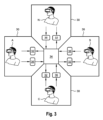
一実施形態によれば、例えば各ユーザの「アバター」を表示することによる、他のユーザの位置および/または視線方向を示す視覚化表現以外の表示はワークスペース内に示されない。したがって、視覚化表現の一部がそのような表示によって覆われたり、かつ/または妨げられたりするおそれがない。 According to one embodiment, no representations are shown in the workspace other than visualizations that indicate the positions and/or gaze directions of other users, e.g., by displaying "avatars" of each user. Thus, there is no risk that any part of the visualizations is covered and/or obstructed by such representations.
例えば、分析プロセスの実行は、視覚化表現内の平面の選択を含み得る。その場合、プロセスは、好ましくは、視覚化表現の選択された平面の多断面再構成(MPR)を表示するステップ、特に、選択された平面に対応する三次元視覚化環境内の位置において表示するステップを含む。多断面再構成は、いくつかの元となる画像平面から再構成された画像である。例えば、CTでは通常、横断面像のスタックが取得される。また、分析プロセスにおいて、ユーザは僧帽弁の直径を測定し、それに基づきライブラリから最適な弁を選択し得る。したがって、横方向とは異なる向きの画像のスタックと交差する断面を表示する場合、ユーザは所望の向きを選択し、例えば、様々な横方向スライス内のそれぞれの最も近いピクセルから補間を行うことによって、MPRが作成される。視覚化表現に加えてMPRを表示することによって、ユーザは解剖学的構造をより詳細に見ることができる。仮想現実環境では、18自由度(XRヘッドセットおよび2つのコントローラ)のおかげで、掴むことが可能なMPR平面を3Dボリューム内で非常に素早く正しい位置に配置することができ、配置は検証可能であり、また、MPR平面上または視覚化表現内での測定がより正確かつ信頼できるものになる。また、分析プロセスは、各ユーザによって自身のワークスペースで個別に実行され得る。すなわち、分析プロセスの実行は他のユーザ間で共有されない。例えば、分析プロセス中のワークスペース内での現実のツール(例えば、コントローラまたはユーザが保持する別の現実の物体)または仮想のツール(例えば、仮想の巻き尺、または分析プロセスの実行に使用される物体の視覚化表現)の動きまたは軌道は、分析プロセスが実行されるワークスペース内でのみ視覚化されてもよい。したがって、測定結果のみが全ユーザ間で共有され得る。すなわち、分析プロセスの間、ユーザは、他のユーザが分析プロセスを実行することにより、自身の個別分析プロセスを実行する際に気を取られたり、邪魔されたりすることはない。また、分析プロセスが少なくとも2人のユーザによって同時に実行されてもよい。分析プロセス中に実行される操作(すなわち、サブステップ)はユーザ間で共有されないため、ユーザは分析プロセスの実行において互いを妨害しない。例えば、2人以上のユーザが、互いの邪魔をすることなく、人間の心臓の僧帽弁の直径を同時に測定し得る。 For example, the execution of the analysis process may include the selection of a plane in the visualization representation. In that case, the process preferably includes a step of displaying a multiplanar reconstruction (MPR) of the selected plane of the visualization representation, in particular at a position in the three-dimensional visualization environment corresponding to the selected plane. A multiplanar reconstruction is an image reconstructed from several original image planes. For example, in CT, a stack of transverse images is usually acquired. Also, in the analysis process, the user may measure the diameter of the mitral valve and select the best valve from the library based thereon. Thus, when displaying a cross section intersecting a stack of images with a different orientation from transverse, the user selects the desired orientation and the MPR is created, for example, by interpolating from the respective nearest pixels in the various transverse slices. By displaying the MPR in addition to the visualization representation, the user can see the anatomical structure in more detail. In the virtual reality environment, thanks to the 18 degrees of freedom (XR headset and two controllers), the graspable MPR plane can be placed very quickly in the 3D volume at the correct position, the placement can be verified, and measurements on the MPR plane or in the visualization representation become more accurate and reliable. Also, the analytical process may be performed by each user individually in their own workspace. That is, the execution of the analytical process is not shared among other users. For example, the movement or trajectory of a real tool (e.g., a controller or another real object held by the user) or a virtual tool (e.g., a virtual tape measure, or a visualization representation of an object used to perform the analytical process) in the workspace during the analytical process may be visualized only in the workspace in which the analytical process is performed. Thus, only the measurement results may be shared among all users. That is, during the analytical process, a user is not distracted or disturbed in performing his or her individual analytical process by another user performing an analytical process. Also, the analytical process may be performed simultaneously by at least two users. Because the operations (i.e., sub-steps) performed during the analytical process are not shared among users, the users do not disturb each other in the execution of the analytical process. For example, two or more users may simultaneously measure the diameter of the mitral valve of a human heart without disturbing each other.
なお、例えば分析プロセスの結果が利用可能であることを各ユーザに通知するために、分析プロセスの結果のみが各ワークスペースで共有および視覚化されることに留意されたい。さらに、各ユーザは、視覚化表現のフィーチャを分析するために自身のアプローチを他の全てのユーザに対してすぐに示さず、自分のペースおよび精度で各自の分析プロセスを実行することができる。例えば、ユーザは、分析結果を全てのユーザ間で共有する前に、自身の個別視覚化表現を分析するためのいくつかの異なる方法を試してもよい。したがって、各ユーザは、他のユーザによって観察されることなく、各自のやり方で分析プロセスを実行する自由を有する。結果として、各ユーザの作業雰囲気が改善され、分析プロセスの結果の精度が向上する可能性がある。例えば、分析プロセスを実行したユーザが自分のパフォーマンスに満足できない場合、ユーザは、他のユーザに過剰な情報(すなわち、不適当な測定結果)を提供することなく、分析プロセスを再度行うことができる。好ましくは、ユーザは、他の全てのユーザ(すなわち、ワークスペース)との分析プロセス結果の同期を開始するために、該ユーザが自身の分析プロセスを終えたか否かを知らせる合図を送ることができる。合図は仮想ボタンを押したり、または分析プロセスを終了することによって実行されてもよい。例えば、ユーザは、分析プロセス中に使用される仮想ツールを無効化することによって分析プロセスが終了したことを知らせ得る。 It should be noted that only the results of the analysis process are shared and visualized in each workspace, for example to inform each user that the results of the analysis process are available. Furthermore, each user can perform his/her analysis process at his/her own pace and accuracy without immediately showing all other users his/her approach to analyze the features of the visualization. For example, a user may try several different ways to analyze his/her individual visualization before sharing the analysis results among all users. Thus, each user has the freedom to perform the analysis process in his/her own way without being observed by other users. As a result, the working atmosphere of each user may be improved and the accuracy of the results of the analysis process may be improved. For example, if a user who performed the analysis process is not satisfied with his/her performance, the user may perform the analysis process again without providing excessive information (i.e., inappropriate measurement results) to other users. Preferably, the user may send a signal indicating whether the user has finished his/her analysis process to initiate synchronization of the analysis process results with all other users (i.e., workspaces). The signal may be performed by pressing a virtual button or by terminating the analysis process. For example, the user may signal that the analysis process is finished by disabling a virtual tool used during the analysis process.
例えば、分析プロセスの結果は、医用画像データの視覚化表現のフィーチャの少なくとも1つの測定結果、例えば距離、直径、または厚さであり得る。より詳細には、測定結果は、距離測定が開始されるべき第1の位置の第1のドット(始点)、距離測定が終了されるべき第2の位置の第2のドット(終点)、および第1のドットと第2のドットとを結ぶ線によって表示され得る。具体的には、分析プロセスの結果は三次元注釈、例えば、ユーザによって自身のワークスペース内でフリーハンドで描かれ得る3Dの線であってもよい。言い換えれば、分析プロセスの結果は、平面オブジェクトではなく、3つの次元のうちのいずれかにおいて延在する3D座標系内の3Dオブジェクトであってもよい。例えば、ユーザは心臓を通る血流をさかのぼったり、冠状動脈の進路をたどったりしてもよい。 For example, the result of the analysis process may be at least one measurement, e.g., distance, diameter, or thickness, of a feature of the visualization representation of the medical image data. More specifically, the measurement may be displayed by a first dot (start point) at a first location where the distance measurement should begin, a second dot (end point) at a second location where the distance measurement should end, and a line connecting the first and second dots. In particular, the result of the analysis process may be a three-dimensional annotation, e.g., a 3D line that may be drawn freehand by the user in his workspace. In other words, the result of the analysis process may not be a planar object, but a 3D object in a 3D coordinate system that extends in any of the three dimensions. For example, the user may retrace the blood flow through the heart or trace the course of a coronary artery.
本発明の第1の態様は、各ユーザが、医用画像データの各自の好みの視覚化表現を生成できるという利点、すなわち、各ユーザが、医用画像データの各自の個別ビューを有するという利点を提供する。さらに、各ユーザは独自のやり方(例えば、個々の視線方向、切断面位置、閾値、および速さ)で医用画像データの視覚化表現を分析し、および見ることができ、すなわち、他のユーザと比較して、一部のユーザは特定の手順により多くの時間を必要とする可能性がある。視覚化表現内にはアバターが存在しないため、そのようなアバターの背後に医用画像データの一部が隠れることはない。また、経験の浅いユーザは、自分では理解できない主題をより良く理解するために、別のユーザが作成した結果をリアルタイムで追うことができる。 The first aspect of the invention provides the advantage that each user can generate his/her own preferred visualization of the medical image data, i.e. each user has his/her own individual view of the medical image data. Furthermore, each user can analyze and view the visualization of the medical image data in his/her own way (e.g. individual viewing direction, cutting plane position, thresholds and speed), i.e. some users may require more time for certain procedures compared to other users. Since there are no avatars in the visualization, there is no possibility that parts of the medical image data are hidden behind such avatars. Also, less experienced users can follow the results created by another user in real time to get a better understanding of a subject that they do not understand.
さらに、ユーザは医用画像データによって表される解剖学的構造の真の三次元ビューを取得するので、XRは、ユーザが自信を持って視覚化表現を見るおよび分析することができるという利点を提供する。さらに、ユーザは視覚化された物体(例えば、人間の心臓の視覚化表現)の周りを歩き回ることができ、場合によってはその中に入ることさえできるので、ユーザは、ユーザの前方の空間を完全に埋めるように、視覚化された物体を非常に大きな倍率で表示することができる。したがって、ユーザは特に優れた概観を有し、高い精度で測定を行うことができる。また、XRではユーザ入力イベントの取り扱いが特に容易かつ直感的である。物体の回転や視覚化表現の設定の調整など、二次元画面上では相当にやりにくい可能性がある動作が、XRでは、好ましくはXRコントローラを使用して、非常に直感的で素早い可能性がある。 Furthermore, XR offers the advantage that the user can confidently view and analyze the visualization, since the user obtains a true three-dimensional view of the anatomical structures represented by the medical image data. Furthermore, the user can view the visualized object (e.g. a visualization of a human heart) at a very large magnification, so that it completely fills the space in front of the user, since the user can walk around and even enter it. The user therefore has a particularly good overview and can perform measurements with high precision. Also, handling of user input events is particularly easy and intuitive in XR. Actions that may be rather tricky on a two-dimensional screen, such as rotating an object or adjusting the settings of the visualization, may be very intuitive and fast in XR, preferably using the XR controller.
一実施形態では、医用画像データは人間の心臓の画像、好ましくは4D画像を含む。 In one embodiment, the medical image data includes images, preferably 4D images, of the human heart.
本発明は低侵襲心臓手術、例えば心臓弁の手術または心臓弁置換術などの計画を立てる際に特に有用であり得る。経カテーテル弁置換術などの新しい低侵襲手術は、以前は手術不能または開心術に適さないと考えられていた患者のために使用できる。一部の経カテーテル弁置換術(例えば、TAVR)は完全に折りたたみ可能な生体弁を使用する。しかし、これらのインターベンションを成功させるには、新しい弁が適切に機能し、左心室流出路(LVOT)または冠動脈を妨げることがないよう、存在する病理/幾何学的形状を完全に分析および理解するとともに、新しい弁の選択、サイズ設定、および配置を慎重に行うことが重要である。これはViV(valve-in-valve)インターベンションに特に当てはまる。これにより、低侵襲ViVを用いて機能不全の弁(生体僧帽弁であり得る)が新しい弁に置き換えられる。これにより、新しい弁が古い弁の内側に配置され、展開するにつれて古い弁が置き換えられる。したがって、弁を正しく配置されること、および正しい大きさを有することが重要である。特に、新しい僧帽弁がLVOTを妨げないことが重要である。したがって、ViVインターベンション計画の場合、医用画像データは僧帽弁、LVOT、および左心室を含む。 The present invention may be particularly useful in planning minimally invasive cardiac procedures, such as heart valve surgery or heart valve replacement. New minimally invasive procedures, such as transcatheter valve replacement, can be used for patients previously considered inoperable or unsuitable for open heart surgery. Some transcatheter valve replacements (e.g., TAVR) use fully collapsible biological valves. However, for these interventions to be successful, it is important to thoroughly analyze and understand the pathology/geometry present, as well as carefully select, size, and place the new valve so that it functions properly and does not obstruct the left ventricular outflow tract (LVOT) or coronary arteries. This is especially true for valve-in-valve (ViV) interventions, whereby a dysfunctional valve (which may be a biological mitral valve) is replaced with a new valve using minimally invasive ViV. This places the new valve inside the old valve, replacing the old valve as it unfolds. It is therefore important that the valve is placed correctly and has the correct size. In particular, it is important that the new mitral valve does not interfere with the LVOT. Therefore, for ViV intervention planning, the medical image data includes the mitral valve, the LVOT, and the left ventricle.
本発明のある好ましい実施形態では、分析プロセスの結果の表示は、ユーザによって自身のワークスペースにおいて選択的かつ個別に有効化および無効化され得る。 In a preferred embodiment of the present invention, the display of the results of the analytical process can be selectively and individually enabled and disabled by the user in his or her workspace.
分析プロセスの各結果は、医用画像データが定義される3D座標系内の特定の位置に配置され得る(すなわち、位置はx、y、およびz座標によって定義され得る)。すなわち、結果は医用画像データに対して特定の位置に配置され得る。医用画像データおよび結果は全ユーザによって共有されるため、ユーザが視覚化表現(すなわち、医用画像データの個別ビュー)をどのように個別に変更したかによらず、結果は各ワークスペース内に表示される。ワークスペースに表示されている他の物体を結果が覆う可能性を下げるために、結果は比較的細い線で視覚化されてもよい。それでも、結果が視覚化表現および/または他の結果の一部を覆う状況が生じ得る。したがって、本発明の上記実施形態によれば、結果は消えるように無効化され、結果の後ろに位置する物体への視界が提供され得る。 Each result of the analysis process may be located at a specific location in the 3D coordinate system in which the medical image data is defined (i.e., the location may be defined by x, y, and z coordinates). That is, the result may be located at a specific location relative to the medical image data. Since the medical image data and the results are shared by all users, the results are displayed in each workspace regardless of how the users have individually modified the visualization representation (i.e., individual views of the medical image data). To reduce the possibility that the results obscure other objects displayed in the workspace, the results may be visualized with relatively thin lines. Nevertheless, situations may arise in which the results obscure parts of the visualization representation and/or other results. Therefore, according to the above embodiment of the present invention, the results may be disabled so that they disappear, providing visibility to objects located behind the results.
各ユーザは関心領域に関して異なる点に注目する可能性があるため、各ユーザが、どの結果が関心領域への十分な視界を妨げ、したがって無効化されるべきかを個別に決定できることは重要である。すなわち、各ユーザは、自身または他のユーザによって作成された結果を選択的に無効化し得る。また、結果の有効化または無効化は少なくとも1つの他のワークスペースに影響を及ぼさない可能性があり、結果の有効化および無効化は各ワークスペースで独立して実行され得る。さらに、上記方法は、結果の背後に配置された物体を結果を通して見ることができるよう、ユーザが結果の透明度を調整することを可能にし得る。特に、結果が無効化された後、ユーザは結果を再度有効化し、自身のワークスペース内で結果を再表示してもよい。このため、結果が元々配置されていた場所の情報をユーザに提供するために、無効化された状態の結果は小さな矢印などで示されてもよい。その結果、ユーザは結果を再度有効化するために結果を容易に取り戻すことができる。 Since each user may focus on different points with respect to the region of interest, it is important that each user can individually determine which results obstruct sufficient visibility to the region of interest and therefore should be disabled. That is, each user may selectively disable results created by himself or other users. Also, enabling or disabling a result may not affect at least one other workspace, and enabling and disabling of results may be performed independently in each workspace. Furthermore, the method may allow a user to adjust the transparency of a result so that objects placed behind the result can be seen through the result. In particular, after a result is disabled, the user may re-enable the result and redisplay the result in his or her workspace. To this end, a disabled result may be indicated with a small arrow or the like to provide the user with information about where the result was originally located. As a result, the user can easily retrieve the result in order to re-enable it.
本実施形態によれば、各ユーザが視覚化表現(すなわち、医用画像データの個別ビュー)および結果の両方を、作業性に関する自身の要求を満たすように正確に個別調整できるという点で、各作業空間における視覚化表現はさらに個別化され得る。 In accordance with this embodiment, the visualization in each workspace can be further personalized in that each user can precisely tailor both the visualization (i.e., individual view of medical image data) and the results to meet their own workability requirements.
本発明の他の好ましい実施形態では、少なくとも1つのワークスペースはARワークスペースであり得る。すなわち、現実環境がワークスペースの背景として見える状態で、視覚化および結果の両方がワークスペースに表示される。例えば、現実環境はユーザの周辺領域(例えば、手術室または診療所)であり得る。さらに一実施形態によれば、ARワークスペース内の少なくとも1つの視覚化パラメータ、特に、医用画像データの視覚化表現および/または分析プロセスの結果の透明度および/または色は、ユーザが、現実環境に重ねられた医用画像データの視覚化表現および/または分析プロセスの結果を目標コントラストで見ることができるように自動的に調整され得る。 In another preferred embodiment of the invention, at least one workspace may be an AR workspace, i.e. both the visualization and the results are displayed in the workspace, with the real environment visible as a background of the workspace. For example, the real environment may be the user's surrounding area (e.g. an operating room or a clinic). Furthermore, according to one embodiment, at least one visualization parameter in the AR workspace, in particular the transparency and/or color of the visualization representation of the medical image data and/or the results of the analysis process, may be automatically adjusted so that the user can see the visualization representation of the medical image data and/or the results of the analysis process superimposed on the real environment at a target contrast.
より詳細には、視覚化パラメータは、医用画像データおよび/または結果がどのように視覚化されるかを定める値であり得る。したがって、これらの値を変更すると、それに応じて視覚化も変化する。例えば、視覚化パラメータは透明度の値、すなわち物体の透明さの値を含み得る。例えば、物体の透明度が低い場合、物体で覆われている領域は見えない。一方、物体の透明度が高い場合、物体で覆われている領域は少なくともわずかに見える可能性がある。また、視覚化パラメータは視覚化表現の色、すなわち、視覚化の色相または色調を含み得る。より詳細には、色相は色の主要な特性(カラー・アピアランス・パラメータとも呼ばれる)の1つである。色相は通常、単一の数値(色空間座標図(例えば、色度図)またはカラーホイールの中心または中性点または軸を中心とした角度位置にしばしば対応する)によって、または、その主波長もしくはその補色の主波長によって定量的に表すことができる。他のカラー・アピアランス・パラメータはカラフルネス、彩度(強度またはクロマとも呼ばれる)、明度、および輝度である。本実施形態では、とりわけ、これらのパラメータは、ワークスペース内で目標コントラストを実現するために自動的に調整され得る。目標コントラストは最適コントラストとも呼ばれる。ワークスペース内のコントラストは、ワークスペース内の最も明るい点と最も暗い点と間の差として定義され、ARワークスペースでは現実環境も考慮される。また、ワークスペース内のコントラストはコントラスト比またはダイナミックレンジとして定義されてもよい。医用画像データの視覚化表現および/または結果は、ARワークスペース内のコントラストが目標コントラストになるように調整され得る。言い換えれば、現実環境(背景)が比較的明るい場合、全体のコントラストを目標コントラストまで下げるために視覚化表現および/または結果の輝度も上昇させられる。目標コントラストは、視覚化表現の検出可能性および目立ちやすさに関して最も適切であるとして定義された所定の値であってもよい。あるいは、目標コントラストは、ユーザの個人的な好みを満たすようにユーザが個別に調整および/または設定してもよい。 More specifically, visualization parameters may be values that define how the medical image data and/or results are visualized. Thus, changing these values changes the visualization accordingly. For example, visualization parameters may include transparency values, i.e., values of the transparency of an object. For example, if the transparency of an object is low, the areas covered by the object are not visible. On the other hand, if the transparency of an object is high, the areas covered by the object may be at least slightly visible. Visualization parameters may also include the color of the visualization representation, i.e., the hue or tone of the visualization. More specifically, hue is one of the main properties of color (also called color appearance parameters). Hue can usually be quantitatively represented by a single numerical value (often corresponding to the angular position around the center or neutral point or axis of a color space coordinate diagram (e.g., chromaticity diagram) or a color wheel) or by its dominant wavelength or the dominant wavelength of its complementary color. Other color appearance parameters are colorfulness, saturation (also called intensity or chroma), lightness, and brightness. In this embodiment, among others, these parameters may be automatically adjusted to achieve a target contrast in the workspace. The target contrast is also called optimal contrast. The contrast in the workspace is defined as the difference between the brightest and darkest points in the workspace, and in the AR workspace, the real environment is also taken into account. The contrast in the workspace may also be defined as a contrast ratio or a dynamic range. The visualization of the medical image data and/or the result may be adjusted so that the contrast in the AR workspace is the target contrast. In other words, if the real environment (background) is relatively bright, the brightness of the visualization and/or the result is also increased to lower the overall contrast to the target contrast. The target contrast may be a predefined value defined as most appropriate in terms of detectability and conspicuity of the visualization. Alternatively, the target contrast may be individually adjusted and/or set by the user to meet the user's personal preferences.
一実施形態によれば、各ワークスペースは、医用画像データの視覚化表現および分析プロセスの結果が表示される独自の仮想環境を有し得る。仮想環境は視覚化表現が表示される背景であり得る。さらに、上記実施形態によれば、方法は、各ユーザが個別に、かつ独立して、好ましくは仮想環境の透明度および/または色を設定することによって、仮想環境の視覚化パラメータを調整し、ワークスペース内のコントラストを調整することを可能にするステップをさらに含み得る。仮想環境は視覚化表現が前に配置される背景であり得る。言い換えれば、仮想環境は視覚化表現を取り巻く周辺であってもよい。例えば、VRワークスペースが使用される場合、仮想環境は、ユーザに快適な作業環境を提供するために、定められた色および明るさを有する有色サーフェスを含み得る。すなわち、目標コントラストとなるようなワークスペース内のコントラストを提供するように仮想環境が調整され得る。さらに、ユーザは仮想環境を個別に調整し得る。また、ARワークスペースが使用される場合、現実環境もワークスペース内の背景として表示される。しかし、ARワークスペースであっても、ユーザが現実環境を見ることができるように特定の透明度を有する仮想環境を有し得る。しかし、ワークスペース内のコントラストが目標コントラストになるよう、非常に明るい現実環境を暗くするために仮想環境の透明度の値が調整可能であってもよい。これは、ARワークスペースが手術室などの比較的明るい環境で使用される場合に特に有用である。言い換えれば、ARワークスペースの仮想環境は、現実環境を認識することを可能にしつつ、ユーザが、ARワークスペースを現実環境の条件に自動的に適合させることを可能にする。さらに、ARワークスペースを現実環境の様々な照明条件に容易に適合させることができる。結果として、現実環境の照明状態によらずARワークスペースを適切に使用することができる。 According to an embodiment, each workspace may have its own virtual environment in which the visualization representation of the medical image data and the results of the analysis process are displayed. The virtual environment may be the background in which the visualization representation is displayed. Furthermore, according to the above embodiment, the method may further comprise a step of allowing each user individually and independently to adjust the visualization parameters of the virtual environment, preferably by setting the transparency and/or color of the virtual environment, and to adjust the contrast in the workspace. The virtual environment may be the background in front of which the visualization representation is placed. In other words, the virtual environment may be the periphery surrounding the visualization representation. For example, when a VR workspace is used, the virtual environment may include colored surfaces with a defined color and brightness to provide the user with a comfortable working environment. That is, the virtual environment may be adjusted to provide a contrast in the workspace that is the target contrast. Furthermore, the user may individually adjust the virtual environment. Also, when an AR workspace is used, the real environment is also displayed as a background in the workspace. However, even an AR workspace may have a virtual environment with a certain transparency so that the user can see the real environment. However, the transparency value of the virtual environment may be adjustable to darken a very bright real environment so that the contrast in the workspace is the target contrast. This is particularly useful when the AR workspace is used in a relatively bright environment, such as an operating room. In other words, the virtual environment of the AR workspace allows the user to automatically adapt the AR workspace to the conditions of the real environment while still allowing the user to recognize the real environment. Furthermore, the AR workspace can be easily adapted to various lighting conditions in the real environment. As a result, the AR workspace can be used appropriately regardless of the lighting conditions of the real environment.
好適には、仮想環境は少なくとも1つの仮想制御要素を含み得る。例えば、仮想制御要素はスライドバーおよび/またはボタンであってもよい。制御要素は、視覚化表現の変更などの方法ステップを実行するために、並びに/または、画像の保存、医用画像データのロード、および他のユーザとの通信などの他の管理処理を実施するために使用され得る。また、制御要素は、いくつかの所定の制御コマンドが列挙されているドロップダウンメニューを提供し得る。 Preferably, the virtual environment may include at least one virtual control element. For example, the virtual control element may be a slide bar and/or a button. The control element may be used to execute method steps such as changing the visualization representation and/or to perform other administrative operations such as saving images, loading medical image data, and communicating with other users. The control element may also provide a drop-down menu in which several predefined control commands are listed.
他の好ましい実施形態では、各ユーザが個別に、かつ独立して医用画像データの視覚化表現を変更することを可能にするステップは、ユーザがワークスペース内の仮想フィーチャとインタラクトするためにVRコントローラを使用することを含み得る。具体的には、視覚化表現を変更するためにハンドジェスチャーが使用され、好ましくは、ワークスペース内の物体を掴むことによって使用される。XRワークスペースにおいて、XRヘッドセットを装着し、少なくとも1つのコントローラを一方の手に持っている(好ましくは、それぞれの手にコントローラを持っている)ユーザは、視覚化表現とともにコントローラを見ることができる。コントローラは、ボタン、トラックボール、タッチパッドなどのさらなる操作要素を含むハンドヘルドデバイスであり得る。VRワークスペースが使用される場合、コントローラがVRワークスペース内のどこに配置されているかをユーザに知らせるために、VRワークスペース内にコントローラの表示(例えば、仮想コントローラ)が描写されてもよい。好ましくは、ユーザはまた、現在の手の位置および向きに対応する位置および向きで仮想コントローラを見ることができる。したがって、XRワークスペースは、ユーザがコントローラを視覚化表現に向けて動かし、特定のボタンを押すことでそれを掴み、現実世界の物体についてそうするように、手の動きによって視覚化された物体を移動および/または回転させることを可能にする。これにより、ユーザは18自由度(XRヘッドセットおよび2つのコントローラのそれぞれについて6自由度、すなわち、3回転自由度および3並進自由度)を有し、視覚化された物体を正しく直感的に観察および分析できる。これは物体との普通のインタラクションと良く似ている。コントローラの動きはトラッキングされ、表示の対応する動きがVRワークスペース内で視覚化され得る。一方、ARワークスペースを使用する場合、現実のコントローラが見えたままであってもよい。しかし、ARワークスペースであっても、コントローラをより目立ちやすくするために仮想コントローラが視覚化されてもよい。 In another preferred embodiment, the step of enabling each user individually and independently to modify the visualization of the medical image data may include the user using a VR controller to interact with virtual features in the workspace. In particular, hand gestures are used to modify the visualization, preferably by grabbing objects in the workspace. In the XR workspace, a user wearing an XR headset and holding at least one controller in one hand (preferably holding a controller in each hand) can see the controller along with the visualization. The controller may be a handheld device that includes additional operating elements such as buttons, a trackball, a touchpad, etc. When a VR workspace is used, a representation of the controller (e.g., a virtual controller) may be depicted in the VR workspace to inform the user where the controller is located in the VR workspace. Preferably, the user can also see the virtual controller in a position and orientation that corresponds to the current hand position and orientation. Thus, the XR workspace allows the user to move the controller towards the visualization, grab it by pressing a specific button, and move and/or rotate the visualized object by hand movements as they would for a real-world object. This allows the user to have 18 degrees of freedom (6 for each of the XR headset and the two controllers, i.e. 3 rotational and 3 translational), allowing a correct and intuitive observation and analysis of the visualized object. This is very similar to a normal interaction with an object. The movement of the controller can be tracked and the corresponding movement of the display can be visualized in the VR workspace. On the other hand, when using an AR workspace, the real controller may remain visible. However, even in the AR workspace, a virtual controller may be visualized to make the controller more visible.
位置情報は、少なくとも1つのセンサ、例えばコントローラ内に設けられた加速度センサによって取得され得る。より一般的には、1つまたは複数のコントローラの位置および/または向きがVRヘッドセット上のカメラによってトラッキングされる。センサまたはカメラによって出力されたデータは、データを処理するプロセッサに入力され、コントローラおよび仮想コントローラの視覚化表現の操作によって実行されるコマンドが制御され得る。また、センサの出力に応じて、プロセッサはジェスチャーが遅いか速いかを決定してもよい。また、回転運動が検出されてもよい。結果として、プロセッサは対応する処理を実行し得る。 The position information may be obtained by at least one sensor, for example an acceleration sensor provided in the controller. More generally, the position and/or orientation of one or more controllers is tracked by a camera on the VR headset. The data output by the sensor or camera may be input to a processor that processes the data and controls the commands executed by the manipulation of the visual representation of the controller and the virtual controller. Depending on the output of the sensor, the processor may also determine whether the gesture is slow or fast. Rotational movements may also be detected. As a result, the processor may perform corresponding processing.
コントローラによって実行される操作は、視覚化表現のズームイン/ズームアウト、ワークスペース内の視覚化表現の縮小/拡大、視覚化パラメータおよびレンダリング設定/パラメータの調整、並びに/または表示されている物体、特に医用画像データの視覚化表現を掴むことを含み得る。 Operations performed by the controller may include zooming in/out of the visualization, shrinking/enlarging the visualization in the workspace, adjusting visualization and rendering settings/parameters, and/or grabbing the visualization of the displayed object, in particular the visualization of medical image data.
さらに、コントローラはユーザによって行われるハンドジェスチャー、例えば、何かを掴むジェスチャー、ズームインジェスチャー(2本の指が近づく)、ズームアウトジェスチャー(2本の指が離れる)、およびワイプジェスチャなどを受け取り得る。また、例えば、視覚化表現がコントローラを使用して仮想的に掴まれ、回転または移動されてもよい。XRワークスペースにおいて、現実のコントローラが仮想コントローラとして視覚化され、ユーザがハンドジェスチャーによってワークスペース内の物体を少なくとも掴んで動かすことを可能にしてもよい。この文脈での「動く」や「移動」は回転を意味し得る。コントローラはまた、ユーザがワークスペース内の物体、特に視覚化表現の大きさおよび/または形状を変更することを可能にし得る。ある有用な実施形態によれば、上記コントローラは、ユーザが視覚化表現の位置、大きさ、形状、および/または向きのうちの任意の1つまたは複数を変更することを可能にする。特に、視覚化表現(すなわち、医用画像データの個別ビュー)の位置および/または向きが調整され得る。しかし、ある有用な実施形態では、視覚化表現をより良く分析するために視覚化表現の大きさも変更され得る。好ましくは、そのような調整は、現実世界の物体についてそうするように、ハンドジェスチャーによって視覚化表現を掴み、その位置、大きさ、および/または向きを変更することによってコントローラを使用して行われる。ある有用な実施形態によれば、コントローラは、ユーザがジェスチャー制御によってパラメータを調整することを可能にする。例えば、ユーザはXRワークスペース内で手の動きを用いて特定のパラメータに触れることによってそのパラメータを選択する。次に、ユーザはジェスチャーを使用して、例えば仮想スライダーを操作したり、または、コントローラを水平に(または垂直に)動かすことでスライダーを参照せずにパラメータを調整したりし得る。適切なパラメータが視覚化表現に関連付けられていて、ボリュームレンダリング閾値、スムージング、照明強度、大きさ、視覚化される物体の不透明度、およびシネモードの開始/停止などから選択されてもよい。 Furthermore, the controller may receive hand gestures made by the user, such as a grab gesture, a zoom-in gesture (two fingers moving closer together), a zoom-out gesture (two fingers moving apart), and a wipe gesture. Also, for example, the visualization may be virtually grabbed and rotated or moved using the controller. In an XR workspace, a real controller may be visualized as a virtual controller, allowing the user to at least grab and move objects in the workspace by hand gestures. "Move" or "move" in this context may mean rotate. The controller may also allow the user to change the size and/or shape of objects in the workspace, in particular the visualization. According to a useful embodiment, the controller allows the user to change any one or more of the position, size, shape, and/or orientation of the visualization. In particular, the position and/or orientation of the visualization (i.e., the individual view of the medical image data) may be adjusted. However, in a useful embodiment, the size of the visualization may also be changed in order to better analyze the visualization. Preferably, such adjustments are made using the controller by grabbing the visualization representation with hand gestures and changing its position, size, and/or orientation, as would be done for a real-world object. According to one useful embodiment, the controller allows the user to adjust parameters by gesture control. For example, the user selects a particular parameter by touching it with a hand movement in the XR workspace. The user may then use gestures to, for example, manipulate a virtual slider, or adjust the parameter without reference to a slider by moving the controller horizontally (or vertically). Suitable parameters are associated with the visualization representation and may be selected from volume rendering thresholds, smoothing, lighting intensity, size, opacity of visualized objects, and start/stop cine mode, etc.
その結果、ユーザは、例えば物体を動かす、または操作要素を操作するなどの操作をAR/VRワークスペース内で直感的に行うことができ、そのようなコラボレーションの効率を高めることができる。 As a result, users can intuitively perform operations, such as moving objects or manipulating control elements, within the AR/VR workspace, improving the efficiency of such collaboration.
また、有用な実施形態では、ワークスペースは、視覚化表現の照明に影響を及ぼすように、ユーザがワークスペース内で掴んで動かすことができるランプを備え得る。有用な実施形態では、シーンの明るさ、特に移動可能なランプの明るさが調整され得る。また、ランプの位置を調整することにより、視覚化表現を照らす方向が変更され得る。これは、視覚化された解剖学的構造のキャビティを照らすのに特に役立つ。 Also, in a useful embodiment, the workspace may include a lamp that the user can grab and move within the workspace to affect the lighting of the visualization. In a useful embodiment, the brightness of the scene may be adjusted, particularly the brightness of the movable lamp. Also, by adjusting the position of the lamp, the direction of lighting of the visualization may be changed. This is particularly useful for lighting cavities of visualized anatomical structures.
好ましくは、各ユーザが個別に、かつ独立して医用画像データの視覚化表現を変更することを可能にするステップは、視覚化表現を回転させる、視覚化表現の一部を切り取る、視覚化表現のレンダリングパラメータを変更する、視覚化表現の画像設定を変更する、視覚化表現のコントラストを変更する、視覚化表現のボクセル強度閾値を変更する、および/または視覚化表現のサイズを変更するように視覚化表現を操作することを含む。言い換えれば、視覚化表現は操作され、例えば、ユーザが視覚化表現の別の部分または領域を見たい場合は回転される。すなわち、各ユーザは医用画像データの独自の個別ビューを有する。同様に、各ユーザは個別に、そのユーザにとって関心のある視覚化表現の部分のみを表示する視覚化表現を取得するために、視覚化表現の一部を切り取ってもよい。視覚化表現のレンダリングパラメータはレンダリングの種類(すなわち、ボリュームレンダリングおよび/またはサーフェスレンダリング)を含み、画像設定はサーフェスの色およびシェーディングオプション(すなわち、空間内の光源の位置)を含み得る。また、ユーザは、医用画像データがスライスとして、または他の形式で視覚化されるように自身の個別視覚化表現の設定を構成し得る。また、医用画像データが平面図、右斜め前から見た図、左斜め前から見た図、背面図、底面図、および斜視図などの形で表示される複数の異なる視覚化表現のプリセットが存在してもよい。プリセットは予め設定されていてもよいし、各ユーザによって事前に定められてもよい。 Preferably, the step of enabling each user individually and independently to modify the visualization representation of the medical image data includes manipulating the visualization representation to rotate the visualization representation, crop a portion of the visualization representation, change rendering parameters of the visualization representation, change image settings of the visualization representation, change the contrast of the visualization representation, change the voxel intensity threshold of the visualization representation, and/or change the size of the visualization representation. In other words, the visualization representation is manipulated, e.g. rotated, if the user wants to see another part or area of the visualization representation. That is, each user has his own individual view of the medical image data. Similarly, each user may individually crop a portion of the visualization representation to obtain a visualization representation that displays only the part of the visualization representation that is of interest to that user. The rendering parameters of the visualization representation may include the type of rendering (i.e. volume rendering and/or surface rendering), and the image settings may include surface color and shading options (i.e. the position of the light source in space). Also, the user may configure the settings of his individual visualization representation so that the medical image data is visualized as slices or in other formats. There may also be multiple different visualization presets in which the medical image data is displayed in a plan view, a right-hand front view, a left-hand front view, a back view, a bottom view, an oblique view, etc. The presets may be preset or may be predefined by each user.
好適には、少なくとも1人のユーザは、別のユーザによって行われた医用画像データの視覚化表現の変更を採用し得る。すなわち、別のユーザの視覚化表現(すなわち、医用画像データの個別ビュー)を採用することにより、該視覚化表現が少なくとも1人の他のユーザのワークスペースに送られ、少なくとも2人のユーザが医用画像データの同じ個別ビューを有するようになる。この処理は、経験豊かなユーザ(例えば、教師)が現在、他のユーザ(例えば、生徒)に何かを説明している場合に特に有用である。結果として、他のユーザはより経験豊かなユーザから学ぶことができる可能性がある。言い換えれば、経験豊かなユーザと同じ医用画像データの個別ビューが1人または複数の他のユーザに提供される。個別ビューがどのように変更されたかをユーザに示すために、ある個別ビューから別の個別ビューへの切り替えは連続的に実行されてもよい。あるいは、個別ビュー間の切り替えは、切り替えを鳥瞰図として視覚化することによって示されてもよく、すなわち、個別ビュー間の変更が上面図として示される。 ...
あるいは、あるユーザが、医用画像データの視覚化表現の自身の変更を採用することを少なくとも1人の他のユーザに強制してもよい。すなわち、該ユーザは他のユーザにちょうど自分が見ているものを見させる(すなわち、同じ個別ビューを持たせる)ことができ、これは、あるユーザが他のユーザにワークフローの特定の部分を見せたい場合に特に適している可能性がある。したがって、コラボレーションの効率が向上する。他の好ましい実施形態では、1人のユーザのみが、医用画像データの視覚化表現のどの変更が他のユーザと共有され得るかを決定でき(すなわち、該ユーザはプレゼンターおよび/または教師であり得る)、一方で、他のユーザは機能が制限されており、医用画像データの視覚化表現の変更を共有することは許可されない可能性がある(例えば、該ユーザは参加者および/または生徒であり得る)。 Alternatively, a user may force at least one other user to adopt his/her modifications of the visualization representation of the medical image data, i.e., the user can make the other users see exactly what he/she sees (i.e., have the same individual view), which may be particularly suitable when a user wants other users to see a particular part of a workflow. Thus, the efficiency of collaboration is improved. In another preferred embodiment, only one user can decide which modifications of the visualization representation of the medical image data can be shared with other users (i.e., the user can be a presenter and/or a teacher), while other users have limited capabilities and may not be allowed to share modifications of the visualization representation of the medical image data (e.g., the user can be a participant and/or a student).
他の好ましい実施形態では、少なくとも1人のユーザが自身のワークスペースで医用画像データの分析プロセスを実行することを可能にするステップは、3D測定を行うこと、MPRモードを実行すること、および/または注釈を挿入することをさらに含み得る。すなわち、分析プロセスの結果は、視覚化表現の特定の側面に関する1つまたは複数の注釈、例えば、以前に実行された治療の背景情報や、異常に関連するユーザのコメントなどであり得る。結果は全ユーザによって共有される医用画像データに属するため、各結果は各ワークスペース内に細い線でリアルタイムに視覚化され得る。すなわち、結果が取得された直後に各ユーザが自身の個別ビューで結果を見ることになる。3D測定結果は3D次元空間における測定結果、すなわち、x座標、y座標、およびz座標のそれぞれにおいて互いに異なる2点間の距離であり得る。また、3D測定は、例えば、空間内の複数の点、例えば、僧帽弁輪などの不規則な形状の物体に沿った複数の点によって張られる距離を測定することによって、非平面の不規則な形状を有する物体をトレースすることを含み得る。このような非平面測定は2D画面上では実行できないが、本発明のXRワークスペースでは容易に実行できる。MPRモードは、二次元画像再構成の手法である多断面再構成であり得る。MPRでは、解剖学的向きに関してユーザを助けるために、横断面から前頭面、矢状面、斜めの断面、または湾曲した断面が計算および表示される。例えば、斜めの断面は心臓のイメージング(四腔像、短軸断面)に有用であり、複数回曲がっている構造に沿った湾曲した再構成は、血管(例えば、冠状動脈)または尿管の表現のために有用である。高品質のMPR再構成を取得するには、小さい層厚で重なった(例えば、CTによって取得された)医用画像データを取得する必要がある。さらに、画像再構成中のステップアーチファクトを防ぐために小さい層厚を選択すべきである。いくつかの層を足し合わせることによって画像ノイズを減らすことができる。閾値処理は、関心領域の視覚化を改善するために各ボクセルの閾値境界を調整することであり得る。 In other preferred embodiments, the step of enabling at least one user to perform an analysis process of the medical image data in his/her workspace may further include performing 3D measurements, performing MPR mode, and/or inserting annotations. That is, the result of the analysis process may be one or more annotations regarding a particular aspect of the visualization representation, such as background information of a previously performed treatment or a user's comments related to an abnormality. Since the results belong to the medical image data shared by all users, each result may be visualized in real time with a thin line in each workspace. That is, each user will see the results in their individual view immediately after the results are obtained. The 3D measurement result may be a measurement result in a 3D dimensional space, i.e., the distance between two points that are different from each other in each of the x-, y-, and z-coordinates. Also, the 3D measurement may include tracing an object having a non-planar irregular shape, for example, by measuring the distance spanned by multiple points in space, for example, multiple points along an irregularly shaped object such as the mitral valve annulus. Such non-planar measurements cannot be performed on a 2D screen, but can be easily performed in the XR workspace of the present invention. The MPR mode may be a multiplanar reconstruction, which is a technique of two-dimensional image reconstruction. In MPR, coronal, sagittal, oblique, or curved sections are calculated and displayed from the transverse plane to aid the user with anatomical orientation. For example, oblique sections are useful for cardiac imaging (four-chamber view, short-axis view), and curved reconstructions along structures with multiple bends are useful for the representation of blood vessels (e.g., coronary arteries) or ureters. To obtain a high-quality MPR reconstruction, it is necessary to acquire overlapping medical image data (e.g., acquired by CT) with small layer thicknesses. Furthermore, small layer thicknesses should be selected to prevent step artifacts during image reconstruction. Image noise can be reduced by adding together several layers. Thresholding may be the adjustment of the threshold boundary of each voxel to improve the visualization of the region of interest.
好ましくは、少なくとも1人のユーザが、自身のワークスペースにおいて医用画像データの分析プロセスを実行することを可能にするステップは、医療機器、具体的にはインプラントの動作位置を決定するために、医用画像データの視覚化表現内に医療機器の少なくとも1つのモデルを配置することをさらに含み得る。医療機器のモデルはコンピュータ・グラフィック・オブジェクトであり得る。すなわち、医療機器のモデルがXRワークスペース内に追加で表示されてもよい。医療機器は人体または動物の体内に配置されるインプラントまたは任意の他のデバイスであり得る。コンピュータ・グラフィック・オブジェクトは、例えば幾何学的データの表現、例えば頂点によって定義される3D構造、例えば多面体である。コンピュータ・グラフィック・オブジェクトは、好ましくは、解剖学的構造の動きにロックされ、すなわち、任意の1つのフレーム内の視覚化表現に対して特定の位置に特定の向きで一旦配置される。ユーザがシネモードを開始すると、視覚化表現を制御するプロセッサは、視覚化表現に対する医療機器の相対位置および向きを記憶し、この相対位置および向きを維持する。医療機器が新しい弁を表す場合、そのような新しい弁は弁輪、例えば僧帽弁輪の動きにロックされ得る。好ましくは、これは3Dスペックルを使用して実行され得る。これにより、心周期全体にわたる重要な動的情報が提供され、弁を動作位置に最適に配置することができ(すなわち、最適位置に)、それによって流出の妨害を回避または低減することができる。また、ユーザは、コントローラを使用して、視覚化表現に対してコンピュータ・グラフィック・オブジェクトを動かしたり傾けたりすることができる。これにより、ユーザは測定を行うだけでなく、選択されたインプラント(例えば、置換弁)またはインプラントのサイズが解剖学的機構(例えば、僧帽弁)に適合するか否かを「試す」ことができる。例えば、ユーザはライブラリから最も合う弁を選択し、その弁、またはその弁に対応するコンピュータ・グラフィック・オブジェクトを視覚化表現内に配置して初期点検を行うことができる。ある有用な実施形態では、コンピュータ・グラフィック・オブジェクトは医療機器のCADモデルに対応し、例えば、医療機器の設計および/または製造に使用されたCADモデル、または、より好ましくは医療機器の簡略化されたモデル、例えば心臓弁の簡略化されたモデルに対応する。 Preferably, the step of enabling at least one user to perform an analysis process of the medical image data in his workspace may further comprise placing at least one model of a medical device in the visualization representation of the medical image data in order to determine the operating position of the medical device, in particular an implant. The model of the medical device may be a computer graphic object. That is, a model of the medical device may additionally be displayed in the XR workspace. The medical device may be an implant or any other device to be placed in the human or animal body. The computer graphic object is for example a representation of geometric data, for example a 3D structure defined by vertices, for example a polyhedron. The computer graphic object is preferably locked to the movement of the anatomical structure, i.e. once placed in a specific position and with a specific orientation with respect to the visualization representation in any one frame. When the user starts the cine mode, the processor controlling the visualization representation stores the relative position and orientation of the medical device with respect to the visualization representation and maintains this relative position and orientation. If the medical device represents a new valve, such a new valve may be locked to the movement of the valve annulus, for example the mitral valve annulus. Preferably, this may be performed using 3D speckles. This provides important dynamic information throughout the cardiac cycle, allowing the valve to be optimally positioned (i.e., in an optimal position) for operation, thereby avoiding or reducing outflow obstruction. The user can also use the controller to move and tilt the computer graphic object relative to the visualization. This allows the user to take measurements as well as "try on" whether a selected implant (e.g., a replacement valve) or implant size fits the anatomical feature (e.g., a mitral valve). For example, the user can select a best-fitting valve from a library and place that valve, or a computer graphic object corresponding to that valve, in the visualization for an initial inspection. In one useful embodiment, the computer graphic object corresponds to a CAD model of the medical device, e.g., a CAD model used to design and/or manufacture the medical device, or more preferably, a simplified model of the medical device, e.g., a simplified model of a heart valve.
別の実施形態では、低侵襲インターベンションはほぼ常にX線透視制御下で行われることから、コンピュータ・グラフィック・オブジェクトは、インターベンショナルX線画像(透視画像)上での医療機器の概観と類似する。したがって、ユーザはシーンを三次元で視覚化しても、透視画像上でインプラントがどのように写るかを知ることができる。コンピュータ・グラフィック・オブジェクトは好ましくは三次元であり、例えばインプラントの簡略化されたモデルであり、例えば金網、または単純な表面の集合によって定められた物体の形態のモデルであり得る。 In another embodiment, since minimally invasive interventions are almost always performed under fluoroscopic control, the computer graphic object resembles the overview of the medical device on an interventional X-ray image (fluoroscopic image). Thus, the user can visualize the scene in three dimensions and still get an idea of how the implant looks on a fluoroscopic image. The computer graphic object is preferably three-dimensional and is for example a simplified model of the implant, which can be for example a wire mesh or a model of an object's morphology defined by a set of simple surfaces.
本発明のある好ましい実施形態によれば、医療機器のモデルの動作位置は、好ましくは4D画像情報と組み合わせて、動作中の医療機器を動的に視覚化することによって決定される。言い換えれば、医療機器(例えば、人工僧帽弁)のモデルを意図される位置に配置した状態で、動作中の調査対象物、例えば心臓を視覚化するために4D医用画像データ(すなわち、例えば、シネモードでの3D医用画像データのシーケンス)が使用される。(例えば心拍中の)医療機器の動的な動きは、トラッキングされた4D画像データに基づき得る。例えば、医療機器とインタラクトする特定の目印が3D画像データのシーケンスにわたってトラッキングされ、それに応じて医療機器の仮想位置が調整される。そして、ユーザは、検査中、医療機器の該特定のモデルが該特定の解剖学的構造とともにどのように動作するかを調べることができる。 According to a preferred embodiment of the present invention, the operating position of the model of the medical device is determined by dynamically visualizing the medical device in operation, preferably in combination with 4D image information. In other words, 4D medical image data (i.e., a sequence of 3D medical image data, e.g., in cine mode) is used to visualize the study object, e.g., the heart, in operation, with a model of the medical device (e.g., a prosthetic mitral valve) placed in its intended position. The dynamic movement of the medical device (e.g., during a heartbeat) may be based on the tracked 4D image data. For example, specific landmarks that interact with the medical device are tracked over the sequence of 3D image data, and the virtual position of the medical device is adjusted accordingly. The user can then examine how the specific model of the medical device operates with the specific anatomical structure during the examination.
要約すると、第1の態様に係る本発明は、医用画像データおよび分析プロセスの結果が全ユーザによって共有される一方、各ユーザが依然として各自のワークスペース内に医用画像データの独自の個別ビュー(すなわち、医用画像データの独自の複製/視覚化表現)を有する相互接続通信コンセプトを提供する、場所を問わないXRコラボレーションツールを提供する。 In summary, the present invention in its first aspect provides a location-independent XR collaboration tool that provides an interconnected communication concept where medical image data and the results of the analysis process are shared by all users, while each user still has their own individual view of the medical image data (i.e. their own copy/visualization representation of the medical image data) in their workspace.
本発明の第2の態様によれば、請求項12の特徴を含むコンピュータプログラムが提供される。該コンピュータプログラムは、プロセッサによって実行されると、プロセッサが上記方法を実行することを可能にするプログラムコード命令を含む。コンピュータプログラムは任意のコード、特に、コンピュータ・グラフィック・アプリケーションに適したコード、特に、XRプログラミングに適したコードであり得る。
According to a second aspect of the present invention, there is provided a computer program comprising the features of
また、上記コンピュータプログラムを含むコンピュータ可読媒体が提供され得る。コンピュータ可読媒体はUSBスティック、ハードディスク、CD-ROM、SDカード、またはSSDカードなどの任意のデジタル記憶装置であり得る。当然のことながら、コンピュータプログラムは消費者向けのコンピュータ可読媒体上に保存される必要はなく、インターネットを介してダウンロード可能であってもよい。 A computer readable medium may also be provided that includes the above computer program. The computer readable medium may be any digital storage device such as a USB stick, a hard disk, a CD-ROM, an SD card or an SSD card. Of course, the computer program does not have to be stored on a consumer computer readable medium, but may be downloadable via the internet.
好ましくは、本発明に係る方法は、ディスプレイ、特にXRヘッドセットなどのXRディスプレイまたは投影ディスプレイを制御可能な任意の電子デバイスに組み込まれ得るプロセッサによって実行される。そのようなデジタル機器はコンピュータ、PC、サーバ、テレビ、タブレットコンピュータ、スマートフォン、ラップトップ、またはハンドヘルドデバイスなどであり得る。プロセッサはまた、クラウドコンピュータ、ワークステーション、または医用画像デバイス(特に超音波スキャナ)の制御コンソールの一部であり得る。 Preferably, the method according to the invention is performed by a processor that may be integrated into any electronic device capable of controlling a display, in particular an XR display such as an XR headset or a projected display. Such digital equipment may be a computer, a PC, a server, a television, a tablet computer, a smartphone, a laptop, or a handheld device, etc. The processor may also be part of a cloud computer, a workstation, or a control console of a medical imaging device, in particular an ultrasound scanner.
本発明の第3の態様によれば、上記方法の実行において使用されるように構成されたユーザインターフェースが提供され、該ユーザインターフェースは、
医用画像データの視覚化表現、および分析プロセスの結果をワークスペースにおいてリアルタイムでユーザに表示するためのXR表示デバイス、特にVRヘッドセットを含み、
ワークスペースはXRワークスペースであり、
ワークスペースは、医用画像データの視覚化表現および分析プロセスの結果が表示される仮想環境を含み、
ユーザインターフェースはさらに、ユーザのジェスチャーによってコマンドを入力するために方法の実行中に使用されるように構成された、トラッキングされるコントローラを含み、コマンドは、
分析プロセスの結果の表示を選択的かつ個別に有効化または無効化することを含む。
According to a third aspect of the present invention there is provided a user interface arranged for use in carrying out the above method, the user interface comprising:
an XR display device, in particular a VR headset, for displaying to a user in real time in a workspace a visualization representation of the medical image data and the results of the analysis process,
the workspace is an XR workspace,
the workspace comprises a virtual environment in which a visualization of medical image data and the results of an analytical process are displayed;
The user interface further includes a tracked controller configured for use during the performance of the method to input commands by user gestures, the commands comprising:
This includes selectively and individually enabling or disabling the display of the results of the analytical process.
本発明に係る方法に関連して説明されている有用な実施形態の任意の特徴がユーザインターフェースにも適用される。 Any of the features of the useful embodiments described in relation to the method of the present invention also apply to the user interface.
ユーザインターフェースは、例えば、少なくとも画面またはディスプレイ、および、ユーザが、例えば視覚化パラメータ/設定を調整する、ズーミング、注釈付け、および/または視覚化表現を動かす、もしくは傾けることによって、ディスプレイのコンテンツとインタラクトすることを可能にする入力要素、例えばXRコントローラおよび/またはボタンもしくはスライダーを通常は含むシステムである。 A user interface is, for example, a system that typically includes at least a screen or display and input elements, for example XR controllers and/or buttons or sliders, that allow a user to interact with the content of the display, for example by adjusting visualization parameters/settings, zooming, annotating, and/or moving or tilting the visualization.
好ましくは、コマンドはさらに、好ましくは仮想環境の透明度および/または色を設定することによって、ユーザのワークスペース内のコントラストを個別に、かつ独立して調整することを含み得る。 Preferably, the commands may further include individually and independently adjusting the contrast within the user's workspace, preferably by setting the transparency and/or color of the virtual environment.
本発明の第4の態様によれば、仮想マルチユーザコラボレーションにおいて医用画像データを分析するためのシステムが提供され、システムは、上記方法を実行するように構成されたプロセッサと、プロセッサに接続された少なくとも2つの上記ユーザインターフェースとを含む。 According to a fourth aspect of the present invention, there is provided a system for analyzing medical image data in a virtual multi-user collaboration, the system including a processor configured to perform the above method and at least two of the above user interfaces connected to the processor.
本発明に係る方法に関連して説明されている有用な実施形態の任意の特徴が該システムにも適用される。 Any of the features of the useful embodiments described in relation to the method of the present invention also apply to the system.
仮想現実環境は市販されているVR機器、例えば、VRヘッドセットと、2つのVRコントローラと、2つのポジショントラッカーとを含むHTC VIVE Pro VRシステム(台湾、桃園市330、HTC Corporation製)、またはOculus Rift S(Facebook Technologies,LLC、Oculus)などを使用して実現され得る。ヘッドセット自体によってポジショントラッキング機能が提供されるため、このヘッドセットは室内に別個のポジショントラッカーを必要としない。 The virtual reality environment can be realized using commercially available VR equipment, such as the HTC VIVE Pro VR system (HTC Corporation, 330 Taoyuan City, Taiwan), which includes a VR headset, two VR controllers, and two position trackers, or the Oculus Rift S (Facebook Technologies, LLC, Oculus). The headset does not require a separate position tracker in the room, as the position tracking functionality is provided by the headset itself.
以下、本発明の有用な実施形態について、添付図面を参照しながら説明する。図中、類似する要素または機能には同じ参照符号が付されている。
仮想マルチユーザコラボレーションにおいて医用画像データを分析するための本発明に係る方法の好ましい適用例をより良く視覚化するために、図1は人間の心臓1の構造を示す。肺から来る血液は左心房2に流れ込み、そこから僧帽弁3を通って左心室4に流れ込む。さらに、血液はそこから大動脈弁5を通って大動脈6に送り出される。この部分は左心室流出路(LVOT)とも呼ばれる。胴体から来る血液は右心房7に流れ込み、そこから三尖弁8を通って右心室9に送り出される。さらに、血液はそこから肺動脈弁10を通って肺動脈11に送り出される。心臓壁12は、心腔2、4、7、および9を取り囲む筋肉組織で構成されている。左心室と右心室とは中隔13によって分離されている。図1から、心臓は複雑な形状を有し、さらに心拍とともに絶えず動いていること、すなわち、動的な解剖学的構造であることがわかる。したがって、弁置換術の計画を立てるために僧帽弁3などの複雑な構造を分析することは困難であり、誤りを伴いやすい。すなわち、図1の心臓1は、MR、コンピュータ断層撮影(CT)、ポジトロン断層撮影(PET)、超音波(US)、または経食道心エコー検査(TEE)によって得られた3D医用画像データの例を表す。4D医用画像データを得るには、時間が第4の次元として使用される。
To better visualize a preferred application of the method according to the invention for analyzing medical image data in virtual multi-user collaboration, FIG. 1 shows the structure of the
図2は、医用画像データに基づく心臓1の超音波画像シーケンスM1、M2、M3、・・・MZの概略図を示す。Zは1つの心周期の間、すなわち、時間Tの間に取得される画像の数であり、ここで、Tは約0.5~1.5秒である。簡略化するために、図面は二次元画像を示しているが、本発明によれば、各時点tiにおいて三次元画像が取得される。三次元医用画像は二次元画像のスタックによって形成され得る。四次元医用画像は、連続して順に表示される複数の三次元医用画像によって形成され得る。そのような画像シーケンスM1、M2、M3、・・・MZは、例えばTEEプローブを用いて、動いている心臓の心エコーを行うことよって取得され得る。医用画像シーケンスM1、M2、M3、・・・MZは4D医用画像データを表す。
Fig. 2 shows a schematic diagram of an ultrasound image sequence M1 , M2 , M3 , ... MZ of a
本発明の一実施形態では、学際的心臓チーム(IHT)が心臓手術を予定しており、実際の手術前に複雑な側面について議論することになっている。IHTの全ての参加者が患者の解剖学的構造、および予定される処置を同じように理解していることを確認するために、チームは仮想マルチユーザコラボレーションの予定を立てた。コラボレーション中、チームの各メンバーは異なる場所にいる。IHTは、インターベンショナルカーディオロジストC、心臓麻酔医A、OR/カテーテル室看護師N、および心臓外科医Sからなる。図3は、本発明の実施形態に係る仮想マルチユーザコラボレーションの原理を概略的に示す。 In one embodiment of the present invention, an interdisciplinary heart team (IHT) is planning a cardiac surgery and is to discuss complex aspects before the actual surgery. To ensure that all participants of the IHT have the same understanding of the patient's anatomy and the planned procedure, the team scheduled a virtual multi-user collaboration. During the collaboration, each member of the team is in a different location. The IHT consists of an interventional cardiologist C, a cardiac anesthesiologist A, an OR/catheterization lab nurse N, and a cardiac surgeon S. Figure 3 illustrates the principle of virtual multi-user collaboration according to an embodiment of the present invention.
図3に示されるように、各参加者/ユーザは各自のワークスペースWSを有する。3Dまたは4D医用画像データ34は、各ワークスペース30で視覚化されるように提供およびロードされる。その結果、医用画像データ34の個別視覚化表現32がワークスペースごとに生成および提供される。言い換えれば、各ユーザは医用画像データ34の独自の個別ビュー32を有する。その後、各ユーザは視覚化表現について作業を始める。まず、各ユーザは、医用画像データの視覚化を分析するための自身の要求を満たすよう、視覚化表現34を変更する。
As shown in FIG. 3, each participant/user has his/her own workspace WS. 3D or 4D
異なるユーザがデータセットを表示および分析する態様(ズームレベル、閾値/コントラスト/明度設定、好みの視線角度など)には大きな個人差がある。したがって、各ユーザは、医用画像データ34の視覚化表現の独自の分離されたコピー32を有し、コントローラ36を使用してサイズ変更、回転、移動、および画像設定変更を行うことができる。この操作/ビュー設定部分は他のユーザには伝送されない。例えば、インターベンショナルカーディオロジストCは、視覚化表現を約40cmのサイズで頭から約50cm離れた位置に表示すること、僧帽弁4の弁尖が消えるように設定された高い閾値、および左心房2から僧帽弁4を通って左心室4に向かう視線方向を好む。一方、心臓麻酔科医Aは、視覚化表現内に自身の頭を動かすることができるよう、視覚化表現をできるだけ大きく(100~120cm)表示すること、弁尖が見やすいように設定された、より低い閾値、および二腔像における側方からの視線方向を好む。また、OR/カテーテル室看護師Nおよび心臓外科医Sは、視覚化表現上のさらなる個別ビューを好む。視覚化表現32のこの変更は、個別視覚化表現(すなわち、医用画像データの個別ビュー)を得るために、各ユーザによって個別に、かつ独立して実行される。なお、他のユーザによる医用画像データの個別ビューの変更はどのユーザにも見られない。
There are large individual differences in the way different users view and analyze a data set (zoom levels, threshold/contrast/brightness settings, preferred viewing angles, etc.). Thus, each user has his own
また、利用可能な新しい測定値によって医用画像データが変化する場合、医用画像データに基づく視覚化表現は自動的に更新される。すなわち、各ワークスペース30において、全ユーザによって共有される医用画像データに基づいて視覚化表現が更新される。新しい医用画像データが利用可能となるもう1つの理由は、例えば患者が緊急を要する状態の場合、患者の臓器が分析されるのと同時にコラボレーションが行われ、取得されたデータが直接提供されるためである。さらに、各ユーザは自身のワークスペース30において、視覚化表現がどのバージョンの医用画像データに基づいているかを見ることができる。また、各ユーザは、異なるバージョンの視覚化表現間を個別に変更し得る。
Furthermore, if the medical image data changes due to new measurements being available, the visualizations based on the medical image data are automatically updated. That is, in each
その後、分析プロセスが開始され、各ユーザは、医用画像データの個別のビューを有しつつ、自身のワークスペース30で分析プロセスを行う。すなわち、各ユーザは、コントローラを使用して、自身のワークスペース30内での分析プロセスの結果である独自の測定結果/注釈を作成する。言い換えれば、各ユーザは、分析プロセスの結果を自身のワークスペース30を介して医用画像データに直接加えるという形で医用画像データを制御する。同時に、コントローラを介して入力された測定値/注釈は、全ユーザによって共有される医用画像データに送信される。その結果、各ユーザは、自身の医用画像データの視覚化表現において、他のユーザの測定値/注釈をライブで見ることになる。結果として、各ユーザは、他のユーザの測定値/注釈をすぐに見るおよび受け取ることができ、場合によっては自身のアプローチに利用し得る。
The analysis process is then started, with each user performing the analysis process in his
例えば、同じ画像データセットが4人のユーザ全員に同時に表示される。各ユーザ(C、A、N、およびS)は独自の測定結果および注釈を作成する。各ユーザは、画像データセットの独自の視覚化表現において、他のユーザの注釈をライブで見る。一例として、カーディオロジストCおよび外科医Sは、どの処置が正しいかについて異なる考えを持っている可能性があるが、両方のアプローチを見た麻酔科医Aは、SのアプローチとNのアプローチを有意義に組み合わせた別のアイデアを有する。本発明の方法を使用する場合、SおよびNは異なる測定結果および注釈を作成し、Aはこれらの両方を見ることができる。したがって、Aは、画像データセットの独自の視覚化表現上に自身の改善された提案を注釈付けすることができる。各ユーザに対して、Aの新しい注釈が独自のモデル/視覚化表現上にライブで表示され、各ユーザはこれに同意する。これにより、学際的心臓チームはより効率的にミーティングを行うことができる。 For example, the same image dataset is displayed to all four users simultaneously. Each user (C, A, N, and S) makes their own measurements and annotations. Each user sees the annotations of the other users live on their own visualization of the image dataset. As an example, cardiologist C and surgeon S may have different ideas about which procedure is correct, but anesthesiologist A, having seen both approaches, has another idea that meaningfully combines S's approach with N's approach. When using the method of the present invention, S and N make different measurements and annotations and A can see both of these. Thus, A can annotate his improved suggestions on his own visualization of the image dataset. For each user, A's new annotations are displayed live on their own model/visualization and each user agrees with them. This allows the multidisciplinary cardiac team to meet more efficiently.
測定値/注釈は、全ユーザによって共有される医用画像データ34に直接送られる(すなわち、同期される)ので、測定値/注釈は、別のユーザのワークスペース30内の視覚化表現の一部を隠したり覆ったりする可能性がある。したがって、あるユーザのワークスペース30において視覚化表現の一部が隠されている、および/または覆われている場合、ユーザはその測定値/注釈を無効化し得る。あるいは、ユーザは透明になるように測定値/注釈を調整し得る。
Because the measurements/annotations are sent (i.e., synchronized) directly to the
すなわち、本発明によれば、コラボレーション中、より少ない不必要なインタラクション、測定値/注釈の共有がより速くなり、また、VRセッションの参加者の人数に関係なく、各ユーザは関心領域のビューに関して制約を受けない。また、解剖学的構造の理解は個人個人で異なるため、医用3Dデータセット内の基準点および構造に関する認識の相違は、必然的に、観察者間のばらつき、異なる測定(処置)、異なる仮定、および解剖学的相関の異なる解釈をもたらす。しかし、本発明によれば、各ユーザは、作業を行う上での自身の好みに応じて視覚化表現を個別に変更することができるので、これらの事象は回避される。さらに、ユーザは、表示に関する自身の個人的な好みに応じて取り扱ったり、調整することが可能な自身の個別ビューにおいて、自身および他のユーザの変更をライブで見ることができる。 That is, according to the present invention, during collaboration there are fewer unnecessary interactions, the sharing of measurements/annotations is faster, and each user is not restricted in terms of the view of the region of interest, regardless of the number of participants in the VR session. Also, since the understanding of anatomical structures differs from person to person, differences in the perception of reference points and structures in medical 3D datasets inevitably lead to inter-observer variability, different measurements (treatments), different assumptions, and different interpretations of anatomical correlations. However, according to the present invention, these events are avoided, since each user can individually modify the visualization representation according to his or her preferences for working. Moreover, users can see their own and other users' modifications live in their own individual views that can be manipulated and adjusted according to their personal viewing preferences.
本発明の他の実施形態では、少なくとも1つのワークスペース30はARワークスペースである。言い換えれば、ユーザが視覚化表現および現実環境の両方を見るという点を除き、処理は先述の実施形態の処理と同じである。現実環境は視覚化表現の背景を形成する。本実施形態では、ユーザが視覚化表現を十分に見て分析できるようにするために、ARワークスペースは、視覚化表現と現実環境との間に差し込まれた仮想環境を有する。結果として、仮想環境の不透明度を上げることにより、現実環境を遮ることができる。結果として、ARワークスペース30は、ワークスペース30内の目標コントラストを提供するように仮想背景の不透明度/透明度を自動的に設定し得る。ARワークプレースは、ユーザが同時に現実環境で人(例えば、患者)とインタラクトする場合に特に有用である。また、仮想環境は変化する光の状態に自動的に適合する。あるいは、他の実施形態では、各ユーザは、自身の要求および/または好みを満たすように仮想環境を個別に調整し得る。
In another embodiment of the present invention, at least one
他の実施形態によれば、ユーザは各自の個別ビューを、別のユーザ、例えば、教室の生徒に医療機器の重要な測定または配置を示す教師と同期させることができる。すなわち、視覚化表現に対する個別ビュー32がコラボレーションの1人または複数の他の参加者と共有される。ユーザは、最適な視点位置に位置取り、他の(例えば、より経験豊かな)ユーザが特定の測定もしくは注釈付けを行う、または人工心臓弁などのデバイスの最適位置を決定するために、視覚化表現内の該デバイスを位置決めするところをライブで、かつリアル3Dで見ることができる。例えば、「教師」はまず、生徒が特定の注釈付け/測定をどのように行うかを(生徒の視点から)観察し、そして、例えば厳密に教師自身の視点からインターベンションまたは測定の特定の部分を実演したい場合、1人または複数の生徒の個別ビューを自身の個別ビューと同期させ得る。この事例では、GoToMeetingと同様、1人のユーザが司会の役割を担い(「プレゼンター/教師」)、他の全ての参加者(「参加者/生徒」)はより制限された機能を有する。
According to another embodiment, a user can synchronize his/her individual view with another user, for example a teacher showing students in a classroom important measurements or placements of medical equipment. That is, the
ある好ましい実施形態では、ユーザインターフェースは、図4に示されるように、VRインターフェースである。そのようなインターフェースは、ユーザ80が着用する仮想現実ヘッドセット82によって実現される。ヘッドセット82は、ケーブルまたは無線接続を介してコンピュータ72に接続される。そのような仮想現実ヘッドセット82は左右の目ごとに別々の内部ディスプレイと、頭の動きを追跡する位置センサ84とを含む。拡張現実環境が提示されるべき場合、ヘッドセットはさらにカメラを含み得る。また、ユーザ80はVRコントローラ86を手に持っている。コントローラ86も位置センサ(不図示)を備えており、さらにボタンまたは他の入力要素を含む。そのような仮想現実コントローラ86は、ユーザが仮想現実環境50内に表示された物体を掴んで動かすことを可能にする。VRヘッドセットは、例えば、HTC VIVEヘッドセットおよび対応するVRコントローラであり得る。
In a preferred embodiment, the user interface is a VR interface, as shown in FIG. 4. Such an interface is realized by a
図5は、本発明の一実施形態に係る方法を示すフロー図を示す。ステップ90において、例えば、動いている心臓を示す3Dまたは4D画像情報を含む医用画像データが提供される。4D医用画像データが提供される場合、シーケンスは、1つの心拍に対応する期間にわたる。ステップ92において、医用画像データが各ユーザのワークスペース30にロードされ、例えば、ボリュームレンダリングまたはサーフェスレンダリングされた視覚化表現を生成することによって、各ユーザに医用画像データの視覚化表現が同時に表示される。ステップ94において、各ユーザは、個別に、そして互いに独立して、医用画像データの視覚化表現を変更し、各ユーザの各ワークスペース30において医用画像データの個別視覚化表現(すなわち、医用画像データの各自の個別ビュー)を得ることができる。ステップ96において、少なくとも1人のユーザは、自身のワークスペース30において医用画像データの分析プロセスを実行することができる。そのような分析プロセスは、3D座標系において配置される測定値および注釈の作成を行うことを含む。ステップ98において、分析プロセスが実行されたワークスペース30において分析プロセスの結果が表示される。ステップ100において、分析プロセスの結果が少なくとも1つの他のワークスペース30とリアルタイムで同期され、各ワークスペース30は、医用画像データのそれぞれの個別視覚化表現において分析プロセスの結果を表示する。ステップ96~100は同時に実行され、すなわち、ステップ96で作成された測定結果および注釈は、各ユーザによって共有される医用画像データ34に直接実装されるため、測定結果および注釈は各ワークスペースで直接見ることができる。
5 shows a flow diagram illustrating a method according to an embodiment of the present invention. In
本発明を図面および上記において詳細に図示および記載したが、かかる図示および記載は、記述的ではなく説明的または例示的であると考えられるべきである。本発明は開示の実施形態に限定されない。 While the invention has been illustrated and described in detail in the drawings and above, such illustration and description are to be considered illustrative or exemplary rather than descriptive. The invention is not limited to the disclosed embodiments.
Claims (15)
前記医用画像データは少なくとも2人のユーザによって分析され、
各ユーザは独自のワークスペースを有し、前記ワークスペースはXRワークスペースであり、
前記方法は、
3Dまたは4D画像情報を含む医用画像データを提供するステップと、
前記医用画像データを各ユーザの前記ワークスペースにロードし、前記医用画像データの視覚化表現を各ユーザに同時に表示するステップと、
各ユーザが、個別に、そして互いに独立して、前記医用画像データの前記視覚化表現を変更し、各ユーザの各ワークスペースにおいて前記医用画像データの個別視覚化表現を得ることを可能にするステップと、
現実のツールまたは仮想のツールを使用して、少なくとも1人のユーザが、自身のワークスペースにおいて前記医用画像データの分析プロセスを実行することを可能にするステップであって、前記分析プロセスの実行は、少なくとも一つの他のワークスペースと共有されない、ステップと、
前記分析プロセスが実行された前記ワークスペースにおいて前記分析プロセスの結果を表示するステップと、
前記分析プロセスの前記結果を少なくとも1つの他のワークスペースとリアルタイムで同期させることで、各ワークスペースが、前記医用画像データのそれぞれの個別視覚化表現において前記分析プロセスの前記結果を表示するステップとを含む、方法。 1. A method for analyzing medical image data in a virtual multi-user collaboration, comprising:
The medical image data is analyzed by at least two users;
Each user has their own workspace, said workspace being an XR workspace;
The method comprises:
Providing medical image data including 3D or 4D image information;
loading said medical image data into said workspace of each user and displaying a visualization of said medical image data to each user simultaneously;
- enabling each user individually and independently of each other to modify the visualization representation of the medical image data to obtain an individual visualization representation of the medical image data in each workspace of each user;
- enabling at least one user to perform an analysis process of the medical image data in his/her workspace using real or virtual tools, the execution of the analysis process not being shared with at least one other workspace;
displaying results of the analytical process in the workspace in which the analytical process was performed;
and synchronizing the results of the analytical process in real time with at least one other workspace, such that each workspace displays the results of the analytical process in a respective individual visualization representation of the medical image data.
前記ARワークスペースまたは前記MRワークスペース内の少なくとも1つの視覚化パラメータ、特に、前記医用画像データの前記視覚化表現および/または前記分析プロセスの前記結果の透明度および/または色は、前記ユーザが、現実環境に重ねられた前記医用画像データの前記視覚化表現および/または前記分析プロセスの前記結果を目標コントラストで見ることができるように自動的に調整される、請求項1から3のいずれか一項に記載の仮想マルチユーザコラボレーションにおいて医用画像データを分析するための方法。 At least one workspace is an AR workspace or an MR workspace;
A method for analyzing medical image data in virtual multi-user collaboration as described in any one of claims 1 to 3 , wherein at least one visualization parameter in the AR workspace or the MR workspace, in particular the transparency and/or color of the visualization representation of the medical image data and/or the results of the analysis process, is automatically adjusted so that the user can see the visualization representation of the medical image data and/or the results of the analysis process superimposed on a real environment at a target contrast.
前記方法は、
各ユーザが個別に、かつ独立して、前記仮想環境の透明度および/または色を設定することによって、前記仮想環境の視覚化パラメータを調整し、前記ワークスペース内のコントラストを調整することを可能にするステップをさらに含む、請求項1から4のいずれか一項に記載の仮想マルチユーザコラボレーションにおいて医用画像データを分析するための方法。 each workspace having its own virtual environment in which the visualization representation of the medical image data and the results of the analysis process are displayed;
The method comprises:
A method for analyzing medical image data in virtual multi-user collaboration as described in any one of claims 1 to 4, further comprising a step of enabling each user individually and independently to adjust visualization parameters of the virtual environment by setting the transparency and/or color of the virtual environment and to adjust contrast within the workspace.
1人のユーザは、前記医用画像データの前記視覚化表現の自身の変更を採用することを少なくとも1人の他のユーザに強制し得る、請求項1から8のいずれか一項に記載の仮想マルチユーザコラボレーションにおいて医用画像データを分析するための方法。 A method for analyzing medical image data in virtual multi-user collaboration as described in any one of claims 1 to 8, wherein at least one user may adopt the changes to the visualization representation of the medical image data made by another user, or one user may force at least one other user to adopt his/her own changes to the visualization representation of the medical image data.
前記医療機器の前記モデルの前記動作位置は、4D画像情報と組み合わせて、動作中の前記医療機器を動的に視覚化することによって決定される、請求項1から10のいずれか一項に記載の仮想マルチユーザコラボレーションにおいて医用画像データを分析するための方法。 The step of enabling at least one user to perform the analysis process of the medical image data in his workspace further comprises placing at least one model of a medical device in the visualization representation of the medical image data in order to determine an operating position of a medical device, in particular an implant,
A method for analyzing medical image data in virtual multi-user collaboration as described in any one of claims 1 to 10, wherein the operating position of the model of the medical device is determined by dynamically visualizing the medical device in operation in combination with 4D image information.
医用画像データの視覚化表現、および分析プロセスの結果をワークスペースにおいてリアルタイムでユーザに表示するためのXR表示デバイス、特にVRヘッドセットを含み、
前記ワークスペースはXRワークスペースであり、
前記ワークスペースは、前記医用画像データの前記視覚化表現および前記分析プロセスの前記結果が表示される仮想環境を含み、
前記ユーザインターフェースはさらに、前記ユーザのジェスチャーによってコマンドを入力するために前記方法の実行中に使用されるように構成された、トラッキングされるコントローラを含み、前記コマンドは、
前記分析プロセスの前記結果の前記表示を選択的かつ個別に有効化または無効化することを含む、ユーザインターフェース。 A user interface for use in carrying out the method of any one of claims 1 to 11, said user interface comprising:
an XR display device, in particular a VR headset, for displaying to a user in real time in a workspace a visualization representation of the medical image data and the results of the analysis process,
the workspace is an XR workspace,
the workspace includes a virtual environment in which the visualization representation of the medical image data and the results of the analysis process are displayed;
The user interface further includes a tracked controller configured for use during the method to input commands by gestures of the user, the commands comprising:
A user interface including selectively and individually enabling or disabling the display of the results of the analytical process.
前記仮想環境の透明度および/または色を設定することによって、前記ユーザの前記ワークスペース内のコントラストを個別に、かつ独立して調整することを含む、請求項13に記載のユーザインターフェース。 The command further comprises:
The user interface of claim 13 , including individually and independently adjusting contrast within the workspace of the user by setting transparency and/or color of the virtual environment.
請求項1から11のいずれか一項に記載の方法を実行するプロセッサと、
前記プロセッサに接続された、少なくとも請求項13または14に記載のユーザインターフェースとを含む、システム。 1. A system for analyzing medical image data in virtual multi-user collaboration, comprising:
A processor for executing the method according to any one of claims 1 to 11;
A system comprising at least a user interface according to claim 13 or 14, connected to said processor.
Applications Claiming Priority (3)
| Application Number | Priority Date | Filing Date | Title |
|---|---|---|---|
| EP19195018.7 | 2019-09-03 | ||
| EP19195018.7A EP3790023A1 (en) | 2019-09-03 | 2019-09-03 | Method for analyzing medical image data in a virtual multi-user collaboration, a computer program, a user interface and a system |
| PCT/EP2020/074132 WO2021043684A1 (en) | 2019-09-03 | 2020-08-28 | Method for analysing medical image data in a virtual multi-user collaboration, a computer program, a user interface and a system |
Publications (4)
| Publication Number | Publication Date |
|---|---|
| JP2022547450A JP2022547450A (en) | 2022-11-14 |
| JP2022547450A5 JP2022547450A5 (en) | 2023-09-04 |
| JPWO2021043684A5 JPWO2021043684A5 (en) | 2023-09-04 |
| JP7624975B2 true JP7624975B2 (en) | 2025-01-31 |
Family
ID=67847595
Family Applications (1)
| Application Number | Title | Priority Date | Filing Date |
|---|---|---|---|
| JP2022513881A Active JP7624975B2 (en) | 2019-09-03 | 2020-08-28 | Method, computer program, user interface, and system for analyzing medical image data in virtual multi-user collaboration |
Country Status (6)
| Country | Link |
|---|---|
| US (1) | US20240428926A1 (en) |
| EP (2) | EP3790023A1 (en) |
| JP (1) | JP7624975B2 (en) |
| CN (1) | CN114391158A (en) |
| CA (1) | CA3152809A1 (en) |
| WO (1) | WO2021043684A1 (en) |
Families Citing this family (14)
| Publication number | Priority date | Publication date | Assignee | Title |
|---|---|---|---|---|
| EP4300419A3 (en) | 2016-05-16 | 2024-04-03 | Cathworks Ltd. | System for vascular assessment |
| EP4663131A3 (en) | 2019-04-01 | 2026-01-28 | Cathworks Ltd. | Methods and apparatus for angiographic image selection |
| EP4033964B1 (en) | 2019-09-23 | 2025-04-09 | Cathworks Ltd. | Methods, apparatus, and system for synchronization between a three-dimensional vascular model and an imaging device |
| WO2023278343A1 (en) * | 2021-06-29 | 2023-01-05 | Arterys Inc. | Systems and methods for medical image presentation in multiple contexts |
| CN113456220B (en) * | 2021-06-30 | 2023-02-28 | 上海微创医疗机器人(集团)股份有限公司 | Alignment method, surgical robot, and computer storage medium |
| US12315076B1 (en) | 2021-09-22 | 2025-05-27 | Cathworks Ltd. | Four-dimensional motion analysis of a patient's coronary arteries and myocardial wall |
| CN113961124B (en) * | 2021-09-27 | 2024-02-27 | 上海联影医疗科技股份有限公司 | Medical image display method, device, computer equipment and storage medium |
| CN113963108A (en) * | 2021-09-29 | 2022-01-21 | 深圳市旭东数字医学影像技术有限公司 | Medical image cooperation method and device based on mixed reality and electronic equipment |
| US12482192B2 (en) * | 2021-11-03 | 2025-11-25 | The Regents Of The University California | Collaborative mixed-reality system for immersive surgical telementoring |
| IL314862A (en) | 2022-02-10 | 2024-10-01 | Cathworks Ltd | A system and method based on computational learning for sensor analysis and blood vessel segmentation |
| IL326434A (en) | 2023-08-09 | 2026-04-01 | Cathworks Ltd | Enhanced user interface and crosstalk analysis for vascular index measurement |
| IL326432A (en) | 2023-08-09 | 2026-04-01 | Cathworks Ltd | Post-pci coronary analysis |
| US20250053367A1 (en) | 2023-08-10 | 2025-02-13 | Dentsply Sirona Inc. | Systems, apparatuses, and methods for real-time collaboration with a graphical rendering program |
| US12499646B1 (en) | 2024-06-12 | 2025-12-16 | Cathworks Ltd. | Three-dimensional sizing tool for cardiac assessment |
Citations (4)
| Publication number | Priority date | Publication date | Assignee | Title |
|---|---|---|---|---|
| JP2007141245A (en) | 2005-11-22 | 2007-06-07 | General Electric Co <Ge> | Fully transparent real-time interactive collaboration for planning and consultation within PACS |
| JP2011527760A (en) | 2008-07-10 | 2011-11-04 | リアル ビュー イメージング リミテッド | Wide viewing angle display and user interface |
| JP2018206405A (en) | 2017-01-25 | 2018-12-27 | HoloEyes株式会社 | Medical information virtual reality server, medical information virtual reality program and production method of data for medical information virtual reality |
| WO2019006202A1 (en) | 2017-06-29 | 2019-01-03 | Verb Surgical Inc. | Virtual reality training, simulation, and collaboration in a robotic surgical system |
Family Cites Families (7)
| Publication number | Priority date | Publication date | Assignee | Title |
|---|---|---|---|---|
| EP1602056A2 (en) * | 2003-03-11 | 2005-12-07 | Siemens Medical Solutions USA, Inc. | Computer-aided detection systems and methods for ensuring manual review of computer marks in medical images |
| US7714855B2 (en) | 2004-05-17 | 2010-05-11 | Siemens Medical Solutions Usa, Inc. | Volume rendering processing distribution in a graphics processing unit |
| US20140176661A1 (en) * | 2012-12-21 | 2014-06-26 | G. Anthony Reina | System and method for surgical telementoring and training with virtualized telestration and haptic holograms, including metadata tagging, encapsulation and saving multi-modal streaming medical imagery together with multi-dimensional [4-d] virtual mesh and multi-sensory annotation in standard file formats used for digital imaging and communications in medicine (dicom) |
| US10332639B2 (en) * | 2017-05-02 | 2019-06-25 | James Paul Smurro | Cognitive collaboration with neurosynaptic imaging networks, augmented medical intelligence and cybernetic workflow streams |
| EP3336848B1 (en) * | 2017-08-15 | 2023-09-27 | Siemens Healthcare GmbH | Method for operating a medical imaging device and medical imaging device |
| US10354451B2 (en) * | 2017-11-29 | 2019-07-16 | Siemens Healthcare Gmbh | Exploration of medical visualization parameters in virtual spaces |
| EP3496046A1 (en) | 2018-02-13 | 2019-06-12 | Siemens Healthcare GmbH | Method for representing three-dimensional medical image information |
-
2019
- 2019-09-03 EP EP19195018.7A patent/EP3790023A1/en not_active Withdrawn
-
2020
- 2020-08-28 JP JP2022513881A patent/JP7624975B2/en active Active
- 2020-08-28 CN CN202080061842.1A patent/CN114391158A/en active Pending
- 2020-08-28 EP EP20761846.3A patent/EP4026143A1/en active Pending
- 2020-08-28 WO PCT/EP2020/074132 patent/WO2021043684A1/en not_active Ceased
- 2020-08-28 US US17/637,024 patent/US20240428926A1/en active Pending
- 2020-08-28 CA CA3152809A patent/CA3152809A1/en active Pending
Patent Citations (4)
| Publication number | Priority date | Publication date | Assignee | Title |
|---|---|---|---|---|
| JP2007141245A (en) | 2005-11-22 | 2007-06-07 | General Electric Co <Ge> | Fully transparent real-time interactive collaboration for planning and consultation within PACS |
| JP2011527760A (en) | 2008-07-10 | 2011-11-04 | リアル ビュー イメージング リミテッド | Wide viewing angle display and user interface |
| JP2018206405A (en) | 2017-01-25 | 2018-12-27 | HoloEyes株式会社 | Medical information virtual reality server, medical information virtual reality program and production method of data for medical information virtual reality |
| WO2019006202A1 (en) | 2017-06-29 | 2019-01-03 | Verb Surgical Inc. | Virtual reality training, simulation, and collaboration in a robotic surgical system |
Also Published As
| Publication number | Publication date |
|---|---|
| EP4026143A1 (en) | 2022-07-13 |
| CA3152809A1 (en) | 2021-03-11 |
| US20240428926A1 (en) | 2024-12-26 |
| JP2022547450A (en) | 2022-11-14 |
| WO2021043684A1 (en) | 2021-03-11 |
| CN114391158A (en) | 2022-04-22 |
| EP3790023A1 (en) | 2021-03-10 |
Similar Documents
| Publication | Publication Date | Title |
|---|---|---|
| JP7624975B2 (en) | Method, computer program, user interface, and system for analyzing medical image data in virtual multi-user collaboration | |
| EP3912139B1 (en) | Method of visualising a dynamic anatomical structure | |
| JP7756079B2 (en) | Surgical Virtual Reality User Interface | |
| Pinter et al. | SlicerVR for medical intervention training and planning in immersive virtual reality | |
| US10592067B2 (en) | Distributed interactive medical visualization system with primary/secondary interaction features | |
| US20230230321A1 (en) | Extended reality-based user interface add-on, system and method for reviewing 3d or 4d medical image data | |
| US20240394996A1 (en) | Method for analysing 3d medical image data, computer program and 3d medical image data evaluation device | |
| JP2013521971A (en) | System and method for computerized simulation of medical procedures | |
| US10585552B2 (en) | Distributed interactive medical visualization system with user interface features | |
| Abou El-Seoud et al. | An interactive mixed reality ray tracing rendering mobile application of medical data in minimally invasive surgeries | |
| Sørensen et al. | A new virtual reality approach for planning of cardiac interventions | |
| CN110164531A (en) | Method for showing 3 D medical image information | |
| Williams | A method for viewing and interacting with medical volumes in virtual reality | |
| RU2808612C2 (en) | Method for visualization of dynamic anatomical structure | |
| US11574435B1 (en) | Multi-user extended reality viewing technique | |
| Kleinbeck et al. | Adaptive Volumetric Anatomy Visualization in VR with Tangible Control | |
| CN119742032A (en) | MR equipment and medical imaging systems | |
| HK1181905A (en) | System and method for performing a computerized simulation of a medical procedure |
Legal Events
| Date | Code | Title | Description |
|---|---|---|---|
| A521 | Request for written amendment filed |
Free format text: JAPANESE INTERMEDIATE CODE: A523 Effective date: 20230825 |
|
| A621 | Written request for application examination |
Free format text: JAPANESE INTERMEDIATE CODE: A621 Effective date: 20230825 |
|
| A977 | Report on retrieval |
Free format text: JAPANESE INTERMEDIATE CODE: A971007 Effective date: 20240814 |
|
| A131 | Notification of reasons for refusal |
Free format text: JAPANESE INTERMEDIATE CODE: A131 Effective date: 20240820 |
|
| A521 | Request for written amendment filed |
Free format text: JAPANESE INTERMEDIATE CODE: A523 Effective date: 20240930 |
|
| TRDD | Decision of grant or rejection written | ||
| A01 | Written decision to grant a patent or to grant a registration (utility model) |
Free format text: JAPANESE INTERMEDIATE CODE: A01 Effective date: 20241223 |
|
| A61 | First payment of annual fees (during grant procedure) |
Free format text: JAPANESE INTERMEDIATE CODE: A61 Effective date: 20250121 |
|
| R150 | Certificate of patent or registration of utility model |
Ref document number: 7624975 Country of ref document: JP Free format text: JAPANESE INTERMEDIATE CODE: R150 |