JP2007142884A - Imaging apparatus and control method thereof - Google Patents
Imaging apparatus and control method thereof Download PDFInfo
- Publication number
- JP2007142884A JP2007142884A JP2005334817A JP2005334817A JP2007142884A JP 2007142884 A JP2007142884 A JP 2007142884A JP 2005334817 A JP2005334817 A JP 2005334817A JP 2005334817 A JP2005334817 A JP 2005334817A JP 2007142884 A JP2007142884 A JP 2007142884A
- Authority
- JP
- Japan
- Prior art keywords
- mode
- displayed
- imaging apparatus
- guidance
- button
- Prior art date
- Legal status (The legal status is an assumption and is not a legal conclusion. Google has not performed a legal analysis and makes no representation as to the accuracy of the status listed.)
- Pending
Links
Images





Classifications
-
- G—PHYSICS
- G03—PHOTOGRAPHY; CINEMATOGRAPHY; ANALOGOUS TECHNIQUES USING WAVES OTHER THAN OPTICAL WAVES; ELECTROGRAPHY; HOLOGRAPHY
- G03B—APPARATUS OR ARRANGEMENTS FOR TAKING PHOTOGRAPHS OR FOR PROJECTING OR VIEWING THEM; APPARATUS OR ARRANGEMENTS EMPLOYING ANALOGOUS TECHNIQUES USING WAVES OTHER THAN OPTICAL WAVES; ACCESSORIES THEREFOR
- G03B17/00—Details of cameras or camera bodies; Accessories therefor
- G03B17/18—Signals indicating condition of a camera member or suitability of light
- G03B17/20—Signals indicating condition of a camera member or suitability of light visible in viewfinder
-
- H—ELECTRICITY
- H04—ELECTRIC COMMUNICATION TECHNIQUE
- H04N—PICTORIAL COMMUNICATION, e.g. TELEVISION
- H04N23/00—Cameras or camera modules comprising electronic image sensors; Control thereof
- H04N23/60—Control of cameras or camera modules
- H04N23/63—Control of cameras or camera modules by using electronic viewfinders
- H04N23/631—Graphical user interfaces [GUI] specially adapted for controlling image capture or setting capture parameters
-
- H—ELECTRICITY
- H04—ELECTRIC COMMUNICATION TECHNIQUE
- H04N—PICTORIAL COMMUNICATION, e.g. TELEVISION
- H04N23/00—Cameras or camera modules comprising electronic image sensors; Control thereof
- H04N23/60—Control of cameras or camera modules
- H04N23/63—Control of cameras or camera modules by using electronic viewfinders
- H04N23/633—Control of cameras or camera modules by using electronic viewfinders for displaying additional information relating to control or operation of the camera
Landscapes
- Engineering & Computer Science (AREA)
- Multimedia (AREA)
- Signal Processing (AREA)
- Human Computer Interaction (AREA)
- Physics & Mathematics (AREA)
- General Physics & Mathematics (AREA)
- Studio Devices (AREA)
- Indication In Cameras, And Counting Of Exposures (AREA)
- Exposure Control For Cameras (AREA)
Abstract
【課題】例えばユーザの熟練度に応じて、ヘルプ情報を提供したり、機能設定の状態を初期の設定状態に戻したりできるようにする。
【解決手段】セルフタイマーボタン12、照明ボタン16、AEロックボタン14等の操作があったときにヘルプ情報を表示するに際して、全自動モード71もしくはイメージゾーン72の撮影モードであれば、ユーザがカメラ操作に熟練していない可能性を考慮し、平易な用語を使用し分かりやすい文言でヘルプ情報を表示し、クリエイティブゾーン70の撮影モードであれば、ユーザがある程度カメラ操作に熟練している可能性を考慮し、必要に応じて専門的な用語も含めて簡潔で認識しやすい文言でヘルプ情報を表示する。
【選択図】図1
For example, it is possible to provide help information or return a function setting state to an initial setting state according to the skill level of a user.
When displaying help information when an operation of a self-timer button 12, an illumination button 16, an AE lock button 14 or the like is performed, if the user is in a fully automatic mode 71 or an imaging mode of an image zone 72, the user Considering the possibility that the user is not skilled in the operation, the help information is displayed in plain terms using plain terms, and if the shooting mode is the creative zone 70, the user may be proficient in camera operation to some extent. The help information is displayed in simple and easy-to-recognize words including specialized terms as necessary.
[Selection] Figure 1
Description
本発明は、操作部材の操作があったときに説明情報を提供する機能を有する、もしくは、機能設定の状態を初期の設定状態に戻す操作部材を備えた撮像装置、撮像装置の制御方法、及びコンピュータプログラムに関する。 The present invention relates to an imaging device having a function of providing explanation information when an operation member is operated, or an operation member that returns a function setting state to an initial setting state, a method for controlling the imaging device, and It relates to a computer program.
多数の機能を有するカメラの操作パネルには、シャッター速度、絞り値、露出計、AFモードやAEモードといった設定モード等が表示される。 On the operation panel of the camera having many functions, a shutter speed, an aperture value, an exposure meter, a setting mode such as an AF mode and an AE mode are displayed.
ユーザは任意の撮影モードを使用して撮影を行うに際して、使用するモードの詳細な情報(撮影操作方法や撮影効果等)を知りたいときには、取扱説明書を読んで確認する必要があった。 When a user performs shooting using an arbitrary shooting mode, the user needs to read and check an instruction manual when he / she wants to know detailed information on the mode to be used (such as a shooting operation method and shooting effects).
また、カメラの操作ボタンの表面や周辺には、その操作ボタンの機能を簡略化して示す記号や文字や絵等が描かれている場合がある。しかしながら、このような簡略化された記号等を見ただけでは、その機能の使い方や撮影効果まで理解するのは容易でない。 In addition, symbols, characters, pictures, or the like that simplify the functions of the operation buttons may be drawn on or around the operation buttons of the camera. However, it is not easy to understand how to use the function and the shooting effect only by looking at such simplified symbols.
そこで、カメラ外面に設けられたLCD等からなる表示パネルに、操作に関するヘルプ情報を表示し、操作部材や操作方法等の説明を行うようにしたカメラが提案されている。これにより、ユーザは、取扱説明書を携帯する必要がなく、また、様々な機能の使い方やその機能により得られる撮影効果等を容易に詳しく知ることができる。 In view of this, a camera has been proposed in which help information regarding operations is displayed on a display panel including an LCD or the like provided on the outer surface of the camera, and explanations of operation members, operation methods, and the like are made. Thereby, the user does not need to carry an instruction manual, and can easily know in detail the usage of various functions and the shooting effects obtained by the functions.
例えば特許文献1では、メニュー表示のための操作やヘルプ表示のための操作の操作履歴に基づいて、ヘルプ情報の提示を制御することにより、ユーザの熟練度に応じた最適なメニュー情報を提示することのできるヘルプ情報表示装置が開示されている。
For example, in
また、特許文献2では、撮像装置の状態が所定の状態にあるとき、その旨をユーザに通知し、ユーザの表示指示によって撮像装置に係わる動画ヘルプ情報もしくは簡易ヘルプ情報を表示することで、ユーザの習熟度に応じて撮像装置に係わる情報を適切に提示することのできる撮像装置が提案されている。
Further, in
さらに、多数の機能を有するカメラでは、様々な設定状態や動作条件の設定値が変更可能となっている。これらの設定値を電源オフにしても記憶する手段を備えることで、次回の起動時に前回の設定内容を保持したまま使用することが可能であり、操作性を向上させている。しかしながら、その一方で、設定できる項目の数が増加してくると、設定値を全て基準状態に戻すために設定値を各々変更することは煩わしさを伴う。そこで、ユーザがメニュー操作を行うことで、設定値を全て基準状態に戻すことのできるカメラも知られている。 Further, in a camera having a large number of functions, setting values of various setting states and operating conditions can be changed. By providing a means for storing these setting values even when the power is turned off, it is possible to use them while retaining the previous setting contents at the next start-up, improving operability. However, on the other hand, when the number of items that can be set increases, it is troublesome to change each of the set values in order to return all the set values to the reference state. Therefore, there is also known a camera that can return all setting values to a reference state by a user performing a menu operation.
しかしながら、特許文献1に開示されたヘルプ情報表示装置では、メニュー表示のための操作やヘルプ表示のための操作の操作履歴だけに基づくので、必ずしもユーザの熟練度に応じた最適なメニュー情報が提示されるとは限らない。また、ヘルプ表示が不要な熟練のユーザにとっては、操作回数を重ねなければヘルプ情報が非表示にならず、不要なヘルプ表示が常に表示され煩わしいという問題が生じる。
However, since the help information display device disclosed in
また、特許文献2に開示された撮像装置では、撮像装置が所定の状態であるときに通知されたユーザが、自らヘルプ情報を表示する操作を行うことによってのみヘルプ情報が表示されるため、撮像装置に係る一連の操作を行う中で円滑さを欠き煩わしいという問題が生じる。さらに、動画ヘルプ情報もしくは簡易ヘルプ情報を表示させるために、それぞれ異なる操作を行う必要があるため、誤って所望のレベルのヘルプ情報と異なるヘルプ情報を表示させてしまい混乱を招くおそれもある。
Further, in the imaging device disclosed in
さらに、ユーザが所定操作を行うことで設定値を全て基準状態に戻すことのできるカメラでは、熟練度が異なるユーザに対しても同一の基準状態に戻るため、それぞれのユーザにとって最適な操作性とならないという問題が生じる。 Furthermore, in a camera that can return all setting values to the reference state by performing a predetermined operation by the user, the user returns to the same reference state even for users with different skill levels. The problem of not becoming.
本発明は係る実情に鑑みてなされたものであり、例えばユーザの熟練度に応じて、ヘルプ情報を提供したり、機能設定の状態を初期の設定状態に戻したりできるようにすることを目的とする。 The present invention has been made in view of the actual situation, and an object thereof is to provide help information, for example, according to the skill level of a user, or to return a function setting state to an initial setting state. To do.
本発明による撮像装置は、所定の操作部材の操作に応じてガイダンス表示を行う撮像装置において、前記撮像装置の動作モードを設定するモード設定手段と、前記モード設定手段にて設定される動作モードに応じて、表示されるガイダンスの内容を変更するガイダンス表示変更手段とを有することを特徴とする。
本発明による別の撮像装置は、所定の操作部材の操作に応じてガイダンス表示を行う撮像装置において、前記撮像装置に接続される外部機器を識別する識別手段と、前記識別手段にて識別される外部機器に応じて、表示されるガイダンスの内容を変更するガイダンス表示変更手段とを有することを特徴とする。
本発明による撮像装置の制御方法は、所定の操作部材の操作に応じてガイダンス表示を行う撮像装置の制御方法において、前記撮像装置の動作モードを設定するモード設定工程と、前記モード設定工程にて設定される動作モードに応じて、表示するガイダンスの内容を変更するガイダンス表示変更工程とを有することを特徴とする。
本発明による別の撮像装置の制御方法は、所定の操作部材の操作に応じてガイダンス表示を行う撮像装置の制御方法において、前記撮像装置に接続される外部機器を識別する識別工程と、前記識別工程にて識別される外部機器に応じて、表示されるガイダンスの内容を変更するガイダンス表示変更手段工程とを有することを特徴とする。
本発明によるコンピュータプログラムは、所定の操作部材の操作に応じてガイダンス表示を行う撮像装置の制御するためのコンピュータプログラムであって、前記撮像装置の動作モードを設定するモード設定処理と、前記モード設定処理にて設定される動作モードに応じて、表示するガイダンスの内容を変更するガイダンス表示変更処理とをコンピュータに実行させることを特徴とする。
本発明によるコンピュータプログラムは、所定の操作部材の操作に応じてガイダンス表示を行う撮像装置の制御するためのコンピュータプログラムであって、前記撮像装置に接続される外部機器を識別する識別処理と、前記識別処理にて識別される外部機器に応じて、表示されるガイダンスの内容を変更するガイダンス表示変更手段工程処理とをコンピュータに実行させることを特徴とする。
An image pickup apparatus according to the present invention is an image pickup apparatus that performs guidance display in response to an operation of a predetermined operation member. Mode setting means for setting an operation mode of the image pickup apparatus, and an operation mode set by the mode setting means. And a guidance display changing unit for changing the content of the displayed guidance.
Another imaging device according to the present invention is an imaging device that displays a guidance according to an operation of a predetermined operation member, and is identified by an identification unit that identifies an external device connected to the imaging device, and the identification unit Guidance display changing means for changing the content of the displayed guidance according to the external device.
According to another aspect of the present invention, there is provided a method for controlling an image pickup apparatus, comprising: a mode setting step for setting an operation mode of the image pickup apparatus; and a mode setting step in the image pickup apparatus control method for performing guidance display according to operation of a predetermined operation member. And a guidance display changing step of changing the content of the guidance to be displayed according to the set operation mode.
Another imaging apparatus control method according to the present invention is an imaging apparatus control method for displaying guidance in response to an operation of a predetermined operation member. An identification step of identifying an external device connected to the imaging apparatus; and the identification And a guidance display changing means step for changing the content of the displayed guidance in accordance with the external device identified in the step.
A computer program according to the present invention is a computer program for controlling an imaging apparatus that performs guidance display according to an operation of a predetermined operation member, and includes a mode setting process for setting an operation mode of the imaging apparatus, and the mode setting The computer is caused to execute guidance display change processing for changing the content of guidance to be displayed in accordance with the operation mode set in the processing.
A computer program according to the present invention is a computer program for controlling an imaging apparatus that performs guidance display according to an operation of a predetermined operation member, and an identification process for identifying an external device connected to the imaging apparatus; A guidance display changing means process for changing the content of the displayed guidance according to the external device identified by the identification process is executed by a computer.
本発明によれば、ユーザごとに最適な説明情報を提供したり、ユーザごとに最適に機能設定の状態を初期の設定状態に戻したりすることができ、操作性に優れた撮像装置を提供することができる。 According to the present invention, it is possible to provide optimal explanation information for each user, or to return the function setting state to the initial setting state optimally for each user, and to provide an imaging device with excellent operability. be able to.
以下、添付図面を参照して、本発明の好適な実施形態について説明する。
(第1の実施形態)
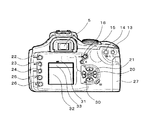
図1は第1の実施形態のデジタル一眼レフカメラを示す斜視図であり、図2は背面図である。1はカメラ本体である。2はカメラ本体1に着脱可能な交換レンズである。3はカメラ本体1から交換レンズ2を取り外すためのレンズ取り外しボタンである。4はカメラ本体1に収納された内蔵ストロボである。5は被写体を観察するためのファインダーである。
Preferred embodiments of the present invention will be described below with reference to the accompanying drawings.
(First embodiment)
FIG. 1 is a perspective view showing the digital single-lens reflex camera of the first embodiment, and FIG. 2 is a rear view.
6はカメラの電源のオン・オフを切り換えるためのメインスイッチである。7はカメラの各種撮影モードを切り換えるモードダイヤルである。8はカメラのシャッター速度や絞り値等の各種の撮影条件を入力するための電子ダイヤルである。
10はレリーズボタンであり、測光、側距を開始するためとレリーズを行わせるための2段階スイッチにより構成される。すなわち、レリーズボタン10を一段目まで軽く押し込んだ状態(いわゆる「半押し」)では測光、側距が行われる。半押しからさらに二段目まで押すと(いわゆる「全押し」)、シャッターが動作し、撮影動作が行われ、撮像素子によって被写体像を光電交換して画像情報が生成される。
11は内蔵ストロボ4を使用可能な状態とするための内蔵ストロボボタンである。12はカメラに内蔵されたセルフタイマー機能を使用するためのセルフタイマーボタンである。13はAFフレーム選択ボタンであり、AFフレーム選択ボタン13を押した後に電子ダイヤル8を回すことによって、撮影画面の中でピント合わせの対象となる領域、すなわちAFフレームの切り換えを行うことができる。
14はAEロック撮影を行うためのAEロックボタンである。15は電子ダイヤル8との組み合わせで露出補正を行うための露出補正ボタンである。なお、マニュアル撮影モードでは、露出補正ボタン15により絞り値をマニュアル設定することができる。
16は外部液晶パネル30のバックライトを点灯させるための照明ボタンである。17はそのときに設定されている絞り値までレンズの絞りを絞り込む絞り込みボタンである。これにより、ユーザは被写界深度を確認することができる。18はストロボ撮影時に発生するいわゆる赤目現象を緩和するために発光する赤目ランプである。
20は様々な設定をメニュー画面で行うときに選択項目を上下左右に移動させるための十字キーである。21は選択項目を決定するためのセットボタンである。
22は外部表示パネル30にメニューを表示させるためのメニューボタンである。23は撮影条件の現在の設定一覧を表示させるためのインフォボタンである。
24は再生モードで再生中の画像から前又は後の画像にジャンプして再生するためのジャンプボタンである。25は記録画像を再生表示させるために再生モードに切り換えるための再生ボタンである。26は再生画像を消去するための消去ボタンである。
Reference numeral 24 denotes a jump button for jumping from the image being reproduced in the reproduction mode to the previous or subsequent image for reproduction.
27は外部メモリカードカバーであり、撮像素子により被写体像が光電交換され生成された画像情報を記録するための不図示の外部メモリカードを着脱するために開閉する。
30は外部液晶パネルであり、撮影条件表示部31、メニュー表示部32、及びヘルプ表示部33により構成される。
以上述べたように、第1の実施形態のデジタル一眼レフカメラは、撮影モードや動作条件を設定するためや、カメラを動作させるために操作される複数のスイッチ、ボタン、ダイヤル等の操作部材6〜8、10〜17、20〜27を有する。
As described above, the digital single-lens reflex camera according to the first embodiment has the
図3には外部液晶パネル30の撮影条件表示部31の表示内容を示す。撮影条件表示部31は設定された撮影条件を表示し、その際にマークを使用して表示する。具体的に、41は赤目緩和マークであり、赤目緩和機能が設定されているときに表示される。42はセルフタイマーマークであり、セルフタイマーモードが設定されているときに表示される。
FIG. 3 shows the display contents of the photographing
43はドライブモードマークであり、単写撮影及び連続撮影のいずれが設定されているかが表示される。44は記録画質表示部であり、設定されている記録画質に応じたマークが表示される。例えば、図示例であればRAW形式が設定されていることが表示されている。
45は露出補正表示部であり、露出補正を行った場合に基準値0に対する差(段数)や、マニュアル撮影時の露出レベルが表示される。46はAEBマークであり、レリーズ動作で自動的に露出を変えながら3画像連続して撮影できるAEB機能が設定されているときに表示される。47は電池残量表示部であり、カメラに充填されている電池の残容量が表示される。
48はホワイトバランス表示部であり、設定されているホワイトバランスに応じたマークが表示される。49は撮影可能枚数表示部であり、装着されている外部メモリカードの残容量から推定される撮影可能枚数が表示される。
50はシャッター速度表示部であり、ユーザがマニュアル設定したシャッター速度又はカメラが自動設定したシャッター速度が表示される。51は絞り値表示であり、設定されている絞り値が表示される。
A shutter
図4には外部液晶パネル30のメニュー表示部32の表示例を示す。上述したように、メニューボタン22を押下することで、メニュー画面を表示させることができる。メニュー表示部32の表示内で、十字キー20とセットボタン21を使用して項目を選択することで、撮影条件もしくは再生条件を設定することができる。また、再生ボタン25を押下することで、撮影画像をメニュー表示部32に表示することもできる。
FIG. 4 shows a display example of the
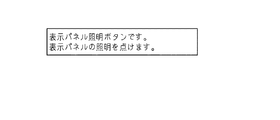
図5には外部液晶パネル30のヘルプ表示部33の表示例を示す。ヘルプ表示部33には、既述した複数の操作部材のいずれかが操作されたときに、その操作部材に関するヘルプ情報が表示される。図示例は、照明ボタン16を押下した際の表示例である。
FIG. 5 shows a display example of the
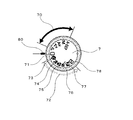
次に、図6を参照して、モードダイヤル7について説明する。図6において、70はクリエイティブゾーンであり、プログラムAEモード「P」、シャッター優先モード「Tv」、絞り優先AEモード「Av」、マニュアル露出モード「M」、オートデプスモード「A-DEP」が設定されている。クリエイティブゾーン70に描かれたモードマークのいずれかをカメラ本体1側のモード指標マーク80に合わせるようにモードダイヤル7を回転させることにより、そのモードマークに対応する撮影モードが設定される。
Next, the
インテリジェントプログラムAEモード「P」では、レリーズボタン10を半押しすると、カメラが自動的にシャッター速度と絞り値を決定する。ユーザは、電子ダイヤル8を操作することでプログラムシフトを行うことができる。シャッター優先モード「Tv」では、ユーザが電子ダイヤル8でシャッター速度を設定すると、被写体の明るさに応じてカメラが絞り値を自動的に設定する。絞り優先AEモード「Av」では、ユーザが電子ダイヤル8で絞り値を設定すると、被写体の明るさに応じてカメラがシャッター速度を自動的に設定する。マニュアル露出モード「M」では、ユーザがシャッター速度や絞り値を決めて撮影することができる。シャッター速度は直接電子ダイヤル8で設定し、絞り値は露出補正ボタン15を押下しながら電子ダイヤル8を回すことにより設定する。オートデプスモード「A-DEP」では、AFフレームに重なった複数の被写体が被写界深度内に入るように絞り値とフォーカス位置を決定する。
In the intelligent program AE mode “P”, when the
図6において、71は全自動モードであり、そのモードマークをカメラ本体1側のモード指標マーク80に合わせるようにモードダイヤル7を回転させることにより、全自動モードが設定される。
In FIG. 6,
図6において、72はイメージゾーンであり、ポートレートモード73、風景モード74、クローズアップモード75、スポーツモード76、夜景モード77、ストロボ発光禁止モード78が設定されている。イメージゾーン72に描かれたモードマークのいずれかをカメラ本体1側のモード指標マーク80に合わせるようにモードダイヤル7を回転させることにより、そのモードマークに対応する撮影モードが設定される。
In FIG. 6,
これら全自動モード71やイメージゾーン72の撮影モードでは、カメラが自動的に最適なAFフレームやシャッター速度、絞り値を設定する。したがって、ユーザはレリーズボタン10を押下するだけで、簡単に良好な撮影を行うことができる。
In these fully
以下、外部液晶パネル30のヘルプ表示部33に表示されるヘルプ情報について説明する。ヘルプ情報は、操作部材7、11、12、13、14、15、16、17等が操作されたときに表示される。なお、本実施形態で説明するヘルプ情報は一例に過ぎず、その文言の内容等に限定されるものではない。
Hereinafter, help information displayed on the
<撮影モードを識別情報とするヘルプ情報>
図7に、本実施形態のデジタル一眼レフカメラの要部の機能構成を示す。なお、既に説明した構成要素には同一の符号を付する。カメラ内には外部液晶パネル30のヘルプ表示部33の表示制御を行う表示制御部700が設けられている。表示制御部700には、モードダイヤル7により設定される撮影モード情報と、操作部材の操作があったか否かの操作情報とが入力される。表示制御部700の選択部700aは、以下に詳述するように撮影モード情報及び操作情報に基づいて、ヘルプ情報記憶部701からヘルプ情報(ガイダンス)を選択抽出し、ヘルプ表示部33に表示する。
<Help information with shooting mode as identification information>
FIG. 7 shows a functional configuration of a main part of the digital single-lens reflex camera of the present embodiment. In addition, the same code | symbol is attached | subjected to the already demonstrated component. A
まず、モードダイヤル7を操作したときのヘルプ情報について説明する。モードダイヤル7を回転させて、モードダイヤル7に描かれたモードマークをカメラ本体1側のモード指標マーク80に合わせると、その選択した撮影モードのヘルプ情報が表示される。その状態で他の操作部材が操作されると、一部又は全部の表示が新しく操作された操作部材に関するヘルプ情報に切り換わる。
First, help information when the
モードダイヤル7が全自動モード71もしくはイメージゾーン72の撮影モードへと操作されたときのヘルプ情報の表示例を記す。全自動モード71の選択時には、「全自動モードです。シャッターボタンを押すだけで簡単にきれいな写真が撮れます。」と表示される。
A display example of help information when the
イメージゾーン72のポートレートモード73の選択時には、「ポートレートモードです。背景をぼかして手前の人物を際立たせた写真が撮れます。」と表示される。また、風景モード74の選択時には、「風景モードです。近景から遠景まで、鮮明に写せます。」と表示される。また、クローズアップモード75の選択時には、「クローズアップモードです。小さな被写体の近接撮影も簡単に写せます。」と表示される。スポーツモード76の選択時には、「スポーツモードです。移動する被写体に最適な動体予測AFと高速AEを組み合わせたモードです。」と表示される。夜景モード77の選択時には、「夜景モードです。見たままの雰囲気で夜景が美しく写せます。」と表示される。ストロボ発光禁止モード78の選択時には、「ストロボ発光禁止モードです。ストロボがアップ状態になっていても発光を禁止します。」と表示される。
When the
次に、モードダイヤル7がクリエイティブゾーン70の撮影モードへと操作されたときのヘルプ情報の表示例を記す。インテリジェントプログラムAEモードの選択時には、「(P)インテリジェントプログラムAEモードです。電子ダイヤルを回してプログラムシフトできます。」と表示される。シャッター優先AEモードの選択時には、「(Tv)シャッター優先AEモードです。」と表示される。絞り優先AEモードの選択時には、「(Av)絞り優先AEモードです。」と表示される。マニュアル露出モードの選択時には、「(M)マニュアル露出モードです。」と表示される。オートデプスモードの選択時には、「(A-DEP)オートデプスモードです。複数の側距点で捉えた被写体それぞれにピントが合うように、絞り値とフォーカス位置をカメラが設定します。」と表示される。
Next, a display example of help information when the
以下、モードダイヤル7により撮影モードが設定された状態で、代表例としてセルフタイマーボタン12、照明ボタン16、AEロックボタン14を操作したときのヘルプ情報について説明する。
Hereinafter, help information when the self-
(セルフタイマーボタン12)
モードダイヤル7が全自動モード71もしくはイメージゾーン72の撮影モードに設定されているときに、セルフタイマーボタン12を押下すると、「セルフタイマーモードです。ファインダーをのぞきながらレリーズボタンを全押ししてください。10秒後の撮影されます。」と表示される。さらに、もう一度セルフタイマーボタン12を押下すると、「通常撮影モードです。セルフタイマーモードにするには、もう一度セルフタイマーボタンを押してください。」と表示される。
(Self-timer button 12)
If the self-
それに対して、モードダイヤル7がクリエイティブゾーン70の撮影モードに設定されているときに、セルフタイマーボタン12を押下すると、「セルフタイマーモードです。ファインダー逆入光に注意してください。10秒後に撮影されます。」と表示される。さらに、もう一度セルフタイマーボタン12を押下すると、「通常撮影モードです。」と表示される。
On the other hand, when the
(照明ボタン16)
モードダイヤル7が全自動モード71もしくはイメージゾーン72の撮影モードに設定されているときに、照明ボタン16を押下すると、「表示パネル照明ボタンです。表示パネルの照明を点けます。」と表示され、同時に表示パネルの照明が点灯する。
(Lighting button 16)
When the
それに対して、モードダイヤル7がクリエイティブゾーン70の撮影モードに設定されているときに、照明ボタン16を押下すると、「表示パネル照明ボタンです。6秒間点灯します。」と表示され、同時に表示パネルの照明が点灯する。
On the other hand, when the
(AEロックボタン14)
モードダイヤル7が全自動モード71もしくはイメージゾーン72の撮影モードに設定されているときに、AEロックボタン14を押下すると、「AEロックボタンです。AEロック撮影を行うボタンです。ファインダー内に*が表示され、露出値が固定されます。」と表示される。
(AE lock button 14)
When the
それに対して、モードダイヤル7がクリエイティブゾーン70の撮影モードに設定されているときに、AEロックボタン16を押下すると、「AEロックボタンです。ファインダー内に*が表示され、測光範囲は部分測光になります。」と表示される。
On the other hand, when the
以上説明したヘルプ情報の表示例は、モードダイヤル7が全自動モード71もしくはイメージゾーン72の撮影モードに設定されているときは、ユーザがカメラ操作に熟練していない可能性を考慮し、平易な用語を使用し分かりやすい文言でヘルプ情報を表示するものである。それに対して、モードダイヤル7がクリエイティブゾーン70の撮影モードに設定されているときは、ユーザがある程度カメラ操作に熟練している可能性を考慮し、必要に応じて専門的な用語も含めて簡潔で認識しやすい文言でヘルプ情報を表示するものである。このようにユーザの熟練度に応じて最適なヘルプ情報を提供することが可能となり、操作性に優れた撮像装置を提供することができる。
The display example of the help information described above is simple in consideration of the possibility that the user is not skilled in camera operation when the
なお、ヘルプ情報は、表示されてから次の操作が行われるか、表示されてから一定時間経過後(例えば6秒経過後)に消えるようになっている。 The help information disappears after the next operation is performed after it is displayed or after a certain time has elapsed since the display (for example, after 6 seconds).
また、本実施形態では、ヘルプ情報を外部液晶パネル30に表示してユーザに提供するようにしたが、音声情報として提供するようにしてもかまわない。
In this embodiment, help information is displayed on the external
<撮影モード以外の設定を識別情報とするヘルプ情報>
以上述べた例では、モードダイヤル7により設定された撮影モードを識別情報として、操作部材が操作されたときのヘルプ情報を選択して提供するようにしたが、それ以外の設定を識別情報としてもよい。以下、記録画質形式、ISO感度、ホワイトバランス、現像パラメータ、AFモード、AFフレーム選択モード、測光方式、露出補正設定、カスタムファンクションの設定を識別情報とする例を説明する。なお、デジタル一眼レフカメラの要部の機能構成は図7に示したものと同様であり、撮影モード情報に替えて、ISO感度、ホワイトバランス、現像パラメータ、AFモード、AFフレーム選択モード、測光方式、露出補正設定、カスタムファンクションの設定情報が入力される。
<Help information with settings other than shooting mode as identification information>
In the example described above, the shooting mode set by the
ISO感度については、カメラの撮影モードが全自動モード71であっても、イメージゾーン72の撮影モードであっても、クリエイティブゾーン70の撮影モードであっても自由に設定ができる。ただし、記録画質形式、ホワイトバランス、現像パラメータ、AFモード、AFフレーム選択モード、測光方式、露出補正設定、カスタムファンクションについては、カメラの撮影モードがクリエイティブゾーン70の撮影モードに設定されているときのみ自由に設定することができるが、全自動モード71もしくはイメージゾーン72の撮影モードに設定されているときはカメラが自動的に設定を行う。
The ISO sensitivity can be set freely regardless of whether the shooting mode of the camera is the fully
図8に、撮影モードごとの撮影機能の組み合わせ一覧を示す。記録画質形式、ISO感度、ホワイトバランス、現像パラメータ、AFモード、測光方式、カスタムファンクションについては、メニューボタン22を押下することで不図示のメニュー画面の中から各々選択可能となっている。
FIG. 8 shows a list of combinations of shooting functions for each shooting mode. The recording image quality format, ISO sensitivity, white balance, development parameter, AF mode, photometry method, and custom function can be selected from a menu screen (not shown) by pressing the
記録画質形式は、一般的によく知られている圧縮方式のJPEG形式と、非圧縮方式で取り扱いに専用のソフトウェアが必要とされるRAW方式の2種類を設定することができる。RAW形式は、コンピュータでの現像処理を前提としているため専門知識が必要であるが、使用目的に最適な画像を作成することが可能である。 Two types of recording image quality formats can be set: the JPEG format, which is a well-known compression method, and the RAW method, which requires a dedicated software for handling in the non-compression method. Since the RAW format is premised on development processing by a computer, specialized knowledge is required, but an image optimal for the purpose of use can be created.
ISO感度は、カメラが自動的に最適な感度設定を行う(オートISO)か、ユーザがマニュアルで感度設定を行うか(マニュアル感度設定)が可能である。 The ISO sensitivity can be set automatically by the camera for optimum sensitivity setting (auto ISO) or manually by the user (sensitivity setting).
ホワイトバランスは、撮影状況に応じて最適なホワイトバランスを自動的に設定するか(オートホワイトバランス)、撮影状況の光源別にホワイトバランスを予め設定されているプリセットホワイトバランスを設定するか、マニュアルで設定することが可能である。 Set the white balance automatically according to the shooting conditions (automatic white balance), set a preset white balance for each shooting light source in advance, or set manually. Is possible.
現像パラメータは、撮影した画像の現像処理の設定内容(コントラスト、シャープネス、色の濃さ、色あい)であり、この現像パラメータを変更することで鮮やかにでくっきりした感じにしたり、逆に控えめな感じにしたりすることができる。本実施形態では、予め設定されている基準パラメータと、コントラスト、シャープネス、色の濃さ、色あいを各々任意に設定することのできるパラメータセットを選択することが可能である。 The development parameters are the settings for the development processing (contrast, sharpness, color density, color tone) of the captured image. Changing these development parameters makes the image look vivid and clear, or conversely Can be. In the present embodiment, it is possible to select a parameter set in which a preset reference parameter and contrast, sharpness, color density, and hue can be arbitrarily set.
AFモードは、AFの作動特性のことであり、静止している被写体の撮影に適したワンショットAFと、動いている被写体の撮影に適したAIサーボAFと、ワンショットAFかAIサーボAFを自動的に切り換えるAIフォーカスAFとの3種類を選択することが可能である。 The AF mode is an AF operation characteristic, and includes one-shot AF suitable for photographing a stationary subject, AI servo AF suitable for photographing a moving subject, and one-shot AF or AI servo AF. It is possible to select three types of AI focus AF that automatically switches.
AFフレーム選択モードは、AFフレーム選択ボタン13を押下した後に電子ダイヤル8を回すことにより、AFフレームを選択することができる。例えば7点のAFフレームを備えており、7点のAFフレームの中から撮影状況に応じて自動的に選択する自動選択モードと、7点のAFフレームの中の任意の1点をマニュアルで選択する任意選択モードとを選択することが可能である。
In the AF frame selection mode, the AF frame can be selected by turning the
測光方式は、撮影状況における様々な光の状況から被写体を適正な露出値にする評価測光と、被写体近傍の範囲のみを測光する部分測光と、画面中央部に重点を置いて画面全体を平均的に測光する中央部重点平均測光の3種類を選択することが可能である。 The metering method is an average metering method with an emphasis on the center of the screen. Three types of center-weighted average metering can be selected.
露出補正設定は、露出補正ボタン15を押下しながら電子ダイヤル8を回すことで設定する。
The exposure correction setting is set by turning the
カスタムファンクションは、様々な撮影スタイルに応じてカメラの機能を細かく変更するための機能設定である。 The custom function is a function setting for finely changing the function of the camera according to various shooting styles.
以下、ISO感度が設定された状態で、代表例として絞り込みボタン17を操作したときのヘルプ情報について説明する。
Hereinafter, help information when the narrow-
(絞り込みボタン19)
ISO感度がオートISOに設定されているときに、絞り込みボタン17を押下すると、「被写界深度確認ボタンです。設定された絞り値まで絞り込み、ピントの合っている範囲をファインダーで確認できます。」と表示される。
(Refine button 19)
When the ISO sensitivity is set to Auto ISO and the
それに対して、ISO感度がマニュアル感度設定されているときに、絞り込みボタン19を押下すると、「被写界深度確認ボタンです。」と表示される。 On the other hand, when the ISO sensitivity is set to manual sensitivity and the narrowing down button 19 is pressed, “depth of field confirmation button” is displayed.
以上説明したヘルプ情報の表示例は、ISO感度がオートISOに設定されているときは、ユーザがカメラ操作に熟練していない可能性を考慮し、平易な用語を使用し分かりやすい文言でヘルプ情報を表示するものである。それに対して、ISO感度がマニュアル感度設定されているときは、ユーザがある程度カメラ操作に熟練している可能性を考慮し、必要に応じて専門的な用語を含めて簡潔で認識しやすい文言でヘルプ情報を表示するものである。このようにユーザの熟練度に応じて最適なヘルプ情報を提供することが可能となり、操作性に優れた撮像装置を提供することができる。 The display example of the help information described above is based on easy-to-understand words using plain terms in consideration of the possibility that the user is not skilled in camera operation when the ISO sensitivity is set to auto ISO. Is displayed. On the other hand, when the ISO sensitivity is set to manual sensitivity, consider the possibility that the user is proficient in camera operation to some extent, and use simple terms that include technical terms as necessary. Display help information. Thus, it is possible to provide optimal help information according to the skill level of the user, and it is possible to provide an imaging device with excellent operability.
ISO感度以外の、記録画質形式、ホワイトバランス、現像パラメータ、AFモード、AFフレーム選択モード、測光方式、露出補正設定、カスタムファンクションの設定を識別情報とする場合について簡単に説明する。記録画質形式がJPEG形式に設定されているときは、ユーザがカメラ操作に熟練していない可能性を考慮する。それに対して、記録画質形式がRAW形式に設定されているときは、ユーザがある程度カメラ操作に熟練している可能性を考慮する。 A case where the recording information format other than the ISO sensitivity, white balance, development parameter, AF mode, AF frame selection mode, photometry method, exposure correction setting, and custom function setting are used as identification information will be briefly described. When the recording image quality format is set to the JPEG format, the possibility that the user is not skilled in camera operation is considered. On the other hand, when the recording image quality format is set to the RAW format, the possibility that the user is proficient in camera operation to some extent is considered.
ホワイトバランスがオートホワイトバランスに設定されているときは、ユーザがカメラ操作に熟練していない可能性を考慮する。それに対して、ホワイトバランスがプリセットホワイトバランスかマニュアル設定されているときは、ユーザがある程度カメラ操作に熟練している可能性を考慮する。 When the white balance is set to auto white balance, the possibility that the user is not skilled in camera operation is considered. On the other hand, when the white balance is preset white balance or manual setting, the possibility that the user is proficient in camera operation to some extent is considered.
現像パラメータが基準パラメータに設定されているときは、ユーザがカメラ操作に熟練していない可能性を考慮する。それに対して、現像パラメータがパラメータセットに設定されているときは、ユーザがある程度カメラ操作に熟練している可能性を考慮する。 When the development parameter is set as the reference parameter, the possibility that the user is not skilled in camera operation is considered. On the other hand, when the development parameters are set in the parameter set, the possibility that the user is proficient in camera operation to some extent is considered.
AFモードがAIフォーカスAFに設定されているときは、ユーザがカメラ操作に熟練していない可能性を考慮する。それに対して、AFモードがワンショットAFか、AIサーボAFに設定されているときには、ユーザがある程度カメラ操作に熟練している可能性を考慮する。 When the AF mode is set to AI focus AF, the possibility that the user is not skilled in camera operation is considered. On the other hand, when the AF mode is set to one-shot AF or AI servo AF, the possibility that the user is proficient in camera operation to some extent is considered.
AFフレーム選択モードが自動選択モードに設定されているときは、ユーザがカメラ操作に熟練していない可能性を考慮する。それに対して、AFフレーム選択モードが任意選択モードに設定されているときは、ユーザがある程度カメラ操作に熟練している可能性を考慮する。 When the AF frame selection mode is set to the automatic selection mode, the possibility that the user is not skilled in camera operation is considered. On the other hand, when the AF frame selection mode is set to the arbitrary selection mode, the possibility that the user is proficient in camera operation to some extent is considered.
測光方式が評価測光に設定されているときは、ユーザがカメラ操作に熟練していない可能性を考慮する。それに対して、測光方式が部分測光か、中央部重点平均測光に設定されているときは、ユーザがある程度カメラ操作に熟練している可能性を考慮する。 When the metering method is set to evaluation metering, the possibility that the user is not skilled in camera operation is taken into consideration. On the other hand, when the metering method is set to partial metering or center-weighted average metering, the possibility that the user is proficient in camera operation is considered.
露出補正設定が設定されていないときは、ユーザがカメラ操作に熟練していない可能性を考慮する。それに対して、露出補正設定が設定されているときは、ユーザがある程度カメラ操作に熟練している可能性を考慮する。 When the exposure correction setting is not set, the possibility that the user is not skilled in camera operation is considered. On the other hand, when the exposure correction setting is set, the possibility that the user is proficient in camera operation to some extent is considered.
カスタムファンクションが設定されていないときは、ユーザがカメラ操作に熟練していない可能性を考慮する。それに対して、カスタムファンクションが設定されているときは、ユーザがある程度カメラ操作に熟練している可能性を考慮する。 When the custom function is not set, consider the possibility that the user is not skilled in camera operation. On the other hand, when a custom function is set, the possibility that the user is proficient in camera operation to some extent is considered.
<カメラに装着されている付属機器を識別情報とするヘルプ情報>
以上述べた例では、モードダイヤル7により設定された撮影モードや記録画質形式、ISO感度、ホワイトバランス、現像パラメータ、AFモード、AFフレーム選択モード、測光方式、露出補正設定、カスタムファンクションの設定を識別情報として、操作部材が操作されたときのヘルプ情報を選択して提供するようにしたが、カメラに装着されている付属機器を識別情報としてもよい。以下、カメラに装着されている付属機器を識別情報とする例を説明する。なお、デジタル一眼レフカメラの要部の機能構成は図7に示したものと同様であり、撮影モード情報に替えて、付属機器情報が入力される。
<Help information with the attached device attached to the camera as identification information>
In the example described above, the shooting mode, recording image quality format, ISO sensitivity, white balance, development parameter, AF mode, AF frame selection mode, metering method, exposure correction setting, and custom function setting set by the
一眼レフカメラの交換レンズとしては、様々な焦点距離や開放絞り値を持つものが多数存在する。その性能や価格も様々であり、普及クラスのレンズから高性能・高価格の高級クラスのレンズまで発売されている。また、交換レンズの中には、近接撮影用のマクロレンズや、ティルト撮影やシフト撮影を行うことができるアオリレンズ等の特殊用途用レンズも発売されている。 Many interchangeable lenses for single-lens reflex cameras have various focal lengths and open aperture values. Its performance and price vary, and a wide range of lenses ranging from high-end lenses to high-performance, high-priced lenses are on sale. Among interchangeable lenses, special-purpose lenses such as a macro lens for close-up photography and a tilt lens that can perform tilt photography and shift photography are also on the market.
また、一眼レフカメラのアクセサリとしては、外付けストロボやバッテリーパックや縦位置グリップ等が存在し、普及クラスから高級クラスまで発売されている。どのようなアクセサリがカメラに装着されているかは、カメラが接続されたアクセサリのID情報を読み取ることで識別することができる。 In addition, as an accessory for single-lens reflex cameras, there are an external flash, a battery pack, a vertical position grip, etc., which are on the market from the popular class to the high class. What accessories are attached to the camera can be identified by reading the ID information of the accessories to which the camera is connected.
また、メディアとしては、通電しなくても記憶が消えないフラッシュメモリを使用したカードと、小型のハードディスクが内蔵されたカードの2種類が知られている。一般的にハードディスク内蔵メモリカードは大容量であり、同容量のフラッシュメモリカードよりも安価であるが、構造的に壊れやすく取り扱いに注意を要するため、ある程度カメラ操作に熟練しているユーザに使用されることが多い。そのような記録媒体がカメラに装着されているかは、カメラに記録媒体が装着されたときに記録媒体からカメラに送信される情報によって識別することができる。 Two types of media are known: a card that uses a flash memory that does not lose its memory even if it is not energized, and a card that contains a small hard disk. Generally, a memory card with a built-in hard disk has a large capacity and is cheaper than a flash memory card with the same capacity, but it is structurally fragile and requires careful handling. Therefore, it is used by users who have some skill in camera operation. Often. Whether such a recording medium is attached to the camera can be identified by information transmitted from the recording medium to the camera when the recording medium is attached to the camera.
カメラに装着されているレンズが普及クラスのレンズのときは、ユーザがカメラ操作に熟練していない可能性を考慮する。それに対して、カメラに装着されているレンズが高級クラスや特殊用途用レンズのときは、ユーザがある程度カメラ操作に熟練している可能性を考慮する。 When the lens mounted on the camera is a popular class lens, the possibility that the user is not skilled in camera operation is considered. On the other hand, when the lens mounted on the camera is a high-class or special purpose lens, the possibility that the user has some skill in camera operation is considered.
カメラに装着されているアクセサリが普及クラスのアクセサリのときは、ユーザがカメラ操作に熟練していない可能性を考慮する。それに対して、カメラに装着されているアクセサリが高級クラスのアクセサリのときは、ユーザがある程度カメラ操作に熟練している可能性を考慮する。 When the accessory mounted on the camera is a popular accessory, consider the possibility that the user is not skilled in camera operation. On the other hand, when the accessory attached to the camera is a high-class accessory, the possibility that the user is proficient in camera operation to some extent is considered.
カメラに装着されているメディアがハードディスク内蔵メモリカードのときは、ユーザがある程度カメラ操作に熟練している可能性を考慮する。 When the media loaded in the camera is a memory card with a built-in hard disk, consider the possibility that the user is proficient in camera operation to some extent.
なお、本例では付属機器の種類に基づくものとしたが、付属機器の設定に基づくものとしてもよい。 In this example, it is based on the type of the accessory device, but may be based on the setting of the accessory device.
<カメラの設定や付属機器の組み合わせを識別情報とするヘルプ情報1>
以上述べた撮影モード、それ以外の設定(記録画質形式、ISO感度、ホワイトバランス、現像パラメータ、AFモード、AFフレーム選択モード、測光方式、露出補正設定、カスタムファンクションの設定)、カメラに装着されている付属機器を組み合わせて識別情報としてもよい。以下、これらの組み合わせを識別情報とする例を説明する。
<Help
The shooting modes described above and other settings (recording image quality format, ISO sensitivity, white balance, development parameters, AF mode, AF frame selection mode, metering method, exposure compensation settings, custom function settings), mounted on the camera The attached information may be combined and used as identification information. Hereinafter, an example in which these combinations are used as identification information will be described.
(内蔵ストロボボタン11)
モードダイヤル7が全自動モード71もしくはイメージゾーン72の撮影モードに設定されているときに(このとき記録画質形式は自動的にJPEG形式に設定されている)、内蔵ストロボボタン11を押下すると、「内蔵ストロボアップボタンです。撮影時にストロボ発光します。使わないとき手でストロボを押し下げて下さい。」と表示され、同時に内蔵ストロボ4をアップする。
(Built-in flash button 11)
When the
それに対して、モードダイヤル7がクリエイティブゾーン70の撮影モードに設定されており、記録画質形式がJPEG形式に設定されているときに、内蔵ストロボボタン11を押下すると、「内蔵ストロボアップボタンです。同調シャッター速度は1/200です。」と表示され、同時に内蔵ストロボ4をアップする。
On the other hand, when the
また、モードダイヤル7がクリエイティブゾーン70の撮影モードに設定されており、記録画質形式がRAW形式に設定されているときには、内蔵ストロボボタン11を押下しても、ヘルプ情報が表示されずに、内蔵ストロボ4をアップする。
Further, when the
図9に、内蔵ストロボボタン11を押下したときのヘルプ情報表示制御のフローチャートを示す。内蔵ストロボボタン11が押下されると(ステップS1)、ヘルプ情報判別情報βの初期化を行う(ステップS2)。次に、モードダイヤル7がクリエイティブゾーン70の撮影モードに設定されているか否かを判定する(ステップS3)。
FIG. 9 shows a flowchart of help information display control when the built-in
ステップS3においてモードダイヤル7がクリエイティブゾーン70の撮影モードに設定されていない場合、すなわち全自動モード71もしくはイメージゾーン71の撮影モードに設定されている場合は、そのままステップS5に移行する。それに対して、モードダイヤル7がクリエイティブゾーン70の撮影モードに設定されている場合、ヘルプ情報判別情報βに1を加算した後(ステップS4)、ステップS5に移行する。この場合、ヘルプ情報判別情報βは、ステップS2において初期化されているので、β=β+1となる。
If the
ステップS5では、記録画質形式がJPEG形式に設定されているか否かを判定する。記録画質形式がJPEG形式に設定されている場合、そのままステップS7に移行する。それに対して、記録画質形式がJPEG形式に設定されていない場合、すなわちRAW形式に設定されている場合は、ヘルプ情報判別情報βに1を加算した後(ステップS6)、ステップS7に移行する。 In step S5, it is determined whether or not the recording image quality format is set to the JPEG format. If the recording image quality format is set to the JPEG format, the process proceeds to step S7 as it is. On the other hand, when the recording image quality format is not set to the JPEG format, that is, when the recording image quality format is set to the RAW format, 1 is added to the help information determination information β (step S6), and the process proceeds to step S7.
ステップS7では、ヘルプ情報判別情報βが0以下であるか否かを判定する。ヘルプ情報判別情報βが0以下である場合は、ステップS9に進み、ヘルプ表示1(平易で分かりやすい表現)を表示する。それに対して、ヘルプ情報判別情報βが0よりも大きい場合は、ステップS8に進み、ヘルプ情報判別情報βが1であるか否かを判定する。ヘルプ情報判別情報βが1である場合は、ステップS10に進み、ヘルプ情報表示2(専門用語を含む簡潔な表現)を表示する。それに対して、ヘルプ情報判別情報βが1でない、すなわち1より大きい場合は、ステップS11に進み、ヘルプ情報表示3(非表示)とする。 In step S7, it is determined whether or not the help information determination information β is 0 or less. If the help information discriminating information β is 0 or less, the process proceeds to step S9, and the help display 1 (plain and easy to understand expression) is displayed. On the other hand, if the help information determination information β is larger than 0, the process proceeds to step S8 to determine whether or not the help information determination information β is 1. If the help information determination information β is 1, the process proceeds to step S10, and the help information display 2 (simple expression including technical terms) is displayed. On the other hand, if the help information determination information β is not 1, that is, larger than 1, the process proceeds to step S11 and the help information display 3 (non-display) is set.
(露出補正ボタン15)
モードダイヤル7が全自動モード71もしくはイメージゾーン72の撮影モードに設定されているときに(このとき記録画質形式は自動的にJPEG形式に設定されている)、露出補正ボタン15を押下すると、「この撮影モードでは、この露出補正ボタンは作動しません。露出補正を設定したいときは、撮影モードをクリエイティブモードに切り換えてください。」と表示される。
(Exposure compensation button 15)
When the
それに対して、モードダイヤル7がクリエイティブゾーン70の撮影モードに設定されており、記録画質形式がJPEG形式に設定されているときに、露出補正ボタン15を押下すると、「露出補正ボタンです。1/3段ステップで±2段の範囲で設定可能です。」と表示される。この場合、ユーザは電子ダイヤル8を回すことで露出補正を設定することができる。
On the other hand, when the
また、モードダイヤル7がクリエイティブゾーン70の撮影モードに設定されており、記録画質形式がRAW形式に設定されているときには、露出補正ボタン15を押下しても、ヘルプ情報が表示されない。この場合、ヘルプ情報は表示されないが、ユーザは電子ダイヤル8を回すことで露出補正を設定することができる。
When the
なお、露出補正ボタン15を押下したときのヘルプ情報表示制御のアルゴリズムは、図8のフローチャートで説明した流れと同様であり、ここではその説明を省略する。
Note that the algorithm of the help information display control when the
以上述べた内蔵ストロボボタン11及び露出補正ボタン15を例では、モードダイヤル7が全自動モード70もしくはイメージゾーン71の撮影モードに設定されているとき(JPEG形式に自動設定)は、ユーザがカメラ操作に熟練していない可能性を考慮し、平易な用語を使用し分かりやすい文言でヘルプ情報を表示するものである。それに対して、モードダイヤル7がクリエイティブゾーン70の撮影モードに設定され、かつ、記録画質形式がJPEG形式に設定されている場合は、ユーザがある程度カメラ操作に熟練している可能性を考慮し、必要に応じて専門的な用語も含めて簡潔で認識しやすい文言でヘルプ情報を表示するものである。また、モードダイヤル7がクリエイティブゾーン70の撮影モードに設定されており、かつ、記録画質形式がRAW形式に設定されているときには、ユーザがかなりカメラ操作に熟練している可能性を考慮して、ヘルプ情報は不要と判断し表示しない。
In the case of the built-in
<カメラの設定や付属機器の組み合わせを識別情報とするヘルプ情報2>
(AFフレーム選択ボタン13)
モードダイヤル7が全自動モード71もしくはイメージゾーン72の撮影モードに設定されているときに(このとき測光方式は自動的に評価測光に設定されている)、AFフレーム選択ボタン13を押下すると、「この撮影モードでは、このAFフレーム選択ボタンは作動しません。AFフレームを任意に選択したときは、撮影モードをクリエイティブモードに切り換えてください。」と表示される。
<Help
(AF frame selection button 13)
When the
それに対して、モードダイヤル7がクリエイティブモード70の撮影モードに設定されており、測光方式が評価測光に設定されているときに、AFフレーム選択ボタン13を押下すると、「AFフレーム選択ボタンです。7点のAFフレームの中から任意選択可能です。」と表示される。この場合、ユーザは電子ダイヤル8を回すことでAFフレームを選択することができる。
On the other hand, when the
また、モードダイヤル7がクリエイティブゾーン70の撮影モードに設定されており、測光方式が部分測光もしくは中央部重点平均測光に設定されているときには、AFフレーム選択ボタン13を押下しても、ヘルプ情報は表示されない。この場合、ヘルプ情報の表示はされないが、ユーザは電子ダイヤル8を回すことでAFフレームを選択することができる。
If the
図10に、AFフレーム選択ボタン13を押下したときのヘルプ情報表示制御のフローチャートを示す。AFフレーム選択ボタン13が押下されると(ステップS21)、ヘルプ情報判別情報βの初期化を行う(ステップS22)。次に、モードダイヤル7がクリエイティブゾーン70の撮影モードに設定されているか否かを判定する(ステップS23)。
FIG. 10 shows a flowchart of help information display control when the AF
ステップS23においてモードダイヤル7がクリエイティブゾーン70の撮影モードに設定されていない場合、すなわち全自動モード71もしくはイメージゾーン71の撮影モードに設定されている場合は、そのままステップS25に移行する。それに対して、モードダイヤル7がクリエイティブゾーン70の撮影モードに設定されている場合、ヘルプ情報判別情報βに1を加算した後(ステップS24)、ステップS25に移行する。この場合、ヘルプ情報判別情報βは、ステップS22において初期化されているので、β=β+1となる。
If the
ステップS25では、測光方式が評価測光に設定されているか否かを判定する。測光方式が評価測光に設定されている場合、そのままステップS27に移行する。それに対して、測光方式が評価測光に設定されていない場合、すなわち部分測光もしくは中央部重点平均測光に設定されている場合は、ヘルプ情報判別情報βに1を加算した後(ステップS26)、ステップS27に移行する。 In step S25, it is determined whether or not the photometry method is set to evaluation photometry. If the metering method is set to evaluation metering, the process directly proceeds to step S27. On the other hand, if the metering method is not set to evaluation metering, that is, if it is set to partial metering or center-weighted average metering, 1 is added to the help information discrimination information β (step S26), and then step The process proceeds to S27.
ステップS27では、ヘルプ情報判別情報βが0以下であるか否かを判定する。ヘルプ情報判別情報βが0以下である場合は、ステップS29に進み、ヘルプ表示1(平易で分かりやすい表現)を表示する。それに対して、ヘルプ情報判別情報が0よりも大きい場合は、ステップS28に進み、ヘルプ情報判別情報βが1であるか否かを判定する。ヘルプ情報判別情報βが1である場合は、ステップS30に進み、ヘルプ情報表示2(専門用語を含む簡潔な表現)を表示する。それに対して、ヘルプ情報判別情報βが1でない、すなわち1より大きい場合は、ステップS31に進み、ヘルプ情報表示3(非表示)とする。
In step S27, it is determined whether or not the help information determination information β is 0 or less. If the help information discriminating information β is 0 or less, the process proceeds to step S29, and the help display 1 (plain and easy-to-understand expression) is displayed. On the other hand, if the help information determination information is larger than 0, the process proceeds to step S28 to determine whether or not the help information determination information β is 1. When the help information determination information β is 1, the process proceeds to step S30, and the help information display 2 (simple expression including technical terms) is displayed. On the other hand, if the help information discriminating information β is not 1, that is, larger than 1, the process proceeds to step S31 and the
以上述べたAFフレーム選択ボタン13の例では、モードダイヤル7が全自動モード70もしくはイメージゾーン71の撮影モードに設定されているとき(評価測光に自動設定)は、ユーザがカメラ操作に熟練していない可能性を考慮し、平易な用語を使用し分かりやすい文言でヘルプ情報を表示するものである。それに対して、モードダイヤル7がクリエイティブゾーン70の撮影モードに設定され、かつ、測光方式が評価測光に設定されている場合は、ユーザがある程度カメラ操作に熟練している可能性を考慮し、必要に応じて専門的な用語も含めて簡潔で認識しやすい文言でヘルプ情報を表示するものである。また、モードダイヤル7がクリエイティブゾーン70の撮影モードに設定されており、かつ、測光方式が部分測光もしくは中央部重点平均測光に設定されているときには、ユーザがかなりカメラ操作に熟練している可能性を考慮して、ヘルプ情報は不要と判断し表示しない。
In the example of the AF
なお、ヘルプ情報を選択するために識別情報は、撮影モードと記録画質形式或いは測光方式との組み合わせに限るものではなく、それら以外の組み合わせに基づくものであってもよい。また、組み合わせのパターンも2つに限るものでなく、それ以上の組み合わせでもよい。 The identification information for selecting the help information is not limited to the combination of the shooting mode and the recording image quality format or the photometry method, but may be based on a combination other than those. Further, the number of combinations is not limited to two, and more combinations may be used.
(第2の実施形態)
図11は第2の実施形態のデジタル一眼レフカメラを示す背面図である。本実施形態のデジタル一眼レフカメラ101は、第1の実施形態で説明したように多数の機能を有するものである。なお、図11においては、図1、2で説明した構成要素については符号を付すのを省略している。
(Second Embodiment)
FIG. 11 is a rear view showing the digital single-lens reflex camera of the second embodiment. The digital single-
このように多数の機能をため、撮影中に様々な機能設定を行うことにより、初期の設定状態からかけ離れた設定状態になりうる。その場合、現在の設定と大幅に異なる操作を行いたいときには、初期の設定状態から必要な設定を行う方が便利で素早く操作ができる。 Because of such a large number of functions, setting various functions during shooting can result in a setting state far from the initial setting state. In that case, if you want to perform operations that are significantly different from the current settings, it is more convenient and quick to perform the necessary settings from the initial settings.
そこで、本実施形態のデジタル一眼レフカメラ101では、その背面に設定初期化ボタン102が設けられている。設定初期化ボタン102を押下することで、現在の設定を全て解除し、初期の設定状態に戻すことができる構成となっている。
Therefore, the digital single-
具体的例を挙げて説明すると、カメラ101において、モードダイヤル7により全自動モード71もしくはイメージゾーン72の撮影モードに設定されており、機能設定が、
“記録画質形式:JPEG” (カメラにより自動設定)
“ISO感度:400”
“ホワイトバランス:オートホワイトバランス” (カメラにより自動設定)
“現像パラメータ:基準パラメータ” (カメラにより自動設定)
“AFモード:AIフォーカスAF” (カメラにより自動設定)
“AFフレーム選択モード:自動選択” (カメラにより自動設定)
“測光方式:評価測光”: (カメラにより自動設定)
“露出補正設定:設定なし”: (カメラにより自動設定)
“セルフタイマーモード:あり”
“カスタムファンクション:設定なし”(カメラにより自動設定)
となっているとする。
A specific example will be described. In the
“Recording quality format: JPEG” (automatically set by the camera)
“ISO sensitivity: 400”
“White balance: Auto white balance” (automatically set by camera)
“Development parameter: Standard parameter” (automatically set by camera)
“AF mode: AI focus AF” (automatically set by camera)
“AF frame selection mode: automatic selection” (automatically set by the camera)
“Metering method: Evaluative metering”: (Automatically set by camera)
“Exposure compensation setting: No setting”: (Automatically set by camera)
“Self-timer mode: Yes”
“Custom function: No setting” (automatically set by camera)
Suppose that
この場合に、設定初期化ボタン102を押下することで、
“記録画質形式:JPEG” (カメラにより自動設定のまま)
“ISO感度:オートISO” (変更)
“ホワイトバランス:オートホワイトバランス” (カメラにより自動設定のまま)
“現像パラメータ:基準パラメータ” (カメラにより自動設定のまま)
“AFモード:AIフォーカスAF” (カメラにより自動設定のまま)
“AFフレーム選択モード:自動選択” (カメラにより自動設定のまま)
“測光方式:評価測光” (カメラにより自動設定のまま)
“露出補正設定:設定なし” (カメラにより自動設定のまま)
“セルフタイマーモード:なし” (変更)
“カスタムファンクション:設定なし”(カメラにより自動設定のまま)
という第1の初期の設定状態に戻る。
In this case, by pressing the setting
“Recording quality format: JPEG” (automatically set by camera)
“ISO sensitivity: Auto ISO” (changed)
“White balance: Auto white balance” (automatically set by camera)
“Development parameter: Standard parameter” (automatically set by camera)
“AF mode: AI focus AF” (automatically set by camera)
“AF frame selection mode: automatic selection” (automatically set by camera)
“Metering method: Evaluative metering” (automatically set by camera)
“Exposure compensation setting: No setting” (automatic setting by camera)
“Self-timer mode: None” (changed)
“Custom function: No setting” (automatic setting by camera)
Return to the first initial setting state.
それに対して、モードダイヤル7によりクリエイティブゾーン70の撮影モードに設定されており、機能設定が、
“記録画質形式:RAW”
“ISO感度:400”
“ホワイトバランス:オートホワイトバランス”
“現像パラメータ:マニュアルセット”
“AFモード:ワンショットAF”
“AFフレーム選択モード:任意選択”
“測光方式:部分測光”
“露出補正設定:+1.0段”
“セルフタイマーモード:あり”
“カスタムファンクション:設定あり”
となっているとする。
On the other hand, the shooting mode of the
“Recording quality format: RAW”
“ISO sensitivity: 400”
“White balance: Auto white balance”
“Development parameters: Manual set”
“AF mode: One-shot AF”
“AF frame selection mode: arbitrary selection”
“Photometry: Partial metering”
“Exposure compensation setting: +1.0 step”
“Self-timer mode: Yes”
“Custom function: Setting”
Suppose that
この場合に、設定初期化ボタン102を押下することで、
“記録画質形式:JPEG” (変更)
“ISO感度:400” (変更なし)
“ホワイトバランス:オートホワイトバランス” (変更なし)
“現像パラメータ:基準パラメータ” (変更)
“AFモード:ワンショットAF” (変更なし)
“AFフレーム選択モード:任意選択” (変更なし)
“測光方式:評価測光” (変更)
“露出補正設定:+0.0段” (変更)
“セルフタイマーモード:なし” (変更)
“カスタムファンクション:設定なし” (変更)
という第2の初期の設定状態に戻る。
In this case, by pressing the setting
“Recording format: JPEG” (changed)
“ISO sensitivity: 400” (no change)
“White balance: Auto white balance” (no change)
“Development parameters: standard parameters” (changed)
“AF mode: One-shot AF” (no change)
“AF frame selection mode: arbitrary selection” (no change)
“Photometry: Evaluative metering” (changed)
“Exposure compensation setting: +0.0 step” (changed)
“Self-timer mode: None” (changed)
“Custom function: No setting” (changed)
Return to the second initial setting state.
以上説明した設定状態の初期化例は、モードダイヤル7が全自動モード71もしくはイメージゾーン72の撮影モードに設定されているときは、ユーザがカメラ操作に熟練していない可能性を考慮し、各種の設定をカメラが自動的に適正な撮影を行えるような第1の初期設定に戻す。それに対して、モードダイヤル7がクリエイティブゾーン70の撮影モードに設定されているときは、ユーザがある程度カメラ操作に熟練している可能性を考慮し、各種の設定をカメラ任せではなくある程度ユーザの意図が反映されるような第2の初期設定に戻す。
In the example of initialization of the setting state described above, when the
本実施形態においても、モードダイヤル7により設定された撮影モードを識別情報とする以外に、記録画質形式、ISO感度、ホワイトバランス、現像パラメータ、AFモード、AFフレーム選択モード、測光方式、露出補正設定、カスタムファンクションの設定を識別情報としたり、カメラに装着されている付属機器を識別情報としたりしてもよく、それらを組み合わせてもよい。
Also in this embodiment, in addition to using the shooting mode set by the
なお、本発明の目的は、上述した実施形態の機能を実現するソフトウェアのプログラムコードを記録した記憶媒体を、システム或いは装置に供給し、そのシステム或いは装置のコンピュータ(又はCPUやMPU)が記憶媒体に格納されたプログラムコードを読み出し実行することによっても、達成されることは言うまでもない。 An object of the present invention is to supply a storage medium storing software program codes for realizing the functions of the above-described embodiments to a system or apparatus, and the computer (or CPU or MPU) of the system or apparatus stores the storage medium. Needless to say, this can also be achieved by reading and executing the program code stored in.
この場合、記憶媒体から読み出されたプログラムコード自体が上述した実施形態の機能を実現することになり、プログラムコード自体及びそのプログラムコードを記憶した記憶媒体は本発明を構成することになる。 In this case, the program code itself read from the storage medium realizes the functions of the above-described embodiments, and the program code itself and the storage medium storing the program code constitute the present invention.
プログラムコードを供給するための記憶媒体としては、例えば、フレキシブルディスク、ハードディスク、光ディスク、光磁気ディスク、CD−ROM、CD−R、磁気テープ、不揮発性のメモリカード、ROM等を用いることができる。 As a storage medium for supplying the program code, for example, a flexible disk, a hard disk, an optical disk, a magneto-optical disk, a CD-ROM, a CD-R, a magnetic tape, a nonvolatile memory card, a ROM, or the like can be used.
また、コンピュータが読み出したプログラムコードを実行することにより、上述した実施形態の機能が実現されるだけでなく、そのプログラムコードの指示に基づき、コンピュータ上で稼動しているOS(基本システム或いはオペレーティングシステム)等が実際の処理の一部又は全部を行い、その処理によって上述した実施形態の機能が実現される場合も含まれることは言うまでもない。 Further, by executing the program code read by the computer, not only the functions of the above-described embodiments are realized, but also an OS (basic system or operating system) running on the computer based on the instruction of the program code. Needless to say, a case where the functions of the above-described embodiment are realized by performing part or all of the actual processing and the processing is included.
さらに、記憶媒体から読み出されたプログラムコードが、コンピュータに挿入された機能拡張ボードやコンピュータに接続された機能拡張ユニットに備わるメモリに書き込まれた後、そのプログラムコードの指示に基づき、その機能拡張ボードや機能拡張ユニットに備わるCPU等が実際の処理の一部又は全部を行い、その処理によって上述した実施形態の機能が実現される場合も含まれることは言うまでもない。 Further, after the program code read from the storage medium is written to a memory provided in a function expansion board inserted into the computer or a function expansion unit connected to the computer, the function expansion is performed based on the instruction of the program code. It goes without saying that the CPU or the like provided in the board or function expansion unit performs part or all of the actual processing, and the functions of the above-described embodiments are realized by the processing.
1 カメラ本体
2 交換レンズ
3 レンズ取り外しボタン
4 内蔵ストロボ
5 ファインダー
6 メインスイッチ
7 モードダイヤル
8 電子ダイヤル
10 レリーズボタン
11 内蔵ストロボボタン
12 セルフタイマーボタン
13 AFフレーム選択ボタン
14 AEロックボタン
15 露出補正ボタン
16 照明ボタン
17 絞り込みボタン
18 赤目ランプ
20 十字キー
21 セットボタン
22 メニューボタン
23 インフォボタン
24 ジャンプボタン
25 再生ボタン
26 消去ボタン
27 外部メモリカードカバー
30 外部液晶パネル
31 撮影条件表示部
32 メニュー表示部
33 ヘルプ表示部
101 デジタル一眼レフカメラ
102 設定初期化ボタン
DESCRIPTION OF
Claims (13)
前記撮像装置の動作モードを設定するモード設定手段と、
前記モード設定手段にて設定される動作モードに応じて、表示されるガイダンスの内容を変更するガイダンス表示変更手段とを有することを特徴とする撮像装置。 In an imaging device that displays a guidance according to an operation of a predetermined operation member,
Mode setting means for setting an operation mode of the imaging device;
An imaging apparatus comprising: guidance display changing means for changing the content of the displayed guidance according to the operation mode set by the mode setting means.
前記撮像装置に接続される外部機器を識別する識別手段と、
前記識別手段にて識別される外部機器に応じて、表示されるガイダンスの内容を変更するガイダンス表示変更手段とを有することを特徴とする撮像装置。 In an imaging device that displays a guidance according to an operation of a predetermined operation member,
Identification means for identifying an external device connected to the imaging device;
An imaging apparatus comprising: guidance display changing means for changing the content of the displayed guidance according to the external device identified by the identification means.
前記撮像装置の動作モードを設定するモード設定工程と、
前記モード設定工程にて設定される動作モードに応じて、表示するガイダンスの内容を変更するガイダンス表示変更工程とを有することを特徴とする撮像装置の制御方法。 In a control method of an imaging apparatus that performs guidance display according to an operation of a predetermined operation member,
A mode setting step for setting an operation mode of the imaging device;
A control method for an imaging apparatus, comprising: a guidance display changing step for changing a content of guidance to be displayed according to an operation mode set in the mode setting step.
前記撮像装置に接続される外部機器を識別する識別工程と、
前記識別工程にて識別される外部機器に応じて、表示されるガイダンスの内容を変更するガイダンス表示変更手段工程とを有することを特徴とする撮像装置の制御方法。 In a control method of an imaging apparatus that performs guidance display according to an operation of a predetermined operation member,
An identification step of identifying an external device connected to the imaging device;
And a guidance display changing means step for changing a content of the displayed guidance according to the external device identified in the identification step.
前記撮像装置の動作モードを設定するモード設定処理と、
前記モード設定処理にて設定される動作モードに応じて、表示するガイダンスの内容を変更するガイダンス表示変更処理とをコンピュータに実行させることを特徴とするコンピュータプログラム。 A computer program for controlling an imaging apparatus that performs guidance display according to an operation of a predetermined operation member,
A mode setting process for setting an operation mode of the imaging apparatus;
A computer program that causes a computer to execute guidance display change processing for changing the content of guidance to be displayed in accordance with the operation mode set in the mode setting processing.
前記撮像装置に接続される外部機器を識別する識別処理と、
前記識別処理にて識別される外部機器に応じて、表示されるガイダンスの内容を変更するガイダンス表示変更手段工程処理とをコンピュータに実行させることを特徴とするコンピュータプログラム。 A computer program for controlling an imaging apparatus that performs guidance display according to an operation of a predetermined operation member,
An identification process for identifying an external device connected to the imaging device;
A computer program for causing a computer to execute guidance display changing means step processing for changing a content of displayed guidance according to an external device identified by the identification processing.
Priority Applications (2)
| Application Number | Priority Date | Filing Date | Title |
|---|---|---|---|
| JP2005334817A JP2007142884A (en) | 2005-11-18 | 2005-11-18 | Imaging apparatus and control method thereof |
| US11/558,640 US7830441B2 (en) | 2005-11-18 | 2006-11-10 | Image pickup apparatus and controlling method thereof |
Applications Claiming Priority (1)
| Application Number | Priority Date | Filing Date | Title |
|---|---|---|---|
| JP2005334817A JP2007142884A (en) | 2005-11-18 | 2005-11-18 | Imaging apparatus and control method thereof |
Publications (1)
| Publication Number | Publication Date |
|---|---|
| JP2007142884A true JP2007142884A (en) | 2007-06-07 |
Family
ID=38053080
Family Applications (1)
| Application Number | Title | Priority Date | Filing Date |
|---|---|---|---|
| JP2005334817A Pending JP2007142884A (en) | 2005-11-18 | 2005-11-18 | Imaging apparatus and control method thereof |
Country Status (2)
| Country | Link |
|---|---|
| US (1) | US7830441B2 (en) |
| JP (1) | JP2007142884A (en) |
Cited By (6)
| Publication number | Priority date | Publication date | Assignee | Title |
|---|---|---|---|---|
| JP2011039206A (en) * | 2009-08-07 | 2011-02-24 | Canon Inc | Image capturing apparatus and method of controlling the same |
| CN102215338A (en) * | 2010-04-02 | 2011-10-12 | 奥林巴斯映像株式会社 | Photographing device |
| JP2012019341A (en) * | 2010-07-07 | 2012-01-26 | Ricoh Co Ltd | Imaging device, and method and program for controlling the same |
| JP2013021614A (en) * | 2011-07-13 | 2013-01-31 | Nikon Corp | Image processor and program |
| US9143679B2 (en) | 2012-01-26 | 2015-09-22 | Canon Kabushiki Kaisha | Electronic apparatus, electronic apparatus control method, and storage medium |
| JP2017199997A (en) * | 2016-04-26 | 2017-11-02 | リコーイメージング株式会社 | Imaging device |
Families Citing this family (13)
| Publication number | Priority date | Publication date | Assignee | Title |
|---|---|---|---|---|
| US8396736B2 (en) * | 2006-04-21 | 2013-03-12 | Process Assets, Llc | Systems and methods for providing documentation having succinct communication with scalability |
| JP4254836B2 (en) * | 2006-10-10 | 2009-04-15 | ソニー株式会社 | Imaging device |
| TWI329450B (en) * | 2007-01-19 | 2010-08-21 | Asia Optical Co Ltd | Photography control method and apparatus thereof |
| USD609714S1 (en) * | 2007-03-22 | 2010-02-09 | Fujifilm Corporation | Electronic camera |
| JP4941758B2 (en) * | 2007-09-11 | 2012-05-30 | ソニー株式会社 | Imaging device |
| US20090262242A1 (en) * | 2008-04-22 | 2009-10-22 | Sony Corporation | System and method for display device operation synchronization |
| JP5153512B2 (en) * | 2008-08-08 | 2013-02-27 | キヤノン株式会社 | Display processing apparatus, display processing method, program, and storage medium |
| US8520979B2 (en) * | 2008-08-19 | 2013-08-27 | Digimarc Corporation | Methods and systems for content processing |
| JP5693355B2 (en) * | 2011-04-27 | 2015-04-01 | キヤノン株式会社 | Imaging apparatus, control method therefor, program, and storage medium |
| JP2014127954A (en) * | 2012-12-27 | 2014-07-07 | Sony Corp | Information processing apparatus, information processing method, and program |
| GB201908996D0 (en) * | 2018-06-29 | 2019-08-07 | Canon Kk | Electronic device, control method for electronic device, program, and computer readable medium |
| JP7428143B2 (en) * | 2019-02-06 | 2024-02-06 | ソニーグループ株式会社 | Photography equipment, photography method, and program |
| JP2021144121A (en) * | 2020-03-11 | 2021-09-24 | キヤノン株式会社 | Display control apparatus, control method thereof, program, and storage medium |
Family Cites Families (6)
| Publication number | Priority date | Publication date | Assignee | Title |
|---|---|---|---|---|
| US5887145A (en) * | 1993-09-01 | 1999-03-23 | Sandisk Corporation | Removable mother/daughter peripheral card |
| JPH07284034A (en) | 1994-04-07 | 1995-10-27 | Toshiba Corp | Help information presentation device |
| JP3479006B2 (en) * | 1999-09-22 | 2003-12-15 | 富士重工業株式会社 | In-vehicle camera inspection method and device |
| US6839511B2 (en) * | 2002-01-31 | 2005-01-04 | Olympus Optical Co., Ltd. | Camera system, camera, accessory device and method for judging and controlling an accessory device |
| JP2003319211A (en) | 2002-04-23 | 2003-11-07 | Minolta Co Ltd | Imaging device and program |
| US20050083411A1 (en) * | 2003-10-16 | 2005-04-21 | Cozier Robert P. | Device driven share system and method |
-
2005
- 2005-11-18 JP JP2005334817A patent/JP2007142884A/en active Pending
-
2006
- 2006-11-10 US US11/558,640 patent/US7830441B2/en not_active Expired - Fee Related
Cited By (6)
| Publication number | Priority date | Publication date | Assignee | Title |
|---|---|---|---|---|
| JP2011039206A (en) * | 2009-08-07 | 2011-02-24 | Canon Inc | Image capturing apparatus and method of controlling the same |
| CN102215338A (en) * | 2010-04-02 | 2011-10-12 | 奥林巴斯映像株式会社 | Photographing device |
| JP2012019341A (en) * | 2010-07-07 | 2012-01-26 | Ricoh Co Ltd | Imaging device, and method and program for controlling the same |
| JP2013021614A (en) * | 2011-07-13 | 2013-01-31 | Nikon Corp | Image processor and program |
| US9143679B2 (en) | 2012-01-26 | 2015-09-22 | Canon Kabushiki Kaisha | Electronic apparatus, electronic apparatus control method, and storage medium |
| JP2017199997A (en) * | 2016-04-26 | 2017-11-02 | リコーイメージング株式会社 | Imaging device |
Also Published As
| Publication number | Publication date |
|---|---|
| US7830441B2 (en) | 2010-11-09 |
| US20070115383A1 (en) | 2007-05-24 |
Similar Documents
| Publication | Publication Date | Title |
|---|---|---|
| JP2007142884A (en) | Imaging apparatus and control method thereof | |
| CN100559257C (en) | electronic camera | |
| US20160165132A1 (en) | Electronic apparatus, and control method therefor | |
| JP2006238076A (en) | Imaging device | |
| JP2006203811A (en) | Imaging apparatus and program thereof | |
| JP2007201693A (en) | Camera and method for controlling the camera | |
| JP4284440B2 (en) | Electronic camera | |
| US20080193121A1 (en) | Imaging apparatus | |
| JPH11331662A (en) | Portable electronic device | |
| JP4417737B2 (en) | Digital camera | |
| JP2004053722A (en) | Camera | |
| JP4345008B2 (en) | Imaging apparatus and imaging method | |
| JP6854633B2 (en) | Electronic devices, control methods, programs, and storage media | |
| JP2004274135A (en) | Electronic camera | |
| JP4509829B2 (en) | Camera device | |
| JP7084769B2 (en) | Electronic devices, control methods, programs, and storage media for electronic devices | |
| JP6884809B2 (en) | Imaging device and its control method | |
| JP3997970B2 (en) | Camera device | |
| JP2007074550A (en) | Imaging condition setting device, imaging condition setting method, and camera equipped with the imaging condition setting device | |
| JP4063313B2 (en) | Camera device | |
| JP4978159B2 (en) | Electronic camera | |
| JP2011024103A (en) | Image pickup device | |
| JP2002341426A (en) | Camera with display function | |
| JP5481984B2 (en) | Imaging device | |
| JP4517876B2 (en) | Digital camera |