mathspp.com feed Stay up-to-date with the articles on mathematics and programming that get published to mathspp.com. 2026-04-13T17:33:19+02:00 Rodrigo Girão Serrão https://mathspp.com/blog Personal highlights of PyCon Lithuania 2026 https://mathspp.com/blog/personal-highlights-of-pycon-lithuania-2026 2026-04-13T17:33:19+02:00 2026-04-11T14:23:00+02:00

In this article I share my personal highlights of PyCon Lithuania 2026.

Shout out to the organisers and volunteers

This was my second time at PyCon Lithuania and, for the second time in a row, I leave with the impression that everything was very well organised and smooth. Maybe the organisers and volunteers were stressed out all the time — organising a conference is never easy — but everything looked under control all the time and well thought-through.

Thank you for an amazing experience!

And by the way, congratulations for 15 years of PyCon Lithuania. To celebrate, they even served a gigantic cake during the first networking event. The cake was at least 80cm by 30cm:
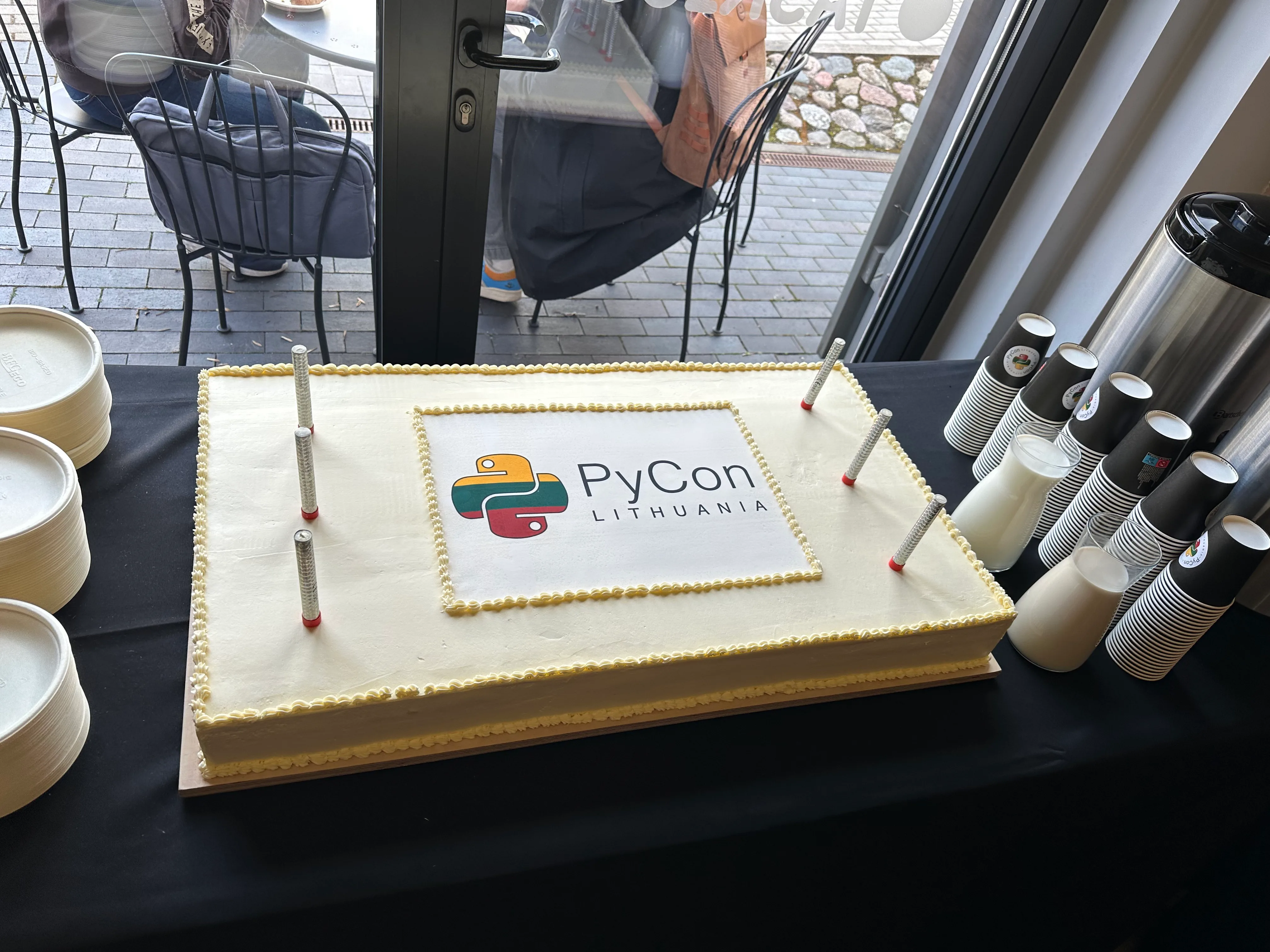
A picture of a large rectangular cake with the PyCon Lithuania logo in the middle.
The PyCon Lithuania cake.

I'll be honest with you: I didn't expect the cake to be good. The quality of food tends to degrade when it's cooked at a large scale... But even the taste was great and the cake had three coloured layers in yellow, green, and red.

Social activities

The organisers prepared two networking events, a speakers' dinner, and three city tours (one per evening) for speakers. There was always something for you to do.

The city tour is a brilliant idea and I wonder why more conferences don't do it:

  • Participants get to know a bit more of the city that's hosting the conference.
  • Participants get the chance to talk to each other in a relaxed and informal environment.
  • Hiring a tour guide is typically fairly cheap, especially when compared to organising a full-blown social event in a dedicated venue and with dedicated catering.

I had taken the city tour last time I had been at PyCon Lithuania and taking it again was not a mistake. Here's our group at the end of the tour, immediately before the speakers' dinner:

Some PyCon Lithuania speakers smile at the camera in front of Gediminas's castle.
Some PyCon Lithuania speakers at the city tour.

The conference organisers even made sure that the city tour ended close to the location of the speakers' dinner and that the tour ended at the same time as the dinner started. Another small detail that was carefully planned.

The atmosphere of the restaurant was very pleasant and the staff there was helpful and kind, so we had a wonderful night. At some point, at our table, we noticed that the folks at the other two tables were projecting something on a big screen. There was a large curtain that partially separated our table from the other two, so we took some time to realise that an impromptu Python quiz was about to take place.

I'm (way too) competitive and immediately got up to play. After six questions, which included learning about the existence of the web framework Falcon and correctly reordering the first four sentences of the Zen of Python, I was crowned the winner:
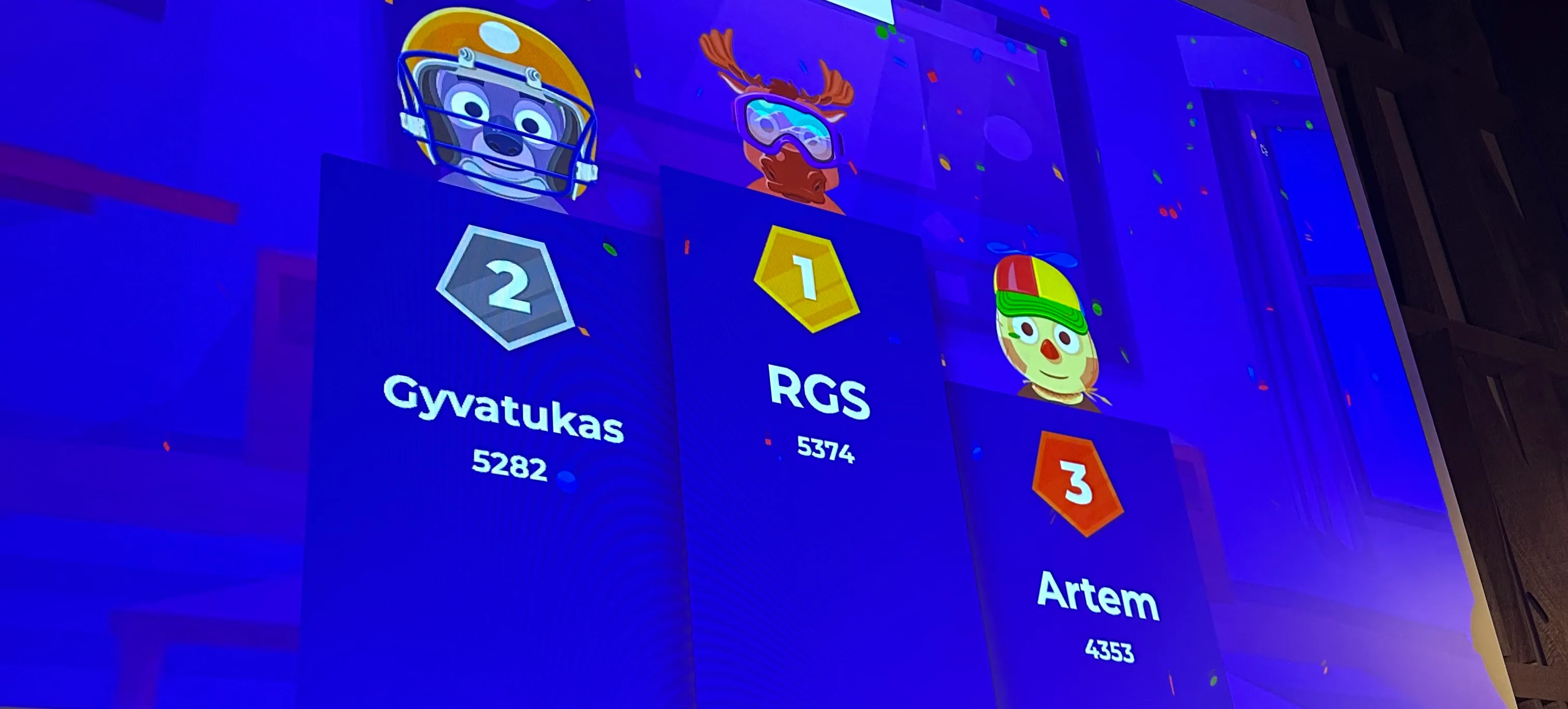
A slanted picture of a blue screen showing the player RGS at the top of the quiz podium.
The final score for the quiz.

The top three players got a free spin on the PyCon Lithuania wheel of fortune.

Egg hunt and swag

On each day of the conference there was an egg hunt running...

]]>
Who wants to be a millionaire: iterables edition https://mathspp.com/blog/who-wants-to-be-a-millionaire-iterables-edition 2026-04-09T22:29:23+02:00 2026-04-09T23:17:00+02:00

Play this short quiz to test your Python knowledge!

At PyCon Lithuania 2026 I did a lightning talk where I presented a “Who wants to be a millionaire?” Python quiz, themed around iterables. There's a whole performance during the lightning talk which was recorded and will be eventually linked to from here. This article includes only the four questions, the options presented, and a basic system that allows you to check whether you got it right or not.

Question 1

This is an easy one to get you started. It makes more sense if you watch the performance of the lightning talk.

What is the output of the following Python program?

print("Hello, world!")
  • Hello, world!
  • Hello world!
  • Hello world
  • Hello world!!

Question 2

What is the output of the following Python program?

squares = (x ** 2 for x in range(3))
print(type(squares))
  • <class 'generator'>
  • <class 'gen_expr'>
  • <class 'list'>
  • <class 'tuple'>

Question 3

This was a reference to the talk I'd given earlier today, where I talked about tee. The only object in itertools that is not an iterable.

Out of the 20, how many objects in itertools are iterables?

  • 19
  • 20
  • 1
  • 0

Question 4

What is the output of the following Python program?

from itertools import *

print(sum(chain.from_iterable(chain(*next(
islice(permutations(islice(batched(pairwise(
count()),5),3,9)),15,None)))))
  • 1800
  • 0
  • 🇱🇹❤️🐍
  • SyntaxError
]]>
uv skills for coding agents https://mathspp.com/blog/uv-skills 2026-04-09T13:39:48+02:00 2026-04-09T14:19:00+02:00

This article shares two skills you can add to your coding agents so they use uv workflows.

I have fully adopted uv into my workflows and most of the time I want my coding agents to use uv workflows as well, like when running any Python code or managing and running scripts that may or may not have dependencies.

To make this more convenient for me, I created two SKILL.md files for two of the most common workflows that the coding agents get wrong on the first few tries:

  1. python-via-uv: this skill tells the agent that it should use uv whenever it wants to run any piece of Python code, be it one-liners or scripts. This is relevant because I don't even have the command python/python3 in the shell path, so whenever the LLM tries running something with python ..., it fails.
  2. uv-script-workflow: this skill is specifically for when the agent wants to create and run a script. It instructs the LLM to initalise the script with uv init --script ... and then tells it about the relevant commands to manage the script dependencies.

The two skills also add a note about sandboxing, since uv's default cache directory will be outside your sandbox. When that's the case, the agent is already instructed to use a valid temporary location for the uv cache.

Installing a skill usually just means dropping a Markdown file in the correct folder, but you should check the documentation for the tools you use.

Here are the two skills for you to download:

  1. Skill for python-via-uv
  2. Skill for uv-script-workflow

I also included the skills verbatim here, for your convenience:

Skill for python-via-uv
---
name: python-via-uv
description: Enforce Python execution through `uv` instead of direct interpreter calls. Use when Codex needs to run Python scripts, modules, one-liners, tools, test runners, or package commands in a workspace and should avoid invoking `python` or `python3` directly.
---

# Python Via Uv

Use `uv` for every Python command.

Do not run `python`.
Do not run `python3`.
Do not suggest `python` or `python3` in instructions unless the user explicitly requires them and the constraint must be called out as a conflict.

## Execution Rules

When sandboxed, set `UV_CACHE_DIR` to a temporary directory the agent can write to before running `uv` commands.

Prefer these patterns:

- Run a script: `UV_CACHE_DIR=/tmp/uv-cache uv run path/to/script.py`
- Run a module: `UV_CACHE_DIR=/tmp/uv-cache uv run -m package.module`
- Run a one-liner: `UV_CACHE_DIR=/tmp/uv-cache uv run python -c "print('hello')"`
- Run a tool exposed by dependencies: `UV_CACHE_DIR=/tmp/uv-cache uv run tool-name`
- Add a dependency for an ad hoc command: `UV_CACHE_DIR=/tmp/uv-cache uv run --with <package> python -c "..."`

## Notes

Using `python` inside `uv run ...` is acceptable because `uv` is still the entrypoint controlling interpreter selection and environment setup.

If the workspace already defines a project-specific temporary cache directory, prefer that over `/tmp/uv-cache`.

If a command example or existing documentation uses `python` or `python3` directly, translate it to the closest `uv` form before executing it....
]]>
Indexable iterables https://mathspp.com/blog/indexable-iterables 2026-04-03T15:09:51+02:00 2026-04-03T13:41:00+02:00

Learn how objects are automatically iterable if you implement integer indexing.

Introduction

An iterable in Python is any object you can traverse through with a for loop. Iterables are typically containers and iterating over the iterable object allows you to access the elements of the container.

This article will show you how you can create your own iterable objects through the implementation of integer indexing.

Indexing with __getitem__

To make an object that can be indexed you need to implement the method __getitem__.

As an example, you'll implement a class ArithmeticSequence that represents an arithmetic sequence, like \(5, 8, 11, 14, 17, 20\). An arithmetic sequence is defined by its first number (\(5\)), the step between numbers (\(3\)), and the total number of elements (\(6\)). The sequence \(5, 8, 11, 14, 17, 20\) is seq = ArithmeticSequence(5, 3, 6) and seq[3] should be \(14\). Using some arithmetic, you can implement indexing in __getitem__ directly:

class ArithmeticSequence:
    def __init__(self, start: int, step: int, total: int) -> None:
        self.start = start
        self.step = step
        self.total = total

    def __getitem__(self, index: int) -> int:
        if not 0 <= index < self.total:
            raise IndexError(f"Invalid index {index}.")

        return self.start + index * self.step

seq = ArithmeticSequence(5, 3, 6)
print(seq[3])  # 14

Turning an indexable object into an iterable

If your object accepts integer indices, then it is automatically an iterable. In fact, you can already iterate over the sequence you created above by simply using it in a for loop:

for value in seq:
    print(value, end=", ")
# 5, 8, 11, 14, 17, 20,

How Python distinguishes iterables from non-iterables

You might ask yourself “how does Python inspect __getitem__ to see it uses numeric indices?” It doesn't! If your object implements __getitem__ and you try to use it as an iterable, Python will try to iterate over it. It either works or it doesn't!

To illustrate this point, you can define a class DictWrapper that wraps a dictionary and implements __getitem__ by just grabbing the corresponding item out of a dictionary:

class DictWrapper:
    def __init__(self, values):
        self.values = values

    def __getitem__(self, index):
        return self.values[index]

Since DictWrapper implements __getitem__, if an instance of DictWrapper just happens to have some integer keys (starting at 0) then you'll be able to iterate partially over the dictionary:

d1 = DictWrapper({0: "hey", 1: "bye", "key": "value"})

for value in d1:
    print(value)
hey
bye
Traceback (most recent call last):
  File "<python-input-25>", line 3, in <module>
    for value in d1:
                 ^^
  File "<python-input-18>", line 6, in __getitem__
    return self.values[index]
           ~~~~~~~~~~~^^^^^^^
KeyError: 2

What's interesting is that you can see explicitly that Python tried to index the object d with the key 2 and it didn't work. In the ArithmeticSequence above, you didn't get an error because you raised IndexError when you reached the end and that's how Python understood the iteration was done. In this case, since you get a KeyError, Python doesn't understand what's going on and just...

]]>
Ask the LLM to write code for it https://mathspp.com/blog/ask-the-llm-to-write-code-for-it 2026-03-24T15:29:56+01:00 2026-03-24T14:16:00+01:00

This article covers a useful LLM pattern where you ask the LLM to write code to solve a problem instead of asking it to solve the problem directly.

The problem of merging two transcripts

I had two files that contained two halves of the transcript of an audio recording and I wanted to use an LLM to merge the two halves. There were three reasons that stopped me from simply copying part 2 and pasting it after part 1:

  1. the two transcripts overlapped (the end of part 1 was after the start of part 2);
  2. the timestamps for part 2 started from 0, so they were missing an offset; and
  3. speaker identification was not consistent.

I uploaded the two halves into ChatGPT and asked it to merge the two transcripts, fix the timestamps and the speaker identification, but to not change the text.

The result I got back was a ridiculous attempt at providing the full transcript, with two sections that supposedly represented parts of either transcript I could just copy and paste confidently, and a couple of other ridiculous blunders.

Instead of fighting ChatGPT, I decided to use a very useful pattern I learned about last year.

Ask the LLM to write code for it

Instead of asking ChatGPT to merge the transcripts, I could ask it to analyse them, find the solutions to the three problems listed above, and then write code that would merge the transcripts.

Since I was confident that ChatGPT could

  1. identify the overlap between the two files;
  2. use the overlap information to compute the timestamp offset required for part 2; and
  3. figure out you had to swap the two speakers in part 2,

I knew ChatGPT would be able to write a Python script that could read from both files and apply a couple of string operations to the second part.

This yielded much better results in two ways. ChatGPT was able to find the solutions for the three problems above and write a script that fixed them automatically. That was the goal.

On top of that, since ChatGPT had a very clear implicit goal — get the final merged transcript — and since running Python code is something that ChatGPT can do, ChatGPT even ran the script for me and produced two artifacts at the end:

  1. the full Python script I could run against the two halves if I wanted; and
  2. the final, fixed transcript.

This is an example application of a really useful LLM pattern:

Don't ask the LLM to solve a problem. Instead, ask it to write code that solves the problem.

As another visual example, it's much easier to ask an LLM to write a Python script that draws a path that solves a maze (that's just a couple hundred of lines of code) than it is to upload an image and ask the LLM to draw a valid path on the picture of a maze. Try it yourself!

]]>
Cyclic trapezoid animation https://mathspp.com/blog/cyclic-trapezoid-animation 2026-03-14T17:35:14+01:00 2026-03-14T15:51:00+01:00

See an animation of a trapezoid innscribed in a circle, built with some maths and the help of an LLM.

The animation

My brother asked for my help to build an animation of a trapezoid inscribed in a circle that kept changing his shape. With a bit of maths and the help of ChatGPT for the UI, I created the animation you can see below. Under the animation you can find a control panel that allows you to tweak some animation parameters, and under that you can find a brief explanation of how the animation works.

Cyclic trapezoid controls
Colour
Point A
Point B
Point D
Global
Point C is computed from the cyclic trapezoid rule:...
]]>
TIL #142 – Cyclic quadrilateral https://mathspp.com/blog/til/cyclic-quadrilateral 2026-03-14T16:03:32+01:00 2026-03-14T14:58:00+01:00

Today I learned that cyclic quadrilaterals have supplementary opposite angles.

A cyclic quadrilateral — a quadrilateral whose four vertices all lie on a single circle — has supplementary opposite angles.

This means that opposite angles add to 180 degrees, or \(\pi\) radians.

As it turns out, this is actually an equivalence relation. If a quadrilateral has supplementary opposite angles, it's a cyclic quadrilateral.

This fact about supplementary opposite angles was very useful for an animation I was trying to create... I may share it here later!

]]>
TIL #141 – Inspect a lazy import https://mathspp.com/blog/til/inspect-a-lazy-import 2026-03-13T15:54:14+01:00 2026-03-13T14:38:00+01:00

Today I learned how to inspect a lazy import object in Python 3.15.

Python 3.15 comes with lazy imports and today I played with them for a minute. I defined the following module mod.py:

print("Hey!")

def f():
    return "Bye!"

Then, in the REPL, I could check that lazy imports indeed work:

>>> # Python 3.15
>>> lazy import mod
>>>

The fact that I didn't see a "Hey!" means that the import is, indeed, lazy. Then, I wanted to take a look at the module so I printed it, but that triggered reification (going from a lazy import to a regular module):

>>> print(mod)
Hey!
<module 'mod' from '/Users/rodrigogs/Documents/tmp/mod.py'>

So, I checked the PEP that introduced explicit lazy modules and turns out as soon as you reference the lazy object directly, it gets reified. But you can work around it by using globals:

>>> # Fresh 3.15 REPL
>>> lazy import mod
>>> globals()["mod"]
<lazy_import 'mod'>

This shows the new class lazy_import that was added to support lazy imports!

Pretty cool, right?

]]>
TIL #140 – Install Jupyter with uv https://mathspp.com/blog/til/install-jupyter-with-uv 2026-03-03T18:05:58+01:00 2026-03-03T16:16:00+01:00

Today I learned how to install jupyter properly while using uv to manage tools.

Running a Jupyter notebook server or Jupyter lab

To run a Jupyter notebook server with uv, you can run the command

$ uvx jupyter notebook

Similarly, if you want to run Jupyter lab, you can run

$ uvx jupyter lab

Both work, but uv will kindly present a message explaining how it's actually doing you a favour, because it guessed what you wanted. That's because uvx something usually looks for a package named “something” with a command called “something”.

As it turns out, the command jupyter comes from the package jupyter-core, not from the package jupyter.

Installing Jupyter

If you're running Jupyter notebooks often, you can install the notebook server and Jupyter lab with

$ uv tool install --with jupyter jupyter-core

Why uv tool install jupyter fails

Running uv tool install jupyter fails because the package jupyter doesn't provide any commands by itself.

Why uv tool install jupyter-core doesn't work

The command uv tool install jupyter-core looks like it works because it installs the command jupyter correctly. However, if you use --help you can see that you don't have access to the subcommands you need:

$ uv tool install jupyter-core
...
Installed 3 executables: jupyter, jupyter-migrate, jupyter-troubleshoot
$ jupyter --help
...
Available subcommands: book migrate troubleshoot

That's because the subcommands notebook and lab are from the package jupyter. The solution? Install jupyter-core with the additional dependency jupyter, which is what the command uv tool install --with jupyter jupyter-core does.

Other usages of Jupyter

The uv documentation has a page dedicated exclusively to the usage of uv with Jupyter, so check it out for other use cases of the uv and Jupyter combo!

]]>
TIL #139 – Multiline input in the REPL https://mathspp.com/blog/til/multiline-input-in-the-repl 2026-03-02T16:21:46+01:00 2026-03-02T15:15:00+01:00

Today I learned how to do multiline input in the REPL using an uncommon combination of arguments for the built-in open.

A while ago I learned I could use open(0) to open standard input. This unlocks a neat trick that allows you to do multiline input in the REPL:

>>> msg = open(0).read()
Hello,
world!
^D
>>> msg
'Hello,\nworld!\n'

The cryptic ^D is Ctrl+D, which means EOF on Unix systems. If you're on Windows, use Ctrl+Z.

The problem is that if you try to use open(0).read() again to read more multiline input, you get an exception:

OSError: [Errno 9] Bad file descriptor

That's because, when you finished reading the first time around, Python closed the file descriptor 0, so you can no longer use it.

The fix is to set closefd=False when you use the built-in open. With the parameter closefd set to False, the underlying file descriptor isn't closed and you can reuse it:

>>> msg1 = open(0, closefd=False).read()
Hello,
world!
^D
>>> msg1
'Hello,\nworld!\n'

>>> msg2 = open(0, closefd=False).read()
Goodbye,
world!
^D
>>> msg2
'Goodbye,\nworld!\n'

By using open(0, closefd=False), you can read multiline input in the REPL repeatedly.

]]>