The WordPress coreCoreCore is the set of software required to run WordPress. The Core Development Team builds WordPress. development team builds WordPress! Follow this site for general updates, status reports, and the occasional code debate. There’s lots of ways to contribute:
Found a bugbugA bug is an error or unexpected result. Performance improvements, code optimization, and are considered enhancements, not defects. After feature freeze, only bugs are dealt with, with regressions (adverse changes from the previous version) being the highest priority.?Create a ticket in the bug tracker.
TL;DR: WordPress Contributor Toolkit v2.0.0 has been released with a new interface built on the WordPress Design System, a settings dialog, a dark theme, and translations into ten languages.
The WordPress Contributor Toolkit removes the points of friction first-time contributors face before they write a line of code, especially during Contributor Days. You do not have to install GitGitGit is a free and open source distributed version control system designed to handle everything from small to very large projects with speed and efficiency. Git is easy to learn and has a tiny footprint with lightning fast performance. Most modern plugin and theme development is being done with this version control system.
https://git-scm.com/, Node.js, npm, or Docker on your machine.
The app started by setting up a full WordPress Core development environment. Version 1.0 added the full Core contribution workflow, from reading a TracTracAn open source project by Edgewall Software that serves as a bug tracker and project management tool for WordPress.ticketticketCreated for both bug reports and feature development on the bug tracker. to sending your fix back as a pull request or a patchpatchA special text file that describes changes to code, by identifying the files and lines which are added, removed, and altered. It may also be referred to as a diff. A patch can be applied to a codebase for testing.. Version 1.2 added the same workflow for Gutenberg.
Now, version 2.0brings a redesigned interface, available in ten languages. The CoreCoreCore is the set of software required to run WordPress. The Core Development Team builds WordPress. and GutenbergGutenbergThe Gutenberg project is the new Editor Interface for WordPress. The editor improves the process and experience of creating new content, making writing rich content much simpler. It uses ‘blocks’ to add richness rather than shortcodes, custom HTML etc.
https://wordpress.org/gutenberg/ workflows work the same way as in 1.2.
A new look, built on the WordPress Design System
The whole window has been redesigned with the WordPress Design System: the sidebarSidebarA sidebar in WordPress is referred to a widget-ready area used by WordPress themes to display information that is not a part of the main content. It is not always a vertical column on the side. It can be a horizontal rectangle below or above the content area, footer, header, or any where in the theme., the page headerHeaderThe header of your site is typically the first thing people will experience. The masthead or header art located across the top of your page is part of the look and feel of your website. It can influence a visitor’s opinion about your content and you/ your organization’s brand. It may also look different on different screen sizes., the site details, the cards, the dialogs and the tray at the bottom. If you have used the blockBlockBlock is the abstract term used to describe units of markup that, composed together, form the content or layout of a webpage using the WordPress editor. The idea combines concepts of what in the past may have achieved with shortcodes, custom HTML, and embed discovery into a single consistent API and user experience. editor, the buttons, notices and dialogs will look familiar.
A few smaller changes make the screen easier to read:
The sites list shows each site’s server status beside its name, so you can see which sites are running without opening them.
The footer’s tray buttons are labeled with their names, not only icons.
The next-action cue is visible on warning notices, so the button that moves you forward stands out even when something needs your attention.
The Trac window uses the app’s theme.
Settings in one place
Version 2.0 adds a settings dialog. Open it from the cog at the bottom right of the window, from Settings… in the app menu on macOS, or from the File menu on Windows and Linux.
The settings are in three groups:
General. The theme, the language, whether a site’s server and build watch start when you open it, whether what was running at quit starts again next time, and a default folder for new sites.
Sites. The PHPPHPThe web scripting language in which WordPress is primarily architected. WordPress requires PHP 7.4 or higher version every site’s development server runs on, and the WP_DEBUG and SCRIPT_DEBUG flags. A change applies the next time a server starts, and the site details show the values the next start will use.
Account. Your WordPress.orgWordPress.orgThe community site where WordPress code is created and shared by the users. This is where you can download the source code for WordPress core, plugins and themes as well as the central location for community conversations and organization. https://wordpress.org/ username and the event you are at, which go into a patch you hand to a mentor, and the GitHubGitHubGitHub is a website that offers online implementation of git repositories that can easily be shared, copied and modified by other developers. Public repositories are free to host, private repositories require a paid subscription. GitHub introduced the concept of the ‘pull request’ where code changes done in branches by contributors can be reviewed and discussed before being merged by the repository owner. https://github.com/ account the app opens pull requests with.
The theme can be light, dark, the same as your operating system, or custom: pick a background and a primary color, and the app builds every other color from them.
The app speaks your language
Every string in the interface is now translatable: the setup checklist, the trunktrunkA directory in Subversion containing the latest development code in preparation for the next major release cycle. If you are running "trunk", then you are on the latest revision. update, Review & submit changes, the pull request form and GitHub sign-in, the ticket and branchbranchA directory in Subversion. WordPress uses branches to store the latest development code for each major release (3.9, 4.0, etc.). Branches are then updated with code for any minor releases of that branch. Sometimes, a major version of WordPress and its minor versions are collectively referred to as a "branch", such as "the 4.0 branch". notices, patch errors, the Terminal and Logs output, the mail dialog, the app menu, and the app’s own dialogs.
Version 2.0 ships in ten languages: Czech, Dutch, English (Canada), English (UK), Galician, Hungarian, Lao, Polish, Serbian and Turkish.
By default the app follows your operating system’s language. To choose another one, open Settings, pick a Language, and relaunch when the dialog offers to.
A language ships with the app once it is at least 80% translated on translate.wordpress.org, so the list grows with each release. If yours is not there yet, the Contributor Toolkit project on translate.wordpress.org is a good first contribution in itself.
See what changed, file by file
After you apply a patch or check out a pull request, the site’s details now list the Changed files as a tree of folders, in two groups:
From the patch or From PR #N: the files the change itself touches. A pencil marks the ones you have edited since.
Your changes: every other file you have changed on that ticket or issue.
Click a file to open it in your editor, inside the site’s folder. Each file you changed has a revert button that puts back just that file, so you can undo one experiment without losing the patch you are testing. Discard your changes now removes only your own work and leaves the applied patch or pull request in place.
Trac details that stay
When you click Read details from Trac, the app now keeps what it read. Quit and reopen it, and the ticket’s summary, status, type, component, milestone and keywords are still there, with the time they were read. A refresh button beside that line reads the ticket again when you want the latest.
The ticket card has also been reorganized: the ticket’s title leads, its facts are on labeled rows, and unsubmitted work on the ticket appears as a notice with Review and submit and Discard changes buttons.
At a Contributor Day, everyone downloads the app at the same time, on the same networknetwork(versus site, blog). Version 2.0 is about 350 MB smaller once installed. It no longer ships PHP builds it never loads, libraries already bundled into the interface, or Chromium language files for languages the app has no translationtranslationThe process (or result) of changing text, words, and display formatting to support another language. Also see localization, internationalization. for.
Other improvements
Sites run as a local environment, so Application Passwords can be tested over HTTPHTTPHTTP is an acronym for Hyper Text Transfer Protocol. HTTP is the underlying protocol used by the World Wide Web and this protocol defines how messages are formatted and transmitted, and what actions Web servers and browsers should take in response to various commands..
Adminer opens the right database when the site uses randomized SQLite storage or a custom DB_PATH.
The debug.log pane no longer shows a line twice, or replays the whole file when you save it from an editor.
The pull request preview no longer lists trunk’s files when the site’s trunk is behind.
The main window can no longer be navigated away from the app or open other windows, and HTMLHTMLHyperText Markup Language. The semantic scripting language primarily used for outputting content in web browsers. mail is shown in a separate frame.
TL;DR: WordPress Contributor Toolkit v1.2.0 has been released providing full CoreCoreCore is the set of software required to run WordPress. The Core Development Team builds WordPress. and GutenbergGutenbergThe Gutenberg project is the new Editor Interface for WordPress. The editor improves the process and experience of creating new content, making writing rich content much simpler. It uses ‘blocks’ to add richness rather than shortcodes, custom HTML etc.
https://wordpress.org/gutenberg/ contribution workflows for first-time contributors.
The WordPress Contributor Toolkit was created to remove the points of friction first-time contributors face before they write a line of code, especially during Contributor Days, but is becoming a great tool also for experienced contributors.
The app started by providing a seamless setup of a full WordPress contribution development environment, the first wall most newcomers hit. Version 1.0 brought a full Core contribution workflow into the app: from reading a TracTracAn open source project by Edgewall Software that serves as a bug tracker and project management tool for WordPress.ticketticketCreated for both bug reports and feature development on the bug tracker. and testing the work attached to it, to sending your own fix back as a pull request or a Trac patchpatchA special text file that describes changes to code, by identifying the files and lines which are added, removed, and altered. It may also be referred to as a diff. A patch can be applied to a codebase for testing., without ever leaving the app.
Now, version 1.2 adds also a full Gutenberg contribution workflow.
A first Gutenberg contribution, from start to finish
A Gutenberg contribution follows the same path as a Core ticket in the app: create a site, link the work item, try the work that already exists, write your fix, and send it.
1. Create a Gutenberg site
Click Create a site, choose a folder, and pick what the site contributes to: WordPress Core, the default, or Gutenberg. That choice decides what the site clones, how it builds and how it runs, and it cannot be changed afterwards. Everything else is the same app: the sidebarSidebarA sidebar in WordPress is referred to a widget-ready area used by WordPress themes to display information that is not a part of the main content. It is not always a vertical column on the side. It can be a horizontal rectangle below or above the content area, footer, header, or any where in the theme., the terminal, the review screen, the ways to submit.
A Gutenberg site clones the blockBlockBlock is the abstract term used to describe units of markup that, composed together, form the content or layout of a webpage using the WordPress editor. The idea combines concepts of what in the past may have achieved with shortcodes, custom HTML, and embed discovery into a single consistent API and user experience. editor’s repository, installs its dependencies with the bundled npm 11, and builds the packages, all as one continuous setup. When it finishes, click Start dev server. The app runs a stock WordPress in Playground with your checkout mounted as the Gutenberg plugin, already activated. Posts, settings and uploads survive stopping the server and restarting the app.
Setup ends with a full build, so the server starts in seconds. To have what you save recompiled, click Start build watch, which runs Gutenberg’s own npm run dev. It rebuilds everything once, then recompiles each save.
2. Link the site to a GitHubGitHubGitHub is a website that offers online implementation of git repositories that can easily be shared, copied and modified by other developers. Public repositories are free to host, private repositories require a paid subscription. GitHub introduced the concept of the ‘pull request’ where code changes done in branches by contributors can be reviewed and discussed before being merged by the repository owner. https://github.com/ issue
Where a Core site has its Trac ticket card, a Gutenberg site has a GitHub issue card. Enter the issue number or paste its URLURLA specific web address of a website or web page on the Internet, such as a website’s URL www.wordpress.org to link the issue to the site.
The issue gets its own branchbranchA directory in Subversion. WordPress uses branches to store the latest development code for each major release (3.9, 4.0, etc.). Branches are then updated with code for any minor releases of that branch. Sometimes, a major version of WordPress and its minor versions are collectively referred to as a "branch", such as "the 4.0 branch". inside the site, so everything ticket branches do on a Core site works here too: switch between issues in seconds, park work you are not ready to finish, move an issue onto the current trunktrunkA directory in Subversion containing the latest development code in preparation for the next major release cycle. If you are running "trunk", then you are on the latest revision. with one click.
Click Review & submit changes to inspect the complete diff. On a Gutenberg site the destination is Open a pull request. You sign in to GitHub through the device flow, and the app forks WordPress/gutenberg to your account, pushes a branch and opens the pull request through the APIAPIAn API or Application Programming Interface is a software intermediary that allows programs to interact with each other and share data in limited, clearly defined ways.. The authorization lives in memory only, and is gone when you quit the app.
The form asks for a title and notes for reviewers. Gutenberg reviewers want testing steps, so that is where they go: what to open, what to click, what should happen. The app adds the Fixes #N line for you, so the pull request appears on the issue as soon as it opens. There is nothing to post anywhere else.
Every site is a real GitGitGit is a free and open source distributed version control system designed to handle everything from small to very large projects with speed and efficiency. Git is easy to learn and has a tiny footprint with lightning fast performance. Most modern plugin and theme development is being done with this version control system.
https://git-scm.com/ repository
Since v1.1, a pull request you try arrives as its own branch with its author’s commits, its conflicts are the same ones GitHub reports, and your ticket can move onto today’s trunk. That comes from one change: the app now ships Git itself (the client GitHub Desktop uses) instead of the JavaScriptJavaScriptJavaScript or JS is an object-oriented computer programming language commonly used to create interactive effects within web browsers. WordPress makes extensive use of JS for a better user experience. While PHP is executed on the server, JS executes within a user’s browser.
https://www.javascript.com reimplementation 1.0 relied on.
It runs with none of your machine’s settings, and you never see it. A Git you already have, or the lack of one, changes nothing about how a site behaves.
Every operation is now a Git command run on your behalf. Creating a site is a clone, linking a ticket is a branch, applying a patch is git apply, trying a pull request is a fetch and a checkout, updating trunk is a fetch and a merge. What the app does in that folder is exactly what you would see if you had typed the commands yourself. That also means a patch fits or fails the way it will for the reviewer, and when it fails the app names the regions that failed and leaves the checkout unchanged.
What this gives you:
The whole history, from the terminal or your editor. Open the site folder and git log, git blame and git bisect work as they do on any clone. A new site brings the full history of wordpress-develop or Gutenberg, fetching old file contents only when something asks for them, so it is not much larger than the shallow clone 1.0 made.
A pull request you apply shows up as its author’s commits. After Apply…, git log lists the pull request’s commits, with their authors, on a pr/N branch. You can read them, diff them, and see exactly what you are testing.
Your work is on branches you can name. Each Core ticket lives on ticket/N, each Gutenberg issue on issue/N, each pull request you try on pr/N. Parking a ticket in the app is a checkout, and git branch shows everything the app is holding for you.
The site outlives the app. Delete the app, or open the folder on another machine, and the repository continues with whatever Git is there. Nothing you did depends on the Toolkit staying installed.
Working from the terminal is fine too. Reading the site with git log or git diff never gets in the app’s way, and if you start a merge or a rebase yourself the app waits: it refuses to write until you finish or abandon it, and names the commands that do either.
Sites created before 1.1 cannot be written to by this version. You can still read them and save their work as a patch, but to keep contributing you create a new site. The app says so on the site’s card, and offers to create one.
Links from your browser
Since 1.1 the app answers wpct://ticket/N links, so a link can hand a Trac ticket to the app instead of making you type the number. The app asks before it links the ticket to the site you have open, because linking switches branches, and a ticket link that arrives while a Gutenberg site is open waits for a Core site. On Windows, open the app once before trying a link.
This enables much smoother contribution workflows. For example, with WP Trac Triager, a Chrome extension for triaging Core Trac tickets, every ticket on Trac gets a link that opens it in Contributor Toolkit, with its pull requests ready to test.
Help shape the next version
Try it on a real ticket or issue and tell us how it went:
Something broke?Open an issue with what you did and what happened.
Something felt off? Use the feedback form, or the feedback button in the app.
Want to talk it through? Ask in #core, or #core-editor for the Gutenberg flow, or comment below.
Gutenberg support is new, so the most useful reports come from taking an issue all the way to a pull request.
First introduced in April as the WordPress Core Dev Environment Toolkit, the WordPress Contributor Toolkit is an experimental desktop app that guides first-time contributors through setting up a full wordpress-develop environment. GitGitGit is a free and open source distributed version control system designed to handle everything from small to very large projects with speed and efficiency. Git is easy to learn and has a tiny footprint with lightning fast performance. Most modern plugin and theme development is being done with this version control system.
https://git-scm.com/, Node.js, and npm are still involved under the hood, but the app provides and runs them for you. You do not have to install Git, Node.js, npm, or Docker on your machine.
The first releases concentrated on getting a newcomer from a fresh computer to a running WordPress development siteDevelopment SiteYou can keep a copy of your live site in a separate environment. Maintaining a development site is a good practice that can let you make any changes and test them without affecting the live/production environment.. Version 1.0 carries that work through the contribution itself: link a TRACTracAn open source project by Edgewall Software that serves as a bug tracker and project management tool for WordPress.ticketticketCreated for both bug reports and feature development on the bug tracker. and see its details, pull requests, and patches; apply existing work and test it on the running site; create a diff or open a pull request directly from the app; and keep that first site current with the latest trunktrunkA directory in Subversion containing the latest development code in preparation for the next major release cycle. If you are running "trunk", then you are on the latest revision., fetching only what changed instead of repeating a full clone and install.
A first CoreCoreCore is the set of software required to run WordPress. The Core Development Team builds WordPress. contribution, from start to finish
Here is what the workflow looks like now.
1. Create the development environment
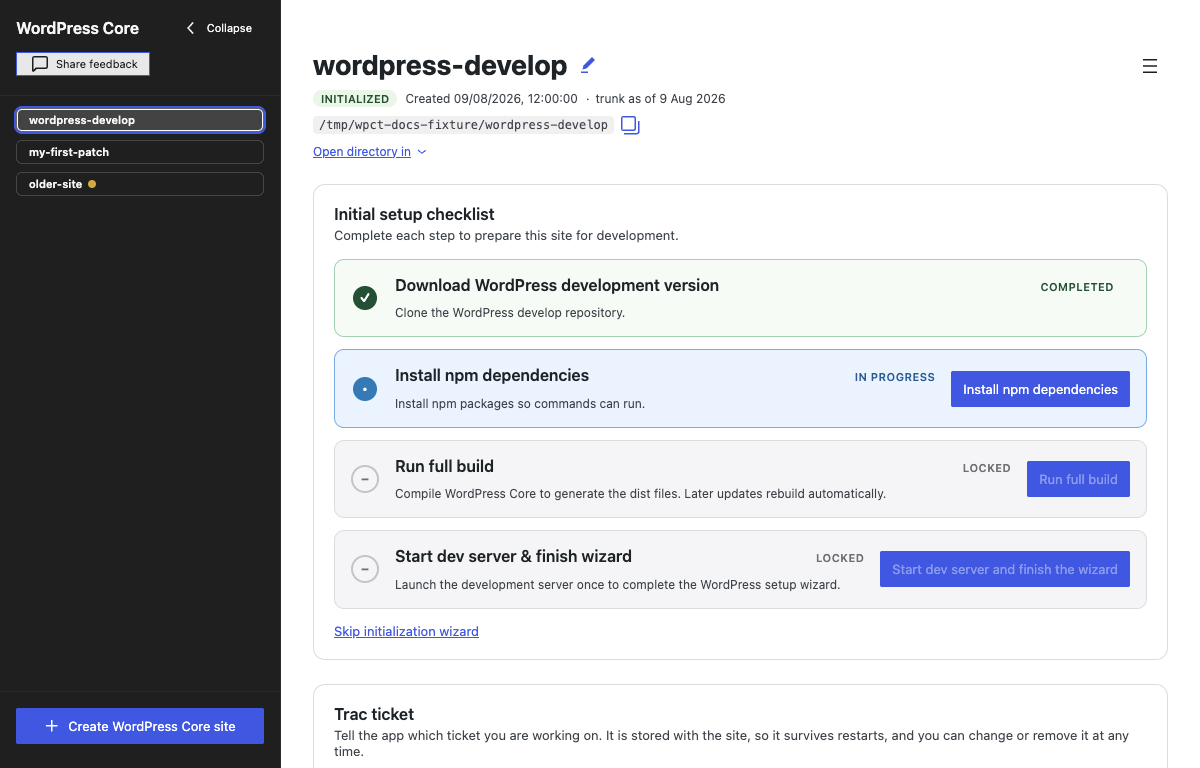
Click Create WordPress Core site and choose a folder. The app clones wordpress-develop, installs the dependencies, and runs the first build as one continuous setup. When setup finishes, click Start dev server and finish the wizard to complete the WordPress installation wizard that opens in your browser, and you are ready to start contributing.
The interface draws attention to the next action with a yellow outline, and completed actions produce an accessible confirmation.
2. Link the site to a Trac ticket
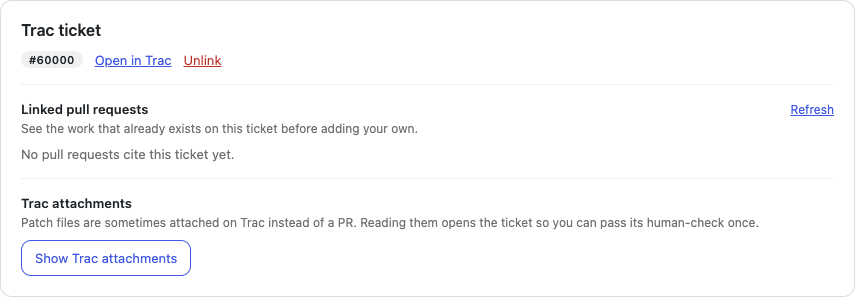
You can link a Trac ticket when creating the site or at any time afterwards. Enter its ticket number or paste its Core Trac URLURLA specific web address of a website or web page on the Internet, such as a website’s URL www.wordpress.org to bring its details, related pull requests, and attached patches into the Toolkit.
The app reads the ticket’s details: summary, status and resolution, type, milestone, component, keywords, and age. These details help you understand the ticket before you start working: how long ago it was opened, whether it is still open or has already been resolved, and which part of WordPress Core it belongs to.
If you do not have a ticket yet, the app links to the good first bugs report on Trac.
Pull requests on WordPress/wordpress-develop that reference the ticket, including their open, closed, or merged state.
PatchpatchA special text file that describes changes to code, by identifying the files and lines which are added, removed, and altered. It may also be referred to as a diff. A patch can be applied to a codebase for testing. files attached directly to Trac.
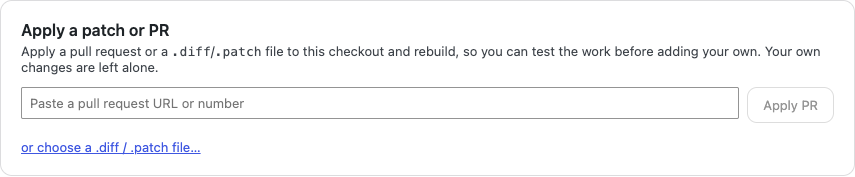
The newest work is marked Latest, based on the date of the newest commit. You can preview and apply a pull request or Trac patch from the same screen.
4. Apply and test an existing patch
Before applying a patch or a PR, the Toolkit previews the files a patch will touch, warns about collisions with your edits, identifies binary files it cannot apply, and checks whether a dependency install will be needed. “Apply and rebuild” then adds the changes and runs any required install or rebuild steps.
If a patch cannot be applied, the app leaves the checkout unchanged and explains what failed so you can decide what to do next.
Applied work keeps the patch or pull request’s identity attached to it. You can make your own changes on top and later remove that layer, but the app will not let you submit somebody else’s patch as if you wrote it.
5. Edit and debug the change
The site can be opened in a detected editor, another application of your choice, or the system file manager. The build watcher now has its own control, status, and log. Starting the development server starts the watcher too, but stopping the server leaves compile-on-save running if you still need it.
The Toolkit also exposes the parts of a development environment that are useful in Core testing and development:
A direct link to wp-admin beside the site URL.
A live debug.log tab with PHPPHPThe web scripting language in which WordPress is primarily architected. WordPress requires PHP 7.4 or higher notices, warnings, deprecations, stack traces, and fatal errors.
An embedded terminal for the supported install, build, test, watch, and Grunt commands, using the Node.js runtime bundled with the app.
Adminer for inspecting the site’s SQLite database while the development server is running.
The development server can remain up while a patch is applied or trunk is updated. The app pauses and resumes the build watcher only when an operation needs exclusive access to the build or dependencies.
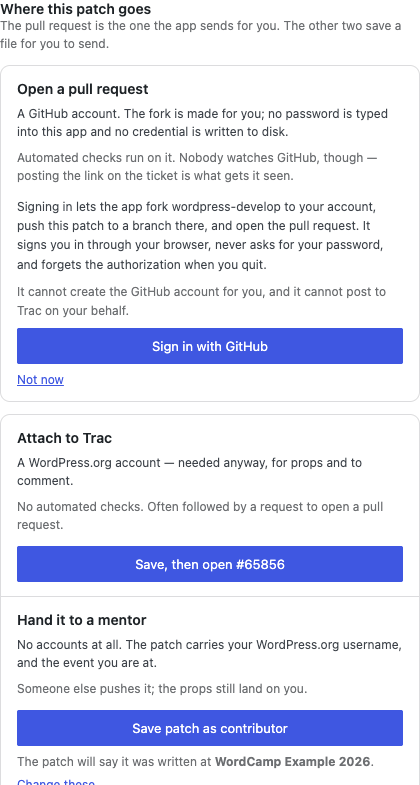
Open a GitHubGitHubGitHub is a website that offers online implementation of git repositories that can easily be shared, copied and modified by other developers. Public repositories are free to host, private repositories require a paid subscription. GitHub introduced the concept of the ‘pull request’ where code changes done in branches by contributors can be reviewed and discussed before being merged by the repository owner. https://github.com/ pull request. The app uses GitHub’s device sign-in, creates the fork, commit, and pull request through the APIAPIAn API or Application Programming Interface is a software intermediary that allows programs to interact with each other and share data in limited, clearly defined ways., and forgets the token when the app quits. No push credential is written to disk. The pull request form asks for a title and optional notes for reviewers: what the change does and why, how to see it working, and anything you are unsure about. The app adds the Trac ticket and your WordPress.orgWordPress.orgThe community site where WordPress code is created and shared by the users. This is where you can download the source code for WordPress core, plugins and themes as well as the central location for community conversations and organization. https://wordpress.org/ username to the description, then points you back to Trac because Core pull requests are not monitored on GitHub alone.
Attach a patch to Trac. The app saves the patch locally and opens the attachment page for the site’s linked ticket. From there, you’ll need to sign in and upload the saved file to the TRAC ticket yourself.
Hand the patch to a mentor. This path needs no GitHub or Trac account. The saved patch carries the contributor’s WordPress.org handle, event, ticket, base revision, and date so the authorship can follow the work when a mentor submits it.
The diff comes first on this screen. The destinations sit beside it, grouped by whether you or a mentor will do the sending.
One site can hold work for many tickets
Creating a site is the expensive part: cloning wordpress-develop, installing its dependencies, and running the first build. Starting another ticket should not repeat all of that.
In 1.0, every linked ticket gets its own branch inside the site. Unlinking a ticket parks its changes, and linking another swaps the files in seconds. The site shows the tickets that have work stored in it, so returning to one does not depend on remembering its number. Each ticket contains only that ticket’s changes.
Keep the environment without keeping an old copy of trunk
A site no longer has to stay on the snapshot of trunk it cloned. Update to latest trunk fetches current Core code, installs dependencies only if they changed, and rebuilds the site. Sites more than 14 days old show a warning that patches created from them may no longer apply cleanly.
The Toolkit uses its own built-in Git implementation, so Git does not need to be installed on your computer. To keep the initial download small, it creates a depth-one shallow clone. If you do have Git installed and run it inside the site folder, history-based commands will be limited: git log sees only the current snapshot, while git blame and git bisect cannot work normally.
Updating trunk does not silently rebase ticket work. The app parks the active ticket, updates the site, and returns to it on its original base. If trunk has moved since that ticket started, the Toolkit says so and explains the safe path to recreate the ticket on a fresh base.
Made for Contributor Days
Version 1.0 is available just in time for WordCamp US Contributor Day on August 16. If you are a first-time contributor planning to work with the Core team, the Test team, or another Contributor DayContributor DayContributor Days are standalone days, frequently held before or after WordCamps but they can also happen at any time. They are events where people get together to work on various areas of https://make.wordpress.org/ There are many teams that people can participate in, each with a different focus. https://make.wordpress.org/support/handbook/getting-started/getting-started-at-a-contributor-day/ team working in wordpress-develop, download the app and create your first site before Sunday if you can. The Toolkit can help you find the pull requests and patches linked to a ticket, apply them, and test the result on a running site, even if you are not writing the fix yourself. The installer is self-contained, but the initial clone and dependency installation still need an internet connection and some time.
For Contributor Day facilitators, the Toolkit is a simpler way to introduce people to Core contributions without spending the session on environment setup. Newcomers and testers can get straight to a ticket, try existing work, and contribute feedback with experienced contributors nearby.
The app has no telemetry. Bug reports, release downloads, and direct feedback are the only signals about where it helps and where contributors still get stuck.
You can share feedback through this form, open an issue in the repository, use the feedback button in the app, comment on this post, or pingPingThe act of sending a very small amount of data to an end point. Ping is used in computer science to illicit a response from a target server to test it’s connection. Ping is also a term used by Slack users to @ someone or send them a direct message (DM). Users might say something along the lines of “Ping me when the meeting starts.”@JuanMa in the #core channel on WordPress Slack.
Feedback from WordCampWordCampWordCamps are casual, locally-organized conferences covering everything related to WordPress. They're one of the places where the WordPress community comes together to teach one another what they’ve learned throughout the year and share the joy. Learn more. Contributor Days is particularly helpful, especially on whether the Toolkit enabled you to complete a contribution independently, where you still needed a facilitator, and what could have made the process easier.