The WordPress coreCoreCore is the set of software required to run WordPress. The Core Development Team builds WordPress. development team builds WordPress! Follow this site for general updates, status reports, and the occasional code debate. There’s lots of ways to contribute:
Found a bugbugA bug is an error or unexpected result. Performance improvements, code optimization, and are considered enhancements, not defects. After feature freeze, only bugs are dealt with, with regressions (adverse changes from the previous version) being the highest priority.?Create a ticket in the bug tracker.
WordPress 7.0 adds a watch() function to the @wordpress/interactivity package. This brand-new function subscribes to changes in any reactive value accessed inside a callback—and reruns it anytime those values change.
Now, you can tie the Interactivity APIAPIAn API or Application Programming Interface is a software intermediary that allows programs to interact with each other and share data in limited, clearly defined ways.’s data-wp-watch to a DOM element’s lifecycle and use that for reacting to state changes. But how would a process observe those changes programmatically, independently of the DOM? How could you set something up to run side effects at the store level, set up logging, or synchronize state between stores? The watch() function fills this gap.
Deprecated state.navigation properties in core/router
The state.navigation.hasStarted and state.navigation.hasFinished properties in the core/router store were always intended as internal implementation details. Used for the loading bar animation, they were never intended to be part of the public API.
Starting in WordPress 7.0, accessing state.navigation from the core/router store is deprecated and will trigger a console warning in development mode (SCRIPT_DEBUG). Plus, in a future version of WordPress, direct access will not work at all. WordPress 7.1 will add an official mechanism for tracking navigation states.
state.url from core/router is now populated on the server
Previously, you initialized state.url in the core/router store on the client by setting it to window.location.href. That meant the value was undefined until the @wordpress/interactivity-router module finished loading asynchronously, and you had to guard against that initial undefined state and filterFilterFilters are one of the two types of Hooks https://codex.wordpress.org/Plugin_API/Hooks. They provide a way for functions to modify data of other functions. They are the counterpart to Actions. Unlike Actions, filters are meant to work in an isolated manner, and should never have side effects such as affecting global variables and output. out the subsequent initialization. Or else things would reactReactReact is a JavaScript library that makes it easy to reason about, construct, and maintain stateless and stateful user interfaces.
https://reactjs.org to it as an actual navigation.
Starting in WordPress 7.0, this value is populated on the server during directive processing. So its value doesn’t change until the first client-side navigation occurs.
And that means you can combine watch() and state.url to reliably track client-side navigations, for example, to send analytics on every virtual page view:
import { store, watch } from '@wordpress/interactivity';

const { state } = store( 'core/router' );

watch( () => {
    // This runs on every client-side navigation.
    sendAnalyticsPageView( state.url );
} );
Standardized APIAPIAn API or Application Programming Interface is a software intermediary that allows programs to interact with each other and share data in limited, clearly defined ways. to set unique IDs in directives
HTMLHTMLHyperText Markup Language. The semantic scripting language primarily used for outputting content in web browsers. does not allow multiple attributes with the same name on a single element, yet multiple plugins may need to add directives of the same type to the same element. To address this, WordPress 6.9 introduces a standardized way to assign unique IDs to Interactivity API directives, allowing an element to have multiple directives of the same type, as long as each directive has a different ID.
To assign a unique ID to a directive, append a triple-dash (---) followed by the ID, as shown in the following example.
The triple-dash syntax unambiguously differentiates unique IDs from suffixes. In the example below, click is the suffix, while plugin-a and plugin-b are the unique IDs. The order is also important: the unique ID must always appear at the end of the attribute name.
<button
    data-wp-on--click---plugin-a="plugin-a::actions.someAction"
    data-wp-on--click---plugin-b="plugin-b::actions.someAction"
>
  Button example
</button>
The data-wp-ignore directive was designed to prevent hydration of a specific part of an interactive region. However, its implementation broke context inheritance and caused potential issues with the client-side navigation feature of the @wordpress/interactivity-router module, without addressing a real use case.
Since WordPress 6.9, this directive is deprecated and will be removed in subsequent versions.
WordPress 6.9 introduces two new TypeScript helper types, AsyncAction<ReturnType> and TypeYield<T>, to the Interactivity API. These types help developers address potential TypeScript issues when working with asynchronous actions.
AsyncAction<ReturnType>
This helper lets developers explicitly type the return value of an asynchronous action (generator). By using any for yielded values, it breaks circular type dependencies when state is used within yield expressions or in the final return value.
This helper lets developers explicitly type the value that a yield expression resolves to by providing the type of the async function or operation being yielded.
In WordPress 6.9, the client-side navigation feature provided by the @wordpress/interactivity-router module has been expanded to cover additional use cases that were previously unsupported.
Support for new script modules and stylesheets
Previously, only the HTMLHTMLHyperText Markup Language. The semantic scripting language primarily used for outputting content in web browsers. of the new page was updated, keeping the styles present in the initial page and ignoring any new script modules. This worked for basic client-side navigation cases, but it didn’t handle more complex situations, such as when new blocks appear on the next page.
With this update, WordPress now replaces stylesheets and loads any script modules after client-side navigation.
The new algorithm reuses the stylesheets shared with the previous page to minimize networknetwork(versus site, blog) requests, loads any new stylesheet not present in the previous navigations, and disables those that no longer apply.
The new algorithm also loads all the script modules belonging to interactive blocks that didn’t exist on the previous pages. To correctly support module dependencies, new importmap definitions are also supported.
To maintain the experience of instant navigations, prefetching a page also prefetches all the stylesheets and script modules that were not previously prefetched or loaded.
While all styles are handled in the browser by the Interactivity APIAPIAn API or Application Programming Interface is a software intermediary that allows programs to interact with each other and share data in limited, clearly defined ways. runtime, script modules must be explicitly marked as compatible with client-side navigation.
For blocks, this is done automatically by checking the supports.interactivity to either true or contain an object with { clientNavigation: true } to mark its support in their block.json file (see docs here). If that’s the case, the corresponding viewScriptModule will be automatically marked as compatible.
For other script modules registered “manually”, developers must use the add_client_navigation_support_to_script_module method of the main WP_Interactivity_API instance, as shown in the example below.
That method would mark the passed script module ID as compatible, and its scripttagtagA directory in Subversion. WordPress uses tags to store a single snapshot of a version (3.6, 3.6.1, etc.), the common convention of tags in version control systems. (Not to be confused with post tags.) would include a data-wp-router-options directive containing the value {"loadOnClientNavigation":true}.
Script modules without that directive are ignored and not imported. Remember that regular scripts are simply ignored regardless of whether they contain the data-wp-router-options directive, as they are not supported by the Interactivity API.
Support for router regions inside interactive elements
Router regions are those elements marked with the data-wp-router-region directive. When the navigate() action from @wordpress/interactivity-router is invoked, the content of these regions is updated to match the newly requested page.
In previous WordPress versions, router regions needed to match a root interactive element (i.e., one of the top-most elements with a data-wp-interactive directive). This meant that if the data-wp-router-region directive was used anywhere else in an interactive region, its content wouldn’t be updated.
<div data-wp-interactive="example">
    <button data-wp-on--click="actions.doSomething">Click me!</button>
    <div
      data-wp-interactive="example"
      data-wp-router-region='example/region-1'
    >
      I wasn't updated on client navigation (now I am!)
    </div>
</div>
Now, router regions are updated whenever they are placed in an interactive region. The only requirement is that they must still be used alongside the data-wp-interactive directive so they receive the corresponding namespace.
For more details, refer to the related issue #71519 and pull request #71635.
New attachTo option for router regions
In WordPress 6.9, router regions accept an attachTo property that can be defined inside the data-wp-router-region directive, allowing the region to be rendered even when it was missing on the initial page. This option supports cases like overlays that are necessary for a blockBlockBlock is the abstract term used to describe units of markup that, composed together, form the content or layout of a webpage using the WordPress editor. The idea combines concepts of what in the past may have achieved with shortcodes, custom HTML, and embed discovery into a single consistent API and user experience., but may appear outside all the regions.
The attachTo property should be a valid CSSCSSCascading Style Sheets. selector that points to the parent element where the new router region should be rendered. For example, the following router region would be rendered in <body> if it appears on a visited page, even if it wasn’t initially rendered.
<div
  data-wp-interactive="example"
  data-wp-router-region='{ "id": "example/region", "attachTo": "body" }'
>
  I'm in a new region!
</div>
Improved getServerState and getServerContext functions
When using the Interactivity API with client-side navigation, the getServerState() and getServerContext() functions now properly handle the following scenarios:
Properties that are modified on the client but should reset to server values on navigation Now, whenever getServerState or getServerContext is tracking a value that doesn’t change after a client-side navigation, it will still trigger an invalidation so that it can be used to reset values, such as:
Properties that only exist on certain pages Server state and contexts are now fully overwritten: only the properties present on the current page are retained, and those from previous pages are removed. This allows having the certainty of knowing if a property doesn’t exist in the server state, even if it was present on the previous page.
WordPress 6.8 comes with a few new best practices and requirements in the Interactivity APIAPIAn API or Application Programming Interface is a software intermediary that allows programs to interact with each other and share data in limited, clearly defined ways. that are part of a longer-term continuous-improvement effort. Some of the relevant changes in 6.8 are an intermediary step: They do not include these enhancements themselves, but they prepare the project to add them in a future release by adding two new deprecation warnings.
If you have been using the Interactivity API in your project, especially if you have been writing your own stores, please read on to learn how you can prepare your changes for the latest and future behavior of the API.
How to apply the latest best practices (and avoid deprecation warnings)
To help the Interactivity API speed up WordPress, the project is working towards running most store actions asynchronously by default, as a better foundation for achieving good INP (“Interaction to Next Paint”) performance. Right now, browsers invoke all synchronous Interactivity API event handlers as part of the same task—this means they stack up. This can make the user wait for longer than 50 milliseconds (also called a “long task”) for the site to reactReactReact is a JavaScript library that makes it easy to reason about, construct, and maintain stateless and stateful user interfaces.
https://reactjs.org to some interaction, like clicking a button.
Starting with 6.8, and going forward, the Interactivity API’s push towards asynchronous handlers as the default will make those long tasks less likely. The 6.8 release only prepares for the transition. In the following WordPress release, the API will automatically yield to the main thread in between handlers, so ideally there’s nothing to stack up, and nothing to make the user wait. (Also refer to async actions and the splitTask() function.)
This performance enhancementenhancementEnhancements are simple improvements to WordPress, such as the addition of a hook, a new feature, or an improvement to an existing feature. also helps with cross-pluginPluginA plugin is a piece of software containing a group of functions that can be added to a WordPress website. They can extend functionality or add new features to your WordPress websites. WordPress plugins are written in the PHP programming language and integrate seamlessly with WordPress. These can be free in the WordPress.org Plugin Directory https://wordpress.org/plugins/ or can be cost-based plugin from a third-party. compatibility, as handlers for the same event may come from different plugins. The new requirements outlined below are an important step to prepare the Interactivity API for that future.
Wrap certain action callbacks in withSyncEvent()
Pay attention to any store action that is attached to an event listener (like data-wp-on--click) and accesses the event object: If the action callback uses any of the event properties or methods below, you need to wrap it in a newly added utility function called withSyncEvent():
Property: event.currentTarget
Method: event.preventDefault()
Method: event.stopImmediatePropagation()
Method: event.stopPropagation()
Starting in WordPress 6.8, if any action callback uses the above event properties or methods and is not wrapped in withSyncEvent(), that action callback will trigger a deprecation warning. For now, the logic will continue to work as before. But in a future WordPress release it will break if you do not migrate. For example, event.preventDefault() will not prevent the default action since the action will be asynchronous by default. As such, please make sure to resolve any deprecation warnings you see.
This correct (✅) code example illustrates how to use withSyncEvent():
import { store, withSyncEvent } from '@wordpress/interactivity';

store( 'myPlugin', {
	actions: {
		// `event.preventDefault()` requires synchronous event access.
		preventNavigation: withSyncEvent( ( event ) => {
			event.preventDefault();
		} ),

		// `event.target` does not require synchronous event access.
		logTarget: ( event ) => {
			console.log( 'event target => ', event.target );
		},

		// Not using `event` at all does not require synchronous event access.
		logSomething: () => {
			console.log( 'something' );
		},
	},
} );
This bad (❌) example will, going forward, emit a deprecation warning:
import { store } from '@wordpress/interactivity';

store( 'myPlugin', {
	actions: {
		// Missing `withSyncEvent()` around synchronous event access.
		preventNavigation: ( event ) => {
			event.preventDefault();
		},
	},
} );
Do not use actions to determine HTMLHTMLHyperText Markup Language. The semantic scripting language primarily used for outputting content in web browsers. attribute values
If you have been relying on Interactivity API store functions (like actions or callbacks) to determine HTML attribute values (e.g. via data-wp-bind--attr), please revise these attributes now. Instead, use global state, local context, or derived state. And please do not combine these function calls with directive logic like the ! operator.
Starting in WordPress 6.8, any directive using a store function in combination with the ! operator will emit a deprecation warning. The logic will continue to work as before for now, but in a future WordPress release it will break if you do not migrate. More broadly, if you are using store functions in directives that determine HTML attribute values, please migrate to using global state, local context, or derived state instead. More deprecation warnings around incorrect usage of store functions are expected soon, and eventually unmigrated code is going to break.
Please refer to the following correct (✅) code example to illustrate how to use derived state:
import { store } from '@wordpress/interactivity';

store( 'myPlugin', {
	state: {
		get isOpen() {
			const ctx = getContext();
			return !! ctx.open;
		},
	},
} );
To provide context on why this new requirement is relevant: Using store functions for anything other than the “on”, “init”, or “watch” groups of directives has always been an anti-pattern. It is now being more formally discouraged, and will in the future be made impossible.
Support for the .length property in directives
An additional Interactivity API enhancement in WordPress 6.8 is support for the .length property on strings and numeric arrays in directives, ensuring consistency between server and client rendering.
Previously, the .length property was unavailable on the server, requiring workarounds. This update allows developers to use .length within all directives that reference global state, local context, or derived state, aligning behavior across environments.
This code example illustrates using the .length property:
This improvement streamlines logic and improves developer experience.
Summary and further reading
Please refer to the following links for further reading:
GutenbergGutenbergThe Gutenberg project is the new Editor Interface for WordPress. The editor improves the process and experience of creating new content, making writing rich content much simpler. It uses ‘blocks’ to add richness rather than shortcodes, custom HTML etc.
https://wordpress.org/gutenberg/ pull request #68097 for the withSyncEvent and new directive requirement enhancements
Gutenberg issues #64944 and #69552 with additional context on the long-term plans to run Interactivity API actions asynchronously by default.
Gutenberg issue #69269 with additional context on the long-term plans to more clearly separate directives that do something vs that determine a value.
TracTracAn open source project by Edgewall Software that serves as a bug tracker and project management tool for WordPress.ticketticketCreated for both bug reports and feature development on the bug tracker.#62582 for support of the .length property.
The Interactivity APIAPIAn API or Application Programming Interface is a software intermediary that allows programs to interact with each other and share data in limited, clearly defined ways. development for WordPress 6.6 has been focused on maintenance. Its updates include new features and directives, a better debugging experience, and improved code quality.
WordPress 6.6 includes three new directives aimed at improving performance:
data-wp-on-async
data-wp-on-async-document
data-wp-on-async-window
These async directives optimize event callbacks by first yielding to the main thread. That way, complex interactions won’t contribute to long tasks, improving the Interaction to Next Paint (INP). You can read more about this approach in Optimize Interaction to Next Paint.
These directives are recommended over the sync ones (data-wp-on, data-wp-on-document, and data-wp-on-window), but you can use them only when you don’t need synchronous access to the event object, specifically if you need to call event.preventDefault(), event.stopPropagation(), or event.stopImmediatePropagation(). The directives in coreCoreCore is the set of software required to run WordPress. The Core Development Team builds WordPress. blocks have been updated to use async where available.
When you must resort to using the non-async directives, the @wordpress/interactivity package now exports a splitTask function which can be used to manually split yield an action to the main thread after calling the synchronous event API. Please see the documentation on async actions for how to implement this.
GitHubGitHubGitHub is a website that offers online implementation of git repositories that can easily be shared, copied and modified by other developers. Public repositories are free to host, private repositories require a paid subscription. GitHub introduced the concept of the ‘pull request’ where code changes done in branches by contributors can be reviewed and discussed before being merged by the repository owner. https://github.com/ pull requests: #61885 and #62665
Support for derived state props inside wp_interactivity_state
Since WordPress 6.5, developers can define the initial state of interactive blocks in the server with wp_interactivity_state(). Directives referencing these state properties are evaluated to render the final HTMLHTMLHyperText Markup Language. The semantic scripting language primarily used for outputting content in web browsers.. However, derived state props, defined as getters in JavaScriptJavaScriptJavaScript or JS is an object-oriented computer programming language commonly used to create interactive effects within web browsers. WordPress makes extensive use of JS for a better user experience. While PHP is executed on the server, JS executes within a user’s browser.
https://www.javascript.com, were a feature missing in PHPPHPThe web scripting language in which WordPress is primarily architected. WordPress requires PHP 7.4 or higher.
In WordPress 6.6, the wp_interactivity_state() function now accepts derived state props using Closures (anonymous functions). This feature is equivalent to the getters already used in JavaScript inside the store() function exposed from the @wordpress/interactivity package.
In the same way, the Closures can access the current Interactivity API context by calling the new wp_interactivity_get_context() function―equivalent to their JavaScript version, getContext(). This function returns the current context for either the current namespace―when omitted―or the specified one. Also, wp_interactivity_state() can be used when the value depends on other parts of the state.
It’s important to note that using Closures for derived state is not always necessary. When the initial value is static, and the Closure will always return the same value because the values it depends on do not change on the server, regular values can be used instead:
Read more about this new feature on the TRACTracAn open source project by Edgewall Software that serves as a bug tracker and project management tool for WordPress.ticketticketCreated for both bug reports and feature development on the bug tracker.#61037 and in the GitHub Issue #6394
Integration with Preact Devtools
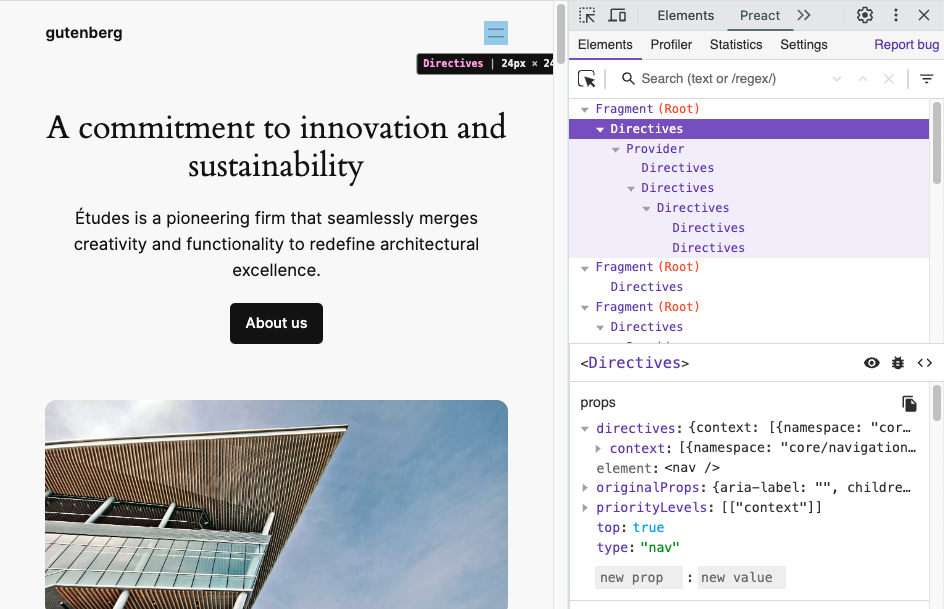
The Interactivity API runtime uses Preact internally to transform directives into components and manage all DOM updates. Since WordPress 6.6, developers can use Preact Devtools to inspect interactive blocks and check the component tree for all rendered directives.
To enable this feature, the SCRIPT_DEBUG constant must be enabled. This constant makes WordPress serve an extended version of the Interactivity API runtime that’s compatible with the Preact dev tools.
In the future, there are plans to improve the displayed information by including the names of the directives used in each of the elements, among other enhancements.
Read more about this new feature on the TRAC ticket #61171 and in the GitHub PR #60514
Interactivity API warnings in 6.6
In WordPress 6.6, both the server-side directives processing and the JavaScript runtime will warn developers when the directives, the namespace, or the markup cannot be evaluated.
To enable this feature, the SCRIPT_DEBUG constant must be enabled.
Warning messages will be shown for the following cases:
Unbalanced HTML tags
If the processed HTML contains any unbalanced tagtagA directory in Subversion. WordPress uses tags to store a single snapshot of a version (3.6, 3.6.1, etc.), the common convention of tags in version control systems. (Not to be confused with post tags.), the server processing will bail out. This causes the flash effect on page load. Now, developers will find which tag is missing within a warning message.
One example could be <span data-wp-text=”hello” />
Unsupported HTML tags
Some tags, like SVG or MathML ones, are not yet supported by the HTML API, which is used internally by the Interactivity API. Directives inside them or in their inner tags won’t be server-side processed. Now, a warning will appear if any directives are found in those positions.
Non-parseable data inside data-wp-context
The context data provided to data-wp-context directives must be a valid JSONJSONJSON, or JavaScript Object Notation, is a minimal, readable format for structuring data. It is used primarily to transmit data between a server and web application, as an alternative to XML. stringified object.
InvalidinvalidA resolution on the bug tracker (and generally common in software development, sometimes also notabug) that indicates the ticket is not a bug, is a support request, or is generally invalid. namespace inside data-wp-interactive
The value passed to data-wp-interactive directive cannot be an empty object {}, an empty string, or a null value. Namespaces must be non-empty strings.
The Interactivity APIAPIAn API or Application Programming Interface is a software intermediary that allows programs to interact with each other and share data in limited, clearly defined ways. provides a standard way for developers to add interactions to the frontend of their blocks.
This standard aims to make it easier for developers to create rich, interactive user experiences, from simple cases like counters or pop-ups to more complex features like instant page navigation, instant search, carts, or checkouts.
Blocks can share data, actions, and callbacks between them. This makes communication between blocks simpler and less error-prone. For example, clicking on an “add to cart” blockBlockBlock is the abstract term used to describe units of markup that, composed together, form the content or layout of a webpage using the WordPress editor. The idea combines concepts of what in the past may have achieved with shortcodes, custom HTML, and embed discovery into a single consistent API and user experience. can seamlessly update a separate “cart” block.
To understand better the reasoning behind it, you can take a look at the original proposal, where it is explained in more detail.
This dev notedev noteEach important change in WordPress Core is documented in a developers note, (usually called dev note). Good dev notes generally include a description of the change, the decision that led to this change, and a description of how developers are supposed to work with that change. Dev notes are published on Make/Core blog during the beta phase of WordPress release cycle. Publishing dev notes is particularly important when plugin/theme authors and WordPress developers need to be aware of those changes.In general, all dev notes are compiled into a Field Guide at the beginning of the release candidate phase. covers the APIs included in 6.5 and how to use the Interactivity API.
How to create interactions using the Interactivity API
It’s important to highlight that the block creation workflow doesn’t change.
Until now, WordPress has been intentionally unopinionated about the different solutions used on the frontend of blocks. The Interactivity API changes that. It adds a new standard way to easily add frontend interactivity to blocks while the APIs handling the Block Editor remain the same.
You need first to declare its compatibility with the API by adding the interactivity property inside supports, in the block.json file:
"supports": {
    "interactivity": true
},
Refer to the Block Editor handbook to get a more detailed description of the interactivity support property.
The Interactivity API script requires using the new script modules coming in WordPress 6.5, so blocks should enqueue the JavaScriptJavaScriptJavaScript or JS is an object-oriented computer programming language commonly used to create interactive effects within web browsers. WordPress makes extensive use of JS for a better user experience. While PHP is executed on the server, JS executes within a user’s browser.
https://www.javascript.com by using viewScriptModule:
You can easily scaffold and test an interactive block followingthis quick start guide, which explains how to use a CLICLICommand Line Interface. Terminal (Bash) in Mac, Command Prompt in Windows, or WP-CLI for WordPress. command to speed up this process.
With that in mind, in order to add interactivity to blocks powered by the Interactivity API, developers would need to:
Add directives to the markup to add specific interactions to the block.
Create a store with the logic (state, actions, or callbacks) for interactivity.
Let’s use a simple example to explain it: a button that shows and hides some text. Let’s also send a message in the console whenever the button is hidden or revealed.
1. Add the directives
Directives are custom attributes that are added to the markup of your block to add interactions to its DOM elements. They are placed in the render.php file (for dynamic blocks).
The very first step is to add the data-wp-interactive directive. This is used to “activate” the Interactivity API in a DOM element and its children, and its value must be the unique namespace of your pluginPluginA plugin is a piece of software containing a group of functions that can be added to a WordPress website. They can extend functionality or add new features to your WordPress websites. WordPress plugins are written in the PHP programming language and integrate seamlessly with WordPress. These can be free in the WordPress.org Plugin Directory https://wordpress.org/plugins/ or can be cost-based plugin from a third-party. or block:
<div data-wp-interactive="myPlugin">
    <!-- Interactivity API zone -->
</div>
The rest of the directives can be added with the desired interactions.
// render.php
$context = array('isOpen' => false);
<div
  data-wp-interactive='myPlugin'
  data-wp-watch="callbacks.logIsOpen"
>
  <button>
    Toggle
  </button>
  <p id="p-1">
    This element is now visible!
  </p>
</div>
Additionally, directives can also be injected dynamically using the HTML Tag Processor.
Don’t worry if you don’t understand how it works yet. So far, the important part is that the example above uses directives like wp-on and wp-bind to add interactivity to the HTMLHTMLHyperText Markup Language. The semantic scripting language primarily used for outputting content in web browsers.. This is the list of directives available in WordPress 6.5:
You can find a deeper explanation of each directive and examples of how to use it in the relevant links.
wp-interactive: This attribute must be set to the unique identifier of your plugin or block in order for it to use the Interactivity API.
wp-context: It provides a local state available to a specific HTML node and its children. It accepts stringified JSONJSONJSON, or JavaScript Object Notation, is a minimal, readable format for structuring data. It is used primarily to transmit data between a server and web application, as an alternative to XML. as a value. It’s recommended to use wp_interactivity_data_wp_context() to set it in PHPPHPThe web scripting language in which WordPress is primarily architected. WordPress requires PHP 7.4 or higher.
wp-bind: It allows HTML attributes to be set on elements based on a boolean or string value. It follows the syntax data-wp-bind--[attribute]. (like data-wp-bind--value)
wp-class: It adds or removes a class to an HTML element, depending on a boolean value. It follows the syntax data-wp-class--[classname].
wp-style: It adds or removes inline style to an HTML element, depending on its value. It follows the syntax data-wp-style--[css-property].
wp-text: It sets the inner text of an HTML element. It only accepts strings as the parameter.
wp-on: It runs code on dispatched DOM events like click or keyup. Its syntax is data-wp-on--[event] (like data-wp-on--click or data-wp-on--keyup).
wp-on-window: It allows to attach global window events like resize, copy, focus and then execute a defined callback when those happen. Its syntax is data-wp-on-window--[window-event] (like data-wp-on-window--resize or data-wp-on-window--languagechange).
wp-on-document: It allows to attach global document events like scroll, mousemove, keydown and then execute a defined callback when those happen. Its syntax is data-wp-on-document--[document-event] (like data-wp-on-document--keydown or data-wp-on-document--selectionchange).
wp-watch: It runs a callback when the node is created and runs it again when the state or context changes.
wp-init: It runs a callback only when the node is created.
wp-run: It runs the passed callback during node’s render execution.
wp-key: It assigns a unique key to an element to help the Interactivity API identify it when iterating through arrays of elements.
wp-each: It is intended to render a list of elements.
wp-each-child: Ensures hydration works as expected, is added automatically on the server processing of wp-each directive.
2. Create the store
The store is used to create the logic that will link the directives with the data used inside that logic.
All stores are referenced by a unique namespace, separating the logic and avoiding name collisions between different store properties and functions.
If there are multiple stores defined with the same namespace, they will be merged into a single store.
The store is usually created in the view.js file of each block, although the state can be initialized in the backend, for example, in the render file of the block.
The state is a global object, available to all HTML nodes of the page. It is defined by the store() function. If you need a local state for just a node and its children, check the context definition.
The object can accept any property, in order to keep consistency between projects, this convention is recommended.
State: Defines data available to the HTML nodes of the page. Properties inside the state will be available globally. If you need to edit them, the recommended way is by using getters.
Derived State. If you need a modified version of any state property, getters are the recommended approach (more on deriving state below).
Actions: Usually triggered by the data-wp-on directive (using event listeners).
Callbacks: Automatically reactReactReact is a JavaScript library that makes it easy to reason about, construct, and maintain stateless and stateful user interfaces.
https://reactjs.org to state changes. Usually triggered by data-wp-on-window, data-wp-on-document or data-wp-init directives.
Returning to our example, this could be a simple store in one block, a global state has been added for having a complete sample of how a store could look like.
// view.js
import { store, getContext } from "@wordpress/interactivity";

const { state } = store( 'myPlugin', {
 state: {
  likes: 0,
  getDoubleLikes() {
    return 2 * state.likes;
  }
 },
  actions: {
    toggle: () => {
      const context = getContext();
      context.isOpen = !context.isOpen;
    },
  },
  callbacks: {
    logIsOpen: () => {
      const context = getContext();
      // Log the value of `isOpen` each time it changes.
      console.log(`Is open: ${context.isOpen}`);
    },
  },
});
There can be cases where only actions and callbacks are defined in the store.
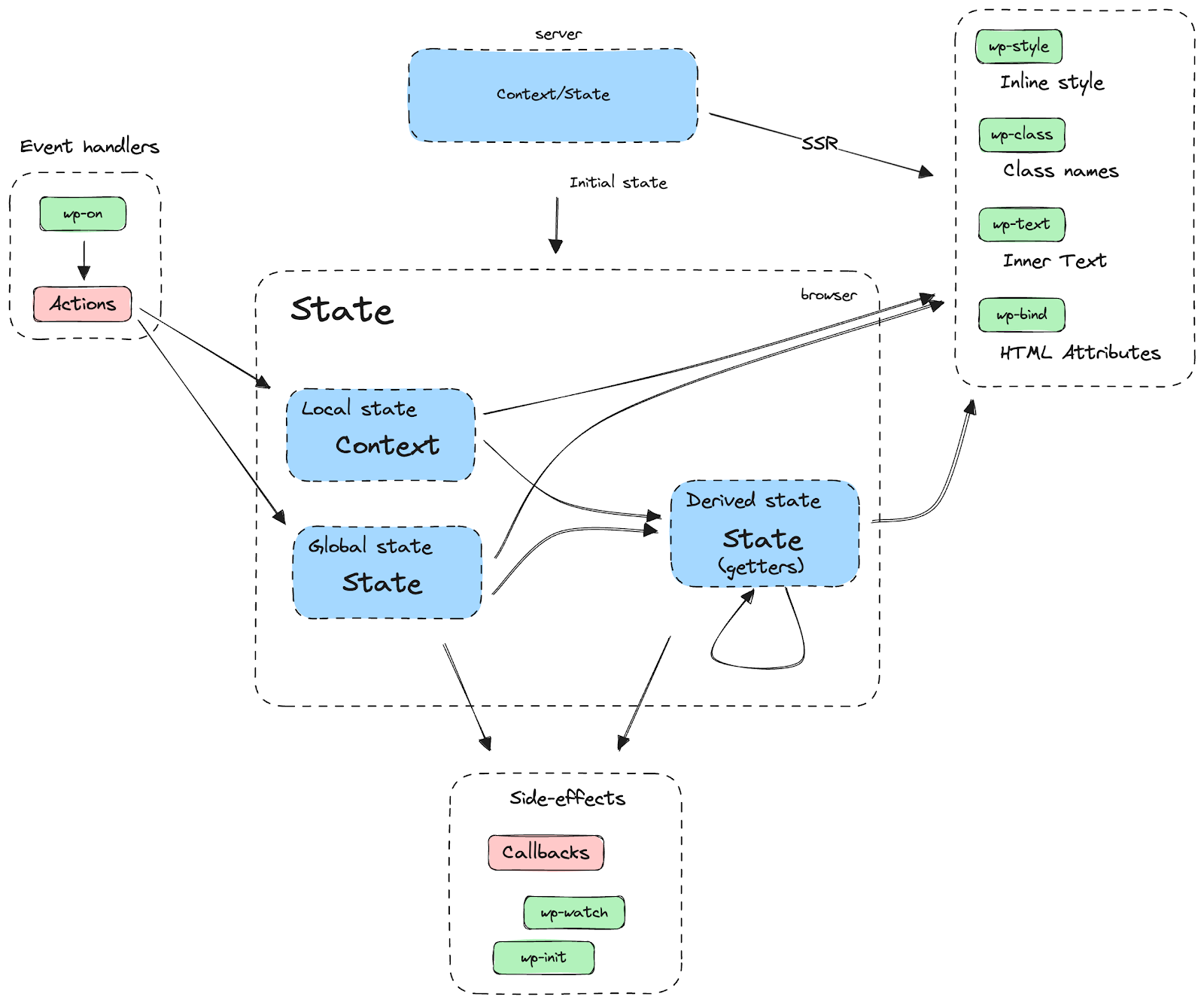
DOM elements are connected to data stored in the state and context through directives. If data in the state or context change directives will react to those changes, updating the DOM accordingly (see diagram).
When creating the store, there are some important things to be aware of:
Using derived state
Derived state uses getters to return a computed version of the state. It can access both state and context.
The store contains all the store properties, like state, actions, or callbacks. They are returned by the store() call, so you can access them by destructuring it:
Note that context is not part of the store and is accessed through the getContext function.
If you want to take a deeper view about how the store() function works, feel free to check the function documentation here.
Async actions
Async actions should use generator functions instead of async/await or promises. The Interactivity API needs to be able to track async behavior in order to restore the proper scope. Otherwise, getContext may return stale values if it was updated concurrently with the async operation. Instead of awaiting the promise, yield it from the generator function, and the Interactivity API will handle awaiting its completion.
So, instead of:
const { state } = store("myPlugin", {
  state: {
    get isOpen() {
      return getContext().isOpen;
    },
  },
  actions: {
    someAction: async () => {
      state.isOpen; // This is the expected context.
      await longDelay();
      state.isOpen; // This may not get the proper context unless it's properly restored.
    },
  },
});

function longDelay() {
  return new Promise( ( resolve ) => {
    setTimeout( () => resolve(), 3_000 );
  } );
}
The store should be:
const { state } = store("myPlugin", {
  state: {
    get isOpen() {
      return getContext().isOpen;
    },
  },
  actions: {
    someAction: function* () {
      state.isOpen; // This is the expected context.
      yield longDelay(); // With generators, the caller controls when to resume this function.
      state.isOpen; // This context is correct because the scope was restored before resuming after the yield.
    },
  },
});

function longDelay() {
  return new Promise( ( resolve ) => {
    setTimeout( () => resolve(), 3_000 );
  } );
}
If you want to take a deeper look at the example, check the API reference.
Working with other namespaces
Interactive blocks can share data between them, unless they are private stores.
Directives
In order to access the store of a different namespace in a directive, add the namespace before the directive value. For example:
<!-- This accesses the current store -->
<div data-wp-bind--id="state.text"></div>
<!-- This accesses the "otherPlugin" store -->
<button data-wp-bind--id="otherPlugin::state.text">>Button</button>
Context
Context from a different namespace can be accessed by providing the desired namespace as an argument to getContext( namespace ):
A store can be “locked” to prevent its content from being accessed from other namespaces. To do so, set the lock option to true in the store() call, like in the example below. When the lock is set, subsequent executions of store() with the same locked namespace will throw an error, meaning that the namespace can only be accessed where its reference was returned from the first store() call. This is especially useful for developers who want to hide part of their plugin stores so it doesn’t become accessible for extenders.
const { state } = store("myPlugin/private", {
  state: {
      messages: [ "private message" ]
    }
  },
  { lock: true }
);

// The following call throws an Error!
store( "myPlugin/private", { /* store part */ } );
There is also a way to unlock private stores: instead of passing a boolean, you can use a string as the lock value. Such a string can then be used in subsequent store() calls to the same namespace to unlock its content. Only the code with the lock string will be able to access the protected store. This is useful for complex stores defined across multiple files.
const { state } = store("myPlugin/private", {
  state: {
      messages: [ "private message" ]
    }
  },
  { lock: PRIVATE_LOCK }
);

// The following call works as expected.
store( "myPlugin/private", { /* store part */ }, { lock: PRIVATE_LOCK } );
Interactivity API client methods
The following methods are for use in JavaScript and are provided by the wordpress/interactivity script module available in WordPress 6.5.
getContext()
The context defined with the data-wp-context attribute can be retrieved with the getContext function:
Retrieves a representation of the element where a function from the store is being evaluated. This representation is read-only, and contains a reference to the DOM element and its attributes.
Retrieves a configuration object that was previously defined in the server via wp_interactivity_config() function.
Configuration is immutable on the client, it cannot be modified. You can get an example later in this document.
store()
Creates the store used to link the data and actions with their respective directives. Check the main section for more information.
withScope()
Actions can depend on the scope when they are called, e.g., when you call getContext() or getElement().
When the Interactivity API runtime execute callbacks, the scope is set automatically. However, if you call an action from a callback that is not executed by the runtime, like in a setInterval() callback, you need to ensure that the scope is properly set. Use the withScope() function to ensure the scope is properly set in these cases.
An example, where actions.nextImage would trigger an undefined error without the wrapper:
It is used to initialize the state on the server and ensure that the HTML sent by it, and the HTML after the client hydration are the same. And it also allows you to use any WordPress API like coreCoreCore is the set of software required to run WordPress. The Core Development Team builds WordPress. translations.
Generates a data-wp-context attribute ready to be server side rendered. This function escapes the array to prevent external attacks, apart from any error that may appear when writing JSON strings manually.
$context is an array containing the keys and values of the context.
$store_namespace allows referencing different stores, and is empty by default.
Sets or gets configuration for an interactivity store. An immutable copy of the configuration can be read by the client.
Consider config as a global setting that can affect the full site and won’t be updated on client interactions. For example, determining if a site can handle client-side navigation or not.
<?php
wp_interactivity_config( 'myPlugin', array( 'setting' => true ) );
 $config = wp_interactivity_config( 'myPlugin' );
?>
<div>
  My interactive div
</div>
Processes directives within HTML content, updating the markup where necessary.
This is the core functionality of the Interactivity API. It’s public so that any HTML can be processed, not just blocks.
For blocks with supports.interactivity, directives are automatically processed. Developers do not need to call wp_interactivity_process_directives in this case.
<?php
$html_content = '<div data-wp-text="myPlugin::state.message"></div>';

wp_interactivity_state( 'myPlugin', array( 'message' => 'hello world!' ) );

// Process directives in HTML content.
$processed_html = wp_interactivity_process_directives( $html_content );

// output: <div data-wp-text="myPlugin::state.message">hello world!</div>


You must be logged in to post a comment.