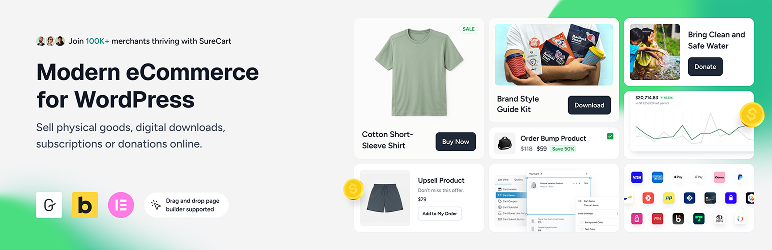

ຄຳອະທິບາຍ
ວິທີໃໝ່ໃນການຂາຍທຸກຢ່າງເທິງ WordPress!
★★★★★
eCommerce on WordPress has evolved and so have the tools.
SureCart brings a modern, intuitive approach to selling online. It’s lightweight, flexible, and built to work seamlessly with your existing WordPress setup.
Whether you’re selling digital products, subscriptions, services, or physical goods, you can launch a fully functional store without complexity.
What’s New | Blog | Docs | Video Tutorials | Get Help | Community
Start With a Completely Free Store
With SureCart’s free plan, you can create a store with full core functionalities: unlimited products, flexible checkout customization, subscription support, and powerful built-in features, without needing a stack of add-ons.
Scale when you’re ready. No forced upgrades. No unnecessary bloat.
What Makes SureCart Different?
SureCart was built to give WordPress users a modern alternative to traditional ecommerce plugins.
Most WordPress ecommerce solutions run entirely inside your website. As stores grow, this can introduce performance issues, database bloat, plugin conflicts, and caching complications.
SureCart takes a fundamentally different approach.
SureCart consists of two parts: the plugin and the platform. The plugin connects your WordPress site to the SureCart platform — a cloud-based ecommerce engine designed specifically to handle payments, subscriptions, taxes, and checkout processing at scale.
Instead of placing all ecommerce processing load on your website, SureCart handles heavy operations on its own infrastructure. This reduces strain on your server, improves reliability, and minimizes conflicts with themes, caching systems, or other plugins.
Because of this architecture, you get:
- A lighter WordPress footprint
- Reduced database bloat
- Fewer plugin conflicts
- Compatibility with caching systems
- Built-in security, backups, and infrastructure handling
The result is a smoother ecommerce experience with less technical overhead and fewer moving parts to manage.
SureCart ເໝາະສຳລັບໃຜ?
Each year we send all of our users a survey, so here are the 2025-26 results of who is using SureCart.
- Subscription-Based Businesses: SureCart is ideal for coaches, course creators, membership sites, and SaaS companies that rely on recurring revenue and need powerful subscription management with built-in retention tools.
- Service-Based Businesses: Perfect for web agencies, legal firms, and local businesses that charge through subscriptions, installment plans, or one-time setup fees with flexible billing built right into the checkout.
- Digital Product Creators & Developers: Built for selling ebooks, printables, creative assets, and digital downloads and increasingly trusted by WordPress software developers who leverage SureCart’s built-in licensing system.
- Physical Product Stores: Great for merchants who want a simple way to launch an online store, manage orders and fulfillment, and increase average order value with built-in cart abandonment recovery, order bumps, and post-purchase upsells.
- Agencies & Freelancers: Instead of turning down eCommerce projects due to complexity, agencies are confidently taking on more online store clients. SureCart makes setup and ongoing management simple and their clients love the experience.
- Nonprofits & Fundraisers: Ideal for charities and causes that need flexible donation forms while also having the ability to sell merchandise, event tickets, or other products, all from one streamlined checkout experience.
ໜ້າຮ້ານຄ້າແບບດັ້ງເດີມ
ຕ້ອງການເພີ່ມຮ້ານຄ້າອອນໄລນ໌ແບບດັ້ງເດີມເຂົ້າໃນເວັບໄຊຂອງທ່ານບໍ່?
ນີ້ຄືຮູບແບບທີ່ມີໜ້າຮ້ານຄ້າເພື່ອສະແດງສິນຄ້າທັງໝົດ, ໜ້າສິນຄ້າ, ກະຕ່າສິນຄ້າ ແລະ ການຊຳລະເງິນ.
SureCart ມີຟີເຈີຄົບຖ້ວນສຳລັບການຂາຍສິນຄ້າ ເຊັ່ນ: ສິນຄ້າທີ່ມີຕົວເລືອກຫຼາກຫຼາຍ, ການຈັດໝວດໝູ່ສິນຄ້າ, ຄູປອງ, ການຕິດຕາມສະຕັອກ, ການຄິດໄລ່ຄ່າສົ່ງ, ການຈັດການຄຳສັ່ງຊື້, ການຄືນສິນຄ້າ ແລະ ເຂດຈັດການສຳລັບລູກຄ້າ.
Product Pricing Options (Now with Dynamic Pricing)
SureCart gives you flexible, conversion-focused pricing control without duplicating products or creating complex checkout flows.
Instead of being limited to one price per product, you can attach multiple pricing options to a single product and let customers choose what works best for them.
You can offer:
- One-time payments
- Subscription payments (daily, weekly, monthly, yearly, etc.)
- Installment plans
- Free trials
- Paid trials
- Setup fees
- Setup discounts
- “Name your own price”
Dynamic Pricing (New)
SureCart also includes built-in Dynamic Pricing, allowing prices to automatically adjust at checkout based on real conditions.
You can:
- Apply discounts when cart subtotal exceeds a threshold
- Add conditional fees based on user role or customer type
- Offer bulk/quantity discounts
- Reward logged-in customers with special pricing
- Run BOGO-style offers without duplicating products
Pricing updates instantly at checkout exactly where buying decisions happen.
This makes it easier to increase average order value (AOV), reward loyal customers, and run smarter promotions without adding extra plugins.
Advanced Subscription Management & Retention for WordPress
Selling a subscription is the easy part. Managing renewals, reducing churn, and maximizing lifetime value is where subscription businesses actually grow.
SureCart goes beyond basic recurring payments by giving you built-in tools to actively manage and retain subscribers and not just collect payments.
Flexible Subscription Setup
With SureCart, you can:
- Create flexible billing intervals (daily, weekly, monthly, yearly, or custom)
- Offer free trials and paid trials
- Add setup fees or setup discounts
- Create installment-style subscription payments
- Apply Dynamic Pricing rules to subscription products
- Offer multiple pricing options on a single subscription product
Reduce Churn From Failed Payments
One of the biggest causes of subscription churn is failed payments. SureCart includes built-in dunning management that:
- Automatically retries failed payments
- Sends advanced pre-payment reminders
- Notifies customers about payment issues
- Helps recover revenue that would otherwise be lost
This helps keep subscribers active without requiring third-party add-ons.
Reduce Voluntary Cancellations
The second major source of churn is subscribers choosing to cancel. SureCart’s Subscription Saver feature helps reduce cancellations and gives you insights into why customers leave.
You can:
- Offer upgrade or downgrade paths with automatic proration
- Allow customers to pause subscriptions instead of cancelling
- Reactivate cancelled subscriptions
- Let customers change payment methods
- Allow changes to billing dates
- Provide self-service management via customer dashboards
Instead of forcing cancellations, you give customers flexible options that keep revenue flowing.
Built-In Management Without Extra Extensions
Many WordPress setups require multiple add-ons to manage subscriptions effectively. SureCart includes subscription logic, retention tools, and email notifications natively.
Because SureCart is cloud-based and API-driven, subscription processing is handled reliably without adding heavy processing load to your WordPress site.
This gives you greater control over subscriber experience, retention, and recurring revenue, all from a single platform.
ທາງເລືອກທີ່ດີທີ່ສຸດແທນ WooCommerce
SureCart ແມ່ນ ທາງເລືອກໃໝ່ແທນ WooCommerce ທີ່ຜູ້ໃຊ້ WordPress ຖາມຫາ!
ພວກເຮົານັບຖື WooCommerce ທີ່ເປັນຜູ້ບຸກເບີກການເຮັດຮ້ານຄ້າອອນໄລນ໌ເທິງ WordPress ແຕ່ມັນອາດຈະບໍ່ແມ່ນທາງເລືອກທີ່ດີທີ່ສຸດສຳລັບທຸກຄົນ.
ທ່ານອາດຈະຕ້ອງຈ່າຍເງິນເຖິງ $2,849 ຕໍ່ປີ ຕໍ່ຮ້ານ ສຳລັບສ່ວນເສີມຂອງ WooCommerce ເພື່ອໃຫ້ໄດ້ຟີເຈີຄືກັນກັບທີ່ SureCart ມີໃຫ້ແລ້ວ! ນອກຈາກນີ້, ເວັບໄຊຂອງທ່ານຍັງສ່ຽງຕໍ່ບັນຫາປັກອິນຕີກັນ, ຊ່ອງໂຫວ່ດ້ານຄວາມປອດໄພ, ຕ້ອງຄອຍອັບເດດປັກອິນຕະຫຼອດ ແລະ ເຮັດໃຫ້ເວັບໄຊຊ້າລົງ.
(ນີ້ແມ່ນເຫດຜົນຈາກເຈົ້າຂອງຮ້ານທີ່ຍ້າຍມາຈາກ WooCommerce ມາໃຊ້ SureCart)
ມີບາງກໍລະນີທີ່ການໃຊ້ WooCommerce ອາດເປັນທາງເລືອກດຽວສຳລັບຮ້ານຄ້າຂອງເຈົ້າ ເນື່ອງຈາກລະບົບນິເວດຂອງສ່ວນເສີມແບບເສຍເງິນ ແລະ ຊ່ອງທາງການຊຳລະເງິນທີ່ກວ້າງຂວາງ ຫາກເຈົ້າມີຄວາມຕ້ອງການທີ່ສະເພາະເຈາະຈົງຫຼາຍ.
ຈຸດທີ່ SureCart ແຕກຕ່າງກໍຄື: ທຸກຢ່າງມີມາໃຫ້ພ້ອມໃນຕົວ ໂດຍບໍ່ຕ້ອງມີສ່ວນເສີມ. ທຸກຢ່າງຖືກອອກແບບມາໃຫ້ງ່າຍຂຶ້ນ, ເວັບໄຊຂອງທ່ານຈະໄວຂຶ້ນ ແລະ ພວກເຮົາມີທີມງານຄອຍຊ່ວຍເຫຼືອທ່ານສະເໝີ.
ຟີເຈີຂອງ SureCart
ນີ້ແມ່ນພຽງແຕ່ບາງຟີເຈີຫຼັກທີ່ຜູ້ໃຊ້ SureCart ມັກທີ່ສຸດ.
-
Multiple Payment Processors, Express Checkout ApplePay & GooglePay:
Easily connect to Stripe, PayPal, Razorpay, and Mollie with support for 135+ currencies, 45+ countries, and dozens of payment methods including cards, wallets, bank debits, and more. You can use multiple processors on a single checkout form. Also, you can optionally accept ApplePay or GooglePay express checkout options. -
ທາງເລືອກການຊຳລະເງິນທີ່ຊົງພະລັງ:
ການຊຳລະຄັ້ງດຽວ, ລະບົບສະມາຊິກ, ທົດລອງໃຊ້ຟຣີ, ຄ່າທຳນຽມທຳອິດ, ການຜ່ອນຊຳລະ, ການໃຫ້ລູກຄ້າກຳນົດລາຄາເອງ ແລະ ການບໍລິຈາກ. SureCart ຮອງຮັບທຸກຮູບແບບທີ່ທ່ານຕ້ອງການ ໂດຍມີໃຫ້ໃຊ້ງານໄດ້ຟຣີ. -
ລະບົບຊຳລະເງິນແບບສະມາຊິກທີ່ຄົບຖ້ວນທີ່ສຸດ:
ລະບົບສະມາຊິກຂອງ SureCart ມີຫຍັງຫຼາຍກວ່າການເກັບເງິນຕາມຮອບວຽນ. ພວກເຮົາມີທາງເລືອກທີ່ຫຼາກຫຼາຍ ແລະ ຍັງຮອງຮັບການອັບເກຣດ ຫຼື ລົດລະດັບແບບຄິດໄລ່ສະເລ່ຍ (Proration) ເຮັດໃຫ້ການປ່ຽນແຜນຈາກລາຍເດືອນເປັນລາຍປີເປັນເລື່ອງງ່າຍ ແລະ ຍຸດຕິທຳ. -
Built-In Product Reviews
SureCart includes a native product review system so you can collect and display verified customer feedback without installing a separate reviews plugin. You can enable star ratings with written feedback, moderate and approve reviews, and display them directly on product and checkout pages. Reviews are managed inside your SureCart dashboard and work seamlessly with your products and pricing options, helping build trust at the point of purchase without adding extra plugins or complexity. -
Dynamic Pricing
SureCart includes built-in Dynamic Pricing so you can automatically adjust prices at checkout based on real conditions without duplicating products or creating complex coupon rules. You can apply discounts or fees based on cart subtotal, product quantity, customer type, user role, or other checkout conditions, and pricing updates instantly where purchase decisions happen. Dynamic Pricing works seamlessly with one-time payments and subscription products, giving you more flexibility to increase average order value and run smarter promotions without adding extra plugins. -
ການສະເໜີຂາຍເພີ່ມ ແລະ ຂະບວນການຂາຍເສີມ: ຜູ້ຂາຍໃນ SureCart ມີຮ້ານຄ້າທີ່ສ້າງກຳໄລໄດ້ຫຼາຍຂຶ້ນ ຍ້ອນມີຊຸດຄຸນສົມບັດການເພີ່ມປະສິດທິພາບລາຍຮັບແບບຄົບວົງຈອນ. ສ້າງລາຍຮັບໃຫ້ຫຼາຍຂຶ້ນດ້ວຍການສະເໜີຂາຍເພີ່ມພຽງຄລິກດຽວ, ການຂາຍເສີມຫຼັງການຊື້ພຽງຄລິກດຽວ, ແລະ ການກູ້ຄືນລາຍການທີ່ຄ້າງໃນກະຕ່າ.
-
ລະບົບຕົວແທນຈຳໜ່າຍ (Affiliate Platform):
ເພີ່ມຍອດຂາຍດ້ວຍການສ້າງລະບົບຕົວແທນຈຳໜ່າຍ. ເປີດໃຊ້ງານໄດ້ງ່າຍພາຍໃນບໍ່ກີ່ນາທີ. ທ່ານສາມາດປັບແຕ່ງໄດ້ທຸກພາກສ່ວນ ເຊັ່ນ: ຄ່າຄອມມິດຊັນຕະຫຼອດຊີບ, ອັດຕາຄອມມິດຊັນສະເພາະຕົວ, ຄູປອງສຳລັບຕົວແທນ ແລະ ອື່ນໆ. -
ເຂດບໍລິການຕົນເອງສຳລັບລູກຄ້າ (ການອັບເກຣດ/ລົດລະດັບສະມາຊິກ):
ດ້ວຍ Customer Area ທີ່ປັບແຕ່ງໄດ້, ທ່ານສາມາດກຳນົດໄດ້ວ່າລູກຄ້າຈະເຫັນ ຫຼື ເຮັດຫຍັງໄດ້ແດ່ ເຊັ່ນ: ປ່ຽນຂໍ້ມູນສ່ວນຕົວ, ປ່ຽນລະຫັດຜ່ານ, ດາວໂຫຼດໄຟລ໌, ອັບເດດບັດເຄຣດິດ, ຫຼື ປ່ຽນແຜນສະມາຊິກ ເຊິ່ງທັງໝົດນີ້ມາພ້ອມກັບໜ້າຕາທີ່ທັນສະໄໝ. -
ປະສົບການການຊື້ເຄື່ອງທີ່ປັບແຕ່ງໄດ້:
ປັບແຕ່ງໜ້າສິນຄ້າ, ໜ້າຮ້ານຄ້າ, ກະຕ່າສິນຄ້າ ແລະ ແຜງຈັດການຂອງລູກຄ້າ ດ້ວຍລະບົບລາກ ແລະ ວາງ ທີ່ເຮັດວຽກຮ່ວມກັບ WordPress block editor ໄດ້ຢ່າງມີປະສິດທິພາບ. -
ລະບົບສ້າງຟອມຊຳລະເງິນທີ່ຢືດຢຸ່ນ:
ສ້າງຟອມຊຳລະເງິນທີ່ປັບແຕ່ງໄດ້ເອງທັງໝົດ ແລະ ສາມາດສ້າງໄດ້ຫຼາຍຟອມຕາມທີ່ຕ້ອງການ. ທ່ານສາມາດລາກ ແລະ ວາງ ຊ່ອງຂໍ້ມູນ, ຕົວເລືອກລາຄາ, ຕົວເລືອກບໍລິຈາກ ແລະ ອື່ນໆ ເພື່ອສ້າງຟອມທີ່ສົມບູນແບບທີ່ສຸດ. -
ຄູປອງສ່ວນຫຼຸດ:
ການໃຊ້ຄູປອງເປັນວິທີທີ່ດີໃນການເພີ່ມຍອດຂາຍ. ທ່ານສາມາດສ້າງຄູປອງໄດ້ບໍ່ຈຳກັດ ແລະ ຍັງສາມາດຕັ້ງຄ່າໃຫ້ໃຊ້ຄູປອງອັດຕະໂນມັດຜ່ານ URL ໄດ້. -
ການສົ່ງໄຟລ໌ດິຈິຕອນຢ່າງປອດໄພ:
ຂາຍສິນຄ້າດິຈິຕອນບໍ່? ບໍ່ວ່າຈະເປັນຊອບແວ, ໄຟລ໌ພິມ, ຫຼື Ebooks, SureCart ສາມາດສົ່ງໄຟລ໌ໃຫ້ລູກຄ້າຂອງທ່ານໄດ້ຢ່າງປອດໄພ. -
ກະຕ່າສິນຄ້າແບບສະໄລ້ (Slide-out Cart):
ຫາກທ່ານຕ້ອງການຂາຍສິນຄ້າແບບມີກະຕ່າໃຫ້ລູກຄ້າເລືອກໃສ່ກ່ອນຊຳລະເງິນ, ທ່ານຈະມັກກະຕ່າສິນຄ້າທີ່ສວຍງາມ ແລະ ເຮັດວຽກໄດ້ໄວທີ່ສຸດຂອງ SureCart. -
ຮອງຮັບມາດຕະຖານ EU ຢ່າງຄົບຖ້ວນ:
ຫາກທ່ານຂາຍສິນຄ້າໃນສະຫະພາບເອີຣົບ, SureCart ຮອງຮັບກົດລະບຽບທີ່ເຂັ້ມງວດກ່ຽວກັບ VAT, ການສະແດງລາຄາລວມ VAT, ຂໍ້ມູນໃນໃບບິນ ແລະ ການລຽງລຳດັບເລກໃບບິນ ຢ່າງຄົບຖ້ວນ. -
ການເຊື່ອມຕໍ່ ແລະ ລະບົບອັດຕະໂນມັດ:
ສ່ວນທີ່ສຳຄັນທີ່ສຸດຂອງແພລດຟອມອີຄອມເມີຊຄືການເຊື່ອມຕໍ່ກັບປັກອິນ ແລະ ແພລດຟອມພາຍນອກ. SureCart ຮອງຮັບການເຊື່ອມຕໍ່ກັບປັກອິນ WordPress ຫຼາກຫຼາຍ ເຮັດໃຫ້ທ່ານໃຊ້ SureCart ຈັດການທຸກຢ່າງໄດ້ຄົບໃນບ່ອນດຽວ. -
ການຮອງຮັບການຂະຫຍາຍຕົວ:
ຫາກມີລູກຄ້າເຂົ້າມາຊື້ເຄື່ອງເປັນຈຳນວນຫຼວງຫຼາຍໃນຊ່ວງໂປຣໂມຊັນ, ປັກອິນອື່ນອາດເຮັດໃຫ້ເວັບໄຊຊ້າ ຫຼື ລົ້ມ ຫາກທ່ານບໍ່ໄດ້ໃຊ້ໂຮດຕິງລາຄາແພງ. ແຕ່ຍ້ອນ SureCart ເປັນລະບົບແພລດຟອມ, ທ່ານຈຶ່ງບໍ່ຕ້ອງກັງວົນ ເພາະພວກເຮົາຈະຈັດການເລື່ອງການຮອງຮັບປະລິມານການໃຊ້ງານໃຫ້ທ່ານເອງ. -
ການຄິດໄລ່ພາສີ ແລະ VAT ແບບລຽວທາມ:
ແພລດຟອມອື່ນໆອາດໃຫ້ທ່ານໃຊ້ບໍລິການຄິດໄລ່ພາສີທີ່ມີລາຄາແພງ, ແຕ່ SureCart ໄດ້ເຊື່ອມຕໍ່ກັບ TaxJar ໄວ້ໃຫ້ແລ້ວ ແລະ ພວກເຮົາເປັນຜູ້ຈ່າຍຄ່າບໍລິການນັ້ນໃຫ້ທ່ານເອງ ເຮັດໃຫ້ການຕັ້ງຄ່າເປັນເລື່ອງງ່າຍໆ.
ການເຊື່ອມຕໍ່ຂອງ SureCart
Recommended
- OttoKit
- SureDash
- SureMembers
- Astra
- Starter Templates
Analytics
- Google Analytics
- Facebook Pixel
- Analytics WP
- Conversion Bridge
- Independent Analytics
- Kadence Insights
Automation
- OttoKit
- Bit Flows
- Zapier
- WPFusion
- Bit Integrations
- Flowmattic
- Integrately
- Omnisend
- Pabbly Connect
- Thrive Automator
- viaSocket
Booking & Events
- LatePoint
- Pie Calendar
Community / Network
- SureDash
- BuddyBoss
- GamiPress
- Omnisend
Courses & Online Learning
- SureDash
- LearnDash
- LifterLMS
- Masteriyo
- TutorLMS
Data Management
- WP Ultimate CSV Importer
Design & Theme
- Astra
- Bricks Builder
- Starter Templates
- Block Editor (Gutenberg)
- Kadence Cloud
- Meta Box
- Advanced Custom Fields
- JetEngine
- Elementor
- Spectra Website Builder
- Divi Builder
- Beaver Builder
- Thrive Architect
- Oxygen Builder
Themes
SureCart ໃຊ້ງານໄດ້ກັບທຸກໆທີມ, ລວມມີ:
- Astra Theme
- Avada
- Blocksy
- Divi Theme
- Flatsome
- GeneratePress
- Kadence Theme
- Neve
- OceanWP
- Spectra One Theme
Membership
- SureMembers
- MemberPress
Other Integrations
- Presto Player
- AffiliateWP
OttoKit Integrations
SureCart also integrates with OttoKit, which is like Zapier for WordPress. OttoKit integrates with over 500 apps and services. These will require you to add the OttoKit plugin to your website to integrate with:
- ActiveCampaign
- ConvertKit
- FluentCRM
- Google Sheets
- GoHighLevel
- Klaviyo
- MailChimp
- MailGun
- Restrict Content Pro
- SendinBlue
- Slack
- The Events Calendar
- Twilio
- Webhooks
- Zoom
- ເບິ່ງລາຍການທັງໝົດ
ເຂົ້າຮ່ວມກຸ່ມ Facebook ຂອງ SureCart
ເຂົ້າຮ່ວມ ຊຸມຊົນໃນກຸ່ມ Facebook: ສຶກສາເຄັດລັບ ແລະ ເຕັກນິກທີ່ຜູ້ໃຊ້ SureCart ຄົນອື່ນໆໃຊ້ເພື່ອຂະຫຍາຍທຸລະກິດ ແລະ ຮັບຂໍ້ມູນຂ່າວສານກ່ຽວກັບຟີເຈີໃໝ່ໆກ່ອນໃຜ.
ຕ້ອງການຮ່ວມພັດທະນາປັກອິນນີ້ບໍ່?
ຕອນນີ້ທ່ານສາມາດຮ່ວມພັດທະນາປັກອິນນີ້ໄດ້ທີ່ Github: SureCart WordPress Plugin on Github
ພາບໜ້າຈໍ
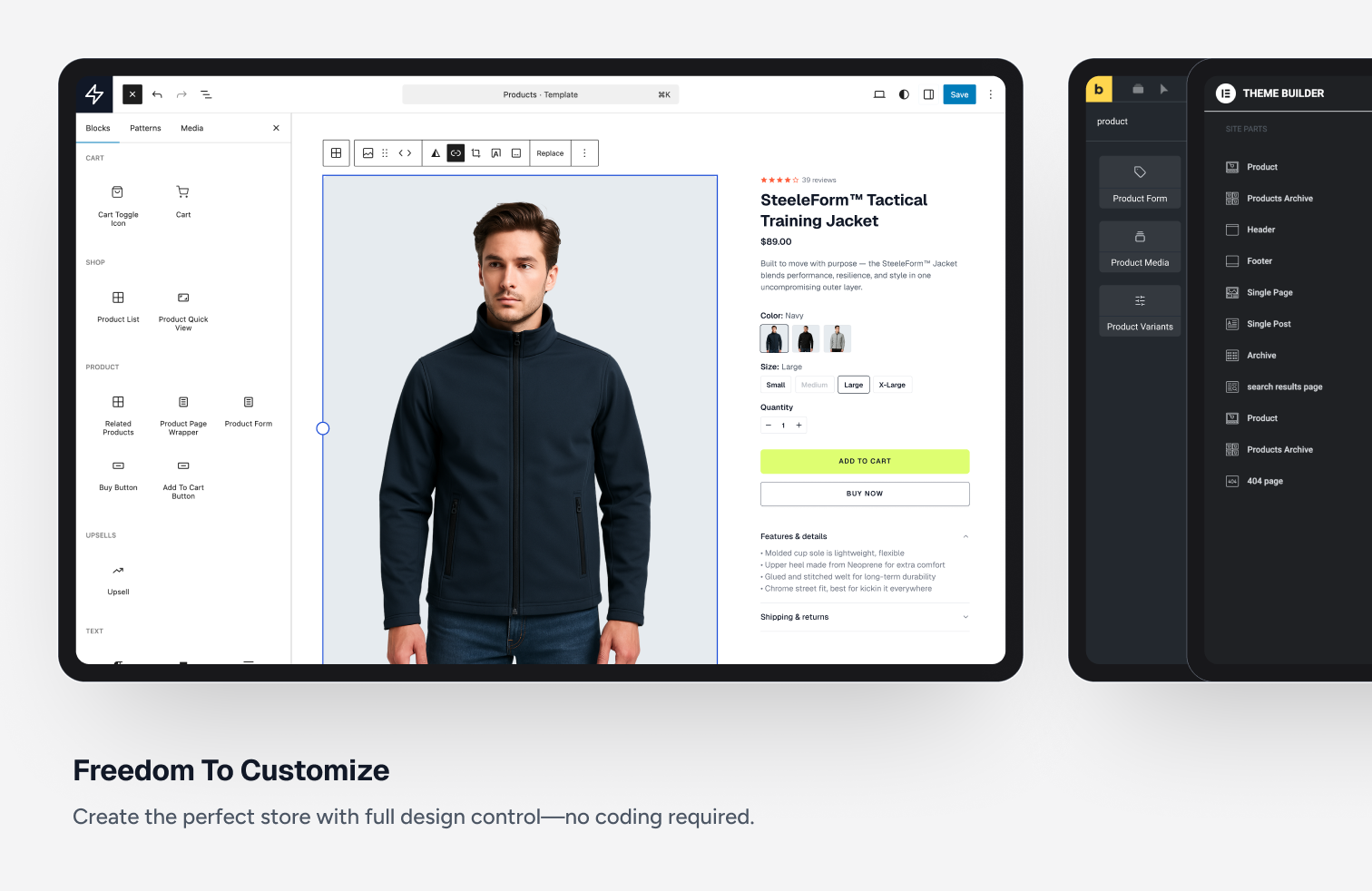
ອິດສະລະໃນການປັບແຕ່ງ. 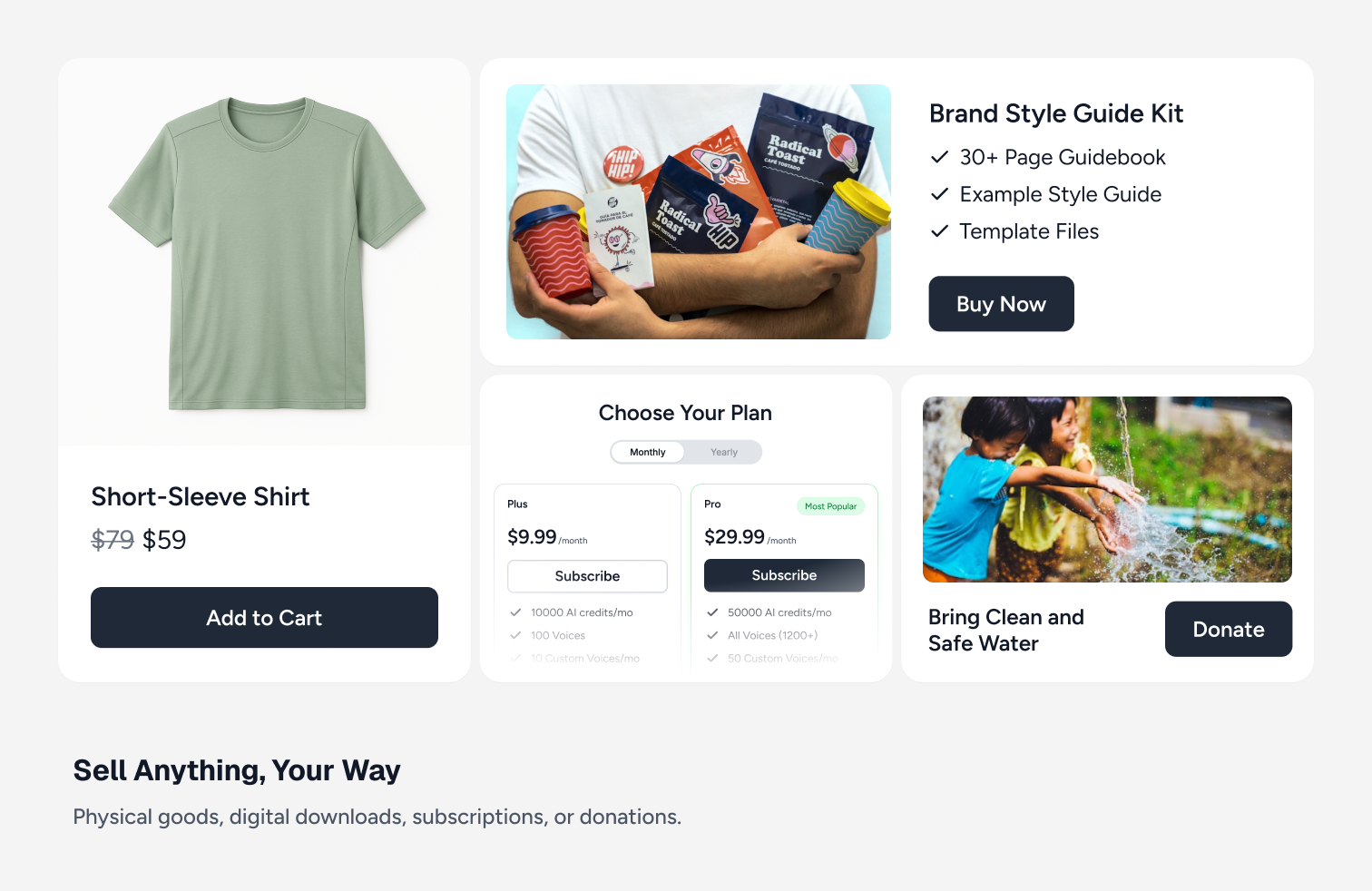
ອີຄອມເມີຊ, ໄຟລ໌ດາວໂຫຼດດິຈິຕອນ ແລະ ການສະໝັກສະມາຊິກ. 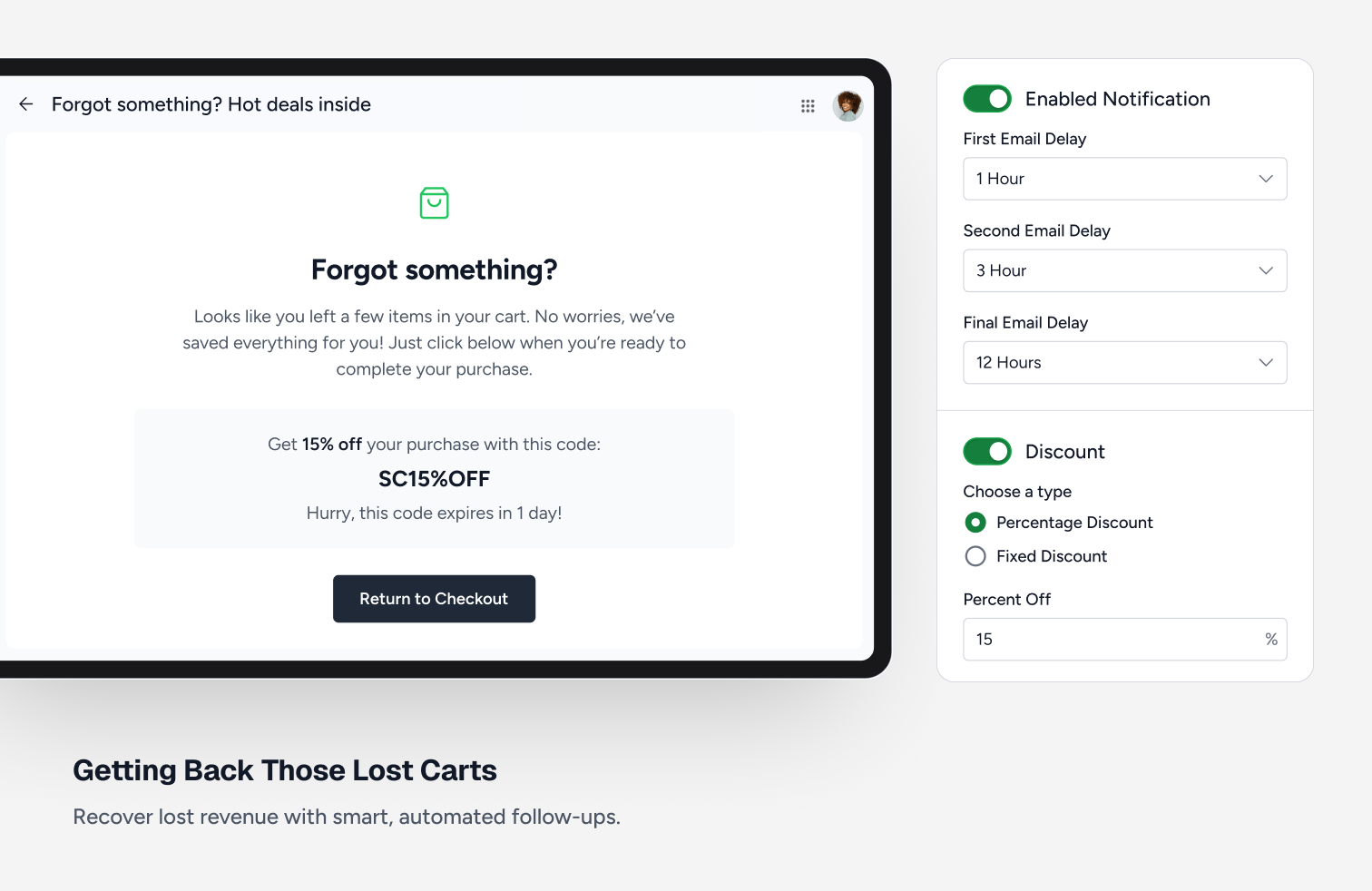
ການຕິດຕາມລູກຄ້າທີ່ຖິ້ມກະຕ່າສິນຄ້າ. 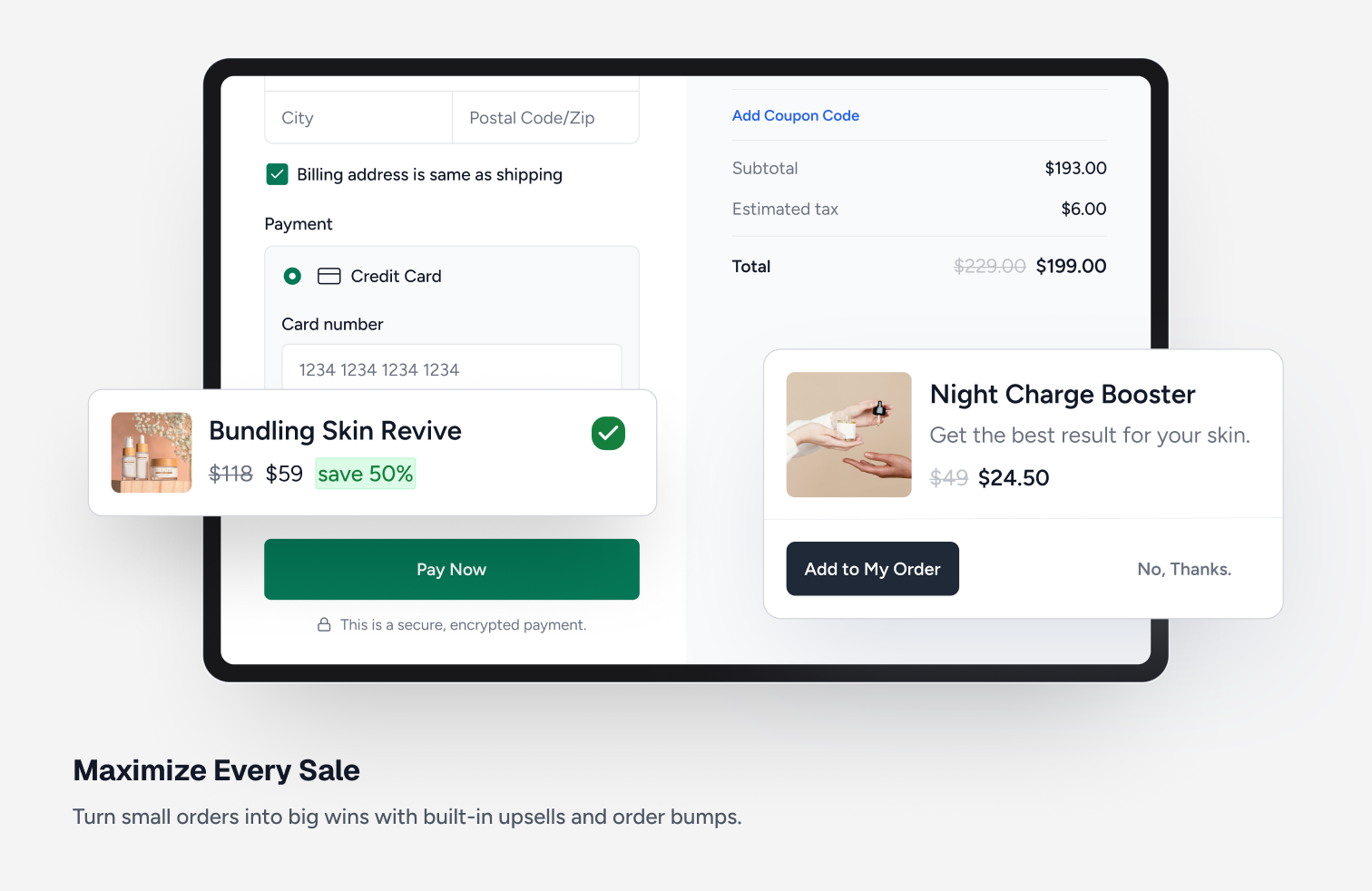
ການສະເໜີຂາຍເພີ່ມເຕີມ/ການຂາຍພ່ວງ. 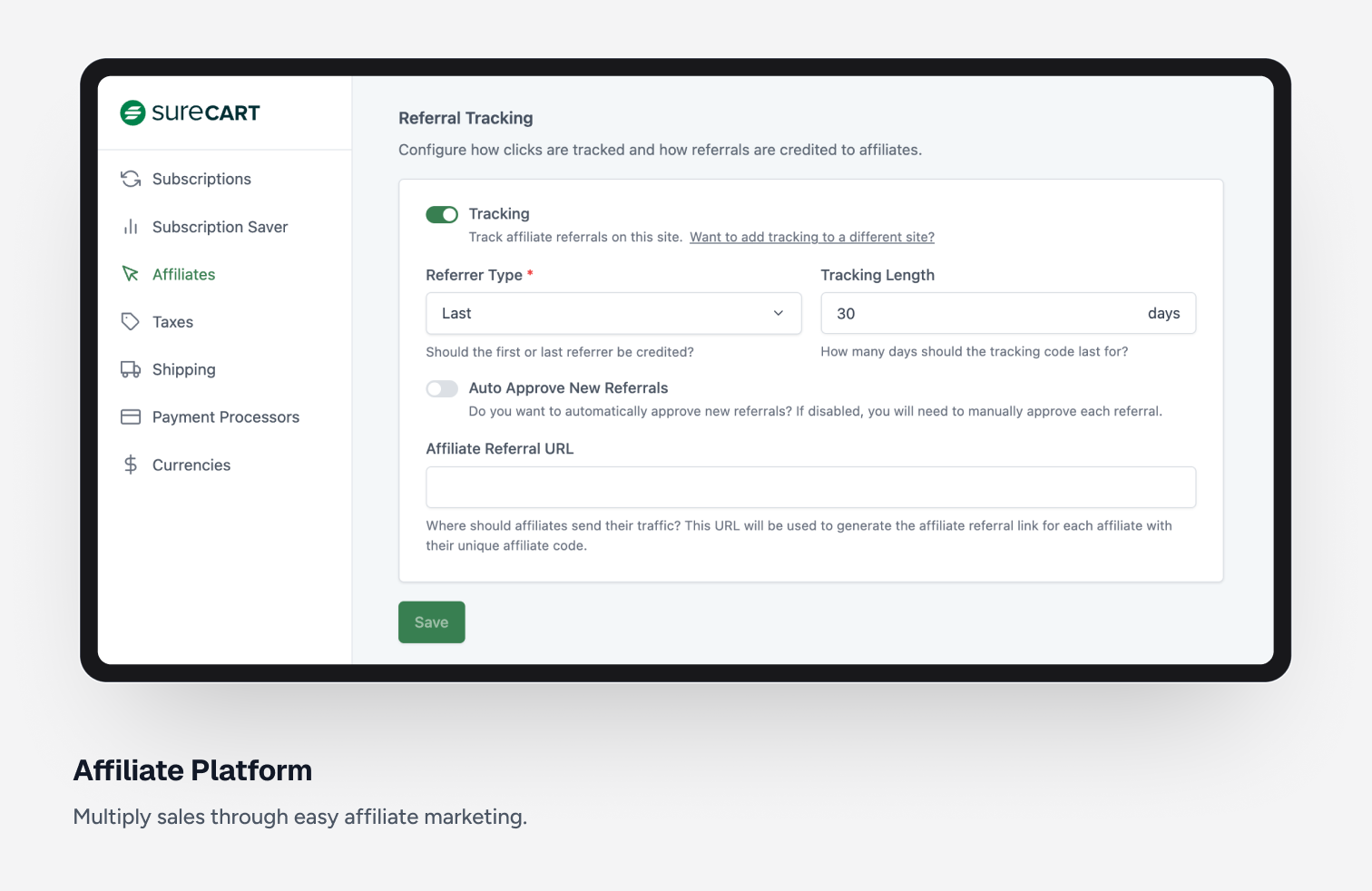
ລະບົບຕົວແທນຈຳໜ່າຍ (Affiliate). 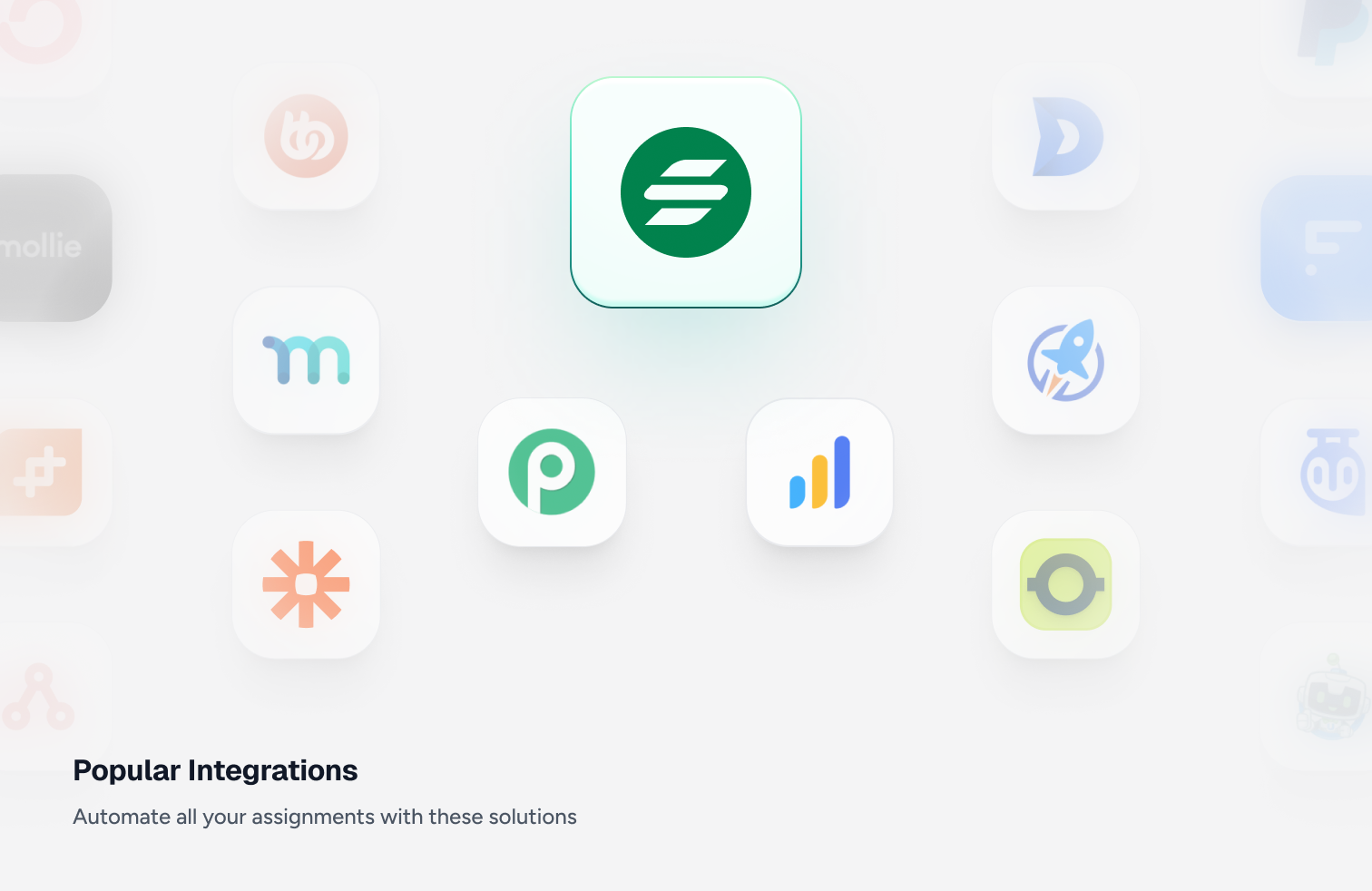
ການເຊື່ອມຕໍ່ກັບລະບົບຍອດນິຍົມ.


ບລັອກ
ປລັກອິນນີ້ມີ 169 ບລັອກ.
- Template Displays products list.
- Review Date Displays the date of a product review.
- Review Form Submit Button Provide a submit button for the product review form.
- Cart Submit Button The cart submit button
- Line item note Display the product line item note.
- Selected Price Custom Amount Displays the currently selected price custom amount.
- Label Display the product review list filter checkboxes label.
- Order Bump Title Display the order bump product title.
- Line item remove Display the product line item remove.
- Cart Coupon Display a coupon form in the cart
- No products Contains the block elements used to render content when no products are found.
- Order Bump CTA Display the order bump call to action text.
- Reviewer Name Displays the name of the reviewer for a product review.
- Cart Bump Line Item Display the cart bump line item
- Selected Price Scratch Amount Displays the currently selected price scratch amount.
- Sidebar Display the product review list sidebar with filters.
- Cart Submit Button The cart submit button
- Order Bump Amount Display the order bump price.
- Sort (Dropdown) Display the product sort.
- Product List Display a list of products.
- Review Form Close Button Display the product review form close button.
- Order Bump Previous Navigate to the previous page of order bumps.
- Content Display the product list content.
- Close Cart Button Display the close cart button.
- Control Display the product quantity control
- Product Buy Button Display the product buy button.
- Floating Cart Icon The cart icon that shows your cart quantity.
- Product Form Display product form.
- Product Quick Add Display the product quick add button.
- Sort (Radio Group) Display the Product List Sort Radio Group.
- Template Display the filter tags.
- Product Selected Variant Image Shows the image for the currently selected product variant.
- Order Bump Template Template for rendering each order bump item.
- Review Rating Stars Displays the rating given by the reviewer for a product review using stars.
- Cart Message Display a custom message in the cart
- Review Title Displays the title of a product review.
- Decrease Quantity Display the product quantity input decrease
- Radio Display the sort radio.
- Collection Tags Displays collection selectors for a product.
- Review Form Title Provide a title input field for product reviews.
- Filter Checkboxes Display the product review list filter checkboxes.
- Line item interval Display the product line item interval.
- Line item status Display the product line item status.
- Label Display the product list filter tags label
- Quick Add Button Display the product quick add to cart button.
- Product Review Form Display the product review form.
- Price Trial Displays trial of a price.
- Buy Buttons Displays product buy and add to cart buttons
- Selected Variant Display Displays the currently selected variant of a product.
- Clear All Display the product list filter tags clear all link.
- Label Display the product review list filter tags label
- Icon Display an icon from the SureCart icon library.
- Review Form Rating Provide a star rating input for product reviews.
- Cart Toggle Icon The cart menu icon that shows your cart quantity.
- Pagination Display the product pagination.
- Price Amount Displays amount of a price.
- Order Bump Next Navigate to the next page of order bumps.
- Review Content Display the product reviews content
- Order Bump Description Display the order bump description.
- Product Media A container to display the product media
- Product Description Display the product description.
- Write a Review Button A button to open the product review form.
- Cart Subtotal Display the cart subtotal
- Cart Items The cart items
- Order Bump Image Display the order bump product image.
- Numbers Display the product pagination numbers.
- Product Title Display the product title.
- Checkbox Display the filter checkbox.
- Order Bump Scratch Amount Display the order bump original price (strikethrough).
- Price Selector Displays possible choices for product prices.
- Template Displays product review template
- Product Template Container Display the Product Template Container.
- Line Item Image Display the product line item image.
- Filter (Dropdown) Display the product filter.
- Order Bump Pagination Pagination controls for order bumps.
- Line item variant Display the product line item variant.
- Line item trial Display the product line item trial.
- Applied Filters Display the applied filters.
- Sidebar Display the product list sidebar.
- Product Review List Display a list of product reviews.
- Tag A product collection tag for a product.
- Tag Display the filter tag.
- Line item amount Display the product line item amount.
- Line item scratch amount Display the product line item scratch amount.
- Cart Header Display a cart header
- Cart Items Count Display the number of items in the cart.
- Review Content Displays the content of a product review.
- Close Display the product quick add close button.
- Label Display the product list sort radio group label
- Order Bumps Display recommended order bumps in the cart.
- Filter Checkboxes Display the product list filter checkboxes.
- Line item price name Display the product line item price name.
- Line item fees Display the product line item fees.
- Line item quantity Display the product line item quantity.
- Order Bump Add Button Button to add the order bump to cart.
- Price Displays the price of a product with a choice of options.
- Review Form Content Provide a content textarea field for product reviews.
- Sidebar Toggle Button Display the product list sidebar toggle.
- Previous Display the product review pagination previous.
- Applied Filters Display the product review applied filters.
- Pill Displays a product variant choice as a pill.
- Price Setup Fee Displays the setup fee of a price.
- Selected Price Amount Displays the currently selected price or variant amount.
- Line Item Title Display the product line item title.
- Search Display the product search.
- Review Breakdown Displays a breakdown of product reviews by star rating.
- Sticky purchase Display the sticky purchase.
- Template Display the filter checkboxes.
- Cart Subtotal Amount Display the cart subtotal amount
- Price Name Displays the name of a price.
- Image Display the product image.
- Next Display the product pagination next.
- Price Interval Displays the price interval.
- Numbers Display the product review pagination numbers.
- Product Quantity Display the product quantity selector
- Content Display the product reviews.
- Average Rating Displays the average product rating value.
- Checkbox Display the product review filter checkbox.
- Star Rating Display the product average rating stars.
- Template Display the sort radio group template.
- Order Bump Discount Badge Display the order bump discount badge.
- Price Display the static product price.
- Product Note Allow customers to add a note to the product
- Pagination Display the product review pagination.
- Template Display the filter tags.
- Label Display the product list filter checkboxes label.
- Variants Selector Display product variants as pills selector.
- Cart Subtotal Display the cart subtotal
- Cart Items The slide-out cart items
- Reviews Count Displays the total reviews count for the product.
- Tag Display the product review filter tag.
- Sale Badge Display a badge if the product is currently on sale
- Related Products Display a list of products related to the current product.
- Cart Display SureCart slide out cart
- Currency Switcher Display a currency switcher dropdown.
- Selected Price Interval Displays the currently selected price interval.
- Next Display the product review pagination next.
- Product Review Summary Display the product review summary.
- Selected Price Fees Displays the currently selected price fees.
- Selected Price Trial Displays the currently selected price trial.
- Sidebar Toggle Button Display the product review list sidebar toggle.
- Scratch Price Display the product scratch price.
- Cart Subtotal Scratch Amount Display the cart subtotal scratch amount (original price before discount).
- Review Verified Badge Displays a verified badge for a product review.
- Clear All Display the product review list filter tags clear all link.
- Price Scratch Amount Displays scratch amount of a price.
- Input Display the product quantity input
- Previous Display the product pagination previous.
- Increase Quantity Display the product quantity input increase
- Template Display the review filter checkboxes.
- No reviews Contains the block elements used to render content when no reviews are found.
- Coupon Display a coupon form.
- Cart Coupon Display a coupon form in the cart.
- Button Display a checkout form button.
- Logout Button Display a logout button.
- Divider Displays a divider.
- Session Info Display information for a specific session.
- Buy Button Display a button to immediately redirect to the checkout page with the product in the cart.
- Add To Cart Button Display a button to add a specific price to the cart.
- Customer Dashboard Displays the users customer dashboard.
- Customer Dashboard Page Displays the users customer dashboard tab.
- Tabbed Customer Dashboard Displays the users customer dashboard.
- Cart Menu Icon The cart menu icon that shows your cart quantity.
- Customer Dashboard Button Display a button to link the user to their customer dashboard.
- Text Field Displays a form text input field. This is saved with the order as additional metadata.
- Product Cart Button Add a buy now or add to cart button.
- Confirmation Template for the review confirmation content. Shown when editing the confirmation.
- Form Template for the review form content. Shown when editing the form.
- Form Displays a form.
ການຕິດຕັ້ງ
- ອັບໂຫຼດໂຟນເດີ SureCart ໄປຍັງໄດເຣັກທໍຣີ /wp-content/plugins/
- ເປີດໃຊ້ງານປັກອິນ SureCart ຜ່ານເມນູ ‘Plugins’ ໃນ WordPress
ຄຳຖາມທີ່ພົບເລື້ອຍ
-
ເປັນຫຍັງຂ້ອຍຈຶ່ງຕ້ອງມີບັນຊີ SureCart.com?
-
SureCart ມີ 2 ສ່ວນຄື: ແພລດຟອມ ແລະ ປັກອິນ. ເພື່ອໃຫ້ປັກອິນເຮັດວຽກໄດ້, ມັນຈຳເປັນຕ້ອງໄດ້ເຊື່ອມຕໍ່ກັບບັນຊີຂອງທ່ານເທິງແພລດຟອມ.
-
ຂ້ອຍສາມາດໃຊ້ຜູ້ໃຫ້ບໍລິການຊຳລະເງິນໃດໄດ້ແດ່?
-
SureCart currently supports payment processing via Stripe, PayPal, Razorpay, and Mollie with support for 135+ currencies, 45+ countries, and dozens of payment methods including cards, wallets, bank debits, and more.
-
SureCart ຈະເຮັດໃຫ້ເວັບໄຊຂອງຂ້ອຍຊ້າລົງບໍ່?
-
ຍ້ອນວິທີການຈັດການດ້ານປະສິດທິພາບຂອງ SureCart, ວຽກຕ່າງໆທີ່ມັກຈະເຮັດໃຫ້ເວັບໄຊຂອງທ່ານຊ້າລົງ ຈະຖືກຍ້າຍໄປປະມວນຜົນຢູ່ແພລດຟອມຂອງພວກເຮົາແທນ ເຮັດໃຫ້ເວັບໄຊຂອງທ່ານໂຫຼດໄດ້ໄວທີ່ສຸດ!
-
SureCart ສາມາດແປພາສາໄດ້ຄົບຖ້ວນບໍ່?
-
ແມ່ນແລ້ວ, ຂໍ້ຄວາມທັງໝົດໃນ SureCart ສາມາດແປໄດ້ ແລະ ພວກເຮົາຫວັງວ່າຈະມີການແປພາສາຕ່າງໆເພີ່ມເຕີມໃຫ້ພ້ອມໃຊ້ງານໃນອະນາຄົດ.
-
SureCart ຈະໃຊ້ງານກັບທີມຂອງຂ້ອຍໄດ້ບໍ່?
-
SureCart ສາມາດໃຊ້ງານໄດ້ກັບທຸກໆທີມ (Theme) ຂອງ WordPress. ເນື່ອງຈາກມີທີມຫຼາຍກວ່າ 10,000 ແບບ, ບາງຄັ້ງທ່ານອາດຈະຕ້ອງໄດ້ປັບແຕ່ງຮູບແບບປຸ່ມ ຫຼື ໄລຍະຫ່າງເລັກໜ້ອຍ. ພວກເຮົາໄດ້ທົດສອບໃຫ້ມີຄວາມສົມບູນແບບກັບທີມຍອດນິຍົມສ່ວນໃຫຍ່ແລ້ວ. ຫາກທ່ານພົບບັນຫາໃດໆ, ກະລຸນາຕິດຕໍ່ພວກເຮົາ.
-
ຂ້ອຍຈະສະເໜີຟີເຈີໃໝ່ຂອງ SureCart ໄດ້ຢູ່ໃສ?
-
ວິທີທີ່ດີທີ່ສຸດໃນການສະເໜີຟີເຈີໃໝ່ແມ່ນຜ່ານ ເວັບໄຊສະເພາະ ຂອງພວກເຮົາ. ທ່ານຍັງສາມາດຮ່ວມໂຫວດໃຫ້ກັບຟີເຈີທີ່ມີຄົນສະເໜີໄວ້ກ່ອນແລ້ວໄດ້ນຳອີກ.
-
ຄ່າທຳນຽມອີຄອມເມີຊມີຫຍັງແດ່?
-
SureCart ຮອງຮັບຜູ້ໃຫ້ບໍລິການຊຳລະເງິນຫຼາຍແຫ່ງ ເຊິ່ງແຕ່ລະແຫ່ງມີຄ່າທຳນຽມທີ່ແຕກຕ່າງກັນ. ໃນແຜນ Launch, ທ່ານສາມາດເຊື່ອມຕໍ່ກັບຜູ້ໃຫ້ບໍລິການຊຳລະເງິນຂອງທ່ານໄດ້, ໂດຍທາງຜູ້ໃຫ້ບໍລິການຈະເກັບຄ່າທຳນຽມຕາມປົກກະຕິ ແລະ ຈະມີຄ່າທຳນຽມທຸລະກຳຕື່ມອີກ 1.9%. ຄ່າທຳນຽມສ່ວນນີ້ແມ່ນນຳມາໃຊ້ເພື່ອສະໜັບສະໜູນການບໍລິການສຳລັບຜູ້ໃຊ້ຟຣີ. ທ່ານສາມາດອ່ານລາຍລະອຽດທັງໝົດໄດ້ທີ່ ຄູ່ມືກ່ຽວກັບຄ່າທຳນຽມ.
-
ຂ້ອຍຈະຊອກຫາຄູ່ມືການໃຊ້ງານທັງໝົດໄດ້ຈາກໃສ?
-
ພວກເຮົາຮວບຮວມຄູ່ມືການໃຊ້ງານຢ່າງລະອຽດໄວ້ທີ່ນີ້: https://surecart.com/docs/
-
ຂ້ອຍຈະຂໍຄວາມຊ່ວຍເຫຼືອກ່ຽວກັບຮ້ານຄ້າອອນໄລນ໌ໄດ້ຢູ່ໃສ?
-
ທ່ານສາມາດສົ່ງຄຳຮ້ອງຂໍຄວາມຊ່ວຍເຫຼືອໄດ້ທີ່ Support Forum ໄດ້ຕະຫຼອດເວລາ ຫຼື ຕິດຕໍ່ຜ່ານລະບົບຊ່ວຍເຫຼືອຂອງພວກເຮົາໂດຍກົງ.
-
ຂ້ອຍຈະຍ້າຍຂໍ້ມູນມາຈາກ WooCommerce ໄດ້ແນວໃດ?
-
SureCart ສາມາດນຳເຂົ້າຂໍ້ມູນສິນຄ້າ, ລູກຄ້າ ແລະ ລາຍການສະໝັກສະມາຊິກຈາກ Stripe ໄດ້. ທ່ານສາມາດເບິ່ງລາຍລະອຽດໄດ້ທີ່ນີ້: https://surecart.com/docs/migrate-to-surecart/
-
ຂ້ອຍສາມາດຕັ້ງຄ່າລະບົບຕົວແທນຈຳໜ່າຍ (Affiliate) ໄດ້ບໍ່?
-
SureCart ມີລະບົບຕົວແທນຈຳໜ່າຍ (Affiliate) ທີ່ມີຟີເຈີຄົບຖ້ວນຕິດຕາມາໃຫ້ເລີຍ. ບໍ່ຈຳເປັນຕ້ອງຊື້ ຫຼື ເຊື່ອມຕໍ່ກັບເຄື່ອງມືພາຍນອກ, ພຽງແຕ່ເປີດໃຊ້ງານລະບົບທີ່ມີຢູ່ໃນຕົວໄດ້ເລີຍ.
-
ຂ້ອຍສາມາດໃຫ້ລູກຄ້າດາວໂຫຼດໃບບິນ PDF ໄດ້ບໍ່?
-
SureCart ມາພ້ອມກັບລະບົບຈັດການສຳລັບລູກຄ້າ (Customer Area), ເຊິ່ງລູກຄ້າສາມາດເຂົ້າມາເບິ່ງລາຍການສັ່ງຊື້ ແລະ ດາວໂຫຼດໃບບິນ PDF ທີ່ທ່ານປັບແຕ່ງໄດ້ເອງ.
-
SureCart ຈຳເປັນຕ້ອງໃຊ້ WooCommerce ບໍ່?
-
SureCart ແມ່ນປັກອິນອີຄອມເມີຊ, ການຊຳລະເງິນ ແລະ ການສະໝັກສະມາຊິກ ທີ່ເຮັດວຽກໄດ້ດ້ວຍຕົວມັນເອງ ໂດຍບໍ່ຈຳເປັນຕ້ອງມີປັກອິນອື່ນໆ ເຊັ່ນ WooCommerce ຫຼື Easy Digital Downloads ມາຊ່ວຍ.
-
ຂ້ອຍສາມາດປັບແຕ່ງຟອມຊຳລະເງິນໄດ້ບໍ່?
-
ແມ່ນແລ້ວ, ທ່ານສາມາດປັບແຕ່ງຟອມຊຳລະເງິນໄດ້ດ້ວຍ Visual Builder. ທ່ານສາມາດຈັດລຽງລຳດັບຂໍ້ມູນ, ລຶບຊ່ອງຂໍ້ມູນທີ່ບໍ່ຈຳເປັນອອກ ຫຼື ເພີ່ມຊ່ອງຂໍ້ມູນໃໝ່ໆ ເຊັ່ນ: ຊ່ອງປ້ອນຂໍ້ຄວາມ, ປຸ່ມເລືອກ (Checkbox, Radio button) ແລະ ອື່ນໆ. ນອກຈາກນີ້ ທ່ານຍັງສາມາດໃຊ້ລະບົບເງື່ອນໄຂ (Conditional Containers) ໄດ້ນຳອີກ.
-
SureCart ຮອງຮັບມາດຕະຖານການເຂົ້າເຖິງ (Accessibility) ບໍ່?
-
ການເຂົ້າເຖິງ (Accessibility) ແມ່ນບຸລິມະສິດທີ່ສຳຄັນຂອງທີມງານ SureCart. ເຊິ່ງພວກເຮົາກຳລັງປັບປຸງມັນຢ່າງຕໍ່ເນື່ອງ. ທີມງານພັດທະນາ ແລະ QA ຂອງພວກເຮົາໄດ້ຮັບການຝຶກອົບຮົມກ່ຽວກັບມາດຕະຖານການເຂົ້າເຖິງ ແລະ ໄດ້ມີການທົດສອບທຸກໆຟີເຈີໃໝ່ສະເໝີ. ຫາກທ່ານພົບເຫັນບັນຫາໃດໆ, ກະລຸນາແຈ້ງໃຫ້ພວກເຮົາຊາບຜ່ານທາງເວັບໄຊ ເພື່ອທີ່ພວກເຮົາຈະໄດ້ຮີບຮ້ອນແກ້ໄຂໃຫ້ໂດຍໄວ.
ການຣີວິວ


ຜູ້ຮ່ວມພັດທະນາ ແລະ ຜູ້ພັດທະນາ
“SureCart – ອີຄອມເມີຊທີ່ຊ່ວຍໃຫ້ການຂາຍສິນຄ້າທົ່ວໄປ, ໄຟລ໌ດາວໂຫຼດດິຈິຕອນ, ການສະໝັກສະມາຊິກ, ການບໍລິຈາກ ແລະ ການຊຳລະເງິນ ກາຍເປັນເລື່ອງງ່າຍ” ແມ່ນຊອຟແວໂອເພັນຊອດ (Open Source). ບຸກຄົນຕໍ່ໄປນີ້ໄດ້ມີສ່ວນຮ່ວມໃນການພັດທະນາປລັກອິນນີ້.
ຜູ້ຮ່ວມພັດທະນາ


“SureCart – ອີຄອມເມີຊທີ່ຊ່ວຍໃຫ້ການຂາຍສິນຄ້າທົ່ວໄປ, ໄຟລ໌ດາວໂຫຼດດິຈິຕອນ, ການສະໝັກສະມາຊິກ, ການບໍລິຈາກ ແລະ ການຊຳລະເງິນ ກາຍເປັນເລື່ອງງ່າຍ” ໄດ້ຖືກແປເປັນ 3 ພາສາທ້ອງຖິ່ນ. ຂໍຂອບໃຈ ທີມງານຜູ້ແປ ສຳລັບການປະກອບສ່ວນຂອງເຂົາເຈົ້າ.
ສົນໃຈຮ່ວມພັດທະນາບໍ່?
ເບິ່ງລະຫັດ, ກວດເບິ່ງ ຄັງເກັບ SVN, ຫຼື ຕິດຕາມ ບັນທຶກການພັດທະນາ ຜ່ານ RSS.
ບັນທຶກການປ່ຽນແປງ
4.1.1 – April 8th, 2026
- New: SureCart Abilities API for AI-powered store management.
- New: Product review shortcodes for use in all page builders or different page contexts.
- Improvement: Checkout and dashboard blocks migrated to v3 compatibility.
- Improvement: WordPress 7.0 compatibility and deprecation fixes.
- Improvement: Model serialization now supports getAttribute filter.
- Improvement: Added an optional in-plugin feedback survey to make it easier for users to share their experience and help shape future improvements.
- Fix: Dashboard analytics date and timezone calculation issues.
- Fix: UX issue in latest version of Safari version 26.4.
- Fix: Translation locale handling so SureCart now uses the correct language by context.
- Fix: Brand color picker showing blank swatch and misaligned popover on newer WordPress versions.
4.1.0 – March 24th, 2026
- New: Learn section on settings page to help with onboarding and setup.
- New: Shipping parcels creation for shipping with standardized boxes.
- Improvement: Add “Review Product” buttons to customer dashboard order view screen.
- Improvement: Select specific products, prices, coupons, promotions for autofee instead of just name matching.
- Fix: Edge case where order detail page crash when product image has dominant color metadata.
- Fix: Don’t add pointer cursor to summary block if its not collapsible.
4.0.3 – March 12th, 2026
- New: Dark mode brand settings for store logo and theme colors.
- New: Cart subtotal scratch amount block for displaying strikethrough discount on cart.
- Improvement: Automatic cache plugin compatibility for LiteSpeed, W3 Total Cache, and other popular caching plugins.
- Improvement: Product form block migration to v3 style compatibility.
- Improvement: Add filter hook for model getAttribute method for better extensibility.
- Improvement: Send billing details to Stripe for improved Radar fraud detection.
- Fix: Integration list not scrolling when there are many integrations.
- Fix: Search filter being cleared when selecting a collection on product list page.
- Fix: Product list context error when products data is undefined.
- Fix: Shortcodes not being processed in template part rendering.
- Fix: Security fix for form shortcode to prevent unauthorized content disclosure.
4.0.2 – March 5th, 2026
- Fix: Product review form was not opening in version 4.0.1.
4.0.1 – March 2nd, 2026
- New: Support for multiple referral URLs in the affiliate portal.
- New: Display customer name and email on the edit subscription page.
- Improvement: Screenreader and accessibility improvements for cart, checkout, and product list.
- Improvement: Quantity input styling and width options.
- Improvement: Better Razorpay display when it’s the only payment gateway.
- Fix: Postal code validation not working correctly for certain countries.
- Fix: PHP fatal error when running WP-CLI commands.
- Fix: Tutor LMS integration error during enrollment.
- Fix: Collections menu item not working correctly in WordPress menus.
4.0.0 – February 25th, 2026
- New: Product Reviews — Let customers leave star ratings and written reviews on your products. Learn More
- New: Product and variant dimensions for shipping.
- New: Additional php and javascript filters on customer dashboard.
- Fix: Issue with default country selector dropdown getting clipped in admin.
- Fix: Added additional security checks to payout make processing endpoints.
3.20.1 – February 16th, 2026
- Fix: Issue where razorpay was sometimes not getting selected at checkout if it’s the only processor.
- Fix: Issue with order bump labels in admin being slightly misaligned.
- Fix: Instant Checkout page requests could fail when strict type checks were applied to the server request URI.
3.20.0 – February 12th, 2026
- New: Slide out cart order bumps.
- ໃໝ່: ສາມາດຕັ້ງກຳນົດເວລາແຈ້ງເຕືອນສະມາຊິກທີ່ມີຢູ່ແລ້ວຄືນໃໝ່ໄດ້ ເມື່ອມີການປ່ຽນແປງການຕັ້ງຄ່າ.
- ການປັບປຸງ: ເພີ່ມທາງເລືອກໃນການປັບແຕ່ງຮູບແບບປຸ່ມຊຳລະເງິນ.
3.19.2 – February 5th, 2026
- ການປ່ຽນແປງ: ອະນຸຍາດໃຫ້ປ່ຽນສະກຸນເງິນສຳລັບຮ້ານຄ້າທີ່ເປີດໃຊ້ງານຢູ່ ຜ່ານໜ້າການຕັ້ງຄ່າ.
3.19.1 – February 5th, 2026
- ການແກ້ໄຂ: ບັນຫາຮູບພາບສິນຄ້າບໍ່ສະແດງໃນບາງກໍລະນີ.
3.19.0 – February 4th, 2026
- ໃໝ່: ຮອງຮັບຜູ້ໃຫ້ບໍລິການຊຳລະເງິນ Razorpay ສຳລັບປະເທດອິນເດຍ.
- ການປັບປຸງ: ເພີ່ມຄູ່ມືສະເພາະສຳລັບການເຮັດແຄຊດ້ວຍ Lightspeed.
- ການປັບປຸງ: ສາມາດແກ້ໄຂ Metadata ຂອງຄຳສັ່ງຊື້ໄດ້ໃນໜ້າຈັດການຄຳສັ່ງຊື້.
- ການປັບປຸງ: ອັບເດດຄຳເຕືອນການລຶບຂໍ້ມູນລູກຄ້າ ເພື່ອໃຫ້ລາຍລະອຽດກ່ຽວກັບໄລຍະເວລາການລຶບຂໍ້ມູນທີ່ກ່ຽວຂ້ອງໃຫ້ຊັດເຈນຂຶ້ນ.
- ການປັບປຸງ: ຍ້າຍບລັອກຈຳນວນຫຼາຍຈາກ v2 ໄປເປັນ v3 block API.
- ການປັບປຸງ: ອັບເດດຂໍ້ຄວາມຍອດລວມການຜ່ອນຊຳລະໃຫ້ຖືກຕ້ອງຂຶ້ນ ໃນກໍລະນີທີ່ມີການໃຊ້ຄູປອງ ຫຼື ສ່ວນຫຼຸດ.
- ການແກ້ໄຂ: ບັນຫາສະກຸນເງິນບໍ່ຖືກຕ້ອງໃນແຜງຈັດການຂອງລູກຄ້າ ເມື່ອມີການອັບເດດລາຄາທີ່ລູກຄ້າກຳນົດເອງ.
- ການແກ້ໄຂ: ບັນຫາການສະແດງຜົນສະກຸນເງິນຫຼາກຫຼາຍເກີນຂອບ ໃນທີມແບບ Full-site editing.
- ການແກ້ໄຂ: ບັນຫາສ່ວນສະຫຼຸບເຂດການຈັດສົ່ງຂັດຂ້ອງໃນບາງປະເທດ ຍ້ອນລະຫັດປະເທດບໍ່ກົງກັນ.
3.18.0 – January 28th, 2026
- ໃໝ່: ການຕັ້ງລາຄາແບບໄດນາມິກ. ປັບຄ່າທຳນຽມ ຫຼື ສ່ວນຫຼຸດອັດຕະໂນມັດ ຕາມເງື່ອນໄຂ ເຊັ່ນ: ບົດບາດຜູ້ໃຊ້, ຍອດລວມໃນກະຕ່າ, ຊະນິດສິນຄ້າ ແລະ ອື່ນໆ.
- ໃໝ່: ປັບປຸງຕົວບົ່ງຊີ້ໂໝດທົດສອບໃນໜ້າຊຳລະເງິນ ພ້ອມປຸ່ມສະຫຼັບລະຫວ່າງໂໝດທົດສອບ ແລະ ໂໝດໃຊ້ຈິງ.
- ໃໝ່: ແອດມິນສາມາດອັບເດດອີເມລ ແລະ ຂໍ້ມູນໂປຣໄຟລ໌ໃຫ້ກັບຕົວແທນຈຳໜ່າຍ (Affiliate) ໄດ້ແລ້ວ.
- ການປັບປຸງ: ຈັດລະບຽບເມນູແອດມິນໃໝ່ ໂດຍເພີ່ມສ່ວນໂປຣໂມຊັນເພື່ອໃຫ້ໃຊ້ງານໄດ້ງ່າຍຂຶ້ນ.
- ການປັບປຸງ: ຮອງຮັບການແບ່ງໜ້າສຳລັບໂຄດໂປຣໂມຊັນ ເມື່ອມີຫຼາຍກວ່າ 100 ໂຄດ.
- ການປັບປຸງ: ເພີ່ມທາງເລືອກໃນການສະແດງຈຳນວນລາຍການສິນຄ້າໃນກະຕ່າແບບສະໄລ້.
- ການແກ້ໄຂ: ປັບປຸງການຮອງຮັບໂໝດມືດ (Dark mode) ສຳລັບພື້ນຫຼັງກະຕ່າ ແລະ ຕົວເລກແຈ້ງເຕືອນ.
- ການແກ້ໄຂ: ໄອຄອນເປີດ-ປິດກະຕ່າໃນ Bricks ບໍ່ສະແດງ SVG ທີ່ກຳນົດເອງ ຫາກບໍ່ໄດ້ເລືອກ SVG ໄວ້ແຕ່ທຳອິດ.
- ການແກ້ໄຂ: Metadata ຂອງຄຳສັ່ງຊື້ບາງຄັ້ງມີຂໍ້ມູນຂອງເຈົ້າຂອງຮ້ານປົນມາ ເມື່ອມີການແກ້ໄຂຈາກໜ້າແອດມິນ.
- ການແກ້ໄຂ: ຮູບແບບການຈັດເກັບຂໍ້ມູນບັນຊີຊົ່ວຄາວເຮັດໃຫ້ເກີດບັນຫາກັບບາງການຕັ້ງຄ່າແຄຊ.
3.17.6 – January 21st, 2026
- ການແກ້ໄຂ: ໄອຄອນ SVG ບໍ່ສະແດງຜົນໃນໜ້າແກ້ໄຂ.
- ການແກ້ໄຂ: Shortcode ຢືນຢັນຄຳສັ່ງຊື້ບໍ່ສະແດງຜົນຢູ່ໜ້າເວັບ.
3.17.5 – January 7th, 2026
- ໃໝ່: ເພີ່ມທາງເລືອກໃນການກຳນົດໃຫ້ຕ້ອງປ້ອນເລກປະຈຳຕົວຜູ້ເສຍພາສີ (VAT ID) ໃນໜ້າຊຳລະເງິນ.
- ໃໝ່: ເພີ່ມຕົວຕອງເພື່ອປັບແຕ່ງລາຍຊື່ປະເທດສຳລັບການຕັ້ງຄ່າທີ່ຢູ່ຈັດສົ່ງ ແລະ ທີ່ຢູ່ໃບບິນ.
- ການປັບປຸງ: ເພີ່ມການຮອງຮັບ Offset ສຳລັບບລັອກລາຍການສິນຄ້າທີ່ກ່ຽວຂ້ອງ.
- ການປັບປຸງ: ປັບປຸງໂຄງສ້າງບລັອກຕົວເລືອກສິນຄ້າ (Variant pills) ເພື່ອປະສິດທິພາບທີ່ດີຂຶ້ນ.
- ການແກ້ໄຂ: ບໍ່ອະນຸຍາດໃຫ້ປ່ຽນມື້ຕໍ່ອາຍຸ ເມື່ອການສະໝັກສະມາຊິກກາຍກຳນົດຊຳລະ.
- ການແກ້ໄຂ: ແກ້ໄຂ TypeError ທີ່ອາດເກີດຂຶ້ນເມື່ອປົດລັອກການຊິງຄ໌ຂໍ້ມູນໃນເວັບໄຊທີ່ໃຊ້ລະບົບບາງ Object cache.
3.17.4 – January 5th, 2026
- ການປັບປຸງ: ສົ່ງຄ່າ noindex ເມື່ອມີພາຣາມີເຕີສະກຸນເງິນ ເພື່ອປ້ອງກັນບໍ່ໃຫ້ປັກອິນ SEO ຕ່າງໆນຳໄປເກັບດັດຊະນີໂດຍບໍ່ໄດ້ຕັ້ງໃຈ.
- ການປັບປຸງ: ປັບປຸງລະບົບສ້າງຂໍ້ມູນສິນຄ້າຕົວຢ່າງສຳລັບບັນຊີທົດລອງ.
- ການແກ້ໄຂ: ບລັອກເລືອກລາຄາໃນໜ້າແກ້ໄຂ ບາງຄັ້ງໂຫຼດຂໍ້ມູນສິນຄ້າຈາກແຄຊເກົ່າ.
- ການແກ້ໄຂ: ບັນຫາການລຶບລາຍການສິນຄ້າຈຳນວນຫຼາຍທີ່ສົ່ງຜົນກະທົບຕໍ່ການຊິງຄ໌ຂໍ້ມູນເບື້ອງຫຼັງ.
3.17.3 – December 29th, 2025
- ການແກ້ໄຂ: ບັນຫາໜ້າແຜງຈັດການບໍ່ໂຫຼດ ຫາກໝວດໝູ່ການເຊື່ອມຕໍ່ຫາຍໄປ.
- ການແກ້ໄຂ: ບໍ່ສາມາດເລືອກປະເທດເລີ່ມຕົ້ນສຳລັບບລັອກທີ່ຢູ່ໃສ່ໜ້າຊຳລະເງິນ.
- ການແກ້ໄຂ: ບັນຫາການແບ່ງໜ້າສິນຄ້າທີ່ກ່ຽວຂ້ອງຫຼາຍກຸ່ມໃນໜ້າດຽວກັນ.
- ການແກ້ໄຂ: ສະແດງລາຍການສະໝັກສະມາຊິກທີ່ກາຍກຳນົດຊຳລະໃນແຜງຈັດການຂອງລູກຄ້າ.
3.17.2 – December 17th, 2025
- ການປັບປຸງ: ເພີ່ມລິ້ງໄປຍັງ GitHub Repository.
- ການປັບປຸງ: ລວມໄຟລ໌ composer.json ເຂົ້າໃນເວີຊັນທີ່ປ່ອຍອອກມາ ເພື່ອໃຫ້ຂໍ້ມູນກ່ຽວກັບແພັກເກັດທີ່ໃຊ້.
- ການແກ້ໄຂ: ແກ້ໄຂ Textdomains ທີ່ຫາຍໄປ ແລະ ຕົວປ່ຽນການແປພາສາທີ່ບໍ່ຖືກຕ້ອງ.
3.17.1 – December 16th, 2025
- ການປັບປຸງ: ສະແດງຂໍ້ຄວາມແຈ້ງເຕືອນທີ່ລະອຽດຂຶ້ນ ເມື່ອມີການປ້ອນຂໍ້ມູນທີ່ຢູ່ຜິດຮູບແບບ.
- ການແກ້ໄຂ: ບັນຫາໄອຄອນກະຕ່າໃນເມນູບໍ່ສະແດງຜົນໃນ WordPress 6.9 ເມື່ອໃຊ້ເປັນ shortcode.
- ການແກ້ໄຂ: ປັບປຸງປັອບອັບແຈ້ງເຕືອນ “ສິນຄ້າໝົດ” ໃຫ້ຮອງຮັບການກວດສອບຕາມຕົວເລືອກສິນຄ້າ (Variants).
- ການແກ້ໄຂ: ເພີ່ມການກວດສອບບໍ່ໃຫ້ສ້າງຮ້ານຄ້າໄດ້ ຫາກຊື່ເວັບໄຊມີໜ້ອຍກວ່າ 2 ຕົວອັກສອນ.
- ການແກ້ໄຂ: ເພີ່ມຊ່ອງວ່າງທີ່ຫາຍໄປໃນການຕັ້ງຄ່າພາສີ GST ແບບລວມພາສີແລ້ວ.
3.17.0 – December 8th, 2025
- ໃໝ່: ການກຳນົດຄ່າສະເພາະສຳລັບແຕ່ລະຕົວເລືອກສິນຄ້າ ເຊັ່ນ: ພາສີ, ການຈັດສົ່ງ, ນ້ຳໜັກ ແລະ ຈຳກັດການຊື້.
- ໃໝ່: ສາມາດຈຳກັດການຈັດສົ່ງສະເພາະລະຫັດໄປສະນີ, ຊ່ວງລະຫັດ ຫຼື ລະຫັດທີ່ກົງກັນບາງສ່ວນ.
- ໃໝ່: ເພີ່ມທາງເລືອກໃຫ້ວິດີໂອໃນໜ້າສິນຄ້າຫຼິ້ນອັດຕະໂນມັດ ແລະ ຫຼິ້ນວົນຊ້ຳ.
- ໃໝ່: ສາມາດຈັດລຽງລາຍການສິນຄ້າໃນໜ້າແອດມິນຕາມຊື່ ຫຼື ວັນທີລົງທະບຽນ.
- ການປ່ຽນແປງ: ອັບເດດສ່ວນປະກອບຂອງທີ່ຢູ່ ເພື່ອຮອງຮັບການໃຊ້ງານສາກົນທີ່ດີຂຶ້ນ.
- ການປັບປຸງ: ຈັດລະບຽບ Error keys ເພື່ອບໍ່ໃຫ້ມີຂໍ້ມູນຊ້ຳຊ້ອນ.
- ການແກ້ໄຂ: ບັນຫາໄອຄອນກຳລັງໂຫຼດບໍ່ສະແດງ ເມື່ອກົດເພີ່ມສິນຄ້າລົງກະຕ່າໃນ Bricks.
- ການແກ້ໄຂ: ບັນຫາການກວດສອບຄ່າຕ່ຳສຸດ/ສູງສຸດ ໃນລະບົບກຳນົດລາຄາເອງຂອງ Bricks.
- ການແກ້ໄຂ: ບັນຫາບົດບາດຜູ້ໃຊ້ (User role) ບໍ່ຖືກລຶບອອກໃນບາງກໍລະນີທີ່ມີການລົດລະດັບແຜນສະມາຊິກ.
- ການແກ້ໄຂ: ຮັບປະກັນວ່າ URL ຕົວຕອງຈະມີ noindex ເມື່ອປັກອິນ SEO ບໍ່ໄດ້ສະແດງ Canonical tag ຢ່າງຖືກຕ້ອງ.
- ການແກ້ໄຂ: ບັນຫາ Google ພະຍາຍາມເຂົ້າເຖິງປຸ່ມກະຕ່າໃນເມນູ ຍ້ອນບໍ່ມີການກຳນົດ Role ທີ່ຖືກຕ້ອງ.
- ການແກ້ໄຂ: ບໍ່ລຶບຄຸກກີ້ການເຂົ້າລະບົບທີ່ມີຢູ່ ເພື່ອປ້ອງກັນບັນຫາການສົ່ງ Header ຜິດລຳດັບຈາກເວັບເຊີບເວີ.
- ການແກ້ໄຂ: ບັນຫາ Bricks ບໍ່ໂຫຼດໄຟລ໌ Javascript ຂອງ shortcode ຫຼັງຈາກການອັບເດດ WordPress 6.9.
3.16.8 – December 3rd, 2025
- ການແກ້ໄຂ: ແກ້ໄຂບັນຫາ Internal Error ໃນໜ້າແຜງຈັດການ ເພື່ອຮອງຮັບ WordPress 6.9.
3.16.7 – December 1st, 2025
- ໃໝ່: ເພີ່ມລະບົບສ້າງຂໍ້ມູນສິນຄ້າ ແລະ ໝວດໝູ່ສິນຄ້າຕົວຢ່າງພາຍໃນ.
- ການແກ້ໄຂ: ຮອງຮັບການເຮັດວຽກຮ່ວມກັບ WordPress 6.9.
- ການແກ້ໄຂ: ສະຄຣິບ CSS ຂອງ Bricks ບາງຄັ້ງໄປໂຫຼດຢູ່ໃນທີມທີ່ບໍ່ແມ່ນ Bricks.
3.16.6 – November 18th, 2025
- ການແກ້ໄຂ: ຍົກເລີກການປ່ຽນແປງຂອງ Stripe ກ່ອນໜ້ານີ້ ເນື່ອງຈາກທາງ Stripe ກຳລັງແກ້ໄຂບັນຫາເອງ.
3.16.5 – November 18th, 2025
- ການແກ້ໄຂ: ບັນຫາລະບົບຊຳລະເງິນ Stripe ບໍ່ໂຫຼດສຳລັບການຊຳລະຄັ້ງດຽວ ຍ້ອນການປ່ຽນແປງຂອງ API ພາຍນອກ.
3.16.4 – November 10th, 2025
- ໃໝ່: ສາມາດລຶບຂໍ້ມູນລູກຄ້າຈຳນວນຫຼາຍໄດ້ພ້ອມກັນ.
- ການແກ້ໄຂ: ບັນຫາການກຳນົດລຳດັບເມນູສິນຄ້າດ້ວຍຕົນເອງ.
- ການແກ້ໄຂ: ລະບົບຄົ້ນຫາສິນຄ້າບໍ່ເຮັດວຽກໃນແຖບຂ້າງຂອງລາຍການສິນຄ້າ.
- ການແກ້ໄຂ: ບັນຫາໃນທີມ FSE ທີ່ປຸ່ມ “ແກ້ໄຂເທັມເພລດ” ພາໄປຫາເທັມເພລດເລີ່ມຕົ້ນ ແທນທີ່ຈະແມ່ນອັນທີ່ກຳນົດໄວ້.
- ການແກ້ໄຂ: ບັນຫາບລັອກຕົວເລືອກສິນຄ້າສະແດງຜົນບໍ່ຖືກຕ້ອງໃນໜ້າແກ້ໄຂການຂາຍພ່ວງ (Upsell).
- ການແກ້ໄຂ: ບັນຫາຂໍ້ຄວາມແຈ້ງເຕືອນກ່ຽວກັບຄຸນລັກສະນະ (Attribute) ບໍ່ຖືກສະແດງກ່ອນຂໍ້ຄວາມລະຫັດຜິດພາດທົ່ວໄປ.
- ການແກ້ໄຂ: ຈຳນວນໄຟລ໌ດາວໂຫຼດສະແດງຜົນບໍ່ຖືກຕ້ອງໃນແຜງຈັດການຂອງລູກຄ້າ ເມື່ອມີຫຼາຍກວ່າ 20 ໄຟລ໌.
3.16.3 – October 30th, 2025
- ການປ່ຽນແປງ: ອະນຸຍາດໃຫ້ມີຕົວເລືອກສິນຄ້າໄດ້ສູງສຸດ 300 ແບບຕໍ່ສິນຄ້າ.
- ການແກ້ໄຂ: ບັນຫາໂມດູນເລືອກຟອມ Elementor ບໍ່ສະແດງ ເມື່ອມີພຽງແຕ່ເວີຊັນຟຣີ.
- ການແກ້ໄຂ: ຂໍ້ຜິດພາດຂອງ shortcode ລາຍການສິນຄ້າ ເມື່ອມີການສົ່ງ ID ໝວດໝູ່ສິນຄ້າຫຼາຍອັນ.
- ການແກ້ໄຂ: ວິທີການຊຳລະເງິນດ້ວຍຕົນເອງບໍ່ສະແດງໃນໜ້າ “ເພີ່ມວິທີຊຳລະເງິນ” ຂອງລູກຄ້າ.
- ການແກ້ໄຂ: ບັນຫາຄ່າຄອມມິດຊັນແບບຕໍ່ເນື່ອງກັບ AffiliateWP ເມື່ອເລີ່ມໃຊ້ງານຊ່ວງທົດລອງຟຣີ.
- ການແກ້ໄຂ: ບັນຫາການກຳນົດຄ່າພາສີພິເສດເປັນ 0% ບໍ່ໄດ້.
3.16.2 – October 27th, 2025
- ການແກ້ໄຂ: ບັນຫາແຜນພູມໃນແຜງຈັດການບໍ່ສະແດງສະກຸນເງິນທີ່ຖືກຕ້ອງ.
3.16.1 – October 24th, 2025
- ການແກ້ໄຂ: ບັນຫາຮູບພາບສິນຄ້າຖືກບີບໃນໜ້າຊຳລະເງິນແບບດ່ວນ.
3.16.0 – October 23rd, 2025
- ໃໝ່: ປັບປຸງໜ້າແຜງຈັດການແອດມິນໃໝ່.
- ໃໝ່: ເພີ່ມລິ້ງດ່ວນສຳລັບແກ້ໄຂເນື້ອຫາໃນແຖບເຄື່ອງມືແອດມິນ.
- ໃໝ່: ສາມາດແກ້ໄຂ Metadata ຂອງຄຳສັ່ງຊື້ໄດ້ໃນໜ້າແອດມິນ.
- ການແກ້ໄຂ: ບັນຫາປັອບອັບເພີ່ມສິນຄ້າແບບດ່ວນໃນທີມ Avada.
- ການແກ້ໄຂ: ເພີ່ມການກວດສອບຂໍ້ມູນສຳລັບບລັອກສະຫຼັບສະກຸນເງິນ.
- ການແກ້ໄຂ: ລຶບໂຄ້ດສ່ວນເກີນໃນໜ້າເພີ່ມສິນຄ້າແບບດ່ວນຂອງແອດມິນ.
3.15.5 – October 22nd, 2025
- ການປັບປຸງ: ເພີ່ມ PHP Filter ເພື່ອປິດການເລືອກລາຄາທຳອິດເປັນຄ່າເລີ່ມຕົ້ນ.
- ການປັບປຸງ: ບໍ່ໃຊ້ເຄີເຊີຮູບມື (Grab) ສຳລັບວິດີໂອ.
- ການແກ້ໄຂ: ລາຍການຂໍໂຕ້ແຍ້ງ (Disputes) ສະແດງຜິດພາດສຳລັບການຊຳລະເງິນດ້ວຍຕົນເອງ.
- ການແກ້ໄຂ: ແກ້ໄຂບັນຫາຕ່າງໆໃນລາຍການເລືອກສິນຄ້າ, ລາຄາ ແລະ ລູກຄ້າ ໃນໜ້າແອດມິນ.
- ການແກ້ໄຂ: ປຸ່ມສະໝັກໃໝ່ບໍ່ສະແດງປັອບອັບ ຫຼັງຈາກທີ່ເຈົ້າຂອງຮ້ານຍົກເລີກການຊຳລະເງິນດ້ວຍຕົນເອງ.
- ການແກ້ໄຂ: ຂໍ້ຜິດພາດ PHP ໃນໜ້າໝວດໝູ່ສິນຄ້າ ຫາກບໍ່ໄດ້ກົດບັນທຶກໜ້ານັ້ນໃໝ່.
3.15.4 – October 8th, 2025
- Fix: Issue with downloads not being able to be listed by customers with more restricted capabilities.
3.15.3 – October 7th, 2025
- ການປັບປຸງ: ປັບປຸງຄຸນນະພາບຂອງຮູບໜ້າປົກວິດີໂອທີ່ສ້າງຂຶ້ນອັດຕະໂນມັດ.
- ການແກ້ໄຂ: ແບ່ງໜ້າດາວໂຫຼດໃນແຜງຈັດການຂອງລູກຄ້າ ຫາກມີຫຼາຍກວ່າ 20 ລາຍການ.
- ການແກ້ໄຂ: ບັນຫາສື່ທີ່ຖືກລຶບຈາກ WordPress ໄປແລ້ວ ແຕ່ຍັງຄ້າງຢູ່ໃນໜ້າຈັດການສິນຄ້າ.
3.15.2 – October 3rd, 2025
- ການແກ້ໄຂ: ບັນຫາການປັບຄວາມສູງອັດຕະໂນມັດສຳລັບບລັອກສື່ດ່ຽວ.
3.15.1 – October 1st, 2025
- ການປັບປຸງ: ປັບປຸງຂໍ້ຄວາມແຈ້ງເຕືອນເມື່ອລູກຄ້າຊື້ສິນຄ້າຄົບຕາມຈຳນວນທີ່ຈຳກັດແລ້ວ.
- Fix: Media thumbnail badges on admin appear under the image.
- ການແກ້ໄຂ: RankMath ເພີ່ມລິ້ງທີ່ບໍ່ຈຳເປັນລົງໃນ Sitemap.
- ການແກ້ໄຂ: ບັນຫາໜ້າຈັດການ Etch ສະແດງໄອຄອນກະຕ່າແບບລອຍ.
- ການແກ້ໄຂ: ບັນຫາປ້າຍສະຖານະຊ້ອນກັນໃນສ່ວນການເຊື່ອມຕໍ່ ເມື່ອຖືກປິດໃຊ້ງານ.
3.15.0 – September 30th, 2025
- ໃໝ່: ຮອງຮັບວິດີໂອໃນໜ້າສິນຄ້າ.
- ໃໝ່: ເພີ່ມຮູບແບບການປ່ຽນແທນສິນຄ້າໃນລະບົບ Upsell.
- ໃໝ່: ສະແດງລາຍການຂໍໂຕ້ແຍ້ງການຊຳລະເງິນໃນໜ້າແອດມິນ.
- ໃໝ່: ປັບປຸງໜ້າຕາການກຳນົດຕົວເລືອກສິນຄ້າໃຫ້ກັບຮູບພາບ/ສື່.
- ການປັບປຸງ: ສົ່ງຄ່າ noindex ໄປກັບພາຣາມີເຕີສະກຸນເງິນ ເພື່ອປ້ອງກັນປັກອິນ SEO ບາງອັນໄປເກັບດັດຊະນີ.
- ການປັບປຸງ: ຈັດວາງຕຳແໜ່ງປຸ່ມຄວາມຊ່ວຍເຫຼືອໃໝ່ ເພື່ອບໍ່ໃຫ້ບັງແຖບເລກໜ້າ.
- ການປັບປຸງ: ປັບປຸງຂໍ້ຄວາມໃຫ້ດີຂຶ້ນເມື່ອກູ້ຄືນແຜນການຊຳລະເງິນ.
- ການປັບປຸງ: ປ່ຽນຂໍ້ຄວາມ “ແກ້ໄຂເທັມເພລດ” ເປັນ “ແກ້ໄຂເທັມເພລດສິນຄ້າ” ໃນໜ້າແອດມິນເພື່ອຄວາມຊັດເຈນ.
- ການແກ້ໄຂ: ບັນຫາອານິເມຊັນປັອບອັບເພີ່ມສິນຄ້າແບບດ່ວນໃນບຣາວເຊີ Safari.
- ການແກ້ໄຂ: ບັນຫາການອັບເດດເລກປະຈຳຕົວຜູ້ເສຍພາສີຂອງລູກຄ້າຈາກໜ້າຈັດການຄຳສັ່ງຊື້.
- ການແກ້ໄຂ: ບັນຫາໃນ Elementor ທີ່ປ້າຍ “ສິນຄ້າໝົດ” ບໍ່ສະແດງຂໍ້ຄວາມທີ່ກຳນົດເອງຢູ່ໜ້າເວັບ.
- ການແກ້ໄຂ: ເພີ່ມຊ່ອງວ່າງທີ່ຫາຍໄປໃນຂໍ້ຄວາມຢືນຢັນການສະໝັກໃໝ່.
3.14.0 – September 15th, 2025
- ໃໝ່: ເພີ່ມຟັງຊັນເພີ່ມສິນຄ້າແບບດ່ວນສຳລັບລາຍການສິນຄ້າ.
- ໃໝ່: ສາມາດເພີ່ມໝາຍເຫດໃນແຕ່ລະລາຍການສິນຄ້າ ໃນໜ້າສິນຄ້າ ແລະ ໃບບິນ.
- ໃໝ່: ເພີ່ມລິ້ງດ່ວນໃນແຖບເຄື່ອງມືແອດມິນ ເພື່ອສ້າງສິນຄ້າ, ໃບບິນ ແລະ ຄູປອງໃໝ່.
- ການປັບປຸງ: ຍ້າຍສ່ວນເລືອກ/ແກ້ໄຂເທັມເພລດໄປໄວ້ໃນ Metabox ສະເພາະ.
- ການປັບປຸງ: ເພີ່ມລາຍການດ່ວນໃນລາຍງານຕົວແທນຈຳໜ່າຍສຳລັບໜ້າຄລິກ, ການຈ່າຍເງິນ ແລະ ການແນະນຳ.
3.13.4 – September 11th, 2025
- ການແກ້ໄຂ: ຍົກເລີກການປ່ຽນແປງໄອຄອນແອດມິນ ຍ້ອນມັນເຮັດໃຫ້ໜ້າສິນຄ້າໃນບາງທີມສະແດງຜົນຜິດພາດ.
3.13.3 – September 11th, 2025
- ການແກ້ໄຂ: ບັນຫາການຊິງຄ໌ສິດການເຂົ້າເຖິງ MemberPress ຫາກມີຫຼາຍສະມາຊິກທີ່ມີລາຄາ ແລະ ສິນຄ້າຄືກັນ.
- ການແກ້ໄຂ: ບັນຫາໄອຄອນແອດມິນບາງອັນບໍ່ໂຫຼດ ເມື່ອບລັອກທັງໝົດໃນຕົວແກ້ໄຂເປັນ v3.
- ການແກ້ໄຂ: ບັນຫາການສະແດງຜົນການຄິດໄລ່ Upsell ແບບລວມພາສີ ເຊິ່ງເຮັດໃຫ້ຍອດລວມສູງກວ່າຍອດຫຼຸດລາຄາ.
3.13.2 – September 2nd, 2025
- ການປັບປຸງ: ເພີ່ມການຕັ້ງຄ່າ “ເລີ່ມແຜນຜ່ອນຊຳລະໃໝ່ເມື່ອສຳເລັດ” ສຳລັບການສະໝັກສະມາຊິກແບບມີສັນຍາ.
- ການປັບປຸງ: ປັບປຸງສິດການໃຊ້ງານຂອງບົດບາດນັກບັນຊີ (Accountant) ເພື່ອການຄວບຄຸມ ແລະ ຈັດການດ້ານການເງິນທີ່ດີຂຶ້ນ.
- ການປັບປຸງ: ອັບເດດປ້າຍຢືນຢັນສິດໃນໜ້າການຕັ້ງຄ່າ ສຳລັບຮ້ານຄ້າທີ່ຍັງບໍ່ໄດ້ຢືນຢັນ.
- ການປັບປຸງ: ເພີ່ມອົງປະກອບເນື້ອຫາສິນຄ້າໃໝ່ສຳລັບ Bricks Builder ເພື່ອສະແດງເນື້ອຫາທີ່ອອກແບບໄວ້ໃຫ້ຖືກຕ້ອງ.
- ການປັບປຸງ: ປັບປຸງຂໍ້ຄວາມສະຖານະເປັນ “ກຳລັງຍົກເລີກ” ເພື່ອໃຫ້ໜ້າຕາລະບົບເບິ່ງສະອາດ ແລະ ເປັນໄປໃນທາງດຽວກັນ.
- Fix: Resolved Stripe “Invalid value for stripe.confirmPayment()” error that occurred in some cases.
- ການແກ້ໄຂ: ການຕັ້ງຄ່າ “ແກ້ໄຂດ້ວຍ Bricks” / “ແກ້ໄຂດ້ວຍ WordPress” ບໍ່ເຮັດວຽກໃນໜ້າສິນຄ້າ.
- ການແກ້ໄຂ: ບັນຫາປຸ່ມຊຳລະເງິນ PayPal ບໍ່ໂຫຼດ ເມື່ອເປີດໃຊ້ການທົດລອງຟຣີ.
- ການແກ້ໄຂ: ແກ້ໄຂໄລຍະຫ່າງຂອງປຸ່ມຊື້ແບບຕິດຂອບ (Sticky) ໃນໜ້າແກ້ໄຂ.
3.13.1 – August 20th, 2025
- ການປັບປຸງ: ຍົກເລີກການກວດສອບ Post type ໃນການຊອກຫາໜ້າແຜງຈັດການ ເພື່ອໃຫ້ຮອງຮັບ Custom post type ໄດ້.
- ການແກ້ໄຂ: ບັນຫາປຸ່ມຄວາມຊ່ວຍເຫຼືອບັງປຸ່ມໃນປັອບອັບແອດມິນ.
- ການແກ້ໄຂ: ບັນຫາ Mollie ບໍ່ໂຫຼດວິທີຊຳລະເງິນສຳລັບການທົດລອງຟຣີໃນບາງກໍລະນີ.
3.13.0 – August 19th, 2025
- ໃໝ່: ຟີເຈີປຸ່ມຊື້ແບບຕິດຂອບ (Sticky) ເພື່ອຊ່ວຍເພີ່ມອັດຕາການຊື້ໃນໜ້າສິນຄ້າ.
- ໃໝ່: ການຕັ້ງຄ່າແຈ້ງເຕືອນສະມາຊິກ ທີ່ສາມາດກຳນົດຈຳນວນມື້ຕ່ຳສຸດລະຫວ່າງການແຈ້ງເຕືອນ ເພື່ອປ້ອງກັນການສົ່ງແຈ້ງເຕືອນຫຼາຍເກີນໄປ.
- ການປັບປຸງ: ລຶບຟັງຊັນລາຍການແນະນຳການເລີ່ມຕົ້ນ (Onboarding checklist) ອອກຈາກປັກອິນ.
- Fix: Updated subscription reminder notification text to reflect percentage-based timing.
- Fix: Order confirmation block now correctly displays totals and shows preview values in the editor.
- ການແກ້ໄຂ: ແກ້ໄຂ PHP warning ທີ່ສະແດງໃນໂໝດ DEBUG ຍ້ອນມີການເອີ້ນໃຊ້ການແປພາສາກ່ອນ WordPress ເລີ່ມລະບົບ.
- ການແກ້ໄຂ: ອົງປະກອບຈຳນວນສິນຄ້າສະແດງຜົນໄດ້ຖືກຕ້ອງໃນໜ້າແກ້ໄຂຂອງ Bricks Builder.
3.12.0 – August 11th, 2025
- ໃໝ່: ເພີ່ມຟັງຊັນລຶບການເຊື່ອມໂຍງຕົວແທນ ເພື່ອການຈັດການຕົວແທນຈຳໜ່າຍທີ່ດີຂຶ້ນ.
- ການປັບປຸງ: ເພີ່ມ Javascript Filter ເພື່ອປັບແຕ່ງທາງເລືອກຂອງ Stripe payment element.
- ການປັບປຸງ: ແຍກໄຟລ໌ CSS ຂອງລາຍລະອຽດລູກຄ້າອອກມາ ເພື່ອໃຫ້ສາມາດປັບແຕ່ງ CSS ໄດ້ເອງ.
- ການແກ້ໄຂ: ແກ້ໄຂບັນຫາການສະແດງຮູບສິນຄ້າໃນກະຕ່າໃນບາງກໍລະນີ.
3.11.0 – July 30th, 2025
- ໃໝ່: ອັບເດດດີໄຊກະຕ່າສິນຄ້າ ແລະ ທາງເລືອກໃນການປັບແຕ່ງໃໝ່.
- ການປັບປຸງ: ເພີ່ມສະຖານະກຳລັງໂຫຼດ ໃຫ້ກັບຕົວຕອງໃນໜ້າຮ້ານຄ້າຜ່ານມືຖື.
- ການປັບປຸງ: ປັບປຸງການສະແດງລາຄາສະມາຊິກແບບອ່ານຢ່າງດຽວ (Readonly) ໃນໜ້າແອດມິນ.
- ການປັບປຸງ: ເພີ່ມ Shadow part ສຳລັບຮູບຕົວຢ່າງສິນຄ້າ ເພື່ອໃຫ້ປັບແຕ່ງໄດ້ງ່າຍຂຶ້ນ.
- ການປັບປຸງ: ບໍ່ສະແດງຮອບວຽນການຊຳລະ ຫາກແຜນຜ່ອນຊຳລະມີພຽງງວດດຽວ.
- ການແກ້ໄຂ: ບັນຫາຮູບພາບສິນຄ້າບໍ່ສະແດງໃນໜ້າຊຳລະເງິນແບບດ່ວນ ຫາກໜ້າສິນຄ້າເປັນສະບັບຮ່າງ (Draft).
- ການແກ້ໄຂ: ຮອງຮັບໂໝດມືດສຳລັບຟີເຈີ Price boost.
- ການແກ້ໄຂ: ແກ້ໄຂ PHP notice ກ່ຽວກັບອາເຣຄີ ທີ່ປຸ່ມສົ່ງຟອມຂອງ Bricks Builder.
- ການແກ້ໄຂ: ການສະແດງຄ່າຄອມມິດຊັນຂອງຕົວແທນ ສະແດງສະກຸນເງິນທີ່ຖືກຕ້ອງແລ້ວ.
- ການແກ້ໄຂ: ຂໍ້ຄວາມ Elementor product wrapper ຈະສະແດງສະເພາະໃນໜ້າສິນຄ້າທີ່ກ່ຽວຂ້ອງເທົ່ານັ້ນ.
3.10.1 – July 18th, 2025
- ການແກ້ໄຂ: ປັບປຸງການເຮັດວຽກຮ່ວມກັບ Bricks Builder ເພື່ອໃຫ້ຟອມສະແດງຜົນໄດ້ຖືກຕ້ອງໃນໜ້າແກ້ໄຂ.
- ການແກ້ໄຂ: ແກ້ໄຂຄຳເຕືອນ Deprecated ເມື່ອໃຊ້ງານຮ່ວມກັບ Bricks Builder.
- ການແກ້ໄຂ: ເພີ່ມຄວາມສະຖຽນຂອງອົງປະກອບ Bricks Builder ແລະ ລິ້ງແກ້ໄຂຕ່າງໆ.
3.10.0 – July 8th, 2025
- Overview
- ໃໝ່: Price boosts. ລະບົບສະຫຼັບລາຄາດ້ວຍການຄລິກດຽວໃນໜ້າຊຳລະເງິນ.
- ໃໝ່: ສາມາດສຳເນົາ (Duplicate) ສິນຄ້າ ແລະ ລາຄາໄດ້.
- ໃໝ່: ສາມາດເພີ່ມຟອມສິນຄ້າໄວ້ບ່ອນໃດກໍໄດ້ໃນເວັບໄຊ.
- ໃໝ່: ເພີ່ມປຸ່ມຄວບຄຸມເພື່ອປັບເວລາການສົ່ງແຈ້ງເຕືອນຕໍ່ອາຍຸສະມາຊິກ.
- ການປັບປຸງ: ເພີ່ມ Filter ເພື່ອໃຫ້ສາມາດປັບແຕ່ງ Stripe payment element ໄດ້.
- ການປ່ຽນແປງ: ປັບປຸງຂໍ້ຄວາມແຈ້ງເຕືອນເມື່ອຍອດສັ່ງຊື້ບໍ່ເຖິງເງື່ອນໄຂຂອງຄູປອງ ໃຫ້ຊັດເຈນຂຶ້ນ.
- ການປ່ຽນແປງ: ເພີ່ມຄຳອະທິບາຍໃນໜ້າ Upsell ກ່ຽວກັບຄວາມຈຳເປັນໃນການໃຊ້ວິທີຊຳລະເງິນທີ່ໃຊ້ຊ້ຳໄດ້.
- ການປ່ຽນແປງ: ຕັ້ງຄ່າໃຫ້ການຢືນຢັນສິດຮ້ານຄ້າ ເປີດໃນແທັບໃໝ່.
- ການແກ້ໄຂ: ຍອດລວມຍ່ອຍ (Subtotal) ສະແດງລາຄາລວມພາສີ ແທນທີ່ຈະເປັນລາຄາກ່ອນພາສີ.
- ການແກ້ໄຂ: ລິ້ງຄຳເຕືອນກ່ຽວກັບ Elementor container ພາໄປ URL ທີ່ບໍ່ຖືກຕ້ອງ.
- ການແກ້ໄຂ: ບັນຫາການສະແດງເນື້ອຫາສິນຄ້າທີ່ບໍ່ໄດ້ກວດສອບ Main query ໃນໜ້າສິນຄ້າ.
3.9.0 – June 5th, 2025
- ໃໝ່: ລະບົບສ້າງໜ້າສິນຄ້າ ແລະ ໜ້າຮ້ານຄ້າດ້ວຍ Elementor. ອ່ານເພີ່ມເຕີມ
- ໃໝ່: ເພີ່ມຮູບແບບແກເລີຣີ (Gallery) ສຳລັບຮູບພາບໃນໜ້າສິນຄ້າ.
- ການປັບປຸງ: ປັບປຸງໂຄງສ້າງສ່ວນເລືອກລາຄາ ເພື່ອຄວາມໄວ ແລະ ຄວາມສະຖຽນທີ່ດີຂຶ້ນ.
- ການປັບປຸງ: ຄຳອະທິບາຍສິນຄ້າສະເໜີຂາຍ (Bump offer) ສາມາດຂຶ້ນແຖວໃໝ່ໄດ້ແລ້ວ.
- ການປັບປຸງ: ໃຊ້ Lazy load ສຳລັບຮູບທຸງຊາດໃນຕົວສະຫຼັບສະກຸນເງິນ ເພື່ອໃຫ້ເວັບໄວຂຶ້ນ.
- ການແກ້ໄຂ: ຂໍ້ຜິດພາດ PHP ໃນໜ້າຄຳສັ່ງຊື້ ເມື່ອໃຊ້ຮ່ວມກັບ Buddy Boss ໃນບາງກໍລະນີ.
- ການແກ້ໄຂ: ແກ້ໄຂການເພີ່ມ ?currency ຕໍ່ທ້າຍ home_url ເມື່ອມີ Path ຕໍ່ທ້າຍ.
- ການແກ້ໄຂ: ເປີດໃຊ້ງານປຸ່ມ “ສົ່ງອີເມລຢືນຢັນຄຳສັ່ງຊື້ຄືນໃໝ່” ສຳລັບການຊຳລະເງິນດ້ວຍຕົນເອງ.
- ການແກ້ໄຂ: ສະໄລ້ໂຊໃນໜ້າຊຳລະເງິນແບບດ່ວນບໍ່ໂຫຼດ ຫາກໜ້າສິນຄ້າເປັນສະບັບຮ່າງ.
- ການແກ້ໄຂ: ຂໍ້ຜິດພາດເມື່ອພະຍາຍາມລ້າງ Object cache pro ໃນບາງກໍລະນີ.
- ການແກ້ໄຂ: ຕັ້ງຄ່າໃຫ້ການສະແດງຮູບສິນຄ້າໃນມືຖືສາມາດປັບແຕ່ງໄດ້ຜ່ານ CSS variable.
- ການແກ້ໄຂ: ອັບເດດຂໍ້ຄວາມການຍົກເລີກສະມາຊິກດ້ວຍຕົນເອງໃຫ້ຖືກຕ້ອງຂຶ້ນ.
- ການແກ້ໄຂ: ແກ້ໄຂບັນຫາຄວາມກວ້າງຂອງປຸ່ມໃນບາງທີມ.
3.8.5 – May 20th, 2025
- ໃໝ່: ເພີ່ມການຮອງຮັບ Jetengine ໃນລາຍການການເຊື່ອມຕໍ່.
- ການປັບປຸງ: ປັບປຸງຂໍ້ຄວາມການຊິງຄ໌ຂໍ້ມູນລູກຄ້າໃຫ້ລະອຽດຂຶ້ນ.
- ການແກ້ໄຂ: ບັນຫາ Rankmath ນຳ URL ທີ່ມີສະກຸນເງິນໄປເກັບດັດຊະນີໃນ Search Console.
- ການແກ້ໄຂ: ລະບົບຕິດຕາມ Google Analytics ອີຄອມເມີຊ ລວມສ່ວນຫຼຸດ ແລະ ພາສີເຂົ້າໄປແລ້ວ.
- ການແກ້ໄຂ: ຍອດສ່ວນຫຼຸດ ແລະ ຍອດລວມບາງຄັ້ງບໍ່ສະແດງໃນບລັອກຢືນຢັນຄຳສັ່ງຊື້.
3.8.4 – May 14th, 2025
- ການແກ້ໄຂ: ບັນຫາ Debug notice ໃນໜ້າແອດມິນ ເມື່ອເປີດໂໝດ Debug ແຕ່ບໍ່ມີລາຍການແນະນຳການເລີ່ມຕົ້ນ.
3.8.3 – May 14th, 2025
- ໃໝ່: ລາຍການແນະນຳການເລີ່ມຕົ້ນ (Onboarding checklist) ເພື່ອຊ່ວຍໃຫ້ທ່ານເລີ່ມໃຊ້ SureCart ໄດ້ງ່າຍຂຶ້ນ.
- ການປັບປຸງ: ເພີ່ມ JavaScript Filter ເພື່ອປັບແຕ່ງລາຍການແຂວງ/ລັດ/ເມືອງ ໃນໜ້າຊຳລະເງິນ.
- ການແກ້ໄຂ: ບັນຫາສິດການເຂົ້າເຖິງກຸ່ມຖືກຍົກເລີກ ເມື່ອມີການອັບເກຣດລະຫວ່າງຕົວເລືອກລາຄາໃນສິນຄ້າດຽວກັນ.
- ການແກ້ໄຂ: ລາຄາທີ່ຂີດຂ້າ (ລາຄາເກົ່າ) ບໍ່ສະແດງໃນປຸ່ມຂອງ TutorLMS.
- ການແກ້ໄຂ: ຊ່ອງຂໍ້ມູນການຊຳລະຄັ້ງຕໍ່ໄປວ່າງເປົ່າ ໃນແຜງຈັດການຂອງລູກຄ້າ ເມື່ອມີການໃຊ້ຄູປອງຫຼຸດ 100%.
3.8.2 – May 6th, 2025
- ການແກ້ໄຂ: ການຕັ້ງຊື່ປ້າຍກຳກັບທີ່ຢູ່ໃບບິນ ບໍ່ສະແດງຜົນຕາມທີ່ກຳນົດຢູ່ໜ້າເວັບ.
- ການແກ້ໄຂ: ພົບຊ່ອງວ່າງສີຂາວໃນໜ້າຮ້ານຄ້າ ເມື່ອໃຊ້ຊ່ອງລິ້ງພິເສດຂອງ ACF.
- ການແກ້ໄຂ: ເທັມເພລດຟອມແບບ “Sections” ຂໍ້ມູນທີ່ຢູ່ຫາຍໄປ.
- ການແກ້ໄຂ: ຍອດລວມຍ່ອຍ (Subtotal) ສະແດງຜົນບໍ່ຖືກຕ້ອງໃນໜ້າຊຳລະເງິນ.
- ການແກ້ໄຂ: ຄຳອະທິບາຍລາຍການສິນຄ້າບໍ່ຂຶ້ນແຖວໃໝ່ສຳລັບຂໍ້ຄວາມທີ່ຍາວ.
3.8.1 – May 5th, 2025
- ໃໝ່: ເພີ່ມລິ້ງດ່ວນໄປຍັງເທັມເພລດອີເມລໃບບິນ.
- ການແກ້ໄຂ: ປັບຂໍ້ຄວາມລາຄາທີ່ກຳນົດເອງໃຫ້ເປັນລາຄາຈິງໃນໜ້າຊຳລະເງິນແບບດ່ວນ.
- ການແກ້ໄຂ: ລິ້ງ Content Designer ພາໄປເວັບໄຊຫຼັກໃນລະບົບ Multisite.
- ການແກ້ໄຂ: ແກ້ໄຂບັນຫາ dynamic shortcode
{post_terms_sc_collection}ບໍ່ເຮັດວຽກໃນ Bricks Builder. - ການແກ້ໄຂ: ຟິວເຕີ
sc_login_redirect_urlບໍ່ເຮັດວຽກກັບລະຫັດເຂົ້າລະບົບ. - ການແກ້ໄຂ: ການຕັ້ງຄ່າຟອນ (Typography) ບໍ່ເຮັດວຽກສຳລັບຕົວຕອງສິນຄ້າແບບ Radio ແລະ Checkbox.
- Fix: Disabled manual payment methods were previously appearing in upgrades.
- ການແກ້ໄຂ: ເຊື່ອງເມນູການເຊື່ອມຕໍ່ ຈົນກວ່າຈະມີການເຊື່ອມຕໍ່ API.
- ການແກ້ໄຂ: ບລັອກນັບຖອຍຫຼັງໃນໜ້າ Upsell ສະແດງ HTML Tag ແທນທີ່ຈະສະແດງຕົວເລກນັບຖອຍຫຼັງ.
3.8.0 – April 30th, 2025
- ໃໝ່: ເພີ່ມຕົວເລືອກສິນຄ້າແບບລາຍການເລືອກລົງ (Dropdown).
- ໃໝ່: ສາມາດສົ່ງອີເມລຢືນຢັນຄຳສັ່ງຊື້ ແລະ ອີເມລໃບບິນຄືນໃໝ່ໄດ້.
- ການປັບປຸງ: ອັບເດດໜ້າຕາການສ້າງ/ແກ້ໄຂລາຄາ.
- ການປັບປຸງ: ອັບເດດດີໄຊລາຍການສິນຄ້າໃນໜ້າຊຳລະເງິນ.
- ການປັບປຸງ: ເພີ່ມ Latepoint ແລະ Pie Calendar ເຂົ້າໃນລາຍການການເຊື່ອມຕໍ່.
- ການປັບປຸງ: ອະນຸຍາດໃຫ້ໃຊ້ Conditional block ໃນສ່ວນຍອດລວມການຊຳລະເງິນ.
- ການແກ້ໄຂ: ບັນຫາບາງສະກຸນເງິນສະແດງຮູບແບບບໍ່ຖືກຕ້ອງ ຫາກບໍ່ມີສ່ວນເສີມ PHP intl.
ເບິ່ງວິດີໂອ ແລະ ລາຍລະອຽດເພີ່ມເຕີມ
3.7.3 – April 24th, 2025
- ການແກ້ໄຂ: ບັນຫາ Rank Math SEO ເພີ່ມສະກຸນເງິນທີ່ເລືອກໄວ້ເຂົ້າໄປໃນ Sitemap.
- ການແກ້ໄຂ: ບັນຫາເລກໜ້າຫາຍໄປໃນລາຍການເປີດໃຊ້ງານໃບອະນຸຍາດ (ຫາກມີຫຼາຍກວ່າ 20).
3.7.2 – April 23rd, 2025
- Improvement: Product metaboxes are now only on the product content editor page for better compatibility.
- ການປັບປຸງ: ລ້າງຂໍ້ມູນສິນຄ້າ/ໝວດໝູ່ທີ່ຊິງຄ໌ໄວ້ເກົ່າ ເມື່ອມີການປ່ຽນການເຊື່ອມຕໍ່ຮ້ານຄ້າ.
- ການແກ້ໄຂ: ບັນຫາການຕັ້ງຄ່າບາງຢ່າງຂອງ DIVI ທີ່ເຮັດໃຫ້ໜ້າແກ້ໄຂສິນຄ້າຂອງແອດມິນບໍ່ໂຫຼດ.
- ການແກ້ໄຂ: ບັນຫາການຕັ້ງຄ່າບາງຢ່າງຂອງ LifterLMS ທີ່ເຮັດໃຫ້ໜ້າແກ້ໄຂສິນຄ້າຂອງແອດມິນບໍ່ໂຫຼດ.
- ການແກ້ໄຂ: ບໍ່ໄປປ່ຽນແປງຄ່າ Template global ທີ່ເຮັດໃຫ້ Divi builder ຂັດຂ້ອງ.
- ການແກ້ໄຂ: ບັນຫາ get_current_screen ບໍ່ເຮັດວຽກໃນບາງກໍລະນີຍ້ອນການເອີ້ນໃຊ້ API.
3.7.1 – April 17th, 2025
- ການແກ້ໄຂ: ບັນຫາປັກອິນຕີກັນກັບ Jetpack ໃນໜ້າແກ້ໄຂສິນຄ້າ.
- ການແກ້ໄຂ: Debug notice ກ່ຽວກັບລຳດັບການໂຫຼດພາສາໃນເວີຊັນ 6.8.
- ການແກ້ໄຂ: ບົດບາດ Shop Worker ບໍ່ມີສິດເຂົ້າເຖິງຄັງສື່ (Media Library).
- ການແກ້ໄຂ: ບັນຫາຕົວເລືອກການຈັດສົ່ງບໍ່ປ່ຽນສະກຸນເງິນຕາມທີ່ເລືອກໃນໜ້າຊຳລະເງິນ.
3.7.0 – April 15th, 2025
- ໃໝ່: ອິດສະລະໃນການປັບແຕ່ງດ້ວຍ Product Content Designer. ອອກແບບໜ້າສິນຄ້າໃຫ້ສວຍງາມຜ່ານ WordPress editor ຫຼື Page builder ທີ່ທ່ານມັກ. ອ່ານເພີ່ມເຕີມ
3.6.2 – April 11th, 2025
- ໃໝ່: ເພີ່ມປຸ່ມຊ່ວຍເຫຼືອໃນໜ້າແອດມິນຂອງ SureCart.
- ການປັບປຸງ: ເພີ່ມ PHP Filter ໃໝ່ເພື່ອໃຫ້ຈັດການການຮ້ອງຂໍຂອງແພລດຟອມໄດ້ງ່າຍຂຶ້ນ.
- ການປ່ຽນແປງ: ລຶບຕົວເລກເປີເຊັນພາສີອອກຈາກໜ້າຊຳລະເງິນ ເພື່ອບໍ່ໃຫ້ຜູ້ໃຊ້ສັບສົນເມື່ອມີການຮວມພາສີທ້ອງຖິ່ນ ແລະ ພາສີລະດັບປະເທດ.
- ການປ່ຽນແປງ: ອັບເດດຊື່ SureTriggers ເປັນ Ottokit ໃນໜ້າແອດມິນ.
- ການແກ້ໄຂ: ບັນຫາຟອມທີ່ຢູ່ໃນແຜງຈັດການຂອງລູກຄ້າສະແດງຜົນບໍ່ຖືກຕ້ອງ.
- ການແກ້ໄຂ: ປ້າຍຊື່ການບໍລິຈາກໃນໜ້າແອດມິນບໍ່ສະແດງຕາມສະກຸນເງິນຂອງຮ້ານ.
- ການແກ້ໄຂ: ບັນຫາສິນຄ້າແບບໃຫ້ລູກຄ້າກຳນົດລາຄາເອງບໍ່ໂຫຼດໃນໜ້າຊຳລະເງິນ ຫາກແອດມິນຕັ້ງລາຄາໄວ້ກ່ອນແລ້ວ.
- ການແກ້ໄຂ: ຄຳເຕືອນ Deprecation ສຳລັບ Webhook ໃນໜ້າ Site Health ໃນ PHP 8.3+.
3.6.1 – March 21st, 2025
- ການແກ້ໄຂ: ບັນຫາຊ່ອງຂໍ້ມູນທີ່ຢູ່ສະແດງຜົນບໍ່ຖືກຕ້ອງໃນໜ້າແອດມິນ.
- ການແກ້ໄຂ: ບັນຫາການສະແດງຕົວຫຍໍ້ສະກຸນເງິນຊ້ຳກັນສອງຄັ້ງໃນໜ້າຊຳລະເງິນ.
3.6.0 – March 20th, 2025
- ໃໝ່: ລະບົບການຄືນເງິນ (Refund UI) – ສາມາດຄືນເງິນສະເພາະລາຍການ, ຍົກເລີກຄ່າຄອມມິດຊັນຕົວແທນ ແລະ ອື່ນໆ.
- ໃໝ່: ເພີ່ມອົງປະກອບໄອຄອນກະຕ່າສຳລັບ Bricks Builder.
- ໃໝ່: ສາມາດເພີ່ມທີ່ຢູ່ແຖວທີ 2 ໃນໜ້າຊຳລະເງິນ.
- ການປັບປຸງ: ຮອງຮັບການສະແດງຜົນທີ່ຢູ່ສາກົນໃນໜ້າຊຳລະເງິນ.
- ການປ່ຽນແປງ: ໜ້າຊຳລະເງິນເລີ່ມຕົ້ນຂອງຮ້ານຄ້າໃໝ່ຈະບໍ່ລວມຊ່ອງທີ່ຢູ່ ນອກຈາກຈະມີຄວາມຈຳເປັນ.
- ການແກ້ໄຂ: ຈັດການການປ່ຽນເສັ້ນທາງ (Redirect) ທົ່ວໄປໃນແຜງຈັດການຂອງລູກຄ້າຈາກແພລດຟອມ.
- ການແກ້ໄຂ: ບັນຫາການແບ່ງໜ້າໃນ Bricks ບໍ່ເຮັດວຽກເມື່ອມີການເລືອກສະກຸນເງິນ.
- ການແກ້ໄຂ: ປັບປຸງຂໍ້ຄວາມແຈ້ງເຕືອນເມື່ອຕັ້ງຊື່ຄູປອງຊ້ຳກັນໃຫ້ຊັດເຈນຂຶ້ນ.
3.5.3 – March 14th, 2025
- ການປ່ຽນແປງ: ປ່ຽນຊື່ອົງປະກອບ Bricks Product Data ເປັນ Product Pricing ເພື່ອຄວາມຊັດເຈນ.
- ການແກ້ໄຂ: ແກ້ໄຂຂໍ້ຜິດພາດໃນໜ້າ Coming soon ຂອງ TutorLMS ເວີຊັນຫຼ້າສຸດ.
- ການແກ້ໄຂ: ບັນຫາພົບຊ່ອງວ່າງສີຂາວຂ້າງກະຕ່າແບບສະໄລ້ໃນບາງບຣາວເຊີ.
- ການແກ້ໄຂ: ບັນຫາສັນຍະລັກສະກຸນເງິນສະແດງຊ້ຳສອງອັນໃນສ່ວນ Order Bump ເມື່ອບໍ່ມີການເລືອກສ່ວນຫຼຸດ.
- ການແກ້ໄຂ: ຮູບ SVG ຂອງ TutorLMS ຫາຍໄປໃນລາຍການການເຊື່ອມຕໍ່.
- ການແກ້ໄຂ: ແກ້ໄຂ PHP notice ໃນລະບົບສະກຸນເງິນ.
3.5.2 – March 12th, 2025
- ການແກ້ໄຂ: ບັນຫາການເລືອກສະກຸນເງິນບໍ່ຖືກປ່ຽນຕາມໃນໜ້າ Upsell.
- ການແກ້ໄຂ: ຄຳເຕືອນ Deprecation ໃນໜ້າ Site Health ສຳລັບ PHP 8.2+.
3.5.1 – March 11th, 2025
- ການແກ້ໄຂ: ບັນຫາຮູບແບບສະກຸນເງິນບໍ່ຖືກຕ້ອງໃນເຊີບເວີທີ່ບໍ່ມີ Number formatting library.
- ການແກ້ໄຂ: ບັນຫາໜ້າ Upsell ຖືກຂ້າມໄປໃນບາງຄັ້ງເມື່ອມີການເລືອກສະກຸນເງິນ.
3.5.0 – March 11th, 2025
- ໃໝ່: ລະບົບຫຼາຍສະກຸນເງິນ (Multicurrency) – ສະແດງລາຄາໄດ້ຫຼາກຫຼາຍສະກຸນເງິນ ແລະ ໃຫ້ລູກຄ້າເລືອກເບິ່ງລາຄາຕາມສະກຸນເງິນທ້ອງຖິ່ນໄດ້. ອ່ານເພີ່ມເຕີມ
3.4.3 – March 6th, 2025
- ການແກ້ໄຂ: ບັນຫາໜ້າໝວດໝູ່ສິນຄ້າຖືກ Redirect ໄປໜ້າສິນຄ້າໃນບາງກໍລະນີ.
- ການແກ້ໄຂ: ບັນຫາການບັນທຶກ Permalink ບາງຄັ້ງມີເຄື່ອງໝາຍ Slash (/) ເພີ່ມຂຶ້ນມາເອງ.
3.4.2 – March 6th, 2025
- ການແກ້ໄຂ: ບັນຫາບາງການຕັ້ງຄ່າບໍ່ບັນທຶກ ຕັ້ງແຕ່ອັບເດດເວີຊັນ 3.4.0.
3.4.1 – March 6th, 2025
- ການແກ້ໄຂ: ບັນຫາການຕັ້ງຄ່າ Permalink ໃໝ່ ໄປກະທົບກັບການຕັ້ງຄ່າ Permalink ຂອງ Post type ອື່ນ.
- ການແກ້ໄຂ: ຂໍ້ຜິດພາດ Fatal error ຍ້ອນລຳດັບການໂຫຼດເທັມເພລດໃນບາງທີມ.
3.4.0 – March 6th, 2025
- ໃໝ່: ສາມາດເພີ່ມຊື່ໝວດໝູ່ສິນຄ້າເຂົ້າໃນ URL ຂອງສິນຄ້າໄດ້.
- ໃໝ່: ສາມາດກຳນົດຍອດເງິນສຳລັບລາຄາທີ່ລູກຄ້າກຳນົດເອງ ໃນບລັອກຊື້ທັນທີ ແລະ shortcode.
- ການປັບປຸງ: ປ້ອງກັນການຮ້ອງຂໍຂໍ້ມູນຊ້ຳຊ້ອນ ເມື່ອມີການດຶງຂໍ້ມູນຈາກແຄຊໃນຊ່ວງທີ່ເຊີບເວີຂັດຂ້ອງ.
- ການປັບປຸງ: ຮອງຮັບການນຳເຂົ້າຂໍ້ມູນ Custom fields ໃນລະບົບນຳເຂົ້າສິນຄ້າ.
- ການປັບປຸງ: ສະແດງລາຍລະອຽດຄ່າທຳນຽມໃນລາຍການເກັບເງິນ.
- ການປັບປຸງ: ເຮັດແຄຊສຳລັບໄຟລ໌ HTML ທີ່ໄດ້ຮັບອະນຸຍາດ ເພື່ອບໍ່ໃຫ້ໂຫຼດຊ້ຳຫຼາຍຄັ້ງເມື່ອມີການເອີ້ນໃຊ້ Ajax.
- ການປັບປຸງ: ປ່ຽນຂໍ້ຄວາມການໃຊ້ຄູປອງຊ້ຳເປັນ “ຫຼາຍເດືອນ” ເພື່ອໃຫ້ກົງກັບການເຮັດວຽກຕົວຈິງ.
- ການແກ້ໄຂ: ບັນຫາຄູປອງຫຼຸດ 0% ບໍ່ສະແດງໃນໜ້າລາຍລະອຽດຄຳສັ່ງຊື້.
- ການແກ້ໄຂ: ໂຫຼດຟັງຊັນການແປພາສາຫຼັກຜ່ານ Hook ເທົ່ານັ້ນ ເພື່ອຮອງຮັບ WordPress 6.7.
- ການແກ້ໄຂ: ການສະແດງລາຄາເກົ່າ (ທີ່ຂີດຂ້າ) ບໍ່ຖືກຕ້ອງໃນບາງກໍລະນີໃນໜ້າຊຳລະເງິນ.
- ການແກ້ໄຂ: ບັນຫາຟອມທີ່ຢູ່ສະແດງໃນໜ້າຊຳລະເງິນ ເຖິງວ່າຈະບໍ່ມີຄວາມຈຳເປັນຕ້ອງຄິດໄລ່ພາສີກໍຕາມ.
3.3.1 – February 17th, 2025
- ການປັບປຸງ: ເພີ່ມລິ້ງໄປຫາໜ້າການຕັ້ງຄ່າ ແລະ ຄູ່ມື ໃນໜ້າລາຍຊື່ປັກອິນ.
- ການປັບປຸງ: ເພີ່ມການກວດສອບລາຄາທີ່ລູກຄ້າກຳນົດເອງ ບໍ່ໃຫ້ຕ່ຳກວ່າຍອດທີ່ກຳນົດໄວ້ໃນໜ້າສິນຄ້າ.
- ການປ່ຽນແປງ: ແຜນການຜ່ອນຊຳລະສາມາດກົດຢຸດພັກຊົ່ວຄາວໄດ້ແລ້ວ.
- ການແກ້ໄຂ: ລິ້ງປຸ່ມ Radio ໃນໜ້າຮ້ານຄ້າຈະບໍ່ສະແດງສີທີ່ຜິດເພ້ຍຈາກການຕັ້ງຄ່າອີກຕໍ່ໄປ.
- ການແກ້ໄຂ: ກູ້ຄືນຟັງຊັນການ Redirect ໄປໜ້າຂອບໃຈທີ່ກຳນົດເອງໃນເວີຊັນຫຼ້າສຸດ.
- ການແກ້ໄຂ: ສາມາດເພີ່ມວິທີຊຳລະເງິນ iDeal ຜ່ານ Mollie ໄດ້ແລ້ວໃນແຜງຈັດການຂອງລູກຄ້າ.
- ການແກ້ໄຂ: ແກ້ໄຂບັນຫາເທັມເພລດໝວດໝູ່ສິນຄ້າສະແດງຂໍ້ຄວາມ Block recovery ໃນໜ້າແອດມິນ.
- ການແກ້ໄຂ: ຄຳອະທິບາຍສິນຄ້າສະແດງຜົນໄດ້ຖືກຕ້ອງແລ້ວໃນໜ້າ Upsell.
- ການແກ້ໄຂ: ໃຊ້ລິ້ງສິນຄ້າຕົວຈິງສຳລັບການສະແດງຕົວຢ່າງໃນຜົນການຄົ້ນຫາ (SEO).
- ການແກ້ໄຂ: ບລັອກສິນຄ້າທີ່ກ່ຽວຂ້ອງຈະບໍ່ສະແດງສິນຄ້າຕົວມັນເອງ ເມື່ອບໍ່ໄດ້ເຊື່ອມໂຍງໝວດໝູ່ໄວ້.
- ການແກ້ໄຂ: ການອັບເດດວິທີຊຳລະເງິນສະມາຊິກ ສາມາດໃຊ້ງານໄດ້ຖືກຕ້ອງກັບການຊຳລະເງິນດ້ວຍຕົນເອງ.
- ການແກ້ໄຂ: ລາຄາປຽບທຽບຖືກຄິດໄລ່ຢ່າງຖືກຕ້ອງແລ້ວ ໃນຟອມທີ່ມີຄ່າທຳນຽມທຳອິດ ແລະ ການທົດລອງໃຊ້ແບບເສຍເງິນ.
- ການແກ້ໄຂ: ພາຣາມີເຕີ URL ສຳລັບ Redirect ຫຼັງເຂົ້າລະບົບ ສາມາດຈັດການຜ່ານ Server-side ໄດ້ແລ້ວ.
- ການແກ້ໄຂ: ເພີ່ມຂໍ້ຄວາມແປພາສາທີ່ຫາຍໄປສຳລັບຟັງຊັນການຈັດລຽງ.
3.3.0 – January 21st, 2025
- ໃໝ່: ເພີ່ມລະບົບສະແດງຮູບພາບແບບຂະຫຍາຍ (Lightbox) ໃນໜ້າສິນຄ້າ.
- ໃໝ່: ເພີ່ມຮູບແບບແຖບຂ້າງ (Sidebar) ສຳລັບໜ້າຮ້ານຄ້າ ພ້ອມຕົວຕອງແບບ Checkbox.
- ການປັບປຸງ: ເພີ່ມຄວາມສາມາດໃຫ້ຜູ້ພັດທະນາພາຍນອກເພີ່ມສ່ວນຕິດຕໍ່ຜູ້ໃຊ້ (UI) ເຂົ້າໃນໜ້າແອດມິນໄດ້. ຄູ່ມື
- ການປັບປຸງ: ຊື່ຂອງບລັອກຕົວຕອງຈະສະແດງຊື່ Taxonomy ທີ່ເລືອກໄວ້.
- ການປັບປຸງ: ເພີ່ມຮູບແບບ ແລະ ທາງເລືອກໃນການປັບແຕ່ງໃຫ້ກັບບລັອກຄົ້ນຫາ.
- ການປ່ຽນແປງ: ປັບປຸງໂຄງສ້າງພາຍໃນຈາກ return_url ເປັນ external_url.
- ການແກ້ໄຂ: ແກ້ໄຂບັນຫາບໍ່ Redirect ກັບໄປໜ້າລາຍການສິນຄ້າຫຼັງຈາກລຶບສິນຄ້າ.
- ການແກ້ໄຂ: ບັນຫາໜ້າສິນຄ້າບາງຄັ້ງໂຫຼດເທັມເພລດເລີ່ມຕົ້ນ ແທນທີ່ຈະແມ່ນອັນທີ່ເລືອກໄວ້.
Full changelog can be found here – SureCart changelog