Garage Fridge Gets New DIY Controller

[Rick] had a problem. His garage refrigerator was tasked with a critical duty—keeping refreshing beverages at low temperature. Unfortunately, it had failed—the condenser was forever running, or not running at all. The beverages were either frozen, or lukewarm, regardless of the thermostat setting. There was nothing for it—the controller had to be rebuilt from scratch.

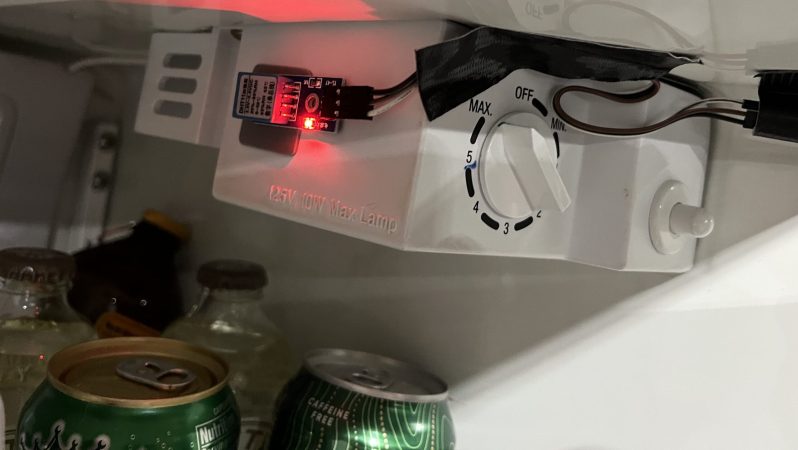
Thankfully, [Rick]’s junk drawer was obliging. He was able to find an Arduino Uno R4, complete with WiFi connectivity courtesy of the ESP32 microcontroller onboard. This was paired with a DHT11 sensor, which provided temperature and humidity measurements. [Rick] began testing the hardware by spitting out temperature readings on the Uno’s LED matrix.

Once that was working, the microcontroller had to be given control over the fridge itself. This was achieved by programming it to activate a Kasa brand smart plug, which could switch mains power to the fridge as needed. The Uno simply emulated the action of the Kasa phone app to switch the smart plug on and off to control the fridge’s temperature, with the fridge essentially running flat out whenever it was switched on. The Uno also logs temperature to a server so [Rick] can make sure temperatures remain in the proper range.

We’ve seen some great beverage-cooling hacks over the years. If you’ve mastered your own hacky methods of keeping the colas chilled, don’t hesitate to let us know on the tipsline.

Little Lie Detector Is Probably No Worse Than The Big Ones

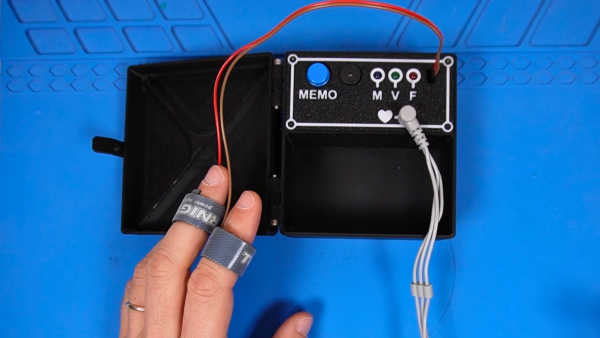
Want to know if somebody is lying? It’s always so hard to tell. [dbmaking] has whipped up a fun little polygraph, otherwise known as a lie detector. It’s nowhere near as complex as the ones you’ve seen on TV, but it might be just as good when it comes to finding the truth.

The project keeps things simple by focusing on two major biometric readouts — heart rate and skin conductivity. When it comes to the beating heart, [dbmaking] went hardcore and chose an AD8232 ECG device, rather than relying on the crutch that is pulse oximetry. It picks up heart signals via three leads that are just like those they stick on you in the emergency room. Skin conductivity is measured with a pair of electrodes that attach to the fingers with Velcro straps. The readings from these inputs are measured and then used to determine truth or a lie if their values cross a certain threshold. Presumably, if you’re sweating a lot and your heart is beating like crazy, you’re telling a lie. After all, we know Olympic sprinters never tell the truth immediately after a run.

Does this work as an actual, viable lie detector? No, not really. But that’s not just because this device isn’t sophisticated enough; commercial polygraph systems have been widely discredited anyway. There simply isn’t an easy way to correlate sweating to lying, as much as TV has told us the opposite. Consider it a fun toy or prop to play with, and a great way to learn about working with microcontrollers and biometric sensors.

Continue reading “Little Lie Detector Is Probably No Worse Than The Big Ones”

Any Old TV Can Be A Clock With Arduino

If you’ve got an old black and white TV, it’s probably not useful for much. There are precious few analog broadcasters left in the world and black and white isn’t that fun to watch, anyway. However, with a little work, you could repurpose that old tube as a clock, as [mircemk] demonstrates.

The build is based around an Arduino Nano R3. This isn’t a particularly powerful microcontroller board, but it’s good enough to run the classic TVOut library. This library lets you generate composite video on an Atmel AVR microcontroller with an absolute minimum of supporting circuitry. [mircemk] paired the Arduino with a DS3231 real-time clock, and whipped up code to display the time and date on the composite video output. He then also demonstrates how to hack the signal into an old TV that doesn’t have a specific input for composite signals.

You’ll note the headline says “any old TV can be a clock,” and that’s for good reason. Newer TVs tend to eschew the classic composite video input, so the TVOut library won’t be any good if you’re trying to get a display up on your modern-era flatscreen. In any case, we’ve seen the TVOut library put to good use before, too. Video after the break.

Continue reading “Any Old TV Can Be A Clock With Arduino”

DIY Pinball Machine Uses Every Skill

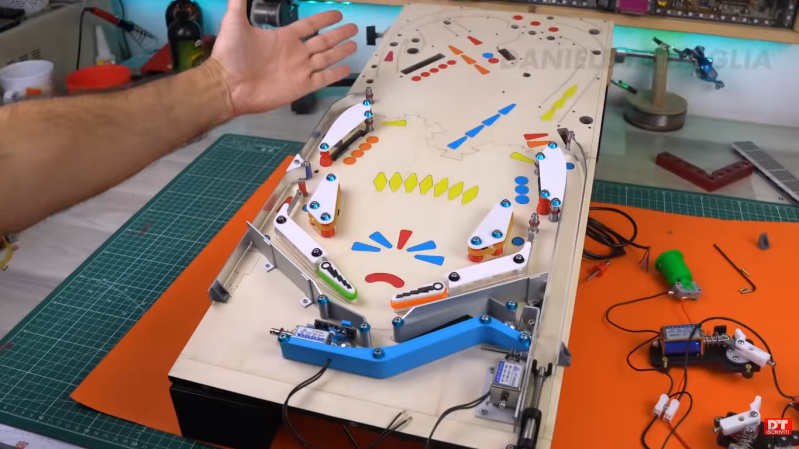
Pinball machines have something for everyone. They’re engaging, fast-paced games available in a variety of sizes and difficulties, and legend has it that they can be played even while deaf and blind. Wizardry aside, pinball machines have a lot to offer those of us around here as well, as they’re a complex mix of analog and digital components, games, computers, and artistry. [Daniele Tartaglia] is showing off every one of his skills to build a tabletop pinball machine completely from the ground up.

Continue reading “DIY Pinball Machine Uses Every Skill”

Dark lab setup with scientific looking drink dispenser

Scared For A Drink?

Halloween is about tricks and treats, but who wouldn’t fancy a bit to drink with that? [John Sutley] decided to complete his Halloween party with a drink dispenser looking as though it was dumped by a backstreet laboratory. It’s not only an impressive looking separating funnel, it even runs on an Arduino. The setup combines lab glassware, servo motors, and an industrial control panel straight from a process plant.

The power management appeared the most challenging part. The three servos drew more current than one Arduino could handle. [John] overcame voltage sag, brownouts, and ghostly resets. A healthy 1000 µF capacitor across the 5-volt rail fixed it. With a bit of PWM control and some C++, [John] managed to finish up his interactive bar system where guests could seal their own doom by pressing simple buttons.

This combines the thrill of Halloween with ‘the ghost in the machine’. Going past the question whether you should ever drink from a test tube – what color would you pick? Lingonberry juice or aqua regia, who could tell? From this video, we wouldn’t trust the bartender on it – but build it yourself and see what it brings you!

Continue reading “Scared For A Drink?”

Kitchen Bench Splash Guard Powered By Arduino

If you’re blessed with high water pressure at home, you probably love how it helps blast grime from your dishes and provides a pleasant washing experience. However, it can also cause a wonderful mess when that water splashes all over your countertops. [vgmllr] has whipped up a simple solution to this problem by installing an automatic splash guard.

So tidy!

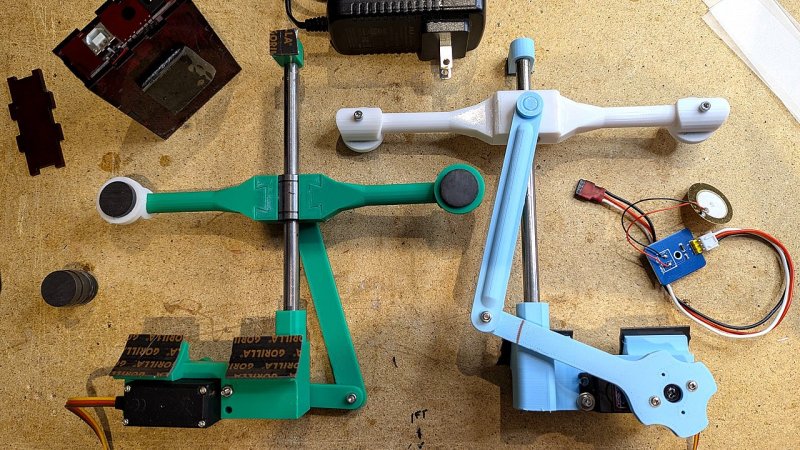
The concept is simple enough—install a pair of flat guards that raise up when the sink is running, in order to stop water getting everywhere. To achieve this, [vgmllr] grabbed an Arduino, and hooked it up to a piezo element, which acts as a water sensor.

The piezo is attached to the bottom of the sink, and effectively acts as a microphone, hooked up to one of the Arduino’s analog-to-digital pins. When water flow is detected, the Arduino commands two servos to raise a pair of 3D printed arms that run up and down the outside of the sink. Each arm is fitted with magnets, which mate with another pair of magnets on the splash shields inside the sink. When the arms go up, the splash shields go up, and when the arms go down, the splash shields go down.

It’s an ingenious design, mostly because the installation is so clean and seamless. By using magnets to move the splash shields, [vgmllr] eliminated any need to drill through the sink, or deal with any pesky seals or potential water leaks. Plus, if the splash shields are getting in the way of something, they can easily be popped off without having to disassemble the entire mechanism.

It’s a tidy little build, both practical and well-engineered. It’s not as advanced as other kitchen automations we’ve seen before, but it’s elegant in its simple utility.

Qualcomm Introduces The Arduino Uno Q Linux-Capable SBC

Generally people equate the Arduino hardware platforms with MCU-centric options that are great for things like low-powered embedded computing, but less for running desktop operating systems. This looks about to change with the Arduino Uno Q, which keeps the familiar Uno formfactor, but features both a single-core Cortex-M33 STM32U575 MCU and a quad-core Cortex-A53 Qualcomm Dragonwing QRB2210 SoC.

According to the store page the board will ship starting October 24, with the price being $44 USD. This gets you a board with the aforementioned SoC and MCU, as well as 2 GB of LPDDR4 and 16 GB of eMMC. There’s also a WiFi and Bluetooth module present, which can be used with whatever OS you decide to install on the Qualcomm SoC.

This new product comes right on the heels of Arduino being acquired by Qualcomm. Whether the Uno Q is a worthy purchase mostly depends on what you intend to use the board for, with the SoC’s I/O going via a single USB-C connector which is also used for its power supply. This means that a USB-C expansion hub is basically required if you want to have video output, additional USB connectors, etc. If you wish to run a headless OS install this would of course be much less of a concern.