After Decades, Linux Finally Gains Stable GPIB Support

Recently, [Greg Kroah-Hartman] proclaimed the joyous news on the Linux Kernel Mailing List that stable General Purpose Interface Bus (GPIB) support has finally been merged into the 6.19 Linux kernel.

The GPIB is a short-range 8-bit, multi-master interface bus that was standardized as IEEE 488. It first saw use on HP laboratory equipment in the 1970s, but was soon after also used by microcomputers like the Commodore PET, Commodore 64 and others. Although not high-speed with just 8 MB/s, nor with galvanic isolation requirements, it’s an uncomplicated bus design that can be implemented without much of a blip on the BOM costs.

The IEEE 488 standard consists of multiple elements, with 488.1 defining the physical interface and 488.2 the electrical protocol. Over the decades a communication protocol was also developed, in the form of SCPI and its standardized way of communicating with a wide range of devices using a simple human-readable protocol.

Although the physical side of IEEE 488 has changed over the years, with Ethernet becoming a major alternative to the short GPIB cables and large connectors, the electrical protocol and SCPI alike are still very much relevant today. This latest addition to the Linux kernel should make it much easier to use both old and new equipment equipped with this bus.
Building Rust Apps For Cheap Hackable Handheld Console

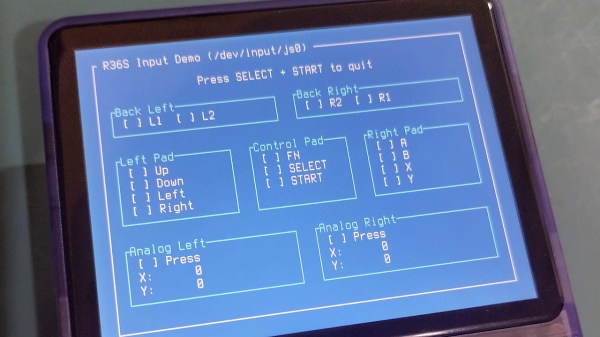
The age of cheap and powerful devices is upon us. How about a 20 EUR handheld game console intended for retro game emulation, that runs Linux under the hood? [Luiz Ferreira] kicks the tires of a R36S, a very popular and often cloned device running a quad-core RK3326 with an Ubuntu-based OS, and shows us how to write and cross-compile a simple app for it using Rust – even if you daily drive Windows.

Since a fair bit of the underlying Linux OS is exposed, you can quickly build even text applications and have them run on the console. For instance, [Luiz]’s app uses ratatui to scan then print button and joystick states to the screen. Perhaps the most important thing about this app is that it’s a detailed tutorial on cross-compiling Rust apps for a Linux target, and it runs wonders using WSL, too.

Installing your app is simple, too: SSH into it, username ark and password ark. Looking for a Linux-powered device with a bright screen, WiFi, a fair few rugged buttons, and an OS open for exploration? This one is quite reassuring in the age of usual portables like smartphones getting more and more closed-off to tinkering. And, if the store-bought hackable Linux consoles still aren’t enough, you can always step it up and build your own, reusing Joycons for your input needs while at it.

Putting KDE On Raspberry Pi OS Simpler Than Expected

Raspberry Pi boards are no longer constrained – these days, you can get a quad-core board with 8 or 16GB of RAM to go around, equip it with a heatsink, and get a decently comfortable shop/desk/kitchen computer with GPIOs, cameras, speedy networking, maybe even NVMe, and all the wireless you’d expect.

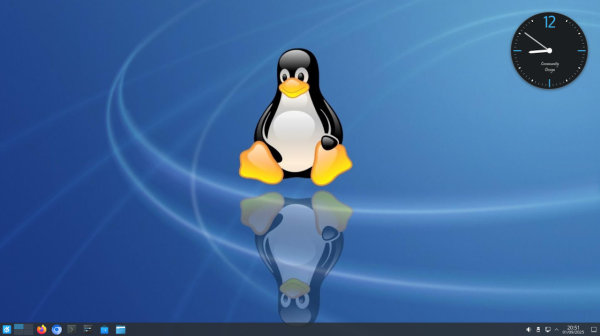
Raspberry OS, however, remains lightweight with its pre-installed LXDE environment – and, in many cases, it feels quite constrained. In case you ever idly wondered about giving your speedy Pi a better UI, [Luc] wants to remind you that setting up KDE on your Raspberry OS install is dead simple and requires only about a dozen commandline steps.

[Luc] walks you through these dozen steps, from installation to switching the default DE, and the few hangups you might expect after the switch; if you want to free up some disk space afterwards, [Luc] shows how to get rid of the original LXDE packages. Got the latest Trixie-based Pi OS? There’s an update post detailing the few necessary changes, as well as talking about others’ experiences with the switch.

All in all, [Luc] demonstrates that KDE will have a fair bit of graphical and UX advantages, while operating only a little slower, and if you weren’t really using your powerful Pi to the fullest, it’s a worthwhile visual and usability upgrade. For the regular desktop users, KDE has recently released their own distro, and our own [Jenny] has taken a look at it.

Linux Fu: The SSD Super Cache

NVMe solid state disk drives have become inexpensive unless you want the very largest sizes. But how do you get the most out of one? There are two basic strategies: you can use the drive as a fast drive for things you use a lot, or you can use it to cache a slower drive.

Each method has advantages and disadvantages. If you have an existing system, moving high-traffic directories over to SSD requires a bind mount or, at least, a symbolic link. If your main filesystem uses RAID, for example, then those files are no longer protected.

Caching sounds good, in theory, but there are at least two issues. You generally have to choose whether your cache “writes through”, which means that writes will be slow because you have to write to the cache and the underlying disk each time, or whether you will “write back”, allowing the cache to flush to disk occasionally. The problem is, if the system crashes or the cache fails between writes, you will lose data.

Compromise

For some time, I’ve adopted a hybrid approach. I have an LVM cache for most of my SSD that hides the terrible performance of my root drive’s RAID array. However, I have some selected high-traffic, low-importance files in specific SSD directories that I either bind-mount or symlink into the main directory tree. In addition, I have as much as I can in tmpfs, a RAM drive, so things like /tmp don’t hit the disks at all.

There are plenty of ways to get SSD caching on Linux, and I won’t explain any particular one. I’ve used several, but I’ve wound up on the LVM caching because it requires the least odd stuff and seems to work well enough.

This arrangement worked just fine and gives you the best of both worlds. Things like /var/log and /var/spool are super fast and don’t bog down the main disk. Yet the main disk is secure and much faster thanks to the cache setup. That’s been going on for a number of years until recently.

Continue reading “Linux Fu: The SSD Super Cache”

The Unexpected Joys Of Hacking An Old Kindle

In the closing hours of JawnCon 0x2, I was making a final pass of the “Free Stuff for Nerds” table when I noticed a forlorn Kindle that had a piece of paper taped to it. The hand-written note explained that the device was in shambles — not only was its e-ink display visibly broken, but the reader was stuck in some kind of endless boot loop. I might have left it there if it wasn’t for the closing remark: “Have Fun!”

Truth is, the last thing I needed was another Kindle. My family has already managed to build up a collection of the things. But taking a broken one apart and attempting to figure out what was wrong with it did seem like it would be kind of fun, as I’d never really had the opportunity to dig into one before. So I brought it home and promptly forgot about it as Supercon was only a few weeks away and there was plenty to keep me occupied.

The following isn’t really a story about fixing a Kindle, although it might seem like it on the surface. It’s more about the experience of working on the device, and the incredible hacking potential of these unassuming gadgets. Whether you’ve got a clear goal in mind, or just want to get your hands dirty in the world of hardware hacking, you could do far worse than picking a couple of busted Kindles up for cheap on eBay.

If there’s a singular takeaway, it’s that the world’s most popular e-reader just so happens to double as a cheap and impressively capable embedded Linux development environment for anyone who’s willing to crack open the case.

Continue reading “The Unexpected Joys Of Hacking An Old Kindle”

Wayland’s Never-Ending Opposition To Multi-Window Positioning

There are many applications out there that use more than one window, with every modern-day platform and GUI toolkit offering the means for said application to position each of its windows exactly where it wants, and to restore these exactly in the configuration and location where the user saved it for that particular session. All toolkits but one, that is, for the Wayland project keeps shooting down proposals. Most recently merge request #264 for the ext-zones protocol by [Matthias Klumpp] as it descended into a 600+ comments spree.

This follows on an attempt two years prior with MR#247, which was rejected despite laying out sound reasons why the session protocol of Wayland does not cover many situations. In the breakdown video of the new ext-zones protocol discussion by [Brodie Robertson] the sheer absurdity of this whole situation becomes apparent, especially since KDE and others are already working around the Wayland project with their own extensions such as via KWin, which is being used commercially in e.g. the automotive world.

In a January 2024 blog post [Matthias] lays out many of his reasonings and views regarding the topic, with a focus on Linux desktop application usage from a scientific application perspective. When porting a Windows-, X11- or MacOS application to Wayland runs into compatibility issues that may necessitate a complete rewrite or dropping of features, the developer is more likely to stick to X11, to not port to Linux at all, or to use what eventually will amount to Wayland forks that patch around these missing API features.

Meanwhile X11 is definitely getting very long in the tooth, yet without it being a clean drop-in replacement it leaves many developers and end-users less than impressed. Perhaps the Wayland project should focus more on the needs of developers and end-users, and less about what it deems to be the One True Way?

Continue reading “Wayland’s Never-Ending Opposition To Multi-Window Positioning”

Moving From Windows To FreeBSD As The Linux Chaos Alternative

Back in the innocent days of Windows 98 SE, I nearly switched to Linux on account of how satisfied I was with my Windows experience. This started with the Year of the Linux Desktop in 1999 that started with me purchasing a boxed copy of SuSE Linux and ended with me switching to Windows 2000. After this I continued tinkering with non-Windows OSes including QNX, BeOS, various BSDs, as well as Linux distributions that promised a ‘Windows-like’ desktop experience, such as Lindows.

Now that Windows 2000’s proud legacy has seen itself reduced to a rusting wreck resting on cinderblocks on Microsoft’s dying front lawn, the quiet discomfort that many Windows users have felt since Windows 7 was forcefully End-Of-Life-d has only increased. With it comes the uncomfortable notion that Windows as a viable desktop OS may be nearing its demise. Yet where to from here?

Although the recommendations from the peanut gallery seem to coalesce around Linux or Apple’s MacOS (formerly OS X), there are a few dissenting voices extolling the virtues of FreeBSD over both. There are definitely compelling reasons to pick FreeBSD over Linux, in addition to it being effectively MacOS’s cousin. Best of all is not having to deal with the Chaos Vortex that spawns whenever you dare to utter the question of ‘which Linux distro?’. Within the world of FreeBSD there is just FreeBSD, which makes for a remarkably coherent experience.

Continue reading “Moving From Windows To FreeBSD As The Linux Chaos Alternative”