Reverse-Engineering The Intel 8087 Stack Circuitry

Although something that’s taken for granted these days, the ability to perform floating-point operations in hardware was, for the longest time, something reserved for people with big wallets. This began to change around the time that Intel released the 8087 FPU coprocessor in 1980, featuring hardware support for floating-point arithmetic at a blistering 50 KFLOPS. Notably, the 8087 uses a stack-based architecture, a major departure from existing FPUs. Recently [Ken Shirriff] took a literal closer look at this stack circuitry to see what it looks like and how it works.

Nearly half of the 8087’s die is taken up by the microcode frontend and bus controller, with a block containing constants like π alongside the FP calculation-processing datapath section taking up much of the rest. Nestled along the side are the eight registers and the stack controller. At 80 bits per FP number, the required registers and related were pretty sizeable for the era, especially when you consider that the roughly 60,000 transistors in the 8087 were paired alongside the 29,000 transistors in the 16-bit 8086.

Each of the 8087’s registers is selected by the decoded instructions via a lot of wiring that can still be fairly easily traced despite the FPU’s die being larger than the CPU it accompanied. As for the unique stack-based register approach, this turned out to be mostly a hindrance, and the reason why the x87 FP instructions in the x86 ISA are still quite maligned today. Yet with careful use, providing a big boost over traditional code, this made it a success by that benchmark, even if MMX, SSE, and others reverted to a stackless design.

Improving The Cloud Chamber

Want to visualize radioactive particles? You don’t need a boatload of lab equipment. Just a cloud chamber. And [Curious Scientist] is showing off an improved miniature cloud chamber that is easy to replicate using a 3D printer and common components.

The build uses a Peltier module, a CPU cooler, an aluminum plate, thermal paste, and headlight film. The high voltage comes from a sacrificed mosquito swatter. The power input for the whole system is any 12V supply.

The cloud chamber was high tech back in 1911 when physicist Charles T. R. Wilson made ionizing radiation visible by creating trails of tiny liquid droplets in a supersaturated vapor of alcohol or water. Charged particles pass through, leaving visible condensation trails.

Continue reading “Improving The Cloud Chamber”

off grid weather station

915 MHz Forecast: Rolling Your Own Offline Weather Station

There are a lot of options for local weather stations; most of them, however, are sensors tied to a base station, often requiring an internet connection to access all features. [Vinnie] over at vinthewrench has published his exploration into an off-grid weather station revolving around a Raspberry Pi and an RTL-SDR for communications.

The weather station has several aspects to it. The main sensor package [Vinnie] settled on was the Ecowitt WS90, capable of measuring wind speed, wind direction, temperature, humidity, light, UVI, and rain amount. The WS90 communicates at 915 MHz, which can be read using the rtl_433 project. The WS90 is also available for purchase as a standalone sensor, allowing [Vinnie] to implement his own base station.

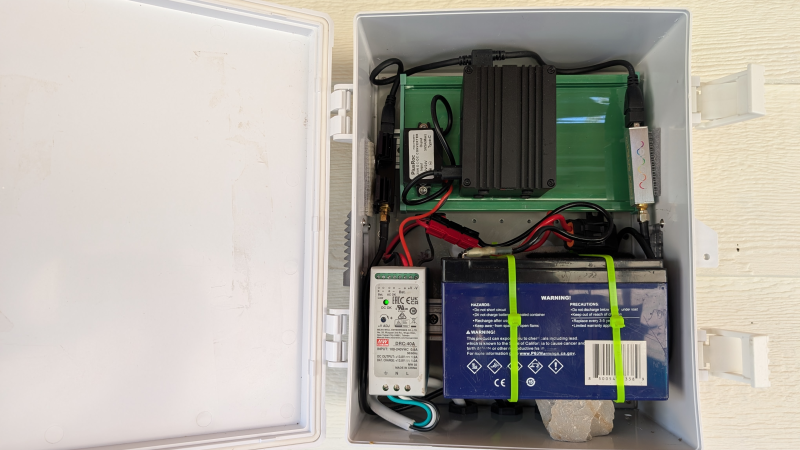
For the base station, [Vinnie] uses a weatherproof enclosure that houses a 12V battery with charger to act as a local UPS. This powers the brains of the operation: a Raspberry Pi. Hooked to the Pi is an RTL-SDR with a 915 MHz antenna. The Pi receives an update from the WS90 roughly every 5 seconds, which it can decode using the rtl_433 library. The Pi then turns that packet into structured JSON.

The JSON is fed into a weather model backend that handles keeping track of trends in the sensor data, as well as the health of the sensor station. The backend has an API that allows for a dashboard weather site for [Vinnie], no internet required.

Thanks, [Vinnie], for sending in your off-grid weather station project. Check out his site to read more about his process, and head over to the GitHub page to check out the technical details of his implementation. This is a great addition to some of the other DIY weather stations we’ve featured here.

Cheap 3D Printer Becomes CNC Wood Engraver

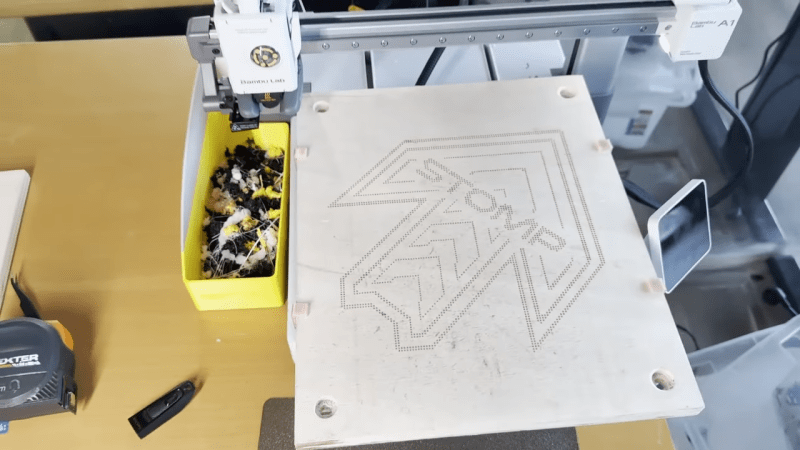
3D printers are built for additive manufacturing. However, at heart, they are really just simple CNC motion platforms, and can be readily repurposed to other tasks. As [Arseniy] demonstrates, it’s not that hard to take a cheap 3D printer and turn it into a viable wood engraver.

The first attempt involved a simple experiment—heating the 3D printer nozzle, and moving it into contact with a piece of wood to see if it could successfully leave a mark. This worked well, producing results very similar to a cheap laser engraving machine. From there, [Arseniy] set about fixing the wood with some simple 3D-printed clamps so it wouldn’t move during more complex burning/engraving tasks. He also figured out a neat trick to simply calibrate the right Z height for wood burning by using the built in calibration routines. Further experiments involved developing a tool for creating quality G-Code for these engraving tasks, and even using the same techniques on leather with great success.

If you need to mark some patterns on wood and you already have a 3D printer, this could be a great way to go. [Arseniy] used it to great effect in the production of a plywood dance pad. We’ve featured some other great engraver builds over the years, too, including this innovative laser-based project. Video after the break.

Continue reading “Cheap 3D Printer Becomes CNC Wood Engraver”

Using GIMP for visual analysis

Decapsulating A PIC12F683 To Examine Its CMOS Implementation

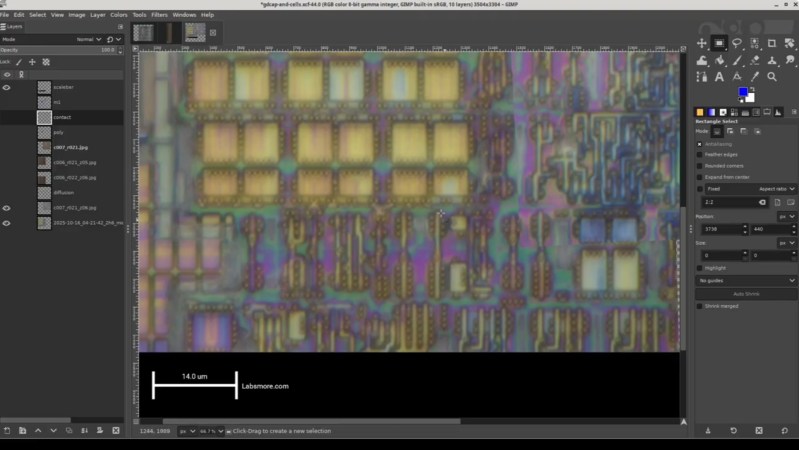
In a recent video, [Andrew Zonenberg] takes us through the process of decapsulating a PIC12F683 to take a peak at its CMOS implementation.

This is a multipart series with five parts done and more to come. The PIC12F683 is an 8-pin flash-based, 8-bit microcontroller from Microchip. [Andrew] picked the PIC12F683 for decapsulation because back in 2011 it was the first microcontroller he broke read-protection on and he wanted to go back and revisit this chip, given particularly that his resources and skills had advanced in the intervening period.

The five videos are a tour de force. He begins by taking a package cross section, then decapsulating and delayering. He collects high-resolution photos as he goes along. In the process, he takes some time to explain the dangers of working with acid and the risk mitigations he has in place. Then he does what he calls a “floorplan analysis” which takes stock of the entire chip before taking a close look at the SRAM implementation.

If you’re interested in decapsulating integrated circuits you might want to take a look at Laser Fault Injection, Now With Optional Decapping, A Particularly Festive Chip Decapping, or even read through the transcript of the Decapping Components Hack Chat With John McMaster.

Continue reading “Decapsulating A PIC12F683 To Examine Its CMOS Implementation”

Hackaday Podcast Episode 350: Damnation For Spreadsheets, Praise For Haiku, And Admiration For The Hacks In Between

This week’s Hackaday Podcast sees Elliot Williams joined by Jenny List for an all-European take on the week, and have we got some hacks for you!

In the news this week is NASA’s Maven Mars Orbiter, which may sadly have been lost. A sad day for study of the red planet, but at the same time a chance to look back at what has been a long and successful mission.

In the hacks of the week, we have a lo-fi camera, a very refined Commodore 64 laptop, and a MIDI slapophone to entertain you, as well as taking a detailed look at neutrino detectors. Then CYMK printing with laser cut stencils draws our attention, as well as the arrival of stable GPIB support for Linux. Finally both staffers let loose; Elliot with an epic rant about spreadsheets, and Jenny enthusiastically describing the Haiku operating system.

Check out the links below if you want to follow along, and as always, tell us what you think about this episode in the comments!

It’s dangerous to go alone. Here, take this MP3.

Continue reading “Hackaday Podcast Episode 350: Damnation For Spreadsheets, Praise For Haiku, And Admiration For The Hacks In Between”

Attach A Full Size Lens To A Tiny Camera

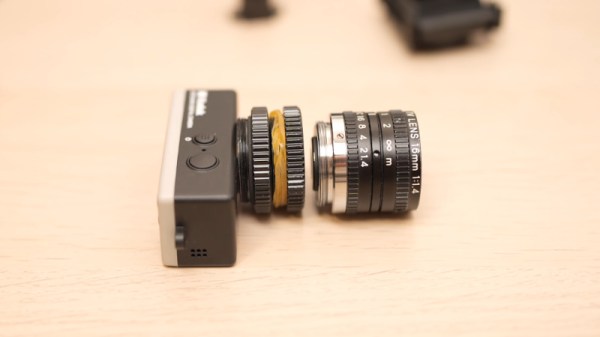
The Kodak Charmera is a tiny keychain camera produced by licencing out the name of the famous film manufacturer, and it’s the current must-have cool trinket among photo nerds. Inside is a tiny sensor and a fixed-focus M7 lens, and unlike many toy cameras it has better quality than its tiny package might lead you to expect. There will always be those who wish to push the envelope though, and [微攝 Macrodeon] is here to fit a lens mount for full-size lenses (Chinese language, subtitle translation available).

The hack involves cracking the camera open and separating the lens mount from the sensor. This is something we’re familiar with from other cameras, and it’s a fiddly process which requires a lot of care. A C-mount is then glued to the front, from which all manner of other lenses can be attached using a range of adapters. The focus requires a bit of effort to set up and we’re guessing that every lens becomes extreme telephoto due to the tiny sensor, but we’re sure hours of fun could be had.

The Charmera is almost constantly sold out, but you should be able to place a preorder for about $30 USD if you want one. If waiting months for delivery isn’t your bag, there are other cameras you can upgrade to C-mount.

Continue reading “Attach A Full Size Lens To A Tiny Camera”