Plug Into USB, Read Hostname And IP Address

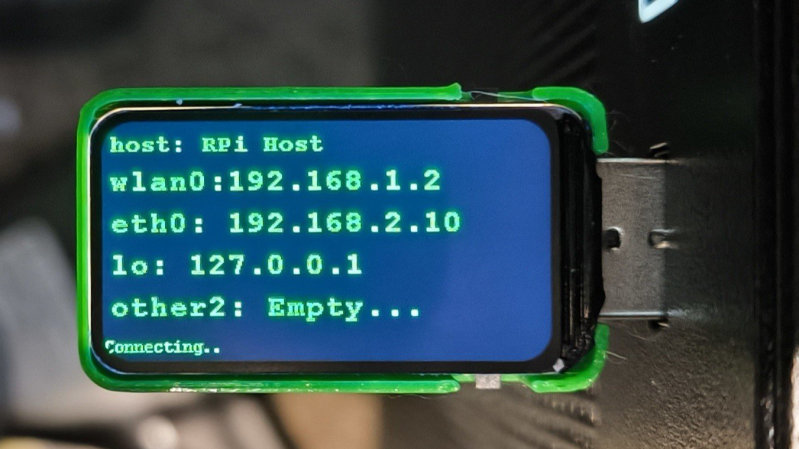
Ever wanted to just plug something in and conveniently read the hostname and IP addresses of a headless board like a Raspberry Pi? Chances are, a free USB port is more accessible than digging up a monitor and keyboard, and that’s where [C4KEW4LK]’s rpi_usb_ip_display comes in. Plug it into a free USB port, and a few moments later, read the built-in display. Handy!

The device is an RP2350 board and a 1.47″ Waveshare LCD, with a simple 3D-printed enclosure. It displays hostname, WiFi interface, Ethernet interface, and whatever others it can identify. There isn’t even a button to push; just plug it in and let it run.

Here’s how it works: once plugged in, the board identifies itself as a USB keyboard and a USB serial port. Then it launches a terminal with Ctrl-Alt-T, and from there it types and runs commands to do the following:

  1. Find the serial port that the RP2350 board just created.
  2. Get the parsed outputs of hostname, ip -o -4 addr show dev wlan0, ip -o -4 addr show dev eth0, and ip -o -4 addr show to gather up data on active interfaces.
  3. Send that information out the serial port to the RP2350 board.
  4. Display the information on the LCD.
  5. Update periodically.

The only catch is that the host system must be able to respond to launching a new terminal with Ctrl-Alt-T, which typically means the host must have someone logged in.

It’s a pretty nifty little tool, and its operation might remind you, in concept, of how BadUSB attacks happen: a piece of hardware, once plugged into a host, identifies itself to the host as something other than what it appears to be. Then it proceeds to input and execute actions. But in this case, it’s not at all malicious, just convenient and awfully cute.
3D Printing And Metal Casting Are A Great Match

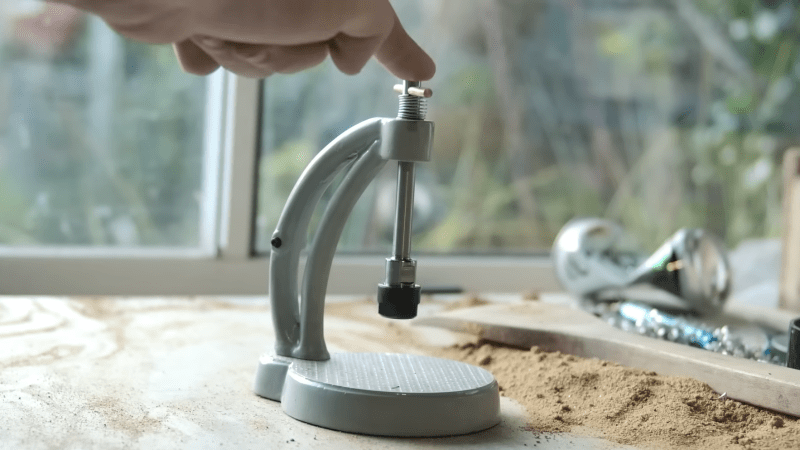
[Chris Borge] has made (and revised) many of his own tools using a combination of 3D printing and common hardware, and recently decided to try metal casting. Having created his own tapping arm, he tries his hand at aluminum casting to create a much more compact version out of metal. His video (embedded below) really shows off the whole process, and [Chris] freely shares his learning experiences in casting his first metal tool.

The result looks great and is considerably smaller in stature than the 3D-printed version. However, the workflow of casting metal parts is very different. The parts are much stronger, but there is a lot of preparation and post-processing involved.

Metal casting deals with molten metal, but the process is otherwise very accessible, and many resources are available to help anyone with a healthy interest.

The key to making good castings is mold preparation. [Chris] uses green sand (a mixture of fine sand and bentonite clay – one source of the latter is ground-up kitty litter) packed tightly around 3D printed parts inside a frame. The packed sand holds its shape while still allowing the original forms to be removed and channels to be cut, creating a two-part mold.

His first-time castings have a rough surface texture, but are perfectly serviceable. After some CNC operations to smooth some faces and drill some holes, the surface imperfections are nothing filing, filler, and paint can’t handle.

To cast molten metal, there really isn’t any way around needing a forge. Or is there? We have seen some enterprising hackers repurpose microwave ovens for this purpose. One can also use a low-temperature alloy like Rose’s Metal, or eschew molten liquid altogether and do cold casting, which uses a mixture of resin and metal powder instead.

The design files for [Chris]’s tapping arm are available from links in the video description, and he also helpfully provides links to videos and resources he found useful. Watch it in the video, embedded just below.

Continue reading “3D Printing And Metal Casting Are A Great Match”

Why Games Work, And How To Build Them

Most humans like games. But what are games, exactly? Not in a philosophical sense, but in the sense of “what exactly are their worky bits, so we know how to make them?” [Raph Koster] aims to answer that in a thoughtful blog post that talks all about game design from the perspective of what, exactly, makes them tick. And we are right into that, because we like to see things pulled apart to learn how they work.

On the one hand, it’s really not that complicated. What’s a game? It’s fun to play, and we generally feel we know a good one when we see it. But as with many apparently simple things, it starts to get tricky to nail down specifics. That’s what [Raph]’s article focuses on; it’s a twelve-step framework for how games work, and why they do (or don’t) succeed at what they set out to do.

Continue reading “Why Games Work, And How To Build Them”

Watch A Recording Lathe From 1958 Cut A Lacquer Master Record

Most of us are familiar with vinyl LPs, and even with the way in which they are made by stamping a hot puck of polyvinyl chloride (PVC) into a record. But [Technostalgism] takes us all the way back to the beginning, giving us a first-hand look at how a lacquer master is cut by a specialized recording lathe.

An uncut lacquer master is an aluminum base coated with a flawless layer of lacquer. It smells like fresh, drying paint.

Cutting a lacquer master is the intricate process by which lacquer disks, used as the masters for vinyl records, are created. These glossy black masters — still made by a company in Japan — are precision aluminum discs coated with a special lacquer to create a surface that resembles not-quite-cured nail polish and, reportedly, smells like fresh paint.

The cutting process itself remains largely unchanged over the decades, although the whole supporting setup is a bit more modernized than it would have been some seventy years ago. In the video (embedded below), we get a whole tour of the setup and watch a Neumann AM32B Master Stereo Disk Recording Lathe from 1958 cut the single unbroken groove that makes up the side of a record.

The actual cutting tool is a stylus whose movement combines the left and right channels and is heated to achieve the smoothest cuts possible. The result is something that impresses the heck out of [Technostalgism] with its cleanliness, clarity, and quality. Less obvious is the work that goes into arranging the whole thing. Every detail, every band between tracks, is the result of careful planning.

It’s very clear that not only is special equipment needed to cut a disk, but doing so effectively is a display of serious craftsmanship, experience, and skill. If you’re inclined to agree and are hungry for more details, then be sure to check out this DIY record-cutting lathe.
Continue reading “Watch A Recording Lathe From 1958 Cut A Lacquer Master Record”

Failed 3D Printed Part Brings Down Small Plane

Back in March, a small aircraft in the UK lost engine power while coming in for a landing and crashed. The aircraft was a total loss, but thankfully, the pilot suffered only minor injuries. According to the recently released report by the Air Accidents Investigation Branch, we now know a failed 3D printed part is to blame.

The part in question is a plastic air induction elbow — a curved duct that forms part of the engine’s air intake system. The collapsed part you see in the image above had an air filter attached to its front (towards the left in the image), which had detached and fallen off. Heat from the engine caused the part to soften and collapse, which in turn greatly reduced intake airflow, and therefore available power.

Serious injury was avoided, but the aircraft was destroyed.

While the cause of the incident is evident enough, there are still some unknowns regarding the part itself. The fact that it was 3D printed isn’t an issue. Additive manufacturing is used effectively in the aviation industry all the time, and it seems the owner of the aircraft purchased the part at an airshow in the USA with no reason to believe anything was awry. So what happened?

The part in question is normally made from laminated fiberglass and epoxy, with a glass transition of 84° C. Glass transition is the temperature at which a material begins to soften, and is usually far below the material’s actual melting point.

When a part is heated at or beyond its glass transition, it doesn’t melt but is no longer “solid” in the normal sense, and may not even be able to support its own weight. It’s the reason some folks pack parts in powdered salt to support them before annealing.

The printed part the owner purchased and installed was understood to be made from CF-ABS, or ABS with carbon fiber. ABS has a glass transition of around 100° C, which should have been plenty for this application. However, the investigation tested two samples taken from the failed part and measured the glass temperature at 52.8°C and 54.0°C, respectively. That’s a far cry from what was expected, and led to part failure from the heat of the engine.

The actual composition of the part in question has not been confirmed, but it sure seems likely that whatever it was made from, it wasn’t ABS. The Light Aircraft Association (LAA) plans to circulate an alert to inspectors regarding 3D printed parts, and the possibility they aren’t made from what they claim to be.

Making Glasses That Detect Smartglasses

[NullPxl]’s Ban-Rays concept is a wearable that detects when one is in the presence of camera-bearing smartglasses, such as Meta’s line of Ray-Bans. A project in progress, it’s currently focused on how to reliably perform detection without resorting to using a camera itself. Right now, it plays a well-known audio cue whenever it gets a hit.

Once software is nailed down, the device aims to be small enough to fit into glasses.

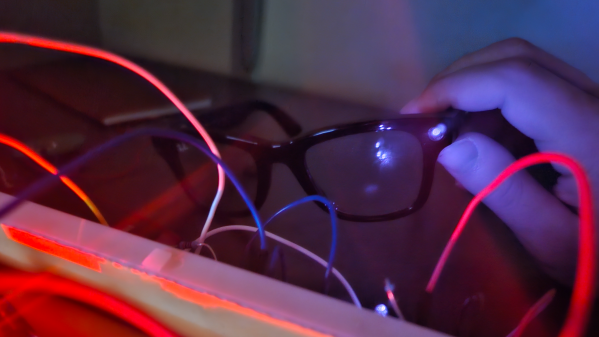
Currently, [NullPxl] is exploring two main methods of detection. The first takes advantage of the fact that image sensors in cameras act as tiny reflectors for IR. That means camera-toting smartglasses have an identifying feature, which can be sensed and measured. You can see a sample such reflection in the header image, up above.

As mentioned, Ban-Rays eschews the idea of using a camera to perform this. [NullPxl] understandably feels that putting a camera on glasses in order to detect glasses with cameras doesn’t hold much water, conceptually.

The alternate approach is to project IR in a variety of wavelengths while sensing reflections with a photodiode. Initial tests show that scanning a pair of Meta smartglasses in this way does indeed look different from regular eyeglasses, but probably not enough to be conclusive on its own at the moment. That brings us to the second method being used: wireless activity.

Characterizing a device by its wireless activity turned out to be trickier than expected. At first, [NullPxl] aimed to simply watch for BLE (Bluetooth Low-Energy) advertisements coming from smartglasses, but these only seem to happen during pairing and power-up, and sometimes when the glasses are removed from the storage case. Clearly a bit more is going to be needed, but since these devices rely heavily on wireless communications there might yet be some way to actively query or otherwise characterize their activity.

This kind of project is something that is getting some interest. Here’s another smartglasses detector that seems to depend entirely on sniffing OUIs (Organizationally Unique Identifiers); an approach [NullPxl] suspects isn’t scalable due to address randomization in BLE. Clearly, a reliable approach is still in the works.

The increasing numbers of smartglasses raises questions about the impact of normalizing tech companies turning people into always-on recording devices. Of course, the average person is already being subtly recorded by a staggering number of hidden cameras. But at least it’s fairly obvious when an individual is recording you with a personal device like their phone. That may not be the case for much longer.

Trace Line Clock Does It With Magnets

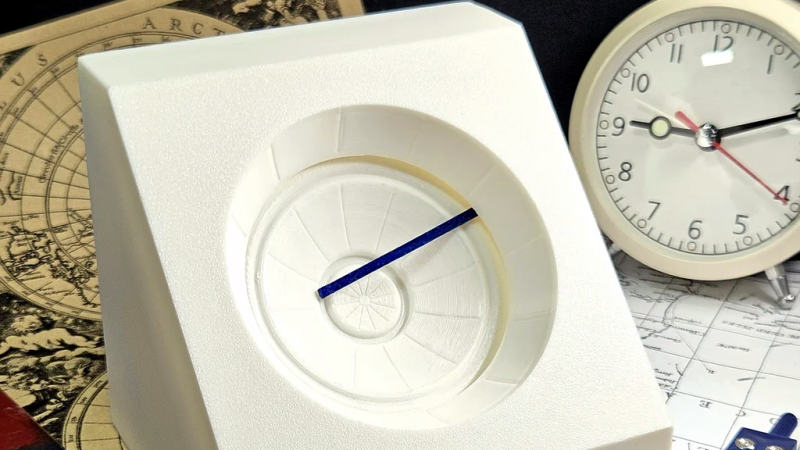
We love a good clock project, and [byeh_ in] has one with a design concept we don’t believe we have seen before. The Trace Line Clock has smooth lines and a clean presentation, with no sockets or visible mechanical fixtures.

Reading the clock is quite straightforward once one knows what is going on. At its heart, the unmarked face is much like any other analog clock face, and on the inside is a pretty normal clock movement. The inner recessed track on the face represents hours, and the outer is minutes. The blue line connects the two, drawing a constantly changing line.

Continue reading “Trace Line Clock Does It With Magnets”