Ufex is a cross-platform desktop application for inspecting the internal structure and metadata of many different file formats. Open any file and instantly see its hex data, parsed structure, visual layout, and validation results — all in one place.
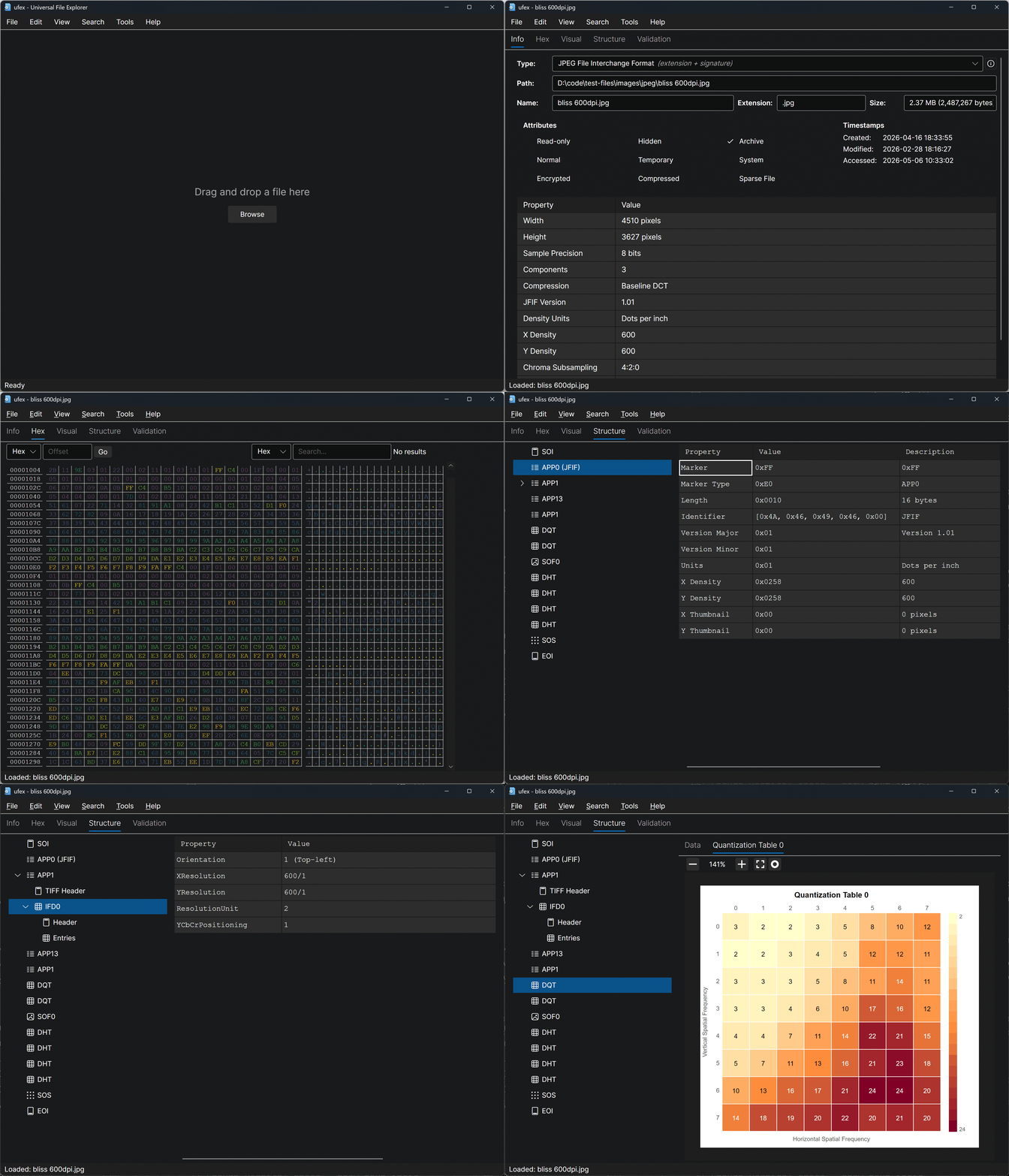
Downloads: https://github.com/ufex/Ufex/releases
- File Format Identification — Automatically identifies file types using a signature-based database of magic bytes, file extensions, and MIME types. The database is defined in XML config files and can be extended without writing any code.
- Hex Viewer — Browse the raw bytes of any file with synchronized hex and ASCII columns.
- Info — View file system attributes (size, timestamps, permissions) and format-specific metadata at a glance.
- Structure — Explore parsed file segments in an interactive tree view. Select any node to see its fields, offsets, and decoded values in a detail panel.
- Visual — See graphical representations of file data such as file maps that show how a file is divided into segments, embedded image previews, and more.
- Validation — Review format-specific validation results (info, warnings, errors) to check if a file conforms to its specification.
- Number Format Toggle — Switch between hexadecimal, decimal, binary, and ASCII display modes for numeric values throughout the UI.
- Drag & Drop — Open files by dragging them onto the window or by using the file browser.
- Search — Find byte patterns and text within files.
- Supported Formats - JPEG, GIF, PNG, BMP, HEIF, PDF, DOCX, XLSX, PPTX, ZIP, GZIP, WAV, AVI, 3GP, and more...
Ufex is designed to be extended via .NET assembly plugins. Each plugin teaches Ufex how to parse, display, and validate a specific file format (for example PNG, ZIP, BMP, or PDF).
Plugins are standard .NET class library projects that reference the Ufex.API library and are loaded dynamically at runtime from the plugins/ directory. This means third-party developers can add support for new file formats without modifying the core application.
| Component | Technology |
|---|---|
| Language | C# |
| Runtime | .NET 10 |
| UI Framework | Avalonia UI 11.2 |
| UI Theme | Avalonia Fluent Theme |
| Icons | Fluent Icons |
| Text/Code Editing | AvaloniaEdit |
| CI/CD | GitHub Actions |
| Installer (Windows) | MSI via WiX Toolset |
| Installer (macOS) | DMG (Intel x64 + Apple Silicon arm64) |
| Installer (Linux) | AppImage |
ufex/
├── src/
│   ├── Ufex.Desktop           # Main desktop application (Avalonia)
│   ├── Ufex.API               # Public API & base classes for plugins
│   ├── Ufex.FileType          # File type identification engine
│   ├── Ufex.Hex               # Hex viewer library
│   └── Ufex.Controls.Avalonia # Reusable Avalonia UI controls
├── config/                    # XML file-type signature database
├── ext/                       # Extension plugin source (git submodules)
├── tests/                     # Unit tests
├── build/                     # Build output staging
└── .github/workflows/         # CI/CD pipeline
- .NET 10 SDK or later
# Clone the repository
git clone https://github.com/ufex/Ufex.git
cd Ufex

# Restore dependencies and build
dotnet build ufex.sln

# Run the application
dotnet run --project src/Ufex.Desktopdotnet test ufex.slnContributions are welcome! Here's how to get started:
- Fork the repository and create a feature branch.
- Follow the code style:
- Use tabs for indentation.
- Use PascalCase for classes, methods, properties, and constants.
- Use camelCase for local variables and parameters.
- Write tests for new functionality where applicable.
- Submit a pull request with a clear description of your changes.
- Add file type signatures — Extend the XML config files in
config/to identify more file formats (no C# required). - Build a plugin — Create a new .NET class library that parses and displays a file format.
- Improve the core app — Bug fixes, UI improvements, new features for the desktop application.
- Documentation — Improve or add documentation for the project or individual file formats.
Ufex is licensed under the Apache License 2.0.