Repository navigation
DB4S non-compliant with RFC-4180 #2445
Description

Details for the issue
#--------------------
Background: Reference closed bug report #2442
After placing a bug report on SQLite Forum on the SQLite CLI on issue with .import command, it appears the issue (stripping of spaces in header column names when constructing the CREATE TABLE command) is with DB4S not compliant with RFC-4180 and stripping spaces from the header column names when they should be ignored.
RFQ-4180 says "Within the header ... spaces are considered part of a field and should not be ignored." It seems like DB4S is the one that is not following the spec, not the SQLite CLI.
What did you do?
Details in bug report #2442
What did you expect to see?
What did you see instead?
Useful extra information
The info below often helps, please fill it out if you're able to. :)
What operating system are you using?
- [x ] Windows: ( version: 10_ )
- Linux: ( distro: ___ )
- macOS: ( version: ___ )
- Other: ___
What is your DB4S version?
- [ x] 3.12.0
- 3.11.x
- Other: ___
DB4S v3.12.0 [built for x86_64-little_endian-llp64] on Windows 10 (10.0) (winnt/10.0.19041) [x86_64]
using SQLite Version 3.32.2
and Qt 5.12.8
SQLite Tools Versions 3.33
Activity
chrisjlocke commentedon Oct 17, 2020
Can you email me (or post here) the headers from your CSV? So the first line showing the field names (as they are in the CSV). I can see how the end schema is, but just want to see what the import file looks like.For the avoidance of doubt, you've used DB4S to import a CSV and got column headers without spaces (dateofbirth instead of 'date of birth')
You've also used the .import tool, and that's created correct field names ('date of birth')
When importing, do you recall the settings used?
So a field separator of a comma, for example, quote character of a double-quote, etc.
chrisjlocke commentedon Oct 17, 2020
Confirmed that the import of a table ignores spaces in the CSV, and adding quotes doesn't do anything either.
https://streamable.com/i5s72j
rgward611 commentedon Oct 17, 2020
Here are DB4S Import settings I get on Import CSV file...note the preview of column names without spaces.
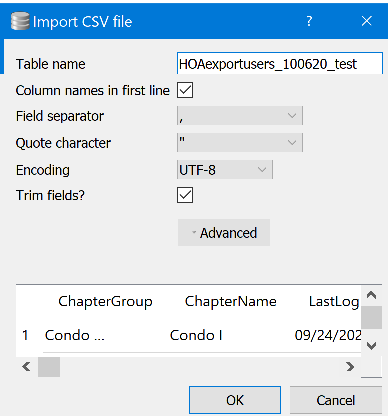
Below is header row in CSV file. Not sure how I can attach/link to my source CSV file (HOAexportusers_100620_test.csv) referenced in my script.
rgward611 commentedon Oct 17, 2020
Woah! sorry for the huge image. not sure how to edit and resize.
chrisjlocke commentedon Oct 17, 2020
Thanks for posting them. Its OK about the CSV file, as I've sort-of proved there is an issue using a simple 'field 1, field 2, field 3' example.
Thanks for posting the issue. :)
mgrojo commentedon Oct 18, 2020
We're removing a set of "problematic" characters:
But they wouldn't be problematic for us, since we are supposed to quote properly all the table identifiers. So I guess it was included as a convenience for the user. Should we remove this automatism, so we don't remove anything which is in the field name according to the used separators? I guess that removing space from that set would be the safest approach. I don't see why anyone would like to use the others in a column name.
But maybe some users are already used to that convenience...
MKleusberg commentedon Oct 25, 2020
Let's definitely remove the space character. But I would also vote for removing this automatism altogether. I can't imagine that many people rely on it and it's kind of random anyway (why remove the comma but keep the dot? Why remove double quotes but keep square brackets? etc.). If somebody complains about us removing this feature I'd suggest implementing it properly. What do you think, @mgrojo?
sky5walk commentedon Oct 25, 2020
True, DB4S is a SQLite browser with features beyond the underlying database.
The DB4S import gui should encompass the base rules of CSV, but not limit them.
My use of Trim may differ from the standard.
To accomplish both, extend the gui.
Import: do not remove characters from CSV header fields
mgrojo commentedon Feb 26, 2021
I've followed @MKleusberg suggestion, and now we don't remove any character from the header field names. This should be good enough for the time being.
chrisjlocke commentedon Apr 1, 2021
@rgward611 - Can you confirm if you're happy with this change, and all is now working OK?
rgward611 commentedon Apr 1, 2021
Not seeing any change. Spaces still removed. See screenshot. Notice HOAexportusers table was created using IMPORT table via bat script. HOAexportusers-test table was created using IMPORT via GUI.
chrisjlocke commentedon Apr 1, 2021
I'm more interested in how the 'about' box got so squished.... 😯
Frustrating that the fix didn't fix it. Thanks for confirming.
rgward611 commentedon Apr 1, 2021
Yep, that's how it pops up when I click on 'About'. It was quite convenient though for my screenshot.